“Think before you automate”
UiPath Community Event
Introduction
Erik Gillet
▪ Born in The Netherlands, living in Switzerland
▪ 25 years of business improvement experience
▪ Global RPA lead for EssilorLuxottica (RayBan)
▪ Founder and CEO of Boundaryless
Boundaryless
▪ Started in 2018 in The UK
▪ Today also in The US, France, Switzerland, Malaysia, Sri Lanka, and India
▪ Focus on Advanced Analytics and Intelligent Automation
▪ Team of experts, including several UiPath MVPs, delivering projects
boundaryless.com
Presentation overview
5m Introduction: Why process redesign should be in the RPA delivery roadmap
10m Process Performance: Learn to see what is wrong in a process
10m Process Analysis: Find the real problem
10m Process Improvement: Tools to make improvements. Fast.
10m Process Redesign in Practice: Interactive exercise
15m Questions / Discussion
Introduction to process redesign
boundaryless.com
Some quotes
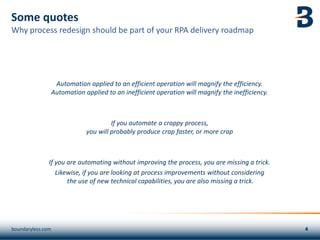
Automation applied to an efficient operation will magnify the efficiency.
Automation applied to an inefficient operation will magnify the inefficiency.
If you automate a crappy process,
you will probably produce crap faster, or more crap
If you are automating without improving the process, you are missing a trick.
Likewise, if you are looking at process improvements without considering
the use of new technical capabilities, you are also missing a trick.
boundaryless.com
Why process redesign should be part of your RPA delivery roadmap
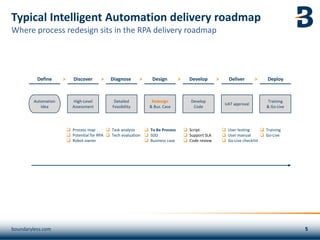
Typical Intelligent Automation delivery roadmap
boundaryless.com
Define Discover Diagnose Design Develop Deliver Deploy
> > > > > >
Automation
Idea
High-Level
Assessment
Detailed
Feasibility
Redesign
& Bus. Case
Develop
Code
UAT approval
Training
& Go-Live
❑ Process map
❑ Potential for RPA
❑ Robot owner
❑ Task analysis
❑ Tech evaluation
❑ To Be Process
❑ SDD
❑ Business case
❑ Script
❑ Support SLA
❑ Code review
❑ User testing
❑ User manual
❑ Go-Live checklist
❑ Training
❑ Go-Live
Where process redesign sits in the RPA delivery roadmap
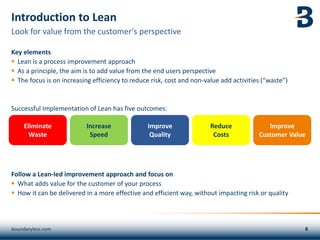
Introduction to Lean
Key elements
▪ Lean is a process improvement approach
▪ As a principle, the aim is to add value from the end users perspective
▪ The focus is on increasing efficiency to reduce risk, cost and non-value add activities (“waste”)
Successful Implementation of Lean has five outcomes:
Follow a Lean-led improvement approach and focus on
▪ What adds value for the customer of your process
▪ How it can be delivered in a more effective and efficient way, without impacting risk or quality
Look for value from the customer’s perspective
Eliminate
Waste
Improve
Quality
Increase
Speed
Reduce
Costs
boundaryless.com
Improve
Customer Value
Transport
Unnecessary movements of
information
Inventory
Excess products and materials
being processed
Motion
Unnecessary movement by
people (e.g. walking)
Waiting
Wasted time waiting for the
next step in a process
Over-Production
Generation of information that is
more than needed or before it is
needed
Excessive
Processing
More work or higher quality
than is required by the
customer
Defects
Efforts caused by rework,
scrap, and incorrect
information
Non Utilized
Talent
Underutilizing people’s
talents, skills & knowledge
Eight types of waste in office processes
Use DOWNTIME to identify waste
boundaryless.com
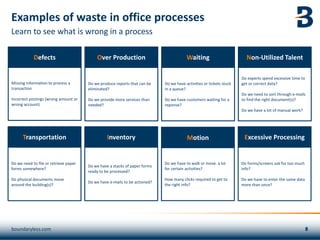
Examples of waste in office processes
Learn to see what is wrong in a process
Do we need to file or retrieve paper
forms somewhere?
Do physical documents move
around the building(s)?
Transportation
Do we have a stacks of paper forms
ready to be processed?
Do we have e-mails to be actioned?
Inventory
Do we have to walk or move a lot
for certain activities?
How many clicks required to get to
the right info?
Motion
Do we produce reports that can be
eliminated?
Do we provide more services than
needed?
Over Production
Do forms/screens ask for too much
info?
Do we have to enter the same data
more than once?
Excessive Processing
Missing information to process a
transaction
Incorrect postings (wrong amount or
wrong account)
Defects
Do we have activities or tickets stuck
in a queue?
Do we have customers waiting for a
reponse?
Waiting
Do experts spend excessive time to
get or correct data?
Do we need to sort through e-mails
to find the right document(s)?
Do we have a lot of manual work?
Non-Utilized Talent
boundaryless.com
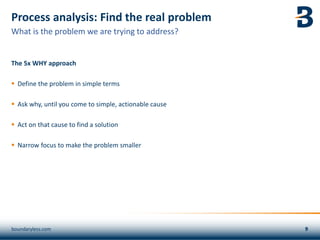
Process analysis: Find the real problem
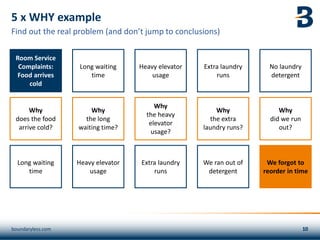
The 5x WHY approach
▪ Define the problem in simple terms
▪ Ask why, until you come to simple, actionable cause
▪ Act on that cause to find a solution
▪ Narrow focus to make the problem smaller
What is the problem we are trying to address?
boundaryless.com
5 x WHY example
Find out the real problem (and don’t jump to conclusions)
Room Service
Complaints:
Food arrives
cold
Why
does the food
arrive cold?
Long waiting
time
Long waiting
time
Why
the long
waiting time?
Heavy elevator
usage
Heavy elevator
usage
Why
the heavy
elevator
usage?
Extra laundry
runs
Extra laundry
runs
Why
the extra
laundry runs?
We ran out of
detergent
No laundry
detergent
Why
did we run
out?
We forgot to
reorder in time
boundaryless.com
5 WHYs Illustration
boundaryless.com
The Jefferson Memorial
https://youtu.be/BEQvq99PZwo
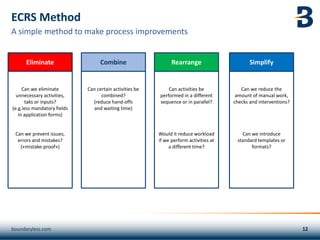
Can we eliminate
unnecessary activities,
taks or inputs?
(e.g.less mandatory fields
in application forms)
Can we prevent issues,
errors and mistakes?
(«mistake-proof»)
Can certain activities be
combined?
(reduce hand-offs
and waiting time)
Can activities be
performed in a different
sequence or in parallel?
Would it reduce workload
if we perform activities at
a different time?
Eliminate Combine Rearrange Simplify
ECRS Method
boundaryless.com
A simple method to make process improvements
Can we reduce the
amount of manual work,
checks and interventions?
Can we introduce
standard templates or
formats?
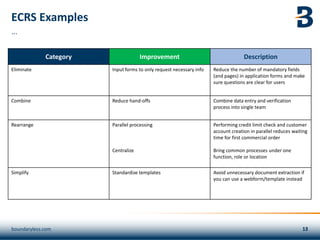
ECRS Examples
Category Improvement Description
Eliminate Input forms to only request necessary info Reduce the number of mandatory fields
(and pages) in application forms and make
sure questions are clear for users
Combine Reduce hand-offs Combine data entry and verification
process into single team
Rearrange Parallel processing
Centralize
Performing credit limit check and customer
account creation in parallel reduces waiting
time for first commercial order
Bring common processes under one
function, role or location
Simplify Standardize templates Avoid unnecessary document extraction if
you can use a webform/template instead
boundaryless.com
…
E-mail candidate on
receipt
Print 3 copies of e-mail
and attachments
Manually match
applications to open
roles
Review and grade
candidates
Enter candidates in
system (typos are being
made)
HR receives and
reviews
Write letter
Reference letters and
CV
Send by e-mail
Candidate
applies
E-mail back and forth
with candidates to find
suitable timeslots
Send applicant copy of
the job posting
HR sends CVs to
manager by internal
mail
Schedule
interviews
Conduct interviews
Capture feedback on
form
Hiring decision
Manually e-mail
candidate on decision
E-mail for cost
reimbursements
Conduct interviews
Print document and
pick up in printer room
Review applications
once a week
Wait for management
decision to invite
candidates
Hiring manager shares
available interview slots
Manual rejection e-mail
If candidate not a fit
Hiring Manager
Review
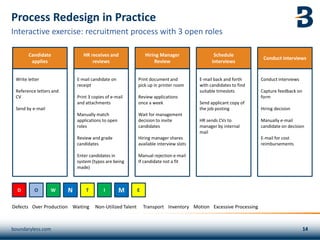
Process Redesign in Practice
boundaryless.com
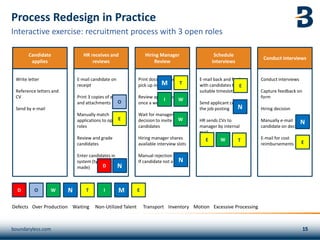
Interactive exercise: recruitment process with 3 open roles
Defects Over Production Waiting Non-Utilized Talent Transport Inventory Motion Excessive Processing
D O W N T I M E
E-mail candidate on
receipt
Print 3 copies of e-mail
and attachments
Manually match
applications to open
roles
Review and grade
candidates
Enter candidates in
system (typos are being
made)
HR receives and
reviews
Write letter
Reference letters and
CV
Send by e-mail
Candidate
applies
E-mail back and forth
with candidates to find
suitable timeslots
Send applicant copy of
the job posting
HR sends CVs to
manager by internal
mail
Schedule
interviews
Conduct interviews
Capture feedback on
form
Hiring decision
Manually e-mail
candidate on decision
E-mail for cost
reimbursements
Conduct interviews
Print document and
pick up in printer room
Review applications
once a week
Wait for management
decision to invite
candidates
Hiring manager shares
available interview slots
Manual rejection e-mail
If candidate not a fit
Hiring Manager
Review
Process Redesign in Practice
boundaryless.com
Interactive exercise: recruitment process with 3 open roles
W
E
T
D
I
M
T
W
E
W
E
E
N
N
Defects Over Production Waiting Non-Utilized Talent Transport Inventory Motion Excessive Processing
D O W N T I M E
O
N
N
E-mail confirmation to
candidate
Print 3 copies of e-mail
and attachments
Manually match
application to open
role(s)
Review and grade
candidate in web tool
Write letter
Reference letters and
CV
Apply on-line
Call candidate to
confirm date and time
Automated e-mail to
confirm interview
CVs available in tool
Conduct interviews
Capture feedback on in
web tool
Hiring or reassign
decision
Capture info in
database
Automated e-mail to
candidate on decision
Automated E-mail for
cost reimbursements
Print document and
pick up in printer room
Decision to invite via
web tool
Opportunity to reassign
candidate to another
role
Hiring manager shares
available interview slots
Automated rejection e-
mail if candidate no fit
boundaryless.com
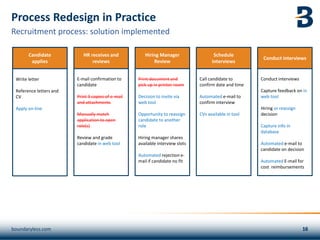
Recruitment process: solution implemented
Process Redesign in Practice
HR receives and
reviews
Candidate
applies
Schedule
interviews
Conduct interviews
Hiring Manager
Review
Questions: erik@boundaryless.com

Think before we automate

  • 1.
    “Think before youautomate” UiPath Community Event
  • 2.
    Introduction Erik Gillet ▪ Bornin The Netherlands, living in Switzerland ▪ 25 years of business improvement experience ▪ Global RPA lead for EssilorLuxottica (RayBan) ▪ Founder and CEO of Boundaryless Boundaryless ▪ Started in 2018 in The UK ▪ Today also in The US, France, Switzerland, Malaysia, Sri Lanka, and India ▪ Focus on Advanced Analytics and Intelligent Automation ▪ Team of experts, including several UiPath MVPs, delivering projects boundaryless.com
  • 3.
    Presentation overview 5m Introduction:Why process redesign should be in the RPA delivery roadmap 10m Process Performance: Learn to see what is wrong in a process 10m Process Analysis: Find the real problem 10m Process Improvement: Tools to make improvements. Fast. 10m Process Redesign in Practice: Interactive exercise 15m Questions / Discussion Introduction to process redesign boundaryless.com
  • 4.
    Some quotes Automation appliedto an efficient operation will magnify the efficiency. Automation applied to an inefficient operation will magnify the inefficiency. If you automate a crappy process, you will probably produce crap faster, or more crap If you are automating without improving the process, you are missing a trick. Likewise, if you are looking at process improvements without considering the use of new technical capabilities, you are also missing a trick. boundaryless.com Why process redesign should be part of your RPA delivery roadmap
  • 5.
    Typical Intelligent Automationdelivery roadmap boundaryless.com Define Discover Diagnose Design Develop Deliver Deploy > > > > > > Automation Idea High-Level Assessment Detailed Feasibility Redesign & Bus. Case Develop Code UAT approval Training & Go-Live ❑ Process map ❑ Potential for RPA ❑ Robot owner ❑ Task analysis ❑ Tech evaluation ❑ To Be Process ❑ SDD ❑ Business case ❑ Script ❑ Support SLA ❑ Code review ❑ User testing ❑ User manual ❑ Go-Live checklist ❑ Training ❑ Go-Live Where process redesign sits in the RPA delivery roadmap
  • 6.
    Introduction to Lean Keyelements ▪ Lean is a process improvement approach ▪ As a principle, the aim is to add value from the end users perspective ▪ The focus is on increasing efficiency to reduce risk, cost and non-value add activities (“waste”) Successful Implementation of Lean has five outcomes: Follow a Lean-led improvement approach and focus on ▪ What adds value for the customer of your process ▪ How it can be delivered in a more effective and efficient way, without impacting risk or quality Look for value from the customer’s perspective Eliminate Waste Improve Quality Increase Speed Reduce Costs boundaryless.com Improve Customer Value
  • 7.
    Transport Unnecessary movements of information Inventory Excessproducts and materials being processed Motion Unnecessary movement by people (e.g. walking) Waiting Wasted time waiting for the next step in a process Over-Production Generation of information that is more than needed or before it is needed Excessive Processing More work or higher quality than is required by the customer Defects Efforts caused by rework, scrap, and incorrect information Non Utilized Talent Underutilizing people’s talents, skills & knowledge Eight types of waste in office processes Use DOWNTIME to identify waste boundaryless.com
  • 8.
    Examples of wastein office processes Learn to see what is wrong in a process Do we need to file or retrieve paper forms somewhere? Do physical documents move around the building(s)? Transportation Do we have a stacks of paper forms ready to be processed? Do we have e-mails to be actioned? Inventory Do we have to walk or move a lot for certain activities? How many clicks required to get to the right info? Motion Do we produce reports that can be eliminated? Do we provide more services than needed? Over Production Do forms/screens ask for too much info? Do we have to enter the same data more than once? Excessive Processing Missing information to process a transaction Incorrect postings (wrong amount or wrong account) Defects Do we have activities or tickets stuck in a queue? Do we have customers waiting for a reponse? Waiting Do experts spend excessive time to get or correct data? Do we need to sort through e-mails to find the right document(s)? Do we have a lot of manual work? Non-Utilized Talent boundaryless.com
  • 9.
    Process analysis: Findthe real problem The 5x WHY approach ▪ Define the problem in simple terms ▪ Ask why, until you come to simple, actionable cause ▪ Act on that cause to find a solution ▪ Narrow focus to make the problem smaller What is the problem we are trying to address? boundaryless.com
  • 10.
    5 x WHYexample Find out the real problem (and don’t jump to conclusions) Room Service Complaints: Food arrives cold Why does the food arrive cold? Long waiting time Long waiting time Why the long waiting time? Heavy elevator usage Heavy elevator usage Why the heavy elevator usage? Extra laundry runs Extra laundry runs Why the extra laundry runs? We ran out of detergent No laundry detergent Why did we run out? We forgot to reorder in time boundaryless.com
  • 11.
    5 WHYs Illustration boundaryless.com TheJefferson Memorial https://youtu.be/BEQvq99PZwo
  • 12.
    Can we eliminate unnecessaryactivities, taks or inputs? (e.g.less mandatory fields in application forms) Can we prevent issues, errors and mistakes? («mistake-proof») Can certain activities be combined? (reduce hand-offs and waiting time) Can activities be performed in a different sequence or in parallel? Would it reduce workload if we perform activities at a different time? Eliminate Combine Rearrange Simplify ECRS Method boundaryless.com A simple method to make process improvements Can we reduce the amount of manual work, checks and interventions? Can we introduce standard templates or formats?
  • 13.
    ECRS Examples Category ImprovementDescription Eliminate Input forms to only request necessary info Reduce the number of mandatory fields (and pages) in application forms and make sure questions are clear for users Combine Reduce hand-offs Combine data entry and verification process into single team Rearrange Parallel processing Centralize Performing credit limit check and customer account creation in parallel reduces waiting time for first commercial order Bring common processes under one function, role or location Simplify Standardize templates Avoid unnecessary document extraction if you can use a webform/template instead boundaryless.com …
  • 14.
    E-mail candidate on receipt Print3 copies of e-mail and attachments Manually match applications to open roles Review and grade candidates Enter candidates in system (typos are being made) HR receives and reviews Write letter Reference letters and CV Send by e-mail Candidate applies E-mail back and forth with candidates to find suitable timeslots Send applicant copy of the job posting HR sends CVs to manager by internal mail Schedule interviews Conduct interviews Capture feedback on form Hiring decision Manually e-mail candidate on decision E-mail for cost reimbursements Conduct interviews Print document and pick up in printer room Review applications once a week Wait for management decision to invite candidates Hiring manager shares available interview slots Manual rejection e-mail If candidate not a fit Hiring Manager Review Process Redesign in Practice boundaryless.com Interactive exercise: recruitment process with 3 open roles Defects Over Production Waiting Non-Utilized Talent Transport Inventory Motion Excessive Processing D O W N T I M E
  • 15.
    E-mail candidate on receipt Print3 copies of e-mail and attachments Manually match applications to open roles Review and grade candidates Enter candidates in system (typos are being made) HR receives and reviews Write letter Reference letters and CV Send by e-mail Candidate applies E-mail back and forth with candidates to find suitable timeslots Send applicant copy of the job posting HR sends CVs to manager by internal mail Schedule interviews Conduct interviews Capture feedback on form Hiring decision Manually e-mail candidate on decision E-mail for cost reimbursements Conduct interviews Print document and pick up in printer room Review applications once a week Wait for management decision to invite candidates Hiring manager shares available interview slots Manual rejection e-mail If candidate not a fit Hiring Manager Review Process Redesign in Practice boundaryless.com Interactive exercise: recruitment process with 3 open roles W E T D I M T W E W E E N N Defects Over Production Waiting Non-Utilized Talent Transport Inventory Motion Excessive Processing D O W N T I M E O N N
  • 16.
    E-mail confirmation to candidate Print3 copies of e-mail and attachments Manually match application to open role(s) Review and grade candidate in web tool Write letter Reference letters and CV Apply on-line Call candidate to confirm date and time Automated e-mail to confirm interview CVs available in tool Conduct interviews Capture feedback on in web tool Hiring or reassign decision Capture info in database Automated e-mail to candidate on decision Automated E-mail for cost reimbursements Print document and pick up in printer room Decision to invite via web tool Opportunity to reassign candidate to another role Hiring manager shares available interview slots Automated rejection e- mail if candidate no fit boundaryless.com Recruitment process: solution implemented Process Redesign in Practice HR receives and reviews Candidate applies Schedule interviews Conduct interviews Hiring Manager Review
  • 17.