Women in Automation Series
🌺 Women in Automation Program:
Become a Citizen Developer with
UiPath StudioX Session 1
2
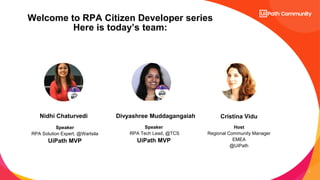
Speaker
RPA Solution Expert, @Wartsila
UiPath MVP
Speaker
RPA Tech Lead, @TCS
UiPath MVP
Host
Regional Community Manager
EMEA
@UiPath
Nidhi Chaturvedi Cristina Vidu
Welcome to RPA Citizen Developer series
Here is today’s team:
Divyashree Muddagangaiah
Become a Citizen Developer with
UiPath StudioX Session 1
4
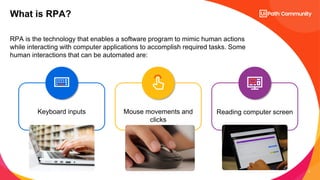
RPA is the technology that enables a software program to mimic human actions
while interacting with computer applications to accomplish required tasks. Some
human interactions that can be automated are:
What is RPA?
Mouse movements and
clicks
Keyboard inputs Reading computer screen
5
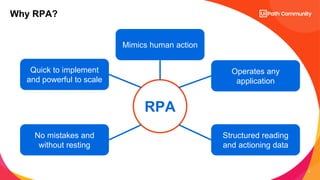
RPA
Mimics human action
Quick to implement
and powerful to scale
Operates any
application
No mistakes and
without resting
Structured reading
and actioning data
Why RPA?
6
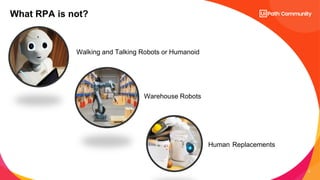
What RPA is not?
Walking and Talking Robots or Humanoid
Warehouse Robots
Human Replacements
7
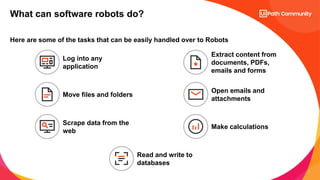
Here are some of the tasks that can be easily handled over to Robots
What can software robots do?
Log into any
application
Move files and folders
Extract content from
documents, PDFs,
emails and forms
Scrape data from the
web
Open emails and
attachments
Make calculations
Read and write to
databases
8
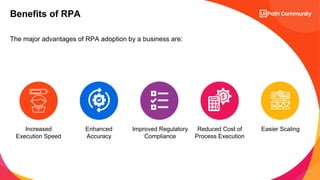
The major advantages of RPA adoption by a business are:
Benefits of RPA
Reduced Cost of
Process Execution
Easier Scaling
Improved Regulatory
Compliance
Enhanced
Accuracy
Increased
Execution Speed
9
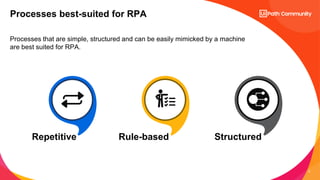
Processes that are simple, structured and can be easily mimicked by a machine
are best suited for RPA.
Processes best-suited for RPA
Repetitive Rule-based Structured
10
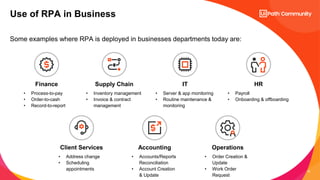
Some examples where RPA is deployed in businesses departments today are:
Use of RPA in Business
Finance
• Process-to-pay
• Order-to-cash
• Record-to-report
IT
• Server & app monitoring
• Routine maintenance &
monitoring
HR
• Payroll
• Onboarding & offboarding
Supply Chain
• Inventory management
• Invoice & contract
management
Client Services
• Address change
• Scheduling
appointments
Accounting
• Accounts/Reports
Reconciliation
• Account Creation
& Update
Operations
• Order Creation &
Update
• Work Order
Request
Introduction to UiPath
12
Why UiPath
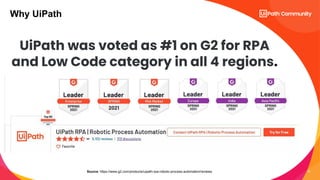
Source: https://www.g2.com/products/uipath-rpa-robotic-process-automation/reviews
UiPath was voted as #1 on G2 for RPA
and Low Code category in all 4 regions.
13
Why UiPath
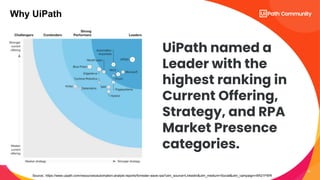
Source: https://www.uipath.com/resources/automation-analyst-reports/forrester-wave-rpa?utm_source=LinkedIn&utm_medium=Social&utm_campaign=AR21FWR
UiPath named a
Leader with the
highest ranking in
Current Offering,
Strategy, and RPA
Market Presence
categories.
14
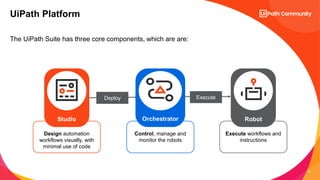
The UiPath Suite has three core components, which are are:
UiPath Platform
Execute workflows and
instructions
Control, manage and
monitor the robots
Design automation
workflows visually, with
minimal use of code
Deploy Execute
Robot
Studio Orchestrator
15
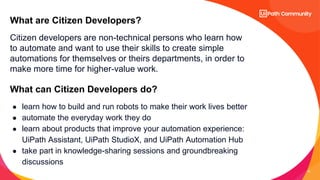
Citizen developers are non-technical persons who learn how
to automate and want to use their skills to create simple
automations for themselves or theirs departments, in order to
make more time for higher-value work.
What are Citizen Developers?
What can Citizen Developers do?
â—Ź learn how to build and run robots to make their work lives better
â—Ź automate the everyday work they do
â—Ź learn about products that improve your automation experience:
UiPath Assistant, UiPath StudioX, and UiPath Automation Hub
â—Ź take part in knowledge-sharing sessions and groundbreaking
discussions
16
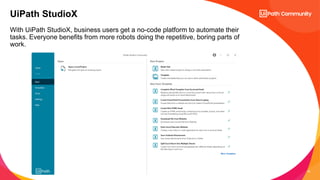
With UiPath StudioX, business users get a no-code platform to automate their
tasks. Everyone benefits from more robots doing the repetitive, boring parts of
work.
UiPath StudioX
17
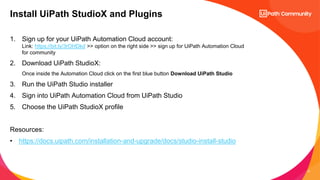
1. Sign up for your UiPath Automation Cloud account:
Link: https://bit.ly/3rOHDkd >> option on the right side >> sign up for UiPath Automation Cloud
for community
2. Download UiPath StudioX:
Once inside the Automation Cloud click on the first blue button Download UiPath Studio
3. Run the UiPath Studio installer
4. Sign into UiPath Automation Cloud from UiPath Studio
5. Choose the UiPath StudioX profile
Resources:
• https://docs.uipath.com/installation-and-upgrade/docs/studio-install-studio
Install UiPath StudioX and Plugins
18
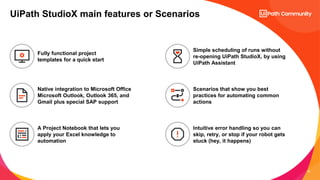
UiPath StudioX main features or Scenarios
Native integration to Microsoft Office
Microsoft Outlook, Outlook 365, and
Gmail plus special SAP support
Fully functional project
templates for a quick start
A Project Notebook that lets you
apply your Excel knowledge to
automation
Simple scheduling of runs without
re-opening UiPath StudioX, by using
UiPath Assistant
Scenarios that show you best
practices for automating common
actions
Intuitive error handling so you can
skip, retry, or stop if your robot gets
stuck (hey, it happens)
19
Interaction and
Q&A
www.linkedin.com/in/nidhi-chaturvedi3
https://www.linkedin.com/in/divyashree-muddagangaiah/
20
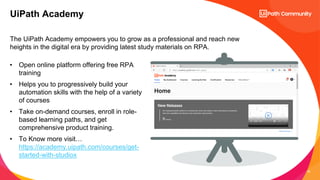
The UiPath Academy empowers you to grow as a professional and reach new
heights in the digital era by providing latest study materials on RPA.
UiPath Academy
• Open online platform offering free RPA
training
• Helps you to progressively build your
automation skills with the help of a variety
of courses
• Take on-demand courses, enroll in role-
based learning paths, and get
comprehensive product training.
• To Know more visit…
https://academy.uipath.com/courses/get-
started-with-studiox
21
Goodbye & Glad to meet YOU!
Stay close:
â—Ź community@uipath.com
â—Ź community.uipath.com

🌺 Women in Automation Program: Become a Citizen Developer with UiPath StudioX Session 1

  • 1.
    Women in AutomationSeries 🌺 Women in Automation Program: Become a Citizen Developer with UiPath StudioX Session 1
  • 2.
    2 Speaker RPA Solution Expert,@Wartsila UiPath MVP Speaker RPA Tech Lead, @TCS UiPath MVP Host Regional Community Manager EMEA @UiPath Nidhi Chaturvedi Cristina Vidu Welcome to RPA Citizen Developer series Here is today’s team: Divyashree Muddagangaiah
  • 3.
    Become a CitizenDeveloper with UiPath StudioX Session 1
  • 4.
    4 RPA is thetechnology that enables a software program to mimic human actions while interacting with computer applications to accomplish required tasks. Some human interactions that can be automated are: What is RPA? Mouse movements and clicks Keyboard inputs Reading computer screen
  • 5.
    5 RPA Mimics human action Quickto implement and powerful to scale Operates any application No mistakes and without resting Structured reading and actioning data Why RPA?
  • 6.
    6 What RPA isnot? Walking and Talking Robots or Humanoid Warehouse Robots Human Replacements
  • 7.
    7 Here are someof the tasks that can be easily handled over to Robots What can software robots do? Log into any application Move files and folders Extract content from documents, PDFs, emails and forms Scrape data from the web Open emails and attachments Make calculations Read and write to databases
  • 8.
    8 The major advantagesof RPA adoption by a business are: Benefits of RPA Reduced Cost of Process Execution Easier Scaling Improved Regulatory Compliance Enhanced Accuracy Increased Execution Speed
  • 9.
    9 Processes that aresimple, structured and can be easily mimicked by a machine are best suited for RPA. Processes best-suited for RPA Repetitive Rule-based Structured
  • 10.
    10 Some examples whereRPA is deployed in businesses departments today are: Use of RPA in Business Finance • Process-to-pay • Order-to-cash • Record-to-report IT • Server & app monitoring • Routine maintenance & monitoring HR • Payroll • Onboarding & offboarding Supply Chain • Inventory management • Invoice & contract management Client Services • Address change • Scheduling appointments Accounting • Accounts/Reports Reconciliation • Account Creation & Update Operations • Order Creation & Update • Work Order Request
  • 11.
  • 12.
    12 Why UiPath Source: https://www.g2.com/products/uipath-rpa-robotic-process-automation/reviews UiPathwas voted as #1 on G2 for RPA and Low Code category in all 4 regions.
  • 13.
  • 14.
    14 The UiPath Suitehas three core components, which are are: UiPath Platform Execute workflows and instructions Control, manage and monitor the robots Design automation workflows visually, with minimal use of code Deploy Execute Robot Studio Orchestrator
  • 15.
    15 Citizen developers arenon-technical persons who learn how to automate and want to use their skills to create simple automations for themselves or theirs departments, in order to make more time for higher-value work. What are Citizen Developers? What can Citizen Developers do? â—Ź learn how to build and run robots to make their work lives better â—Ź automate the everyday work they do â—Ź learn about products that improve your automation experience: UiPath Assistant, UiPath StudioX, and UiPath Automation Hub â—Ź take part in knowledge-sharing sessions and groundbreaking discussions
  • 16.
    16 With UiPath StudioX,business users get a no-code platform to automate their tasks. Everyone benefits from more robots doing the repetitive, boring parts of work. UiPath StudioX
  • 17.
    17 1. Sign upfor your UiPath Automation Cloud account: Link: https://bit.ly/3rOHDkd >> option on the right side >> sign up for UiPath Automation Cloud for community 2. Download UiPath StudioX: Once inside the Automation Cloud click on the first blue button Download UiPath Studio 3. Run the UiPath Studio installer 4. Sign into UiPath Automation Cloud from UiPath Studio 5. Choose the UiPath StudioX profile Resources: • https://docs.uipath.com/installation-and-upgrade/docs/studio-install-studio Install UiPath StudioX and Plugins
  • 18.
    18 UiPath StudioX mainfeatures or Scenarios Native integration to Microsoft Office Microsoft Outlook, Outlook 365, and Gmail plus special SAP support Fully functional project templates for a quick start A Project Notebook that lets you apply your Excel knowledge to automation Simple scheduling of runs without re-opening UiPath StudioX, by using UiPath Assistant Scenarios that show you best practices for automating common actions Intuitive error handling so you can skip, retry, or stop if your robot gets stuck (hey, it happens)
  • 19.
  • 20.
    20 The UiPath Academyempowers you to grow as a professional and reach new heights in the digital era by providing latest study materials on RPA. UiPath Academy • Open online platform offering free RPA training • Helps you to progressively build your automation skills with the help of a variety of courses • Take on-demand courses, enroll in role- based learning paths, and get comprehensive product training. • To Know more visit… https://academy.uipath.com/courses/get- started-with-studiox
  • 21.
    21 Goodbye & Gladto meet YOU! Stay close: â—Ź community@uipath.com â—Ź community.uipath.com