The Zero Sum Sales Receipt  Taking Minimum Time for Maximum Results
Today’s Agenda Why Easily see errors every day. Comparisons of Sales Items Makes reconciling your Bank Account painless How To Create a ZSR and Memorize it.  Input the everyday information Sales Tax Show me the Money!   Questions Who Is Debbie? Is a Good Fit for the Zero Sum Sales Receipt (And who isn’t!) What  What is it??  What’s on it?  What happens Behind the Scenes? Where Does the Information go in your QB File? Is the information found?
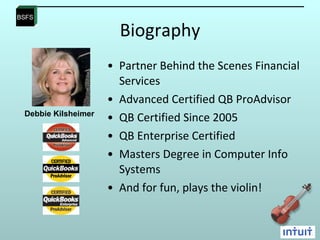
Biography Partner Behind the Scenes Financial Services Advanced Certified QB ProAdvisor  QB Certified Since 2005 QB Enterprise Certified Masters Degree in Computer Info Systems And for fun, plays the violin!  Debbie Kilsheimer
Who is a Good Fit? Any Business that want to capture the Daily Sales Activity.  Some of my clients using this technique: Specialty Wine and Cheese Shop Union Veterinary Hospital Hair Salon Restaurants  Decorative Concrete Supply Company
Who is a  NOT  a Good Fit? Any Business that tracks Sales by Individual Customer.  Some of my clients that do NOT use this technique: My own Accounting Firm Piano Retailer Car Dealership Architect Construction Homeowner’s Association Non-Profit Agency
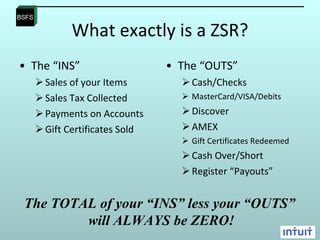
What exactly is a ZSR? The “INS” Sales of your Items Sales Tax Collected Payments on Accounts Gift Certificates Sold The “OUTS” Cash/Checks MasterCard/VISA/Debits Discover AMEX Gift Certificates Redeemed Cash Over/Short Register “Payouts” The TOTAL of your “INS” less your “OUTS”  will ALWAYS be ZERO!
Let’s Look at a few Examples The Vin Yard The Local 295 Safe Haven Veterinary Hospital DJ’s Deck
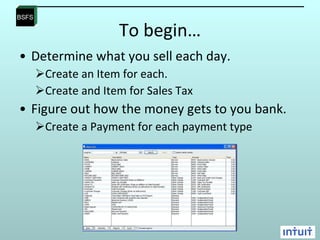
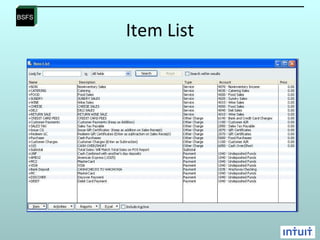
To begin… Determine what you sell each day. Create an Item for each.  Create and Item for Sales Tax  Figure out how the money gets to you bank.  Create a Payment for each payment type
Item List
The Process Take your daily print out from your POS system.  Create your Zero Sum Sales Receipt duplicating the items as they appear on the POS report.  Memorize it.  Every day, just pull up the Memorized Sales Receipt and type in the figures.  Make your Deposits.  Reconcile your Bank every day, every week or every month!
The Vin Yard The POS Print Out. Daily Sales Money Received
Let’s See it in Action
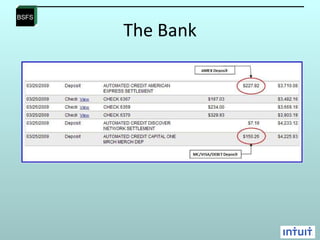
The Bank
Key Points To CREATE your ZSR Determine Your Item List Track how you get paid Duplicate your POS Daily Summary Memorize it.  To USE it every day. Open you Memorized Transaction List Type your figures from your POS Report Make your Deposits Reconcile your Bank. I can do this!!
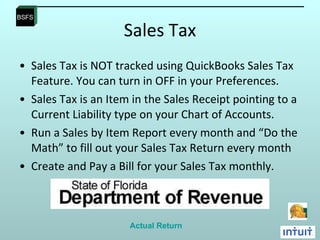
Sales Tax Sales Tax is NOT tracked using QuickBooks Sales Tax Feature. You can turn in OFF in your Preferences.  Sales Tax is an Item in the Sales Receipt pointing to a Current Liability type on your Chart of Accounts.  Run a Sales by Item Report every month and “Do the Math” to fill out your Sales Tax Return every month Create and Pay a Bill for your Sales Tax monthly. Actual Return
Questions
Thank you! [email_address] 386-852-5755 Cell Phone

The Zero Sum Sales Receipt

  • 1.
    The Zero SumSales Receipt Taking Minimum Time for Maximum Results
  • 2.
    Today’s Agenda WhyEasily see errors every day. Comparisons of Sales Items Makes reconciling your Bank Account painless How To Create a ZSR and Memorize it. Input the everyday information Sales Tax Show me the Money!  Questions Who Is Debbie? Is a Good Fit for the Zero Sum Sales Receipt (And who isn’t!) What What is it?? What’s on it? What happens Behind the Scenes? Where Does the Information go in your QB File? Is the information found?
  • 3.
    Biography Partner Behindthe Scenes Financial Services Advanced Certified QB ProAdvisor QB Certified Since 2005 QB Enterprise Certified Masters Degree in Computer Info Systems And for fun, plays the violin! Debbie Kilsheimer
  • 4.
    Who is aGood Fit? Any Business that want to capture the Daily Sales Activity. Some of my clients using this technique: Specialty Wine and Cheese Shop Union Veterinary Hospital Hair Salon Restaurants Decorative Concrete Supply Company
  • 5.
    Who is a NOT a Good Fit? Any Business that tracks Sales by Individual Customer. Some of my clients that do NOT use this technique: My own Accounting Firm Piano Retailer Car Dealership Architect Construction Homeowner’s Association Non-Profit Agency
  • 6.
    What exactly isa ZSR? The “INS” Sales of your Items Sales Tax Collected Payments on Accounts Gift Certificates Sold The “OUTS” Cash/Checks MasterCard/VISA/Debits Discover AMEX Gift Certificates Redeemed Cash Over/Short Register “Payouts” The TOTAL of your “INS” less your “OUTS” will ALWAYS be ZERO!
  • 7.
    Let’s Look ata few Examples The Vin Yard The Local 295 Safe Haven Veterinary Hospital DJ’s Deck
  • 8.
    To begin… Determinewhat you sell each day. Create an Item for each. Create and Item for Sales Tax Figure out how the money gets to you bank. Create a Payment for each payment type
  • 9.
  • 10.
    The Process Takeyour daily print out from your POS system. Create your Zero Sum Sales Receipt duplicating the items as they appear on the POS report. Memorize it. Every day, just pull up the Memorized Sales Receipt and type in the figures. Make your Deposits. Reconcile your Bank every day, every week or every month!
  • 11.
    The Vin YardThe POS Print Out. Daily Sales Money Received
  • 12.
    Let’s See itin Action
  • 13.
  • 14.
    Key Points ToCREATE your ZSR Determine Your Item List Track how you get paid Duplicate your POS Daily Summary Memorize it. To USE it every day. Open you Memorized Transaction List Type your figures from your POS Report Make your Deposits Reconcile your Bank. I can do this!!
  • 15.
    Sales Tax SalesTax is NOT tracked using QuickBooks Sales Tax Feature. You can turn in OFF in your Preferences. Sales Tax is an Item in the Sales Receipt pointing to a Current Liability type on your Chart of Accounts. Run a Sales by Item Report every month and “Do the Math” to fill out your Sales Tax Return every month Create and Pay a Bill for your Sales Tax monthly. Actual Return
  • 16.
  • 17.
    Thank you! [email_address]386-852-5755 Cell Phone