The vSphere Web Client Video Project:
A Case Study in Coordinated Content
Strategy
Wendy Shaffer

Confidential

@wshaffer74 #Lavacon @LavaCon
© 2010 VMware Inc. All rights reserved
About the Speaker

• Staff Technical Writer at VMware
• Coordinated initial phase of video
project
• Video “catalyst”

@wshaffer74 #Lavacon @LavaCon
What is the vSphere Web Client and why do we need videos about
it?

@wshaffer74 #Lavacon @LavaCon
vSphere
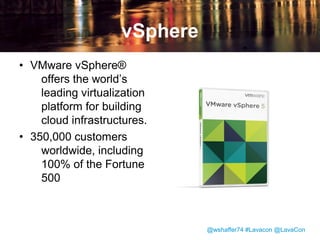
• VMware vSphere®
offers the world’s
leading virtualization
platform for building
cloud infrastructures.
• 350,000 customers
worldwide, including
100% of the Fortune
500

@wshaffer74 #Lavacon @LavaCon
89% of all virtualized applications
in the world run on VMware.
Gartner, December 2008

@wshaffer74 #Lavacon @LavaCon
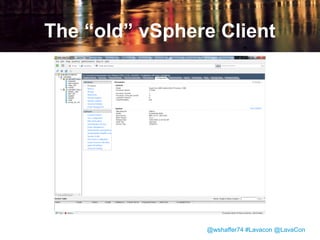
The “old” vSphere Client

@wshaffer74 #Lavacon @LavaCon
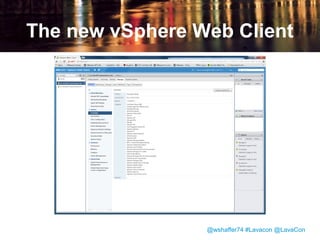
The new vSphere Web Client

@wshaffer74 #Lavacon @LavaCon
Comparing the Clients
vSphere Client
• Windows-only installed
application
• Tree-based navigation
• Familiar to users through
many years of vSphere
releases

vSphere Web Client
• Cross-platform Web
application
• Graph-based navigation
• Numerous interface
changes and
improvements for
users to get
accustomed to

@wshaffer74 #Lavacon @LavaCon
• Management at VMware identified video
as a key part of the strategy for helping
users make the transition to the new
client.
@wshaffer74 #Lavacon @LavaCon
Why Video?
• Video is visual.
• Video is ideal for short attention spans or
consuming information in small chunks.
• Video still has novelty value for some
customers.

@wshaffer74 #Lavacon @LavaCon
Who makes these videos?

@wshaffer74 #Lavacon @LavaCon
Who should make these
videos?

• A number of groups at VMware make
user-facing video:
– Support
– Technical Marketing
– Technical Communications

@wshaffer74 #Lavacon @LavaCon
• Management asked the Technical
Communications team to create video
to:
– Help users get accustomed to the new
interface.
– Teach users how to perform their most
critical tasks in the new interface.
– Highlight new features only available in the
new interface
@wshaffer74 #Lavacon @LavaCon
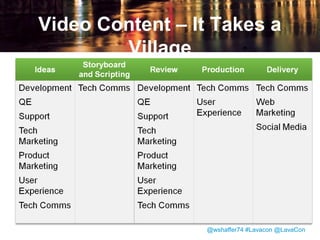
Video Content – It Takes a
Village

@wshaffer74 #Lavacon @LavaCon
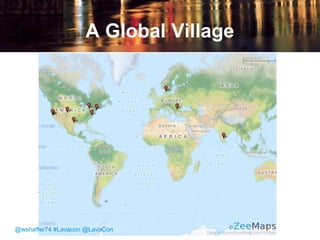
A Global Village

@wshaffer74 #Lavacon @LavaCon
How do we decide what to make videos about?

@wshaffer74 #Lavacon @LavaCon
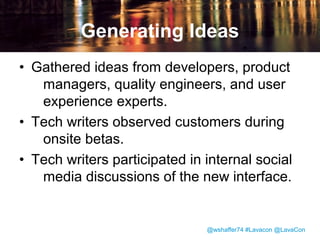
Generating Ideas
• Gathered ideas from developers, product
managers, quality engineers, and user
experience experts.
• Tech writers observed customers during
onsite betas.
• Tech writers participated in internal social
media discussions of the new interface.

@wshaffer74 #Lavacon @LavaCon
• Narrowed down to a list of 26 videos to be
scripted and produced by Tech Comms.
• Some additional topics were handed off to
Technical Marketing or Support to
handle in the videos they produce.

@wshaffer74 #Lavacon @LavaCon
How do we develop the script and the storyboard?

@wshaffer74 #Lavacon @LavaCon
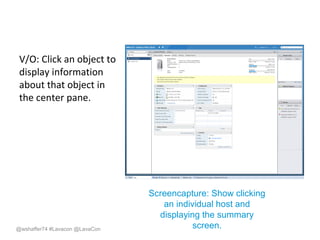
Storyboarding
• Encourages visual thinking.
• The storyboard provides a way to specify
the relationship between voiceover and
visuals in the video.
• Writers produce storyboards in
PowerPoint, using a combination of text,
screenshots, and animation.

@wshaffer74 #Lavacon @LavaCon
V/O: Click an object to
display information
about that object in
the center pane.

@wshaffer74 #Lavacon @LavaCon

Screencapture: Show clicking
an individual host and
displaying the summary
screen.
Pitch Meeting

Writers present storyboards to other writers, as well as
representatives from tech marketing, support, user experience
@wshaffer74 #Lavacon @LavaCon
The Pitch Meeting
• Allows refinement of script before shooting
• Allows the development of a common
voice and set of stylistic conventions.
• Allows writers to leverage each others’
strengths.

@wshaffer74 #Lavacon @LavaCon
Review
• Ensure technical accuracy of the script.
• Proofread on-screen text to ensure correct
grammar and spelling.

@wshaffer74 #Lavacon @LavaCon
How do we do filming and production?

@wshaffer74 #Lavacon @LavaCon
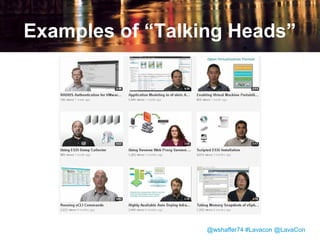
The “Talking Head”
• Puts a human face on the product.
• Using actual VMware employees instead
of actors or voiceover artists increases
credibility.
• Increases viewer engagement.

@wshaffer74 #Lavacon @LavaCon
Examples of “Talking Heads”

@wshaffer74 #Lavacon @LavaCon
Filming and Video Production
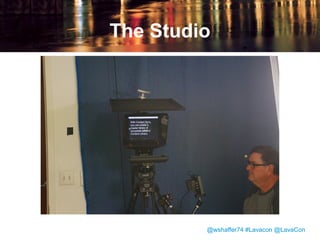
• “Talking Head” is filmed reading script
from teleprompter.
• Writer captures video of the product UI
using Camtasia.
• Writers work with videographer to create
still graphics and animations.

@wshaffer74 #Lavacon @LavaCon
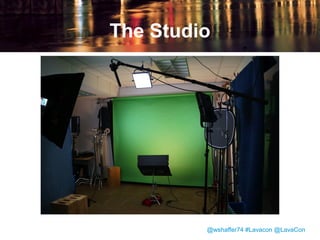
The Studio

@wshaffer74 #Lavacon @LavaCon
The Studio

@wshaffer74 #Lavacon @LavaCon
Review Round 2
• All stakeholders review the finished video
and suggest changes or edits.
• Final video must be approved by PM,
writer, and writer’s manager before
release.

@wshaffer74 #Lavacon @LavaCon
How do we get these videos out where customers can see them?

@wshaffer74 #Lavacon @LavaCon
Video Distribution
• Link from client home screen to videos on
vmware.com
• TechPubs Youtube Channel
• Social media
• At VMworld trade show

@wshaffer74 #Lavacon @LavaCon
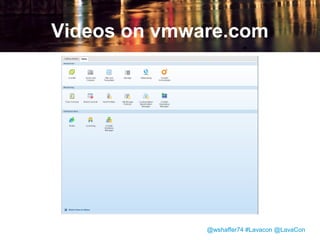
Videos on vmware.com

@wshaffer74 #Lavacon @LavaCon
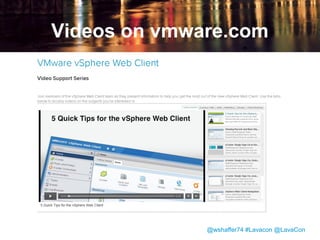
Videos on vmware.com

@wshaffer74 #Lavacon @LavaCon
Video on vmware.com
• Hosted by Brightcove
• Contains vSphere Web Client videos only
• More than 50,000 views in the first 7
weeks.
• Videos can be updated while maintaining
a stable URL for the video player

@wshaffer74 #Lavacon @LavaCon
Vmware TechPubs on
Youtube

• http://www.youtube.com/user/VMwareTechPub
• Has all tech pubs video content
• Youtube makes it easy to link and share
individual videos
• Can’t update an individual video without
changing the URL.

@wshaffer74 #Lavacon @LavaCon
Vmware TechPubs on
Youtube

• 5,534 subscribers as of 10/18
• 173,726 total video views

@wshaffer74 #Lavacon @LavaCon
Social Media
• VMware Support Insider Blog:
http://blogs.vmware.com/kb/
• VMware vSphere twitter account
• VMware Google+ community

@wshaffer74 #Lavacon @LavaCon
VMworld
• 21,000 attendees at VMworld 2012
• 4 videos were selected to run in a loop in
the demo booth during times when no
live demo was scheduled.

@wshaffer74 #Lavacon @LavaCon
Carrying the video project
forward

• Continue to produce videos between
major product releases.
• Carry on another coordinated effort to
create video for the vSphere 5.5
release.
• 15 videos published for this release; 12
more to follow in next 2 months.

@wshaffer74 #Lavacon @LavaCon
Lessons Learned
• Management support is critical.
• Not waiting for management buy in before
you lay the groundwork is also critical.
• Think visually.
• Small, focused projects can be great for
building collaborative relationships.
• Video can be a great way to demonstrate
what we do.
@wshaffer74 #Lavacon @LavaCon
It was excellent working from start
to finish with our script writers,
director and producer on the
videos. The key was having content
that is relevant to our users
presented in short, punchy videos.
Peter Shepherd, Senior Staff Engineer, VMware

@wshaffer74 #Lavacon @LavaCon
Credits

@wshaffer74 #Lavacon @LavaCon
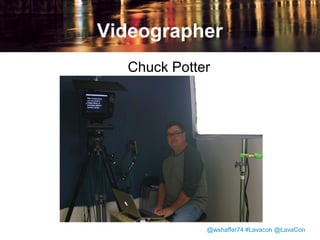
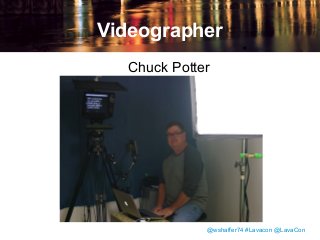
Videographer
Chuck Potter

@wshaffer74 #Lavacon @LavaCon
Writers
•
•
•
•
•
•
•
•

Dobrinka Boeva
Amy Bowman
Gary Gray
JoAnne Grey
Diane Huffman
Doreen Kasson
Renate Kempf
Iliana Kostova

•
•
•
•
•
•

Michael Martin
Wendy Shaffer
Colleen Taggart
Ralitsa Tsoneva
Yordan Ugrinov
Svetlana
Voskoboinikova

•
@wshaffer74 #Lavacon @LavaCon
References
• Why Choose Vmware for Server
Virtualization?
https://www.vmware.com/files/pdf/vmwar
e_advantage.pdf

@wshaffer74 #Lavacon @LavaCon

The vSphere Web Client video project: a case study in coordinated content strategy

  • 1.
    The vSphere WebClient Video Project: A Case Study in Coordinated Content Strategy Wendy Shaffer Confidential @wshaffer74 #Lavacon @LavaCon © 2010 VMware Inc. All rights reserved
  • 2.
    About the Speaker •Staff Technical Writer at VMware • Coordinated initial phase of video project • Video “catalyst” @wshaffer74 #Lavacon @LavaCon
  • 3.
    What is thevSphere Web Client and why do we need videos about it? @wshaffer74 #Lavacon @LavaCon
  • 4.
    vSphere • VMware vSphere® offersthe world’s leading virtualization platform for building cloud infrastructures. • 350,000 customers worldwide, including 100% of the Fortune 500 @wshaffer74 #Lavacon @LavaCon
  • 5.
    89% of allvirtualized applications in the world run on VMware. Gartner, December 2008 @wshaffer74 #Lavacon @LavaCon
  • 6.
    The “old” vSphereClient @wshaffer74 #Lavacon @LavaCon
  • 7.
    The new vSphereWeb Client @wshaffer74 #Lavacon @LavaCon
  • 8.
    Comparing the Clients vSphereClient • Windows-only installed application • Tree-based navigation • Familiar to users through many years of vSphere releases vSphere Web Client • Cross-platform Web application • Graph-based navigation • Numerous interface changes and improvements for users to get accustomed to @wshaffer74 #Lavacon @LavaCon
  • 9.
    • Management atVMware identified video as a key part of the strategy for helping users make the transition to the new client. @wshaffer74 #Lavacon @LavaCon
  • 10.
    Why Video? • Videois visual. • Video is ideal for short attention spans or consuming information in small chunks. • Video still has novelty value for some customers. @wshaffer74 #Lavacon @LavaCon
  • 11.
    Who makes thesevideos? @wshaffer74 #Lavacon @LavaCon
  • 12.
    Who should makethese videos? • A number of groups at VMware make user-facing video: – Support – Technical Marketing – Technical Communications @wshaffer74 #Lavacon @LavaCon
  • 13.
    • Management askedthe Technical Communications team to create video to: – Help users get accustomed to the new interface. – Teach users how to perform their most critical tasks in the new interface. – Highlight new features only available in the new interface @wshaffer74 #Lavacon @LavaCon
  • 14.
    Video Content –It Takes a Village @wshaffer74 #Lavacon @LavaCon
  • 15.
  • 16.
    How do wedecide what to make videos about? @wshaffer74 #Lavacon @LavaCon
  • 17.
    Generating Ideas • Gatheredideas from developers, product managers, quality engineers, and user experience experts. • Tech writers observed customers during onsite betas. • Tech writers participated in internal social media discussions of the new interface. @wshaffer74 #Lavacon @LavaCon
  • 18.
    • Narrowed downto a list of 26 videos to be scripted and produced by Tech Comms. • Some additional topics were handed off to Technical Marketing or Support to handle in the videos they produce. @wshaffer74 #Lavacon @LavaCon
  • 19.
    How do wedevelop the script and the storyboard? @wshaffer74 #Lavacon @LavaCon
  • 20.
    Storyboarding • Encourages visualthinking. • The storyboard provides a way to specify the relationship between voiceover and visuals in the video. • Writers produce storyboards in PowerPoint, using a combination of text, screenshots, and animation. @wshaffer74 #Lavacon @LavaCon
  • 21.
    V/O: Click anobject to display information about that object in the center pane. @wshaffer74 #Lavacon @LavaCon Screencapture: Show clicking an individual host and displaying the summary screen.
  • 22.
    Pitch Meeting Writers presentstoryboards to other writers, as well as representatives from tech marketing, support, user experience @wshaffer74 #Lavacon @LavaCon
  • 23.
    The Pitch Meeting •Allows refinement of script before shooting • Allows the development of a common voice and set of stylistic conventions. • Allows writers to leverage each others’ strengths. @wshaffer74 #Lavacon @LavaCon
  • 24.
    Review • Ensure technicalaccuracy of the script. • Proofread on-screen text to ensure correct grammar and spelling. @wshaffer74 #Lavacon @LavaCon
  • 25.
    How do wedo filming and production? @wshaffer74 #Lavacon @LavaCon
  • 26.
    The “Talking Head” •Puts a human face on the product. • Using actual VMware employees instead of actors or voiceover artists increases credibility. • Increases viewer engagement. @wshaffer74 #Lavacon @LavaCon
  • 27.
    Examples of “TalkingHeads” @wshaffer74 #Lavacon @LavaCon
  • 28.
    Filming and VideoProduction • “Talking Head” is filmed reading script from teleprompter. • Writer captures video of the product UI using Camtasia. • Writers work with videographer to create still graphics and animations. @wshaffer74 #Lavacon @LavaCon
  • 29.
  • 30.
  • 31.
    Review Round 2 •All stakeholders review the finished video and suggest changes or edits. • Final video must be approved by PM, writer, and writer’s manager before release. @wshaffer74 #Lavacon @LavaCon
  • 32.
    How do weget these videos out where customers can see them? @wshaffer74 #Lavacon @LavaCon
  • 33.
    Video Distribution • Linkfrom client home screen to videos on vmware.com • TechPubs Youtube Channel • Social media • At VMworld trade show @wshaffer74 #Lavacon @LavaCon
  • 34.
  • 35.
  • 36.
    Video on vmware.com •Hosted by Brightcove • Contains vSphere Web Client videos only • More than 50,000 views in the first 7 weeks. • Videos can be updated while maintaining a stable URL for the video player @wshaffer74 #Lavacon @LavaCon
  • 37.
    Vmware TechPubs on Youtube •http://www.youtube.com/user/VMwareTechPub • Has all tech pubs video content • Youtube makes it easy to link and share individual videos • Can’t update an individual video without changing the URL. @wshaffer74 #Lavacon @LavaCon
  • 38.
    Vmware TechPubs on Youtube •5,534 subscribers as of 10/18 • 173,726 total video views @wshaffer74 #Lavacon @LavaCon
  • 39.
    Social Media • VMwareSupport Insider Blog: http://blogs.vmware.com/kb/ • VMware vSphere twitter account • VMware Google+ community @wshaffer74 #Lavacon @LavaCon
  • 40.
    VMworld • 21,000 attendeesat VMworld 2012 • 4 videos were selected to run in a loop in the demo booth during times when no live demo was scheduled. @wshaffer74 #Lavacon @LavaCon
  • 41.
    Carrying the videoproject forward • Continue to produce videos between major product releases. • Carry on another coordinated effort to create video for the vSphere 5.5 release. • 15 videos published for this release; 12 more to follow in next 2 months. @wshaffer74 #Lavacon @LavaCon
  • 42.
    Lessons Learned • Managementsupport is critical. • Not waiting for management buy in before you lay the groundwork is also critical. • Think visually. • Small, focused projects can be great for building collaborative relationships. • Video can be a great way to demonstrate what we do. @wshaffer74 #Lavacon @LavaCon
  • 43.
    It was excellentworking from start to finish with our script writers, director and producer on the videos. The key was having content that is relevant to our users presented in short, punchy videos. Peter Shepherd, Senior Staff Engineer, VMware @wshaffer74 #Lavacon @LavaCon
  • 44.
  • 45.
  • 46.
    Writers • • • • • • • • Dobrinka Boeva Amy Bowman GaryGray JoAnne Grey Diane Huffman Doreen Kasson Renate Kempf Iliana Kostova • • • • • • Michael Martin Wendy Shaffer Colleen Taggart Ralitsa Tsoneva Yordan Ugrinov Svetlana Voskoboinikova • @wshaffer74 #Lavacon @LavaCon
  • 47.
    References • Why ChooseVmware for Server Virtualization? https://www.vmware.com/files/pdf/vmwar e_advantage.pdf @wshaffer74 #Lavacon @LavaCon

Editor's Notes

  • #6 <number>
  • #7 For the vSphere 5.1 release, the primary user interface switched from this… <number>
  • #8 …to this <number>
  • #11 If a picture is worth a thousand words, then a 3.5 minute video at 30 frames per second is worth approximately 6,300,000 words.
  • #13 Support: video supports the knowledge base system. Primarily troubleshooting oriented. Technical Marketing; Product demo videos Tech Pubs: Instructional video that complements our written documentation and explains concepts and tasks
  • #15 <number>
  • #24 Style conventions of print don't always translate well to video. Video is a bit more informal – the script should sound natural when spoken. Examples of writers' strengths: - Visual representation of information. - Natural-sounding dialogue. - Eye for structure and tightness of information.
  • #30 There’s where the talking head stands, in front of a green screen. <number>
  • #31 Camera with teleprompter, being operated by videographer Chuck Potter. <number>
  • #35 Direct link from the product user interface. <number>
  • #36 Videos are hosted by Brightcove, which allows building customized players. This player has 6 tabs: Getting Started, Common Tasks, Hosts, Networking, Storage, and Virtual Machines. <number>
  • #37 Works for customers whose access to Youtube is blocked.
  • #42 vSphere 5.5 shipped in early September 2013. <number>
  • #44 <number>