The Road to DITA
Amy Bowman, Tracy Baker, and Wendy Shaffer
getting the go-ahead
•Do the legwork
•Identify your stakeholders
•Pitch it
getting the go-ahead
● Get the facts for your universe
● Do you have content that is reused?
● Do you translate?
● In what formats do you publish?
● Figure out what means the most to your stakeholders and pitch
that
● The farther up the food chain the less they care that your
team is overworked
● They want to know how moving to XML will impact the
bottom line in a positive way
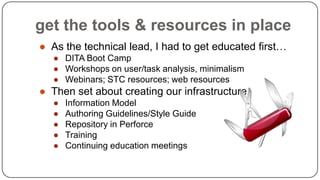
get the tools & resources in place
● As the technical lead, I had to get educated first…
● DITA Boot Camp
● Workshops on user/task analysis, minimalism
● Webinars; STC resources; web resources

● Then set about creating our infrastructure
●
●
●
●
●

Information Model
Authoring Guidelines/Style Guide
Repository in Perforce
Training
Continuing education meetings
migration instead of conversion
 Couldn’t stop the presses; how do we get our still-valid content in topics?

 Started with new features
 Used the gap at the beginning of a new release cycle to start

moving tasks into topics
 Easiest to transition
 Quick results

 Constant reminders to team that it was not OK to just plop FM

content into a topic; weed/prune/thin/discard
 Did not set any arbitrary deadlines; when we were done, we were
done
 5 years later, 1st release in all topics (this month!)
analyze your content
• Prune unnecessary text
• Chunk content into topics
• Identify reuse
delete, delete, delete
● Wordiness
● Unnecessary explanations
● Excessive pointers to other
docs/sections
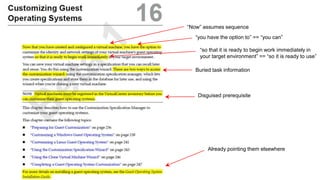
“Now” assumes sequence
“you have the option to” == “you can”
“so that it is ready to begin work immediately in
your target environment” == “so it is ready to use”
Buried task information

Disguised prerequisite

Already pointing them elsewhere
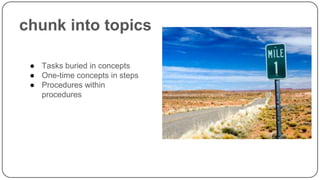
chunk into topics
● Tasks buried in concepts
● One-time concepts in steps
● Procedures within
procedures
2

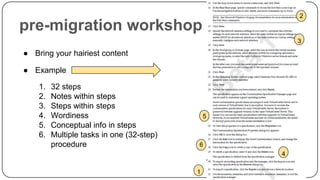
pre-migration workshop

3

● Bring your hairiest content
● Example

1.
2.
3.
4.
5.
6.

32 steps
Notes within steps
Steps within steps
Wordiness
Conceptual info in steps
Multiple tasks in one (32-step)
procedure

5

6
4
1
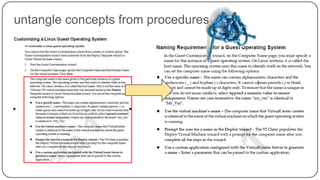
untangle concepts from procedures
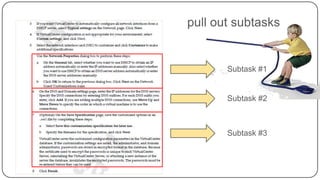
pull out subtasks

Subtask #1

Subtask #2

Subtask #3
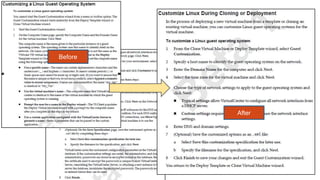
Before

After
selecting tools
tools/environment







We knew enough to not pick a CCM right away; the tools are not
the process
Used the same source control as Dev; no cost
We already had an XML authoring tool in our toolset
Invested in an XSL:FO renderer for PDF
Open-source or standards-based is a guiding principle; we do not
want to get backed into a corner by our tools.
content management systems
 Do you need a content management system? Maybe,

maybe not.
 A source control system (such as Perforce, git, and so
on) is an alternative that you might already have access
to.
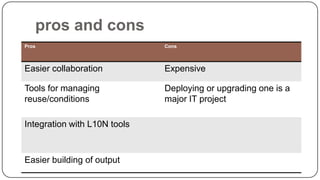
pros and cons
Pros

Cons

Easier collaboration

Expensive

Tools for managing
reuse/conditions

Deploying or upgrading one is a
major IT project

Integration with L10N tools

Easier building of output
authoring tools
 Your choice of tool might be constrained by your CMS

 Make sure that all stakeholders are involved in tool

selection: writers, editors, localization, possibly
reviewers
 If possible, have a small group of writers try out the
tools for a while before settling on final choice.
Success Stories
Or how we looked like rock stars

19
successes
● Fortunate to have doc-savvy senior leadership; was not a
“tough sell” to get support on moving to an XML framework
● Moved a writing resource into a technical lead role
● Allowed to develop Info Model and preliminary Authoring
Guidelines before any writers were involved
● Had a tech comm “task force” to review and approve these
resources
● Already had great XML authoring tool in our toolset
● Did not set a completion deadline
● TBA training is mandatory for all new hires; 2 days
 Invite all writers to join in for a refresher
 Periodic continuing education sessions
vSphere Client Online Help
 We had a ~1000 topic online Help system that was

originally maintained as a separate source file, despite
considerable duplication of information from other docs.
 After conversion to DITA/TBA, we were able to
incorporate a substantial amount of content reuse.
 Result: better content and less time spent maintaining
content.
VMware Tools documentation
• A set of virtual machine utilities used in 5 different

products.
• Documentation was scattered in different source files,
inconsistent across products, often incomplete.
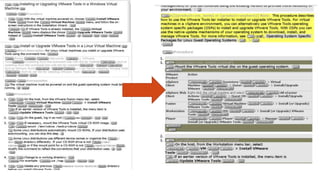
• After DITA/TBA, content was consolidated into a
single set of topics with conditional text that allowed
them to produce appropriate output for each product.
flexibility of doc structure
• Documents can easily be split or combined as

we get feedback about how customers like to
see information chunked.
• We tend to re-architect our doc set every few
releases, and this was a pain when we
worked in FrameMaker files.
everyone in the same toolchain
• Editors edit directly in DITA files.
• Localization team exports content directly from the CMS.

• No more hand-entering edits from marked-up hardcopy

or PDF!
• No more zipping up files and ftp-ing them to the
localization vendor!
pitfalls
surprises
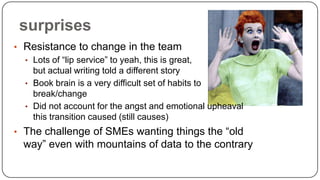
• Resistance to change in the team
• Lots of “lip service” to yeah, this is great,
but actual writing told a different story
• Book brain is a very difficult set of habits to
break/change
• Did not account for the angst and emotional upheaval
this transition caused (still causes)
• The challenge of SMEs wanting things the “old

way” even with mountains of data to the contrary
going overboard with reuse
 Every time you reuse content, you create a dependency.
 Reuse of content containing xrefs is a recipe for

headaches.
 Someone can reuse your content without your knowledge
– and then not be informed when that content becomes
obsolete.
 If you reuse someone else’s content, keep an eye out for
changes and whether they are appropriate for your
context.
short descriptions are hard
• Beware the tautological short description: “Use the Edit

Settings dialog box to edit the settings.”
• Develop editorial standards for short descriptions. Show
examples of good ones.
• Think about the contexts in which short descriptions
appear. This might include:
 As the first paragraph of the topic
 In search results
 In tooltips for links
29
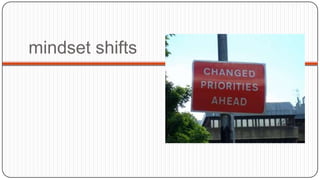
mindset shifts
writing process impacts
 Writers now [mostly] removed from publication processes
 Much more collaboration on content development and writing;

writers actually have to talk to each other (gasp!  )
 Editing occurs as content is crafted; reduction in the last-minute
frenzy that DTP can allow
 Enforce consistency across team with quality checking tools
 “resistance is futile” messaging from Tech Comm management to
their reports; must have support from management on your team
for success
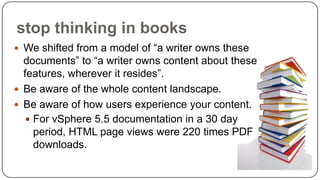
stop thinking in books
 We shifted from a model of “a writer owns these

documents” to “a writer owns content about these
features, wherever it resides”.
 Be aware of the whole content landscape.
 Be aware of how users experience your content.
 For vSphere 5.5 documentation in a 30 day
period, HTML page views were 220 times PDF
downloads.
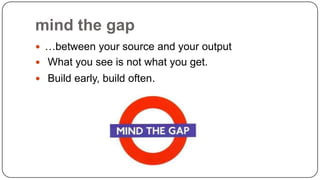
mind the gap
 …between your source and your output
 What you see is not what you get.

 Build early, build often.
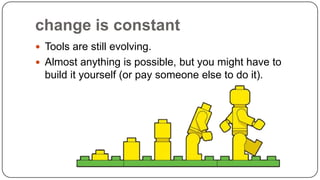
change is constant
 Tools are still evolving.
 Almost anything is possible, but you might have to

build it yourself (or pay someone else to do it).
communicate more
 Unless you work on a team of one, you’ll probably be

collaborating more.
questions to answer
 Examples of questions:
• I need information about feature X – has someone
•
•
•
•

already written content that I can use?
How do I know I have the correct version of the
topic?
If I insert a hyperlink or conref here, will that cause
problems if the topic is used in another context?
Is this topic ready for review? Translation?
Does the information in this topic apply to the version
of the product I’m interested in?
36
strategies for communication
 Version-specific comments (CMS feature)
 In-topic comments

 Wikis
 Meetings
 “Brown-bag” talks
resources
●
●
●
●
●
●
●
●

dita-users@yahoo.com user group
Many DITA/TBA LinkedIn groups
Industry conferences
DITA Boot Camp
Webinars
QA Checker (from Patrick Quinlan, Ditanauts)
Minimalism courses, workshops
Books: DITA Style Guide, DITA Best Practices, DITA for Practitioners:
Volume 1, DITA for Print: A DITA Open Toolkit Workbook
about amy
●
●
●
●

Tech Comm manager at VMware (~1 ½ years)
Tech Writer at VMware (~4 ½ years)
Worked in DITA for ~5 ½ years
Member of IA Council at VMware
about tracy


Tracy Baker, Sr. Technical Communication Specialist



- Work @ F5 Networks, headquartered in Seattle, WA



- 13 years as a technical writer (9 @ F5); moved into technical role in 2008



- Sold our director on moving to XML/DITA/TBA
 - She tasked me with making it happen, but also gave me the freedom and
trust to put all the pieces in place so we could be successful
 - I wear many hats: DITA OT expert, publication person, TBA consultant,
information architect, counselor 
about wendy
 Technical Writer at VMware for 8 years
 Worked in DITA for ~5½ years.
 Member of the IA Council at VMware

 @wshaffer74 on twitter

The Road to DITA

  • 1.
    The Road toDITA Amy Bowman, Tracy Baker, and Wendy Shaffer
  • 2.
    getting the go-ahead •Dothe legwork •Identify your stakeholders •Pitch it
  • 3.
    getting the go-ahead ●Get the facts for your universe ● Do you have content that is reused? ● Do you translate? ● In what formats do you publish? ● Figure out what means the most to your stakeholders and pitch that ● The farther up the food chain the less they care that your team is overworked ● They want to know how moving to XML will impact the bottom line in a positive way
  • 4.
    get the tools& resources in place ● As the technical lead, I had to get educated first… ● DITA Boot Camp ● Workshops on user/task analysis, minimalism ● Webinars; STC resources; web resources ● Then set about creating our infrastructure ● ● ● ● ● Information Model Authoring Guidelines/Style Guide Repository in Perforce Training Continuing education meetings
  • 5.
    migration instead ofconversion  Couldn’t stop the presses; how do we get our still-valid content in topics?  Started with new features  Used the gap at the beginning of a new release cycle to start moving tasks into topics  Easiest to transition  Quick results  Constant reminders to team that it was not OK to just plop FM content into a topic; weed/prune/thin/discard  Did not set any arbitrary deadlines; when we were done, we were done  5 years later, 1st release in all topics (this month!)
  • 6.
    analyze your content •Prune unnecessary text • Chunk content into topics • Identify reuse
  • 7.
    delete, delete, delete ●Wordiness ● Unnecessary explanations ● Excessive pointers to other docs/sections
  • 8.
    “Now” assumes sequence “youhave the option to” == “you can” “so that it is ready to begin work immediately in your target environment” == “so it is ready to use” Buried task information Disguised prerequisite Already pointing them elsewhere
  • 9.
    chunk into topics ●Tasks buried in concepts ● One-time concepts in steps ● Procedures within procedures
  • 10.
    2 pre-migration workshop 3 ● Bringyour hairiest content ● Example 1. 2. 3. 4. 5. 6. 32 steps Notes within steps Steps within steps Wordiness Conceptual info in steps Multiple tasks in one (32-step) procedure 5 6 4 1
  • 11.
  • 12.
    pull out subtasks Subtask#1 Subtask #2 Subtask #3
  • 13.
  • 14.
  • 15.
    tools/environment      We knew enoughto not pick a CCM right away; the tools are not the process Used the same source control as Dev; no cost We already had an XML authoring tool in our toolset Invested in an XSL:FO renderer for PDF Open-source or standards-based is a guiding principle; we do not want to get backed into a corner by our tools.
  • 16.
    content management systems Do you need a content management system? Maybe, maybe not.  A source control system (such as Perforce, git, and so on) is an alternative that you might already have access to.
  • 17.
    pros and cons Pros Cons Easiercollaboration Expensive Tools for managing reuse/conditions Deploying or upgrading one is a major IT project Integration with L10N tools Easier building of output
  • 18.
    authoring tools  Yourchoice of tool might be constrained by your CMS  Make sure that all stakeholders are involved in tool selection: writers, editors, localization, possibly reviewers  If possible, have a small group of writers try out the tools for a while before settling on final choice.
  • 19.
    Success Stories Or howwe looked like rock stars 19
  • 20.
    successes ● Fortunate tohave doc-savvy senior leadership; was not a “tough sell” to get support on moving to an XML framework ● Moved a writing resource into a technical lead role ● Allowed to develop Info Model and preliminary Authoring Guidelines before any writers were involved ● Had a tech comm “task force” to review and approve these resources ● Already had great XML authoring tool in our toolset ● Did not set a completion deadline ● TBA training is mandatory for all new hires; 2 days  Invite all writers to join in for a refresher  Periodic continuing education sessions
  • 21.
    vSphere Client OnlineHelp  We had a ~1000 topic online Help system that was originally maintained as a separate source file, despite considerable duplication of information from other docs.  After conversion to DITA/TBA, we were able to incorporate a substantial amount of content reuse.  Result: better content and less time spent maintaining content.
  • 22.
    VMware Tools documentation •A set of virtual machine utilities used in 5 different products. • Documentation was scattered in different source files, inconsistent across products, often incomplete. • After DITA/TBA, content was consolidated into a single set of topics with conditional text that allowed them to produce appropriate output for each product.
  • 24.
    flexibility of docstructure • Documents can easily be split or combined as we get feedback about how customers like to see information chunked. • We tend to re-architect our doc set every few releases, and this was a pain when we worked in FrameMaker files.
  • 25.
    everyone in thesame toolchain • Editors edit directly in DITA files. • Localization team exports content directly from the CMS. • No more hand-entering edits from marked-up hardcopy or PDF! • No more zipping up files and ftp-ing them to the localization vendor!
  • 26.
  • 27.
    surprises • Resistance tochange in the team • Lots of “lip service” to yeah, this is great, but actual writing told a different story • Book brain is a very difficult set of habits to break/change • Did not account for the angst and emotional upheaval this transition caused (still causes) • The challenge of SMEs wanting things the “old way” even with mountains of data to the contrary
  • 28.
    going overboard withreuse  Every time you reuse content, you create a dependency.  Reuse of content containing xrefs is a recipe for headaches.  Someone can reuse your content without your knowledge – and then not be informed when that content becomes obsolete.  If you reuse someone else’s content, keep an eye out for changes and whether they are appropriate for your context.
  • 29.
    short descriptions arehard • Beware the tautological short description: “Use the Edit Settings dialog box to edit the settings.” • Develop editorial standards for short descriptions. Show examples of good ones. • Think about the contexts in which short descriptions appear. This might include:  As the first paragraph of the topic  In search results  In tooltips for links 29
  • 30.
  • 31.
    writing process impacts Writers now [mostly] removed from publication processes  Much more collaboration on content development and writing; writers actually have to talk to each other (gasp!  )  Editing occurs as content is crafted; reduction in the last-minute frenzy that DTP can allow  Enforce consistency across team with quality checking tools  “resistance is futile” messaging from Tech Comm management to their reports; must have support from management on your team for success
  • 32.
    stop thinking inbooks  We shifted from a model of “a writer owns these documents” to “a writer owns content about these features, wherever it resides”.  Be aware of the whole content landscape.  Be aware of how users experience your content.  For vSphere 5.5 documentation in a 30 day period, HTML page views were 220 times PDF downloads.
  • 33.
    mind the gap …between your source and your output  What you see is not what you get.  Build early, build often.
  • 34.
    change is constant Tools are still evolving.  Almost anything is possible, but you might have to build it yourself (or pay someone else to do it).
  • 35.
    communicate more  Unlessyou work on a team of one, you’ll probably be collaborating more.
  • 36.
    questions to answer Examples of questions: • I need information about feature X – has someone • • • • already written content that I can use? How do I know I have the correct version of the topic? If I insert a hyperlink or conref here, will that cause problems if the topic is used in another context? Is this topic ready for review? Translation? Does the information in this topic apply to the version of the product I’m interested in? 36
  • 37.
    strategies for communication Version-specific comments (CMS feature)  In-topic comments  Wikis  Meetings  “Brown-bag” talks
  • 38.
    resources ● ● ● ● ● ● ● ● dita-users@yahoo.com user group ManyDITA/TBA LinkedIn groups Industry conferences DITA Boot Camp Webinars QA Checker (from Patrick Quinlan, Ditanauts) Minimalism courses, workshops Books: DITA Style Guide, DITA Best Practices, DITA for Practitioners: Volume 1, DITA for Print: A DITA Open Toolkit Workbook
  • 39.
    about amy ● ● ● ● Tech Commmanager at VMware (~1 ½ years) Tech Writer at VMware (~4 ½ years) Worked in DITA for ~5 ½ years Member of IA Council at VMware
  • 40.
    about tracy  Tracy Baker,Sr. Technical Communication Specialist  - Work @ F5 Networks, headquartered in Seattle, WA  - 13 years as a technical writer (9 @ F5); moved into technical role in 2008  - Sold our director on moving to XML/DITA/TBA  - She tasked me with making it happen, but also gave me the freedom and trust to put all the pieces in place so we could be successful  - I wear many hats: DITA OT expert, publication person, TBA consultant, information architect, counselor 
  • 41.
    about wendy  TechnicalWriter at VMware for 8 years  Worked in DITA for ~5½ years.  Member of the IA Council at VMware  @wshaffer74 on twitter

Editor's Notes

  • #16 . (At VMware, we had writers working in both Structured Framemaker and XMetaL before settling on XMetaL