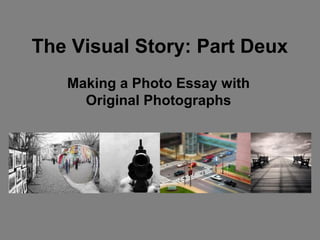
The Visual Story: Part Deux
   Making a Photo Essay with
     Original Photographs
Introduction:
• For this second photo
  essay assignment, you
  will work alone or in
  pairs in order to create a
  photo essay using
  ONLY photographs
  you have taken and
  edited yourselves.
So… What are we supposed to do?
• Your task is to tell a short story using 25-
  40 photos.
• Your story may be funny or serious but it
  must make sense (to everyone, not just
  you).
• You must use a variety of photographs of
  different shot lengths (requirements will
  follow).
How to go about compiling your
       found photo essay:
• Decide on the story you are going to tell.
  Will it be a serious story? Entertaining?
  Abstract?
• Search the internet for photos which will
  eloquently tell your story using limited
  written words.
• Using PowerPoint, assemble your photos
  into a cohesive story.
• Add a caption for each photograph, of no
  more than a few sentences.
Cont’d.
• You may add effects such as
  transitions, however do not rely
  on the effects to make the story
  good. The photos themselves
  should be enough to do that if
  you’ve chosen them well.
• Give your photo essay a title
  and brief description- and add it
  to the beginning of you
  PowerPoint presentation.
Finally you must-
  SET YOUR PRESENTATION TO MUSIC
• To set a presentation to music you must
  first choose a piece of music that
  compliments your photo essay.
• Save the piece of music as an mp3 in your
  folder
• Go to your first slide and go to
  Insert>Movies and Sounds>Sound from
  file, then choose your saved Mp3.
Music Cont’d.
• You should see a small sound symbol on your
  page now.
• Next you will have to time your presentation to
  the music. To do this go to “Slide
  Show”>”Rehearse Timings”
• Your presentation will start and you will see a
  counter in the top left hand corner
• Read each of your slides slowly and click on the
  arrow to move to your next slide until the
  presentation is done.
Things to remember:

• Photos and stories must not contain any
  offensive material whatsoever. This
  includes nudity, sexual activity, or anything
  construed as homophobic, racist or sexist.
• Since the photos are the basis of the story
  make sure they are well chosen. This
  means that they should be in focus,
  clear, and have interesting and varied
  angles, lighting and colour.
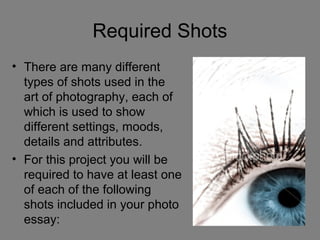
Required Shots
• There are many different
  types of shots used in the
  art of photography, each of
  which is used to show
  different settings, moods,
  details and attributes.
• For this project you will be
  required to have at least one
  of each of the following
  shots included in your photo
  essay:
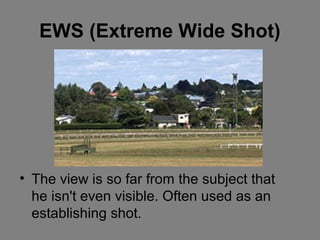
EWS (Extreme Wide Shot)


• The view is so far from the subject that
  he isn't even visible. Often used as an
  establishing shot.
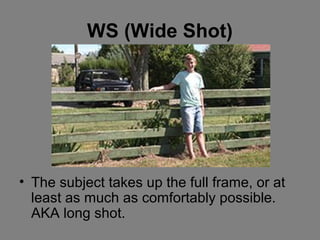
WS (Wide Shot)


• The subject takes up the full frame, or at
  least as much as comfortably possible.
  AKA long shot.
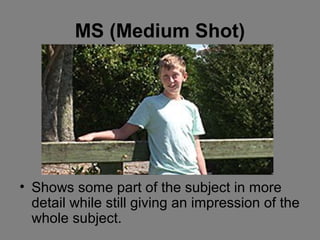
MS (Medium Shot)


• Shows some part of the subject in more
  detail while still giving an impression of the
  whole subject.
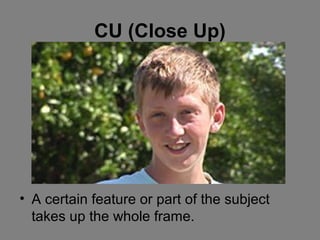
CU (Close Up)


• A certain feature or part of the subject
  takes up the whole frame.
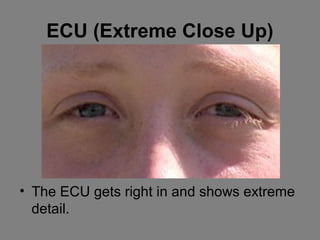
ECU (Extreme Close Up)


• The ECU gets right in and shows extreme
  detail.
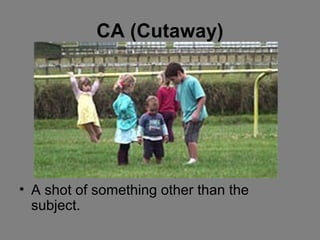
CA (Cutaway)


• A shot of something other than the
  subject.

The visual story part deux

  • 1.
    The Visual Story:Part Deux Making a Photo Essay with Original Photographs
  • 2.
    Introduction: • For thissecond photo essay assignment, you will work alone or in pairs in order to create a photo essay using ONLY photographs you have taken and edited yourselves.
  • 3.
    So… What arewe supposed to do? • Your task is to tell a short story using 25- 40 photos. • Your story may be funny or serious but it must make sense (to everyone, not just you). • You must use a variety of photographs of different shot lengths (requirements will follow).
  • 4.
    How to goabout compiling your found photo essay: • Decide on the story you are going to tell. Will it be a serious story? Entertaining? Abstract? • Search the internet for photos which will eloquently tell your story using limited written words. • Using PowerPoint, assemble your photos into a cohesive story. • Add a caption for each photograph, of no more than a few sentences.
  • 5.
    Cont’d. • You mayadd effects such as transitions, however do not rely on the effects to make the story good. The photos themselves should be enough to do that if you’ve chosen them well. • Give your photo essay a title and brief description- and add it to the beginning of you PowerPoint presentation.
  • 6.
    Finally you must- SET YOUR PRESENTATION TO MUSIC • To set a presentation to music you must first choose a piece of music that compliments your photo essay. • Save the piece of music as an mp3 in your folder • Go to your first slide and go to Insert>Movies and Sounds>Sound from file, then choose your saved Mp3.
  • 7.
    Music Cont’d. • Youshould see a small sound symbol on your page now. • Next you will have to time your presentation to the music. To do this go to “Slide Show”>”Rehearse Timings” • Your presentation will start and you will see a counter in the top left hand corner • Read each of your slides slowly and click on the arrow to move to your next slide until the presentation is done.
  • 8.
    Things to remember: •Photos and stories must not contain any offensive material whatsoever. This includes nudity, sexual activity, or anything construed as homophobic, racist or sexist. • Since the photos are the basis of the story make sure they are well chosen. This means that they should be in focus, clear, and have interesting and varied angles, lighting and colour.
  • 9.
    Required Shots • Thereare many different types of shots used in the art of photography, each of which is used to show different settings, moods, details and attributes. • For this project you will be required to have at least one of each of the following shots included in your photo essay:
  • 10.
    EWS (Extreme WideShot) • The view is so far from the subject that he isn't even visible. Often used as an establishing shot.
  • 11.
    WS (Wide Shot) •The subject takes up the full frame, or at least as much as comfortably possible. AKA long shot.
  • 12.
    MS (Medium Shot) •Shows some part of the subject in more detail while still giving an impression of the whole subject.
  • 13.
    CU (Close Up) •A certain feature or part of the subject takes up the whole frame.
  • 14.
    ECU (Extreme CloseUp) • The ECU gets right in and shows extreme detail.
  • 15.
    CA (Cutaway) • Ashot of something other than the subject.