The Sky’s the Limit

       Integrate and run MySQL
             in the cloud
                          Ivan Zoratti

12.09.01
Agenda

A bit of introduction

The Cloud: a DBA perspective

MySQL everywhere

Running MySQL in AWS

Conclusions


                               2
Who is Ivan


    ?
              3
SkySQL

     #1 provider of MySQL-based solutions, for
     software and services

     Backed by Monty Program AB and 3rd
     parties active in the MySQL ecosystem

     Committed to provide the best solutions
     around MySQL for the Community and for
     the Enterprise


http://www.skysql.com                            4
The Cloud
A DBA Perspective
What is a Cloud?
“Computer resources
delivered as a service
over a network”
IaaS - Infrastructure
  Hardware
  Virtual Machines
  VLANs

PaaS - Platform
  OS
  Database
  Application Server

SaaS - Software
  Application Software                                                6
                         http://en.wikipedia.org/wiki/File:Cloud_computing.svg
What is a Cloud?
“Computer resources
delivered as a service
over a network”
IaaS - Infrastructure
  Hardware
  Virtual Machines
  VLANs

PaaS - Platform
  OS
  Database
  Application Server

SaaS - Software
  Application Software                                                7
                         http://en.wikipedia.org/wiki/File:Cloud_computing.svg
The Cloud Promise
Agility           Reliability
Compatibility     Security
Elasticity        Systems
                  Independence
Low Maintenance
                  Virtualization
Multi-tenancy
Reduced Costs
                                   8
Breaking News!
Agility            Reliability

                  ou   d
Compatibility
                Cl Security
              e Systems na       l]
Elasticity Th            io
                  el at
                   Indipendence y!
            ot [R           nd   l
         N
Low Maintenance
     s               Fr ie
Multi-tenancy se-
   I               Virtualization

        a ta ba
    D
Reduced Costs
                                      9
Can We Avoid the
                 Shared Enterprise
                 Business Services

   The Big Migration

         Commodity
        Data Services

       IT in a
         Box

 Home
 Clouds

 Big
Data


                                                                                                   10
                                     http://www.slideshare.net/Linthicum/future-of-cloud-computing-linthicum
NoSQL adoption

Key / Value Stores

Structured vs Unstructured data

Documents

NoSQL and the Cloud


                                  11
Welcome to
Your New Data Center


                       12
Challenges for a MySQL
 DBA in the next 5 years
Integration with other databases - primarily NoSQL

Adopt the right technology to make MySQL and the
Cloud work together

Integration with provisioning, administration and
monitoring tools

Increase/provide better security for the database
and for the users’ data

Provide elasticity and reduce TCO
                                                    13
MySQL Everywhere?
Deployment Scenarios
 Bare Metal

 Virtual Machines

 Private Clouds

 Public Clouds

 Hybrid Clouds


                       15
Reliability/High
                   Availability
Bare Metal         There are many well know solutions to choose from.


Virtual Machines   Virtual machines will increase the options.


                   Must rely on the features provided. It can be complicated and
Public Clouds      standard features may not fit well.


Private Clouds     It combines the best of the three above.


                   It can be a good balance between TCO and features for reliability
Hybrid Clouds      and disaster recovery.

                                                                                       16
Elasticity
                   Fairly difficult and not practical. Servers need be switched off but
Bare Metal         they must remain in stand-by.


                   Virtual machines can be switch on on different physical machines,
Virtual Machines   depending on availability and workload.


Public Clouds      Must rely on the features provided. It can be difficult


Private Clouds     It probably provides the easiest implementation


                   Good combination of scalability and costs - it is probably the best in
Hybrid Clouds      cost reduction and in implementation. Integration may be hard.

                                                                                         17
Multi-tenancy
                   Must rely on MySQL features and some scripting or ad-hoc
Bare Metal         implementation. It can work, to some extent, but it really depends on
                   a case by case basis.


Virtual Machines   Like bare metal, specialised servers may be easier to implement.


                   Some providers implement multi-tenancy at DB level, but it is far
Public Clouds      from being a good choice. Multi-tenancy at server level (i.e. reserved
                   DB instances) may be a good fit.


                   Not great, but it gives more option - like a combination of bare metal
Private Clouds     + public cloud options.


Hybrid Clouds      As in private clouds, plus integration aspects.


                                                                                       18
Security
                   It can work behind firewalls or by setting up secure connections
Bare Metal         with external clients.


                   Like bare metal, virtual storage may be easier to manage, but also to
Virtual Machines   copy and steal.


                   Security must be set for internal and for external communication.
Public Clouds      Dealing with the security features defined by the provider may be
                   tricky.

                   It is probably the easiest option, combining virtual machine features
Private Clouds     and cloud features. On the other hand, virtual storage can be more
                   vulnerable.


                   It adds extra complexity in integrating multiple environment through
Hybrid Clouds      a secure or unsecure network.

                                                                                       19
MySQL on Amazon
      EC2
RDS or EC2 instance?
Aspects to consider:
  MySQL Engines/distribution and versions
  Storage
  HA configuration
  Automatic failover
  Backup strategy
  Monitoring and alerting
  Instance recovery
  DB Import/Export
  Elasticity


                                            21
Reliability/High
              Availability
What happens when a node has a failure?
   RDS:
      AWS issue, hopefully there is a snapshot or a backup to recover on
      another instance.
      Recovery should be handled automatically
   Ad-hoc EC2 instance:
      The instance must be restarted.
      The public IP address must be updated at a client level (or an elastic IP
      must be used

What happens when an instance must be stopped?
   RDS: A snapshot must be taken first, it can restart from the snapshot
   Ad-hoc EC2 instance: The instance can be stopped, the IP address
   must be updated when it restarts

Network latency and instability can be a big issue
HA on EC2 requires further IAM settings
Cross-Region shipment can be expensive
                                                                             22
Accessibility
RDS: Should be defined through roles and security
groups

Ad-hoc instances:
  One or more Elastic IP addresses should be setup
  to guarantee access to the servers from external
  clients or to avoid the switching of public IP
  addresses
  IAM roles should be set to give access to S3
  buckets

Watch out for the limit of the number of Elastic IPs
  When you attach an Elastic IP, you loose your
  Public IP                                          23
Performance
RDS: Servers can be provisioned with specific CPU,
RAM and IOPs
  10GB Network connectivity may make a big difference
  for the interaction between DB and application
Ad-hoc EC2 instances:
  Choice between CPU, RAM and IOPs
  Standard Volumes may be enough for not very high
  performance DBs
  Provisioned IOPs can be setup
  Reserved instances are a good option to avoid sharing
  physical machines with other resource hungry apps
Network connectivity, latency and instability may be an
                                                      24
Security
RDS: give access to internal and external servers

Ad-Hoc instances:
  Define Identity and Access Management (IAM)
     Manage Elastic IP address
     Manage S3 buckets
     Manage instances
  Define the Security Groups
     MySQL
     Pacemaker/Corosync
     administration and monitoring

IAM works with the SDK but not with command-line tools
  You must write your own tools to make use of IAM
  You need IAM roles to allow an instance to switch on/off
  another another instances - the alternative is to use keys
                                                               25
Backups/Restore
RDS: Automatically handling of rolling backup
sets and point in time recovery

Ad-Hoc instances:
  Define Identity and Access Management (IAM)
    Manage Elastic IP address
    Manage S3 buckets
    Manage instances
  Define the Security Groups
    MySQL
    Pacemaker/Corosync
    administration and monitoring

                                                26
Introducing
SkySQL Cloud Data
SkySQL Data Suite
                                          Replication

                                 HA
                                          Synchronous
                 Online
                                          Super-scale
                              Full-Text

SkySQL Data

                Analytics


              Carrier Grade
                                                        28
SkySQL Cloud Data
          Suite Rel.1
                                          Replication

                                 HA
                                          Synchronous
                 Online
                                          Super-scale
                              Full-Text

SkySQL Data

                Analytics


              Carrier Grade
                                                        29
Why a Data Suite?
Verified, certified,
integrated software
modules

It covers the majority of the
users’ needs for:
  Reliability
  Scalability
  High Availability
  Interoperability
  Features
  Infrastructure
                                30
SkySQL Cloud Data Suite
    The Enterprise meets the

Scalable

Highly Available

High
Performance

Elastic


                               31
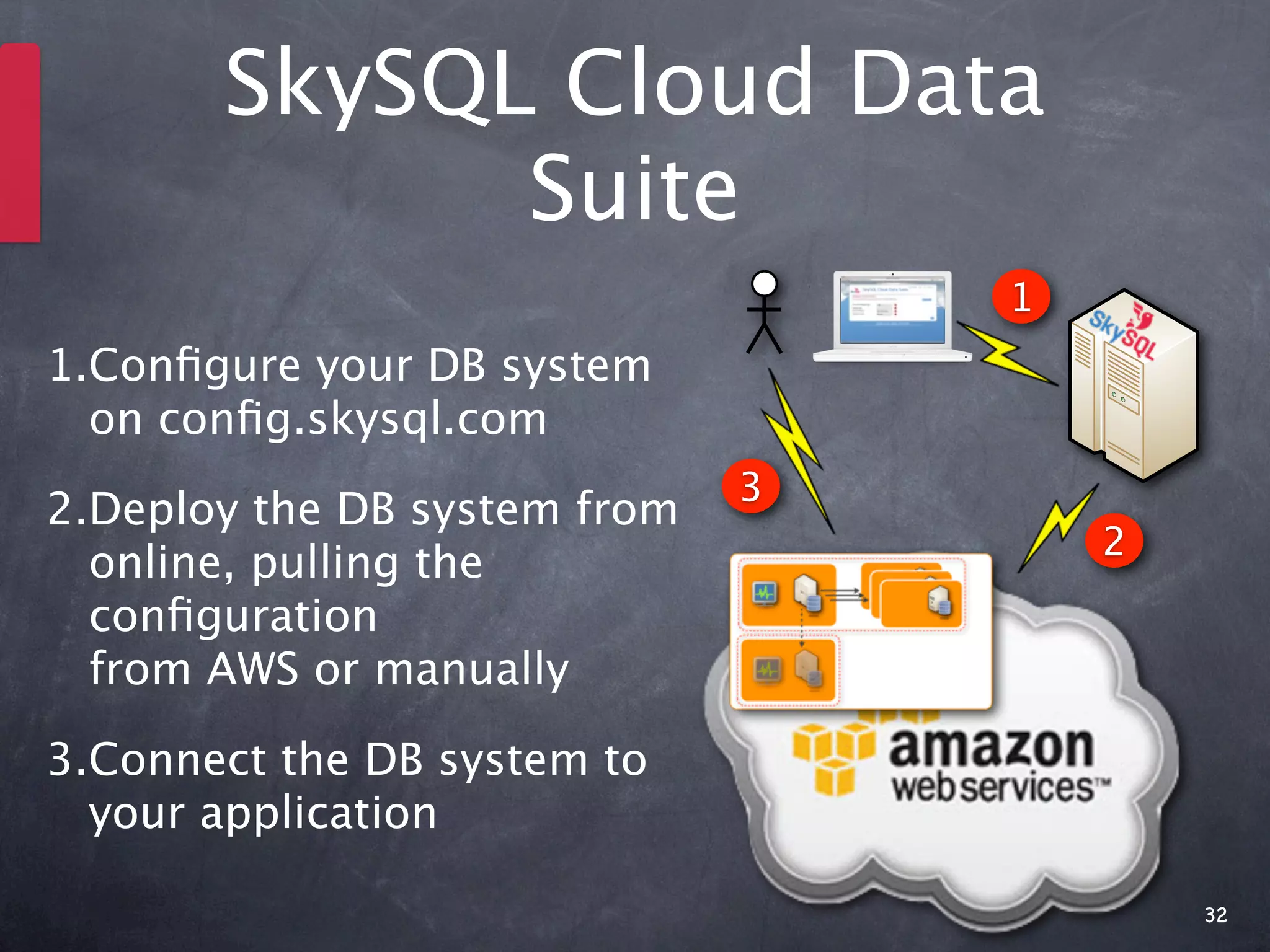
SkySQL Cloud Data
             Suite
                                  1
1.Configure your DB system
  on config.skysql.com
                              3
2.Deploy the DB system from
                                      2
  online, pulling the
  configuration
  from AWS or manually

3.Connect the DB system to
  your application

                                          32
SkySQL Cloud Data
      Suite


                    33
SkySQL Cloud Data
      Suite


                    34
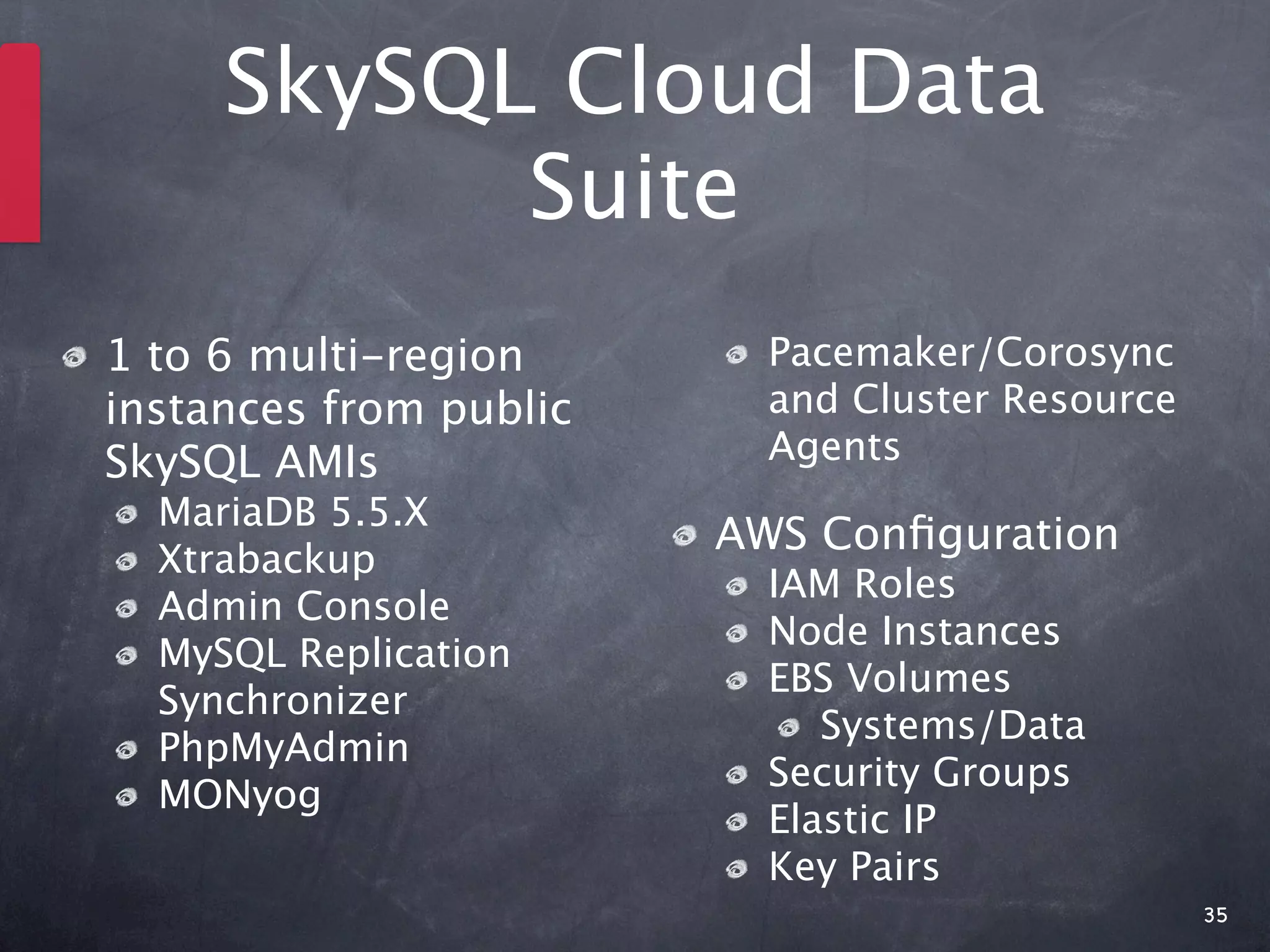
SkySQL Cloud Data
           Suite
1 to 6 multi-region       Pacemaker/Corosync
instances from public     and Cluster Resource
SkySQL AMIs               Agents
  MariaDB 5.5.X
                        AWS Configuration
  Xtrabackup
                          IAM Roles
  Admin Console
                          Node Instances
  MySQL Replication
                          EBS Volumes
  Synchronizer
                             Systems/Data
  PhpMyAdmin
                          Security Groups
  MONyog
                          Elastic IP
                          Key Pairs
                                                 35
SkySQL Cloud Data
      Suite


    Database


                    36
SkySQL Cloud Data
      Suite


               Database


                          Database


    Database
                                     Database


                                                37
SkySQL Cloud Data
      Suite


               Database


                          Database


    Database
                                     Database


                                                38
SkySQL Cloud Data
      Suite


               Database


                          Database


    Database
                                     Database


    Database


                                                39
Admin Console


                40
Admin Console
        Features
Start/Stop Cluster

Start/Stop/Isolate a Node - Real-time /
Scheduled

Import / Export Data

Promote Slave to Master

Backup - Real-time / Scheduled
  Incremental / Full

                                          41
Admin Console
        Features

Real-time instant monitoring in the Admin
Console node page

Real-time monitoring with PhpMyAdmin

Extra monitoring features, with Custom
Advisors, time machine and query analysis
using MONyog


                                            42
What’s Next


              43
Thank You!
 More info:
   www.skysql.com
   www.skysql.com/blog

 Slides and notes:
   www.slideshare.net/izoratti
   izoratti.blogspot.com

 Test:
   config.skysql.com
   www.skysql.com/forum
   bugs.skysql.com
                                 44

The sky's the limit

  • 1.
    The Sky’s theLimit Integrate and run MySQL in the cloud Ivan Zoratti 12.09.01
  • 2.
    Agenda A bit ofintroduction The Cloud: a DBA perspective MySQL everywhere Running MySQL in AWS Conclusions 2
  • 3.
  • 4.
    SkySQL #1 provider of MySQL-based solutions, for software and services Backed by Monty Program AB and 3rd parties active in the MySQL ecosystem Committed to provide the best solutions around MySQL for the Community and for the Enterprise http://www.skysql.com 4
  • 5.
    The Cloud A DBAPerspective
  • 6.
    What is aCloud? “Computer resources delivered as a service over a network” IaaS - Infrastructure Hardware Virtual Machines VLANs PaaS - Platform OS Database Application Server SaaS - Software Application Software 6 http://en.wikipedia.org/wiki/File:Cloud_computing.svg
  • 7.
    What is aCloud? “Computer resources delivered as a service over a network” IaaS - Infrastructure Hardware Virtual Machines VLANs PaaS - Platform OS Database Application Server SaaS - Software Application Software 7 http://en.wikipedia.org/wiki/File:Cloud_computing.svg
  • 8.
    The Cloud Promise Agility Reliability Compatibility Security Elasticity Systems Independence Low Maintenance Virtualization Multi-tenancy Reduced Costs 8
  • 9.
    Breaking News! Agility Reliability ou d Compatibility Cl Security e Systems na l] Elasticity Th io el at Indipendence y! ot [R nd l N Low Maintenance s Fr ie Multi-tenancy se- I Virtualization a ta ba D Reduced Costs 9
  • 10.
    Can We Avoidthe Shared Enterprise Business Services The Big Migration Commodity Data Services IT in a Box Home Clouds Big Data 10 http://www.slideshare.net/Linthicum/future-of-cloud-computing-linthicum
  • 11.
    NoSQL adoption Key /Value Stores Structured vs Unstructured data Documents NoSQL and the Cloud 11
  • 12.
    Welcome to Your NewData Center 12
  • 13.
    Challenges for aMySQL DBA in the next 5 years Integration with other databases - primarily NoSQL Adopt the right technology to make MySQL and the Cloud work together Integration with provisioning, administration and monitoring tools Increase/provide better security for the database and for the users’ data Provide elasticity and reduce TCO 13
  • 14.
  • 15.
    Deployment Scenarios BareMetal Virtual Machines Private Clouds Public Clouds Hybrid Clouds 15
  • 16.
    Reliability/High Availability Bare Metal There are many well know solutions to choose from. Virtual Machines Virtual machines will increase the options. Must rely on the features provided. It can be complicated and Public Clouds standard features may not fit well. Private Clouds It combines the best of the three above. It can be a good balance between TCO and features for reliability Hybrid Clouds and disaster recovery. 16
  • 17.
    Elasticity Fairly difficult and not practical. Servers need be switched off but Bare Metal they must remain in stand-by. Virtual machines can be switch on on different physical machines, Virtual Machines depending on availability and workload. Public Clouds Must rely on the features provided. It can be difficult Private Clouds It probably provides the easiest implementation Good combination of scalability and costs - it is probably the best in Hybrid Clouds cost reduction and in implementation. Integration may be hard. 17
  • 18.
    Multi-tenancy Must rely on MySQL features and some scripting or ad-hoc Bare Metal implementation. It can work, to some extent, but it really depends on a case by case basis. Virtual Machines Like bare metal, specialised servers may be easier to implement. Some providers implement multi-tenancy at DB level, but it is far Public Clouds from being a good choice. Multi-tenancy at server level (i.e. reserved DB instances) may be a good fit. Not great, but it gives more option - like a combination of bare metal Private Clouds + public cloud options. Hybrid Clouds As in private clouds, plus integration aspects. 18
  • 19.
    Security It can work behind firewalls or by setting up secure connections Bare Metal with external clients. Like bare metal, virtual storage may be easier to manage, but also to Virtual Machines copy and steal. Security must be set for internal and for external communication. Public Clouds Dealing with the security features defined by the provider may be tricky. It is probably the easiest option, combining virtual machine features Private Clouds and cloud features. On the other hand, virtual storage can be more vulnerable. It adds extra complexity in integrating multiple environment through Hybrid Clouds a secure or unsecure network. 19
  • 20.
  • 21.
    RDS or EC2instance? Aspects to consider: MySQL Engines/distribution and versions Storage HA configuration Automatic failover Backup strategy Monitoring and alerting Instance recovery DB Import/Export Elasticity 21
  • 22.
    Reliability/High Availability What happens when a node has a failure? RDS: AWS issue, hopefully there is a snapshot or a backup to recover on another instance. Recovery should be handled automatically Ad-hoc EC2 instance: The instance must be restarted. The public IP address must be updated at a client level (or an elastic IP must be used What happens when an instance must be stopped? RDS: A snapshot must be taken first, it can restart from the snapshot Ad-hoc EC2 instance: The instance can be stopped, the IP address must be updated when it restarts Network latency and instability can be a big issue HA on EC2 requires further IAM settings Cross-Region shipment can be expensive 22
  • 23.
    Accessibility RDS: Should bedefined through roles and security groups Ad-hoc instances: One or more Elastic IP addresses should be setup to guarantee access to the servers from external clients or to avoid the switching of public IP addresses IAM roles should be set to give access to S3 buckets Watch out for the limit of the number of Elastic IPs When you attach an Elastic IP, you loose your Public IP 23
  • 24.
    Performance RDS: Servers canbe provisioned with specific CPU, RAM and IOPs 10GB Network connectivity may make a big difference for the interaction between DB and application Ad-hoc EC2 instances: Choice between CPU, RAM and IOPs Standard Volumes may be enough for not very high performance DBs Provisioned IOPs can be setup Reserved instances are a good option to avoid sharing physical machines with other resource hungry apps Network connectivity, latency and instability may be an 24
  • 25.
    Security RDS: give accessto internal and external servers Ad-Hoc instances: Define Identity and Access Management (IAM) Manage Elastic IP address Manage S3 buckets Manage instances Define the Security Groups MySQL Pacemaker/Corosync administration and monitoring IAM works with the SDK but not with command-line tools You must write your own tools to make use of IAM You need IAM roles to allow an instance to switch on/off another another instances - the alternative is to use keys 25
  • 26.
    Backups/Restore RDS: Automatically handlingof rolling backup sets and point in time recovery Ad-Hoc instances: Define Identity and Access Management (IAM) Manage Elastic IP address Manage S3 buckets Manage instances Define the Security Groups MySQL Pacemaker/Corosync administration and monitoring 26
  • 27.
  • 28.
    SkySQL Data Suite Replication HA Synchronous Online Super-scale Full-Text SkySQL Data Analytics Carrier Grade 28
  • 29.
    SkySQL Cloud Data Suite Rel.1 Replication HA Synchronous Online Super-scale Full-Text SkySQL Data Analytics Carrier Grade 29
  • 30.
    Why a DataSuite? Verified, certified, integrated software modules It covers the majority of the users’ needs for: Reliability Scalability High Availability Interoperability Features Infrastructure 30
  • 31.
    SkySQL Cloud DataSuite The Enterprise meets the Scalable Highly Available High Performance Elastic 31
  • 32.
    SkySQL Cloud Data Suite 1 1.Configure your DB system on config.skysql.com 3 2.Deploy the DB system from 2 online, pulling the configuration from AWS or manually 3.Connect the DB system to your application 32
  • 33.
  • 34.
  • 35.
    SkySQL Cloud Data Suite 1 to 6 multi-region Pacemaker/Corosync instances from public and Cluster Resource SkySQL AMIs Agents MariaDB 5.5.X AWS Configuration Xtrabackup IAM Roles Admin Console Node Instances MySQL Replication EBS Volumes Synchronizer Systems/Data PhpMyAdmin Security Groups MONyog Elastic IP Key Pairs 35
  • 36.
    SkySQL Cloud Data Suite Database 36
  • 37.
    SkySQL Cloud Data Suite Database Database Database Database 37
  • 38.
    SkySQL Cloud Data Suite Database Database Database Database 38
  • 39.
    SkySQL Cloud Data Suite Database Database Database Database Database 39
  • 40.
  • 41.
    Admin Console Features Start/Stop Cluster Start/Stop/Isolate a Node - Real-time / Scheduled Import / Export Data Promote Slave to Master Backup - Real-time / Scheduled Incremental / Full 41
  • 42.
    Admin Console Features Real-time instant monitoring in the Admin Console node page Real-time monitoring with PhpMyAdmin Extra monitoring features, with Custom Advisors, time machine and query analysis using MONyog 42
  • 43.
  • 44.
    Thank You! Moreinfo: www.skysql.com www.skysql.com/blog Slides and notes: www.slideshare.net/izoratti izoratti.blogspot.com Test: config.skysql.com www.skysql.com/forum bugs.skysql.com 44

Editor's Notes

  • #2 \n
  • #3 \n
  • #4 \n
  • #5 \n
  • #6 \n
  • #7 General overview of cloud architectures\n
  • #8 Where the database sits in the cloud\nThe key element: what is this all about?\n- Technologies that are already available\n- - Integrated\n- - Connected together\n- Technologies that should work out-of-the-box\n- - Provisioning and solution deployment made easy\n- APIs\n- - APIs to interact with large cloud solutions\n
  • #9 Agility - Resources can be re-provisioned when needed - so updates, changes in the provisioned systems etc. is facilitated.\nCompatibility - It is very m\nElasticity - Resources can be switched on and off on demand. It’s the next step of scalability - it’s scale-out, but also scale-in\nLow Maintenance - In theory, operations are executed on large scale and do not require ad-hoc server-specific maintenance. Public clouds are supposed to provide an out-of-the-box solution with virtually no maintenance required.\nMulti-tenancy - Resources are used by many users or group of users at the same time. Groups of users manage resources as if they own that completely\nReduced Costs - In public clouds CAPEX is converted to OPEX. Systems that are not required for a long time are likely to cost less. The use of hybrid clouds is probably the best way to reduce costs, provided they can easily interact. Rackspace may be happy with that, AWS is not.\nReliability - Systems are automatically replicated and made redundant. Failures should be automatically handled to guarantee the service.\nSecurity - Centralised environments and secure connections would improve security on sensitive data and applications.\nSystems Independence - Applications are supposed to be easy to move from one platform to another, event from one cloud to another.\nVirtualization - Systems are provisioned in a virtualised mode, so the user environment is abstracted from the physical resources avaialble.\n\n
  • #10 The majority of these bullet points are in contrast of what a RDBMS is:\nAgility - A DB is very much a monolithic system that has to do one job very well and it need to be set up properly to get the max performance, scalability, availability etc.\nCompatibility - \nElasticity - A DB is far from being elastic. You can’t easily add and remove DB instances, you usually use one instance only and the best you can do is to replicate to get read scalability\nMulti-tenancy - MySQL is not ideal for multi-tenancy, it does not provide the right features to control individual connections/users/queries in a multi-tenant env.\nReduced Costs\nReliability - Ok with realiability, but not all the possible HA solutions available on bare metal are feasible here.\nSecurity - It can be applied, but it is likely to be \nSystems Independence\nVirtualization - Virtualization is one of the pains for RDBMSs of any kind. DB servers require all the possible resources available on bare metal to work at their best\n\n\n
  • #11 it looks like the Cloud is going to stay above and around us for a long time. So we need to be prepared as DBAs.\n\nCertainly it depends on the company, on the business model, on the applications, but the majority of MySQL installations are going to live in the cloud and it is better that they fit well - that they become friends.\n\n
  • #12 Present pros and cons of NoSQL vs MySQL\nStructure vs Unstructured data\n\nNoSQL is very much complementary, not an alternative to MySQL. MySQL may have been used in the past to manage these aspects - documents, unstructured data, KVS etc. - but that happened because there were no good solutions around - now they are around.\n\nThe key point is to integrate and make NoSQL and MySQL work together.\n\n
  • #13 A data centre in the cloud - the raise of public, private and hybrid clouds\n\nThese are only some of the brands, there will be many others and we should expect new raising stars in this environment.\n
  • #14 \n
  • #15 \n
  • #16 \n
  • #17 \n
  • #18 \n
  • #19 \n
  • #20 \n
  • #21 \n
  • #22 Engine: MySQL CE with some 5.1 and 5.5\nStorage: 5GB - Max 1TB\nHA: Snapshots\nImp/Exp: works with mysqldump and mysqlimport\nRDS is not elastic\n
  • #23 \n
  • #24 There is a limit to the number of Elastic IPs you can setup\nAssigning an Elastic IP to an instance requires the use of the AM\n
  • #25 \n
  • #26 \n
  • #27 \n
  • #28 \n
  • #29 \n
  • #30 \n
  • #31 \n
  • #32 \n
  • #33 \n
  • #34 \n
  • #35 \n
  • #36 \n
  • #37 \n
  • #38 \n
  • #39 \n
  • #40 \n
  • #41 \n
  • #42 \n
  • #43 \n
  • #44 \n
  • #45 \n
  • #46 \n
  • #47 \n
  • #48 \n