The NumPy Library
Haim Michael
August 18th
, 2020
All logos, trade marks and brand names used in this presentation belong
to the respective owners.
lifemichael
https://youtu.be/Tl5SyyBZA-4
Introduction
© 2008 Haim Michael 20150729
What is NumPy?
 NumPy is the fundamental library in use when dealing with
scientific computing.
 The NumPy library provides us with a powerful n-
dimensional array object.
 In addition, it provides us with sophisticated functions, tools
for integrating code in CC++ and in Fortran, useful linear
algebra, fourier transforms, and random numbers
generating capabilities.
© 2008 Haim Michael 20150729
Installing NumPy
 There are more than a few ways to install NumPy. The
simplest would be using the pip utility.
pip install numpy
© 2008 Haim Michael 20150729
Checking NumPy Version
 You can easily check the version of the NumPy you already
have installed using the following code.
 The expected outout should look like the following:
© 2008 Haim Michael 20150729
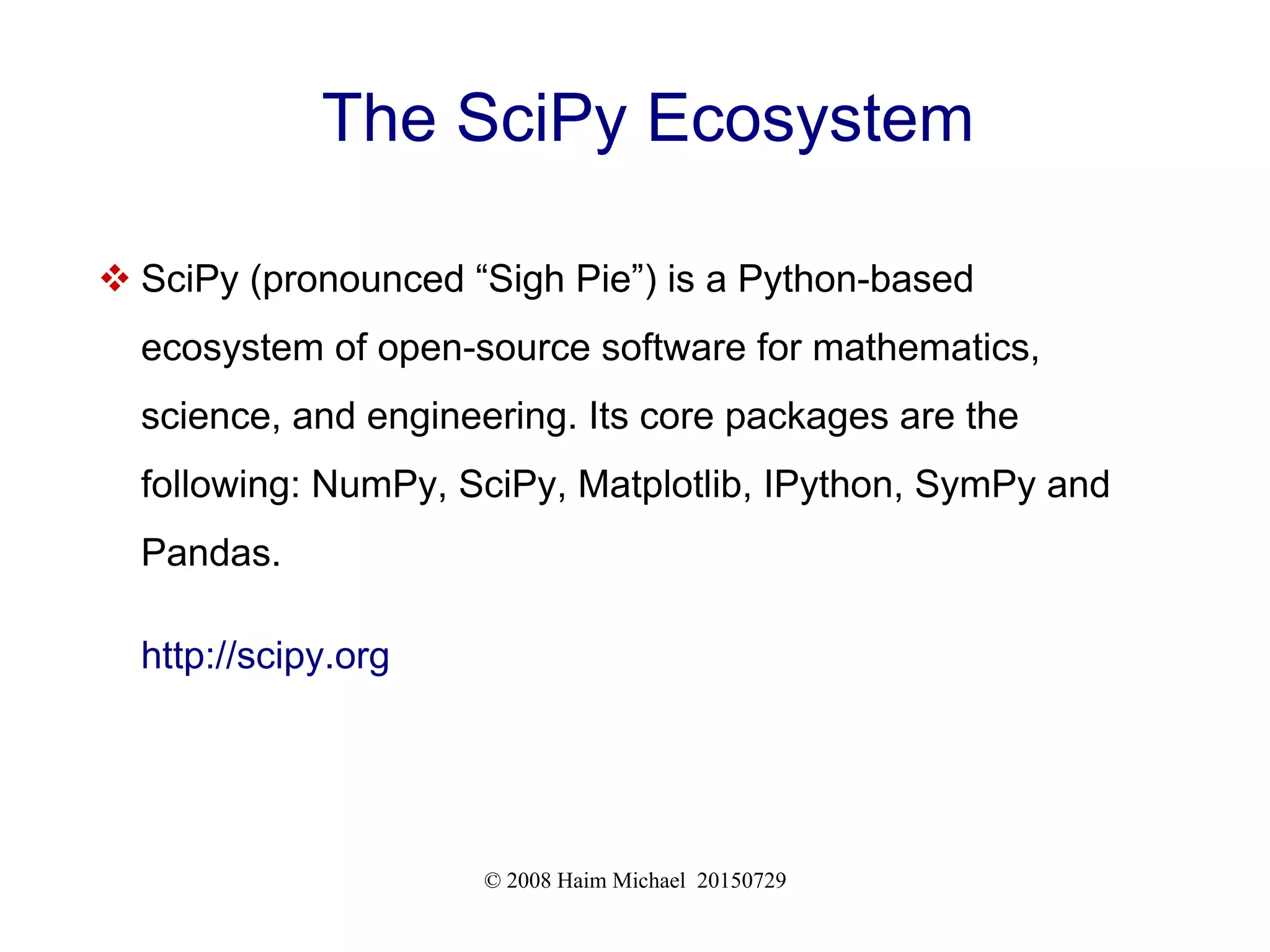
The SciPy Ecosystem
 SciPy (pronounced “Sigh Pie”) is a Python-based
ecosystem of open-source software for mathematics,
science, and engineering. Its core packages are the
following: NumPy, SciPy, Matplotlib, IPython, SymPy and
Pandas.
http://scipy.org
© 2008 Haim Michael 20150729
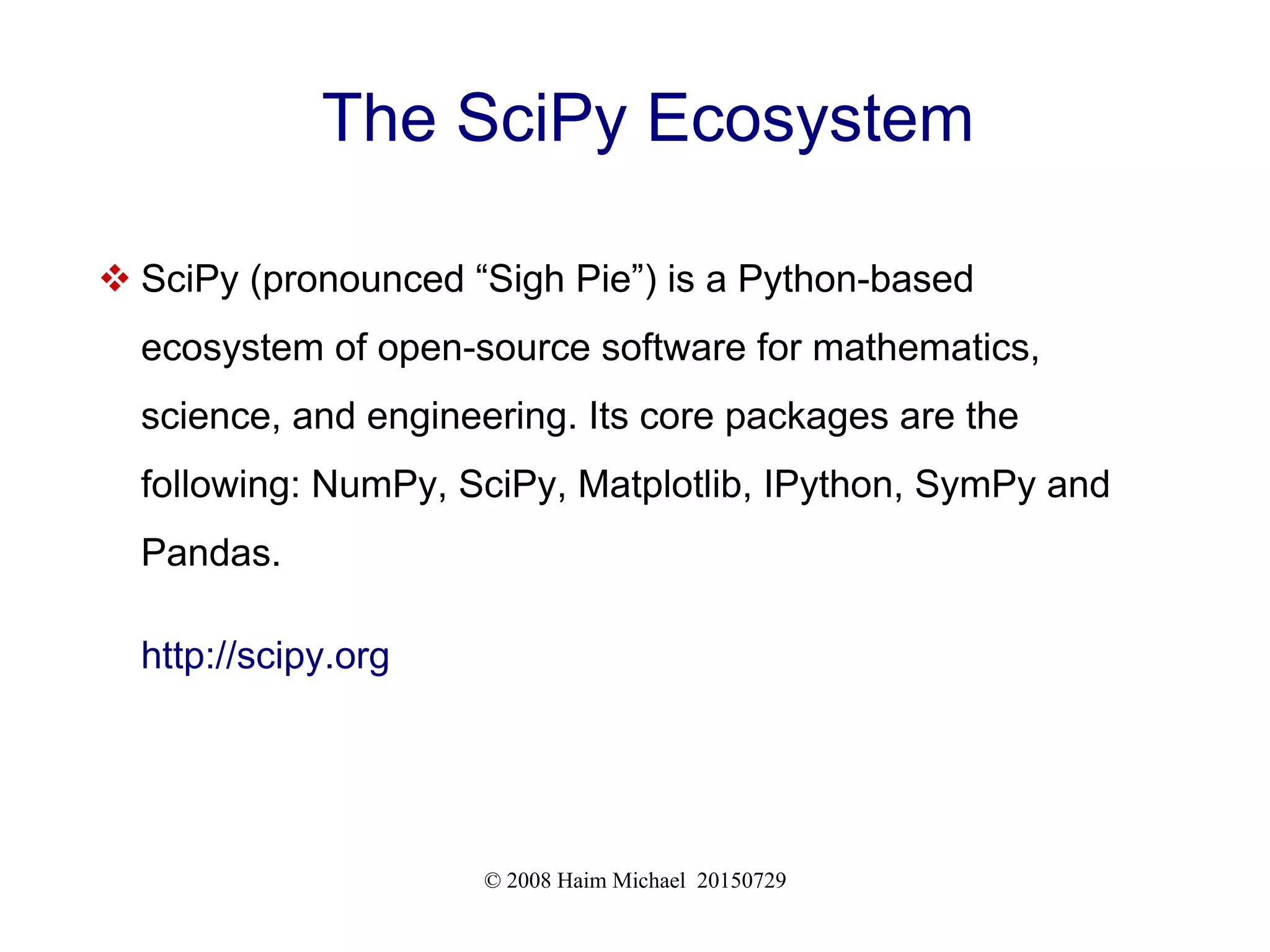
The SciPy Ecosystem
 SciPy (pronounced “Sigh Pie”) is a Python-based
ecosystem of open-source software for mathematics,
science, and engineering. Its core packages are the
following: NumPy, SciPy, Matplotlib, IPython, SymPy and
Pandas.
http://scipy.org
© 2008 Haim Michael 20150729
SciPy Documentation
 You can find detailed documentation for all SciPy's
packages (including NumPy, Pandas, and Matplotlib) at
https://www.scipy.org/docs.html
Basics
© 2008 Haim Michael 20150729
The ndarray Class
 NumPy's main purpose is to provide us with the capability to
work with an homogeneous multidimensional array, which is
a table of elements of the same type (usually numbers),
indexed by a tuple of non negative numbers.
 Objects instantiated from ndarray represent such
homogeneous multidimensional arrays. The alias for
ndarray is array.
© 2008 Haim Michael 20150729
The ndarray Class
 The number of dimensions is the rank of the array. The
following code sample creates a two dimension array (the
rank is 2).
import numpy as np
a = np.array([[1,2,3,4], [5,6,7,8], [9,10,11,12]])
print(a.ndim)
© 2008 Haim Michael 20150729
The ndarray Class Attributes
 The more important attributes, objects instantiated from the
ndarray class have, are:
ndim
The number of axes (dimensions) of the array
shape
The dimensions of the array. The value of this attribute is a tuple that includes
integers. Each integer is the size of a specific axe (dimension). When having a
matrix with n rows and m columns, shape will be (n,m). The length of the
shape tuple is therefore the number of axes, ndim.
© 2008 Haim Michael 20150729
The ndarray Class Attributes
size
The total number of elements of the array.
dtype
It is an object that describes the type of the elements the array holds. It can be
one of Python standard types or it can be one of the additional types NumPy
provides us with (numpy.int32, numpy.int16, numpy.float64 etc.).
itemsize
This is the size in bytes of each element in the array (e.g. array of elements of
the type float64 has the itemsize 8).
© 2008 Haim Michael 20150729
The ndarray Class Attributes
data
This is a buffer that contains the actual elements of the array. Usually we will
access the elements directly and won't need this attribute.
© 2008 Haim Michael 20150729
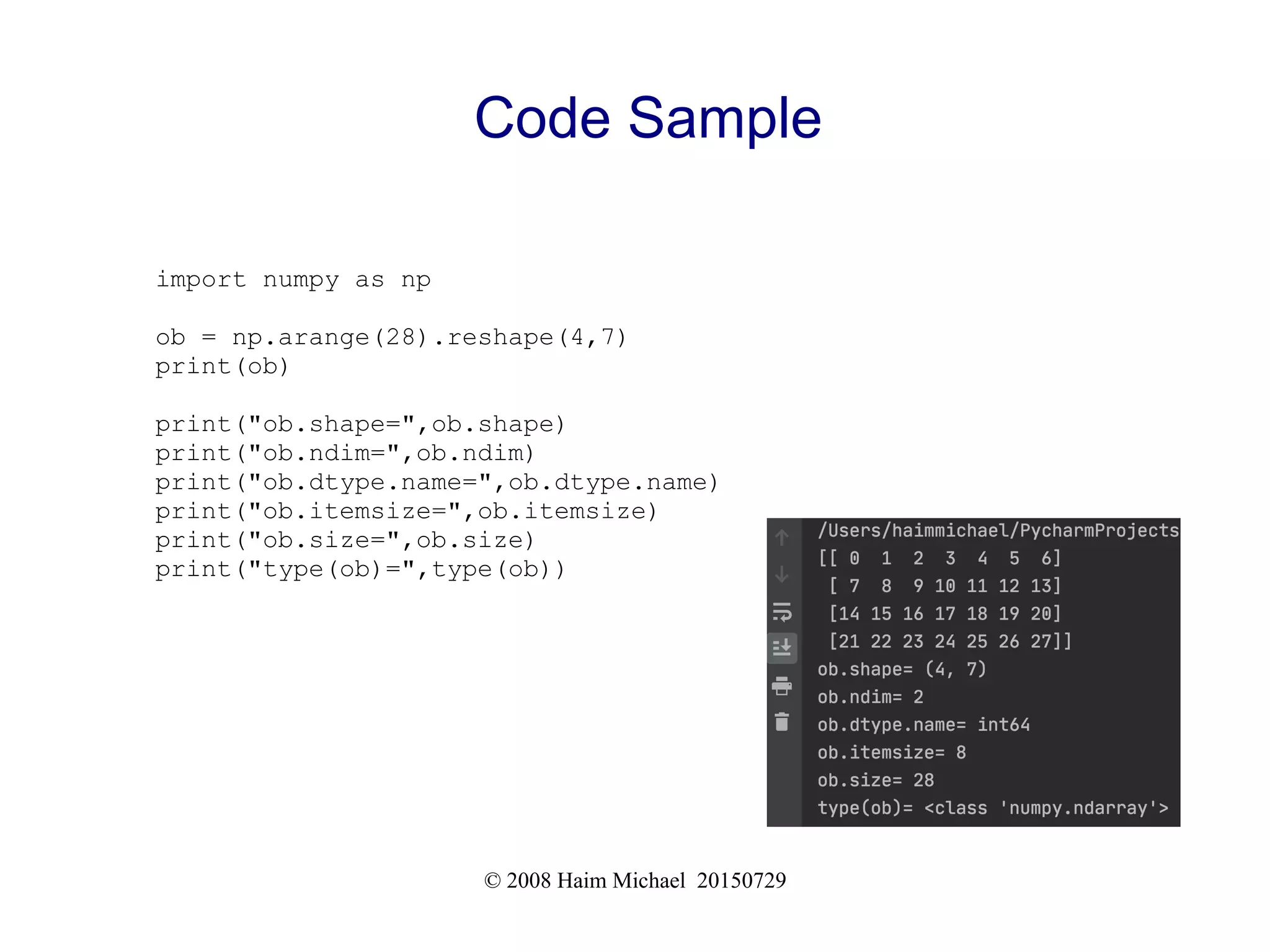
Code Sample
import numpy as np
ob = np.arange(28).reshape(4,7)
print(ob)
print("ob.shape=",ob.shape)
print("ob.ndim=",ob.ndim)
print("ob.dtype.name=",ob.dtype.name)
print("ob.itemsize=",ob.itemsize)
print("ob.size=",ob.size)
print("type(ob)=",type(ob))
© 2008 Haim Michael 20150729
Code Sample
import numpy as np
ob = np.array([12,8,20,30])
print(ob)
print("ob.shape=",ob.shape)
print("ob.ndim=",ob.ndim)
print("ob.dtype.name=",ob.dtype.name)
print("ob.itemsize=",ob.itemsize)
print("ob.size=",ob.size)
print("type(ob)=",type(ob))
© 2008 Haim Michael 20150729
Creating Simple Arrays
 There are several ways for creating new objects of the type
ndarray (AKA array):
ob = np.array([3,4,5,6])
ob = np.array([[2,4,6],[8,54,2],[4,3,2]])
ob = np.array([[2,4],[8,2],[4,3]])
© 2008 Haim Michael 20150729
Creating Array of Zeros
 Using the zeros function we can easily create an array of
zeros.
ob = np.zeros(9)
© 2008 Haim Michael 20150729
Creating Array of Ones
 Using the ones function we can easily create an array full of
ones.
ob = np.ones(9)
© 2008 Haim Michael 20150729
Creating Array of Random Numbers
 Using the empty function we can easily create an array full
of random numbers.
ob = np.empty(9)
© 2008 Haim Michael 20150729
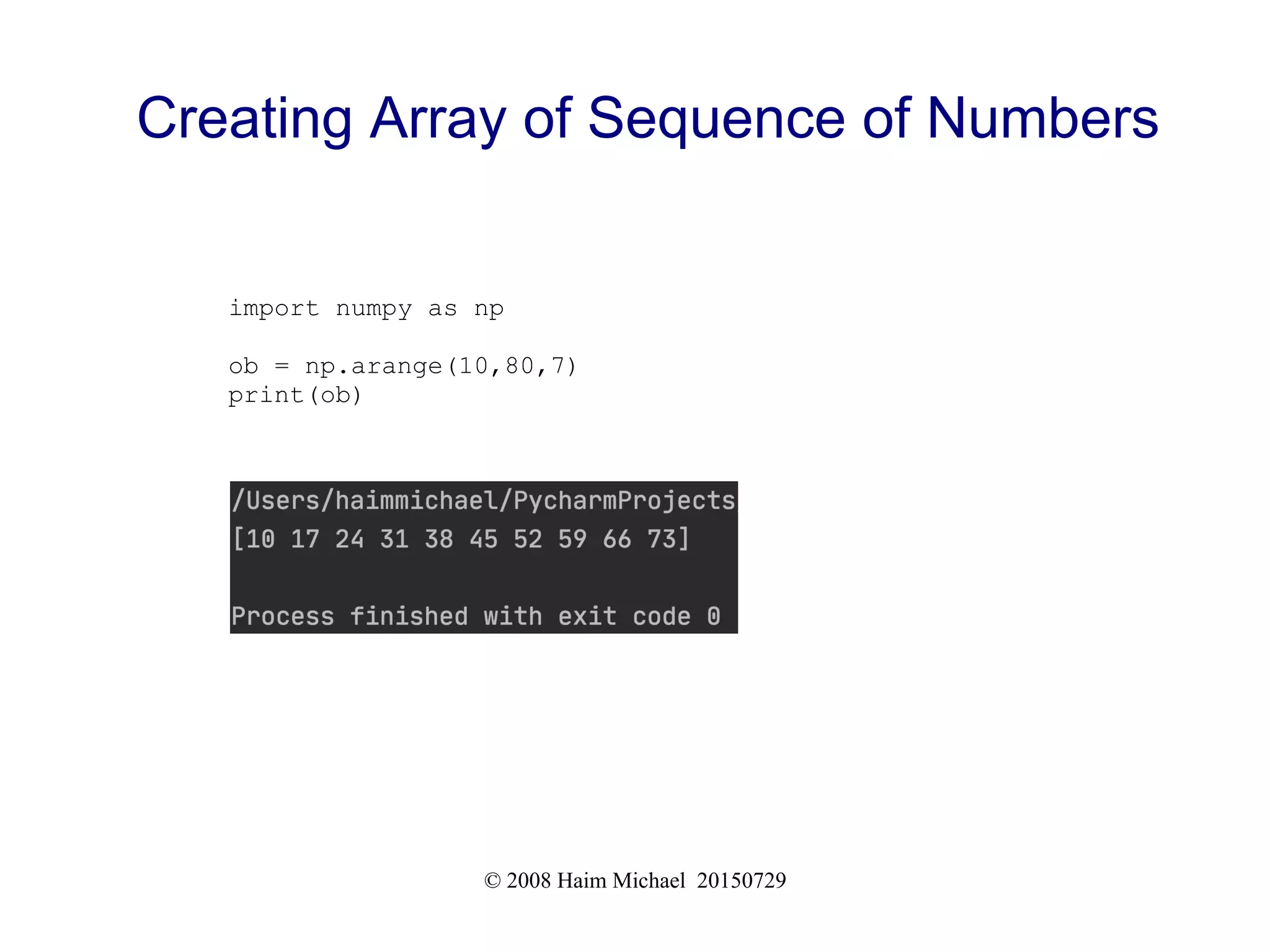
Creating Array of Sequence of Numbers
 Using the arange function we can easily create an array
that holds a sequence of numbers.The arange function
signature is similar to the signature of range.
© 2008 Haim Michael 20150729
Creating Array of Sequence of Numbers
import numpy as np
ob = np.arange(10,80,7)
print(ob)
© 2008 Haim Michael 20150729
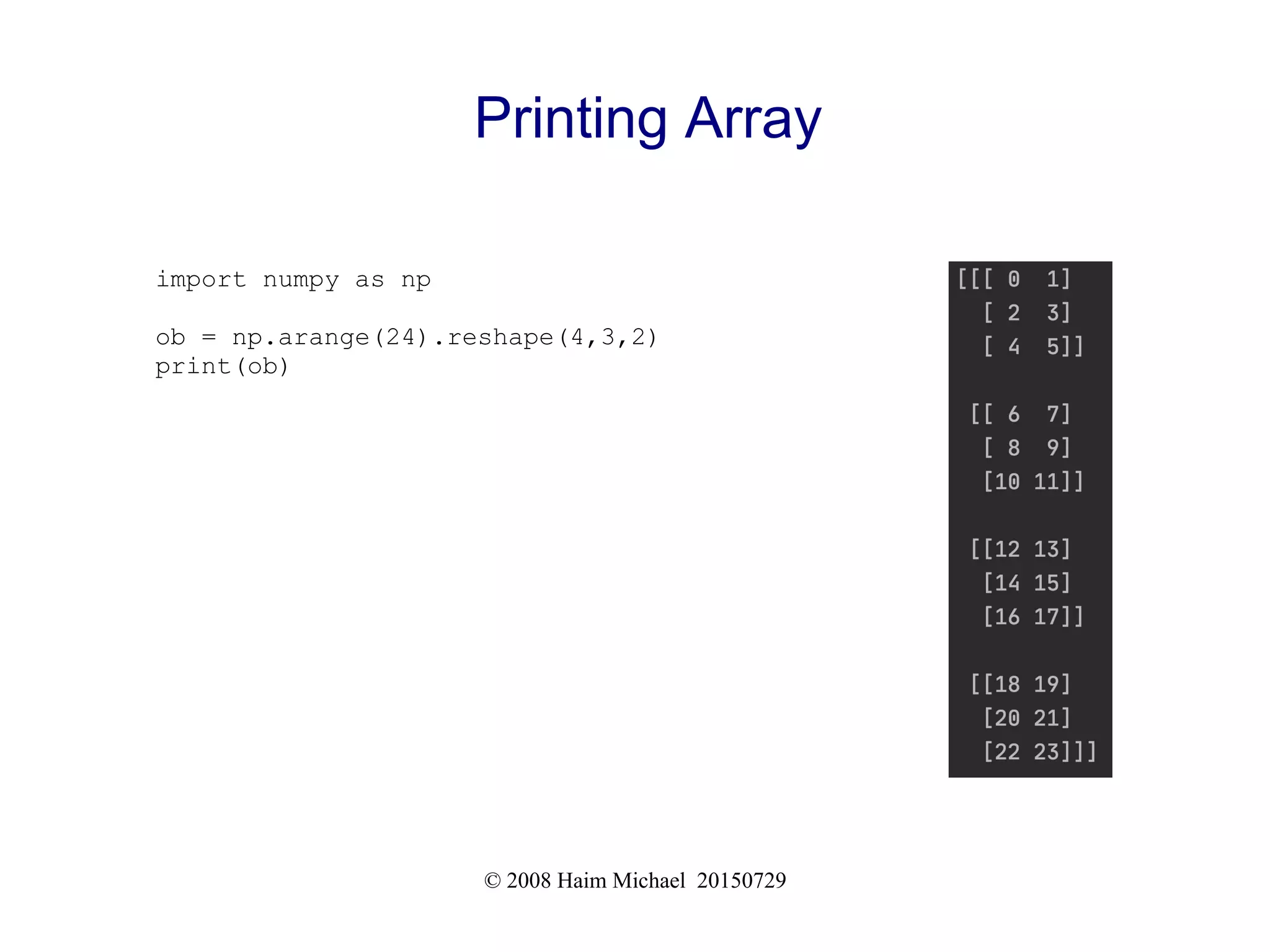
Printing Array
 When trying to print an array we get a representation similar
to the representation of nested lists. One dimensional arrays
are printed as rows. Bidimensional arrays are printed as
matrices. Tridimensionals are printed as lists of matrices.
© 2008 Haim Michael 20150729
Printing Array
import numpy as np
ob = np.arange(24).reshape(4,3,2)
print(ob)
© 2008 Haim Michael 20150729
Basic Operations
 When performing arithmetic operators on arrays, a new
array is created and filled with the result.
import numpy as np
a = np.array([100, 200, 300, 400])
b = np.arange(1, 5)
c = a + b
print(c)
c = a - b
print(c)
c = a * b
print(c)
c = a / b
print(c)
© 2008 Haim Michael 20150729
Basic Operations
 The +=, -=, *=, and /= operators works as well. Please note
that although the documentation says these operators
modify rather than create a new one, the truth is different.
These operators are just a shorthand.
© 2008 Haim Michael 20150729
Basic Operations
 The way the * operator works is elementwise. In order to
calculate the product of two arrays we should use the @
operator or the dot method.
https://courses.lumenlearning.com/ivytech-collegealgebra/chapter/finding-the-product-of-two-matrices/
© 2008 Haim Michael 20150729
Basic Operations
import numpy as np
a = np.array( [ [2,3,4], [6,2,2] ] )
b = np.array( [ [5,4,3], [2,3,2], [1,1,1] ] )
c = a @ b
print("a:")
print(a)
print("b:")
print(b)
print("c:")
print(c)
© 2008 Haim Michael 20150729
Useful Methods
 Some operations are available through methods we can
invoke on the array object.
© 2008 Haim Michael 20150729
The sum Function
 This function returns the sum of all numbers the array holds,
or the sum of each column or row in accordance with the
value we pass over to the axis parameter.
import numpy as np
a = np.array( [ [2,3,4], [6,2,2] ] )
print("a.sum()=",a.sum())
print("a.sum(axis=0)",a.sum(axis=0)) #sum of columns
print("a.sum(axis=1)",a.sum(axis=1)) #sum of rows
© 2008 Haim Michael 20150729
The sum Function
import numpy as np
a = np.array( [ [2,3,4], [6,2,2] ] )
print("a.sum()=",a.sum())
print("a.sum(axis=0)",a.sum(axis=0)) #sum of columns
print("a.sum(axis=1)",a.sum(axis=1)) #sum of rows
© 2008 Haim Michael 20150729
The min Function
 This function returns the smallest number of all numbers the
array holds.
import numpy as np
a = np.array( [ [2,3,4], [6,2,-2] ] )
print("a.min()=",a.min())
© 2008 Haim Michael 20150729
Indexing, Slicing & Iterating
 When dealing with one dimensional arrays we can index,
slice and iterate, as if we were working with tuples or lists.
 When trying to index two dimensional arrays we should
specify two numbers. The index number of rows and the
index number of cols.
© 2008 Haim Michael 20150729
Indexing, Slicing & Iterating
import numpy as np
a = np.array( [ [2,3,4], [6,2,-2] ] )
print(a)
print(a[1,2])
© 2008 Haim Michael 20150729
Indexing, Slicing & Iterating
 When trying to slice a two dimensional array. We can
specify a column... a row... or a range of columns... or a
range of rows.
import numpy as np
a = np.array( [ [2,3,4], [6,2,-2] ] )
print(a)
print(a[0:2,0]) #all rows in column 0
print(a[0:2,1]) #all rows in column 1
print(a[0:2,0:2]) #all rows in column 0 and 1
© 2008 Haim Michael 20150729
Indexing, Slicing & Iterating
[[ 2 3 4]
[ 6 2 -2]]
[2 6]
[3 2]
[[2 3]
[6 2]]
import numpy as np
a = np.array( [ [2,3,4], [6,2,-2] ] )
print(a)
print()
print(a[0:2,0]) #all rows in column 0
print()
print(a[0:2,1]) #all rows in column 1
print()
print(a[0:2,0:2]) #all rows in column 0 and 1
© 2008 Haim Michael 20150729
Indexing, Slicing & Iterating
 When dealing with two dimensional array we can either
simply iterating the rows or we can iterate all elements by
using the flat attribute.
import numpy as np
a = np.array( [ [2,3,4], [6,2,-2] ] )
for num in a.flat:
print(num)
© 2008 Haim Michael 20150729
The fromfunction Function
 We can easily create a new array using a function we
specify.
import numpy as np
def f(x,y):
return 100*x+y
b = np.fromfunction(f,(2,3),dtype=int)

The num py_library_20200818

  • 1.
    The NumPy Library HaimMichael August 18th , 2020 All logos, trade marks and brand names used in this presentation belong to the respective owners. lifemichael https://youtu.be/Tl5SyyBZA-4
  • 2.
  • 3.
    © 2008 HaimMichael 20150729 What is NumPy?  NumPy is the fundamental library in use when dealing with scientific computing.  The NumPy library provides us with a powerful n- dimensional array object.  In addition, it provides us with sophisticated functions, tools for integrating code in CC++ and in Fortran, useful linear algebra, fourier transforms, and random numbers generating capabilities.
  • 4.
    © 2008 HaimMichael 20150729 Installing NumPy  There are more than a few ways to install NumPy. The simplest would be using the pip utility. pip install numpy
  • 5.
    © 2008 HaimMichael 20150729 Checking NumPy Version  You can easily check the version of the NumPy you already have installed using the following code.  The expected outout should look like the following:
  • 6.
    © 2008 HaimMichael 20150729 The SciPy Ecosystem  SciPy (pronounced “Sigh Pie”) is a Python-based ecosystem of open-source software for mathematics, science, and engineering. Its core packages are the following: NumPy, SciPy, Matplotlib, IPython, SymPy and Pandas. http://scipy.org
  • 7.
    © 2008 HaimMichael 20150729 The SciPy Ecosystem  SciPy (pronounced “Sigh Pie”) is a Python-based ecosystem of open-source software for mathematics, science, and engineering. Its core packages are the following: NumPy, SciPy, Matplotlib, IPython, SymPy and Pandas. http://scipy.org
  • 8.
    © 2008 HaimMichael 20150729 SciPy Documentation  You can find detailed documentation for all SciPy's packages (including NumPy, Pandas, and Matplotlib) at https://www.scipy.org/docs.html
  • 9.
  • 10.
    © 2008 HaimMichael 20150729 The ndarray Class  NumPy's main purpose is to provide us with the capability to work with an homogeneous multidimensional array, which is a table of elements of the same type (usually numbers), indexed by a tuple of non negative numbers.  Objects instantiated from ndarray represent such homogeneous multidimensional arrays. The alias for ndarray is array.
  • 11.
    © 2008 HaimMichael 20150729 The ndarray Class  The number of dimensions is the rank of the array. The following code sample creates a two dimension array (the rank is 2). import numpy as np a = np.array([[1,2,3,4], [5,6,7,8], [9,10,11,12]]) print(a.ndim)
  • 12.
    © 2008 HaimMichael 20150729 The ndarray Class Attributes  The more important attributes, objects instantiated from the ndarray class have, are: ndim The number of axes (dimensions) of the array shape The dimensions of the array. The value of this attribute is a tuple that includes integers. Each integer is the size of a specific axe (dimension). When having a matrix with n rows and m columns, shape will be (n,m). The length of the shape tuple is therefore the number of axes, ndim.
  • 13.
    © 2008 HaimMichael 20150729 The ndarray Class Attributes size The total number of elements of the array. dtype It is an object that describes the type of the elements the array holds. It can be one of Python standard types or it can be one of the additional types NumPy provides us with (numpy.int32, numpy.int16, numpy.float64 etc.). itemsize This is the size in bytes of each element in the array (e.g. array of elements of the type float64 has the itemsize 8).
  • 14.
    © 2008 HaimMichael 20150729 The ndarray Class Attributes data This is a buffer that contains the actual elements of the array. Usually we will access the elements directly and won't need this attribute.
  • 15.
    © 2008 HaimMichael 20150729 Code Sample import numpy as np ob = np.arange(28).reshape(4,7) print(ob) print("ob.shape=",ob.shape) print("ob.ndim=",ob.ndim) print("ob.dtype.name=",ob.dtype.name) print("ob.itemsize=",ob.itemsize) print("ob.size=",ob.size) print("type(ob)=",type(ob))
  • 16.
    © 2008 HaimMichael 20150729 Code Sample import numpy as np ob = np.array([12,8,20,30]) print(ob) print("ob.shape=",ob.shape) print("ob.ndim=",ob.ndim) print("ob.dtype.name=",ob.dtype.name) print("ob.itemsize=",ob.itemsize) print("ob.size=",ob.size) print("type(ob)=",type(ob))
  • 17.
    © 2008 HaimMichael 20150729 Creating Simple Arrays  There are several ways for creating new objects of the type ndarray (AKA array): ob = np.array([3,4,5,6]) ob = np.array([[2,4,6],[8,54,2],[4,3,2]]) ob = np.array([[2,4],[8,2],[4,3]])
  • 18.
    © 2008 HaimMichael 20150729 Creating Array of Zeros  Using the zeros function we can easily create an array of zeros. ob = np.zeros(9)
  • 19.
    © 2008 HaimMichael 20150729 Creating Array of Ones  Using the ones function we can easily create an array full of ones. ob = np.ones(9)
  • 20.
    © 2008 HaimMichael 20150729 Creating Array of Random Numbers  Using the empty function we can easily create an array full of random numbers. ob = np.empty(9)
  • 21.
    © 2008 HaimMichael 20150729 Creating Array of Sequence of Numbers  Using the arange function we can easily create an array that holds a sequence of numbers.The arange function signature is similar to the signature of range.
  • 22.
    © 2008 HaimMichael 20150729 Creating Array of Sequence of Numbers import numpy as np ob = np.arange(10,80,7) print(ob)
  • 23.
    © 2008 HaimMichael 20150729 Printing Array  When trying to print an array we get a representation similar to the representation of nested lists. One dimensional arrays are printed as rows. Bidimensional arrays are printed as matrices. Tridimensionals are printed as lists of matrices.
  • 24.
    © 2008 HaimMichael 20150729 Printing Array import numpy as np ob = np.arange(24).reshape(4,3,2) print(ob)
  • 25.
    © 2008 HaimMichael 20150729 Basic Operations  When performing arithmetic operators on arrays, a new array is created and filled with the result. import numpy as np a = np.array([100, 200, 300, 400]) b = np.arange(1, 5) c = a + b print(c) c = a - b print(c) c = a * b print(c) c = a / b print(c)
  • 26.
    © 2008 HaimMichael 20150729 Basic Operations  The +=, -=, *=, and /= operators works as well. Please note that although the documentation says these operators modify rather than create a new one, the truth is different. These operators are just a shorthand.
  • 27.
    © 2008 HaimMichael 20150729 Basic Operations  The way the * operator works is elementwise. In order to calculate the product of two arrays we should use the @ operator or the dot method. https://courses.lumenlearning.com/ivytech-collegealgebra/chapter/finding-the-product-of-two-matrices/
  • 28.
    © 2008 HaimMichael 20150729 Basic Operations import numpy as np a = np.array( [ [2,3,4], [6,2,2] ] ) b = np.array( [ [5,4,3], [2,3,2], [1,1,1] ] ) c = a @ b print("a:") print(a) print("b:") print(b) print("c:") print(c)
  • 29.
    © 2008 HaimMichael 20150729 Useful Methods  Some operations are available through methods we can invoke on the array object.
  • 30.
    © 2008 HaimMichael 20150729 The sum Function  This function returns the sum of all numbers the array holds, or the sum of each column or row in accordance with the value we pass over to the axis parameter. import numpy as np a = np.array( [ [2,3,4], [6,2,2] ] ) print("a.sum()=",a.sum()) print("a.sum(axis=0)",a.sum(axis=0)) #sum of columns print("a.sum(axis=1)",a.sum(axis=1)) #sum of rows
  • 31.
    © 2008 HaimMichael 20150729 The sum Function import numpy as np a = np.array( [ [2,3,4], [6,2,2] ] ) print("a.sum()=",a.sum()) print("a.sum(axis=0)",a.sum(axis=0)) #sum of columns print("a.sum(axis=1)",a.sum(axis=1)) #sum of rows
  • 32.
    © 2008 HaimMichael 20150729 The min Function  This function returns the smallest number of all numbers the array holds. import numpy as np a = np.array( [ [2,3,4], [6,2,-2] ] ) print("a.min()=",a.min())
  • 33.
    © 2008 HaimMichael 20150729 Indexing, Slicing & Iterating  When dealing with one dimensional arrays we can index, slice and iterate, as if we were working with tuples or lists.  When trying to index two dimensional arrays we should specify two numbers. The index number of rows and the index number of cols.
  • 34.
    © 2008 HaimMichael 20150729 Indexing, Slicing & Iterating import numpy as np a = np.array( [ [2,3,4], [6,2,-2] ] ) print(a) print(a[1,2])
  • 35.
    © 2008 HaimMichael 20150729 Indexing, Slicing & Iterating  When trying to slice a two dimensional array. We can specify a column... a row... or a range of columns... or a range of rows. import numpy as np a = np.array( [ [2,3,4], [6,2,-2] ] ) print(a) print(a[0:2,0]) #all rows in column 0 print(a[0:2,1]) #all rows in column 1 print(a[0:2,0:2]) #all rows in column 0 and 1
  • 36.
    © 2008 HaimMichael 20150729 Indexing, Slicing & Iterating [[ 2 3 4] [ 6 2 -2]] [2 6] [3 2] [[2 3] [6 2]] import numpy as np a = np.array( [ [2,3,4], [6,2,-2] ] ) print(a) print() print(a[0:2,0]) #all rows in column 0 print() print(a[0:2,1]) #all rows in column 1 print() print(a[0:2,0:2]) #all rows in column 0 and 1
  • 37.
    © 2008 HaimMichael 20150729 Indexing, Slicing & Iterating  When dealing with two dimensional array we can either simply iterating the rows or we can iterate all elements by using the flat attribute. import numpy as np a = np.array( [ [2,3,4], [6,2,-2] ] ) for num in a.flat: print(num)
  • 38.
    © 2008 HaimMichael 20150729 The fromfunction Function  We can easily create a new array using a function we specify. import numpy as np def f(x,y): return 100*x+y b = np.fromfunction(f,(2,3),dtype=int)