3
Simple if Statement…
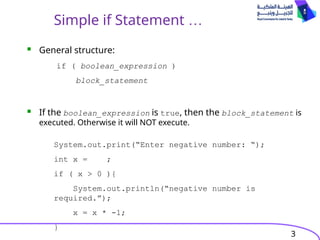
General structure:
If the boolean_expression is true, then the block_statement is
executed. Otherwise it will NOT execute.
if ( boolean_expression )
block_statement
System.out.print(“Enter negative number: “);
int x = ;
if ( x > 0 ){
System.out.println(“negative number is
required.”);
x = x * -1;
}
4.
4
-- Simple ifStatement …
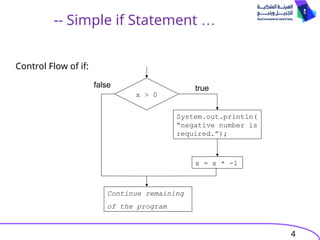
Control Flow of if:
x > 0
System.out.println(
“negative number is
required.”);
x = x * -1
true
false
Continue remaining
of the program
5.
5
-- if-else Statement…
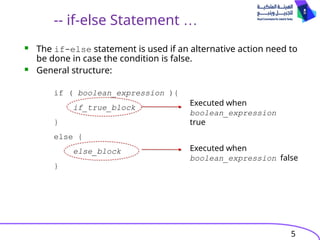
The if-else statement is used if an alternative action need to
be done in case the condition is false.
General structure:
if ( boolean_expression ){
if_true_block
}
else {
else_block
}
Executed when
boolean_expression
true
Executed when
boolean_expression false
6.
6
-- if-else Statement…
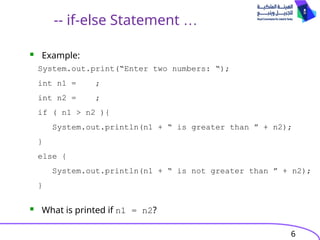
Example:
What is printed if n1 = n2?
System.out.print(“Enter two numbers: “);
int n1 = ;
int n2 = ;
if ( n1 > n2 ){
System.out.println(n1 + “ is greater than ” + n2);
}
else {
System.out.println(n1 + “ is not greater than ” + n2);
}
7.
7
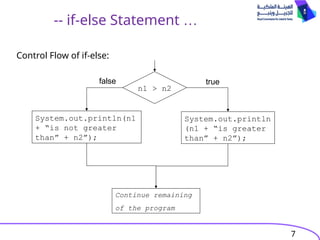
-- if-else Statement…
n1 > n2
System.out.println
(n1 + “is greater
than” + n2”);
true
Continue remaining
of the program
System.out.println(n1
+ “is not greater
than” + n2”);
false
Control Flow of if-else:
8.
8
Block Statement
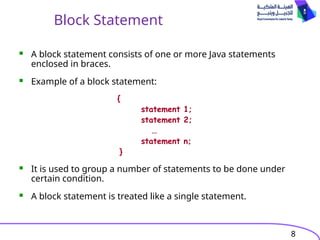
Ablock statement consists of one or more Java statements
enclosed in braces.
Example of a block statement:
{
statement 1;
statement 2;
…
statement n;
}
It is used to group a number of statements to be done under
certain condition.
A block statement is treated like a single statement.
9.
9
Block Statements
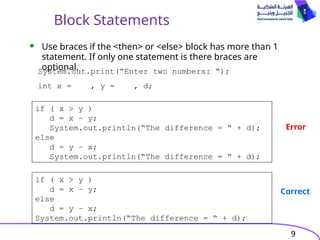
Usebraces if the <then> or <else> block has more than 1
statement. If only one statement is there braces are
optional.
System.out.print(“Enter two numbers: “);
int x = , y = , d;
if ( x > y )
d = x – y;
System.out.println(“The difference = “ + d);
else
d = y – x;
System.out.println(“The difference = “ + d);
if ( x > y )
d = x – y;
else
d = y – x;
System.out.println(“The difference = “ + d);
Error
Correct
10.
10
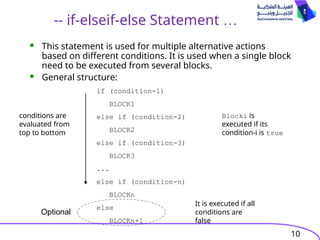
-- if-elseif-else Statement…
This statement is used for multiple alternative actions
based on different conditions. It is used when a single block
need to be executed from several blocks.
General structure:
if (condition-1)
BLOCK1
else if (condition-2)
BLOCK2
else if (condition-3)
BLOCK3
...
else if (condition-n)
BLOCKn
else
BLOCKn+1
Optional
Blocki is
executed if its
condition-i is true
It is executed if all
conditions are
false
conditions are
evaluated from
top to bottom
11.
11
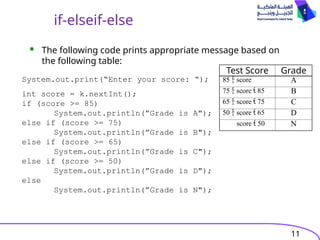
if-elseif-else
System.out.print(“Enter your score:“);
int score = k.nextInt();
if (score >= 85)
System.out.println(”Grade is A");
else if (score >= 75)
System.out.println(”Grade is B");
else if (score >= 65)
System.out.println(”Grade is C");
else if (score >= 50)
System.out.println(”Grade is D");
else
System.out.println(”Grade is N");
Test Score Grade
85 score A
75 score 85 B
65 score 75 C
50 score 65 D
score 50 N
The following code prints appropriate message based on
the following table:
12.
12
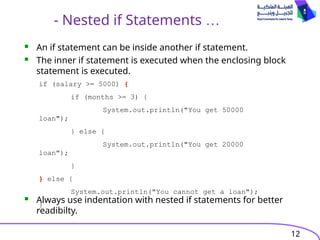
- Nested ifStatements …
An if statement can be inside another if statement.
The inner if statement is executed when the enclosing block
statement is executed.
Always use indentation with nested if statements for better
readibilty.
if (salary >= 5000) {
if (months >= 3) {
System.out.println("You get 50000
loan");
} else {
System.out.println("You get 20000
loan");
}
} else {
System.out.println("You cannot get a loan");
}
13.
13
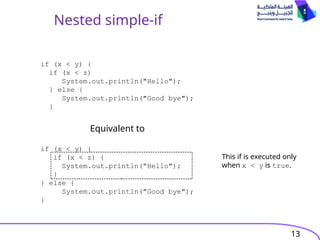
Nested simple-if
if (x< y) {
if (x < z)
System.out.println("Hello");
} else {
System.out.println("Good bye");
}
Equivalent to
if (x < y) {
if (x < z) {
System.out.println("Hello");
}
} else {
System.out.println("Good bye");
}
This if is executed only
when x < y is true.
14.
14
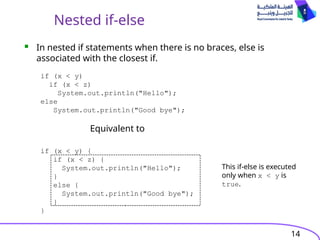
Nested if-else
Equivalent to
In nested if statements when there is no braces, else is
associated with the closest if.
if (x < y)
if (x < z)
System.out.println("Hello");
else
System.out.println("Good bye");
if (x < y) {
if (x < z) {
System.out.println("Hello");
}
else {
System.out.println("Good bye");
}
}
This if-else is executed
only when x < y is
true.
17
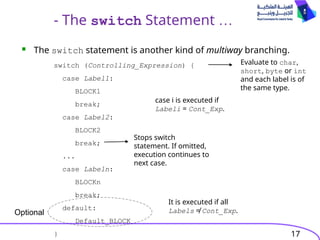
- The switchStatement …
The switch statement is another kind of multiway branching.
switch (Controlling_Expression) {
case Label1:
BLOCK1
break;
case Label2:
BLOCK2
break;
...
case Labeln:
BLOCKn
break;
default:
Default_BLOCK
}
Optional
Evaluate to char,
short, byte or int
and each label is of
the same type.
case i is executed if
Labeli = Cont_Exp.
Stops switch
statement. If omitted,
execution continues to
next case.
It is executed if all
Labels ≠ Cont_Exp.
18.
18
… -- Theswitch Statement
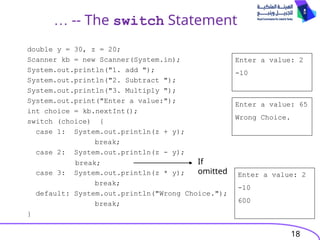
double y = 30, z = 20;
Scanner kb = new Scanner(System.in);
System.out.println("1. add ");
System.out.println("2. Subtract ");
System.out.println("3. Multiply ");
System.out.print("Enter a value:");
int choice = kb.nextInt();
switch (choice) {
case 1: System.out.println(z + y);
break;
case 2: System.out.println(z - y);
case 3: System.out.println(z * y);
break;
default: System.out.println("Wrong Choice.");
break;
}
break;
Enter a value: 2
-10
Enter a value: 65
Wrong Choice.
If
omitted Enter a value: 2
-10
600
19.
19
Exercises
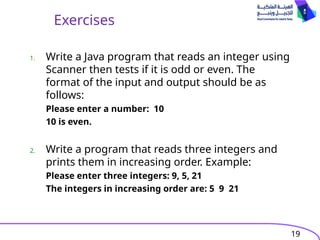
1. Write aJava program that reads an integer using
Scanner then tests if it is odd or even. The
format of the input and output should be as
follows:
Please enter a number: 10
10 is even.
2. Write a program that reads three integers and
prints them in increasing order. Example:
Please enter three integers: 9, 5, 21
The integers in increasing order are: 5 9 21
20.
20
Exercises
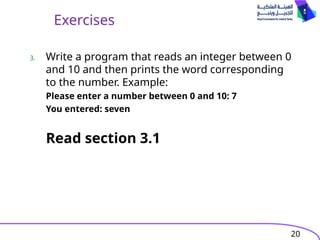
3. Write aprogram that reads an integer between 0
and 10 and then prints the word corresponding
to the number. Example:
Please enter a number between 0 and 10: 7
You entered: seven
Read section 3.1