17/04/2018
1
--
The evolving automatic enrolment landscape -
The evolving automatic
enrolment landscape
By Karen Bennett
Marketing Manager
at BrightPay
-
CPD Accredited
Fill out survey at the end of the webinar
Q&A Session
Questions Tab or #BPWebinars
Q&A
CPD
On Demand
This session is being recorded
REC
Webinar Agenda
Auto Enrolment &
New Employers
Increasing Minimum
Contributions
Integration between
payroll & pension
providers
Re-Enrolment & Re-
Declaration of
Compliance
How BrightPay
Automates Auto
Enrolment
Introduction to
BrightPay Connect
17/04/2018
2
-Auto Enrolment & New Employers
Auto Enrolment & New Employers
• Before now, a staging date indicated the start of an employers auto
enrolment responsibilities
• From 1st October 2017, new employers are affected by AE instantly
• Duties start date: The date that the first member of staff starts
work which kick-starts when the auto enrolment duties begin
• Employers must be ready to comply with AE as soon as the first
employee begins employment
Auto Enrolment & New Employers
• Once registered as an employer with HMRC, an employer must
inform TPR of point of contact and choose a suitable pension
scheme
Auto Enrolment & New Employers
• Employees must be assessed to determine if they need to be
automatically enrolled
• Eligible jobholders must be enrolled into a qualifying auto enrolment
pension scheme
• Employer & employee must make contributions to the scheme
• New employers are required to comply with the total minimum
contribution rate at that time
• Postponement can still be availed of
17/04/2018
3
-Increasing Minimum Contributions
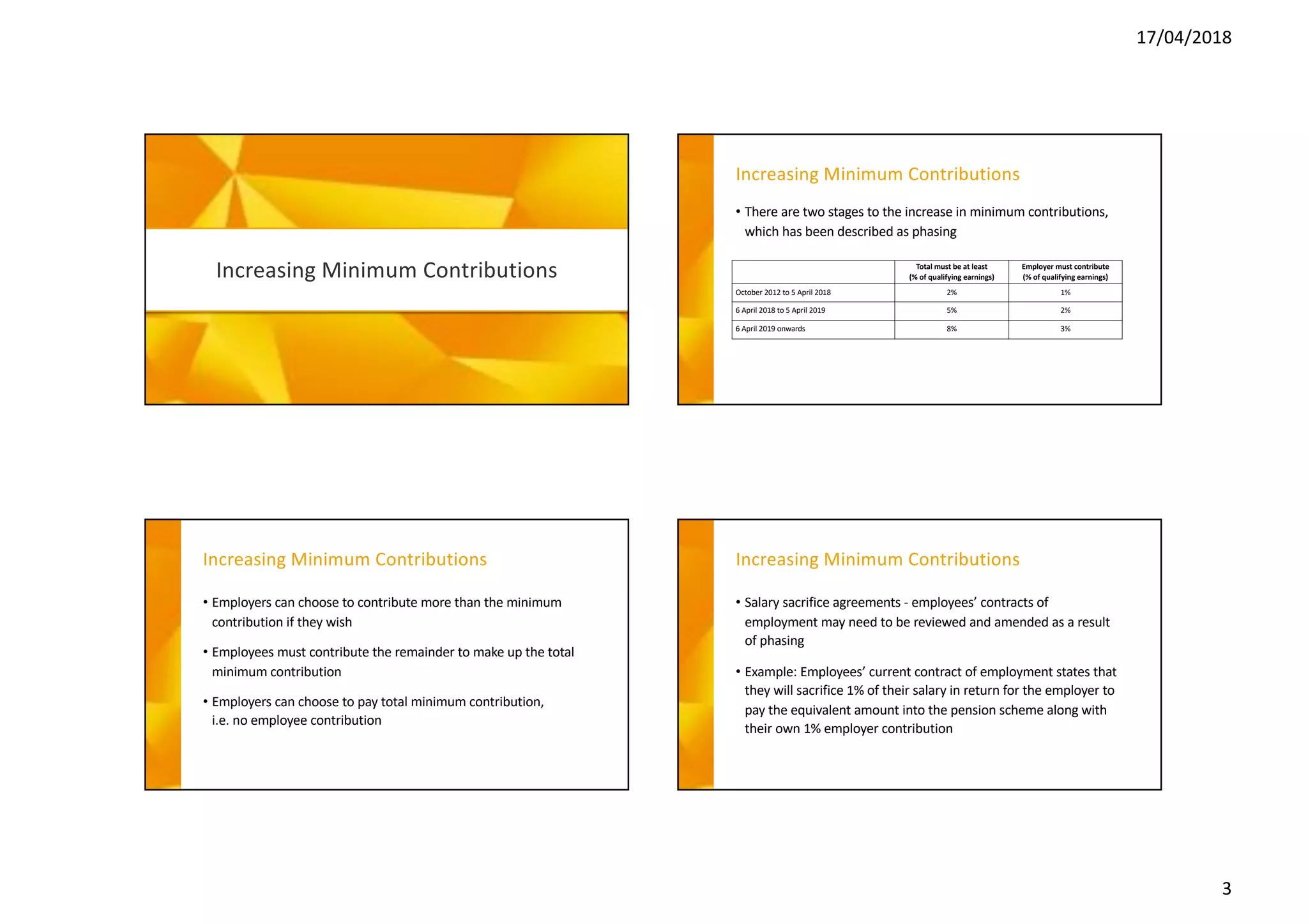
Increasing Minimum Contributions
• There are two stages to the increase in minimum contributions,
which has been described as phasing
Total must be at least
(% of qualifying earnings)
Employer must contribute
(% of qualifying earnings)
October 2012 to 5 April 2018 2% 1%
6 April 2018 to 5 April 2019 5% 2%
6 April 2019 onwards 8% 3%
Increasing Minimum Contributions
• Employers can choose to contribute more than the minimum
contribution if they wish
• Employees must contribute the remainder to make up the total
minimum contribution
• Employers can choose to pay total minimum contribution,
i.e. no employee contribution
Increasing Minimum Contributions
• Salary sacrifice agreements - employees’ contracts of
employment may need to be reviewed and amended as a result
of phasing
• Example: Employees’ current contract of employment states that
they will sacrifice 1% of their salary in return for the employer to
pay the equivalent amount into the pension scheme along with
their own 1% employer contribution
17/04/2018
4
Increasing Minimum Contributions
• You must know when and how much to deduct from April 2018
and April 2019
• Payroll software should automatically prompt you when the
increases need to be implemented
• Increased contributions are required to be processed on the first
pay date after 6th April
Increasing Minimum Contributions
• It is not a mandatory requirement to inform or write to staff
about the increases in minimum contributions
• Best practice would be to clearly communicate with employees
to let them know before the increase takes place
• This will help minimise confusion and reduce queries
• TPR has a sample letter template available to give to employees
-
Integration between Payroll
& Pension Systems
Auto Enrolment & New Employers
• Some providers have enabled direct integration
• This allows payroll and pension systems to communicate with
each other
• Eliminates the need to export and save the data file to the PC
and manually upload the data
• With integration, data can be sent directly to the pension
provider at the click of a button
17/04/2018
5
Auto Enrolment & New Employers
• Useful for bureaus with a number of clients – reduces errors and
workload
• NEST, Aviva & Smart Pension
• Other NEST APIs – validate groups and payment sources &
approve payments from within BrightPay
• Streamlines setup and ongoing tasks when using NEST
-
Re-Enrolment &
Re-Declaration of Compliance
Automatic Re-Enrolment
• Duties vary depending on whether you have staff to enrol
• Employer choose their enrolment date from a 6 month window:
3 months either side of the third anniversary of the staging date
• Employers can align re-enrolment with the company’s financial
year or avoid seasonal peaks
• The re-enrolment date applies to all staff & postponement
cannot be used
Automatic Re-Enrolment
• At re-enrolment, certain employees must be re-assessed
• Previously opted out
• Voluntarily ceased active membership of a qualifying scheme
17/04/2018
6
Automatic Re-Enrolment
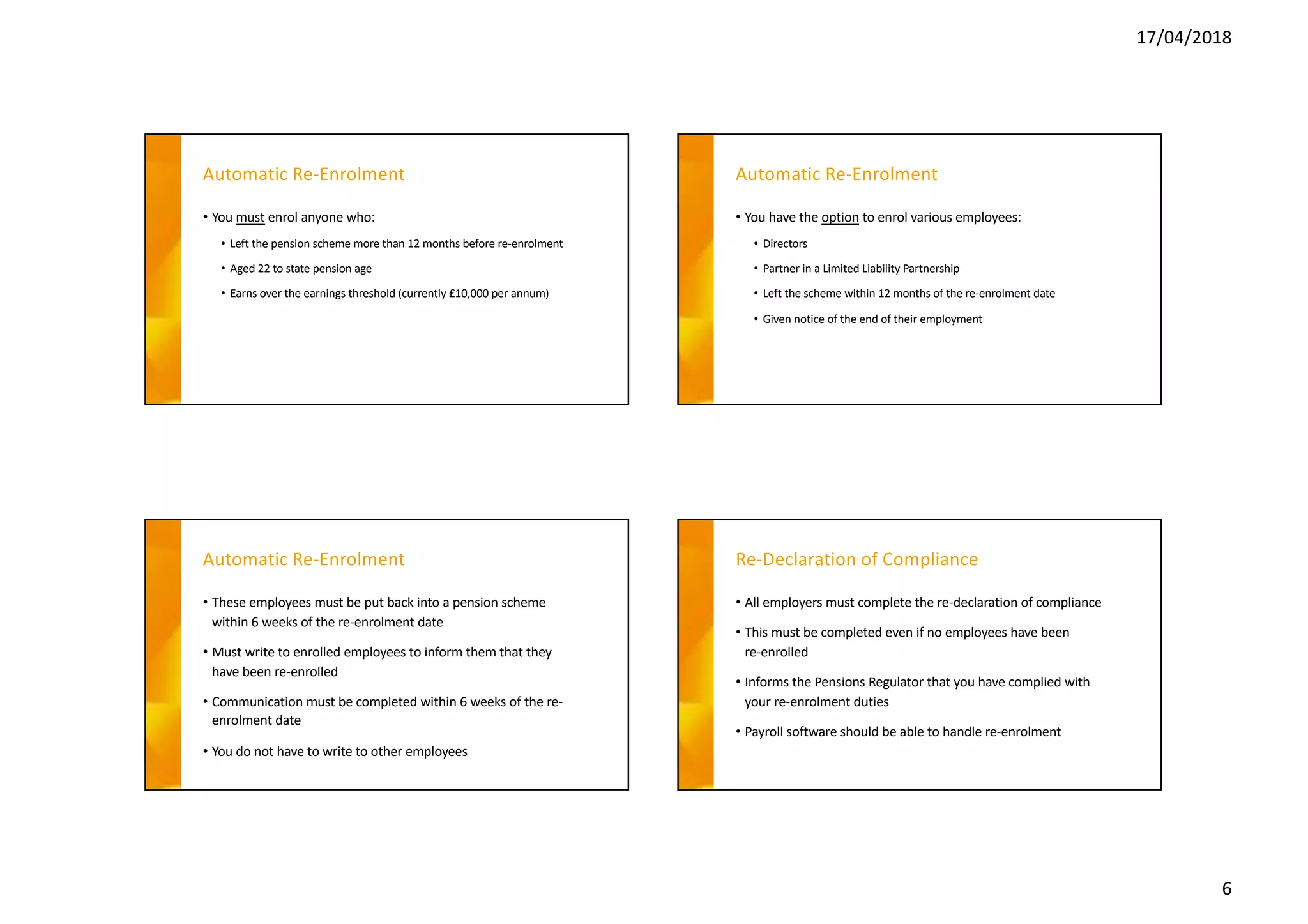
• You must enrol anyone who:
• Left the pension scheme more than 12 months before re-enrolment
• Aged 22 to state pension age
• Earns over the earnings threshold (currently £10,000 per annum)
Automatic Re-Enrolment
• You have the option to enrol various employees:
• Directors
• Partner in a Limited Liability Partnership
• Left the scheme within 12 months of the re-enrolment date
• Given notice of the end of their employment
Automatic Re-Enrolment
• These employees must be put back into a pension scheme
within 6 weeks of the re-enrolment date
• Must write to enrolled employees to inform them that they
have been re-enrolled
• Communication must be completed within 6 weeks of the re-
enrolment date
• You do not have to write to other employees
Re-Declaration of Compliance
• All employers must complete the re-declaration of compliance
• This must be completed even if no employees have been
re-enrolled
• Informs the Pensions Regulator that you have complied with
your re-enrolment duties
• Payroll software should be able to handle re-enrolment
17/04/2018
7
-
How BrightPay Automates
Auto Enrolment
-A quick peek at BrightPay Connect
- -
17/04/2018
8
- -
- -
17/04/2018
9
- -
- -
17/04/2018
10
- -
-
OFF
Webinar50
Bureau Licence
-
Sign up to our Newsletter
17/04/2018
11
-
NEXT WEBINAR:
GDPR for Payroll Bureaus
-Questions & Answers

The Evolving Automatic Enrolment Landscape

  • 1.
    17/04/2018 1 -- The evolving automaticenrolment landscape - The evolving automatic enrolment landscape By Karen Bennett Marketing Manager at BrightPay - CPD Accredited Fill out survey at the end of the webinar Q&A Session Questions Tab or #BPWebinars Q&A CPD On Demand This session is being recorded REC Webinar Agenda Auto Enrolment & New Employers Increasing Minimum Contributions Integration between payroll & pension providers Re-Enrolment & Re- Declaration of Compliance How BrightPay Automates Auto Enrolment Introduction to BrightPay Connect
  • 2.
    17/04/2018 2 -Auto Enrolment &New Employers Auto Enrolment & New Employers • Before now, a staging date indicated the start of an employers auto enrolment responsibilities • From 1st October 2017, new employers are affected by AE instantly • Duties start date: The date that the first member of staff starts work which kick-starts when the auto enrolment duties begin • Employers must be ready to comply with AE as soon as the first employee begins employment Auto Enrolment & New Employers • Once registered as an employer with HMRC, an employer must inform TPR of point of contact and choose a suitable pension scheme Auto Enrolment & New Employers • Employees must be assessed to determine if they need to be automatically enrolled • Eligible jobholders must be enrolled into a qualifying auto enrolment pension scheme • Employer & employee must make contributions to the scheme • New employers are required to comply with the total minimum contribution rate at that time • Postponement can still be availed of
  • 3.
    17/04/2018 3 -Increasing Minimum Contributions IncreasingMinimum Contributions • There are two stages to the increase in minimum contributions, which has been described as phasing Total must be at least (% of qualifying earnings) Employer must contribute (% of qualifying earnings) October 2012 to 5 April 2018 2% 1% 6 April 2018 to 5 April 2019 5% 2% 6 April 2019 onwards 8% 3% Increasing Minimum Contributions • Employers can choose to contribute more than the minimum contribution if they wish • Employees must contribute the remainder to make up the total minimum contribution • Employers can choose to pay total minimum contribution, i.e. no employee contribution Increasing Minimum Contributions • Salary sacrifice agreements - employees’ contracts of employment may need to be reviewed and amended as a result of phasing • Example: Employees’ current contract of employment states that they will sacrifice 1% of their salary in return for the employer to pay the equivalent amount into the pension scheme along with their own 1% employer contribution
  • 4.
    17/04/2018 4 Increasing Minimum Contributions •You must know when and how much to deduct from April 2018 and April 2019 • Payroll software should automatically prompt you when the increases need to be implemented • Increased contributions are required to be processed on the first pay date after 6th April Increasing Minimum Contributions • It is not a mandatory requirement to inform or write to staff about the increases in minimum contributions • Best practice would be to clearly communicate with employees to let them know before the increase takes place • This will help minimise confusion and reduce queries • TPR has a sample letter template available to give to employees - Integration between Payroll & Pension Systems Auto Enrolment & New Employers • Some providers have enabled direct integration • This allows payroll and pension systems to communicate with each other • Eliminates the need to export and save the data file to the PC and manually upload the data • With integration, data can be sent directly to the pension provider at the click of a button
  • 5.
    17/04/2018 5 Auto Enrolment &New Employers • Useful for bureaus with a number of clients – reduces errors and workload • NEST, Aviva & Smart Pension • Other NEST APIs – validate groups and payment sources & approve payments from within BrightPay • Streamlines setup and ongoing tasks when using NEST - Re-Enrolment & Re-Declaration of Compliance Automatic Re-Enrolment • Duties vary depending on whether you have staff to enrol • Employer choose their enrolment date from a 6 month window: 3 months either side of the third anniversary of the staging date • Employers can align re-enrolment with the company’s financial year or avoid seasonal peaks • The re-enrolment date applies to all staff & postponement cannot be used Automatic Re-Enrolment • At re-enrolment, certain employees must be re-assessed • Previously opted out • Voluntarily ceased active membership of a qualifying scheme
  • 6.
    17/04/2018 6 Automatic Re-Enrolment • Youmust enrol anyone who: • Left the pension scheme more than 12 months before re-enrolment • Aged 22 to state pension age • Earns over the earnings threshold (currently £10,000 per annum) Automatic Re-Enrolment • You have the option to enrol various employees: • Directors • Partner in a Limited Liability Partnership • Left the scheme within 12 months of the re-enrolment date • Given notice of the end of their employment Automatic Re-Enrolment • These employees must be put back into a pension scheme within 6 weeks of the re-enrolment date • Must write to enrolled employees to inform them that they have been re-enrolled • Communication must be completed within 6 weeks of the re- enrolment date • You do not have to write to other employees Re-Declaration of Compliance • All employers must complete the re-declaration of compliance • This must be completed even if no employees have been re-enrolled • Informs the Pensions Regulator that you have complied with your re-enrolment duties • Payroll software should be able to handle re-enrolment
  • 7.
    17/04/2018 7 - How BrightPay Automates AutoEnrolment -A quick peek at BrightPay Connect - -
  • 8.
  • 9.
  • 10.
  • 11.
    17/04/2018 11 - NEXT WEBINAR: GDPR forPayroll Bureaus -Questions & Answers