
Auto Enrolment
WHAT YOU NEED TO KNOW
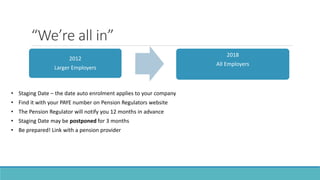
“We’re all in”
2012
Larger Employers
2018
All Employers
• Staging Date – the date auto enrolment applies to your company
• Find it with your PAYE number on Pension Regulators website
• The Pension Regulator will notify you 12 months in advance
• Staging Date may be postponed for 3 months
• Be prepared! Link with a pension provider
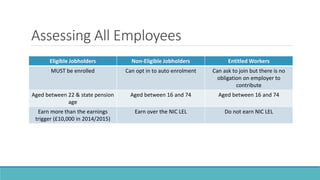
Assessing All Employees
Eligible Jobholders Non-Eligible Jobholders Entitled Workers
MUST be enrolled Can opt in to auto enrolment Can ask to join but there is no
obligation on employer to
contribute
Aged between 22 & state pension
age
Aged between 16 and 74 Aged between 16 and 74
Earn more than the earnings
trigger (£10,000 in 2014/2015)
Earn over the NIC LEL Do not earn NIC LEL
Deductions and Contributions
(EE and ER)
•Employee deductions are made from net pay, with 20% tax relief
•Percentages are applied to all earnings (SSP, overtime, etc.) in excess of LEL and up to a
maximum of the Upper Earnings Limit (UEL)
•Contributions must be paid by 22nd of following month & shown on payslip
Date Total Must Be Employer must contribute a
minimum of
Oct 2012- Sept 2017 2% 1%
Oct 2017 – Sept 2018 5% 2%
October 2018 onwards 8% 3%
Communications
•Eligible Jobholders
Confirm they are being enrolled
How much is being deducted/contributed
How deductions/contributions will change up until 2018
Employees ability to opt out within a month
•Non-Eligible Jobholders
Give option to opt in and outline process of doing so
•Entitled Workers
Inform them they can join a scheme that the employer will administer
•Already a Pension Scheme Member
No auto enrolment need but need to be kept informed
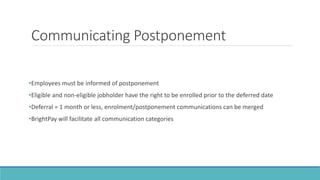
Communicating Postponement
•Employees must be informed of postponement
•Eligible and non-eligible jobholder have the right to be enrolled prior to the deferred date
•Deferral = 1 month or less, enrolment/postponement communications can be merged
•BrightPay will facilitate all communication categories
Enrolling
•Enrolling is usually set up by pension provider
•NEST
• Log in and type in information
OR
• Upload a CSV file
Ongoing Monitoring, Assessment & AE
Events
•Continuous communication with pension provider
• Details of what has been deducted after every pay period
• File can be uploaded as a CSV file
•Monitor all Workers
• Has someone turned 22
• New employees
•Postponement can be used:
• If an employee breaches earnings trigger but usually would be below this level
• To avoid enrolling short-term workers
Pay Period Combinations
An entitled worker now earns more than the LEL but less than the ET (becoming an non-eligible jobholder) – let him know that he can opt
in to AE i.e. communicate
An entitled worker or non-eligible jobholder earns above the ET (becoming an eligible jobholder) and postponement is not used – enrol,
communicate and start deductions/contributions
An entitled worker or non-eligible jobholder earns above the ET (becoming an eligible jobholder) and postponement is used –
communicate
A worker who is already enrolled now earns below the ET – continue to calculate on amount in excess of LEL – their status does not
change – no action required
A worker who is already enrolled now earns below the LEL – zero deduction/contribution – their status does not change – no action
required
A non-eligible jobholder turns 22 and postponement is not used - enrol, communicate and start deductions/contributions
A new employee starts and falls into the eligible jobholder category and postponement is not used - enrol, communicate and start
deductions/contributions
An employee who is already enrolled opts out within one month – unenrol, stop deductions/contributions and refund all deductions to
date. (One of the fundamental rules of AE is that an employee cannot be coerced to opt out!)
An employee who is already enrolled opts out after one month – unenrol and stop deductions/contributions
The Pensions Regulator
•Informs employers of their staging date
•Employers can get their own staging date using a calculator on their website
•Compliance with Auto Enrolment must be logged with the Regulator at the latest 5 months after
their staging date
Pay Reference Periods
•New rules as of 1st April 2014
•Pay periods may be defined as tax periods (tax weeks, months or fortnights)
•Any first part period may be zero (rather than having to apportion days)
•Example:
• Employer has 6 weeks to physically enrol an employee
• Previously “joining window” was 4 weeks
• However, deductions must be calculated from actual enrolment date
Pay Reference Periods Definitions
•For assessment purposes, the relevant pay reference period is the pay reference period in which
the assessment date falls e.g. the staging date or postponement date or date of starting
employment or date of turning 22
•The first contributions that need to be deducted for a worker who’s automatically enrolled apply
from the first pay day on or after the automatic enrolment date irrespective of when that pay
was earned, however, contributions don’t need to be calculated until the first full pay reference
period.
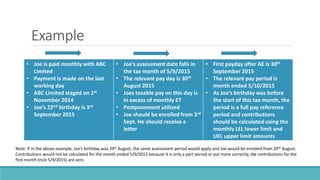
Example
• Joe is paid monthly with ABC
Limited
• Payment is made on the last
working day
• ABC Limited staged on 1st
November 2014
• Joe’s 22nd birthday is 3rd
September 2015
• Joe’s assessment date falls in
the tax month of 5/9/2015
• The relevant pay day is 30th
August 2015
• Joes taxable pay on this day is
in excess of monthly ET
• Postponement utilised
• Joe should be enrolled from 3rd
Sept. He should receive a
letter
• First payday after AE is 30th
September 2015
• The relevant pay period is
month ended 5/10/2015
• As Joe’s birthday was before
the start of this tax month, the
period is a full pay reference
period and contributions
should be calculated using the
monthly LEL lower limit and
UEL upper limit amounts
Note: If in the above example, Joe’s birthday was 29th August, the same assessment period would apply and Joe would be enrolled from 29th August.
Contributions would not be calculated for the month ended 5/9/2015 because it is only a part period or put more correctly, the contributions for the
first month (m/e 5/9/2015) are zero.
NEST – Groups and payment sources
•NEST Allows different levels of contributions for different sets of employees
• Floor workers set up at 1% and 1%
• Managers straight to 5% and 3%
•Different categories should be attributed group names e.g. floor workers and managers
•If using different bank accounts to pay different groups this must be inputted when setting up
with NEST
•If there are weekly and monthly employees, they will require separate contribution files.
BrightPay Functionality
•Regardless of pension provider BrightPay handles
• Assessment
• Communication
• Calculations
•The initial version will prepare NEST enrolment and contribution CSV files
•Enrolment and contribution files for other providers will follow
•However, it should be possible to prepare appropriate reports within BrightPay to assist with
enrolment and contribution responsibilities

Auto enrolment - Payroll UK

  • 1.
  • 2.
    “We’re all in” 2012 LargerEmployers 2018 All Employers • Staging Date – the date auto enrolment applies to your company • Find it with your PAYE number on Pension Regulators website • The Pension Regulator will notify you 12 months in advance • Staging Date may be postponed for 3 months • Be prepared! Link with a pension provider
  • 3.
    Assessing All Employees EligibleJobholders Non-Eligible Jobholders Entitled Workers MUST be enrolled Can opt in to auto enrolment Can ask to join but there is no obligation on employer to contribute Aged between 22 & state pension age Aged between 16 and 74 Aged between 16 and 74 Earn more than the earnings trigger (£10,000 in 2014/2015) Earn over the NIC LEL Do not earn NIC LEL
  • 4.
    Deductions and Contributions (EEand ER) •Employee deductions are made from net pay, with 20% tax relief •Percentages are applied to all earnings (SSP, overtime, etc.) in excess of LEL and up to a maximum of the Upper Earnings Limit (UEL) •Contributions must be paid by 22nd of following month & shown on payslip Date Total Must Be Employer must contribute a minimum of Oct 2012- Sept 2017 2% 1% Oct 2017 – Sept 2018 5% 2% October 2018 onwards 8% 3%
  • 5.
    Communications •Eligible Jobholders Confirm theyare being enrolled How much is being deducted/contributed How deductions/contributions will change up until 2018 Employees ability to opt out within a month •Non-Eligible Jobholders Give option to opt in and outline process of doing so •Entitled Workers Inform them they can join a scheme that the employer will administer •Already a Pension Scheme Member No auto enrolment need but need to be kept informed
  • 6.
    Communicating Postponement •Employees mustbe informed of postponement •Eligible and non-eligible jobholder have the right to be enrolled prior to the deferred date •Deferral = 1 month or less, enrolment/postponement communications can be merged •BrightPay will facilitate all communication categories
  • 7.
    Enrolling •Enrolling is usuallyset up by pension provider •NEST • Log in and type in information OR • Upload a CSV file
  • 8.
    Ongoing Monitoring, Assessment& AE Events •Continuous communication with pension provider • Details of what has been deducted after every pay period • File can be uploaded as a CSV file •Monitor all Workers • Has someone turned 22 • New employees •Postponement can be used: • If an employee breaches earnings trigger but usually would be below this level • To avoid enrolling short-term workers
  • 9.
    Pay Period Combinations Anentitled worker now earns more than the LEL but less than the ET (becoming an non-eligible jobholder) – let him know that he can opt in to AE i.e. communicate An entitled worker or non-eligible jobholder earns above the ET (becoming an eligible jobholder) and postponement is not used – enrol, communicate and start deductions/contributions An entitled worker or non-eligible jobholder earns above the ET (becoming an eligible jobholder) and postponement is used – communicate A worker who is already enrolled now earns below the ET – continue to calculate on amount in excess of LEL – their status does not change – no action required A worker who is already enrolled now earns below the LEL – zero deduction/contribution – their status does not change – no action required A non-eligible jobholder turns 22 and postponement is not used - enrol, communicate and start deductions/contributions A new employee starts and falls into the eligible jobholder category and postponement is not used - enrol, communicate and start deductions/contributions An employee who is already enrolled opts out within one month – unenrol, stop deductions/contributions and refund all deductions to date. (One of the fundamental rules of AE is that an employee cannot be coerced to opt out!) An employee who is already enrolled opts out after one month – unenrol and stop deductions/contributions
  • 10.
    The Pensions Regulator •Informsemployers of their staging date •Employers can get their own staging date using a calculator on their website •Compliance with Auto Enrolment must be logged with the Regulator at the latest 5 months after their staging date
  • 11.
    Pay Reference Periods •Newrules as of 1st April 2014 •Pay periods may be defined as tax periods (tax weeks, months or fortnights) •Any first part period may be zero (rather than having to apportion days) •Example: • Employer has 6 weeks to physically enrol an employee • Previously “joining window” was 4 weeks • However, deductions must be calculated from actual enrolment date
  • 12.
    Pay Reference PeriodsDefinitions •For assessment purposes, the relevant pay reference period is the pay reference period in which the assessment date falls e.g. the staging date or postponement date or date of starting employment or date of turning 22 •The first contributions that need to be deducted for a worker who’s automatically enrolled apply from the first pay day on or after the automatic enrolment date irrespective of when that pay was earned, however, contributions don’t need to be calculated until the first full pay reference period.
  • 13.
    Example • Joe ispaid monthly with ABC Limited • Payment is made on the last working day • ABC Limited staged on 1st November 2014 • Joe’s 22nd birthday is 3rd September 2015 • Joe’s assessment date falls in the tax month of 5/9/2015 • The relevant pay day is 30th August 2015 • Joes taxable pay on this day is in excess of monthly ET • Postponement utilised • Joe should be enrolled from 3rd Sept. He should receive a letter • First payday after AE is 30th September 2015 • The relevant pay period is month ended 5/10/2015 • As Joe’s birthday was before the start of this tax month, the period is a full pay reference period and contributions should be calculated using the monthly LEL lower limit and UEL upper limit amounts Note: If in the above example, Joe’s birthday was 29th August, the same assessment period would apply and Joe would be enrolled from 29th August. Contributions would not be calculated for the month ended 5/9/2015 because it is only a part period or put more correctly, the contributions for the first month (m/e 5/9/2015) are zero.
  • 14.
    NEST – Groupsand payment sources •NEST Allows different levels of contributions for different sets of employees • Floor workers set up at 1% and 1% • Managers straight to 5% and 3% •Different categories should be attributed group names e.g. floor workers and managers •If using different bank accounts to pay different groups this must be inputted when setting up with NEST •If there are weekly and monthly employees, they will require separate contribution files.
  • 15.
    BrightPay Functionality •Regardless ofpension provider BrightPay handles • Assessment • Communication • Calculations •The initial version will prepare NEST enrolment and contribution CSV files •Enrolment and contribution files for other providers will follow •However, it should be possible to prepare appropriate reports within BrightPay to assist with enrolment and contribution responsibilities