The difference between
learning and training
Enrique Lima
BLOG: HTTP://GEEKSWITHBLOGS.NET/ENRIQUELIMA
TWITTER: @ENRIQUELIMA
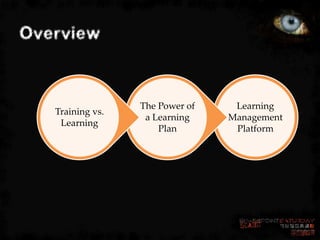
Overview


                  The Power of    Learning
   Training vs.
                   a Learning    Management
    Learning
                      Plan        Platform
One scary thing
Watch your eyes …

The end goal is to help enable an
organization’s path and drive to …


           Adoption
Traditional vs. Mindset Shift

TRAINING VS. LEARNING
Training vs. Learning
  Training
   Normally focused off-the-shelf solutions
   No follow through or assessment as part of the delivery
   Demos and labs based on highlighting product features
  Tracking on delivery completion


  Learning
   Tailored to customer’s solution and needs
   Tracking is essential
   Follow through using assessments after each lesson
   Demos and labs based on highlighting customer’s solution
Traditional Approach


     IT Pros

      Developers

     End Users
Let’s talk about that ...
• Does it make sense for the reality of
  SharePoint?
• Are those too general?
• Are we positioning a product or intending
  to implement a solution?
Mindset Shift
       Members

         Site Owners

           Site Collection Administrators

           Farm Administrators

         Architects

       Developers/Designers
The Power Behind a

LEARNING PLAN
How do we even start?
• Learning Plan
  – What is the goal?
  – How do we deliver it?
  – Plan the approach
  – Build a path!!
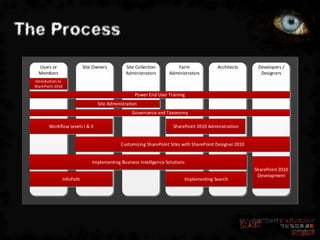
The Process
    Users or                    Site Owners         Site Collection        Farm               Architects       Developers /
    Members                                         Administrators      Administrators                          Designers
   Introduction to
  SharePoint 2010

                                                        Power End User Training
                                      Site Administration
                                                       Governance and Taxonomy

          Workflow Levels I & II                                          SharePoint 2010 Administration


                                                 Customizing SharePoint Sites with SharePoint Designer 2010


                                    Implementing Business Intelligence Solutions
                                                                                                              SharePoint 2010
                                                                                                               Development
                     InfoPath                                                  Implementing Search
Assessments
• Pre
• Post
• “Certification” of Skills


                              14
Delivery Options

    Computer-based
     Practically unlimited user base
     Self-paced
     Web-based training


    Classroom
     Up to 16 attendees per training session
     Instructor-led


                                                15
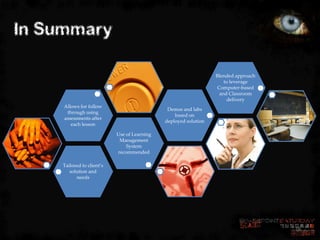
In Summary

                                                                 Blended approach
                                                                     to leverage
                                                                  Computer-based
                                                                   and Classroom
                                                                      delivery
     Allows for follow
                                              Demos and labs
      through using
                                                 based on
     assessments after
                                             deployed solution
        each lesson

                           Use of Learning
                            Management
                               System
                           recommended

    Tailored to client’s
       solution and
          needs


                                                                                    16
LEARNING MANAGEMENT
PLATFORM
Approach
• Build a natural environment
  – Could we … should we deliver it in
    SharePoint?
  – Does it fit?
Sample Requirements
General Requirements

• Allow individuals or managers to sign-up
  Individuals.
• Use SharePoint Learning Kit as base.
• Individuals will be presented with a landing
  page that lists their Learning Plan.
• Individual’s information will be gathered
  from the User Profile System.
Sample Requirements
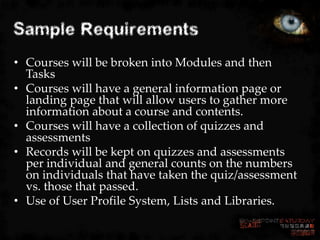
• Courses will be broken into Modules and then
  Tasks
• Courses will have a general information page or
  landing page that will allow users to gather more
  information about a course and contents.
• Courses will have a collection of quizzes and
  assessments
• Records will be kept on quizzes and assessments
  per individual and general counts on the numbers
  on individuals that have taken the quiz/assessment
  vs. those that passed.
• Use of User Profile System, Lists and Libraries.
Sample Requirements
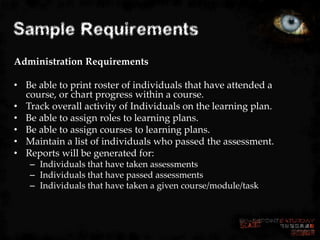
Administration Requirements

• Be able to print roster of individuals that have attended a
  course, or chart progress within a course.
• Track overall activity of Individuals on the learning plan.
• Be able to assign roles to learning plans.
• Be able to assign courses to learning plans.
• Maintain a list of individuals who passed the assessment.
• Reports will be generated for:
   – Individuals that have taken assessments
   – Individuals that have passed assessments
   – Individuals that have taken a given course/module/task
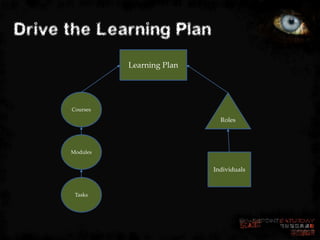
Drive the Learning Plan
                Learning Plan


      Courses
                                  Roles


      Modules


                                Individuals


       Tasks
Assessment Flow
                   Assessment Results

 Assessment


                                                  Individual
                            Role


         Course

                  Learning Plan / Learning Path
Content
• Videos
  – Keep focus on the task at hand
  – Task driven
• Text
  – Documents
  – Single Printable guides
• Wiki
  – Living document
Some examples
• Point8020 ShowMe
• The SharePoint Shepherd’s Guide for End
  Users
• Mindsharp
In Closing

                                                              One Size does
                                                               not Fit All


       Assessments
                                               Make it
       show enable
                                           Milestone driven
         growth

                           Learn the
                          Culture of
                        Learning for the
                         Organization

      Make it part of
       the Solution
Questions & Evals
ScarePint


Right here at the UC Bearcat Lounge
immediately following the closing
session

Generously sponsored by
Thanks To Our Sponsors

The difference between learning and training

  • 1.
    The difference between learningand training Enrique Lima
  • 2.
  • 3.
    Overview The Power of Learning Training vs. a Learning Management Learning Plan Platform
  • 4.
    One scary thing Watchyour eyes … The end goal is to help enable an organization’s path and drive to … Adoption
  • 5.
    Traditional vs. MindsetShift TRAINING VS. LEARNING
  • 7.
    Training vs. Learning Training  Normally focused off-the-shelf solutions  No follow through or assessment as part of the delivery  Demos and labs based on highlighting product features Tracking on delivery completion Learning  Tailored to customer’s solution and needs  Tracking is essential  Follow through using assessments after each lesson  Demos and labs based on highlighting customer’s solution
  • 8.
    Traditional Approach IT Pros Developers End Users
  • 9.
    Let’s talk aboutthat ... • Does it make sense for the reality of SharePoint? • Are those too general? • Are we positioning a product or intending to implement a solution?
  • 10.
    Mindset Shift Members Site Owners Site Collection Administrators Farm Administrators Architects Developers/Designers
  • 11.
    The Power Behinda LEARNING PLAN
  • 12.
    How do weeven start? • Learning Plan – What is the goal? – How do we deliver it? – Plan the approach – Build a path!!
  • 13.
    The Process Users or Site Owners Site Collection Farm Architects Developers / Members Administrators Administrators Designers Introduction to SharePoint 2010 Power End User Training Site Administration Governance and Taxonomy Workflow Levels I & II SharePoint 2010 Administration Customizing SharePoint Sites with SharePoint Designer 2010 Implementing Business Intelligence Solutions SharePoint 2010 Development InfoPath Implementing Search
  • 14.
    Assessments • Pre • Post •“Certification” of Skills 14
  • 15.
    Delivery Options Computer-based  Practically unlimited user base  Self-paced  Web-based training Classroom  Up to 16 attendees per training session  Instructor-led 15
  • 16.
    In Summary Blended approach to leverage Computer-based and Classroom delivery Allows for follow Demos and labs through using based on assessments after deployed solution each lesson Use of Learning Management System recommended Tailored to client’s solution and needs 16
  • 17.
  • 18.
    Approach • Build anatural environment – Could we … should we deliver it in SharePoint? – Does it fit?
  • 19.
    Sample Requirements General Requirements •Allow individuals or managers to sign-up Individuals. • Use SharePoint Learning Kit as base. • Individuals will be presented with a landing page that lists their Learning Plan. • Individual’s information will be gathered from the User Profile System.
  • 20.
    Sample Requirements • Courseswill be broken into Modules and then Tasks • Courses will have a general information page or landing page that will allow users to gather more information about a course and contents. • Courses will have a collection of quizzes and assessments • Records will be kept on quizzes and assessments per individual and general counts on the numbers on individuals that have taken the quiz/assessment vs. those that passed. • Use of User Profile System, Lists and Libraries.
  • 21.
    Sample Requirements Administration Requirements •Be able to print roster of individuals that have attended a course, or chart progress within a course. • Track overall activity of Individuals on the learning plan. • Be able to assign roles to learning plans. • Be able to assign courses to learning plans. • Maintain a list of individuals who passed the assessment. • Reports will be generated for: – Individuals that have taken assessments – Individuals that have passed assessments – Individuals that have taken a given course/module/task
  • 22.
    Drive the LearningPlan Learning Plan Courses Roles Modules Individuals Tasks
  • 23.
    Assessment Flow Assessment Results Assessment Individual Role Course Learning Plan / Learning Path
  • 24.
    Content • Videos – Keep focus on the task at hand – Task driven • Text – Documents – Single Printable guides • Wiki – Living document
  • 25.
    Some examples • Point8020ShowMe • The SharePoint Shepherd’s Guide for End Users • Mindsharp
  • 26.
    In Closing One Size does not Fit All Assessments Make it show enable Milestone driven growth Learn the Culture of Learning for the Organization Make it part of the Solution
  • 27.
  • 28.
    ScarePint Right here atthe UC Bearcat Lounge immediately following the closing session Generously sponsored by
  • 29.
    Thanks To OurSponsors