A blueprint is a detailed outline or plan of action. This Blueprint outlines the
design specifications, standards, and conventions specific to project development.
Use this Blueprint as a reference tool, which presents and explains what features
and functionality you can expect from the finished program project.
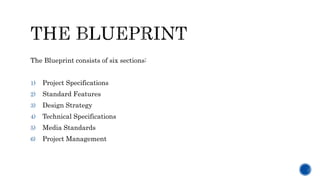
The Blueprint consists of six sections:
1) Project Specifications
2) Standard Features
3) Design Strategy
4) Technical Specifications
5) Media Standards
6) Project Management
An outline of the project’s most fundamental requirements—those
attributes that define what we are building and for whom.
1
Intended Audience:
Targeted Length:Brief Description of Project:
Learning Objectives:
1) [Example]
2) [Example]
3) [Example]
4) [Example]
5) [Example]
Audience Characteristics:
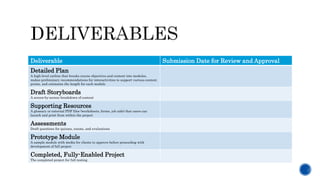
Deliverable Submission Date for Review and Approval
Detailed Plan
A high-level outline that breaks course objectives and content into modules,
makes preliminary recommendations for interactivities to support various content
points, and estimates the length for each module
Draft Storyboards
A screen-by-screen breakdown of content
Supporting Resources
A glossary or external PDF files (worksheets, forms, job aids) that users can
launch and print from within the project
Assessments
Draft questions for quizzes, exams, and evaluations
Prototype Module
A sample module with media for clients to approve before proceeding with
development of full project
Completed, Fully-Enabled Project
The completed project for full testing
Existing training, documentation, or other materials to be used as a source of
content:
 [Sample 1]
 [Sample 2]
 [Sample 3]
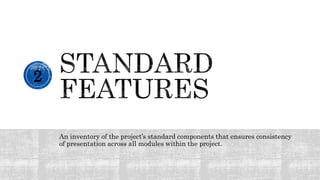
An inventory of the project’s standard components that ensures consistency
of presentation across all modules within the project.
2
Types of Modules Description
Tutorial Module Provides instructions about using the program and navigating within it.
Overview Module
Presents an introduction to the content to be covered within the course, including course
objectives and a brief description of the roles or responsibilities of the people being trained.
Content Module States the intent to organize core content into one or more brief, logical modules.
Wrap-Up Module Summarizes key information presented in the program and provides concluding thoughts.
Assessment [???]
Other
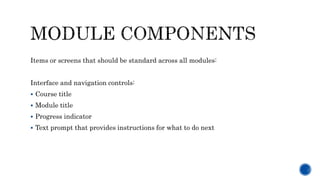
Items or screens that should be standard across all modules:
Interface and navigation controls:
 Course title
 Module title
 Progress indicator
 Text prompt that provides instructions for what to do next
Documentation of methods, strategies, and constraints for presenting
content, engaging users, and evaluating their learning.
3
The theme that defines the graphical look:
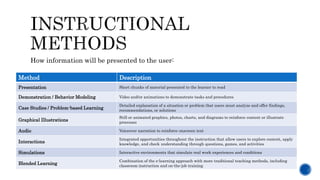
How information will be presented to the user:
Method Description
Presentation Short chunks of material presented to the learner to read
Demonstration / Behavior Modeling Video and/or animations to demonstrate tasks and procedures
Case Studies / Problem-based Learning
Detailed explanation of a situation or problem that users must analyze and offer findings,
recommendations, or solutions
Graphical Illustrations
Still or animated graphics, photos, charts, and diagrams to reinforce content or illustrate
processes
Audio Voiceover narration to reinforce onscreen text
Interactions
Integrated opportunities throughout the instruction that allow users to explore content, apply
knowledge, and check understanding through questions, games, and activities
Simulations Interactive environments that simulate real work experiences and conditions
Blended Learning
Combination of the e-learning approach with more traditional teaching methods, including
classroom instruction and on-the-job training
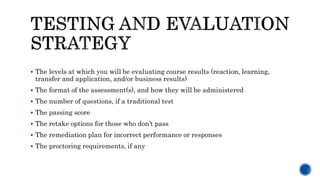
 The levels at which you will be evaluating course results (reaction, learning,
transfer and application, and/or business results)
 The format of the assessment(s), and how they will be administered
 The number of questions, if a traditional test
 The passing score
 The retake options for those who don’t pass
 The remediation plan for incorrect performance or responses
 The proctoring requirements, if any
A record of the technical specifications for the project
4
Development
Tools used to build the final project:
Delivery
Platform used for final project:
Documentation that details conventions for the various types of media
included in the project.
5
 Text
 Audio
 Visuals
 Graphics
 Video
A list of project management details for reference.
6
Content taken from Monique Donahue’s “The Design Document: Your Blueprint for e-Learning
Standards and Consistency,” which was featured in the December 5, 2005 issue of The Learning
Solutions Magazine.
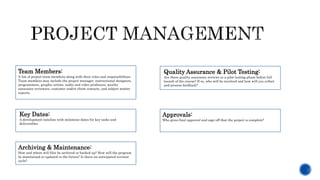
Team Members:
A list of project team members along with their roles and responsibilities.
Team members may include the project manager, instructional designers,
programmers, graphic artists, audio and video producers, quality
assurance reviewers, customer and/or client contacts, and subject matter
experts.
Quality Assurance & Pilot Testing:
Are there quality assurance reviews or a pilot testing phase before full
launch of the course? If so, who will be involved and how will you collect
and process feedback?
Key Dates:
A development timeline with milestone dates for key tasks and
deliverables
Approvals:
Who gives final approval and sign-off that the project is complete?
Archiving & Maintenance:
How and where will files be archived or backed up? How will the program
be maintained or updated in the future? Is there an anticipated revision
cycle?

The Design Document Blueprint

  • 1.
    A blueprint isa detailed outline or plan of action. This Blueprint outlines the design specifications, standards, and conventions specific to project development. Use this Blueprint as a reference tool, which presents and explains what features and functionality you can expect from the finished program project.
  • 2.
    The Blueprint consistsof six sections: 1) Project Specifications 2) Standard Features 3) Design Strategy 4) Technical Specifications 5) Media Standards 6) Project Management
  • 3.
    An outline ofthe project’s most fundamental requirements—those attributes that define what we are building and for whom. 1
  • 4.
    Intended Audience: Targeted Length:BriefDescription of Project: Learning Objectives: 1) [Example] 2) [Example] 3) [Example] 4) [Example] 5) [Example] Audience Characteristics:
  • 5.
    Deliverable Submission Datefor Review and Approval Detailed Plan A high-level outline that breaks course objectives and content into modules, makes preliminary recommendations for interactivities to support various content points, and estimates the length for each module Draft Storyboards A screen-by-screen breakdown of content Supporting Resources A glossary or external PDF files (worksheets, forms, job aids) that users can launch and print from within the project Assessments Draft questions for quizzes, exams, and evaluations Prototype Module A sample module with media for clients to approve before proceeding with development of full project Completed, Fully-Enabled Project The completed project for full testing
  • 6.
    Existing training, documentation,or other materials to be used as a source of content:  [Sample 1]  [Sample 2]  [Sample 3]
  • 7.
    An inventory ofthe project’s standard components that ensures consistency of presentation across all modules within the project. 2
  • 8.
    Types of ModulesDescription Tutorial Module Provides instructions about using the program and navigating within it. Overview Module Presents an introduction to the content to be covered within the course, including course objectives and a brief description of the roles or responsibilities of the people being trained. Content Module States the intent to organize core content into one or more brief, logical modules. Wrap-Up Module Summarizes key information presented in the program and provides concluding thoughts. Assessment [???] Other
  • 9.
    Items or screensthat should be standard across all modules: Interface and navigation controls:  Course title  Module title  Progress indicator  Text prompt that provides instructions for what to do next
  • 10.
    Documentation of methods,strategies, and constraints for presenting content, engaging users, and evaluating their learning. 3
  • 11.
    The theme thatdefines the graphical look:
  • 12.
    How information willbe presented to the user: Method Description Presentation Short chunks of material presented to the learner to read Demonstration / Behavior Modeling Video and/or animations to demonstrate tasks and procedures Case Studies / Problem-based Learning Detailed explanation of a situation or problem that users must analyze and offer findings, recommendations, or solutions Graphical Illustrations Still or animated graphics, photos, charts, and diagrams to reinforce content or illustrate processes Audio Voiceover narration to reinforce onscreen text Interactions Integrated opportunities throughout the instruction that allow users to explore content, apply knowledge, and check understanding through questions, games, and activities Simulations Interactive environments that simulate real work experiences and conditions Blended Learning Combination of the e-learning approach with more traditional teaching methods, including classroom instruction and on-the-job training
  • 13.
     The levelsat which you will be evaluating course results (reaction, learning, transfer and application, and/or business results)  The format of the assessment(s), and how they will be administered  The number of questions, if a traditional test  The passing score  The retake options for those who don’t pass  The remediation plan for incorrect performance or responses  The proctoring requirements, if any
  • 14.
    A record ofthe technical specifications for the project 4
  • 15.
    Development Tools used tobuild the final project: Delivery Platform used for final project:
  • 16.
    Documentation that detailsconventions for the various types of media included in the project. 5
  • 17.
     Text  Audio Visuals  Graphics  Video
  • 18.
    A list ofproject management details for reference. 6
  • 19.
    Content taken fromMonique Donahue’s “The Design Document: Your Blueprint for e-Learning Standards and Consistency,” which was featured in the December 5, 2005 issue of The Learning Solutions Magazine.
  • 20.
    Team Members: A listof project team members along with their roles and responsibilities. Team members may include the project manager, instructional designers, programmers, graphic artists, audio and video producers, quality assurance reviewers, customer and/or client contacts, and subject matter experts. Quality Assurance & Pilot Testing: Are there quality assurance reviews or a pilot testing phase before full launch of the course? If so, who will be involved and how will you collect and process feedback? Key Dates: A development timeline with milestone dates for key tasks and deliverables Approvals: Who gives final approval and sign-off that the project is complete? Archiving & Maintenance: How and where will files be archived or backed up? How will the program be maintained or updated in the future? Is there an anticipated revision cycle?