TABLE OF CONTENTS
03 Why Should I Read the Definitive Guide to Engaging Email Marketing?
04 Part One: What is Engaging Email?
17 Part Two: Trusted
51 Part Three: Always Relevant
97 Part Four: Conversations, Not Campaigns
109 Part Five: Coordinated Across Channels
123 Part Six: Strategic - The New Metrics for Email
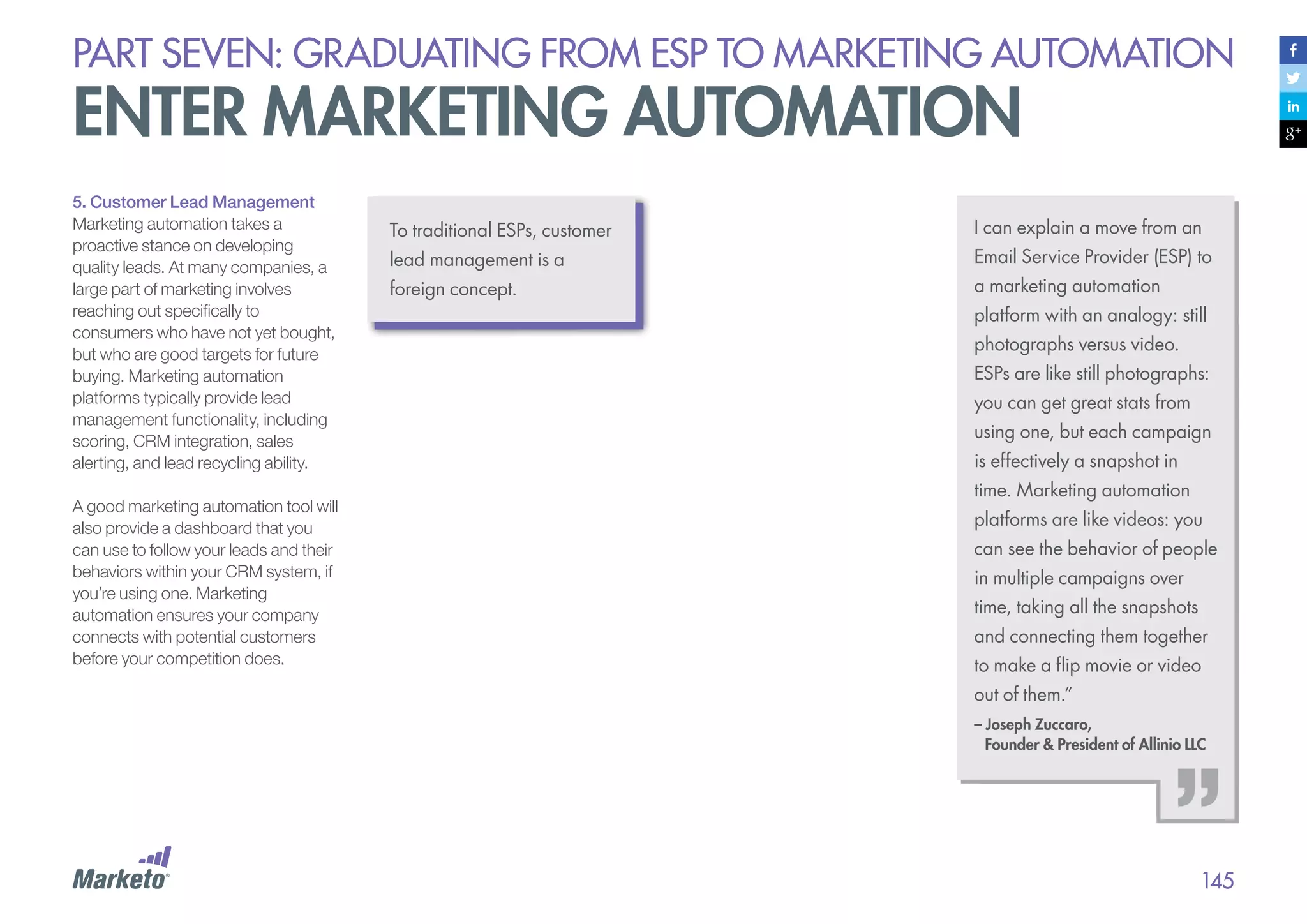
136 Part Seven: Graduating from ESP to Marketing Automation
152 Appendix: Email Marketing Experts
153 Appendix: Reference Links
154 About Marketo
introduction

why should i read the
definitive guide to engaging
email marketing?
Buyers today are more empowered. Information is abundantly, overwhelmingly available,
and buyers are using that easy access to tune out unwanted marketing messages while
simultaneously seizing control of their buying processes.
In this environment, oldfashioned “batch and blast”
email will serve only to alienate
buyers. With short attention
spans and intelligent buying and
browsing habits, digitally-savvy
consumers want personalized,
relevant communications.
To keep up with today’s buyer, you
need to know:
•	What makes email truly trusted
and engaging
•	How to talk with each of your
customers individually, rather
than talk at them as a group
•	How to engage your audience
with cross-channel
conversations, listening and
responding effectively

This Definitive Guide to Engaging
Email Marketing (#DG2EEM) covers
the five attributes of engaging email:
•	Trusted
•	Always relevant
•	Conversational

We hope this guide will help you tell richer,
more compelling, and ultimately more
engaging stories within your email
marketing and beyond. Throughout it,
you’ll find checklists and worksheets to
help you assess your strategy and
examples of great email marketing to
inspire you.

•	Coordinated across channels
•	Strategic
As a “Definitive Guide”, it also covers
all sorts of email topics, including
writing subject lines, designing emails
for mobile, building and managing
your list, avoiding spam filters,
integrating email and social, and
more. The guide also talks about the
latest in email technology, including
what to look for in a modern email
service provider.

On any given day, the average customer will be exposed
to 2,904 media messages, will pay attention to 52 and will
positively remember only four (SuperProfile 2010).
How do you ensure that your email is one of the four that
gets remembered? The answer: your email must be more
trusted, more relevant, and more strategic. It must be
more engaging.
part one:

What is
engaging email?
PART ONE: What is Engaging email?

The new digital buyer
Meet today’s buyer. She has the upper hand when it comes to making purchasing decisions. Tech savvy and
brand sophisticated, she is wise to the ways of marketing, and she expects a lot. She believes you should inform
and even entertain her, but never bore or, worse, irritate her. And she’s fickle — if you don’t keep
communications interesting, she’ll opt out lickety-split.
Three major trends have emerged out
of the recent — and rapid — evolution
of buyer behaviors across email,
social, search, and the Web.
1.	Buyers are more empowered:
Thanks to information abundance
combined with better search and
sharing technology, product
information is now ubiquitous. The
Web provides consumers with instant
information gratification. And mobile
devices add a wherever/whenever
dimension to every aspect of the
experience. Consumers can access
detailed specs, pricing, and reviews
about goods and services 24/7 with a
few flicks of their thumbs on their
smartphones. Meanwhile, social
media encourages consumers to
share and compare.

Today’s buyers are increasingly
self-directed when it comes to making
purchasing decisions. They have
broad access to resources and
proactively gather information across
a number of digital channels, often
developing brand perceptions before
they ever interact directly with a brand.
By the time a buyer comes to you, he’s
probably already made his purchasing
decision, so it’s time to throw out the
old model of a persuasive shop girl
greeting your customer at the door.

And as for you sales guys, the idea of
taking a customer out for golf sounds
great, and it may even happen
occasionally, but you know it’s not
feasible for everyone. You manage a
portfolio of hundreds or thousands
of customers!

Customer Engagement for
Competitive Advantage
According to Forrester Research, we are
now in the “Age of the Customer.” Today,
advances in technology allow every
company to tap into global factories and
supply chains, and even the leanest
startups can access all the computing
resources they need from the cloud. The
ability to tap into the cloud is no longer
considered an advantage; rather, it’s a way
of life. Today, being the customer’s first
choice is the only remaining source of
competitive advantage, and competition is
fierce. To win, companies must be
obsessed with their customers, focused on
understanding them and engaging with
them better than anyone else.

5
PART ONE: What is Engaging email?

The new digital buyer
2. Buyers know how to opt out:
The junk mail of yore kept consumers
prisoner because they couldn’t
“break out.” But today’s buyers can
easily opt out of marketing
communications they don’t want. If
you’re sending marketing emails and
tracking your results (and we hope
you are!) you probably know that
gut-sinking feeling well when a
campaign underperforms and
causes a lot of opt-outs – or, worse,
spam complaints!
But consumers who take the initiative
to unsubscribe from your emails
might only be the tip of the opt-out
iceberg. Many more consumers
might be “passively opting out” —
simply ignoring the emails you send.
We’re all getting better at tuning out
the noise of today’s digital circus, and
the result is that most traditional
marketing techniques, which are
based on “renting attention” from the
buyer as they go about their business,
are becoming less and less effective
as buyers get more tech-savvy.

3. Consumers have higher
expectations: Today’s buyers
expect companies to keep seamless
track of their purchasing history,
communication preferences, and
desires. If your system isn’t a well-oiled
data machine, you’ll lose brand
loyalty fast.
Consumers look for a unified and
personalized experience across all of
your touchpoints: your website, social
media and photo platforms
(Facebook, Twitter, Instagram), email
marketing, etc. They want to find the
information they are looking for in the
medium that is most convenient for
them at the moment. Whether they’re
in front of their computers at work or in
lines at post offices on their mobile
devices, they expect an experience
that’s streamlined and consistent —
and it must be personal, too. They also
expect you to recognize them — this is
where it becomes critical to capture
and store data over time and across
channels — and then feed them the
exact information they want at the
moment you interact with them.

It’s an exciting – yet challenging –
time to be a marketer. It’s no
longer sufficient to simply push
static information to buyers in a
mass advertising model, not
even in segmented batches. You
must fundamentally shift the ways
you engage with customers across
online channels throughout their
lifecycles. And to do this, you must
learn to engage each and every
prospective customer
individually and personally.

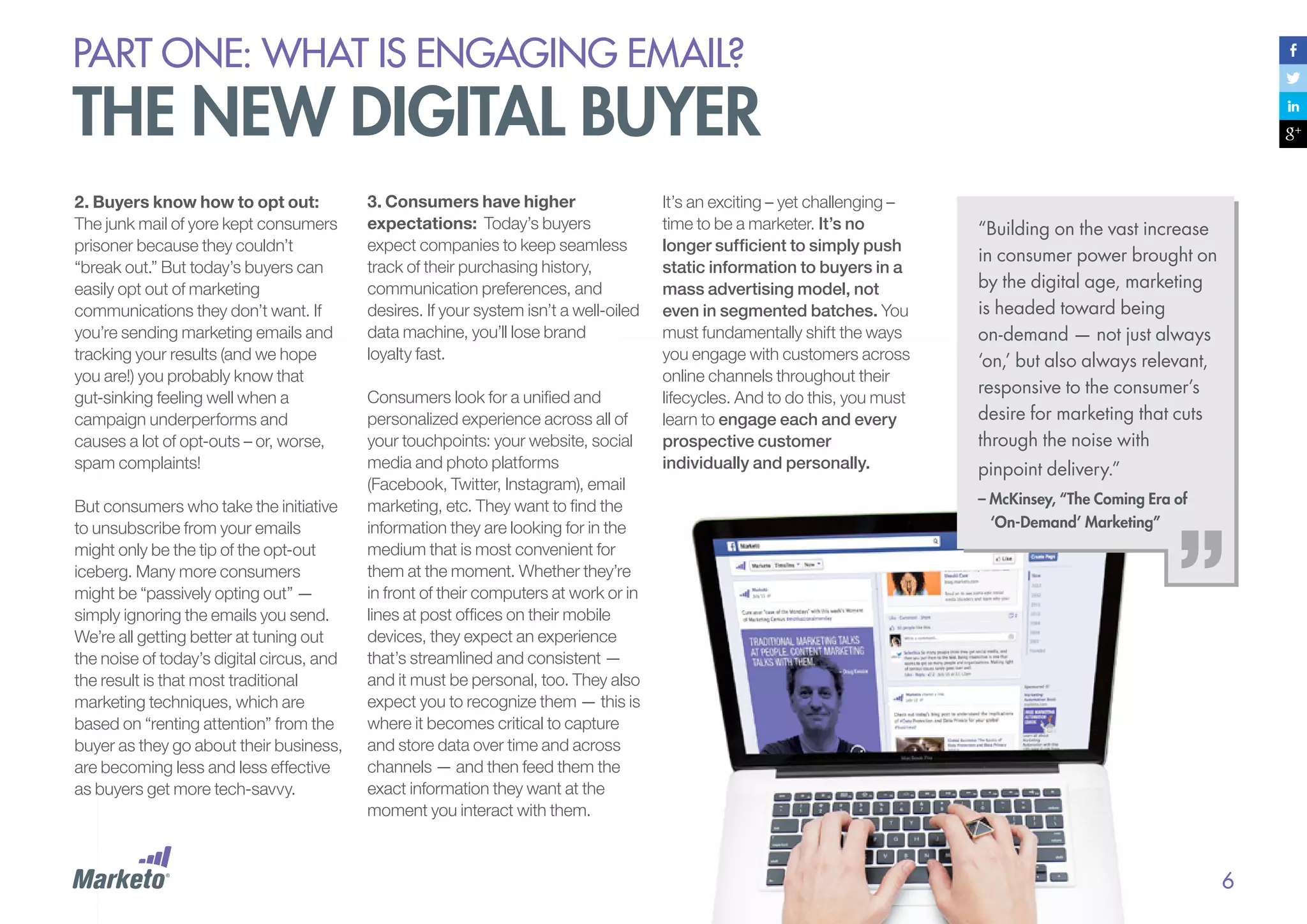
“Building on the vast increase
in consumer power brought on
by the digital age, marketing
is headed toward being
on-demand — not just always
‘on,’ but also always relevant,
responsive to the consumer’s
desire for marketing that cuts
through the noise with
pinpoint delivery.”
– McKinsey, “The Coming Era of
‘On-Demand’ Marketing”

6
PART ONE: What is Engaging email?

email matters more today
than ever before
In 2009, The Wall Street Journal published an article claiming that email was dead.
Ironically, it was the most emailed article of the day.
Just about every day since then,
someone has published an article or
blog post echoing email’s demise. In
fact, if you Google “email is dead,”
you’ll get over 1.5 million results.
(To emphasize just how radical a
number that is, comparison searches
bring up only 280,000 results for
“blogging is dead,” 180,000 for
“social media is dead,” and only
2,500 for “podcasting is dead.” All of
these numbers were current at the
time we wrote this in June 2013.)

But the reports of the death of email
have been greatly exaggerated, and
the hysteria around the notion only
shows that email is more important
than ever. While companies now
have the flexibility to communicate
via traditional channels, such as
direct mail and TV, as well as
through newer channels, such as
social media, email is still the
quickest and most direct way to
reach customers with
critical information.

“The reports of my death have
been greatly exaggerated.”
– Mark Twain

Quick Quiz
1.	 How many times a day do you
check your email?
2.	 How many times have you checked
your email in the last hour?
3.	 How soon after you wake up do
you check your email?
4.	 Have you checked your email
while reading this guide?

Why? Because email is the one
channel your audience accesses
regularly. We – consumers – are
addicted to email.

7
PART ONE: What is Engaging email?

email matters more today
than ever before
Email: Alive and Well
On any given day, your customer may
or may not visit your website, blog or
Facebook page; but with few
exceptions, customers check their
email every day, if not multiple times a
day. Scratch that — how do you make
it through all those meetings? It’s more
like multiple times an hour!
Despite pundit cynicism, the stats
around email are resoundingly positive.
For example, there are currently 3.3
billion email accounts in the world.
(Source: Mashable)

What’s more:
•	Of Americans age 12 and over
who are active online, 94% cite
email as one of their regular
activities. (Source: Pew Internet and
American Life Project’s Generations
2010 report)

•	Jay Baer, Social Media Speaker,
Author and Coach, says that 58%
percent of adult Americans
check email first thing in the
morning. (Source: MarketingSherpa
2013 Email Summit)

Email is very much alive. Plus, it’s still
the number one way for marketers to
communicate directly with customers.
According to new research:
•	Email is the customer
preference. In a recent survey, a
staggering 77% of consumers
reported that they prefer to receive
permission-based marketing
communications through email –
and email was the number one
source for all age groups
including 15-24!
(Source: Waldow Social)

•	Email generates nearly a 2X
return compared to other
channels. For every dollar spent
on email marketing in 2011, there
was a $40.56 return. Compare that
to other channels, such as search
engine marketing, which is the
next closest at $22.44.

•	Email investment is slated to
increase. 64% of companies
indicated their organizations’
investment in email marketing was
expected to increase in 2013.
(Source: MarketingSherpa 2013
Benchmark report)

“Where do you tell people
to send important calendar
items, documents, or
discussions about
important topics, either for
work or home? Our guess

The point is, email is not going
anywhere. As a marketer, it’s still
your number one tool for reaching
customers fast.
If you agree that email marketing
is NOT dead, go ahead and take a
quick break to tweet:

is that ‘Facebook’ wasn’t
your answer. It was
probably email.”
– Jason Falls, Digital Strategist
and Co-author of “The Rebel’s
Guide to Email Marketing”

Email Marketing is
NOT dead! #DG2EEM

(Source: Direct Marketing Association and
Smart Data Collective)

8
PART ONE: What is Engaging email?

but email is facing challenges
Email still matters – perhaps more than ever – but traditional paradigms no longer cut it. It’s time for
a reality check regarding the new challenges that email marketers face as digital consumers get
more sophisticated.
Here are the key areas of this new challenge:
•	The Economics of Attention: Information abundance and
attention scarcity make it harder than ever to get buyer attention
•	Opt-Out, Screen Out, Tune Out: Consumers don’t want to
feel they are being marketed to, and will find ways to tune out
unwanted communications
•	The Cross-Channel Marketing Revolution: New
communication channels mean email can no longer be a
standalone channel
•	Imprecise Metrics: Imprecise metrics that don’t show true
impact means that email struggles to be strategic
PART ONE: What is Engaging email?

but email is facing challenges
The Economics of Attention
The rise of the Internet has resulted in
a quick transition from information
scarcity to information abundance.
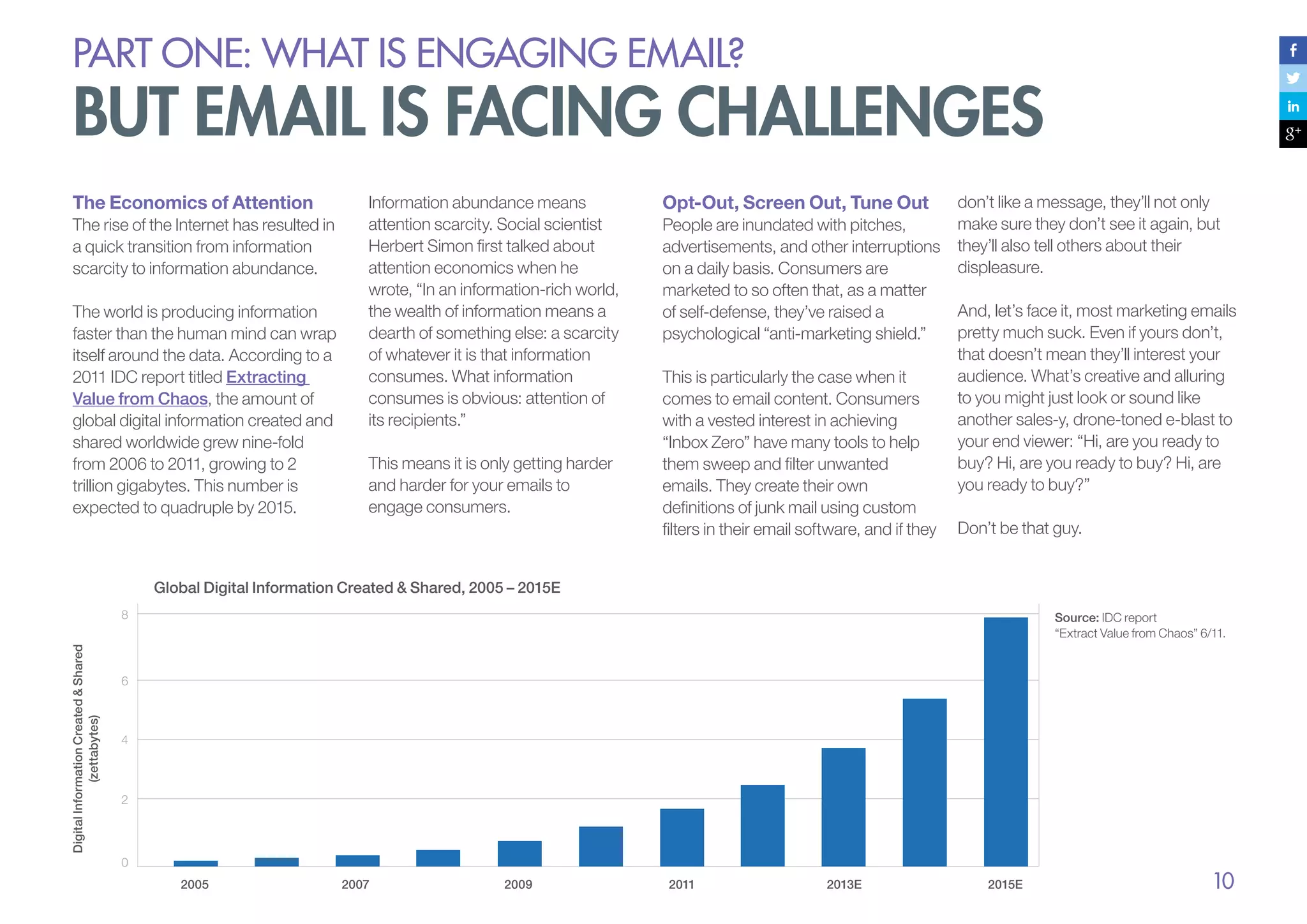
The world is producing information
faster than the human mind can wrap
itself around the data. According to a
2011 IDC report titled Extracting
Value from Chaos, the amount of
global digital information created and
shared worldwide grew nine-fold
from 2006 to 2011, growing to 2
trillion gigabytes. This number is
expected to quadruple by 2015.

Information abundance means
attention scarcity. Social scientist
Herbert Simon first talked about
attention economics when he
wrote, “In an information-rich world,
the wealth of information means a
dearth of something else: a scarcity
of whatever it is that information
consumes. What information
consumes is obvious: attention of
its recipients.”
This means it is only getting harder
and harder for your emails to
engage consumers.

Opt-Out, Screen Out, Tune Out
People are inundated with pitches,
advertisements, and other interruptions
on a daily basis. Consumers are
marketed to so often that, as a matter
of self-defense, they’ve raised a
psychological “anti-marketing shield.”
This is particularly the case when it
comes to email content. Consumers
with a vested interest in achieving
“Inbox Zero” have many tools to help
them sweep and filter unwanted
emails. They create their own
definitions of junk mail using custom
filters in their email software, and if they

don’t like a message, they’ll not only
make sure they don’t see it again, but
they’ll also tell others about their
displeasure.
And, let’s face it, most marketing emails
pretty much suck. Even if yours don’t,
that doesn’t mean they’ll interest your
audience. What’s creative and alluring
to you might just look or sound like
another sales-y, drone-toned e-blast to
your end viewer: “Hi, are you ready to
buy? Hi, are you ready to buy? Hi, are
you ready to buy?”
Don’t be that guy.

Global Digital Information Created & Shared, 2005 – 2015E

Digital Information Created & Shared
(zettabytes)

8

Source: IDC report
“Extract Value from Chaos” 6/11.

6

4

2

0
2005

2007

2009

2011

2013E

2015E

10
PART ONE: What is Engaging email?

but email is facing challenges
The Cross-Channel
Marketing Revolution
Today’s buyer seeks relevant and
personalized content across all digital
channels: email, mobile, social,
display advertising, you name it.
Omni-channel, customer-focused
marketing is no longer nice to have;
it’s a must-have.
Companies that want to put
customers at the center of their
marketing strategies must engage
them across the board, but this is only
possible when marketing teams have
a channel strategy that unifies their
products and teams.
Traditional email marketing tools were
designed for just one channel – email.
It started as a single communications
channel with no core connection to
other marketing channels. Even
today, companies using standalone
email service providers (ESPs) are
stuck with a legacy approach that
doesn’t take into account the reality

Imprecise Metrics
that today’s buyer is adept at
multi-tasking across channels —
engaging with email in one
moment, a website the next, and
then flitting across to social media.
And he does it all while talking on
the phone or texting. Traditional
ESP solutions can’t adequately
address this level of sophisticated
multi-channel customer
engagement. Nor can ESPs
adequately capture all the online
and offline behavioral patterns that
marketers must track to stay on top
of customer whims.
To spearhead the movement
toward true cross-channel
coordination, a new breed of email
marketers is quickly rising to the
top. These forward-thinking
marketers are embracing strategies
that leverage email as the best
platform to tie together the
customer relationship over time and
across all marketing channels.

With traditional ESP solutions, the
marketer has to manually sort through
multiple reports to track unsubscribes,
clicks, opens, bounces, and so on for
each email campaign. The insight
these reports provide is, unfortunately,
not that insightful with regard to
customer engagement.
When stuck with imprecise and
generic metrics, email marketing
remains merely a tactical channel,
relegated to the sidelines instead of
becoming a strategic part of
leadership’s revenue plan.

Marketers waste valuable time struggling to connect
the basic metrics provided by their ESPs to the more
strategic metrics that company executives actually
care about, such as customer engagement and
revenue impact.

11
PART ONE: What is Engaging email?

Engaging Email Marketing Defined
Consumers are always on, always connected, and always overwhelmed. If you want to connect with them, you
have to work hard to engage them. In order to be truly effective, email marketing must become more trusted, more
relevant, more conversational, and more strategic.
Think about it: you probably pay
the most attention to emails from
friends, family, and colleagues,
people with whom you have
genuine, trusted relationships.
Sure, the relationship between a
brand and a consumer is never
exactly the same as the relationship
between friends and family, but
marketers can narrow the gap.
Brands can enjoy some of the
benefits of a trusted relationship by
marketing to the buyer in a natural,
non-marketing-speak way that truly
engages him.

The best marketing doesn’t
feel like marketing at all.
If you can genuinely engage your
audience through email
marketing, you can build direct,
trusted relationships across all
channels. Do this right, and you’ll
be the company that cuts
through the noise.

“Remember that the best
campaigns aren’t about you
or what you want subscribers
to do. They’re about your
subscribers and what they
want.”
– Matt Blumberg
	 Chairman & CEO of Return Path

When implemented effectively, modern
engagement marketing can significantly
enhance your organization’s ability to
increase revenue, maximize return on
marketing investments, and increase the
lifetime value of your customers. Marketo
has found this to be true across almost
every industry, including:
•	Business services
•	Education
•	Financial services
•	Healthcare
•	Manufacturing
•	Media
•	Technology
•	Telecommunications
•	Travel and leisure

12
PART ONE: What is Engaging email?

Engaging Email Marketing Defined
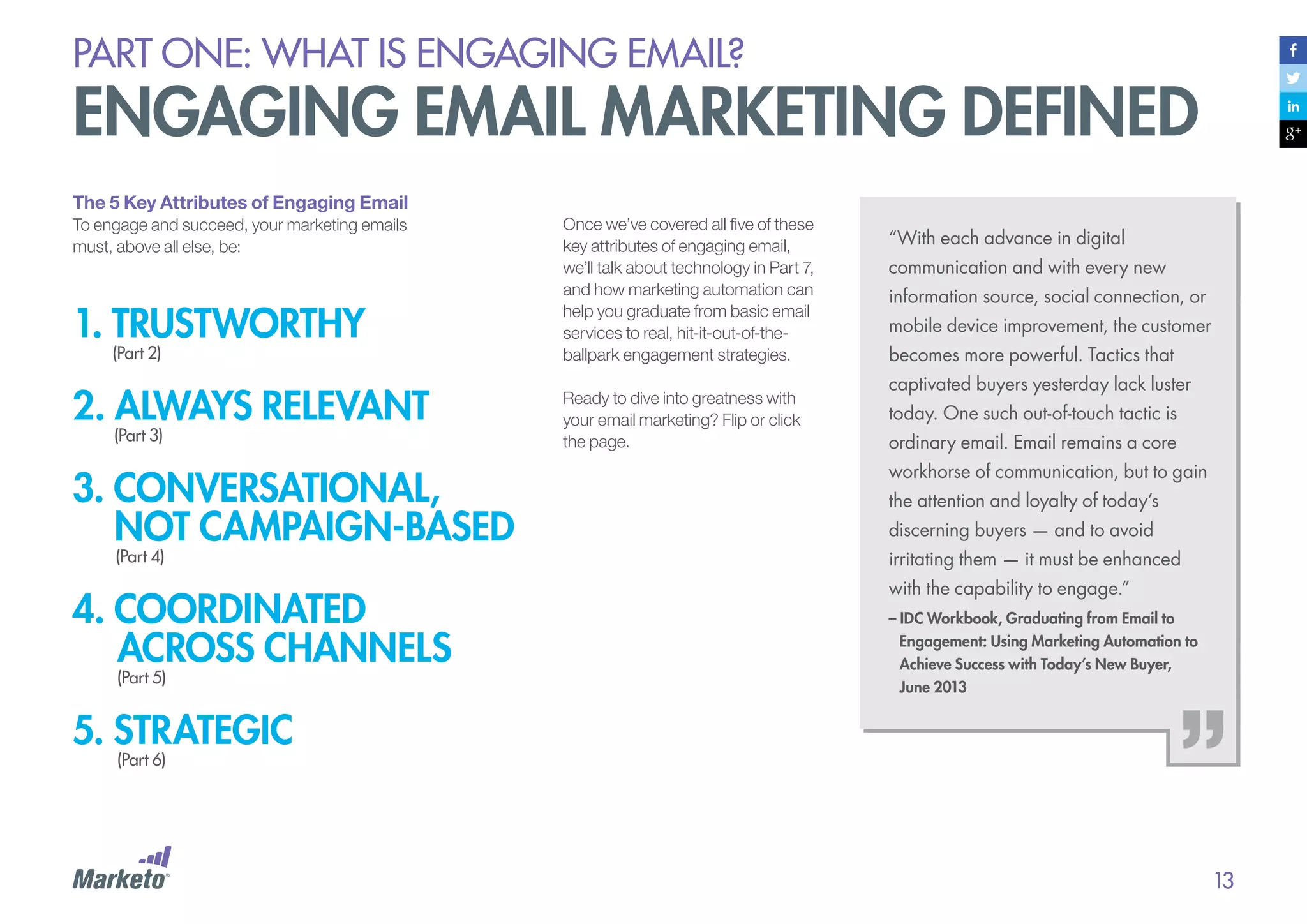
The 5 Key Attributes of Engaging Email
To engage and succeed, your marketing emails
must, above all else, be:

1. TRUSTWorthy
(Part 2)

2. always relevant
(Part 3)

Once we’ve covered all five of these
key attributes of engaging email,
we’ll talk about technology in Part 7,
and how marketing automation can
help you graduate from basic email
services to real, hit-it-out-of-theballpark engagement strategies.
Ready to dive into greatness with
your email marketing? Flip or click
the page.

“With each advance in digital
communication and with every new
information source, social connection, or
mobile device improvement, the customer
becomes more powerful. Tactics that
captivated buyers yesterday lack luster
today. One such out-of-touch tactic is
ordinary email. Email remains a core

3. conversational,
not campaign-based

workhorse of communication, but to gain

4. coordinated
across channels

with the capability to engage.”

(Part 4)

(Part 5)

the attention and loyalty of today’s
discerning buyers — and to avoid
irritating them — it must be enhanced
– IDC Workbook, Graduating from Email to 	
	 Engagement: Using Marketing Automation to 	
	 Achieve Success with Today’s New Buyer,
	 June 2013

5. strategic
(Part 6)

13
PART ONE: What is Engaging email?

Engaging Email Marketing Defined
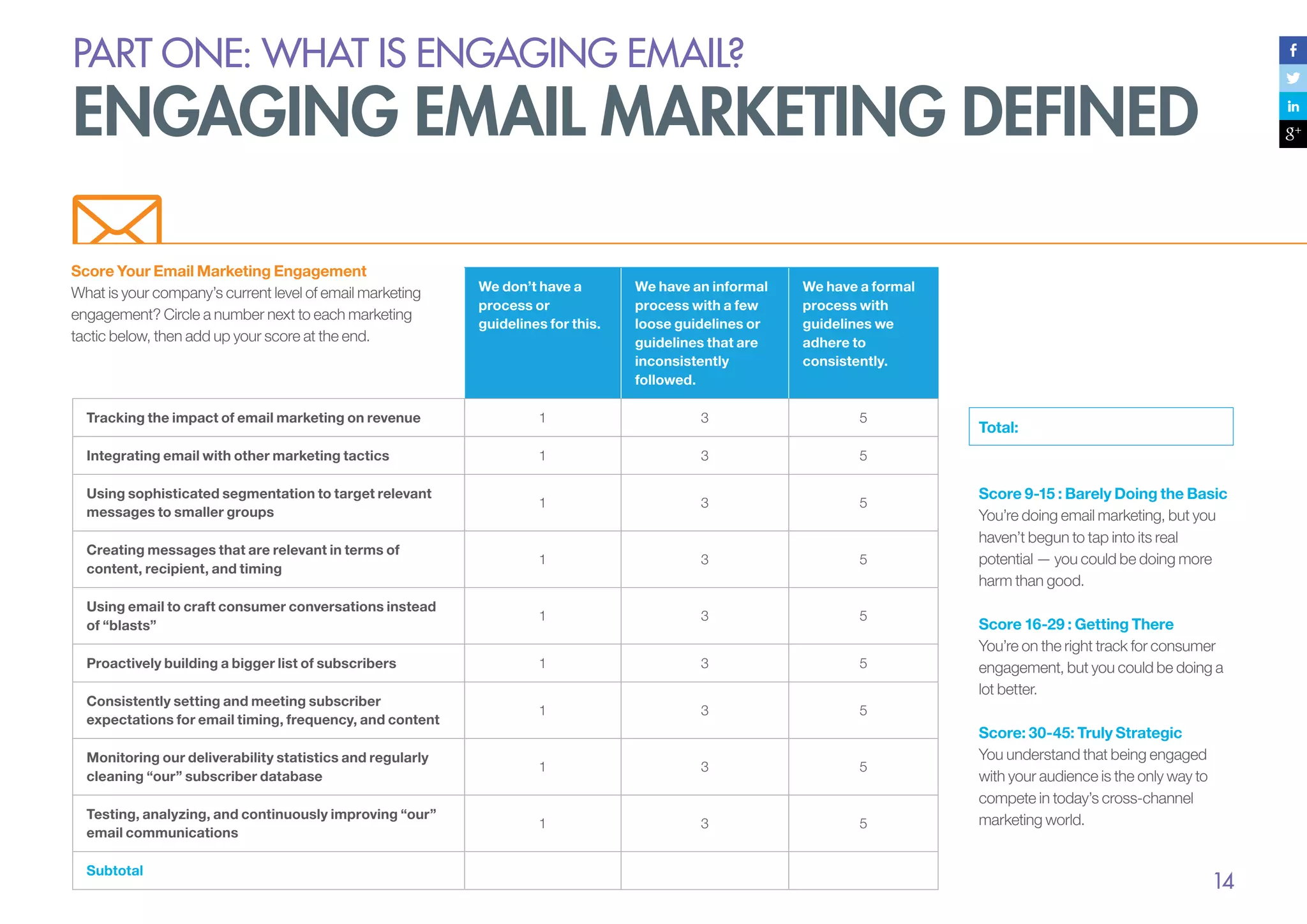
Score Your Email Marketing Engagement
What is your company’s current level of email marketing
engagement? Circle a number next to each marketing
tactic below, then add up your score at the end.

We have a formal
process with
guidelines we
adhere to
consistently.

We don’t have a
process or
guidelines for this.

We have an informal
process with a few
loose guidelines or
guidelines that are
inconsistently
followed.

Tracking the impact of email marketing on revenue

1

3

5

Integrating email with other marketing tactics

1

3

5

Using sophisticated segmentation to target relevant
messages to smaller groups

1

3

5

Creating messages that are relevant in terms of
content, recipient, and timing

1

3

5

Using email to craft consumer conversations instead
of “blasts”

1

3

5

Proactively building a bigger list of subscribers

1

3

5

Consistently setting and meeting subscriber
expectations for email timing, frequency, and content

1

3

5

Monitoring our deliverability statistics and regularly
cleaning “our” subscriber database

1

3

5

Testing, analyzing, and continuously improving “our”
email communications

1

3

5

Subtotal

Total:

Score 9-15 : Barely Doing the Basic
You’re doing email marketing, but you
haven’t begun to tap into its real
potential — you could be doing more
harm than good.
Score 16-29 : Getting There
You’re on the right track for consumer
engagement, but you could be doing a
lot better.
Score: 30-45: Truly Strategic
You understand that being engaged
with your audience is the only way to
compete in today’s cross-channel
marketing world.

14
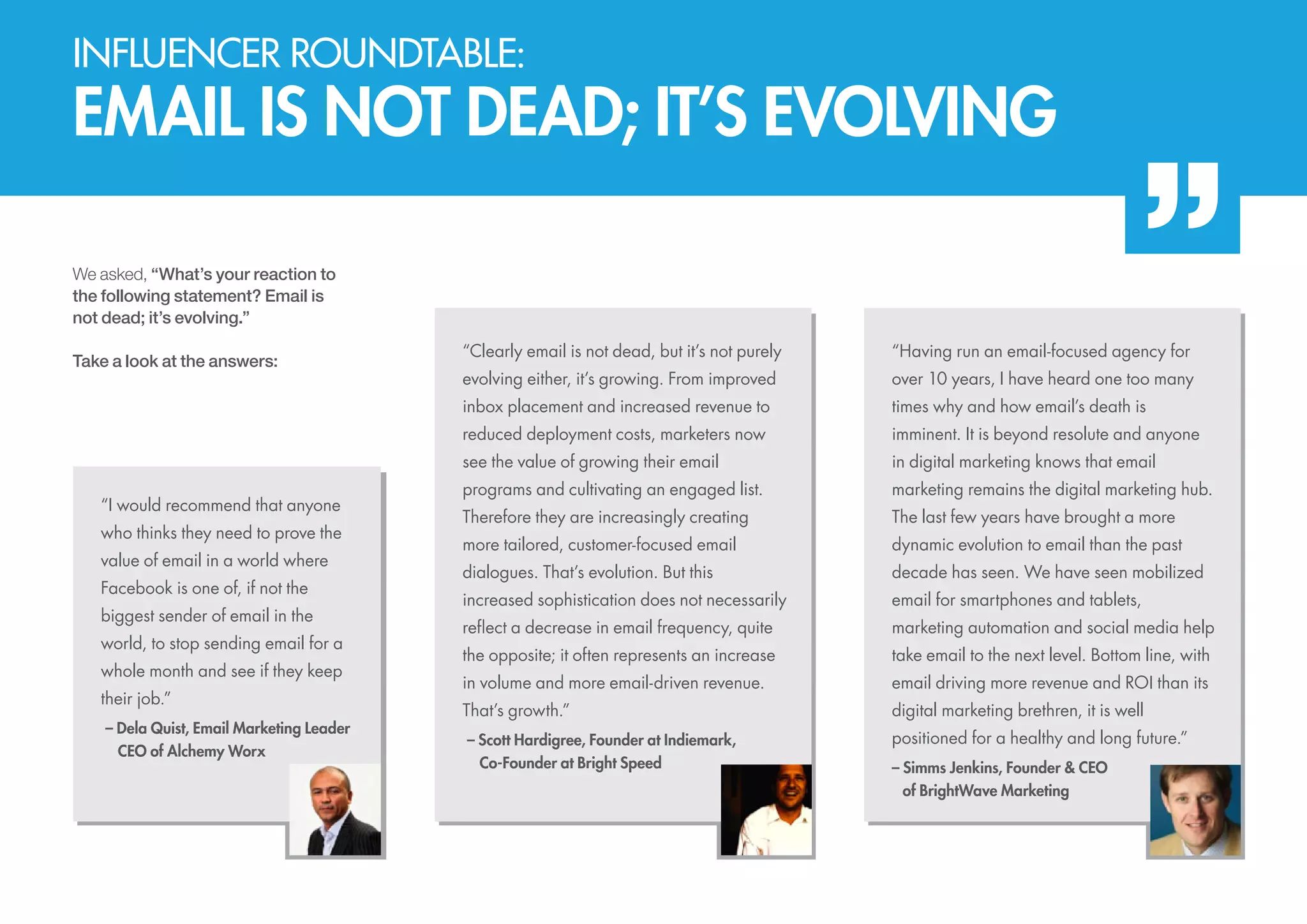
Influencer roundtable:

EMAIL IS NOT DEAD; IT’S EVOLVING
We asked, “What’s your reaction to
the following statement? Email is
not dead; it’s evolving.”

value of email in a world where
Facebook is one of, if not the
biggest sender of email in the
world, to stop sending email for a
whole month and see if they keep
their job.”
– Dela Quist, Email Marketing Leader
	 CEO of Alchemy Worx

evolving either, it’s growing. From improved

over 10 years, I have heard one too many
times why and how email’s death is
imminent. It is beyond resolute and anyone

see the value of growing their email

who thinks they need to prove the

“Having run an email-focused agency for

reduced deployment costs, marketers now

“I would recommend that anyone

“Clearly email is not dead, but it’s not purely
inbox placement and increased revenue to

Take a look at the answers:

in digital marketing knows that email

programs and cultivating an engaged list.

marketing remains the digital marketing hub.

Therefore they are increasingly creating

The last few years have brought a more

more tailored, customer-focused email

dynamic evolution to email than the past

dialogues. That’s evolution. But this

decade has seen. We have seen mobilized

increased sophistication does not necessarily

email for smartphones and tablets,

reflect a decrease in email frequency, quite

marketing automation and social media help

the opposite; it often represents an increase

take email to the next level. Bottom line, with

in volume and more email-driven revenue.

email driving more revenue and ROI than its

That’s growth.”

digital marketing brethren, it is well

– Scott Hardigree, Founder at Indiemark,
	 Co-Founder at Bright Speed

positioned for a healthy and long future.”
– Simms Jenkins, Founder & CEO
	of BrightWave Marketing
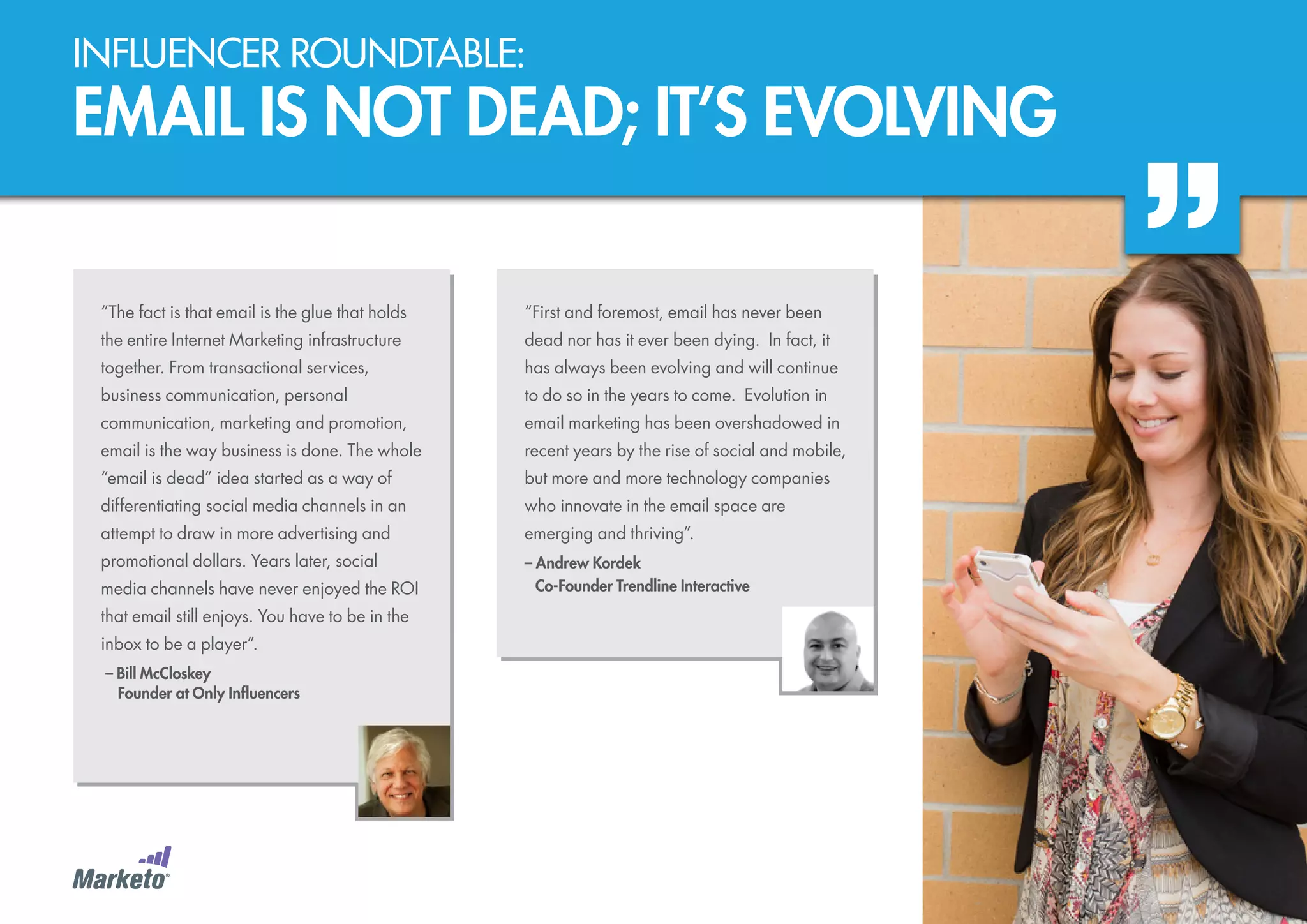
Influencer roundtable:

EMAIL IS NOT DEAD; IT’S EVOLVING
“The fact is that email is the glue that holds

“First and foremost, email has never been

the entire Internet Marketing infrastructure

dead nor has it ever been dying. In fact, it

together. From transactional services,

has always been evolving and will continue

business communication, personal

to do so in the years to come. Evolution in

communication, marketing and promotion,

email marketing has been overshadowed in

email is the way business is done. The whole

recent years by the rise of social and mobile,

“email is dead” idea started as a way of

but more and more technology companies

differentiating social media channels in an

who innovate in the email space are

attempt to draw in more advertising and

emerging and thriving”.

promotional dollars. Years later, social

– Andrew Kordek
	 Co-Founder Trendline Interactive

media channels have never enjoyed the ROI
that email still enjoys. You have to be in the
inbox to be a player”.
– Bill McCloskey
	 Founder at Only Influencers
part TWO:

trusted
PART Two: trusted

Engaging Email Is Trusted Email
Only with trust will consumers let your email past their filters and into their lives. Set expectations during an
opt-in process, and then fulfill those expectations with every email you send.
Trusted emails have lower bounce
and unsubscribe rates, and higher
deliverability. Conversely, if you don’t
have trust, you will have lower opens,
clicks, conversions, and so on — and
your messages are more likely to be
marked as spam.

After reviewing 130 million IP addresses that sent nearly
20 trillion emails, Experian noted that 85% of all
messages received by ISPs were classified as spam.

Spam is in the Eyes
of the Consumer
Spam, Spam, Spam, Baked Beans,
Spam … a few of the many menu
items in the famous Monty Python
sketch from the 1970s. These days,
when we hear the word spam, it’s
usually not about a can of meat
— although today’s version of spam
can be just as nasty.
There are legal definitions of spam
— in the U.S., for example, spam can
be classified as any email that violates
the 2003 CAN-SPAM Act (again, no
relation to canned spam) or any other
countries’ bulk email laws. In the
eyes of consumers, however, the
definition of spam is arguably
broader and less forgiving.

To consumers,
spam might represent:
•	Any email they don’t expect.
•	Any email they don’t want.
•		 ny email that prompts them to
A
hit the “This is spam” button.
•		 ny email they might have
A
signed up for, but later decide
they don’t want.
•		 n easy way to opt-out.
A

DJ Waldow, one of the authors of
this guide, tells a story of watching
his wife mark a legitimate email —
a communication she had opted
into — as spam. Why did she do
that? A negative in-store
experience turned her off to
the company.
For our purposes here, spam is
defined as “the opposite
of engagement.”

The Subscriber Covenant
It’s crucial to gain and keep the trust of your
audience so they don’t mark your
communications as spam. We approach
this with something we call “The Subscriber
Covenant” — an implicit promise to
deliver value in exchange for
consumer trust.
If “The Subscriber Covenant” were a letter, it
might read something like this:
Dear Subscriber,
We promise to:
•	Send emails that you actually want.
•	Deliver those emails when you want
them.
•	Use the data we collect from you to
send targeted, relevant information.
Sincerely,
A Marketing Department that Wins
Keep “The Subscriber Covenant” top
of mind when deploying your email
marketing campaigns.

18
PART Two: trusted

Engaging Email Is Trusted Email
Consistency Leads to Trust
One way to build trust with your
email marketing is to be consistent.
We all lean in to routine — from the
amount of milk we put in our coffee,
to the route we take home from
work. Routine gives us comfort and
makes our lives easier.
When someone knocks on your
door, if you don’t recognize that
person through the keyhole, your
initial reaction probably ranges
somewhere between annoyance
and dread. The same goes for
unexpected emails; subscribers
don’t generally like surprises. When
you are consistent, your
subscribers recognize your emails
the moment they arrive.

Here are five ways to create and
maintain email consistency:
1.	 Be consistent with your timing.
Send emails at the same times
and on the same days of the week.
2.	 	 e consistent with your
B
frequency. Send the same
number of emails every month.
3.	 Keep types of content consistent.
4.	 Brand consistently. Your emails
should usually look similar.
5.	 Use consistent naming and
subject lines. Your emails should
“act” similar when they hit a
recipient’s inbox.

You can also use consistency to
train your subscribers to take
certain actions, such as click
through to a landing page on your
website. For example, if a
subscriber knows that your emails
typically start with a two or three
paragraph teaser, followed by a
link to the full story online, she
might develop the habit of
skipping the teaser and going
straight for the story.
A predictable routine breeds
security. When subscribers
understand your behavior, they
are less likely to unsubscribe or
complain, and more likely to take
positive action.

The Occasional Surprise
Aiming to be consistent does not mean you
can’t send the occasional one-off email. There
might be a strategic reason to send a unique,
valuable message on a different day and time,
or in a different format than usual. If you have
established a pattern of trust, your audience is
likely to accept the inconsistency — and may
even respond well to the “surprise.”
PART Two: trusted

engagement up front: develop
and maintain a quality list
Before you can fulfill and maintain expectations, you must first set them. Expectations start with the opt-in.
A smart opt-in process sets an accurate and positive notion of what’s to come, and how “it” will arrive.
Choose the Right Opt-in
Type for Your Business
There are various tactics for building
your list of opt-in email addresses,
but, in general, they fall into three
categories:
1.	 Single opt-in
2.	 	 ingle opt-in with a ‘Welcome’
S
or ‘Thank You’ email
3.	 	 onfirmed or double opt-in
C

Single Opt-In
How it works
A new subscriber enters her email
address and possibly other information
(demographics, preferences, etc.).
She is immediately subscribed and will
automatically receive the next email
campaign. There’s no need for her to
take an additional step.
Implicit opt-in occurs when a consumer fills
out a form, e.g. in order to download content
or register for an event. The website’s
privacy policy must state that performing
this action automatically opts the user into
email marketing. This is a commonly used
method in the business-to-business (B2B)
sector, and typically B2B audiences
understand the implications of providing
their email addresses.
Explicit opt-in requires the user to voluntarily
sign up for email marketing. Often, this takes
the form of a checkbox on a registration
page. Often checked by default, this option
reads something like, “I want to receive
news and updates.”

Pros

Cons

•	 Requires the least amount of effort
on the part of both the company and
the customer.

•	 No opportunity to set expectations with
your audience; the first email they receive
is your next marketing message.

•	 There’s no place for a subscriber to
drop the ball, which can happen
when she’s required to “confirm” her
opt-in.

•	 Unless you have a system for catching
bad email addresses, you run the risk of
being targeted by spambots submitting
phony addresses. This is annoying and
could cost you credibility with your ESP.

•	 Most quickly leads to a big list.

•	 If a subscriber forgets that he opted in, or
doesn’t realize he has opted in, the risk is
high that he’ll mark your email as spam.
This is particularly true with implicit opt-ins
and when too much time has elapsed
between subscriber sign up and your first
communication.
•	 Less consumer effort in the sign-up
process generally means less connection
to your brand overall. Single opt-in tends
to attract less committed subscribers,
who will either actively or passively opt out
of your emails later.
•	 In some countries, implicit opt-in is
actually illegal. Check the laws of the
countries in which you market.
PART Two: trusted

engagement up front:
develop and maintain a quality list
Single Opt-In with Welcome Email

Confirmed or Double Opt-In

How it works
A new subscriber enters his information and
implicitly or explicitly opts-in as described above.
In this case, an immediate auto-response email
thanks and welcomes the subscriber. This email
includes a customized message that tells him
what to expect in future emails, and when to
expect them.

How it works
A new subscriber enters his email address and,
depending on your needs, other information and
content preferences. The post-subscribe
thank-you page may alert him to look for an email.
Once he receives that email, he’ll need to click on
a link or button to confirm the subscription.

Marketing study showed that a

Pros

actually decrease trust by 10%.

Pros
•	 The welcome email provides a great
opportunity to engage each new subscriber.
It’s courteous, and it also serves as a good
way to begin earning the trust of your
subscribers while setting proactive
expectations.
•	 A welcome email and/or landing page
prompt provides an opportunity to link to a
bonus opt-in incentive.
•	 If a welcome email bounces, you know to
filter out that address. Bye-bye, spambots!
Cons
•	 Similar to basic single opt-in, less effort can
equal less engagement and more risk of
opt-out or being marked as spam.
•	 You still run the risk of sending the welcome
emails to bad addresses, which can
negatively impact your future deliverability.

•	 Asking subscribers to confirm their
subscriptions separates the committed from
the simply impulsive. Those who click on the
link really want to receive your emails.

Marketo’s Benchmark on Email
clear opt-in method increases
trust by 10%, while cheap
shortcuts, such as using thirdparty lists and data vendors,
Marketo Benchmark on
Email Marketing

•	 Requiring a manual confirmation action
separates humans from bots. A bounced
confirmation email can be filtered out right
away.
Cons
•	 You’re asking subscribers to take an extra
step, which is a risky request in this age of
instant gratification. After all, they’ve already
told you they want your emails with their
initial opt-in request; asking them twice
might annoy them.
•	 There’s a risk that an interested subscriber
will get distracted before she can click
“confirm” in the follow-up email, or, worse,
that your email will get lost or filtered. As a
result, you may lose interested subscribers.

21
PART Two: trusted

engagement up front: develop
and maintain a quality list
Problems with
Assuming Opt-In
Spam is in the eye of the beholder, and
any time you assume or use implicit
opt-in, or use a list of email addresses
you secured elsewhere, you’re taking a
risk that your valuable messages will
be considered junk mail — even if you
technically have legal permission to
send them. For example:
•	You got a name from a
tradeshow list or other activity
you sponsored. When a
consumer registers for something
you’ve sponsored, lets you scan
his nametag at an event, or drops
a business card in a fishbowl, it
does not necessarily mean he’s
asking for future email marketing. If
the recipient is not expecting your
email, you may not be building
trusted engagement.

•	Someone handed you her
business card. An executive
handed you her business card
after being introduced by a
colleague at an event. Does this
mean she wants to receive your
marketing emails? Probably not.
•	You already have a list of
contacts. You give your admin
your entire contact list to enter
into your email database or CRM
system. A month later, everyone
on that list receives an unsolicited
email from your company. This is
a way to break trust — fast.

A better option: When you meet a
potential subscriber through any of
these means, send a “Nice to meet
you” email with a button or link
inviting him to your email
communications. Give him a great
reason to accept! Provide value and
maybe include an incentive. If he
opts in, great; if not, you know to be
more circumspect with how you use
his email address in the future.
PART Two: trusted

engagement up front: develop
and maintain a quality list
Expert Opinions on
Single vs. Double Opt-In

Set Expectations
During Opt-In

Single Opt-in: According to DJ
Waldow, one of the guide’s authors,
the single opt-in is the best option for
most companies. After all, building an
email list is one of the most valuable
things a company can do in terms of
marketing, and lists grow fastest with
single opt-ins. DJ is also not a fan of
the question implied by a confirmation
email: “Are you really, really sure?” If
someone tells you they want to be on
your list, believe them!

Opt-in is an opportunity to build trust
and to set expectations about what’s
to come with your email marketing.
The page where a subscriber enters
her email address is your first chance
to establish a positive relationship.

(Read DJ’s entire article on this)

Double Opt-in: Seth Godin, creator
of Permission Marketing, is an
advocate for the double opt-in. “Real
permission is different from
presumed or legalistic permission,”
he says. “Just because you somehow
get my email address doesn’t mean
you have permission. Just because I
don’t complain doesn’t mean you
have permission. Just because it’s in
the fine print of your privacy policy
doesn’t mean it is permission either.”
If you take the time to get a
subscriber’s permission, with
confirmation follow-through, you gain
the advantage of his abiding loyalty
and engagement.

Use your opt-in page wisely. Explain in
simple and compelling language what
she will get after entering her
information: “Enter your email address
to download our white paper” or “Get a
special subscriber discount when you
sign up for our newsletter.” The value
you offer might seem obvious to you,
but it might not be crystal clear for
others, at least not from the beginning.

Your opt-in should:
•	Explain “What’s In It For Me
(WIIFM)?” Subscribers want to
know why they should subscribe;
so tell them right up front.
Remember, marketing is about
meeting their needs, not yours.
•	Explain exactly what types of
content you’ll be sending: Let your
subscribers know they might
receive updates, deals, coupons,
offers, advice, news, events, or
general information.
•	Set expectations for frequency
and timing. (We’ll talk more about
this later.)
•	Give subscribers choices, if you
can. Offer them the ability to sign
up for emails on certain subjects
versus others, or for a weekly
digest versus a daily message.

23
PART Two: trusted

engagement up front: develop
and maintain a quality list
Other Tips for Opt-in Pages
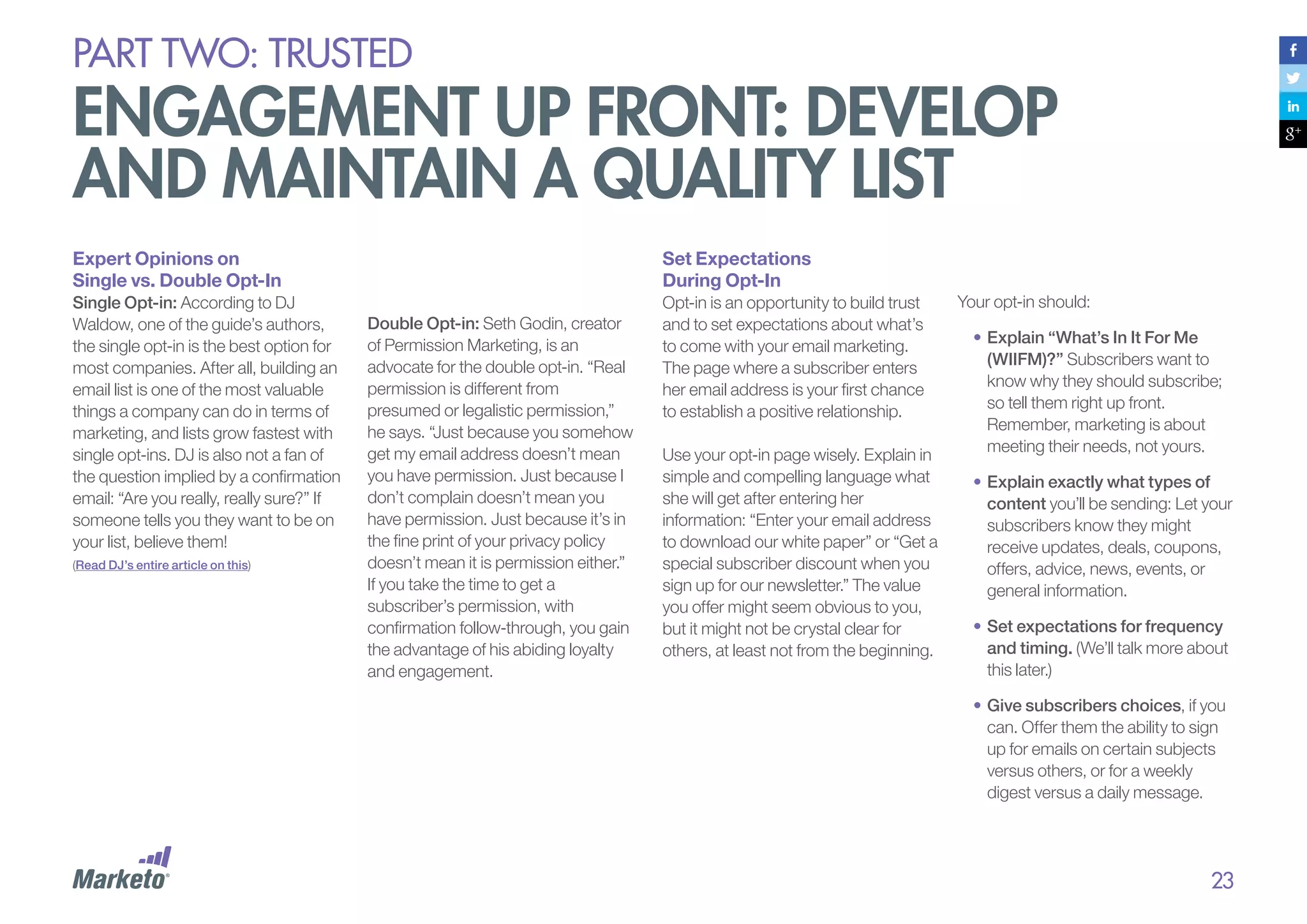
Privacy Policy: Your privacy policy is
crucial. It’s not just mandatory
legalese, but also another opportunity
to establish trust and set expectations
with your Web visitors. Here’s a link to
Marketo’s privacy policy:
marketo.com/trust/privacy.php.
The mention of your policy doesn’t
have to be dry verbiage; it can be a
simple promise not to spam your
audience, like this example from
Funny or Die:

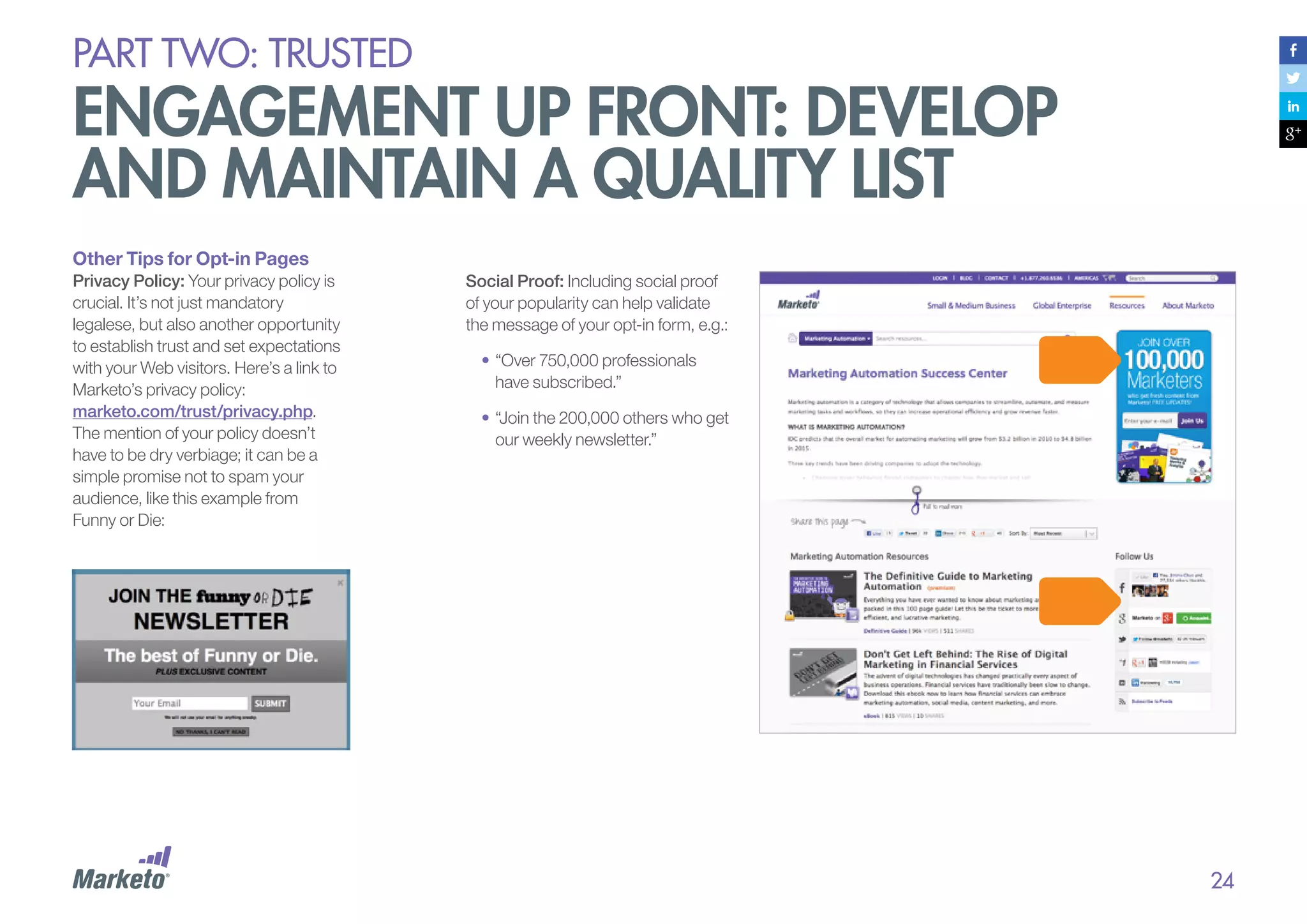
Social Proof: Including social proof
of your popularity can help validate
the message of your opt-in form, e.g.:
•	“Over 750,000 professionals
have subscribed.”
•	“Join the 200,000 others who get
our weekly newsletter.”

24
EXAMPLE:

southwest airlines
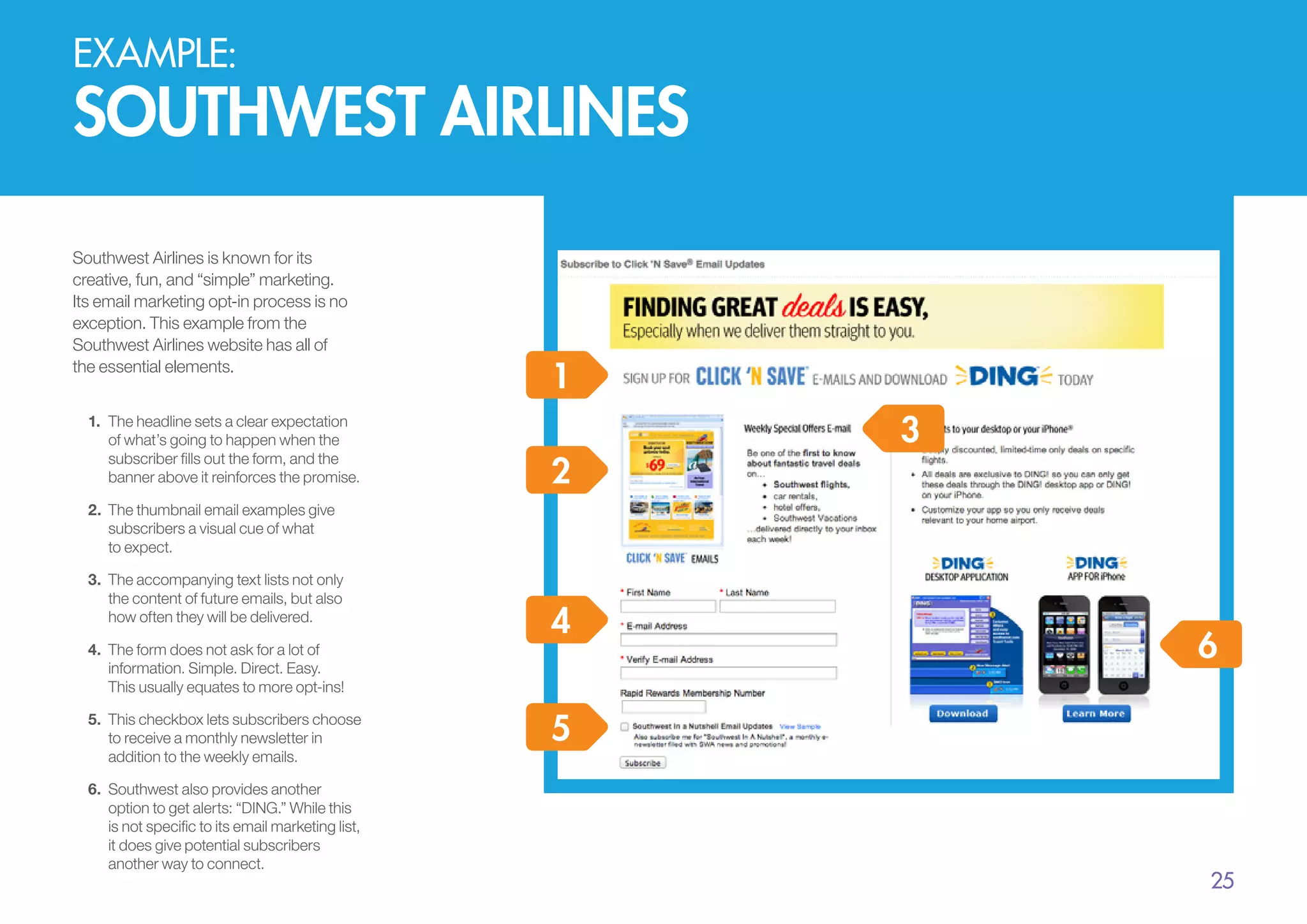
Southwest Airlines is known for its
creative, fun, and “simple” marketing.
Its email marketing opt-in process is no
exception. This example from the
Southwest Airlines website has all of
the essential elements.
1.	 The headline sets a clear expectation
of what’s going to happen when the
subscriber fills out the form, and the
banner above it reinforces the promise.

1
2

3

2.	 	 he thumbnail email examples give
T
subscribers a visual cue of what
to expect.
3.	 The accompanying text lists not only
the content of future emails, but also
how often they will be delivered.
4.	 The form does not ask for a lot of
information. Simple. Direct. Easy.
This usually equates to more opt-ins!
5.	 This checkbox lets subscribers choose
to receive a monthly newsletter in
addition to the weekly emails.
6.	 Southwest also provides another
option to get alerts: “DING.” While this
is not specific to its email marketing list,
it does give potential subscribers
another way to connect.

4

6

5

25
EXAMPLE:

waldow social
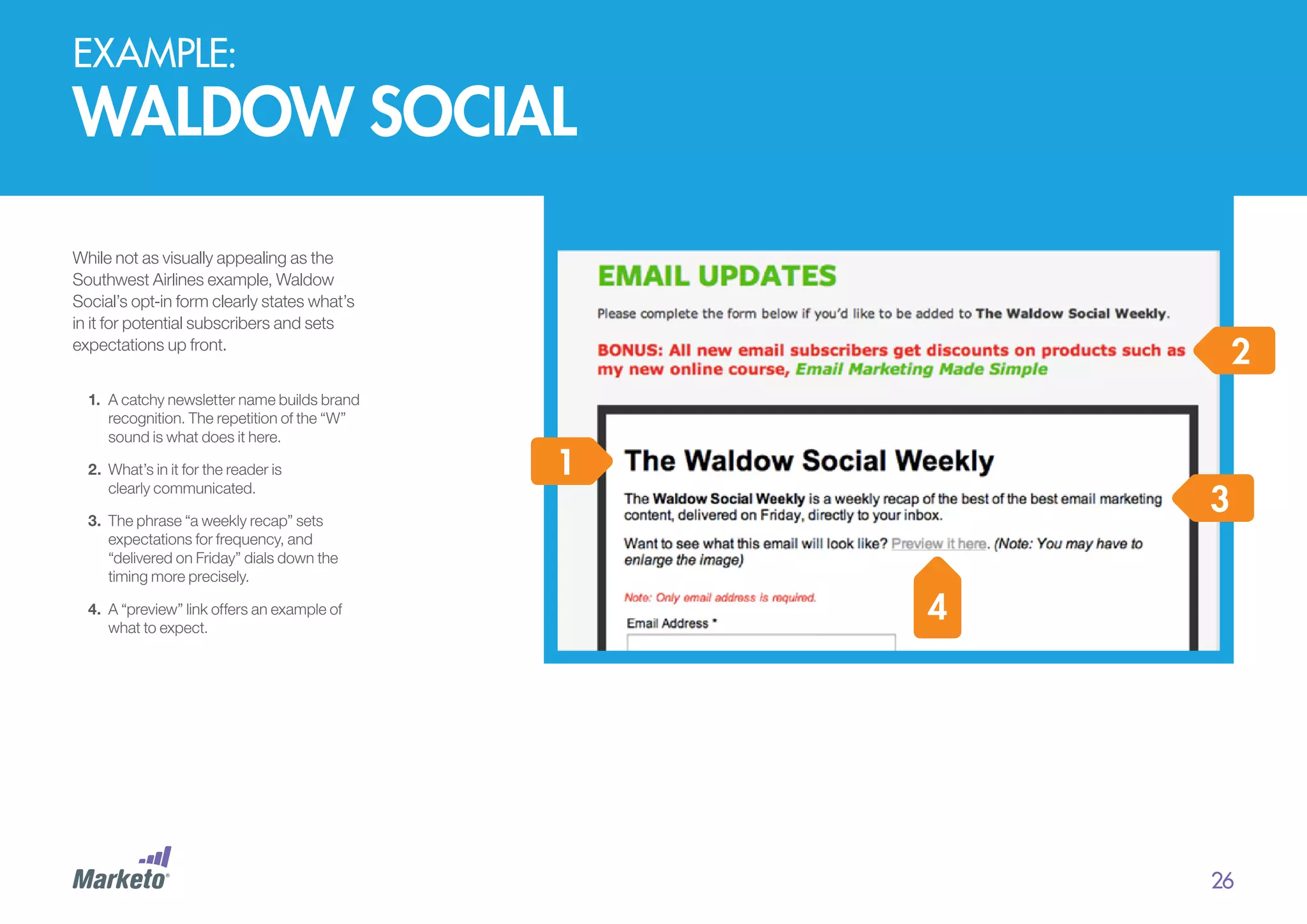
While not as visually appealing as the
Southwest Airlines example, Waldow
Social’s opt-in form clearly states what’s
in it for potential subscribers and sets
expectations up front.
1.	 A catchy newsletter name builds brand
recognition. The repetition of the “W”
sound is what does it here.
2.	 	 hat’s in it for the reader is
W
clearly communicated.

2
1

3

3.	 	 he phrase “a weekly recap” sets
T
expectations for frequency, and
“delivered on Friday” dials down the
timing more precisely.
4.	 	 “preview” link offers an example of
A
what to expect.

4

26
PART Two: trusted

engagement up front: develop
and maintain a quality list
Email frequency and timing
Your opt-in page is a great place to
set expectations for the frequency
and timing of your emails. You can be
specific (“every Friday”), establish
email cadence (“weekly”), or let
subscribers know they should be on
the lookout for unscheduled emails
(“new product alerts”).
The most important thing to
remember about setting expectations
is to meet them. If you tell your
subscribers you’re going to send a
weekly email, and then bombard
them daily, they’ll quickly
unsubscribe, ignore your messages,
or mark them as spam.

“When should I send emails?”
Determining the best time and day to
send your emails is a challenge. Despite
what some people will tell you, there is
no perfect or best time to send. Timing is
established after knowing what works
best for your audience, based on
captured user data and other
parameters. Some strategies to test:
•	 Time of opt-In: If a subscriber
opts in to your newsletter at 2PM
PST, you can reasonably assume
that’s a time he is online.
•	 Early bird: If you schedule your
emails to arrive in the early
morning, you can be at the top of
the email pile when folks arrive at
the office. Note, however, that as
smartphones become more
ubiquitous, people check their
email earlier and earlier in the day
— often long before they actually
get to work.

•	 Time Zone: By capturing IP
addresses at opt-in, you can
segment your list to send emails
based on where subscribers live,
so that every subscriber gets your
email at the right time for their
time zone.
•	 Domain: Send emails to
subscribers using personal email
domains (Gmail.com, Yahoo.com,
AOL.com, etc.) during the early
morning and evening hours. Those
using work-related domains (e.g.,
company.com) should receive
emails during the day.
Whichever tactic you choose, pick a
send time and own it. Remember, once
you set an expectation with your
subscribers, stand by it consistently.
(Note: this does not mean that you
cannot send “one-off” emails on a
different day of the week or time of the
day. It also doesn’t mean that you cannot
– and should not – be testing to see what
works best for your audience.)

“How often should I send emails?”
Ultimately, the answer depends on the
level of perceived value you deliver in each
email. For instance, daily deal emails, such
as those from Daily Candy, Groupon, and
Living Social, have high value and deserve
daily frequency. Help A Reporter Out
(HARO), an email service that connects
product and service experts to journalists
looking to write on-topic stories, sends
emails three times a day! According to The
Rebel’s Guide to Email Marketing, some
HARO users even set their alarms for 5:45
AM EST, so they don’t miss the first
message of the day!
For most businesses, however, once a
day is much too much. A general rule to
follow: If you find yourself wondering if
you’re sending one too many emails,
you probably are.

27
PART Two: trusted

engagement up front: develop
and maintain a quality list
Post Registration:
What to Expect Next
Once subscribers have offered up
their information, it’s a good idea to
immediately serve them a “Thank
You” page. This page serves a few
purposes:
1.	 It says “Thank You,” which is just
good manners.
2.	 It tells subscribers that the opt-in
actually worked.
3.	 It answers subscribers’ questions
about when to expect their first
email and what it will look like.

You can stand out from the pack by
adding unique, funny, or creative
language and graphics, or maybe
even include a short Thank You video
to this page. Your subscribers have
already exhibited their willingness to
be engaged, so this is a great time to
seize their enthusiasm. Invite them to
follow you on social media, subscribe
to your blog, or learn more about your
product or service via content links.
It’s also a good time to ask them to
refer their friends.

The Welcome Email
As soon as someone registers, your
email marketing software can
immediately send them a welcome
email. The anatomy of a welcome
email looks something like this:
•	Thank you!
•	Congratulations,
you are now subscribed!
•	Here is your offer (fulfill the promise
of the opt-in by sending the
coupon code, content, or other
promised offer).
•	Here is what to expect next, and
when to expect it.
PART Two: trusted

building the list
A key goal as an email marketer
should be to grow your list of
engaged subscribers. You will lose
up to 30% of subscribers each
year due to email attrition, and not
all engaged subscribers will
become paying customers. To
grow your business, you need to
feed the top of the funnel with
list-building tactics.

Building Your List on Your Website
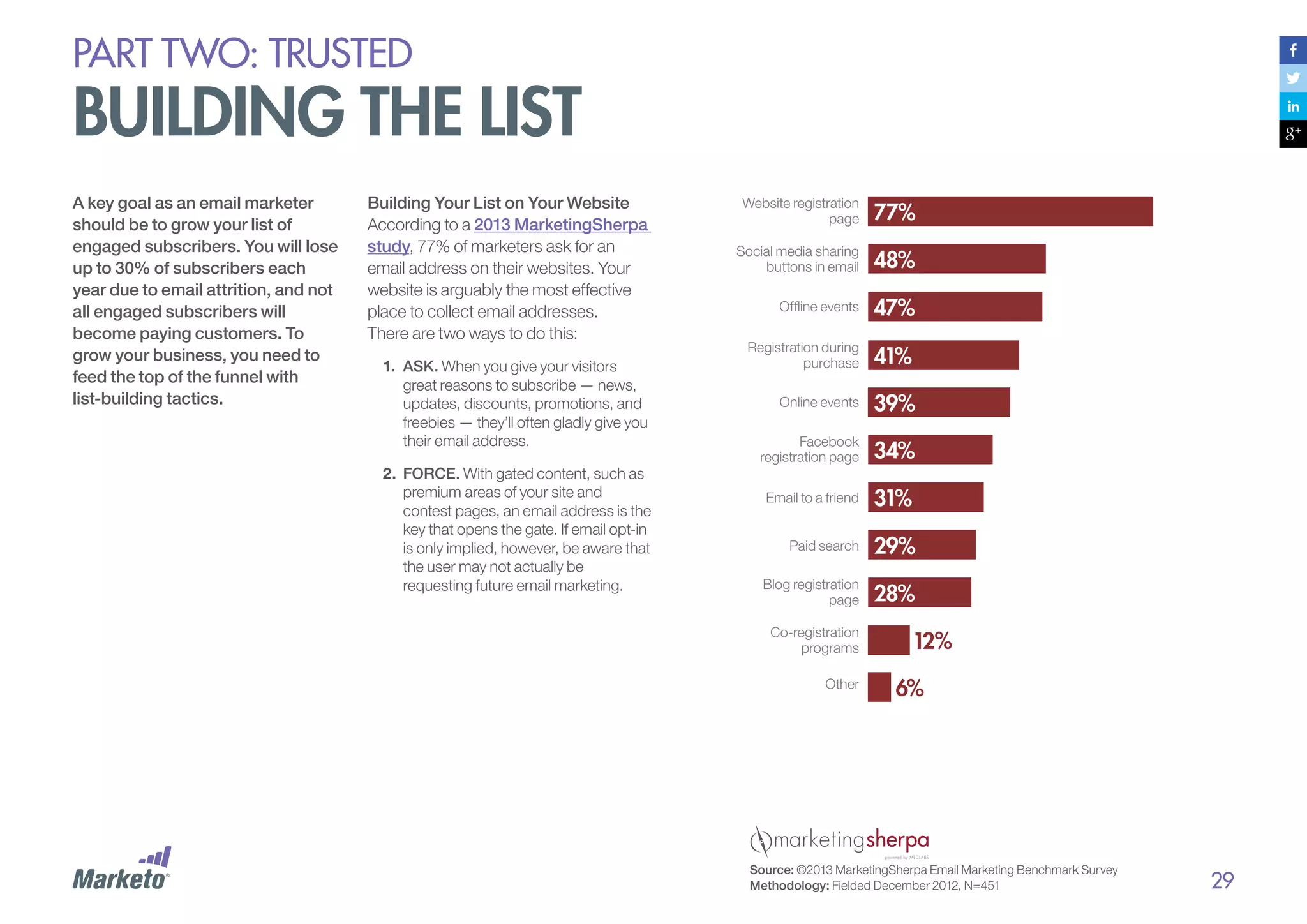
According to a 2013 MarketingSherpa
study, 77% of marketers ask for an
email address on their websites. Your
website is arguably the most effective
place to collect email addresses.
There are two ways to do this:
1.	 ASK. When you give your visitors
great reasons to subscribe — news,
updates, discounts, promotions, and
freebies — they’ll often gladly give you
their email address.
2.	 FORCE. With gated content, such as
premium areas of your site and
contest pages, an email address is the
key that opens the gate. If email opt-in
is only implied, however, be aware that
the user may not actually be
requesting future email marketing.

Website registration
page
Social media sharing
buttons in email
Offline events
Registration during
purchase
Online events
Facebook
registration page
Email to a friend
Paid search
Blog registration
page
Co-registration
programs
Other

Source: ©2013 MarketingSherpa Email Marketing Benchmark Survey
Methodology: Fielded December 2012, N=451

29
PART Two: trusted

engagement up front: develop
and maintain a quality list
Email Opt-In Form
Placement Options
Having too many opt-in forms on your
website could be a turnoff for potential
new subscribers. On the other hand, if
you relegate your opt-in form just to
your home page or your contact page,
you run the risk of missing visitors who
come in the back door. You need to
strike a balance.
Here are some traditional placement
options, as well as a few you might not
have considered.

1.	 The sidebar.
Depending on the design and flow of
your site, putting an opt-in form in a
sidebar might be very effective. If you
“pin it” — anchor the opt-in on users’
screens as they scroll down the page
— it’s never out of their sight.
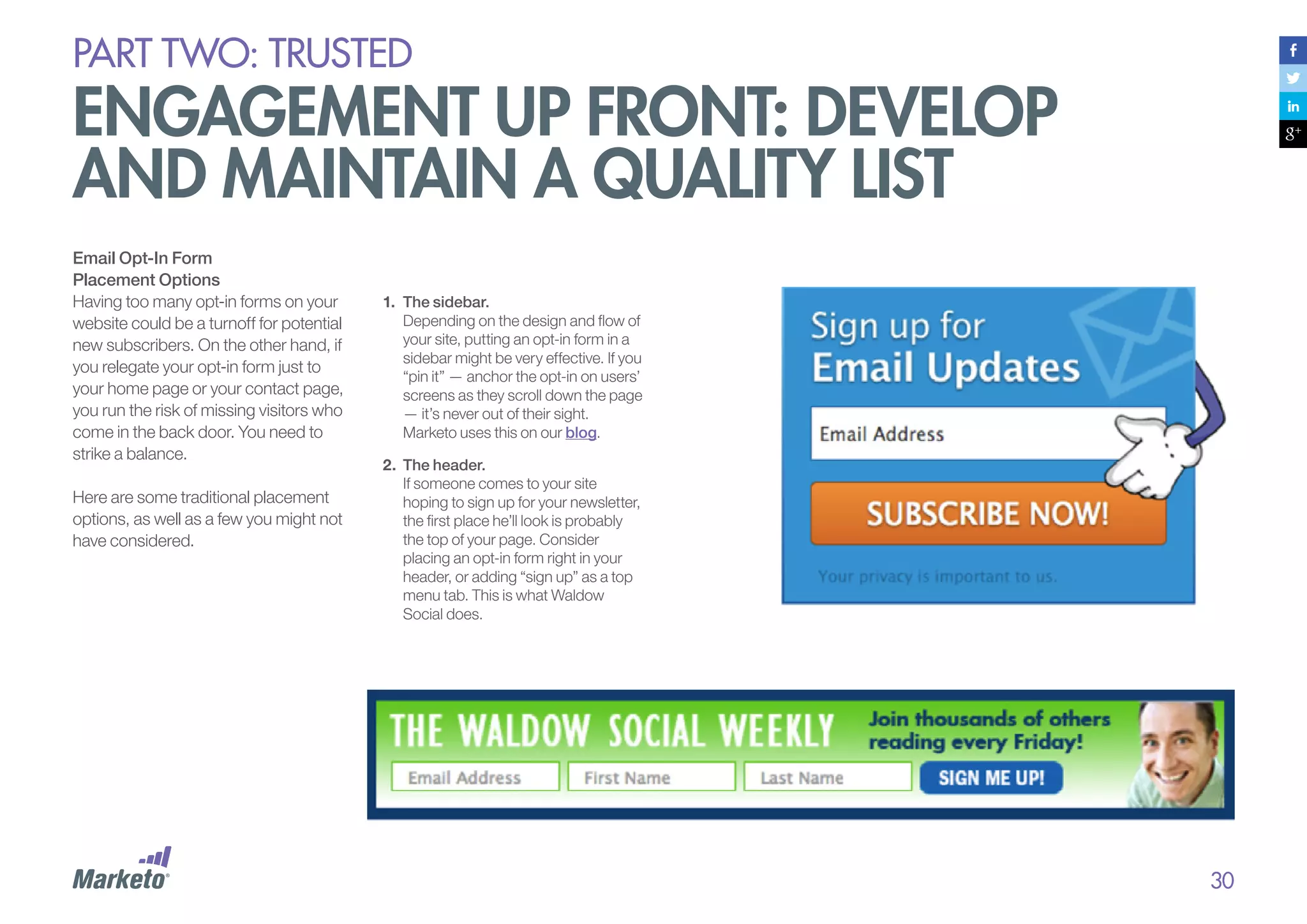
Marketo uses this on our blog.
2.	 The header.
If someone comes to your site
hoping to sign up for your newsletter,
the first place he’ll look is probably
the top of your page. Consider
placing an opt-in form right in your
header, or adding “sign up” as a top
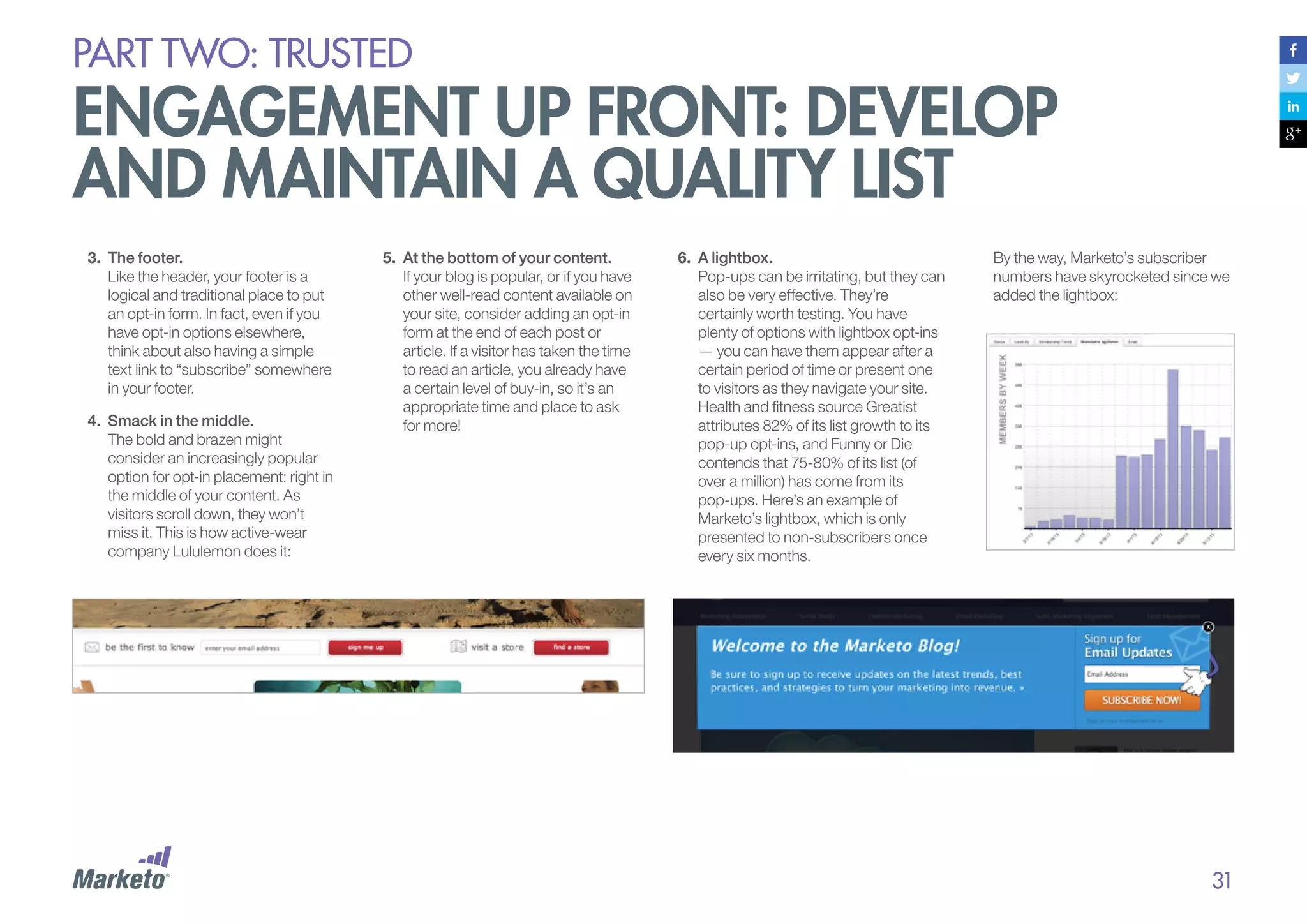
menu tab. This is what Waldow
Social does.

30
PART Two: trusted

engagement up front: develop
and maintain a quality list
3.	 The footer.
Like the header, your footer is a
logical and traditional place to put
an opt-in form. In fact, even if you
have opt-in options elsewhere,
think about also having a simple
text link to “subscribe” somewhere
in your footer.
4.	 Smack in the middle.
The bold and brazen might
consider an increasingly popular
option for opt-in placement: right in
the middle of your content. As
visitors scroll down, they won’t
miss it. This is how active-wear
company Lululemon does it:

5.	 At the bottom of your content.
If your blog is popular, or if you have
other well-read content available on
your site, consider adding an opt-in
form at the end of each post or
article. If a visitor has taken the time
to read an article, you already have
a certain level of buy-in, so it’s an
appropriate time and place to ask
for more!

6.	 	A lightbox.
Pop-ups can be irritating, but they can
also be very effective. They’re
certainly worth testing. You have
plenty of options with lightbox opt-ins
— you can have them appear after a
certain period of time or present one
to visitors as they navigate your site.
Health and fitness source Greatist
attributes 82% of its list growth to its
pop-up opt-ins, and Funny or Die
contends that 75-80% of its list (of
over a million) has come from its
pop-ups. Here’s an example of
Marketo’s lightbox, which is only
presented to non-subscribers once
every six months.

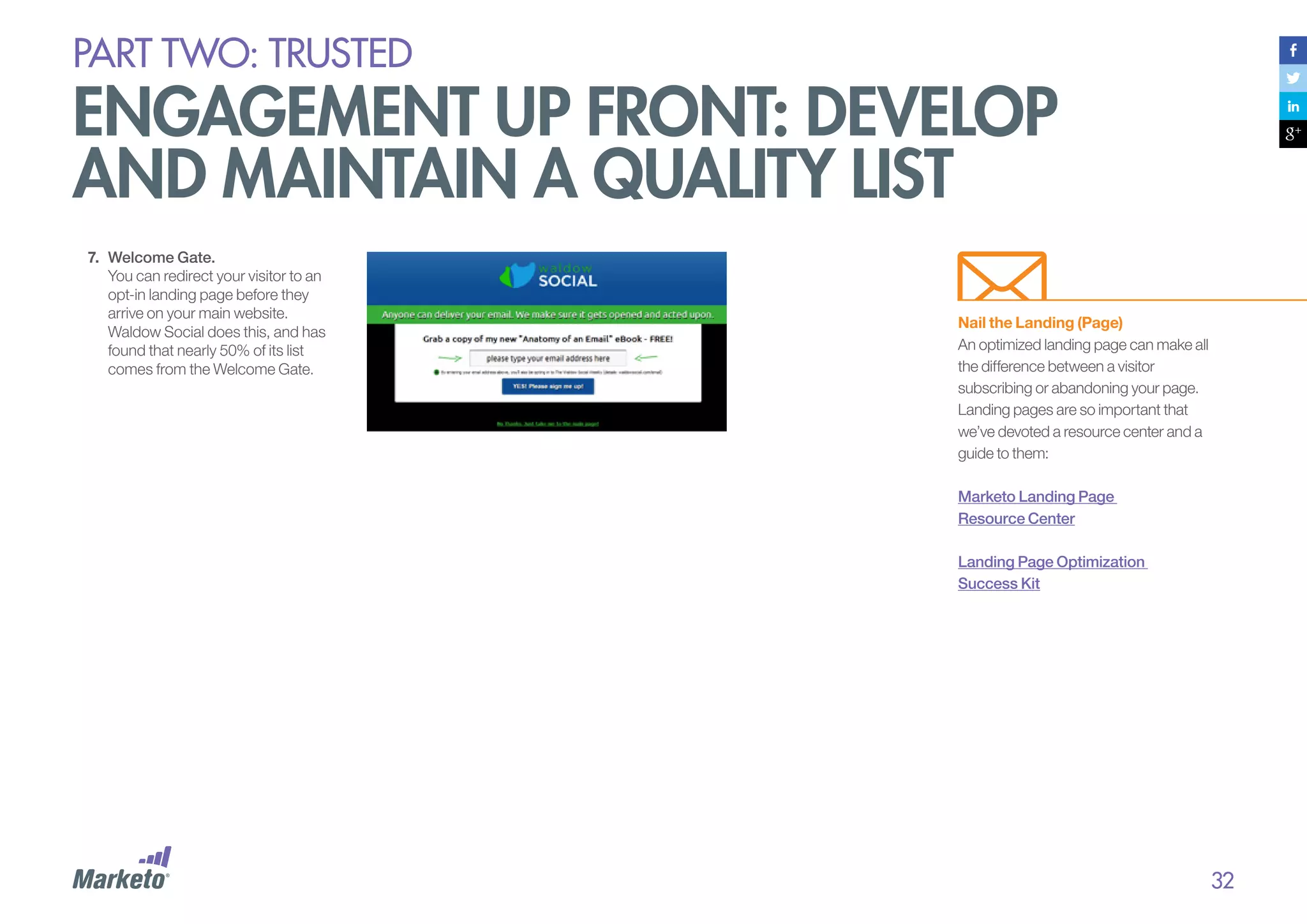
By the way, Marketo’s subscriber
numbers have skyrocketed since we
added the lightbox:

31
PART Two: trusted

engagement up front: develop
and maintain a quality list
7.	 Welcome Gate.
You can redirect your visitor to an
opt-in landing page before they
arrive on your main website.
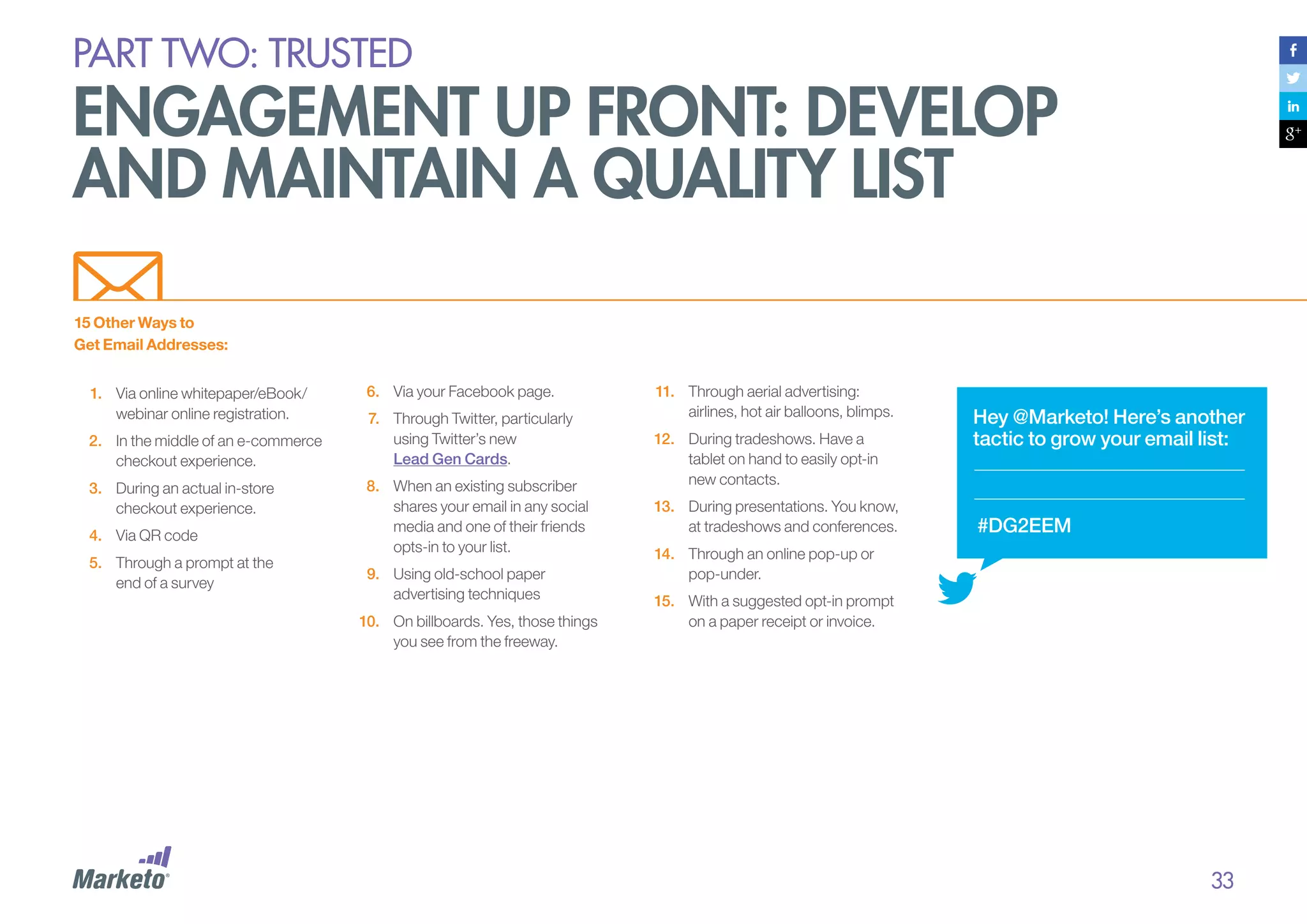
Waldow Social does this, and has
found that nearly 50% of its list
comes from the Welcome Gate.

Nail the Landing (Page)
An optimized landing page can make all
the difference between a visitor
subscribing or abandoning your page.
Landing pages are so important that
we’ve devoted a resource center and a
guide to them:
Marketo Landing Page
Resource Center
Landing Page Optimization
Success Kit

32
PART Two: trusted

engagement up front: develop
and maintain a quality list
15 Other Ways to
Get Email Addresses:
1.	 Via online whitepaper/eBook/
webinar online registration.
2.	 In the middle of an e-commerce
checkout experience.
3.	 During an actual in-store
checkout experience.
4.	 Via QR code
5.	 Through a prompt at the
end of a survey

6.	 Via your Facebook page.
7.	 Through Twitter, particularly
using Twitter’s new
Lead Gen Cards.
8.	 When an existing subscriber
shares your email in any social
media and one of their friends
opts-in to your list.
9.	 Using old-school paper
advertising techniques
10.	 On billboards. Yes, those things
you see from the freeway.

11.	 Through aerial advertising:
airlines, hot air balloons, blimps.
12.	 During tradeshows. Have a
tablet on hand to easily opt-in
new contacts.
13.	 During presentations. You know,
at tradeshows and conferences.

Hey @Marketo! Here’s another
tactic to grow your email list:

#DG2EEM

14.	 Through an online pop-up or
pop-under.
15.	 With a suggested opt-in prompt
on a paper receipt or invoice.

33
PART Two: trusted

maintain your list
It’s not enough to build a list – you
also need to maintain it. This means
letting subscribers manage their
preferences or opt-out if they wish.
And it means proactively cleaning
and culling your list based on
response data.
Subscription Centers
One of the best ways to establish trust
with your audience is to allow them to
take control of communications —
they should never feel trapped.
You can be smart about your opt-out
by creating a subscription center on
your website. When subscribers click
“unsubscribe,” they will be taken to the
center and given the option of
changing their communication
preferences or the frequency with
which they receive your emails. Maybe
they still like you and don’t really want
to leave you — they just want to see
less of you.

Most opt-out forms are pretty bare:
you ask a subscriber to enter his email
address — if it’s not pre-populated —
and, perhaps, his reason for leaving.
As a marketer watching a subscriber
march out the door, wouldn’t it be
better to give him one last chance to
stay by offering a few subscriptionfrequency options in a human, friendly
voice that lets him know you care
about his needs?
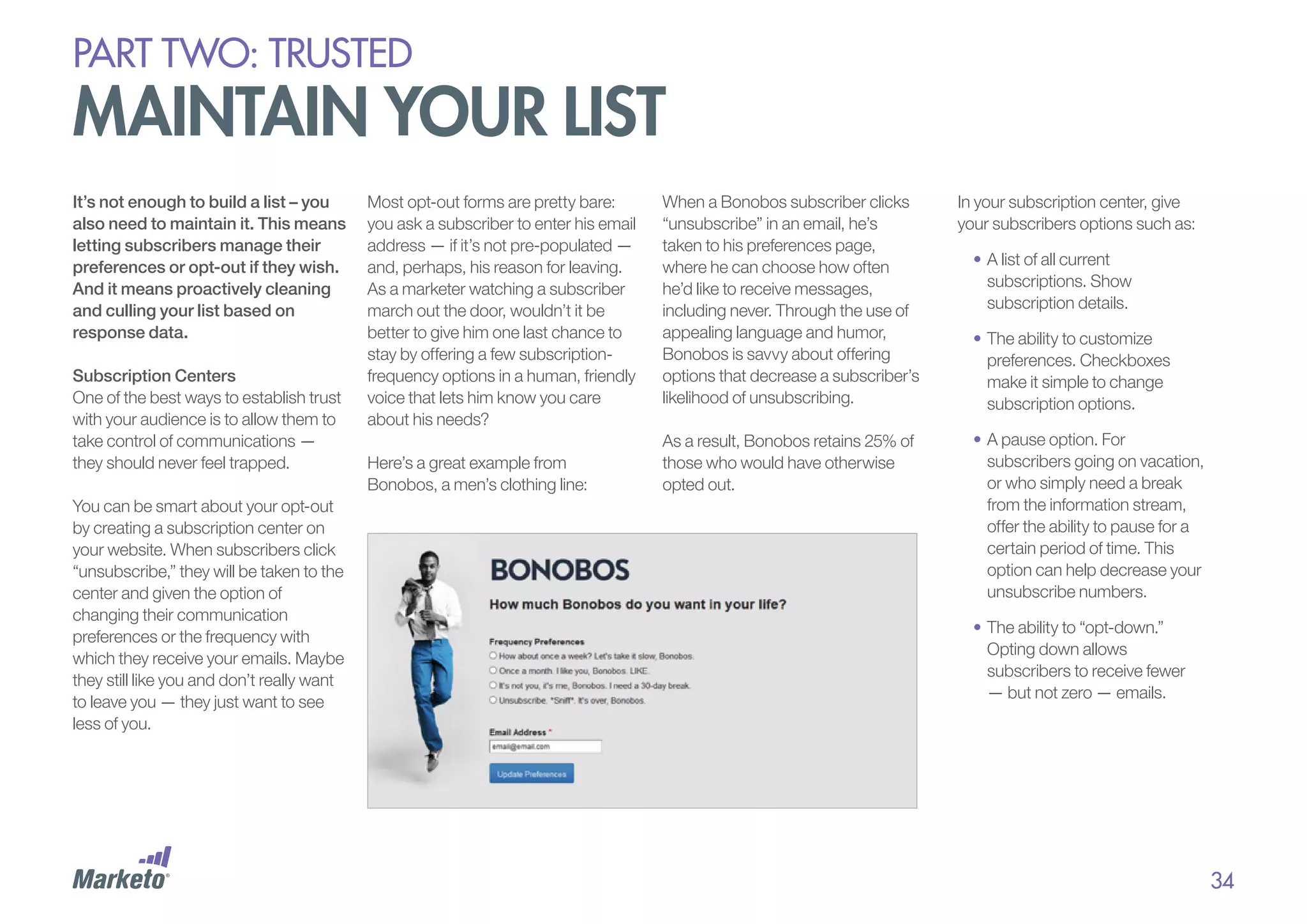
Here’s a great example from
Bonobos, a men’s clothing line:

When a Bonobos subscriber clicks
“unsubscribe” in an email, he’s
taken to his preferences page,
where he can choose how often
he’d like to receive messages,
including never. Through the use of
appealing language and humor,
Bonobos is savvy about offering
options that decrease a subscriber’s
likelihood of unsubscribing.
As a result, Bonobos retains 25% of
those who would have otherwise
opted out.

In your subscription center, give
your subscribers options such as:
•	A list of all current
subscriptions. Show
subscription details.
•	The ability to customize
preferences. Checkboxes
make it simple to change
subscription options.
•	A pause option. For
subscribers going on vacation,
or who simply need a break
from the information stream,
offer the ability to pause for a
certain period of time. This
option can help decrease your
unsubscribe numbers.
•	The ability to “opt-down.”
Opting down allows
subscribers to receive fewer
— but not zero — emails.

34
EXAMPLE:

marketo’s subscription center
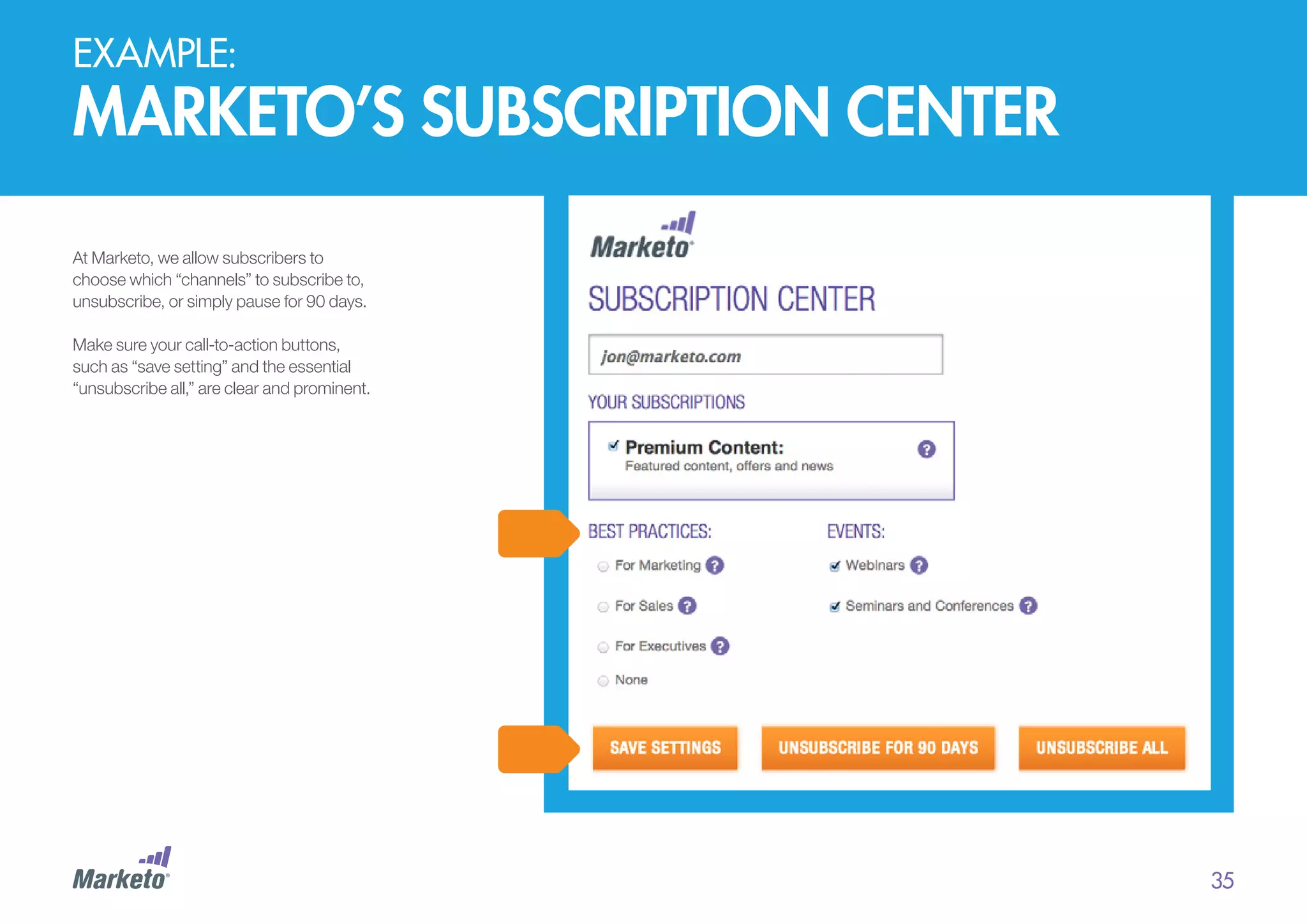
At Marketo, we allow subscribers to
choose which “channels” to subscribe to,
unsubscribe, or simply pause for 90 days.
Make sure your call-to-action buttons,
such as “save setting” and the essential
“unsubscribe all,” are clear and prominent.

35
EXAMPLE:

fab’s subscription center
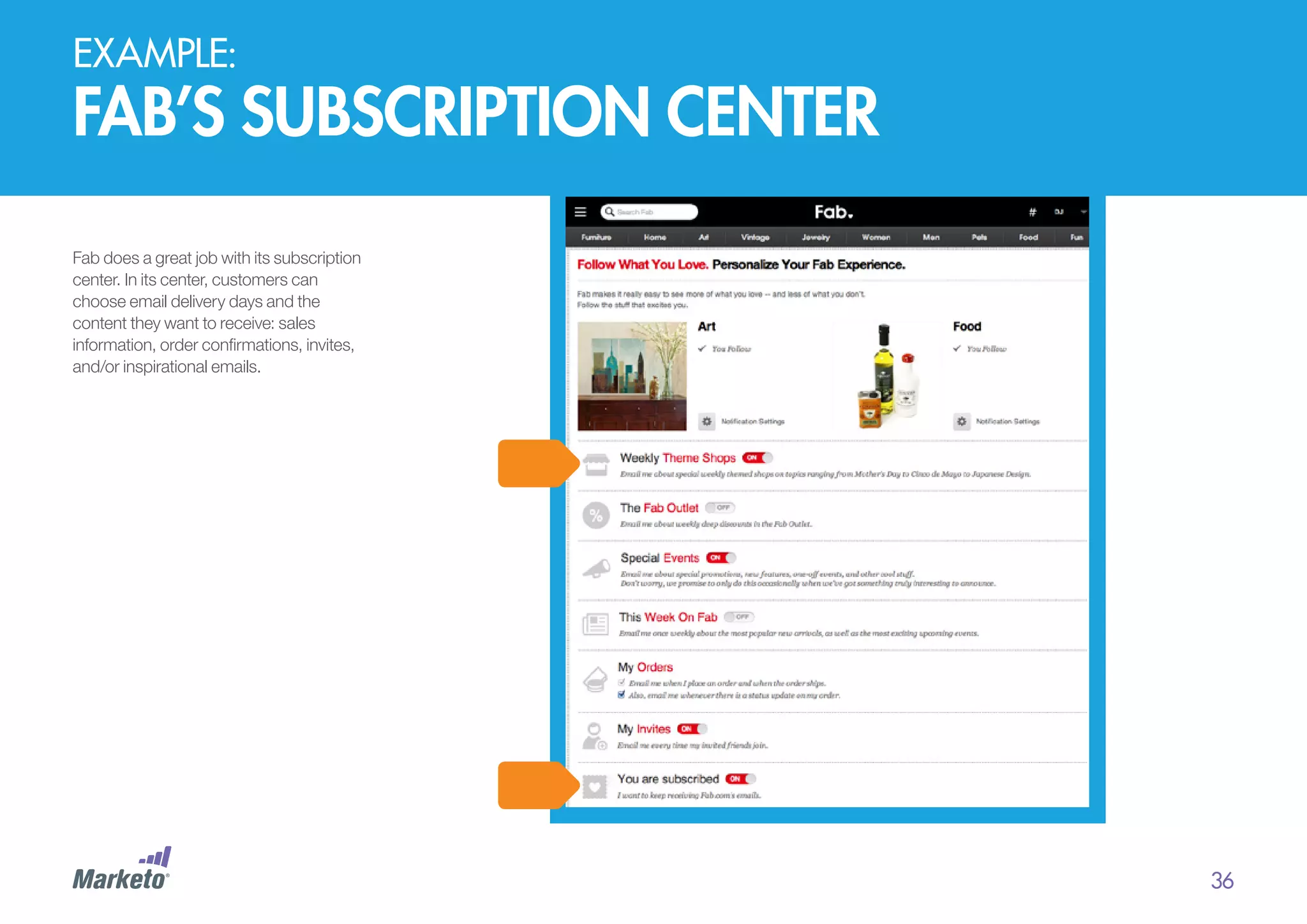
Fab does a great job with its subscription
center. In its center, customers can
choose email delivery days and the
content they want to receive: sales
information, order confirmations, invites,
and/or inspirational emails.

36
PART Two: trusted

engagement up front: develop
and maintain a quality list
Clean Inactive Subscribers
Do you suspect that a lot of your
subscribers have emotionally opted
out? The Marketo Benchmark on
Email Performance study found that
most marketers are pretty sure a
significant percentage of their
subscribers are inactive — neither
opening email, reading them, nor
bothering to unsubscribe.
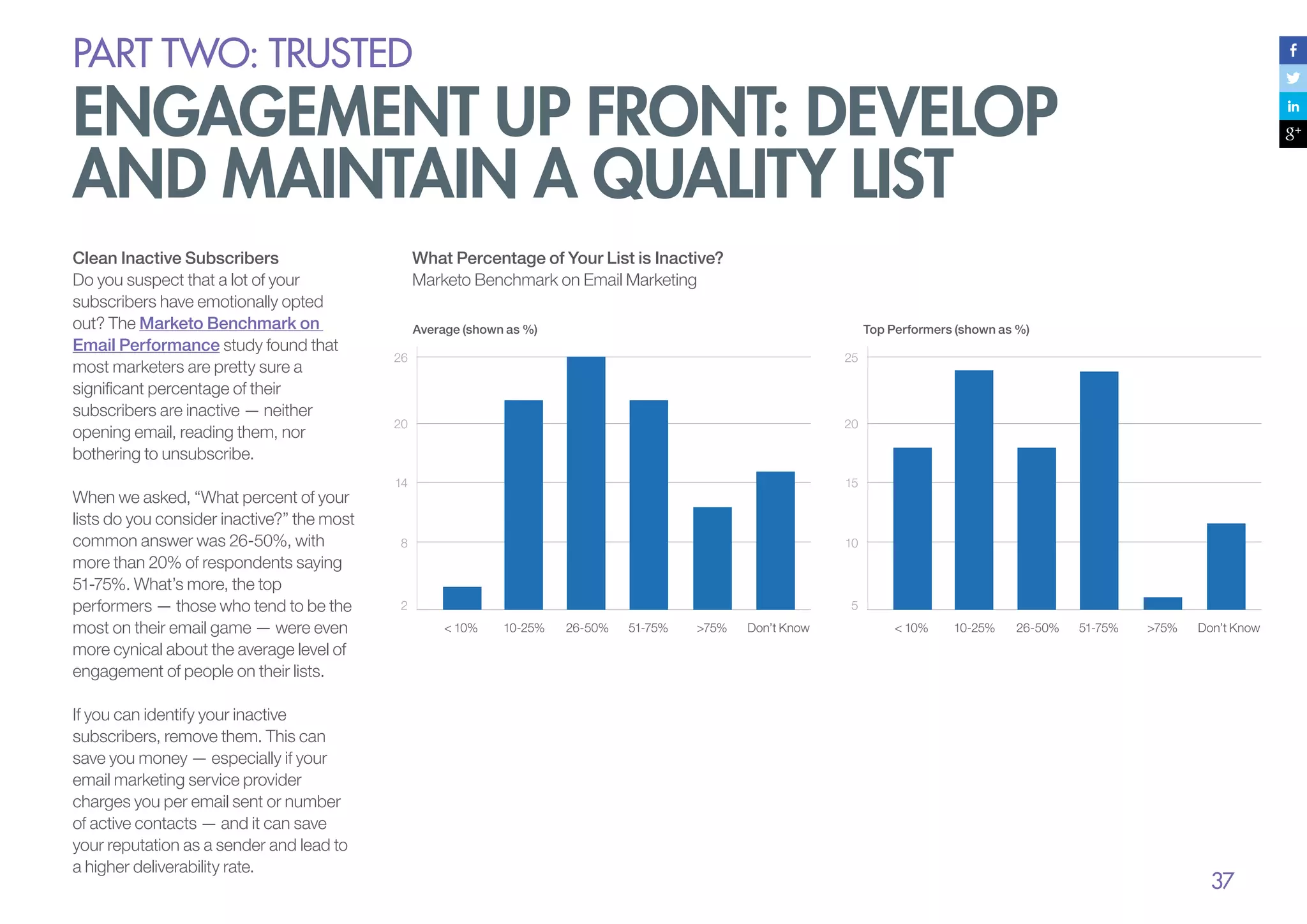
When we asked, “What percent of your
lists do you consider inactive?” the most
common answer was 26-50%, with
more than 20% of respondents saying
51-75%. What’s more, the top
performers — those who tend to be the
most on their email game — were even
more cynical about the average level of
engagement of people on their lists.
If you can identify your inactive
subscribers, remove them. This can
save you money — especially if your
email marketing service provider
charges you per email sent or number
of active contacts — and it can save
your reputation as a sender and lead to
a higher deliverability rate.

What Percentage of Your List is Inactive?
Marketo Benchmark on Email Marketing
Average (shown as %)

Top Performers (shown as %)

26

25

20

20

14

15

8

10

2

5
< 10%

10-25%

26-50%

51-75%

>75%

Don’t Know

< 10%

10-25%

26-50%

51-75%

>75%

Don’t Know

37
PART Two: trusted

engagement up front: develop
and maintain a quality list
“In the end, removing inactive
subscribers is often the action
needed to get your mail back
to the inbox and in front of
your customers.”
– Melinda Plemel, ReturnPath

“As an organization’s email
marketing program matures,
routinely and methodically
‘scrubbing’ its subscriber list
becomes a greater priority,”
according to MarketingSherpa’s
Special Report: CMO Perspectives
on Email Deliverability. Scrubbing
means removing email addresses that
bounce after each campaign. Conduct
a thorough sweep of your list every 4 to
6 months, and you’ll get rid of inactive
subscribers and “spam traps”.

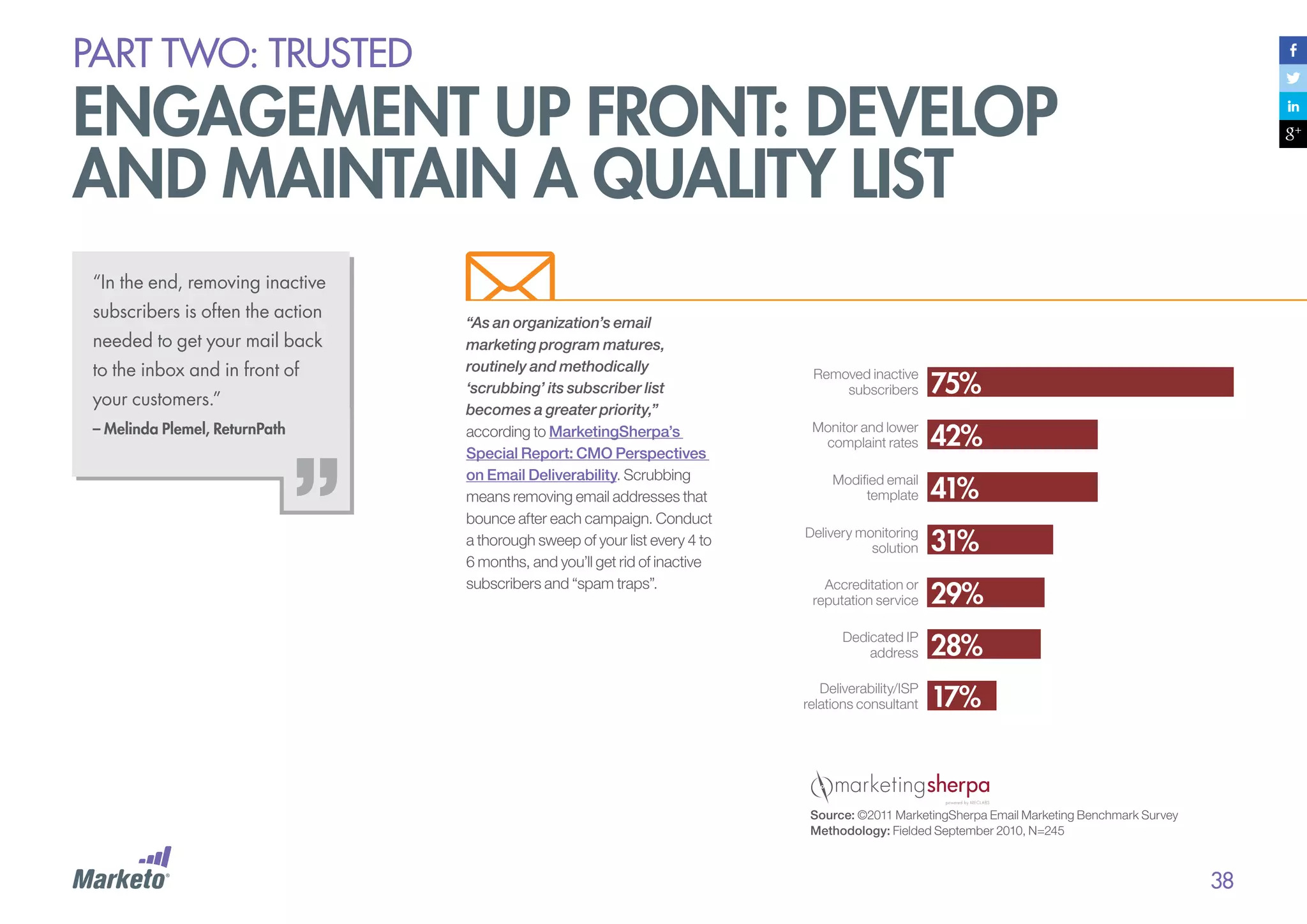
Removed inactive
subscribers

75%

Monitor and lower
complaint rates

42%

Modified email
template

41%

Delivery monitoring
solution

31%

Accreditation or
reputation service

29%

Dedicated IP
address

28%

Deliverability/ISP
relations consultant

17%

Source: ©2011 MarketingSherpa Email Marketing Benchmark Survey
Methodology: Fielded September 2010, N=245

38
PART Two: trusted

engagement up front: develop
and maintain a quality list
Reactivating Subscribers
Before removing inactive
subscribers, consider giving them
one more chance to stay in touch.
With a re-engagement campaign,
you might just find that some of
your “zombie” subscribers come
back to life.
There are a few ways to bring them
back into the fold:
1.	 Send a series of emails to just
those subscribers that have
not opened, clicked, shared,
or converted for a while. In
each message, give them the
option to remain on the list or opt
out. Once you’ve sent your final
email in the series, go ahead and
remove those who haven’t
responded. They’re dead to you,
after all. (Pun intended.) (Note:
The “not converted” part of this
query is essential. If you don’t
include this, you risk removing
subscribers who may not be
active clickers, but are your
biggest purchasers!)

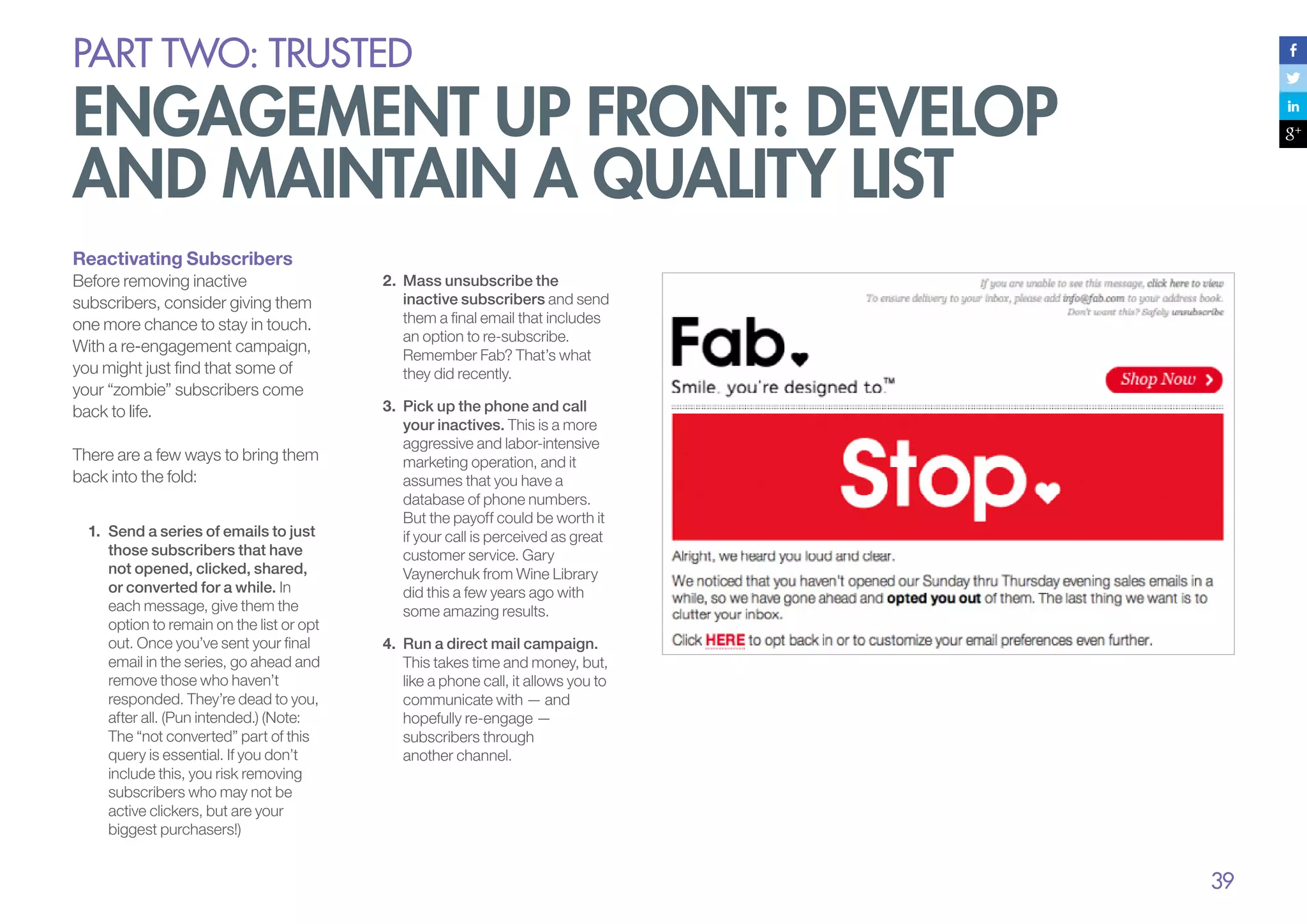
2.	 Mass unsubscribe the
inactive subscribers and send
them a final email that includes
an option to re-subscribe.
Remember Fab? That’s what
they did recently.
3.	 Pick up the phone and call
your inactives. This is a more
aggressive and labor-intensive
marketing operation, and it
assumes that you have a
database of phone numbers.
But the payoff could be worth it
if your call is perceived as great
customer service. Gary
Vaynerchuk from Wine Library
did this a few years ago with
some amazing results.
4.	 Run a direct mail campaign.
This takes time and money, but,
like a phone call, it allows you to
communicate with — and
hopefully re-engage —
subscribers through
another channel.

39
PART Two: trusted

email deliverability
There’s no question that email software and the people who use it are getting better at filtering out spam. This is good
since it makes it easier for engaging emails to get through — but without a strong focus on deliverability, sometimes even
quality, permission-based emails can get filtered out of your subscriber’s inboxes.
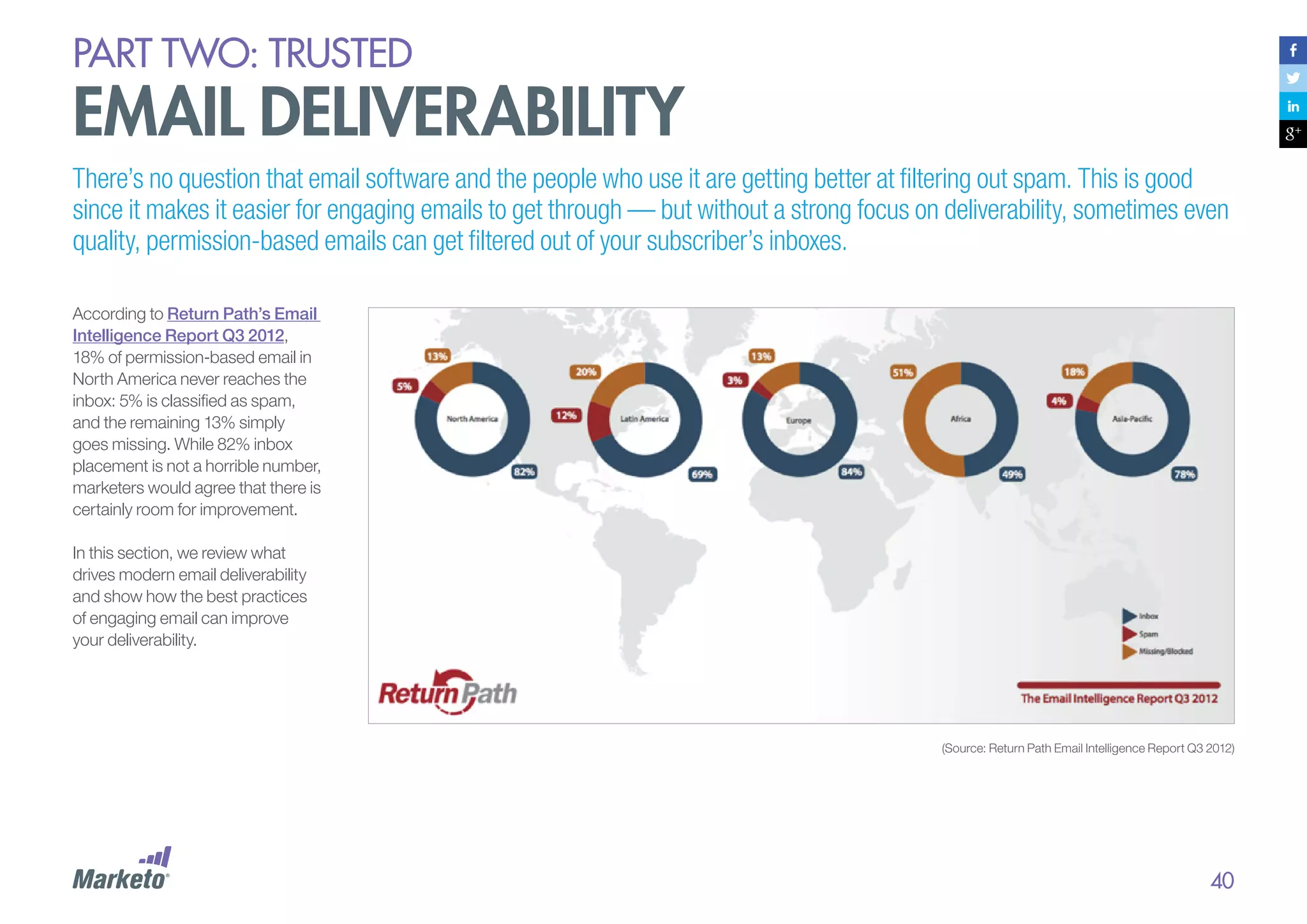
According to Return Path’s Email
Intelligence Report Q3 2012,
18% of permission-based email in
North America never reaches the
inbox: 5% is classified as spam,
and the remaining 13% simply
goes missing. While 82% inbox
placement is not a horrible number,
marketers would agree that there is
certainly room for improvement.
In this section, we review what
drives modern email deliverability
and show how the best practices
of engaging email can improve
your deliverability.

(Source: Return Path Email Intelligence Report Q3 2012)

40
PART Two: trusted

email deliverability
Your Reputation as
a Sender Is Crucial
Email deliverability is more and
more about your reputation as a
sender and less about the actual
content of your emails. This does
not mean that content is not
important, but it does mean that
marketers need to give plenty of
attention to how their emails are
being delivered.
When it comes to modern email
delivery, it’s good to know
the fundamentals.

Algorithmic Filters
Most email applications use
algorithms to compare all incoming
emails to those marked as junk. Any
email with a similar sender, links, or
content is more likely to be
considered spam. But the analyzing
doesn’t stop there: The subscriber’s
internet service provider (ISP)
remembers the URLs and domains
in the spam. If those URLs and
domains are reported, then any other
email containing them has a harder
time getting through to the recipient
— even if it’s from a completely
different sender.

Spamtraps
Spamtraps are email addresses
created to catch spammers in the
act. So, you want to be scrupulous
about your email list building to avoid
them at all costs.
In an article titled “A Brief Guide to
Spamtraps,” Word to the Wise
founding partner Laura Atkins
describes a spamtrap as an “[email]
address that was never used but still
received mail. By definition these
addresses were never handed out,
advertised or even used by a
human.… These traps tell the trap

“More than 80% of all

“Filtering improvements are going to give recipients more

delivery issues arise

customize their own inbox based on preferences”.

– George Bilbrey,
President of Return Path

Read Laura’s great article
for details regarding different types
of spamtraps.

will be one inbox view, each individual user will be able to

your sending reputation.”

If you’re not a spammer, you’re
probably thinking that you don’t
have to worry about spamtraps. But
it can be all too easy to end up with
spamtrap email addresses on your
contact lists if you’re not using
secure opt-in techniques, or if you’re
buying or borrowing email lists from
unsavory sources.

and more control over their inbox. In fact, I don’t think there

because of a problem with

owner that the sender is randomly
creating addresses or buying lists
from someone who is. These are
useful for identifying sources that are
sending mail without permission.”

– Laura Atkins, Email Deliverability Expert and Owner, Word to the Wise

41
PART Two: trusted

email deliverability
Blacklists
Blacklisting is a process of actively
monitoring the Internet for reports of
senders sending unsolicited
commercial email, and then publicly
listing that information on Internet
sites for others to reference as a
measure to fight spam. Many ISPs
and independent organizations use
these blacklists as a reference filter
applied to their inbound mail servers
to aid in preventing spam, and to
encourage internet security.
SBC - Email Blacklisting

Bounce Handling
ISP and email receiving systems are
moving away from standard email
address validation more and more
by using their own custom bounce
codes. Modern email marketing
service providers need to know
what all the different new bounce
codes mean so they can properly
process soft and hard bounces
while giving senders the visibility
they need to manage their email
campaigns.
Shared or Dedicated IP
If you are a low-volume sender, a
shared IP address might suffice, but
if you are a high volume sender, a
dedicated IP is usually best
(assuming you are a “good” sender).

Authentication Protocols
Use protocols to help email
receivers separate legitimate
messages from spam and
malware, so less false-positive
filtering occurs. The most common
email authentication protocols are
DKIM (DomainKeys Identified Mail),
SPF (Sender Protection
Framework), and SenderID.
Receiver and ISP Relations
Your email provider should be able
to handle relationships with ISPs
and receivers, especially if your
legitimate emails are getting
marked as false-positive spam.
PART Two: trusted

email deliverability
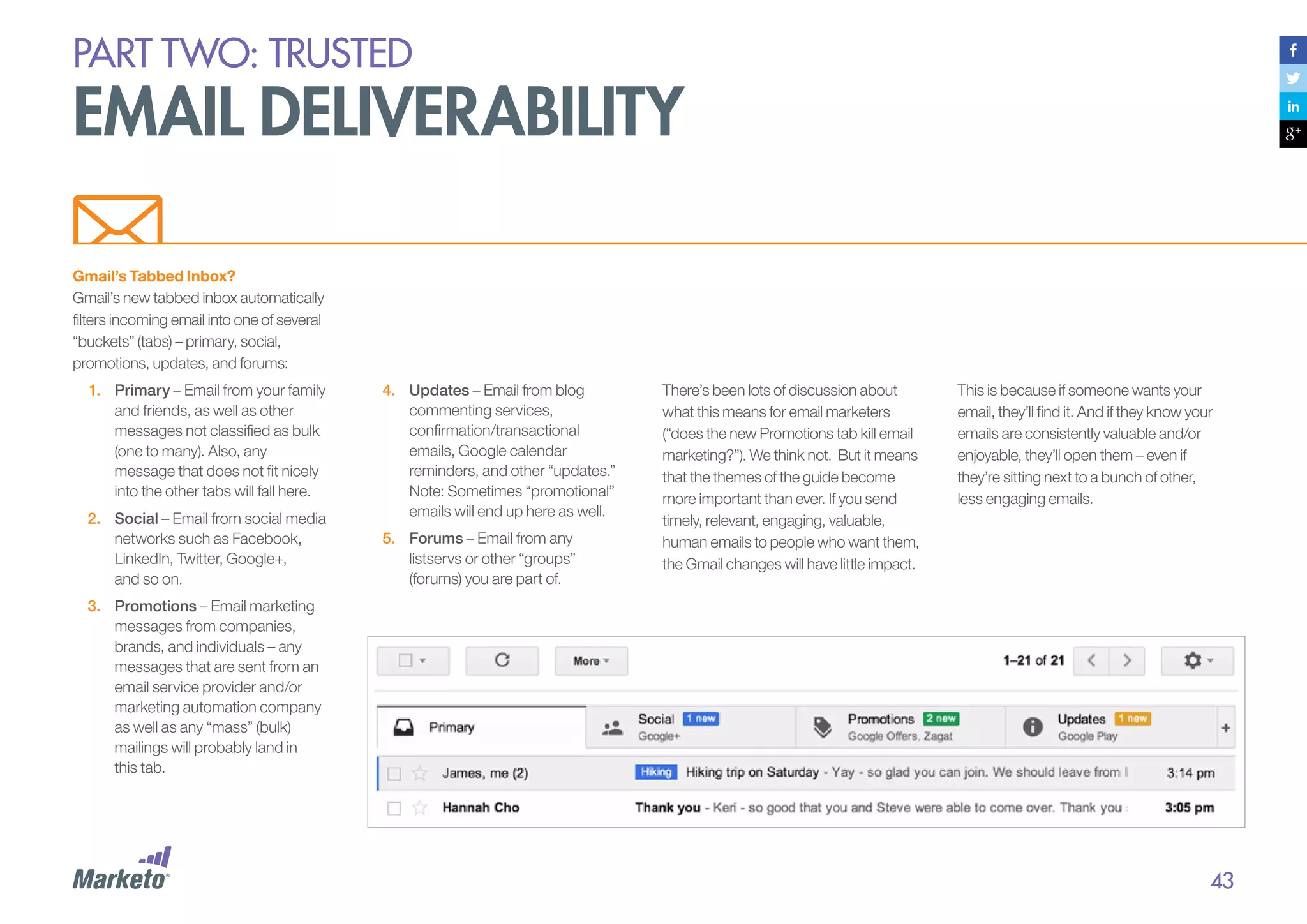
Gmail’s Tabbed Inbox?
Gmail’s new tabbed inbox automatically
filters incoming email into one of several
“buckets” (tabs) – primary, social,
promotions, updates, and forums:
1.	 Primary – Email from your family
and friends, as well as other
messages not classified as bulk
(one to many). Also, any
message that does not fit nicely
into the other tabs will fall here.
2.	 Social – Email from social media
networks such as Facebook,
LinkedIn, Twitter, Google+,
and so on.

4.	 Updates – Email from blog
commenting services,
confirmation/transactional
emails, Google calendar
reminders, and other “updates.”
Note: Sometimes “promotional”
emails will end up here as well.
5.	 Forums – Email from any
listservs or other “groups”
(forums) you are part of.

There’s been lots of discussion about
what this means for email marketers
(“does the new Promotions tab kill email
marketing?”). We think not. But it means
that the themes of the guide become
more important than ever. If you send
timely, relevant, engaging, valuable,
human emails to people who want them,
the Gmail changes will have little impact.

This is because if someone wants your
email, they’ll find it. And if they know your
emails are consistently valuable and/or
enjoyable, they’ll open them – even if
they’re sitting next to a bunch of other,
less engaging emails.

3.	 Promotions – Email marketing
messages from companies,
brands, and individuals – any
messages that are sent from an
email service provider and/or
marketing automation company
as well as any “mass” (bulk)
mailings will probably land in
this tab.

43
PART Two: trusted

email deliverability
Engagement Matters
to Deliverability
How your recipients engage with
your emails is a major factor in future
deliverability. Since the summer of
2012, engagement data has become
a prominent measure of deliverability
at some of the major ISPs. Big league
email providers, such as Yahoo!,
Gmail, Hotmail, and Outlook, have
made it clear that they analyze which
emails their users open and click
through to gauge whether emails
from a particular sender are spam. If
users are not opening and clicking
certain emails, to the spam folder
they eventually go.

Yahoo! has acknowledged that as it
more precisely analyzes user behavior
to weed out spam, some genuine
senders might find themselves facing
deliverability challenges. And, time will
tell, but we predict that if a consumer
always engages with emails from a
particular sender, then Gmail will
eventually move those emails from the
Promotions tab to the Primary tab, just
as they did with the older Priority Inbox.

Consumers use the spam button to tattletale
on companies that send unwanted emails,
even if they initially opted in to receive them.
If recipients don’t want or expect your
emails, they are more likely to mark them as
spam. Disturbingly, Return Path reports that
recipients are more likely to tag your email
as spam than to simply unsubscribe, even if
your “unsubscribe” link is conspicuous.

This is why engagement matters even
for deliverability.

“Mail providers and mail clients are going
to have more sophisticated filters that
measure user interactions with mail and
preferences for content. This is why it’s so
important to figure out how to tailor email
content to the audience.”
– Laura Atkins, Email Deliverability Expert 		
	 and Owner, Word to the Wise
PART Two: trusted

email deliverability
Content still matters (some)

Trigger Words

We haven’t yet talked much about
the actual content of your emails.
This is not because content is
meaningless; it’s just that reputation
and engagement matter more.
However, if you find that your emails
are landing in junk boxes, despite
your adherence to all the
deliverability best practices we’ve
mentioned, then it’s probably time to
review your content.

The rules of content are everchanging. It used to be that if your
emails included certain “trigger”
words, such as “free,” there was a
pretty good chance they would
never reach the inbox. Today,
however, those once-forbidden
words no longer cause email
marketing messages to
get blocked.

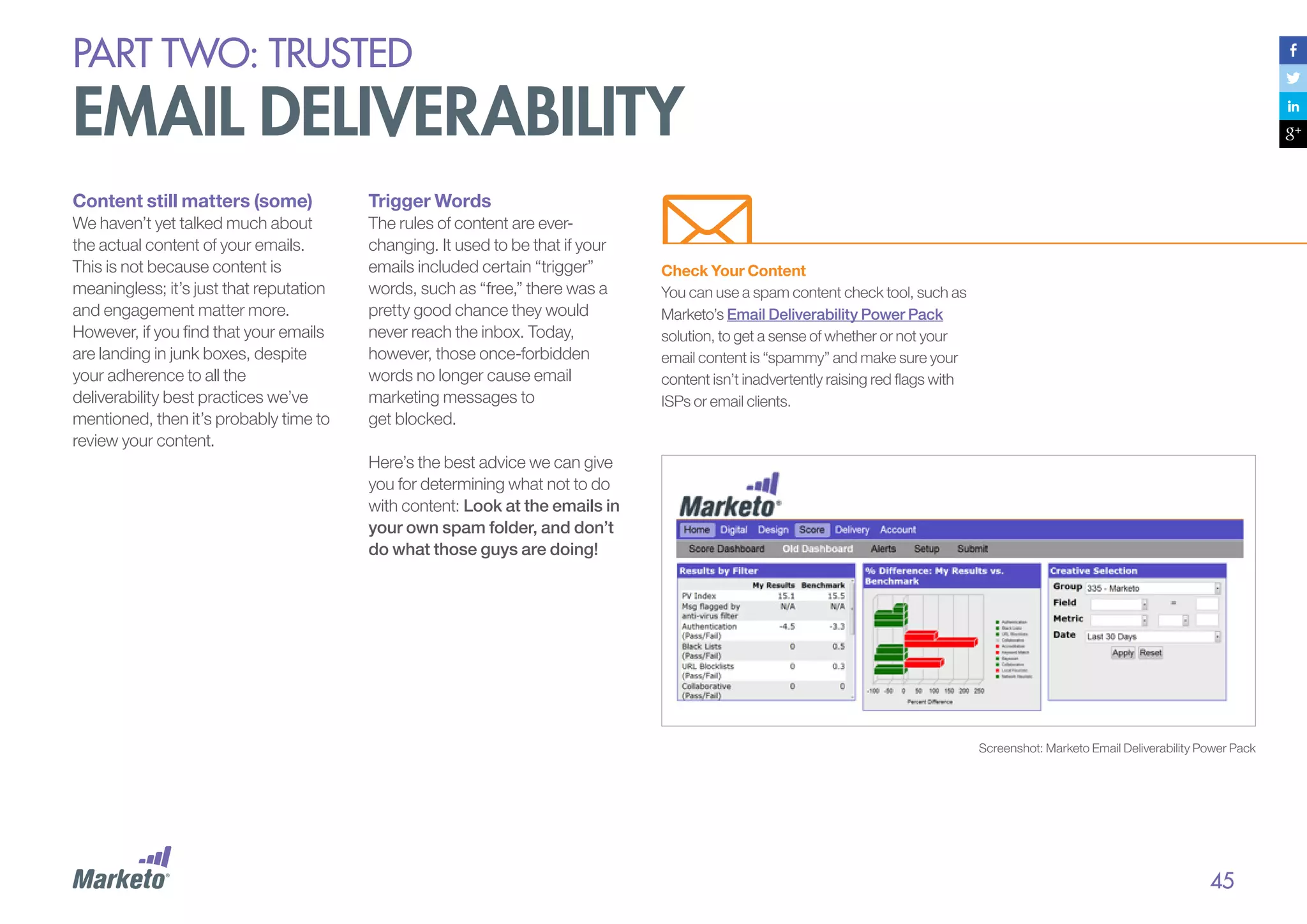
Check Your Content
You can use a spam content check tool, such as
Marketo’s Email Deliverability Power Pack
solution, to get a sense of whether or not your
email content is “spammy” and make sure your
content isn’t inadvertently raising red flags with
ISPs or email clients.

Here’s the best advice we can give
you for determining what not to do
with content: Look at the emails in
your own spam folder, and don’t
do what those guys are doing!

Screenshot: Marketo Email Deliverability Power Pack

45
PART Two: trusted

email deliverability
Deliverability: a Partnership
between Email Provider and Sender
With all the issues surrounding
deliverability of your marketing emails,
you can see how important it is for a
sender (that’s you) to work closely with a
provider (your email marketing service) to
make sure sent emails are getting
through to recipients. Deliverability is a
shared responsibility. Here’s how it
breaks down:

The Provider’s Responsibility
1.	 Your provider is responsible for making sure its
email technology is up-to-date and compliant
with today’s legal requirements. This means it
must optimize the back-end of its delivery
platform for reduced friction with corporate
filtering systems. A good provider must also
cultivate good relationships with receivers by
applying proactive issue resolutions, feedback
loops, and whitelisting practices.
2.	 A modern email marketing service provider will
allow you to segment your contact lists into
sub-lists so that you can target specific
customers with specific messages. This is
essential to keeping your audience engaged with
relevant content and making sure the right
person gets the right message at the right time.

The Sender’s Responsibility
1.	 As a sender, you must keep your lists clean, take
the time to understand your audience, and craft
carefully-targeted messages that are relevant to
specific subscriber sub-lists.
2.	 	 ou are ultimately responsible for what you send
Y
and to whom it’s sent. Corporate email systems
keep a close eye on how the subscribers under
their watch are interacting with your emails. They
score you based on your engagement levels, so
you want your subscribers to open, click,
forward, save, and print on a steady basis. If
your subscribers are ignoring you, you are in
danger of being blacklisted.
3.	 If you send relevant messages to a willing opt-in
list, you’ll build a good deliverability reputation; if
you don’t, your reputation will suffer.

46
PART Two: trusted

email deliverability
Seven Best Practices
for Deliverability
Take the following proactive steps to
give your emails the best chance of
hitting the inbox:
1.	 Follow the trust and
engagement mantra.
Give your subscribers a good
reason to opt in and set clear
expectations about what’s to
come. Then, follow through on
your promises with timely,
targeted, valuable emails.
2.	 Use responsible methods
to build your lists.
Verify all new email addresses
before sending your messages,
and regularly scrub your contact
lists to remove inactive addresses.
3.	 Choose a solid email
marketing service provider.
Make sure the vendor you choose
is sophisticated enough to handle
bounce codes, feedback loops,
and connection optimization.
4.	 Create engaging content.
On its own, bad content won’t
prevent your emails from being
delivered, but if your content is
boring or irrelevant, people won’t
engage with it or, worse, will mark
your emails as spam.

5.	 Manage your complaint rate.
If your email marketing service warns
you that complaints made against
you are high, take the warning
seriously. Set up an email address
— abuse@your-domain.com — that
a representative of your email
marketing service or an anti-spam
organization can use to contact you
with any complaints. Register that
email address with www.abuse.net,
an anti-spam advocacy group and
resource center, to show anti-spam
organizations that you are
responsible and that you’ve given
thought to the email abuse issue.
6.	 Be proactive about closely
monitoring your reputation
metrics.
Get your email reputation score to
learn what you need to change
about your program in order to
improve your reputation and your
inbox placement rates. Return Path,
a leader in email intelligence, offers a
product called Sender Score, which,
in addition to providing you with your
reputation score, shows you how
your email marketing program stacks

7.	 Be transparent.
Let your subscribers and potential
subscribers know how you’re doing
when it comes to complaint rates,
bounces rates, and your Sender
Score rank. Here’s how Marketo
presents this data to give our clients
confidence that their emails are
getting delivered. For more on this,
see Marketo’s Trust page.

up against your competitors’. Sender
Score’s proprietary algorithm ranks a
sending IP address on scale of 0 to
100, where 0 is the worst score and
100 is the best. Ranking is based on
factors such as complaints against
you, volume of your emails, your
external reputation, number of
unknown users, and amount of
rejected emails. Another reputation
monitoring option is SenderBase. Part
of the Cisco IronPort SenderBase
Security Network, SenderBase rates
your IP as good (little-to-no threat
activity), neutral (within acceptable
parameters), or poor (showing a
problematic level of threat activity).

(marketo.com/trust)

Trusted IPs
Month

Cisco
SenderBase
Good/Neutral/
Poor

June 2013
May 2013

All IPs
Return Path
Sender Score
0 to 100

Cisco
SenderBase
Good/Neutral/
Poor

Good

99

Good

97

Good

99

Good

96

April 2013

Good

99

Good

96

March 2013

Good

99

Good

98

Return Path
Sender Score
0 to 100

February 2013

Good

99

Good

95

January 2013

Good

99

Good

95

December 2012

Good

98

Good

95
PART Two: trusted

legal issues
Being a law-abiding email marketer is a big part of establishing trust,
not just with your audience but also with ISPs and other companies.
With email marketing, the “country of
reception” principle usually applies.
This means the law of the country of
the recipient of an email applies, even if
you (the sender) are situated abroad.
This makes it important to understand
the nuances of each country you
market in. Wikipedia has a big list of
Email Spam Legislation by Country.
This guide is not meant to be a legal
document, and we’re not lawyers, so
we can only give you an overview of
legal compliance. Play it safe – be sure
to consult with legal counsel or a
member of your company’s
compliance team for specifics of the
laws in your region.

United States
When it comes to the legalities of
email marketing in the U.S., the
Controlling the Assault of Nonsolicited Pornography and
Marketing Act of 2003 — also
known as the CAN-SPAM Act — is
the governing law. The CAN-SPAM
Act, updated in 2008, makes it
possible for spammers to be fined
$11,000 per violation. Yes, that’s
right —$11K for sending one
inappropriate email! Authentic
marketers must stay on their toes to
avoid using deceptive language in
their email headers, subject lines,
and from and reply-to addresses.

Australia
The following brief from the Bureau of
Consumer Protection Business
Center breaks down the law into
seven main requirements for email
marketers:
1.	 Don’t use false or misleading
header information.
2.	 Don’t use deceptive subject lines.
3.	 Identify your messages as ads.
4.	 Tell recipients where you’re located.
5.	 Tell recipients how to opt out of
receiving future emails.
6.	 Honor opt-out requests promptly
(within 10 days).

Here are the key requirements of the
Spam Act of 2003:
•	Consent - make sure you have
consent to contact the recipient
and can prove you have
obtained it.
•	Identify - include accurate
information to identify yourself or
your organisation as the authorised
sender of the message.
•	Unsubscribe - make sure your
messages have a functional
unsubscribe facility, so that
recipients can unsubscribe at
any time.

7.	 Monitor what others are doing on
your behalf.

For more information, read the
Bureau of Consumer Protection
Business Center’s full Compliance
Guide, and the updates to the
CAN-SPAM Act.

48
PART Two: trusted

legal issues
European Union
The European Directive on Privacy
and Electronic Communications
covers all direct email marketing
messages, including charitable and
political messages. It specifies that
direct marketing email messages
may be sent only to subscribers who
have given their prior consent (“optin”). Prior permission is required for all
business-to-consumer (B2C)
communications, though in some
cases a prior business relationship
will suffice for business-to-business
(B2B) communications.
Regardless, all emails must include
opt-out instructions. Furthermore,
disguising or concealing the identity
of the sender on whose behalf the
communication is made is prohibited,
and companies registered or
operating in the EU need to state their
company details on every electronic
business communication sent from
their organization.

Canada
With marketing in Europe, it’s
especially important to
understand nuances of specific
countries. For example in some
countries (including Germany), the
sender of the email has to be able
to provide an objective evidence
that he received the consent of
the recipient.
For more, see our ebook:
How New EU Privacy Laws Will
Change Your Marketing.

The Canadian Anti-Spam Law (CASL)
was passed in December, 2010. For an
email marketer, the most important
piece is the consent requirement;
CASL prohibits senders from mailing
anyone who has not explicitly
requested that mailing. The consent
must be affirmative, so implicit consent
or even a pre-checked box on a
registration page is NOT acceptable.
CASL also requires clear identification
of the sender of any electronic
message, each message must include
the sender’s valid postal mailing
address (valid for at least 60 days after
the mailing), and each message must
have an unsubscribe method that is
clear, prominent, and able to be
“readily performed.”

For more, see the following resources:
•	Canada’s Anti-Spam Law
(CASL): What Does It Mean
For You?
•	Canada’s Impending AntiSpam Legislation: What You
Need to Know to Be Prepared
•	CRTC Issues CASL
(Canada’s Anti-Spam Law)
Regulation Guidelines

“Always remember email
law is a guiding framework,
to be blended with your
engagement strategy, your
message, and your content.”
– Duncan Smith
CEO of iCompli

49
case study:

“Marketo has really looked at K12 as a partner... and
has been incredibly interested in our roadmap and how
they can help us get to the next level.”

K12

– Dianne Conley, VP of Marketing Operations & Technology, K12

automated email marketing Makes the
Grade for K12’s B2B and B2C Marketing
Highlights
•	 Highly focused marketing: K12
increased productivity, reducing
the need for hundreds of emails to
4 per campaign.
•	 Efficient marketing: K12 leveraged
Marketo to shrink the number of its
landing pages by 150% and more
effectively aggregate the data.
•	 Democratized marketing:
Automated email marketing
empowers large numbers of users,
maximizing how resources are
used across the company

Challenges
K12 is the nation’s leading provider of
online education for grades K-12, offering
award-winning solutions to public and
private educational institutions, as well as
to individual students and families. K12’s
goal was to have one solution for their B2B
and B2C marketing. They required a smart
system that would allow for exceptional
revenue analysis and seamless integration
with Salesforce.com. They also wanted the
benefits of scalable marketing tools while
engaging parents earnestly about critical
choices for their children’s education.
Solution
Marketo’s intuitive interface empowered
K12’s marketing and enrollment teams to
begin to democratize campaigns across
their organization. In the B2C realm, this
means that the agility and robustness of
Marketo enables K12 to have very
meaningful conversations with families
about their children’s education, and to

nurture those relationships not only
authentically, but cost-effectively. Once
K12 decided on Saleforce.com, Marketo
was the obvious choice for their email
marketing solution as both systems share
the same data model and database,
enabling K12 to get the most out of their
lead-routing algorithms.
As K12’s VP of Marketing and Technology,
Dianne Conley explains, “With
Salesforce.com and Marketo, it was
very important for us to think about
how the systems would work together
rather than thinking of them as isolated
platforms.” K12 can track the entire
customer lifecycle, from initial touch point,
to lead acquisition, to lead nurturing and
conversion — allowing for a big picture
view of what’s really going on in the
pipeline and insightful business decisions.

Benefits
Since adopting Marketo, K12 has
successfully leveraged more of its
resources — the intuitive platform is
being adopted by ranks of business
teams, enabling K12 to reach out to a
vast number of prospects and
customers in a conversational way.
Additionally, K12 has streamlined its
processes, reducing landing pages by
150% and producing dynamic
campaigns with 3 or 4 emails rather than
hundreds. Ultimately, it’s allowing K12 to
reach out to its database both efficiently
and meaningfully — and that’s
channeled directly to the top line.
K12 is looking strategically across their
organization to create a plan to scale
their business with Marketo.
part three:

Always relevant
PART three: always relevant

engaging email is relevant
Relevance means knowing who your audience is and what they want from your emails. Impersonal and poorly
timed messages make your subscribers think, You don’t know who I am. You don’t know what I want. You just
don’t get me. If you aren’t relevant, your subscribers will opt-out – or emotionally opt-out.
Being relevant means sending the
right content to the right person at
the right time. This part covers
three topics related to relevance:
1.	 Talk to the right people.
Segment and target by using an
email marketing solution that’s
easy to customize and manage.
2.	 Say the right things.
Put thought into your content;
call on a talented team to write
and design your emails.
3.	 Improve, always.
Optimize and test to learn what
works and what doesn’t.

“Your email content has to
be compelling and in line
with the subscriber’s stated
needs and their behavior.
Done correctly you have not
only increased relevancy
and engagement – you’ve
significantly increased sales
and lifetime value.”
– Scott Hardigree
Founder at Indiemark
PART THREE: always relevant

segmentation and targeting
Consumers are becoming more and more comfortable with targeted advertising and personalized
content. They expect marketers to know almost everything about them, and to use that information
to create customized experiences.
When consumers visit Amazon.com,
they look for recommendations to be
fed to them based on what they’ve
purchased in the past: “You bought
this, so you might like this.” Datadriven customization is
commonplace now across all
platforms, and email is no exception.
Everyone can market like Amazon.

Segmentation Means
Higher Engagement
One of the most valuable ways to use
consumer data is to segment and target your
lists. Consider this:

Consumers increasingly expect
when they share information with
marketers — either explicitly at opt-in
or implicitly with their buying and
browsing habits — that those
marketers will use that data wisely.

•	“Segmented email campaigns produce
30% more opens than undifferentiated
messages.” — Monetate’s Intelligent
Email Marketing that Drives
Conversions - 2012

•	“Email marketers estimate 30% of email
revenue derives from targeting to specific
segments.” — DMA’s National Client
Email Report - 2013

“More than half of email
marketers say that their
biggest challenge is targeting
subscribers with relevant
content. The key to creating
engaging campaigns starts
with having a clear
understanding of what is truly
relevant to your subscribers”.
– Andrew Kordek
Co-Founder, Trendline Interactive

•	“76% of all email marketing revenue came
from more advanced practices than
generic broadcast email.” — DMA UK’s
National Client Email Report - 2013

53
PART THREE: always relevant

segmentation and targeting
Small, segmented sends are more
engaging than large, untargeted
sends. Marketo’s research shows
that sending targeted content to
smaller groups leads to higher
engagement. This makes sense, of
course, since the smaller the group,
the more focused – and therefore
relevant – the message can be. It’s
basically impossible to be relevant
with a “least common denominator”
message sent to a large group.

Source: Marketo Benchmark Study research
showing the relationship between smaller, more
targeted email sends and higher engagement. See
Part 6 for the definition of Engagement Score.

Additionally,
The Marketo Benchmark on
Email Marketing study
found segmentation to be the
highest ROI tactic used by email
marketers — higher even than drip
marketing or dynamic content.

54
PART THREE: always relevant

segmentation and targeting
Types of Segmentation
The two main ways to segment
your list are:
1.	 Who they are:
Demographic attributes, such as
income, title, age, and location.
2.	 What they’ve done:
Past behaviors and transactions.

As we will see, segmenting
according to behavior is the
single most essential tactic an
email marketer can adopt to
increase relevance.

Segmentation Based
on Demographics
Knowing who your contacts are is
an important part of being relevant
in your messaging. Here are eight
common ways to segment
using demographics:
1.	 Gender
2.	 Age (or birth year)
3.	 Job title
4.	 Company size
5.	 Industry
6.	 Interests
7.	 Geography
8.	 Birthday month

As we will see, segmenting
according to behavior is the single
most essential tactic an email
marketer can adopt to
increase relevance.

Segments Are Used In Two Ways:
1.	 To pull targeted lists, and send
different emails to each segment.
2.	 To customize a single email for
different segments using dynamic
content. Dynamic content allows
you to create one email template
with content that varies based on
the recipient. (We go into detail
about this later in the guide.)
PART THREE: always relevant

segmentation and targeting
Example: Segmenting by Age

In the campaign below, Fit For Me
segmented customers using each
subscriber’s year of birth, and then
adjusted the tone of the writing and images
to be relevant to each group. Even though
you may not be able to read the copy of
the message, you can clearly see how the
images are adjusted based on age.

Personas
Personas are research-based profiles of archetypal
customers that represent the needs of many. Creating
personas brings a human element to your campaigns by
allowing you to focus on your customers as real people, and
then communicate with them on a more natural level. You
can name each persona, give them a storyline, and even
assign lifestyle attributes and pain points. For example:
•	“Sam the Shopper” is partial to impulse purchases
and likes to “add to cart,” provided that each
additional item is under $25 and relevant to his needs.
•	“Cyril the CEO” is an information-hungry whitepaper
hoarder, who is looking to league up with thought
leaders in his field.
•	“Wendy the White Wine Enthusiast” will buy any
California white that isn’t a heavily-oaked Chardonnay,
and that happens to be offered in bulk at a discount
greater than 20%.
If you haven’t already, take the time to create a few buyer
personas that represent your customer base, and then use
those personas to segment your communications.
For more on personas, visit our blog and read
“Improve Your Targeting and Tell a Story By
Creating Buyer Personas.”

56
PART THREE: always relevant

segmentation and targeting
Keep Your Forms Short,
But Your Data Rich
Where do you get this
demographic information?
Ideally, keep your Web forms short to help
prevent users from getting frustrated and
giving up on the conversation process. So
how do you get that data without directly
asking them? Try the following:

1.	 The Page Two Experience:
Capture basic contact information
on the first page of your site, and
then ask for more information on
subsequent pages. Waldow Social
successfully uses this technique.

3.	 Preference Center:
Once customers have subscribed to
your email marketing, invite them to
your email preference center, where
they can customize their profiles and
help you help them.

2.	 	Progressive Profiling:
When you recognize repeat Web
visitors, ask for new information
each time they fill out a form. With
each completed form, you
progressively add to their profiles.

4.	 Data Augmentation Services:
There are many vendors specializing
in either business data or consumer
data, that can help you “clean” and
augment your data.

5.	 	 lick Paths and Transactions:
C
By paying attention to a user’s click
path and transaction activity, you
can make inferences about his
demographics. For example,
marketers at Bluefly infer gender
based on whether a shopper visits
the women’s section of the site or
the men’s section. But be careful;
your buyer might be shopping for a
spouse, friend, or significant other!
As another example, at Marketo we
present a navigational choice by
offering links to “Solutions for Small
Business” and “Solutions for Global
Enterprise” on our site.

57
PART THREE: always relevant

A better way to segment:
based on behaviors
Knowing who your customers are is great, but knowing how they behave is even better.
Actions speak way, way louder
than words. Knowing your
prospects in terms of their
personas and demographics tells
you what they might be interested
in, but knowing how they behave
tells you what they definitely are
interested in. You can ask your
contacts about their interests in
an effort to cater your content to
those interests, but, the truth is,
they rarely provide accurate data,
and interests change over time.

Learn to Read Buyers’
Online Body Language
Behavioral data can be highly
predictive of future decision-making
patterns and road-to-purchase
activity. A prospect’s browsing and
search activity relate directly to his
intent; his social sharing activity can
indicate future purchase possibilities;
and emails opened, links clicked,
and content consumed indicate
good ol’ interest.
The information gleaned by paying
attention to a consumer’s digital
behavior is her online body
language. By tracking and
interpreting online body language,
you can determine where she is in
her buying journey and what
problems she might be trying to
solve. You can even begin to figure
out what interests her, what annoys
her, and what persuades her.

When you combine online body
language with transactional and
purchase data — transactional
history, products purchased or
owned, usage data, and so on
— you have solid and very powerful
information to go on.
But when behavioral data is not used,
your emails could be considered
dissonant interruptions. The last thing
you want is for a subscriber to wonder
why you sent him a discount coupon
on Friday for a product he purchased
on Thursday. Without behavioral
targeting, what you consider a nice
drip campaign might feel more like
water drip torture to a recipient.

Always be aware of the laws
related to capturing customer
activity data. If your privacy
policy isn’t accurate, or if
you’re capturing data without
informing customers, it could
be considered a breach of
browser security. In many
countries, this could violate
privacy, data protection, and
consumer protection laws.
Consult legal counsel for the
specifics in your jurisdiction.

58
PART THREE: always relevant

A better way to segment:
based on behaviors
The Value of
Behavioral Targeting
When David Daniels, co-founder
of the Relevancy Group, was an
analyst at Jupiter Research
(acquired by Forrester Research
in 2008), he reported that
targeting emails based on Web
click-stream data increased open
rates by more than 50%, and
increased conversion rates by
more than 350%.

Similar research from Gareth
Herschel at Gartner found that
event-triggered campaigns
performed five times better than
traditional batch campaigns.
Forrester research recently found
that only 17% of companies
assessed themselves as mature
practitioners of behavioral marketing
– but those mature practitioners
grew revenue faster than they
planned (53% versus 41%).

Open Rate

Click-through
Rate

Conversion
Rate

Untargeted
broadcast emails

20%

9.5%

1.1%

Triggered from
user actions

27%

9.3%

2.3%

Targeted with
web click data

33%

14%

3.9%

Target Type

Source: Jupiter Research

59
PART THREE: always relevant

A better way to segment:
based on behaviors
Triggered emails and segmenting campaigns based on behaviors are the top tactics to improve email engagement.

39%
37%
36%
28%
21%
18%
14%
12%
11%

Automatically send email
based on triggers

Segment email campaigns
based on behavior
Dynamically personalize email content

Chart: Relevancy Improvement Tactics = Level of Effectiveness
Q. Please indicate the level of effectiveness for each of the relevancy
improvement tactics your organization is using.
Segmented email campaigns based on behavior

50%

50%

(e.g. first name in subject line, geo-location content)

Segment email campaigns
based on sales cycle

Allow subscribers to specify email
preferences via a robust preference center

Include surveys,
trivia or games

Use loyalty /
reward programs
Dedicate resources to produce content
for each stage of the buying process

Make use of animated GIF
images or video in design

Automatically send email based on triggers

Allowed subscribers to specify email preferences

27%

67%

6%

Segmented email campaigns based on sales cycle

23%

74%

3%

Dynamically personalized email content

10% 90%
Very Effective

Source: ©2013 MarketingSherpa Email Marketing Benchmark Survey - http://bit.ly/18I1O80
Methodology: Fielded December 2012, N=626

55%

45%

Somewhat Effective

Not Effective

Source: ©2011 MarketingSherpa Email Marketing Benchmark Survey
Methodology: Fielded September 2010, N=246
PART THREE: always relevant

A better way to segment:
based on behaviors
“Online behavioral models
built with Web traffic, search
behavior, lifestyle data, and
demographics are
particularly effective at
identifying prospects not
found with traditional
demographic prospecting
models.”

Campaigns Based
on Topic of Interest
At Marketo, we created different email
engagement tracks based on focused
topics that might interest customers:
email marketing, social marketing, and
marketing automation, to list a few. We
then used behavioral triggers to
determine when to add a person to
each track.

– McKinsey, The Coming Era 		
of ‘On-Demand’ Marketing

For example, when a prospect downloads
social content, we assign him to the social
marketing nurture track. In that track, he
receives a set of social-marketing focused
emails. Once he’s received all of our social
content, we automatically trigger him back
into the regular track. By using these smart
segmentation tactics, we’ve experienced
much higher engagement.

Standard Nurture

Triggered Interests

Lift

Open %

21.7%

34%

57%

Click to Open %

23.4%

37.1%

59%

5.1%

12.6%

147%

Click %

61
PART THREE: always relevant

A better way to segment:
based on behaviors
Examples of Behavior Targeting
Here are some basic examples of
behavioral targeting.
Email:

Social:

Website:

•	Which emails did a consumer
open and/or click on?

•	Did a consumer mention your
company on Twitter?

•	Did a consumer visit your
website? If so, how recently?

•	Which emails did she NOT open
and/or click on?

•	Did she navigate to your site
from Facebook?

•	What content did she
download or view?

•	Which type of offer does she
respond to most often?

•	Did she share one of your
messages?

•	What keywords were used to
navigate to your site?

•	How long ago was her last
interaction with an email —
three days, three weeks or
three months?

•	Did she comment on one of
your blog posts?

•	How long did she stay on
your website?

•	Who responds frequently, who
rarely interacts?

•	How many pages did she
view while there?
PART THREE: always relevant

A better way to segment:
based on behaviors
More Examples of
Behavioral Targeting
There are many other ways to
use behaviors in email targeting.
Campaign Response
Target new campaigns based on
how buyers have responded to prior
campaigns. If a consumer always
responds to content downloads but
never to event invitations, stop
targeting her for events. Instead,
give her more content to download.
This tactic requires the ability to
track conversion success or, even
better, to look down the funnel to
see what actually happened during
her experience.

Remailing
Remailing is like retargeting for
email. With it, you give your original
email a second chance by sending
it again a few (3 to 5) days later
— and perhaps with a different
subject line — to contacts that did
not open it. You could also resend
emails to those who opened, but
did not click, with a different call to
action, or with altered content.
E-Loan recently garnered 13%
more purchases as a result of a
three-part email promotion
strategy: recipients were sent
similar emails (with a slightly
different message) on three
different occasions.

Content Interactions
The content a consumer views tells
you a lot about his interests. For
example, if a consumer uses the
mortgage calculator on a financial
services company’s website, he is
likely interested in mortgage products.
Making the connection between
content interaction and email
targeting is vital, and not that hard. If a
prospect has read reviews of a
particular product on your site,
common sense dictates that you
would promote that product.
If another prospect visits a key
product Web page twice in one week,
send him a special offer, and alert the
sales team! On a related note, if a
consumer has already seen content
offered on your website, then it makes
sense to exclude him from an email
campaign promoting that content.

Revenue Stage
Use different messages for prospects
that have never bought and are not
currently evaluating solutions,
prospects who are actively evaluating
solutions, and active customers. You
can identify these segments by
integrating your email with your
transactional or CRM system.
Transactional Data
Using actual transactional data can be
one of the most powerful forms of
behavioral targeting. For a financial
services company, this can include
balance information and deposit and
withdrawal transactions. For a
telecommunications firm, it can include
data usage and add-on purchase
history. A travel company noticing that
a particular customer travels to Paris
every April can use transactional data
to offer a related discount.

63
PART THREE: always relevant

A better way to segment:
based on behaviors
Non-activity
Targeting emails based on “missing”
behavior can be just as powerful as
targeting specific behaviors. For
example, you can target consumers
that do not respond to a campaign (no
open; no click; no conversion) or that
have not visited your website in a
specific amount of time. A more
sophisticated example: a customer
who regularly makes a deposit on the
first Friday of the month, but then
misses a date, might deserve
a check-in.
Propensity Models / Scores
You can use scores to predict
propensity for customer behaviors,
such as readiness to buy, probability of
responding to offers, retention actions,
cross-sell offers, and likeliness to
churn. This can be based on statistical
models, but you can also score based
on simple rules. For example, you
might assign a customer two points
every time he visits your website, and
four points each time he downloads
a whitepaper.

One-Time Buyers vs.
Repeat Buyers
Loyal customers require a different
message than those merely sampling
your goods. Out of all the choices they
have, they’ve chosen your company not
just once, but many times. Your loyal
customers are also the people who with
each transaction tell you they want you
to succeed. Make sure they understand
how important they are to you.
Example: Segmenting
In the campaign below, the surgical
weight loss center Slimband segments
their lists based on surgery date and
surgery recovery stage. Demographic
data is based on what your business
cares about, so for Slimband, they
customize based on information
pertaining to surgery and recovery.
Take a look an example email Slimband
customizes for their patients who are
day 1 post-op.

64
PART THREE: always relevant

A better way to segment:
based on behaviors
Anniversary
Target customers based on the
anniversary of a purchase. Norm
Thompson, a men and women’s
fashion retailer, does this well.
Exactly one year after a customer
makes her first purchase, she
receives an email thanking her for
being a loyal customer and offering
her a 20% discount off her next
order. See Waldow Social for how
Norm Thompson perfects its
messaging in this campaign.
Replenishment Date
Companies that sell consumable
products can predict when buyers
will run out by looking at typical
usage patterns, and then send an
offer to replenish in advance of the
predicted date. Mapping
customers’ buying cycles is a great
tactic for small items, such as
hearing aid batteries, as well as
big-ticket items, such as car leases.

Other Date-Based Data
PaperStyle, an online invitation and
stationery store, targets brides-to-be
by sending a series of email reminders
based on crucial dates: when to send
invitations, when to think about
wedding favors, and when to buy
bridal party gifts. PaperStyle has
found that targeting brides in this way
generates an open rate three times
that of their bulk mailings, and a click
rate twice as high. Additionally,
PaperStyle found that these emails
generate four times the revenue of
their bulk mailings.
As another example, Algonquin
College of Applied Arts and
Technology, the largest college in
Eastern Ontario, recently embarked
upon a revitalization of its recruitment
processes. The college replaced its
traditional batch and blast email
campaign with automated
conversations based on various
factors, including a prospective
student’s graduation date.

In this program, prospective students
were sent invitations to on-campus
events, program sessions, and tours,
and they were provided with
application process information and
important application dates.
As a result, prospective student
engagement soared: Algonquin’s
open rate is now 23.5%, with some
individual click through rates climbing
to over 10% from 2-3%. They also
saw an increase in visitor loyalty of
8.1% over the previous year.
PART THREE: always relevant

A better way to segment:
based on behaviors
Cart Abandonment
Shopping cart abandonment is the
scourge of ecommerce for vendors.
In fact, many sources cite shopping
car abandonment rates in the mid60% range. There are a lot of
potential reasons for this, including
that some consumers use shopping
carts to compare prices and shipping
rates before they’re ready to commit,
and others get distracted or
frustrated before completing the
purchase. But regardless of the
rationale, cart abandonment is a
good reason to use a behavioral
targeted campaign to nudge your
subscribers to finish their order.

Send one personalized email
reminder, or even a series of
reminders to follow up! According to
the e-tailing group’s 2012 Merchant
Survey, shopping cart abandonment
emails was the single highest ROI
personalization technique used by
e-tailers, with 55% of those surveyed
responding that such campaigns
were either very successful or
somewhat successful.

Recency, Frequency,
and Monetary (RFM Analysis)
Direct marketers have been using
recency, frequency, and monetary (RFM)
analysis for years to sort customers by
most recent purchase date, dividing
them into equal groups and assigning
points to the groups.
For example, if you use quintiles (which is
most common), the 20% that make up
the most recent purchasers are given 5
points; the next group, 4; and so on, until
you get to the bottom 20%, which are
given a score of 1. With segmented RFM
groups, marketers can target promotions
to each group separately. One campaign
could target the top most recent buyers,
for instance, while another could be
aimed at those who haven’t made a
purchase in a long period of time. You do
the same thing by frequency of purchase
and total monetary value of the
consumer’s spending.

Using quintiles, you end up with 125
segments of equal size, coded from 5-5-5
(5 points for very recent purchases, 5 points
for very frequent purchases, and 5 points
for high value purchases) down to 1-1-1 (1
point for responding a long time ago, 1
point for responding only once, and 1 point
for resulting in little or no value.
This technique works great in traditional
marketing models like direct mail, where
sending is expensive per piece and it might
behoove a company to send only to the
customers most likely to buy. But since
email campaigns carry a much lower cost
— perhaps as low as zero marginal cost,
depending on the email provider — RFM
doesn’t make a lot of sense for email
marketing. More specific behavioral
strategies — targeting based on actual
products purchased, content
consumed, keywords used —
makes more sense.

66
PART THREE: always relevant

From dumb lists to
a smart database
Relevancy and engagement are powerful sources of value — but they require sophisticated targeting that
combines online body language (web traffic, search behavior, email response) and transactional data with
lifestyle and demographic data (personas).
However, while this engaging level
of targeting is not a new concept,
it’s still not commonly used in
practice. Why? Because traditional
email service providers have not
made it easy.

Dumb Lists and
Technical Queries
In a perfect world, every interaction
that individual consumers have with
your brand would be collected and
stored in behavioral databases, so
you could target and customize every
single message easily. Unfortunately,
many marketers don’t yet live in that
world. According to Forrester, only
45% of marketers are currently
capturing and consolidating
customer behavioral data from
multiple channels into a single
database. Data comes from many
sources, and customer-facing
systems don’t always talk to each
other. Social data, for example, is
sometimes connected; sometimes
it’s not. Website data is almost never
connected to transactional data.

Traditional ESPs don’t help much
with data aggregation. Sure, they
can track email behaviors and
feed their customers reports on
open and click-through rates. But
they lack connection to other
behavioral data and are unable to
inform communication with more
personal behavioral cues.
These ESPs work primarily from
imported lists and spreadsheets. We
call these “dumb lists,” for obvious
reasons. Anything sophisticated
requires pulling custom lists with
complex queries written by technical
experts — not marketers. They are
made up of API calls, SAS code, and
SQL queries. Not sure what these
acronyms mean let alone stand for?
You’re not alone.

When marketers are forced to deal with
complicated technical jargon and
customized code, they are at the
mercy of IT for explanations. This
makes acting on behavioral data quite
challenging for the average marketer
using a traditional ESP. Less agility
means it takes longer to react to
opportunity. Ultimately, it means that
sophisticated behavioral targeting is
often not done because it’s too difficult.
And when it’s not done, you can say
bye-bye to relevant engagement.

67
PART THREE: always relevant

From dumb lists to
a smart database
Sample email provider interface for “basic” queries –
complex for most marketers.
The Problems with Lists
Many traditional email service providers
use lists for their marketing. However,
lists can present problems, including:

Sample email provider code for behavioral query
(e.g. click a specific URL)
Select SubscriberKey AS EmailAddress
from _Click
Where like = ‘%www.your URL.com/corporate.html%’

•	Companies tend to use lists over
and over and over. Beating your
customers into submission is not the
answer.

•	Lists require marketers to
re-create the wheel. Each time a
company wants to send a new
email, marketers have to “pull a
new list” — which often requires
working with a technical resource,
slowing the process way down.

•	Lists lack history when pulled fresh
for each email. Every new list
compiled lacks the knowledge gained
from the experience of the last send.
Companies eventually end up with
thousands of messy and hard to
manage lists!

•	Lists treat each list subscriber
the same. A list might be “every
person who bought a product from
us at some point.” This is a very
broad, one-size-fits-all approach,
and doesn’t promise the most
relevant messaging.

•	Lists lack actionable visibility.
When the metrics are tied to the list
and not to the actual subscriber, or to
an intelligent segment of subscribers,
it’s hard to read and learn from them.

68
PART THREE: always relevant

a smart database
with smart lists
There are progressive email
marketing providers offering
behavior-smart databases at their
core. These marketing automation
providers offer a secure and
trusted repository of demographic
and behavioral data to power
intelligent communications.
Companies that use marketing
automation get a database that
serves as the system of record for all
prospect and customer interactions
within marketing, sales, and
transactional systems. The result: a
single place from which marketers
can build highly targeted campaigns
tied to trackable information about
each individual contact.

With a smart database, marketers
also have the ability to easily
segment their subscribers using
various filters, such as:
•	Demographic: name, location,
age, registration source,
household, preferences, score,
custom fields, etc.

Within many of these filters, segments
can be created by existence of
behavior — timeframe of behavior and
number of times the behavior occurred
— as well as inactivity.

•		Email history: sent, opened,
clicked, bounced,
unsubscribed, etc.
•		Social: shared content, referral,
poll answer, etc.

Marketo Screenshot: Easy drag and drop

•		Website: visit, clicked link,
completed form, referral source,
search query, etc.
•		 ampaign history: campaign
C
membership, campaign
response, campaign
success, etc.
•		Custom: purchase history,
deposit, withdrawal, cart
abandonment, data usage, etc.

69
PART THREE: always relevant

A smart database with smart lists
Best of all, because these systems
are built for marketers, not
engineers, the functionality is
accessible to an entire team. They
make it easy to create “smart lists”
using drag and drop functionality
similar to creating a playlist in iTunes.
You can combine filters to create
specific lists: subscribers ages 18-25
who shared content via social, or
customers with balances above a
certain amount who visited the loans
page twice in the last month. Plus,
you can track campaign and
response history for a solid record of
how segments have performed.
This type of system makes
marketing self-reliant, so that
marketers can easily create and
manage sophisticated behavioraltargeted campaigns on their own,
without having to enlist the help of
technical support. That means you
spend less time modifying
spreadsheets and waiting for IT, and
more time building engaging,
relevant campaigns.

Marketo’s Smart List builder combines
demographics and powerful
behavioral filters with real-time triggers
in an easy-to-use marketing interface.
PART THREE: always relevant

content and design
While segmentation and targeting are certainly the most important aspects of
keeping your marketing relevant, content also matters — a lot.
In order to engage your audience,
your content must be “human” —
likeable and personalized. It should
also be helpful and educational —
or, at the very least, entertaining.
And it should be timely.
In this section, we’ll show you how
to create great email content, and
we’ll share tips on optimizing some
of the most important pieces of
your content: the subject and
“from” lines. We’ll also discuss the
latest trends in email design, how to
design for mobile, and how to
design for recipients who don’t
allow image downloads.

Direct Marketing Economics
According to an old direct marketing
rule of thumb:
•	Targeting is responsible for
50% of your audience response
•	Creative is responsible for 20%
•	The actual offer is responsible
for 30%.

71
PART THREE: always relevant

content and design
Engaging Content is Human
To be engaging, your company and
your content must be human.
Many of today’s email marketing
campaigns are boring and
impersonal: Opt-in forms read as if
written by robots, email subject lines
are dull, and copy is stale and laden
with corporate-speak. But it doesn’t
have to be that way!
Some companies, such as
MarketingProfs, really know how to
nail the human aspect of an email:

The language is friendly and
conversational, making it pretty
obvious that a human wrote it. (Note:
As it turns out, Ann Handley – Chief
Content Officer at MarketingProfs –
DID write this email). Notice the
language in the second paragraph; it’s
personable, likeable, and witty.
Urge your copywriters to err on the
side of being more human, not less, in
email messages (and on your web
pages and opt-out form).

“Effective engagement is
inspired by the empathy
that develops simply by
being human.”
– Brian Solis, Author of “Engage!”

72
PART THREE: always relevant

content and design
Take a look at another example from
ReachForce and LeadMD. In
planning to attend Marketo’s User
Summit, LeadMD worked with
ReachForce to try a new take on the
conventional, cliché traffic builder
email. Instead, they wanted to try
something more conversational and
humorous. They even finessed fake
Marketo tokens so it would resonate
with the audience. The campaign
received a 42.8% email open rate
and a 300% improvement over the
previous year in booth visits.
There is no silver bullet when it
comes to creating engaging and
relevant content, but we’ve got a free
guide, titled “Creating Content that
Sells: A Guide to Content Marketing
for Demand Generation,” which we
encourage you to download. This
guide will teach you how to effectively
engage the right prospects with the
right content by using smart email
marketing techniques that target
buyer personas.

Hi Pierce,

In case you are being inundated with the same AMAZING marketing emails that I am. I
thought I would share an easy cut and paste you can use for your replies:

“Hi - Yes I am excited to go to {(Marketo Summit)}, thanks for asking {(unnamed sales rep
who never contacted me before)}. It will be life-changing!

And yes - Your booth sounds amazing, too. Your incredibly creative {(ipad)} giveaway is
sure to be a great traffic builder. You’ll be demoing? At your booth? Who would a thunk it?
Yes, your solution will certainly change my demand generation life – or would if you
understood my {(buyer persona)} {(company revenues)} {(experience using Marketo)}.”
Oh Yes, those sales guys. We hire email copywriters for a reason, yo.

So, no cheesey emails. Just saying if you really want to get something valuable at the
summit, check out what you can pick up from me at ReachForce, Booth 36.
And yes, that is the 8-incher. Nothing but the best from ReachForce.

See you in class {(at Marketo University)} {(taking my certification exam)} at our Booth
{(36)} as we introduce {(fully Marketo integrated continuous data quality management
including lead de-deuplication and automated merge)} as part of our new Connected
Marketing Data Hub and as I present {(Will the real lead please stand up? Tips and tricks to
get a set of data)}.

The one thing to boost email
marketing engagement is to
be human.

5 Ways to Be More Human in Your
Email Marketing Message
•	Ditch the corporate “Frankenspeak.”
•	Add humor.
•	Include customer stories.
•	Weave in real-world events
and pop culture.
•	Don’t take yourself too seriously!

Mary Firme, Chief Lead Accelerator
ReachForce | Connected Marketing Data Hub
(512) 327-9000
Email: mfirme@reachforce.com | http://www.reachforce.com
LinkedIn: linkedin.com/in/maryfirme
Twitter: twitter.com/ReachForce

*and of course, we are not giving away free beer any night but Monday, and as for the gold,
that’s what you’ll find in your data after working with ReachForce!!

73
PART THREE: always relevant

content and design
Engaging Content
is Personalized
There are two ways to help your
email marketing content be
relevant to your subscribers:

Personalization
An example of personalization
includes using a subscriber’s first
name within the subject line and/or
body of the email — “Cindy, we have
a special offer for you!” — and adding
data that’s specific to that subscriber.
You’ve probably received
personalized emails like this.

1.	 Use personalization techniques
2.	 Use dynamic content

Here is a generic email that shows
both of these in use. The small
fields such as name and pet type
are personalized; the larger
custom coupon is dynamically
inserted content.

The following email from REI reflects
personalization done well. It includes
both the subscriber’s first name and
his unique dividend information,
making it highly relevant to him.

Source: Chris Siestema, Teach to Fish Digital

74
PART THREE: always relevant

content and design
To take personalization even further,
use “snippets” to dynamically insert
entire blocks of copy into your emails.
Snippets require zero technical skills
and are easily reusable and editable in
a text interface. At Marketo, we often
use this tactic to personalize attributes
such as office location (based on the
recipient’s region), and the
subscriber’s gender.
Here is an example of a snippet used
to populate an email footer on a
landing page in Marketo:

Regards,
{{lead.Lead Owner First Name:default=Ryan}}
{{lead.Lead Owner Last Name: default=Hammer}}
{{lead.Lead Owner Job Title:default=Sales Development Representative}}
{{lead.Lead Owner Phone Number.default=+1.650.376.2301}}

Regards,
Ryan
Ryan Hammer
Sales Development Representative
Phone: 650.376.2301
Email: ryanh@marketo.com
www.marketo.com
Let’s Connect!

75
PART THREE: always relevant

content and design
Dynamic Content
Dynamic content allows email
marketers to create one email
template with content that varies
based on the recipient. The content
is determined based on the
attributes of each individual
subscriber. For example, a travel
company might customize
messaging to its subscribers by
home airport. A marketer at that
company doesn’t have to create
hundreds of different emails for every
single home airport possibility; he
simply sends one email using
dynamic content. If one subscriber’s
home airport is DFW and another’s is
BOS, each subscriber receives a
slightly different email based on the
flight specials available from his
home airport.

Socialware, a Marketo customer,
dynamically customizes its emails
and landing pages based on the
industry and role of each recipient
— marketing, sales, IT, and so on.
Using vertical, functional, and
firm-specific dynamic content,
Socialware has increased:

Source: ROI of Dynamic content for socialware

76
PART THREE: always relevant

content and design
SmartBear also uses dynamic
content to change the free tree
CTA based on which product a
lead has already trialed.

Tips for Using Dynamic Content to
Improve Marketing ROI
1.	 Don’t customize for the sake of
customization. Focus on varying the
content that’s relevant to your
personas.
2.	 Work on your data quality to ensure
that customized fields are populated
with accurate information.
3.	 Plan ahead. Dynamic content
requires more creative input and
testing.
4.	 Review all versions created by
dynamic content before sending to
eliminate errors.

77
PART THREE: always relevant

content and design
Personalization Can Backfire
Personalization can backfire if you are
creepy or aren’t confident in your data. You
will know some things for sure (maybe a
person’s age), but many more things are
merely estimates. If you send emails that
are more personalized than your data
quality can support, consumers may be
confused and turned off.
Instead of sending emails that say “You
bought product X and visited page Y so
we’re sending you offer Z”, simply use the
information you know to craft messages
that will be relevant to people who had
those behaviors – without mentioning the
information you know specifically.

78
PART THREE: always relevant

content and design
Content: What to Say
Now let’s discuss what your emails
are actually about.
Your email should do one of four things
for a prospect or customer:
1.	 Solve his problem
2.	 Save him money
3.	 Make him smarter
4.	 Entertain him

Take a moment to think about the glut
of email marketing messages you
receive every day. Which ones do you
open? We guarantee they fit into one
(or more!) of the four categories above.
Sources of Email Content
Where do you get content for emails,
especially content-rich communication
and nurture emails? Here are a few
common sources:
•		Original: Content that you create.
It’s yours, and only yours, and it
cannot be found anywhere else
online or in print. Giving your
audience original content in an
email is great incentive for
them to opt in.

•		 epurposed or Reimagined:
R
Content that you’ve already
published on your website, in a blog,
on a podcast, and/or as video can
often be repurposed for email
marketing. If the content offers
unique benefits on different
platforms (video versus a bulleted
list, for example), it’s a great
opportunity for you to crosspromote your different
marketing channels.
•	Curated: A newer trend in email
marketing, curation is the process of
finding useful industry content from
various sources and then sharing it
in email campaigns, often with a
customized summary or introduction
to why it is useful.
•		 ser-Generated (Community):
U
Asking your community to help
create content can inspire your
creative team and engage
subscribers. Social media is perfect
for this. You can send an email that
links to a poll you’ve created on
Twitter or Facebook, and then post
the results of the poll within another
email. Community content can also
come from blog comments,
customer testimonials, and reviews.

Types of Email
Most emails will serve one of the following
purposes. Be sure the content of your email
is appropriate for the purpose.
•	Transactional: An operational email,
usually related to a purchase – a
receipt or confirmation, for example.

•	Communication: An email that is
meant to update or communicate
information (e.g. a newsletter).

•	Promotional: An email meant to
stimulate an action (purchase,
registration, usage, etc.).

•	Reminder: A ‘nudge’ email sent to
a subscriber who has abandoned
her online shopping cart. Daily deal
sites like Groupon use this method
to remind users of coupons that
have not been redeemed. Other
companies send consumers
reminders for scheduled events.

•	Alert: An email triggered by a certain
event, such as the one you receive
when your flight is delayed or when
someone asks to connect with you
on LinkedIn. Alerts offer convenience.
•	Relationship development: An
email that is meant to simply maintain
and build a relationship over time; no
action is needed.

79
PART THREE: always relevant

content and design
Timely Content
Being relevant often means being
timely. Leverage real-world events
and current industry goings-on. Did
something big happen recently in
your city, state, country, or the
world? Can you tie it back to what’s
going on in your email, say, through
a graphic or headline? Or — if
appropriate — is it cause for an
email of its own?

When integrating news events into
your marketing, be sensitive to the
dynamics of the news. It’s best to
affiliate with positive events rather
than those that are negative or tragic.
American Apparel took a lot of heat
for sending this email during
Hurricane Sandy:

On the other hand, if during the
time of the Superbowl you have a
hunch that a commercial relevant
to your industry will be featured
during the telecast, have an email
ready to go that looks something
like this:

Marketo scheduled this Superbowl
email to run at 5:40PT, in order to give
a buffer after the halftime ads had
been shown. The timeliness of the
email generated great results:
•	The email was sent to 20,000
marketers in the US and Canada
•	It had a 13.5% open rate, yielding
a 16.5% click to open rate
•	More than 680 people
responded to the poll and
forwarded it to colleagues
and friends
With your finger on the “send”
button, so to speak, you can release
it in the moment for that priceless
human effect.
Note: When using timely content in
an automated campaign, it’s crucial
to set “content expiration” dates. This
is especially important for emails
related to events.

80
PART THREE: always relevant

content and design
Educate, Don’t Sell
We’re in the post-hard-sell age.
Consumers are savvy about
avoiding ads, but willing to engage
with interesting, relevant content.
In other words, an email that
includes a sales pitch will alienate
your subscribers, but one that
contains good content will please
them. So, keep this rule of thumb
in mind: Your content is on track if
your subscribers find it valuable
— consume and interact with it
— even if they never purchase a
product from you.

For example, imagine you lead the
email marketing team for a hospital.
You can assume that, at any given
moment, most of your subscribers
wouldn’t respond to the urgency
implied by a subject line that reads, “Do
You Need to Visit the Hospital?” So, to
appeal to your entire audience, you
would write a subject line that’s more
inclusive: “Five Things to Look for in a
Hospital” or, even better, “10 Ways to
Stay Healthy and Avoid the Emergency
Room.” These subjects will appeal to
readers who happen to have a current
need, as well as to the bulk of your
readers who might turn to your hospital
when the need arises.

“Focus on creating

The 411 Approach to Content
While your messaging should always be
centered on educating or entertaining
consumers, not every single message you
send has to be educational or entertaining.
Tippingpoint Labs and Joe Pulizzi of the
Content Marketing Institute devised what
they call the 411 approach to marketing on
Twitter, which touts that for every selfserving tweet you post, you re-tweet one
relevant tweet that you’ve read, and share
four pieces of content written by others.
With this approach, you engage in the
conversation, build awareness, and help
spread interesting content without coming
across as pushy or narcissistic.

You can apply the 411 approach to email
marketing as well. As you plan your
conversations, schedule four educational
or entertaining emails for every soft
promotion (e.g., event invitation), as well
as every hard promotion (e.g., discount
coupon).
Consider another dating analogy: If you
focus on only being funny and smart, you
might end up in the dreaded friend zone.
Sometimes, you have to make a move to
take your relationship to the next level.

opportunities to invite
customer engagement, rather
than tearing the door down.”
– MarketingSherpa

81
PART THREE: always relevant

subject lines
The subject line of an email is one
of the first things a recipient sees in
her inbox. And she’s likely to make
a snap judgment based on that line
about whether to open, ignore,
delete or — ack! — mark as spam.
Not every subject line needs to be
Pulitzer Prize-worthy, but there
sure is power in a subject line that’s
magnetic. Let’s face it, if you can
get a subscriber to open your
email, you’re doing a good job, but
if you can get her to stop what
she’s doing and open your email
immediately, you’re winning!

“Email subject lines are a
form of headline. They
perform the same function
as a headline by attracting
attention and getting your
email content a chance to
be read.”
– Brian Clark, Copyblogger

Subject Lines Typically Perform
One of the Following Actions:
•	Educate:
“7 things content marketers can
learn from fiction writers.”
•	Ask a question:
“Did you miss this?”
•	Announce a sale or new product:
“Save up to 50%: Our semi-annual
sale starts today.”
•	Offer a solution to a problem:
“Pay down your loan.”

“Do subject lines matter?
The short answer is yes. The

•	Jump on a popular topic:
“The state of the Facebook
newsfeed: What’s working now?”

somewhat longer answer is,
HELL YEAH.”
– Waldow Social

82
PART THREE: always relevant

subject lines

Companies for which email marketing is everything, such as
Groupon, sometimes experiment with extremes when it comes to
subject line length. Groupon often sends emails with very long
subject lines, such as this one, which is 42 words!

How Long Should Subject Lines Be?
While some marketers argue that
subject lines should be short (30-50
characters long), shorter is not always
better. According to a study by Alchemy
Worx, a UK-based email marketing
agency, longer subject lines actually
have higher click-to-open rates.

Subject: One Oil Change, Three Oil Changes with Inspections, or
a Four-Wheel Alignment (Up to 78% Off) | 10 or 20 Gym Passes
(Up to 69% Off) | Salon Package with Cut, Style, and Two-Color
Highlights; Shellac Manicure; or Acrylic Nails (Up to 51% Off)”

As well as very short ones, such as this:
28.5%

Subject: Wine

22.6%
18.8%

13.5%

15.9%

15%

Shorter subject lines make sense if you fear your recipients won’t
read the entire thing. This is a genuine concern, especially when
subscribers read on mobile devices, where your message can get
butchered or shortened. Consider what could happen if this
subject line got cut off after, say, 26 characters:
Subject: Get up to 70% off children’s fashion
That’s right, you’d end up with this, a possible public relations nightmare:

Subject: Get up to 70% off children...

83
PART THREE: always relevant

subject lines
When to Break the
Subject Line Rules
There are a lot of “always do this;
never do that” rules surrounding the
intricate science of email marketing
subject lines. Consider breaking the
rules occasionally to see what works
best for you and your audience. Of
course, to break the rules, you first
have to know what they are. Here are
some of the top “bossy” tips we’ve
heard (and rolled our eyes at):

Rule: Never use the word free.
This is no longer a sure-sign of email
deliverability problems; search your
own inbox for companies using the
word and you’ll see that a good
reputation dominates. Plus, FREE is a
very powerful motivator for action.
Vermont-based flour and baking
resource company King Arthur Flour
ran an A|B subject line test: In email A
the subject line was Ends Thursday:
FREE SHIPPING; in email B, a more
creative subject line was used
(Hawaiian Pizza — the secret’s in the
crust). While email B resulted in a
higher open rate, email A had a nearly
400% higher conversion revenue.

Rule: NEVER USE ALL CAPS.
Wrong again. Look in your inbox right
now. Chances are pretty high that
there are many legitimate emails from
well-known brands that include
all-caps subject lines. As long as
you’ve tested this style to confirm your
audience responds positively, go
ahead and use it.

“Emphasize value. The
subject line is the first thing
an email marketer should
focus on crafting, not the
last thing dashed off just
before the campaign goes
out the door. Assuming the
sender’s email reputation is
solid and their email is
getting delivered, the
subject line is the one thing
everyone’s going to see.”
– Ken Magill
President of the Magill Report

Email inbox searching for emails
using “Free” in subject. Note this is
not a junk folder.

84
PART THREE: always relevant

content and design
Rule: Never include fake FWD:
and RE: in subject lines. We tested
this rule in a recent Marketo
campaign, and found that our email
with the fake forward had an open
rate of 19.9%, while our email without
the forward earned a rate of 17.9%.
Additionally, the click-to-open rate
was 5.3% for the email with the fake
forward, compared to 3.5% for the
one without. That said, some email
marketing purists argue that these
gimmicks are deceptive, so always
test how your audience response to
this kind of approach.

Rule: Never use symbols. We’re
seeing symbols used more and
more in subject lines. While symbols
may provide a short-term lift in open
rates because they are unique and
stand out, you shouldn’t base a
long-term strategy on them. The
novelty may wear off, and not all
email clients support symbols. If you
do choose to use them, be sure to
test across a variety of platforms
and devices. Learn more about how
to use symbols in your subject line
at EmailKarma.net.

Well-known brands that currently
use symbols:
Angie’s List:
Share the Angie’s List love
Travelocity:
Fly from $49 Each Way
Staples:
Don’t miss your bonus coupon
inside. Open now!
Pottery Barn:
Days Only! Free Shipping and
Monogramming on holiday favorites

85
PART THREE: always relevant

content and design
Email Marketing Rules
You Simply HAVE to Break
When it comes to email marketing, there
are a lot of purists out there who say you
should ALWAYS do this or NEVER do that.
Consider all of the “best practices” that are
floating around online. From PowerPoint
presentations to old white papers, archaic
eBooks and other resources that are just
plain outdated, they promote rules that
used to be true.
The reality is, as long as you are not
breaking any laws, not much is black and
white. (That said, we do strongly encourage
you to consult counsel for anything legal.
We are not attorneys!)

That’s why we’ve made a list of 17 email
marketing “rules” that you absolutely,
100% must break*.
1.	 NEVER use words like “free” or
“deal” or “discount” in an email
subject line.
2.	 ALWAYS keep your email subject
lines between 30 and 50
characters.

11.	 NEVER have fun.
12.	 NEVER use ALL CAPS in an
email subject line.
13.	 NEVER use animated gifs in the
body of an email.

3.	 ALWAYS use double opt-in when
growing your list.

14.	 NEVER put the unsubscribe
button or link at the top of an
email (or make it obvious).

4.	 NEVER use a pop-up (or pop-over)
to collect email addresses.

15.	 ALWAYS send an email during
the middle of the week.

5.	 NEVER send a mostly-text email.
6.	 NEVER send a mostly-image email.

16.	 NEVER send an email at the end
of the day.

7.	 NEVER send an email with one
big image.

*“Break” is a fancy way of saying test to
see what works best for your audience.
Don’t assume that all of these rules will
work for you simply because they worked
for someone else. Test. Tweak. Then,
break the rules. Figure out the best
approach for your community.

17.	 NEVER send more than one
email per day.

8.	 ALWAYS have a good balance
of images to text.
9.	 NEVER send “ugly” emails.
10.	 NEVER buy a list.

86
PART THREE: always relevant

the “from” name
Trust, trust, trust. We can’t make this
point enough: Your goal as a marketer
should be to earn enough trust from
your subscribers that they are willing to
open your emails.
Along with the subject line, the sender
name — or “From” name — is a critical
factor in a subscriber’s decision to
open versus delete your email. If a
subscriber doesn’t recognize you or
doesn’t trust you, he’s far less likely to
open your email, and he might even
mark it as spam. Shudder!

There are many different ways to
set up your From name. Here are
some options:
•	Company or Brand Name:
Apple, Travelocity, and The Gap,
for example.
•	Product or Service: “Mileage
Plus” is sometimes used by
United Airlines as a From name.
•	Personal Name: Use the name of
a specific employee at your
company (e.g., the sales executive
that owns the account).

•	With a Phone Number:
Include an office or mobile
phone number so your
customers can contact you
easily after reading your email:
John Smith | 555-123-4567.
•	Campaign-based: Marketo
sometimes sends nurturing
emails from “Marketo
Nurturing” or “Marketo Events”
so subscribers know exactly
what to expect before opening.
•	Gimmicky: Celebrity names or
names of those famous within
your industry.

Some companies use a combination of
From-name tactics. MarketingProfs, for
example, is known for mixing and
matching various styles:

Jen Kelly - MProfs Partn.
MarketingProfs
MarketingProfs Today
Sharon, MarketingProfs
Kathy Bushman, Marketing.
MarketingProfs Events Te.
Corey O’Loughlin, Market.
Ann Handley, MarketingPr.
MarketingProfs: Email Ne.

Note: These are actual from names and subject lines from real
emails we’ve received! Can you guess who the sender is? Tweet us!

#DG2EEM

87
PART THREE: always relevant

email design

Congratulations! You’ve gotten your
subscribers to open your emails.
Now, what do they see? Think about
not only how your content reads,
but also what it looks like.
While it’s true that beauty is in the eye
of the beholder, here are a few basics
to guide you to design success:
•	Think about the width of your
email. Most common is 600 pixels.
•	Remember that Flash, JavaScript,
video and other rich media won’t
work in an HTML email.
•	Focus on what will appear “above
the fold” in the preview pane on
desktop computers, laptops, and
on mobile devices.
•	Pretty is not always better;
sometimes text-heavy emails can
be quite effective. Publisher’s
Clearing House often uses textheavy emails that get 40% open
rates and 87% click-to-open rates!
•	Provide a plain text version for
subscribers who simply don’t like
HTML versions.

88
PART THREE: always relevant

email design
Images
Most email clients now block all
images by default, so users must
take the initiative to unblock if they
want to see them. The semi-good
news, according to David Daniels of
The Relevancy Group: “55% of
consumers stated that they turn on
the images in the emails that they
receive, which rivals the 57% of
consumers who state they check
their primary personal email account
on their mobile devices.”
Nonetheless, many recipients will be
looking at your emails without
images. Here are a few steps you
can take to respond:
•	Create bulletproof buttons
that look like images but are
actually cleverly formatted
HTML. The buttons ensure that
subscribers will see the most
important points of your email,
regardless of whether or not
they’ve blocked images. The
folks at Mass Transmit have
created a cool bulletproof
button generator. Give it a try!

•	Use image “alt” tags so that
recipients who’ve blocked
images know what they’re
missing. For example, a picture of
a red cashmere sweater could
have an alt tag that reads, “red
cashmere sweater.” If you’re
offering 15% off of the price of
that sweater, the alt tag should
definitely read, “15% off red
cashmere sweater.”

•	Get creative with images-off
design. Check out what the
creative team at Pizza Express did:

•	Test animated GIFs. Starbucks
used animated GIFs in a February
2012 email. We can’t animate the
example for you in this guide but,
if you squint, you can probably
imagine the stars “falling” down
the page.

Once again, it comes back to trust. In order to get
subscribers to care enough about your images to download
them, they must have confidence in your content.

89
PART THREE: always relevant

mobile design
Eighty-one percent of people read
their emails on mobile devices, and
41% of commercial emails were
opened on devices in the second
half of 2012. This is up from 27% a
year earlier, and from 13% at the end
of 2010. When we see the numbers
for 2013 and beyond they are sure to
be even higher.

Mobile

Yet even with all this explosive growth
in mobile email, 58% of email
marketers are still not designing
for it. And MarketingSherpa reports
that 31% of marketers don’t even
know their mobile email open rate!

Desktop

Webmail

Source: Litmus

90
PART THREE: always relevant

mobile design
Scalable and Responsive Design
There are two common design
options for mobile — scalable
or responsive:
•	Scalable: The layout is clickable
and the type is readable, even
when reduced 50% in size.
Scalable design avoids large
widths and includes big type
and big buttons.
•	Responsive: The layout of a
page responds based on the
proportions of the screen on
which it’s presented. This design
is becoming increasingly
common for use in emails, as
well as on websites.

Media Queries
Media queries allow you to control the
layout and display of your email based
on the mobile device that is being used
to open it. However, it’s important to
know that not all mobile email clients
support media queries. Style
Campaign, a company that specializes
in responsive email design, maintains a
good list of what is supported by
various clients.
You can also use media queries to
fine-tune your code with designs for
specific devices and situations,
including horizontal vs. vertical layout,
and even iPad-specific layouts. Media
queries also let you include mobilespecific CSS to handle single-column
layouts and widths under 600 pixels.
But there are a few things to remember
when using media queries:
•	Most people access mobile email
on 320 x 480 pixel screens.
•	If a device does not support
responsive design, then it will be
scaled. So it’s worth thinking about
a scalable design, nonetheless.

•	Readers use their fingers to
select items, so use pronounced
image buttons and keep them
simple. Links and buttons with a
minimum target area of 44 × 44
pixels (per Apple guidelines)
are ideal.
•	Make sure images are readable
when resized, or include mobilespecific images. The minimum
font size displayed on iPhones is
13 pixels; anything smaller will be
upscaled and could break
your layout.
•	Use display: none; to hide any
part of the design that is
unnecessary for email. Extra
callouts and social sharing
buttons may work on a desktop
or laptop computer, but can
clutter a mobile experience.
•	Pay attention to the pre-header
— the preview shown in many
mobile email clients. Give your
pre-header language the same
care and attention that you apply
to your subject line, and avoid
simply displaying ‘view in
browser’ text.

@media Support Across Mobile Apps
iPhone native
iPad native
Android 2.1 native
Android 2.2 native
Android 2.3 native
Android 4.x native
Gmail mobile apps
Mailbox iOS app
Yahoo! mobile apps
Windows Mobile 7
Windows Mobile 7.5
Windows Mobile 8
BlackBerry OS 6
BlackBerry OS 7
BlackBerry Z10
Kindle Fire native
Source: stylecampaign.com

91
PART THREE: always relevant

design testing
Design Testing across Clients
One of the most frustrating things
about designing for email is that you
have little control over what your
audience actually sees. There are a
lot of different email clients across
desktop and mobile and tons of
variation in how they display HTML
and handle previews panes. To
make things worse, users can
customize email appearance by
changing font size and turning
images on or off. The same email
client can even display messages
differently from ISP to ISP! If there’s
one thing you can be sure of, it’s that
your email doesn’t look the same to
all subscribers.

You can’t control everything, but you
can test your design across different
clients. With enough resources, you
could do this manually, but, better yet,
you can use a tool such as Marketo’s
Email Deliverability Power Pack to
automate the testing process. Here’s
what the output of our tool looks like.

The 6 Golden Rules of Mobile Email
by: Simms Jenkins
CEO & Founder of BrightWave Marketing

I believe mobile to be the biggest thing to
ever impact email. It can also affect your
brand since email closely ties to how your
brand is perceived. If you send too many
emails, offer a poor user experience, bad
rendering, etc., your brand equity can suffer.
Good mobile email drives revenue.
According to Adobe, 71% said mobile
purchasing decisions are most influenced
by emails from companies. That is huge!
1.	 Smartphone owners are more likely
to read emails than make calls
2.	 Consumers read more emails on
mobile devices than a browser
or desktop
3.	 How your email looks on
smartphones matters to consumers
4.	 Understand where your subscribers
read your email to determine the
right approach

Source: Marketo Email Deliverability Power Pack

5.	 What you are trying to accomplish in
your mobile email should impact
your approach & strategy
6.	 Device matters and behavior varies
PART THREE: always relevant

testing and optimization
Best practices are those that are best for YOUR audience.
You must test to see what resonates most with your subscribers.
One of the most powerful aspects of
email marketing is that it can, indeed,
be tested, which is crucial to the
success of your campaigns. There
are no golden rules for how to run
your campaigns, and that can be
frustrating; but rules don’t exist
because what works for one
audience won’t necessarily work for
another. Testing is your biggest ally.

What to Test
Historically, the subject line has been
the most popular marketing email
element to test, followed closely by
the content of the message itself. But
as MarketingSherpa highlights in this
chart, there are many other elements
of your emails that are just as testable:

Subject line
(e.g. phrasing, length)
Message
(e.g. greeting, body, closing)
Layout and images

Call-to-action

Days of the week sent

Want to learn more about testing? Visit:
Marketo’s The Ultimate Guide To Test Statistics (bit.ly/11ZkASJ)
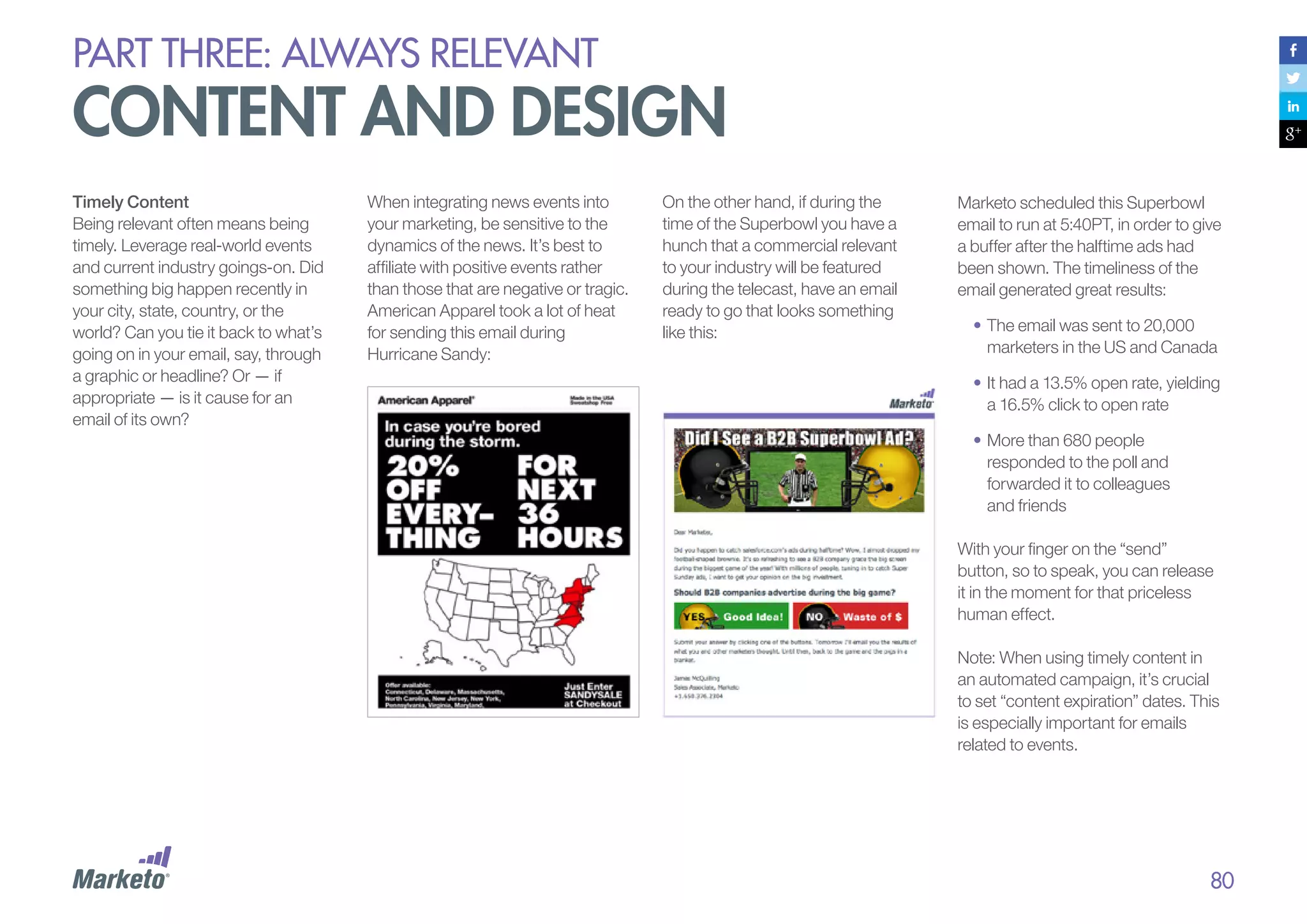
Time of day sent

Personalization

Are you among those who self-proclaim, “I’m not good at
math”? If so, we’ve got a handy calculator you can use.
This calculator was originally designed for landing-page
conversions, but it works great for email numbers. Just replace
“page views” with “emails sent,” and “conversion rate” with
“click-through rate.”

Landing page

Target audience

From line

Mobile layout and images
Source: MarketingSherpa Email Marketing Benchmark Survey

93
PART THREE: always relevant

testing and optimization
Eight Tips for Pro Testing
1.	 Start simple. Test subject lines
and headers first. It doesn’t take
a lot of time or creative work to
come up with a few simple
variants, and the return can
be significant.
2.	 	 est one element at a time. If you
T
test more than one element, you
won’t be able to tell which variant
drove the success.
3.	 	 ontrol for time of day and day of
C
the week. If you’re testing other
variants, then send on the same
day and at the same time to
eliminate the timing variant.
4.	 	 eep a log of all your tests.
K
Record your findings so you can
refer back to the specific
variables tested and, more
importantly, learn from them.

5.	 	 ake sure testing is part of your
M
day-to-day processes. Testing
doesn’t have to be daunting,
and it shouldn’t be something
you put off due to a lack of
resources — it should be part
of your daily routine.
6.	 	 un tests on groups that are
R
small, but large enough to
determine a clear winner. The
winning variables should then
be incorporated into your
larger mailing.
7.	 	 on’t forget that small
D
differences can be significant.
This is especially true if your
sample sizes are large.
8.	 	 isten to what your tests tell you!
L
All the testing in the world won’t
matter if you’re not making
decisions and modifications to
your campaigns based on what
you’ve learned. Unused data is
sad data, indeed.

Here are 25 elements we suggest
you consider testing:
1.	
2.	
3.	
4.	
5.	
6.	
7.	
8.	
9.	
10.	
11.	

Subject line
From name
Day of the week
Time of day
Frequency
Mostly-images vs. mostly-text
Short copy vs. long copy
Links vs. buttons
Number of links
Unsubscribe at the top
First name personalization —
in the subject line

12.	 First name personalization —

14.	
15.	
16.	
17.	
18.	
19.	
20.	
21.	
22.	
23.	
24.	
25.	

Font colors
Font styles
Opt-down
Social sharing icons
Social connecting icons
Delivery by time zone
Call to action — number
Call to action — placement
Post-click landing page
Social proof
Tone — human vs. corporate
Copy length

in the email body

13.	 Animated gifs

What other email elements have you tested?
Please share by tweeting us:

I tested
#DG2EEM

94
PART THREE: always relevant

testing and optimization
What We’ve
Learned at Marketo
At Marketo, we’ve run 100s of email
tests to discover what resonates well
with our target audience. Here are
some examples, along with our
findings – though keep in mind that
this is what works for us, and your
results may vary.
From Label (Person vs. Alias)
To conduct this test, your email
marketing solution must have the
capability to insert personalized
token information and/or merge field
capability. Version A was sent from a
human being (the lead’s owner);
version B was sent from a general
marketing alias; the subject lines
were identical.

Here are examples of the
two versions:
•	Version A From Name:
Ryan Hammer, Marketo
•	Version B From Name:
Marketo Premium Content

Salutations
Think salutations don’t matter? Think
again. Our test compared an email that
included a salutation (e.g., Dear [First
Name]) with one that didn’t. The
subject lines were the same.

The winner: Version A, which
increased opens by 28% and
increased CTR by 8%. Our
hypothesis is that an email from a real
person appears more engaging.

The winner: The email with a
salutation resulted in an almost 2.5%
increase in Click-to-Opens, which
translates to 49 more clicks. It was
significant with a 95% confidence level,
while open rates did not significantly
differ.

Fake Forward
In our Fake Forward test, we tested
an email that appeared as if a sales
rep forwarded it to the subscriber to
an email that was directly from that
sales rep.

Email Body Length
Does shorter, more concise email
content lead to more click-throughs
than highly descriptive, longer email
content?

The winner: The test showed Fake
Forward had significantly higher
Open Rate (2% higher) and Click-toOpen Rate (2% higher).

The winner: We conducted two tests,
both of which showed significant
results in favor of shorter, more concise
content. Our first test resulted in a 7%
increase in Click-to-Opens, equating to
38 more clicks. The second test
generated a 2% increase in Click-toOpens, which translates to 66 more
clicks. We believe difference exists

because not only are short emails less
likely to overwhelm readers, but also
they’re not cluttered by text, so the
CTA appears prominently.
Bracketed Offer in Subject Line
This test applies to emails that offer a
content asset. We tested two versions
of subject lines by naming the asset
(New eBook) in one and simply placing
the word “Download” in brackets in the
other:
•	Version A: [Download] Make Your
Facebook Posts More Shareable
•	Version B: [New eBook] Make
Your Facebook Posts More
Shareable
The winner: Interestingly, the Open
Rates did not differ. However, the click
through was higher for the email that
contained the word Download. That,
we believe, is because the word
Download doesn’t just just alert
readers to an asset, but also instructs
readers how to obtain that asset. In
terms of confidence, the results were
only significant to 80%.
thought leadership snapshot:

Andrew kordek, co-founder,
trendline interactive
MKTO: What is your advice for
creating engaging email marketing
campaigns and content?

Andrew Kordek is the
Co-Founder and Chief Strategist
for Trendline Interactive, a
strategic email marketing agency.
He leads all strategy for Trendline
clients, touching all aspects of email
programs. He has over 22 years of
sales and marketing experience.
You can find Andrew writing,
blogging, speaking, and generally
obsessed with email marketing.

AK: More than half of email marketers
say that their biggest challenge is
targeting subscribers with relevant
content. The key to creating engaging
campaigns starts with having a clear
understanding of what is truly relevant
to your subscribers. You cannot
achieve relevancy if you don’t know
what to say.
In order to form a baseline of what to
say to subscribers, organizations need
to gather insights on topics and types
of communication that both customers
and prospects find valuable, and then
create a messaging strategy around
the research. This research should be
both qualitative and quantitative, and
lead to a strategic messaging
blueprint, which is then used to create
a program charter that defines
objectives and creates a value
proposition for their subscribers.

Creating engaging email campaigns
starts with research. It leverages
existing and future content and is then
optimized through testing and
technology-driven insights. This is
not an easy task, but then again the
competition for inbox attention is
every email that is more relevant
than the one you just sent.
MKTO: Looking into your crystal
ball, what does email marketing
look like 5-10 years from now?
AK: In the next 5-10 years email will
evolve in two important ways. First,
the inbox as we know it will become a
centralized communication hub
whereby subscribers will be able to
communicate with brands and other
individuals via integrated social and
email capabilities. The days where
you will need separate apps to
communicate on Facebook, Twitter,
email and other social networks that
have yet to be spawned will be history.
This experience will be mirrored and
unified across all devices.

The second and perhaps most difficult
change for marketers is the increasing
expectation that behavior can and will
drive messaging relevancy.
Someone’s behavior in the store, on
the website, in an app, an action in the
car or even the television shows they
watch will drive communications
between brands and their subscriber.
Brand loyalists will expect hyperpersonalized communication and
digital and marketing privacy will
continue to be a topic of fierce debate
around the world.

96
part four:

conversations,
not campaigns
PART four: conversations, not campaigns

nobody wants to get blasted
Commercial email marketing evolved out of the traditional direct-mail mindset, which is all
about big campaigns sent to many, on the marketer’s schedule, not the buyer’s.
With email blasts, marketers realized
that they could save a lot of money
over direct mail — and reach their
target audience much faster. It
seemed logical that if sending 100
emails generated $10 in revenue,
then sending 10,000 emails should
generate $1,000. Batch and blast
was off and running.
But marketers soon ran into a serious
problem: No one wants to get
“blasted.” What seemed like a
dream solution for companies
became a nightmare for recipients,
who were inundated with messages.

Popular marketing expressions such
as batch and blast, hit the database,
and e-shot, certainly don’t have
positive connotations. The sentiment
behind the words is telling. When you
batch and blast, you are essentially
admitting that your emails are not
individually relevant.
The days of batch and blast are
numbered. Contemporary subscribers
expect personal and relevant emails on
a non-disruptive schedule.

Think about the word blast for a
moment. What does it bring to mind?
An explosion? A batch and blast
email strategy is, indeed, like an
explosion — a violent shattering or
blowing apart of something that often
results in more damage than benefit.

98
PART four: conversations, not campaigns

nobody wants to get blasted
From Direct Mail Origins
to Ongoing Conversations

What Does an Engaging
Conversation Look Like?

Just getting your messages to
recipients is not enough; you have to
give subscribers reasons to engage
with those messages. This means
abandoning the idea of batch and
blast and entering into a relationshiporiented mindset that continuously
builds engagement with consumers,
one by one and over time.

We’ve used the word “engaging” quite
a bit so far, but what does it really mean
in terms of email marketing?

We now have the opportunity to
listen and respond to every customer
at every stage of his purchase
process, keeping him engaged and
helping to drive his purchasing
decisions. Emails should flow in
logical fashion through smart
marketing tracks to create engaging,
personalized conversations.
Email needs to evolve from
campaigns to conversations.

For starters, engaging means that your
email marketing content stimulates a
dialogue that’s organic and freeflowing. Just like a real-world
conversation, the dialogue you start
should foster a two-way conversation.
In other words, an engaging email
doesn’t just talk to a recipient; it also
gives him a reason and an opportunity
to respond, and fits into a broader
conversational arc.
Put another way, having a conversation
means you:
•	Listen and adapt
•	Send messages that flow
one to the next

“‘Sense and respond’
communication in the digital world
requires automation that monitors
for explicit and implicit behavioral
cues, captures that data (senses)
in a rich behavioral database,
and then uses the data to
customize a valuable response
(responds). Marketing automation
platforms, sometimes known as
campaign management systems
or marketing operations systems,
are one of the primary
technologies used for this
kind of ‘sense and respond’
digital dialogue.”
– Graduating from Email to
Engagement: Using Marketing
Automation to Achieve Success with
Today’s Buyer, an International Data
Corporation (IDC) Workbook,
sponsored by Marketo
PART four: conversations, not campaigns

nobody wants to get blasted
Listen and Adapt
A romantic date goes badly if all you
do is talk about yourself. The same
holds true for marketing
conversations. If you don’t listen
— really listen — to your prospects
and consumers, you’ll never earn the
chance for a “second date,” let alone
a long-term commitment.
To start a two-way conversation, you
must provide content relevant to a
consumer’s interests. Then, you
must be willing to adjust your
content based on how that
consumer responds. It’s great to
automate workflows that map to a
buyer’s journey, but they can’t be
static workflows; you must be willing
to adjust them as you observe how
your buyer actually navigates
across channels.

Here’s how to listen and adapt in
email marketing:
•	Use behavioral filters to target.
As discussed in Part 3, behavioral
filters ensure relevance in your email
marketing. So, start a conversation
with a smart subset of your contact
list based on unique profiles and
behaviors. Then, continue to watch
your subscribers’ behaviors as the
campaign progresses and your
conversation with each recipient
diverges down its own unique
behavioral path.

•		 rigger messages and
T
adjustments based
on behaviors.
When a prospect does
something meaningful on your
website, in social channels, or
offline (such as making a
purchase at a physical store), you
need to be able to respond with
a relevant, timely email. When
you automatically send a
prospect a message based on
an action she took (or didn’t
take), you allow for the message
to be delivered at the moment
your brand is on her mind. You
are communicating with her on
her terms, not yours. But if you
miss these triggers, and simply
blast emails to your entire list as
your promotional calendar
dictates, you ignore your
potential customers and their
buying signals.

As a simple example, imagine you’re a
marketer at a food company, and your
goal is to drive sales for a particular
brand of salad dressing. You have two
marketing messages — one about the
health aspects of the dressing, and the
other about how kids love the taste. In
practice, you find out that Customer A
responded to the health message, but
that message did nothing for Customer
B. By listening for a lack of response to
your initial marketing message, you
can automatically deliver the “your kids
will love it” message to Customer B.

100
PART four: conversations, not campaigns

nobody wants to get blasted
Send Messages That
Flow One to the Next
Good email marketing
conversations evolve over time.
They tell stories that have a
beginning, a middle, an end, with
each component flowing naturally
from the last and weaving a plot.

Each step in the conversation should
flow from prior communications and
move the relationship forward.
Here’s what an engaging conversation
might sound like:

“Every interaction is a link
within the context of a
communication supply-

•	Welcome! Here’s what to expect.

•	Are you ready to buy?

chain. Don’t look at each

•	Check out this article.

•	Here’s more great content!

discrete message, or even

•	Here’s a cool video.

•	Join us at our event.

•	See our latest offering.

•	You like X, so check out Y.

link to the end result.

•	Share this with friends.

Marketing is not a candy

•	Here’s what others like.

•	Here are some fun ways to learn
more about our products (or
services).

•	Download our new book.

•	Take this survey?

•	Happy birthday!

events each of which leads

•	You haven’t bought X yet, so here’s
a 10% discount.

each campaign, as a
unique event with a direct

machine. Instead, view
each as a link in a chain of
to other actions.”
– IDC Technology Marketing Blog

101
PART four: conversations, not campaigns

traditional tools don’t cut it
There’s no doubt that engaging conversation is a great marketing technique. So why aren’t more
companies using it effectively? Turns out, flow-chart approaches don’t work for real-world conversations.
Flow Charts Don’t Flow
Perhaps you began by sketching out
a plan on your whiteboard during a
marketing meeting:

It made perfect sense while
planning, but now that your
campaign is live, your prospects
and buyers aren’t taking the actions
you mapped out. You did your best
to script the conversations, but
people are unpredictable. Think
about it: you can prep for a cocktail
party by coming up with some great
conversation points based on things
you’ve read or seen on television,
but you can’t control how the
people you meet at the party will
react to your conversation. All you
can do is make a loose plan, and
then be willing to adapt in real time.
Similarly, with email marketing
conversations, you can do your best
to map countless if-then scenarios,
but in an attempt to cover all your
bases, you might end up with
visual spaghetti.

102
PART four: conversations, not campaigns

traditional tools don’t cut it
Complex flow charts quickly cause
problems for marketers because
they are:
•	Confusing.
Charts can get so complicated
that only technical experts can
understand them. As David
Raab, marketing technology
expert and consultant, wrote in
his blog: “I never saw a flow chart
interface that actually did a good
job handling complexity. So I’ve
reluctantly concluded that flow
charts are only suitable for
serious technical experts.”

•	Less agile.
Flow charts require rebuilding
workflows when new content is
added. Subscribers who are
already partially through a track
won’t ever get the new content if
it’s scheduled early in the
sequence. Or, if the content is
scheduled for the end, they might
not receive it for months. Making
changes requires you to reprogram
complex flow charts – which can
quickly get unwieldy.

•	Error prone.
It’s almost impossible to act
intelligently on information that’s
hard to follow. Complex flow
charts can cause you to send
expired or duplicate content, or
even too much content to
subscribers. The last thing you
want is to send prospects an
invitation today to an event that
was held last week, or to
receive an email from a
subscriber who is fed up with
your constant messaging.

“My own opinion is quite
firm: flow charts don’t work.
They look good in
demonstrations and can lay
out simple processes quite
nicely. But they get impossibly
convoluted once you try to do
something complex.”
– David Raab, Marketing
Technology Consultant & Analyst

Marketers using flow charts can’t
keep up with the dynamic,
interactive nature of behavior-based
conversational marketing. They’re
handicapped when it comes to
customizing their dialogue
with customers.

103
PART four: conversations, not campaigns

conversations: a better way
Years of experience at Marketo have
shown us that there’s a better way to
manage engaging consumer
conversations.
1.	Easily add new content
An intelligent solution will let
marketers easily drag and drop
relevant content where they want it in
the stream of communications, and
the system will automatically deliver
appropriate messages to each
recipient at the perfect time. This
means that subscribers always get
the freshest and most relevant
content.

3.	Automatically limit
email frequency
Sending too many emails can kill
your campaign and quickly lead to
high unsubscribe rates. So, look for
solutions that let you control the
number of emails any one recipient
will get — regardless of the
communication streams in which he
takes part. You simply set limits and
let the system do its thing.

2.	Schedule content to
activate and deactivate
With traditional solutions, it can be
hard to remember to activate content
at the right time or deactivate it when
it’s no longer relevant. Plus, the more
complex the workflow, the more
error-prone management can be. A
better solution is to support content
activation and expiration dates for
each message, and let the system
automatically activate and deactivate
it for you at the right time.

4.	Never serve the same
dish twice
It’s never relevant to send a
subscriber an offer for content she’s
already downloaded or a product
she already owns. A smart
conversational solution monitors
content consumption across
channels — not just within your
email marketing — and ensures that
customers don’t receive duplicate
content or offers. For example, if
your prospect downloads an eBook

from your website just before an
email promoting that book is
scheduled to go out, the system
should be smart enough to know
that this prospect shouldn’t get that
email, and deliver the next most
relevant piece of content instead.
5.	Know when you’ve run
out of content
With regular flowcharts, there’s no
indication when a consumer hits the
end of your content stream, which
can result in large numbers of
subscribers falling out of the string of
conversations. Instead, the solution
should track when consumers have
exhausted all the content in a stream
and alert the marketer that it’s time to
input new content or switch streams.

6.	Engage across even
more channels
You want to engage your prospects
and customers wherever they are
most apt to hang out, but traditional
email solutions don’t let you do that,
because they are focused on, well,
email. As we’ll explore in Part 5, an
automated solution for marketing
conversations enables you to listen
and adjust the conversation based on
information over any channel (e.g.,
trigger engagements based on
mobile application usage, or
interacting with online videos) as well
as coordinate messages over other
outbound channels including direct
mail and SMS.

104
PART four: conversations, not campaigns

conversations: a better way
FROM

TO

New content = need
to reprogram

Drag-and-drop new
content into Smart
Streams

Expired content

Content expiration
dates

Duplicate
content

Never send the
same content twice

Too many
emails

Frequency limits

Consumer falls off
the end of tracks

Exhausted
content

Marketo’s Customer Engagement Engine intelligently and automatically manages the timing and
distribution of the right content to the right person at the right time.

105
PART four: conversations, not campaigns

a better way
Automation Makes Personal
Conversations Scalable
Having a conversation with one
subscriber at a time is easy, and you
can even do it manually. You could
probably even manage dozens of
consumer conversations manually,
in fact. But there is a real scalability
issue when your subscribers start to
number in the hundreds, thousands,
or millions, because you still want to
have relevant, personalized
conversations with each and
every one.
Some companies try to implement
these processes using the wrong
tools. Remember the “I Love Lucy”
episode in which Lucy took a job
working at a candy factory? She
could handle packaging when it
involved just a few chocolates, but
as the volume increased, things got
messy (and funny!). When your
subscriber volume increases, it’s as
if your conversations are on a
fast-moving conveyer belt. Without
the right technology to keep you up
to speed, your marketing could
become a mess, and no one will find
humor in that!

That’s why automation is critical to
customer engagement — there is
no other way to have one-to-one
conversations with your
customers on a large scale.
Automation allows you to be relevant
to each and every one of your
customers lets them feel listened to
and respected. Remarkably, in this
new digital era, we’re back to the
good old-fashioned business ethic of
putting the customer first!

When your subscribers number in the
hundreds, thousands, or millions, you need
the right technology to keep up with the
volume and engage customers in respectful
and relevant one-to-one conversations.
case study:

trimble
with automated email marketing,
trimble positions its dealers to deliver sales
Highlights
•	 Actively supports their dealers and
distributors by sharing valuable
lead insights for trial downloads,
accelerating conversion rates
•	 Transforms data aggregation and
greatly reduces manual
processes, which improves ROI
and allows for deeper focus on
marketing campaign quality

Challenges
Best known for commercializing GPS
technology, Trimble offers over 500
products that are used for a variety of
applications including construction,
surveying, agriculture, fleet and asset
management, transportation and logistics,
and public safety. Trimble products are
used in over 141 countries, and their 6,500
employees are assisted by a highly
capable network of dealers and
distribution partners. One of many
divisions leveraging Marketo is the Trimble
Heavy Civil Construction division, who
supply advanced automation and lifecycle
solutions which incorporate precision
machine control, software, site positioning,
telematics and real-time connectivity.
Trimble Heavy Civil Construction recently
implemented Salesforce.com to manage
their leads globally and with that realized
their previous email service provider was
not providing the level of engagement with
clients they were hoping for. As Tamara

Schoder, Marcom Project Manager for
Trimble’s Heavy Civil Construction
division, explains, “Before our Marketo
implementation, we weren’t confident that
we were getting the most out of our
tradeshow, website and customer opt-in
lists. We didn’t have an integrated way to
measure and manage success.” Trimble
wanted an easy-to-use platform that
integrated seamlessly with Saleforce.com
and that possessed advanced functionality
to assist their channel partners in nurturing
leads to enhanced sales.
Solutions
After researching the top Gartner-reported
automation vendors, Trimble chose
Marketo. Immediately after migration,
Trimble’s marketing team was freed from
numerous data management chores and
could finally focus on creating compelling
campaigns and programs. Before
Marketo, when Trimble wanted to send out
specialized content to their regional

dealers, they were forced to hand sort
address lists and communicate in one-off
emails. With Marketo, Trimble segments
campaigns with precision and
communicates with specific dealers about
support issues, webinars, and events that
specifically pertain to their clients’ needs.
Trimble’s marketing has been able to
energize customer acquisition for dealers
and distributors by automating nurture
campaigns associated with its free trial
download. For example, when potential
clients visit Trimble’s website, and take
advantage of the free software, Marketo
enables Trimble to follow up at each stage
of the free trial. With Marketo, Trimble
makes sure opportunities are cultivated
with customized campaigns. From data
collected from form fill outs, Trimble can
assess an opportunity—whether it’s a
small or large company and how many
people from the same company have
downloaded a trial. They can follow
behavior in the pipeline and know if a lead
case study:

trimble
has filled out a form, downloaded software,
or opened a newsletter. Trimble’s marketing
passes on valuable lead data to their dealers,
who then have the ability to engage
opportunities in meaningful conversations
that close deals. The net effect: significant
increases in conversion rates.
Benefits
With Marketo, the Trimble Heavy Civil
Construction division has improved their
relationship with their dealer networks by
providing active support. Sharing valuable
insights on opportunity behavior with dealers
has also improved Trimble’s sales processes.
With Marketo’s metrics, Trimble’s marketing
team proves the value of their efforts and
quantifies the leads that they attract and
nurture. After a year of using Marketo, Trimble
has seen impressive reductions in time and
resources for managing their databases.

“The difference between using our previous email
marketing tool and leveraging Marketo’s fullfledged automation has been night and day.
Before, we were passing spreadsheets of leads to
sales and had mostly anecdotal data to support
strategic decisions. Now, we’re sharing valuable
behavioral insights with the field and managing
our campaign development much more efficiently.
Marketo has completely transformed our sales
and marketing process.”
– Tamara Schoder
Marcom Project Manager – Heavy Civil Construction
Division, Trimble

108
part five:

coordinated
across channels
PART five: coordinated across channels

channel agnostic
customer experiences

Today’s consumer moves seamlessly – and sometimes quite quickly – across digital and offline channels.
She jumps from an email, to social media, to your website, to your 1-800 number, and then back to social
media, all without losing momentum. And she does so from whatever device is most handy in the moment.
The modern, digitally-empowered
consumer is channel agnostic: she
doesn’t think in terms of committing
to channels. In fact, she typically
interacts with your company over at
least two channels each month, and
according to a recent Experian
QAS® survey, 36% of U.S.
organizations interact with customers
and prospects in five or more
channels every month.
For that reason, omni-channel
business — a new paradigm that
concentrates on a more seamless
approach to consumer engagement
through all available channels — is
now mainstream across many
industries, including retail, financial
services, automotive, healthcare,
manufacturing, services,
and technology.

The channel-agnostic consumer has
become the undisputed controller of
her relationship with a brand. Now,
more than ever, the customer is in
charge. She is living her life on her own
terms and engaging with brands when
and how it’s most convenient for her.

Marketing is no longer just about being multi-channel.
Today, it’s about being omni-channel — delivering an
integrated customer experience across every single
platform. This requires a single, cross-channel view of
the customer and the ability to coordinate messages
and interactions across touch points.
PART five: coordinated across channels

organizational and
technology barriers
In Multi-Channel Experience, an
article on 360Connext’s blog, writer
Jeannie Walters asks, “How do you
best serve customers when they are
jumping from device to device while
posting on your Facebook wall and
calling your customer service line at the
same time?” If you don’t have the right
tools and strategies to deliver seamless
integrated experiences across
channels, you don’t serve your
customers well.
Of course, companies don’t send
mixed marketing messages
intentionally or because they don’t
care. The problem is that most
companies are just not prepared to
deliver integrated channel experiences.
The consumption and buying habits of
Internet-savvy buyers have zoomed
ahead of companies’ organizational
and technical abilities to communicate
and interact with them.

Organizational Barriers
Traditional marketing organizations
divide teams into channel or product
groups that work in isolated silos to
meet their goals. A company might
have one group for direct mail and
another for online marketing. These
teams often create their own
campaigns, track their own metrics,
and have their own budgets. But even
if one team is doing a bang-up job
exceeding its goals, it could be
duplicating the content efforts of the
other teams.
Customers don’t consider the Web,
social media, and email from the same
company to be separate entities, and
get confused and overwhelmed by a
stream of what often appears to be
contradictory messaging. We’ve all
gotten an email from our favorite airline
promising flights from one place to
another for low fares. But when we
navigate to the website to take
advantage of the offer, we can’t find it.
This is frustrating for the consumer,
and an easy way to lose her trust.

Technology Barriers
Most companies aren’t equipped
with the technology they need to
integrate the customer experience.
The tools we’ve used for years to
connect with customers are
focused on single channels, such as
email, mobile, Web, print, and so
on. Messages delivered via each of
these channels come from different
technology platforms, which can
get complicated and create
problems quickly.
Your customers don’t care – and
likely don’t even know – which
technology platforms you use;
they’re interested only in their
personal multi-channel
experiences. Don’t expect the
consumer to adapt to you; you
should adapt to the consumer. To
meet their expectations, you have to
move from channel- or promotioncentric marketing to customercentric marketing powered by
cross-channel technology.

DemandGen Report
What are your biggest obstacles to achieving
your customer marketing/management goals?
52% - Managing multiple, disparate systems
44% - Insufficient data to support 	 		
	
segmentation/targeting initiatives
36% - Manual reporting/insufficient
36% - Lack of integration between channels 	
	
(web, social, etc.)
27% - Over-reliance on one off communications
23% - Inconsistent messaging between 		
	
divisions / branches
19% - Inability to determine/communicate with 	
	
customers’ preferred channel

111
PART five: coordinated across channels

becoming multi-channel
Delivering an integrated, cross-channel consumer experience is the new mandate for marketers. They will
need platforms that aid them in listening to their audience and proactively responding over any channel.
Multi-channel marketers need
tools to help them:
•	Listen.
Pay close attention to consumer
behavior across all channels to
create a single, integrated view of
the consumer persona.
•	Act.
Manage and personalize
conversations with consumers
across channels.

Listen
Imagine you had a great phone
conversation yesterday with one of
your best customers about a new
service offering. Now imagine that
after you read this, you go out for a
cup of coffee and run into him on the
street. “Hi! So glad we bumped into
one another,” you say. “I want to talk
to you about a great service we’re
offering!” Your customer responds
with a puzzled look. He thinks you
have a terrible memory or that
you’re confused.

The same thing happens when a
customer receives dueling messages
from you on different marketing
platforms. If you’re not listening to him
across different channels, you’re not
delivering an integrated experience. To
create relevant interactions with a
consumer over any channel, you need
to understand that consumer’s
behaviors across all channels – you
need a single, cross-channel view of
the customer.

Identity Resolution and
Profile Building
Identity resolution is key to creating a
successful customer experience across
platforms. The ability to know that
•	 jon@marketo.com (email)
•	 @jonmiller (Twitter)
•	 +jonmiller2 (Google+)
are the same person is a key aspect of any
cross-channel database.

“Fewer than 10 percent of brands are executing true
cross-channel communications informed by one view of
the customer.” – The 2013 Digital Marketer, Experian

112
PART five: coordinated across channels

becoming multi-channel
Act
Engaging conversations with
consumers should be maintained
seamlessly as your subscriber
moves from one channel to the next.
A conversation you start in an email
must continue when the consumer
navigates to your website, and
shouldn’t skip a beat when he jumps
over to your Facebook page. Instead
of competing against each other with
disconnected messaging, or
repeating information the customer
has already absorbed, your email
and different marketing channels
should work together to coordinate
the customer’s experience.
Here are just a few examples of how
email can work with and
complement other channels. (See
the next section for a deep-dive on
email and social.)

Display / Retargeting
Some companies are including a
retargeting pixel in the emails they
send to prospects and customers
(including emails sent by individual
employees). This sets a cookie on
the subscriber’s machine, which
allows the company to target
specific display ads to them as they
navigate the Web. Done well, it can
create more coordinated
experiences between the messages
the subscriber sees over email and
on online.
Web
Your website is of course a great
place to capture new email
addresses, but also it’s a great
place to continue conversations.
The Web experience can and
should be dynamically personalized
to reinforce and extend the dialog
started in emails.

Direct Mail
Companies like Cloud2You let you
send direct mail as part of
marketing conversations as easily
as you send an email. MarketSync
offers a solution that sends
packages and tracks the delivery
of those packages; when a
consumer signs for the delivery,
the system receives an alert,
which can trigger a follow-up
email, phone call, or both.
Integrating in this way not only
allows conversations to flow
across channels, but also
beyond the digital.
PART five: coordinated across channels

becoming multi-channel
PURLs
PURLs are personalized URLs.
Customers type a custom URL into
their browser from a postcard they
receive in the mail. This address
brings them to a landing page
designed specifically for their
persona. By offering them targeted
Web content in this way, you can
improve conversion by 30% or more.
Here’s an example of a Marketo
designed postcard Marketo that
includes a PURL:

(Postcard: Back)

(Postcard: Front)

114
PART five: coordinated across channels

becoming multi-channel
Stores
Use email to drive traffic to stores,
dealers, and other physical locations
by promoting special events, local
news, and in-store discounts. Also,
use store visits to capture email
addresses (“Would you like your
receipt emailed to you?”), adding
walk-in customers to your mailing list.

Video
If you’re running a TV or online video
campaign, use email messaging to
refer to it in your copy: “As seen on TV!”
or “From our YouTube channel.” You
can offer your loyal customers longer
‘directors’ cuts’ of videos if they click on
a link in an email. You can also use
email to promote upcoming television
and video events: “Rachael Ray will be
cooking with our mustard on her show
on Friday morning. Don’t miss it!”

Other
Multi-channel consumer dialogues can
trigger intelligent interactions over
many other channels to support and
complement email communications.
For example, a phone call can be a
powerful follow-up to an email
promotion, an automated voicemail
can supplement email reminders to
attend an event, and an SMS message
can prompt consumers to respond to
an email promotion.
PART five: coordinated across channels

becoming multi-channel
Email is the Digital Glue
Email is the digital glue that holds
all these new channels and
communication forums together.
In an omni-channel scenario, email is
the anchor channel — the one
channel that all the other channels
refer back to and rely on. This is good
news for email marketers, because it
means they’re leading the
evolutionary march toward true
cross-channel coordination.

“Email is the ‘digital glue’ of

“Email is the hub of all digital

the new media landscape,

messaging. It’s not the end-all

and a medium that is not to

be-all, but email is the glue

be overlooked. Email is the

that keeps marketing

Internet’s dominant

channels together.”

application, and is where the

– Simms Jenkins, CEO of Brightwave

attention is of our audiences
on the most frequent basis.”
– Greg Cangialosi,
Founder & CEO, Blue Sky Factory

When it comes to carrying the
customer relationship across
channels, email messages have
two advantages:
1.	 They’re proactive, reaching out to
consumers at the right time and
with relevant messages.
2.	 They’re everywhere. Thanks to the
rise of mobile, email is accessible
on any device at any time, and
from virtually any location.

“Email continues to be the
communication tool linking
together in-store activity, online

“Email marketing is well-suited
to integrate with a multitude of
existing and emerging
communication channels to
deliver precise value in this
ever-evolving environment.”
– MarketingSherpa

shopping, social sharing, and
Web-based searches. …
Triggered emails communicate
with consumers at the moment
they need valuable information,
to assist their progression on
the path to purchase.”
– MarketingSherpa CMO
Perspectives on Email Deliverability

116
PART five: coordinated across channels

social media and email

There are cynics who predict that the rapid adoption of social media will lead to the decline of email marketing.
Simply put: They’re wrong. People are using email as much (or perhaps more) than ever before. But it is true
that social networking is forcing email to evolve and adapt.
Before getting into the evolution of
email marketing fueled by social
media, let’s remember just how
much social networking sites rely on
email. Sure, you can tweet on Twitter
and post to Facebook. You can pin
visuals on Pinterest. You can even
publish videos and pictures with witty
captions on Instagram. But in the
end, it always comes back to email.
Twitter, Facebook, Google+,
Instagram, Pinterest, and LinkedIn all
require an email address just to sign
up for and log into their platforms. (A
few social sites do let you sign in with
a phone number as an alternative,
but people who use a phone number
for ID are in the minority these days.)
Several social networks send weekly
or monthly email newsletters by
default, and they provide many
options for email notifications.

When you want to make sure
someone gets your message, you
email her. And when you want to
get that message to a lot of people
at once — and to be sure they’ll see
it — you definitely email them. For
example, Evernote is an app that
functions as a progressive to-do
list. In March of 2013, Evernote’s IT
team discovered suspicious activity
on their network and needed to
notify users — fast.

Those messages raised the ire of
several online bloggers, who chided
LinkedIn for not using email as a first
mode of communication.
(Read more about LinkedIn’s
email gaffe on Waldow Social.)
Social mediums are not trying to
replace email, because email is
essential to the way they operate,
and to the way we all operate.

“Email is for conversations that
are urgent and important.
Social media is for
conversations that are less
urgent and less important; they
still have a place.”
– Jay Baer, Social Media & Content
Marketing Strategist

How did they choose to
communicate? Email, of course.
LinkedIn experienced a similar data
breach in 2012, and ultimately used
email to alert its user base. But
unlike Evernote, LinkedIn first
announced the news on its blog
and on Twitter — more passive
modes of communication.

117
PART five: coordinated across channels

social media and email
The Symbiotic Relationship
between Email and Social
There are three ways email
marketing and social media can team
up heroically:
1.	 Social Connecting: Use email to
grow your social followers.
2.	 Social Sharing: Use email to extend
the reach of your message through
social channels.
3.	 Social Promoting: Use social
media to grow your email list
and promote your email
marketing messages.

Social Connecting
Social Connecting means leveraging
your email list to increase your social
media followers, ultimately benefitting
your email marketing. Here’s a social
connecting curriculum to help
you plan:
•	Social Connecting 101: Include
social media icons in the header,
footer, sidebar, or main body of
your email campaign so it’s easy
for people to find and connect
with you on social platforms.

•		 ocial Connecting 201: Include
S
social media icon links in your
emails, along with encouraging
text: “Like us on Facebook”;
“Follow us on Twitter”; “Subscribe
to our YouTube channel”; or
“Follow our Pinterest board.”
•	Social Connecting 301: Include
social media icon links in your
emails and give subscribers
reasons to follow you. (Remember
what’s in it for me —WIIFM?)
Reasons might include deals,
discounts, or news only available
on social media. You could even
run a contest to give subscribers
an extra incentive to connect.
•	Social Connecting 401: Send a
dedicated email to your list, asking
them to connect with you.

Email Marketing (Batman) & Social Media (Robin)
Like Batman and Robin, email and social media have a
symbiotic relationship. If email marketing is Batman, then
social media is Robin.
Batman is the “Caped Crusader.” He’s always around when
Gotham City needs him. He’s trustworthy and dependable.
When the bat signal goes off, Batman swoops in to save
the day. Like email, he’s awfully powerful by himself, but
he’s sometimes even more effective with a little help.
Robin is the “Boy Wonder”. He helps Batman fight evil and
get the job done! Like social media, he’s young, full of ideas
and enthusiasm.
Like the Dynamic Duo, email and social media are most
effective when they cooperate. Your social media followers
tend to be less committed than your email contacts at first.
When you successfully transition social media followers into
email subscribers, your email marketing list gets bigger, and
your subscriber loyalty grows. And when you drive your
email subscribers to your social feeds, you create deeper
engagement. You and your success metrics will agree that
both channels benefit.

118
PART five: coordinated across channels

social media and email
Social Sharing
You don’t just want your email
subscribers to follow you on
Facebook; you want them to actively
share the content of your emails with
their Facebook friends. When your
email recipients are so connected to
the content of your emails that they
are compelled to share it through their
social networks, you’ve hit the crosschannel content jackpot. Here’s your
curriculum for social sharing:
•	Social Sharing 101: Include
social sharing links in your email
messages so it’s easy for people
to share right from your content.
“Share with your network”
(SWYN) is the new “forward to a
friend” (FTAF). Recent research
indicates that SWYN links have a
click-through rate of 0.5% —
five times that of FTAF.

•	Social Sharing 201: Encourage
the use of a hashtag in your
emails for social. For instance,
Piperlime, a retailer, created the
hashtag #sandalweek within an
email campaign to start a trend
on social media and make people
think about buying sandals. Even
better, include a “tweet this!” link
in an email. When the reader
clicks on the link, a pre-written
tweet pops up that you’ve already
customized with hashtags and an
@YourCompany Twitter handle.
As long as the tweet is less than
140 characters, you can include
any message you want. In this
example from Waldow Social,
there is a link to opt-in to the email
newsletter, providing a closed
loop of #winning #marketing:

•	Social Sharing 301: Create a
social sharing contest. Make a
game out of it, and provide
incentives and rewards for sharing.
For marketers, the ultimate goal of
social sharing is to extend the reach of
email marketing messages. If your
email subscriber list has 100,000
names, then the people you know are
just the tip of the iceberg – imagine
how many people they know! Even if a
small percentage of your recipients
click “share,” your number of followers
can increase dramatically.

If you are (& are reading this now), please tweet this! Did you know you can view this email in your browser?
Not loving the content anymore? Feel free to unsubscribe. No hard feelings.
PART five: coordinated across channels

social media and email
Social Promoting
Social promoting is about driving
traffic in the other direction — from
social media to email marketing. It
can make non-subscribers aware of
the advantages of subscribing, and it
can let current subscribers know to
be on the lookout for your latest
email message.
Here’s your curriculum for building
bigger lists with the help of your
social media sites:
•		 ocial Promoting 101: Send a
S
tweet or post an update on your
Facebook page that includes a
link to your most recent email
marketing campaign.

•	Social Promoting 201: Include a
link in a tweet or on Facebook
inviting non-subscribers
to opt-in.
•	Social Promoting 301: Build an
email opt-in app that lives on your
Facebook page, and occasionally
promote it in your status updates.
You can also amplify the
promotion with paid social
advertising options, e.g. targeting
Facebook users who perhaps
follow your competitors or
industry-related companies but
who aren’t yet on your email list.

•	Social Promoting 401: Target
consumers who are on your
recipient list but haven’t opened
an email by placing a duplicate
offer in their Facebook feed using
custom audiences.

Cowgirl Creamery
Most email marketing services offer a way
to create a tab on your Facebook page for
an email opt-in. You can customize how the
tab reads and the order in which it appears
in on your main profile. Here’s an example
of one company, Cowgirl Creamery, putting
“Join Our Mailing List” front and center on
their Facebook page:

Clicking on the tab brings you to:

It’s all done without ever leaving Facebook.

120
PART five: coordinated across channels

social media and email
“Surround your customers
with options to interact with
your brand, and the chances
you will be able to interact
with them at all go up
considerably.”
– Jay Baer, Social Media & Content
Marketing Strategist

Bonus Tips for Combining Email and Social
Running social campaigns is great, but making every
campaign social is better. When you connect your email
and social marketing efforts, they enhance one another.
Here are some ideas:
•	Supplement each email address in your database
with that contact’s social media data.
•	Increase opt-in conversion rates with social sign-in
capabilities on your forms.
•	Feature a Facebook and Twitter connect button in
email opt-in confirmation messages so that
enthusiastic new subscribers don’t miss out on
other ways to connect.
•	Add a Facebook and Twitter connect button to email
unsubscribe pages for recipients who’d rather stay
in touch over social networks.
•	Listen for keywords that are used by your audience
in social media, and then send segmented emails
that use those keywords.
•	Watch who your followers follow, and use their
content interests to help augment your
segmentation strategy.

121
thought leadership snapshot:

matt blumberg, chairman & CEO
of return path, inc
MKTO: What is your advice for
creating engaging email marketing
campaigns and content?

Matt Blumberg is Chairman &
CEO of Return Path, Inc,
is the pioneer of many innovations in
email marketing, including Email
Change of Address, email
deliverability, whitelisting, and
reputation services. Matt was listed
as one of New York’s 100 most
influential technology leaders by the
Silicon Alley Insider in 2008, he was
one of Crain’s New York’s Top
Entrepreneurs in 2012, and he was
an Ernst & Young Entrepreneur of
the Year finalist in 2012. Matt is also
an author and blogger.

MKTO: What’s your reaction to
the following statement? Email is
not dead; it’s evolving.

MKTO: How can we integrate email
into our marketing strategy – not
merely into the marketing mix?

MB: The best campaigns aren’t
about you or what you want
subscribers to do. They’re about your
subscribers and what they want.
They may buy kitchen equipment or
golf clubs, but what they really want is
help becoming better cooks and
golfers. A knife skills primer or a
troubleshooting diagnosis of lefthanded swing problems—maybe
even an interactive video—will be
infinitely more engaging than lists of
product SKUs. When every
campaign delivers legitimately
valuable content, your subscribers
will engage. They’ll read your
messages, they’ll become brand
advocates, and most importantly,
they’ll buy.

MB: Since 2010 we’ve seen more
innovation in email than in the entire
decade before it. Lately when we
talk about emerging email
technology, the examples we cite
are typically already in use, as email
technology is so rapidly advancing.
Automated foldering is already the
normal email experience. Utilities
that turn the inbox into to-do lists,
integrated calendars, social media
monitors and messaging hubs,
shopping engines and reservation
managers are already popular and
already part of the mobile user
experience. Even communications
technologies beyond the mailbox
are being built on top of email – try
joining a social network without an
email address. Email has always
been transforming, but the speed of
change has increased radically over
the past few years.

MB: This is a loaded question, but
maybe not for the obvious reason. Of
course we think strategists should
focus more on email, but its real
transformational power lies in what
email data can tell us about our
business. The same data that can
optimize email revenue should also be
guiding efforts to better understand
customers, markets, and brands. The
way audiences engage with
campaigns can reveal critical insight
into product positioning, brand
perceptions, and shifting trends that
impact decision making across the
entire organization. We talk about
email as a revenue engine, but the data
and intelligence that email generates
may ultimately be worth far more to a
business than the (admittedly
impressive) ROI it generates.

122
part six:

strategic:
the new metrics for email
PART six: strategic: the new metrics for email

Engaging email is strategic email
Engaging email is strategic email, and as we’ve learned, traditional email campaigns are not strategic.
To achieve strategic value, email marketers need better metrics.
Using the right metrics doesn’t just
help you finesse what you’re sending
to your recipients and when you’re
sending it. Appropriate metrics also
let you measure the worth of your
marketing tactics.

“Bottom line, with email driving

Top executives in your
company care about things like:
•	Driving customer engagement
•	Measuring and proving ROI
•	Beating the competition
•	Making buyers happy and
customers successful

more revenue and ROI than its

•	Controlling risk

digital marketing brethren, it is

•	Managing and leveraging the
growing complexity of
changing buyer behaviors,
channels, and technologies

well positioned for a healthy
and long future.”
– Simms Jenkins
Founder & CEO BrightWave

•	Growing revenue and
“making the number”

It’s no secret that top
executives don’t really care
about the Open Rate or Clickthrough Rate of your last email
campaign. If you can’t convince
your top executives to care about
email, you won’t get the budget or
resources you need to make email
a core part of your strategic
marketing plan, and won’t be able
to take advantage of its potential.
In this part of our guide, we’ll cover
best practices for using traditional
email metrics. Then we’ll introduce
a new email metric for
engagement, and also explain
how you can strategically tie email
to revenue.

Strong relationship between
strategy and email marketing results
Top email performers spend significantly
more time on strategy than their
counterparts. In fact, the Marketo
Benchmark on Email Marketing found
that top performers spend more than
three times the amount of time per month
on email strategy than average
performers do:
Avg.

Top
Performers

Hours Per Month

62

123

Creative
(design and copy)

23%

20%

Segmentation
and targeting

12%

13%

Strategy

14%

22%

Email layout and
processing

18%

17%

Reporting

10%

13%

Content creation

23%

16%

124
PART six: strategic: the new metrics for email

email measurement basics

Before we discuss sophisticated measurement strategies, let’s review the common
metrics used by ESPs. We’ll define each one, where appropriate, share benchmark values
for average companies and top-performers, and share tips for how-to results.
Here are the seven most
common email metrics:
1.	 Sent
2.	 Delivered
3.	 Bounced
4.	 Opens / Open Rate
5.	 Clicks / Click Rate /
Click to Open Rate
6.	 Unsubscribe Rate
7.	 Marked as Spam

Sent

Delivered

Definition: Your sent metric is the
number of emails that actually moved
through the sending mail server (your
ESP). This may or may not be the
same as addresses on your sending
list; it depends upon how your ESP
tracks what’s been sent (whether or
not it includes “bad” email addresses
in the final count). Remember, while
some of your emails are sent to bad
addresses, they certainly don’t get
received. Marketo defines Sent as the
number of valid contacts who were
sent an email.

Definition: Delivered refers to the
number of emails that were sent and
not rejected by a receiving server.
It’s important to understand that
Delivered does not mean it landed in
the recipient’s inbox. Marketo
defines Delivered as the number of
contacts who were successfully
delivered at least one message.

How to optimize: If your goal is to
increase the number of emails sent,
you have to grow your contact list! But
for this to work, your list also has to be
healthy. The healthier your list, the
more emails are sent successfully.

Keep in mind that some Email Service Providers (ESPs) might use different terminology for these metrics.
Your provider can probably help you map our terms to theirs.

How to optimize: Again, ensure
that your email list is healthy; take
precautions to prevent bad email
addresses or spam traps from being
added to your list. For a refresher,
refer to Part 2, where we covered
the ways to build and maintain a
healthy list.
PART six: strategic: the new metrics for email

email measurement basics
Bounced
Definition: Bounced email is the
opposite of Delivered email. There
are two types of bounces:
1.	 Hard bounces are messages that
are permanently rejected (emails
denied due to an invalid email
address or because the
recipient’s server has blocked the
sender’s server).
2.	 Soft bounces are messages that
are temporarily rejected because
the recipient’s mailbox is full, the
server is down, or the message
exceeds the size limit set by the
recipient or ESP. Too many soft
bounces to one address can
eventually result in a permanent
hard bounce.

In both cases, Marketo defines
Bounced as the number of people
(contacts) who were sent a
message that bounced.

The Value of Engagement: The
Marketo Benchmark on Email
Performance found that top
performers had lower bounce rates:
•	Average companies: 2.1 – 5.0%
•	Top performers: < 2.0%
How to optimize: Be proactive
about preventing bounces:
•	Your email provider should
automatically remove recipients
who bounce from your mailing
list for future sends, but be sure
to process soft bounces,
such as “out of office”
messages differently.
•	Use a real-time email validation
service to minimize the chance
of a subscriber entering a bad
email address — accidentally
or on purpose.

•	Scan your list(s) and check for
obvious typos, like a missing
period or mistyped domain
name (myemail@aol, myemail@
aolcom, etc.). These errors can
be fixed on the spot.
•	Provide a way for recipients to
update their own email
addresses. An online
Subscription Center is a logical
place for information updates.
Keep in mind, though, that
instead of navigating to the Web,
subscribers will often click “reply”
on a message to alert you to a
change to their contact
information. If you receive these
replies, update your list quickly.
(This is another reason to have a
human managing your email
replies, rather than using do-notreply email addresses!)

•	Consider calling or direct mailing
recipients whose emails bounce
to let them know that there’s a
problem with their addresses.
You definitely want to keep in
touch with recipients you believe
have the potential to be highvalue customers.
•	Monitor delivery rates by domain.
Track your Open Rates and
Bounce Rates according to the
sent-to domains. If the Bounce
Rates for one domain are
significantly higher than the
others, your campaign might be
the victim of spam filtering.

126
PART six: strategic: the new metrics for email

email measurement basics
Opens / Open Rate
Definition: How many recipients
opened (viewed) the email. Marketo
defines Opens as the number of
contacts who opened the email at
least once, and the Open Rate as
the number of opens / number of
leads delivered.
Note that some ESPs report Total
Opens versus Unique Opens. Total
Opens include every instance of a
recipient opening an email. In other
words, if one subscriber opens the
same email ten times, then it will be
reported as ten Opens instead of
one. Unique Opens signifies that no
matter how many times a single
subscriber opens the same email, it
counts only as one time.

Opens are tracked by adding a small,
personalized image (“pixel”) to the
email. As soon as the image renders,
the ESP will register that the email has
been opened. Note that this means
Opens is a difficult metric to track, and
there is also no guarantee that an email
opened was an email read.
Some challenges:
•	If a subscriber loads an email with
“images on” in the preview pane,
the ESP will record as Open even if
she doesn’t actually look at it.
•	The ESP will record an Open if she
selects it (opens it briefly) in order
to delete it.
•	If email preferences are set to
“images off,” it’s entirely possible
for the subscriber to authentically
open and read your email without
it being registered as an Open. As
we mentioned earlier, most email
clients do block images
by default.

The bottom line is, the Open Rate is
not 100% accurate, but it does serve
as a good proxy for whether emails
are being read, and as a relative
measure to compare emails against
each other.
The Value of Engagement: The
Marketo Benchmark on Email
Performance found that top
performers had significantly higher
open rates, showing the value of trust
and quality targeting:
•	Average companies: 10-15%
•	Top performers: 16-20%
How to optimize: The Open Rate
is primarily influenced by the
following factors:
1.	 Targeting – If your list is focused
and well-targeted, your recipients
will more likely value your email
and open it.
2.	 	 he From Name – A recipient is
T
more likely to open your email if she
recognizes (and trusts) the sender.
3.	 	 he Subject Line – The subject line,
T
or headline, is what sells your email.
It plays a huge role in whether your

email gets opened, deleted, ignored,
or marked as spam. As we detailed
in Part 3, there are many ways you
can design an effective subject line:
long or short, straightforward or
intriguing, etc. Again, test options to
know which style is best for your
campaign.

You can also increase the odds of
recipients opening your emails if you
remove from your list the contacts who
have not opened your emails in the last
six months.
Marketo’s Open Rate Results: When
Marketo sends email campaigns,
about 75% of those emails are opened
the day they are sent.
PART six: strategic: the new metrics for email

email measurement basics
Clicks / Click Rate /
Click-to-Open Rate
Definition: When a subscriber clicks
on a link, button, or image within your
message, a Click is recorded.
Marketo defines total Clicks as the
number of people (contacts) who
click at least one link in the email. In
other words, like the Open Rate, no
matter how many times a recipient
clicks on the link(s), only one Click is
recorded. Counting in this way
provides a better measure of how
many subscribers are truly engaged.
This also ensures the Click Rate
cannot be greater than 100%.
Click Rate equals the total number of
Clicks divided by the total number of
emails delivered (or, depending on the
measure used, sent). The Click-toOpen (CTO) Rate is the total number
of Clicks (per subscriber) divided by
the total number of Opens. This
means that Click Rate = Open Rate x
Click-to-Open Rate.

Marketers often pay more attention to
the CTO than the Click Rate, since the
CTO helps to separate the reasons for
opening from the reasons for clicking.
The Value of Engagement: In the
Marketo Benchmark on Email
Performance, that top performers
had better click rates and
click-to-open rates:
Click Rate:
•	Average companies: 2.1 – 5.0%
•	Top performers: 5.1 – 10%
Click to Open Rate:
•	Average companies: 11 – 15%
•	Top performers: 16 – 20%

How to optimize: The unique Click
Rate is a good indicator of how
effective your content and your calls
to action (CTAs) are within your
email. If people are opening your
emails but your Click Rate is low (or
trending down), this usually means
you need to tweak both your
content and your CTAs.
•	Make It Easy: Your CTA should
be obviously placed (not hidden
on the page) and include plain,
clear language. Don’t make
your audience work to find or
interpret it.
•	Multiple Links: Test your CTA
using multiple links for the same
action. Try using an image link,
one button link, and multiple
links inline within the copy, each
with different anchor text.
Including many links to the
same destination has been
shown to improve email
Click Rates.

•	Test, Test, Test: If you’ve tested
everything else, try testing the
color of your CTA button. When it
comes to your CTA Click Rate,
testing is vital.
•	Create Scarcity: Offering a deal
for a limited time (or to a limited
number of people) creates
scarcity and a clamoring for the
bargain. Subscribers often fear
that they’ll miss out if they don’t
act fast.
Marketo’s Click Rate Results: When
Marketo sends email campaigns, 2/3
of our recipients click them the day
they’re sent.
PART six: strategic: the new metrics for email

email measurement basics
Unsubscribe Rate
Definition: The number of contacts
who click the “unsubscribe” link in an
email and then follow through to
successfully opt out.
The Value of Engagement: The
Marketo Benchmark on Email
Performance found that top
performers had lower overall
unsubscribe rates:
•	Average companies: 0.11 – 0.20%
•	Top performers: < 0.10%

Marked-as-Spam Rate
How to optimize: In this case
optimize means to shoot for the
lowest number possible while
avoiding being marked as spam. If
someone wants off your list, it’s far
better for him to unsubscribe than to
point a finger at you, so don’t hide
your unsubscribe link. Instead, place
it in the footer of your message,
because that’s where we marketers
have trained subscribers to look for
it. To make sure that subscribers see
the link, some companies also
include an option to unsubscribe,
along with friendly language, closer
to the top of the email.

Definition: The number of
subscribers who reported your email
as spam, divided by the number sent
or delivered.
How to optimize: You want to do
whatever you can to bring the Marked
as-Spam-rate to the lowest number
possible — ideally, zero. The more
engaging you are, the fewer spam
complaints you’ll receive. Remember
your goal: send timely, targeted,
valuable, human content to people
who have requested it.

Then, once someone is on your
unsubscribe page, use the various
options described in Part 2 to let
them manage their subscription and
perhaps not unsubscribe completely.

Marketo follows these rules when computing our email metrics:
Rule #1: Each email activity record is set to one — and only one — of the following values: Delivered, Hard Bounce, Soft Bounce, or Pending.
Rule #2: If the email record shows Opened, then it is counted as Delivered.
Rule #3: If the email record shows Clicked Email or Unsubscribed, then it is Opened and, therefore, counted as Delivered.
Rule #4: If the email is Opened, then any bounce is ignored. Otherwise, a Hard Bounced “wins” even if the email record shows Soft Bounced or Delivered.
PART six: strategic: the new metrics for email

engagement

Engagement is more than an idea or a buzzword; it’s a tangible way of interacting with consumers
one-to-one across channels by listening, acting, and analyzing. With the right tools, engagement
metrics can be managed and increased.
Operational metrics, such as Opens
and Clicks, are not ideal for measuring
engagement. Consider the following
testing scenario:
•	Email A has a high Open Rate.
•	Email B has a high Click Rate.
•	Email C has a high
Conversion Rate.
Which of these emails had the best
engagement? With traditional ESP
solutions, no real insight is given into
whether a campaign has actually
engaged customers or deepened
relationships. A marketer must pore
over multiple reports and then apply
guesswork to determine how an email
performed in terms of engagement.

In order to accurately measure
engagement, you need a way to
combine all the metrics of
traditional ESPs — Open Rate,
Click Rate, Conversion Rate,
Unsubscribe, etc. — into one
single measure.
PART six: strategic: the new metrics for email

engagement
Marketo Engagement Metric
The Marketo Engagement Score is a
proprietary algorithm that our Data
Science Team created to determine
exactly how engaging each message
is. It combines multiple data points
— Clicks, Opens, Conversions,
Unsubscribes, Program Successes,
etc. — and then applies a statistical
algorithm to create a single measure
of engagement.

This metric takes the guesswork out
of your marketing metrics and applies
a tangible number that you can wield
when making future marketing
decisions — not just decisions
regarding email campaigns, but also
those relating your entire omnichannel strategy.

Our Engagement Score provides a
standard way to measure the
engagement of your messages over
time, not just as isolated standalone
incidents. With this new level of
measurement, you can best
accomplish the following:
•	Fine-tune to improve the
engagement of campaigns,
continuously.
•	See how the changes you make
improve engagement over time.
•	Test different messages and
content streams against each
other to find which are the
most engaging.

131
PART six: strategic: the new metrics for email

True Financial Metrics

A riveting subject line or persuasive email copy is only as good as the revenue it generates:
you don’t just want Opens; you want actual sales.
Many email marketers obsess over
traditional ESP metrics without ever
connecting them to important
financial numbers. This is not their
fault — traditional ESPs don’t
provide the functionality to make this
sort of connection.

Mapping Marketing
Back to Revenue
MarketingSherpa asked CMOs and
senior marketing executives about the
importance of various factors in
measuring the value of email marketing
programs, and found a shift in the
factors used by CMOs. While basic
metrics used to be considered
sufficient, they aren’t anymore.
According to the survey, “today, CMOs
presume email will provide a financial
return on investment.”

2011

Email measurement is moving
beyond Opens and Clicks
and toward true financial
metrics, such as Revenue
Impact and ROI.

65%

Post-click metrics like lead
generation and
sales conversion

62%

Email performance metrics
like opens, clickthroughs
and bounce rates

56%

Non-financial return on
investment (qualitative
return on email investment)

When you measure Opens and
Clicks without comparing them to
bigger-picture financial metrics,
you’ll generally always come to the
same conclusion: You need to
send more emails. But more
emails isn’t always a good idea.

Financial return on investment
(quantitative return on
email investment)

33%

A/B split or multivariate
test results on email
and landing pages

2010

32%

57%

73%

69%

29%

30%

Source: ©2011 MarketingSherpa Email Marketing Benchmark Survey
Methodology: Fielded July 2011, N=2,735
PART six: strategic: the new metrics for email

True Financial Metrics
How to measure revenue
impact of email programs
In its 2013 Digital Marketing Report,
Experian noted that 35% of marketers
cited response attribution as the most
challenging multi-channel marketing
issue for their organizations.
To become more strategic about
measuring financial metrics in email
marketing, start by recognizing that the
consumer rarely makes a purchase as
a result of a single campaign.
Conventional marketing wisdom
proposes that at least seven
successful “touches” (forms of
engagement) are needed in order to
convert a cold prospect into a buyer.
Sometimes companies attempt to tie
revenue to either a customer’s first
touch or his last. But a better strategy
is to allocate the value of every
engagement across all of the
marketing efforts that customer
touched. Here’s how.

Step 1:
Count All the Successful Touches
In an omni-channel scenario,
successful touches can happen
across numerous channels. Perhaps
the customer’s last touch point was
your website, but prior to hitting
“buy,” he spent time in an email, on
your Facebook page, and on your
Twitter feed. He may have even gone
into a brick-and-mortar store before
committing to the purchase online (or
vice versa). When collecting all your
touches, be sure to only count those
that occurred before the action was
taken — those that led to the action.
Step 2:
Assign Value to the Final Action
You might use your e-commerce
platform, transactional system, or
CRM as the system of record for how
much the action is worth. A
marketing automation tool can make
this easy for you.

Marketo Deal Storyboard, showing all the marketing interactions with a customer before a sale.

Step 3:
Distribute That Value across Your
Successful Touches
In a multi-touch attribution scenario,
you assign a value to each successful
touch. Often, this is best done with
simple distribution: if a consumer
touched five marketing programs,
each touch point gets 1/5th of the
credit for the ultimate value.

As simple as that seems, it’s often
easier said than done, because most
ESPs don’t support such sophisticated
analysis. But modern marketing
automation solutions can do this right
out of the box.

133
PART six: strategic: the new metrics for email

True Financial Metrics
Test and Control
A/B testing can be used to find
emails with the best open rate, but it
can also be used more strategically
to measure the impact of broad
programs. Just divide your target
buyer group into two homogenous
groups, and apply a program to only
one of these groups. All other factors
being equal, you’ll be able to attribute
any difference in subsequent buyer
behavior to the marketing effort.

The outcome metric you ultimately
measure can be anything —revenue,
profit, traffic, retention — or all of
those things.

Sample output from Test and Control groups, courtesy of The Lenskold Group.

Measure Email Compared
to Other Channels
One final, but critical point: Don’t just
measure the performance and ROI of
your email against other emails; instead,
compare the results and ROI against
ALL channels. You might find that email
outperforms other channels and you should
invest MORE on email, or perhaps you’ll find
that in some cases LESS email investment
is called for. The key point is to know what is
working – and what isn’t – across channels.
This sort of “marketing mix analysis” is an
essential tool for a modern marketing
department, but most ESPs are unable to
provide for it. Since they’re exclusively
focused on email metrics, the best they can
tell you is which of your emails should be
sent more often.
For winning marketing across channels,
you need a true omni-channel marketing
solution that can help you measure and
optimize your entire portfolio of marketing
investments — not just email.

134
thought leadership snapshot:

Mark brownlow, writer & publisher
at email marketing reports
MKTO: What is your advice for
creating engaging email marketing
campaigns and content?

Mark Brownlow is an email
copywriter, business writer, and
publisher at Email Marketing
Reports. He has a focus on
e-commerce and email marketing
and contributed to many websites
such as MarketingSherpa
and MarketingProfs.

MB: There are lots of tools and tactics
for ensuring that email marketing is
FUNCTIONALLY very successful. For
example, behavior-based and trigger
emails still offer a lot of undiscovered
potential: things like post-purchase
follow-up messages, cart
abandonment emails, emails
customized to website browsing
behavior, etc.
That all works and works well. But
there’s a reason I say “functionally”
very successful. When you get locked
into the tools and tactics mentality, you
can lose sight of other opportunities
that can keep your emails immune
from the vast competition for
subscriber attention (inside and
outside the inbox).

It’s a little old-fashioned, but it comes
down to recalling that the recipient is
not a number in a spreadsheet or an
entry in a database, but a human
(hopefully). And that human wants
some kind of value in return for the
time they spend on our emails.
That value can indeed be functional
– a great deal, an insightful article,
good advice. But there’s value in
personality too – engaging writing,
clever design, creativity, humor,
giving a platform to customers,
sometimes giving value and asking
for nothing in return. These are all
things that help distinguish you from
the competition when they’re also
offering a 15%-off everything sale.

MKTO: Looking into your crystal
ball, what does email marketing
look like 5-10 years from now?
MB: I have absolutely no idea. When
I started online, AltaVista was THE
search engine. Facebook wasn’t
even a gleam in Mark Zuckerberg’s
eye and mobile communication
devices were pretty much exclusive
to episodes of Star Trek. (And I’m not
even that old.)
With the Internet so dynamic,
predictions are hard (impossible
really). The trick is to stay flexible and
keep in mind that certain
fundamentals don’t change: you can
dress up your messages however
you like, but at the end of the day,
delivering value is what counts for a
lasting customer relationship.

135
part seven:

graduating from esp to
marketing automation
PART seven: graduating from esp to marketing automation

technology for engaging email

Consumers have more control than ever, and marketers need to step up their game accordingly. Email service
providers (ESPs), vendors that primarily provide batch and blast email capability, can’t deliver the behaviorallytargeted engagement needed to stay relevant, let alone the integrated multi-channel conversations necessary to
maximize the impact of marketing. Only an intelligent marketing automation platform is up to the task.
Throughout this guide, we’ve
emphasized the five key factors
that make email engaging and
ultimately successful:
1.	 Email must be trusted.
It’s essential that your emails set
and then consistently meet
subscriber expectations.
2.	 Email must be relevant.
You have an obligation to deliver
the right content to the right
person at the right time, based on
a smart understanding of each
subscriber’s interests
and behaviors.
3.	 Email must be conversational.
Buyers are individuals, and they
deserve personalized
communications. This means
abandoning the idea of batch and
blast campaigns and entering into
a relationship-oriented mindset
that continuously builds
engagement with consumers, one
by one and over time.

4.	 Email must be coordinated
with other channels.
Your emails must be coordinated
with interactions from every
marketing channel, so that your
customers’ experiences are
consistent and progressive.
5.	 Email must be strategic.
Always use the right metrics to
measure your email marketing
tactics and assess their
effectiveness and worth. Then,
make adjustments accordingly.

Traditional ESPs can’t deliver
on these musts. If you agree that your
company needs email to be
competitive and effective, it’s time to
graduate to marketing automation.
PART seven: graduating from esp to marketing automation

limitations of traditional
email service providers

ESPs came onto the scene in the mid-90s as email became mainstream and companies realized they needed to
be able to send consumers large volumes of marketing messages. But as email marketing has become more
sophisticated, ESPs have struggled to move beyond their original batch and blast origins.
Some ESPs have tried to evolve, but
they are constrained by their very
nature. Their databases are simple and
lack easy integration with other
enterprise systems. They were built for
rapidly sending the same message to
many, not for orchestrating intelligent
one-to-one conversations, and are
destined to always view everything
through an email-centric, not omnichannel, lens.

Key limitations of traditional
email service providers include:
Not relevant
ESPs rely primarily on targeting
audiences based on demographics
and flat “subscriber” files. However, this
kind of targeting ignores valuable
information about buyer behavior that
can be obtained by examining a
buyer’s actions, or lack of actions, as
they engage with content and trusted
sources online and offline. Connecting
to behavioral systems requires
technical skills and complex queries,
making traditional ESPs blind to
valuable buyer behavior and, therefore,
unable to build meaningful
relationships with consumers.

Not conversational
ESPs don’t have the functional ability
to allow one-to-one conversations
over time. They send mass emails to
an entire list at once. Sure, they can
customize emails, but they aren’t
built to facilitate evolving and
customized two-way conversations
between a company and each
individual consumer. Marketers
stuck using traditional ESPs waste
an incredible amount of time
manually simulating dynamic
conversations with their various lists
— valuable time that they could be
using to optimize their marketing
strategy and create fresh content.

Not multi-channel
Today’s buyer shifts rapidly and
continually across channels,
engaging with email one moment and
with social media the next. But
traditional ESPs were designed
around one function: email marketing.
Traditional ESPs have made modest
attempts to integrate other
capabilities such as social media, but
without the backbone to support true
cross-channel marketing, their small
fixes don’t address the bigger
problem. Traditional ESPs simply
cannot comprehensively capture all
the online and offline behavioral
patterns that give marketers real
insight into how their customers tick,
and they cannot effectively or in a
timely manner trigger action in other
parts of the organization such as
sales or call centers.
PART seven: graduating from esp to marketing automation

limitations of traditional
email service providers
Not strategic
ESPs only provide email marketing
metrics. They can’t track and
measure the impact of marketing
spend on revenue over time. Without
a comprehensive and unified view of
how spending is affecting revenue,
marketers cannot compare the
relative effectiveness of their
investments. As a result, marketers
are challenged in how to allocate and
re-allocate resources to the channels
and methods that have the greatest
positive impact on revenue.

“Given the situation with
today’s buyer, standalone
email is insufficient to produce
or effectively judge
engagement. In fact, email can
be worse than inadequate.
Instead of engaging buyers,
improperly managed email
can push buyers away.”
– International Data Corporation
(IDC) Workbook: Graduating from
Email to Engagement: Using
Marketing Automation to Achieve
Success with Today’s New Buyer,
June 2013

Lack of Automation
If you’re a marketer using traditional ESPs, even sending a
short follow-up email about an event is complicated.
1.	 You manually compile a list of people who
attended the event. This isn’t something the ESP
keeps track of, so you probably do import and
export to get names.
2.	 You determine which of the people on your list
RSVP’d to the event, but never showed up, and
then put them on a separate list. Another
import/export.
3.	 You manually build two campaigns —
one for those who attended, and another
for those who didn’t.
4.	 You manually send both emails –
nothing is automated.
The time you spend manually gathering data, analyzing it,
creating lists, and setting calendar notices for yourself in
order to remember to simulate what you hope will appear
to be a personalized marketing experience for your
recipient is time that you’ll never get back. But worse, this
cumbersome process means that scaling your marketing
efforts is pretty much impossible.

139
PART seven: graduating from esp to marketing automation

enter marketing automation
Marketing automation platforms succeed in all of the areas in which traditional ESP solutions fail,
particularly when it comes to personalized, targeted marketing.
Although we’ve noted the importance
of marketing automation throughout
this guide, it’s now time to dig into the
details. Let’s begin with a concise
definition of marketing automation:
Marketing automation is a
category of software that
streamlines, automates, and
measures marketing tasks and
workflows, so companies can
increase operational efficiency
and grow revenue quickly.

How It’s Used:
Marketing automation is used to create
a real-time, relationship-oriented
approach to marketing across all online
and offline channels.
How It Works:
Marketing automation combines a
marketing database, workflow engine,
multi-channel interactions, and rich
analytics in one powerful and easy tool.
Why Companies Automate:
Marketing automation allows
companies to streamline marketing
processes and improve customer
and prospect relationships to
grow revenue.

140
PART seven: graduating from esp to marketing automation

enter marketing automation
Marketing automation platforms can
replace traditional ESPs to handle
email marketing – both batch and
real-time, personalized email
messaging. But marketing
automation goes way beyond
email. Its functionality allows for
(and ties email to):
•	Landing pages
•	Online forms
•	Behavior tracking
•	Relationship marketing
•	Campaign management
•	Customer scoring
•	Customer lead generation
•	Customer management
•	Customer retention
•	Cross-selling and upselling
•	Event management
•	CRM integration

By bringing all of this functionality
together into one single platform, a
marketer’s world is simplified.
Core Benefits of
Marketing Automation
Marketing automation is
indispensible to today’s
businesses because of three
core benefits that traditional
email marketing can’t provide:
1.	 Saves time and money by
automating processes and
eliminating tedious and errorprone manual work. Marketing
automation makes what used to
be complex, simple.

“A marketing automation
solution delivers essentially all
the benefits of an email
marketing solution along with
integrated capabilities that
would otherwise need to be
cobbled together using various
standalone technologies.”

Marketo’s free 100-page
Definitive Guide to Marketing
Automation will answer all of
your questions about how
marketing automation can
help your company, and how
to be successful with it once
you’ve made the decision.

– Gleanster Research

2.	 Measures and optimizes
marketing investments so that
you can better track your
marketing programs and assess
their performance over time.
3.	 Compels faster revenue growth
by dramatically improving
customer engagement with
relevant, personalized
conversations to thousands or
millions of contacts.

•	Social marketing
•	Marketing analytics

141
PART seven: graduating from esp to marketing automation

enter marketing automation
Five Essential
Reasons to Graduate
to Marketing Automation

Just as the introduction of

It’s time to stop using the term
email marketing, and replace it
with engagement marketing.

Ford’s Model-T in 1908 set in

A marketing automation platform
extends the benefits of email and
provides an opportunity to mitigate
email’s shortcomings. When
marketing automation is used to its
full capacity, it becomes a fullfledged engagement-orchestration
tool, enabling you to listen to
consumers’ unique needs and
deliver what they want, when
they want it.

that quickly made the horse

Marketing automation performs
new and valuable functions that
standalone email solutions simply
cannot, including several essential
capabilities for “sense and
respond” conversations.
Let’s take a closer look at the
functionality that marketing
automation platforms provide.

motion a revolution in
affordable transportation
and buggy irrelevant, today’s
powerful but easy-to-use
marketing automation tools
are rendering traditional
ESPs old fashioned.
PART seven: graduating from esp to marketing automation

enter marketing automation
1. Behavioral Targeting
for Relevance
With marketing automation tools,
you can build dynamic behavioral
lists that segment customers and
prospects by demographics and
by behavioral data, such as Web
activity, social sharing history,
transactional history, and more.
Marketers can then send the right
message, in the right format, to
the right person at the right time.

Dumb Lists vs. Smart Lists
While marketing automation
tools use “smart” lists, which
are dynamically generated
according to buyer behavior
using rich database
functionality, traditional ESPs
can only perform the most
rudimentary segmentation
using “dumb” static lists, or
worse, spreadsheets.
Behavioral filters often require
complex queries written by
developers, not marketers.

2. Relationship-building
Conversations
Batch and blast. Spray ‘n Pray.
Those tactics are yesterday’s news.
Marketing automation tools
automatically and intelligently provide
consumers with the next appropriate
and relevant message – which builds
lasting relationships. Marketers use
automation platforms to create a
dialog using sophisticated
conversational nudging, rather than
disconnected missives. By taking into
account where each customer is in
relationship to your business right
now, you’re able to create a
connection that starts with the very
first dialog you have with a customer,
and lasts all the way through his
stages of purchase, use, and loyalty.

Do You Want to Get Blasted?
Nobody likes the idea of
getting “blasted,” but that’s
exactly what most ESPs do
— blast subscribers. At best,
they succeed in sending
similar messages to
everyone on a list at the
same times — at best, the
messages won’t resonate; at
worst, they will irritate and
alienate recipients!

143
PART seven: graduating from esp to marketing automation

enter marketing automation
3. Coordinated
Multi-channel Campaigns
As today’s consumers move
seamlessly across digital and offline
channels — the Web, mobile, social
media, in-store, etc. — marketing
automation enables coordinated
marketing. It pays attention to the
consumer’s behavior on every
channel and then takes responsive
action. For instance, marketing
automation knows when a
consumer shares social content,
and can use that data to target him
with an SMS text, a personalized
email, or even a phone call. By
tracking an integrated chain of
interactions via email, search, and
social, marketing automation tools
coordinate conversations with
buyers across every channel.

For marketers used to working with
the limited functionality of ESPs, it’s
exciting to know that marketing
automation provides functionality to
easily create personalized landing
pages and forms right out of the
box. Not only is marketing
automation capable of following
consumers across platforms, that’s
precisely why it was designed.

ESPs were built for email,

4. Strategic Analytics
Marketers greatly appreciate how
much better the analytics are on
marketing automation platforms than
with traditional ESPs. Marketing
automation is meant to give a deep
understanding of marketing ROI, to
prove the revenue impact of
campaigns. Company executives don’t
really care about Open and Click
Rates; they want a measure of true
engagement and actual financial
metrics that tie email and all marketing
to the goals of the entire company.

ESP reporting is limited to
email-centric metrics, such
as how many Opens and
Clicks a batch and blast
campaign garnered.

and email alone; this makes
ESPs ill-suited for the sort of
omni-channel integration for
which marketing automation
was born.

144
PART seven: graduating from esp to marketing automation

enter marketing automation
5. Customer Lead Management
Marketing automation takes a
proactive stance on developing
quality leads. At many companies, a
large part of marketing involves
reaching out specifically to
consumers who have not yet bought,
but who are good targets for future
buying. Marketing automation
platforms typically provide lead
management functionality, including
scoring, CRM integration, sales
alerting, and lead recycling ability.
A good marketing automation tool will
also provide a dashboard that you
can use to follow your leads and their
behaviors within your CRM system, if
you’re using one. Marketing
automation ensures your company
connects with potential customers
before your competition does.

To traditional ESPs, customer

I can explain a move from an

lead management is a

Email Service Provider (ESP) to

foreign concept.

a marketing automation
platform with an analogy: still
photographs versus video.
ESPs are like still photographs:
you can get great stats from
using one, but each campaign
is effectively a snapshot in
time. Marketing automation
platforms are like videos: you
can see the behavior of people
in multiple campaigns over
time, taking all the snapshots
and connecting them together
to make a flip movie or video
out of them.”
– Joseph Zuccaro,
Founder & President of Allinio LLC

145
PART seven: graduating from esp to marketing automation

enter marketing automation
Comparing Marketing Automation with an ESP

Email Service
Provider

Marketing
Automation

Sends mass emails
Tracks open rates and clicks
Easy to build landing pages and forms

­—

Website behavior tracking

—

Easy to create dynamic segments based on cross-channel behaviors

—

Powered by a smart marketing database (demographics, behaviors, transactions)

—

Easy to create multi-step campaigns with conditional logic

—

Intelligently delivers content with Smart Streams

—

Coordinate cross-channel interactions (direct mail, SMS, etc.)

—

Social sweepstakes and referral applications

—

Ability to define and measure a data-driven view of the buying cycle

—

Customizable time series reporting on marketing performance

—

Behavioral and demographic scoring to prioritize engagement

—

Comprehensive and flexible integration with CRM systems

—

Manage marketing budgets and forecasts seamlessly across teams

—

Measures impact of marketing programs on revenue

—

Ability to define and measure a data-driven view of the buying cycle

—

146
PART seven: graduating from esp to marketing automation

Case studies

TM

College with over 55,000 students
Challenge: Batch and blast method
was ineffective, needed to modernize
student interactions
Solution: Marketo empowered Marketing
to measure ROI impact, improved lead
generation by 28%, and multiplied
conversion rates thanks to new insight
into student decision process

Investment management
products provider

Fifth largest travel management
company worldwide

Challenge: Existing system only did
untargeted email blasts; needed to
generate campaign success results for
sales and top management

Challenge: No ability to segment, track
and engage prospects based on buying
behavior; lists had to be rebuilt from
scratch each time the company
undertook an email campaign

Solution: Marketo drove targeted
multi-layered campaigns, crucial
behavioral insights for reps in the CRM,
and automated Brinker’s national and
regional event process

Solution: Marketo drastically reduced
campaign launch time, increased email
click-through rates, and improved sales
and marketing collaboration to
drive revenue

“Life before Marketo was like being in the dark ages. Marketo has

“With Marketo, we’ve gone from being tactical,

put us into the modern era of marketing and helped us increase

manual, and flying blind to being automated,

leads by 28% and sales by over 18%.”

empowered and strategic.”

– Doug Wotherspoon, Exec. Director of Advancement, Algonquin College

– Cate Vanasse, Marketing Manager, Egencia

147
PART seven: graduating from esp to marketing automation

checklist: Key capabilities
If your email solution can’t do the following things, it’s time to graduate to marketing automation.
Smart Content
Intelligently decide the next best
piece of content for each individual
recipient (as opposed to targeting
content broadly)
Allow new content to be easily
added to ongoing conversations
at precisely the point it would be
most relevant for each subscriber
Automatically remove content that
is no longer relevant
Offer behavior-based trigger
responses based on real-time
individual behaviors, rather than
on pre-set schedules aimed at
dumb lists
Ensure you don’t ever feed a
customer content he has
already consumed
Limit communication frequency so
that one subscriber never gets too
many emails

Omni-channel Engagement

Relevant Metrics

Provide WYSIWYG ability to build
graphical Web landing pages and
forms without help from IT

Provide insight into which
messages are driving the
best engagement

Support engagement across all
channels — not just email, but
also social, Web, print, phone, and
in-person

Support A/B testing so you can
quickly and easily compare
multiple landing pages and emails

Handle event marketing smartly,
streamlining the entire event
process with personalized
invitations, registration prompts,
timely reminders, and post-event
follow-up
Integrate smoothly with Facebook
registration page publication so
that your lead registration
programs’ EdgeRank
continuously improves
Handle social campaigns, such as
polls, referral programs, and
sweepstakes (e.g., “Enter to win an
iPad” or “Refer three friends and
get $100”

Use multiple scoring models to
track interest in — and
engagement with — multiple
products or services
Help manage marketing
investments, including assigning
top-down budgets to various
groups, planning marketing
spending across platforms,
tracking open-to-spend numbers,
ensuring budget compliance,
coordinating workflows and
permissions, and reconciling plans
with actual invoices
Use multi-touch revenue
attribution to allocate revenue
among all the marketing activities
that successfully influenced a
customer as she moved through
the buying process

Technical
Offer role-based access options to give a
manager one set of functions in the
system, and a customer or third-party
user another
Separate work groups in order to define
segmented contacts, campaigns, and
assets that are only accessible for
marketing purposes by certain
specified users
House a sophisticated marketing
database with a simple user interface, so
you get a rich view of all of your marketing
interactions with customers, including
their website visits, email interactions,
purchases, campaign responses, social
activity, and data history
Offer progressive profiling so you
can easily create dynamic forms that
recognize known visitors and prepopulate any existing fields, all the
while gathering additional information
for each visitor’s unique record in
the database
Use advanced segmentation to combine
real-time triggers, demographic fields,
and behavioral attributes into a single list
that automatically changes as
customers change
Vision snapshot:

Curves Graduates from
Email to Marketing Automation
Challenges
Started in 1992, Curves has grown into the
largest fitness franchise in the world,
helping women in over 90 countries lead
healthier lives. Curves empowers women
to take a practical approach to diet and
exercise and combines this with a
supportive club environment. With its
tremendous growth, Curves grew largely
on word of mouth without advertising or
focused digital strategies. The company
already had an abundance of valuable
online resources, but most were only
accessible to its members.
Curves leaders recognized the need for a
strong, visible presence on the web. “We
want every woman to see how much we
can offer them in support of their
fitness and weight loss goals,” explains
Jacob Stark, Curves’ Director of Digital
Strategy. “To be a thought leader, we
needed to centralize those resources
so that anyone, member or not, could
go and quickly find what she needs.”
Curves’ traditional email service provider
was competent with traditional batch and
blast email formats but those formats
lacked crucial functionality to
communicate relevant, conversational

content to potential members across
multiple channels. To get back to the heart
of Curves’ mission to “strengthen women
inside and out,” Curves turned to Marketo.
Marketo as the Solution
Curves heard about Marketo through their
web development company. Stark and his
team were also impressed by the amount
of content Marketo shares with the world.
“I realized that Marketo, too, is a
thought leader in its industry,” adds
Stark. “Marketo was providing a model
of the path we want for Curves.” In order
to distribute thought leadership to
customers, Curves needed a solution that
built meaningful conversations with its
audience whether they were members
or not.
Marketo’s marketing automation solution
will help Curves create personalized,
targeted conversations with potential
clients to nurture leads into customers.
While the previous solution sent leads
directly to the bottom of the funnel,
Marketo enables top and middle-of-thefunnel lead nurturing. Rather than simply
placing leads in buckets of ‘ready to
purchase’ or ‘not ready to purchase,’
Marketo offers a solution that can engage

and nurture leads through the buying
cycle. Even in the period when consumers
aren’t yet ready to make a purchase, lead
marketing keeps Curves top-of-mind with
the buyers. The Curves’ team was also
impressed with Marketo’s simple, easy-touse interface.
Vision with Marketo
Curves recognized that the batch and
blast emails with their previous email
service provider weren’t going to build
lasting relationships. What they needed
was the more sophisticated approach that
a solution like Marketo could offer. Curves
intends to leverage Marketo to open the
doors to its community.
By broadening the scope of their content,
Curves can help invigorate people who
have not yet succeeded at meeting their
fitness and weight loss goals and
demonstrate how Curves can be a partner
and a supporter through the process. “We
want them to feel support from other
members, and from the company, as
soon as they land on our website. We
know that we gain the most influence
with personalization and talking to our
members about their specific journey,”
says Stark. “Marketo gives us the power

“We want potential members
to feel support from current
members, and from the
company, as soon as they
land on our website. We know
that we gain the most
influence with personalization
and talking to our clients
about their specific journey.
Marketo gives us the power to
do that.”
– Jacob Stark
Director of Digital Strategy, Curves

to do that.” Curves’ plan is to begin using
Marketo for corporate marketing initiatives
before introducing the solution to its
franchise owners. With Marketo, Curves
can nurture leads across channels to
include social media.
Curves excels at developing community
and conversation, and now with Marketo,
Curves can leverage those strengths to
incentivize people to take action. “With
these tools, we can demonstrate to
women that Curves is a group who will
be involved in supporting their
success. We can show people that
Curves is a company they want to be
working with.”
conclusion

Engaging email marketing
The old batch and blast model of sending one email to a big bucket of subscribers
is no longer effective. Today, your emails must truly engage consumers.
Today’s email marketing demands
that your messages be: trusted,
relevant, conversational,
coordinated across channels,
and strategic.

Trusted

Relevant

Conversational

Coordinated across channels

Information overabundance reigns, so
consumers have become more
sophisticated and savvy about
focusing their attention where it
counts. To get past their filters, you
have to establish trust with
consistency. Set an expectation in
your very first email to subscribers
and stick to it. You must also create
the right opt-in process for your brand,
offer consumers a convenient online
subscription center, and honor what
we call The Subscriber Covenant:
send your subscribers emails they
want, when they want them, and use
the data you collect to send targeted,
relevant information. By setting and
keeping consistent expectations
around your email marketing, you
develop a relationship with each
subscriber and become a familiar
and welcomed presence in his inbox.

To be relevant, you not only have to
know the demographics and
firmographics of your subscribers,
but also how they behave. Use your
metrics, test often, and segment
your subscribers into smart lists.
Apply sophisticated behavioral
filters to pinpoint their browsing and
purchasing behaviors across
channels. Most companies aren’t
doing this very well, so engaging
consumers with relevant
messaging will put you way ahead
of the competition.

Listen to your audience, adapt to
your subscribers’ changing needs,
and tell engaging stories over time.
Engaging content is, above all,
human — written by humans for
humans. It’s conversational, friendly,
and never boring. Use behavioral
targeting and dynamic content to
create two-way email conversations
that are not only trustworthy and
relevant, but also interesting. Your
content should always answer the
question that’s on every
subscriber’s mind: What’s In It for
Me? And your answer should be
specific and compelling in every
single email you send.

Email is the digital glue that holds all of
your marketing together. Your email
marketing must integrate with every
channel you market through — your
website, including landing pages; your
blog; and all of your social media
pages. When your email marketing
exists in a silo, you’re incapable of
being effective in today’s omnichannel world, where consumers
jump seamlessly from email to your
website to social. No matter which
channel a consumer is in, each
conversation you have with him
should pick up where the last one left
off. The only way to do this is with an
automated tool designed to integrate
email marketing across the Web.

150
conclusion

engaging email marketing
Email service providers are antiquated. Automated marketing platforms are designed to
engage and convert your subscribers within and beyond your email efforts. It’s time to
move beyond the term email marketing. The future lies in engagement marketing.
Strategic
Targeted, engaging emails call for better
metrics that measure the levels of customer
engagement with your brand and, more
importantly, the actual ROI of your marketing
campaigns. Old school email service
providers (ESPs) can’t deliver the metrics
that automated marketing platforms can.
Your Sent, Opened, Bounced, and Clicked
numbers are important, but they don’t tell
you everything you need to know.
Automated marketing platforms deliver
explicit engagement scores that take all the
guesswork out of your marketing strategy
and give you tangible figures from which you
can make strategic marketing decisions that
actually map to company goals. With
automation, you can finally measure the true
impact of your marketing.

“Successful engagement
requires marketing automation.”
– IDC

“Email Marketing. The future
is very bright.”
– Scott Hardigree
Founder at Indiemark
appendix: Email Marketing experts
Josh Aberant
@jaberant
Twitter
twitter.com

Tom Burke
@TowerData
TowerData
towerdata.com

Jack Hogan
@Lifescript
Lifescript
lifescript.com

Kath Pay
@kathpay
Plan to Engage
plantoengage.com

Morgan Stewart
@mostew
Trendline Interactive
trendlineinteractive.com

Elana Anderson
@elanaera
IBM
ibm.com

Jordan Cohen
@jcohen808
Movable Ink
movableink.com

Simm Jenkins
@SimmsJenkins
BrightWave Marketing
simmsjenkins.com

Stefan Tornquist
@MarketingStefan
eConsultancy
stefantornquist.com

Laura Atkins
@wise_laura
Word to the Wise
blog.wordtothewise.com

David Daniels
@EmailDaniels
The Relevancy Group
relevancygroup.com

Justine Jordan
@meladorri
Litmus
litmus.com

Chris Penn
@cspenn
Shift Communications,
Marketing Over Coffee,
Podcamp
christopherspenn.com

Tom Bartell
@barteltom
Bounce.io
bounce.io

Chris Donald
@inboxgroup
Inbox Group
inboxgroup.com

David Kirkpatrick
@davidkonline
Sherpa
sherpablog.marketingsherpa.com

George Bilbrey
@gbilbrey
ReturnPah
returnpath.com

Michelle Eichner
@ibm
IBM
ibm.com

Andrew Kordek
@andrewkordek
Trendline Interactive
trendlineinteractive.com

Matt Blumberg
@mattblumberg
ReturnPath
returnpath.com

Tamara Gielen
@tamaragielen
Plan to Engage
plantoengage.com

Ken Magill
@Kmagill
The Magill Report
magillreport.com

Shar Van Boskirk
@SharVanBoskirk
Forrester
forrester.com/shar-vanboskirk

Scott Hardigree
@indiescott
IndieMark
indiemark.com

Bill McCloskey
@BillMcCloskey
OnlyInfluencers
onlyinfluencers.com

Mark Brownlow
@MarkatEMR
Email Marketing Reports
email-marketing-reports.com

Sharon Hayes
@SharonHayes
Domainate.com
domainate.com

Stephanie Miller
@StephanieSAM
Direct Marketing Association
thedma.org

Ryan Phelan
@ryanpphelan
Axciom
axciom.com
Dela Quist
@DelaQuist
Alchemy Worx
alchemyworx.com
Jordie van Rijn
@jvanrijn
eMailMonday
emailmonday.com
Neil Schwartzma
@spamfighter666
CAUCE
cauce.org
Chris Sietsema
@sietsema
Teach to Fish Digital
teachtofishdigital.com

Ragy Thomas
@ragythomas
Sprinklr
sprinklr.com
Matthew Vernhout
@EmailKarma
Inbox Marketer
emailkarma.net
Mark Vogel
@markvogel
Vogel Marketing Solutions LLC
vogelmarketing.net
Tim Watson
@tawatson
Settasphere
zettasphere.com
Matt Williamson
@m_d_Williams
Windsor Circle
windsorcircle.com

Craig Swerdloff
@swerd
LeadSpend
leadspend.com

152
appendix: reference links
Part One:

Part Two:

Pew Internet and American
Life Project’s Generations
2010 report
(bit.ly/gjKFvg)
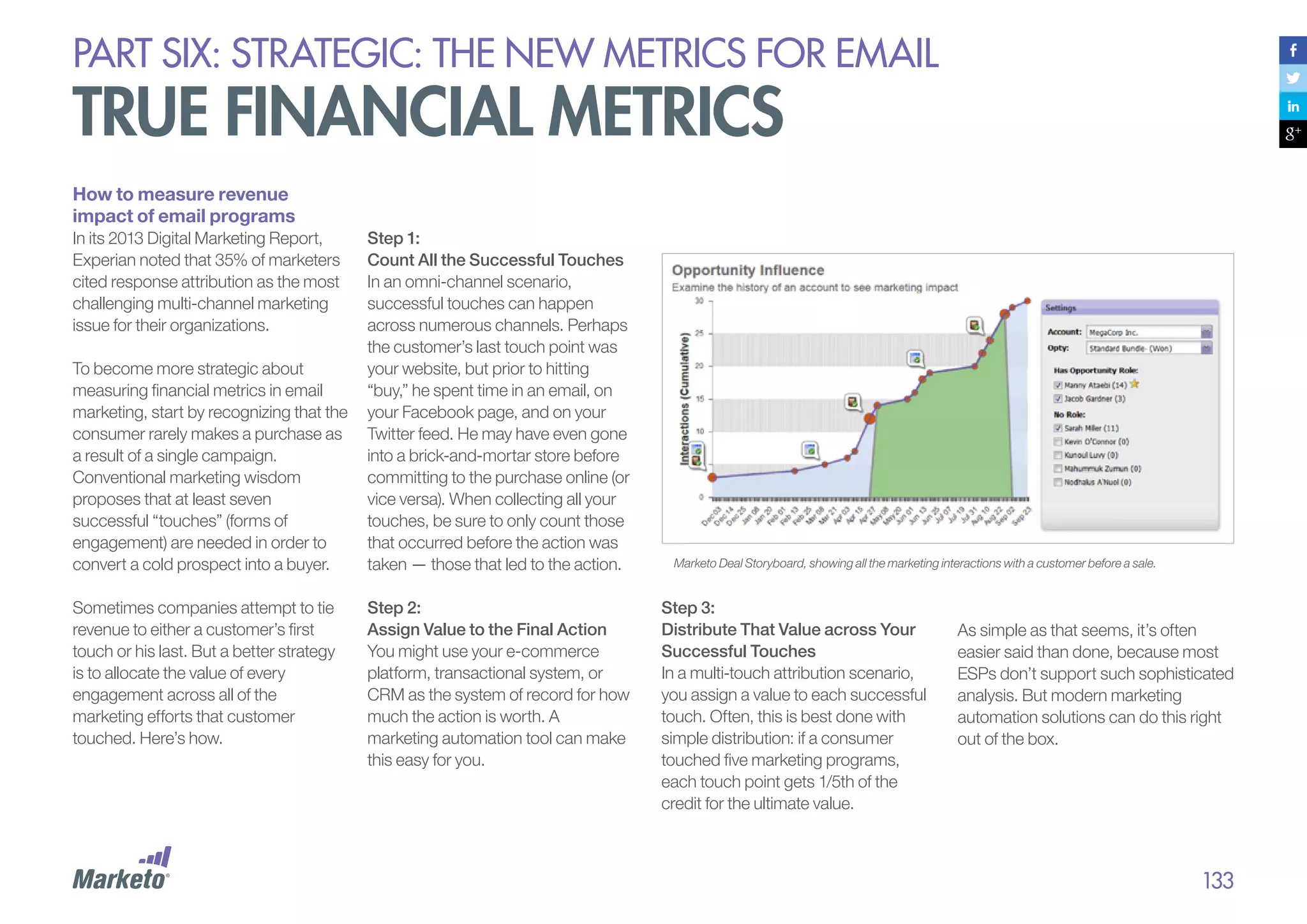
Marketo Privacy Policy
(bit.ly/15LFshb)
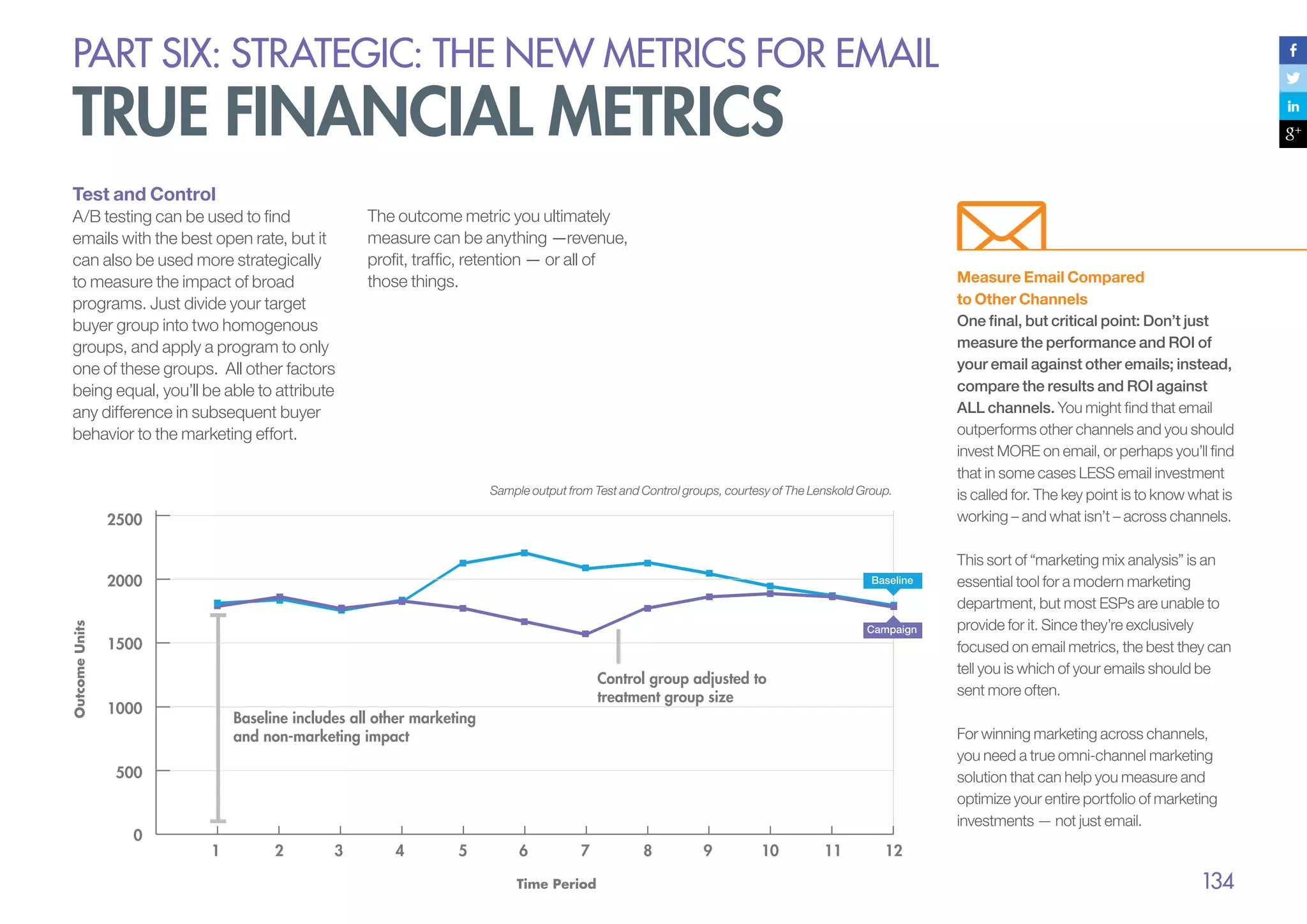
MarketingSherpa 2013
Email Summit
(bit.ly/Z7bn96)
Waldow Social
(bit.ly/IGUkCn)

DJ’s article
(bit.ly/HNmOLR)
2013 MarketingSherpa study
(bit.ly/15QCRjI)
Marketo Landing Page
Resource Center
(marketo.com/landing-pages)

Direct Marketing Association
and Smart Data Collective
(bit.ly/VEAKAn)
MarketingSherpa 2013
Benchmark report
(bit.ly/YGdMoe)
Extracting Value from Chaos
(bit.ly/mh7faw)

Landing Page
Optimization Success Kit

(marketo.com/success-kits/
landing-page-optimization)

Lead Gen Cards
(bit.ly/13hh5oV)
Marketo Benchmark on
Email Performance
(bit.ly/13CJzJn)
Melinda Plemel, ReturnPath
(bit.ly/14tjuyB)
MarketingSherpa’s Special
Report: CMO Perspectives on
Email Deliverability
(bit.ly/169xFIC)
Return Path’s Email
Intelligence Report Q3 2012
(bit.ly/RlbhtA)
Laura’s great article
(bit.ly/nHdhl8)
SBC - Email Blacklisting
(bit.ly/11eb9i7)
Yahoo!
(bit.ly/13uDGS0)
Email Deliverability
Power Pack
(marketo.com/packages/
email-deliverability.php)

Email Spam Legislation
by Country.
(bit.ly/wuywqT)
CAN-SPAM Act
(http://1.usa.gov/YgrzFP)
How New EU Privacy Laws
Will Change Your Marketing
(bit.ly/12O8KbD)
Canada’s Anti-Spam Law
(CASL): What Does It Mean
For You?
(bit.ly/17Gteq6)
Canada’s Impending AntiSpam Legislation: What You
Need to Know to Be Prepared
(bit.ly/Zyfuty)
CRTC Issues CASL
(Canada’s Anti-Spam Law)
Regulation Guidelines
(bit.ly/RzWrxt)
National Client
Email Report - 2013
(bit.ly/137a2Dw)
Monetate’s Intelligent Email
(bit.ly/Od01ww)
Marketing that Drives
Conversions - 2012
(http://bit.ly/Od01ww)
DMA UK’s National Client
Email Report - 2013
(bit.ly/12Ozedb)

Part Three:

Part Four:

Part Six:

National Client Email
Report - 2013
(bit.ly/137a2Dw)

Graduating from Email to
Engagement: Using
Marketing Automation to
Achieve Success with
Today’s Buyer
(bit.ly/15S6zqD)

Marketo Benchmark on
Email Marketing
(bit.ly/142gJ9H)

Intelligent Email Marketing
that Drives Conversions - 2012
(bit.ly/Od01ww)
National Client Email
Report - 2013
(bit.ly/12Ozedb)
The Marketo Benchmark on
Email Marketing study
(bit.ly/142gJ9H)
Improve Your Targeting and
Tell a Story By Creating
Buyer Personas
(bit.ly/RBYpPK)
EmailKarma.net
(bit.ly/13U40Vb)
Pizza Express
(bit.ly/YFf6YU)
Marketing Land
(mklnd.com/15sUZ5J)
Marketing Land
(mklnd.com/XPdt9l)

IDC Technology
Marketing Blog
(bit.ly/19kTv1j)

Part Five:
Multi-Channel Experience
(bit.ly/15bEAoY)
Greg Cangialosi
(bit.ly/167LPwe)
Simms Jenkins
(bit.ly/16i4Z1c)

MarketingSherpa
(bit.ly/14bxVUB)

Part Seven:
Graduating from Email to
Engagement: Using Marketing
Automation to Achieve
Success with Today’s New
Buyer
(bit.ly/15S6zqD)
Definitive Guide to
Marketing Automation
(marketo.com/DG2MA)

MarketingSherpa CMO
Perspectives on Email
Deliverability
(bit.ly/169xFIC)
LinkedIn’s email gaffe
on Waldow Social
(bit.ly/LS7L4o)

Litmus
(bit.ly/Xmq0BG)
STYLE Campaign
(bit.ly/U7Fb5z)

The Marketo Benchmark
on Email Marketing study
(bit.ly/142gJ9H)

Marketo’s Email
Deliverability Power Pack
(bit.ly/17GABOx)

Improve Your Targeting
and Tell a Story By Creating
Buyer Personas.”
(bit.ly/RBYpPK)

Marketo’s The Ultimate
Guide To Test Statistics
(bit.ly/11ZkASJ)

Teach to Fish Digital
(bit.ly/VT84hX)

Handy Calculator
(bit.ly/13gAZ2x)

153
about this guide

#DG2EEM
Written By:
Jon Miller
VP of Marketing, Marketo
@jonmiller
DJ Waldow
Waldow Social
@DJwaldow
Additional Contributors:
Dayna Rothman
Content Marketing Manager, Marketo
@dayroth
Caitlin Roberson
Wordisseur
Designed By:
Davis Lee
Creative Director, Marketo
Lynn-Kai Chao
Graphic Designer, Marketo

About Marketo:
Marketing Software.
Easy, Powerful, Complete.
Marketo (NASDAQ: MKTO) provides
the leading cloud-based marketing
software platform for companies of all
sizes to build and sustain engaging
customer relationships. Spanning
today’s digital, social, mobile and offline
channels, the Marketo® solution
includes a complete suite of applications
that help organizations acquire new
customers more efficiently, maximize
customer loyalty and lifetime value,
improve sales effectiveness, and
provide analytical insight into
marketing’s contribution to revenue
growth. Marketo’s applications are
known for their breakthrough ease-ofuse, and are complemented by the
Marketing Nation™, a thriving network
of more than 150 LaunchPoint™
ecosystem partners and over 30,000
marketers who share and learn from
each other to grow their collective
marketing expertise. The result for
modern marketers is unprecedented
agility and superior results.

Headquartered in San Mateo, CA, with
offices in Europe and Australia, Marketo
serves as a strategic marketing partner
to more than 2,500 large enterprises and
fast-growing small companies across a
wide variety of industries. For more
information, visit: www.marketo.com.
Marketo, the Marketo logo, Marketing
Nation and LaunchPoint are trademarks
of Marketo, Inc. All other trademarks are
the property of their respective owners.

154
DG2EEM-081613

© 2013 Marketo, Inc. All rights reserved.

info@marketo.com
www.marketo.com

The Definitive Guide to Engaging Email Marketing via Marketo

  • 2.
    TABLE OF CONTENTS 03Why Should I Read the Definitive Guide to Engaging Email Marketing? 04 Part One: What is Engaging Email? 17 Part Two: Trusted 51 Part Three: Always Relevant 97 Part Four: Conversations, Not Campaigns 109 Part Five: Coordinated Across Channels 123 Part Six: Strategic - The New Metrics for Email 136 Part Seven: Graduating from ESP to Marketing Automation 152 Appendix: Email Marketing Experts 153 Appendix: Reference Links 154 About Marketo
  • 3.
    introduction why should iread the definitive guide to engaging email marketing? Buyers today are more empowered. Information is abundantly, overwhelmingly available, and buyers are using that easy access to tune out unwanted marketing messages while simultaneously seizing control of their buying processes. In this environment, oldfashioned “batch and blast” email will serve only to alienate buyers. With short attention spans and intelligent buying and browsing habits, digitally-savvy consumers want personalized, relevant communications. To keep up with today’s buyer, you need to know: • What makes email truly trusted and engaging • How to talk with each of your customers individually, rather than talk at them as a group • How to engage your audience with cross-channel conversations, listening and responding effectively This Definitive Guide to Engaging Email Marketing (#DG2EEM) covers the five attributes of engaging email: • Trusted • Always relevant • Conversational We hope this guide will help you tell richer, more compelling, and ultimately more engaging stories within your email marketing and beyond. Throughout it, you’ll find checklists and worksheets to help you assess your strategy and examples of great email marketing to inspire you. • Coordinated across channels • Strategic As a “Definitive Guide”, it also covers all sorts of email topics, including writing subject lines, designing emails for mobile, building and managing your list, avoiding spam filters, integrating email and social, and more. The guide also talks about the latest in email technology, including what to look for in a modern email service provider. On any given day, the average customer will be exposed to 2,904 media messages, will pay attention to 52 and will positively remember only four (SuperProfile 2010). How do you ensure that your email is one of the four that gets remembered? The answer: your email must be more trusted, more relevant, and more strategic. It must be more engaging.
  • 4.
  • 5.
    PART ONE: Whatis Engaging email? The new digital buyer Meet today’s buyer. She has the upper hand when it comes to making purchasing decisions. Tech savvy and brand sophisticated, she is wise to the ways of marketing, and she expects a lot. She believes you should inform and even entertain her, but never bore or, worse, irritate her. And she’s fickle — if you don’t keep communications interesting, she’ll opt out lickety-split. Three major trends have emerged out of the recent — and rapid — evolution of buyer behaviors across email, social, search, and the Web. 1. Buyers are more empowered: Thanks to information abundance combined with better search and sharing technology, product information is now ubiquitous. The Web provides consumers with instant information gratification. And mobile devices add a wherever/whenever dimension to every aspect of the experience. Consumers can access detailed specs, pricing, and reviews about goods and services 24/7 with a few flicks of their thumbs on their smartphones. Meanwhile, social media encourages consumers to share and compare. Today’s buyers are increasingly self-directed when it comes to making purchasing decisions. They have broad access to resources and proactively gather information across a number of digital channels, often developing brand perceptions before they ever interact directly with a brand. By the time a buyer comes to you, he’s probably already made his purchasing decision, so it’s time to throw out the old model of a persuasive shop girl greeting your customer at the door. And as for you sales guys, the idea of taking a customer out for golf sounds great, and it may even happen occasionally, but you know it’s not feasible for everyone. You manage a portfolio of hundreds or thousands of customers! Customer Engagement for Competitive Advantage According to Forrester Research, we are now in the “Age of the Customer.” Today, advances in technology allow every company to tap into global factories and supply chains, and even the leanest startups can access all the computing resources they need from the cloud. The ability to tap into the cloud is no longer considered an advantage; rather, it’s a way of life. Today, being the customer’s first choice is the only remaining source of competitive advantage, and competition is fierce. To win, companies must be obsessed with their customers, focused on understanding them and engaging with them better than anyone else. 5
  • 6.
    PART ONE: Whatis Engaging email? The new digital buyer 2. Buyers know how to opt out: The junk mail of yore kept consumers prisoner because they couldn’t “break out.” But today’s buyers can easily opt out of marketing communications they don’t want. If you’re sending marketing emails and tracking your results (and we hope you are!) you probably know that gut-sinking feeling well when a campaign underperforms and causes a lot of opt-outs – or, worse, spam complaints! But consumers who take the initiative to unsubscribe from your emails might only be the tip of the opt-out iceberg. Many more consumers might be “passively opting out” — simply ignoring the emails you send. We’re all getting better at tuning out the noise of today’s digital circus, and the result is that most traditional marketing techniques, which are based on “renting attention” from the buyer as they go about their business, are becoming less and less effective as buyers get more tech-savvy. 3. Consumers have higher expectations: Today’s buyers expect companies to keep seamless track of their purchasing history, communication preferences, and desires. If your system isn’t a well-oiled data machine, you’ll lose brand loyalty fast. Consumers look for a unified and personalized experience across all of your touchpoints: your website, social media and photo platforms (Facebook, Twitter, Instagram), email marketing, etc. They want to find the information they are looking for in the medium that is most convenient for them at the moment. Whether they’re in front of their computers at work or in lines at post offices on their mobile devices, they expect an experience that’s streamlined and consistent — and it must be personal, too. They also expect you to recognize them — this is where it becomes critical to capture and store data over time and across channels — and then feed them the exact information they want at the moment you interact with them. It’s an exciting – yet challenging – time to be a marketer. It’s no longer sufficient to simply push static information to buyers in a mass advertising model, not even in segmented batches. You must fundamentally shift the ways you engage with customers across online channels throughout their lifecycles. And to do this, you must learn to engage each and every prospective customer individually and personally. “Building on the vast increase in consumer power brought on by the digital age, marketing is headed toward being on-demand — not just always ‘on,’ but also always relevant, responsive to the consumer’s desire for marketing that cuts through the noise with pinpoint delivery.” – McKinsey, “The Coming Era of ‘On-Demand’ Marketing” 6
  • 7.
    PART ONE: Whatis Engaging email? email matters more today than ever before In 2009, The Wall Street Journal published an article claiming that email was dead. Ironically, it was the most emailed article of the day. Just about every day since then, someone has published an article or blog post echoing email’s demise. In fact, if you Google “email is dead,” you’ll get over 1.5 million results. (To emphasize just how radical a number that is, comparison searches bring up only 280,000 results for “blogging is dead,” 180,000 for “social media is dead,” and only 2,500 for “podcasting is dead.” All of these numbers were current at the time we wrote this in June 2013.) But the reports of the death of email have been greatly exaggerated, and the hysteria around the notion only shows that email is more important than ever. While companies now have the flexibility to communicate via traditional channels, such as direct mail and TV, as well as through newer channels, such as social media, email is still the quickest and most direct way to reach customers with critical information. “The reports of my death have been greatly exaggerated.” – Mark Twain Quick Quiz 1. How many times a day do you check your email? 2. How many times have you checked your email in the last hour? 3. How soon after you wake up do you check your email? 4. Have you checked your email while reading this guide? Why? Because email is the one channel your audience accesses regularly. We – consumers – are addicted to email. 7
  • 8.
    PART ONE: Whatis Engaging email? email matters more today than ever before Email: Alive and Well On any given day, your customer may or may not visit your website, blog or Facebook page; but with few exceptions, customers check their email every day, if not multiple times a day. Scratch that — how do you make it through all those meetings? It’s more like multiple times an hour! Despite pundit cynicism, the stats around email are resoundingly positive. For example, there are currently 3.3 billion email accounts in the world. (Source: Mashable) What’s more: • Of Americans age 12 and over who are active online, 94% cite email as one of their regular activities. (Source: Pew Internet and American Life Project’s Generations 2010 report) • Jay Baer, Social Media Speaker, Author and Coach, says that 58% percent of adult Americans check email first thing in the morning. (Source: MarketingSherpa 2013 Email Summit) Email is very much alive. Plus, it’s still the number one way for marketers to communicate directly with customers. According to new research: • Email is the customer preference. In a recent survey, a staggering 77% of consumers reported that they prefer to receive permission-based marketing communications through email – and email was the number one source for all age groups including 15-24! (Source: Waldow Social) • Email generates nearly a 2X return compared to other channels. For every dollar spent on email marketing in 2011, there was a $40.56 return. Compare that to other channels, such as search engine marketing, which is the next closest at $22.44. • Email investment is slated to increase. 64% of companies indicated their organizations’ investment in email marketing was expected to increase in 2013. (Source: MarketingSherpa 2013 Benchmark report) “Where do you tell people to send important calendar items, documents, or discussions about important topics, either for work or home? Our guess The point is, email is not going anywhere. As a marketer, it’s still your number one tool for reaching customers fast. If you agree that email marketing is NOT dead, go ahead and take a quick break to tweet: is that ‘Facebook’ wasn’t your answer. It was probably email.” – Jason Falls, Digital Strategist and Co-author of “The Rebel’s Guide to Email Marketing” Email Marketing is NOT dead! #DG2EEM (Source: Direct Marketing Association and Smart Data Collective) 8
  • 9.
    PART ONE: Whatis Engaging email? but email is facing challenges Email still matters – perhaps more than ever – but traditional paradigms no longer cut it. It’s time for a reality check regarding the new challenges that email marketers face as digital consumers get more sophisticated. Here are the key areas of this new challenge: • The Economics of Attention: Information abundance and attention scarcity make it harder than ever to get buyer attention • Opt-Out, Screen Out, Tune Out: Consumers don’t want to feel they are being marketed to, and will find ways to tune out unwanted communications • The Cross-Channel Marketing Revolution: New communication channels mean email can no longer be a standalone channel • Imprecise Metrics: Imprecise metrics that don’t show true impact means that email struggles to be strategic
  • 10.
    PART ONE: Whatis Engaging email? but email is facing challenges The Economics of Attention The rise of the Internet has resulted in a quick transition from information scarcity to information abundance. The world is producing information faster than the human mind can wrap itself around the data. According to a 2011 IDC report titled Extracting Value from Chaos, the amount of global digital information created and shared worldwide grew nine-fold from 2006 to 2011, growing to 2 trillion gigabytes. This number is expected to quadruple by 2015. Information abundance means attention scarcity. Social scientist Herbert Simon first talked about attention economics when he wrote, “In an information-rich world, the wealth of information means a dearth of something else: a scarcity of whatever it is that information consumes. What information consumes is obvious: attention of its recipients.” This means it is only getting harder and harder for your emails to engage consumers. Opt-Out, Screen Out, Tune Out People are inundated with pitches, advertisements, and other interruptions on a daily basis. Consumers are marketed to so often that, as a matter of self-defense, they’ve raised a psychological “anti-marketing shield.” This is particularly the case when it comes to email content. Consumers with a vested interest in achieving “Inbox Zero” have many tools to help them sweep and filter unwanted emails. They create their own definitions of junk mail using custom filters in their email software, and if they don’t like a message, they’ll not only make sure they don’t see it again, but they’ll also tell others about their displeasure. And, let’s face it, most marketing emails pretty much suck. Even if yours don’t, that doesn’t mean they’ll interest your audience. What’s creative and alluring to you might just look or sound like another sales-y, drone-toned e-blast to your end viewer: “Hi, are you ready to buy? Hi, are you ready to buy? Hi, are you ready to buy?” Don’t be that guy. Global Digital Information Created & Shared, 2005 – 2015E Digital Information Created & Shared (zettabytes) 8 Source: IDC report “Extract Value from Chaos” 6/11. 6 4 2 0 2005 2007 2009 2011 2013E 2015E 10
  • 11.
    PART ONE: Whatis Engaging email? but email is facing challenges The Cross-Channel Marketing Revolution Today’s buyer seeks relevant and personalized content across all digital channels: email, mobile, social, display advertising, you name it. Omni-channel, customer-focused marketing is no longer nice to have; it’s a must-have. Companies that want to put customers at the center of their marketing strategies must engage them across the board, but this is only possible when marketing teams have a channel strategy that unifies their products and teams. Traditional email marketing tools were designed for just one channel – email. It started as a single communications channel with no core connection to other marketing channels. Even today, companies using standalone email service providers (ESPs) are stuck with a legacy approach that doesn’t take into account the reality Imprecise Metrics that today’s buyer is adept at multi-tasking across channels — engaging with email in one moment, a website the next, and then flitting across to social media. And he does it all while talking on the phone or texting. Traditional ESP solutions can’t adequately address this level of sophisticated multi-channel customer engagement. Nor can ESPs adequately capture all the online and offline behavioral patterns that marketers must track to stay on top of customer whims. To spearhead the movement toward true cross-channel coordination, a new breed of email marketers is quickly rising to the top. These forward-thinking marketers are embracing strategies that leverage email as the best platform to tie together the customer relationship over time and across all marketing channels. With traditional ESP solutions, the marketer has to manually sort through multiple reports to track unsubscribes, clicks, opens, bounces, and so on for each email campaign. The insight these reports provide is, unfortunately, not that insightful with regard to customer engagement. When stuck with imprecise and generic metrics, email marketing remains merely a tactical channel, relegated to the sidelines instead of becoming a strategic part of leadership’s revenue plan. Marketers waste valuable time struggling to connect the basic metrics provided by their ESPs to the more strategic metrics that company executives actually care about, such as customer engagement and revenue impact. 11
  • 12.
    PART ONE: Whatis Engaging email? Engaging Email Marketing Defined Consumers are always on, always connected, and always overwhelmed. If you want to connect with them, you have to work hard to engage them. In order to be truly effective, email marketing must become more trusted, more relevant, more conversational, and more strategic. Think about it: you probably pay the most attention to emails from friends, family, and colleagues, people with whom you have genuine, trusted relationships. Sure, the relationship between a brand and a consumer is never exactly the same as the relationship between friends and family, but marketers can narrow the gap. Brands can enjoy some of the benefits of a trusted relationship by marketing to the buyer in a natural, non-marketing-speak way that truly engages him. The best marketing doesn’t feel like marketing at all. If you can genuinely engage your audience through email marketing, you can build direct, trusted relationships across all channels. Do this right, and you’ll be the company that cuts through the noise. “Remember that the best campaigns aren’t about you or what you want subscribers to do. They’re about your subscribers and what they want.” – Matt Blumberg Chairman & CEO of Return Path When implemented effectively, modern engagement marketing can significantly enhance your organization’s ability to increase revenue, maximize return on marketing investments, and increase the lifetime value of your customers. Marketo has found this to be true across almost every industry, including: • Business services • Education • Financial services • Healthcare • Manufacturing • Media • Technology • Telecommunications • Travel and leisure 12
  • 13.
    PART ONE: Whatis Engaging email? Engaging Email Marketing Defined The 5 Key Attributes of Engaging Email To engage and succeed, your marketing emails must, above all else, be: 1. TRUSTWorthy (Part 2) 2. always relevant (Part 3) Once we’ve covered all five of these key attributes of engaging email, we’ll talk about technology in Part 7, and how marketing automation can help you graduate from basic email services to real, hit-it-out-of-theballpark engagement strategies. Ready to dive into greatness with your email marketing? Flip or click the page. “With each advance in digital communication and with every new information source, social connection, or mobile device improvement, the customer becomes more powerful. Tactics that captivated buyers yesterday lack luster today. One such out-of-touch tactic is ordinary email. Email remains a core 3. conversational, not campaign-based workhorse of communication, but to gain 4. coordinated across channels with the capability to engage.” (Part 4) (Part 5) the attention and loyalty of today’s discerning buyers — and to avoid irritating them — it must be enhanced – IDC Workbook, Graduating from Email to Engagement: Using Marketing Automation to Achieve Success with Today’s New Buyer, June 2013 5. strategic (Part 6) 13
  • 14.
    PART ONE: Whatis Engaging email? Engaging Email Marketing Defined Score Your Email Marketing Engagement What is your company’s current level of email marketing engagement? Circle a number next to each marketing tactic below, then add up your score at the end. We have a formal process with guidelines we adhere to consistently. We don’t have a process or guidelines for this. We have an informal process with a few loose guidelines or guidelines that are inconsistently followed. Tracking the impact of email marketing on revenue 1 3 5 Integrating email with other marketing tactics 1 3 5 Using sophisticated segmentation to target relevant messages to smaller groups 1 3 5 Creating messages that are relevant in terms of content, recipient, and timing 1 3 5 Using email to craft consumer conversations instead of “blasts” 1 3 5 Proactively building a bigger list of subscribers 1 3 5 Consistently setting and meeting subscriber expectations for email timing, frequency, and content 1 3 5 Monitoring our deliverability statistics and regularly cleaning “our” subscriber database 1 3 5 Testing, analyzing, and continuously improving “our” email communications 1 3 5 Subtotal Total: Score 9-15 : Barely Doing the Basic You’re doing email marketing, but you haven’t begun to tap into its real potential — you could be doing more harm than good. Score 16-29 : Getting There You’re on the right track for consumer engagement, but you could be doing a lot better. Score: 30-45: Truly Strategic You understand that being engaged with your audience is the only way to compete in today’s cross-channel marketing world. 14
  • 15.
    Influencer roundtable: EMAIL ISNOT DEAD; IT’S EVOLVING We asked, “What’s your reaction to the following statement? Email is not dead; it’s evolving.” value of email in a world where Facebook is one of, if not the biggest sender of email in the world, to stop sending email for a whole month and see if they keep their job.” – Dela Quist, Email Marketing Leader CEO of Alchemy Worx evolving either, it’s growing. From improved over 10 years, I have heard one too many times why and how email’s death is imminent. It is beyond resolute and anyone see the value of growing their email who thinks they need to prove the “Having run an email-focused agency for reduced deployment costs, marketers now “I would recommend that anyone “Clearly email is not dead, but it’s not purely inbox placement and increased revenue to Take a look at the answers: in digital marketing knows that email programs and cultivating an engaged list. marketing remains the digital marketing hub. Therefore they are increasingly creating The last few years have brought a more more tailored, customer-focused email dynamic evolution to email than the past dialogues. That’s evolution. But this decade has seen. We have seen mobilized increased sophistication does not necessarily email for smartphones and tablets, reflect a decrease in email frequency, quite marketing automation and social media help the opposite; it often represents an increase take email to the next level. Bottom line, with in volume and more email-driven revenue. email driving more revenue and ROI than its That’s growth.” digital marketing brethren, it is well – Scott Hardigree, Founder at Indiemark, Co-Founder at Bright Speed positioned for a healthy and long future.” – Simms Jenkins, Founder & CEO of BrightWave Marketing
  • 16.
    Influencer roundtable: EMAIL ISNOT DEAD; IT’S EVOLVING “The fact is that email is the glue that holds “First and foremost, email has never been the entire Internet Marketing infrastructure dead nor has it ever been dying. In fact, it together. From transactional services, has always been evolving and will continue business communication, personal to do so in the years to come. Evolution in communication, marketing and promotion, email marketing has been overshadowed in email is the way business is done. The whole recent years by the rise of social and mobile, “email is dead” idea started as a way of but more and more technology companies differentiating social media channels in an who innovate in the email space are attempt to draw in more advertising and emerging and thriving”. promotional dollars. Years later, social – Andrew Kordek Co-Founder Trendline Interactive media channels have never enjoyed the ROI that email still enjoys. You have to be in the inbox to be a player”. – Bill McCloskey Founder at Only Influencers
  • 17.
  • 18.
    PART Two: trusted EngagingEmail Is Trusted Email Only with trust will consumers let your email past their filters and into their lives. Set expectations during an opt-in process, and then fulfill those expectations with every email you send. Trusted emails have lower bounce and unsubscribe rates, and higher deliverability. Conversely, if you don’t have trust, you will have lower opens, clicks, conversions, and so on — and your messages are more likely to be marked as spam. After reviewing 130 million IP addresses that sent nearly 20 trillion emails, Experian noted that 85% of all messages received by ISPs were classified as spam. Spam is in the Eyes of the Consumer Spam, Spam, Spam, Baked Beans, Spam … a few of the many menu items in the famous Monty Python sketch from the 1970s. These days, when we hear the word spam, it’s usually not about a can of meat — although today’s version of spam can be just as nasty. There are legal definitions of spam — in the U.S., for example, spam can be classified as any email that violates the 2003 CAN-SPAM Act (again, no relation to canned spam) or any other countries’ bulk email laws. In the eyes of consumers, however, the definition of spam is arguably broader and less forgiving. To consumers, spam might represent: • Any email they don’t expect. • Any email they don’t want. • ny email that prompts them to A hit the “This is spam” button. • ny email they might have A signed up for, but later decide they don’t want. • n easy way to opt-out. A DJ Waldow, one of the authors of this guide, tells a story of watching his wife mark a legitimate email — a communication she had opted into — as spam. Why did she do that? A negative in-store experience turned her off to the company. For our purposes here, spam is defined as “the opposite of engagement.” The Subscriber Covenant It’s crucial to gain and keep the trust of your audience so they don’t mark your communications as spam. We approach this with something we call “The Subscriber Covenant” — an implicit promise to deliver value in exchange for consumer trust. If “The Subscriber Covenant” were a letter, it might read something like this: Dear Subscriber, We promise to: • Send emails that you actually want. • Deliver those emails when you want them. • Use the data we collect from you to send targeted, relevant information. Sincerely, A Marketing Department that Wins Keep “The Subscriber Covenant” top of mind when deploying your email marketing campaigns. 18
  • 19.
    PART Two: trusted EngagingEmail Is Trusted Email Consistency Leads to Trust One way to build trust with your email marketing is to be consistent. We all lean in to routine — from the amount of milk we put in our coffee, to the route we take home from work. Routine gives us comfort and makes our lives easier. When someone knocks on your door, if you don’t recognize that person through the keyhole, your initial reaction probably ranges somewhere between annoyance and dread. The same goes for unexpected emails; subscribers don’t generally like surprises. When you are consistent, your subscribers recognize your emails the moment they arrive. Here are five ways to create and maintain email consistency: 1. Be consistent with your timing. Send emails at the same times and on the same days of the week. 2. e consistent with your B frequency. Send the same number of emails every month. 3. Keep types of content consistent. 4. Brand consistently. Your emails should usually look similar. 5. Use consistent naming and subject lines. Your emails should “act” similar when they hit a recipient’s inbox. You can also use consistency to train your subscribers to take certain actions, such as click through to a landing page on your website. For example, if a subscriber knows that your emails typically start with a two or three paragraph teaser, followed by a link to the full story online, she might develop the habit of skipping the teaser and going straight for the story. A predictable routine breeds security. When subscribers understand your behavior, they are less likely to unsubscribe or complain, and more likely to take positive action. The Occasional Surprise Aiming to be consistent does not mean you can’t send the occasional one-off email. There might be a strategic reason to send a unique, valuable message on a different day and time, or in a different format than usual. If you have established a pattern of trust, your audience is likely to accept the inconsistency — and may even respond well to the “surprise.”
  • 20.
    PART Two: trusted engagementup front: develop and maintain a quality list Before you can fulfill and maintain expectations, you must first set them. Expectations start with the opt-in. A smart opt-in process sets an accurate and positive notion of what’s to come, and how “it” will arrive. Choose the Right Opt-in Type for Your Business There are various tactics for building your list of opt-in email addresses, but, in general, they fall into three categories: 1. Single opt-in 2. ingle opt-in with a ‘Welcome’ S or ‘Thank You’ email 3. onfirmed or double opt-in C Single Opt-In How it works A new subscriber enters her email address and possibly other information (demographics, preferences, etc.). She is immediately subscribed and will automatically receive the next email campaign. There’s no need for her to take an additional step. Implicit opt-in occurs when a consumer fills out a form, e.g. in order to download content or register for an event. The website’s privacy policy must state that performing this action automatically opts the user into email marketing. This is a commonly used method in the business-to-business (B2B) sector, and typically B2B audiences understand the implications of providing their email addresses. Explicit opt-in requires the user to voluntarily sign up for email marketing. Often, this takes the form of a checkbox on a registration page. Often checked by default, this option reads something like, “I want to receive news and updates.” Pros Cons • Requires the least amount of effort on the part of both the company and the customer. • No opportunity to set expectations with your audience; the first email they receive is your next marketing message. • There’s no place for a subscriber to drop the ball, which can happen when she’s required to “confirm” her opt-in. • Unless you have a system for catching bad email addresses, you run the risk of being targeted by spambots submitting phony addresses. This is annoying and could cost you credibility with your ESP. • Most quickly leads to a big list. • If a subscriber forgets that he opted in, or doesn’t realize he has opted in, the risk is high that he’ll mark your email as spam. This is particularly true with implicit opt-ins and when too much time has elapsed between subscriber sign up and your first communication. • Less consumer effort in the sign-up process generally means less connection to your brand overall. Single opt-in tends to attract less committed subscribers, who will either actively or passively opt out of your emails later. • In some countries, implicit opt-in is actually illegal. Check the laws of the countries in which you market.
  • 21.
    PART Two: trusted engagementup front: develop and maintain a quality list Single Opt-In with Welcome Email Confirmed or Double Opt-In How it works A new subscriber enters his information and implicitly or explicitly opts-in as described above. In this case, an immediate auto-response email thanks and welcomes the subscriber. This email includes a customized message that tells him what to expect in future emails, and when to expect them. How it works A new subscriber enters his email address and, depending on your needs, other information and content preferences. The post-subscribe thank-you page may alert him to look for an email. Once he receives that email, he’ll need to click on a link or button to confirm the subscription. Marketing study showed that a Pros actually decrease trust by 10%. Pros • The welcome email provides a great opportunity to engage each new subscriber. It’s courteous, and it also serves as a good way to begin earning the trust of your subscribers while setting proactive expectations. • A welcome email and/or landing page prompt provides an opportunity to link to a bonus opt-in incentive. • If a welcome email bounces, you know to filter out that address. Bye-bye, spambots! Cons • Similar to basic single opt-in, less effort can equal less engagement and more risk of opt-out or being marked as spam. • You still run the risk of sending the welcome emails to bad addresses, which can negatively impact your future deliverability. • Asking subscribers to confirm their subscriptions separates the committed from the simply impulsive. Those who click on the link really want to receive your emails. Marketo’s Benchmark on Email clear opt-in method increases trust by 10%, while cheap shortcuts, such as using thirdparty lists and data vendors, Marketo Benchmark on Email Marketing • Requiring a manual confirmation action separates humans from bots. A bounced confirmation email can be filtered out right away. Cons • You’re asking subscribers to take an extra step, which is a risky request in this age of instant gratification. After all, they’ve already told you they want your emails with their initial opt-in request; asking them twice might annoy them. • There’s a risk that an interested subscriber will get distracted before she can click “confirm” in the follow-up email, or, worse, that your email will get lost or filtered. As a result, you may lose interested subscribers. 21
  • 22.
    PART Two: trusted engagementup front: develop and maintain a quality list Problems with Assuming Opt-In Spam is in the eye of the beholder, and any time you assume or use implicit opt-in, or use a list of email addresses you secured elsewhere, you’re taking a risk that your valuable messages will be considered junk mail — even if you technically have legal permission to send them. For example: • You got a name from a tradeshow list or other activity you sponsored. When a consumer registers for something you’ve sponsored, lets you scan his nametag at an event, or drops a business card in a fishbowl, it does not necessarily mean he’s asking for future email marketing. If the recipient is not expecting your email, you may not be building trusted engagement. • Someone handed you her business card. An executive handed you her business card after being introduced by a colleague at an event. Does this mean she wants to receive your marketing emails? Probably not. • You already have a list of contacts. You give your admin your entire contact list to enter into your email database or CRM system. A month later, everyone on that list receives an unsolicited email from your company. This is a way to break trust — fast. A better option: When you meet a potential subscriber through any of these means, send a “Nice to meet you” email with a button or link inviting him to your email communications. Give him a great reason to accept! Provide value and maybe include an incentive. If he opts in, great; if not, you know to be more circumspect with how you use his email address in the future.
  • 23.
    PART Two: trusted engagementup front: develop and maintain a quality list Expert Opinions on Single vs. Double Opt-In Set Expectations During Opt-In Single Opt-in: According to DJ Waldow, one of the guide’s authors, the single opt-in is the best option for most companies. After all, building an email list is one of the most valuable things a company can do in terms of marketing, and lists grow fastest with single opt-ins. DJ is also not a fan of the question implied by a confirmation email: “Are you really, really sure?” If someone tells you they want to be on your list, believe them! Opt-in is an opportunity to build trust and to set expectations about what’s to come with your email marketing. The page where a subscriber enters her email address is your first chance to establish a positive relationship. (Read DJ’s entire article on this) Double Opt-in: Seth Godin, creator of Permission Marketing, is an advocate for the double opt-in. “Real permission is different from presumed or legalistic permission,” he says. “Just because you somehow get my email address doesn’t mean you have permission. Just because I don’t complain doesn’t mean you have permission. Just because it’s in the fine print of your privacy policy doesn’t mean it is permission either.” If you take the time to get a subscriber’s permission, with confirmation follow-through, you gain the advantage of his abiding loyalty and engagement. Use your opt-in page wisely. Explain in simple and compelling language what she will get after entering her information: “Enter your email address to download our white paper” or “Get a special subscriber discount when you sign up for our newsletter.” The value you offer might seem obvious to you, but it might not be crystal clear for others, at least not from the beginning. Your opt-in should: • Explain “What’s In It For Me (WIIFM)?” Subscribers want to know why they should subscribe; so tell them right up front. Remember, marketing is about meeting their needs, not yours. • Explain exactly what types of content you’ll be sending: Let your subscribers know they might receive updates, deals, coupons, offers, advice, news, events, or general information. • Set expectations for frequency and timing. (We’ll talk more about this later.) • Give subscribers choices, if you can. Offer them the ability to sign up for emails on certain subjects versus others, or for a weekly digest versus a daily message. 23
  • 24.
    PART Two: trusted engagementup front: develop and maintain a quality list Other Tips for Opt-in Pages Privacy Policy: Your privacy policy is crucial. It’s not just mandatory legalese, but also another opportunity to establish trust and set expectations with your Web visitors. Here’s a link to Marketo’s privacy policy: marketo.com/trust/privacy.php. The mention of your policy doesn’t have to be dry verbiage; it can be a simple promise not to spam your audience, like this example from Funny or Die: Social Proof: Including social proof of your popularity can help validate the message of your opt-in form, e.g.: • “Over 750,000 professionals have subscribed.” • “Join the 200,000 others who get our weekly newsletter.” 24
  • 25.
    EXAMPLE: southwest airlines Southwest Airlinesis known for its creative, fun, and “simple” marketing. Its email marketing opt-in process is no exception. This example from the Southwest Airlines website has all of the essential elements. 1. The headline sets a clear expectation of what’s going to happen when the subscriber fills out the form, and the banner above it reinforces the promise. 1 2 3 2. he thumbnail email examples give T subscribers a visual cue of what to expect. 3. The accompanying text lists not only the content of future emails, but also how often they will be delivered. 4. The form does not ask for a lot of information. Simple. Direct. Easy. This usually equates to more opt-ins! 5. This checkbox lets subscribers choose to receive a monthly newsletter in addition to the weekly emails. 6. Southwest also provides another option to get alerts: “DING.” While this is not specific to its email marketing list, it does give potential subscribers another way to connect. 4 6 5 25
  • 26.
    EXAMPLE: waldow social While notas visually appealing as the Southwest Airlines example, Waldow Social’s opt-in form clearly states what’s in it for potential subscribers and sets expectations up front. 1. A catchy newsletter name builds brand recognition. The repetition of the “W” sound is what does it here. 2. hat’s in it for the reader is W clearly communicated. 2 1 3 3. he phrase “a weekly recap” sets T expectations for frequency, and “delivered on Friday” dials down the timing more precisely. 4. “preview” link offers an example of A what to expect. 4 26
  • 27.
    PART Two: trusted engagementup front: develop and maintain a quality list Email frequency and timing Your opt-in page is a great place to set expectations for the frequency and timing of your emails. You can be specific (“every Friday”), establish email cadence (“weekly”), or let subscribers know they should be on the lookout for unscheduled emails (“new product alerts”). The most important thing to remember about setting expectations is to meet them. If you tell your subscribers you’re going to send a weekly email, and then bombard them daily, they’ll quickly unsubscribe, ignore your messages, or mark them as spam. “When should I send emails?” Determining the best time and day to send your emails is a challenge. Despite what some people will tell you, there is no perfect or best time to send. Timing is established after knowing what works best for your audience, based on captured user data and other parameters. Some strategies to test: • Time of opt-In: If a subscriber opts in to your newsletter at 2PM PST, you can reasonably assume that’s a time he is online. • Early bird: If you schedule your emails to arrive in the early morning, you can be at the top of the email pile when folks arrive at the office. Note, however, that as smartphones become more ubiquitous, people check their email earlier and earlier in the day — often long before they actually get to work. • Time Zone: By capturing IP addresses at opt-in, you can segment your list to send emails based on where subscribers live, so that every subscriber gets your email at the right time for their time zone. • Domain: Send emails to subscribers using personal email domains (Gmail.com, Yahoo.com, AOL.com, etc.) during the early morning and evening hours. Those using work-related domains (e.g., company.com) should receive emails during the day. Whichever tactic you choose, pick a send time and own it. Remember, once you set an expectation with your subscribers, stand by it consistently. (Note: this does not mean that you cannot send “one-off” emails on a different day of the week or time of the day. It also doesn’t mean that you cannot – and should not – be testing to see what works best for your audience.) “How often should I send emails?” Ultimately, the answer depends on the level of perceived value you deliver in each email. For instance, daily deal emails, such as those from Daily Candy, Groupon, and Living Social, have high value and deserve daily frequency. Help A Reporter Out (HARO), an email service that connects product and service experts to journalists looking to write on-topic stories, sends emails three times a day! According to The Rebel’s Guide to Email Marketing, some HARO users even set their alarms for 5:45 AM EST, so they don’t miss the first message of the day! For most businesses, however, once a day is much too much. A general rule to follow: If you find yourself wondering if you’re sending one too many emails, you probably are. 27
  • 28.
    PART Two: trusted engagementup front: develop and maintain a quality list Post Registration: What to Expect Next Once subscribers have offered up their information, it’s a good idea to immediately serve them a “Thank You” page. This page serves a few purposes: 1. It says “Thank You,” which is just good manners. 2. It tells subscribers that the opt-in actually worked. 3. It answers subscribers’ questions about when to expect their first email and what it will look like. You can stand out from the pack by adding unique, funny, or creative language and graphics, or maybe even include a short Thank You video to this page. Your subscribers have already exhibited their willingness to be engaged, so this is a great time to seize their enthusiasm. Invite them to follow you on social media, subscribe to your blog, or learn more about your product or service via content links. It’s also a good time to ask them to refer their friends. The Welcome Email As soon as someone registers, your email marketing software can immediately send them a welcome email. The anatomy of a welcome email looks something like this: • Thank you! • Congratulations, you are now subscribed! • Here is your offer (fulfill the promise of the opt-in by sending the coupon code, content, or other promised offer). • Here is what to expect next, and when to expect it.
  • 29.
    PART Two: trusted buildingthe list A key goal as an email marketer should be to grow your list of engaged subscribers. You will lose up to 30% of subscribers each year due to email attrition, and not all engaged subscribers will become paying customers. To grow your business, you need to feed the top of the funnel with list-building tactics. Building Your List on Your Website According to a 2013 MarketingSherpa study, 77% of marketers ask for an email address on their websites. Your website is arguably the most effective place to collect email addresses. There are two ways to do this: 1. ASK. When you give your visitors great reasons to subscribe — news, updates, discounts, promotions, and freebies — they’ll often gladly give you their email address. 2. FORCE. With gated content, such as premium areas of your site and contest pages, an email address is the key that opens the gate. If email opt-in is only implied, however, be aware that the user may not actually be requesting future email marketing. Website registration page Social media sharing buttons in email Offline events Registration during purchase Online events Facebook registration page Email to a friend Paid search Blog registration page Co-registration programs Other Source: ©2013 MarketingSherpa Email Marketing Benchmark Survey Methodology: Fielded December 2012, N=451 29
  • 30.
    PART Two: trusted engagementup front: develop and maintain a quality list Email Opt-In Form Placement Options Having too many opt-in forms on your website could be a turnoff for potential new subscribers. On the other hand, if you relegate your opt-in form just to your home page or your contact page, you run the risk of missing visitors who come in the back door. You need to strike a balance. Here are some traditional placement options, as well as a few you might not have considered. 1. The sidebar. Depending on the design and flow of your site, putting an opt-in form in a sidebar might be very effective. If you “pin it” — anchor the opt-in on users’ screens as they scroll down the page — it’s never out of their sight. Marketo uses this on our blog. 2. The header. If someone comes to your site hoping to sign up for your newsletter, the first place he’ll look is probably the top of your page. Consider placing an opt-in form right in your header, or adding “sign up” as a top menu tab. This is what Waldow Social does. 30
  • 31.
    PART Two: trusted engagementup front: develop and maintain a quality list 3. The footer. Like the header, your footer is a logical and traditional place to put an opt-in form. In fact, even if you have opt-in options elsewhere, think about also having a simple text link to “subscribe” somewhere in your footer. 4. Smack in the middle. The bold and brazen might consider an increasingly popular option for opt-in placement: right in the middle of your content. As visitors scroll down, they won’t miss it. This is how active-wear company Lululemon does it: 5. At the bottom of your content. If your blog is popular, or if you have other well-read content available on your site, consider adding an opt-in form at the end of each post or article. If a visitor has taken the time to read an article, you already have a certain level of buy-in, so it’s an appropriate time and place to ask for more! 6. A lightbox. Pop-ups can be irritating, but they can also be very effective. They’re certainly worth testing. You have plenty of options with lightbox opt-ins — you can have them appear after a certain period of time or present one to visitors as they navigate your site. Health and fitness source Greatist attributes 82% of its list growth to its pop-up opt-ins, and Funny or Die contends that 75-80% of its list (of over a million) has come from its pop-ups. Here’s an example of Marketo’s lightbox, which is only presented to non-subscribers once every six months. By the way, Marketo’s subscriber numbers have skyrocketed since we added the lightbox: 31
  • 32.
    PART Two: trusted engagementup front: develop and maintain a quality list 7. Welcome Gate. You can redirect your visitor to an opt-in landing page before they arrive on your main website. Waldow Social does this, and has found that nearly 50% of its list comes from the Welcome Gate. Nail the Landing (Page) An optimized landing page can make all the difference between a visitor subscribing or abandoning your page. Landing pages are so important that we’ve devoted a resource center and a guide to them: Marketo Landing Page Resource Center Landing Page Optimization Success Kit 32
  • 33.
    PART Two: trusted engagementup front: develop and maintain a quality list 15 Other Ways to Get Email Addresses: 1. Via online whitepaper/eBook/ webinar online registration. 2. In the middle of an e-commerce checkout experience. 3. During an actual in-store checkout experience. 4. Via QR code 5. Through a prompt at the end of a survey 6. Via your Facebook page. 7. Through Twitter, particularly using Twitter’s new Lead Gen Cards. 8. When an existing subscriber shares your email in any social media and one of their friends opts-in to your list. 9. Using old-school paper advertising techniques 10. On billboards. Yes, those things you see from the freeway. 11. Through aerial advertising: airlines, hot air balloons, blimps. 12. During tradeshows. Have a tablet on hand to easily opt-in new contacts. 13. During presentations. You know, at tradeshows and conferences. Hey @Marketo! Here’s another tactic to grow your email list: #DG2EEM 14. Through an online pop-up or pop-under. 15. With a suggested opt-in prompt on a paper receipt or invoice. 33
  • 34.
    PART Two: trusted maintainyour list It’s not enough to build a list – you also need to maintain it. This means letting subscribers manage their preferences or opt-out if they wish. And it means proactively cleaning and culling your list based on response data. Subscription Centers One of the best ways to establish trust with your audience is to allow them to take control of communications — they should never feel trapped. You can be smart about your opt-out by creating a subscription center on your website. When subscribers click “unsubscribe,” they will be taken to the center and given the option of changing their communication preferences or the frequency with which they receive your emails. Maybe they still like you and don’t really want to leave you — they just want to see less of you. Most opt-out forms are pretty bare: you ask a subscriber to enter his email address — if it’s not pre-populated — and, perhaps, his reason for leaving. As a marketer watching a subscriber march out the door, wouldn’t it be better to give him one last chance to stay by offering a few subscriptionfrequency options in a human, friendly voice that lets him know you care about his needs? Here’s a great example from Bonobos, a men’s clothing line: When a Bonobos subscriber clicks “unsubscribe” in an email, he’s taken to his preferences page, where he can choose how often he’d like to receive messages, including never. Through the use of appealing language and humor, Bonobos is savvy about offering options that decrease a subscriber’s likelihood of unsubscribing. As a result, Bonobos retains 25% of those who would have otherwise opted out. In your subscription center, give your subscribers options such as: • A list of all current subscriptions. Show subscription details. • The ability to customize preferences. Checkboxes make it simple to change subscription options. • A pause option. For subscribers going on vacation, or who simply need a break from the information stream, offer the ability to pause for a certain period of time. This option can help decrease your unsubscribe numbers. • The ability to “opt-down.” Opting down allows subscribers to receive fewer — but not zero — emails. 34
  • 35.
    EXAMPLE: marketo’s subscription center AtMarketo, we allow subscribers to choose which “channels” to subscribe to, unsubscribe, or simply pause for 90 days. Make sure your call-to-action buttons, such as “save setting” and the essential “unsubscribe all,” are clear and prominent. 35
  • 36.
    EXAMPLE: fab’s subscription center Fabdoes a great job with its subscription center. In its center, customers can choose email delivery days and the content they want to receive: sales information, order confirmations, invites, and/or inspirational emails. 36
  • 37.
    PART Two: trusted engagementup front: develop and maintain a quality list Clean Inactive Subscribers Do you suspect that a lot of your subscribers have emotionally opted out? The Marketo Benchmark on Email Performance study found that most marketers are pretty sure a significant percentage of their subscribers are inactive — neither opening email, reading them, nor bothering to unsubscribe. When we asked, “What percent of your lists do you consider inactive?” the most common answer was 26-50%, with more than 20% of respondents saying 51-75%. What’s more, the top performers — those who tend to be the most on their email game — were even more cynical about the average level of engagement of people on their lists. If you can identify your inactive subscribers, remove them. This can save you money — especially if your email marketing service provider charges you per email sent or number of active contacts — and it can save your reputation as a sender and lead to a higher deliverability rate. What Percentage of Your List is Inactive? Marketo Benchmark on Email Marketing Average (shown as %) Top Performers (shown as %) 26 25 20 20 14 15 8 10 2 5 < 10% 10-25% 26-50% 51-75% >75% Don’t Know < 10% 10-25% 26-50% 51-75% >75% Don’t Know 37
  • 38.
    PART Two: trusted engagementup front: develop and maintain a quality list “In the end, removing inactive subscribers is often the action needed to get your mail back to the inbox and in front of your customers.” – Melinda Plemel, ReturnPath “As an organization’s email marketing program matures, routinely and methodically ‘scrubbing’ its subscriber list becomes a greater priority,” according to MarketingSherpa’s Special Report: CMO Perspectives on Email Deliverability. Scrubbing means removing email addresses that bounce after each campaign. Conduct a thorough sweep of your list every 4 to 6 months, and you’ll get rid of inactive subscribers and “spam traps”. Removed inactive subscribers 75% Monitor and lower complaint rates 42% Modified email template 41% Delivery monitoring solution 31% Accreditation or reputation service 29% Dedicated IP address 28% Deliverability/ISP relations consultant 17% Source: ©2011 MarketingSherpa Email Marketing Benchmark Survey Methodology: Fielded September 2010, N=245 38
  • 39.
    PART Two: trusted engagementup front: develop and maintain a quality list Reactivating Subscribers Before removing inactive subscribers, consider giving them one more chance to stay in touch. With a re-engagement campaign, you might just find that some of your “zombie” subscribers come back to life. There are a few ways to bring them back into the fold: 1. Send a series of emails to just those subscribers that have not opened, clicked, shared, or converted for a while. In each message, give them the option to remain on the list or opt out. Once you’ve sent your final email in the series, go ahead and remove those who haven’t responded. They’re dead to you, after all. (Pun intended.) (Note: The “not converted” part of this query is essential. If you don’t include this, you risk removing subscribers who may not be active clickers, but are your biggest purchasers!) 2. Mass unsubscribe the inactive subscribers and send them a final email that includes an option to re-subscribe. Remember Fab? That’s what they did recently. 3. Pick up the phone and call your inactives. This is a more aggressive and labor-intensive marketing operation, and it assumes that you have a database of phone numbers. But the payoff could be worth it if your call is perceived as great customer service. Gary Vaynerchuk from Wine Library did this a few years ago with some amazing results. 4. Run a direct mail campaign. This takes time and money, but, like a phone call, it allows you to communicate with — and hopefully re-engage — subscribers through another channel. 39
  • 40.
    PART Two: trusted emaildeliverability There’s no question that email software and the people who use it are getting better at filtering out spam. This is good since it makes it easier for engaging emails to get through — but without a strong focus on deliverability, sometimes even quality, permission-based emails can get filtered out of your subscriber’s inboxes. According to Return Path’s Email Intelligence Report Q3 2012, 18% of permission-based email in North America never reaches the inbox: 5% is classified as spam, and the remaining 13% simply goes missing. While 82% inbox placement is not a horrible number, marketers would agree that there is certainly room for improvement. In this section, we review what drives modern email deliverability and show how the best practices of engaging email can improve your deliverability. (Source: Return Path Email Intelligence Report Q3 2012) 40
  • 41.
    PART Two: trusted emaildeliverability Your Reputation as a Sender Is Crucial Email deliverability is more and more about your reputation as a sender and less about the actual content of your emails. This does not mean that content is not important, but it does mean that marketers need to give plenty of attention to how their emails are being delivered. When it comes to modern email delivery, it’s good to know the fundamentals. Algorithmic Filters Most email applications use algorithms to compare all incoming emails to those marked as junk. Any email with a similar sender, links, or content is more likely to be considered spam. But the analyzing doesn’t stop there: The subscriber’s internet service provider (ISP) remembers the URLs and domains in the spam. If those URLs and domains are reported, then any other email containing them has a harder time getting through to the recipient — even if it’s from a completely different sender. Spamtraps Spamtraps are email addresses created to catch spammers in the act. So, you want to be scrupulous about your email list building to avoid them at all costs. In an article titled “A Brief Guide to Spamtraps,” Word to the Wise founding partner Laura Atkins describes a spamtrap as an “[email] address that was never used but still received mail. By definition these addresses were never handed out, advertised or even used by a human.… These traps tell the trap “More than 80% of all “Filtering improvements are going to give recipients more delivery issues arise customize their own inbox based on preferences”. – George Bilbrey, President of Return Path Read Laura’s great article for details regarding different types of spamtraps. will be one inbox view, each individual user will be able to your sending reputation.” If you’re not a spammer, you’re probably thinking that you don’t have to worry about spamtraps. But it can be all too easy to end up with spamtrap email addresses on your contact lists if you’re not using secure opt-in techniques, or if you’re buying or borrowing email lists from unsavory sources. and more control over their inbox. In fact, I don’t think there because of a problem with owner that the sender is randomly creating addresses or buying lists from someone who is. These are useful for identifying sources that are sending mail without permission.” – Laura Atkins, Email Deliverability Expert and Owner, Word to the Wise 41
  • 42.
    PART Two: trusted emaildeliverability Blacklists Blacklisting is a process of actively monitoring the Internet for reports of senders sending unsolicited commercial email, and then publicly listing that information on Internet sites for others to reference as a measure to fight spam. Many ISPs and independent organizations use these blacklists as a reference filter applied to their inbound mail servers to aid in preventing spam, and to encourage internet security. SBC - Email Blacklisting Bounce Handling ISP and email receiving systems are moving away from standard email address validation more and more by using their own custom bounce codes. Modern email marketing service providers need to know what all the different new bounce codes mean so they can properly process soft and hard bounces while giving senders the visibility they need to manage their email campaigns. Shared or Dedicated IP If you are a low-volume sender, a shared IP address might suffice, but if you are a high volume sender, a dedicated IP is usually best (assuming you are a “good” sender). Authentication Protocols Use protocols to help email receivers separate legitimate messages from spam and malware, so less false-positive filtering occurs. The most common email authentication protocols are DKIM (DomainKeys Identified Mail), SPF (Sender Protection Framework), and SenderID. Receiver and ISP Relations Your email provider should be able to handle relationships with ISPs and receivers, especially if your legitimate emails are getting marked as false-positive spam.
  • 43.
    PART Two: trusted emaildeliverability Gmail’s Tabbed Inbox? Gmail’s new tabbed inbox automatically filters incoming email into one of several “buckets” (tabs) – primary, social, promotions, updates, and forums: 1. Primary – Email from your family and friends, as well as other messages not classified as bulk (one to many). Also, any message that does not fit nicely into the other tabs will fall here. 2. Social – Email from social media networks such as Facebook, LinkedIn, Twitter, Google+, and so on. 4. Updates – Email from blog commenting services, confirmation/transactional emails, Google calendar reminders, and other “updates.” Note: Sometimes “promotional” emails will end up here as well. 5. Forums – Email from any listservs or other “groups” (forums) you are part of. There’s been lots of discussion about what this means for email marketers (“does the new Promotions tab kill email marketing?”). We think not. But it means that the themes of the guide become more important than ever. If you send timely, relevant, engaging, valuable, human emails to people who want them, the Gmail changes will have little impact. This is because if someone wants your email, they’ll find it. And if they know your emails are consistently valuable and/or enjoyable, they’ll open them – even if they’re sitting next to a bunch of other, less engaging emails. 3. Promotions – Email marketing messages from companies, brands, and individuals – any messages that are sent from an email service provider and/or marketing automation company as well as any “mass” (bulk) mailings will probably land in this tab. 43
  • 44.
    PART Two: trusted emaildeliverability Engagement Matters to Deliverability How your recipients engage with your emails is a major factor in future deliverability. Since the summer of 2012, engagement data has become a prominent measure of deliverability at some of the major ISPs. Big league email providers, such as Yahoo!, Gmail, Hotmail, and Outlook, have made it clear that they analyze which emails their users open and click through to gauge whether emails from a particular sender are spam. If users are not opening and clicking certain emails, to the spam folder they eventually go. Yahoo! has acknowledged that as it more precisely analyzes user behavior to weed out spam, some genuine senders might find themselves facing deliverability challenges. And, time will tell, but we predict that if a consumer always engages with emails from a particular sender, then Gmail will eventually move those emails from the Promotions tab to the Primary tab, just as they did with the older Priority Inbox. Consumers use the spam button to tattletale on companies that send unwanted emails, even if they initially opted in to receive them. If recipients don’t want or expect your emails, they are more likely to mark them as spam. Disturbingly, Return Path reports that recipients are more likely to tag your email as spam than to simply unsubscribe, even if your “unsubscribe” link is conspicuous. This is why engagement matters even for deliverability. “Mail providers and mail clients are going to have more sophisticated filters that measure user interactions with mail and preferences for content. This is why it’s so important to figure out how to tailor email content to the audience.” – Laura Atkins, Email Deliverability Expert and Owner, Word to the Wise
  • 45.
    PART Two: trusted emaildeliverability Content still matters (some) Trigger Words We haven’t yet talked much about the actual content of your emails. This is not because content is meaningless; it’s just that reputation and engagement matter more. However, if you find that your emails are landing in junk boxes, despite your adherence to all the deliverability best practices we’ve mentioned, then it’s probably time to review your content. The rules of content are everchanging. It used to be that if your emails included certain “trigger” words, such as “free,” there was a pretty good chance they would never reach the inbox. Today, however, those once-forbidden words no longer cause email marketing messages to get blocked. Check Your Content You can use a spam content check tool, such as Marketo’s Email Deliverability Power Pack solution, to get a sense of whether or not your email content is “spammy” and make sure your content isn’t inadvertently raising red flags with ISPs or email clients. Here’s the best advice we can give you for determining what not to do with content: Look at the emails in your own spam folder, and don’t do what those guys are doing! Screenshot: Marketo Email Deliverability Power Pack 45
  • 46.
    PART Two: trusted emaildeliverability Deliverability: a Partnership between Email Provider and Sender With all the issues surrounding deliverability of your marketing emails, you can see how important it is for a sender (that’s you) to work closely with a provider (your email marketing service) to make sure sent emails are getting through to recipients. Deliverability is a shared responsibility. Here’s how it breaks down: The Provider’s Responsibility 1. Your provider is responsible for making sure its email technology is up-to-date and compliant with today’s legal requirements. This means it must optimize the back-end of its delivery platform for reduced friction with corporate filtering systems. A good provider must also cultivate good relationships with receivers by applying proactive issue resolutions, feedback loops, and whitelisting practices. 2. A modern email marketing service provider will allow you to segment your contact lists into sub-lists so that you can target specific customers with specific messages. This is essential to keeping your audience engaged with relevant content and making sure the right person gets the right message at the right time. The Sender’s Responsibility 1. As a sender, you must keep your lists clean, take the time to understand your audience, and craft carefully-targeted messages that are relevant to specific subscriber sub-lists. 2. ou are ultimately responsible for what you send Y and to whom it’s sent. Corporate email systems keep a close eye on how the subscribers under their watch are interacting with your emails. They score you based on your engagement levels, so you want your subscribers to open, click, forward, save, and print on a steady basis. If your subscribers are ignoring you, you are in danger of being blacklisted. 3. If you send relevant messages to a willing opt-in list, you’ll build a good deliverability reputation; if you don’t, your reputation will suffer. 46
  • 47.
    PART Two: trusted emaildeliverability Seven Best Practices for Deliverability Take the following proactive steps to give your emails the best chance of hitting the inbox: 1. Follow the trust and engagement mantra. Give your subscribers a good reason to opt in and set clear expectations about what’s to come. Then, follow through on your promises with timely, targeted, valuable emails. 2. Use responsible methods to build your lists. Verify all new email addresses before sending your messages, and regularly scrub your contact lists to remove inactive addresses. 3. Choose a solid email marketing service provider. Make sure the vendor you choose is sophisticated enough to handle bounce codes, feedback loops, and connection optimization. 4. Create engaging content. On its own, bad content won’t prevent your emails from being delivered, but if your content is boring or irrelevant, people won’t engage with it or, worse, will mark your emails as spam. 5. Manage your complaint rate. If your email marketing service warns you that complaints made against you are high, take the warning seriously. Set up an email address — abuse@your-domain.com — that a representative of your email marketing service or an anti-spam organization can use to contact you with any complaints. Register that email address with www.abuse.net, an anti-spam advocacy group and resource center, to show anti-spam organizations that you are responsible and that you’ve given thought to the email abuse issue. 6. Be proactive about closely monitoring your reputation metrics. Get your email reputation score to learn what you need to change about your program in order to improve your reputation and your inbox placement rates. Return Path, a leader in email intelligence, offers a product called Sender Score, which, in addition to providing you with your reputation score, shows you how your email marketing program stacks 7. Be transparent. Let your subscribers and potential subscribers know how you’re doing when it comes to complaint rates, bounces rates, and your Sender Score rank. Here’s how Marketo presents this data to give our clients confidence that their emails are getting delivered. For more on this, see Marketo’s Trust page. up against your competitors’. Sender Score’s proprietary algorithm ranks a sending IP address on scale of 0 to 100, where 0 is the worst score and 100 is the best. Ranking is based on factors such as complaints against you, volume of your emails, your external reputation, number of unknown users, and amount of rejected emails. Another reputation monitoring option is SenderBase. Part of the Cisco IronPort SenderBase Security Network, SenderBase rates your IP as good (little-to-no threat activity), neutral (within acceptable parameters), or poor (showing a problematic level of threat activity). (marketo.com/trust) Trusted IPs Month Cisco SenderBase Good/Neutral/ Poor June 2013 May 2013 All IPs Return Path Sender Score 0 to 100 Cisco SenderBase Good/Neutral/ Poor Good 99 Good 97 Good 99 Good 96 April 2013 Good 99 Good 96 March 2013 Good 99 Good 98 Return Path Sender Score 0 to 100 February 2013 Good 99 Good 95 January 2013 Good 99 Good 95 December 2012 Good 98 Good 95
  • 48.
    PART Two: trusted legalissues Being a law-abiding email marketer is a big part of establishing trust, not just with your audience but also with ISPs and other companies. With email marketing, the “country of reception” principle usually applies. This means the law of the country of the recipient of an email applies, even if you (the sender) are situated abroad. This makes it important to understand the nuances of each country you market in. Wikipedia has a big list of Email Spam Legislation by Country. This guide is not meant to be a legal document, and we’re not lawyers, so we can only give you an overview of legal compliance. Play it safe – be sure to consult with legal counsel or a member of your company’s compliance team for specifics of the laws in your region. United States When it comes to the legalities of email marketing in the U.S., the Controlling the Assault of Nonsolicited Pornography and Marketing Act of 2003 — also known as the CAN-SPAM Act — is the governing law. The CAN-SPAM Act, updated in 2008, makes it possible for spammers to be fined $11,000 per violation. Yes, that’s right —$11K for sending one inappropriate email! Authentic marketers must stay on their toes to avoid using deceptive language in their email headers, subject lines, and from and reply-to addresses. Australia The following brief from the Bureau of Consumer Protection Business Center breaks down the law into seven main requirements for email marketers: 1. Don’t use false or misleading header information. 2. Don’t use deceptive subject lines. 3. Identify your messages as ads. 4. Tell recipients where you’re located. 5. Tell recipients how to opt out of receiving future emails. 6. Honor opt-out requests promptly (within 10 days). Here are the key requirements of the Spam Act of 2003: • Consent - make sure you have consent to contact the recipient and can prove you have obtained it. • Identify - include accurate information to identify yourself or your organisation as the authorised sender of the message. • Unsubscribe - make sure your messages have a functional unsubscribe facility, so that recipients can unsubscribe at any time. 7. Monitor what others are doing on your behalf. For more information, read the Bureau of Consumer Protection Business Center’s full Compliance Guide, and the updates to the CAN-SPAM Act. 48
  • 49.
    PART Two: trusted legalissues European Union The European Directive on Privacy and Electronic Communications covers all direct email marketing messages, including charitable and political messages. It specifies that direct marketing email messages may be sent only to subscribers who have given their prior consent (“optin”). Prior permission is required for all business-to-consumer (B2C) communications, though in some cases a prior business relationship will suffice for business-to-business (B2B) communications. Regardless, all emails must include opt-out instructions. Furthermore, disguising or concealing the identity of the sender on whose behalf the communication is made is prohibited, and companies registered or operating in the EU need to state their company details on every electronic business communication sent from their organization. Canada With marketing in Europe, it’s especially important to understand nuances of specific countries. For example in some countries (including Germany), the sender of the email has to be able to provide an objective evidence that he received the consent of the recipient. For more, see our ebook: How New EU Privacy Laws Will Change Your Marketing. The Canadian Anti-Spam Law (CASL) was passed in December, 2010. For an email marketer, the most important piece is the consent requirement; CASL prohibits senders from mailing anyone who has not explicitly requested that mailing. The consent must be affirmative, so implicit consent or even a pre-checked box on a registration page is NOT acceptable. CASL also requires clear identification of the sender of any electronic message, each message must include the sender’s valid postal mailing address (valid for at least 60 days after the mailing), and each message must have an unsubscribe method that is clear, prominent, and able to be “readily performed.” For more, see the following resources: • Canada’s Anti-Spam Law (CASL): What Does It Mean For You? • Canada’s Impending AntiSpam Legislation: What You Need to Know to Be Prepared • CRTC Issues CASL (Canada’s Anti-Spam Law) Regulation Guidelines “Always remember email law is a guiding framework, to be blended with your engagement strategy, your message, and your content.” – Duncan Smith CEO of iCompli 49
  • 50.
    case study: “Marketo hasreally looked at K12 as a partner... and has been incredibly interested in our roadmap and how they can help us get to the next level.” K12 – Dianne Conley, VP of Marketing Operations & Technology, K12 automated email marketing Makes the Grade for K12’s B2B and B2C Marketing Highlights • Highly focused marketing: K12 increased productivity, reducing the need for hundreds of emails to 4 per campaign. • Efficient marketing: K12 leveraged Marketo to shrink the number of its landing pages by 150% and more effectively aggregate the data. • Democratized marketing: Automated email marketing empowers large numbers of users, maximizing how resources are used across the company Challenges K12 is the nation’s leading provider of online education for grades K-12, offering award-winning solutions to public and private educational institutions, as well as to individual students and families. K12’s goal was to have one solution for their B2B and B2C marketing. They required a smart system that would allow for exceptional revenue analysis and seamless integration with Salesforce.com. They also wanted the benefits of scalable marketing tools while engaging parents earnestly about critical choices for their children’s education. Solution Marketo’s intuitive interface empowered K12’s marketing and enrollment teams to begin to democratize campaigns across their organization. In the B2C realm, this means that the agility and robustness of Marketo enables K12 to have very meaningful conversations with families about their children’s education, and to nurture those relationships not only authentically, but cost-effectively. Once K12 decided on Saleforce.com, Marketo was the obvious choice for their email marketing solution as both systems share the same data model and database, enabling K12 to get the most out of their lead-routing algorithms. As K12’s VP of Marketing and Technology, Dianne Conley explains, “With Salesforce.com and Marketo, it was very important for us to think about how the systems would work together rather than thinking of them as isolated platforms.” K12 can track the entire customer lifecycle, from initial touch point, to lead acquisition, to lead nurturing and conversion — allowing for a big picture view of what’s really going on in the pipeline and insightful business decisions. Benefits Since adopting Marketo, K12 has successfully leveraged more of its resources — the intuitive platform is being adopted by ranks of business teams, enabling K12 to reach out to a vast number of prospects and customers in a conversational way. Additionally, K12 has streamlined its processes, reducing landing pages by 150% and producing dynamic campaigns with 3 or 4 emails rather than hundreds. Ultimately, it’s allowing K12 to reach out to its database both efficiently and meaningfully — and that’s channeled directly to the top line. K12 is looking strategically across their organization to create a plan to scale their business with Marketo.
  • 51.
  • 52.
    PART three: alwaysrelevant engaging email is relevant Relevance means knowing who your audience is and what they want from your emails. Impersonal and poorly timed messages make your subscribers think, You don’t know who I am. You don’t know what I want. You just don’t get me. If you aren’t relevant, your subscribers will opt-out – or emotionally opt-out. Being relevant means sending the right content to the right person at the right time. This part covers three topics related to relevance: 1. Talk to the right people. Segment and target by using an email marketing solution that’s easy to customize and manage. 2. Say the right things. Put thought into your content; call on a talented team to write and design your emails. 3. Improve, always. Optimize and test to learn what works and what doesn’t. “Your email content has to be compelling and in line with the subscriber’s stated needs and their behavior. Done correctly you have not only increased relevancy and engagement – you’ve significantly increased sales and lifetime value.” – Scott Hardigree Founder at Indiemark
  • 53.
    PART THREE: alwaysrelevant segmentation and targeting Consumers are becoming more and more comfortable with targeted advertising and personalized content. They expect marketers to know almost everything about them, and to use that information to create customized experiences. When consumers visit Amazon.com, they look for recommendations to be fed to them based on what they’ve purchased in the past: “You bought this, so you might like this.” Datadriven customization is commonplace now across all platforms, and email is no exception. Everyone can market like Amazon. Segmentation Means Higher Engagement One of the most valuable ways to use consumer data is to segment and target your lists. Consider this: Consumers increasingly expect when they share information with marketers — either explicitly at opt-in or implicitly with their buying and browsing habits — that those marketers will use that data wisely. • “Segmented email campaigns produce 30% more opens than undifferentiated messages.” — Monetate’s Intelligent Email Marketing that Drives Conversions - 2012 • “Email marketers estimate 30% of email revenue derives from targeting to specific segments.” — DMA’s National Client Email Report - 2013 “More than half of email marketers say that their biggest challenge is targeting subscribers with relevant content. The key to creating engaging campaigns starts with having a clear understanding of what is truly relevant to your subscribers”. – Andrew Kordek Co-Founder, Trendline Interactive • “76% of all email marketing revenue came from more advanced practices than generic broadcast email.” — DMA UK’s National Client Email Report - 2013 53
  • 54.
    PART THREE: alwaysrelevant segmentation and targeting Small, segmented sends are more engaging than large, untargeted sends. Marketo’s research shows that sending targeted content to smaller groups leads to higher engagement. This makes sense, of course, since the smaller the group, the more focused – and therefore relevant – the message can be. It’s basically impossible to be relevant with a “least common denominator” message sent to a large group. Source: Marketo Benchmark Study research showing the relationship between smaller, more targeted email sends and higher engagement. See Part 6 for the definition of Engagement Score. Additionally, The Marketo Benchmark on Email Marketing study found segmentation to be the highest ROI tactic used by email marketers — higher even than drip marketing or dynamic content. 54
  • 55.
    PART THREE: alwaysrelevant segmentation and targeting Types of Segmentation The two main ways to segment your list are: 1. Who they are: Demographic attributes, such as income, title, age, and location. 2. What they’ve done: Past behaviors and transactions. As we will see, segmenting according to behavior is the single most essential tactic an email marketer can adopt to increase relevance. Segmentation Based on Demographics Knowing who your contacts are is an important part of being relevant in your messaging. Here are eight common ways to segment using demographics: 1. Gender 2. Age (or birth year) 3. Job title 4. Company size 5. Industry 6. Interests 7. Geography 8. Birthday month As we will see, segmenting according to behavior is the single most essential tactic an email marketer can adopt to increase relevance. Segments Are Used In Two Ways: 1. To pull targeted lists, and send different emails to each segment. 2. To customize a single email for different segments using dynamic content. Dynamic content allows you to create one email template with content that varies based on the recipient. (We go into detail about this later in the guide.)
  • 56.
    PART THREE: alwaysrelevant segmentation and targeting Example: Segmenting by Age In the campaign below, Fit For Me segmented customers using each subscriber’s year of birth, and then adjusted the tone of the writing and images to be relevant to each group. Even though you may not be able to read the copy of the message, you can clearly see how the images are adjusted based on age. Personas Personas are research-based profiles of archetypal customers that represent the needs of many. Creating personas brings a human element to your campaigns by allowing you to focus on your customers as real people, and then communicate with them on a more natural level. You can name each persona, give them a storyline, and even assign lifestyle attributes and pain points. For example: • “Sam the Shopper” is partial to impulse purchases and likes to “add to cart,” provided that each additional item is under $25 and relevant to his needs. • “Cyril the CEO” is an information-hungry whitepaper hoarder, who is looking to league up with thought leaders in his field. • “Wendy the White Wine Enthusiast” will buy any California white that isn’t a heavily-oaked Chardonnay, and that happens to be offered in bulk at a discount greater than 20%. If you haven’t already, take the time to create a few buyer personas that represent your customer base, and then use those personas to segment your communications. For more on personas, visit our blog and read “Improve Your Targeting and Tell a Story By Creating Buyer Personas.” 56
  • 57.
    PART THREE: alwaysrelevant segmentation and targeting Keep Your Forms Short, But Your Data Rich Where do you get this demographic information? Ideally, keep your Web forms short to help prevent users from getting frustrated and giving up on the conversation process. So how do you get that data without directly asking them? Try the following: 1. The Page Two Experience: Capture basic contact information on the first page of your site, and then ask for more information on subsequent pages. Waldow Social successfully uses this technique. 3. Preference Center: Once customers have subscribed to your email marketing, invite them to your email preference center, where they can customize their profiles and help you help them. 2. Progressive Profiling: When you recognize repeat Web visitors, ask for new information each time they fill out a form. With each completed form, you progressively add to their profiles. 4. Data Augmentation Services: There are many vendors specializing in either business data or consumer data, that can help you “clean” and augment your data. 5. lick Paths and Transactions: C By paying attention to a user’s click path and transaction activity, you can make inferences about his demographics. For example, marketers at Bluefly infer gender based on whether a shopper visits the women’s section of the site or the men’s section. But be careful; your buyer might be shopping for a spouse, friend, or significant other! As another example, at Marketo we present a navigational choice by offering links to “Solutions for Small Business” and “Solutions for Global Enterprise” on our site. 57
  • 58.
    PART THREE: alwaysrelevant A better way to segment: based on behaviors Knowing who your customers are is great, but knowing how they behave is even better. Actions speak way, way louder than words. Knowing your prospects in terms of their personas and demographics tells you what they might be interested in, but knowing how they behave tells you what they definitely are interested in. You can ask your contacts about their interests in an effort to cater your content to those interests, but, the truth is, they rarely provide accurate data, and interests change over time. Learn to Read Buyers’ Online Body Language Behavioral data can be highly predictive of future decision-making patterns and road-to-purchase activity. A prospect’s browsing and search activity relate directly to his intent; his social sharing activity can indicate future purchase possibilities; and emails opened, links clicked, and content consumed indicate good ol’ interest. The information gleaned by paying attention to a consumer’s digital behavior is her online body language. By tracking and interpreting online body language, you can determine where she is in her buying journey and what problems she might be trying to solve. You can even begin to figure out what interests her, what annoys her, and what persuades her. When you combine online body language with transactional and purchase data — transactional history, products purchased or owned, usage data, and so on — you have solid and very powerful information to go on. But when behavioral data is not used, your emails could be considered dissonant interruptions. The last thing you want is for a subscriber to wonder why you sent him a discount coupon on Friday for a product he purchased on Thursday. Without behavioral targeting, what you consider a nice drip campaign might feel more like water drip torture to a recipient. Always be aware of the laws related to capturing customer activity data. If your privacy policy isn’t accurate, or if you’re capturing data without informing customers, it could be considered a breach of browser security. In many countries, this could violate privacy, data protection, and consumer protection laws. Consult legal counsel for the specifics in your jurisdiction. 58
  • 59.
    PART THREE: alwaysrelevant A better way to segment: based on behaviors The Value of Behavioral Targeting When David Daniels, co-founder of the Relevancy Group, was an analyst at Jupiter Research (acquired by Forrester Research in 2008), he reported that targeting emails based on Web click-stream data increased open rates by more than 50%, and increased conversion rates by more than 350%. Similar research from Gareth Herschel at Gartner found that event-triggered campaigns performed five times better than traditional batch campaigns. Forrester research recently found that only 17% of companies assessed themselves as mature practitioners of behavioral marketing – but those mature practitioners grew revenue faster than they planned (53% versus 41%). Open Rate Click-through Rate Conversion Rate Untargeted broadcast emails 20% 9.5% 1.1% Triggered from user actions 27% 9.3% 2.3% Targeted with web click data 33% 14% 3.9% Target Type Source: Jupiter Research 59
  • 60.
    PART THREE: alwaysrelevant A better way to segment: based on behaviors Triggered emails and segmenting campaigns based on behaviors are the top tactics to improve email engagement. 39% 37% 36% 28% 21% 18% 14% 12% 11% Automatically send email based on triggers Segment email campaigns based on behavior Dynamically personalize email content Chart: Relevancy Improvement Tactics = Level of Effectiveness Q. Please indicate the level of effectiveness for each of the relevancy improvement tactics your organization is using. Segmented email campaigns based on behavior 50% 50% (e.g. first name in subject line, geo-location content) Segment email campaigns based on sales cycle Allow subscribers to specify email preferences via a robust preference center Include surveys, trivia or games Use loyalty / reward programs Dedicate resources to produce content for each stage of the buying process Make use of animated GIF images or video in design Automatically send email based on triggers Allowed subscribers to specify email preferences 27% 67% 6% Segmented email campaigns based on sales cycle 23% 74% 3% Dynamically personalized email content 10% 90% Very Effective Source: ©2013 MarketingSherpa Email Marketing Benchmark Survey - http://bit.ly/18I1O80 Methodology: Fielded December 2012, N=626 55% 45% Somewhat Effective Not Effective Source: ©2011 MarketingSherpa Email Marketing Benchmark Survey Methodology: Fielded September 2010, N=246
  • 61.
    PART THREE: alwaysrelevant A better way to segment: based on behaviors “Online behavioral models built with Web traffic, search behavior, lifestyle data, and demographics are particularly effective at identifying prospects not found with traditional demographic prospecting models.” Campaigns Based on Topic of Interest At Marketo, we created different email engagement tracks based on focused topics that might interest customers: email marketing, social marketing, and marketing automation, to list a few. We then used behavioral triggers to determine when to add a person to each track. – McKinsey, The Coming Era of ‘On-Demand’ Marketing For example, when a prospect downloads social content, we assign him to the social marketing nurture track. In that track, he receives a set of social-marketing focused emails. Once he’s received all of our social content, we automatically trigger him back into the regular track. By using these smart segmentation tactics, we’ve experienced much higher engagement. Standard Nurture Triggered Interests Lift Open % 21.7% 34% 57% Click to Open % 23.4% 37.1% 59% 5.1% 12.6% 147% Click % 61
  • 62.
    PART THREE: alwaysrelevant A better way to segment: based on behaviors Examples of Behavior Targeting Here are some basic examples of behavioral targeting. Email: Social: Website: • Which emails did a consumer open and/or click on? • Did a consumer mention your company on Twitter? • Did a consumer visit your website? If so, how recently? • Which emails did she NOT open and/or click on? • Did she navigate to your site from Facebook? • What content did she download or view? • Which type of offer does she respond to most often? • Did she share one of your messages? • What keywords were used to navigate to your site? • How long ago was her last interaction with an email — three days, three weeks or three months? • Did she comment on one of your blog posts? • How long did she stay on your website? • Who responds frequently, who rarely interacts? • How many pages did she view while there?
  • 63.
    PART THREE: alwaysrelevant A better way to segment: based on behaviors More Examples of Behavioral Targeting There are many other ways to use behaviors in email targeting. Campaign Response Target new campaigns based on how buyers have responded to prior campaigns. If a consumer always responds to content downloads but never to event invitations, stop targeting her for events. Instead, give her more content to download. This tactic requires the ability to track conversion success or, even better, to look down the funnel to see what actually happened during her experience. Remailing Remailing is like retargeting for email. With it, you give your original email a second chance by sending it again a few (3 to 5) days later — and perhaps with a different subject line — to contacts that did not open it. You could also resend emails to those who opened, but did not click, with a different call to action, or with altered content. E-Loan recently garnered 13% more purchases as a result of a three-part email promotion strategy: recipients were sent similar emails (with a slightly different message) on three different occasions. Content Interactions The content a consumer views tells you a lot about his interests. For example, if a consumer uses the mortgage calculator on a financial services company’s website, he is likely interested in mortgage products. Making the connection between content interaction and email targeting is vital, and not that hard. If a prospect has read reviews of a particular product on your site, common sense dictates that you would promote that product. If another prospect visits a key product Web page twice in one week, send him a special offer, and alert the sales team! On a related note, if a consumer has already seen content offered on your website, then it makes sense to exclude him from an email campaign promoting that content. Revenue Stage Use different messages for prospects that have never bought and are not currently evaluating solutions, prospects who are actively evaluating solutions, and active customers. You can identify these segments by integrating your email with your transactional or CRM system. Transactional Data Using actual transactional data can be one of the most powerful forms of behavioral targeting. For a financial services company, this can include balance information and deposit and withdrawal transactions. For a telecommunications firm, it can include data usage and add-on purchase history. A travel company noticing that a particular customer travels to Paris every April can use transactional data to offer a related discount. 63
  • 64.
    PART THREE: alwaysrelevant A better way to segment: based on behaviors Non-activity Targeting emails based on “missing” behavior can be just as powerful as targeting specific behaviors. For example, you can target consumers that do not respond to a campaign (no open; no click; no conversion) or that have not visited your website in a specific amount of time. A more sophisticated example: a customer who regularly makes a deposit on the first Friday of the month, but then misses a date, might deserve a check-in. Propensity Models / Scores You can use scores to predict propensity for customer behaviors, such as readiness to buy, probability of responding to offers, retention actions, cross-sell offers, and likeliness to churn. This can be based on statistical models, but you can also score based on simple rules. For example, you might assign a customer two points every time he visits your website, and four points each time he downloads a whitepaper. One-Time Buyers vs. Repeat Buyers Loyal customers require a different message than those merely sampling your goods. Out of all the choices they have, they’ve chosen your company not just once, but many times. Your loyal customers are also the people who with each transaction tell you they want you to succeed. Make sure they understand how important they are to you. Example: Segmenting In the campaign below, the surgical weight loss center Slimband segments their lists based on surgery date and surgery recovery stage. Demographic data is based on what your business cares about, so for Slimband, they customize based on information pertaining to surgery and recovery. Take a look an example email Slimband customizes for their patients who are day 1 post-op. 64
  • 65.
    PART THREE: alwaysrelevant A better way to segment: based on behaviors Anniversary Target customers based on the anniversary of a purchase. Norm Thompson, a men and women’s fashion retailer, does this well. Exactly one year after a customer makes her first purchase, she receives an email thanking her for being a loyal customer and offering her a 20% discount off her next order. See Waldow Social for how Norm Thompson perfects its messaging in this campaign. Replenishment Date Companies that sell consumable products can predict when buyers will run out by looking at typical usage patterns, and then send an offer to replenish in advance of the predicted date. Mapping customers’ buying cycles is a great tactic for small items, such as hearing aid batteries, as well as big-ticket items, such as car leases. Other Date-Based Data PaperStyle, an online invitation and stationery store, targets brides-to-be by sending a series of email reminders based on crucial dates: when to send invitations, when to think about wedding favors, and when to buy bridal party gifts. PaperStyle has found that targeting brides in this way generates an open rate three times that of their bulk mailings, and a click rate twice as high. Additionally, PaperStyle found that these emails generate four times the revenue of their bulk mailings. As another example, Algonquin College of Applied Arts and Technology, the largest college in Eastern Ontario, recently embarked upon a revitalization of its recruitment processes. The college replaced its traditional batch and blast email campaign with automated conversations based on various factors, including a prospective student’s graduation date. In this program, prospective students were sent invitations to on-campus events, program sessions, and tours, and they were provided with application process information and important application dates. As a result, prospective student engagement soared: Algonquin’s open rate is now 23.5%, with some individual click through rates climbing to over 10% from 2-3%. They also saw an increase in visitor loyalty of 8.1% over the previous year.
  • 66.
    PART THREE: alwaysrelevant A better way to segment: based on behaviors Cart Abandonment Shopping cart abandonment is the scourge of ecommerce for vendors. In fact, many sources cite shopping car abandonment rates in the mid60% range. There are a lot of potential reasons for this, including that some consumers use shopping carts to compare prices and shipping rates before they’re ready to commit, and others get distracted or frustrated before completing the purchase. But regardless of the rationale, cart abandonment is a good reason to use a behavioral targeted campaign to nudge your subscribers to finish their order. Send one personalized email reminder, or even a series of reminders to follow up! According to the e-tailing group’s 2012 Merchant Survey, shopping cart abandonment emails was the single highest ROI personalization technique used by e-tailers, with 55% of those surveyed responding that such campaigns were either very successful or somewhat successful. Recency, Frequency, and Monetary (RFM Analysis) Direct marketers have been using recency, frequency, and monetary (RFM) analysis for years to sort customers by most recent purchase date, dividing them into equal groups and assigning points to the groups. For example, if you use quintiles (which is most common), the 20% that make up the most recent purchasers are given 5 points; the next group, 4; and so on, until you get to the bottom 20%, which are given a score of 1. With segmented RFM groups, marketers can target promotions to each group separately. One campaign could target the top most recent buyers, for instance, while another could be aimed at those who haven’t made a purchase in a long period of time. You do the same thing by frequency of purchase and total monetary value of the consumer’s spending. Using quintiles, you end up with 125 segments of equal size, coded from 5-5-5 (5 points for very recent purchases, 5 points for very frequent purchases, and 5 points for high value purchases) down to 1-1-1 (1 point for responding a long time ago, 1 point for responding only once, and 1 point for resulting in little or no value. This technique works great in traditional marketing models like direct mail, where sending is expensive per piece and it might behoove a company to send only to the customers most likely to buy. But since email campaigns carry a much lower cost — perhaps as low as zero marginal cost, depending on the email provider — RFM doesn’t make a lot of sense for email marketing. More specific behavioral strategies — targeting based on actual products purchased, content consumed, keywords used — makes more sense. 66
  • 67.
    PART THREE: alwaysrelevant From dumb lists to a smart database Relevancy and engagement are powerful sources of value — but they require sophisticated targeting that combines online body language (web traffic, search behavior, email response) and transactional data with lifestyle and demographic data (personas). However, while this engaging level of targeting is not a new concept, it’s still not commonly used in practice. Why? Because traditional email service providers have not made it easy. Dumb Lists and Technical Queries In a perfect world, every interaction that individual consumers have with your brand would be collected and stored in behavioral databases, so you could target and customize every single message easily. Unfortunately, many marketers don’t yet live in that world. According to Forrester, only 45% of marketers are currently capturing and consolidating customer behavioral data from multiple channels into a single database. Data comes from many sources, and customer-facing systems don’t always talk to each other. Social data, for example, is sometimes connected; sometimes it’s not. Website data is almost never connected to transactional data. Traditional ESPs don’t help much with data aggregation. Sure, they can track email behaviors and feed their customers reports on open and click-through rates. But they lack connection to other behavioral data and are unable to inform communication with more personal behavioral cues. These ESPs work primarily from imported lists and spreadsheets. We call these “dumb lists,” for obvious reasons. Anything sophisticated requires pulling custom lists with complex queries written by technical experts — not marketers. They are made up of API calls, SAS code, and SQL queries. Not sure what these acronyms mean let alone stand for? You’re not alone. When marketers are forced to deal with complicated technical jargon and customized code, they are at the mercy of IT for explanations. This makes acting on behavioral data quite challenging for the average marketer using a traditional ESP. Less agility means it takes longer to react to opportunity. Ultimately, it means that sophisticated behavioral targeting is often not done because it’s too difficult. And when it’s not done, you can say bye-bye to relevant engagement. 67
  • 68.
    PART THREE: alwaysrelevant From dumb lists to a smart database Sample email provider interface for “basic” queries – complex for most marketers. The Problems with Lists Many traditional email service providers use lists for their marketing. However, lists can present problems, including: Sample email provider code for behavioral query (e.g. click a specific URL) Select SubscriberKey AS EmailAddress from _Click Where like = ‘%www.your URL.com/corporate.html%’ • Companies tend to use lists over and over and over. Beating your customers into submission is not the answer. • Lists require marketers to re-create the wheel. Each time a company wants to send a new email, marketers have to “pull a new list” — which often requires working with a technical resource, slowing the process way down. • Lists lack history when pulled fresh for each email. Every new list compiled lacks the knowledge gained from the experience of the last send. Companies eventually end up with thousands of messy and hard to manage lists! • Lists treat each list subscriber the same. A list might be “every person who bought a product from us at some point.” This is a very broad, one-size-fits-all approach, and doesn’t promise the most relevant messaging. • Lists lack actionable visibility. When the metrics are tied to the list and not to the actual subscriber, or to an intelligent segment of subscribers, it’s hard to read and learn from them. 68
  • 69.
    PART THREE: alwaysrelevant a smart database with smart lists There are progressive email marketing providers offering behavior-smart databases at their core. These marketing automation providers offer a secure and trusted repository of demographic and behavioral data to power intelligent communications. Companies that use marketing automation get a database that serves as the system of record for all prospect and customer interactions within marketing, sales, and transactional systems. The result: a single place from which marketers can build highly targeted campaigns tied to trackable information about each individual contact. With a smart database, marketers also have the ability to easily segment their subscribers using various filters, such as: • Demographic: name, location, age, registration source, household, preferences, score, custom fields, etc. Within many of these filters, segments can be created by existence of behavior — timeframe of behavior and number of times the behavior occurred — as well as inactivity. • Email history: sent, opened, clicked, bounced, unsubscribed, etc. • Social: shared content, referral, poll answer, etc. Marketo Screenshot: Easy drag and drop • Website: visit, clicked link, completed form, referral source, search query, etc. • ampaign history: campaign C membership, campaign response, campaign success, etc. • Custom: purchase history, deposit, withdrawal, cart abandonment, data usage, etc. 69
  • 70.
    PART THREE: alwaysrelevant A smart database with smart lists Best of all, because these systems are built for marketers, not engineers, the functionality is accessible to an entire team. They make it easy to create “smart lists” using drag and drop functionality similar to creating a playlist in iTunes. You can combine filters to create specific lists: subscribers ages 18-25 who shared content via social, or customers with balances above a certain amount who visited the loans page twice in the last month. Plus, you can track campaign and response history for a solid record of how segments have performed. This type of system makes marketing self-reliant, so that marketers can easily create and manage sophisticated behavioraltargeted campaigns on their own, without having to enlist the help of technical support. That means you spend less time modifying spreadsheets and waiting for IT, and more time building engaging, relevant campaigns. Marketo’s Smart List builder combines demographics and powerful behavioral filters with real-time triggers in an easy-to-use marketing interface.
  • 71.
    PART THREE: alwaysrelevant content and design While segmentation and targeting are certainly the most important aspects of keeping your marketing relevant, content also matters — a lot. In order to engage your audience, your content must be “human” — likeable and personalized. It should also be helpful and educational — or, at the very least, entertaining. And it should be timely. In this section, we’ll show you how to create great email content, and we’ll share tips on optimizing some of the most important pieces of your content: the subject and “from” lines. We’ll also discuss the latest trends in email design, how to design for mobile, and how to design for recipients who don’t allow image downloads. Direct Marketing Economics According to an old direct marketing rule of thumb: • Targeting is responsible for 50% of your audience response • Creative is responsible for 20% • The actual offer is responsible for 30%. 71
  • 72.
    PART THREE: alwaysrelevant content and design Engaging Content is Human To be engaging, your company and your content must be human. Many of today’s email marketing campaigns are boring and impersonal: Opt-in forms read as if written by robots, email subject lines are dull, and copy is stale and laden with corporate-speak. But it doesn’t have to be that way! Some companies, such as MarketingProfs, really know how to nail the human aspect of an email: The language is friendly and conversational, making it pretty obvious that a human wrote it. (Note: As it turns out, Ann Handley – Chief Content Officer at MarketingProfs – DID write this email). Notice the language in the second paragraph; it’s personable, likeable, and witty. Urge your copywriters to err on the side of being more human, not less, in email messages (and on your web pages and opt-out form). “Effective engagement is inspired by the empathy that develops simply by being human.” – Brian Solis, Author of “Engage!” 72
  • 73.
    PART THREE: alwaysrelevant content and design Take a look at another example from ReachForce and LeadMD. In planning to attend Marketo’s User Summit, LeadMD worked with ReachForce to try a new take on the conventional, cliché traffic builder email. Instead, they wanted to try something more conversational and humorous. They even finessed fake Marketo tokens so it would resonate with the audience. The campaign received a 42.8% email open rate and a 300% improvement over the previous year in booth visits. There is no silver bullet when it comes to creating engaging and relevant content, but we’ve got a free guide, titled “Creating Content that Sells: A Guide to Content Marketing for Demand Generation,” which we encourage you to download. This guide will teach you how to effectively engage the right prospects with the right content by using smart email marketing techniques that target buyer personas. Hi Pierce, In case you are being inundated with the same AMAZING marketing emails that I am. I thought I would share an easy cut and paste you can use for your replies: “Hi - Yes I am excited to go to {(Marketo Summit)}, thanks for asking {(unnamed sales rep who never contacted me before)}. It will be life-changing! And yes - Your booth sounds amazing, too. Your incredibly creative {(ipad)} giveaway is sure to be a great traffic builder. You’ll be demoing? At your booth? Who would a thunk it? Yes, your solution will certainly change my demand generation life – or would if you understood my {(buyer persona)} {(company revenues)} {(experience using Marketo)}.” Oh Yes, those sales guys. We hire email copywriters for a reason, yo. So, no cheesey emails. Just saying if you really want to get something valuable at the summit, check out what you can pick up from me at ReachForce, Booth 36. And yes, that is the 8-incher. Nothing but the best from ReachForce. See you in class {(at Marketo University)} {(taking my certification exam)} at our Booth {(36)} as we introduce {(fully Marketo integrated continuous data quality management including lead de-deuplication and automated merge)} as part of our new Connected Marketing Data Hub and as I present {(Will the real lead please stand up? Tips and tricks to get a set of data)}. The one thing to boost email marketing engagement is to be human. 5 Ways to Be More Human in Your Email Marketing Message • Ditch the corporate “Frankenspeak.” • Add humor. • Include customer stories. • Weave in real-world events and pop culture. • Don’t take yourself too seriously! Mary Firme, Chief Lead Accelerator ReachForce | Connected Marketing Data Hub (512) 327-9000 Email: mfirme@reachforce.com | http://www.reachforce.com LinkedIn: linkedin.com/in/maryfirme Twitter: twitter.com/ReachForce *and of course, we are not giving away free beer any night but Monday, and as for the gold, that’s what you’ll find in your data after working with ReachForce!! 73
  • 74.
    PART THREE: alwaysrelevant content and design Engaging Content is Personalized There are two ways to help your email marketing content be relevant to your subscribers: Personalization An example of personalization includes using a subscriber’s first name within the subject line and/or body of the email — “Cindy, we have a special offer for you!” — and adding data that’s specific to that subscriber. You’ve probably received personalized emails like this. 1. Use personalization techniques 2. Use dynamic content Here is a generic email that shows both of these in use. The small fields such as name and pet type are personalized; the larger custom coupon is dynamically inserted content. The following email from REI reflects personalization done well. It includes both the subscriber’s first name and his unique dividend information, making it highly relevant to him. Source: Chris Siestema, Teach to Fish Digital 74
  • 75.
    PART THREE: alwaysrelevant content and design To take personalization even further, use “snippets” to dynamically insert entire blocks of copy into your emails. Snippets require zero technical skills and are easily reusable and editable in a text interface. At Marketo, we often use this tactic to personalize attributes such as office location (based on the recipient’s region), and the subscriber’s gender. Here is an example of a snippet used to populate an email footer on a landing page in Marketo: Regards, {{lead.Lead Owner First Name:default=Ryan}} {{lead.Lead Owner First Name:default=Ryan}} {{lead.Lead Owner Last Name: default=Hammer}} {{lead.Lead Owner Job Title:default=Sales Development Representative}} {{lead.Lead Owner Phone Number.default=+1.650.376.2301}} Regards, Ryan Ryan Hammer Sales Development Representative Phone: 650.376.2301 Email: ryanh@marketo.com www.marketo.com Let’s Connect! 75
  • 76.
    PART THREE: alwaysrelevant content and design Dynamic Content Dynamic content allows email marketers to create one email template with content that varies based on the recipient. The content is determined based on the attributes of each individual subscriber. For example, a travel company might customize messaging to its subscribers by home airport. A marketer at that company doesn’t have to create hundreds of different emails for every single home airport possibility; he simply sends one email using dynamic content. If one subscriber’s home airport is DFW and another’s is BOS, each subscriber receives a slightly different email based on the flight specials available from his home airport. Socialware, a Marketo customer, dynamically customizes its emails and landing pages based on the industry and role of each recipient — marketing, sales, IT, and so on. Using vertical, functional, and firm-specific dynamic content, Socialware has increased: Source: ROI of Dynamic content for socialware 76
  • 77.
    PART THREE: alwaysrelevant content and design SmartBear also uses dynamic content to change the free tree CTA based on which product a lead has already trialed. Tips for Using Dynamic Content to Improve Marketing ROI 1. Don’t customize for the sake of customization. Focus on varying the content that’s relevant to your personas. 2. Work on your data quality to ensure that customized fields are populated with accurate information. 3. Plan ahead. Dynamic content requires more creative input and testing. 4. Review all versions created by dynamic content before sending to eliminate errors. 77
  • 78.
    PART THREE: alwaysrelevant content and design Personalization Can Backfire Personalization can backfire if you are creepy or aren’t confident in your data. You will know some things for sure (maybe a person’s age), but many more things are merely estimates. If you send emails that are more personalized than your data quality can support, consumers may be confused and turned off. Instead of sending emails that say “You bought product X and visited page Y so we’re sending you offer Z”, simply use the information you know to craft messages that will be relevant to people who had those behaviors – without mentioning the information you know specifically. 78
  • 79.
    PART THREE: alwaysrelevant content and design Content: What to Say Now let’s discuss what your emails are actually about. Your email should do one of four things for a prospect or customer: 1. Solve his problem 2. Save him money 3. Make him smarter 4. Entertain him Take a moment to think about the glut of email marketing messages you receive every day. Which ones do you open? We guarantee they fit into one (or more!) of the four categories above. Sources of Email Content Where do you get content for emails, especially content-rich communication and nurture emails? Here are a few common sources: • Original: Content that you create. It’s yours, and only yours, and it cannot be found anywhere else online or in print. Giving your audience original content in an email is great incentive for them to opt in. • epurposed or Reimagined: R Content that you’ve already published on your website, in a blog, on a podcast, and/or as video can often be repurposed for email marketing. If the content offers unique benefits on different platforms (video versus a bulleted list, for example), it’s a great opportunity for you to crosspromote your different marketing channels. • Curated: A newer trend in email marketing, curation is the process of finding useful industry content from various sources and then sharing it in email campaigns, often with a customized summary or introduction to why it is useful. • ser-Generated (Community): U Asking your community to help create content can inspire your creative team and engage subscribers. Social media is perfect for this. You can send an email that links to a poll you’ve created on Twitter or Facebook, and then post the results of the poll within another email. Community content can also come from blog comments, customer testimonials, and reviews. Types of Email Most emails will serve one of the following purposes. Be sure the content of your email is appropriate for the purpose. • Transactional: An operational email, usually related to a purchase – a receipt or confirmation, for example. • Communication: An email that is meant to update or communicate information (e.g. a newsletter). • Promotional: An email meant to stimulate an action (purchase, registration, usage, etc.). • Reminder: A ‘nudge’ email sent to a subscriber who has abandoned her online shopping cart. Daily deal sites like Groupon use this method to remind users of coupons that have not been redeemed. Other companies send consumers reminders for scheduled events. • Alert: An email triggered by a certain event, such as the one you receive when your flight is delayed or when someone asks to connect with you on LinkedIn. Alerts offer convenience. • Relationship development: An email that is meant to simply maintain and build a relationship over time; no action is needed. 79
  • 80.
    PART THREE: alwaysrelevant content and design Timely Content Being relevant often means being timely. Leverage real-world events and current industry goings-on. Did something big happen recently in your city, state, country, or the world? Can you tie it back to what’s going on in your email, say, through a graphic or headline? Or — if appropriate — is it cause for an email of its own? When integrating news events into your marketing, be sensitive to the dynamics of the news. It’s best to affiliate with positive events rather than those that are negative or tragic. American Apparel took a lot of heat for sending this email during Hurricane Sandy: On the other hand, if during the time of the Superbowl you have a hunch that a commercial relevant to your industry will be featured during the telecast, have an email ready to go that looks something like this: Marketo scheduled this Superbowl email to run at 5:40PT, in order to give a buffer after the halftime ads had been shown. The timeliness of the email generated great results: • The email was sent to 20,000 marketers in the US and Canada • It had a 13.5% open rate, yielding a 16.5% click to open rate • More than 680 people responded to the poll and forwarded it to colleagues and friends With your finger on the “send” button, so to speak, you can release it in the moment for that priceless human effect. Note: When using timely content in an automated campaign, it’s crucial to set “content expiration” dates. This is especially important for emails related to events. 80
  • 81.
    PART THREE: alwaysrelevant content and design Educate, Don’t Sell We’re in the post-hard-sell age. Consumers are savvy about avoiding ads, but willing to engage with interesting, relevant content. In other words, an email that includes a sales pitch will alienate your subscribers, but one that contains good content will please them. So, keep this rule of thumb in mind: Your content is on track if your subscribers find it valuable — consume and interact with it — even if they never purchase a product from you. For example, imagine you lead the email marketing team for a hospital. You can assume that, at any given moment, most of your subscribers wouldn’t respond to the urgency implied by a subject line that reads, “Do You Need to Visit the Hospital?” So, to appeal to your entire audience, you would write a subject line that’s more inclusive: “Five Things to Look for in a Hospital” or, even better, “10 Ways to Stay Healthy and Avoid the Emergency Room.” These subjects will appeal to readers who happen to have a current need, as well as to the bulk of your readers who might turn to your hospital when the need arises. “Focus on creating The 411 Approach to Content While your messaging should always be centered on educating or entertaining consumers, not every single message you send has to be educational or entertaining. Tippingpoint Labs and Joe Pulizzi of the Content Marketing Institute devised what they call the 411 approach to marketing on Twitter, which touts that for every selfserving tweet you post, you re-tweet one relevant tweet that you’ve read, and share four pieces of content written by others. With this approach, you engage in the conversation, build awareness, and help spread interesting content without coming across as pushy or narcissistic. You can apply the 411 approach to email marketing as well. As you plan your conversations, schedule four educational or entertaining emails for every soft promotion (e.g., event invitation), as well as every hard promotion (e.g., discount coupon). Consider another dating analogy: If you focus on only being funny and smart, you might end up in the dreaded friend zone. Sometimes, you have to make a move to take your relationship to the next level. opportunities to invite customer engagement, rather than tearing the door down.” – MarketingSherpa 81
  • 82.
    PART THREE: alwaysrelevant subject lines The subject line of an email is one of the first things a recipient sees in her inbox. And she’s likely to make a snap judgment based on that line about whether to open, ignore, delete or — ack! — mark as spam. Not every subject line needs to be Pulitzer Prize-worthy, but there sure is power in a subject line that’s magnetic. Let’s face it, if you can get a subscriber to open your email, you’re doing a good job, but if you can get her to stop what she’s doing and open your email immediately, you’re winning! “Email subject lines are a form of headline. They perform the same function as a headline by attracting attention and getting your email content a chance to be read.” – Brian Clark, Copyblogger Subject Lines Typically Perform One of the Following Actions: • Educate: “7 things content marketers can learn from fiction writers.” • Ask a question: “Did you miss this?” • Announce a sale or new product: “Save up to 50%: Our semi-annual sale starts today.” • Offer a solution to a problem: “Pay down your loan.” “Do subject lines matter? The short answer is yes. The • Jump on a popular topic: “The state of the Facebook newsfeed: What’s working now?” somewhat longer answer is, HELL YEAH.” – Waldow Social 82
  • 83.
    PART THREE: alwaysrelevant subject lines Companies for which email marketing is everything, such as Groupon, sometimes experiment with extremes when it comes to subject line length. Groupon often sends emails with very long subject lines, such as this one, which is 42 words! How Long Should Subject Lines Be? While some marketers argue that subject lines should be short (30-50 characters long), shorter is not always better. According to a study by Alchemy Worx, a UK-based email marketing agency, longer subject lines actually have higher click-to-open rates. Subject: One Oil Change, Three Oil Changes with Inspections, or a Four-Wheel Alignment (Up to 78% Off) | 10 or 20 Gym Passes (Up to 69% Off) | Salon Package with Cut, Style, and Two-Color Highlights; Shellac Manicure; or Acrylic Nails (Up to 51% Off)” As well as very short ones, such as this: 28.5% Subject: Wine 22.6% 18.8% 13.5% 15.9% 15% Shorter subject lines make sense if you fear your recipients won’t read the entire thing. This is a genuine concern, especially when subscribers read on mobile devices, where your message can get butchered or shortened. Consider what could happen if this subject line got cut off after, say, 26 characters: Subject: Get up to 70% off children’s fashion That’s right, you’d end up with this, a possible public relations nightmare: Subject: Get up to 70% off children... 83
  • 84.
    PART THREE: alwaysrelevant subject lines When to Break the Subject Line Rules There are a lot of “always do this; never do that” rules surrounding the intricate science of email marketing subject lines. Consider breaking the rules occasionally to see what works best for you and your audience. Of course, to break the rules, you first have to know what they are. Here are some of the top “bossy” tips we’ve heard (and rolled our eyes at): Rule: Never use the word free. This is no longer a sure-sign of email deliverability problems; search your own inbox for companies using the word and you’ll see that a good reputation dominates. Plus, FREE is a very powerful motivator for action. Vermont-based flour and baking resource company King Arthur Flour ran an A|B subject line test: In email A the subject line was Ends Thursday: FREE SHIPPING; in email B, a more creative subject line was used (Hawaiian Pizza — the secret’s in the crust). While email B resulted in a higher open rate, email A had a nearly 400% higher conversion revenue. Rule: NEVER USE ALL CAPS. Wrong again. Look in your inbox right now. Chances are pretty high that there are many legitimate emails from well-known brands that include all-caps subject lines. As long as you’ve tested this style to confirm your audience responds positively, go ahead and use it. “Emphasize value. The subject line is the first thing an email marketer should focus on crafting, not the last thing dashed off just before the campaign goes out the door. Assuming the sender’s email reputation is solid and their email is getting delivered, the subject line is the one thing everyone’s going to see.” – Ken Magill President of the Magill Report Email inbox searching for emails using “Free” in subject. Note this is not a junk folder. 84
  • 85.
    PART THREE: alwaysrelevant content and design Rule: Never include fake FWD: and RE: in subject lines. We tested this rule in a recent Marketo campaign, and found that our email with the fake forward had an open rate of 19.9%, while our email without the forward earned a rate of 17.9%. Additionally, the click-to-open rate was 5.3% for the email with the fake forward, compared to 3.5% for the one without. That said, some email marketing purists argue that these gimmicks are deceptive, so always test how your audience response to this kind of approach. Rule: Never use symbols. We’re seeing symbols used more and more in subject lines. While symbols may provide a short-term lift in open rates because they are unique and stand out, you shouldn’t base a long-term strategy on them. The novelty may wear off, and not all email clients support symbols. If you do choose to use them, be sure to test across a variety of platforms and devices. Learn more about how to use symbols in your subject line at EmailKarma.net. Well-known brands that currently use symbols: Angie’s List: Share the Angie’s List love Travelocity: Fly from $49 Each Way Staples: Don’t miss your bonus coupon inside. Open now! Pottery Barn: Days Only! Free Shipping and Monogramming on holiday favorites 85
  • 86.
    PART THREE: alwaysrelevant content and design Email Marketing Rules You Simply HAVE to Break When it comes to email marketing, there are a lot of purists out there who say you should ALWAYS do this or NEVER do that. Consider all of the “best practices” that are floating around online. From PowerPoint presentations to old white papers, archaic eBooks and other resources that are just plain outdated, they promote rules that used to be true. The reality is, as long as you are not breaking any laws, not much is black and white. (That said, we do strongly encourage you to consult counsel for anything legal. We are not attorneys!) That’s why we’ve made a list of 17 email marketing “rules” that you absolutely, 100% must break*. 1. NEVER use words like “free” or “deal” or “discount” in an email subject line. 2. ALWAYS keep your email subject lines between 30 and 50 characters. 11. NEVER have fun. 12. NEVER use ALL CAPS in an email subject line. 13. NEVER use animated gifs in the body of an email. 3. ALWAYS use double opt-in when growing your list. 14. NEVER put the unsubscribe button or link at the top of an email (or make it obvious). 4. NEVER use a pop-up (or pop-over) to collect email addresses. 15. ALWAYS send an email during the middle of the week. 5. NEVER send a mostly-text email. 6. NEVER send a mostly-image email. 16. NEVER send an email at the end of the day. 7. NEVER send an email with one big image. *“Break” is a fancy way of saying test to see what works best for your audience. Don’t assume that all of these rules will work for you simply because they worked for someone else. Test. Tweak. Then, break the rules. Figure out the best approach for your community. 17. NEVER send more than one email per day. 8. ALWAYS have a good balance of images to text. 9. NEVER send “ugly” emails. 10. NEVER buy a list. 86
  • 87.
    PART THREE: alwaysrelevant the “from” name Trust, trust, trust. We can’t make this point enough: Your goal as a marketer should be to earn enough trust from your subscribers that they are willing to open your emails. Along with the subject line, the sender name — or “From” name — is a critical factor in a subscriber’s decision to open versus delete your email. If a subscriber doesn’t recognize you or doesn’t trust you, he’s far less likely to open your email, and he might even mark it as spam. Shudder! There are many different ways to set up your From name. Here are some options: • Company or Brand Name: Apple, Travelocity, and The Gap, for example. • Product or Service: “Mileage Plus” is sometimes used by United Airlines as a From name. • Personal Name: Use the name of a specific employee at your company (e.g., the sales executive that owns the account). • With a Phone Number: Include an office or mobile phone number so your customers can contact you easily after reading your email: John Smith | 555-123-4567. • Campaign-based: Marketo sometimes sends nurturing emails from “Marketo Nurturing” or “Marketo Events” so subscribers know exactly what to expect before opening. • Gimmicky: Celebrity names or names of those famous within your industry. Some companies use a combination of From-name tactics. MarketingProfs, for example, is known for mixing and matching various styles: Jen Kelly - MProfs Partn. MarketingProfs MarketingProfs Today Sharon, MarketingProfs Kathy Bushman, Marketing. MarketingProfs Events Te. Corey O’Loughlin, Market. Ann Handley, MarketingPr. MarketingProfs: Email Ne. Note: These are actual from names and subject lines from real emails we’ve received! Can you guess who the sender is? Tweet us! #DG2EEM 87
  • 88.
    PART THREE: alwaysrelevant email design Congratulations! You’ve gotten your subscribers to open your emails. Now, what do they see? Think about not only how your content reads, but also what it looks like. While it’s true that beauty is in the eye of the beholder, here are a few basics to guide you to design success: • Think about the width of your email. Most common is 600 pixels. • Remember that Flash, JavaScript, video and other rich media won’t work in an HTML email. • Focus on what will appear “above the fold” in the preview pane on desktop computers, laptops, and on mobile devices. • Pretty is not always better; sometimes text-heavy emails can be quite effective. Publisher’s Clearing House often uses textheavy emails that get 40% open rates and 87% click-to-open rates! • Provide a plain text version for subscribers who simply don’t like HTML versions. 88
  • 89.
    PART THREE: alwaysrelevant email design Images Most email clients now block all images by default, so users must take the initiative to unblock if they want to see them. The semi-good news, according to David Daniels of The Relevancy Group: “55% of consumers stated that they turn on the images in the emails that they receive, which rivals the 57% of consumers who state they check their primary personal email account on their mobile devices.” Nonetheless, many recipients will be looking at your emails without images. Here are a few steps you can take to respond: • Create bulletproof buttons that look like images but are actually cleverly formatted HTML. The buttons ensure that subscribers will see the most important points of your email, regardless of whether or not they’ve blocked images. The folks at Mass Transmit have created a cool bulletproof button generator. Give it a try! • Use image “alt” tags so that recipients who’ve blocked images know what they’re missing. For example, a picture of a red cashmere sweater could have an alt tag that reads, “red cashmere sweater.” If you’re offering 15% off of the price of that sweater, the alt tag should definitely read, “15% off red cashmere sweater.” • Get creative with images-off design. Check out what the creative team at Pizza Express did: • Test animated GIFs. Starbucks used animated GIFs in a February 2012 email. We can’t animate the example for you in this guide but, if you squint, you can probably imagine the stars “falling” down the page. Once again, it comes back to trust. In order to get subscribers to care enough about your images to download them, they must have confidence in your content. 89
  • 90.
    PART THREE: alwaysrelevant mobile design Eighty-one percent of people read their emails on mobile devices, and 41% of commercial emails were opened on devices in the second half of 2012. This is up from 27% a year earlier, and from 13% at the end of 2010. When we see the numbers for 2013 and beyond they are sure to be even higher. Mobile Yet even with all this explosive growth in mobile email, 58% of email marketers are still not designing for it. And MarketingSherpa reports that 31% of marketers don’t even know their mobile email open rate! Desktop Webmail Source: Litmus 90
  • 91.
    PART THREE: alwaysrelevant mobile design Scalable and Responsive Design There are two common design options for mobile — scalable or responsive: • Scalable: The layout is clickable and the type is readable, even when reduced 50% in size. Scalable design avoids large widths and includes big type and big buttons. • Responsive: The layout of a page responds based on the proportions of the screen on which it’s presented. This design is becoming increasingly common for use in emails, as well as on websites. Media Queries Media queries allow you to control the layout and display of your email based on the mobile device that is being used to open it. However, it’s important to know that not all mobile email clients support media queries. Style Campaign, a company that specializes in responsive email design, maintains a good list of what is supported by various clients. You can also use media queries to fine-tune your code with designs for specific devices and situations, including horizontal vs. vertical layout, and even iPad-specific layouts. Media queries also let you include mobilespecific CSS to handle single-column layouts and widths under 600 pixels. But there are a few things to remember when using media queries: • Most people access mobile email on 320 x 480 pixel screens. • If a device does not support responsive design, then it will be scaled. So it’s worth thinking about a scalable design, nonetheless. • Readers use their fingers to select items, so use pronounced image buttons and keep them simple. Links and buttons with a minimum target area of 44 × 44 pixels (per Apple guidelines) are ideal. • Make sure images are readable when resized, or include mobilespecific images. The minimum font size displayed on iPhones is 13 pixels; anything smaller will be upscaled and could break your layout. • Use display: none; to hide any part of the design that is unnecessary for email. Extra callouts and social sharing buttons may work on a desktop or laptop computer, but can clutter a mobile experience. • Pay attention to the pre-header — the preview shown in many mobile email clients. Give your pre-header language the same care and attention that you apply to your subject line, and avoid simply displaying ‘view in browser’ text. @media Support Across Mobile Apps iPhone native iPad native Android 2.1 native Android 2.2 native Android 2.3 native Android 4.x native Gmail mobile apps Mailbox iOS app Yahoo! mobile apps Windows Mobile 7 Windows Mobile 7.5 Windows Mobile 8 BlackBerry OS 6 BlackBerry OS 7 BlackBerry Z10 Kindle Fire native Source: stylecampaign.com 91
  • 92.
    PART THREE: alwaysrelevant design testing Design Testing across Clients One of the most frustrating things about designing for email is that you have little control over what your audience actually sees. There are a lot of different email clients across desktop and mobile and tons of variation in how they display HTML and handle previews panes. To make things worse, users can customize email appearance by changing font size and turning images on or off. The same email client can even display messages differently from ISP to ISP! If there’s one thing you can be sure of, it’s that your email doesn’t look the same to all subscribers. You can’t control everything, but you can test your design across different clients. With enough resources, you could do this manually, but, better yet, you can use a tool such as Marketo’s Email Deliverability Power Pack to automate the testing process. Here’s what the output of our tool looks like. The 6 Golden Rules of Mobile Email by: Simms Jenkins CEO & Founder of BrightWave Marketing I believe mobile to be the biggest thing to ever impact email. It can also affect your brand since email closely ties to how your brand is perceived. If you send too many emails, offer a poor user experience, bad rendering, etc., your brand equity can suffer. Good mobile email drives revenue. According to Adobe, 71% said mobile purchasing decisions are most influenced by emails from companies. That is huge! 1. Smartphone owners are more likely to read emails than make calls 2. Consumers read more emails on mobile devices than a browser or desktop 3. How your email looks on smartphones matters to consumers 4. Understand where your subscribers read your email to determine the right approach Source: Marketo Email Deliverability Power Pack 5. What you are trying to accomplish in your mobile email should impact your approach & strategy 6. Device matters and behavior varies
  • 93.
    PART THREE: alwaysrelevant testing and optimization Best practices are those that are best for YOUR audience. You must test to see what resonates most with your subscribers. One of the most powerful aspects of email marketing is that it can, indeed, be tested, which is crucial to the success of your campaigns. There are no golden rules for how to run your campaigns, and that can be frustrating; but rules don’t exist because what works for one audience won’t necessarily work for another. Testing is your biggest ally. What to Test Historically, the subject line has been the most popular marketing email element to test, followed closely by the content of the message itself. But as MarketingSherpa highlights in this chart, there are many other elements of your emails that are just as testable: Subject line (e.g. phrasing, length) Message (e.g. greeting, body, closing) Layout and images Call-to-action Days of the week sent Want to learn more about testing? Visit: Marketo’s The Ultimate Guide To Test Statistics (bit.ly/11ZkASJ) Time of day sent Personalization Are you among those who self-proclaim, “I’m not good at math”? If so, we’ve got a handy calculator you can use. This calculator was originally designed for landing-page conversions, but it works great for email numbers. Just replace “page views” with “emails sent,” and “conversion rate” with “click-through rate.” Landing page Target audience From line Mobile layout and images Source: MarketingSherpa Email Marketing Benchmark Survey 93
  • 94.
    PART THREE: alwaysrelevant testing and optimization Eight Tips for Pro Testing 1. Start simple. Test subject lines and headers first. It doesn’t take a lot of time or creative work to come up with a few simple variants, and the return can be significant. 2. est one element at a time. If you T test more than one element, you won’t be able to tell which variant drove the success. 3. ontrol for time of day and day of C the week. If you’re testing other variants, then send on the same day and at the same time to eliminate the timing variant. 4. eep a log of all your tests. K Record your findings so you can refer back to the specific variables tested and, more importantly, learn from them. 5. ake sure testing is part of your M day-to-day processes. Testing doesn’t have to be daunting, and it shouldn’t be something you put off due to a lack of resources — it should be part of your daily routine. 6. un tests on groups that are R small, but large enough to determine a clear winner. The winning variables should then be incorporated into your larger mailing. 7. on’t forget that small D differences can be significant. This is especially true if your sample sizes are large. 8. isten to what your tests tell you! L All the testing in the world won’t matter if you’re not making decisions and modifications to your campaigns based on what you’ve learned. Unused data is sad data, indeed. Here are 25 elements we suggest you consider testing: 1. 2. 3. 4. 5. 6. 7. 8. 9. 10. 11. Subject line From name Day of the week Time of day Frequency Mostly-images vs. mostly-text Short copy vs. long copy Links vs. buttons Number of links Unsubscribe at the top First name personalization — in the subject line 12. First name personalization — 14. 15. 16. 17. 18. 19. 20. 21. 22. 23. 24. 25. Font colors Font styles Opt-down Social sharing icons Social connecting icons Delivery by time zone Call to action — number Call to action — placement Post-click landing page Social proof Tone — human vs. corporate Copy length in the email body 13. Animated gifs What other email elements have you tested? Please share by tweeting us: I tested #DG2EEM 94
  • 95.
    PART THREE: alwaysrelevant testing and optimization What We’ve Learned at Marketo At Marketo, we’ve run 100s of email tests to discover what resonates well with our target audience. Here are some examples, along with our findings – though keep in mind that this is what works for us, and your results may vary. From Label (Person vs. Alias) To conduct this test, your email marketing solution must have the capability to insert personalized token information and/or merge field capability. Version A was sent from a human being (the lead’s owner); version B was sent from a general marketing alias; the subject lines were identical. Here are examples of the two versions: • Version A From Name: Ryan Hammer, Marketo • Version B From Name: Marketo Premium Content Salutations Think salutations don’t matter? Think again. Our test compared an email that included a salutation (e.g., Dear [First Name]) with one that didn’t. The subject lines were the same. The winner: Version A, which increased opens by 28% and increased CTR by 8%. Our hypothesis is that an email from a real person appears more engaging. The winner: The email with a salutation resulted in an almost 2.5% increase in Click-to-Opens, which translates to 49 more clicks. It was significant with a 95% confidence level, while open rates did not significantly differ. Fake Forward In our Fake Forward test, we tested an email that appeared as if a sales rep forwarded it to the subscriber to an email that was directly from that sales rep. Email Body Length Does shorter, more concise email content lead to more click-throughs than highly descriptive, longer email content? The winner: The test showed Fake Forward had significantly higher Open Rate (2% higher) and Click-toOpen Rate (2% higher). The winner: We conducted two tests, both of which showed significant results in favor of shorter, more concise content. Our first test resulted in a 7% increase in Click-to-Opens, equating to 38 more clicks. The second test generated a 2% increase in Click-toOpens, which translates to 66 more clicks. We believe difference exists because not only are short emails less likely to overwhelm readers, but also they’re not cluttered by text, so the CTA appears prominently. Bracketed Offer in Subject Line This test applies to emails that offer a content asset. We tested two versions of subject lines by naming the asset (New eBook) in one and simply placing the word “Download” in brackets in the other: • Version A: [Download] Make Your Facebook Posts More Shareable • Version B: [New eBook] Make Your Facebook Posts More Shareable The winner: Interestingly, the Open Rates did not differ. However, the click through was higher for the email that contained the word Download. That, we believe, is because the word Download doesn’t just just alert readers to an asset, but also instructs readers how to obtain that asset. In terms of confidence, the results were only significant to 80%.
  • 96.
    thought leadership snapshot: Andrewkordek, co-founder, trendline interactive MKTO: What is your advice for creating engaging email marketing campaigns and content? Andrew Kordek is the Co-Founder and Chief Strategist for Trendline Interactive, a strategic email marketing agency. He leads all strategy for Trendline clients, touching all aspects of email programs. He has over 22 years of sales and marketing experience. You can find Andrew writing, blogging, speaking, and generally obsessed with email marketing. AK: More than half of email marketers say that their biggest challenge is targeting subscribers with relevant content. The key to creating engaging campaigns starts with having a clear understanding of what is truly relevant to your subscribers. You cannot achieve relevancy if you don’t know what to say. In order to form a baseline of what to say to subscribers, organizations need to gather insights on topics and types of communication that both customers and prospects find valuable, and then create a messaging strategy around the research. This research should be both qualitative and quantitative, and lead to a strategic messaging blueprint, which is then used to create a program charter that defines objectives and creates a value proposition for their subscribers. Creating engaging email campaigns starts with research. It leverages existing and future content and is then optimized through testing and technology-driven insights. This is not an easy task, but then again the competition for inbox attention is every email that is more relevant than the one you just sent. MKTO: Looking into your crystal ball, what does email marketing look like 5-10 years from now? AK: In the next 5-10 years email will evolve in two important ways. First, the inbox as we know it will become a centralized communication hub whereby subscribers will be able to communicate with brands and other individuals via integrated social and email capabilities. The days where you will need separate apps to communicate on Facebook, Twitter, email and other social networks that have yet to be spawned will be history. This experience will be mirrored and unified across all devices. The second and perhaps most difficult change for marketers is the increasing expectation that behavior can and will drive messaging relevancy. Someone’s behavior in the store, on the website, in an app, an action in the car or even the television shows they watch will drive communications between brands and their subscriber. Brand loyalists will expect hyperpersonalized communication and digital and marketing privacy will continue to be a topic of fierce debate around the world. 96
  • 97.
  • 98.
    PART four: conversations,not campaigns nobody wants to get blasted Commercial email marketing evolved out of the traditional direct-mail mindset, which is all about big campaigns sent to many, on the marketer’s schedule, not the buyer’s. With email blasts, marketers realized that they could save a lot of money over direct mail — and reach their target audience much faster. It seemed logical that if sending 100 emails generated $10 in revenue, then sending 10,000 emails should generate $1,000. Batch and blast was off and running. But marketers soon ran into a serious problem: No one wants to get “blasted.” What seemed like a dream solution for companies became a nightmare for recipients, who were inundated with messages. Popular marketing expressions such as batch and blast, hit the database, and e-shot, certainly don’t have positive connotations. The sentiment behind the words is telling. When you batch and blast, you are essentially admitting that your emails are not individually relevant. The days of batch and blast are numbered. Contemporary subscribers expect personal and relevant emails on a non-disruptive schedule. Think about the word blast for a moment. What does it bring to mind? An explosion? A batch and blast email strategy is, indeed, like an explosion — a violent shattering or blowing apart of something that often results in more damage than benefit. 98
  • 99.
    PART four: conversations,not campaigns nobody wants to get blasted From Direct Mail Origins to Ongoing Conversations What Does an Engaging Conversation Look Like? Just getting your messages to recipients is not enough; you have to give subscribers reasons to engage with those messages. This means abandoning the idea of batch and blast and entering into a relationshiporiented mindset that continuously builds engagement with consumers, one by one and over time. We’ve used the word “engaging” quite a bit so far, but what does it really mean in terms of email marketing? We now have the opportunity to listen and respond to every customer at every stage of his purchase process, keeping him engaged and helping to drive his purchasing decisions. Emails should flow in logical fashion through smart marketing tracks to create engaging, personalized conversations. Email needs to evolve from campaigns to conversations. For starters, engaging means that your email marketing content stimulates a dialogue that’s organic and freeflowing. Just like a real-world conversation, the dialogue you start should foster a two-way conversation. In other words, an engaging email doesn’t just talk to a recipient; it also gives him a reason and an opportunity to respond, and fits into a broader conversational arc. Put another way, having a conversation means you: • Listen and adapt • Send messages that flow one to the next “‘Sense and respond’ communication in the digital world requires automation that monitors for explicit and implicit behavioral cues, captures that data (senses) in a rich behavioral database, and then uses the data to customize a valuable response (responds). Marketing automation platforms, sometimes known as campaign management systems or marketing operations systems, are one of the primary technologies used for this kind of ‘sense and respond’ digital dialogue.” – Graduating from Email to Engagement: Using Marketing Automation to Achieve Success with Today’s Buyer, an International Data Corporation (IDC) Workbook, sponsored by Marketo
  • 100.
    PART four: conversations,not campaigns nobody wants to get blasted Listen and Adapt A romantic date goes badly if all you do is talk about yourself. The same holds true for marketing conversations. If you don’t listen — really listen — to your prospects and consumers, you’ll never earn the chance for a “second date,” let alone a long-term commitment. To start a two-way conversation, you must provide content relevant to a consumer’s interests. Then, you must be willing to adjust your content based on how that consumer responds. It’s great to automate workflows that map to a buyer’s journey, but they can’t be static workflows; you must be willing to adjust them as you observe how your buyer actually navigates across channels. Here’s how to listen and adapt in email marketing: • Use behavioral filters to target. As discussed in Part 3, behavioral filters ensure relevance in your email marketing. So, start a conversation with a smart subset of your contact list based on unique profiles and behaviors. Then, continue to watch your subscribers’ behaviors as the campaign progresses and your conversation with each recipient diverges down its own unique behavioral path. • rigger messages and T adjustments based on behaviors. When a prospect does something meaningful on your website, in social channels, or offline (such as making a purchase at a physical store), you need to be able to respond with a relevant, timely email. When you automatically send a prospect a message based on an action she took (or didn’t take), you allow for the message to be delivered at the moment your brand is on her mind. You are communicating with her on her terms, not yours. But if you miss these triggers, and simply blast emails to your entire list as your promotional calendar dictates, you ignore your potential customers and their buying signals. As a simple example, imagine you’re a marketer at a food company, and your goal is to drive sales for a particular brand of salad dressing. You have two marketing messages — one about the health aspects of the dressing, and the other about how kids love the taste. In practice, you find out that Customer A responded to the health message, but that message did nothing for Customer B. By listening for a lack of response to your initial marketing message, you can automatically deliver the “your kids will love it” message to Customer B. 100
  • 101.
    PART four: conversations,not campaigns nobody wants to get blasted Send Messages That Flow One to the Next Good email marketing conversations evolve over time. They tell stories that have a beginning, a middle, an end, with each component flowing naturally from the last and weaving a plot. Each step in the conversation should flow from prior communications and move the relationship forward. Here’s what an engaging conversation might sound like: “Every interaction is a link within the context of a communication supply- • Welcome! Here’s what to expect. • Are you ready to buy? chain. Don’t look at each • Check out this article. • Here’s more great content! discrete message, or even • Here’s a cool video. • Join us at our event. • See our latest offering. • You like X, so check out Y. link to the end result. • Share this with friends. Marketing is not a candy • Here’s what others like. • Here are some fun ways to learn more about our products (or services). • Download our new book. • Take this survey? • Happy birthday! events each of which leads • You haven’t bought X yet, so here’s a 10% discount. each campaign, as a unique event with a direct machine. Instead, view each as a link in a chain of to other actions.” – IDC Technology Marketing Blog 101
  • 102.
    PART four: conversations,not campaigns traditional tools don’t cut it There’s no doubt that engaging conversation is a great marketing technique. So why aren’t more companies using it effectively? Turns out, flow-chart approaches don’t work for real-world conversations. Flow Charts Don’t Flow Perhaps you began by sketching out a plan on your whiteboard during a marketing meeting: It made perfect sense while planning, but now that your campaign is live, your prospects and buyers aren’t taking the actions you mapped out. You did your best to script the conversations, but people are unpredictable. Think about it: you can prep for a cocktail party by coming up with some great conversation points based on things you’ve read or seen on television, but you can’t control how the people you meet at the party will react to your conversation. All you can do is make a loose plan, and then be willing to adapt in real time. Similarly, with email marketing conversations, you can do your best to map countless if-then scenarios, but in an attempt to cover all your bases, you might end up with visual spaghetti. 102
  • 103.
    PART four: conversations,not campaigns traditional tools don’t cut it Complex flow charts quickly cause problems for marketers because they are: • Confusing. Charts can get so complicated that only technical experts can understand them. As David Raab, marketing technology expert and consultant, wrote in his blog: “I never saw a flow chart interface that actually did a good job handling complexity. So I’ve reluctantly concluded that flow charts are only suitable for serious technical experts.” • Less agile. Flow charts require rebuilding workflows when new content is added. Subscribers who are already partially through a track won’t ever get the new content if it’s scheduled early in the sequence. Or, if the content is scheduled for the end, they might not receive it for months. Making changes requires you to reprogram complex flow charts – which can quickly get unwieldy. • Error prone. It’s almost impossible to act intelligently on information that’s hard to follow. Complex flow charts can cause you to send expired or duplicate content, or even too much content to subscribers. The last thing you want is to send prospects an invitation today to an event that was held last week, or to receive an email from a subscriber who is fed up with your constant messaging. “My own opinion is quite firm: flow charts don’t work. They look good in demonstrations and can lay out simple processes quite nicely. But they get impossibly convoluted once you try to do something complex.” – David Raab, Marketing Technology Consultant & Analyst Marketers using flow charts can’t keep up with the dynamic, interactive nature of behavior-based conversational marketing. They’re handicapped when it comes to customizing their dialogue with customers. 103
  • 104.
    PART four: conversations,not campaigns conversations: a better way Years of experience at Marketo have shown us that there’s a better way to manage engaging consumer conversations. 1. Easily add new content An intelligent solution will let marketers easily drag and drop relevant content where they want it in the stream of communications, and the system will automatically deliver appropriate messages to each recipient at the perfect time. This means that subscribers always get the freshest and most relevant content. 3. Automatically limit email frequency Sending too many emails can kill your campaign and quickly lead to high unsubscribe rates. So, look for solutions that let you control the number of emails any one recipient will get — regardless of the communication streams in which he takes part. You simply set limits and let the system do its thing. 2. Schedule content to activate and deactivate With traditional solutions, it can be hard to remember to activate content at the right time or deactivate it when it’s no longer relevant. Plus, the more complex the workflow, the more error-prone management can be. A better solution is to support content activation and expiration dates for each message, and let the system automatically activate and deactivate it for you at the right time. 4. Never serve the same dish twice It’s never relevant to send a subscriber an offer for content she’s already downloaded or a product she already owns. A smart conversational solution monitors content consumption across channels — not just within your email marketing — and ensures that customers don’t receive duplicate content or offers. For example, if your prospect downloads an eBook from your website just before an email promoting that book is scheduled to go out, the system should be smart enough to know that this prospect shouldn’t get that email, and deliver the next most relevant piece of content instead. 5. Know when you’ve run out of content With regular flowcharts, there’s no indication when a consumer hits the end of your content stream, which can result in large numbers of subscribers falling out of the string of conversations. Instead, the solution should track when consumers have exhausted all the content in a stream and alert the marketer that it’s time to input new content or switch streams. 6. Engage across even more channels You want to engage your prospects and customers wherever they are most apt to hang out, but traditional email solutions don’t let you do that, because they are focused on, well, email. As we’ll explore in Part 5, an automated solution for marketing conversations enables you to listen and adjust the conversation based on information over any channel (e.g., trigger engagements based on mobile application usage, or interacting with online videos) as well as coordinate messages over other outbound channels including direct mail and SMS. 104
  • 105.
    PART four: conversations,not campaigns conversations: a better way FROM TO New content = need to reprogram Drag-and-drop new content into Smart Streams Expired content Content expiration dates Duplicate content Never send the same content twice Too many emails Frequency limits Consumer falls off the end of tracks Exhausted content Marketo’s Customer Engagement Engine intelligently and automatically manages the timing and distribution of the right content to the right person at the right time. 105
  • 106.
    PART four: conversations,not campaigns a better way Automation Makes Personal Conversations Scalable Having a conversation with one subscriber at a time is easy, and you can even do it manually. You could probably even manage dozens of consumer conversations manually, in fact. But there is a real scalability issue when your subscribers start to number in the hundreds, thousands, or millions, because you still want to have relevant, personalized conversations with each and every one. Some companies try to implement these processes using the wrong tools. Remember the “I Love Lucy” episode in which Lucy took a job working at a candy factory? She could handle packaging when it involved just a few chocolates, but as the volume increased, things got messy (and funny!). When your subscriber volume increases, it’s as if your conversations are on a fast-moving conveyer belt. Without the right technology to keep you up to speed, your marketing could become a mess, and no one will find humor in that! That’s why automation is critical to customer engagement — there is no other way to have one-to-one conversations with your customers on a large scale. Automation allows you to be relevant to each and every one of your customers lets them feel listened to and respected. Remarkably, in this new digital era, we’re back to the good old-fashioned business ethic of putting the customer first! When your subscribers number in the hundreds, thousands, or millions, you need the right technology to keep up with the volume and engage customers in respectful and relevant one-to-one conversations.
  • 107.
    case study: trimble with automatedemail marketing, trimble positions its dealers to deliver sales Highlights • Actively supports their dealers and distributors by sharing valuable lead insights for trial downloads, accelerating conversion rates • Transforms data aggregation and greatly reduces manual processes, which improves ROI and allows for deeper focus on marketing campaign quality Challenges Best known for commercializing GPS technology, Trimble offers over 500 products that are used for a variety of applications including construction, surveying, agriculture, fleet and asset management, transportation and logistics, and public safety. Trimble products are used in over 141 countries, and their 6,500 employees are assisted by a highly capable network of dealers and distribution partners. One of many divisions leveraging Marketo is the Trimble Heavy Civil Construction division, who supply advanced automation and lifecycle solutions which incorporate precision machine control, software, site positioning, telematics and real-time connectivity. Trimble Heavy Civil Construction recently implemented Salesforce.com to manage their leads globally and with that realized their previous email service provider was not providing the level of engagement with clients they were hoping for. As Tamara Schoder, Marcom Project Manager for Trimble’s Heavy Civil Construction division, explains, “Before our Marketo implementation, we weren’t confident that we were getting the most out of our tradeshow, website and customer opt-in lists. We didn’t have an integrated way to measure and manage success.” Trimble wanted an easy-to-use platform that integrated seamlessly with Saleforce.com and that possessed advanced functionality to assist their channel partners in nurturing leads to enhanced sales. Solutions After researching the top Gartner-reported automation vendors, Trimble chose Marketo. Immediately after migration, Trimble’s marketing team was freed from numerous data management chores and could finally focus on creating compelling campaigns and programs. Before Marketo, when Trimble wanted to send out specialized content to their regional dealers, they were forced to hand sort address lists and communicate in one-off emails. With Marketo, Trimble segments campaigns with precision and communicates with specific dealers about support issues, webinars, and events that specifically pertain to their clients’ needs. Trimble’s marketing has been able to energize customer acquisition for dealers and distributors by automating nurture campaigns associated with its free trial download. For example, when potential clients visit Trimble’s website, and take advantage of the free software, Marketo enables Trimble to follow up at each stage of the free trial. With Marketo, Trimble makes sure opportunities are cultivated with customized campaigns. From data collected from form fill outs, Trimble can assess an opportunity—whether it’s a small or large company and how many people from the same company have downloaded a trial. They can follow behavior in the pipeline and know if a lead
  • 108.
    case study: trimble has filledout a form, downloaded software, or opened a newsletter. Trimble’s marketing passes on valuable lead data to their dealers, who then have the ability to engage opportunities in meaningful conversations that close deals. The net effect: significant increases in conversion rates. Benefits With Marketo, the Trimble Heavy Civil Construction division has improved their relationship with their dealer networks by providing active support. Sharing valuable insights on opportunity behavior with dealers has also improved Trimble’s sales processes. With Marketo’s metrics, Trimble’s marketing team proves the value of their efforts and quantifies the leads that they attract and nurture. After a year of using Marketo, Trimble has seen impressive reductions in time and resources for managing their databases. “The difference between using our previous email marketing tool and leveraging Marketo’s fullfledged automation has been night and day. Before, we were passing spreadsheets of leads to sales and had mostly anecdotal data to support strategic decisions. Now, we’re sharing valuable behavioral insights with the field and managing our campaign development much more efficiently. Marketo has completely transformed our sales and marketing process.” – Tamara Schoder Marcom Project Manager – Heavy Civil Construction Division, Trimble 108
  • 109.
  • 110.
    PART five: coordinatedacross channels channel agnostic customer experiences Today’s consumer moves seamlessly – and sometimes quite quickly – across digital and offline channels. She jumps from an email, to social media, to your website, to your 1-800 number, and then back to social media, all without losing momentum. And she does so from whatever device is most handy in the moment. The modern, digitally-empowered consumer is channel agnostic: she doesn’t think in terms of committing to channels. In fact, she typically interacts with your company over at least two channels each month, and according to a recent Experian QAS® survey, 36% of U.S. organizations interact with customers and prospects in five or more channels every month. For that reason, omni-channel business — a new paradigm that concentrates on a more seamless approach to consumer engagement through all available channels — is now mainstream across many industries, including retail, financial services, automotive, healthcare, manufacturing, services, and technology. The channel-agnostic consumer has become the undisputed controller of her relationship with a brand. Now, more than ever, the customer is in charge. She is living her life on her own terms and engaging with brands when and how it’s most convenient for her. Marketing is no longer just about being multi-channel. Today, it’s about being omni-channel — delivering an integrated customer experience across every single platform. This requires a single, cross-channel view of the customer and the ability to coordinate messages and interactions across touch points.
  • 111.
    PART five: coordinatedacross channels organizational and technology barriers In Multi-Channel Experience, an article on 360Connext’s blog, writer Jeannie Walters asks, “How do you best serve customers when they are jumping from device to device while posting on your Facebook wall and calling your customer service line at the same time?” If you don’t have the right tools and strategies to deliver seamless integrated experiences across channels, you don’t serve your customers well. Of course, companies don’t send mixed marketing messages intentionally or because they don’t care. The problem is that most companies are just not prepared to deliver integrated channel experiences. The consumption and buying habits of Internet-savvy buyers have zoomed ahead of companies’ organizational and technical abilities to communicate and interact with them. Organizational Barriers Traditional marketing organizations divide teams into channel or product groups that work in isolated silos to meet their goals. A company might have one group for direct mail and another for online marketing. These teams often create their own campaigns, track their own metrics, and have their own budgets. But even if one team is doing a bang-up job exceeding its goals, it could be duplicating the content efforts of the other teams. Customers don’t consider the Web, social media, and email from the same company to be separate entities, and get confused and overwhelmed by a stream of what often appears to be contradictory messaging. We’ve all gotten an email from our favorite airline promising flights from one place to another for low fares. But when we navigate to the website to take advantage of the offer, we can’t find it. This is frustrating for the consumer, and an easy way to lose her trust. Technology Barriers Most companies aren’t equipped with the technology they need to integrate the customer experience. The tools we’ve used for years to connect with customers are focused on single channels, such as email, mobile, Web, print, and so on. Messages delivered via each of these channels come from different technology platforms, which can get complicated and create problems quickly. Your customers don’t care – and likely don’t even know – which technology platforms you use; they’re interested only in their personal multi-channel experiences. Don’t expect the consumer to adapt to you; you should adapt to the consumer. To meet their expectations, you have to move from channel- or promotioncentric marketing to customercentric marketing powered by cross-channel technology. DemandGen Report What are your biggest obstacles to achieving your customer marketing/management goals? 52% - Managing multiple, disparate systems 44% - Insufficient data to support segmentation/targeting initiatives 36% - Manual reporting/insufficient 36% - Lack of integration between channels (web, social, etc.) 27% - Over-reliance on one off communications 23% - Inconsistent messaging between divisions / branches 19% - Inability to determine/communicate with customers’ preferred channel 111
  • 112.
    PART five: coordinatedacross channels becoming multi-channel Delivering an integrated, cross-channel consumer experience is the new mandate for marketers. They will need platforms that aid them in listening to their audience and proactively responding over any channel. Multi-channel marketers need tools to help them: • Listen. Pay close attention to consumer behavior across all channels to create a single, integrated view of the consumer persona. • Act. Manage and personalize conversations with consumers across channels. Listen Imagine you had a great phone conversation yesterday with one of your best customers about a new service offering. Now imagine that after you read this, you go out for a cup of coffee and run into him on the street. “Hi! So glad we bumped into one another,” you say. “I want to talk to you about a great service we’re offering!” Your customer responds with a puzzled look. He thinks you have a terrible memory or that you’re confused. The same thing happens when a customer receives dueling messages from you on different marketing platforms. If you’re not listening to him across different channels, you’re not delivering an integrated experience. To create relevant interactions with a consumer over any channel, you need to understand that consumer’s behaviors across all channels – you need a single, cross-channel view of the customer. Identity Resolution and Profile Building Identity resolution is key to creating a successful customer experience across platforms. The ability to know that • jon@marketo.com (email) • @jonmiller (Twitter) • +jonmiller2 (Google+) are the same person is a key aspect of any cross-channel database. “Fewer than 10 percent of brands are executing true cross-channel communications informed by one view of the customer.” – The 2013 Digital Marketer, Experian 112
  • 113.
    PART five: coordinatedacross channels becoming multi-channel Act Engaging conversations with consumers should be maintained seamlessly as your subscriber moves from one channel to the next. A conversation you start in an email must continue when the consumer navigates to your website, and shouldn’t skip a beat when he jumps over to your Facebook page. Instead of competing against each other with disconnected messaging, or repeating information the customer has already absorbed, your email and different marketing channels should work together to coordinate the customer’s experience. Here are just a few examples of how email can work with and complement other channels. (See the next section for a deep-dive on email and social.) Display / Retargeting Some companies are including a retargeting pixel in the emails they send to prospects and customers (including emails sent by individual employees). This sets a cookie on the subscriber’s machine, which allows the company to target specific display ads to them as they navigate the Web. Done well, it can create more coordinated experiences between the messages the subscriber sees over email and on online. Web Your website is of course a great place to capture new email addresses, but also it’s a great place to continue conversations. The Web experience can and should be dynamically personalized to reinforce and extend the dialog started in emails. Direct Mail Companies like Cloud2You let you send direct mail as part of marketing conversations as easily as you send an email. MarketSync offers a solution that sends packages and tracks the delivery of those packages; when a consumer signs for the delivery, the system receives an alert, which can trigger a follow-up email, phone call, or both. Integrating in this way not only allows conversations to flow across channels, but also beyond the digital.
  • 114.
    PART five: coordinatedacross channels becoming multi-channel PURLs PURLs are personalized URLs. Customers type a custom URL into their browser from a postcard they receive in the mail. This address brings them to a landing page designed specifically for their persona. By offering them targeted Web content in this way, you can improve conversion by 30% or more. Here’s an example of a Marketo designed postcard Marketo that includes a PURL: (Postcard: Back) (Postcard: Front) 114
  • 115.
    PART five: coordinatedacross channels becoming multi-channel Stores Use email to drive traffic to stores, dealers, and other physical locations by promoting special events, local news, and in-store discounts. Also, use store visits to capture email addresses (“Would you like your receipt emailed to you?”), adding walk-in customers to your mailing list. Video If you’re running a TV or online video campaign, use email messaging to refer to it in your copy: “As seen on TV!” or “From our YouTube channel.” You can offer your loyal customers longer ‘directors’ cuts’ of videos if they click on a link in an email. You can also use email to promote upcoming television and video events: “Rachael Ray will be cooking with our mustard on her show on Friday morning. Don’t miss it!” Other Multi-channel consumer dialogues can trigger intelligent interactions over many other channels to support and complement email communications. For example, a phone call can be a powerful follow-up to an email promotion, an automated voicemail can supplement email reminders to attend an event, and an SMS message can prompt consumers to respond to an email promotion.
  • 116.
    PART five: coordinatedacross channels becoming multi-channel Email is the Digital Glue Email is the digital glue that holds all these new channels and communication forums together. In an omni-channel scenario, email is the anchor channel — the one channel that all the other channels refer back to and rely on. This is good news for email marketers, because it means they’re leading the evolutionary march toward true cross-channel coordination. “Email is the ‘digital glue’ of “Email is the hub of all digital the new media landscape, messaging. It’s not the end-all and a medium that is not to be-all, but email is the glue be overlooked. Email is the that keeps marketing Internet’s dominant channels together.” application, and is where the – Simms Jenkins, CEO of Brightwave attention is of our audiences on the most frequent basis.” – Greg Cangialosi, Founder & CEO, Blue Sky Factory When it comes to carrying the customer relationship across channels, email messages have two advantages: 1. They’re proactive, reaching out to consumers at the right time and with relevant messages. 2. They’re everywhere. Thanks to the rise of mobile, email is accessible on any device at any time, and from virtually any location. “Email continues to be the communication tool linking together in-store activity, online “Email marketing is well-suited to integrate with a multitude of existing and emerging communication channels to deliver precise value in this ever-evolving environment.” – MarketingSherpa shopping, social sharing, and Web-based searches. … Triggered emails communicate with consumers at the moment they need valuable information, to assist their progression on the path to purchase.” – MarketingSherpa CMO Perspectives on Email Deliverability 116
  • 117.
    PART five: coordinatedacross channels social media and email There are cynics who predict that the rapid adoption of social media will lead to the decline of email marketing. Simply put: They’re wrong. People are using email as much (or perhaps more) than ever before. But it is true that social networking is forcing email to evolve and adapt. Before getting into the evolution of email marketing fueled by social media, let’s remember just how much social networking sites rely on email. Sure, you can tweet on Twitter and post to Facebook. You can pin visuals on Pinterest. You can even publish videos and pictures with witty captions on Instagram. But in the end, it always comes back to email. Twitter, Facebook, Google+, Instagram, Pinterest, and LinkedIn all require an email address just to sign up for and log into their platforms. (A few social sites do let you sign in with a phone number as an alternative, but people who use a phone number for ID are in the minority these days.) Several social networks send weekly or monthly email newsletters by default, and they provide many options for email notifications. When you want to make sure someone gets your message, you email her. And when you want to get that message to a lot of people at once — and to be sure they’ll see it — you definitely email them. For example, Evernote is an app that functions as a progressive to-do list. In March of 2013, Evernote’s IT team discovered suspicious activity on their network and needed to notify users — fast. Those messages raised the ire of several online bloggers, who chided LinkedIn for not using email as a first mode of communication. (Read more about LinkedIn’s email gaffe on Waldow Social.) Social mediums are not trying to replace email, because email is essential to the way they operate, and to the way we all operate. “Email is for conversations that are urgent and important. Social media is for conversations that are less urgent and less important; they still have a place.” – Jay Baer, Social Media & Content Marketing Strategist How did they choose to communicate? Email, of course. LinkedIn experienced a similar data breach in 2012, and ultimately used email to alert its user base. But unlike Evernote, LinkedIn first announced the news on its blog and on Twitter — more passive modes of communication. 117
  • 118.
    PART five: coordinatedacross channels social media and email The Symbiotic Relationship between Email and Social There are three ways email marketing and social media can team up heroically: 1. Social Connecting: Use email to grow your social followers. 2. Social Sharing: Use email to extend the reach of your message through social channels. 3. Social Promoting: Use social media to grow your email list and promote your email marketing messages. Social Connecting Social Connecting means leveraging your email list to increase your social media followers, ultimately benefitting your email marketing. Here’s a social connecting curriculum to help you plan: • Social Connecting 101: Include social media icons in the header, footer, sidebar, or main body of your email campaign so it’s easy for people to find and connect with you on social platforms. • ocial Connecting 201: Include S social media icon links in your emails, along with encouraging text: “Like us on Facebook”; “Follow us on Twitter”; “Subscribe to our YouTube channel”; or “Follow our Pinterest board.” • Social Connecting 301: Include social media icon links in your emails and give subscribers reasons to follow you. (Remember what’s in it for me —WIIFM?) Reasons might include deals, discounts, or news only available on social media. You could even run a contest to give subscribers an extra incentive to connect. • Social Connecting 401: Send a dedicated email to your list, asking them to connect with you. Email Marketing (Batman) & Social Media (Robin) Like Batman and Robin, email and social media have a symbiotic relationship. If email marketing is Batman, then social media is Robin. Batman is the “Caped Crusader.” He’s always around when Gotham City needs him. He’s trustworthy and dependable. When the bat signal goes off, Batman swoops in to save the day. Like email, he’s awfully powerful by himself, but he’s sometimes even more effective with a little help. Robin is the “Boy Wonder”. He helps Batman fight evil and get the job done! Like social media, he’s young, full of ideas and enthusiasm. Like the Dynamic Duo, email and social media are most effective when they cooperate. Your social media followers tend to be less committed than your email contacts at first. When you successfully transition social media followers into email subscribers, your email marketing list gets bigger, and your subscriber loyalty grows. And when you drive your email subscribers to your social feeds, you create deeper engagement. You and your success metrics will agree that both channels benefit. 118
  • 119.
    PART five: coordinatedacross channels social media and email Social Sharing You don’t just want your email subscribers to follow you on Facebook; you want them to actively share the content of your emails with their Facebook friends. When your email recipients are so connected to the content of your emails that they are compelled to share it through their social networks, you’ve hit the crosschannel content jackpot. Here’s your curriculum for social sharing: • Social Sharing 101: Include social sharing links in your email messages so it’s easy for people to share right from your content. “Share with your network” (SWYN) is the new “forward to a friend” (FTAF). Recent research indicates that SWYN links have a click-through rate of 0.5% — five times that of FTAF. • Social Sharing 201: Encourage the use of a hashtag in your emails for social. For instance, Piperlime, a retailer, created the hashtag #sandalweek within an email campaign to start a trend on social media and make people think about buying sandals. Even better, include a “tweet this!” link in an email. When the reader clicks on the link, a pre-written tweet pops up that you’ve already customized with hashtags and an @YourCompany Twitter handle. As long as the tweet is less than 140 characters, you can include any message you want. In this example from Waldow Social, there is a link to opt-in to the email newsletter, providing a closed loop of #winning #marketing: • Social Sharing 301: Create a social sharing contest. Make a game out of it, and provide incentives and rewards for sharing. For marketers, the ultimate goal of social sharing is to extend the reach of email marketing messages. If your email subscriber list has 100,000 names, then the people you know are just the tip of the iceberg – imagine how many people they know! Even if a small percentage of your recipients click “share,” your number of followers can increase dramatically. If you are (& are reading this now), please tweet this! Did you know you can view this email in your browser? Not loving the content anymore? Feel free to unsubscribe. No hard feelings.
  • 120.
    PART five: coordinatedacross channels social media and email Social Promoting Social promoting is about driving traffic in the other direction — from social media to email marketing. It can make non-subscribers aware of the advantages of subscribing, and it can let current subscribers know to be on the lookout for your latest email message. Here’s your curriculum for building bigger lists with the help of your social media sites: • ocial Promoting 101: Send a S tweet or post an update on your Facebook page that includes a link to your most recent email marketing campaign. • Social Promoting 201: Include a link in a tweet or on Facebook inviting non-subscribers to opt-in. • Social Promoting 301: Build an email opt-in app that lives on your Facebook page, and occasionally promote it in your status updates. You can also amplify the promotion with paid social advertising options, e.g. targeting Facebook users who perhaps follow your competitors or industry-related companies but who aren’t yet on your email list. • Social Promoting 401: Target consumers who are on your recipient list but haven’t opened an email by placing a duplicate offer in their Facebook feed using custom audiences. Cowgirl Creamery Most email marketing services offer a way to create a tab on your Facebook page for an email opt-in. You can customize how the tab reads and the order in which it appears in on your main profile. Here’s an example of one company, Cowgirl Creamery, putting “Join Our Mailing List” front and center on their Facebook page: Clicking on the tab brings you to: It’s all done without ever leaving Facebook. 120
  • 121.
    PART five: coordinatedacross channels social media and email “Surround your customers with options to interact with your brand, and the chances you will be able to interact with them at all go up considerably.” – Jay Baer, Social Media & Content Marketing Strategist Bonus Tips for Combining Email and Social Running social campaigns is great, but making every campaign social is better. When you connect your email and social marketing efforts, they enhance one another. Here are some ideas: • Supplement each email address in your database with that contact’s social media data. • Increase opt-in conversion rates with social sign-in capabilities on your forms. • Feature a Facebook and Twitter connect button in email opt-in confirmation messages so that enthusiastic new subscribers don’t miss out on other ways to connect. • Add a Facebook and Twitter connect button to email unsubscribe pages for recipients who’d rather stay in touch over social networks. • Listen for keywords that are used by your audience in social media, and then send segmented emails that use those keywords. • Watch who your followers follow, and use their content interests to help augment your segmentation strategy. 121
  • 122.
    thought leadership snapshot: mattblumberg, chairman & CEO of return path, inc MKTO: What is your advice for creating engaging email marketing campaigns and content? Matt Blumberg is Chairman & CEO of Return Path, Inc, is the pioneer of many innovations in email marketing, including Email Change of Address, email deliverability, whitelisting, and reputation services. Matt was listed as one of New York’s 100 most influential technology leaders by the Silicon Alley Insider in 2008, he was one of Crain’s New York’s Top Entrepreneurs in 2012, and he was an Ernst & Young Entrepreneur of the Year finalist in 2012. Matt is also an author and blogger. MKTO: What’s your reaction to the following statement? Email is not dead; it’s evolving. MKTO: How can we integrate email into our marketing strategy – not merely into the marketing mix? MB: The best campaigns aren’t about you or what you want subscribers to do. They’re about your subscribers and what they want. They may buy kitchen equipment or golf clubs, but what they really want is help becoming better cooks and golfers. A knife skills primer or a troubleshooting diagnosis of lefthanded swing problems—maybe even an interactive video—will be infinitely more engaging than lists of product SKUs. When every campaign delivers legitimately valuable content, your subscribers will engage. They’ll read your messages, they’ll become brand advocates, and most importantly, they’ll buy. MB: Since 2010 we’ve seen more innovation in email than in the entire decade before it. Lately when we talk about emerging email technology, the examples we cite are typically already in use, as email technology is so rapidly advancing. Automated foldering is already the normal email experience. Utilities that turn the inbox into to-do lists, integrated calendars, social media monitors and messaging hubs, shopping engines and reservation managers are already popular and already part of the mobile user experience. Even communications technologies beyond the mailbox are being built on top of email – try joining a social network without an email address. Email has always been transforming, but the speed of change has increased radically over the past few years. MB: This is a loaded question, but maybe not for the obvious reason. Of course we think strategists should focus more on email, but its real transformational power lies in what email data can tell us about our business. The same data that can optimize email revenue should also be guiding efforts to better understand customers, markets, and brands. The way audiences engage with campaigns can reveal critical insight into product positioning, brand perceptions, and shifting trends that impact decision making across the entire organization. We talk about email as a revenue engine, but the data and intelligence that email generates may ultimately be worth far more to a business than the (admittedly impressive) ROI it generates. 122
  • 123.
  • 124.
    PART six: strategic:the new metrics for email Engaging email is strategic email Engaging email is strategic email, and as we’ve learned, traditional email campaigns are not strategic. To achieve strategic value, email marketers need better metrics. Using the right metrics doesn’t just help you finesse what you’re sending to your recipients and when you’re sending it. Appropriate metrics also let you measure the worth of your marketing tactics. “Bottom line, with email driving Top executives in your company care about things like: • Driving customer engagement • Measuring and proving ROI • Beating the competition • Making buyers happy and customers successful more revenue and ROI than its • Controlling risk digital marketing brethren, it is • Managing and leveraging the growing complexity of changing buyer behaviors, channels, and technologies well positioned for a healthy and long future.” – Simms Jenkins Founder & CEO BrightWave • Growing revenue and “making the number” It’s no secret that top executives don’t really care about the Open Rate or Clickthrough Rate of your last email campaign. If you can’t convince your top executives to care about email, you won’t get the budget or resources you need to make email a core part of your strategic marketing plan, and won’t be able to take advantage of its potential. In this part of our guide, we’ll cover best practices for using traditional email metrics. Then we’ll introduce a new email metric for engagement, and also explain how you can strategically tie email to revenue. Strong relationship between strategy and email marketing results Top email performers spend significantly more time on strategy than their counterparts. In fact, the Marketo Benchmark on Email Marketing found that top performers spend more than three times the amount of time per month on email strategy than average performers do: Avg. Top Performers Hours Per Month 62 123 Creative (design and copy) 23% 20% Segmentation and targeting 12% 13% Strategy 14% 22% Email layout and processing 18% 17% Reporting 10% 13% Content creation 23% 16% 124
  • 125.
    PART six: strategic:the new metrics for email email measurement basics Before we discuss sophisticated measurement strategies, let’s review the common metrics used by ESPs. We’ll define each one, where appropriate, share benchmark values for average companies and top-performers, and share tips for how-to results. Here are the seven most common email metrics: 1. Sent 2. Delivered 3. Bounced 4. Opens / Open Rate 5. Clicks / Click Rate / Click to Open Rate 6. Unsubscribe Rate 7. Marked as Spam Sent Delivered Definition: Your sent metric is the number of emails that actually moved through the sending mail server (your ESP). This may or may not be the same as addresses on your sending list; it depends upon how your ESP tracks what’s been sent (whether or not it includes “bad” email addresses in the final count). Remember, while some of your emails are sent to bad addresses, they certainly don’t get received. Marketo defines Sent as the number of valid contacts who were sent an email. Definition: Delivered refers to the number of emails that were sent and not rejected by a receiving server. It’s important to understand that Delivered does not mean it landed in the recipient’s inbox. Marketo defines Delivered as the number of contacts who were successfully delivered at least one message. How to optimize: If your goal is to increase the number of emails sent, you have to grow your contact list! But for this to work, your list also has to be healthy. The healthier your list, the more emails are sent successfully. Keep in mind that some Email Service Providers (ESPs) might use different terminology for these metrics. Your provider can probably help you map our terms to theirs. How to optimize: Again, ensure that your email list is healthy; take precautions to prevent bad email addresses or spam traps from being added to your list. For a refresher, refer to Part 2, where we covered the ways to build and maintain a healthy list.
  • 126.
    PART six: strategic:the new metrics for email email measurement basics Bounced Definition: Bounced email is the opposite of Delivered email. There are two types of bounces: 1. Hard bounces are messages that are permanently rejected (emails denied due to an invalid email address or because the recipient’s server has blocked the sender’s server). 2. Soft bounces are messages that are temporarily rejected because the recipient’s mailbox is full, the server is down, or the message exceeds the size limit set by the recipient or ESP. Too many soft bounces to one address can eventually result in a permanent hard bounce. In both cases, Marketo defines Bounced as the number of people (contacts) who were sent a message that bounced. The Value of Engagement: The Marketo Benchmark on Email Performance found that top performers had lower bounce rates: • Average companies: 2.1 – 5.0% • Top performers: < 2.0% How to optimize: Be proactive about preventing bounces: • Your email provider should automatically remove recipients who bounce from your mailing list for future sends, but be sure to process soft bounces, such as “out of office” messages differently. • Use a real-time email validation service to minimize the chance of a subscriber entering a bad email address — accidentally or on purpose. • Scan your list(s) and check for obvious typos, like a missing period or mistyped domain name (myemail@aol, myemail@ aolcom, etc.). These errors can be fixed on the spot. • Provide a way for recipients to update their own email addresses. An online Subscription Center is a logical place for information updates. Keep in mind, though, that instead of navigating to the Web, subscribers will often click “reply” on a message to alert you to a change to their contact information. If you receive these replies, update your list quickly. (This is another reason to have a human managing your email replies, rather than using do-notreply email addresses!) • Consider calling or direct mailing recipients whose emails bounce to let them know that there’s a problem with their addresses. You definitely want to keep in touch with recipients you believe have the potential to be highvalue customers. • Monitor delivery rates by domain. Track your Open Rates and Bounce Rates according to the sent-to domains. If the Bounce Rates for one domain are significantly higher than the others, your campaign might be the victim of spam filtering. 126
  • 127.
    PART six: strategic:the new metrics for email email measurement basics Opens / Open Rate Definition: How many recipients opened (viewed) the email. Marketo defines Opens as the number of contacts who opened the email at least once, and the Open Rate as the number of opens / number of leads delivered. Note that some ESPs report Total Opens versus Unique Opens. Total Opens include every instance of a recipient opening an email. In other words, if one subscriber opens the same email ten times, then it will be reported as ten Opens instead of one. Unique Opens signifies that no matter how many times a single subscriber opens the same email, it counts only as one time. Opens are tracked by adding a small, personalized image (“pixel”) to the email. As soon as the image renders, the ESP will register that the email has been opened. Note that this means Opens is a difficult metric to track, and there is also no guarantee that an email opened was an email read. Some challenges: • If a subscriber loads an email with “images on” in the preview pane, the ESP will record as Open even if she doesn’t actually look at it. • The ESP will record an Open if she selects it (opens it briefly) in order to delete it. • If email preferences are set to “images off,” it’s entirely possible for the subscriber to authentically open and read your email without it being registered as an Open. As we mentioned earlier, most email clients do block images by default. The bottom line is, the Open Rate is not 100% accurate, but it does serve as a good proxy for whether emails are being read, and as a relative measure to compare emails against each other. The Value of Engagement: The Marketo Benchmark on Email Performance found that top performers had significantly higher open rates, showing the value of trust and quality targeting: • Average companies: 10-15% • Top performers: 16-20% How to optimize: The Open Rate is primarily influenced by the following factors: 1. Targeting – If your list is focused and well-targeted, your recipients will more likely value your email and open it. 2. he From Name – A recipient is T more likely to open your email if she recognizes (and trusts) the sender. 3. he Subject Line – The subject line, T or headline, is what sells your email. It plays a huge role in whether your email gets opened, deleted, ignored, or marked as spam. As we detailed in Part 3, there are many ways you can design an effective subject line: long or short, straightforward or intriguing, etc. Again, test options to know which style is best for your campaign. You can also increase the odds of recipients opening your emails if you remove from your list the contacts who have not opened your emails in the last six months. Marketo’s Open Rate Results: When Marketo sends email campaigns, about 75% of those emails are opened the day they are sent.
  • 128.
    PART six: strategic:the new metrics for email email measurement basics Clicks / Click Rate / Click-to-Open Rate Definition: When a subscriber clicks on a link, button, or image within your message, a Click is recorded. Marketo defines total Clicks as the number of people (contacts) who click at least one link in the email. In other words, like the Open Rate, no matter how many times a recipient clicks on the link(s), only one Click is recorded. Counting in this way provides a better measure of how many subscribers are truly engaged. This also ensures the Click Rate cannot be greater than 100%. Click Rate equals the total number of Clicks divided by the total number of emails delivered (or, depending on the measure used, sent). The Click-toOpen (CTO) Rate is the total number of Clicks (per subscriber) divided by the total number of Opens. This means that Click Rate = Open Rate x Click-to-Open Rate. Marketers often pay more attention to the CTO than the Click Rate, since the CTO helps to separate the reasons for opening from the reasons for clicking. The Value of Engagement: In the Marketo Benchmark on Email Performance, that top performers had better click rates and click-to-open rates: Click Rate: • Average companies: 2.1 – 5.0% • Top performers: 5.1 – 10% Click to Open Rate: • Average companies: 11 – 15% • Top performers: 16 – 20% How to optimize: The unique Click Rate is a good indicator of how effective your content and your calls to action (CTAs) are within your email. If people are opening your emails but your Click Rate is low (or trending down), this usually means you need to tweak both your content and your CTAs. • Make It Easy: Your CTA should be obviously placed (not hidden on the page) and include plain, clear language. Don’t make your audience work to find or interpret it. • Multiple Links: Test your CTA using multiple links for the same action. Try using an image link, one button link, and multiple links inline within the copy, each with different anchor text. Including many links to the same destination has been shown to improve email Click Rates. • Test, Test, Test: If you’ve tested everything else, try testing the color of your CTA button. When it comes to your CTA Click Rate, testing is vital. • Create Scarcity: Offering a deal for a limited time (or to a limited number of people) creates scarcity and a clamoring for the bargain. Subscribers often fear that they’ll miss out if they don’t act fast. Marketo’s Click Rate Results: When Marketo sends email campaigns, 2/3 of our recipients click them the day they’re sent.
  • 129.
    PART six: strategic:the new metrics for email email measurement basics Unsubscribe Rate Definition: The number of contacts who click the “unsubscribe” link in an email and then follow through to successfully opt out. The Value of Engagement: The Marketo Benchmark on Email Performance found that top performers had lower overall unsubscribe rates: • Average companies: 0.11 – 0.20% • Top performers: < 0.10% Marked-as-Spam Rate How to optimize: In this case optimize means to shoot for the lowest number possible while avoiding being marked as spam. If someone wants off your list, it’s far better for him to unsubscribe than to point a finger at you, so don’t hide your unsubscribe link. Instead, place it in the footer of your message, because that’s where we marketers have trained subscribers to look for it. To make sure that subscribers see the link, some companies also include an option to unsubscribe, along with friendly language, closer to the top of the email. Definition: The number of subscribers who reported your email as spam, divided by the number sent or delivered. How to optimize: You want to do whatever you can to bring the Marked as-Spam-rate to the lowest number possible — ideally, zero. The more engaging you are, the fewer spam complaints you’ll receive. Remember your goal: send timely, targeted, valuable, human content to people who have requested it. Then, once someone is on your unsubscribe page, use the various options described in Part 2 to let them manage their subscription and perhaps not unsubscribe completely. Marketo follows these rules when computing our email metrics: Rule #1: Each email activity record is set to one — and only one — of the following values: Delivered, Hard Bounce, Soft Bounce, or Pending. Rule #2: If the email record shows Opened, then it is counted as Delivered. Rule #3: If the email record shows Clicked Email or Unsubscribed, then it is Opened and, therefore, counted as Delivered. Rule #4: If the email is Opened, then any bounce is ignored. Otherwise, a Hard Bounced “wins” even if the email record shows Soft Bounced or Delivered.
  • 130.
    PART six: strategic:the new metrics for email engagement Engagement is more than an idea or a buzzword; it’s a tangible way of interacting with consumers one-to-one across channels by listening, acting, and analyzing. With the right tools, engagement metrics can be managed and increased. Operational metrics, such as Opens and Clicks, are not ideal for measuring engagement. Consider the following testing scenario: • Email A has a high Open Rate. • Email B has a high Click Rate. • Email C has a high Conversion Rate. Which of these emails had the best engagement? With traditional ESP solutions, no real insight is given into whether a campaign has actually engaged customers or deepened relationships. A marketer must pore over multiple reports and then apply guesswork to determine how an email performed in terms of engagement. In order to accurately measure engagement, you need a way to combine all the metrics of traditional ESPs — Open Rate, Click Rate, Conversion Rate, Unsubscribe, etc. — into one single measure.
  • 131.
    PART six: strategic:the new metrics for email engagement Marketo Engagement Metric The Marketo Engagement Score is a proprietary algorithm that our Data Science Team created to determine exactly how engaging each message is. It combines multiple data points — Clicks, Opens, Conversions, Unsubscribes, Program Successes, etc. — and then applies a statistical algorithm to create a single measure of engagement. This metric takes the guesswork out of your marketing metrics and applies a tangible number that you can wield when making future marketing decisions — not just decisions regarding email campaigns, but also those relating your entire omnichannel strategy. Our Engagement Score provides a standard way to measure the engagement of your messages over time, not just as isolated standalone incidents. With this new level of measurement, you can best accomplish the following: • Fine-tune to improve the engagement of campaigns, continuously. • See how the changes you make improve engagement over time. • Test different messages and content streams against each other to find which are the most engaging. 131
  • 132.
    PART six: strategic:the new metrics for email True Financial Metrics A riveting subject line or persuasive email copy is only as good as the revenue it generates: you don’t just want Opens; you want actual sales. Many email marketers obsess over traditional ESP metrics without ever connecting them to important financial numbers. This is not their fault — traditional ESPs don’t provide the functionality to make this sort of connection. Mapping Marketing Back to Revenue MarketingSherpa asked CMOs and senior marketing executives about the importance of various factors in measuring the value of email marketing programs, and found a shift in the factors used by CMOs. While basic metrics used to be considered sufficient, they aren’t anymore. According to the survey, “today, CMOs presume email will provide a financial return on investment.” 2011 Email measurement is moving beyond Opens and Clicks and toward true financial metrics, such as Revenue Impact and ROI. 65% Post-click metrics like lead generation and sales conversion 62% Email performance metrics like opens, clickthroughs and bounce rates 56% Non-financial return on investment (qualitative return on email investment) When you measure Opens and Clicks without comparing them to bigger-picture financial metrics, you’ll generally always come to the same conclusion: You need to send more emails. But more emails isn’t always a good idea. Financial return on investment (quantitative return on email investment) 33% A/B split or multivariate test results on email and landing pages 2010 32% 57% 73% 69% 29% 30% Source: ©2011 MarketingSherpa Email Marketing Benchmark Survey Methodology: Fielded July 2011, N=2,735
  • 133.
    PART six: strategic:the new metrics for email True Financial Metrics How to measure revenue impact of email programs In its 2013 Digital Marketing Report, Experian noted that 35% of marketers cited response attribution as the most challenging multi-channel marketing issue for their organizations. To become more strategic about measuring financial metrics in email marketing, start by recognizing that the consumer rarely makes a purchase as a result of a single campaign. Conventional marketing wisdom proposes that at least seven successful “touches” (forms of engagement) are needed in order to convert a cold prospect into a buyer. Sometimes companies attempt to tie revenue to either a customer’s first touch or his last. But a better strategy is to allocate the value of every engagement across all of the marketing efforts that customer touched. Here’s how. Step 1: Count All the Successful Touches In an omni-channel scenario, successful touches can happen across numerous channels. Perhaps the customer’s last touch point was your website, but prior to hitting “buy,” he spent time in an email, on your Facebook page, and on your Twitter feed. He may have even gone into a brick-and-mortar store before committing to the purchase online (or vice versa). When collecting all your touches, be sure to only count those that occurred before the action was taken — those that led to the action. Step 2: Assign Value to the Final Action You might use your e-commerce platform, transactional system, or CRM as the system of record for how much the action is worth. A marketing automation tool can make this easy for you. Marketo Deal Storyboard, showing all the marketing interactions with a customer before a sale. Step 3: Distribute That Value across Your Successful Touches In a multi-touch attribution scenario, you assign a value to each successful touch. Often, this is best done with simple distribution: if a consumer touched five marketing programs, each touch point gets 1/5th of the credit for the ultimate value. As simple as that seems, it’s often easier said than done, because most ESPs don’t support such sophisticated analysis. But modern marketing automation solutions can do this right out of the box. 133
  • 134.
    PART six: strategic:the new metrics for email True Financial Metrics Test and Control A/B testing can be used to find emails with the best open rate, but it can also be used more strategically to measure the impact of broad programs. Just divide your target buyer group into two homogenous groups, and apply a program to only one of these groups. All other factors being equal, you’ll be able to attribute any difference in subsequent buyer behavior to the marketing effort. The outcome metric you ultimately measure can be anything —revenue, profit, traffic, retention — or all of those things. Sample output from Test and Control groups, courtesy of The Lenskold Group. Measure Email Compared to Other Channels One final, but critical point: Don’t just measure the performance and ROI of your email against other emails; instead, compare the results and ROI against ALL channels. You might find that email outperforms other channels and you should invest MORE on email, or perhaps you’ll find that in some cases LESS email investment is called for. The key point is to know what is working – and what isn’t – across channels. This sort of “marketing mix analysis” is an essential tool for a modern marketing department, but most ESPs are unable to provide for it. Since they’re exclusively focused on email metrics, the best they can tell you is which of your emails should be sent more often. For winning marketing across channels, you need a true omni-channel marketing solution that can help you measure and optimize your entire portfolio of marketing investments — not just email. 134
  • 135.
    thought leadership snapshot: Markbrownlow, writer & publisher at email marketing reports MKTO: What is your advice for creating engaging email marketing campaigns and content? Mark Brownlow is an email copywriter, business writer, and publisher at Email Marketing Reports. He has a focus on e-commerce and email marketing and contributed to many websites such as MarketingSherpa and MarketingProfs. MB: There are lots of tools and tactics for ensuring that email marketing is FUNCTIONALLY very successful. For example, behavior-based and trigger emails still offer a lot of undiscovered potential: things like post-purchase follow-up messages, cart abandonment emails, emails customized to website browsing behavior, etc. That all works and works well. But there’s a reason I say “functionally” very successful. When you get locked into the tools and tactics mentality, you can lose sight of other opportunities that can keep your emails immune from the vast competition for subscriber attention (inside and outside the inbox). It’s a little old-fashioned, but it comes down to recalling that the recipient is not a number in a spreadsheet or an entry in a database, but a human (hopefully). And that human wants some kind of value in return for the time they spend on our emails. That value can indeed be functional – a great deal, an insightful article, good advice. But there’s value in personality too – engaging writing, clever design, creativity, humor, giving a platform to customers, sometimes giving value and asking for nothing in return. These are all things that help distinguish you from the competition when they’re also offering a 15%-off everything sale. MKTO: Looking into your crystal ball, what does email marketing look like 5-10 years from now? MB: I have absolutely no idea. When I started online, AltaVista was THE search engine. Facebook wasn’t even a gleam in Mark Zuckerberg’s eye and mobile communication devices were pretty much exclusive to episodes of Star Trek. (And I’m not even that old.) With the Internet so dynamic, predictions are hard (impossible really). The trick is to stay flexible and keep in mind that certain fundamentals don’t change: you can dress up your messages however you like, but at the end of the day, delivering value is what counts for a lasting customer relationship. 135
  • 136.
    part seven: graduating fromesp to marketing automation
  • 137.
    PART seven: graduatingfrom esp to marketing automation technology for engaging email Consumers have more control than ever, and marketers need to step up their game accordingly. Email service providers (ESPs), vendors that primarily provide batch and blast email capability, can’t deliver the behaviorallytargeted engagement needed to stay relevant, let alone the integrated multi-channel conversations necessary to maximize the impact of marketing. Only an intelligent marketing automation platform is up to the task. Throughout this guide, we’ve emphasized the five key factors that make email engaging and ultimately successful: 1. Email must be trusted. It’s essential that your emails set and then consistently meet subscriber expectations. 2. Email must be relevant. You have an obligation to deliver the right content to the right person at the right time, based on a smart understanding of each subscriber’s interests and behaviors. 3. Email must be conversational. Buyers are individuals, and they deserve personalized communications. This means abandoning the idea of batch and blast campaigns and entering into a relationship-oriented mindset that continuously builds engagement with consumers, one by one and over time. 4. Email must be coordinated with other channels. Your emails must be coordinated with interactions from every marketing channel, so that your customers’ experiences are consistent and progressive. 5. Email must be strategic. Always use the right metrics to measure your email marketing tactics and assess their effectiveness and worth. Then, make adjustments accordingly. Traditional ESPs can’t deliver on these musts. If you agree that your company needs email to be competitive and effective, it’s time to graduate to marketing automation.
  • 138.
    PART seven: graduatingfrom esp to marketing automation limitations of traditional email service providers ESPs came onto the scene in the mid-90s as email became mainstream and companies realized they needed to be able to send consumers large volumes of marketing messages. But as email marketing has become more sophisticated, ESPs have struggled to move beyond their original batch and blast origins. Some ESPs have tried to evolve, but they are constrained by their very nature. Their databases are simple and lack easy integration with other enterprise systems. They were built for rapidly sending the same message to many, not for orchestrating intelligent one-to-one conversations, and are destined to always view everything through an email-centric, not omnichannel, lens. Key limitations of traditional email service providers include: Not relevant ESPs rely primarily on targeting audiences based on demographics and flat “subscriber” files. However, this kind of targeting ignores valuable information about buyer behavior that can be obtained by examining a buyer’s actions, or lack of actions, as they engage with content and trusted sources online and offline. Connecting to behavioral systems requires technical skills and complex queries, making traditional ESPs blind to valuable buyer behavior and, therefore, unable to build meaningful relationships with consumers. Not conversational ESPs don’t have the functional ability to allow one-to-one conversations over time. They send mass emails to an entire list at once. Sure, they can customize emails, but they aren’t built to facilitate evolving and customized two-way conversations between a company and each individual consumer. Marketers stuck using traditional ESPs waste an incredible amount of time manually simulating dynamic conversations with their various lists — valuable time that they could be using to optimize their marketing strategy and create fresh content. Not multi-channel Today’s buyer shifts rapidly and continually across channels, engaging with email one moment and with social media the next. But traditional ESPs were designed around one function: email marketing. Traditional ESPs have made modest attempts to integrate other capabilities such as social media, but without the backbone to support true cross-channel marketing, their small fixes don’t address the bigger problem. Traditional ESPs simply cannot comprehensively capture all the online and offline behavioral patterns that give marketers real insight into how their customers tick, and they cannot effectively or in a timely manner trigger action in other parts of the organization such as sales or call centers.
  • 139.
    PART seven: graduatingfrom esp to marketing automation limitations of traditional email service providers Not strategic ESPs only provide email marketing metrics. They can’t track and measure the impact of marketing spend on revenue over time. Without a comprehensive and unified view of how spending is affecting revenue, marketers cannot compare the relative effectiveness of their investments. As a result, marketers are challenged in how to allocate and re-allocate resources to the channels and methods that have the greatest positive impact on revenue. “Given the situation with today’s buyer, standalone email is insufficient to produce or effectively judge engagement. In fact, email can be worse than inadequate. Instead of engaging buyers, improperly managed email can push buyers away.” – International Data Corporation (IDC) Workbook: Graduating from Email to Engagement: Using Marketing Automation to Achieve Success with Today’s New Buyer, June 2013 Lack of Automation If you’re a marketer using traditional ESPs, even sending a short follow-up email about an event is complicated. 1. You manually compile a list of people who attended the event. This isn’t something the ESP keeps track of, so you probably do import and export to get names. 2. You determine which of the people on your list RSVP’d to the event, but never showed up, and then put them on a separate list. Another import/export. 3. You manually build two campaigns — one for those who attended, and another for those who didn’t. 4. You manually send both emails – nothing is automated. The time you spend manually gathering data, analyzing it, creating lists, and setting calendar notices for yourself in order to remember to simulate what you hope will appear to be a personalized marketing experience for your recipient is time that you’ll never get back. But worse, this cumbersome process means that scaling your marketing efforts is pretty much impossible. 139
  • 140.
    PART seven: graduatingfrom esp to marketing automation enter marketing automation Marketing automation platforms succeed in all of the areas in which traditional ESP solutions fail, particularly when it comes to personalized, targeted marketing. Although we’ve noted the importance of marketing automation throughout this guide, it’s now time to dig into the details. Let’s begin with a concise definition of marketing automation: Marketing automation is a category of software that streamlines, automates, and measures marketing tasks and workflows, so companies can increase operational efficiency and grow revenue quickly. How It’s Used: Marketing automation is used to create a real-time, relationship-oriented approach to marketing across all online and offline channels. How It Works: Marketing automation combines a marketing database, workflow engine, multi-channel interactions, and rich analytics in one powerful and easy tool. Why Companies Automate: Marketing automation allows companies to streamline marketing processes and improve customer and prospect relationships to grow revenue. 140
  • 141.
    PART seven: graduatingfrom esp to marketing automation enter marketing automation Marketing automation platforms can replace traditional ESPs to handle email marketing – both batch and real-time, personalized email messaging. But marketing automation goes way beyond email. Its functionality allows for (and ties email to): • Landing pages • Online forms • Behavior tracking • Relationship marketing • Campaign management • Customer scoring • Customer lead generation • Customer management • Customer retention • Cross-selling and upselling • Event management • CRM integration By bringing all of this functionality together into one single platform, a marketer’s world is simplified. Core Benefits of Marketing Automation Marketing automation is indispensible to today’s businesses because of three core benefits that traditional email marketing can’t provide: 1. Saves time and money by automating processes and eliminating tedious and errorprone manual work. Marketing automation makes what used to be complex, simple. “A marketing automation solution delivers essentially all the benefits of an email marketing solution along with integrated capabilities that would otherwise need to be cobbled together using various standalone technologies.” Marketo’s free 100-page Definitive Guide to Marketing Automation will answer all of your questions about how marketing automation can help your company, and how to be successful with it once you’ve made the decision. – Gleanster Research 2. Measures and optimizes marketing investments so that you can better track your marketing programs and assess their performance over time. 3. Compels faster revenue growth by dramatically improving customer engagement with relevant, personalized conversations to thousands or millions of contacts. • Social marketing • Marketing analytics 141
  • 142.
    PART seven: graduatingfrom esp to marketing automation enter marketing automation Five Essential Reasons to Graduate to Marketing Automation Just as the introduction of It’s time to stop using the term email marketing, and replace it with engagement marketing. Ford’s Model-T in 1908 set in A marketing automation platform extends the benefits of email and provides an opportunity to mitigate email’s shortcomings. When marketing automation is used to its full capacity, it becomes a fullfledged engagement-orchestration tool, enabling you to listen to consumers’ unique needs and deliver what they want, when they want it. that quickly made the horse Marketing automation performs new and valuable functions that standalone email solutions simply cannot, including several essential capabilities for “sense and respond” conversations. Let’s take a closer look at the functionality that marketing automation platforms provide. motion a revolution in affordable transportation and buggy irrelevant, today’s powerful but easy-to-use marketing automation tools are rendering traditional ESPs old fashioned.
  • 143.
    PART seven: graduatingfrom esp to marketing automation enter marketing automation 1. Behavioral Targeting for Relevance With marketing automation tools, you can build dynamic behavioral lists that segment customers and prospects by demographics and by behavioral data, such as Web activity, social sharing history, transactional history, and more. Marketers can then send the right message, in the right format, to the right person at the right time. Dumb Lists vs. Smart Lists While marketing automation tools use “smart” lists, which are dynamically generated according to buyer behavior using rich database functionality, traditional ESPs can only perform the most rudimentary segmentation using “dumb” static lists, or worse, spreadsheets. Behavioral filters often require complex queries written by developers, not marketers. 2. Relationship-building Conversations Batch and blast. Spray ‘n Pray. Those tactics are yesterday’s news. Marketing automation tools automatically and intelligently provide consumers with the next appropriate and relevant message – which builds lasting relationships. Marketers use automation platforms to create a dialog using sophisticated conversational nudging, rather than disconnected missives. By taking into account where each customer is in relationship to your business right now, you’re able to create a connection that starts with the very first dialog you have with a customer, and lasts all the way through his stages of purchase, use, and loyalty. Do You Want to Get Blasted? Nobody likes the idea of getting “blasted,” but that’s exactly what most ESPs do — blast subscribers. At best, they succeed in sending similar messages to everyone on a list at the same times — at best, the messages won’t resonate; at worst, they will irritate and alienate recipients! 143
  • 144.
    PART seven: graduatingfrom esp to marketing automation enter marketing automation 3. Coordinated Multi-channel Campaigns As today’s consumers move seamlessly across digital and offline channels — the Web, mobile, social media, in-store, etc. — marketing automation enables coordinated marketing. It pays attention to the consumer’s behavior on every channel and then takes responsive action. For instance, marketing automation knows when a consumer shares social content, and can use that data to target him with an SMS text, a personalized email, or even a phone call. By tracking an integrated chain of interactions via email, search, and social, marketing automation tools coordinate conversations with buyers across every channel. For marketers used to working with the limited functionality of ESPs, it’s exciting to know that marketing automation provides functionality to easily create personalized landing pages and forms right out of the box. Not only is marketing automation capable of following consumers across platforms, that’s precisely why it was designed. ESPs were built for email, 4. Strategic Analytics Marketers greatly appreciate how much better the analytics are on marketing automation platforms than with traditional ESPs. Marketing automation is meant to give a deep understanding of marketing ROI, to prove the revenue impact of campaigns. Company executives don’t really care about Open and Click Rates; they want a measure of true engagement and actual financial metrics that tie email and all marketing to the goals of the entire company. ESP reporting is limited to email-centric metrics, such as how many Opens and Clicks a batch and blast campaign garnered. and email alone; this makes ESPs ill-suited for the sort of omni-channel integration for which marketing automation was born. 144
  • 145.
    PART seven: graduatingfrom esp to marketing automation enter marketing automation 5. Customer Lead Management Marketing automation takes a proactive stance on developing quality leads. At many companies, a large part of marketing involves reaching out specifically to consumers who have not yet bought, but who are good targets for future buying. Marketing automation platforms typically provide lead management functionality, including scoring, CRM integration, sales alerting, and lead recycling ability. A good marketing automation tool will also provide a dashboard that you can use to follow your leads and their behaviors within your CRM system, if you’re using one. Marketing automation ensures your company connects with potential customers before your competition does. To traditional ESPs, customer I can explain a move from an lead management is a Email Service Provider (ESP) to foreign concept. a marketing automation platform with an analogy: still photographs versus video. ESPs are like still photographs: you can get great stats from using one, but each campaign is effectively a snapshot in time. Marketing automation platforms are like videos: you can see the behavior of people in multiple campaigns over time, taking all the snapshots and connecting them together to make a flip movie or video out of them.” – Joseph Zuccaro, Founder & President of Allinio LLC 145
  • 146.
    PART seven: graduatingfrom esp to marketing automation enter marketing automation Comparing Marketing Automation with an ESP Email Service Provider Marketing Automation Sends mass emails Tracks open rates and clicks Easy to build landing pages and forms ­— Website behavior tracking — Easy to create dynamic segments based on cross-channel behaviors — Powered by a smart marketing database (demographics, behaviors, transactions) — Easy to create multi-step campaigns with conditional logic — Intelligently delivers content with Smart Streams — Coordinate cross-channel interactions (direct mail, SMS, etc.) — Social sweepstakes and referral applications — Ability to define and measure a data-driven view of the buying cycle — Customizable time series reporting on marketing performance — Behavioral and demographic scoring to prioritize engagement — Comprehensive and flexible integration with CRM systems — Manage marketing budgets and forecasts seamlessly across teams — Measures impact of marketing programs on revenue — Ability to define and measure a data-driven view of the buying cycle — 146
  • 147.
    PART seven: graduatingfrom esp to marketing automation Case studies TM College with over 55,000 students Challenge: Batch and blast method was ineffective, needed to modernize student interactions Solution: Marketo empowered Marketing to measure ROI impact, improved lead generation by 28%, and multiplied conversion rates thanks to new insight into student decision process Investment management products provider Fifth largest travel management company worldwide Challenge: Existing system only did untargeted email blasts; needed to generate campaign success results for sales and top management Challenge: No ability to segment, track and engage prospects based on buying behavior; lists had to be rebuilt from scratch each time the company undertook an email campaign Solution: Marketo drove targeted multi-layered campaigns, crucial behavioral insights for reps in the CRM, and automated Brinker’s national and regional event process Solution: Marketo drastically reduced campaign launch time, increased email click-through rates, and improved sales and marketing collaboration to drive revenue “Life before Marketo was like being in the dark ages. Marketo has “With Marketo, we’ve gone from being tactical, put us into the modern era of marketing and helped us increase manual, and flying blind to being automated, leads by 28% and sales by over 18%.” empowered and strategic.” – Doug Wotherspoon, Exec. Director of Advancement, Algonquin College – Cate Vanasse, Marketing Manager, Egencia 147
  • 148.
    PART seven: graduatingfrom esp to marketing automation checklist: Key capabilities If your email solution can’t do the following things, it’s time to graduate to marketing automation. Smart Content Intelligently decide the next best piece of content for each individual recipient (as opposed to targeting content broadly) Allow new content to be easily added to ongoing conversations at precisely the point it would be most relevant for each subscriber Automatically remove content that is no longer relevant Offer behavior-based trigger responses based on real-time individual behaviors, rather than on pre-set schedules aimed at dumb lists Ensure you don’t ever feed a customer content he has already consumed Limit communication frequency so that one subscriber never gets too many emails Omni-channel Engagement Relevant Metrics Provide WYSIWYG ability to build graphical Web landing pages and forms without help from IT Provide insight into which messages are driving the best engagement Support engagement across all channels — not just email, but also social, Web, print, phone, and in-person Support A/B testing so you can quickly and easily compare multiple landing pages and emails Handle event marketing smartly, streamlining the entire event process with personalized invitations, registration prompts, timely reminders, and post-event follow-up Integrate smoothly with Facebook registration page publication so that your lead registration programs’ EdgeRank continuously improves Handle social campaigns, such as polls, referral programs, and sweepstakes (e.g., “Enter to win an iPad” or “Refer three friends and get $100” Use multiple scoring models to track interest in — and engagement with — multiple products or services Help manage marketing investments, including assigning top-down budgets to various groups, planning marketing spending across platforms, tracking open-to-spend numbers, ensuring budget compliance, coordinating workflows and permissions, and reconciling plans with actual invoices Use multi-touch revenue attribution to allocate revenue among all the marketing activities that successfully influenced a customer as she moved through the buying process Technical Offer role-based access options to give a manager one set of functions in the system, and a customer or third-party user another Separate work groups in order to define segmented contacts, campaigns, and assets that are only accessible for marketing purposes by certain specified users House a sophisticated marketing database with a simple user interface, so you get a rich view of all of your marketing interactions with customers, including their website visits, email interactions, purchases, campaign responses, social activity, and data history Offer progressive profiling so you can easily create dynamic forms that recognize known visitors and prepopulate any existing fields, all the while gathering additional information for each visitor’s unique record in the database Use advanced segmentation to combine real-time triggers, demographic fields, and behavioral attributes into a single list that automatically changes as customers change
  • 149.
    Vision snapshot: Curves Graduatesfrom Email to Marketing Automation Challenges Started in 1992, Curves has grown into the largest fitness franchise in the world, helping women in over 90 countries lead healthier lives. Curves empowers women to take a practical approach to diet and exercise and combines this with a supportive club environment. With its tremendous growth, Curves grew largely on word of mouth without advertising or focused digital strategies. The company already had an abundance of valuable online resources, but most were only accessible to its members. Curves leaders recognized the need for a strong, visible presence on the web. “We want every woman to see how much we can offer them in support of their fitness and weight loss goals,” explains Jacob Stark, Curves’ Director of Digital Strategy. “To be a thought leader, we needed to centralize those resources so that anyone, member or not, could go and quickly find what she needs.” Curves’ traditional email service provider was competent with traditional batch and blast email formats but those formats lacked crucial functionality to communicate relevant, conversational content to potential members across multiple channels. To get back to the heart of Curves’ mission to “strengthen women inside and out,” Curves turned to Marketo. Marketo as the Solution Curves heard about Marketo through their web development company. Stark and his team were also impressed by the amount of content Marketo shares with the world. “I realized that Marketo, too, is a thought leader in its industry,” adds Stark. “Marketo was providing a model of the path we want for Curves.” In order to distribute thought leadership to customers, Curves needed a solution that built meaningful conversations with its audience whether they were members or not. Marketo’s marketing automation solution will help Curves create personalized, targeted conversations with potential clients to nurture leads into customers. While the previous solution sent leads directly to the bottom of the funnel, Marketo enables top and middle-of-thefunnel lead nurturing. Rather than simply placing leads in buckets of ‘ready to purchase’ or ‘not ready to purchase,’ Marketo offers a solution that can engage and nurture leads through the buying cycle. Even in the period when consumers aren’t yet ready to make a purchase, lead marketing keeps Curves top-of-mind with the buyers. The Curves’ team was also impressed with Marketo’s simple, easy-touse interface. Vision with Marketo Curves recognized that the batch and blast emails with their previous email service provider weren’t going to build lasting relationships. What they needed was the more sophisticated approach that a solution like Marketo could offer. Curves intends to leverage Marketo to open the doors to its community. By broadening the scope of their content, Curves can help invigorate people who have not yet succeeded at meeting their fitness and weight loss goals and demonstrate how Curves can be a partner and a supporter through the process. “We want them to feel support from other members, and from the company, as soon as they land on our website. We know that we gain the most influence with personalization and talking to our members about their specific journey,” says Stark. “Marketo gives us the power “We want potential members to feel support from current members, and from the company, as soon as they land on our website. We know that we gain the most influence with personalization and talking to our clients about their specific journey. Marketo gives us the power to do that.” – Jacob Stark Director of Digital Strategy, Curves to do that.” Curves’ plan is to begin using Marketo for corporate marketing initiatives before introducing the solution to its franchise owners. With Marketo, Curves can nurture leads across channels to include social media. Curves excels at developing community and conversation, and now with Marketo, Curves can leverage those strengths to incentivize people to take action. “With these tools, we can demonstrate to women that Curves is a group who will be involved in supporting their success. We can show people that Curves is a company they want to be working with.”
  • 150.
    conclusion Engaging email marketing Theold batch and blast model of sending one email to a big bucket of subscribers is no longer effective. Today, your emails must truly engage consumers. Today’s email marketing demands that your messages be: trusted, relevant, conversational, coordinated across channels, and strategic. Trusted Relevant Conversational Coordinated across channels Information overabundance reigns, so consumers have become more sophisticated and savvy about focusing their attention where it counts. To get past their filters, you have to establish trust with consistency. Set an expectation in your very first email to subscribers and stick to it. You must also create the right opt-in process for your brand, offer consumers a convenient online subscription center, and honor what we call The Subscriber Covenant: send your subscribers emails they want, when they want them, and use the data you collect to send targeted, relevant information. By setting and keeping consistent expectations around your email marketing, you develop a relationship with each subscriber and become a familiar and welcomed presence in his inbox. To be relevant, you not only have to know the demographics and firmographics of your subscribers, but also how they behave. Use your metrics, test often, and segment your subscribers into smart lists. Apply sophisticated behavioral filters to pinpoint their browsing and purchasing behaviors across channels. Most companies aren’t doing this very well, so engaging consumers with relevant messaging will put you way ahead of the competition. Listen to your audience, adapt to your subscribers’ changing needs, and tell engaging stories over time. Engaging content is, above all, human — written by humans for humans. It’s conversational, friendly, and never boring. Use behavioral targeting and dynamic content to create two-way email conversations that are not only trustworthy and relevant, but also interesting. Your content should always answer the question that’s on every subscriber’s mind: What’s In It for Me? And your answer should be specific and compelling in every single email you send. Email is the digital glue that holds all of your marketing together. Your email marketing must integrate with every channel you market through — your website, including landing pages; your blog; and all of your social media pages. When your email marketing exists in a silo, you’re incapable of being effective in today’s omnichannel world, where consumers jump seamlessly from email to your website to social. No matter which channel a consumer is in, each conversation you have with him should pick up where the last one left off. The only way to do this is with an automated tool designed to integrate email marketing across the Web. 150
  • 151.
    conclusion engaging email marketing Emailservice providers are antiquated. Automated marketing platforms are designed to engage and convert your subscribers within and beyond your email efforts. It’s time to move beyond the term email marketing. The future lies in engagement marketing. Strategic Targeted, engaging emails call for better metrics that measure the levels of customer engagement with your brand and, more importantly, the actual ROI of your marketing campaigns. Old school email service providers (ESPs) can’t deliver the metrics that automated marketing platforms can. Your Sent, Opened, Bounced, and Clicked numbers are important, but they don’t tell you everything you need to know. Automated marketing platforms deliver explicit engagement scores that take all the guesswork out of your marketing strategy and give you tangible figures from which you can make strategic marketing decisions that actually map to company goals. With automation, you can finally measure the true impact of your marketing. “Successful engagement requires marketing automation.” – IDC “Email Marketing. The future is very bright.” – Scott Hardigree Founder at Indiemark
  • 152.
    appendix: Email Marketingexperts Josh Aberant @jaberant Twitter twitter.com Tom Burke @TowerData TowerData towerdata.com Jack Hogan @Lifescript Lifescript lifescript.com Kath Pay @kathpay Plan to Engage plantoengage.com Morgan Stewart @mostew Trendline Interactive trendlineinteractive.com Elana Anderson @elanaera IBM ibm.com Jordan Cohen @jcohen808 Movable Ink movableink.com Simm Jenkins @SimmsJenkins BrightWave Marketing simmsjenkins.com Stefan Tornquist @MarketingStefan eConsultancy stefantornquist.com Laura Atkins @wise_laura Word to the Wise blog.wordtothewise.com David Daniels @EmailDaniels The Relevancy Group relevancygroup.com Justine Jordan @meladorri Litmus litmus.com Chris Penn @cspenn Shift Communications, Marketing Over Coffee, Podcamp christopherspenn.com Tom Bartell @barteltom Bounce.io bounce.io Chris Donald @inboxgroup Inbox Group inboxgroup.com David Kirkpatrick @davidkonline Sherpa sherpablog.marketingsherpa.com George Bilbrey @gbilbrey ReturnPah returnpath.com Michelle Eichner @ibm IBM ibm.com Andrew Kordek @andrewkordek Trendline Interactive trendlineinteractive.com Matt Blumberg @mattblumberg ReturnPath returnpath.com Tamara Gielen @tamaragielen Plan to Engage plantoengage.com Ken Magill @Kmagill The Magill Report magillreport.com Shar Van Boskirk @SharVanBoskirk Forrester forrester.com/shar-vanboskirk Scott Hardigree @indiescott IndieMark indiemark.com Bill McCloskey @BillMcCloskey OnlyInfluencers onlyinfluencers.com Mark Brownlow @MarkatEMR Email Marketing Reports email-marketing-reports.com Sharon Hayes @SharonHayes Domainate.com domainate.com Stephanie Miller @StephanieSAM Direct Marketing Association thedma.org Ryan Phelan @ryanpphelan Axciom axciom.com Dela Quist @DelaQuist Alchemy Worx alchemyworx.com Jordie van Rijn @jvanrijn eMailMonday emailmonday.com Neil Schwartzma @spamfighter666 CAUCE cauce.org Chris Sietsema @sietsema Teach to Fish Digital teachtofishdigital.com Ragy Thomas @ragythomas Sprinklr sprinklr.com Matthew Vernhout @EmailKarma Inbox Marketer emailkarma.net Mark Vogel @markvogel Vogel Marketing Solutions LLC vogelmarketing.net Tim Watson @tawatson Settasphere zettasphere.com Matt Williamson @m_d_Williams Windsor Circle windsorcircle.com Craig Swerdloff @swerd LeadSpend leadspend.com 152
  • 153.
    appendix: reference links PartOne: Part Two: Pew Internet and American Life Project’s Generations 2010 report (bit.ly/gjKFvg) Marketo Privacy Policy (bit.ly/15LFshb) MarketingSherpa 2013 Email Summit (bit.ly/Z7bn96) Waldow Social (bit.ly/IGUkCn) DJ’s article (bit.ly/HNmOLR) 2013 MarketingSherpa study (bit.ly/15QCRjI) Marketo Landing Page Resource Center (marketo.com/landing-pages) Direct Marketing Association and Smart Data Collective (bit.ly/VEAKAn) MarketingSherpa 2013 Benchmark report (bit.ly/YGdMoe) Extracting Value from Chaos (bit.ly/mh7faw) Landing Page Optimization Success Kit (marketo.com/success-kits/ landing-page-optimization) Lead Gen Cards (bit.ly/13hh5oV) Marketo Benchmark on Email Performance (bit.ly/13CJzJn) Melinda Plemel, ReturnPath (bit.ly/14tjuyB) MarketingSherpa’s Special Report: CMO Perspectives on Email Deliverability (bit.ly/169xFIC) Return Path’s Email Intelligence Report Q3 2012 (bit.ly/RlbhtA) Laura’s great article (bit.ly/nHdhl8) SBC - Email Blacklisting (bit.ly/11eb9i7) Yahoo! (bit.ly/13uDGS0) Email Deliverability Power Pack (marketo.com/packages/ email-deliverability.php) Email Spam Legislation by Country. (bit.ly/wuywqT) CAN-SPAM Act (http://1.usa.gov/YgrzFP) How New EU Privacy Laws Will Change Your Marketing (bit.ly/12O8KbD) Canada’s Anti-Spam Law (CASL): What Does It Mean For You? (bit.ly/17Gteq6) Canada’s Impending AntiSpam Legislation: What You Need to Know to Be Prepared (bit.ly/Zyfuty) CRTC Issues CASL (Canada’s Anti-Spam Law) Regulation Guidelines (bit.ly/RzWrxt) National Client Email Report - 2013 (bit.ly/137a2Dw) Monetate’s Intelligent Email (bit.ly/Od01ww) Marketing that Drives Conversions - 2012 (http://bit.ly/Od01ww) DMA UK’s National Client Email Report - 2013 (bit.ly/12Ozedb) Part Three: Part Four: Part Six: National Client Email Report - 2013 (bit.ly/137a2Dw) Graduating from Email to Engagement: Using Marketing Automation to Achieve Success with Today’s Buyer (bit.ly/15S6zqD) Marketo Benchmark on Email Marketing (bit.ly/142gJ9H) Intelligent Email Marketing that Drives Conversions - 2012 (bit.ly/Od01ww) National Client Email Report - 2013 (bit.ly/12Ozedb) The Marketo Benchmark on Email Marketing study (bit.ly/142gJ9H) Improve Your Targeting and Tell a Story By Creating Buyer Personas (bit.ly/RBYpPK) EmailKarma.net (bit.ly/13U40Vb) Pizza Express (bit.ly/YFf6YU) Marketing Land (mklnd.com/15sUZ5J) Marketing Land (mklnd.com/XPdt9l) IDC Technology Marketing Blog (bit.ly/19kTv1j) Part Five: Multi-Channel Experience (bit.ly/15bEAoY) Greg Cangialosi (bit.ly/167LPwe) Simms Jenkins (bit.ly/16i4Z1c) MarketingSherpa (bit.ly/14bxVUB) Part Seven: Graduating from Email to Engagement: Using Marketing Automation to Achieve Success with Today’s New Buyer (bit.ly/15S6zqD) Definitive Guide to Marketing Automation (marketo.com/DG2MA) MarketingSherpa CMO Perspectives on Email Deliverability (bit.ly/169xFIC) LinkedIn’s email gaffe on Waldow Social (bit.ly/LS7L4o) Litmus (bit.ly/Xmq0BG) STYLE Campaign (bit.ly/U7Fb5z) The Marketo Benchmark on Email Marketing study (bit.ly/142gJ9H) Marketo’s Email Deliverability Power Pack (bit.ly/17GABOx) Improve Your Targeting and Tell a Story By Creating Buyer Personas.” (bit.ly/RBYpPK) Marketo’s The Ultimate Guide To Test Statistics (bit.ly/11ZkASJ) Teach to Fish Digital (bit.ly/VT84hX) Handy Calculator (bit.ly/13gAZ2x) 153
  • 154.
    about this guide #DG2EEM WrittenBy: Jon Miller VP of Marketing, Marketo @jonmiller DJ Waldow Waldow Social @DJwaldow Additional Contributors: Dayna Rothman Content Marketing Manager, Marketo @dayroth Caitlin Roberson Wordisseur Designed By: Davis Lee Creative Director, Marketo Lynn-Kai Chao Graphic Designer, Marketo About Marketo: Marketing Software. Easy, Powerful, Complete. Marketo (NASDAQ: MKTO) provides the leading cloud-based marketing software platform for companies of all sizes to build and sustain engaging customer relationships. Spanning today’s digital, social, mobile and offline channels, the Marketo® solution includes a complete suite of applications that help organizations acquire new customers more efficiently, maximize customer loyalty and lifetime value, improve sales effectiveness, and provide analytical insight into marketing’s contribution to revenue growth. Marketo’s applications are known for their breakthrough ease-ofuse, and are complemented by the Marketing Nation™, a thriving network of more than 150 LaunchPoint™ ecosystem partners and over 30,000 marketers who share and learn from each other to grow their collective marketing expertise. The result for modern marketers is unprecedented agility and superior results. Headquartered in San Mateo, CA, with offices in Europe and Australia, Marketo serves as a strategic marketing partner to more than 2,500 large enterprises and fast-growing small companies across a wide variety of industries. For more information, visit: www.marketo.com. Marketo, the Marketo logo, Marketing Nation and LaunchPoint are trademarks of Marketo, Inc. All other trademarks are the property of their respective owners. 154
  • 156.
    DG2EEM-081613 © 2013 Marketo,Inc. All rights reserved. info@marketo.com www.marketo.com