The Content
Strategist’s
Guide to
Mobile 

Apps
2
By Amy Sly
3
4
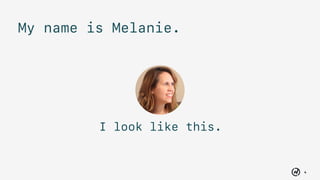
I look like this.
My name is Melanie.
5
Content audits
Content matrices
Style guides
6
Makes apps
7
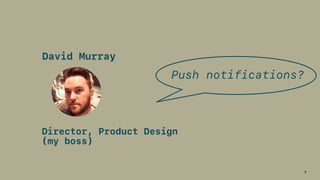
David Murray
Director, Product Design 

(my boss)
Push notifications?
8
???
Me
9
David Murray
Director, Product Design 

(my boss)
App store?
10
???
Me
11
How about you?
12
Apps are different
from web.
13
How do you do
content strategy
for a mobile app?
14
Mobile apps need you.
15
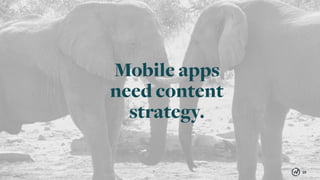
Mobile apps
need content
strategy.
16
Why?
17
Push Notifications
& In-App Messaging04
Re-engage users.
The Golden Age
of Apps?
The Golden Age of Apps?01
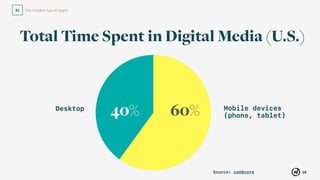
Total Time Spent in Digital Media (U.S.)
Mobile devices
(phone, tablet)
Desktop
Source: comScore
40% 60%
18
The Golden Age of Apps?01
Mobile devices
(phone, tablet)
Desktop
Source: comScore
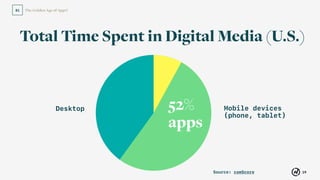
40% 60%52%
apps
Total Time Spent in Digital Media (U.S.)
19
20
“Wow! 

Apps must be taking over.”
21
Not so fast.
The Golden Age of Apps?
22
01
Source: comScore
The Golden Age of Apps?
23
01
The Golden Age of Apps?
24
01
#1
Source: comScore
The Golden Age of Apps?
25
01
Source: comScore
26
Facebook, Google, Apple,
Yahoo, Amazon and eBay
develop 9 of the top 10
most-used apps.
Source: comScore
27
Enter your app…
28
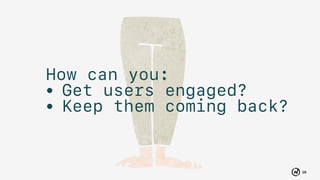
How can you:
• Get users engaged?
• Keep them coming back?
29
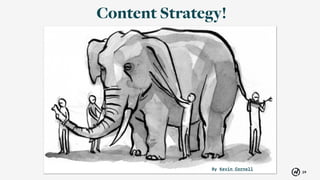
Content Strategy!
By Kevin Cornell
30
Use content strategy
to create an app
people love.
31
Push Notifications02
4 Essential
Components of Mobile
App Content Strategy
32
33
APPS
34
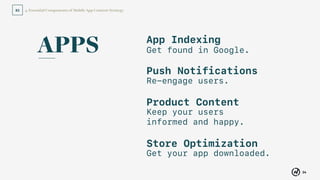
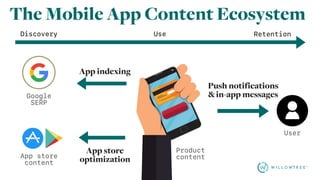
4. Essential Components of Mobile App Content Strategy02
App Indexing
Get found in Google.
Push Notifications
Re-engage users.
Product Content
Keep your users
informed and happy.
Store Optimization
Get your app downloaded.
APPS
35
App Indexing01
Get found in Google.
App Indexing
36
01
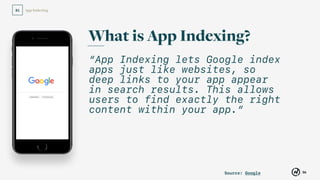
“App Indexing lets Google index
apps just like websites, so
deep links to your app appear
in search results. This allows
users to find exactly the right
content within your app.”
What is App Indexing?
Source: Google
37
Push Notifications02
Example
with app
installed
38
App Indexing01
39
Push Notifications02
Example
without app
installed
40
App Indexing01
41
Push Notifications02
Constraint: You must have
a website with content that
matches the app.
42
App Indexing01
Source: Search Engine Land
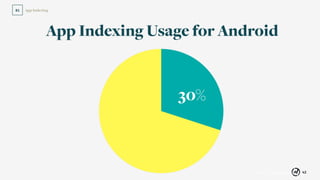
30%
App Indexing Usage for Android
43
App Indexing01
Source: Search Engine Land
30%
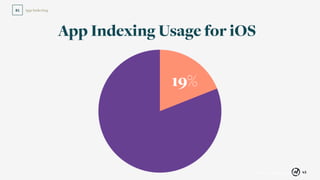
App Indexing Usage for iOS
19%
44
Push Notifications02
Next step?
Talk to your developers.
45
Push Notifications02
Re-engage users.
46
Push Notifications02
47
Push Notifications02
Source: @EricBlattberg | Twitter
48
Push Notifications02
Source: @Babylonian | Twitter
Push Notifications
49
02
“If they don’t receive
messages, only 5% will
continue to use the
app 90 days after
first app open…”
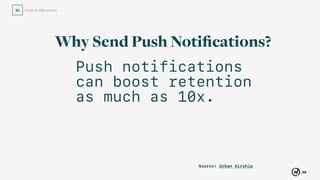
Why Send Push Notifications?
Source: Urban Airship
Push Notifications
50
02
Push notifications
can boost retention
as much as 10x.
Why Send Push Notifications?
Source: Urban Airship
51
Push Notifications02
Send the good kind.
52
Push Notifications02
It starts with collaboration.
53
Push Notifications02
Promotional messages: 

talk to your business
stakeholders.
54
Push Notifications02
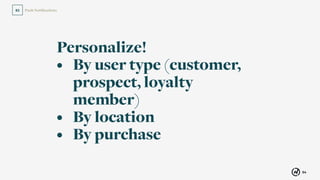
Personalize!
• By user type (customer,
prospect, loyalty
member)
• By location
• By purchase
55
Push Notifications02
Source: Andrew Chen
56
Push Notifications02
Source: Andrew Chen
57
Push Notifications02
Source: Sellbrite
58
Push Notifications02
Informational messages:
talk to your design team.
59
Push Notifications02
Source: Andrew Chen
60
Push Notifications02
Integrate with your
product map
(aka, sitemap).
61
Push Notifications02
All message types:
consult your brand voice
and tone guidelines.
62
Push Notifications02
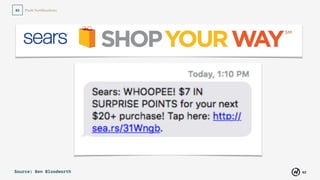
Source: Ben Bloodworth
63
Push Notifications02
Respect the user.
64
Push Notifications02
Provide the ability to turn off
push from inside the app.
65
Push Notifications02
66
Product Content03
In-app messaging and
omnichannel content.
67
Push Notifications
& In-App Messaging04
Re-engage users.
In-App Messages
68
In-App Messages02
What are they?
• Notifications that 

appear inside the app
• Can be a banner or
interstitial page
69
In-App Messages02
Source: Urban Airship
70
In-App Messages02
71
In-App Messages02
Source: Urban Airship
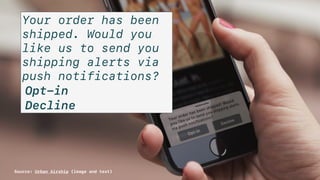
Your order has been
shipped. Would you
like us to send you
shipping alerts via
push notifications?
Opt-in
Decline
Source: Urban Airship (image and text)
72
In-App Messages02
Like push notifications, in-app
messages should be:
• Thoughtful
• Personalized
• Written according to your 

brand voice and tone guidelines
73
In-App Messages02
Use in-app messages in
conjunction with push
notifications to provide
users with a rich experience.
74
Push Notifications
& In-App Messaging04
Re-engage users.
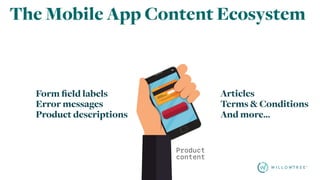
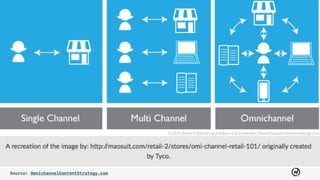
Omnichannel
Content
Form field labels
Error messages
Product descriptions
Articles
Terms & Conditions
And more…
Source: OmnichannelContentStrategy.com
77
Product Content03
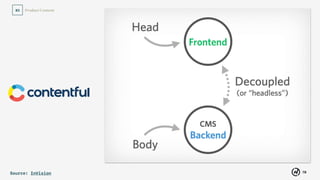
Source: InVision
78
Product Content03
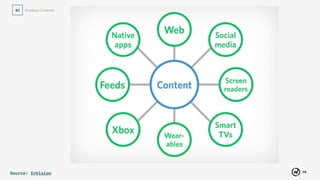
Source: InVision
79
Product Content03
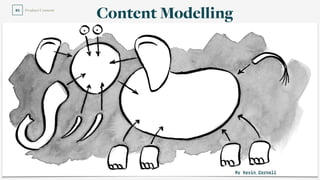
By Kevin Cornell
Content Modelling
80
Push Notifications02
Example
81
Product Content03
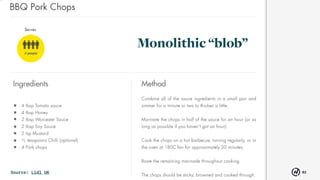
Source: Lidl UK
Monolithic “blob”
82
Product Content03
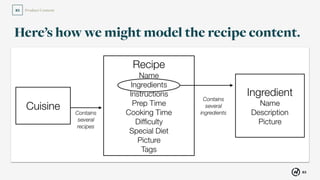
Here’s how we might model the recipe content.
83
Product Content03
So, what does this get us?
84
Product Content03
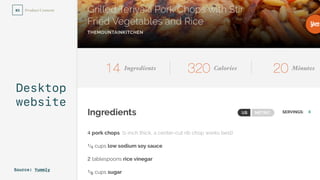
Desktop
website
Source: Yummly
85
Product Content03
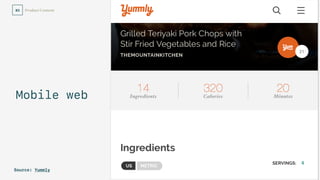
Mobile web
Source: Yummly
86
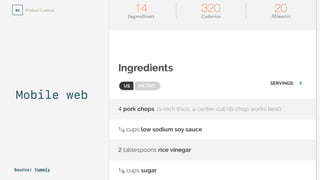
Product Content03
Mobile web
Source: Yummly
87
Product Content03
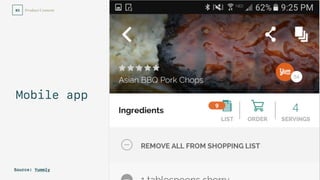
Mobile app
Source: Yummly
88
Product Content03
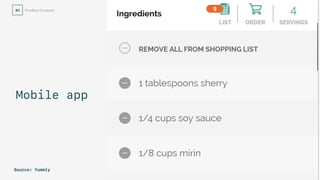
Mobile app
Source: Yummly
Product Content
89
03
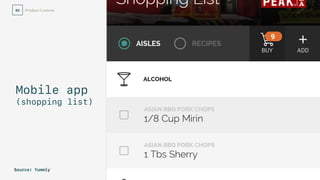
Mobile app
(shopping list)
Source: Yummly
90
Product Content03
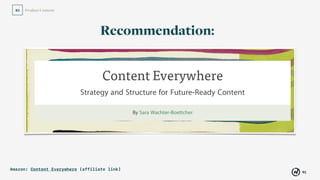
Amazon: Content Everywhere (affiliate link)
Recommendation:
91
Product Content03
Read it in UXPA Magazine.
Mike Atherton Carrie Hane
Recommendation:
92
Store Optimization04
Get your app downloaded.
93
Store Optimization04
App Store Optimization
Like SEO, but for
the app stores.
(search engine optimization)
94
Store Optimization04
Why is it important?
95
Store Optimization04
Why is it important?
47%
Source: TechCrunch
96
Store Optimization04
Why is it important?
Source: TechCrunch
53%
97
Store Optimization04
How do we do it?
98
Push Notifications
& In-App Messaging04
Re-engage users.
1. Keyword research
99
Store Optimization04
Keyword
Tools:
100
Store Optimization04
101
Store Optimization04
102
Store Optimization04
103
Store Optimization04
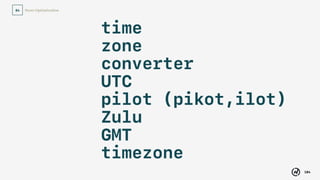
time
zone
converter
UTC
pilot (pikot,ilot)
Zulu
GMT
timezone
104
Store Optimization04
Make sure your
keywords are
relevant to your app.
105
Push Notifications
& In-App Messaging04
Re-engage users.
2. App Store
keywords
106
Store Optimization04
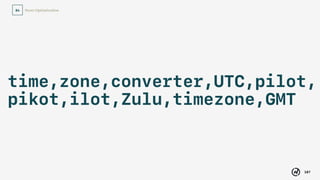
time,zone,converter,UTC,pilot,
pikot,ilot,Zulu,timezone,GMT
107
Push Notifications
& In-App Messaging04
Re-engage users.
3. App name
108
Store Optimization04
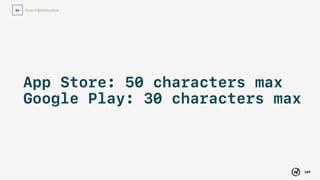
App Store: 50 characters max

Google Play: 30 characters max
109
Store Optimization04
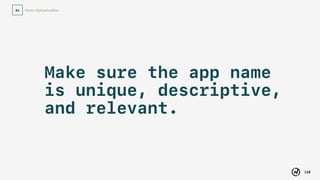
Make sure the app name
is unique, descriptive,
and relevant.
110
Store Optimization04
No keyword stuffing.
111
Push Notifications
& In-App Messaging04
Re-engage users.
4. Description
112
Store Optimization04
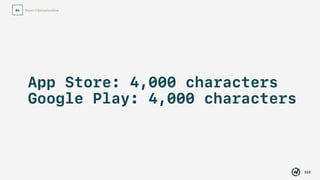
App Store: 4,000 characters

Google Play: 4,000 characters
Store Optimization
113
04
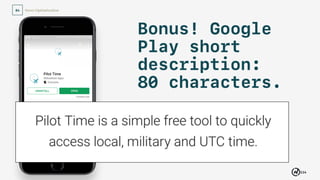
Bonus! Google
Play short
description:
80 characters.
114
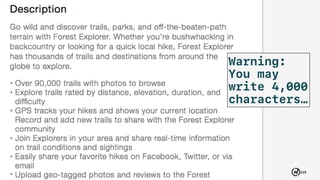
Store Optimization04
Warning:
You may
write 4,000
characters…
115
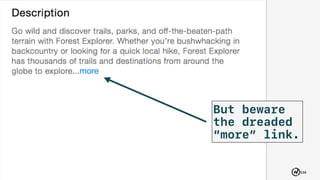
Store Optimization04
But beware
the dreaded
“more” link.
116
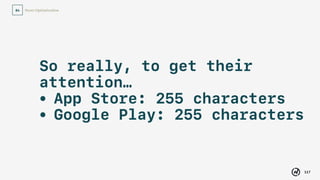
Store Optimization04
So really, to get their
attention…
• App Store: 255 characters
• Google Play: 255 characters
117
Store Optimization04
Be ruthless in your copy.
No filler in the first
255 characters.
118
Store Optimization04
Incorporate keywords.
But no keyword stuffing.
119
Store Optimization04
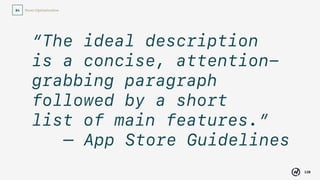
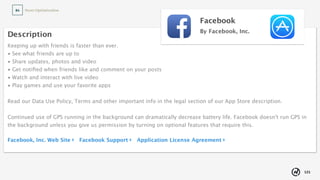
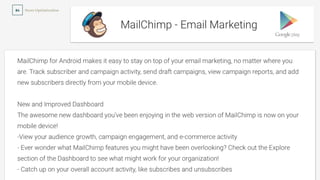
“The ideal description 

is a concise, attention-
grabbing paragraph
followed by a short 

list of main features.”
— App Store Guidelines
120
Store Optimization04
121
Store Optimization04
122
Store Optimization04
123
Store Optimization04
Use your brand’s
messaging architecture.
124
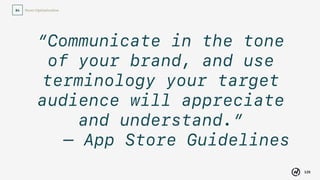
Store Optimization04
“Communicate in the tone
of your brand, and use
terminology your target
audience will appreciate
and understand.”
— App Store Guidelines
125
Push Notifications
& In-App Messaging04
Re-engage users.
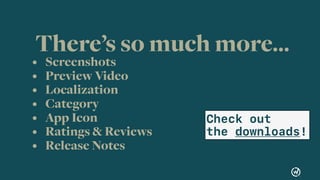
There’s so much more…
• Screenshots
• Preview Video
• Localization
• Category
• App Icon
• Ratings & Reviews
• Release Notes
Check out 

the downloads!
126
Store Optimization04
Q&A
Mobile apps need you. 

Mobile apps need content strategy.
128
Use content strategy
to create an app
people love.
129
Push Notifications02
130
Push Notifications02
Thanks!
131
Push Notifications
& In-App Messaging04
Re-engage users.
Kudos to:
• Jonathon Colman
• Chris Stauffer
• Scott Wolfson
• Jeff Seibert
• Kate Bennis
• Hillary Pitts
• Alicia Midland
• Everyone at WillowTree
132
Push Notifications
& In-App Messaging04
Re-engage users.
Downloads
• App Store Optimization Checklist
• Push Notification Strategy Template
• Resources for Further Reading

The Content Strategist's Guide to Mobile Apps | RVA Content

Editor's Notes

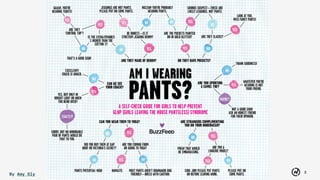
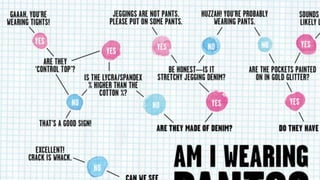
  • #3 I want to talk to you today about pants. We all have pants that we love. You know what I’m talking about. The super-comfortable, terrible-looking kind. You have them, you live in them, you love them. You know it’s true. Some of us love our comfy pants and leggings—a little too much. So much so that BuzzFeed created this infographic to help some of us determine, “Am I wearing pants?” I have definitely seen people out in public who could have benefitted from this graphic. I think this is my favorite part:
  • #4 “Are they made of denim? Be honest—is it stretchy jegging denim? Jeggings are not pants! Please put on some pants.” And in the left top corner, heaven help you if you’re wearing “control top”—“Gaah, you’re wearing tights!” Or on the right: “Do they have pockets? Are the pockets painted on in gold glitter? If so, “sounds suspect—these are likely leggings, not pants.”
  • #5 My name is Melanie Seibert. I am a content strategist. At one time, I was a content strategist working exclusively on the web.
  • #6 I did things like create content audits, manage content matrices for redesign projects, and write style guides.
  • #7 Then, I got hired by WillowTree, a mobile app development agency. We make apps for iOS, Android, and other platforms.
  • #8 One day, my boss David Murray asked me, “Melanie, have you ever worked with push notifications before?”
  • #9 Push notifications? I had never even thought about the fact that someone somewhere was writing the push notifications that I saw on my phone. Was that a thing?
  • #10 Then he said, “Melanie, do you know how to make apps findable in the app store?”
  • #11 Did apps need to be found in the app store? Of course it made sense that they did. And the app stores must have their own search algorithms. But how did they work? I had no clue. I was taken aback. I had no answers because I’d never worked on a mobile app before.
  • #12 Maybe you’re like me. Maybe you’ve work on web projects, and now your boss or someone in your company has decided to make a mobile app. Or maybe you’ll be asked to work on a mobile app in the future.
  • #13 Suddenly, you’ll find yourself working in a completely new world. Because apps are different from the web in some key ways.
  • #14 How do you “do content strategy” for a mobile app? What content do you need to consider? How do you integrate a mobile app into your existing content strategy? In this talk, I want to show you what I’ve learned about content strategy for mobile apps.
  • #15 And here’s the truth: mobile apps NEED you.
  • #16 They need content strategy.
  • #17 Why?
  • #18 If you look at a few statistics, it might look like we’re in the golden age of apps. First, let’s talk about phones.
  • #19 Total activity on smartphones and tablets accounts for 60% of digital media time spent in the U.S. Now, how much of that time do you think we spend on apps?
  • #20 “The fuel driving mobile’s relentless growth is primarily app usage, which alone makes up a majority of total digital media engagement at 52%.” That’s amazing. People spend 52% of their total digital media time using apps, according to comScore.
  • #21 Which led them to state that “apps are the fuel driving mobile growth.”
  • #22 Clearly, apps are winning. They’re taking over all our digital media time.
  • #23 But wait. There’s more to the story.
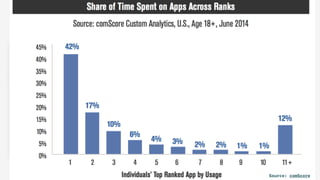
  • #24 It turns out that it’s very difficult to become the “stretchy pants” of apps. MarketingLand interprets the numbers this way: “Because of smartphone memory constraints and the mediocre quality of most apps, users are only going to download and engage with a small fraction of the apps on the market.” How many apps do you think people spend a majority of their time in?
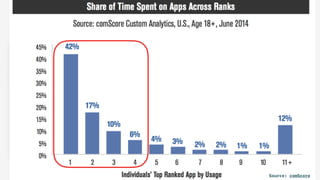
  • #25 Here’s a closer look at the comScore numbers.
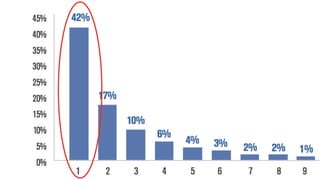
  • #26 A staggering 42 percent of all app time spent on smartphones occurs on the individual’s single most used app.” What do you think is our most-used app in the US?
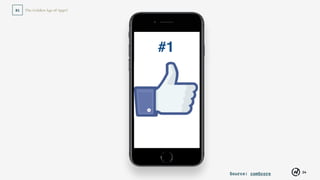
  • #27 Facebook. It happens to be my favorite too. Even though I hid it from my home screen, I go find it and check it several times a day.
  • #28 Not only that, but “Nearly three out of every four minutes of app usage occurs on one of the individual’s top 4 apps.” Let’s think about that. Nearly three out of four minutes are in the user’s top 4 apps.
  • #29 Facebook, Google, Apple, Yahoo, Amazon and eBay develop 9 of the top 10 most-used apps. (So if you work for one of them, nice work!)
  • #30 And here we come, you and I, with our shiny new apps, to try to bust into that user’s top 4! We’re asking users to take precious minutes away from their favorite apps. We want them to take off their favorite stretchy pants, and try our pants! That’s just a little daunting, isn’t it?
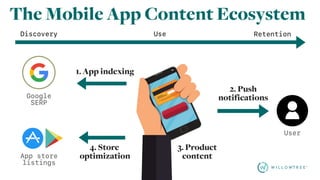
  • #31 So, how do you do it? How do you get users engaged, and keep them coming back to your app? Fortunately, the mobile app content ecosystem has some tools that can help you. For this, you need to integrate your mobile app into your organization’s overall content strategy.
  • #32 With content strategy, of course!
  • #33 You can use content strategy to help you create an app that people love. Almost as much as they love their stretchy pants. How?
  • #35 Remember, we said that mobile is different from web. At its heart, a mobile app is a product. We’ve seen some great talks this week about product content strategy, and how it differs from web content strategy. A mobile app is a subtype of a product, with its own content ecosystem and content considerations. You have to understand this content ecosystem if you’re going to incorporate the mobile app into your overall content strategy.
  • #36 The acronym APPS will help us remember what these 4 areas are.
  • #37 The 4 areas we’re going to focus on are: app indexing push notifications & messaging product content and store optimization Now I’ll explain each of these in more depth.
  • #38 Sometimes we assume that as a product, our app’s content is locked up, away from the reaches of search engines. But that’s not necessarily true. There’s a way for your app’s content to actually be indexable by Google and findable by both new users who have never seen your app, and existing users who have installed your app.
  • #39 This is known as App Indexing, and currently it’s called by the name Firebase App Indexing. What exactly is App Indexing? From Google: “App indexing lets Google index apps just like websites, so deep links to your app appear in search results. This allows users to find exactly the right content within your app.”
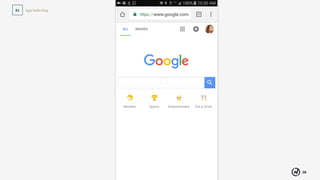
  • #40 Let’s look at an example. Say I do a google search for the Netflix show called “A Series of Unfortunate Events.”
  • #41 Let’s look at an example. Say I do a google search for the Netflix show called “A Series of Unfortunate Events.”
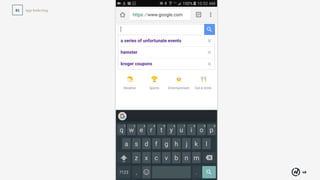
  • #42 But app indexing also lets your app show up in search results when the user DOESN’T have your app installed.
  • #43 Here’s an example. I search for “Kroger coupons” to find coupons at a popular grocery store where I live. Google lists the app in the search results, along with an “install” button. I click “install,” go to the Google Play store and install the app.
  • #44 One limitation of app indexing is that it only works if you have a website with content that matches your app. So for IMDB and Netflix, it works great. If you have a standalone app and no website, it will not work, as of today. Expect this to change in the future (good news for apps without corresponding sites).
  • #45 App indexing isn’t exactly brand new - it’s been around since October 2013. So why do I bring it up? Well, a tiny fraction of apps are using it - just 30% of Android apps
  • #46 App indexing isn’t exactly brand new - it’s been around since October 2013. So why do I bring it up? Well, a tiny fraction of apps are using it - just 30% of Android apps
  • #47 App indexing is done in the code, so it’s not something that we as content creators and strategists can do on our own. But, as content strategists, we should know about it, so we can make sure our teams take it into account during development. So now you know!
  • #48 Most of us know what push notifications are. They can be useful, like in the case of Lyft telling you that your car is arriving, or your bank telling you that your deposit posted.
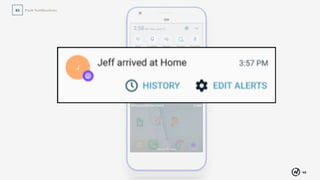
  • #49 Here’s a push from Life 360, an app that tells you where your family members are (kind of like Find My Friends on iPhone). It tells me my husband made it home. I’m happy to get these kinds of notifications.
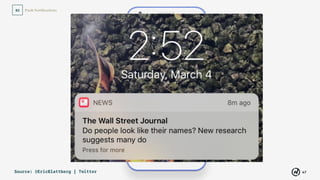
  • #50 Some are less than useful, like this notification from the Wall Street Journal, telling us about new research suggesting many people “look like their names.” This type of notification is trivial and squanders the user’s time and attention— two resources that we have far too little of these days.
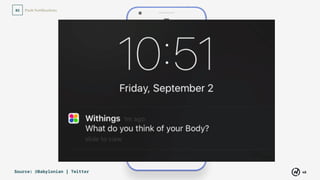
  • #51 Or this notification from activity tracking app Withings, which says, “What do you think of your body?” There’s no point or call to action to this notification. I don't learn anything and can’t see that I should do anything with it.
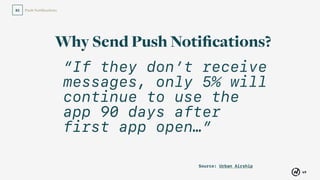
  • #52 It’s almost enough to make you think, maybe we just shouldn’t send them. Why should we send push notifications at all? Well, lest we assume all push is bad, take a look at this research by Urban Airship (a push messaging platform) which found that apps that don’t use push at all, retention will drop to 5% in the first 90 days. That means 95% of users will not open the app again. Ouch!
  • #53 On the other hand, retention rates were much higher when apps did send push notifications. So it’s clear that, while we might be taking a risk by sending push notifications, we’d be taking a far greater risk not to send them.
  • #54 So if we’re going to send push notifications, we want to send “the good kind.” So how do we create the good kind of push notification?
  • #55 It starts with collaboration with your team.
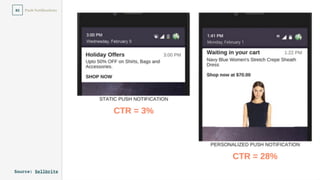
  • #56 First, talk to your business stakeholders — your marketing and product teams — so you know the business goals. What messaging makes sense to send? What actions in the app do you want to prompt? In a blog post I wrote about this topic, I used the example of a banking client who might want to promote a new type of savings account. The question is, is the account meant for existing customers (who would have the bank’s app), or is it a product designed for new customers (who wouldn’t have the app)? Your business stakeholders will know answers to questions like these.
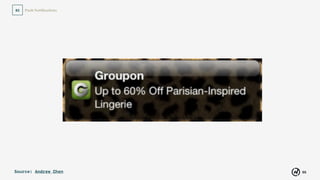
  • #58 So is this a good push notification or a bad one? Well, it depends on who it’s going to. This notification went to a man with no interest in lingerie.
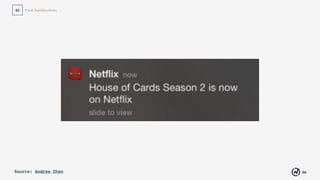
  • #59 Netflix does a great job noting what their users’ interests are and tailoring messaging to them. This notification went to a person who watches house of cards.
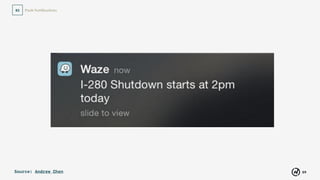
  • #61 The most useful messages we saw were the transactional or informational messages: Your Uber is arriving now, Your transaction just posted, Your daughter arrived home safely. In order to really know which events should trigger a transactional notification, you have to talk to your designers and user experience team, who should know what events in the product people will want to be notified about.
  • #62 Again, personalization and locally targeted messages make the notification even more relevant to the user.
  • #63 You know what sitemaps are, right? For a website, they tell you which pages exist and how they relate to each other. Well, the same thing exists for an app, but it’s called a product map. You have to have a product map in order to know which app screens your notification will drive traffic to. For the banking example, we could create a notification that tells a user their certificate of deposit is expiring, so they can renew it. But if they can’t renew the CD in the app, we will need to adjust the call to action—or probably more likely, contact them a different way, like through email.
  • #64 And when it comes time to write your notifications, your overall company content strategy comes into play. Make sure to reference your voice and tone guidelines, Margot Bloomstein calls it a messaging architecture. It tells you whether your tone is friendly or formal, for example. If you don’t have these guidelines, here’s a perfect time to create them.
  • #65 This is actually not a push notification, but a chat message sent from Sears to a co-worker of mine who frequently buys Craftsman tools and is in their loyalty program. In this instance, the buyer of tools wasn’t really impressed or engaged by Sears saying “WHOOPEE!”.
  • #66 Above all, you have to respect the user.
  • #67 You have to let them turn off push notifications from inside the app. I know I said I wasn’t going to talk about product content, but this is one really important exception.
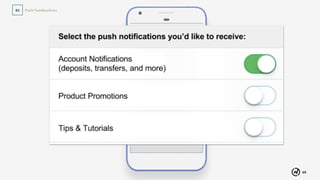
  • #68 Forrester reports that giving users a preference center builds trust with your brand. And perhaps more critically to your business and stakeholders, it can prevent a user who’s frustrated from uninstalling the app completely. Here’s an example of what a simple preference center might look like for a bank. Divide notifications into types, and give the users some level of control over the messaging they receive. That way, a user who doesn’t mind re-engaging with your brand but only wants certain types of notifications isn’t left with no alternative but to either turn off push at the OS level, or uninstall completely.
  • #69 Now product content is a huge arena, and we can’t cover all of it today. We’ve already seen some really great talks about product content strategy. There are just 2 product content considerations that i want you to know about for your mobile app: in-app messaging and omnichannel content.
  • #70 Now, we just learned that push notifications—when done well—are great for re-engaging users. But, as we alluded to just now, users can, and some users will, opt out of them. What if you have new features or useful information about your app that you’d like to send to all users? There’s a way to do to reach all your active users which is actually less intrusive than a push notification. It’s called an in-app message.
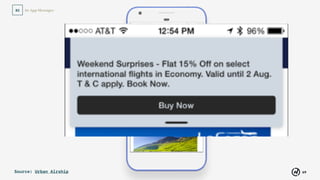
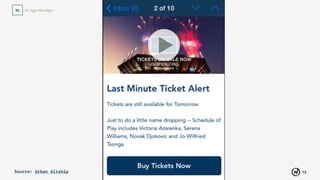
  • #72 Here’s an example of a banner-style in-app message. This is a promotional one, telling a user about a discounted airline fare. But in-app messages also work well for informing the user about a transaction.
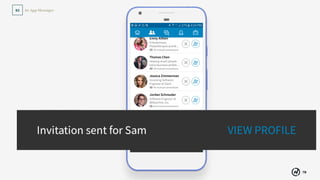
  • #73 LinkedIn uses in-app messages to let you know that your action was completed, in this case sending a connection request. Notice that it includes a call to action, to view the person’s profile.
  • #74 Now this app also has a banner-style in-app message, which is difficult to read. It also includes calls to action. So here’s an example where the app took the opportunity to message the user about a transaction, and at the same time give them a chance to receive push notifications they might actually find useful.
  • #75 And here’s an interstitial-style in-app message. This is also a promotion. Note too, that just like push notifications, these messages don’t have to be just text. You can include images, video, and emojis in both message types.
  • #77 When your users receive the right amount of content at the right time, and it’s valuable to them, they’re more likely to continue to use your app. Now let’s try something different for a minute. I want to take us out of the app, away from specific channels, and zoom out to a high-level overview of the app, and how it fits into our overall content strategy.
  • #78 Now I want to take a second to address the content that appears in your app. This is probably the content that we think about first, because it’s a part of our product. And it’s definitely the BIGGEST chunk of content. So we won’t be able to cover it all. Mainly I want to talk about what happens when you have content that you want to bring into the app from a website or other content channel.
  • #79 I’m talking about things like form field labels, error messages, product descriptions, articles, terms and conditions—any content that appears in the app itself. So if we have content that appears on web AND on our apps, how do we do that?
  • #80  This is what we call ‘omnichannel’ content, because it needs to be able to appear in all channels. And preferably it would be reusable, so that we can manage it from one place, rather than duplicating it in a separate content management system for each channel.
  • #81 At WillowTree, the type of content management system we prefer to use is called a “Headless” CMS. And our headless CMS of choice is Contentful, though there are others out there, like Prismic. And you can also use Drupal this way. This allows us to store our content in a kind of database, or as an API, and the front end reaches out to grab whatever content it needs. It also separates content from the presentation. So each platform can have its own design, and the content can adapt to it.
  • #82 So the same repository of content can feed into any number of front ends - from a website, to native mobile apps, to wearables, even smart TVs.
  • #83 In order for content to work across devices this way, it must be stored in the CMS in a particular way, in small, modular pieces (or chunks), rather than huge monolithic pages or blobs. We call the process of “chunking” our content “content modelling,” and Rachel Lovinger has written about it at length.
  • #84 Why don’t we look at an example?
  • #85 Here’s an example of a recipe from a grocery store in the UK. It appears that the entire page is stored as a monolithic content blob. Nothing here is clickable, or would give any indication that it could stand on its own. For example, if I want to see other recipes that serve 4 people, I can’t click on the image here to see them. Or if I want to learn more about the tomato sauce I should use, too bad! I can’t click the ingredients.
  • #86 We could chunk up the content this way, so that for example, each ingredient is stored separately in the CMS. That way, we can later find recipes by ingredients. Same with all these facets here, like difficulty or cook time.
  • #88 Look at these ingredients. Are they all stored as one monolithic blob?
  • #89 Now let’s look at the mobile web.
  • #90 Also take a look at the servings.
  • #91 So you see how the content is flexible—it can appear in different ways on each paltform, however the designer wants it to appear. This frees it to be used on devices that haven’t even been invented yet.
  • #92 You can even add each ingredient to a separate shopping list. You can’t do that with a blob.
  • #93 Each ingredient is its own content object, with its own metadata (the category, like alcohol), which can be added to the list.
  • #94 Several others have addressed omnichannel in much more detail than I could do today. If you want to learn more about omnichannel content, I highly recommend the book Content Everywhere by Sara Wachter-Boettcher. I would name Jeff Eaton, Noz Urbina, Cleve Gibbon, Rachel Lovinger, and Carrie Hane among them. If you’re interested in that, I will include a slide at the end of the presentation that points you to more resources.
  • #95 And I also highly recommend the article Future-Friendly Content by Mike Atherton and Carrie Hane. I could also name Jeff Eaton, Noz Urbina, Cleve Gibbon, and Rachel Lovinger among those who do a great job explaining how to structure content for omnichannel. If you’re interested in that, I will include a slide at the end of the presentation that points you to more resources.
  • #96 I’m calling this section Perspective, because (for one thing it starts with “P”, and I needed to spell APPS) but also because it’s a way for us to understand whether and how our app fits in with the rest of our publication channels.
  • #97 You’ve heard about SEO, right? Search engine optimization for the web search engines, like Google? Did you know that the app stores (Apple app store and Google Play store for Android) have their own search algorithms? That means that each store has a completely separate search ecosystem from the normal web search engine optimization you’ve heard about. And you have to take search into account for your apps.
  • #98 You’ve heard about SEO, right? Search engine optimization for the web search engines, like Google? Did you know that the app stores (Apple app store and Google Play store for Android) have their own search algorithms? That means that each store has a completely separate search ecosystem from the normal web search engine optimization you’ve heard about. And you have to take search into account for your apps.
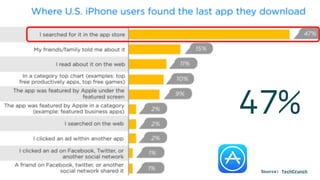
  • #99 Techcrunch reported that 47% of iPhone users found their most recently downloaded app through store search.
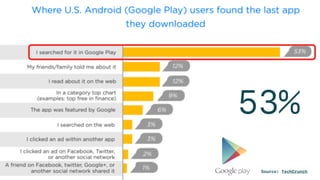
  • #100 Techcrunch reported that 53% of Android users found their most recently downloaded app through searching Google Play.
  • #101 OK, so we know that app store optimization is important! So how do we do it? We could probably spend an entire day talking JUST about app store content! So I’m going to give you a brief how-to, letting you know the main content to work on, so that you can maximize your downloads. And as part of this presentation you’ll get a free checklist to help you when you go to release your app in the App Store or Google Play. Ready?
  • #102 Step 1: Much like with SEO, you start with keyword research. Fortunately, there are several tools to help you see what keywords your competitors are ranking for. And, once you launch, you’ll have access to that data for your app as well.
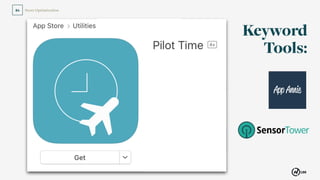
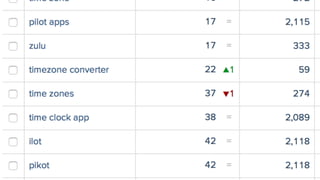
  • #103 Let’s see how people find one of our apps, Pilot Time. Pilot Time is an internal project created by our company founder, who also happens to be an aviation enthusiast. To pilots, always knowing what time it is in UTC (a universal time standard that happens to coordinate with Greenwich Mean Time) is essential. But our founder had trouble making the conversion in his head. We use a tool called App Annie, but you can also use Sensor Tower. App Annie has a free view that will show you the top keywords that people actually used to find any app.
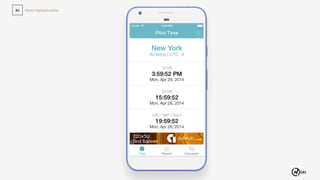
  • #104 Pilot Time is a super-simple solution to that problem. All it does is show the time in your current time zone (here you see 12-hour and 24-hour formats), plus UTC, and whatever other time zones you select. That’s it. Because Pilot Time has been in the app stores for a few years, App Annie’s free tool can give us some useful keyword ideas. So we can see if the keywords we’re currently targeting line up with what users are using to discover the app.
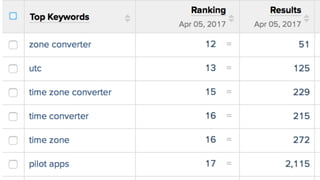
  • #105 Here’s a snapshot of the top search keywords for Pilot Time in the App Store. It looks like “zone converter” is the top keyword this month, good to know. And UTC is a much higher ranking search term than Zulu (which is another term for Greenwich Mean Time).
  • #106 GMT doesn’t even appear in the top keywords. (It comes in much further down the list.) If Pilot Time were a brand new app, we’d do this same process with a similar app.
  • #107 GMT doesn’t even appear in the top keywords. (It comes in much further down the list.) If Pilot Time were a brand new app, we’d do this same process with a similar app.
  • #108 So make sure that your keywords are relevant. Even if you rank high for a given keyword, that doesn’t mean you should optimize for it. Optimizing for “radar” might help us boost downloads for Pilot Time, but it would result in a lot of uninstalls and unhappy users.
  • #109 Step 1: Much like with SEO, you start with keyword research. Fortunately, there are several tools to help you see what keywords your competitors are ranking for. And, once you launch, you’ll have access to that data for your app as well.
  • #110 Now, the Apple App Store is the only one that actually lets you input meta keywords, and you get 100 characters, including spaces. So the best way to format your keywords is like this. Because we had some extra room, I went ahead and included typos. We don’t know if that will really help but I don’t think it’ll hurt. Now you’ll notice that I did include GMT because even though it didn’t have high search volume, it is relevant, and we had room in our keywords. I didn’t include terms like “flight status” or “radar” which likewise appeared lower in search results, because they don’t accurately describe what Pilot Time does.
  • #111 Step 3: Use those keywords to create your app’s name for the store.
  • #113 Sometimes the name is obvious, like with Facebook, or you can name the app after your business. An app like Pilot Time is different. In our case, Pilot Time works because it’s: unique descriptive relevant - doesn’t promise anything other than what it delivers!
  • #114 Both Apple and Google discourage you from stuffing keywords in the title and descripton.
  • #115 Step 4: Write the app description Remember your keywords? We’ll be going back to those again for the app’s description.
  • #117 Now for Android only, there’s an additional Short Description field, 80 characters long, in the Google Play store.
  • #118 Though you may write 4,000 characters,
  • #119 The dreaded “more” link will hide most of it. That means
  • #120 You really have 255 characters to engage the user and get their interest.
  • #121 How to write a great app store description? Have you ever heard the adage that with web copy, you should write your page, edit out half the words, then edit out half the words again? This is similar. Be ruthless. No filler in the first 255 characters.
  • #122 Incorporate your keywords — but no keyword stuffing. That could get you penalized.
  • #127 Be sure to consult your brand’s messaging architecture to make sure the description fits with voice and tone guidelines.
  • #128 If you don’t have brand guidelines, consult Margot Bloomstein’s Content Strategy at Work.
  • #129 There’s so much more to your app store listing that we just don’t have time to talk about today. Look in the download for pointers on taking care of each of these elements of a good app store listing. Each one can really affect your app’s discoverability and user acquisiton.
  • #130 So I’ve taken you on a whirlwind tour of app content strategy. I’m going to leave you with a thought in a moment, but first, what questions do you have?
  • #131 Before I leave, I want to remind you that mobile apps need you. Mobile apps need content strategy.
  • #132 I hope this talk has helped you to understand, and inspired you to explore, the mobile app content ecosystem, so that you can help make the “stretchy pants” of mobile apps.
  • #133 I hope this talk has helped you to understand, and inspired you to explore, the mobile app content ecosystem, so that you can help make the “stretchy pants” of mobile apps.
  • #134 I hope this talk has helped you to understand, and inspired you to explore, the mobile app content ecosystem, so that you can help make the “stretchy pants” of mobile apps.