Downloaded 338 times
![What the [ ] is “The Cloud”?
Joel Kline, Ph.D., APR
Professor of Digital Communication
Lebanon Valley College](https://image.slidesharecdn.com/1a78e152-77ee-4f9c-ab69-c0aa6a3fb1f6-161008161249/85/The-Cloud-Presentation-2016-1-320.jpg)
![What the [ ] is “The Cloud”?
Joel Kline, Ph.D., APR
Professor of Digital Communication
Lebanon Valley College](https://image.slidesharecdn.com/1a78e152-77ee-4f9c-ab69-c0aa6a3fb1f6-161008161249/75/The-Cloud-Presentation-2016-1-2048.jpg)
![What
The
[ ? ]
What’s in this Presentation?
1. Definition of The Cloud
2. Rent vs. Buy Model
3. Types of Cloud Services
4. Benefits of The Cloud
5. How Consumers use The Cloud
6. How Businesses Use the Cloud
7. Takeaways](https://image.slidesharecdn.com/1a78e152-77ee-4f9c-ab69-c0aa6a3fb1f6-161008161249/85/The-Cloud-Presentation-2016-2-320.jpg)
![What
The
[ ? ]
Do These Definitions Clarify It?
• "Clouds are vast resource pools with on-demand resource allocation”
(Pritzker).
• "The ‘Cloud’ concept is finally wrapping peoples’ minds around what is
possible when you leverage web…infrastructure…in an on-demand way.
“Managed Services”, “ASP”, “Grid Computing”, “Software as a Service”,
“Platform as a Service”, “Anything as a Service”… all terms that couldn’t
get it done. Call it a “Cloud” and everyone goes bonkers. Go figure"
(Edwards).
• “Cloud computing enables companies to consume compute resources as a
utility -- just like electricity -- rather than having to build and maintain
computing infrastructures in-house” (Rouse).](https://image.slidesharecdn.com/1a78e152-77ee-4f9c-ab69-c0aa6a3fb1f6-161008161249/85/The-Cloud-Presentation-2016-3-320.jpg)
![What
The
[ ? ]
Still Confused?
• The Cloud is actually a term that is more accurately termed Cloud
Computing.
• Cloud Computing refers to computing that is done on servers or
devices accessed over the Internet
• Cloud Computing is ubiquitous and distributed as long as you have
an Internet connection
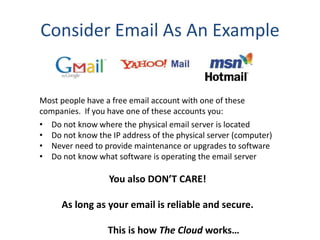
• The physical location your data and programs is unknown (and
immaterial)
• As a user, you typically connect to cloud computing through a web
browser
• To be accurate, not all Cloud services are computing. For example
Dropbox is simply for storage. But there is computing happening on
DropBox’s end to facilitate this storage function](https://image.slidesharecdn.com/1a78e152-77ee-4f9c-ab69-c0aa6a3fb1f6-161008161249/85/The-Cloud-Presentation-2016-4-320.jpg)
![What
The
[ ? ]
Types of Cloud Service*
• Storage
• Database
• Information processing
• Application
• Platform
• Integration
• Security
• Management/governance
• Testing
• Infrastructure
*As developed by David Linthicum](https://image.slidesharecdn.com/1a78e152-77ee-4f9c-ab69-c0aa6a3fb1f6-161008161249/85/The-Cloud-Presentation-2016-11-320.jpg)
![What
The
[ ? ]
Common Models
• Software as a Service: SaaS is when software
is run on the Internet and not from your
computer.
• Platform as a Service: PaaS provides a
platform for you to deploy software or virtual
computers.
• Infrastructure as a Service: IaaS provides
computers, storage, databases and other
types of infrastructure components.](https://image.slidesharecdn.com/1a78e152-77ee-4f9c-ab69-c0aa6a3fb1f6-161008161249/85/The-Cloud-Presentation-2016-12-320.jpg)
![What
The
[ ? ]
Benefits of Cloud Computing
• Elasticity - system automatically handles
supply and demand issues
• Scalability - system permits you to scale
resources to match your organization
• Utility model - you pay for units (e.g.
computing, storage) as you use them
• Low barriers to entry – no large initial
investment in infrastructure components](https://image.slidesharecdn.com/1a78e152-77ee-4f9c-ab69-c0aa6a3fb1f6-161008161249/85/The-Cloud-Presentation-2016-13-320.jpg)
![What
The
[ ? ]
The Cloud is Device Independent
Since most assets are accessed via apps or
browsers, there is a large amount of device
independence.](https://image.slidesharecdn.com/1a78e152-77ee-4f9c-ab69-c0aa6a3fb1f6-161008161249/85/The-Cloud-Presentation-2016-14-320.jpg)
![What
The
[ ? ]
Growing uses for SMBs
Microsoft surveyed small and medium
businesses (SMBs) and found that in the
next three years those SMBs paying for
cloud services will be using 3.3 services, up
from fewer than two services today.](https://image.slidesharecdn.com/1a78e152-77ee-4f9c-ab69-c0aa6a3fb1f6-161008161249/85/The-Cloud-Presentation-2016-15-320.jpg)
![What
The
[ ? ]
SMB Examples
• CRM (Salesforce.com)
• Storage (Dropbox)
• Email (Gmail for your company.com)
• Accounting (Quicken.com)
• Marketing (Hootsuite)
• Project Management (Basecamp)
• Collaboration (Huddle)
• Helpdesk and Support (ZenDesk)](https://image.slidesharecdn.com/1a78e152-77ee-4f9c-ab69-c0aa6a3fb1f6-161008161249/85/The-Cloud-Presentation-2016-16-320.jpg)
![What
The
[ ? ]
Consumers already use The Cloud](https://image.slidesharecdn.com/1a78e152-77ee-4f9c-ab69-c0aa6a3fb1f6-161008161249/85/The-Cloud-Presentation-2016-17-320.jpg)
![What
The
[ ? ]
Revenue Models - Consumer Cloud
• Often free applications in exchange for
advertising
• Privacy invasion and selling of personal data
• Targeted and untargeted marketing
• Reliability is good but no accountability if
service is free
• Services not reliant on adverting charge a
subscription fee](https://image.slidesharecdn.com/1a78e152-77ee-4f9c-ab69-c0aa6a3fb1f6-161008161249/85/The-Cloud-Presentation-2016-18-320.jpg)
![What
The
[ ? ]
Revenue Models – Business Cloud
• Often charge a flat subscription fee
• Or charge for each person using the service (per
seat)
• Pay-as-you-go
• No advertising
• No privacy invasion
• High Reliability – Accountability from subscription
• Security and compliance issues may arise from
offsite data](https://image.slidesharecdn.com/1a78e152-77ee-4f9c-ab69-c0aa6a3fb1f6-161008161249/85/The-Cloud-Presentation-2016-19-320.jpg)
![What
The
[ ? ]
Some Popular Business Cloud Apps:](https://image.slidesharecdn.com/1a78e152-77ee-4f9c-ab69-c0aa6a3fb1f6-161008161249/85/The-Cloud-Presentation-2016-20-320.jpg)
![What
The
[ ? ]
Take Aways
• The Cloud and Cloud Computing lets you purchase
reliable, state-of-the-art technology as a subscription
• The Cloud lets you scale services
• The Cloud puts the burden of upgrade, maintenance,
and security on the vendor.
• Even an SMB can benefit from having cloud computing
companies run your technology systems
• Security, compliance, and governance (e.g. HIPAA) can
still be an issue](https://image.slidesharecdn.com/1a78e152-77ee-4f9c-ab69-c0aa6a3fb1f6-161008161249/85/The-Cloud-Presentation-2016-21-320.jpg)

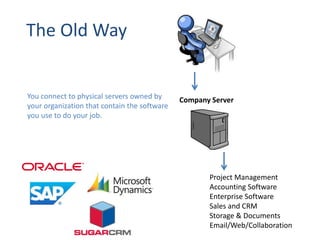
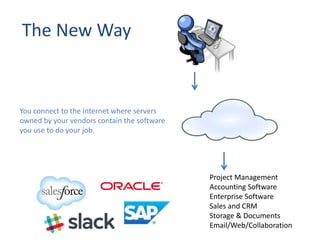
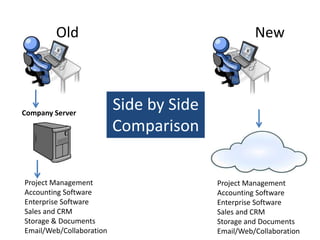
This document defines and explains cloud computing. It begins by defining cloud computing as computing done on servers accessed over the internet, with users connecting through a web browser without knowing the physical location of data or programs. It then discusses different types of cloud services and models including SaaS, PaaS, and IaaS. The document outlines key benefits of cloud computing such as scalability, low upfront costs, and reduced maintenance burden. It also provides examples of how consumers and businesses utilize cloud computing applications and services.


![What the [bleep] is "The Cloud'?](https://cdn.slidesharecdn.com/ss_thumbnails/thecloudpresentation-120202081923-phpapp02-thumbnail.jpg?width=640&height=640&fit=bounds)


