
Business
    Needs?
    Business
    PCs.


1
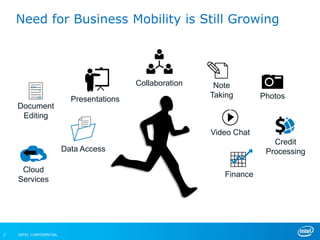
Need for Business Mobility is Still Growing


                                           Collaboration    Note
                                                           Taking       Photos
                           Presentations
    Document
     Editing

                                                           Video Chat
                                                                           Credit
                         Data Access                                     Processing

     Cloud
                                                              Finance
    Services


2   INTEL CONFIDENTIAL
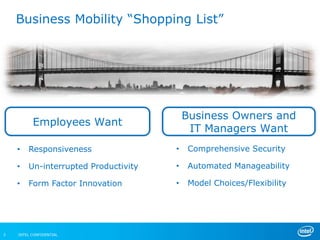
Business Mobility ―Shopping List‖


                                          Business Owners and
          Employees Want
                                           IT Managers Want
    •   Responsiveness                •    Comprehensive Security

    •   Un-interrupted Productivity   •    Automated Manageability

    •   Form Factor Innovation        •    Model Choices/Flexibility


3   INTEL CONFIDENTIAL
4

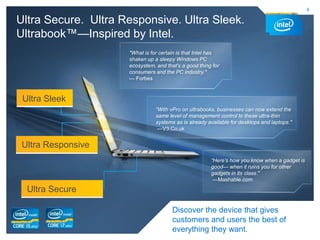
Ultra Secure. Ultra Responsive. Ultra Sleek.
Ultrabook™—Inspired by Intel.
                     "What is for certain is that Intel has
                     shaken up a sleepy Windows PC
                     ecosystem, and that’s a good thing for
                     consumers and the PC industry."
                     — Forbes


 Ultra Sleek
                                “With vPro on ultrabooks, businesses can now extend the
                                same level of management control to these ultra-thin
                                systems as is already available for desktops and laptops."
                                 —V3.Co.uk


 Ultra Responsive
                                                       “Here’s how you know when a gadget is
                                                       good— when it ruins you for other
                                                       gadgets in its class."
                                                        —Mashable.com

  Ultra Secure

                                       Discover the device that gives
                                       customers and users the best of
                                       everything they want.
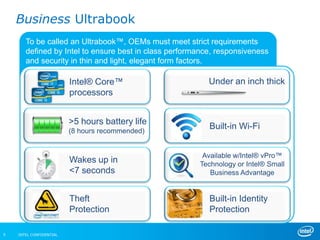
Business Ultrabook
       To be called an Ultrabook™, OEMs must meet strict requirements
       defined by Intel to ensure best in class performance, responsiveness
       and security in thin and light, elegant form factors.

                         Intel® Core™                     Under an inch thick
                         processors


                         >5 hours battery life
                         (8 hours recommended)
                                                          Built-in Wi-Fi


                                                        Available w/Intel® vPro™
                         Wakes up in                   Technology or Intel® Small
                         <7 seconds                       Business Advantage


                         Theft                            Built-in Identity
                         Protection                       Protection

5   INTEL CONFIDENTIAL
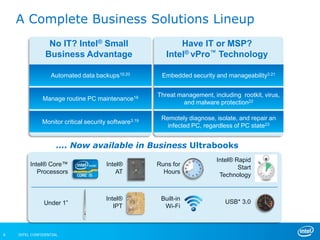
A Complete Business Solutions Lineup
                 No IT? Intel® Small                          Have IT or MSP?
                Business Advantage                        Intel® vPro™ Technology

                  Automated data backups19,20           Embedded security and manageability3.21


                                                       Threat management, including rootkit, virus,
               Manage routine PC maintenance19
                                                                and malware protection22

                                                        Remotely diagnose, isolate, and repair an
              Monitor critical security software3.19
                                                          infected PC, regardless of PC state23


                     …. Now available in Business Ultrabooks
                                                                            Intel® Rapid
         Intel® Core™                  Intel®          Runs for
                                                                                    Start
            Processors                     AT            Hours
                                                                             Technology


                                       Intel®           Built-in
               Under 1”                                                        USB* 3.0
                                          IPT            Wi-Fi


6   INTEL CONFIDENTIAL
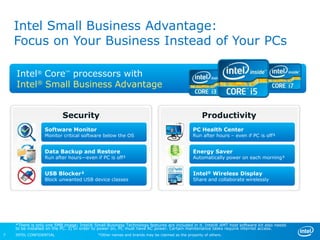
Intel Small Business Advantage:
    Focus on Your Business Instead of Your PCs

    Intel® Core™ processors with
    Intel® Small Business Advantage


                          Security                                                               Productivity
                  Software Monitor                                                          PC Health Center
                  Monitor critical software below the OS                                    Run after hours – even if PC is off³


                  Data Backup and Restore                                                   Energy Saver
                  Run after hours—even if PC is off³                                        Automatically power on each morning³


                  USB Blocker²                                                              Intel® Wireless Display
                  Block unwanted USB device classes                                         Share and collaborate wirelessly


    *There is only one 5MB image; Intel® Small Business Technology features are included in it. Intel® AMT host software kit also needs
    to be installed on the PC. 3) In order to power on, PC must have AC power. Certain maintenance tasks require internet access.
7   INTEL CONFIDENTIAL                     *Other names and brands may be claimed as the property of others.
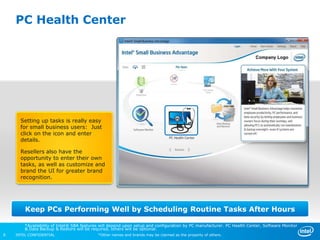
PC Health Center


      Setting up tasks is really easy
      for small business users: Just
      click on the icon and enter
      details.

      Resellers also have the
      opportunity to enter their own
      tasks, as well as customize and
      brand the UI for greater brand
      recognition.


        Keep PCs Performing Well by Scheduling Routine Tasks After Hours

        *Availability of Intel® SBA features will depend upon setup and configuration by PC manufacturer. PC Health Center, Software Monitor
        & Data Backup & Restore will be required, others will be optional.
8   INTEL CONFIDENTIAL                     *Other names and brands may be claimed as the property of others.
Intel SBA Demo
                         (run in slide show mode)


9   INTEL CONFIDENTIAL   *Other names and brands may be claimed as the property of others.
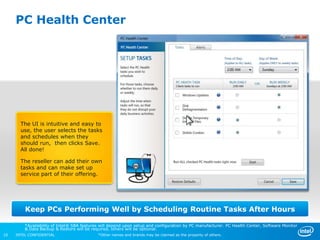
PC Health Center


       The UI is intuitive and easy to
       use, the user selects the tasks
       and schedules when they
       should run, then clicks Save.
       All done!

       The reseller can add their own
       tasks and can make set up
       service part of their offering.


         Keep PCs Performing Well by Scheduling Routine Tasks After Hours

         *Availability of Intel® SBA features will depend upon setup and configuration by PC manufacturer. PC Health Center, Software Monitor
         & Data Backup & Restore will be required, others will be optional.
10   INTEL CONFIDENTIAL                     *Other names and brands may be claimed as the property of others.
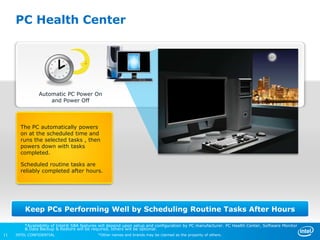
PC Health Center


               Automatic PC Power On
                   and Power Off


       The PC automatically powers
       on at the scheduled time and
       runs the selected tasks , then
       powers down with tasks
       completed.

       Scheduled routine tasks are
       reliably completed after hours.


         Keep PCs Performing Well by Scheduling Routine Tasks After Hours

         *Availability of Intel® SBA features will depend upon setup and configuration by PC manufacturer. PC Health Center, Software Monitor
         & Data Backup & Restore will be required, others will be optional.
11   INTEL CONFIDENTIAL                     *Other names and brands may be claimed as the property of others.
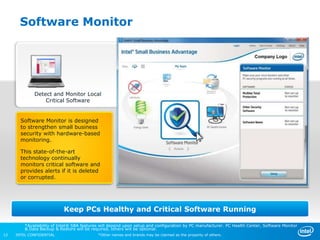
Software Monitor


             Detect and Monitor Local
                 Critical Software


       Software Monitor is designed
       to strengthen small business
       security with hardware-based
       monitoring.

       This state-of-the-art
       technology continually
       monitors critical software and
       provides alerts if it is deleted
       or corrupted.


                           Keep PCs Healthy and Critical Software Running

         *Availability of Intel® SBA features will depend upon setup and configuration by PC manufacturer. PC Health Center, Software Monitor
         & Data Backup & Restore will be required, others will be optional.
12   INTEL CONFIDENTIAL                     *Other names and brands may be claimed as the property of others.
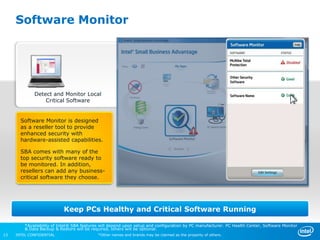
Software Monitor


             Detect and Monitor Local
                 Critical Software


       Software Monitor is designed
       as a reseller tool to provide
       enhanced security with
       hardware-assisted capabilities.

       SBA comes with many of the
       top security software ready to
       be monitored. In addition,
       resellers can add any business-
       critical software they choose.


                           Keep PCs Healthy and Critical Software Running

         *Availability of Intel® SBA features will depend upon setup and configuration by PC manufacturer. PC Health Center, Software Monitor
         & Data Backup & Restore will be required, others will be optional.
13   INTEL CONFIDENTIAL                     *Other names and brands may be claimed as the property of others.
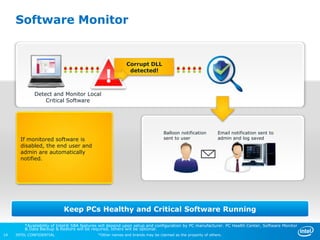
Software Monitor


                                                          Corrupt DLL
                                                           detected!


             Detect and Monitor Local
                 Critical Software


                                                                              Balloon notification        Email notification sent to
       If monitored software is                                               sent to user                admin and log saved
       disabled, the end user and
       admin are automatically
       notified.


                           Keep PCs Healthy and Critical Software Running

         *Availability of Intel® SBA features will depend upon setup and configuration by PC manufacturer. PC Health Center, Software Monitor
         & Data Backup & Restore will be required, others will be optional.
14   INTEL CONFIDENTIAL                     *Other names and brands may be claimed as the property of others.
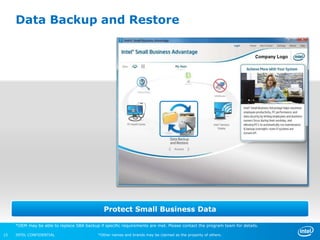
Data Backup and Restore


                                               Protect Small Business Data

     *OEM may be able to replace SBA backup if specific requirements are met. Please contact the program team for details.

15   INTEL CONFIDENTIAL                     *Other names and brands may be claimed as the property of others.
Data Backup and Restore


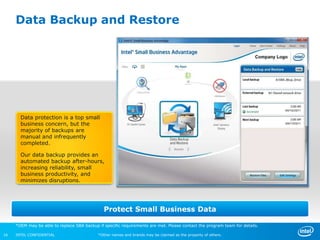
       Data protection is a top small
       business concern, but the
       majority of backups are
       manual and infrequently
       completed.

       Our data backup provides an
       automated backup after-hours,
       increasing reliability, small
       business productivity, and
       minimizes disruptions.


                                               Protect Small Business Data

     *OEM may be able to replace SBA backup if specific requirements are met. Please contact the program team for details.

16   INTEL CONFIDENTIAL                     *Other names and brands may be claimed as the property of others.
Data Backup and Restore


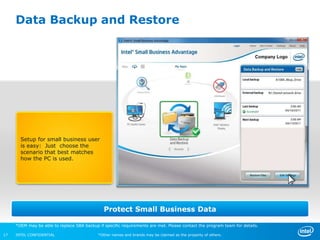
       Setup for small business user
       is easy: Just choose the
       scenario that best matches
       how the PC is used.


                                               Protect Small Business Data

     *OEM may be able to replace SBA backup if specific requirements are met. Please contact the program team for details.

17   INTEL CONFIDENTIAL                     *Other names and brands may be claimed as the property of others.
Data Backup and Restore


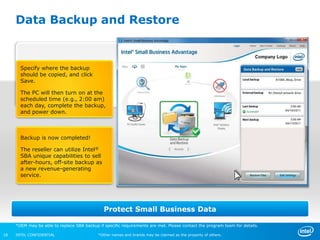
       Specify where the backup
       should be copied, and click
       Save.

       The PC will then turn on at the
       scheduled time (e.g., 2:00 am)
       each day, complete the backup,
       and power down.


       Backup is now completed!

       The reseller can utilize Intel®
       SBA unique capabilities to sell
       after-hours, off-site backup as
       a new revenue-generating
       service.


                                               Protect Small Business Data

     *OEM may be able to replace SBA backup if specific requirements are met. Please contact the program team for details.

18   INTEL CONFIDENTIAL                     *Other names and brands may be claimed as the property of others.
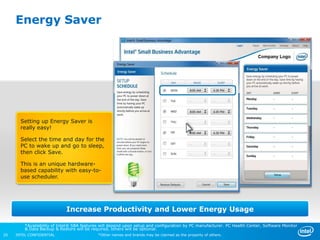
Energy Saver


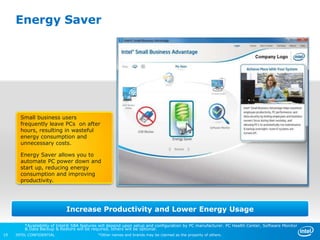
       Small business users
       frequently leave PCs on after
       hours, resulting in wasteful
       energy consumption and
       unnecessary costs.

       Energy Saver allows you to
       automate PC power down and
       start up, reducing energy
       consumption and improving
       productivity.


                             Increase Productivity and Lower Energy Usage

         *Availability of Intel® SBA features will depend upon setup and configuration by PC manufacturer. PC Health Center, Software Monitor
         & Data Backup & Restore will be required, others will be optional.
19   INTEL CONFIDENTIAL                     *Other names and brands may be claimed as the property of others.
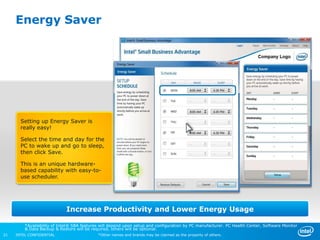
Energy Saver


       Setting up Energy Saver is
       really easy!

       Select the time and day for the
       PC to wake up and go to sleep,
       then click Save.

       This is an unique hardware-
       based capability with easy-to-
       use scheduler.


                             Increase Productivity and Lower Energy Usage

         *Availability of Intel® SBA features will depend upon setup and configuration by PC manufacturer. PC Health Center, Software Monitor
         & Data Backup & Restore will be required, others will be optional.
20   INTEL CONFIDENTIAL                     *Other names and brands may be claimed as the property of others.
Energy Saver


       Setting up Energy Saver is
       really easy!

       Select the time and day for the
       PC to wake up and go to sleep,
       then click Save.

       This is an unique hardware-
       based capability with easy-to-
       use scheduler.


                             Increase Productivity and Lower Energy Usage

         *Availability of Intel® SBA features will depend upon setup and configuration by PC manufacturer. PC Health Center, Software Monitor
         & Data Backup & Restore will be required, others will be optional.
21   INTEL CONFIDENTIAL                     *Other names and brands may be claimed as the property of others.
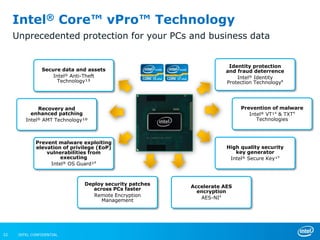
Intel® Core™ vPro™ Technology
     Unprecedented protection for your PCs and business data


                                                                     Identity protection
                Secure data and assets                              and fraud deterrence
                    Intel® Anti-Theft                                   Intel® Identity
                      Technology¹³                                  Protection Technology⁸


              Recovery and                                                Prevention of malware
           enhanced patching                                                 Intel® VT¹⁴ & TXT⁹
         Intel® AMT Technology¹º                                                Technologies


             Prevent malware exploiting
             elevation of privilege (EoP)                            High quality security
                 vulnerabilities from                                   key generator
                      executing                                       Intel® Secure Key¹⁹
                  Intel® OS Guard¹⁸


                               Deploy security patches
                                                         Accelerate AES
                                  across PCs faster
                                                           encryption
                                  Remote Encryption         AES-NI⁴
                                     Management


22    INTEL CONFIDENTIAL
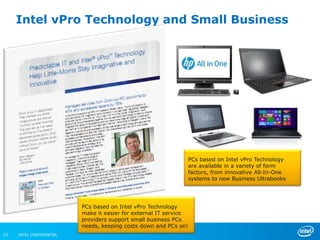
Intel vPro Technology and Small Business


                                                               PCs based on Intel vPro Technology
                                                               are available in a variety of form
                                                               factors, from innovative All-In-One
                                                               systems to new Business Ultrabooks


                          PCs based on Intel vPro Technology
                          make it easier for external IT service
                          providers support small business PCs
                          needs, keeping costs down and PCs on!
23   INTEL CONFIDENTIAL
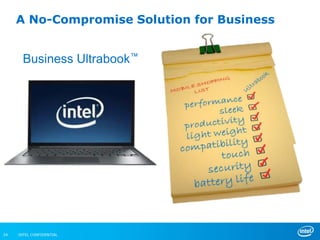
A No-Compromise Solution for Business
                                       •   Performance
                                       •   Security
                                           Productivity
                          Ultrabook™
                                       •

       Business                        •   Compatibility


24   INTEL CONFIDENTIAL
Thank You

The changing computer for small biz

  • 1.
    Business Needs? Business PCs. 1
  • 2.
    Need for BusinessMobility is Still Growing Collaboration Note Taking Photos Presentations Document Editing Video Chat Credit Data Access Processing Cloud Finance Services 2 INTEL CONFIDENTIAL
  • 3.
    Business Mobility ―ShoppingList‖ Business Owners and Employees Want IT Managers Want • Responsiveness • Comprehensive Security • Un-interrupted Productivity • Automated Manageability • Form Factor Innovation • Model Choices/Flexibility 3 INTEL CONFIDENTIAL
  • 4.
    4 Ultra Secure. UltraResponsive. Ultra Sleek. Ultrabook™—Inspired by Intel. "What is for certain is that Intel has shaken up a sleepy Windows PC ecosystem, and that’s a good thing for consumers and the PC industry." — Forbes Ultra Sleek “With vPro on ultrabooks, businesses can now extend the same level of management control to these ultra-thin systems as is already available for desktops and laptops." —V3.Co.uk Ultra Responsive “Here’s how you know when a gadget is good— when it ruins you for other gadgets in its class." —Mashable.com Ultra Secure Discover the device that gives customers and users the best of everything they want.
  • 5.
    Business Ultrabook To be called an Ultrabook™, OEMs must meet strict requirements defined by Intel to ensure best in class performance, responsiveness and security in thin and light, elegant form factors. Intel® Core™ Under an inch thick processors >5 hours battery life (8 hours recommended) Built-in Wi-Fi Available w/Intel® vPro™ Wakes up in Technology or Intel® Small <7 seconds Business Advantage Theft Built-in Identity Protection Protection 5 INTEL CONFIDENTIAL
  • 6.
    A Complete BusinessSolutions Lineup No IT? Intel® Small Have IT or MSP? Business Advantage Intel® vPro™ Technology Automated data backups19,20 Embedded security and manageability3.21 Threat management, including rootkit, virus, Manage routine PC maintenance19 and malware protection22 Remotely diagnose, isolate, and repair an Monitor critical security software3.19 infected PC, regardless of PC state23 …. Now available in Business Ultrabooks Intel® Rapid Intel® Core™ Intel® Runs for Start Processors AT Hours Technology Intel® Built-in Under 1” USB* 3.0 IPT Wi-Fi 6 INTEL CONFIDENTIAL
  • 7.
    Intel Small BusinessAdvantage: Focus on Your Business Instead of Your PCs Intel® Core™ processors with Intel® Small Business Advantage Security Productivity Software Monitor PC Health Center Monitor critical software below the OS Run after hours – even if PC is off³ Data Backup and Restore Energy Saver Run after hours—even if PC is off³ Automatically power on each morning³ USB Blocker² Intel® Wireless Display Block unwanted USB device classes Share and collaborate wirelessly *There is only one 5MB image; Intel® Small Business Technology features are included in it. Intel® AMT host software kit also needs to be installed on the PC. 3) In order to power on, PC must have AC power. Certain maintenance tasks require internet access. 7 INTEL CONFIDENTIAL *Other names and brands may be claimed as the property of others.
  • 8.
    PC Health Center Setting up tasks is really easy for small business users: Just click on the icon and enter details. Resellers also have the opportunity to enter their own tasks, as well as customize and brand the UI for greater brand recognition. Keep PCs Performing Well by Scheduling Routine Tasks After Hours *Availability of Intel® SBA features will depend upon setup and configuration by PC manufacturer. PC Health Center, Software Monitor & Data Backup & Restore will be required, others will be optional. 8 INTEL CONFIDENTIAL *Other names and brands may be claimed as the property of others.
  • 9.
    Intel SBA Demo (run in slide show mode) 9 INTEL CONFIDENTIAL *Other names and brands may be claimed as the property of others.
  • 10.
    PC Health Center The UI is intuitive and easy to use, the user selects the tasks and schedules when they should run, then clicks Save. All done! The reseller can add their own tasks and can make set up service part of their offering. Keep PCs Performing Well by Scheduling Routine Tasks After Hours *Availability of Intel® SBA features will depend upon setup and configuration by PC manufacturer. PC Health Center, Software Monitor & Data Backup & Restore will be required, others will be optional. 10 INTEL CONFIDENTIAL *Other names and brands may be claimed as the property of others.
  • 11.
    PC Health Center Automatic PC Power On and Power Off The PC automatically powers on at the scheduled time and runs the selected tasks , then powers down with tasks completed. Scheduled routine tasks are reliably completed after hours. Keep PCs Performing Well by Scheduling Routine Tasks After Hours *Availability of Intel® SBA features will depend upon setup and configuration by PC manufacturer. PC Health Center, Software Monitor & Data Backup & Restore will be required, others will be optional. 11 INTEL CONFIDENTIAL *Other names and brands may be claimed as the property of others.
  • 12.
    Software Monitor Detect and Monitor Local Critical Software Software Monitor is designed to strengthen small business security with hardware-based monitoring. This state-of-the-art technology continually monitors critical software and provides alerts if it is deleted or corrupted. Keep PCs Healthy and Critical Software Running *Availability of Intel® SBA features will depend upon setup and configuration by PC manufacturer. PC Health Center, Software Monitor & Data Backup & Restore will be required, others will be optional. 12 INTEL CONFIDENTIAL *Other names and brands may be claimed as the property of others.
  • 13.
    Software Monitor Detect and Monitor Local Critical Software Software Monitor is designed as a reseller tool to provide enhanced security with hardware-assisted capabilities. SBA comes with many of the top security software ready to be monitored. In addition, resellers can add any business- critical software they choose. Keep PCs Healthy and Critical Software Running *Availability of Intel® SBA features will depend upon setup and configuration by PC manufacturer. PC Health Center, Software Monitor & Data Backup & Restore will be required, others will be optional. 13 INTEL CONFIDENTIAL *Other names and brands may be claimed as the property of others.
  • 14.
    Software Monitor Corrupt DLL detected! Detect and Monitor Local Critical Software Balloon notification Email notification sent to If monitored software is sent to user admin and log saved disabled, the end user and admin are automatically notified. Keep PCs Healthy and Critical Software Running *Availability of Intel® SBA features will depend upon setup and configuration by PC manufacturer. PC Health Center, Software Monitor & Data Backup & Restore will be required, others will be optional. 14 INTEL CONFIDENTIAL *Other names and brands may be claimed as the property of others.
  • 15.
    Data Backup andRestore Protect Small Business Data *OEM may be able to replace SBA backup if specific requirements are met. Please contact the program team for details. 15 INTEL CONFIDENTIAL *Other names and brands may be claimed as the property of others.
  • 16.
    Data Backup andRestore Data protection is a top small business concern, but the majority of backups are manual and infrequently completed. Our data backup provides an automated backup after-hours, increasing reliability, small business productivity, and minimizes disruptions. Protect Small Business Data *OEM may be able to replace SBA backup if specific requirements are met. Please contact the program team for details. 16 INTEL CONFIDENTIAL *Other names and brands may be claimed as the property of others.
  • 17.
    Data Backup andRestore Setup for small business user is easy: Just choose the scenario that best matches how the PC is used. Protect Small Business Data *OEM may be able to replace SBA backup if specific requirements are met. Please contact the program team for details. 17 INTEL CONFIDENTIAL *Other names and brands may be claimed as the property of others.
  • 18.
    Data Backup andRestore Specify where the backup should be copied, and click Save. The PC will then turn on at the scheduled time (e.g., 2:00 am) each day, complete the backup, and power down. Backup is now completed! The reseller can utilize Intel® SBA unique capabilities to sell after-hours, off-site backup as a new revenue-generating service. Protect Small Business Data *OEM may be able to replace SBA backup if specific requirements are met. Please contact the program team for details. 18 INTEL CONFIDENTIAL *Other names and brands may be claimed as the property of others.
  • 19.
    Energy Saver Small business users frequently leave PCs on after hours, resulting in wasteful energy consumption and unnecessary costs. Energy Saver allows you to automate PC power down and start up, reducing energy consumption and improving productivity. Increase Productivity and Lower Energy Usage *Availability of Intel® SBA features will depend upon setup and configuration by PC manufacturer. PC Health Center, Software Monitor & Data Backup & Restore will be required, others will be optional. 19 INTEL CONFIDENTIAL *Other names and brands may be claimed as the property of others.
  • 20.
    Energy Saver Setting up Energy Saver is really easy! Select the time and day for the PC to wake up and go to sleep, then click Save. This is an unique hardware- based capability with easy-to- use scheduler. Increase Productivity and Lower Energy Usage *Availability of Intel® SBA features will depend upon setup and configuration by PC manufacturer. PC Health Center, Software Monitor & Data Backup & Restore will be required, others will be optional. 20 INTEL CONFIDENTIAL *Other names and brands may be claimed as the property of others.
  • 21.
    Energy Saver Setting up Energy Saver is really easy! Select the time and day for the PC to wake up and go to sleep, then click Save. This is an unique hardware- based capability with easy-to- use scheduler. Increase Productivity and Lower Energy Usage *Availability of Intel® SBA features will depend upon setup and configuration by PC manufacturer. PC Health Center, Software Monitor & Data Backup & Restore will be required, others will be optional. 21 INTEL CONFIDENTIAL *Other names and brands may be claimed as the property of others.
  • 22.
    Intel® Core™ vPro™Technology Unprecedented protection for your PCs and business data Identity protection Secure data and assets and fraud deterrence Intel® Anti-Theft Intel® Identity Technology¹³ Protection Technology⁸ Recovery and Prevention of malware enhanced patching Intel® VT¹⁴ & TXT⁹ Intel® AMT Technology¹º Technologies Prevent malware exploiting elevation of privilege (EoP) High quality security vulnerabilities from key generator executing Intel® Secure Key¹⁹ Intel® OS Guard¹⁸ Deploy security patches Accelerate AES across PCs faster encryption Remote Encryption AES-NI⁴ Management 22 INTEL CONFIDENTIAL
  • 23.
    Intel vPro Technologyand Small Business PCs based on Intel vPro Technology are available in a variety of form factors, from innovative All-In-One systems to new Business Ultrabooks PCs based on Intel vPro Technology make it easier for external IT service providers support small business PCs needs, keeping costs down and PCs on! 23 INTEL CONFIDENTIAL
  • 24.
    A No-Compromise Solutionfor Business • Performance • Security Productivity Ultrabook™ • Business • Compatibility 24 INTEL CONFIDENTIAL
  • 25.

Editor's Notes

  • #6 The following make up the required ingredients of an Ultrabook™:Intel® Core™ Family Processors: Powered by a 3rd generation Intel® Core processor - the “brain” of the UltrabookIntel® Rapid Start Technology: Resumes from hibernate in &lt;7 seconds and loads and runs applications in a flashLong Battery Life: Offers a minimum of 5 hours of battery life with 8+ hours in many systemsIntel® Identity Protection Technology: Helps you and your customers stay safe with embedded security authentication and password protectionIntel® Anti-Theft Technology: protects your data by disabling the Utrabook if lost or stolenBuilt-in wireless: Connect, communicate, and collaborate by wirelessly connecting your Ultrabook to Wi-Fi enabled devicesUnder 1 inch thick: Innovative designs coming late 2012 with touch and convertible design variety.USB 3.0 and/or Thunderbolt™ technologies:Features USB 3.0 and/or Thunderbolt™ technology, a high-speed PC connection that’s fast enough to transfer a full-length HD movie in less than 30 seconds
  • #19 Market research shows that data backup is one of the primary usages businesses request. The need to take snapshots of the data on a local hard drive and preserve it remotely or locally is critical. Often users defer backing up during working hours. Then if they power off their PC overnight, no backup can occur. Treasure Lakes uses the Local Maintenance Timer to power on the PC wherever it is as long as it’s on AC power and proceed with backup during the employee’s non-productive hours. For mobile workers, they can back up to a local disk and let TL handle saving the backup file externally when they are back in the office.
  • #23 This slide presents the key security features now available with 3rd Generation Intel® Core™ vPro™ ProcessorsDISCLAIMERS1. Intel® vPro™ Technology is sophisticated and requires setup and configuration. Availability of features and results will depend upon the setup and configuration of your hardware, software and IT environment. To learn more about the breadth of security features, visit http://www.intel.com/technology/vpro/4. Intel® AES-NI requires a computer system with an AES-NI-enabled processors, as well as non-Intel software to execute the instructions in the correct sequence. AES-NI is available on select Intel® Core™ processors. For availability, consult your system manufacturer. For more information, see http://software.intel.com/en-us/articles/intel-advanced-encryption-standard-instructions-aes-ni8. No system can provide absolute security under all conditions. Requires an Intel® Identity Protection Technology-enabled system, including a 2nd or 3rd gen Intel® Core™ processor, enabled chipset, firmware, and software, and participating website. Consult your system manufacturer. Intel assumes no liability for lost or stolen data and/or systems or any resulting damages. For more information, visit http://ipt.intel.com9. No computer system can provide absolute security under all conditions. Intel® Trusted Execution Technology (Intel® TXT) requires a computer with Intel® Virtualization Technology, an Intel TXT-enabled processor, chipset, BIOS, Authenticated Code Modules and an Intel TXT-compatible measured launched environment (MLE). Intel TXT also requires the system to contain a TPM v1.s. For more information, visit http://www.intel.com/technology/security10. Intel® Active Management Technology (Intel® AMT) requires the computer system to have an Intel® AMT-enabled chipset, network hardware and software, as well as connection with a power source and a corporate network connection. Setup requires configuration by the purchaser and may require scripting with the management console or further integration into existing security frameworks to enable certain functionality. It may also require modifications of implementation of new business processes. With regard to notebooks, Intel AMT may not be available or certain capabilities may be limited over a host OS-based VPN or when connecting wirelessly, on battery power, sleeping, hibernating, or powered off. System Defense only works with select Intel® vPro technology brand varified LAN cards. For more information, see http://www.intel.com/technology/platform-technology/intel-amt/13. Intel® Anti-Theft Technology—PC Protection. No computer system can provide absolute security under all conditions. Intel® Anti-Theft Technology requires the computer system to have an Intel® AT-enabled chipset, BIOS, firmware release, software, and an Intel AT-capable Service Provider/ISV application and service subscription. The detection (triggers), response (actions), and recovery mechanisms only work after the Intel® AT functionality has been activated and configured. Certain functionality may not be offered by some ISVs or service providers and may not be available in all countries. Intel assumes no liability for lost or stolen data and/or systems or any other damages resulting thereof.14. Intel® Virtualization Technologies requires a computer system with an enabled Intel® processor, BIOS, and virtual machine monitor (VMM). VT technologies include VT-x, EPT (Extended Page Tables), and VT-d (VT-directed i/o); VT-d is currently exclusive to vProFunctionality, performance, or other benefits will vary depending on hardware and software configurations. Software applications may not be compatible with all operating systems. Consult your PC manufacturer. For more information, visit http://www.intel.com/go/virtualization18. No system can provide absolute security. Requires an Intel® OS Guard enabled system with a 3rd gen Intel® Core™ vPro™ processor and an enabled operating system. Consult your system manufacturer for more information.19. No system can provide absolute security. Requires an Intel® Secure Key enabled PC with a 3rd gen Intel® Core™ vPro™ processor and software optimized to support Intel Secure Key. Consult your system manufacturer for more information.
  • #25 The category of Ultrabooks is being expanded to include no-compromise mobile solutions for business.Ultrabooks will come in a wide variety of form factors, many of which will combine the productivity, performance, compatibility, and security of the laptop, with the sleek design, light weight, battery life, and in some cases touch capability of the tablet into one no-compromise device.