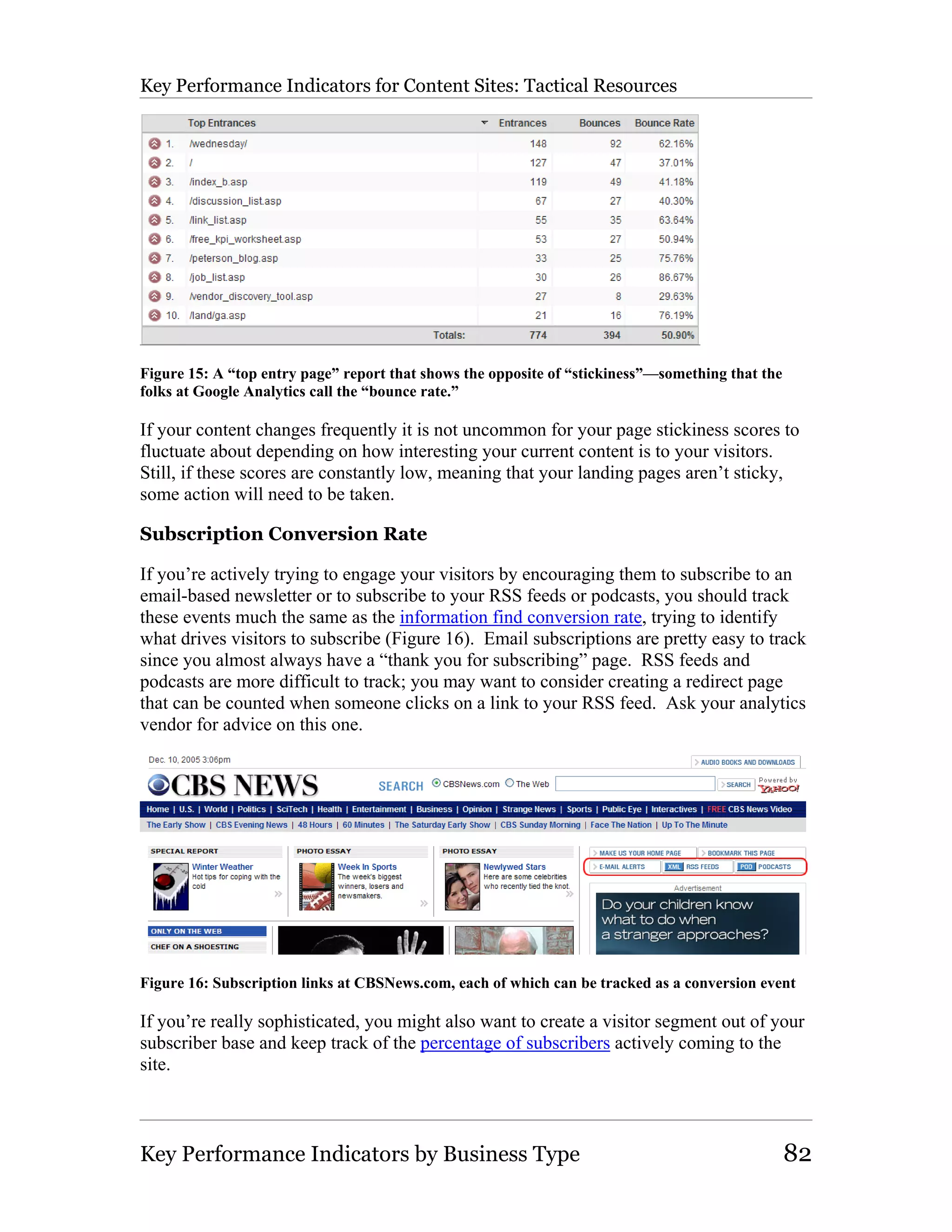
The Big Book of
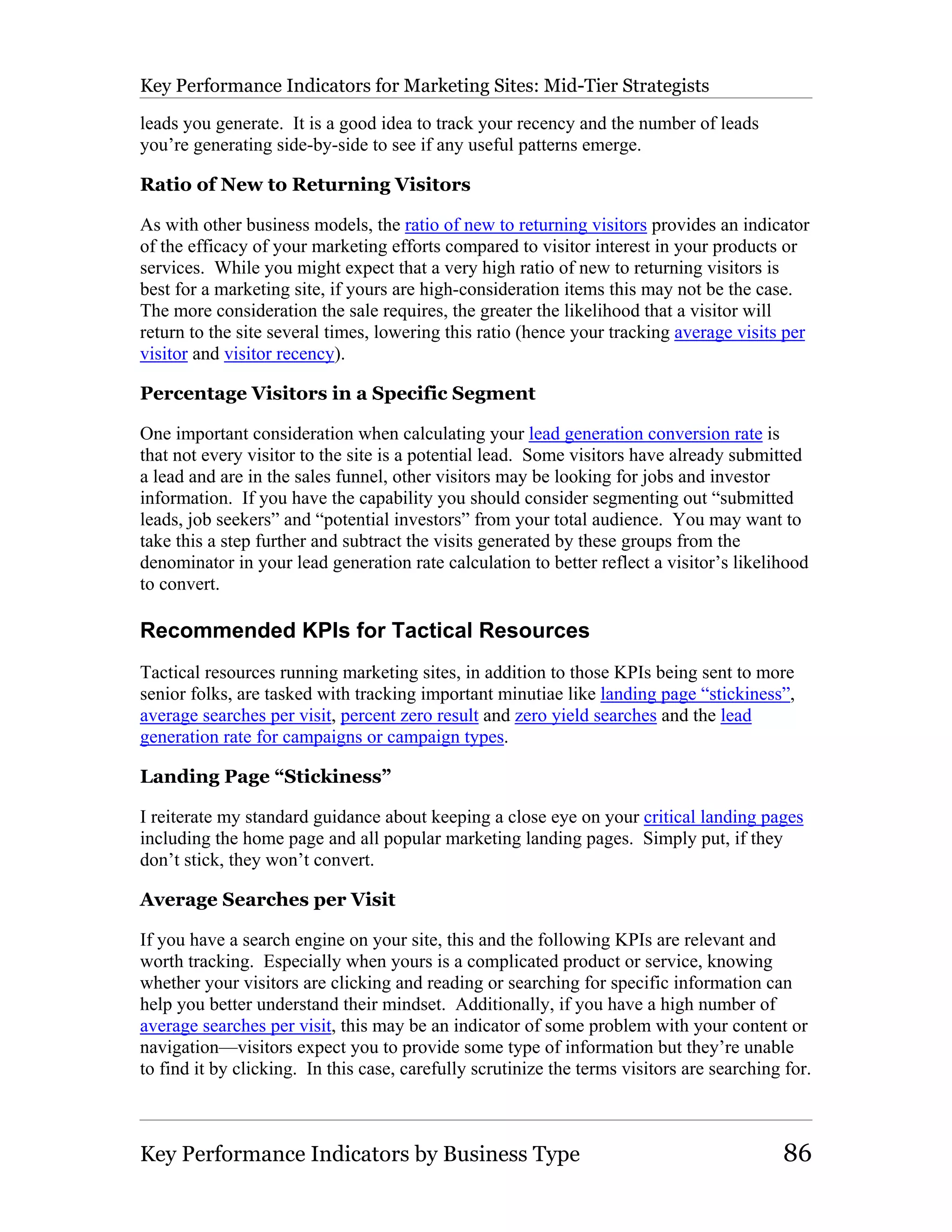
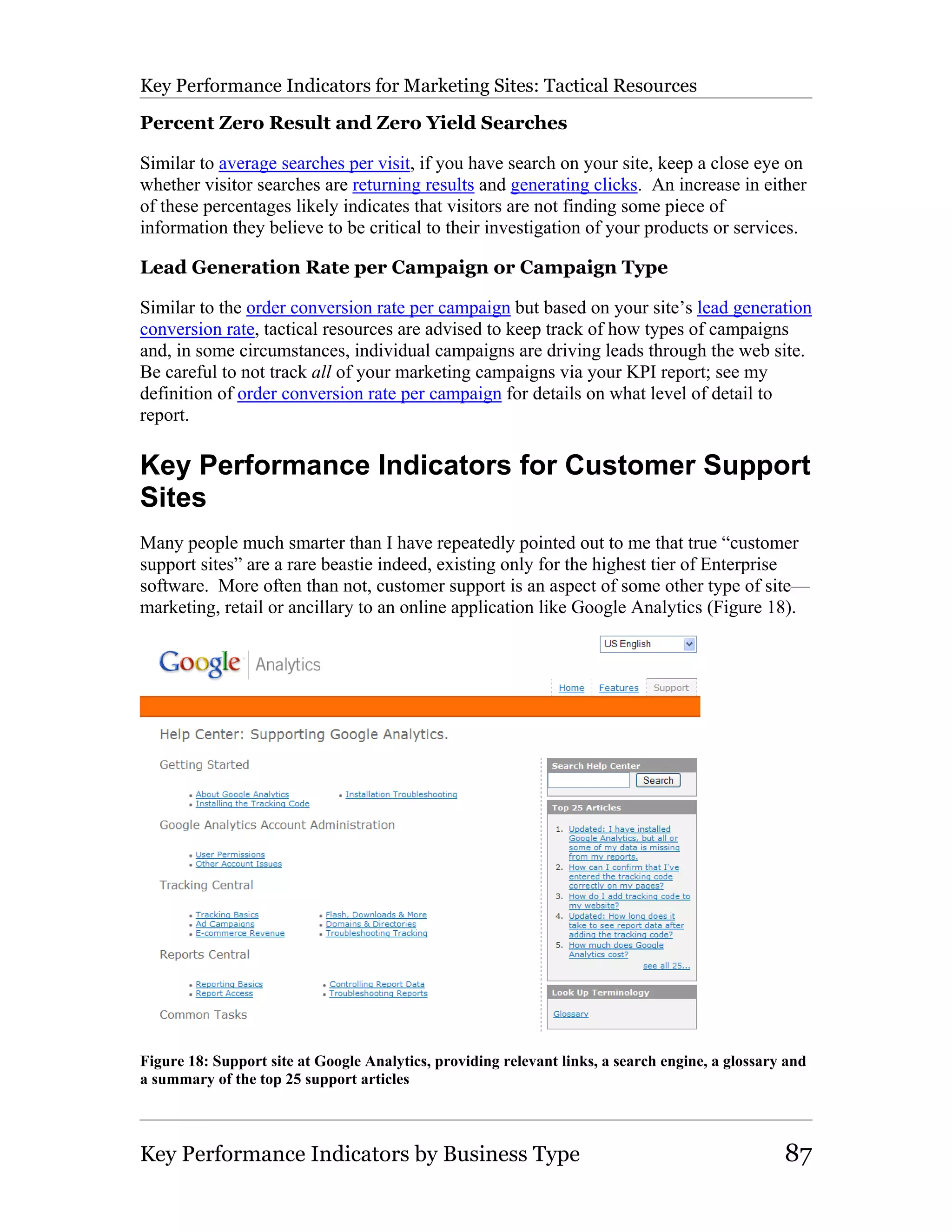
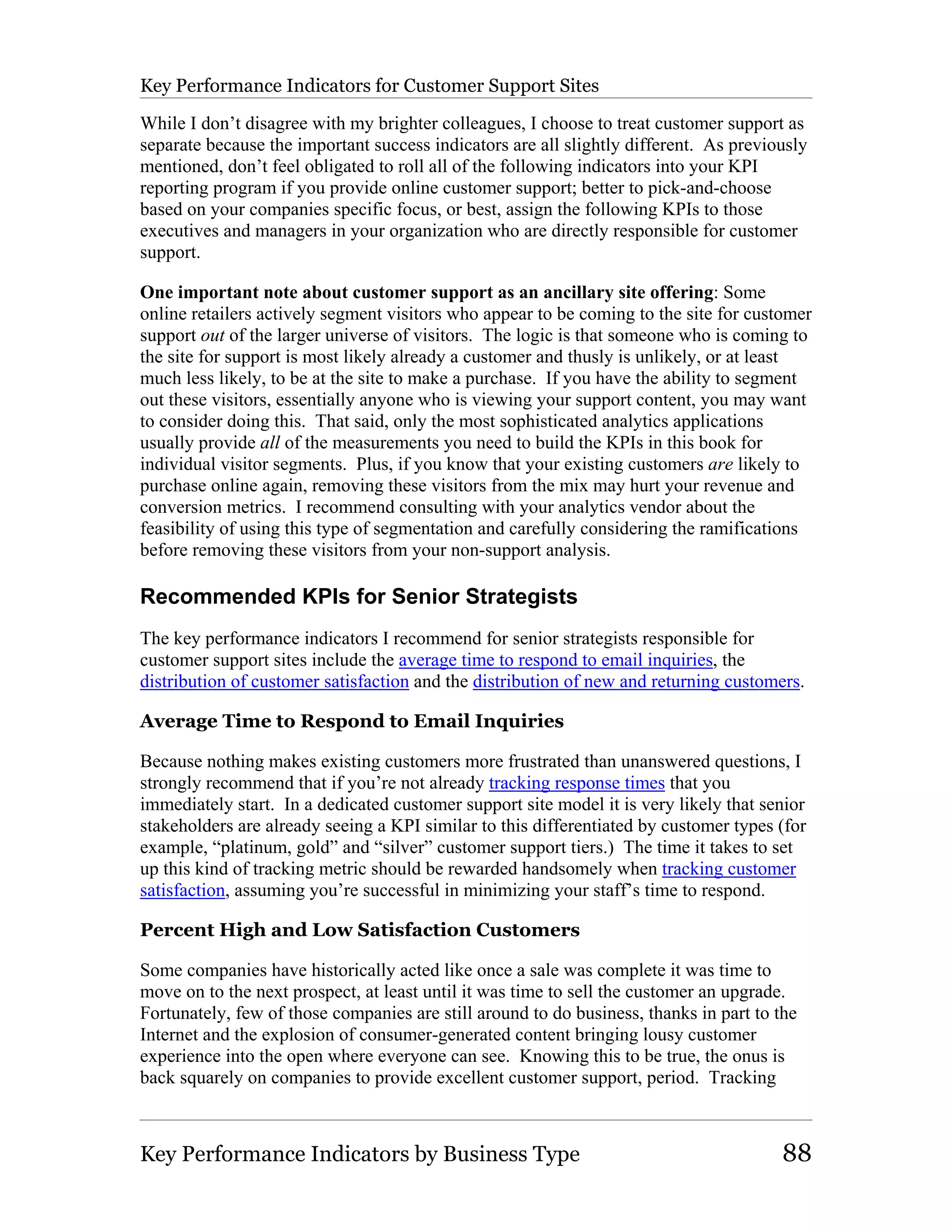
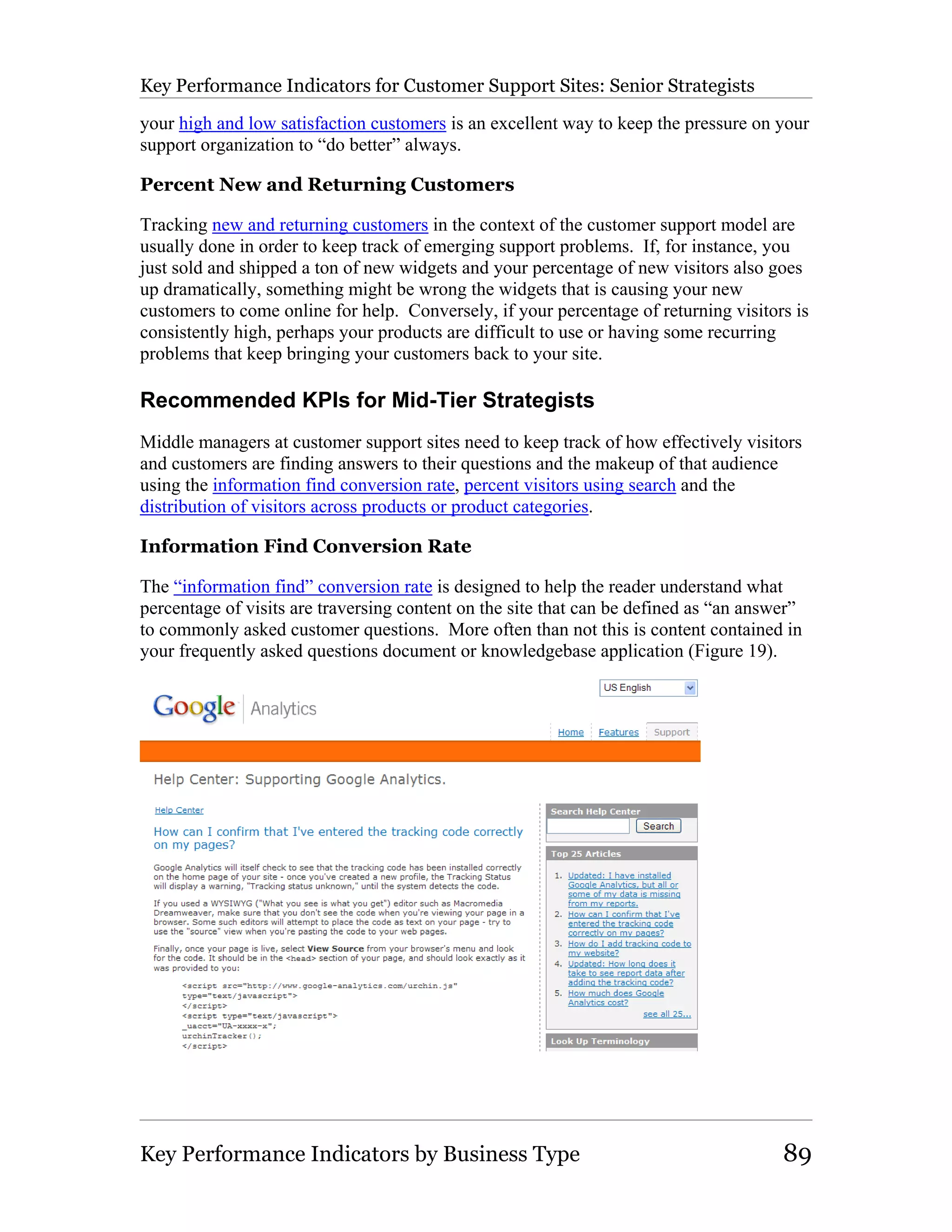
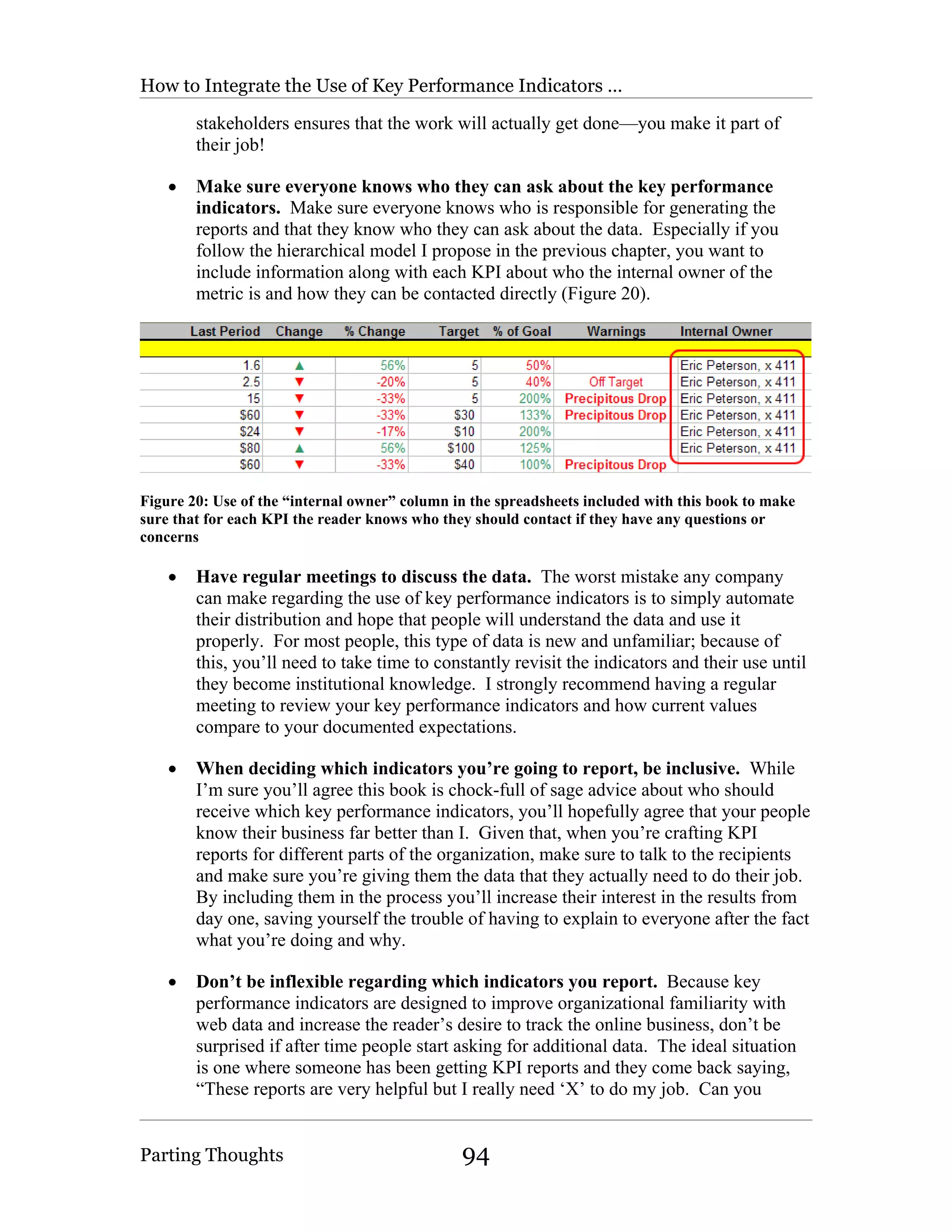
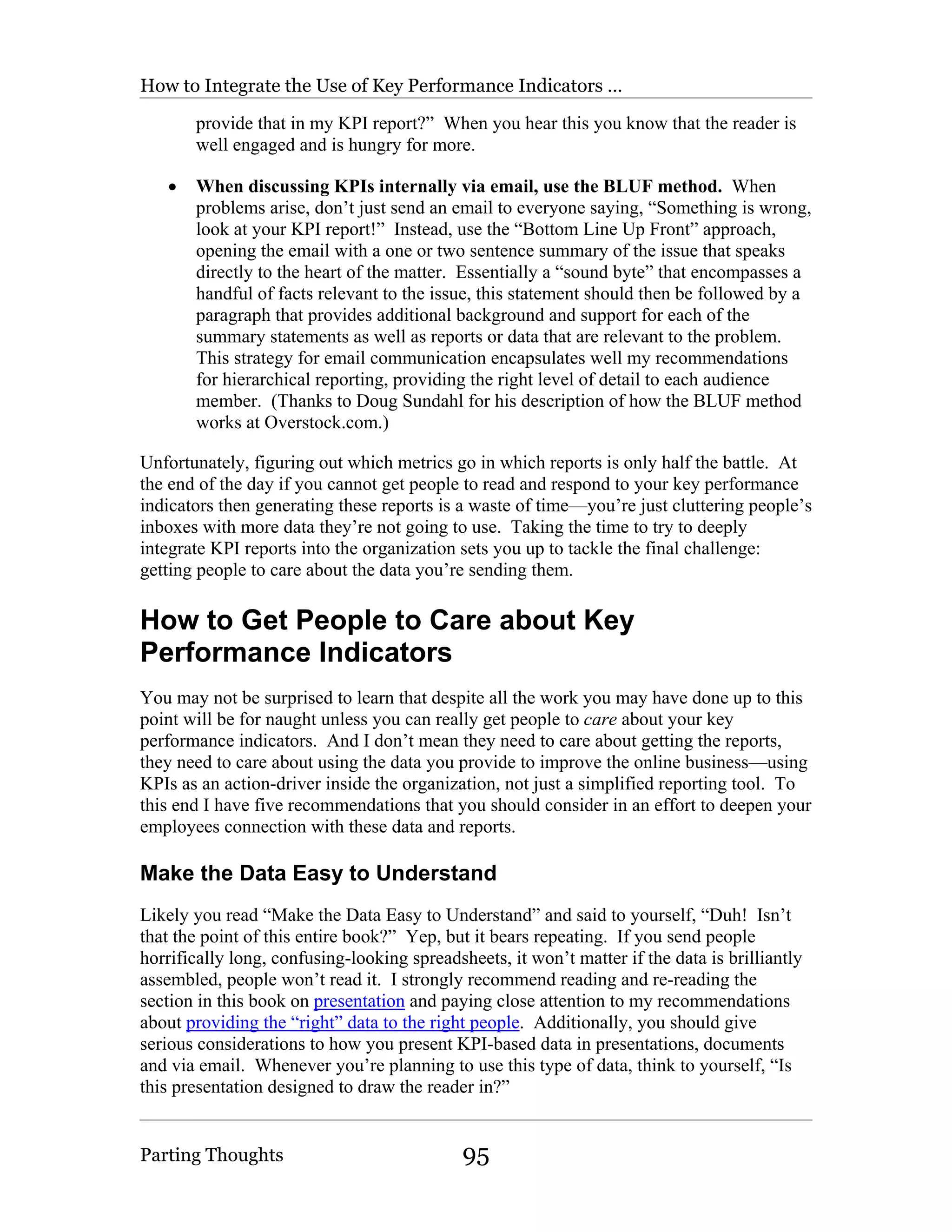
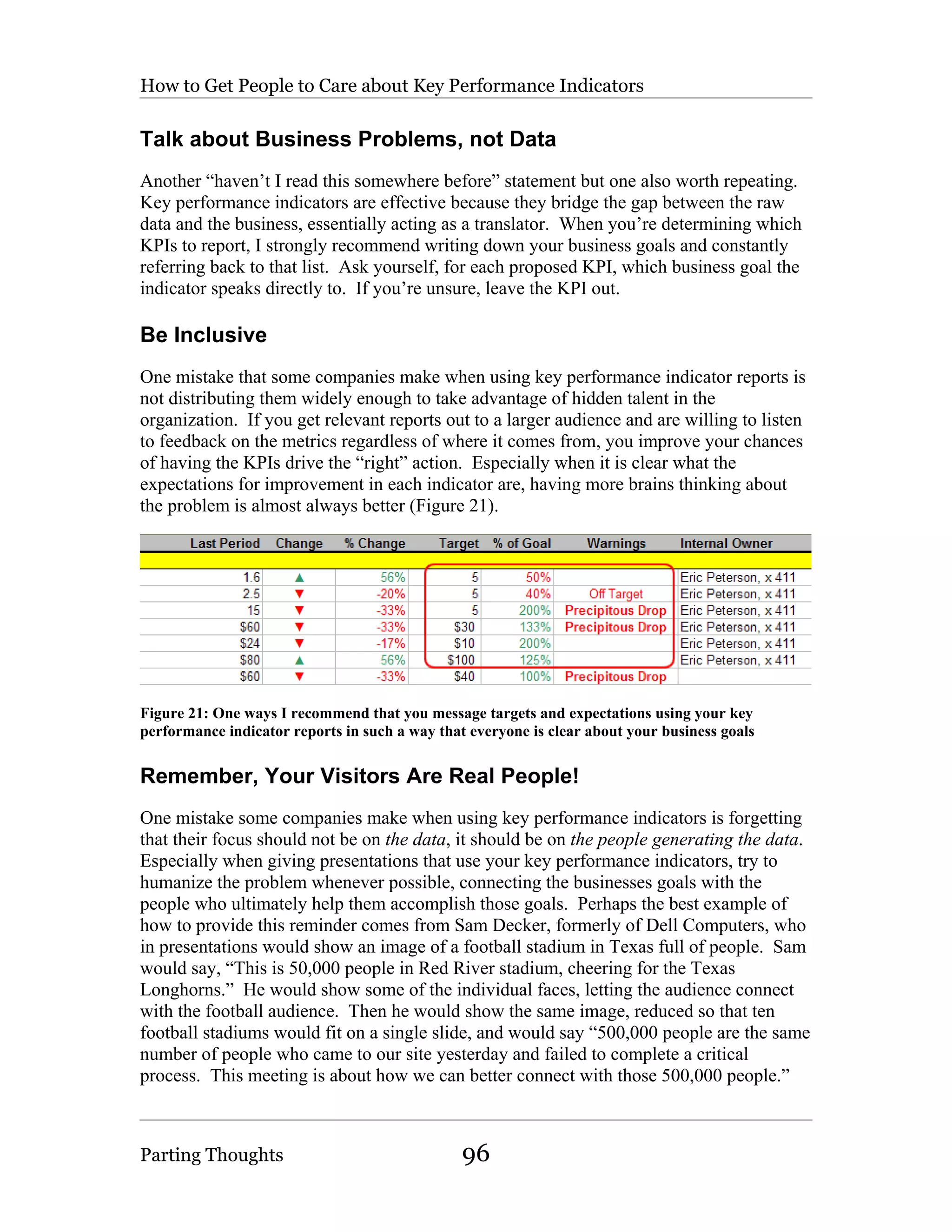
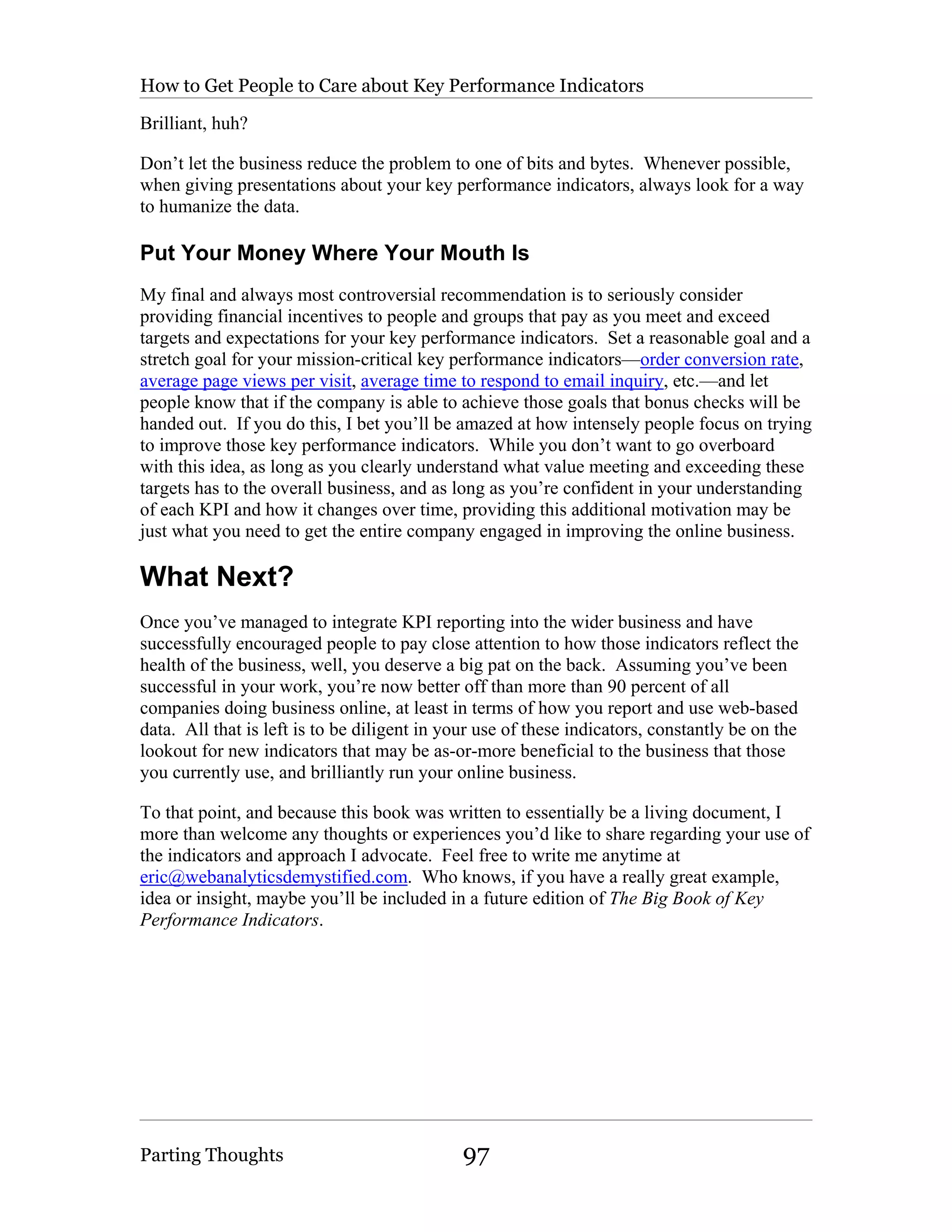
Key Performance Indicators
                                    by
                         Eric T. Peterson


        Book Two in the Web Analytics Demystified Series


                               First Edition

                         Published January 1, 2006


          Copyright 2005 © Eric T. Peterson | All Rights Reserved

  For more information please visit http://www.webanalyticsdemystified.com
The Big Book of Key Performance Indicators is

       dedicated to Chloe and Cooper.
Forward
Rarely do I see a client who doesn't have enough data, especially web data. It's widely
available. Yet, people are overwhelmed with it. The most sophisticated web analytics
tools today now give you the flexibility to configure millions of custom metrics and
reports. But who needs that many? How do you take advantage of that flexibility?

This has created an interesting dichotomy. While the web analytics tools get richer with
advanced features, the vast majority of marketing executives and their organizations that
I work with are looking to simplify their analysis around specific, actionable objectives
and key performance indicators (KPIs) because they’re struggling to adequately quantify
their results.

So let’s start with the most high-level question, “How are we performing?”

It’s a simple question, but a difficult one for marketers to answer. According to the CMO
Council, 90 percent of senior marketing executives say measuring marketing
performance is a top priority, yet only 20 percent have a comprehensive metrics
framework in place. This measurement gap is a direct reflection of the overwhelming
need for clarity and best practices around defining KPIs.

KPIs are the foundation to every successful web analytics solution. Having worked with
several Fortune 1000 companies in the past few years that wanted to better use the web
analytics solutions they invested in, nearly all of them struggled with the same
fundamental problem – a lack of agreed upon KPIs to prove and improve the results of
their web business. Only in the hands of a seasoned business analyst, whether in-house or
outsourced, will an organization reap the additional benefits of the deeper ad-hoc analysis
capabilities that the web analytics tools provide. And, only after an organization has
clearly defined its objectives and established its scorecard of KPIs, does the more
advanced analysis become a lucrative initiative.

So what makes a KPI? Are there any standards or best practices? What are other
organizations doing? These questions and many others will be addressed within this
book.

Read on to understand the criteria of what distinguishes a KPI versus other measures.
You will find specific examples by industry and by site type. But, most importantly, you
will learn how to formulate your own KPIs for your specific business – setting the
foundation for your future success. And that’s what it’s really all about.

Jason Burby, Director of Web Analytics for ZAAZ, jasonb@zaaz.com


Forward                                                                                     i
Contents
Forward ................................................................................................................................ i

Contents .............................................................................................................................. ii

Chapter 1 Introduction ........................................................................................................ 1

   Why this Book?............................................................................................................... 2

   How This Book Is Designed to Evolve........................................................................... 2

   Key Performance Indicators and Your Web Measurement Vendor ............................... 3

   About the Use of Screenshots throughout This Book..................................................... 3

   Cookies and Key Performance Indicators....................................................................... 3

   About the Author ............................................................................................................ 4

   Other Valuable References ............................................................................................. 5

       Books .......................................................................................................................... 5

       Web Sites, People and Groups.................................................................................... 5

Chapter 2 Introduction to Key Performance Indicators...................................................... 7

   What is a Key Performance Indicator? ........................................................................... 7

       Definition .................................................................................................................... 8

       Presentation................................................................................................................. 8

       Expectation ............................................................................................................... 10

       Action........................................................................................................................ 10

   What is not a Key Performance Indicator? ................................................................... 11

   How Should Key Performance Indicators Be Presented?............................................. 11

       Format ....................................................................................................................... 11


Contents                                                                                                                               ii
Timeliness of Delivery.............................................................................................. 12

       Annotation................................................................................................................. 12

       Who Gets What? ....................................................................................................... 13

   Seriously, Don’t Send Everyone 50 Key Performance Indicators! .............................. 14

   How Should Key Performance Indicators Be Used?.................................................... 15

   How Should People Respond to Key Performance Indicators?.................................... 16

   About Business Specific Key Performance Indicators ................................................. 16

Chapter 3 The Indicators................................................................................................... 18

   Averages ....................................................................................................................... 18

       Average Page Views per Visit .................................................................................. 19

       Average Visits per Visitor ........................................................................................ 21

       Average Time to Respond to Email Inquiries........................................................... 23

       Average Cost per Visitor .......................................................................................... 24

       Average Cost per Visit.............................................................................................. 25

       Average Cost per Conversion ................................................................................... 26

       Average Revenue per Visitor.................................................................................... 27

       Average Revenue per Visit ....................................................................................... 28

       Average Order Value ................................................................................................ 29

       Average Items per Cart Completed........................................................................... 31

       Average Clicks per Impression by Campaign Type (Click-Through Rate) ............. 32

       Average Visits Prior to Conversion .......................................................................... 33

       Average Searches per Visit....................................................................................... 34

   Percentages ................................................................................................................... 35

       Percent New and Returning Visitors......................................................................... 35

       Percent New and Returning Customers .................................................................... 37


Contents                                                                                                                         iii
Percent Visitors in a Specific Segment..................................................................... 39

     Percentage of High, Medium and Low Time Spent Visits (Interest Categories) ..... 39

     Percentage of High, Medium and Low Click Depth Visits (Interest Categories) .... 41

     Percentage of High, Medium and Low Frequency Visitors ..................................... 43

     Percentage of High, Medium and Low Recency Visitors......................................... 45

     Percent Revenue from New and Returning Visitors and Customers........................ 46

     Percent Orders from New and Returning Visitors and Customers ........................... 47

     Percent High and Low Satisfaction Visitors and Customers .................................... 48

     Percent Visitors Using Search .................................................................................. 49

     Percent Zero Result Searches.................................................................................... 50

     Percent Zero Yield Searches..................................................................................... 51

  Rates and Ratios............................................................................................................ 52

     Order Conversion Rate ............................................................................................. 53

     Buyer Conversion Rate ............................................................................................. 54

     New and Returning Visitor Conversion Rate ........................................................... 55

     New and Returning Buyer Conversion Rate............................................................. 56

     Ratio of New to Returning Visitors .......................................................................... 57

     Order Conversion Rate per Campaign...................................................................... 58

     Cart Start Rate........................................................................................................... 59

     Cart Completion Rate ............................................................................................... 60

     Checkout Start Rate .................................................................................................. 61

     Checkout Completion Rate ....................................................................................... 61

     Ratio of Checkout Starts to Cart Starts ..................................................................... 63

     Landing Page “Stickiness”........................................................................................ 64

     Information Find Conversion Rate ........................................................................... 66


Contents                                                                                                                      iv
Search to Purchase Conversion Rate ........................................................................ 67

      Search Results to Site Exits Ratio............................................................................. 68

      Download Completion Rate...................................................................................... 70

      Form Completion Rate.............................................................................................. 71

Chapter 4 Key Performance Indicators by Business Type ............................................... 73

   Key Performance Indicators for Online Retailers......................................................... 74

      Recommended KPIs for Senior Strategists............................................................... 74

      Recommended KPIs for Mid-Tier Strategists........................................................... 76

      Recommended KPIs for Tactical Resources............................................................. 77

   Key Performance Indicators for Content Sites ............................................................. 79

      Recommended KPIs for Senior Strategists............................................................... 79

      Recommended KPIs for Mid-Tier Strategists........................................................... 80

      Recommended KPIs for Tactical Resources............................................................. 81

   Key Performance Indicators for Marketing Sites ......................................................... 83

      Recommended KPIs for Senior Strategists............................................................... 83

      Recommended KPIs for Mid-Tier Strategists........................................................... 85

      Recommended KPIs for Tactical Resources............................................................. 86

   Key Performance Indicators for Customer Support Sites............................................. 87

      Recommended KPIs for Senior Strategists............................................................... 88

      Recommended KPIs for Mid-Tier Strategists........................................................... 89

      Recommended KPIs for Tactical Resources............................................................. 90

Chapter 5 Parting Thoughts .............................................................................................. 93

   How to Integrate the Use of Key Performance Indicators into your Organization ...... 93

   How to Get People to Care about Key Performance Indicators ................................... 95

      Make the Data Easy to Understand........................................................................... 95


Contents                                                                                                                 v
Talk about Business Problems, not Data .................................................................. 96

       Be Inclusive .............................................................................................................. 96

       Remember, Your Visitors Are Real People!............................................................. 96

       Put Your Money Where Your Mouth Is ................................................................... 97

   What Next? ................................................................................................................... 97

Index ................................................................................................................................. 98


Contents                                                                                                                              vi
Introduction


                                   Chapter 1
                                Introduction
Having spent most of my professional life in the web analytics field, either as a
programmer, a consultant or an analyst covering the space, one of the things I have had
repeatedly observed is that web analytics is not easy. No matter how simple and refined
the interface or eloquent the explanation, most business people simply don’t seem to take
the time to understand the available data and try and use it to their advantage. But web
data is critical to the success of every online business, a truth that is proven again and
again every day. So the question becomes, “How can I make more people care about the
data that we mine from our web site?”

How about making it easier for them to understand?

The classic web analytics presentation includes pages and pages of data presented in
worksheets and PowerPoint slides using domain-specific technical jargon, jargon that
most normal people don’t understand. Often time’s web analytics salespeople will say
with all sincerity, “Our application is so easy to use that everyone in your company will
want to log in and use it!” Unfortunately, this is rarely true, and this type of thinking
usually leads to companies cycling through analytics vendors looking for “the right
interface” and “the right reports.”

For most people working in the online world, the “right” interface is an annotated
spreadsheet, slide or email. For nearly everyone, the “right” reports are the exact reports
they need to succeed in their job, nothing more, and nothing less, presented in language
that they understand. The former are generic and already universally deployed. The
latter are specific to the business, the line of business and the stakeholder and need to be
individually deployed. The truth is that most people are unlikely to use a web analytics
application to do any type of meaningful analysis.

So what can you do?

Personally, I recommend key performance indicators and dedicated analytics expertise as
a substitute for churning through applications in search of a silver bullet. Based on years
of experience and volumes of research, the proper use of key performance indicators,
managed by appropriate staff and widely distributed throughout the organization, does
more to improve a company’s understanding of how the Internet impacts the overall
business than any attractive user interface or pretty graph. When companies proactively
define their business goals and the visitor activities that satisfy those goals, key

Introduction                                                                                1
Introduction

performance indicators become plainly obvious; when everyone is getting the “right” key
performance indicator reports, everyone gets on the same page and the business begins to
make excellent use of their investment in web analytics.

This book is all about key performance indicators—what they are, how they’re defined,
how they’re used, who should use them—all of it. And if you’re serious about getting
more from your investment in web analytics, read on!

Why this Book?
Having worked in the web analytics field since the late 1990s I have seen my fair share of
the frustration and confusion that comes from an organization that intuitively knows they
have a source of data that can drive business improvement but are unable to access and
understand that data. Web analytics is powerful but nobody ever said it was easy.

Fortunately I’ve been lucky enough to help companies establish key performance
indicators as a consultant and have seen how their use transforms people’s willingness to
use data to make decisions. Kind of like turning an army of artists into an army of tax
accountants, allowing them to see beauty in the data.

My successes with key performance indicators prompted me to write about them in both
my previous books, Web Analytics Demystified (Celilo) and Web Site Measurement
Hacks (O’Reilly), as well in a number of reports published by JupiterResearch. Talking
about KPIs brought even greater interest in them as a subject and great interest in them on
the part of the vendor community. As more people began talking about KPIs, we all
started notice that there was no definitive work on the subject, just my writing, a
scattering of articles published by vendors and the occasional post to the Web Analytics
Forum at Yahoo! Groups.

Since I’ve always been an entrepreneur, I saw an opportunity and thusly sat down to
write The Big Book of Key Performance Indicators. I was going to call the book Purple
Data Cow or Who Moved My Spreadsheet? to be clever but I suspect it would have
seemed smarmy or worse, overbearing. For now this Big Book remains a small but
hopefully exhaustive guide to the subject of key performance indicators. And hopefully
you will respect my copyright and not share this book with your friends, asking them
instead to support the author, so my daughter can go to medical school and not have to
suffer sleepless nights writing like her dad.

How This Book Is Designed to Evolve
The major reason that I have opted to only publish The Big Book of Key Performance
Indicators as an electronic book is malleability; I want this book to get better over time
and not simply be the static document that Web Analytics Demystified and Web Site
Measurement Hacks have become. To this end, I welcome any thoughts or experiences
you’d like to share regarding your use of key performance indicators. Feel free to write
me anytime at eric@webanalyticsdemystified.com. My initial plan is to put out an


Introduction                                                                                 2
Why this Book?

updated edition of this book once per quarter, free of course to everyone who has already
purchased a copy of the book.

If you have a really great example, idea or insight, I’ll do my best to include your
experience in a future edition of The Big Book of Key Performance Indicators.

Key Performance Indicators and Your Web
Measurement Vendor
One very important thing to know before getting into the subject of key performance
indicators is that your ability to use them is a direct function of your web analytics
application. Most of the data you’ll need to make the calculations in this book is
commonly available from nearly any web analytics application. But some data is only
available from more complex applications, especially the segment-dependent KPIs. If
you have any questions about how to get the necessary data out of your particular
application, I strongly encourage you to consult your application vendor directly. If
they’re not sure what you’re talking about, encourage them to purchase a copy of this
book for their own bookshelves.

About the Use of Screenshots throughout This
Book
Rather than go through the process of requesting permission from dozens of vendors to
use screenshots from their applications in this book to make a point, requiring legal
documents and seemingly endless “bugging” on my part, I opted to use my own work
whenever possible and screen grabs from Google’s Google Analytics application. I
chose Google Analytics for one reason and one reason only—it’s free. This use is in no
way, shape or form an endorsement of the application.

You can learn more about Google Analytics at www.google.com/analytics/

Cookies and Key Performance Indicators
All of the major web analytics applications rely primarily on browser cookies to string
multiple page views together into visits and multiple visits into an individual visitor’s
history of activity on the web site. Unfortunately, consumers block and delete cookies,
degrading the accuracy of cookie based tracking systems. While the whole cookie debate
is outside of the scope of this book, I thought it worthwhile to point out where cookie
blocking and deletion impact many of the KPIs I describe:

     •   Cookie blocking: Consumers preventing cookies from being “set” impacts most
         calculations dependent on “sessions” or “visits.” Some analytics applications
         will revert to less accurate methods than cookies to stitch subsequent page views
         together into a visit; other applications simply drop visit data for browsers that


Introduction                                                                             3
Cookies and Key Performance Indicators

         deny their cookies. The greatest impact from cookie blocking is observed in
         indicators like average page views per visit which are likely counting all of the
         page views but missing any number of visits, having been dropped from the
         analysis.

     •   Cookie deletion: Consumers erasing the analytics cookie from the computer’s
         hard-drive, either manually or using some type of anti-spyware application,
         impacts any calculations dependent on “visitors.” Short-term measurements of
         visitors are less affected but as time goes on and more browser cookies are
         deleted, visitors who have already been identified as having visited the site
         previously appear to be new. The greatest impact from cookie deletion is on key
         performance indicators like average visits per visitor where the same person
         might look like multiple visitors because a new cookie is being repeatedly set.

Rather than provide a section in each indicator’s description talking about the risk
associated with data collection I would instead offer the following advice:

   1. Consult with your analytics vendor regarding their best practices policy for
      cookie use. Most will recommend using first-party cookies to minimize
      automated blocking and deletion activities. I strongly recommend following
      whatever advice your vendor provides, unless of course they profess no
      knowledge of problems associated with cookies, in which case I strongly
      recommend you find a new analytics vendor.

   2. Work to minimize risks associated with cookies by using first-party cookies
      and by examining short timeframes whenever possible. One of the reasons I
      advocate reporting your KPIs on a daily or weekly basis is that it gives your
      visitors less time to delete cookies.

   3. Don’t stress out over cookie blocking and deletion. As long as you know
      cookie deletion is happening you’re better off than any number of companies who
      still don’t understand the problem. Plus, since key performance indicators are
      designed to highlight changes, their use is actually a brilliant strategy to mitigate
      the ramifications of cookie blocking and deletion.

For a more complete treatment of the problems with cookies and some alternatives I
recommend reading Hacks 15, 16 and 17 in my book Web Site Measurement Hacks. The
first discusses improving data accuracy using cookies, the second covers first-party
cookies and the third alternatives to cookies. You can learn more about Web Site
Measurement Hacks at my web site, www.webanalyticsdemystified.com.

About the Author
For some reason I just can’t get enough of web analytics. I’ve written three books on the
subject Web Analytics Demystified (Celilo), Web Site Measurement Hacks (O’Reilly)
and, of course, The Big Book of Key Performance Indicators. I have worked diligently to
support the web analytics community by moderating the Web Analytics Forum at Yahoo

Introduction                                                                                 4
Cookies and Key Performance Indicators

Groups, I maintain a big list of links to sites and articles about web analytics, and more
recently I’ve been promoting social networking events for web analytics professionals
(Web Analytics Wednesday). You can learn more about my activities in this regard by
visiting my web site, www.webanalyticsdemystified.com.

Other Valuable References
While this book was written to be the definitive work, it is by no means the only
information on key performance indicators available. The following are some other
sources you should consider if you’re truly interested in the topic:

Books
One of my favorite books that cover key performance indicators extensively is Web Site
Measurement Hacks: Tips & Tools to Help Optimize Your Online Business which I
authored in 2005 with seventeen brilliant web analytics professionals. The entirety of
Chapter 7, titled “Reporting Strategies and Key Performance Indicators,” provides much
the same guidance I offer in this book. Web Site Measurement Hacks is well reviewed
and available at just about any book store in the world, including Amazon.com, thanks to
the kind folks at O’Reilly & Associates.

Another of my favorites, no big surprise, is my first book, Web Analytics Demystified: A
Marketers Guide to Understanding How Your Web Site Affects Your Business. Web
Analytics Demystified provides an excellent introduction to the subject of web site
analysis and measurement. In my freshman effort I examine the relevant metrics at each
phase in the customer life cycle—reach, acquisition, conversion and retention—
recommending key performance indicators worth tracking at each phase. You can
purchase Web Analytics Demystified at Amazon.com or via my eponymous web site,
www.webanalyticsdemystified.com.

In addition to these fine books, many of the analytics vendors including WebSideStory
(registration required) have published whitepapers on the subject that are available for
download.

Web Sites, People and Groups
Assuming you know about my web site, www.webanalyticsdemystified.com, there are a
handful of other sites, people and groups you should be aware of if you’re really
interested in the subject of key performance indicators:

   •   ZAAZ: The folks at ZAAZ make really good use of KPIs and you can learn more
       about their thoughts at www.zaaz.com. One of their principal analysts is Jason
       Burby who incidentally writes a column for the Clickz Network in which he often
       covers KPIs. You can see the breadth of Jason’s writing at
       www.clickz.com/experts/author/index.php/65333


Introduction                                                                                 5
Other Valuable References

   •   Bryan Eisenberg: Speaking of the Clickz Network, another of their authors,
       Bryan Eisenberg, is known to write about KPIs and extol their virtues at great
       length. Bryan is a true mover-and-shaker in the web analytics industry, co-
       founding the Web Analytics Association. You can read his Clickz work at
       www.clickz.com/experts/author/index.php/19333

   •   Web Analytics Association: Oh, and speaking of the Web Analytics Association
       … founded in 2005 by Bryan Eisenberg and Jim Sterne, the group is providing all
       kinds of insight and education to those folks interested in the subjects of web
       analytics and key performance indicators. Learn more about the group at
       www.webanalyticsassociation.org

   •   Jim Sterne: And speaking of Jim Sterne … Mr. Sterne is the Godfather of web
       analytics, not because of his age but simply because of the clout he wields. Prior
       to having founded the Web Analytics Association with Bryan Eisenberg, Jim had
       written dozens of books on web marketing and web analytics including one of the
       most important documents ever produced on the subject, E-metrics: Business
       Metrics for the New Economy. Jim hosts a few hundred really interested folks
       every year at his E-metrics Summit in Santa Barbara, California and London,
       England. Learn how to join us at www.emetrics.org

   •   Jim Novo: One of Mr. Sterne’s good friends is Jim Novo, author of any number
       of books on web analytics including Drilling Down: Turning Customer Data into
       Profits with a Spreadsheet. Mr. Novo is an authority on key performance
       indicators and his web site, www.jimnovo.com, is definitely worth checking out.

   •   Web Analytics Forum: As if this isn’t enough, you should know about the Web
       Analytics Forum at Yahoo! Groups. A group that I had the pleasure of founding
       in 2004 when I first published Web Analytics Demystified, the Forum is
       comprised of well over 1,000 web analytics professionals around the globe asking
       and answering questions. Free to all comers, you can sign up at
       groups.yahoo.com/group/webanalytics/.

For more resources on key performance indicators please check out my web site,
www.webanalyticsdemystified.com. Having purchased this book, you’ll have access to
additional information on the subject.


Introduction                                                                            6
Introduction to Key Performance Indicators


               Chapter 2
         Introduction to
       Key Performance
              Indicators
As mentioned in the introduction, key performance indicators are a response to a general
organizational fear of big, ugly spreadsheets and complex applications. The big idea
behind KPIs is that you’re taking technical data and presenting it using business-relevant
language. Key performance indicators:

   •   Use rates, ratios, percentages and averages instead of raw numbers

   •   Leverage tachometers and thermometers and stoplights instead of pie charts and
       bar graphs

   •   Provide temporal context and highlight change instead of presenting tables of data

   •   Drive business-critical action

The last point is the most important, that all good key performance indicators drive
action. I’ll say it again since it’s worth repeating: All good key performance indicators
drive action. This is the polite way of saying, “Any KPI that, when it changes suddenly
and unexpectedly does not inspire someone to send an email, pick up the phone or take a
quick walk to find help, is not a KPI worth reporting.”

What is a Key Performance Indicator?
Keeping the description above firmly in mind, let’s get to the nuts and bolts. Key
performance indicators are numbers designed to succinctly convey as much information
as possible. Good key performance indicators are well defined, well presented, create
expectations and drive actions.


Introduction to Key Performance Indicators                                               7
What is a Key Performance Indicator?

Definition
Key performance indicators are always rates, ratios, averages or percentages; they are
never raw numbers. Raw numbers are valuable to web analytics reporting to be sure, but
because they don’t provide context, are less powerful than key performance indicators.
Consider the following …

Say you take 10,000 orders on Monday. Great, right? Not if you took 100,000 orders on
the previous Monday. And not if you took those 10,000 orders from 1,000,000 people
you’d paid good money to bring to your site, especially when you took 100,000 orders
the previous Monday …

See what I mean? Without context 10,000 is just a number. Not good, not bad, but not
really informative. That’s why I insist to the chagrin of my respected peers that KPIs are
always rates, ratios, averages or percentages. It’s not to say that you should exclude raw
numbers from your KPI report—quite the opposite! Raw numbers are necessary to
provide context to these reports and to promote conversation. All I’m saying is that raw
numbers are not key performance indicators.

Key performance indicators are designed to summarize meaningfully compared data.
Prior to writing this book, many people spent a great deal of time discussing which data
were meaningfully compared. Now you can just read the definitions in this book and
save yourself the time.

Presentation
I’m tempted to say that presentation is the most important aspect of any key performance
indicator—how you choose to highlight changes over time, alert based on thresholds,
etc.—but that wouldn’t be right. Whether the KPI drives valuable action is the most
important aspect. Still, I’ve observed that companies that use colors, visual cues and
appropriate visual elements to present their KPIs usually see greater interest on the part of
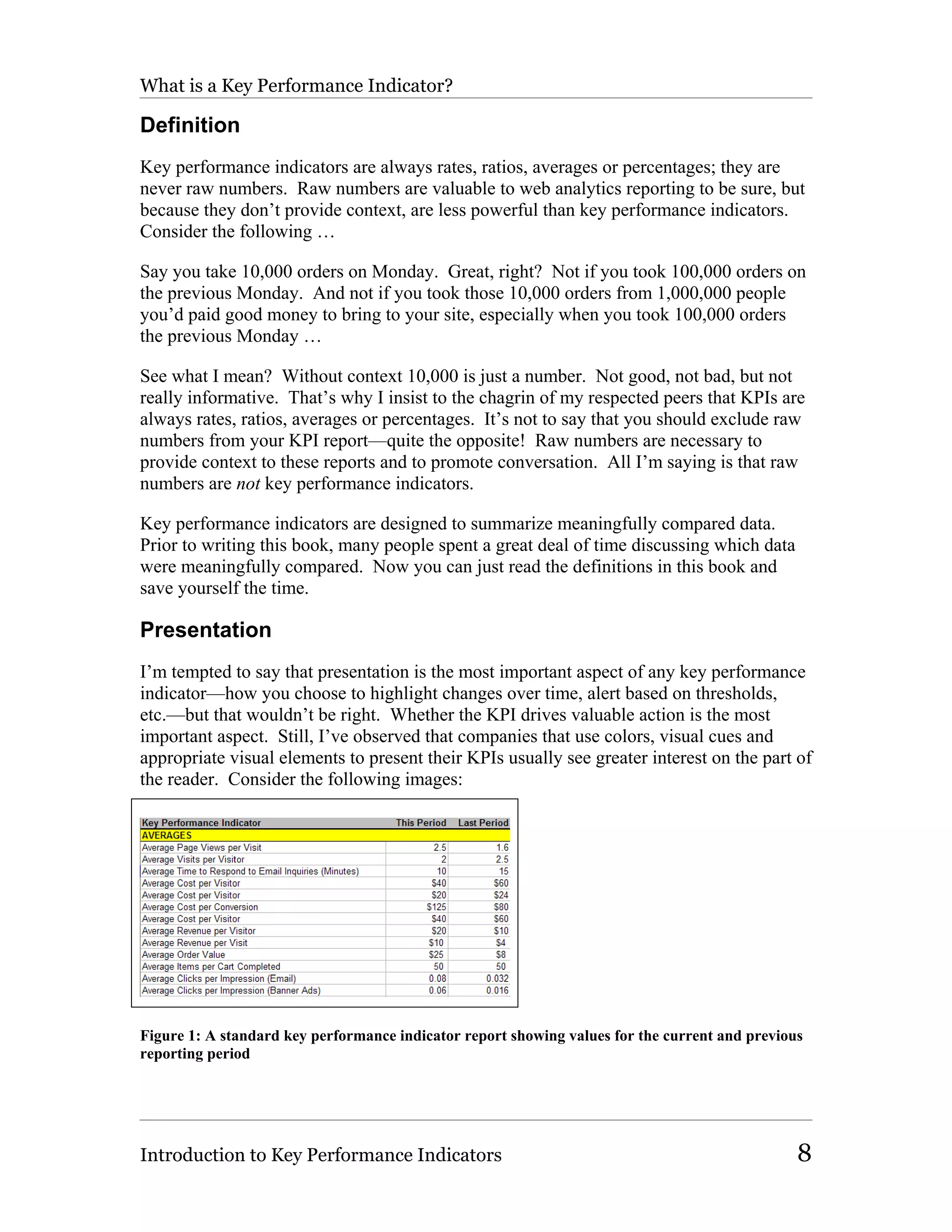
the reader. Consider the following images:


Figure 1: A standard key performance indicator report showing values for the current and previous
reporting period


Introduction to Key Performance Indicators                                                      8
What is a Key Performance Indicator?


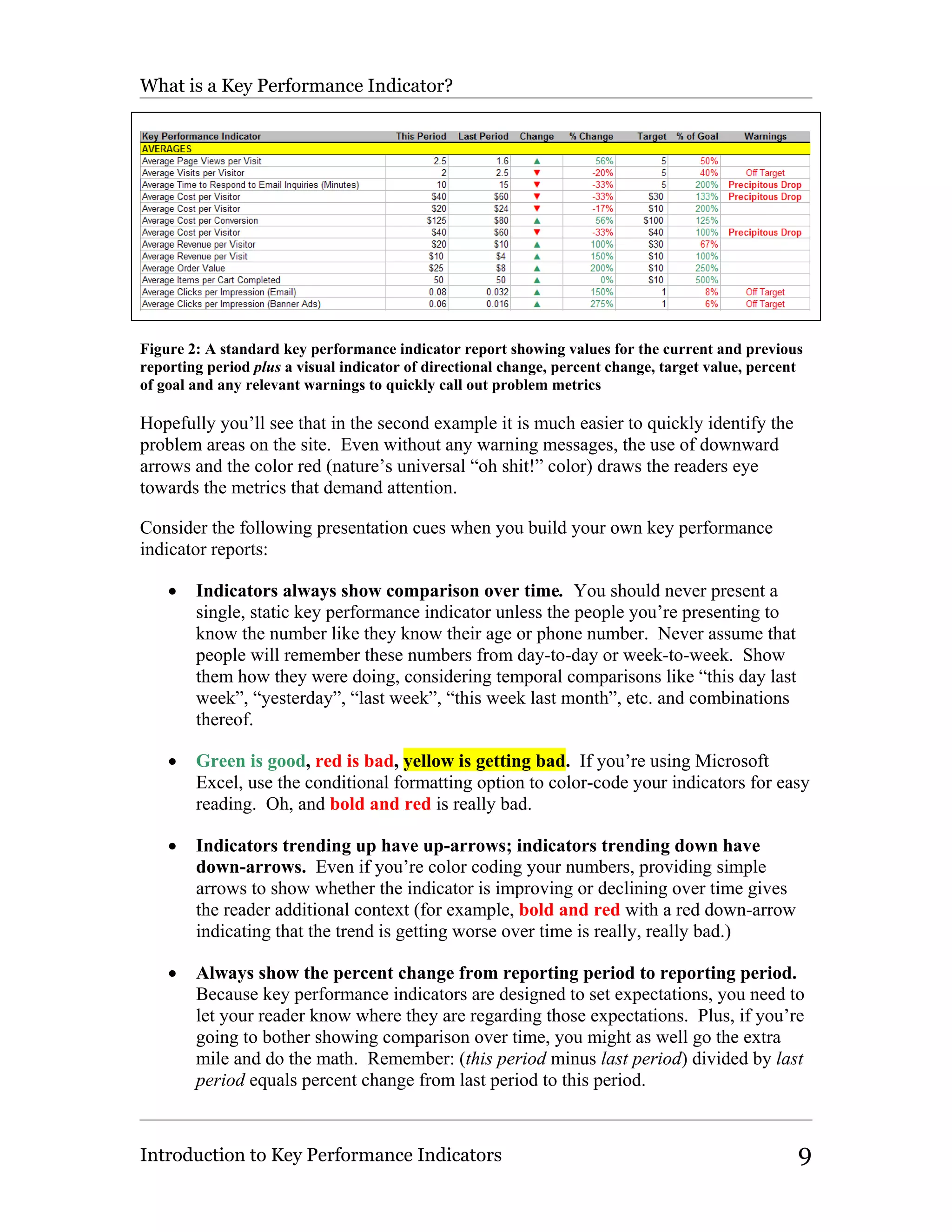
Figure 2: A standard key performance indicator report showing values for the current and previous
reporting period plus a visual indicator of directional change, percent change, target value, percent
of goal and any relevant warnings to quickly call out problem metrics

Hopefully you’ll see that in the second example it is much easier to quickly identify the
problem areas on the site. Even without any warning messages, the use of downward
arrows and the color red (nature’s universal “oh shit!” color) draws the readers eye
towards the metrics that demand attention.

Consider the following presentation cues when you build your own key performance
indicator reports:

    •   Indicators always show comparison over time. You should never present a
        single, static key performance indicator unless the people you’re presenting to
        know the number like they know their age or phone number. Never assume that
        people will remember these numbers from day-to-day or week-to-week. Show
        them how they were doing, considering temporal comparisons like “this day last
        week”, “yesterday”, “last week”, “this week last month”, etc. and combinations
        thereof.

    •   Green is good, red is bad, yellow is getting bad. If you’re using Microsoft
        Excel, use the conditional formatting option to color-code your indicators for easy
        reading. Oh, and bold and red is really bad.

    •   Indicators trending up have up-arrows; indicators trending down have
        down-arrows. Even if you’re color coding your numbers, providing simple
        arrows to show whether the indicator is improving or declining over time gives
        the reader additional context (for example, bold and red with a red down-arrow
        indicating that the trend is getting worse over time is really, really bad.)

    •   Always show the percent change from reporting period to reporting period.
        Because key performance indicators are designed to set expectations, you need to
        let your reader know where they are regarding those expectations. Plus, if you’re
        going to bother showing comparison over time, you might as well go the extra
        mile and do the math. Remember: (this period minus last period) divided by last
        period equals percent change from last period to this period.


Introduction to Key Performance Indicators                                                          9
What is a Key Performance Indicator?

   •   Set thresholds and show warnings. While you’re color coding your indicators,
       take the time to compare either the numbers or the percent change calculations to
       a pre-set threshold and show a warning if that threshold is exceeded. For
       example, if your order conversion rate drops by 5 percent, show a “MILD
       CONCERN” warning, if it drops by 10 percent, show a “MEDIUM CONCERN”
       warning, and if it drops by more than 20 percent show a “RUN SCREAMING!”
       warning.

   •   Set targets for improvement and report against those targets. Since setting
       expectation is critical to the use of key performance indicators, you may as well
       report and measure against those expectations. That way you can show a warning
       if you’re dangerously far from your target.

Sounds complicated, huh? That’s why I coded all of the key performance indicators
described in this book into a companion Excel spreadsheet, to save you the time having to
build spreadsheets (see an example in Figure 2). All you have to do is drop the necessary
data in, set your thresholds, add definitions that will be understood by your audience and
you’re off and running. Hopefully you’ll look like a genius.

No need to thank me.

Expectation
A big part of presentation is setting expectations and then communicating how close you
are to your set targets. Don’t simply track your indicators; challenge yourself and your
organization to improve upon them.

Put another way, you won’t get the full value out of your investment in key performance
indicators (and this book) until you use them as the reporting input into the continual
improvement process—measure, report, analyze, optimize—using them week-over-week,
month-over-month. The only reason you optimize the site is to drive improvement
(hence the name, continual improvement process.) Trying to do so in a vacuum is
wasteful. I strongly recommend that you set a target for improvement and diligently
work towards that goal.

Even if you don’t meet your targets and expectations, by setting them you force people to
keep KPIs under consideration. If you want to take it to the next level, consider setting
high (but reasonable) expectations for improvement in key performance indicators and
then paying bonuses each quarter based on successful attainment of those goals. The
promise of free money usually gets people intensely interested in the numbers.

Action
Key performance indicators should either drive action or provide a warm, comforting
feeling to the reader; they should never be met with a blank stare. Ask yourself “If this
number improves by 10 percent who should I congratulate?” and “If this number declines


Introduction to Key Performance Indicators                                            10
What is a Key Performance Indicator?

by 10 percent who should I scream at?” If you don’t have a good answer for both
questions, likely the metric is interesting but not a key performance indicator.

There is enough data in the world already. What most people need is data that helps them
make decisions. If you’re only providing raw data, you’re part of the problem. If you’re
providing clearly actionable data, you’re part of the solution. If you discover you’re
already doing the latter, give yourself a hug.

Most of the indicators outlined in this book are really good and useful metrics. I
specifically describe what action you might take based on the indicator in a variety of
contexts so that you’ll have those possible actions in mind. If you think of other actions
you might take based on a specific key performance indicator I would love to hear from
you. E-mail me at eric@webanalyticsdemysified.com.

What is not a Key Performance Indicator?
Raw numbers are not key performance indicators. I know that many smart people
disagree with me on this point but, well, they’re wrong. I’m not saying that key
performance indicators and raw numbers cannot be used in the same context, presented
side-by-side even. In fact, in many instances it’s not a bad idea to present a few raw
numbers—data like number of visitors, visits and page views to the site, revenue, orders
taken, etc.—to further contextualize the reports. But don’t go overboard, if you put a
bunch of raw numbers in a spreadsheet you don’t have a KPI report, you have the exact
same spreadsheet that nobody understood and nobody used.

If you want to argue about whether raw numbers are key performance indicators, please
e-mail me at yourletterwillgostraightintothetrash@webanalyticsdemystified.com.

How Should Key Performance Indicators Be
Presented?
Considering everything you’ve already read in this book about presentation you might be
surprised that there’s more! You know how to construct and present a KPI, now you
need to deliver it.

Format
There are a variety of ways you can deliver KPI reports throughout your organization:
email, spreadsheets, slides, documents, dashboards and the like. I tend to favor
spreadsheets like Microsoft Excel because they provide most of the functionality
necessary to achieve the presentation goals for key performance indicators described
above. Additionally, many web analytics application vendors provide direct data access
from Microsoft Excel that can dramatically simplify the report generation process.
Hopefully you’ll be able to automate data into the Excel spreadsheet provided with this
book to save yourself a bunch of time generating reports so you can dedicate time to
analyzing the metrics.

Introduction to Key Performance Indicators                                              11
How Should Key Performance Indicators Be Presented?

If you plan on using slides, you may be better off providing an annotated spreadsheet and
using slides to highlight indicators of note and drive the presentation. If you build a
spreadsheet and copy the table into a slide, you’re only making a hard-to-read slide. The
harder to read your slides are, the less likely your audience is to pay attention to the
message.

Dashboards are a format that nearly all analytics vendors recommend for your KPI
reporting but the use of dashboards in most cases assumes that your audience is going to
log into the analytics application, an assumption that is often false. Also, dashboards
often don’t provide enough flexibility in terms of which metrics and indicators can be
presented. While dashboards do usually allow for interesting visualizations
(thermometers, tachometers and so on), these visualizations often do not convey enough
information and thusly become impediments to the actual use of the data.

Timeliness of Delivery
If you take the necessary time to build a key performance indicator report but either only
distribute the report once a quarter or worse, don’t distribute the report at all, you’re
wasting your time. Every organization is different but KPIs are only effective if people
see them frequently enough to actually keep them in mind when making business
decisions. In general, I recommend that retailers deliver their KPI reports on a daily basis
and all other business models deliver reports on a weekly basis.

Even if you’re unable to meet every day or every week to discuss the ramifications of the
report, make sure your indicators are being generated, annotated and delivered. Doing so
will keep the recipients up to date and hopefully make any conversation about the metric
more productive. Fight the temptation to only send out reports just prior to any meeting
on the subject of KPIs; this practice is the same as hoping that people will log into the
analytics application frequently enough to maintain any sense of relationship with the
data. It’s great in theory but usually fails to produce the desired results.

Annotation
As I’ve alluded to several times, annotating your KPI reports is perhaps one of the most
important things your web data analysis staff can do to promote the proper use of these
metrics. While KPIs are designed to promote action, providing relevant notes alongside
indicators that are in decline often helps promote the “right” action. If nothing else,
adding a note to any metric exceeding set thresholds stating that “the web data team is
already exploring the problem and hopes to have a recommendation very soon” will cut
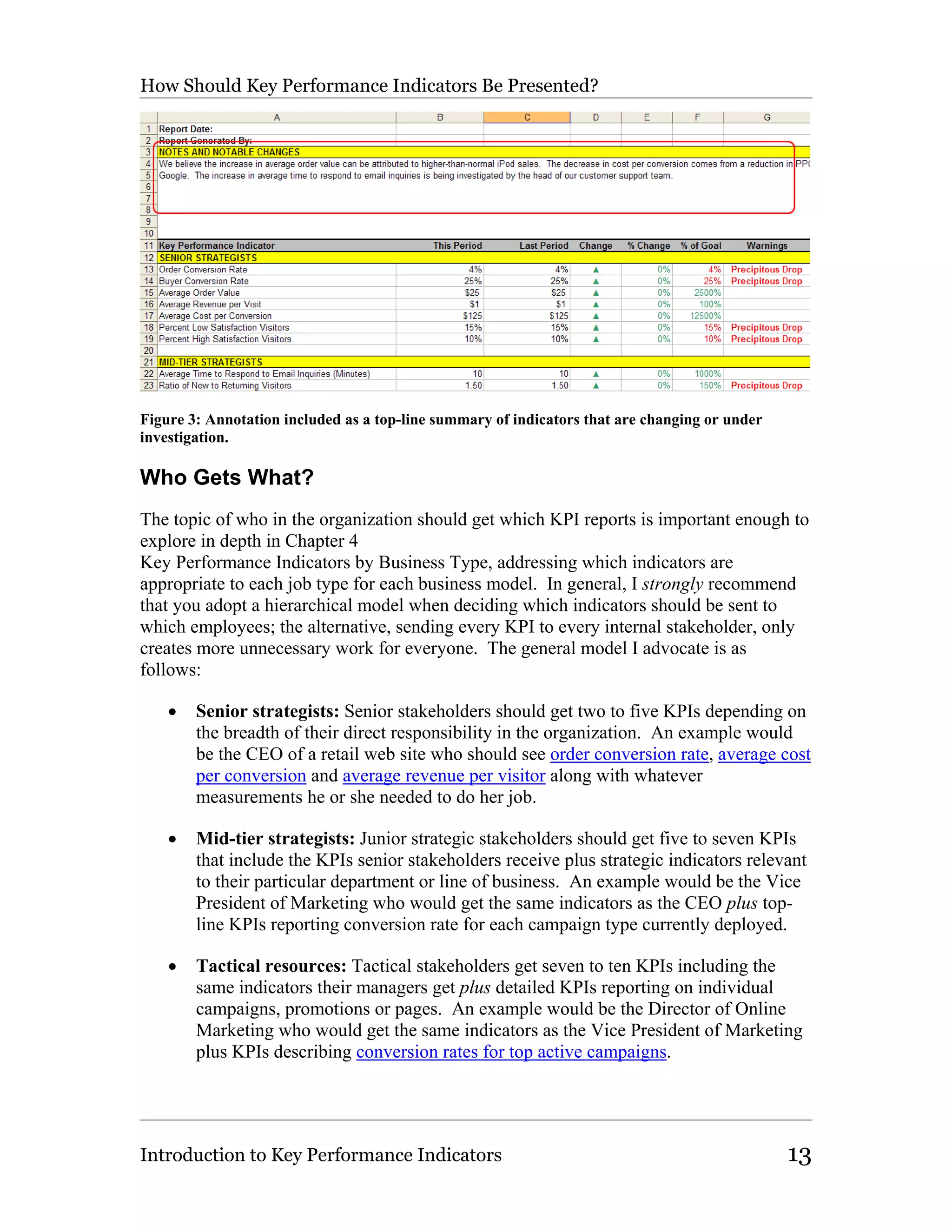
down on unnecessary phone calls and meetings (Figure 3).


Introduction to Key Performance Indicators                                              12
How Should Key Performance Indicators Be Presented?


Figure 3: Annotation included as a top-line summary of indicators that are changing or under
investigation.

Who Gets What?
The topic of who in the organization should get which KPI reports is important enough to
explore in depth in Chapter 4
Key Performance Indicators by Business Type, addressing which indicators are
appropriate to each job type for each business model. In general, I strongly recommend
that you adopt a hierarchical model when deciding which indicators should be sent to
which employees; the alternative, sending every KPI to every internal stakeholder, only
creates more unnecessary work for everyone. The general model I advocate is as
follows:

    •   Senior strategists: Senior stakeholders should get two to five KPIs depending on
        the breadth of their direct responsibility in the organization. An example would
        be the CEO of a retail web site who should see order conversion rate, average cost
        per conversion and average revenue per visitor along with whatever
        measurements he or she needed to do her job.

    •   Mid-tier strategists: Junior strategic stakeholders should get five to seven KPIs
        that include the KPIs senior stakeholders receive plus strategic indicators relevant
        to their particular department or line of business. An example would be the Vice
        President of Marketing who would get the same indicators as the CEO plus top-
        line KPIs reporting conversion rate for each campaign type currently deployed.

    •   Tactical resources: Tactical stakeholders get seven to ten KPIs including the
        same indicators their managers get plus detailed KPIs reporting on individual
        campaigns, promotions or pages. An example would be the Director of Online
        Marketing who would get the same indicators as the Vice President of Marketing
        plus KPIs describing conversion rates for top active campaigns.


Introduction to Key Performance Indicators                                                     13
How Should Key Performance Indicators Be Presented?

Below the level of tactical stakeholder I usually advise that people get comfortable using
the actual analytics application. While they should get the appropriate KPI report,
tactical managers are usually responsible for all campaigns, products or pages and should
thusly be familiar with how to gather necessary data from the application directly. The
primary reason I make this recommendation is that any action a KPI instigates generally
falls downstream to the appropriate tactical resource for diagnosis and correction.

Seriously, Don’t Send Everyone 50 Key
Performance Indicators!
Despite guidance about “Who Gets What?” and my attempt to break down indicator
usage by organizational role and business model in Chapter 4
Key Performance Indicators by Business Type of this book, experience tells me that it is
worthwhile to emphasize the following:

NO KEY PERFORMANCE INDICATOR REPORT SHOULD HAVE MORE
THAN A HANDFUL OF METRICS, TWO HANDSFUL AT MOST!

Sorry for yelling but it seems that no matter how many times I bring this up, someone
always asks me to review a KPI report with 30 different metrics on it. When I ask the
response is almost always, “Well, someone in accounting needs that metric” or “We
always tracked that number so everyone is used to seeing it.”

Auuugh!

Key performance indicators exist because there is already too much data available to any
business of any size. Given this, how can providing long spreadsheets of irrelevant data
possibly provide any value? Simply, it cannot. You need to follow these three easy
guidelines when determining which KPIs you should distribute throughout your
organization:

   1. Be hierarchical. Follow my recommendation for hierarchical delivery of
      indicators, making sure that people are only tasked with understanding indicators
      that directly impact the performance of their group, division, department or line of
      business.

   2. Be focused. Per recommendation #1, always fight the temptation to simplify the
      process into a single spreadsheet. Trust me on this one—more relevant data
      garners more attention than generic data.

   3. Be open to suggestions. If there is any doubt about the relevance and utility of a
      metric, ask the potential recipient what action they would take if the indicator
      increased or decreased by ten percent. If they don’t have a pretty good answer,
      don’t send them the indicator.

You’re welcome to ignore this sage advice but please don’t come whining to me six
months later when nobody is paying any attention to your beautiful KPI reports because

Introduction to Key Performance Indicators                                              14
Seriously, Don’t Send Everyone 50 Key Performance Indicators!

they’re really long and only appear to have a little data that is actually relevant to their
job. If you do, expect to hear me say “I told you so.”

How Should Key Performance Indicators Be
Used?
The best use for a key performance indicator can best be explained using two examples:

   1. Example #1: Senior executive responsible for the web site arrives at work
      Monday morning, opens an email containing his key performance indicator report
      comparing the previous week to the week prior and the same week last month.
      She examines the metrics, noting that all of the critical KPIs are improving and
      that and problems being reported are all known issues. She closes the report and
      goes on with her busy day.

   2. Example #2: Senior executive responsible for the web site arrives at work
      Monday morning, opens an email containing his key performance indicator report
      comparing the previous week to the week prior and the same week last month.
      He sees red everywhere. His conversion rate has tanked, his revenue per visitor is
      down 23%. He notes that it looks like most of the problems are associated with
      recently launched marketing campaigns so he picks up the phone and calls his
      direct reports in for a “nice chat” about their jobs.

In both cases, a manager was able to make a quick decision about how the day or week
was going to go regarding the web site as a business channel. The first executive went on
with her day, knowing that her downstream people had their own reports and that she
would hear from them if necessary. The second needed to be more proactive, calling for
an immediate meeting to discuss how the problem would be researched and resolved.
Assuming his team is seeing the same reports those folks should not be at all surprised to
get the call and will hopefully already be working on a response.

Key performance indicators are tools designed to simplify people’s relationship with web
data and guide action. Because non-data analysts will only be getting the information
they need to do their jobs in a format that they’re comfortable with, they can more
quickly assess performance and respond appropriately. This is another way of saying that
if you keep sending them huge, complex reports, eventually most people will stop paying
attention.

KPIs also help improve data sharing throughout the organization and in meetings.
Because everyone should have access to the same set of reports, people won’t come to
meetings with the “wrong” data (wrong being a function of the metrics used, the
timeframes examined or the calculations made.) If people are using the same reports
week over week they become more ingrained, ideally becoming common knowledge.
That way everyone is thinking about the same problem, working together towards a
solution.


Introduction to Key Performance Indicators                                                     15
How Should People Respond to Key Performance Indicators?


How Should People Respond to Key Performance
Indicators?
The only reason you should use key performance indicators for reporting web analytic
data is because the organization is motivated to optimize the online channel. If the
company is not motivated to use the available data, repackaging it into key performance
indicators and forcing it on people isn’t going to help. Trust me on this one.

In the course of my research I recently uncovered something surprisingly simple about
how companies need to think about an investment in web analytics: the idea that it takes
more than just an investment in measurement technology to be successful. If you’re not
willing to invest in technology and people to use that technology you’re doomed from the
get-go. But if you’re not willing to establish process around that investment you’re still
more likely than not to fail. The use of key performance indicators is an excellent way to
establish process. Still, without organizational interest, all you have are reports and
reports by themselves are unlikely to have any profound impact on your online business.

So given this framework, how should people respond to the key performance indicators
they receive? It’s hard to say. I know that whenever one of the KPIs I use to measure
my online business (selling books, right?) declines I immediately try to figure out what
went wrong and why. Depending on which KPI is in decline I focus more or less quickly
on the problem. Revenue KPIs I address immediately, other KPIs I address more slowly
but still I make sure to address them. Why? Because I’m really interested in making my
online business as successful as possible; the KPIs are about my business objectives and
their successful attainment.

That’s the most critical thing to keep in mind: your key performance indicators are about
your business success. If your personal success is tied to your business success, as it is
for so many employees, all the more reason to pay special attention to your business
KPIs. Perhaps all you need to do is occasionally remind people that these indicators are
not just numbers, they’re numbers that describe how successful the organization truly is.
Hopefully that will create the level of interest your organization needs to work diligently
to optimize the online channel.

About Business Specific Key Performance
Indicators
One of the comments I got from Bob Page, a really smart guy who knows his metrics,
was that my really big list of key performance indicators didn’t include any business
specific KPIs. Metrics like “percent completed streams” for online media properties or
“percent successfully executed trades” for online brokerage houses. Bob makes an
excellent point.


Introduction to Key Performance Indicators                                              16
About Business Specific Key Performance Indicators

Please don’t treat the calculations described in this book as the end-all-be-all list of
metrics for your specific business. Treat them as guides to help you get started with
using key performance indicators and to help you understand how your own business-
specific KPIs should be defined and reported. If you build out an appropriate list of key
performance indicators and people comment, “Yeah, that list looks good but it’s missing
the number I need to do my job” then you should ask them what that number is, where it
comes from and how you can include it in their specific KPI report. As long as it is
widely understood within the organization and actionable it is probably a pretty good key
performance indicator.

Oh, and I’d absolutely love to hear about your business specific KPIs as I plan on
updating this book as frequently as is reasonable and will gladly include the metrics that
work for you. Please email me directly at eric@webanalyticsdemystified.com and let me
know what your business specific KPI is, how you define it and how it helps you run
your online business.


Introduction to Key Performance Indicators                                             17
Averages


                           Chapter 3
                      The Indicators
Because there are a multitude of key performance indicators, this list of all useful KPIs is
broken down by the kind of number presented: averages, percentages, rates and ratios.
While this breakdown is clearly artificial, I thought it would be best to group KPIs in the
way most people think about the data. For example, when you ask about conversion rate,
the percentage of new or returning visitors or the average number of page views per visit
you’re identifying explicitly the kind of number you expect.

Averages
While averages are conveniently generated for a number of important metrics, it pays to
keep the definition of an average in mind when using the following key performance
indicators. The average, or arithmetic mean, according to the Wikipedia is as follows:

       The arithmetic mean is the standard "average", often simply called the "mean". It
       is used for many purposes and may be abused by using it to describe skewed
       distributions, with highly misleading results. A classic example is average
       income. The arithmetic mean may be used to imply that most people's incomes are
       higher than is in fact the case. When presented with an "average" one may be led
       to believe that most people's incomes are near this number. This "average"
       (arithmetic mean) income is higher than most people's incomes, because high
       income outliers skew the result higher (in contrast, the median income "resists"
       such skew). However, this "average" says nothing about the number of people
       near the median income (nor does it say anything about the modal income that
       most people are near). Nevertheless, because one might carelessly relate
       "average" and "most people" one might incorrectly assume that most people's
       incomes would be higher (nearer this inflated "average") than they are. Consider
       the scores {1, 2, 2, 2, 3, 9}. The arithmetic mean is 3.17, but five out of six scores
       are below this!

(From en.wikipedia.org/wiki/Average.) The important thing to keep in mind when using
average-based key performance indicators is that, as the Wikipedia says, skewed
distributions can lead to the misleading results. This problem often arises when looking
at average time spent on a page—the average time spent looks ridiculously long or short
but nothing appears to be wrong with the data. When this happens, either try and


The Indicators                                                                           18
Averages

calculate the median value (50 percent of the values are above, 50 percent are below) or
simply do the best you can.

Another problem with averages is that there is really no such thing as an “average” visit
or visitor—every person who comes to your web site will behave slightly differently.
Some people argue that using averages to understand how people browse content often
leads to misinterpretation but I disagree. Used in the context of the following key
performance indicators, thinking about the “average” visit or visitor will help you better
understand the lowest common denominator—the habits and behaviors of people who are
neither your best nor worst visitors, only those who come in the largest numbers. You
don’t necessarily want to make sweeping changes to your site based on the activities of
“average” visitors but you want to keep a close eye on what the majority is doing. One
thing sophisticated users may want to try to overcome this effect is segmenting your
audience in meaningful ways and then building the following KPIs; the segmentation will
refine the behaviors measured into more focused groups, hopefully allowing you to take
more specific actions based on the data.

Average Page Views per Visit
Average page views per visit are an excellent indicator of how compelling and easily
navigated your visitors find your web site.

Definition

The total number of page views divided by the total number of visits during the same
timeframe.

    Page Views / Visits = Average Page Views per Visit

Sophisticated users may also want to calculate average page views per visit for different
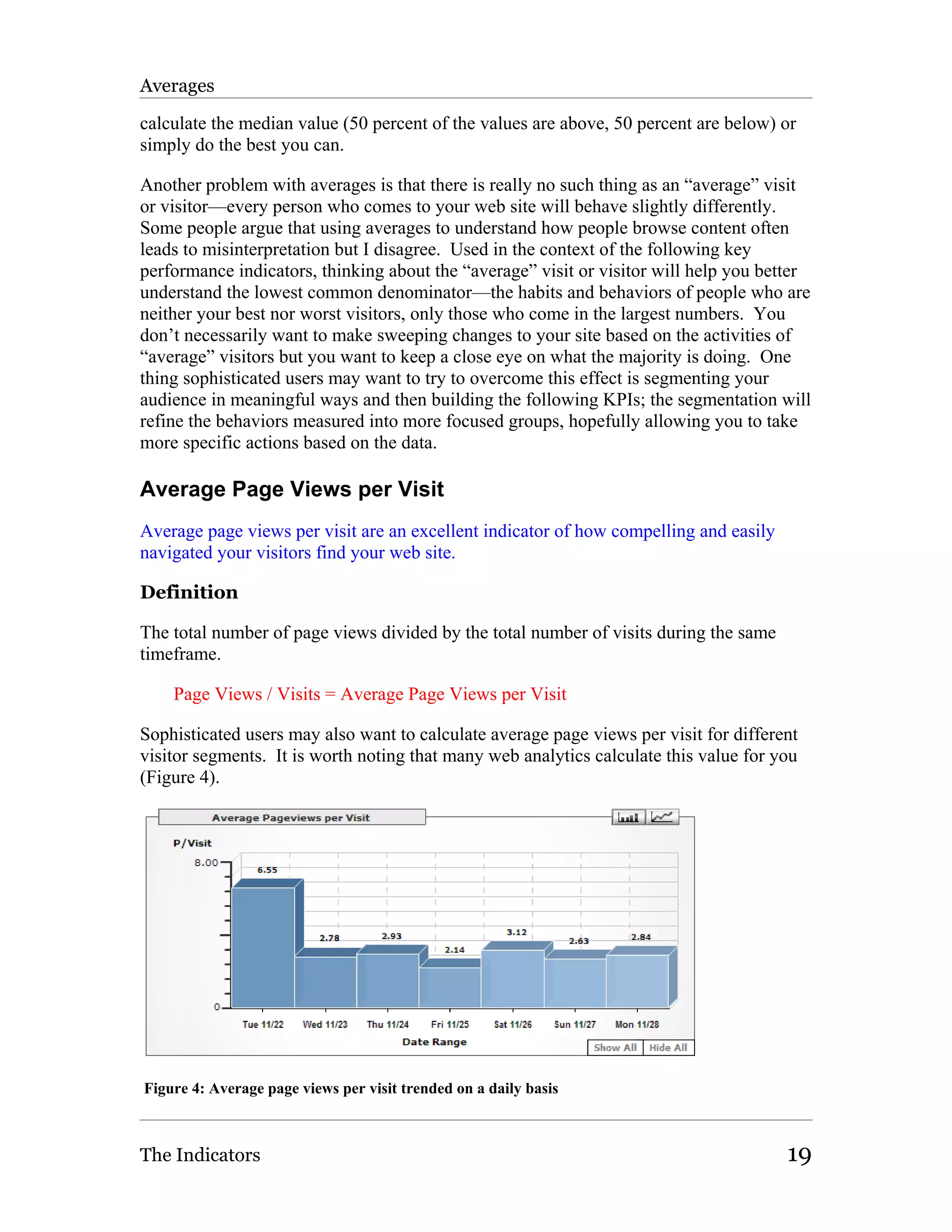
visitor segments. It is worth noting that many web analytics calculate this value for you
(Figure 4).


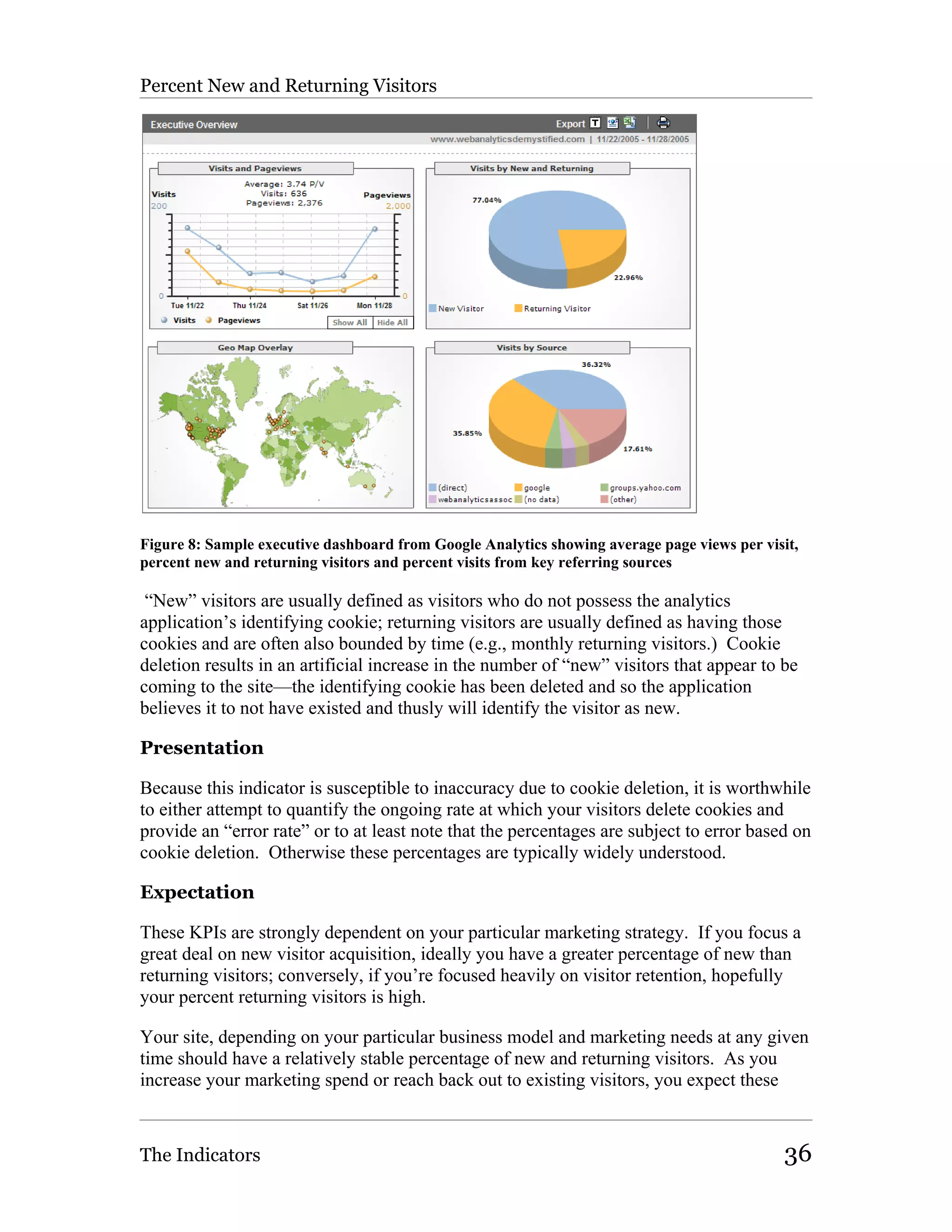
Figure 4: Average page views per visit trended on a daily basis


The Indicators                                                                         19
Average Page Views per Visit

Presentation

Presentation of average page views per visit can be supplemented by associating the
monetary value of a page view for the advertising business model. Based on an average
cost per thousand (CPM) advertising impressions, you can calculate the value of the
average visit as follows:

    Average Dollar Value / 1,000 Page Views * Page Views / Visit = Value of Average
    Visit

For example, an advertising site having an average CPM of $25.00 and an average 3 page
views per visit would make the following calculation:

    $25 / 1,000 page views * 3.00 page views / visit = $0.075 per visit

Expectation

Expectations about average page views per visit depend on your business model.

   •   Content: CPM-based business models that depend on high page view volumes
       should work to increase the average number of page views per visit, thusly
       increasing the value of each visit.

   •   Marketing and Retail: Marketing and retail sites generally want to increase this
       average, indicating a greater interest on the part of the visitor. However,
       depending on the specific goals of the site, more page views can indicate
       confusion on the part of the visitor.

   •   Support: Customer support sites generally want to decrease the number of page
       views per visit, at least in sections specifically designed to help visitors find
       information quickly.

Action

When the average number of page views per visit trend against expectations, I
recommend examining a handful of common site components that affect page views:

   •   Navigational elements: If it is difficult for visitors to navigate your site they will
       often be forced to view more pages as they hunt. Conversely, if your site is
       difficult to navigate, visitors may leave your site prematurely out of frustration.

   •   Content: If your content is poorly written and doesn’t follow best practices for
       writing for the web, visitors may leave your site prematurely. Conversely, if your
       content is well written, visitors may be inspired to “keep reading”, driving up the
       average number of page views.


The Indicators                                                                           20
Average Page Views per Visit

    •   Search technology: If your search functionality is poor, visitors may be forced to
        click to look for information. Conversely, if your search functionality is good,
        visitors may be leveraging search, thusly reducing the number of pages viewed.

    •   Marketing efforts: If your marketing efforts are poorly targeted, visitors are less
        likely to view many pages. Conversely, if your marketing efforts are good,
        visitors may view a large number of pages.

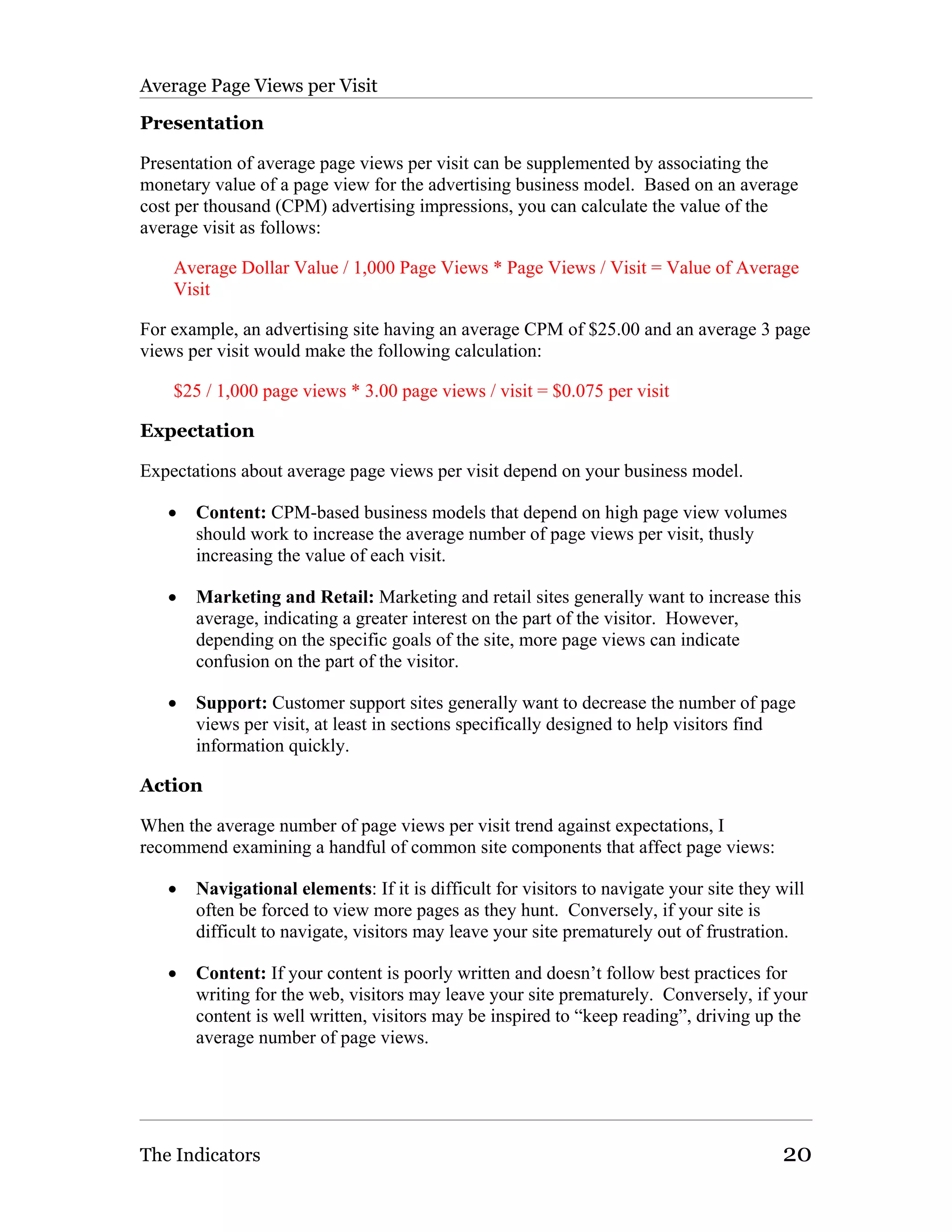
When diagnosing problems with average page views per visit one of the places you may
want to look is at your time spent on site and average time spend on pages reports if your
analytics application provides them (Figure 5). You may also want to look at how your
internal search application is being used by examining percent visitors using search,
percent “zero result” searches and average searches per visit.


Figure 5: Sample time spent (length of visit) report from Google Analytics, useful in diagnosing
problems reflected in the average page views per visit key performance indicator


Average Visits per Visitor
Average visits per visitor over a finite timeframe can help you understand how much
interest or momentum the “average” visitor has.

Definition

The total number of visits divided by the total number of visitors during the same
timeframe:

     Total Visits / Total Visitors = Average Visits per Visitor

Sophisticated users may also want to calculate average visits per visitor for different
visitor segments. This can be especially valuable when examining the activity of new
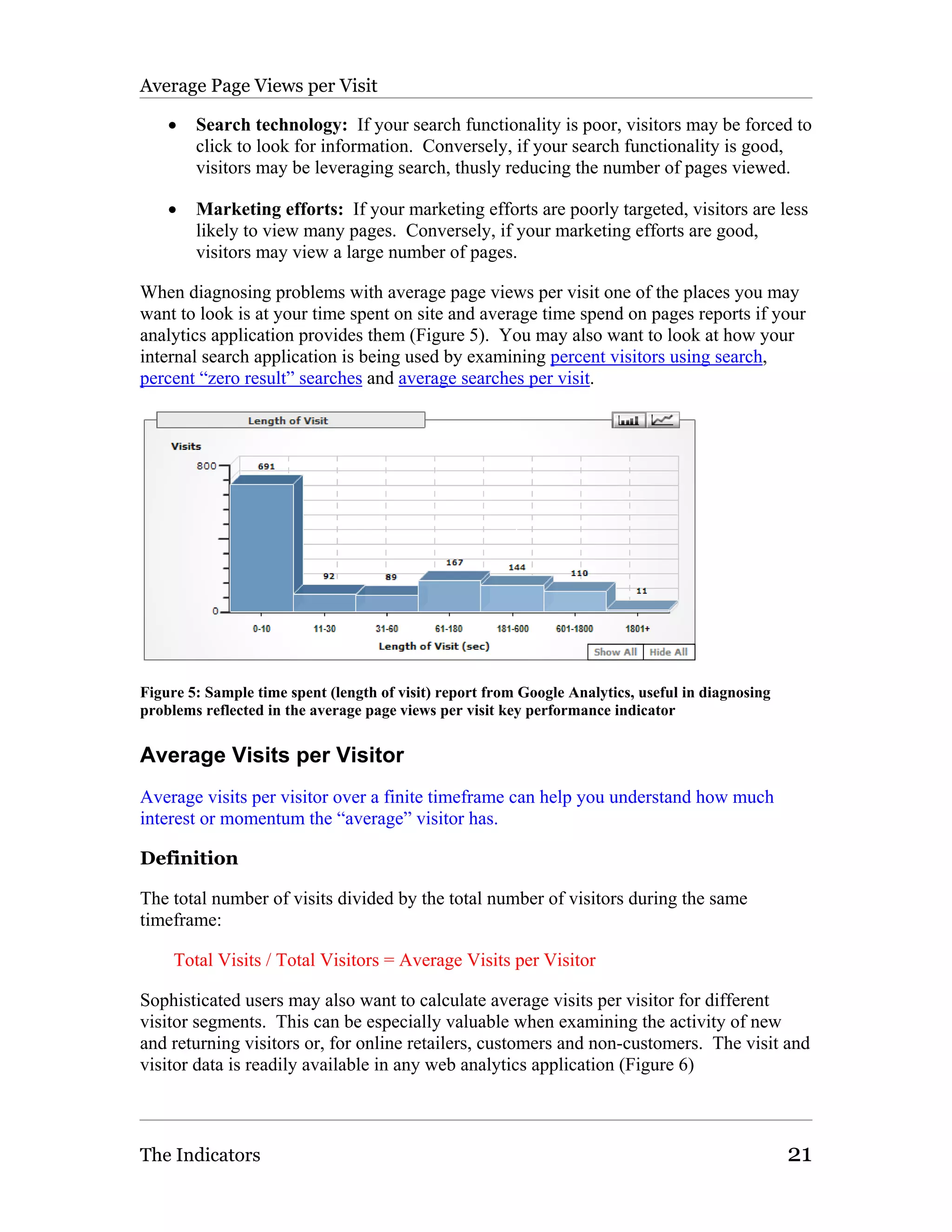
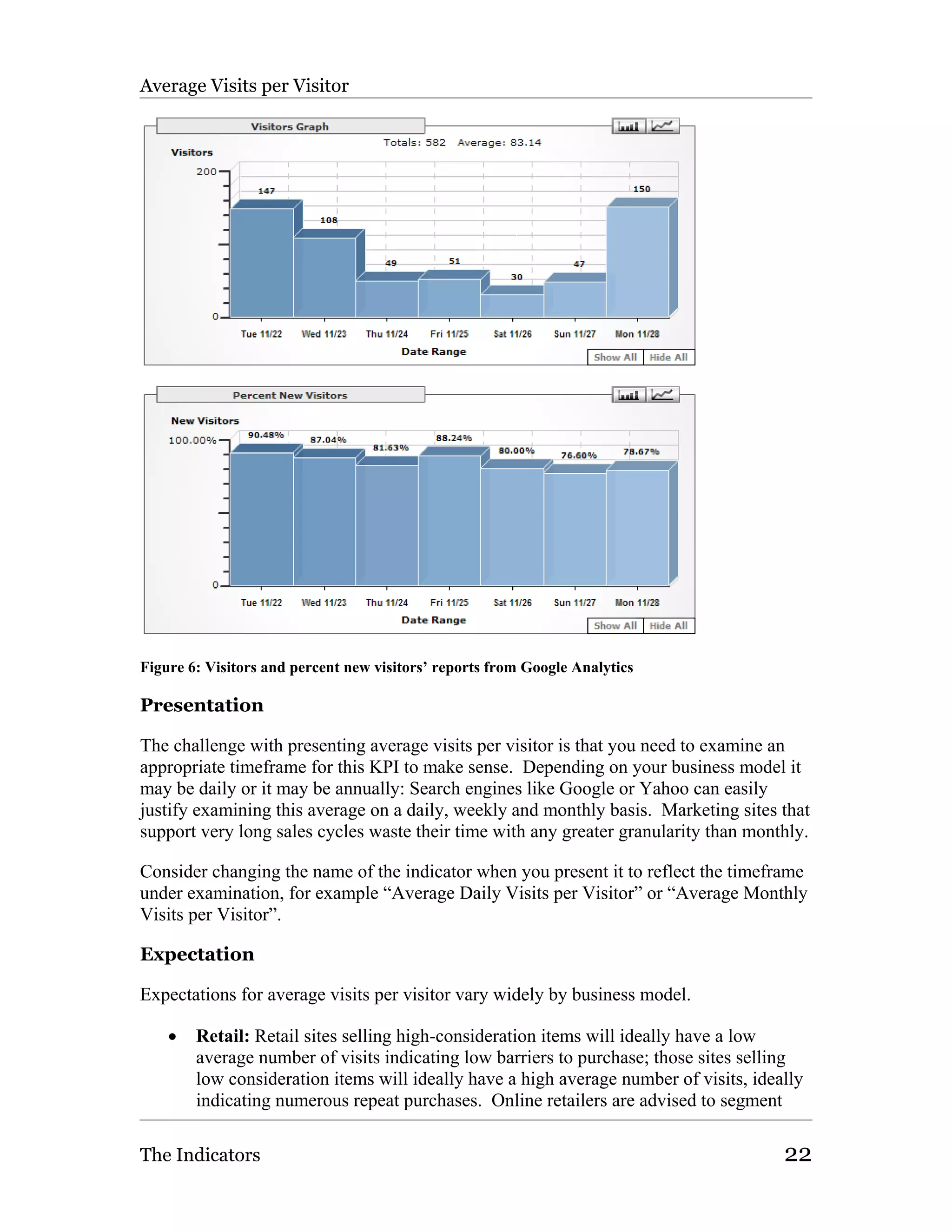
and returning visitors or, for online retailers, customers and non-customers. The visit and
visitor data is readily available in any web analytics application (Figure 6)


The Indicators                                                                                     21
Average Visits per Visitor


Figure 6: Visitors and percent new visitors’ reports from Google Analytics

Presentation

The challenge with presenting average visits per visitor is that you need to examine an
appropriate timeframe for this KPI to make sense. Depending on your business model it
may be daily or it may be annually: Search engines like Google or Yahoo can easily
justify examining this average on a daily, weekly and monthly basis. Marketing sites that
support very long sales cycles waste their time with any greater granularity than monthly.

Consider changing the name of the indicator when you present it to reflect the timeframe
under examination, for example “Average Daily Visits per Visitor” or “Average Monthly
Visits per Visitor”.

Expectation

Expectations for average visits per visitor vary widely by business model.

    •   Retail: Retail sites selling high-consideration items will ideally have a low
        average number of visits indicating low barriers to purchase; those sites selling
        low consideration items will ideally have a high average number of visits, ideally
        indicating numerous repeat purchases. Online retailers are advised to segment

The Indicators                                                                         22
Average Visits per Visitor

       this KPI by customers and non-customers as well as new versus returning visitors
       regardless of customer status.

   •   Content and Marketing: Advertising and marketing sites will ideally have high
       average visits per visitor, a strong indication of loyalty and interest.

   •   Support: Customer support sites will ideally have a low average visits per visitor,
       suggesting either high satisfaction with the products being supported or easy
       resolution of problems. Support sites having high frequency of visit per visitor
       should closely examine average page views per visit, time spent on site (see
       Figure 5) and call center volumes, especially if the indicator is in decline.

Action

All web sites desire some kind of relationship with their visitors over time—the wild
cards are usually the type of relationship and the amount of time. Customer support sites
want people to visit whenever they have a problem but don’t want customers to have
problems per se yielding a high average visits per visitor over a longer period of time.
Retail, marketing and advertising sites all want people to come back all the time to buy,
learn or click respectively. The challenge for site operators is figuring out how exactly to
drive this return activity and knowing what to do when it fails to appear.

For the most part, when this KPI trends in the wrong direction you need to ask “what just
happened?” Your average visits per visitor should be relatively stable providing your site
has been available for at least 6 months and you’ve not made any major changes to the
site or your retention marketing strategy. Therein lies the opportunity: If you change
your retention marketing strategy or your site you should expect to see a change (albeit
slight) in this KPI in the following weeks and months. If none appears, what went
wrong? If the KPI improves dramatically, great! Understand what you did well and
repeat as often as possible.

If this KPI suddenly gets worse, figure out why. Common culprits include site changes
breaking bookmarked links, the emergence of a new competitor and the intangible offline
“vibe”, e.g., perhaps you’re just no longer as cool as you think. Keep in mind before you
panic: You need to give your visitors enough time to return and visit depending on your
business model.

Average Time to Respond to Email Inquiries
Most companies forget to track one of the most important customer support metrics there
is: the amount of time it takes you to respond to a customer request sent via email.

Definition

The average response time for an email inquiry is a measurement of the number of
minutes, hours or days it takes you to provide a visitor a human-generated response to an
email-based inquiry:


The Indicators                                                                          23
Average Time to Respond to Email Inquiries

    Sum of Response Times in [TIME UNIT]/ Total Number of Email Inquries =
    Average Time to Respond

The [TIME UNIT] in this equation refers to minutes, hours or days, e.g., “Sum of
Response Times in Days”. Response time is defined as the difference in [TIME UNITS]
between the time the inquiry is received and the time that someone in your company
answers the email. While there are a handful of technologies designed to automate
responses, rare is the substitute for a personal email responding to the question or
concern. Any company concerned with how visitors perceive their commitment to
customer support is advised to respond personally to these inquires.

While summing these times can be arduous, the process can be simplified by creating a
central spreadsheet of inquiries and responses or mining your customer support
application for the data.

Presentation

Because nothing is more frustrating to visitors than sending an email and having to wait
endlessly for the response, this KPI is one that lends itself well to conservative alerts and
warnings being generated. Depending on your particular business, you should set the
warning threshold very low and use warning generation as a strong action driver.

Expectation

Your visitors and customers expect a near-instantaneous response to any email they send
you, especially when they have a problem. If you want happy customers and prospects
you should consider setting expectations of response times very low, e.g., less than 6
hours or under one day—same day response. As an exercise, track this KPI against the
volume of calls into your organization to see if a 10 percent improvement in average
response time correlates well to a 10 percent decrease in call volume. You may be
pleasantly surprised.

Action

Regardless of your average response time this KPI should never get worse and increase.
Any sustained increase should immediately be investigated, looking to see if perhaps
there has been an increase in complex inquiries, an extended illness or problem among
those responsible for responding or worse, someone completely ignoring requests for
help.

Average Cost per Visitor
Visitor acquisition costs often spiral out of control when left untracked. While tracking
these costs can be difficult in the long run the effort is worth it.

Definition

A function of the total sum of marketing costs, the average cost per visitor is defined as:

The Indicators                                                                            24
Average Cost per Visitor

    Sum of Acquisition Marketing Costs / Visitors = Average Cost per Visitor

For most companies the tricky piece is summing acquisition marketing costs, owing to
the fact that few companies are accurately tracking these numbers on anything more
granular than a quarterly basis. It is recommended that you limit the summation to online
marketing activities only unless you strongly brand your URL in offline marketing
materials. By adding up the costs of search, email, banner, partner and feed-based
marketing activities a fairly useful KPI can be generated.

This indicator is a good candidate for segmentation by marketing channel. For example,
you may want to calculate the average cost per visitor for your email, banner and search
based marketing efforts. You may also want to segment out new and returning visitors if
possible to see whether your acquisition or retention marketing is more cost effective.

Presentation

Because this KPI is dollar-based little usually needs to be done regarding presentation to
attract stakeholder interest. Especially if the average cost per visitor is high, most
executives and managers will pay close attention to this indicator.

Expectation

Ideally visitor acquisition costs are low and contribute to a well-run, high margin
business. Unfortunately the ideal case is rarely observed. It is worthwhile to set the
expectation that the company will work diligently to lower visitor acquisition costs and
carefully critique each marketing channel.

Action

If cost per visitor suddenly increases it is worthwhile to compare this increased cost to
average revenue per visitor and relevant conversion rates. If cost per visitor is going up
but revenue or conversion are flat or decreasing something has gone awry. The converse
is also true: if your acquisition costs drop suddenly you want to make sure that this
fortuitous event has not happened at the expense of revenue or other measured value.

Average Cost per Visit
Often it pays dividends to keep track of the cost of driving individual visits to the web
site for comparison to your average cost per visitor. These key performance indicators
used in tandem can tell you a great deal about your marketing acquisition costs.

Definition

A function of the total sum of marketing costs, the average cost per visit is defined as:

    Sum of Acquisition Marketing Costs / Visits = Average Cost per Visit


The Indicators                                                                              25
Average Cost per Visit

Challenges associate with calculating this key performance indicator are the same as
average cost per visitor.

Presentation

It is a good idea to present average cost per visit and average cost per visitor side-by-side,
depending on how different these calculations are.

Expectation

In an idea world you would be able to drive visits with little or no marketing costs;
unfortunately it is far from an ideal world. Still, lower is better.

Action

Especially when experimenting with new marketing channels you want to watch your
average cost per visit carefully, looking for a dramatic increase that is not correlated with
increases in value-based KPIs like average revenue per visit and average order value.

Average Cost per Conversion
Regardless of your business model, conversion is one of the most important visitor
activities you need to track. By calculating the average cost per conversion you can
ensure that you’re not paying too much to acquire visitors.

Definition

The general calculation for average cost per conversion is similar to average cost per
visitor and average cost per visit:

    Sum of Acquisition Marketing Costs / Total Conversion Events = Average Cost per
    Conversion

Sophisticated marketers may want to segment this KPI for individual conversion events;
to do this you need to have a pretty good system for tracking marketing costs so that they
may be associated with the intended act of conversion. For example, if your site is
designed to generate leads but visitors can also sign up for a newsletter, you may want to
assign the lion’s share of marketing costs to the former and a small fraction to the latter—
only the marketing you do to grow your newsletter subscription base. Doing so will
inevitably produce a better-looking KPI for your newsletter subscription conversion event
but this makes sense as long as the latter event is ancillary to your marketing goals.

Similar to average cost per visitor it does make sense to segment average cost per
conversion by marketing channel to help identify strategies that are ineffective from a
cost perspective.


The Indicators                                                                            26
Average Cost per Conversion

Presentation

Because this KPI is dollar-based it and critical to the success of most businesses it is
unlikely you’ll need to change much in the presentation. It is worthwhile, if you break
down your cost by conversion event, to both provide a global view (all marketing costs
divided by all conversion events) for reference and also clearly identify the conversion
event for micro-events.

Expectation

If you’re paying more for conversions than the conversions are worth then clearly
something has gone wrong. For most companies this is not the case and the expectation
is that even nominal ongoing savings in conversion costs can add up. By constantly re-
examining your marketing acquisition efforts and cutting waste, your cost per conversion
can be dramatically improved.

Action

Any time average cost per conversion increases it is advised to immediately examine
your marketing efforts to see what has changed. The most common case is that some
expensive program has recently been launched and is failing to drive an appropriate
number of conversion events. In this case you usually don’t want to immediately cease
the marketing activity in question but do want to pay close attention to said effort,
watching for any improvement.

Average Revenue per Visitor
Revenue per visitor is a critical metric but not just for online retailers and advertising
supported sites. Marketing sites can better understand their marketing efforts by
estimating value based on conversion events and customer support sites can approximate
revenue supported.

Definition

In general:

    Sum of Revenue Generated / Visitors = Average Revenue per Visitor

Each business model will calculate revenue generated or supported differently:

   •   Retail: For retail sites the sum of revenue generated is easily calculated.

   •   Content: Advertising-based sites can use the sum of advertising revenues
       generated or a calculation of average CPM times impressions served.

   •   Marketing: Marketing sites focused on lead generation are encouraged to
       estimate the value of leads generated by comparing similar quality leads to past
       results.

The Indicators                                                                         27
Average Revenue per Visitor

   •   Support: Customer support sites should ideally sum the amount of customer
       contract value supported by the site. For example, if you know that 100 people
       are getting support for a $100 product and 50 people are getting support for a
       $500 product, the sum of revenue supported would be 100 x $100 + 50 x 500 =
       $1,250,00.

   While the customer support case is obviously artificial it serves no less value for sites
   to track the value of visitors they support.

Presentation

As with other dollar-based KPIs, presentation should be fairly obvious. The only
exception would be for the customer support model in which the indicator should be
clearly titled “Average Revenue Supported per Visitor.”

Expectation

As you would expect, the more revenue per visitor you’re able to get, the better off you
are. The obvious strategy for improving this performance indicator is to attract more
valuable visitors to your web site. Consider using average revenue per visitor to critically
examine each new visitor acquisition effort, segmenting as necessary, to determine
whether different strategies are actually working.

Action

If this number drops off suddenly or precipitously likely the first call you should make is
to your marketing department and the next to your operations group. Often times either a
large group of unqualified visitors has been attracted to the site or something has gone
wrong with your revenue realization path (e.g., your shopping cart is broken or your site
is performing slowly, thusly reducing the number of advertising impressions you serve.)

NOTE: This key performance indicator makes the list of “RED BUTTON” KPIs that,
when they go wrong, should bring everyone to a screeching halt while the problem is
diagnosed.

Average Revenue per Visit
Average revenue per visit is a more granular examination of your site’s financial
performance but otherwise similar to average revenue per visitor.

Definition

See average revenue per visitor but substitute “Visits” for “Visitors.” A variation on this
KPI is average revenue per searcher visit, basically:

    Sum of Revenue Generated from Search Visits / Visits Where Visitors Use Search =
    Average Revenue per Searcher Visit


The Indicators                                                                          28
Average Revenue per Visit

Your ability to calculate the searcher KPI depends on you analytics application’s ability
to segment revenue. To do this you’d segment all visits in which a visitor saw at least
one search results page and use segment revenue generated and segment visits.

Presentation

See average revenue per visitor.

Expectation

While average revenue per visitor is really a long-term, time independent performance
indicator, revenue per visit is a good indicator of how you’re doing right now in your
marketing and conversion efforts. Compare revenue per visit to average revenue per
visitor to see if your short-term efforts are paying off but not really contributing to the
lifetime value of a visitor.

Action

See average revenue per visitor.

Average Order Value
For retailers, average order value is considered a “key” key performance indicator by
many, when combined with revenue per visitor or visit and order conversion rate, is
essentially the pulse of the web site.

Definition

Average order value is nearly always calculated by the analytics application but often
requires some additional commerce tracking code (Figure 7). The basic calculation is:

    Sum of Revenue Generated / Number of Orders Taken = Average Order Value


The Indicators                                                                            29
Average Order Value
Figure 7: Average order value report from Google Analytics. No, my online book sales aren’t that
pathetic! I made a mistake when I deployed Google Analytic’s commerce tracking code

In the ongoing effort to optimize the online business there are two major KPIs describing
the site’s ability to generate revenue—average order value and order conversion rate.
Smart business owners work diligently to improve both but segmenting visitors and
marketing campaigns into high, medium and low average order value (AOV) groups can
help identify where the “best” (e.g., high AOV) customers are coming from.

You may want to calculate this indicator for both your new and returning customers and
presenting those KPIs in context with percent new and returning visitors. Most analytics
and commerce reporting packages will provide that level of segmentation without
additional work.

Presentation

As with other dollar-based KPIs, presentation should be fairly obvious. It is a good idea
to present this indicator and average cost per conversion, order conversion rate and
average revenue per visitor together to provide context to each.

Sites trying to positively impact average order value often work to improve up-sell and
cross-sell, essentially getting customers to add additional value to the cart prior to the
checkout process. To this end, it is also worthwhile to track average items per cart along
with average order value.

Expectation

Sites should determine a baseline average order value for all customers to use as a
comparator for all marketing acquisition campaigns. For example, it might help to make
and keep track of the average order value for the entire site, targeted email campaigns,
untargeted email campaigns, search marketing efforts and so on. Assuming your
conversion rate is same for all customer acquisition efforts (rarely the case), you’ll
discover that you’re better off focusing your efforts on high-AOV generating campaign
types.

Entire Site AOV          Email AOV                Keyword AOV               Banner Ad AOV

$100.10                  $95.50                   $120.15                   $101.25

As you can see, the average order value for customers associated with search keywords is
20 percent higher than the site-wide AOV.

Action

A decrease in average order value should be compared to changes in the order conversion
rate. If AOV decreases but order conversion rate increases average revenue per visitor
should stay roughly the same; if AOV and order conversion rate both drop revenue per

The Indicators                                                                                30
Average Order Value

visitor will likely be strongly impacted. Regardless, average order value should be
closely watched and any changes should be diagnosed, looking at changes in the
checkout process and marketing acquisition programs.

NOTE: This key performance indicator makes the list of “RED BUTTON” KPIs that,
when they go wrong, should bring everyone to a screeching halt while the problem is
diagnosed. Especially when compared to marketing acquisition indicators like average
cost per visit, the value of conversions are critical.

Average Items per Cart Completed
Aside from acquiring better qualified visitors to the site, the next best strategy to increase
average order value is getting customers too buy more items each time they purchase.

Definition

The average number of items per cart is the measurement of the number of units or items
in each successfully completed cart:

    Sum of Products Purchased / Number of Completed Shopping Carts = Average Items
    per Cart

To make this calculation the analytics package or commerce application need to be able
to report on the number of items contained in each completed cart. If your particular
application does not report on this value automatically, you may want to consider using a
custom variable, being sure to only sum the number of products purchased for
successfully completed carts.

Presentation

It is a good idea to present average items per cart along with average order value to
provide context if one or the other KPI decreases.

Expectation

Depending on what they’re selling, retailers will quickly realize that average items per
cart are usually very close to 1.0 and very difficult to increase. In some instances, this
KPI is uninformative because it will always be a single item; in other instances this KPI
can provide valuable insight into the disposition of visitors coming to the site and the
quality of up-sell and cross-sell presentment.

Action

This KPI should be carefully watched when an effort is being made to improve the
quality of up-sell and cross-sell functionality in the shopping cart. In situations where
new strategies are being rolled out but average items per cart and average order value are
unchanged, additional work is warranted.


The Indicators                                                                             31
Average Items per Cart Completed

In situations where this KPI suddenly decreases, it is worthwhile to review with
marketing groups what changes if any have recently occurred. Perhaps a successful sale
on a single item is underway and is decreasing the number of multiple-item carts being
completed. The converse is also true; if no recent work has been done on how up-sell
and cross-sell is presented, an increase in average items per cart may be indicative of a
more qualified audience or a particularly successful campaign.

Average Clicks per Impression by Campaign Type (Click-
Through Rate)
Average clicks per impression are a good high-level indicator of the reach of your
marketing campaigns.

Definition

Most of the data necessary to calculate average clicks per impression will come from
your advertising partners (e.g., Google, Yahoo!, your email service provider, your banner
advertising server.):

    Total Clicks / Total Impressions Served = Average Clicks per Impression

Plan on generating this KPI for each of the gross campaign types you run—email, search
marketing, banner advertising, RSS feeds, etc. It is worth noting that average clicks per
impression are generally referred to as a campaign’s “click-through rate.”

Presentation

It is important to make clear the campaign type being tracked by this KPI to alleviate
confusion and different campaign types should not be mixed, e.g., clicks from email are
different than clicks from search marketing and should be treated as such. Additionally,
this is a very tactical key performance indicator and should be treated as such by only
reporting the average clicks per impression to those individuals directly responsible for
said campaigns. Average clicks per impression is a KPI that leads quickly to the data
behind the average in an attempt to explore the source of poorly performing campaign
types.

Expectation

The unfortunate reality is that this indicator will most often be a very, very small number
and will vary widely by campaign type. Still, the fact that few prospects typically click
on advertising campaigns provides a great opportunity to explore how to improve this
click-through rate.

Action

Average clicks per impression is an indicator that you can spend your entire life trying to
improve and see few (if any) results. The general strategy to improve this KPI is to
tweak your message or your audience; if you know your creative is working at other sites

The Indicators                                                                          32
Average Clicks per Impression by Campaign Type

(for example, when you explore the average you can see component sites that convert at a
rate much higher than average) then you can assume some problem with your audience.
If your message isn’t working anywhere, likely the problem is the creative.

If the problem is the audience you should rank all of the components of the average—the
sites at which the campaign is being run—and work from the bottom up, making sure that
the campaign’s placement is correct. If the placement is correct but click-through is still
poor, stop running the campaign at that site. If the problem is the message, consider
testing different versions of the campaign, tweaking images and language until the click-
through rate increases.

Average Visits Prior to Conversion
Companies having high-consideration conversion events should use average visits prior
to conversion to properly set expectations about campaign success.

Definition

Average visits prior to conversion, on a per campaign basis, is defined as:

    Sum of Pre-Conversion Visits / Total Conversions = Average Visits Prior to
    Conversion

Your ability to calculate this indicator depends on being able to segment “converted
visitors” from “unconverted visitors”, something not all analytics packages support.
Also, because this KPI is depends on data from multiple sessions, cookie deletion
behavior on the part of visitors may impact the accuracy of this metric.

Presentation

It is worthwhile to calculate this KPI for both all visits to the site and also sites
originating from campaign activity. If your analytics application allows it, comparing
average visits prior to conversion for different campaigns and different campaign types
can help marketers identify particularly compelling campaigns.

Expectation

Expectations for this indicator vary widely depending on the type of campaign being run
and the conversion event(s) being monitored. Consumers typically visit sites repeatedly
prior to making high-consideration purchases; conversely, a banner ad offering
something “free” and driving the visitor directly to the call to action will likely have a
low average visit prior to conversion.

Because there is no way to know in advance what this KPI will look like for different
sites, campaigns and conversion events, it is a good idea to calculate this metric for
enough time to understand how visitors convert without reporting it widely to the
organization. This strategy will allow the web data analyst to have a refined sense of
what the numbers are, just in case managers ask “is that good or bad?”

The Indicators                                                                           33
Average Visits Prior to Conversion

Action

Despite the difficulty setting expectations for this indicator, shorter average times are
better and longer times are worse. Campaigns and offers that take longer than average
times to drive conversion should be examined carefully for higher conversion rates,
higher value or lower overall cost to run. All things being equal, campaigns that convert
in longer periods of time should be cut in favor of campaigns that convert more quickly.

Sites that have long average visits prior to conversion in general should examine the calls
to action around conversion events. This KPI presents a good opportunity for sites to
explore conversion funnels within an A/B testing framework, looking for the right
combination of elements that encourage visitors to convert more quickly.

Average Searches per Visit
Sites that provide site and commerce search functionality should examine visitor
behavior in respect to search, determining the dependence visitors have on said
technology.

Definition

Assuming you have some kind of internal search technology deployed and you’re
tracking your search results page, this indicator is calculated as follows:

    Total Number of Searches (Page Views) / Total Visits = Average Searches per Visit

Note that the total number of searches is measured in page views—unique searches
executed by the visitors. This metric is designed to examine the frequency of which your
visitors use your search technology.

Presentation

It is recommended that you present this KPI along with percent visitors using search to
provide context. The goal of these metrics is to help the reader monitor the visitor’s
relationship with deployed search technology.

Expectation

Content sites and retail sites that have invested in packaged search applications (e.g.,
Google Search Appliance, Endeca, Mercado) should look for this number to be higher
(above 1.0) reflecting visitors interest in content and products available on the site.
Customer support sites, despite investment in search, should look for this number to be
lower, hopefully indicating that visitors have found the answers they are looking for
quickly. Regardless, this indicator is a function of the prominence of search and the
perceived value search provides to the visitor.


The Indicators                                                                         34
Percentages

Action

This indicator is typically used when deploying or optimizing search technology, helping
site operators understand whether visitors are using search enough relative to the
investment. On an ongoing basis this KPI rarely changes without some other change
affecting the prominence of the site’s search box. Any significant but unexpected
changes should prompt an examination of the audience makeup as well as a review of the
quality of search results provided; in situations where search results dramatically worsen,
this KPI will provide a leading indicator of problems that may not otherwise be obvious.

Percentages
Relative to averages, percentages are well understood and usually well behaved. Most of
the percentages presented in this chapter are designed to help the reader understand the
distribution of visitors coming to the web site. Also, compared to averages, percentages
are often more easily affected by making changes to marketing, messaging or the site
infrastructure. Want to dramatically increase the percentage of new visitors coming to
the site? Increase your marketing spend. Want to increase your percentage of low
recency customers? Improve offers in emails sent to customers who have recently
purchased.

To simplify the description of calculations used throughout this chapter, I assume that the
reader understands the need to multiply each of the results by 100 to report a more
traditional percentage (a number between 0% and 100% instead of a number between
zero and one.)

Percent New and Returning Visitors
One of the most key marketing indicators, percent new and returning visitors provides a
top-line indicator of your overall business health.

Definition

Simply defined as:

    Total New Visitors / All Visitors = Percent New Visitors

    Total Returning Visitors / All Visitors = Percent Returning Visitors

Also, because the sum of new and returning visitors should equal your total visitors
count:

    (Total Returning Visitors + Total New Visitors) / All Visitors) = 1.00

All three component numbers are basic measurements made by even run-of-the-mill
analytics applications (Figure 8)


The Indicators                                                                         35
Percent New and Returning Visitors


Figure 8: Sample executive dashboard from Google Analytics showing average page views per visit,
percent new and returning visitors and percent visits from key referring sources

 “New” visitors are usually defined as visitors who do not possess the analytics
application’s identifying cookie; returning visitors are usually defined as having those
cookies and are often also bounded by time (e.g., monthly returning visitors.) Cookie
deletion results in an artificial increase in the number of “new” visitors that appear to be
coming to the site—the identifying cookie has been deleted and so the application
believes it to not have existed and thusly will identify the visitor as new.

Presentation

Because this indicator is susceptible to inaccuracy due to cookie deletion, it is worthwhile
to either attempt to quantify the ongoing rate at which your visitors delete cookies and
provide an “error rate” or to at least note that the percentages are subject to error based on
cookie deletion. Otherwise these percentages are typically widely understood.

Expectation

These KPIs are strongly dependent on your particular marketing strategy. If you focus a
great deal on new visitor acquisition, ideally you have a greater percentage of new than
returning visitors; conversely, if you’re focused heavily on visitor retention, hopefully
your percent returning visitors is high.

Your site, depending on your particular business model and marketing needs at any given
time should have a relatively stable percentage of new and returning visitors. As you
increase your marketing spend or reach back out to existing visitors, you expect these


The Indicators                                                                               36
Percent New and Returning Visitors

percentages to change. How much they change is a function of how good a job you do in
your efforts.

When these numbers do change, one thing you want to do is make sure you know which
component is driving the change: don’t assume that return visitor activity is up; it could
just be that new visitor activity is down. It is worthwhile to compare this percentage with
your ratio of new to returning visitors to determine which lever is affecting your site’s
traffic.

Action

If you’re not actively making any changes to your marketing or visitor retention efforts it
is worthwhile to explore every change in these percentages greater than a few percent in
either direction looking for either the loss of a consistent referring source or a new
mention about your site somewhere on the Internet driving new visitor traffic.

For most companies, one of the primary sources of traffic are the Internet search engines
(Google, Yahoo! and MSN)—a sudden and unexpected change in the percentage of new
visitors coming to your site can sometimes be directly attributed to a change in your site’s
ranking in these engines for relevant search terms. When these percentages change
suddenly, start by exploring your referring traffic reports, perhaps using a “What’s
Changed” analysis, specifically focusing on search keywords and the search engines
themselves. Catching a change in your indexing status quickly can help prevent a costly
loss of traffic, giving you a head-start at tweaking your site to improve or repair your
ranking.

If you are actively trying to attract either new visitors through a new marketing campaign
or returning visitors through an email or re-marketing campaign, you certainly expect to
see these percentages change accordingly. While there are no hard-and-fast rules, if a
new visitor marketing campaign is not making your new percentage increase (resulting in
a decrease in your return visitor percentage) something is going wrong and the campaign
should be carefully examined. This KPI is an excellent top-line indicator to help keep
senior management appraised about the relationship you’re trying to create with your web
visitors.

Percent New and Returning Customers
For online retailers, keeping track of retained customer activity and repeat buying
behavior is critical. This indicator is an excellent top-line metric to highlight changes in
this behavior.

Definition

Similar to percent new and returning visitors:

    Total New Customers / All Customers = Percent New Customers

    Total Returning Customers / All Customers = Percent Returning Customers

The Indicators                                                                            37
Percent New and Returning Customers

Also, because the sum of new and returning visitors should equal your total visitors
count:

    (Total Returning Customers + Total New Customers) / All Customers) = 1.00

The measurement of new and returning customers is often done independent of the
browser cookie and is thusly less subject to inaccuracies introduced by cookie deletion.
The most important thing to do is make sure that both the total number of customers
being reported by your analytics system is same or very similar to what your commerce
platform reports; same for your return customer count (something that you should be able
to verify via your commerce platform or customer relationship management system.)

Presentation

Especially when this measurement is presented side-by-side with percent new and
returning visitors, care should be made to differentiate “visitors” from “customers.” You
also should consider presenting this KPI with your average order value KPI broken down
by new and returning customers as well as your percent revenue from New and Returning
customers KPI.

Expectation

Similar to percent new and returning visitors, this KPI is strongly dependent on your
marketing and re-marketing activities. If you want more returning customers, actively
and aggressively market to your existing customer base.

Keep in mind, not all online retail sites expect or get returning customers: At Web
Analytics Demystified the concept of the “return customer” is alien, or at least it was
until you bought my second book (the one you’re reading now, provided you already
bought Web Analytics Demystified though my web site.) If you don’t expect return
customers, or only expect them very infrequently, it is likely not useful to track this
indicator.

Action

Similar to percent new and returning visitors, if you’re actively working to attract new or
returning customers you certainly expect your efforts to pay off in percentages (if not
exactly profitability or product sales.) Unfortunately, a sudden drop in percent return
customer is sometimes not easily attributed to an increase in new customers. Increases
and decreases in these metrics can often be attributed to seasonality and changing
consumer preferences. That said, a drop in the percentage of returning customers could
also mean that customers have found another vendor to make purchases from or that
you’re somehow failing to meet and exceed their shopping expectations.

Again, these percentages should be watched closely for dramatic and unexplained
changes.


The Indicators                                                                            38
Percent New and Returning Customers

Percent Visitors in a Specific Segment
“New” and “returning” are simply visitor segments, two of many you may be tracking on
your web site. Don’t stop with just those generic segments; build KPIs around your most
valuable visitor segments.

Definition

Many site owners track complex visitors segments like “high value customers” and
“visitors referred from search marketing efforts.” Regardless of which segments you’re
monitoring, the percent visitors in that segment is simply:

    Total Visitors in the Segment / Total Visitors = Percent Visitors in the Segment

Sounds silly to define it but this is the “Big Book of Key Performance Indicators”, is it
not? If your web analytics application allows you to segment visitors, the most basic
metric they provide is number of visitors in the segment visiting at any given time.

Presentation

The most important thing in this kind of KPI is to ensure that the reader is clear about the
segment being described. In general, try and use the most commonly used language in
your company to identify the segment and then provide a clear definition somewhere on
the report for reference.

Expectation

Expectations about how this KPI will behave depend entirely on the segment or segments
being monitored.

Action

Again, as Jim Sterne, the godfather of web analytics, says, “It depends!” Despite this,
before you provide this indicator in any report make sure you have a very clear
understanding of what action you’ll take based on a significant increase or decrease in
percent segment membership.

Percentage of High, Medium and Low Time Spent Visits (Interest
Categories)
Categorizing your visitors in terms of the average time they spend interacting with your
site will help you better understand the activities of different “interest” segments.

Definition

This metric is slightly more complex than some because it depends on your analytics
application providing the right granularity of data. If your application only provides an


The Indicators                                                                            39
Percent High, Medium and Low Time Spent Visits

“average time spent” for all visits or visitors, you’re unfortunately out of luck. If,
however, your application provides a distribution of times spent on the site on per visit or
per visitor, you’re off and running.

Assuming you have granular data, all you need to then do is determine how you’ll define
“high”, “medium” and “low” time spent on the site. For most sites, a “low” amount of
time spent is 30 seconds or less, a “medium” amount of time spent is between 30 seconds
and five minutes and a “high” amount of time spent is more than five minutes. If you use
these times, the calculations are as follows:

    Total Number of Visits Spending Less Than 30 Seconds on the Site / All Visits =
    Percent Low Time Spent Visits

    Total Number of Visits Spending between 30 Seconds and Five Minutes on the Site /
    All Visits = Percent Medium Time Spent Visits

    Total Number of Visits Spending More Than 5 Minutes on the Site / All Visits =
    Percent High Time Spent Visits

If your analytics application only provides the necessary data on a per visitor basis
simply change the name of the KPI accordingly. Most applications treat times on a per
visit basis owing to the likelihood that individual visitors may return to the site and spend
more or less time with you in subsequent visits.

Presentation

The most important thing to emphasize with this KPI is your time group categories. So
that the reader is clear, you may want to actually rename these metrics “Percent Low
Time Spent Visits (under 30 seconds)”, “Percent Medium Time Spent Visits (30 seconds
to 5 minutes)” and “Percent High Time Spent Visits (over 5 minutes)” using whichever
times you decide are most appropriate.

Other authors have treated these indicators more broadly as interest categories, for
example “low interest visits” and so on. As long as you’re clear about how the KPIs are
defined, you should use whichever names your readership are most comfortable with.

Expectation

While some percentage-based KPIs are comparatively easy to affect, interest groups are
less so. In general, you hope to reduce the number of low time spent visits whenever
possible since these are likely folks who just aren’t seeing what they’re looking for and
are bailing out. More relevant information or products usually result in longer visits to
the site. Still, customer support sites will typically strive to have a larger percentage of
medium time spent visits, hopefully reflecting that the visitor found the solution to their
problem quickly (but not too quickly, as in simply looking for the phone number to call.)


The Indicators                                                                           40
Percent High, Medium and Low Time Spent Visits

Action

The most common strategies for increasing the time a visitor spends on your site are to
improve the overall usability of the site and to better target visitors during the reach and
acquisition process. If you’re experiencing a relatively high volume of low time spent
visits (for example, more than half of your visits) it is likely that you’re poorly targeting
visitors and that upon reaching your site they immediately realize you’re not what they’re
looking for and bail out. In these instances, consider reevaluating your marketing
strategy and look for ways to reach more qualified visitors or examine your top entry
pages and make sure that the content you’re presenting on those pages is consistent with
the marketing message you use to bring people to the site.

If you believe your marketing to be well targeted, or if you don’t have any better
acquisition avenues to pursue, consider your site’s information architecture and usability,
asking yourself “Is my site really easy to use?” Often times when visitors don’t
understand navigation systems or cannot determine where the information they’re
looking for resides they abandon their visit. In these cases it’s a good idea to look at your
site search logs, looking for commonly searched for terms that may highlight visitor
interests not clearly represented in the site’s navigational structure.

Regardless, if you’ve carefully established your “low, medium” and “high” time spent
categories, these indicators can help you identify dramatic and unexpected changes in the
composition of your audience.

Percentage of High, Medium and Low Click Depth Visits (Interest
Categories)
Similar to time spent categories, the percentages of visits in different interest categories
measured by the number of pages the visitor views can help you to understand how good
a job you’re doing creating the all important connection with your visitors.

Definition

Like the categories described in percent high, medium and low time spent visits, this
indicator depends on your application’s ability to provide visit or visitor counts
associated with the number of pages viewed during a given visit to the site (Figure 9)


The Indicators                                                                           41
Percent High, Medium and Low Click Depth Visits


Figure 9: Click depth per visit report from Google Analytics. This type of distribution is where a
web data analyst would look to attempt to diagnose a decline in your high click depth visitor
percentage

Assuming you have access to that report, all you need to do is assign a range of clicks to
your “low, medium” and “high” categories, keeping in mind that “pages viewed” and
“clicks” are analogs (meaning the visitor has to click to get to the page and that “one
click” is the link they clicked to get to your site or the click on the “enter” key if they
typed the URL directly.)

For most sites, good ranges are as follows:

    •   Low: Two clicks or less

    •   Medium: Three to five clicks

    •   High: More than five clicks

With these categories, you would define these KPIs as:

     Total Number of Visits of Two Clicks or Less / All Visits = Percent Low Click
     Depth Visits

     Total Number of Visits of Three to Five Clicks / All Visits = Percent Medium Click
     Depth Visits

     Total Number of Visits of More Than Five Clicks / All Visits = Percent High Click
     Depth Visits

Keep in mind, these numbers of clicks may not work in all situations. Especially for
retail sites and media properties, you may want to increase those numbers to three to ten
clicks for the “medium” category and more than ten clicks for the “high” category. A
good way to determine where these lines should be drawn is to determine the average
click depth per visit and then break the medium and high categories at the average. For


The Indicators                                                                                       42
Percent High, Medium and Low Click Depth Visits

example, if your average click-depth is seven clicks, medium depth would become “two
to seven clicks” and high “seven or more clicks.”

Presentation

See percent high, medium and low time spent visits regarding explicitly telling the reader
how many clicks define each category. You may also want to consider annotating this
KPI to explain what a click means in this context, essentially a page view. Some would
argue that a better name for these indicators is “percent low/medium/high page view
visits” but because the necessary action on the part of the visitor is to click a link or a
button I prefer clicks.

Expectation

Similar to percent high, medium and low time spent visits, the depth that visitors click
into your site is a direct function of their interest in the content or products you provide.
Confusing or uninteresting sites will usually have higher percentages of lower click depth
visits, engaging and interesting sites the opposite.

Action

If you don’t feel that a high-enough percentage of visits are deep enough into your site
you should compare these KPIs with percent high, medium and low time spent visits.
Sometimes your visitors are not clicking deeply but spending a great deal of time reading
each page they do view. For example, if you have a high percentage of low click depth
visits but a high percentage of high time spent visits you’re probably doing ok. If,
however, you have a high percentage of low click depth and time spent visits, something
is clearly wrong.

Again, when click depth is a problem you should examine your site search logs looking
for popular search terms and concepts that aren’t adequately represented in the site’s
navigational structure. Also, look for high abandonment points in the site that aren’t
natural exit pages; these problem pages should be addressed immediately in an effort to
lower the visitor’s barrier to making the next click.

Percentage of High, Medium and Low Frequency Visitors
If visitor retention is important to your site, tracking how frequently your visitors visit in
broad categories can provide an early warning system for visitor churn.

Definition

Similar to other category-based key performance indicators, these metrics depend on your
analytics application providing you a breakdown of the frequency with which your
visitors come to your site. Assuming you’re able to get a distribution of the frequency of
visit, all you need to do is define “low, medium” and “high” and you’re off and running.
These definitions will vary widely by site type but in general, if you know that visitors do


The Indicators                                                                             43
Percent High, Medium and Low Frequency Visitors

visit frequently on average, set the numbers higher and if you know that your site is
unlikely to attract repeat visitation, set the numbers lower.

Timeframe is very important when you’re considering frequency of visit: a visitor that
returns many times a day is likely significantly more engaged than a visitor returning
many times a month. I suggest that you examine the frequency of visitor engagement on
a monthly basis, meaning that “low” frequency visitors would be those visitors who
return to the site fewer than say, three times a month. Still, meaningful categorization
can really only be done in the context of the site’s business model and so more explicit
treatment will be given elsewhere in this book.

Using generic categorization, these metrics are defined as follows:

    Total Number of Low Frequency Visitors / All Visitors = Percent Low Frequency
    Visitors

    Total Number of Medium Frequency Visitors / All Visitors = Percent Medium
    Frequency Visitors

    Total Number of High Frequency Visitors / All Visitors = Percent High Frequency
    Visitors

Because the definitions of “low, medium” and “high” are decidedly vague, it is very
valuable to explicitly define these terms in context. You should consider having a
“definitions” or “notes” section, or perhaps using the note feature in Excel, to clearly
explain what these categories mean.

Presentation

Assuming you’re careful to define the relevant terms, these percentages usually stand
alone quite well. Retailers should consider calculating these numbers for customers as
well if return customers are easily identified via segmentation tools or the use of cookies.

Expectation

The frequency with which visitors return to your site is very much a function of your
business and business model; consider the differences in frequency you’d expect at
CNN.com and my site, Web Analytics Demystified
(www.webanalyticsdemystified.com). CNN likely appreciates a very high percentage of
visitors who return to the site with great frequency; I am lucky to get people to return a
few times a month. CNN is a media property, mine is a marketing site.

Again, this KPI will be discussed at greater length elsewhere in this book and in the
context of specific business models.


The Indicators                                                                             44
Percent High, Medium and Low Frequency Visitors

Action

Assuming your site is designed for high frequency of visits, any drop-off in these metrics
should be examined. While it can be very difficult to impact these percentages, judicious
use of email marketing and similar retention strategies can help prevent visitor churn. A
slow but steady decrease in these KPIs can indicate an underlying problem with the value
proposition your site provides. Still, these KPIs are much more valuable when
considered in the context of the business model.

Percentage of High, Medium and Low Recency Visitors
According to Jim Novo, one of the best predictors of future success is the amount of time
that passes between visits and purchases.

Definition

Recency is the amount of time that passes between subsequent visits, and while not a
metric that all analytics applications calculate, can be used to categorize your visiting
audience. Similar to other “high, medium, low” categories, you’ll need to make a
decision about how much time can pass for membership in each group (Figure 10)


Figure 10: Visitor recency report showing the number of visits generated from visitors having come
“n” days ago. What this report says is that the vast majority of visitors to the site had been here only
on this day (new visitors)

Presentation

Because few people really seem to understand what recency describes it is probably a
good idea to provide the definition along with the KPI. It is important to emphasize that
“low” recency is good in this context—the shorter the number of days between previous
visits, the likelier the visitors will engage in some action of value.

Also, as the recency of your audience changes, you expect to see changes in other metrics
such as the percent high, medium and low frequency visitors and many of your value
KPIs.


The Indicators                                                                                      45
Percent High, Medium and Low Recency Visitors

Finally, since recency is observed to be tremendously important to a customers decision
to make another purchase, retailers should calculate this KPI for both visitors and
customers if possible.

Expectation

Recency is relatively easy to control with your marketing and re-marketing efforts. Want
to drive the percentage of low-recency visitors up dramatically? Drop an email campaign
to past purchasers or visitors offering some amazing and free thing. Want to drive up the
percentage of high-recency visitors? Don’t re-market to your visitors at all.

Keep in mind that not all web sites expect low recency visitors. The appropriateness of
this KPI to specific business models is discussed elsewhere in this book.

Action

As with all good key performance indicators, if you’ve stumbled upon what seems to be
the “optimal mix” of visitor loyalty, any sudden change should be addressed quickly.
One reason that low recency visitors stop coming as frequently is that some better
alternative has emerged (the competition!)

Percent Revenue from New and Returning Visitors and
Customers
Revenue distribution by new and returning visitors and customers is an important
indicator describing “when” you’re most likely to get the visitor to convert.

Definition

Provided your analytics application allows you to differentiate revenue events by new
and returning visitor categories, the calculation is relatively simple:

    Total Revenue from New Visitors / Total Revenue = Percent Revenue from New
    Visitors

    Total Revenue from Returning Visitors / Total Revenue = Percent Revenue from
    Returning Visitors

If your revenue event is some kind of purchase, it is worthwhile to make these same
calculations for new and returning customers as well:

    Total Revenue from New Customers / Total Revenue = Percent Revenue from New
    Customers

    Total Revenue from Returning Customers / Total Revenue = Percent Revenue from
    Returning Customers


The Indicators                                                                          46
Percent Revenue from New and Returning Visitors and Customers

In this context, a “new” customer is someone who has perhaps visited your site
previously but has never made a purchase. Another way to think about “new” and
“returning” in this context is “first-time” and “repeat” customers.

Presentation

In practice these KPIs are self-explanatory.

Expectation

Generally speaking, most online businesses observe that the greatest percentage of
revenue comes from returning visitors. Whether the same is true of returning customers
depends on whether you’re likely to sell another product to someone once they’ve made
the initial purchase, a function of your product assortment and the quality of job you do
delivering the first product. Because of this, if you’re tracking customer satisfaction, you
should present these KPIs in context with the percentage of high and low satisfaction
customers.

Action

Most sites observe that these percentages become somewhat static, differing only by a
handful of percentage points but varying throughout the year. Assuming you’re doing the
best job possible to satisfy your visitors and customers, any sudden changes you observe
in these metrics should immediately be explored. If percent revenue from new visitors
and customers suddenly increases you might actually be seeing a decrease in the
likelihood that previous visitors and customers are placing orders. Just like percent new
and returning visitors and percent new and returning customers, changes should prompt
you to explore the underlying data to determine causation.

Percent Orders from New and Returning Visitors and Customers
Tracking the percent orders you’re getting from new and returning customers provides a
quick double-check for percent revenue calculations for the same groups.

Definition

Making the same assumptions as percent revenue from new and returning visitors and/or
customers:

    Total Orders from New Visitors / Total Orders = Percent Orders from New Visitors

    Total Orders from Returning Visitors / Total Orders = Percent Orders from
    Returning Visitors

Most analytics packages provide this level of granularity, again owing to the value
ascribed to knowing how new and returning visitors and customers drive sales.


The Indicators                                                                          47
Percent Revenue from New and Returning Visitors and Customers

Presentation

Assuming you’re presenting the appropriate revenue KPIs you should make clear that this
indicator is describing the number of orders, not revenue or units.

Expectation

See percent revenue from new and returning visitors and customers.

Action

Some retailers observe that the percent of orders placed by visitor and customer segments
will vary while the total revenue stays same or similar. If this happens, pay special
attention to your average order value KPIs looking for any emerging trends.

Percent High and Low Satisfaction Visitors and Customers
Visitor and customer satisfaction is an important driver behind many of the key
performance indicators presented in this book; knowing this, it definitely makes sense to
monitor relative levels of satisfaction.

Definition

Visitor and customer satisfaction are metrics that are rarely available in web analytics
applications because these data have to be explicitly collected. Technology vendors like
Foresee Results, OpinionLab, Usability Sciences Corporation and a handful of others
enable the collection of satisfaction data on either a per-page or per-visit basis. If you’re
working with a company like this, you simply need to establish a cutoff point for “high”
and “low” satisfaction:

    Total Number of Visitors Scoring a High Level of Satisfaction / All Measured
    Visitors = Percent High Satisfaction Visitors

    Total Number of Visitors Scoring a Low Level of Satisfaction / All Measured
    Visitors = Percent Low Satisfaction Visitors

Again, if you’re in retail, you should build similar KPIs for your customers:

    Total Number of Customers Scoring a High Level of Satisfaction / All Measured
    Customers = Percent High Satisfaction Customers

    Total Number of Customers Scoring a Low Level of Satisfaction / All Measured
    Customers = Percent Low Satisfaction Customers

NOTE: It is important to note that the denominator in these calculations is not “All
Visitors”—you’re unlikely to collect this kind of data for all of your visitors.


The Indicators                                                                            48
Percent High and Low Satisfaction Visitors and Customers

Ideally if you have this data you’re able to automate it’s collection into the same analytics
system you’re using to generate the other metrics you’re using from throughout this book.

Presentation

It is a good idea to provide some explanation about your particular definition of “high”
and “low” satisfaction.

Expectation

Most web sites expect to have highly satisfied visitors and customers. Most often this is
not the case. Depending on a complex interaction involving site usability, visitor intent,
pricing (for retailers) and the competitive landscape, a visitor that reports being satisfied
during one visit may report the exact opposite during the next. Still, it is tremendously
important to measure satisfaction and to watch for steep and sudden changes in the
metrics that are likely to impact many of your other metrics (revenue, frequency, recency,
time on site, depth of visit, etc.)

Action

Any sudden drop in the percentage of high satisfaction visitors or customers coming to
your site should “stop the presses” while you research the underlying cause behind the
change. Fortunately, most good applications that allow you to measure satisfaction
provide diagnostic tools as well. Do not watch your reported satisfaction scores drop and
simply hope they’ll come back up.

NOTE: This key performance indicator makes the list of “RED BUTTON” KPIs that,
when they go wrong, should bring everyone to a screeching halt while the problem is
diagnosed.

Percent Visitors Using Search
Site and commerce search technology are popular tools for users looking for specific
information on your site. Keeping track of the percentage of your visitors who use these
tools can help you monitor for changes in visitor understanding and expectation.

Definition

Provided you have a site or commerce search solution deployed on your site (for
example, WebSideStory Search, Mercado, the Google Search Appliance, Endeca, etc.)
you should definitely be measuring how many of your visitors are searching. The most
common way to do this is to make sure the “search results” page is tagged or identified in
your log file analysis. Assuming you’re doing this, the calculation is as follows:

    Total Number of Visitors Who See at Least One “Search Results” Page / All Visitors
    = Percent Visitors Using Search


The Indicators                                                                           49
Percent Visitors Using Search

You may want to make this calculation using the “visits” metric as well to help you
understand whether your visitors are searching in during some visits and not others. If
this is the case, you’ll observe differences in the two calculations.

If search is very important to your online business, and if you’re analytics application
provides for somewhat complicated segmentation, you may want to also track categories
of searchers similar to the other “high, medium” and “low” category KPIs presented in
this chapter.

Presentation

Likely you’ll want to explicitly tell the reader that these visitors saw “at least one” search
results page and that you’re reporting on your internal search technology, not an external
search engine.

Expectation

The percentage of visitors who search at your site is a function of the type of audience
you draw, the type of information or products your site presents and the overall usability
of the site. Some sites get a lot of “searchers”, others very few. It is very likely that
unless you make some dramatic change to your site’s design that this KPI will be
relatively static.

Action

Because this KPI is relatively static, any dramatic changes are likely describing some
problem caused by recent changes to the site. If this number suddenly plummets you
might ask yourself, “Did we just bury the search box?” Alternatively, if you’ve invested
significantly in search technology and this percentage seems low, you should consider
experimenting with how you present your search box, monitoring this KPI for marked
improvement.

Percent Zero Result Searches
Nothing is less satisfying for your visitors than entering a term into your search box and
getting a “sorry, no results” error back, especially when they’re searching for something
they know you have.

Definition

Tracking percent zero result searches depends on your search application’s ability to
report back on the number of search results found. In my experience this is usually easier
using a JavaScript tag-based collection mechanism, using a custom variable to record the
number of search results returned or more simply, whether results were returned or not.

Assuming you have this information, the calculation is simply:


The Indicators                                                                            50
Percent Zero Result Searches

    Total Number of “Zero Result” Searches / All Search Results = Percent Zero Result
    Searches

Both the numerator and denominator in this calculation should be measured in page
views, not visits or visitors, owing to the fact that visitors may search multiple times
during a visit.

Presentation

You should make sure that the reader understands the definition of “zero result” and
perhaps link this key performance indicator to your report detailing the search terms that
yielded no results.

Expectation

In a perfect world this metric is always very close to zero percent; unfortunately it is not a
perfect world. Often times zero result searches arise from misspellings and conceptual
and linguistic variations that are easily corrected by creating synonyms and mappings
within your search product.

Action

If either you have a significant financial investment in search technology or your percent
visitors using search is particularly high, this indicator should prompt you to closely
monitor the search terms that visitors are using. When you observe an increase in this
KPI, you should examine the terms that are producing no results and try and map those
(and similar) terms to the appropriate set of results in your search index.

Percent Zero Yield Searches
Serving up search results is good but only if your visitors are actually clicking on links
and finding useful information. Tracking search yield can help you understand how
likely your visitors are to see a result they believe to be compelling enough to click.

Definition

Similar to percent zero result searches, this indicator is moderately complex and requires
that you can systematically know if a visitor is clicking on a link in a search result set.
Usually done using a redirect or using JavaScript to capture the onClick event and
reported on a per-page view basis, the calculation is as follows:

    Total Number of Search Results Pages from which Visitors Did Not Click a Search
    Result / All Search Results = Percent Zero Yield Searches

If it is easier to track that visitors are clicking on a search result link, you can use that
number as well in the numerator:


The Indicators                                                                                  51
Percent Zero Yield Searches

    1.00 – (Total Number of Search Results Pages from which Visitors Did Click a
    Search Result / All Search Results) = Percent Zero Yield Searches

Both the numerator and denominator in this calculation should be measured in page
views, not visits or visitors, owing to the fact that visitors may search multiple times
during a visit.

Presentation

You should make sure that the reader understands the definition of “zero yield” and
perhaps link this key performance indicator to your report detailing the search terms that
returned results but aren’t generating clicks.

Expectation

Search results are designed to be clicked in most instances so the failure to do so
generally indicates a problem.

Action

The first place to look if this number seems high is at your search results. Are the results
clear? Are they easy to read? Do you provide enough information to the searcher so they
can reasonably determine what information is contained on each of the linked pages?

If you believe you’ve done a good job presenting results, the next place to look is at the
zero yield terms themselves. Do you see a pattern that perhaps indicates discontinuity
between the search term and the results set returned? If your analytics or search
application provides the ability to see “same visit searches” you might want to see what
other terms visitors are using when they’re not clicking links to help you identify what
the visitors may have been actually looking for.

One important thing to keep in mind is that this KPI can be somewhat of a trap: you
could spend your entire life trying to understand why a searcher is not clicking links and
never know anything at all. Still, an increase in zero yield searches should be explored to
look for technology problems or the emergence of new search terms being used that are
not optimally treated in your search index.

Rates and Ratios
Although averages and percentages are powerful metrics, rates and ratios are the numbers
most commonly associated with key performance indicators. The most commonly
discussed indicator of all is inarguably “conversion rate” which is actually dozens of
different numbers depending on your business model and information need. Rates help
you understand the percentage of visitors who start processes actually finish. Ratios are
more typically more complex. I chose to treat rates different than percentages due to
their common usage in industry—people talk about “conversion rate” not the “percent of
visitors who completed such and such process.”


The Indicators                                                                             52
Rates and Ratios

As with percentages, to simplify the description of each rate’s definition I chose not to
explicitly add “times 100.” When you’re building these rates into your spreadsheets and
reporting mechanisms you should remember to do that multiplication so that readers see
the kind of numbers they expect. A reported conversion rate of 0.03 and 3% will be
received differently, trust me.

Keep in mind, with many of the conversion rates it is convenient to discuss things in
terms of retail sales, the most common case. However, if you’re not selling online
directly, don’t dismiss these metrics out-of-hand; consider attempting to calculate these
rates for whatever your most important conversion events are. Because conversion rate is
an excellent top-line indicator of visitor success, all sites should make an attempt to
calculate, report and use this key performance indicator.

Also, keep in mind that if you have multiple conversion events on your site, it is
appropriate to calculate many of these rates on a “per conversion event” basis. For
example, if you sell shoes and also have a newsletter that visitors can subscribe to, you
should calculate order and buyer conversion rates for both the purchase and subscription
processes.

Order Conversion Rate
Among the most frequently described and poorly understood of all key performance
indicators, order conversion rate is almost the archetype of this book’s topic.

Definition

Despite the number of people who talk about their retail site’s “conversion rate,” there
are really two distinct conversion rates, order and buyer. The order conversion rate is
designed to help anyone selling products or services online understand the rate at which
they get orders during site visits:

    Total Number of Orders Taken / Total Visits = Order Conversion Rate

Again, this indicator describes the likelihood that any individual visit to your site will
make a purchase.

Presentation

The most important thing I’ve learned regarding order conversion rate is to clearly
differentiate it from buyer conversion rate so that the reader understands they’re
examining session behavior, not visitor behavior. You should always present this KPI in
context with other retail KPIs like buyer conversion rate, average order value and percent
new and returning visitors.

Expectation

If you’re not already tracking order conversion rate, expect to be disappointed—most
site’s conversion rates are on the order of two to five percent. This means that

The Indicators                                                                               53
Order Conversion Rate

somewhere between 95 and 98 percent of all visits to the site don’t end in a conversion or
purchase. Welcome to the Internet.

Order conversion rate for retailers is a top-line key performance indicator, something that
every stakeholder in the organization should be tracking. The rate at which you take
orders will fluctuate seasonally but should not deviate widely outside of this seasonal
variation unless something is changing in your audience makeup and site presentation.

Action

If your order conversion rate changes suddenly, regardless of whether it is for the better
or for the worse, you should immediately work to figure out why. Some of the most
common culprits include:

   •   Poor qualification: The number of visits to the site has gone up but the new
       traffic is poorly qualified.

   •   Visitor confusion: The number of visits to the site has gone up but the visiting
       people can not find what they’re looking for.

   •   Real changes: The number of orders have actually dramatically increased or
       decreased relative to the number of visits to the site.

Because of how people shop online, there will always be a substantial segment of traffic
coming to your site that has no intention to purchase. Your job with web analytics is to
optimize your marketing so that you can find more people who are engaged in the
shopping process, to quickly help them find the products or services you have that they
are looking for, and to get them through your checkout process without impediment. If
you keep this in mind, you’ll hopefully see where to spend your time when you inevitably
decide that your order conversion rate is too low and needs improvement.

Buyer Conversion Rate
Whereas order conversion rate describes the likelihood that a visit will end in a purchase,
buyer conversion rate describes the likelihood that a person will turn into a customer.

Definition

Keeping the definition of order conversion rate firmly in mind, buyer conversion rate is
defined as:

    Total Customers Converted / All Visitors = Buyer Conversion Rate

Because this KPI uses visitor-based metrics, be sure to compare data from the same
timeframe.


The Indicators                                                                          54
Buyer Conversion Rate

Presentation

See order conversion rate.

Expectation

Order and buyer conversion rates are intricately tied together. Imagine the following
examples:

   •   Example 1: Most visitors come to your site only once and during that visit
       successfully complete a purchase.

   •   Example 2: Most visitors come to your site many times before making a
       purchase.

   •   Example 3: Your visitors are a mix of people who purchase quickly and people
       who purchase after long deliberation.

In the first case, your order and buyer conversion rates will be very close together. In the
second case, your order conversion rate will be lower than your buyer conversion rate. In
the third case, it depends on the mix of fast and slow purchasers.

Keep in mind that most people won’t purchase regardless of the number of visits to the
site. Again, welcome to the Internet.

By juxtaposing order and buyer conversion rate you will eventually develop an
understanding of your purchaser’s consideration cycle. Once you understand their habits,
you can then try and influence their behavior using clever marketing and aggressive
pricing.

Action

If your buyer conversion rate decreases it either means you’re increasingly failing to
convert people into customers or that you have a high consideration purchase cycle (order
and buyer conversion rates are disparate) and you just injected a large number of new
people into the process. Regardless of the cause, any substantial change in your buyer
conversion rate needs to be diagnosed. Look at your inbound marketing campaigns, any
changes to your pricing or checkout process and your percent new and returning visitors.

New and Returning Visitor Conversion Rate
The conversion rate segmented by new and returning visitors to your site will help you
understand how much consideration your offer requires.

Definition

Similar to buyer conversion rate but focusing on how you get the initial conversion:


The Indicators                                                                          55
New and Returning Visitor Conversion Rate

    Total New Visitors Converted / All Visitors = New Visitors Conversion Rate

    Total Returning Visitors Converted / All Visitors = Repeat Visitors Conversion Rate

To calculate this KPI you will need to be able to segment your converted visitors by
whether they’ve ever visited your site previously (returning visitors) or not (new visitors.)
Also, this KPI is strongly dependent on cookies as a determinant of the “newness” of a
visitor and may degrade over time, leading you to overestimate the number of new visitor
conversions you’re getting.

Presentation

See order conversion rate and percent new and returning visitors.

Expectation

Depending on the conversion events you’re trying to drive visitors will convert more
quickly or slowly. As with nearly all key performance indicators listed in this book,
watch for substantial changes and diagnose problems when they arise.

Action

If you’re selling a low-consideration item but observe a low percentage of new visitor’s
converting you may want to examine how you’re messaging the value proposition on
your site. A classic example is a free download that nobody can find on your site until
they explore, something that often takes multiple visits. Cases like these are classic
fodder for A/B testing projects, exploring different ways to entice the new visitor to
convert.

New and Returning Buyer Conversion Rate
The buyer conversion rate segmented by new and returning customers will help you
understand how good you are at building an ongoing relationship with your customers.

Definition

Same as the buyer conversion rate except using appropriate visitor segments:

    Total New Customers Converted / All Visitors = New Buyer Conversion Rate

    Total Returning Customers Converted / All Visitors = Returning Buyer Conversion
    Rate

Because you’re examining visitor behavior, every “new customer” should only be
included in the segment one time. Every subsequent purchase should treat them as a
returning or repeat customer. It sounds obvious but some analytics applications lose
track of the “newness” of visitors because of cookie deletion.


The Indicators                                                                           56
New and Returning Buyer Conversion Rate

Presentation

See order conversion rate. Consider presenting these KPIs with the customer satisfaction
KPIs in this book.

Expectation

In general, sites expect returning customers to purchase at a higher rate than new
customers, at least when the site is doing a good job at building a relationship with the
customer. Keep in mind, some sites don’t expect repeat conversions and thusly these
KPIs are inappropriate in some situations.

Action

Similar to the buyer conversion rate except if your repeat customer conversion rate
suddenly drops you should look for problems in your fulfillment and delivery systems
since the change may be attributed to poor customer service preventing customers from
coming back.

Ratio of New to Returning Visitors
Similar to your percentage of new and repeat visitors, the ratio of the two gives you a
single metric that effectively describes the particular “acquisition mode” exhibited by
your web site.

Definition

Assuming you can get an accurate count of new and repeat visitors to your site:

    Total New Visitors / Total Returning Visitors = Ratio of New to Repeat Visitors

This number will always be greater than zero. The smaller the number, the more return
visitors you’re attracting to your site relative to your total audience; the larger the
number, the more new visitors. Generally speaking, anything under 1.00 means you’re in
the business of retaining the visitors you already have—something more common at
content and media sites. Numbers above 1.00 mean your acquiring new visitors. A
calculated value of 1.00 means that for every new visitor who visits, one visitor returns.

Presentation

Because this number is an odd calculation (even for this book) it is worthwhile to spend
some extra time explaining the number and what it means. Once you get a feel for what
your ratio of new to repeat visitors are, it’s a good idea to build thresholds and alert
against those thresholds. For example, if you’re ESPN and your ratio is always between
0.30 and 0.40, you want to know if that number suddenly goes to 1.00. A change like
that might be a good thing, meaning a marketing campaign is working really well, or it
might be a bad thing, meaning that many of your loyal visitors have stopped coming to
the site.

The Indicators                                                                              57
Ratio of New to Returning Visitors

Expectation

This ratio differs widely from site to site but in general:

   •   Content: Media and content sites have numbers close to or below 1.00, especially
       when they’re well established.

   •   Retail: Retail sites that sell multiple products have numbers above 2.00 or 3.00.

   •   Marketing: Lead generation sites have numbers that are very high, often 10.0 or
       greater.

   •   Support: Customer support sites have numbers around 1.00, depending on the
       products being supported.

These numbers are not set in stone and your ratio will inevitably vary. Still, when it
changes dramatically, you want it to be because you’ve actively done something, not
because of sudden visitor or customer dissatisfaction.

Action

If the ratio changes suddenly and unexpectedly you should take the same action you
would when observing changes in your percent new and returning visitors. Explore your
recent marketing and customer retention efforts, changes to the layout or delivery of your
site and, if possible, and changes in what your visitors are saying about you publicly or to
you directly. In the last case you may discover that notable bloggers or journalists are
talking about your site in either a positive or negative light, or that customer complaints
have recently increased, thusly increasing visitor churn.

Order Conversion Rate per Campaign
Tracking your marketing campaigns through to conversion is among the most important
and valuable uses for any web analytics applications.

Definition

Simply the order conversion rate for any campaign you’re currently running, something
that most analytics applications calculate for you provided you’ve properly identified
your conversion events. Tracked for email marketing, banner and search advertising,
affiliate marketing, partnerships, RSS feeds and any other type of acquisition marketing
programs you’re running.

Presentation

Because business web sites typically run a number of different types of campaigns,
different people within your organization will likely need different levels of granularity
for this set of indicators. While this is discussed elsewhere in this book, consider the


The Indicators                                                                           58
Order Conversion Rate per Campaign

following levels of reporting to be most effective with order conversion rates for your
marketing campaigns:

    •   Senior strategists: Senior executives get a aggregated rates for all of your
        campaign types individually as well as a single aggregate for “all campaigns.”

    •   Mid-tier strategists: Strategic resources see the same executive report and a
        subset of individual campaigns (top performers, bottom performers, currently
        most important, etc.)

    •   Tactical resources: Tactical resources see the executive report and have greater
        breadth in their specific tactical area.

For example, someone in charge of email marketing will see their campaign conversion
rate compared to all other forms of marketing and also a list of the most active or relevant
email campaigns. Below this level of reporting the responsibility really falls on the
analytics application proper and outside of the realm where KPIs are actually helpful.

Expectation

See order conversion rate.

Action

See order conversion rate.

Cart Start Rate
Retailers have a special set of indicators describing cart and checkout processes. The cart
start rate lets you know how many visits see a visitor add at least one item to your
shopping cart.

Definition

Simply:

    Total Visits where a Shopping Cart is Started / All Visits = Cart Start Rate

If you’re not able to determine cart starts on a per visit basis, you can substitute visitors if
available. Make sure to not use page views for this metric (or any conversion rate for that
matter.)

Presentation

Cart start rate should always be presented with your cart completion rate, checkout start
rate and checkout completion rate to provide context.


The Indicators                                                                              59
Cart Start Rate

Expectation

Your cart start rate is very much a function of the products you sell and how you sell
them. Some companies have started the bad habit of having shoppers add products to the
cart to see the price. Some shoppers add products to shopping carts to check shipping
costs and sales tax, others add products as a wish-list and still others for no apparent
reason at all.

Action

If your cart start rate suddenly declines, one possible reason is that your competitors have
suddenly lowered the price on the same product or have somehow made their offer more
compelling. In this case you’ll still get roughly the same number of visits and visitors
because shoppers will still be researching pricing but fewer carts will be started. It is
worthwhile to research whether product browse-to-buy ratios have declined and verify
pricing via the shopping engines if you notice this KPI declining suddenly or
consistently.

Cart Completion Rate
The cart completion rate provides additional insight into your order conversion rate,
helping you isolate problems to your shopping cart functionality.

Definition

Similar to the cart start rate:

     Total Orders / Total Visits where a Shopping Cart is Started = Cart Completion Rate

Again, if necessary use visitors but not page views to calculate this metric.

Presentation

See cart start rate.

Expectation

If your cart completion rate is low but your cart start rate is high, the most likely problem
is visitors experiencing problems with your checkout process (see checkout start rate and
checkout completion rate.) If, however, your checkout process converts at a high rate,
your problem might be something as simple as shoppers not being able to find the
“checkout” button.

Action

Because of the criticality of the shopping cart, any changes in your cart completion rate
should immediately be investigated. If your cart completion rate is improving you should
be trying to explain why so you can take credit; if the rate is declining, well, uncompleted


The Indicators                                                                           60
Cart Start Rate

carts yield no revenue. Pay special attention to the placement and visibility of the buttons
or links you use to move shoppers through the checkout process; sometimes simple
changes move buttons below the fold, hiding them from smaller browser windows,
strangely causing shoppers to abandon the cart.

Checkout Start Rate
Providing even greater granularity into how shoppers convert into customers, the
checkout start rate tells you how frequently your “checkout now” button gets clicked.

Definition

Also, measured in visits:

     Total Visits where the Checkout Button is Clicked / All Visits = Checkout Start Rate

Many web analytics applications calculate the checkout start and completion rates in their
normal retail analysis. Before you spend time looking for the number of visits in which
the checkout button is clicked, first check to see that the calculation is not being made for
you.

Presentation

See cart start rate.

Expectation

Ideally, every started cart will lead to a started checkout process. Unfortunately it is far
from an ideal world and often your cart start rate will be much higher than your checkout
start rate. If your site forces shoppers to move through the checkout process to calculate
shipping, your checkout start rate is likely high. If you allow shoppers to calculate
shipping in the shopping cart, likely your checkout start rate will be lower.

Action

Problems with your checkout start rate are often associated with the placement of buttons
and where you allow your shoppers to calculate shipping costs. If your checkout start
rate is low, closely examine button placement and consider providing shoppers the ability
to check or estimate shipping costs before they click the “checkout now” button.

Checkout Completion Rate
Given the importance of the checkout process, the checkout completion rate is among the
most important retail key performance indicators.

Definition

Similar to the cart completion rate:

The Indicators                                                                           61
Checkout Completion Rate

     Total Orders / Total Visits where the Checkout Process is Started = Checkout
     Completion Rate

Again, most analytics packages calculate the checkout completion rate for you; check
with your vendor if you cannot find this rate somewhere in your commerce analysis
reports.

Presentation

See cart start rate.

Expectation

Your checkout completion rate is a direct function of how good a job you’ve done at
designing an easy-to-use, intuitive checkout process. While there is a great deal of debate
on the subject, in most cases fewer pages are better than long, involved processes. Unless
you have special cases like “pickup in store” or complex shipping options, work to
simplify your checkout process as much as possible, only asking for information that is
absolutely necessary.

Also, fight the temptation to require registration to start or use your checkout process. I
cover this in Chapter 6 of Web Analytics Demystified on pages 74 and 75 but in short, the
vast majority of shoppers don’t want to be forced to register to make purchases at your
site. Time-and-time again, well-known retailers remove this barrier to purchase and are
surprised that their order and buyer conversion rates go up (along with their checkout
completion rate.) I’m not sure why they’re surprised; maybe because they’re not reading
my books.

Action

If you’re not satisfied with your checkout completion rate and you still require
registration, stop that. I guarantee that in most instances, if you either stop requiring
registration or simply move the registration step to the end of the checkout process, your
checkout completion rate will go up. If you’re not able to remove the registration step, or
if you simply don’t believe me, take a close look at your checkout process and keep the
following in mind:

    •   Most people who study checkout processes agree that fewer steps are better.
        While it may look better or cleaner to ask for each discreet unit of information
        (shipping address, billing address, shipping information, special options,
        confirmation) consolidating this information in an organized fashion will save
        shoppers two or three pages, giving them fewer options to abandon the process.

    •   If possible, use client-side form validation. Nothing is more frustrating for
        visitors than having to see the same form over and over because they forgot a
        field of information. Check forms before the script submits, not after, whenever
        possible.


The Indicators                                                                         62
Checkout Completion Rate

    •   Make sure the required fields are clearly marked. Or, better, only ask for
        required information. If you’re good at making a connection with the shopper
        you’ll have other opportunities to learn about them after you’ve made the critical
        first sale. Don’t risk abandonment because shoppers cannot figure out which
        fields are required or not without seeing an error.

    •   Calculate shipping as early in the process as possible. Since many times
        shoppers are forced to use the checkout process to calculate shipping costs, you
        might as well let them make the calculation and leave if that’s what they’re likely
        to do anyway (Figure 11). Conversely, you may want to experimenting with
        moving shipping deeper into the process, hoping that if they’ve struggled to get
        this far, perhaps momentum will carry them the rest of the way.


Figure 11: Shopping cart at Backcountry.com featuring shipping costs prominently

For a pretty good example of a well-optimized checkout process, I refer you to the smart
folks at BackCountry.com (Figure 11). Theirs is a five step process that makes use of
most of the current best practices. Check out www.backcountry.com.

Ratio of Checkout Starts to Cart Starts
The relationship between your visitor’s propensity to click “add to cart” and “checkout
now” can be summarized in a simple, easy-to-understand ratio.

Definition

Assuming you’re able to calculate your cart start rate and checkout start rate:


The Indicators                                                                          63
Ratio of Checkout Starts to Cart Starts

    Total Visits where the Checkout Process is Started / Total Visits where a Shopping
    Cart is Started = Ratio of Checkout Starts to Cart Starts

The closer this ratio is to 1.00, the better the job you’re doing at converting started carts
to started checkout processes. This is similar to your cart completion rate—the ratio of
cart starts to completed checkouts—measuring another step in the process.

Presentation

You should present this ratio in the context of your cart and checkout start and
completion rates when you’re focusing efforts on improving the shopping process on
your site. Make sure to explain what this ratio is telling the reader so it’s not interpreted
as another rate. Technically it is a rate but I find it more telling to simply explain,
“Closer to 1.00 is better and 1.00 is best. Watch for sudden changes.”

Expectation

Sites selling high-consideration items will likely find this ratio to be closer to zero than
one owing to shopper’s temptation to add items to the cart when they’re researching,
planning or dreaming. Sites selling low-consideration items often find this ratio close to
one.

Action

Again, when used to monitor any cart and checkout performance testing this ratio is a
simple but telling indicator. If you’re focusing on the usability of your shopping cart,
challenge yourself to increase this ratio by ten percent and then explore how different
buttons, different words and difference placements impact the shopper’s likelihood to
click “checkout.”

Landing Page “Stickiness”
One of the most important marketing key performance indicators is page “stickiness”—
the likelihood that your landing pages will keep people on your site.

Definition

For any page on your site:

    1.00 – (Single Access Page Views of that Page / Entry Page Views of the Same
    Page) = Page “Stickiness”

Keep in mind that to calculate this KPI you need to identify the pages you want to track
in both your single access page and entry page reports (Figure 12). Also, keep in mind
that your home page is a special case and likely the most popular landing page on your
site.


The Indicators                                                                             64
Landing Page “Stickiness”


Figure 12: Entry page view (entrances) and single access page view (bounces) reported in Google
Analytics. The “bounce rate” is the converse of “stickiness” so the stickiness of my home page (“/” in
this example) is 100% minus 37% or 63% which is pretty good if I do say so myself!

The closer to one, the stickier the page is and the better off you are. Many people are
more comfortable treating this ratio as a percentage, thinking about the percent chance
the average visitor will see at least one more page.

Presentation

Depending on where you sit in the hierarchy you will want to keep track of a greater or
smaller number of pages using stickiness. More strategic resources don’t necessarily
need this level of granularity while more tactical resources should be watching this KPI
closely. See order conversion rate per campaign for guidelines about who should see this
KPI but present your home page “stickiness” indicator to everyone. It is a good idea to
present this KPI in context with average page views per visit and percent high, medium
and low click depth visits and to quickly determine how much impact any problem page
is having on the rest of the web site.

Expectation

Ideally, if you’re spending money to bring people to your web site, your offer is
compelling enough that a high percentage of visitors will do more than simply read your
landing page and leave. Some people might look at your offer and then come back later,
something much trickier to track but possible using most campaign analysis tools, but the
majority are either going to explore during that first visit or not at all.

Action

Especially with marketing campaigns, working to diagnose landing page issues is one of
the most high-value uses of web analytics. When you start a new campaign, make sure to
pay close attention to the stickiness of your main landing pages, watching for any poor
performers. Landing pages provide a classic use case for A/B testing programs, allowing
you to test many different landing pages against this KPI and the segment conversion rate
for visitors traversing each page.


The Indicators                                                                                    65
Landing Page “Stickiness”

When you find a page that is less sticky than others you should carefully consider how
the landing page is related to the campaign message, how the landing page is designed to
drive action and the performance of the page. Unless you’re buying your traffic on a cost-
per-acquisition basis, landing pages that drive people away increase your marketing costs
and have the potential to erode your brand.

Information Find Conversion Rate
Customer support and retail sites many times contain critical information that can help
lower operational costs by preventing site visitors from placing costly phone calls.
Making sure that visitors find that information is critical.

Definition

This KPI is a variation on the order conversion rate in which we simply loosen the
definition of “order” to reflect visitors seeing critical goal pages (Figure 13).
Generically:

     Total Number of Visits to the Goal Page / Total Visits = Information Find
     Conversion Rate


Figure 13: An alternative conversion event, in this case lead capture, tracked on a daily basis
demonstrating non-commerce conversion rates

These goal pages can be the answers to frequently asked questions, knowledgebase
articles or any kind of page that contains information that your site is designed to provide.
Some analytics systems make it difficult to identify a large number of conversion goals—
something typically required of this rate—but sites providing cost-saving customer
support are encouraged to make an effort to identify them and track this indictor.

Also, it is important to keep in mind that unless you have a pure support site, your
visitors may not actually be looking for support and thusly will never see the information
you’re monitoring. If possible, use your application’s visitor segmentation tools to make
the calculation only for visitors who are looking at customer support content (or whatever
set of information you’re trying to track.)

The Indicators                                                                                    66
Information Find Conversion Rate

Presentation

Ensure that your reader knows what the goal is when they’re using this indicator. If, in
your business, the critical goal pages are your customer support documents, make sure to
call this KPI the “customer support document find rate” and explain in the glossary which
set of documents on your site are included. Also, you should consider this KPI in tandem
with average page views per visit to monitor for an artificially high conversion rate,
essentially visitors are looking at multiple pages that fall in the solution set and might
simply be frustrated. You may also want to present this KPI with your customer
satisfaction KPIs to assess whether low conversion is hurting satisfaction.

Expectation

How visitors find information is a function of your information architecture, your search
technology, the words you use, the words they use and their particular mood at any given
time; some aspects are easily modified, others impossible to control. Support sites should
establish a baseline for this metric and use the continual improvement process to look for
ways to improve the rate at which visitors “find” information.

Action

If yours is a pure customer support site, one only designed to keep visitors from calling
you for technical or product support, you should be treating this KPI exactly the same
way that a retailer treats their order and buyer conversion rates and studying them
closely. Hopefully, because the visiting audience has some baseline of knowledge about
your products or services they’ll be efficient in their task of finding help and will convert
at a relatively high rate. Any sudden drops should prompt you to ask yourself if
something recently changed in your site design, search technology or index, or the quality
of products you’re supporting.

Even if yours is not a pure support site, segmenting your support-seeking visitors and
making sure they’re being helped is critical. Because retention and customer satisfaction
are tied directly to people being able to find information when problems arise simply and
easily, this KPI cannot be undervalued.

Search to Purchase Conversion Rate
If you have a search engine on your retail site, tracking how searching visitors
differentially convert into customers will help you understand the real value of your
investment in search (or lack thereof.)

Definition

Another special case of the order conversion rate:

    Total Orders Attributed to Searchers / Total Number of Visits to a Search Results
    Page = Search to Purchase Conversion Rate


The Indicators                                                                           67
Search to Purchase Conversion Rate

As with average revenue per searcher visit, this metric’s calculation depends heavily on
your application’s segmentation features. You need to be able to isolate visits in which
the visitor used your search technology and sum the total number of orders taken from
the segment. Provided you’re able to do this, comparing your search to purchase
conversion rate to your order conversion rate will tell you how valuable and good your
search implementation is.

Presentation

This metric should be presented with the order and buyer conversion rates for any retail
site.

Expectation

In my experience, most sites that have invested time and money into site search tend to
have a higher search to purchase conversion rate than the site-wide order conversion rate.
Likely because visitors are focused on a clearly defined task and, providing you have
what they’re looking for and present it to them quickly, are more likely to be shopping
than simply browsing. It is also common that when sites first deploy search technology
that the difference in these rates is not as pronounced as it will likely become as you
refine the relevance controls and presentation of your search tool.

Occasionally sites will use this KPI and realize that their search technology performs
more poorly than the site as a hole. Usually this realization—that the search investment
is ultimately making things worse—leads to a rapid replacement of the search technology
deployed.

Action

If your search to purchase conversion rate is lower than you’d hope, one thing you should
also check is the mix of products you sell to searchers and whether the average revenue
per search visit is high or low. If your search engine isn’t converting well, but when it
does it gets more revenue per visitor, a higher average order value or is selling higher
margin items, well, perhaps there is nothing really wrong. Assuming that your sales
metrics are same or similar, you should use this KPI as a benchmark against improving
the relevance controls, the presentation and the amount of information you present on
your search results page. The elements that compose a good retail search results page are
well documented and include giving your visitors the ability to drill-down on product
attributes, compare products and providing detail about price and availability (see Retail
Site Search: Site Ranking and Best Practices, JupiterResearch, 2004). Make sure you’re
following those recommendations and constantly studying your percent zero results and
percent zero yield search metrics.

Search Results to Site Exits Ratio
Similar to percent zero yield search results, the ratio of search results to site exits ratio
will help you understand whether visitors find your internal search engine useful.


The Indicators                                                                              68
Search Results to Site Exits Ratio

Definition

Assuming you have a search engine running on your site and that you can determine both
the number of visits to a search results page and the number of times the search results
page is an exit page from your site, something usually measured in visits, the calculation
is:

    Total Site Exits from Search Results Page / Total Number of Visits to a Search
    Results Page = Search Results to Site Exits

Roughly the opposite of the search to purchase conversion rate, this ratio can be used to
help you understand how search is driving visitor failure and dissatisfaction. Because
search results are by definition a gateway to additional content, when you’re returning the
“right” results, your visitors should not be leaving the site.

NOTE: If your search results are actually leading people away from your site, or if the
analysis is treating pages as not being part of the site, this KPI becomes somewhat
irrelevant. This indicator is most useful for sites that host their own content and for
search engines designed to keep visitors engaged with the site.

Presentation

While this KPI seems somewhat obvious, in practice people are often unsure what the
ratio is telling them. You should seriously consider providing a detailed explanation of
the metric to ensure that readers have the correct interpretation. Also, it is a good idea to
co-present this KPI with average searches per visit, percent zero results searches and
percent zero yield searches to provide the proper context. In retail models, also co-
present the search to purchase conversion rate if possible.

Expectation

In a perfect world this ratio would always be very, very low, indicating that when visitors
are searching that they’re finding relevant content and staying engaged with your web
site. Because the world is far from perfect, the online world only less so, you’ll probably
want to keep a close eye on this indicator.

Action

The most obvious action to take when visitors are searching and then leaving your site is
to try and determine what they’re searching for and why the results you return appear
irrelevant to the searcher. You might want to try and correlate the searches leading to
exits to zero results searches and zero yield searches (you might expect a 1:1 correlation
between site exits and zero yield searches but because this is a visits-based metric that is
not always the case.) Needless to say, searching and then leaving the site is a strong
indicator that the visitor isn’t finding what they’re looking for, a problem for most online
business models.


The Indicators                                                                            69
Download Completion Rate

Download Completion Rate
The download completion rate is a special case for sites that provide some kind of
downloadable document or application, one that requires some kind of log file analysis to
properly measure.

Definition

The download completion rate describes the percentage of times that a visitor starts a
download and that download actually completes. Unfortunately tag-based applications
are usually unable to measure this metric; they’ll show you how many times a visitor
clicks on a link to begin the download but then lose visibility of the process. To make
this measurement you’ll need access to your download log files and some process that
allows you to determine how many times the full document (measured in KB) is
successfully delivered. If you can do this, the calculation is:

    Number of Completed Downloads / Total Number of Download Requests =
    Download Completion Rate

Again, if your document is 100,000 KB, you’ll want to analyze the log file looking for
both the total number of requests for the file and the number of times that request
delivered 100,000 KB of the file. Some download managers further complicate this
calculation. I highly recommend reading Jim MacIntyre’s description of how to
accurately measure downloads in my book Web Site Measurement Hacks (Hack 79, page
304 – 307) for a more detailed explanation.

Presentation

If you have many different downloads available on your site you should make sure that
each document is clearly identified for the reader. You may also want to make the
calculation above for both all downloadable documents and each individual document.
Especially when reporting to he or she who is responsible for those documents being
successfully downloaded, knowing which documents are suffering from abandonment
mid-download can be critical.

Expectation

In a perfect world, any download that a visitor starts is also completed and your rate is
100 percent. Since it’s not a perfect world, inevitably you’ll see some abandonment. In
general, the larger the file the more it will be abandoned but the visitor’s connection type
will impact the rate as well.

Action

If you have documents that are frequently abandoned during the download process the
first thing you should explore is whether those documents can be further compressed.
Try zipping the files or compressing them using an alternative algorithm if possible. You


The Indicators                                                                           70
Download Completion Rate

should also examine your visitor’s connection type, trying to identify if abandoners are
exclusively using slower connections or if you have a mix of modem and broadband
users stopping the process. It is also worthwhile to examine the geographic distribution
of visitors requesting downloads to see if the problem is perhaps distance, in which case
you can either set up geographic mirror sites or subscribe to a service like Akamai, both
strategies used to move the documents closer to your visitors.

Form Completion Rate
Forms are a special case of conversion, micro-conversion if you will, but in most cases
when a visitor fails to complete a form they fail to convert.

Definition

Tracking form starts and completions requires that your analytics application is able to
monitor forms usage. Providing this functionality is available, the form completion rate
is usually calculated for you. If not, the calculation is simply:

    Number of Visits in which the Form is Submitted / Total Visits in which the Visitor
    Started Completing the Form = Form Completion Rate

If the only reason someone would visit the page is to use the form (for example, if the
form was preceded by a hyperlink saying “Click here to start filling out your
application”) then you might want to use Total Visits to the Page as the denominator in
the calculation. While perhaps more aggressive, calculating the number this way better
describes your intentions. Otherwise it’s better to compare completers to only those
people who start filling out the form owing to the fact that many pages that contain forms
have other information that visitors may be looking for.

Presentation

If your web site has a number of different critical forms that need to be completed, you
want to make sure that each are clearly differentiated in your KPI report. Use internal
names and provide URLs or hyperlinks so that if anyone is not sure which form you
mean they can easily make that determination. Also, fight the temptation to include form
completion rates for every form on your site unless they are all critical to your business
objectives. This is a tactical KPI, one designed to be used by tactical resources in the
company, but because many other KPIs describe problems with forms it is better to track
only the “most critical.”

Expectation

Expect that your form completion rates will be low, especially if your forms are long.
While I have never seen a complete study on the topic, in most cases, the length of a form
is directly and inversely proportional to its completion rate. Unless the form is absolutely
critical to the visitor and cannot be completed elsewhere (phone, in person) without


The Indicators                                                                          71
Form Completion Rate

penalty, long forms have a tendency to drive abandonment either simply because they
look cumbersome or because they are difficult to complete.

Action

The general rule for improving form completion rates is to ask for less. Whether you do
this by simply removing fields that you don’t really need to collect or by breaking the
form into multiple shorter forms is up to you. I usually recommend the former approach,
only asking for the information that you absolutely need, or at least doing so until the
primary conversion event occurs. Marketers always fight this guidance—for some reason
they persist their belief that asking “Where did you hear about us?” will actually produce
an honest and meaningful answer—but the advice is good.

Usually form completion rates for critical forms are fairly predictable. If the rate
suddenly degrades, check your acquisition marketing efforts; you may have bought a
bunch of unqualified traffic, people who are willing to “kick the tires” but not commit.
Other causes are changes in the form itself and more commonly, problems with the
length of the form relative to the visitor’s screen resolution. You’d be surprised at how
common it is for visitors to start filling out the form that is visible above the fold only to
stop when they scroll down and see how much of the form is left. That or they simply
cannot find the “next” button because it is below the fold or because it is not otherwise
easy to find.


The Indicators                                                                              72
Key Performance Indicators by Business Type


              Chapter 4
       Key Performance
           Indicators by
         Business Type
Perhaps the most frequently asked questions about key performance indicators is, “Which
KPIs should we use?” to which the answer is usually, to quote Jim Sterne, “It depends.”
Hopefully, one of the reasons you bought this book instead of spending tens of thousands
of dollars with consultants is because you’re committed to the idea of using KPIs. I’ve
had the chance to work with a number of companies using KPIs to run their online
business and can provide some insight into the metrics most likely to help run your online
business. Now that I’ve taken the time to tell you what the indicators are, it’s worth your
and my time to discuss how to use them in real business situations. In this chapter I’ll
discuss which types of employees should see which key performance indicators for each
of the four major business models: retail, content and advertising, marketing, and
customer support sites.

Keep in mind that very few web sites have a single business model—most sites are
predominantly one model and make some use of each of the other business models.
Consider the online retail site: the dominant business model is retail but these sites also
need to provide customer support, they almost always have some type of useful content
that they’d like visitors to read, and nearly always do some type of marketing. I do not
suggest that you simply take all of the key performance indicators I recommend for each
business model and distribute them throughout your organization. I do, however,
recommend that you read each of the following sections and try and determine which
KPIs might be relevant to individuals in your organization.

Along these lines, remember that in Chapter 1 Introduction I discussed the notion that
every person in the organization should not see the exact same key performance indicator
report. This is especially true in situations where site, marketing and merchandising
efforts are often specialized and managed by completely different groups. Trust me on


Key Performance Indicators by Business Type                                             73
Key Performance Indicators by Business Type

this one; most webmasters care very little about your banner advertising, roughly as much
as most CEOs really care about individual form completion rates. In general:

   •   Senior strategists: Senior executives should get three to five top-line KPIs that
       speak directly to the site’s core business objectives and profitability.

   •   Mid-tier strategists: Mid-tier strategists are often the first people asked by senior
       strategists when problems arise and thusly need to see the same KPIs as senior
       strategists and those indicators that add an additional level of detail without
       becoming mired in technical mumbo-jumbo.

   •   Tactical resources: Tactical resources are those folks inside an organization that
       aren’t fortunate enough to have a fancy title but still have a bunch of
       responsibility. In most cases, these folks actually use and understand the web
       analytics application. Tactical resources should get the same indicators that
       senior executives and mid-tier strategists see, plus appropriate tactical KPIs to
       keep an eye operational details.

Keep in mind, the following key performance indicators are merely recommendations for
organizations just getting started. If people in your organization have a well-refined
sense of the metrics they need to do their job, as long as they make sense and adhere to
my recommendations for definition, presentation, expectation setting and action driving,
by all means, toss these recommendations and use your own ideas!

Key Performance Indicators for Online Retailers
Key performance indicators were designed for large online retailers. Situations where
conversion is everything, revenue is real and small changes can have substantial
ramifications. In all but low volume, low consideration environments I recommend
distributing KPIs on a daily basis, summarizing both weekend days on Monday. As you
would imagine, most of the retail KPIs revolve around revenue and conversion.

Recommended KPIs for Senior Strategists
The indicators I recommend for senior strategists in retail situations are the order and
buyer conversion rates, average order value, average revenue per visit. If you are
particularly involved in the day-to-day operation of the site, you may also want to
consider reporting and explaining average cost per conversion and percent high and low
satisfaction customers.

Order and Buyer Conversion Rate

Perhaps the most commonly referenced of the retail key performance indicators, many
people treat order and buyer conversion rates as the holy grail of retail metrics. While it
is without a doubt valuable, conversion rates are also very easy to manipulate and so
should be taken with a grain of salt. Don’t believe me? If you want to immediately


Key Performance Indicators by Business Type                                              74
Key Performance Indicators for Online Retailers: Senior Strategists

decrease your conversion rate, spend a million dollars advertising on the home page of
Yahoo! or AOL—sites where you’ll inevitably drive large numbers of highly unqualified
visitors to your site. Want to increase your conversion rate? Stop advertising. Assuming
your returning customers convert at a higher rate than new customers, if you stop
attracting new visitors to your site a greater percentage of your existing audience will
convert. Still, order and buyer conversion rates are an excellent leading indicator of
change for retail sites and should be carefully watched.

Average Order Value (AOV)

Most retail sites have relatively stable average order values, at least over time and in high
enough volume. While you do expect changes in AOV on a daily basis, you should
watch this indicator for a consistent increase or decline, perhaps indicating a change in
the types of products your customers are purchasing or the efficacy of your up-selling and
cross-selling strategy.

Average Revenue per Visit

Jim Novo considers average revenue per visit the “grand dame” of key performance
indicators for retail sites, providing a single glance metric to compare to online sales that
describes the overall health of any mature retailing site. This metric effectively distills all
of your marketing, merchandising and site design efforts down to a single question: Did
you get revenue during the visit or not? Pay careful attention to changes in revenue per
visit as an indicator of the quality of your online marketing efforts; campaigns attracting
poorly qualified visitors may not impact conversion if these visitors are making smaller
than average purchases but can drive down average order value and revenue per visit.

Order conversion rate, average order value and average revenue per visit are “red button”
performance indicators meaning if they decline dramatically without reason, senior
strategists should hit the “red button” that stops everything until the problem is
diagnosed, understood and if possible, resolved. While not always practical, hopefully
you get the point. Don’t let your order conversion rate drop by 20 percent without asking
someone, “Why did that happen?”

Average Cost per Conversion

Despite the complexity and diversity of data inputs required to make this calculation,
retailers should keep a close eye on their per conversion marketing costs. While these
costs vary widely by marketing program, keeping an eye on the aggregated and averaged
costs is simply smart business management.

Percent High and Low Satisfaction Customers

Given the importance often ascribed to having satisfied customers it only makes sense to
keep track of customer satisfaction. Assuming that you are actively tracking satisfaction
using some external application (Foresee Results, Usability Sciences, and OpinionLab are
three vendors who may be able to help you with this type of measurement), senior


Key Performance Indicators by Business Type                                                75
Key Performance Indicators for Online Retailers: Senior Strategists

strategists should always keep a close eye on the percentage of high and low satisfaction
scores they’re getting.

Recommended KPIs for Mid-Tier Strategists
For mid-tier strategists in retail organizations I recommend tracking average time to
respond to email inquiries, ratio of new to returning visitors, the new and returning visitor
conversion rate, percent revenue from new and returning customers and the “stickiness”
of the home page and key campaign landing pages on the site. Of course, mid-tier
strategists should also be tracking those KPIs going to their higher-ups.

Average Time to Respond to Email Inquiries

Average time to respond to email inquiries, in the retail context, is a good indicator of
your organization’s willingness to compete the way you need to in the online world. It is
likely that most online shoppers don’t expect a quick response, having been well trained
to expect that requests for help usually vanish into a black hole on the Internet. This
attitude creates an opportunity to delight and surprise your prospects and customers
which usually positively impacts your overall customer satisfaction. By reporting your
email response time to the highest levels in your organization, hopefully everyone will be
inspired to diligently work to respond quickly.

Ratio of New to Returning Visitors

The ratio of new to returning visitors will help you easily gauge the mix of visitors on
your site and compare that to your marketing efforts. The more you spend on acquisition
marketing, the higher this ratio should be. Because in most cases your most valuable
visitors are your returning customers, you don’t want this ratio to be too high—too large
a number suggests that few visitors are returning to the site. Expect some seasonality in
this metric and use it to keep an eye on the overall makeup of your audience.

New and Returning Visitor Conversion Rate

Most retailers expect returning visitors to convert at a higher rate than new visitors; the
usual explanation for this is that as visitors become more familiar with your site and
brand, they become more likely to actually commit to making a purchase. Mid-tier
strategists should closely track new and returning visitor conversion to properly set
expectations about visitor acquisition efforts.

Percent of Revenue from New and Returning Customers

As a compliment to the average order value KPI, tracking the percent of revenue
attributed to new and returning customers will help paint a more complete picture of
customer purchase behavior. The classic case is when the site-wide AOV declines
slightly, causing senior strategists to panic. The good mid-tier strategist will hopefully be
able to report that while AOV is down slightly, sales to new customers are up overall,
shortening the sales cycle and improving overall site profitability.


Key Performance Indicators by Business Type                                               76
Key Performance Indicators for Online Retailers: Mid-Tier Strategists

Home Page and Key Landing Page “Stickiness”

If your sites revenue per visit suddenly declines, one of the usual suspects is the
stickiness of your home page and key landing pages (Figure 12). Often time’s changes to
key landing pages or audience targeting will cause a dramatic and unexpected increase in
the number of visitors “bouncing” off your site as quickly as they arrive, thusly
increasing visits without increasing revenue. Having these KPIs handy can help when a
senior strategist calls asking about a sudden decline in revenue per visit or order
conversion rate, especially if a decrease in the stickiness of the home page at least tells
you where to look for a solution to the problem.

Recommended KPIs for Tactical Resources
In addition to all of the aforementioned key indicators, I recommend that tactical
resources in the organization also track the search to purchase conversion rate, the
percentage of low recency visitors, the cart and checkout completion rates, order
conversion rate by campaign type, percent zero result and zero yield searches and the
percent high, medium and low click depth visits.

Search to Purchase Conversion Rate

Any retail site selling more than just a handful of SKUs should have some type of
attribute-driven search package deployed in an effort to help shoppers quickly find the
“right” products to purchase. Assuming you have this type of search deployed, you
should definitely be measuring your search to purchase conversion rate for visitors using
the search functionality as part of their visit (Figure 14).


Figure 14: Example of an attribute-driven search for “tape” at HomeDepot.com

Usually visitor segmentation is used to make this measurement, essentially assigning the
visitor to the “searcher” segment if they search at any point in their visit and then making
the order conversion rate calculation for members of that segment. This KPI is important

Key Performance Indicators by Business Type                                              77
Key Performance Indicators for Online Retailers: Tactical Resources

to track because good search functionality has been shown repeatedly to help drive
purchases; any significant decline in your site’s order conversion rate may be tied to
problems with search relevance or results presentation.

Percent Low Recency Visitors

Especially if you sell high-consideration items, keeping track of the percent of low
recency visitors will help you understand the likelihood that sales will stay at current
levels, increase or decline. According to Jim Novo, recency is the most powerful
predictor of whether or not a customer will repeat an action (see Drilling Down: Tutorial
on Recency) Assuming this is true, the lower recency visitors you have (meaning the
greater the percentage of visitors who have been to the site recently) the greater the
likelihood they’ll make a purchase. Pay careful attention to how this more volatile
indicator moves and work to identify any trends particular to your audience.

Cart and Checkout Completion Rate

As a compliment to your order conversion rate, knowing quickly whether any measured
decline can be attributed to the carting or checkout processes on your site can save you a
tremendous amount of time. While not a perfect science, if your buyer conversion rate is
down but your cart and checkout completion rates are stable, more often than not your
diagnosis will lead you to marketing efforts, not site changes, as the culprit. Conversely,
any time you change even the minutia in your shopping cart and checkout functionality,
these KPIs should be watched closely for change.

Order Conversion Rate per Campaign or Campaign Type

Complimenting the average cost per conversion reported to senior strategists, keeping an
eye on your order conversion rate for your campaigns will help you identify champions
and cull out losers. If you’re running more than just a handful of campaigns at a time
(the usual case) it is hardly practical to track every campaign in your key performance
indicator report; in cases like this you should choose to report on either the most
expensive, most important or highest visibility campaigns currently being run.
Alternatively, you may choose to track campaign types in your KPI report, providing
conversion rates for email, search marketing, banner advertising, RSS and other
campaign categories. More often than not campaign-level detail comes directly from the
analytics application interface, not KPI reports.

Percent Zero Result and Zero Yield Searches

If you’re reporting on your search to purchase conversion rate you should also be
reporting tactically on the percent zero result searches your visitors are experiencing. If
you’re doing a great job this KPI will hover down around zero percent. If you have the
ability, you may also want to track the percent zero yield searches. Obviously if either of
these numbers increase suddenly I recommend exploring which terms are returning zero
results or zero yield, looking for emerging visitor interests or problems with your
indexing.


Key Performance Indicators by Business Type                                              78
Key Performance Indicators for Online Retailers: Tactical Resources

Percent High, Medium and Low Click Depth Visits

Again, when diagnosing problems with conversion and revenue generation, one should
keep the notion that all of this data is based on people generating clicks. If too high a
percentage of visitors to your site are clicking on too few pages it is extremely unlikely
that they’ll convert. Especially when your definition of “low click depth” is fewer clicks
than your checkout process requires, this measurement can be a good gauge of the real
volume of visits that were likely to convert in the first place. The good news is that these
KPIs are easy to generate, the bad news is they’re difficult to change. More often than
not at retail sites to impact these metrics you need to be thinking about changing your
language, your navigation system or your search functionality.

Key Performance Indicators for Content Sites
While the principal goal of content sites is almost always to generate revenue via online
advertising, the path to achieving this goal is not always so clear. Content sites live and
die by the loyalty of their audience and the propensity of that audience to respond to
online advertising. Especially as Internet advertising evolves more and more towards
pay-for-performance models, content site owners are going to have to work directly with
advertisers and advertising technologies like behavioral targeting to increase the
relevancy of content, regardless of whether that content is editorial, advertising or a blend
of the two. Most of the key performance indicators I recommend for these types of sites
revolve around visitor interest and loyalty and I recommend that content sites get in the
habit of reviewing these metrics on at least a weekly basis.

Recommended KPIs for Senior Strategists
The indicators I recommend you provide to senior strategists running content sites with
CPM- or sponsorship-based revenue models are average page views per visit, average
cost per visit, average revenue per visit, average CPM and the percentage of high,
medium and low frequency visitors.

Average Page Views per Visit

The most direct measure of success at any content site is page views; as visitors become
more engaged with the content provided, they continue to click and generate additional
page views. Conversely, disinterested visitors often either don’t click or click the back
button and leave your site. Senior strategists should keep a close eye on the average
number of page views per visit and constantly task the organization with increasing this
ratio. If the data is available, Jason Burby from ZAAZ highly recommends also tracking
the average ad impressions shown per visit. Average impressions per visit speak even
more clearly to the monetization question at sites having CPM-based business models.

Average Cost per Visit and Average Revenue per Visit

While the old adage, “You have to spend a dollar to make a dollar” is almost always true,
hopefully you can spend one dollar to make three or four or ten dollars. To keep track of

Key Performance Indicators by Business Type                                              79
Key Performance Indicators for Content Sites: Senior Strategists

how you’re doing in this regard, senior strategists should be keeping track of acquisition
costs relative to average revenue per visit. It would be unfortunate indeed if your average
cost per visit was higher than the average revenue you generate per visit. Similarly, if
your advertising engine provides easy access to the total number of impressions served
and the total advertising revenue generated, you might want to calculate your average
revenue-per-thousand impressions served (Average RPM) to more accurately track the
revenue the site generates.

Percentage of High, Medium and Low Frequency Visitors

Since visitor loyalty is paramount to content and advertising sites I strongly recommend
keeping an eye on the distribution of loyal, somewhat loyal and disloyal visitors you have
coming to your site at any given time. While often difficult to change, these percentages
drive action by providing an overall indicator of whether visitor retention strategies are
in-fact working.

Recommended KPIs for Mid-Tier Strategists
In addition to those KPIs presented to senior strategists, I recommend that mid-tier
managers track average visits per visitor, the ratio of new to returning visitors and the
percentage of high, medium and low time spent visits.

Average Visits per Visitor

Building on the data conveyed via average page views per visit, average visits per visitor
is another measurement of visitor loyalty similar to percentage of high, medium and low
frequency visitors. This metric is typically less affected by cookie deletion behavior than
visitor frequency metrics because it deals with shorter-term activity.

Ratio of New to Returning Visitors

Given the importance ascribed to understanding visitor loyalty and your audience mix,
the ratio of new to returning visitors provides a single-glance metric that describes your
acquisition and retention activities. The ideal value for this ratio at content sites is almost
always near or below 1.00, unless the site is new or you’re actively engaged in visitor
acquisition activities. In general, the lower this calculation is the better off you are, as
long as you’re still bringing new visitors into the mix.

Percentage of High, Medium and Low Time Spent Visits

Keeping track of the percentage distribution of visitor time spent as they visit your site
provides yet another perspective on your visitor’s interest and engagement. Ideally you
have a high percentage of medium and high time spent visits, which when compared to
average page views per visit provides great deal of information about how visitors are
spending their time.


Key Performance Indicators by Business Type                                                 80
Key Performance Indicators for Content Sites: Tactical Resources

Recommended KPIs for Tactical Resources
In addition to those KPIs being sent to senior and mid-tier strategists, I recommend that
tactical analytics users responsible for content sites track the percent of visitors using
search, the percentage of high, medium and low click depth visits, landing page
“stickiness” for the home page and critical landing pages and, if the site has an email or
RSS subscription option, the subscription conversion rate.

Percent Visitors Using Search

Given the importance of search at most content sites it is definitely worthwhile to stay
aware of how visitors are interacting with your site’s search engine. The greater this
percentage, the greater the attention you need to pay to other key performance indicators
like percent zero result and percent zero yield searches as well as the native success
reports that your search engine provides. Keep a close eye on this indicator as a sudden
increase can indicate that consumers believe you should have content that for whatever
reason they cannot find and a sudden decrease can indicate a problem with your search
results, perhaps caused by a recent re-indexing event.

Percentage of High, Medium and Low Click Depth Visits

Building on the time spent distribution provided to middle managers; tactical resources
should keep an eye on how visitors cluster around depth of visits as measured by pages
viewed. While conventional wisdom says that greater time’s spent on the site will
translate into more pages being clicked this is not always the case. If visitors are
struggling to find information they might little time but look at a lot of pages.
Conversely, if visitors are well engaged in reading the content you provide, they might
spend a lot of time but look at relatively few pages. If you feel like visitors are struggling
with your site based on time spent or click depth metrics, have a look at your reported
customer satisfaction scores.

Landing Page “Stickiness”

The “stickiness” of landing pages on content and advertising sites is perhaps more
important than for any other business model; if all you’re trying to do is show page views
and generate visitor loyalty, how can you possibly hope to accomplish your goals if
visitors leave without exploring your site? You should watch this indicator closely for
the home page and any of the top five to ten entry pages to the site (data almost always
available in a “top entry pages” report (Figure 15).


Key Performance Indicators by Business Type                                               81
Key Performance Indicators for Content Sites: Tactical Resources


Figure 15: A “top entry page” report that shows the opposite of “stickiness”—something that the
folks at Google Analytics call the “bounce rate.”

If your content changes frequently it is not uncommon for your page stickiness scores to
fluctuate about depending on how interesting your current content is to your visitors.
Still, if these scores are constantly low, meaning that your landing pages aren’t sticky,
some action will need to be taken.

Subscription Conversion Rate

If you’re actively trying to engage your visitors by encouraging them to subscribe to an
email-based newsletter or to subscribe to your RSS feeds or podcasts, you should track
these events much the same as the information find conversion rate, trying to identify
what drives visitors to subscribe (Figure 16). Email subscriptions are pretty easy to track
since you almost always have a “thank you for subscribing” page. RSS feeds and
podcasts are more difficult to track; you may want to consider creating a redirect page
that can be counted when someone clicks on a link to your RSS feed. Ask your analytics
vendor for advice on this one.


Figure 16: Subscription links at CBSNews.com, each of which can be tracked as a conversion event

If you’re really sophisticated, you might also want to create a visitor segment out of your
subscriber base and keep track of the percentage of subscribers actively coming to the
site.


Key Performance Indicators by Business Type                                                       82
Key Performance Indicators for Marketing Sites


Key Performance Indicators for Marketing Sites
One can easily argue that either there is no such thing as a marketing site or that every
site does some kind of marketing and be right every time; the idea of a “marketing” site is
decidedly vague. Another way to think about marketing sites is as “lead generation
sites”—sites supporting businesses that have very long sales cycles or sites that don’t
actually sell products or services online but that depend on the Internet as a vehicle to
bring leads into the sales cycle. Consider as an example my own web site
(www.webanalyticsdemystified.com) where I offer free downloads in exchange for your
name and email address (Figure 17).


Figure 17: My “Get FREE Stuff!” offer that I use to generate leads throughout the Web Analytics
Demystified web site

The key metrics for marketing and lead generation sites are all about visitor engagement,
designed to help the organization keep a close eye on their lead generation and marketing
efforts relative to the cost of visitor acquisition. Marketing sites should examine these
metrics on a weekly basis, more frequently depending on how much money is currently
being spent to acquire visitors.

Recommended KPIs for Senior Strategists
Senior stakeholders running marketing and lead generation sites should pay close
attention to the lead generation conversion rate, the average amount of time it takes the
organization to response to inquiries, the average cost per lead generated and the average
estimated revenue per visit.


Key Performance Indicators by Business Type                                                   83
Key Performance Indicators for Marketing Sites: Senior Strategists

Lead Generation Conversion Rate

Regardless of how you collect leads, you should be keeping track of your lead generation
conversion rate, a variation on the information find conversion rate. If you have an
online form, an email address and a phone number, all three channels should be tracked
looking for leads. One thing you may want to consider is using a distinct phone number
on your web site so that you can count the number of inbound inquiries the site generates
differentiated from other business channels. If you also have store locators, events
calendars and other information that may lead visitors to interact with your company via
the offline channel you might also want to use visits to those pages as the numerator to
calculate a “soft” lead generation conversion rate.

Average Time to Respond to Email Inquiries

Perhaps the most critical of marketing site key performance indicators, senior strategists
need to know that as leads and inquiries are being handled in a timely fashion. If you
have the ability, you should consider loosening the “email” aspect of this KPI and track
the average time to respond to any inquiry, regardless of where the inquiry originates.
Keep track of how long it takes your staff to follow-up on leads from tradeshows, in-
bound telephone calls, submitted forms and emails sent directly. It is important to
remember that when someone explicitly asks for information, more often than not it is
because they haven’t been able to find that information on your web site but that they’d
like an answer sooner than later. In essence, any amount of time longer than a few
working hours becomes “too long” and may prompt the inquirer to seek answers
elsewhere.

Average Cost per Conversion (Lead Generated)

Since acquisition marketing is the critical function of a lead generating web site, it
behooves senior strategists to keep a close eye on acquisition marketing costs. Keep in
mind, however, that this KPI doesn’t speak to the quality of the lead generated, only that
a lead was generated. If you have the ability, consider pre-qualifying the leads and
segmenting them into “highly qualified, qualified” and “poorly qualified” buckets
perhaps using a variation on the percent high and low satisfaction visitors’ indicator.

Average (Estimated) Revenue per Visit

Jason Burby and the folks at ZAAZ constantly remind me of the value of monetization of
key performance indicators, even the non-obvious ones. While most marketing and lead
generation sites cannot assign a direct dollar value to conversion events, this should not
prevent senior strategists from keeping tabs on the estimated value provided by the web
site at any given time. If you have a good estimate of the value of a lead or conversion
event, use that as part of the average revenue per visit calculation. If you don’t have a
good estimate, try and determine the average value of a sale or engagement and multiply
that number by your lead-to-sale (close) rate, then multiply the result by the total number
of conversion events before dividing by the number of visits to the site:


Key Performance Indicators by Business Type                                            84
Key Performance Indicators for Marketing Sites: Senior Strategists

    ((Average Engagement Value * Close Rate) * Total Leads Generated) / Visits =
    Average Estimated Revenue per Visit

For example, say your average engagement is $10,000 and you close 10 percent of the
leads you generate. If you generate 100 leads in a week when there are 10,000 visits to
the web site:

    ((10,000 * 0.10) * 100) / 10,000 = Estimated $10 per Visit

You should be careful to highlight for your readers that this is an estimate and is very
likely to change. Still, this number provides a good comparator to gauge the efficacy of
changes you’re making to your site and marketing campaigns.

Recommended KPIs for Mid-Tier Strategists
In addition to the KPIs listed above for senior strategists running marketing sites, I
recommend that mid-tier managers keep track of the average number of visits per visitor,
the percentage of high, medium and low time spent and recency visits, the ratio of new to
returning visitors and the percentage of visitors in a specific segment (such as “job
seekers” and “investors”).

Average Visits per Visitor

Most people have a tendency to continually revisit ideas that they find particularly
interesting—they’ll drive by a car lot and look at the new car they want, they’ll walk
through neighborhoods they’d like to buy a house in and they’ll continually visit sites that
provide some product or service they’re considering buying. Because of this, the average
number of visits per visitor provides a leading indicator of the overall interest your
visitors have in whatever it is you offer. Values closer to 1.00 mean that the average
visitor is only coming to your site one time during the timeframe under examination;
higher values indicate more return visits, possibly indicating greater overall interest.

Percentage of High, Medium and Low Time Spent Visits

If yours is an informational site designed to convey just enough information to encourage
the visitor to request more information it is definitely worthwhile to keep track of how
much time visitors are spending reviewing your site. Unfortunately, high time spent
doesn’t necessarily translate into more leads—inevitably some visitors will come to your
site and immediately realize they need to contact you directly, spending a short period of
time but generating a highly interested lead.

Percentage of High, Medium and Low Recency Visitors

Keeping in mind that frequency and recency are good indicators of a visitors propensity
to further engage, sites should watch for sudden spikes or dips in the percentage of low
recency visitors. If a greater percentage of visitors to your site have been to the site very
recently, meaning they have a low recency, you may see an increase in the number of


Key Performance Indicators by Business Type                                               85
Key Performance Indicators for Marketing Sites: Mid-Tier Strategists

leads you generate. It is a good idea to track your recency and the number of leads
you’re generating side-by-side to see if any useful patterns emerge.

Ratio of New to Returning Visitors

As with other business models, the ratio of new to returning visitors provides an indicator
of the efficacy of your marketing efforts compared to visitor interest in your products or
services. While you might expect that a very high ratio of new to returning visitors is
best for a marketing site, if yours are high-consideration items this may not be the case.
The more consideration the sale requires, the greater the likelihood that a visitor will
return to the site several times, lowering this ratio (hence your tracking average visits per
visitor and visitor recency).

Percentage Visitors in a Specific Segment

One important consideration when calculating your lead generation conversion rate is
that not every visitor to the site is a potential lead. Some visitors have already submitted
a lead and are in the sales funnel, other visitors may be looking for jobs and investor
information. If you have the capability you should consider segmenting out “submitted
leads, job seekers” and “potential investors” from your total audience. You may want to
take this a step further and subtract the visits generated by these groups from the
denominator in your lead generation rate calculation to better reflect a visitor’s likelihood
to convert.

Recommended KPIs for Tactical Resources
Tactical resources running marketing sites, in addition to those KPIs being sent to more
senior folks, are tasked with tracking important minutiae like landing page “stickiness”,
average searches per visit, percent zero result and zero yield searches and the lead
generation rate for campaigns or campaign types.

Landing Page “Stickiness”

I reiterate my standard guidance about keeping a close eye on your critical landing pages
including the home page and all popular marketing landing pages. Simply put, if they
don’t stick, they won’t convert.

Average Searches per Visit

If you have a search engine on your site, this and the following KPIs are relevant and
worth tracking. Especially when yours is a complicated product or service, knowing
whether your visitors are clicking and reading or searching for specific information can
help you better understand their mindset. Additionally, if you have a high number of
average searches per visit, this may be an indicator of some problem with your content or
navigation—visitors expect you to provide some type of information but they’re unable
to find it by clicking. In this case, carefully scrutinize the terms visitors are searching for.


Key Performance Indicators by Business Type                                                86
Key Performance Indicators for Marketing Sites: Tactical Resources

Percent Zero Result and Zero Yield Searches

Similar to average searches per visit, if you have search on your site, keep a close eye on
whether visitor searches are returning results and generating clicks. An increase in either
of these percentages likely indicates that visitors are not finding some piece of
information they believe to be critical to their investigation of your products or services.

Lead Generation Rate per Campaign or Campaign Type

Similar to the order conversion rate per campaign but based on your site’s lead generation
conversion rate, tactical resources are advised to keep track of how types of campaigns
and, in some circumstances, individual campaigns are driving leads through the web site.
Be careful to not track all of your marketing campaigns via your KPI report; see my
definition of order conversion rate per campaign for details on what level of detail to
report.

Key Performance Indicators for Customer Support
Sites
Many people much smarter than I have repeatedly pointed out to me that true “customer
support sites” are a rare beastie indeed, existing only for the highest tier of Enterprise
software. More often than not, customer support is an aspect of some other type of site—
marketing, retail or ancillary to an online application like Google Analytics (Figure 18).


Figure 18: Support site at Google Analytics, providing relevant links, a search engine, a glossary and
a summary of the top 25 support articles


Key Performance Indicators by Business Type                                                       87
Key Performance Indicators for Customer Support Sites

While I don’t disagree with my brighter colleagues, I choose to treat customer support as
separate because the important success indicators are all slightly different. As previously
mentioned, don’t feel obligated to roll all of the following indicators into your KPI
reporting program if you provide online customer support; better to pick-and-choose
based on your companies specific focus, or best, assign the following KPIs to those
executives and managers in your organization who are directly responsible for customer
support.

One important note about customer support as an ancillary site offering: Some
online retailers actively segment visitors who appear to be coming to the site for customer
support out of the larger universe of visitors. The logic is that someone who is coming to
the site for support is most likely already a customer and thusly is unlikely, or at least
much less likely, to be at the site to make a purchase. If you have the ability to segment
out these visitors, essentially anyone who is viewing your support content, you may want
to consider doing this. That said, only the most sophisticated analytics applications
usually provide all of the measurements you need to build the KPIs in this book for
individual visitor segments. Plus, if you know that your existing customers are likely to
purchase online again, removing these visitors from the mix may hurt your revenue and
conversion metrics. I recommend consulting with your analytics vendor about the
feasibility of using this type of segmentation and carefully considering the ramifications
before removing these visitors from your non-support analysis.

Recommended KPIs for Senior Strategists
The key performance indicators I recommend for senior strategists responsible for
customer support sites include the average time to respond to email inquiries, the
distribution of customer satisfaction and the distribution of new and returning customers.

Average Time to Respond to Email Inquiries

Because nothing makes existing customers more frustrated than unanswered questions, I
strongly recommend that if you’re not already tracking response times that you
immediately start. In a dedicated customer support site model it is very likely that senior
stakeholders are already seeing a KPI similar to this differentiated by customer types (for
example, “platinum, gold” and “silver” customer support tiers.) The time it takes to set
up this kind of tracking metric should be rewarded handsomely when tracking customer
satisfaction, assuming you’re successful in minimizing your staff’s time to respond.

Percent High and Low Satisfaction Customers

Some companies have historically acted like once a sale was complete it was time to
move on to the next prospect, at least until it was time to sell the customer an upgrade.
Fortunately, few of those companies are still around to do business, thanks in part to the
Internet and the explosion of consumer-generated content bringing lousy customer
experience into the open where everyone can see. Knowing this to be true, the onus is
back squarely on companies to provide excellent customer support, period. Tracking


Key Performance Indicators by Business Type                                             88
Key Performance Indicators for Customer Support Sites: Senior Strategists

your high and low satisfaction customers is an excellent way to keep the pressure on your
support organization to “do better” always.

Percent New and Returning Customers

Tracking new and returning customers in the context of the customer support model are
usually done in order to keep track of emerging support problems. If, for instance, you
just sold and shipped a ton of new widgets and your percentage of new visitors also goes
up dramatically, something might be wrong the widgets that is causing your new
customers to come online for help. Conversely, if your percentage of returning visitors is
consistently high, perhaps your products are difficult to use or having some recurring
problems that keep bringing your customers back to your site.

Recommended KPIs for Mid-Tier Strategists
Middle managers at customer support sites need to keep track of how effectively visitors
and customers are finding answers to their questions and the makeup of that audience
using the information find conversion rate, percent visitors using search and the
distribution of visitors across products or product categories.

Information Find Conversion Rate

The “information find” conversion rate is designed to help the reader understand what
percentage of visits are traversing content on the site that can be defined as “an answer”
to commonly asked customer questions. More often than not this is content contained in
your frequently asked questions document or knowledgebase application (Figure 19).


Key Performance Indicators by Business Type                                            89
Key Performance Indicators for Customer Support Sites: Mid-Tier Strategists
Figure 19: The answer to a Google Analytics question about confirming code deployment. Visits to
this page could reasonably be counted as a conversion event identifying that information has been
“found”

The most common problem sites have using this key performance indicator is working
too hard to determine whether a visitors question has truly been answered, especially
since close examination of many visitor’s clickstream shows that many such answers may
be viewed. The best advice I can offer is to use the information find conversion rate to
determine whether information can actually be found on a per-visit basis and compare
this to your customer satisfaction scores to understand whether the answer was helpful or
not. Obviously if yours is a customer support site but this indicator is low, something is
wrong.

Percent Visitors Using Search

Because most customer support sites are designed to be searched, paying attention to how
visitors use your search engine is critical. Nothing is more frustrating than having a
problem but not knowing where to find the solution, especially when calling for support
results in long hold-times, additional charges, etc. Mid-tier managers should keep a close
eye on the percentage of visitors searching for content on the site, looking for dramatic
changes that might indicate an increase in problems. Also, it’s a good idea to watch the
volume of inbound support phone calls as your search activity increases, looking for
correlation between failed search results and increased phone support costs.

Percent Visitors in a Specific Segment

Depending on the number of different products or product lines your company supports,
you may want to segment your visiting audience by the type of products they have to
watch for changes in the need for product support online. If your support site requires a
log-in and you’re able to look-up the actual products the customer has purchased, great,
use that information for segmentation. Otherwise, consider assigning some type of
product category to each of your support documents and assign visitors to segments
based on which categories they browse. As with most segmentation strategies discussed
in this book, it is best to consult with your analytics provider regarding the specifics of
making this happen.

Recommended KPIs for Tactical Resources
Tactical resources at customer support sites are challenged with looking at both the big
picture and the minute details. Indicators I recommend, in addition to all of the
previously mentioned customer support metrics, include percentage of high, medium and
low click depth visits, the percent zero result and zero yield searches, the search results to
site exits ratio and the form and download completion rates (if relevant).

Percentage of High, Medium and Low Click Depth Visits

In a perfect world, the vast majority of visits to your customer support site are to only as
many pages as absolutely necessary for your customer to solve their problem.

Key Performance Indicators by Business Type                                                    90
Key Performance Indicators for Customer Support Sites: Tactical Resources

Unfortunately, it is far from a perfect world. If you have a particularly high percentage of
high or medium click depth visits, it may be because your visitors are struggling to find
answers. Conversely, if you have a high percentage of low click depth visits, it might be
because your site is great and visitors find answers quickly but it also might be because
your visitors are simply looking for your support telephone number and are more often
than not simply making an expensive support call without using the site at all. Compare
your click-depth with your information find conversion rate and the volume of support
calls you answer to determine how click-depth and support resolution are related.

Percent Zero Result and Zero Yield Searches

Tactical resources should track zero result and zero yield searches and keep a close eye
on the type of information being searched for via the analytics interface or search
application to monitor for emerging problems for which customers are unable to find an
answer. Often these reports are simply noise but if you’ve got a good filter you will
hopefully see patterns in the types of information being searched, giving you the data you
need to build a useful “Top 25 Articles” list similar to that shown in Figure 19.

Search Result to Site Exits Ratio
Knowing how frequently customers are leaving the support site from a search results
page is a good indicator of the overall efficacy of your search engine. As mentioned in
the definition of the search results to site exits ratio, the ideal situation is where this ratio
is very close to zero. High values probably mean that visitors have tried to find
information on your site and have simply given up. Hopefully when they give up they’ll
at least call your phone support organization; the worst-case is where they give up and
write a scathing blog post about how bad your support offerings are and how your
products or services should be avoided. If your analytics application provides strong
visitor segmentation capabilities, you should consider trying to determine how many
times visitors searched, did not find answers and instead browsed or searched for your
“contact us” page, likely generating a costly support phone call.

Form Completion Rate

One surprisingly common problem that visitors have at customer support sites is the
failure to properly submit forms required to access content. If your site requires that
visitors use form technology to drill-down to a product or product category, monitor your
form completion rate to make sure that visitors looking for support don’t get hung up
before they even start reading.

Download Completion Rate

If your site provides downloadable documentation, updates or some type of software
driver, you definitely should track your download completion rate. Depending on the
level of criticality associated with these downloads, you may even want to provide the
top-line rate to mid-tier or senior managers; that said, tactical resources should keep an


Key Performance Indicators by Business Type                                                   91
Key Performance Indicators for Customer Support Sites: Tactical Resources

eye on either download categories or individual files depending on the volume of
downloadable content you have available.


Key Performance Indicators by Business Type                                        92
Parting Thoughts about Key Performance Indicators


               Chapter 5
       Parting Thoughts
Key performance indicators have the potential to change your businesses use of web
traffic data; all you have to do is really start to use them. Nearly all companies deploying
KPI-based reporting for their organizations have some great success story to tell about
how their connection to the data has improved, how much more quickly the organization
responds to problems on the web site or how they’ve used KPIs to communicate the need
for changes to senior management. All you need to do is figure out which KPIs are right
for you, integrate them into your organization, and really get people to pay attention. I’ve
spent the last ninety pages describing which KPIs are right for you, now I want to spend a
little time talking about driving integration and generating interest.

How to Integrate the Use of Key Performance
Indicators into your Organization
One of the things that some of the analytics vendors constantly preach is that “their
applications are so easy to use that everyone in the entire company will rush into work to
log into the data viewer.” While it sounds nice, it’s never true. Most people don’t want
to learn a new application, especially one that requires a bunch of special domain
expertise and understanding. But the challenge is real; you have to figure out a way to
integrate web data into ongoing business concerns. That’s where key performance
indicators come in—they remove the necessity to learn a new application, they speak
directly to business goals and they’re presented using language that the organization
understands. Still, simply sending out reports isn’t enough; you have to figure out how to
make the reports and the data part of the fabric of your online business, essentially
integrating the data into the day-to-day business.

While every business is different, here are a few strategies that companies I know have
used to successfully integrate key performance indicators into their business reporting
strategy:

   •   Hire a web data analyst. Bringing a web data analyst in to manage the analytics
       application is the number one thing I recommend to companies trying to
       institutionalize key performance indicators. Giving a single person or group
       responsibility for determining which KPIs are right, how to build those indicators
       using the available data, annotating that data and distributing it to relevant


Parting Thoughts                            93
How to Integrate the Use of Key Performance Indicators …

        stakeholders ensures that the work will actually get done—you make it part of
        their job!

    •   Make sure everyone knows who they can ask about the key performance
        indicators. Make sure everyone knows who is responsible for generating the
        reports and that they know who they can ask about the data. Especially if you
        follow the hierarchical model I propose in the previous chapter, you want to
        include information along with each KPI about who the internal owner of the
        metric is and how they can be contacted directly (Figure 20).


Figure 20: Use of the “internal owner” column in the spreadsheets included with this book to make
sure that for each KPI the reader knows who they should contact if they have any questions or
concerns

    •   Have regular meetings to discuss the data. The worst mistake any company
        can make regarding the use of key performance indicators is to simply automate
        their distribution and hope that people will understand the data and use it
        properly. For most people, this type of data is new and unfamiliar; because of
        this, you’ll need to take time to constantly revisit the indicators and their use until
        they become institutional knowledge. I strongly recommend having a regular
        meeting to review your key performance indicators and how current values
        compare to your documented expectations.

    •   When deciding which indicators you’re going to report, be inclusive. While
        I’m sure you’ll agree this book is chock-full of sage advice about who should
        receive which key performance indicators, you’ll hopefully agree that your people
        know their business far better than I. Given that, when you’re crafting KPI
        reports for different parts of the organization, make sure to talk to the recipients
        and make sure you’re giving them the data that they actually need to do their job.
        By including them in the process you’ll increase their interest in the results from
        day one, saving yourself the trouble of having to explain to everyone after the fact
        what you’re doing and why.

    •   Don’t be inflexible regarding which indicators you report. Because key
        performance indicators are designed to improve organizational familiarity with
        web data and increase the reader’s desire to track the online business, don’t be
        surprised if after time people start asking for additional data. The ideal situation
        is one where someone has been getting KPI reports and they come back saying,
        “These reports are very helpful but I really need ‘X’ to do my job. Can you


Parting Thoughts                               94
How to Integrate the Use of Key Performance Indicators …

       provide that in my KPI report?” When you hear this you know that the reader is
       well engaged and is hungry for more.

   •   When discussing KPIs internally via email, use the BLUF method. When
       problems arise, don’t just send an email to everyone saying, “Something is wrong,
       look at your KPI report!” Instead, use the “Bottom Line Up Front” approach,
       opening the email with a one or two sentence summary of the issue that speaks
       directly to the heart of the matter. Essentially a “sound byte” that encompasses a
       handful of facts relevant to the issue, this statement should then be followed by a
       paragraph that provides additional background and support for each of the
       summary statements as well as reports or data that are relevant to the problem.
       This strategy for email communication encapsulates well my recommendations
       for hierarchical reporting, providing the right level of detail to each audience
       member. (Thanks to Doug Sundahl for his description of how the BLUF method
       works at Overstock.com.)

Unfortunately, figuring out which metrics go in which reports is only half the battle. At
the end of the day if you cannot get people to read and respond to your key performance
indicators then generating these reports is a waste of time—you’re just cluttering people’s
inboxes with more data they’re not going to use. Taking the time to try to deeply
integrate KPI reports into the organization sets you up to tackle the final challenge:
getting people to care about the data you’re sending them.

How to Get People to Care about Key
Performance Indicators
You may not be surprised to learn that despite all the work you may have done up to this
point will be for naught unless you can really get people to care about your key
performance indicators. And I don’t mean they need to care about getting the reports,
they need to care about using the data you provide to improve the online business—using
KPIs as an action-driver inside the organization, not just a simplified reporting tool. To
this end I have five recommendations that you should consider in an effort to deepen your
employees connection with these data and reports.

Make the Data Easy to Understand
Likely you read “Make the Data Easy to Understand” and said to yourself, “Duh! Isn’t
that the point of this entire book?” Yep, but it bears repeating. If you send people
horrifically long, confusing-looking spreadsheets, it won’t matter if the data is brilliantly
assembled, people won’t read it. I strongly recommend reading and re-reading the
section in this book on presentation and paying close attention to my recommendations
about providing the “right” data to the right people. Additionally, you should give
serious considerations to how you present KPI-based data in presentations, documents
and via email. Whenever you’re planning to use this type of data, think to yourself, “Is
this presentation designed to draw the reader in?”


Parting Thoughts                             95
How to Get People to Care about Key Performance Indicators

Talk about Business Problems, not Data
Another “haven’t I read this somewhere before” statement but one also worth repeating.
Key performance indicators are effective because they bridge the gap between the raw
data and the business, essentially acting as a translator. When you’re determining which
KPIs to report, I strongly recommend writing down your business goals and constantly
referring back to that list. Ask yourself, for each proposed KPI, which business goal the
indicator speaks directly to. If you’re unsure, leave the KPI out.

Be Inclusive
One mistake that some companies make when using key performance indicator reports is
not distributing them widely enough to take advantage of hidden talent in the
organization. If you get relevant reports out to a larger audience and are willing to listen
to feedback on the metrics regardless of where it comes from, you improve your chances
of having the KPIs drive the “right” action. Especially when it is clear what the
expectations for improvement in each indicator are, having more brains thinking about
the problem is almost always better (Figure 21).


Figure 21: One ways I recommend that you message targets and expectations using your key
performance indicator reports in such a way that everyone is clear about your business goals


Remember, Your Visitors Are Real People!
One mistake some companies make when using key performance indicators is forgetting
that their focus should not be on the data, it should be on the people generating the data.
Especially when giving presentations that use your key performance indicators, try to
humanize the problem whenever possible, connecting the businesses goals with the
people who ultimately help them accomplish those goals. Perhaps the best example of
how to provide this reminder comes from Sam Decker, formerly of Dell Computers, who
in presentations would show an image of a football stadium in Texas full of people. Sam
would say, “This is 50,000 people in Red River stadium, cheering for the Texas
Longhorns.” He would show some of the individual faces, letting the audience connect
with the football audience. Then he would show the same image, reduced so that ten
football stadiums would fit on a single slide, and would say “500,000 people are the same
number of people who came to our site yesterday and failed to complete a critical
process. This meeting is about how we can better connect with those 500,000 people.”


Parting Thoughts                                96
How to Get People to Care about Key Performance Indicators

Brilliant, huh?

Don’t let the business reduce the problem to one of bits and bytes. Whenever possible,
when giving presentations about your key performance indicators, always look for a way
to humanize the data.

Put Your Money Where Your Mouth Is
My final and always most controversial recommendation is to seriously consider
providing financial incentives to people and groups that pay as you meet and exceed
targets and expectations for your key performance indicators. Set a reasonable goal and a
stretch goal for your mission-critical key performance indicators—order conversion rate,
average page views per visit, average time to respond to email inquiry, etc.—and let
people know that if the company is able to achieve those goals that bonus checks will be
handed out. If you do this, I bet you’ll be amazed at how intensely people focus on trying
to improve those key performance indicators. While you don’t want to go overboard
with this idea, as long as you clearly understand what value meeting and exceeding these
targets has to the overall business, and as long as you’re confident in your understanding
of each KPI and how it changes over time, providing this additional motivation may be
just what you need to get the entire company engaged in improving the online business.

What Next?
Once you’ve managed to integrate KPI reporting into the wider business and have
successfully encouraged people to pay close attention to how those indicators reflect the
health of the business, well, you deserve a big pat on the back. Assuming you’ve been
successful in your work, you’re now better off than more than 90 percent of all
companies doing business online, at least in terms of how you report and use web-based
data. All that is left is to be diligent in your use of these indicators, constantly be on the
lookout for new indicators that may be as-or-more beneficial to the business that those
you currently use, and brilliantly run your online business.

To that point, and because this book was written to essentially be a living document, I
more than welcome any thoughts or experiences you’d like to share regarding your use of
the indicators and approach I advocate. Feel free to write me anytime at
eric@webanalyticsdemystified.com. Who knows, if you have a really great example,
idea or insight, maybe you’ll be included in a future edition of The Big Book of Key
Performance Indicators.


Parting Thoughts                              97
Index
A                                 F                              S
A/B testing · 34, 56, 65
Akamai · 71                       Foresee Results · 48, 75       Sam Decker · 96
AOL · 75
Average Revenue per Milli · 80
                                  G                              U
B                                 Google · 3, 22, 32, 37, 49     Usability Sciences Corporation ·
                                  Google Analytics · 3             48, 75
BackCountry.com · 63              Google Search Appliance · 34
BLUF method · 95
Bob Page · 16                                                    V
Bryan Eisenberg · 6               J
                                                                 visitor segments · 19, 21
                                  Jason Burby · i, 5, 79, 84
C                                 Jim MacIntyre · 70
                                  Jim Novo · 6, 45, 75, 78       W
CBSNews.com · 82                  Jim Sterne · 6, 39, 73
Clickz Network · 5, 6             JupiterResearch · 2, 68
                                                                 Web Analytics Association · 6
CNN · 44                                                         Web Analytics Demystified · 2, 4,
CPM · 20, 27                                                       5, 6, 38, 44, 62
                                  M                              Web Analytics Forum at Yahoo!
                                                                   Groups · 2, 5, 6
D                                 Mercado · 34, 49               Web Site Measurement Hacks ·
                                  MSN · 37                         2, 4, 5, 70
Dell Computers · 96                                              WebSideStory · 5
Doug Sundahl · 95                                                WebSideStory Search · 49
Drilling Down · 6, 78             O
                                  onClick event · 51             Y
E                                 OpinionLab · 48, 75
                                  Overstock.com · 95             Yahoo! · 2, 4, 6, 32, 37, 75
E-metrics Summit · 6
E-metrics: Business Metrics for
   the New Economy · 6            R                              Z
Endeca · 34, 49, 77
ESPN · 57                         RSS feeds · 82                 ZAAZ · 5, 79, 84
The big book of key performance indicators by eric peterson

The big book of key performance indicators by eric peterson

  • 2.
    The Big Bookof Key Performance Indicators by Eric T. Peterson Book Two in the Web Analytics Demystified Series First Edition Published January 1, 2006 Copyright 2005 © Eric T. Peterson | All Rights Reserved For more information please visit http://www.webanalyticsdemystified.com
  • 3.
    The Big Bookof Key Performance Indicators is dedicated to Chloe and Cooper.
  • 4.
    Forward Rarely do Isee a client who doesn't have enough data, especially web data. It's widely available. Yet, people are overwhelmed with it. The most sophisticated web analytics tools today now give you the flexibility to configure millions of custom metrics and reports. But who needs that many? How do you take advantage of that flexibility? This has created an interesting dichotomy. While the web analytics tools get richer with advanced features, the vast majority of marketing executives and their organizations that I work with are looking to simplify their analysis around specific, actionable objectives and key performance indicators (KPIs) because they’re struggling to adequately quantify their results. So let’s start with the most high-level question, “How are we performing?” It’s a simple question, but a difficult one for marketers to answer. According to the CMO Council, 90 percent of senior marketing executives say measuring marketing performance is a top priority, yet only 20 percent have a comprehensive metrics framework in place. This measurement gap is a direct reflection of the overwhelming need for clarity and best practices around defining KPIs. KPIs are the foundation to every successful web analytics solution. Having worked with several Fortune 1000 companies in the past few years that wanted to better use the web analytics solutions they invested in, nearly all of them struggled with the same fundamental problem – a lack of agreed upon KPIs to prove and improve the results of their web business. Only in the hands of a seasoned business analyst, whether in-house or outsourced, will an organization reap the additional benefits of the deeper ad-hoc analysis capabilities that the web analytics tools provide. And, only after an organization has clearly defined its objectives and established its scorecard of KPIs, does the more advanced analysis become a lucrative initiative. So what makes a KPI? Are there any standards or best practices? What are other organizations doing? These questions and many others will be addressed within this book. Read on to understand the criteria of what distinguishes a KPI versus other measures. You will find specific examples by industry and by site type. But, most importantly, you will learn how to formulate your own KPIs for your specific business – setting the foundation for your future success. And that’s what it’s really all about. Jason Burby, Director of Web Analytics for ZAAZ, jasonb@zaaz.com Forward i
  • 5.
    Contents Forward ................................................................................................................................ i Contents.............................................................................................................................. ii Chapter 1 Introduction ........................................................................................................ 1 Why this Book?............................................................................................................... 2 How This Book Is Designed to Evolve........................................................................... 2 Key Performance Indicators and Your Web Measurement Vendor ............................... 3 About the Use of Screenshots throughout This Book..................................................... 3 Cookies and Key Performance Indicators....................................................................... 3 About the Author ............................................................................................................ 4 Other Valuable References ............................................................................................. 5 Books .......................................................................................................................... 5 Web Sites, People and Groups.................................................................................... 5 Chapter 2 Introduction to Key Performance Indicators...................................................... 7 What is a Key Performance Indicator? ........................................................................... 7 Definition .................................................................................................................... 8 Presentation................................................................................................................. 8 Expectation ............................................................................................................... 10 Action........................................................................................................................ 10 What is not a Key Performance Indicator? ................................................................... 11 How Should Key Performance Indicators Be Presented?............................................. 11 Format ....................................................................................................................... 11 Contents ii
  • 6.
    Timeliness of Delivery..............................................................................................12 Annotation................................................................................................................. 12 Who Gets What? ....................................................................................................... 13 Seriously, Don’t Send Everyone 50 Key Performance Indicators! .............................. 14 How Should Key Performance Indicators Be Used?.................................................... 15 How Should People Respond to Key Performance Indicators?.................................... 16 About Business Specific Key Performance Indicators ................................................. 16 Chapter 3 The Indicators................................................................................................... 18 Averages ....................................................................................................................... 18 Average Page Views per Visit .................................................................................. 19 Average Visits per Visitor ........................................................................................ 21 Average Time to Respond to Email Inquiries........................................................... 23 Average Cost per Visitor .......................................................................................... 24 Average Cost per Visit.............................................................................................. 25 Average Cost per Conversion ................................................................................... 26 Average Revenue per Visitor.................................................................................... 27 Average Revenue per Visit ....................................................................................... 28 Average Order Value ................................................................................................ 29 Average Items per Cart Completed........................................................................... 31 Average Clicks per Impression by Campaign Type (Click-Through Rate) ............. 32 Average Visits Prior to Conversion .......................................................................... 33 Average Searches per Visit....................................................................................... 34 Percentages ................................................................................................................... 35 Percent New and Returning Visitors......................................................................... 35 Percent New and Returning Customers .................................................................... 37 Contents iii
  • 7.
    Percent Visitors ina Specific Segment..................................................................... 39 Percentage of High, Medium and Low Time Spent Visits (Interest Categories) ..... 39 Percentage of High, Medium and Low Click Depth Visits (Interest Categories) .... 41 Percentage of High, Medium and Low Frequency Visitors ..................................... 43 Percentage of High, Medium and Low Recency Visitors......................................... 45 Percent Revenue from New and Returning Visitors and Customers........................ 46 Percent Orders from New and Returning Visitors and Customers ........................... 47 Percent High and Low Satisfaction Visitors and Customers .................................... 48 Percent Visitors Using Search .................................................................................. 49 Percent Zero Result Searches.................................................................................... 50 Percent Zero Yield Searches..................................................................................... 51 Rates and Ratios............................................................................................................ 52 Order Conversion Rate ............................................................................................. 53 Buyer Conversion Rate ............................................................................................. 54 New and Returning Visitor Conversion Rate ........................................................... 55 New and Returning Buyer Conversion Rate............................................................. 56 Ratio of New to Returning Visitors .......................................................................... 57 Order Conversion Rate per Campaign...................................................................... 58 Cart Start Rate........................................................................................................... 59 Cart Completion Rate ............................................................................................... 60 Checkout Start Rate .................................................................................................. 61 Checkout Completion Rate ....................................................................................... 61 Ratio of Checkout Starts to Cart Starts ..................................................................... 63 Landing Page “Stickiness”........................................................................................ 64 Information Find Conversion Rate ........................................................................... 66 Contents iv
  • 8.
    Search to PurchaseConversion Rate ........................................................................ 67 Search Results to Site Exits Ratio............................................................................. 68 Download Completion Rate...................................................................................... 70 Form Completion Rate.............................................................................................. 71 Chapter 4 Key Performance Indicators by Business Type ............................................... 73 Key Performance Indicators for Online Retailers......................................................... 74 Recommended KPIs for Senior Strategists............................................................... 74 Recommended KPIs for Mid-Tier Strategists........................................................... 76 Recommended KPIs for Tactical Resources............................................................. 77 Key Performance Indicators for Content Sites ............................................................. 79 Recommended KPIs for Senior Strategists............................................................... 79 Recommended KPIs for Mid-Tier Strategists........................................................... 80 Recommended KPIs for Tactical Resources............................................................. 81 Key Performance Indicators for Marketing Sites ......................................................... 83 Recommended KPIs for Senior Strategists............................................................... 83 Recommended KPIs for Mid-Tier Strategists........................................................... 85 Recommended KPIs for Tactical Resources............................................................. 86 Key Performance Indicators for Customer Support Sites............................................. 87 Recommended KPIs for Senior Strategists............................................................... 88 Recommended KPIs for Mid-Tier Strategists........................................................... 89 Recommended KPIs for Tactical Resources............................................................. 90 Chapter 5 Parting Thoughts .............................................................................................. 93 How to Integrate the Use of Key Performance Indicators into your Organization ...... 93 How to Get People to Care about Key Performance Indicators ................................... 95 Make the Data Easy to Understand........................................................................... 95 Contents v
  • 9.
    Talk about BusinessProblems, not Data .................................................................. 96 Be Inclusive .............................................................................................................. 96 Remember, Your Visitors Are Real People!............................................................. 96 Put Your Money Where Your Mouth Is ................................................................... 97 What Next? ................................................................................................................... 97 Index ................................................................................................................................. 98 Contents vi
  • 10.
    Introduction Chapter 1 Introduction Having spent most of my professional life in the web analytics field, either as a programmer, a consultant or an analyst covering the space, one of the things I have had repeatedly observed is that web analytics is not easy. No matter how simple and refined the interface or eloquent the explanation, most business people simply don’t seem to take the time to understand the available data and try and use it to their advantage. But web data is critical to the success of every online business, a truth that is proven again and again every day. So the question becomes, “How can I make more people care about the data that we mine from our web site?” How about making it easier for them to understand? The classic web analytics presentation includes pages and pages of data presented in worksheets and PowerPoint slides using domain-specific technical jargon, jargon that most normal people don’t understand. Often time’s web analytics salespeople will say with all sincerity, “Our application is so easy to use that everyone in your company will want to log in and use it!” Unfortunately, this is rarely true, and this type of thinking usually leads to companies cycling through analytics vendors looking for “the right interface” and “the right reports.” For most people working in the online world, the “right” interface is an annotated spreadsheet, slide or email. For nearly everyone, the “right” reports are the exact reports they need to succeed in their job, nothing more, and nothing less, presented in language that they understand. The former are generic and already universally deployed. The latter are specific to the business, the line of business and the stakeholder and need to be individually deployed. The truth is that most people are unlikely to use a web analytics application to do any type of meaningful analysis. So what can you do? Personally, I recommend key performance indicators and dedicated analytics expertise as a substitute for churning through applications in search of a silver bullet. Based on years of experience and volumes of research, the proper use of key performance indicators, managed by appropriate staff and widely distributed throughout the organization, does more to improve a company’s understanding of how the Internet impacts the overall business than any attractive user interface or pretty graph. When companies proactively define their business goals and the visitor activities that satisfy those goals, key Introduction 1
  • 11.
    Introduction performance indicators becomeplainly obvious; when everyone is getting the “right” key performance indicator reports, everyone gets on the same page and the business begins to make excellent use of their investment in web analytics. This book is all about key performance indicators—what they are, how they’re defined, how they’re used, who should use them—all of it. And if you’re serious about getting more from your investment in web analytics, read on! Why this Book? Having worked in the web analytics field since the late 1990s I have seen my fair share of the frustration and confusion that comes from an organization that intuitively knows they have a source of data that can drive business improvement but are unable to access and understand that data. Web analytics is powerful but nobody ever said it was easy. Fortunately I’ve been lucky enough to help companies establish key performance indicators as a consultant and have seen how their use transforms people’s willingness to use data to make decisions. Kind of like turning an army of artists into an army of tax accountants, allowing them to see beauty in the data. My successes with key performance indicators prompted me to write about them in both my previous books, Web Analytics Demystified (Celilo) and Web Site Measurement Hacks (O’Reilly), as well in a number of reports published by JupiterResearch. Talking about KPIs brought even greater interest in them as a subject and great interest in them on the part of the vendor community. As more people began talking about KPIs, we all started notice that there was no definitive work on the subject, just my writing, a scattering of articles published by vendors and the occasional post to the Web Analytics Forum at Yahoo! Groups. Since I’ve always been an entrepreneur, I saw an opportunity and thusly sat down to write The Big Book of Key Performance Indicators. I was going to call the book Purple Data Cow or Who Moved My Spreadsheet? to be clever but I suspect it would have seemed smarmy or worse, overbearing. For now this Big Book remains a small but hopefully exhaustive guide to the subject of key performance indicators. And hopefully you will respect my copyright and not share this book with your friends, asking them instead to support the author, so my daughter can go to medical school and not have to suffer sleepless nights writing like her dad. How This Book Is Designed to Evolve The major reason that I have opted to only publish The Big Book of Key Performance Indicators as an electronic book is malleability; I want this book to get better over time and not simply be the static document that Web Analytics Demystified and Web Site Measurement Hacks have become. To this end, I welcome any thoughts or experiences you’d like to share regarding your use of key performance indicators. Feel free to write me anytime at eric@webanalyticsdemystified.com. My initial plan is to put out an Introduction 2
  • 12.
    Why this Book? updatededition of this book once per quarter, free of course to everyone who has already purchased a copy of the book. If you have a really great example, idea or insight, I’ll do my best to include your experience in a future edition of The Big Book of Key Performance Indicators. Key Performance Indicators and Your Web Measurement Vendor One very important thing to know before getting into the subject of key performance indicators is that your ability to use them is a direct function of your web analytics application. Most of the data you’ll need to make the calculations in this book is commonly available from nearly any web analytics application. But some data is only available from more complex applications, especially the segment-dependent KPIs. If you have any questions about how to get the necessary data out of your particular application, I strongly encourage you to consult your application vendor directly. If they’re not sure what you’re talking about, encourage them to purchase a copy of this book for their own bookshelves. About the Use of Screenshots throughout This Book Rather than go through the process of requesting permission from dozens of vendors to use screenshots from their applications in this book to make a point, requiring legal documents and seemingly endless “bugging” on my part, I opted to use my own work whenever possible and screen grabs from Google’s Google Analytics application. I chose Google Analytics for one reason and one reason only—it’s free. This use is in no way, shape or form an endorsement of the application. You can learn more about Google Analytics at www.google.com/analytics/ Cookies and Key Performance Indicators All of the major web analytics applications rely primarily on browser cookies to string multiple page views together into visits and multiple visits into an individual visitor’s history of activity on the web site. Unfortunately, consumers block and delete cookies, degrading the accuracy of cookie based tracking systems. While the whole cookie debate is outside of the scope of this book, I thought it worthwhile to point out where cookie blocking and deletion impact many of the KPIs I describe: • Cookie blocking: Consumers preventing cookies from being “set” impacts most calculations dependent on “sessions” or “visits.” Some analytics applications will revert to less accurate methods than cookies to stitch subsequent page views together into a visit; other applications simply drop visit data for browsers that Introduction 3
  • 13.
    Cookies and KeyPerformance Indicators deny their cookies. The greatest impact from cookie blocking is observed in indicators like average page views per visit which are likely counting all of the page views but missing any number of visits, having been dropped from the analysis. • Cookie deletion: Consumers erasing the analytics cookie from the computer’s hard-drive, either manually or using some type of anti-spyware application, impacts any calculations dependent on “visitors.” Short-term measurements of visitors are less affected but as time goes on and more browser cookies are deleted, visitors who have already been identified as having visited the site previously appear to be new. The greatest impact from cookie deletion is on key performance indicators like average visits per visitor where the same person might look like multiple visitors because a new cookie is being repeatedly set. Rather than provide a section in each indicator’s description talking about the risk associated with data collection I would instead offer the following advice: 1. Consult with your analytics vendor regarding their best practices policy for cookie use. Most will recommend using first-party cookies to minimize automated blocking and deletion activities. I strongly recommend following whatever advice your vendor provides, unless of course they profess no knowledge of problems associated with cookies, in which case I strongly recommend you find a new analytics vendor. 2. Work to minimize risks associated with cookies by using first-party cookies and by examining short timeframes whenever possible. One of the reasons I advocate reporting your KPIs on a daily or weekly basis is that it gives your visitors less time to delete cookies. 3. Don’t stress out over cookie blocking and deletion. As long as you know cookie deletion is happening you’re better off than any number of companies who still don’t understand the problem. Plus, since key performance indicators are designed to highlight changes, their use is actually a brilliant strategy to mitigate the ramifications of cookie blocking and deletion. For a more complete treatment of the problems with cookies and some alternatives I recommend reading Hacks 15, 16 and 17 in my book Web Site Measurement Hacks. The first discusses improving data accuracy using cookies, the second covers first-party cookies and the third alternatives to cookies. You can learn more about Web Site Measurement Hacks at my web site, www.webanalyticsdemystified.com. About the Author For some reason I just can’t get enough of web analytics. I’ve written three books on the subject Web Analytics Demystified (Celilo), Web Site Measurement Hacks (O’Reilly) and, of course, The Big Book of Key Performance Indicators. I have worked diligently to support the web analytics community by moderating the Web Analytics Forum at Yahoo Introduction 4
  • 14.
    Cookies and KeyPerformance Indicators Groups, I maintain a big list of links to sites and articles about web analytics, and more recently I’ve been promoting social networking events for web analytics professionals (Web Analytics Wednesday). You can learn more about my activities in this regard by visiting my web site, www.webanalyticsdemystified.com. Other Valuable References While this book was written to be the definitive work, it is by no means the only information on key performance indicators available. The following are some other sources you should consider if you’re truly interested in the topic: Books One of my favorite books that cover key performance indicators extensively is Web Site Measurement Hacks: Tips & Tools to Help Optimize Your Online Business which I authored in 2005 with seventeen brilliant web analytics professionals. The entirety of Chapter 7, titled “Reporting Strategies and Key Performance Indicators,” provides much the same guidance I offer in this book. Web Site Measurement Hacks is well reviewed and available at just about any book store in the world, including Amazon.com, thanks to the kind folks at O’Reilly & Associates. Another of my favorites, no big surprise, is my first book, Web Analytics Demystified: A Marketers Guide to Understanding How Your Web Site Affects Your Business. Web Analytics Demystified provides an excellent introduction to the subject of web site analysis and measurement. In my freshman effort I examine the relevant metrics at each phase in the customer life cycle—reach, acquisition, conversion and retention— recommending key performance indicators worth tracking at each phase. You can purchase Web Analytics Demystified at Amazon.com or via my eponymous web site, www.webanalyticsdemystified.com. In addition to these fine books, many of the analytics vendors including WebSideStory (registration required) have published whitepapers on the subject that are available for download. Web Sites, People and Groups Assuming you know about my web site, www.webanalyticsdemystified.com, there are a handful of other sites, people and groups you should be aware of if you’re really interested in the subject of key performance indicators: • ZAAZ: The folks at ZAAZ make really good use of KPIs and you can learn more about their thoughts at www.zaaz.com. One of their principal analysts is Jason Burby who incidentally writes a column for the Clickz Network in which he often covers KPIs. You can see the breadth of Jason’s writing at www.clickz.com/experts/author/index.php/65333 Introduction 5
  • 15.
    Other Valuable References • Bryan Eisenberg: Speaking of the Clickz Network, another of their authors, Bryan Eisenberg, is known to write about KPIs and extol their virtues at great length. Bryan is a true mover-and-shaker in the web analytics industry, co- founding the Web Analytics Association. You can read his Clickz work at www.clickz.com/experts/author/index.php/19333 • Web Analytics Association: Oh, and speaking of the Web Analytics Association … founded in 2005 by Bryan Eisenberg and Jim Sterne, the group is providing all kinds of insight and education to those folks interested in the subjects of web analytics and key performance indicators. Learn more about the group at www.webanalyticsassociation.org • Jim Sterne: And speaking of Jim Sterne … Mr. Sterne is the Godfather of web analytics, not because of his age but simply because of the clout he wields. Prior to having founded the Web Analytics Association with Bryan Eisenberg, Jim had written dozens of books on web marketing and web analytics including one of the most important documents ever produced on the subject, E-metrics: Business Metrics for the New Economy. Jim hosts a few hundred really interested folks every year at his E-metrics Summit in Santa Barbara, California and London, England. Learn how to join us at www.emetrics.org • Jim Novo: One of Mr. Sterne’s good friends is Jim Novo, author of any number of books on web analytics including Drilling Down: Turning Customer Data into Profits with a Spreadsheet. Mr. Novo is an authority on key performance indicators and his web site, www.jimnovo.com, is definitely worth checking out. • Web Analytics Forum: As if this isn’t enough, you should know about the Web Analytics Forum at Yahoo! Groups. A group that I had the pleasure of founding in 2004 when I first published Web Analytics Demystified, the Forum is comprised of well over 1,000 web analytics professionals around the globe asking and answering questions. Free to all comers, you can sign up at groups.yahoo.com/group/webanalytics/. For more resources on key performance indicators please check out my web site, www.webanalyticsdemystified.com. Having purchased this book, you’ll have access to additional information on the subject. Introduction 6
  • 16.
    Introduction to KeyPerformance Indicators Chapter 2 Introduction to Key Performance Indicators As mentioned in the introduction, key performance indicators are a response to a general organizational fear of big, ugly spreadsheets and complex applications. The big idea behind KPIs is that you’re taking technical data and presenting it using business-relevant language. Key performance indicators: • Use rates, ratios, percentages and averages instead of raw numbers • Leverage tachometers and thermometers and stoplights instead of pie charts and bar graphs • Provide temporal context and highlight change instead of presenting tables of data • Drive business-critical action The last point is the most important, that all good key performance indicators drive action. I’ll say it again since it’s worth repeating: All good key performance indicators drive action. This is the polite way of saying, “Any KPI that, when it changes suddenly and unexpectedly does not inspire someone to send an email, pick up the phone or take a quick walk to find help, is not a KPI worth reporting.” What is a Key Performance Indicator? Keeping the description above firmly in mind, let’s get to the nuts and bolts. Key performance indicators are numbers designed to succinctly convey as much information as possible. Good key performance indicators are well defined, well presented, create expectations and drive actions. Introduction to Key Performance Indicators 7
  • 17.
    What is aKey Performance Indicator? Definition Key performance indicators are always rates, ratios, averages or percentages; they are never raw numbers. Raw numbers are valuable to web analytics reporting to be sure, but because they don’t provide context, are less powerful than key performance indicators. Consider the following … Say you take 10,000 orders on Monday. Great, right? Not if you took 100,000 orders on the previous Monday. And not if you took those 10,000 orders from 1,000,000 people you’d paid good money to bring to your site, especially when you took 100,000 orders the previous Monday … See what I mean? Without context 10,000 is just a number. Not good, not bad, but not really informative. That’s why I insist to the chagrin of my respected peers that KPIs are always rates, ratios, averages or percentages. It’s not to say that you should exclude raw numbers from your KPI report—quite the opposite! Raw numbers are necessary to provide context to these reports and to promote conversation. All I’m saying is that raw numbers are not key performance indicators. Key performance indicators are designed to summarize meaningfully compared data. Prior to writing this book, many people spent a great deal of time discussing which data were meaningfully compared. Now you can just read the definitions in this book and save yourself the time. Presentation I’m tempted to say that presentation is the most important aspect of any key performance indicator—how you choose to highlight changes over time, alert based on thresholds, etc.—but that wouldn’t be right. Whether the KPI drives valuable action is the most important aspect. Still, I’ve observed that companies that use colors, visual cues and appropriate visual elements to present their KPIs usually see greater interest on the part of the reader. Consider the following images: Figure 1: A standard key performance indicator report showing values for the current and previous reporting period Introduction to Key Performance Indicators 8
  • 18.
    What is aKey Performance Indicator? Figure 2: A standard key performance indicator report showing values for the current and previous reporting period plus a visual indicator of directional change, percent change, target value, percent of goal and any relevant warnings to quickly call out problem metrics Hopefully you’ll see that in the second example it is much easier to quickly identify the problem areas on the site. Even without any warning messages, the use of downward arrows and the color red (nature’s universal “oh shit!” color) draws the readers eye towards the metrics that demand attention. Consider the following presentation cues when you build your own key performance indicator reports: • Indicators always show comparison over time. You should never present a single, static key performance indicator unless the people you’re presenting to know the number like they know their age or phone number. Never assume that people will remember these numbers from day-to-day or week-to-week. Show them how they were doing, considering temporal comparisons like “this day last week”, “yesterday”, “last week”, “this week last month”, etc. and combinations thereof. • Green is good, red is bad, yellow is getting bad. If you’re using Microsoft Excel, use the conditional formatting option to color-code your indicators for easy reading. Oh, and bold and red is really bad. • Indicators trending up have up-arrows; indicators trending down have down-arrows. Even if you’re color coding your numbers, providing simple arrows to show whether the indicator is improving or declining over time gives the reader additional context (for example, bold and red with a red down-arrow indicating that the trend is getting worse over time is really, really bad.) • Always show the percent change from reporting period to reporting period. Because key performance indicators are designed to set expectations, you need to let your reader know where they are regarding those expectations. Plus, if you’re going to bother showing comparison over time, you might as well go the extra mile and do the math. Remember: (this period minus last period) divided by last period equals percent change from last period to this period. Introduction to Key Performance Indicators 9
  • 19.
    What is aKey Performance Indicator? • Set thresholds and show warnings. While you’re color coding your indicators, take the time to compare either the numbers or the percent change calculations to a pre-set threshold and show a warning if that threshold is exceeded. For example, if your order conversion rate drops by 5 percent, show a “MILD CONCERN” warning, if it drops by 10 percent, show a “MEDIUM CONCERN” warning, and if it drops by more than 20 percent show a “RUN SCREAMING!” warning. • Set targets for improvement and report against those targets. Since setting expectation is critical to the use of key performance indicators, you may as well report and measure against those expectations. That way you can show a warning if you’re dangerously far from your target. Sounds complicated, huh? That’s why I coded all of the key performance indicators described in this book into a companion Excel spreadsheet, to save you the time having to build spreadsheets (see an example in Figure 2). All you have to do is drop the necessary data in, set your thresholds, add definitions that will be understood by your audience and you’re off and running. Hopefully you’ll look like a genius. No need to thank me. Expectation A big part of presentation is setting expectations and then communicating how close you are to your set targets. Don’t simply track your indicators; challenge yourself and your organization to improve upon them. Put another way, you won’t get the full value out of your investment in key performance indicators (and this book) until you use them as the reporting input into the continual improvement process—measure, report, analyze, optimize—using them week-over-week, month-over-month. The only reason you optimize the site is to drive improvement (hence the name, continual improvement process.) Trying to do so in a vacuum is wasteful. I strongly recommend that you set a target for improvement and diligently work towards that goal. Even if you don’t meet your targets and expectations, by setting them you force people to keep KPIs under consideration. If you want to take it to the next level, consider setting high (but reasonable) expectations for improvement in key performance indicators and then paying bonuses each quarter based on successful attainment of those goals. The promise of free money usually gets people intensely interested in the numbers. Action Key performance indicators should either drive action or provide a warm, comforting feeling to the reader; they should never be met with a blank stare. Ask yourself “If this number improves by 10 percent who should I congratulate?” and “If this number declines Introduction to Key Performance Indicators 10
  • 20.
    What is aKey Performance Indicator? by 10 percent who should I scream at?” If you don’t have a good answer for both questions, likely the metric is interesting but not a key performance indicator. There is enough data in the world already. What most people need is data that helps them make decisions. If you’re only providing raw data, you’re part of the problem. If you’re providing clearly actionable data, you’re part of the solution. If you discover you’re already doing the latter, give yourself a hug. Most of the indicators outlined in this book are really good and useful metrics. I specifically describe what action you might take based on the indicator in a variety of contexts so that you’ll have those possible actions in mind. If you think of other actions you might take based on a specific key performance indicator I would love to hear from you. E-mail me at eric@webanalyticsdemysified.com. What is not a Key Performance Indicator? Raw numbers are not key performance indicators. I know that many smart people disagree with me on this point but, well, they’re wrong. I’m not saying that key performance indicators and raw numbers cannot be used in the same context, presented side-by-side even. In fact, in many instances it’s not a bad idea to present a few raw numbers—data like number of visitors, visits and page views to the site, revenue, orders taken, etc.—to further contextualize the reports. But don’t go overboard, if you put a bunch of raw numbers in a spreadsheet you don’t have a KPI report, you have the exact same spreadsheet that nobody understood and nobody used. If you want to argue about whether raw numbers are key performance indicators, please e-mail me at yourletterwillgostraightintothetrash@webanalyticsdemystified.com. How Should Key Performance Indicators Be Presented? Considering everything you’ve already read in this book about presentation you might be surprised that there’s more! You know how to construct and present a KPI, now you need to deliver it. Format There are a variety of ways you can deliver KPI reports throughout your organization: email, spreadsheets, slides, documents, dashboards and the like. I tend to favor spreadsheets like Microsoft Excel because they provide most of the functionality necessary to achieve the presentation goals for key performance indicators described above. Additionally, many web analytics application vendors provide direct data access from Microsoft Excel that can dramatically simplify the report generation process. Hopefully you’ll be able to automate data into the Excel spreadsheet provided with this book to save yourself a bunch of time generating reports so you can dedicate time to analyzing the metrics. Introduction to Key Performance Indicators 11
  • 21.
    How Should KeyPerformance Indicators Be Presented? If you plan on using slides, you may be better off providing an annotated spreadsheet and using slides to highlight indicators of note and drive the presentation. If you build a spreadsheet and copy the table into a slide, you’re only making a hard-to-read slide. The harder to read your slides are, the less likely your audience is to pay attention to the message. Dashboards are a format that nearly all analytics vendors recommend for your KPI reporting but the use of dashboards in most cases assumes that your audience is going to log into the analytics application, an assumption that is often false. Also, dashboards often don’t provide enough flexibility in terms of which metrics and indicators can be presented. While dashboards do usually allow for interesting visualizations (thermometers, tachometers and so on), these visualizations often do not convey enough information and thusly become impediments to the actual use of the data. Timeliness of Delivery If you take the necessary time to build a key performance indicator report but either only distribute the report once a quarter or worse, don’t distribute the report at all, you’re wasting your time. Every organization is different but KPIs are only effective if people see them frequently enough to actually keep them in mind when making business decisions. In general, I recommend that retailers deliver their KPI reports on a daily basis and all other business models deliver reports on a weekly basis. Even if you’re unable to meet every day or every week to discuss the ramifications of the report, make sure your indicators are being generated, annotated and delivered. Doing so will keep the recipients up to date and hopefully make any conversation about the metric more productive. Fight the temptation to only send out reports just prior to any meeting on the subject of KPIs; this practice is the same as hoping that people will log into the analytics application frequently enough to maintain any sense of relationship with the data. It’s great in theory but usually fails to produce the desired results. Annotation As I’ve alluded to several times, annotating your KPI reports is perhaps one of the most important things your web data analysis staff can do to promote the proper use of these metrics. While KPIs are designed to promote action, providing relevant notes alongside indicators that are in decline often helps promote the “right” action. If nothing else, adding a note to any metric exceeding set thresholds stating that “the web data team is already exploring the problem and hopes to have a recommendation very soon” will cut down on unnecessary phone calls and meetings (Figure 3). Introduction to Key Performance Indicators 12
  • 22.
    How Should KeyPerformance Indicators Be Presented? Figure 3: Annotation included as a top-line summary of indicators that are changing or under investigation. Who Gets What? The topic of who in the organization should get which KPI reports is important enough to explore in depth in Chapter 4 Key Performance Indicators by Business Type, addressing which indicators are appropriate to each job type for each business model. In general, I strongly recommend that you adopt a hierarchical model when deciding which indicators should be sent to which employees; the alternative, sending every KPI to every internal stakeholder, only creates more unnecessary work for everyone. The general model I advocate is as follows: • Senior strategists: Senior stakeholders should get two to five KPIs depending on the breadth of their direct responsibility in the organization. An example would be the CEO of a retail web site who should see order conversion rate, average cost per conversion and average revenue per visitor along with whatever measurements he or she needed to do her job. • Mid-tier strategists: Junior strategic stakeholders should get five to seven KPIs that include the KPIs senior stakeholders receive plus strategic indicators relevant to their particular department or line of business. An example would be the Vice President of Marketing who would get the same indicators as the CEO plus top- line KPIs reporting conversion rate for each campaign type currently deployed. • Tactical resources: Tactical stakeholders get seven to ten KPIs including the same indicators their managers get plus detailed KPIs reporting on individual campaigns, promotions or pages. An example would be the Director of Online Marketing who would get the same indicators as the Vice President of Marketing plus KPIs describing conversion rates for top active campaigns. Introduction to Key Performance Indicators 13
  • 23.
    How Should KeyPerformance Indicators Be Presented? Below the level of tactical stakeholder I usually advise that people get comfortable using the actual analytics application. While they should get the appropriate KPI report, tactical managers are usually responsible for all campaigns, products or pages and should thusly be familiar with how to gather necessary data from the application directly. The primary reason I make this recommendation is that any action a KPI instigates generally falls downstream to the appropriate tactical resource for diagnosis and correction. Seriously, Don’t Send Everyone 50 Key Performance Indicators! Despite guidance about “Who Gets What?” and my attempt to break down indicator usage by organizational role and business model in Chapter 4 Key Performance Indicators by Business Type of this book, experience tells me that it is worthwhile to emphasize the following: NO KEY PERFORMANCE INDICATOR REPORT SHOULD HAVE MORE THAN A HANDFUL OF METRICS, TWO HANDSFUL AT MOST! Sorry for yelling but it seems that no matter how many times I bring this up, someone always asks me to review a KPI report with 30 different metrics on it. When I ask the response is almost always, “Well, someone in accounting needs that metric” or “We always tracked that number so everyone is used to seeing it.” Auuugh! Key performance indicators exist because there is already too much data available to any business of any size. Given this, how can providing long spreadsheets of irrelevant data possibly provide any value? Simply, it cannot. You need to follow these three easy guidelines when determining which KPIs you should distribute throughout your organization: 1. Be hierarchical. Follow my recommendation for hierarchical delivery of indicators, making sure that people are only tasked with understanding indicators that directly impact the performance of their group, division, department or line of business. 2. Be focused. Per recommendation #1, always fight the temptation to simplify the process into a single spreadsheet. Trust me on this one—more relevant data garners more attention than generic data. 3. Be open to suggestions. If there is any doubt about the relevance and utility of a metric, ask the potential recipient what action they would take if the indicator increased or decreased by ten percent. If they don’t have a pretty good answer, don’t send them the indicator. You’re welcome to ignore this sage advice but please don’t come whining to me six months later when nobody is paying any attention to your beautiful KPI reports because Introduction to Key Performance Indicators 14
  • 24.
    Seriously, Don’t SendEveryone 50 Key Performance Indicators! they’re really long and only appear to have a little data that is actually relevant to their job. If you do, expect to hear me say “I told you so.” How Should Key Performance Indicators Be Used? The best use for a key performance indicator can best be explained using two examples: 1. Example #1: Senior executive responsible for the web site arrives at work Monday morning, opens an email containing his key performance indicator report comparing the previous week to the week prior and the same week last month. She examines the metrics, noting that all of the critical KPIs are improving and that and problems being reported are all known issues. She closes the report and goes on with her busy day. 2. Example #2: Senior executive responsible for the web site arrives at work Monday morning, opens an email containing his key performance indicator report comparing the previous week to the week prior and the same week last month. He sees red everywhere. His conversion rate has tanked, his revenue per visitor is down 23%. He notes that it looks like most of the problems are associated with recently launched marketing campaigns so he picks up the phone and calls his direct reports in for a “nice chat” about their jobs. In both cases, a manager was able to make a quick decision about how the day or week was going to go regarding the web site as a business channel. The first executive went on with her day, knowing that her downstream people had their own reports and that she would hear from them if necessary. The second needed to be more proactive, calling for an immediate meeting to discuss how the problem would be researched and resolved. Assuming his team is seeing the same reports those folks should not be at all surprised to get the call and will hopefully already be working on a response. Key performance indicators are tools designed to simplify people’s relationship with web data and guide action. Because non-data analysts will only be getting the information they need to do their jobs in a format that they’re comfortable with, they can more quickly assess performance and respond appropriately. This is another way of saying that if you keep sending them huge, complex reports, eventually most people will stop paying attention. KPIs also help improve data sharing throughout the organization and in meetings. Because everyone should have access to the same set of reports, people won’t come to meetings with the “wrong” data (wrong being a function of the metrics used, the timeframes examined or the calculations made.) If people are using the same reports week over week they become more ingrained, ideally becoming common knowledge. That way everyone is thinking about the same problem, working together towards a solution. Introduction to Key Performance Indicators 15
  • 25.
    How Should PeopleRespond to Key Performance Indicators? How Should People Respond to Key Performance Indicators? The only reason you should use key performance indicators for reporting web analytic data is because the organization is motivated to optimize the online channel. If the company is not motivated to use the available data, repackaging it into key performance indicators and forcing it on people isn’t going to help. Trust me on this one. In the course of my research I recently uncovered something surprisingly simple about how companies need to think about an investment in web analytics: the idea that it takes more than just an investment in measurement technology to be successful. If you’re not willing to invest in technology and people to use that technology you’re doomed from the get-go. But if you’re not willing to establish process around that investment you’re still more likely than not to fail. The use of key performance indicators is an excellent way to establish process. Still, without organizational interest, all you have are reports and reports by themselves are unlikely to have any profound impact on your online business. So given this framework, how should people respond to the key performance indicators they receive? It’s hard to say. I know that whenever one of the KPIs I use to measure my online business (selling books, right?) declines I immediately try to figure out what went wrong and why. Depending on which KPI is in decline I focus more or less quickly on the problem. Revenue KPIs I address immediately, other KPIs I address more slowly but still I make sure to address them. Why? Because I’m really interested in making my online business as successful as possible; the KPIs are about my business objectives and their successful attainment. That’s the most critical thing to keep in mind: your key performance indicators are about your business success. If your personal success is tied to your business success, as it is for so many employees, all the more reason to pay special attention to your business KPIs. Perhaps all you need to do is occasionally remind people that these indicators are not just numbers, they’re numbers that describe how successful the organization truly is. Hopefully that will create the level of interest your organization needs to work diligently to optimize the online channel. About Business Specific Key Performance Indicators One of the comments I got from Bob Page, a really smart guy who knows his metrics, was that my really big list of key performance indicators didn’t include any business specific KPIs. Metrics like “percent completed streams” for online media properties or “percent successfully executed trades” for online brokerage houses. Bob makes an excellent point. Introduction to Key Performance Indicators 16
  • 26.
    About Business SpecificKey Performance Indicators Please don’t treat the calculations described in this book as the end-all-be-all list of metrics for your specific business. Treat them as guides to help you get started with using key performance indicators and to help you understand how your own business- specific KPIs should be defined and reported. If you build out an appropriate list of key performance indicators and people comment, “Yeah, that list looks good but it’s missing the number I need to do my job” then you should ask them what that number is, where it comes from and how you can include it in their specific KPI report. As long as it is widely understood within the organization and actionable it is probably a pretty good key performance indicator. Oh, and I’d absolutely love to hear about your business specific KPIs as I plan on updating this book as frequently as is reasonable and will gladly include the metrics that work for you. Please email me directly at eric@webanalyticsdemystified.com and let me know what your business specific KPI is, how you define it and how it helps you run your online business. Introduction to Key Performance Indicators 17
  • 27.
    Averages Chapter 3 The Indicators Because there are a multitude of key performance indicators, this list of all useful KPIs is broken down by the kind of number presented: averages, percentages, rates and ratios. While this breakdown is clearly artificial, I thought it would be best to group KPIs in the way most people think about the data. For example, when you ask about conversion rate, the percentage of new or returning visitors or the average number of page views per visit you’re identifying explicitly the kind of number you expect. Averages While averages are conveniently generated for a number of important metrics, it pays to keep the definition of an average in mind when using the following key performance indicators. The average, or arithmetic mean, according to the Wikipedia is as follows: The arithmetic mean is the standard "average", often simply called the "mean". It is used for many purposes and may be abused by using it to describe skewed distributions, with highly misleading results. A classic example is average income. The arithmetic mean may be used to imply that most people's incomes are higher than is in fact the case. When presented with an "average" one may be led to believe that most people's incomes are near this number. This "average" (arithmetic mean) income is higher than most people's incomes, because high income outliers skew the result higher (in contrast, the median income "resists" such skew). However, this "average" says nothing about the number of people near the median income (nor does it say anything about the modal income that most people are near). Nevertheless, because one might carelessly relate "average" and "most people" one might incorrectly assume that most people's incomes would be higher (nearer this inflated "average") than they are. Consider the scores {1, 2, 2, 2, 3, 9}. The arithmetic mean is 3.17, but five out of six scores are below this! (From en.wikipedia.org/wiki/Average.) The important thing to keep in mind when using average-based key performance indicators is that, as the Wikipedia says, skewed distributions can lead to the misleading results. This problem often arises when looking at average time spent on a page—the average time spent looks ridiculously long or short but nothing appears to be wrong with the data. When this happens, either try and The Indicators 18
  • 28.
    Averages calculate the medianvalue (50 percent of the values are above, 50 percent are below) or simply do the best you can. Another problem with averages is that there is really no such thing as an “average” visit or visitor—every person who comes to your web site will behave slightly differently. Some people argue that using averages to understand how people browse content often leads to misinterpretation but I disagree. Used in the context of the following key performance indicators, thinking about the “average” visit or visitor will help you better understand the lowest common denominator—the habits and behaviors of people who are neither your best nor worst visitors, only those who come in the largest numbers. You don’t necessarily want to make sweeping changes to your site based on the activities of “average” visitors but you want to keep a close eye on what the majority is doing. One thing sophisticated users may want to try to overcome this effect is segmenting your audience in meaningful ways and then building the following KPIs; the segmentation will refine the behaviors measured into more focused groups, hopefully allowing you to take more specific actions based on the data. Average Page Views per Visit Average page views per visit are an excellent indicator of how compelling and easily navigated your visitors find your web site. Definition The total number of page views divided by the total number of visits during the same timeframe. Page Views / Visits = Average Page Views per Visit Sophisticated users may also want to calculate average page views per visit for different visitor segments. It is worth noting that many web analytics calculate this value for you (Figure 4). Figure 4: Average page views per visit trended on a daily basis The Indicators 19
  • 29.
    Average Page Viewsper Visit Presentation Presentation of average page views per visit can be supplemented by associating the monetary value of a page view for the advertising business model. Based on an average cost per thousand (CPM) advertising impressions, you can calculate the value of the average visit as follows: Average Dollar Value / 1,000 Page Views * Page Views / Visit = Value of Average Visit For example, an advertising site having an average CPM of $25.00 and an average 3 page views per visit would make the following calculation: $25 / 1,000 page views * 3.00 page views / visit = $0.075 per visit Expectation Expectations about average page views per visit depend on your business model. • Content: CPM-based business models that depend on high page view volumes should work to increase the average number of page views per visit, thusly increasing the value of each visit. • Marketing and Retail: Marketing and retail sites generally want to increase this average, indicating a greater interest on the part of the visitor. However, depending on the specific goals of the site, more page views can indicate confusion on the part of the visitor. • Support: Customer support sites generally want to decrease the number of page views per visit, at least in sections specifically designed to help visitors find information quickly. Action When the average number of page views per visit trend against expectations, I recommend examining a handful of common site components that affect page views: • Navigational elements: If it is difficult for visitors to navigate your site they will often be forced to view more pages as they hunt. Conversely, if your site is difficult to navigate, visitors may leave your site prematurely out of frustration. • Content: If your content is poorly written and doesn’t follow best practices for writing for the web, visitors may leave your site prematurely. Conversely, if your content is well written, visitors may be inspired to “keep reading”, driving up the average number of page views. The Indicators 20
  • 30.
    Average Page Viewsper Visit • Search technology: If your search functionality is poor, visitors may be forced to click to look for information. Conversely, if your search functionality is good, visitors may be leveraging search, thusly reducing the number of pages viewed. • Marketing efforts: If your marketing efforts are poorly targeted, visitors are less likely to view many pages. Conversely, if your marketing efforts are good, visitors may view a large number of pages. When diagnosing problems with average page views per visit one of the places you may want to look is at your time spent on site and average time spend on pages reports if your analytics application provides them (Figure 5). You may also want to look at how your internal search application is being used by examining percent visitors using search, percent “zero result” searches and average searches per visit. Figure 5: Sample time spent (length of visit) report from Google Analytics, useful in diagnosing problems reflected in the average page views per visit key performance indicator Average Visits per Visitor Average visits per visitor over a finite timeframe can help you understand how much interest or momentum the “average” visitor has. Definition The total number of visits divided by the total number of visitors during the same timeframe: Total Visits / Total Visitors = Average Visits per Visitor Sophisticated users may also want to calculate average visits per visitor for different visitor segments. This can be especially valuable when examining the activity of new and returning visitors or, for online retailers, customers and non-customers. The visit and visitor data is readily available in any web analytics application (Figure 6) The Indicators 21
  • 31.
    Average Visits perVisitor Figure 6: Visitors and percent new visitors’ reports from Google Analytics Presentation The challenge with presenting average visits per visitor is that you need to examine an appropriate timeframe for this KPI to make sense. Depending on your business model it may be daily or it may be annually: Search engines like Google or Yahoo can easily justify examining this average on a daily, weekly and monthly basis. Marketing sites that support very long sales cycles waste their time with any greater granularity than monthly. Consider changing the name of the indicator when you present it to reflect the timeframe under examination, for example “Average Daily Visits per Visitor” or “Average Monthly Visits per Visitor”. Expectation Expectations for average visits per visitor vary widely by business model. • Retail: Retail sites selling high-consideration items will ideally have a low average number of visits indicating low barriers to purchase; those sites selling low consideration items will ideally have a high average number of visits, ideally indicating numerous repeat purchases. Online retailers are advised to segment The Indicators 22
  • 32.
    Average Visits perVisitor this KPI by customers and non-customers as well as new versus returning visitors regardless of customer status. • Content and Marketing: Advertising and marketing sites will ideally have high average visits per visitor, a strong indication of loyalty and interest. • Support: Customer support sites will ideally have a low average visits per visitor, suggesting either high satisfaction with the products being supported or easy resolution of problems. Support sites having high frequency of visit per visitor should closely examine average page views per visit, time spent on site (see Figure 5) and call center volumes, especially if the indicator is in decline. Action All web sites desire some kind of relationship with their visitors over time—the wild cards are usually the type of relationship and the amount of time. Customer support sites want people to visit whenever they have a problem but don’t want customers to have problems per se yielding a high average visits per visitor over a longer period of time. Retail, marketing and advertising sites all want people to come back all the time to buy, learn or click respectively. The challenge for site operators is figuring out how exactly to drive this return activity and knowing what to do when it fails to appear. For the most part, when this KPI trends in the wrong direction you need to ask “what just happened?” Your average visits per visitor should be relatively stable providing your site has been available for at least 6 months and you’ve not made any major changes to the site or your retention marketing strategy. Therein lies the opportunity: If you change your retention marketing strategy or your site you should expect to see a change (albeit slight) in this KPI in the following weeks and months. If none appears, what went wrong? If the KPI improves dramatically, great! Understand what you did well and repeat as often as possible. If this KPI suddenly gets worse, figure out why. Common culprits include site changes breaking bookmarked links, the emergence of a new competitor and the intangible offline “vibe”, e.g., perhaps you’re just no longer as cool as you think. Keep in mind before you panic: You need to give your visitors enough time to return and visit depending on your business model. Average Time to Respond to Email Inquiries Most companies forget to track one of the most important customer support metrics there is: the amount of time it takes you to respond to a customer request sent via email. Definition The average response time for an email inquiry is a measurement of the number of minutes, hours or days it takes you to provide a visitor a human-generated response to an email-based inquiry: The Indicators 23
  • 33.
    Average Time toRespond to Email Inquiries Sum of Response Times in [TIME UNIT]/ Total Number of Email Inquries = Average Time to Respond The [TIME UNIT] in this equation refers to minutes, hours or days, e.g., “Sum of Response Times in Days”. Response time is defined as the difference in [TIME UNITS] between the time the inquiry is received and the time that someone in your company answers the email. While there are a handful of technologies designed to automate responses, rare is the substitute for a personal email responding to the question or concern. Any company concerned with how visitors perceive their commitment to customer support is advised to respond personally to these inquires. While summing these times can be arduous, the process can be simplified by creating a central spreadsheet of inquiries and responses or mining your customer support application for the data. Presentation Because nothing is more frustrating to visitors than sending an email and having to wait endlessly for the response, this KPI is one that lends itself well to conservative alerts and warnings being generated. Depending on your particular business, you should set the warning threshold very low and use warning generation as a strong action driver. Expectation Your visitors and customers expect a near-instantaneous response to any email they send you, especially when they have a problem. If you want happy customers and prospects you should consider setting expectations of response times very low, e.g., less than 6 hours or under one day—same day response. As an exercise, track this KPI against the volume of calls into your organization to see if a 10 percent improvement in average response time correlates well to a 10 percent decrease in call volume. You may be pleasantly surprised. Action Regardless of your average response time this KPI should never get worse and increase. Any sustained increase should immediately be investigated, looking to see if perhaps there has been an increase in complex inquiries, an extended illness or problem among those responsible for responding or worse, someone completely ignoring requests for help. Average Cost per Visitor Visitor acquisition costs often spiral out of control when left untracked. While tracking these costs can be difficult in the long run the effort is worth it. Definition A function of the total sum of marketing costs, the average cost per visitor is defined as: The Indicators 24
  • 34.
    Average Cost perVisitor Sum of Acquisition Marketing Costs / Visitors = Average Cost per Visitor For most companies the tricky piece is summing acquisition marketing costs, owing to the fact that few companies are accurately tracking these numbers on anything more granular than a quarterly basis. It is recommended that you limit the summation to online marketing activities only unless you strongly brand your URL in offline marketing materials. By adding up the costs of search, email, banner, partner and feed-based marketing activities a fairly useful KPI can be generated. This indicator is a good candidate for segmentation by marketing channel. For example, you may want to calculate the average cost per visitor for your email, banner and search based marketing efforts. You may also want to segment out new and returning visitors if possible to see whether your acquisition or retention marketing is more cost effective. Presentation Because this KPI is dollar-based little usually needs to be done regarding presentation to attract stakeholder interest. Especially if the average cost per visitor is high, most executives and managers will pay close attention to this indicator. Expectation Ideally visitor acquisition costs are low and contribute to a well-run, high margin business. Unfortunately the ideal case is rarely observed. It is worthwhile to set the expectation that the company will work diligently to lower visitor acquisition costs and carefully critique each marketing channel. Action If cost per visitor suddenly increases it is worthwhile to compare this increased cost to average revenue per visitor and relevant conversion rates. If cost per visitor is going up but revenue or conversion are flat or decreasing something has gone awry. The converse is also true: if your acquisition costs drop suddenly you want to make sure that this fortuitous event has not happened at the expense of revenue or other measured value. Average Cost per Visit Often it pays dividends to keep track of the cost of driving individual visits to the web site for comparison to your average cost per visitor. These key performance indicators used in tandem can tell you a great deal about your marketing acquisition costs. Definition A function of the total sum of marketing costs, the average cost per visit is defined as: Sum of Acquisition Marketing Costs / Visits = Average Cost per Visit The Indicators 25
  • 35.
    Average Cost perVisit Challenges associate with calculating this key performance indicator are the same as average cost per visitor. Presentation It is a good idea to present average cost per visit and average cost per visitor side-by-side, depending on how different these calculations are. Expectation In an idea world you would be able to drive visits with little or no marketing costs; unfortunately it is far from an ideal world. Still, lower is better. Action Especially when experimenting with new marketing channels you want to watch your average cost per visit carefully, looking for a dramatic increase that is not correlated with increases in value-based KPIs like average revenue per visit and average order value. Average Cost per Conversion Regardless of your business model, conversion is one of the most important visitor activities you need to track. By calculating the average cost per conversion you can ensure that you’re not paying too much to acquire visitors. Definition The general calculation for average cost per conversion is similar to average cost per visitor and average cost per visit: Sum of Acquisition Marketing Costs / Total Conversion Events = Average Cost per Conversion Sophisticated marketers may want to segment this KPI for individual conversion events; to do this you need to have a pretty good system for tracking marketing costs so that they may be associated with the intended act of conversion. For example, if your site is designed to generate leads but visitors can also sign up for a newsletter, you may want to assign the lion’s share of marketing costs to the former and a small fraction to the latter— only the marketing you do to grow your newsletter subscription base. Doing so will inevitably produce a better-looking KPI for your newsletter subscription conversion event but this makes sense as long as the latter event is ancillary to your marketing goals. Similar to average cost per visitor it does make sense to segment average cost per conversion by marketing channel to help identify strategies that are ineffective from a cost perspective. The Indicators 26
  • 36.
    Average Cost perConversion Presentation Because this KPI is dollar-based it and critical to the success of most businesses it is unlikely you’ll need to change much in the presentation. It is worthwhile, if you break down your cost by conversion event, to both provide a global view (all marketing costs divided by all conversion events) for reference and also clearly identify the conversion event for micro-events. Expectation If you’re paying more for conversions than the conversions are worth then clearly something has gone wrong. For most companies this is not the case and the expectation is that even nominal ongoing savings in conversion costs can add up. By constantly re- examining your marketing acquisition efforts and cutting waste, your cost per conversion can be dramatically improved. Action Any time average cost per conversion increases it is advised to immediately examine your marketing efforts to see what has changed. The most common case is that some expensive program has recently been launched and is failing to drive an appropriate number of conversion events. In this case you usually don’t want to immediately cease the marketing activity in question but do want to pay close attention to said effort, watching for any improvement. Average Revenue per Visitor Revenue per visitor is a critical metric but not just for online retailers and advertising supported sites. Marketing sites can better understand their marketing efforts by estimating value based on conversion events and customer support sites can approximate revenue supported. Definition In general: Sum of Revenue Generated / Visitors = Average Revenue per Visitor Each business model will calculate revenue generated or supported differently: • Retail: For retail sites the sum of revenue generated is easily calculated. • Content: Advertising-based sites can use the sum of advertising revenues generated or a calculation of average CPM times impressions served. • Marketing: Marketing sites focused on lead generation are encouraged to estimate the value of leads generated by comparing similar quality leads to past results. The Indicators 27
  • 37.
    Average Revenue perVisitor • Support: Customer support sites should ideally sum the amount of customer contract value supported by the site. For example, if you know that 100 people are getting support for a $100 product and 50 people are getting support for a $500 product, the sum of revenue supported would be 100 x $100 + 50 x 500 = $1,250,00. While the customer support case is obviously artificial it serves no less value for sites to track the value of visitors they support. Presentation As with other dollar-based KPIs, presentation should be fairly obvious. The only exception would be for the customer support model in which the indicator should be clearly titled “Average Revenue Supported per Visitor.” Expectation As you would expect, the more revenue per visitor you’re able to get, the better off you are. The obvious strategy for improving this performance indicator is to attract more valuable visitors to your web site. Consider using average revenue per visitor to critically examine each new visitor acquisition effort, segmenting as necessary, to determine whether different strategies are actually working. Action If this number drops off suddenly or precipitously likely the first call you should make is to your marketing department and the next to your operations group. Often times either a large group of unqualified visitors has been attracted to the site or something has gone wrong with your revenue realization path (e.g., your shopping cart is broken or your site is performing slowly, thusly reducing the number of advertising impressions you serve.) NOTE: This key performance indicator makes the list of “RED BUTTON” KPIs that, when they go wrong, should bring everyone to a screeching halt while the problem is diagnosed. Average Revenue per Visit Average revenue per visit is a more granular examination of your site’s financial performance but otherwise similar to average revenue per visitor. Definition See average revenue per visitor but substitute “Visits” for “Visitors.” A variation on this KPI is average revenue per searcher visit, basically: Sum of Revenue Generated from Search Visits / Visits Where Visitors Use Search = Average Revenue per Searcher Visit The Indicators 28
  • 38.
    Average Revenue perVisit Your ability to calculate the searcher KPI depends on you analytics application’s ability to segment revenue. To do this you’d segment all visits in which a visitor saw at least one search results page and use segment revenue generated and segment visits. Presentation See average revenue per visitor. Expectation While average revenue per visitor is really a long-term, time independent performance indicator, revenue per visit is a good indicator of how you’re doing right now in your marketing and conversion efforts. Compare revenue per visit to average revenue per visitor to see if your short-term efforts are paying off but not really contributing to the lifetime value of a visitor. Action See average revenue per visitor. Average Order Value For retailers, average order value is considered a “key” key performance indicator by many, when combined with revenue per visitor or visit and order conversion rate, is essentially the pulse of the web site. Definition Average order value is nearly always calculated by the analytics application but often requires some additional commerce tracking code (Figure 7). The basic calculation is: Sum of Revenue Generated / Number of Orders Taken = Average Order Value The Indicators 29
  • 39.
    Average Order Value Figure7: Average order value report from Google Analytics. No, my online book sales aren’t that pathetic! I made a mistake when I deployed Google Analytic’s commerce tracking code In the ongoing effort to optimize the online business there are two major KPIs describing the site’s ability to generate revenue—average order value and order conversion rate. Smart business owners work diligently to improve both but segmenting visitors and marketing campaigns into high, medium and low average order value (AOV) groups can help identify where the “best” (e.g., high AOV) customers are coming from. You may want to calculate this indicator for both your new and returning customers and presenting those KPIs in context with percent new and returning visitors. Most analytics and commerce reporting packages will provide that level of segmentation without additional work. Presentation As with other dollar-based KPIs, presentation should be fairly obvious. It is a good idea to present this indicator and average cost per conversion, order conversion rate and average revenue per visitor together to provide context to each. Sites trying to positively impact average order value often work to improve up-sell and cross-sell, essentially getting customers to add additional value to the cart prior to the checkout process. To this end, it is also worthwhile to track average items per cart along with average order value. Expectation Sites should determine a baseline average order value for all customers to use as a comparator for all marketing acquisition campaigns. For example, it might help to make and keep track of the average order value for the entire site, targeted email campaigns, untargeted email campaigns, search marketing efforts and so on. Assuming your conversion rate is same for all customer acquisition efforts (rarely the case), you’ll discover that you’re better off focusing your efforts on high-AOV generating campaign types. Entire Site AOV Email AOV Keyword AOV Banner Ad AOV $100.10 $95.50 $120.15 $101.25 As you can see, the average order value for customers associated with search keywords is 20 percent higher than the site-wide AOV. Action A decrease in average order value should be compared to changes in the order conversion rate. If AOV decreases but order conversion rate increases average revenue per visitor should stay roughly the same; if AOV and order conversion rate both drop revenue per The Indicators 30
  • 40.
    Average Order Value visitorwill likely be strongly impacted. Regardless, average order value should be closely watched and any changes should be diagnosed, looking at changes in the checkout process and marketing acquisition programs. NOTE: This key performance indicator makes the list of “RED BUTTON” KPIs that, when they go wrong, should bring everyone to a screeching halt while the problem is diagnosed. Especially when compared to marketing acquisition indicators like average cost per visit, the value of conversions are critical. Average Items per Cart Completed Aside from acquiring better qualified visitors to the site, the next best strategy to increase average order value is getting customers too buy more items each time they purchase. Definition The average number of items per cart is the measurement of the number of units or items in each successfully completed cart: Sum of Products Purchased / Number of Completed Shopping Carts = Average Items per Cart To make this calculation the analytics package or commerce application need to be able to report on the number of items contained in each completed cart. If your particular application does not report on this value automatically, you may want to consider using a custom variable, being sure to only sum the number of products purchased for successfully completed carts. Presentation It is a good idea to present average items per cart along with average order value to provide context if one or the other KPI decreases. Expectation Depending on what they’re selling, retailers will quickly realize that average items per cart are usually very close to 1.0 and very difficult to increase. In some instances, this KPI is uninformative because it will always be a single item; in other instances this KPI can provide valuable insight into the disposition of visitors coming to the site and the quality of up-sell and cross-sell presentment. Action This KPI should be carefully watched when an effort is being made to improve the quality of up-sell and cross-sell functionality in the shopping cart. In situations where new strategies are being rolled out but average items per cart and average order value are unchanged, additional work is warranted. The Indicators 31
  • 41.
    Average Items perCart Completed In situations where this KPI suddenly decreases, it is worthwhile to review with marketing groups what changes if any have recently occurred. Perhaps a successful sale on a single item is underway and is decreasing the number of multiple-item carts being completed. The converse is also true; if no recent work has been done on how up-sell and cross-sell is presented, an increase in average items per cart may be indicative of a more qualified audience or a particularly successful campaign. Average Clicks per Impression by Campaign Type (Click- Through Rate) Average clicks per impression are a good high-level indicator of the reach of your marketing campaigns. Definition Most of the data necessary to calculate average clicks per impression will come from your advertising partners (e.g., Google, Yahoo!, your email service provider, your banner advertising server.): Total Clicks / Total Impressions Served = Average Clicks per Impression Plan on generating this KPI for each of the gross campaign types you run—email, search marketing, banner advertising, RSS feeds, etc. It is worth noting that average clicks per impression are generally referred to as a campaign’s “click-through rate.” Presentation It is important to make clear the campaign type being tracked by this KPI to alleviate confusion and different campaign types should not be mixed, e.g., clicks from email are different than clicks from search marketing and should be treated as such. Additionally, this is a very tactical key performance indicator and should be treated as such by only reporting the average clicks per impression to those individuals directly responsible for said campaigns. Average clicks per impression is a KPI that leads quickly to the data behind the average in an attempt to explore the source of poorly performing campaign types. Expectation The unfortunate reality is that this indicator will most often be a very, very small number and will vary widely by campaign type. Still, the fact that few prospects typically click on advertising campaigns provides a great opportunity to explore how to improve this click-through rate. Action Average clicks per impression is an indicator that you can spend your entire life trying to improve and see few (if any) results. The general strategy to improve this KPI is to tweak your message or your audience; if you know your creative is working at other sites The Indicators 32
  • 42.
    Average Clicks perImpression by Campaign Type (for example, when you explore the average you can see component sites that convert at a rate much higher than average) then you can assume some problem with your audience. If your message isn’t working anywhere, likely the problem is the creative. If the problem is the audience you should rank all of the components of the average—the sites at which the campaign is being run—and work from the bottom up, making sure that the campaign’s placement is correct. If the placement is correct but click-through is still poor, stop running the campaign at that site. If the problem is the message, consider testing different versions of the campaign, tweaking images and language until the click- through rate increases. Average Visits Prior to Conversion Companies having high-consideration conversion events should use average visits prior to conversion to properly set expectations about campaign success. Definition Average visits prior to conversion, on a per campaign basis, is defined as: Sum of Pre-Conversion Visits / Total Conversions = Average Visits Prior to Conversion Your ability to calculate this indicator depends on being able to segment “converted visitors” from “unconverted visitors”, something not all analytics packages support. Also, because this KPI is depends on data from multiple sessions, cookie deletion behavior on the part of visitors may impact the accuracy of this metric. Presentation It is worthwhile to calculate this KPI for both all visits to the site and also sites originating from campaign activity. If your analytics application allows it, comparing average visits prior to conversion for different campaigns and different campaign types can help marketers identify particularly compelling campaigns. Expectation Expectations for this indicator vary widely depending on the type of campaign being run and the conversion event(s) being monitored. Consumers typically visit sites repeatedly prior to making high-consideration purchases; conversely, a banner ad offering something “free” and driving the visitor directly to the call to action will likely have a low average visit prior to conversion. Because there is no way to know in advance what this KPI will look like for different sites, campaigns and conversion events, it is a good idea to calculate this metric for enough time to understand how visitors convert without reporting it widely to the organization. This strategy will allow the web data analyst to have a refined sense of what the numbers are, just in case managers ask “is that good or bad?” The Indicators 33
  • 43.
    Average Visits Priorto Conversion Action Despite the difficulty setting expectations for this indicator, shorter average times are better and longer times are worse. Campaigns and offers that take longer than average times to drive conversion should be examined carefully for higher conversion rates, higher value or lower overall cost to run. All things being equal, campaigns that convert in longer periods of time should be cut in favor of campaigns that convert more quickly. Sites that have long average visits prior to conversion in general should examine the calls to action around conversion events. This KPI presents a good opportunity for sites to explore conversion funnels within an A/B testing framework, looking for the right combination of elements that encourage visitors to convert more quickly. Average Searches per Visit Sites that provide site and commerce search functionality should examine visitor behavior in respect to search, determining the dependence visitors have on said technology. Definition Assuming you have some kind of internal search technology deployed and you’re tracking your search results page, this indicator is calculated as follows: Total Number of Searches (Page Views) / Total Visits = Average Searches per Visit Note that the total number of searches is measured in page views—unique searches executed by the visitors. This metric is designed to examine the frequency of which your visitors use your search technology. Presentation It is recommended that you present this KPI along with percent visitors using search to provide context. The goal of these metrics is to help the reader monitor the visitor’s relationship with deployed search technology. Expectation Content sites and retail sites that have invested in packaged search applications (e.g., Google Search Appliance, Endeca, Mercado) should look for this number to be higher (above 1.0) reflecting visitors interest in content and products available on the site. Customer support sites, despite investment in search, should look for this number to be lower, hopefully indicating that visitors have found the answers they are looking for quickly. Regardless, this indicator is a function of the prominence of search and the perceived value search provides to the visitor. The Indicators 34
  • 44.
    Percentages Action This indicator istypically used when deploying or optimizing search technology, helping site operators understand whether visitors are using search enough relative to the investment. On an ongoing basis this KPI rarely changes without some other change affecting the prominence of the site’s search box. Any significant but unexpected changes should prompt an examination of the audience makeup as well as a review of the quality of search results provided; in situations where search results dramatically worsen, this KPI will provide a leading indicator of problems that may not otherwise be obvious. Percentages Relative to averages, percentages are well understood and usually well behaved. Most of the percentages presented in this chapter are designed to help the reader understand the distribution of visitors coming to the web site. Also, compared to averages, percentages are often more easily affected by making changes to marketing, messaging or the site infrastructure. Want to dramatically increase the percentage of new visitors coming to the site? Increase your marketing spend. Want to increase your percentage of low recency customers? Improve offers in emails sent to customers who have recently purchased. To simplify the description of calculations used throughout this chapter, I assume that the reader understands the need to multiply each of the results by 100 to report a more traditional percentage (a number between 0% and 100% instead of a number between zero and one.) Percent New and Returning Visitors One of the most key marketing indicators, percent new and returning visitors provides a top-line indicator of your overall business health. Definition Simply defined as: Total New Visitors / All Visitors = Percent New Visitors Total Returning Visitors / All Visitors = Percent Returning Visitors Also, because the sum of new and returning visitors should equal your total visitors count: (Total Returning Visitors + Total New Visitors) / All Visitors) = 1.00 All three component numbers are basic measurements made by even run-of-the-mill analytics applications (Figure 8) The Indicators 35
  • 45.
    Percent New andReturning Visitors Figure 8: Sample executive dashboard from Google Analytics showing average page views per visit, percent new and returning visitors and percent visits from key referring sources “New” visitors are usually defined as visitors who do not possess the analytics application’s identifying cookie; returning visitors are usually defined as having those cookies and are often also bounded by time (e.g., monthly returning visitors.) Cookie deletion results in an artificial increase in the number of “new” visitors that appear to be coming to the site—the identifying cookie has been deleted and so the application believes it to not have existed and thusly will identify the visitor as new. Presentation Because this indicator is susceptible to inaccuracy due to cookie deletion, it is worthwhile to either attempt to quantify the ongoing rate at which your visitors delete cookies and provide an “error rate” or to at least note that the percentages are subject to error based on cookie deletion. Otherwise these percentages are typically widely understood. Expectation These KPIs are strongly dependent on your particular marketing strategy. If you focus a great deal on new visitor acquisition, ideally you have a greater percentage of new than returning visitors; conversely, if you’re focused heavily on visitor retention, hopefully your percent returning visitors is high. Your site, depending on your particular business model and marketing needs at any given time should have a relatively stable percentage of new and returning visitors. As you increase your marketing spend or reach back out to existing visitors, you expect these The Indicators 36
  • 46.
    Percent New andReturning Visitors percentages to change. How much they change is a function of how good a job you do in your efforts. When these numbers do change, one thing you want to do is make sure you know which component is driving the change: don’t assume that return visitor activity is up; it could just be that new visitor activity is down. It is worthwhile to compare this percentage with your ratio of new to returning visitors to determine which lever is affecting your site’s traffic. Action If you’re not actively making any changes to your marketing or visitor retention efforts it is worthwhile to explore every change in these percentages greater than a few percent in either direction looking for either the loss of a consistent referring source or a new mention about your site somewhere on the Internet driving new visitor traffic. For most companies, one of the primary sources of traffic are the Internet search engines (Google, Yahoo! and MSN)—a sudden and unexpected change in the percentage of new visitors coming to your site can sometimes be directly attributed to a change in your site’s ranking in these engines for relevant search terms. When these percentages change suddenly, start by exploring your referring traffic reports, perhaps using a “What’s Changed” analysis, specifically focusing on search keywords and the search engines themselves. Catching a change in your indexing status quickly can help prevent a costly loss of traffic, giving you a head-start at tweaking your site to improve or repair your ranking. If you are actively trying to attract either new visitors through a new marketing campaign or returning visitors through an email or re-marketing campaign, you certainly expect to see these percentages change accordingly. While there are no hard-and-fast rules, if a new visitor marketing campaign is not making your new percentage increase (resulting in a decrease in your return visitor percentage) something is going wrong and the campaign should be carefully examined. This KPI is an excellent top-line indicator to help keep senior management appraised about the relationship you’re trying to create with your web visitors. Percent New and Returning Customers For online retailers, keeping track of retained customer activity and repeat buying behavior is critical. This indicator is an excellent top-line metric to highlight changes in this behavior. Definition Similar to percent new and returning visitors: Total New Customers / All Customers = Percent New Customers Total Returning Customers / All Customers = Percent Returning Customers The Indicators 37
  • 47.
    Percent New andReturning Customers Also, because the sum of new and returning visitors should equal your total visitors count: (Total Returning Customers + Total New Customers) / All Customers) = 1.00 The measurement of new and returning customers is often done independent of the browser cookie and is thusly less subject to inaccuracies introduced by cookie deletion. The most important thing to do is make sure that both the total number of customers being reported by your analytics system is same or very similar to what your commerce platform reports; same for your return customer count (something that you should be able to verify via your commerce platform or customer relationship management system.) Presentation Especially when this measurement is presented side-by-side with percent new and returning visitors, care should be made to differentiate “visitors” from “customers.” You also should consider presenting this KPI with your average order value KPI broken down by new and returning customers as well as your percent revenue from New and Returning customers KPI. Expectation Similar to percent new and returning visitors, this KPI is strongly dependent on your marketing and re-marketing activities. If you want more returning customers, actively and aggressively market to your existing customer base. Keep in mind, not all online retail sites expect or get returning customers: At Web Analytics Demystified the concept of the “return customer” is alien, or at least it was until you bought my second book (the one you’re reading now, provided you already bought Web Analytics Demystified though my web site.) If you don’t expect return customers, or only expect them very infrequently, it is likely not useful to track this indicator. Action Similar to percent new and returning visitors, if you’re actively working to attract new or returning customers you certainly expect your efforts to pay off in percentages (if not exactly profitability or product sales.) Unfortunately, a sudden drop in percent return customer is sometimes not easily attributed to an increase in new customers. Increases and decreases in these metrics can often be attributed to seasonality and changing consumer preferences. That said, a drop in the percentage of returning customers could also mean that customers have found another vendor to make purchases from or that you’re somehow failing to meet and exceed their shopping expectations. Again, these percentages should be watched closely for dramatic and unexplained changes. The Indicators 38
  • 48.
    Percent New andReturning Customers Percent Visitors in a Specific Segment “New” and “returning” are simply visitor segments, two of many you may be tracking on your web site. Don’t stop with just those generic segments; build KPIs around your most valuable visitor segments. Definition Many site owners track complex visitors segments like “high value customers” and “visitors referred from search marketing efforts.” Regardless of which segments you’re monitoring, the percent visitors in that segment is simply: Total Visitors in the Segment / Total Visitors = Percent Visitors in the Segment Sounds silly to define it but this is the “Big Book of Key Performance Indicators”, is it not? If your web analytics application allows you to segment visitors, the most basic metric they provide is number of visitors in the segment visiting at any given time. Presentation The most important thing in this kind of KPI is to ensure that the reader is clear about the segment being described. In general, try and use the most commonly used language in your company to identify the segment and then provide a clear definition somewhere on the report for reference. Expectation Expectations about how this KPI will behave depend entirely on the segment or segments being monitored. Action Again, as Jim Sterne, the godfather of web analytics, says, “It depends!” Despite this, before you provide this indicator in any report make sure you have a very clear understanding of what action you’ll take based on a significant increase or decrease in percent segment membership. Percentage of High, Medium and Low Time Spent Visits (Interest Categories) Categorizing your visitors in terms of the average time they spend interacting with your site will help you better understand the activities of different “interest” segments. Definition This metric is slightly more complex than some because it depends on your analytics application providing the right granularity of data. If your application only provides an The Indicators 39
  • 49.
    Percent High, Mediumand Low Time Spent Visits “average time spent” for all visits or visitors, you’re unfortunately out of luck. If, however, your application provides a distribution of times spent on the site on per visit or per visitor, you’re off and running. Assuming you have granular data, all you need to then do is determine how you’ll define “high”, “medium” and “low” time spent on the site. For most sites, a “low” amount of time spent is 30 seconds or less, a “medium” amount of time spent is between 30 seconds and five minutes and a “high” amount of time spent is more than five minutes. If you use these times, the calculations are as follows: Total Number of Visits Spending Less Than 30 Seconds on the Site / All Visits = Percent Low Time Spent Visits Total Number of Visits Spending between 30 Seconds and Five Minutes on the Site / All Visits = Percent Medium Time Spent Visits Total Number of Visits Spending More Than 5 Minutes on the Site / All Visits = Percent High Time Spent Visits If your analytics application only provides the necessary data on a per visitor basis simply change the name of the KPI accordingly. Most applications treat times on a per visit basis owing to the likelihood that individual visitors may return to the site and spend more or less time with you in subsequent visits. Presentation The most important thing to emphasize with this KPI is your time group categories. So that the reader is clear, you may want to actually rename these metrics “Percent Low Time Spent Visits (under 30 seconds)”, “Percent Medium Time Spent Visits (30 seconds to 5 minutes)” and “Percent High Time Spent Visits (over 5 minutes)” using whichever times you decide are most appropriate. Other authors have treated these indicators more broadly as interest categories, for example “low interest visits” and so on. As long as you’re clear about how the KPIs are defined, you should use whichever names your readership are most comfortable with. Expectation While some percentage-based KPIs are comparatively easy to affect, interest groups are less so. In general, you hope to reduce the number of low time spent visits whenever possible since these are likely folks who just aren’t seeing what they’re looking for and are bailing out. More relevant information or products usually result in longer visits to the site. Still, customer support sites will typically strive to have a larger percentage of medium time spent visits, hopefully reflecting that the visitor found the solution to their problem quickly (but not too quickly, as in simply looking for the phone number to call.) The Indicators 40
  • 50.
    Percent High, Mediumand Low Time Spent Visits Action The most common strategies for increasing the time a visitor spends on your site are to improve the overall usability of the site and to better target visitors during the reach and acquisition process. If you’re experiencing a relatively high volume of low time spent visits (for example, more than half of your visits) it is likely that you’re poorly targeting visitors and that upon reaching your site they immediately realize you’re not what they’re looking for and bail out. In these instances, consider reevaluating your marketing strategy and look for ways to reach more qualified visitors or examine your top entry pages and make sure that the content you’re presenting on those pages is consistent with the marketing message you use to bring people to the site. If you believe your marketing to be well targeted, or if you don’t have any better acquisition avenues to pursue, consider your site’s information architecture and usability, asking yourself “Is my site really easy to use?” Often times when visitors don’t understand navigation systems or cannot determine where the information they’re looking for resides they abandon their visit. In these cases it’s a good idea to look at your site search logs, looking for commonly searched for terms that may highlight visitor interests not clearly represented in the site’s navigational structure. Regardless, if you’ve carefully established your “low, medium” and “high” time spent categories, these indicators can help you identify dramatic and unexpected changes in the composition of your audience. Percentage of High, Medium and Low Click Depth Visits (Interest Categories) Similar to time spent categories, the percentages of visits in different interest categories measured by the number of pages the visitor views can help you to understand how good a job you’re doing creating the all important connection with your visitors. Definition Like the categories described in percent high, medium and low time spent visits, this indicator depends on your application’s ability to provide visit or visitor counts associated with the number of pages viewed during a given visit to the site (Figure 9) The Indicators 41
  • 51.
    Percent High, Mediumand Low Click Depth Visits Figure 9: Click depth per visit report from Google Analytics. This type of distribution is where a web data analyst would look to attempt to diagnose a decline in your high click depth visitor percentage Assuming you have access to that report, all you need to do is assign a range of clicks to your “low, medium” and “high” categories, keeping in mind that “pages viewed” and “clicks” are analogs (meaning the visitor has to click to get to the page and that “one click” is the link they clicked to get to your site or the click on the “enter” key if they typed the URL directly.) For most sites, good ranges are as follows: • Low: Two clicks or less • Medium: Three to five clicks • High: More than five clicks With these categories, you would define these KPIs as: Total Number of Visits of Two Clicks or Less / All Visits = Percent Low Click Depth Visits Total Number of Visits of Three to Five Clicks / All Visits = Percent Medium Click Depth Visits Total Number of Visits of More Than Five Clicks / All Visits = Percent High Click Depth Visits Keep in mind, these numbers of clicks may not work in all situations. Especially for retail sites and media properties, you may want to increase those numbers to three to ten clicks for the “medium” category and more than ten clicks for the “high” category. A good way to determine where these lines should be drawn is to determine the average click depth per visit and then break the medium and high categories at the average. For The Indicators 42
  • 52.
    Percent High, Mediumand Low Click Depth Visits example, if your average click-depth is seven clicks, medium depth would become “two to seven clicks” and high “seven or more clicks.” Presentation See percent high, medium and low time spent visits regarding explicitly telling the reader how many clicks define each category. You may also want to consider annotating this KPI to explain what a click means in this context, essentially a page view. Some would argue that a better name for these indicators is “percent low/medium/high page view visits” but because the necessary action on the part of the visitor is to click a link or a button I prefer clicks. Expectation Similar to percent high, medium and low time spent visits, the depth that visitors click into your site is a direct function of their interest in the content or products you provide. Confusing or uninteresting sites will usually have higher percentages of lower click depth visits, engaging and interesting sites the opposite. Action If you don’t feel that a high-enough percentage of visits are deep enough into your site you should compare these KPIs with percent high, medium and low time spent visits. Sometimes your visitors are not clicking deeply but spending a great deal of time reading each page they do view. For example, if you have a high percentage of low click depth visits but a high percentage of high time spent visits you’re probably doing ok. If, however, you have a high percentage of low click depth and time spent visits, something is clearly wrong. Again, when click depth is a problem you should examine your site search logs looking for popular search terms and concepts that aren’t adequately represented in the site’s navigational structure. Also, look for high abandonment points in the site that aren’t natural exit pages; these problem pages should be addressed immediately in an effort to lower the visitor’s barrier to making the next click. Percentage of High, Medium and Low Frequency Visitors If visitor retention is important to your site, tracking how frequently your visitors visit in broad categories can provide an early warning system for visitor churn. Definition Similar to other category-based key performance indicators, these metrics depend on your analytics application providing you a breakdown of the frequency with which your visitors come to your site. Assuming you’re able to get a distribution of the frequency of visit, all you need to do is define “low, medium” and “high” and you’re off and running. These definitions will vary widely by site type but in general, if you know that visitors do The Indicators 43
  • 53.
    Percent High, Mediumand Low Frequency Visitors visit frequently on average, set the numbers higher and if you know that your site is unlikely to attract repeat visitation, set the numbers lower. Timeframe is very important when you’re considering frequency of visit: a visitor that returns many times a day is likely significantly more engaged than a visitor returning many times a month. I suggest that you examine the frequency of visitor engagement on a monthly basis, meaning that “low” frequency visitors would be those visitors who return to the site fewer than say, three times a month. Still, meaningful categorization can really only be done in the context of the site’s business model and so more explicit treatment will be given elsewhere in this book. Using generic categorization, these metrics are defined as follows: Total Number of Low Frequency Visitors / All Visitors = Percent Low Frequency Visitors Total Number of Medium Frequency Visitors / All Visitors = Percent Medium Frequency Visitors Total Number of High Frequency Visitors / All Visitors = Percent High Frequency Visitors Because the definitions of “low, medium” and “high” are decidedly vague, it is very valuable to explicitly define these terms in context. You should consider having a “definitions” or “notes” section, or perhaps using the note feature in Excel, to clearly explain what these categories mean. Presentation Assuming you’re careful to define the relevant terms, these percentages usually stand alone quite well. Retailers should consider calculating these numbers for customers as well if return customers are easily identified via segmentation tools or the use of cookies. Expectation The frequency with which visitors return to your site is very much a function of your business and business model; consider the differences in frequency you’d expect at CNN.com and my site, Web Analytics Demystified (www.webanalyticsdemystified.com). CNN likely appreciates a very high percentage of visitors who return to the site with great frequency; I am lucky to get people to return a few times a month. CNN is a media property, mine is a marketing site. Again, this KPI will be discussed at greater length elsewhere in this book and in the context of specific business models. The Indicators 44
  • 54.
    Percent High, Mediumand Low Frequency Visitors Action Assuming your site is designed for high frequency of visits, any drop-off in these metrics should be examined. While it can be very difficult to impact these percentages, judicious use of email marketing and similar retention strategies can help prevent visitor churn. A slow but steady decrease in these KPIs can indicate an underlying problem with the value proposition your site provides. Still, these KPIs are much more valuable when considered in the context of the business model. Percentage of High, Medium and Low Recency Visitors According to Jim Novo, one of the best predictors of future success is the amount of time that passes between visits and purchases. Definition Recency is the amount of time that passes between subsequent visits, and while not a metric that all analytics applications calculate, can be used to categorize your visiting audience. Similar to other “high, medium, low” categories, you’ll need to make a decision about how much time can pass for membership in each group (Figure 10) Figure 10: Visitor recency report showing the number of visits generated from visitors having come “n” days ago. What this report says is that the vast majority of visitors to the site had been here only on this day (new visitors) Presentation Because few people really seem to understand what recency describes it is probably a good idea to provide the definition along with the KPI. It is important to emphasize that “low” recency is good in this context—the shorter the number of days between previous visits, the likelier the visitors will engage in some action of value. Also, as the recency of your audience changes, you expect to see changes in other metrics such as the percent high, medium and low frequency visitors and many of your value KPIs. The Indicators 45
  • 55.
    Percent High, Mediumand Low Recency Visitors Finally, since recency is observed to be tremendously important to a customers decision to make another purchase, retailers should calculate this KPI for both visitors and customers if possible. Expectation Recency is relatively easy to control with your marketing and re-marketing efforts. Want to drive the percentage of low-recency visitors up dramatically? Drop an email campaign to past purchasers or visitors offering some amazing and free thing. Want to drive up the percentage of high-recency visitors? Don’t re-market to your visitors at all. Keep in mind that not all web sites expect low recency visitors. The appropriateness of this KPI to specific business models is discussed elsewhere in this book. Action As with all good key performance indicators, if you’ve stumbled upon what seems to be the “optimal mix” of visitor loyalty, any sudden change should be addressed quickly. One reason that low recency visitors stop coming as frequently is that some better alternative has emerged (the competition!) Percent Revenue from New and Returning Visitors and Customers Revenue distribution by new and returning visitors and customers is an important indicator describing “when” you’re most likely to get the visitor to convert. Definition Provided your analytics application allows you to differentiate revenue events by new and returning visitor categories, the calculation is relatively simple: Total Revenue from New Visitors / Total Revenue = Percent Revenue from New Visitors Total Revenue from Returning Visitors / Total Revenue = Percent Revenue from Returning Visitors If your revenue event is some kind of purchase, it is worthwhile to make these same calculations for new and returning customers as well: Total Revenue from New Customers / Total Revenue = Percent Revenue from New Customers Total Revenue from Returning Customers / Total Revenue = Percent Revenue from Returning Customers The Indicators 46
  • 56.
    Percent Revenue fromNew and Returning Visitors and Customers In this context, a “new” customer is someone who has perhaps visited your site previously but has never made a purchase. Another way to think about “new” and “returning” in this context is “first-time” and “repeat” customers. Presentation In practice these KPIs are self-explanatory. Expectation Generally speaking, most online businesses observe that the greatest percentage of revenue comes from returning visitors. Whether the same is true of returning customers depends on whether you’re likely to sell another product to someone once they’ve made the initial purchase, a function of your product assortment and the quality of job you do delivering the first product. Because of this, if you’re tracking customer satisfaction, you should present these KPIs in context with the percentage of high and low satisfaction customers. Action Most sites observe that these percentages become somewhat static, differing only by a handful of percentage points but varying throughout the year. Assuming you’re doing the best job possible to satisfy your visitors and customers, any sudden changes you observe in these metrics should immediately be explored. If percent revenue from new visitors and customers suddenly increases you might actually be seeing a decrease in the likelihood that previous visitors and customers are placing orders. Just like percent new and returning visitors and percent new and returning customers, changes should prompt you to explore the underlying data to determine causation. Percent Orders from New and Returning Visitors and Customers Tracking the percent orders you’re getting from new and returning customers provides a quick double-check for percent revenue calculations for the same groups. Definition Making the same assumptions as percent revenue from new and returning visitors and/or customers: Total Orders from New Visitors / Total Orders = Percent Orders from New Visitors Total Orders from Returning Visitors / Total Orders = Percent Orders from Returning Visitors Most analytics packages provide this level of granularity, again owing to the value ascribed to knowing how new and returning visitors and customers drive sales. The Indicators 47
  • 57.
    Percent Revenue fromNew and Returning Visitors and Customers Presentation Assuming you’re presenting the appropriate revenue KPIs you should make clear that this indicator is describing the number of orders, not revenue or units. Expectation See percent revenue from new and returning visitors and customers. Action Some retailers observe that the percent of orders placed by visitor and customer segments will vary while the total revenue stays same or similar. If this happens, pay special attention to your average order value KPIs looking for any emerging trends. Percent High and Low Satisfaction Visitors and Customers Visitor and customer satisfaction is an important driver behind many of the key performance indicators presented in this book; knowing this, it definitely makes sense to monitor relative levels of satisfaction. Definition Visitor and customer satisfaction are metrics that are rarely available in web analytics applications because these data have to be explicitly collected. Technology vendors like Foresee Results, OpinionLab, Usability Sciences Corporation and a handful of others enable the collection of satisfaction data on either a per-page or per-visit basis. If you’re working with a company like this, you simply need to establish a cutoff point for “high” and “low” satisfaction: Total Number of Visitors Scoring a High Level of Satisfaction / All Measured Visitors = Percent High Satisfaction Visitors Total Number of Visitors Scoring a Low Level of Satisfaction / All Measured Visitors = Percent Low Satisfaction Visitors Again, if you’re in retail, you should build similar KPIs for your customers: Total Number of Customers Scoring a High Level of Satisfaction / All Measured Customers = Percent High Satisfaction Customers Total Number of Customers Scoring a Low Level of Satisfaction / All Measured Customers = Percent Low Satisfaction Customers NOTE: It is important to note that the denominator in these calculations is not “All Visitors”—you’re unlikely to collect this kind of data for all of your visitors. The Indicators 48
  • 58.
    Percent High andLow Satisfaction Visitors and Customers Ideally if you have this data you’re able to automate it’s collection into the same analytics system you’re using to generate the other metrics you’re using from throughout this book. Presentation It is a good idea to provide some explanation about your particular definition of “high” and “low” satisfaction. Expectation Most web sites expect to have highly satisfied visitors and customers. Most often this is not the case. Depending on a complex interaction involving site usability, visitor intent, pricing (for retailers) and the competitive landscape, a visitor that reports being satisfied during one visit may report the exact opposite during the next. Still, it is tremendously important to measure satisfaction and to watch for steep and sudden changes in the metrics that are likely to impact many of your other metrics (revenue, frequency, recency, time on site, depth of visit, etc.) Action Any sudden drop in the percentage of high satisfaction visitors or customers coming to your site should “stop the presses” while you research the underlying cause behind the change. Fortunately, most good applications that allow you to measure satisfaction provide diagnostic tools as well. Do not watch your reported satisfaction scores drop and simply hope they’ll come back up. NOTE: This key performance indicator makes the list of “RED BUTTON” KPIs that, when they go wrong, should bring everyone to a screeching halt while the problem is diagnosed. Percent Visitors Using Search Site and commerce search technology are popular tools for users looking for specific information on your site. Keeping track of the percentage of your visitors who use these tools can help you monitor for changes in visitor understanding and expectation. Definition Provided you have a site or commerce search solution deployed on your site (for example, WebSideStory Search, Mercado, the Google Search Appliance, Endeca, etc.) you should definitely be measuring how many of your visitors are searching. The most common way to do this is to make sure the “search results” page is tagged or identified in your log file analysis. Assuming you’re doing this, the calculation is as follows: Total Number of Visitors Who See at Least One “Search Results” Page / All Visitors = Percent Visitors Using Search The Indicators 49
  • 59.
    Percent Visitors UsingSearch You may want to make this calculation using the “visits” metric as well to help you understand whether your visitors are searching in during some visits and not others. If this is the case, you’ll observe differences in the two calculations. If search is very important to your online business, and if you’re analytics application provides for somewhat complicated segmentation, you may want to also track categories of searchers similar to the other “high, medium” and “low” category KPIs presented in this chapter. Presentation Likely you’ll want to explicitly tell the reader that these visitors saw “at least one” search results page and that you’re reporting on your internal search technology, not an external search engine. Expectation The percentage of visitors who search at your site is a function of the type of audience you draw, the type of information or products your site presents and the overall usability of the site. Some sites get a lot of “searchers”, others very few. It is very likely that unless you make some dramatic change to your site’s design that this KPI will be relatively static. Action Because this KPI is relatively static, any dramatic changes are likely describing some problem caused by recent changes to the site. If this number suddenly plummets you might ask yourself, “Did we just bury the search box?” Alternatively, if you’ve invested significantly in search technology and this percentage seems low, you should consider experimenting with how you present your search box, monitoring this KPI for marked improvement. Percent Zero Result Searches Nothing is less satisfying for your visitors than entering a term into your search box and getting a “sorry, no results” error back, especially when they’re searching for something they know you have. Definition Tracking percent zero result searches depends on your search application’s ability to report back on the number of search results found. In my experience this is usually easier using a JavaScript tag-based collection mechanism, using a custom variable to record the number of search results returned or more simply, whether results were returned or not. Assuming you have this information, the calculation is simply: The Indicators 50
  • 60.
    Percent Zero ResultSearches Total Number of “Zero Result” Searches / All Search Results = Percent Zero Result Searches Both the numerator and denominator in this calculation should be measured in page views, not visits or visitors, owing to the fact that visitors may search multiple times during a visit. Presentation You should make sure that the reader understands the definition of “zero result” and perhaps link this key performance indicator to your report detailing the search terms that yielded no results. Expectation In a perfect world this metric is always very close to zero percent; unfortunately it is not a perfect world. Often times zero result searches arise from misspellings and conceptual and linguistic variations that are easily corrected by creating synonyms and mappings within your search product. Action If either you have a significant financial investment in search technology or your percent visitors using search is particularly high, this indicator should prompt you to closely monitor the search terms that visitors are using. When you observe an increase in this KPI, you should examine the terms that are producing no results and try and map those (and similar) terms to the appropriate set of results in your search index. Percent Zero Yield Searches Serving up search results is good but only if your visitors are actually clicking on links and finding useful information. Tracking search yield can help you understand how likely your visitors are to see a result they believe to be compelling enough to click. Definition Similar to percent zero result searches, this indicator is moderately complex and requires that you can systematically know if a visitor is clicking on a link in a search result set. Usually done using a redirect or using JavaScript to capture the onClick event and reported on a per-page view basis, the calculation is as follows: Total Number of Search Results Pages from which Visitors Did Not Click a Search Result / All Search Results = Percent Zero Yield Searches If it is easier to track that visitors are clicking on a search result link, you can use that number as well in the numerator: The Indicators 51
  • 61.
    Percent Zero YieldSearches 1.00 – (Total Number of Search Results Pages from which Visitors Did Click a Search Result / All Search Results) = Percent Zero Yield Searches Both the numerator and denominator in this calculation should be measured in page views, not visits or visitors, owing to the fact that visitors may search multiple times during a visit. Presentation You should make sure that the reader understands the definition of “zero yield” and perhaps link this key performance indicator to your report detailing the search terms that returned results but aren’t generating clicks. Expectation Search results are designed to be clicked in most instances so the failure to do so generally indicates a problem. Action The first place to look if this number seems high is at your search results. Are the results clear? Are they easy to read? Do you provide enough information to the searcher so they can reasonably determine what information is contained on each of the linked pages? If you believe you’ve done a good job presenting results, the next place to look is at the zero yield terms themselves. Do you see a pattern that perhaps indicates discontinuity between the search term and the results set returned? If your analytics or search application provides the ability to see “same visit searches” you might want to see what other terms visitors are using when they’re not clicking links to help you identify what the visitors may have been actually looking for. One important thing to keep in mind is that this KPI can be somewhat of a trap: you could spend your entire life trying to understand why a searcher is not clicking links and never know anything at all. Still, an increase in zero yield searches should be explored to look for technology problems or the emergence of new search terms being used that are not optimally treated in your search index. Rates and Ratios Although averages and percentages are powerful metrics, rates and ratios are the numbers most commonly associated with key performance indicators. The most commonly discussed indicator of all is inarguably “conversion rate” which is actually dozens of different numbers depending on your business model and information need. Rates help you understand the percentage of visitors who start processes actually finish. Ratios are more typically more complex. I chose to treat rates different than percentages due to their common usage in industry—people talk about “conversion rate” not the “percent of visitors who completed such and such process.” The Indicators 52
  • 62.
    Rates and Ratios Aswith percentages, to simplify the description of each rate’s definition I chose not to explicitly add “times 100.” When you’re building these rates into your spreadsheets and reporting mechanisms you should remember to do that multiplication so that readers see the kind of numbers they expect. A reported conversion rate of 0.03 and 3% will be received differently, trust me. Keep in mind, with many of the conversion rates it is convenient to discuss things in terms of retail sales, the most common case. However, if you’re not selling online directly, don’t dismiss these metrics out-of-hand; consider attempting to calculate these rates for whatever your most important conversion events are. Because conversion rate is an excellent top-line indicator of visitor success, all sites should make an attempt to calculate, report and use this key performance indicator. Also, keep in mind that if you have multiple conversion events on your site, it is appropriate to calculate many of these rates on a “per conversion event” basis. For example, if you sell shoes and also have a newsletter that visitors can subscribe to, you should calculate order and buyer conversion rates for both the purchase and subscription processes. Order Conversion Rate Among the most frequently described and poorly understood of all key performance indicators, order conversion rate is almost the archetype of this book’s topic. Definition Despite the number of people who talk about their retail site’s “conversion rate,” there are really two distinct conversion rates, order and buyer. The order conversion rate is designed to help anyone selling products or services online understand the rate at which they get orders during site visits: Total Number of Orders Taken / Total Visits = Order Conversion Rate Again, this indicator describes the likelihood that any individual visit to your site will make a purchase. Presentation The most important thing I’ve learned regarding order conversion rate is to clearly differentiate it from buyer conversion rate so that the reader understands they’re examining session behavior, not visitor behavior. You should always present this KPI in context with other retail KPIs like buyer conversion rate, average order value and percent new and returning visitors. Expectation If you’re not already tracking order conversion rate, expect to be disappointed—most site’s conversion rates are on the order of two to five percent. This means that The Indicators 53
  • 63.
    Order Conversion Rate somewherebetween 95 and 98 percent of all visits to the site don’t end in a conversion or purchase. Welcome to the Internet. Order conversion rate for retailers is a top-line key performance indicator, something that every stakeholder in the organization should be tracking. The rate at which you take orders will fluctuate seasonally but should not deviate widely outside of this seasonal variation unless something is changing in your audience makeup and site presentation. Action If your order conversion rate changes suddenly, regardless of whether it is for the better or for the worse, you should immediately work to figure out why. Some of the most common culprits include: • Poor qualification: The number of visits to the site has gone up but the new traffic is poorly qualified. • Visitor confusion: The number of visits to the site has gone up but the visiting people can not find what they’re looking for. • Real changes: The number of orders have actually dramatically increased or decreased relative to the number of visits to the site. Because of how people shop online, there will always be a substantial segment of traffic coming to your site that has no intention to purchase. Your job with web analytics is to optimize your marketing so that you can find more people who are engaged in the shopping process, to quickly help them find the products or services you have that they are looking for, and to get them through your checkout process without impediment. If you keep this in mind, you’ll hopefully see where to spend your time when you inevitably decide that your order conversion rate is too low and needs improvement. Buyer Conversion Rate Whereas order conversion rate describes the likelihood that a visit will end in a purchase, buyer conversion rate describes the likelihood that a person will turn into a customer. Definition Keeping the definition of order conversion rate firmly in mind, buyer conversion rate is defined as: Total Customers Converted / All Visitors = Buyer Conversion Rate Because this KPI uses visitor-based metrics, be sure to compare data from the same timeframe. The Indicators 54
  • 64.
    Buyer Conversion Rate Presentation Seeorder conversion rate. Expectation Order and buyer conversion rates are intricately tied together. Imagine the following examples: • Example 1: Most visitors come to your site only once and during that visit successfully complete a purchase. • Example 2: Most visitors come to your site many times before making a purchase. • Example 3: Your visitors are a mix of people who purchase quickly and people who purchase after long deliberation. In the first case, your order and buyer conversion rates will be very close together. In the second case, your order conversion rate will be lower than your buyer conversion rate. In the third case, it depends on the mix of fast and slow purchasers. Keep in mind that most people won’t purchase regardless of the number of visits to the site. Again, welcome to the Internet. By juxtaposing order and buyer conversion rate you will eventually develop an understanding of your purchaser’s consideration cycle. Once you understand their habits, you can then try and influence their behavior using clever marketing and aggressive pricing. Action If your buyer conversion rate decreases it either means you’re increasingly failing to convert people into customers or that you have a high consideration purchase cycle (order and buyer conversion rates are disparate) and you just injected a large number of new people into the process. Regardless of the cause, any substantial change in your buyer conversion rate needs to be diagnosed. Look at your inbound marketing campaigns, any changes to your pricing or checkout process and your percent new and returning visitors. New and Returning Visitor Conversion Rate The conversion rate segmented by new and returning visitors to your site will help you understand how much consideration your offer requires. Definition Similar to buyer conversion rate but focusing on how you get the initial conversion: The Indicators 55
  • 65.
    New and ReturningVisitor Conversion Rate Total New Visitors Converted / All Visitors = New Visitors Conversion Rate Total Returning Visitors Converted / All Visitors = Repeat Visitors Conversion Rate To calculate this KPI you will need to be able to segment your converted visitors by whether they’ve ever visited your site previously (returning visitors) or not (new visitors.) Also, this KPI is strongly dependent on cookies as a determinant of the “newness” of a visitor and may degrade over time, leading you to overestimate the number of new visitor conversions you’re getting. Presentation See order conversion rate and percent new and returning visitors. Expectation Depending on the conversion events you’re trying to drive visitors will convert more quickly or slowly. As with nearly all key performance indicators listed in this book, watch for substantial changes and diagnose problems when they arise. Action If you’re selling a low-consideration item but observe a low percentage of new visitor’s converting you may want to examine how you’re messaging the value proposition on your site. A classic example is a free download that nobody can find on your site until they explore, something that often takes multiple visits. Cases like these are classic fodder for A/B testing projects, exploring different ways to entice the new visitor to convert. New and Returning Buyer Conversion Rate The buyer conversion rate segmented by new and returning customers will help you understand how good you are at building an ongoing relationship with your customers. Definition Same as the buyer conversion rate except using appropriate visitor segments: Total New Customers Converted / All Visitors = New Buyer Conversion Rate Total Returning Customers Converted / All Visitors = Returning Buyer Conversion Rate Because you’re examining visitor behavior, every “new customer” should only be included in the segment one time. Every subsequent purchase should treat them as a returning or repeat customer. It sounds obvious but some analytics applications lose track of the “newness” of visitors because of cookie deletion. The Indicators 56
  • 66.
    New and ReturningBuyer Conversion Rate Presentation See order conversion rate. Consider presenting these KPIs with the customer satisfaction KPIs in this book. Expectation In general, sites expect returning customers to purchase at a higher rate than new customers, at least when the site is doing a good job at building a relationship with the customer. Keep in mind, some sites don’t expect repeat conversions and thusly these KPIs are inappropriate in some situations. Action Similar to the buyer conversion rate except if your repeat customer conversion rate suddenly drops you should look for problems in your fulfillment and delivery systems since the change may be attributed to poor customer service preventing customers from coming back. Ratio of New to Returning Visitors Similar to your percentage of new and repeat visitors, the ratio of the two gives you a single metric that effectively describes the particular “acquisition mode” exhibited by your web site. Definition Assuming you can get an accurate count of new and repeat visitors to your site: Total New Visitors / Total Returning Visitors = Ratio of New to Repeat Visitors This number will always be greater than zero. The smaller the number, the more return visitors you’re attracting to your site relative to your total audience; the larger the number, the more new visitors. Generally speaking, anything under 1.00 means you’re in the business of retaining the visitors you already have—something more common at content and media sites. Numbers above 1.00 mean your acquiring new visitors. A calculated value of 1.00 means that for every new visitor who visits, one visitor returns. Presentation Because this number is an odd calculation (even for this book) it is worthwhile to spend some extra time explaining the number and what it means. Once you get a feel for what your ratio of new to repeat visitors are, it’s a good idea to build thresholds and alert against those thresholds. For example, if you’re ESPN and your ratio is always between 0.30 and 0.40, you want to know if that number suddenly goes to 1.00. A change like that might be a good thing, meaning a marketing campaign is working really well, or it might be a bad thing, meaning that many of your loyal visitors have stopped coming to the site. The Indicators 57
  • 67.
    Ratio of Newto Returning Visitors Expectation This ratio differs widely from site to site but in general: • Content: Media and content sites have numbers close to or below 1.00, especially when they’re well established. • Retail: Retail sites that sell multiple products have numbers above 2.00 or 3.00. • Marketing: Lead generation sites have numbers that are very high, often 10.0 or greater. • Support: Customer support sites have numbers around 1.00, depending on the products being supported. These numbers are not set in stone and your ratio will inevitably vary. Still, when it changes dramatically, you want it to be because you’ve actively done something, not because of sudden visitor or customer dissatisfaction. Action If the ratio changes suddenly and unexpectedly you should take the same action you would when observing changes in your percent new and returning visitors. Explore your recent marketing and customer retention efforts, changes to the layout or delivery of your site and, if possible, and changes in what your visitors are saying about you publicly or to you directly. In the last case you may discover that notable bloggers or journalists are talking about your site in either a positive or negative light, or that customer complaints have recently increased, thusly increasing visitor churn. Order Conversion Rate per Campaign Tracking your marketing campaigns through to conversion is among the most important and valuable uses for any web analytics applications. Definition Simply the order conversion rate for any campaign you’re currently running, something that most analytics applications calculate for you provided you’ve properly identified your conversion events. Tracked for email marketing, banner and search advertising, affiliate marketing, partnerships, RSS feeds and any other type of acquisition marketing programs you’re running. Presentation Because business web sites typically run a number of different types of campaigns, different people within your organization will likely need different levels of granularity for this set of indicators. While this is discussed elsewhere in this book, consider the The Indicators 58
  • 68.
    Order Conversion Rateper Campaign following levels of reporting to be most effective with order conversion rates for your marketing campaigns: • Senior strategists: Senior executives get a aggregated rates for all of your campaign types individually as well as a single aggregate for “all campaigns.” • Mid-tier strategists: Strategic resources see the same executive report and a subset of individual campaigns (top performers, bottom performers, currently most important, etc.) • Tactical resources: Tactical resources see the executive report and have greater breadth in their specific tactical area. For example, someone in charge of email marketing will see their campaign conversion rate compared to all other forms of marketing and also a list of the most active or relevant email campaigns. Below this level of reporting the responsibility really falls on the analytics application proper and outside of the realm where KPIs are actually helpful. Expectation See order conversion rate. Action See order conversion rate. Cart Start Rate Retailers have a special set of indicators describing cart and checkout processes. The cart start rate lets you know how many visits see a visitor add at least one item to your shopping cart. Definition Simply: Total Visits where a Shopping Cart is Started / All Visits = Cart Start Rate If you’re not able to determine cart starts on a per visit basis, you can substitute visitors if available. Make sure to not use page views for this metric (or any conversion rate for that matter.) Presentation Cart start rate should always be presented with your cart completion rate, checkout start rate and checkout completion rate to provide context. The Indicators 59
  • 69.
    Cart Start Rate Expectation Yourcart start rate is very much a function of the products you sell and how you sell them. Some companies have started the bad habit of having shoppers add products to the cart to see the price. Some shoppers add products to shopping carts to check shipping costs and sales tax, others add products as a wish-list and still others for no apparent reason at all. Action If your cart start rate suddenly declines, one possible reason is that your competitors have suddenly lowered the price on the same product or have somehow made their offer more compelling. In this case you’ll still get roughly the same number of visits and visitors because shoppers will still be researching pricing but fewer carts will be started. It is worthwhile to research whether product browse-to-buy ratios have declined and verify pricing via the shopping engines if you notice this KPI declining suddenly or consistently. Cart Completion Rate The cart completion rate provides additional insight into your order conversion rate, helping you isolate problems to your shopping cart functionality. Definition Similar to the cart start rate: Total Orders / Total Visits where a Shopping Cart is Started = Cart Completion Rate Again, if necessary use visitors but not page views to calculate this metric. Presentation See cart start rate. Expectation If your cart completion rate is low but your cart start rate is high, the most likely problem is visitors experiencing problems with your checkout process (see checkout start rate and checkout completion rate.) If, however, your checkout process converts at a high rate, your problem might be something as simple as shoppers not being able to find the “checkout” button. Action Because of the criticality of the shopping cart, any changes in your cart completion rate should immediately be investigated. If your cart completion rate is improving you should be trying to explain why so you can take credit; if the rate is declining, well, uncompleted The Indicators 60
  • 70.
    Cart Start Rate cartsyield no revenue. Pay special attention to the placement and visibility of the buttons or links you use to move shoppers through the checkout process; sometimes simple changes move buttons below the fold, hiding them from smaller browser windows, strangely causing shoppers to abandon the cart. Checkout Start Rate Providing even greater granularity into how shoppers convert into customers, the checkout start rate tells you how frequently your “checkout now” button gets clicked. Definition Also, measured in visits: Total Visits where the Checkout Button is Clicked / All Visits = Checkout Start Rate Many web analytics applications calculate the checkout start and completion rates in their normal retail analysis. Before you spend time looking for the number of visits in which the checkout button is clicked, first check to see that the calculation is not being made for you. Presentation See cart start rate. Expectation Ideally, every started cart will lead to a started checkout process. Unfortunately it is far from an ideal world and often your cart start rate will be much higher than your checkout start rate. If your site forces shoppers to move through the checkout process to calculate shipping, your checkout start rate is likely high. If you allow shoppers to calculate shipping in the shopping cart, likely your checkout start rate will be lower. Action Problems with your checkout start rate are often associated with the placement of buttons and where you allow your shoppers to calculate shipping costs. If your checkout start rate is low, closely examine button placement and consider providing shoppers the ability to check or estimate shipping costs before they click the “checkout now” button. Checkout Completion Rate Given the importance of the checkout process, the checkout completion rate is among the most important retail key performance indicators. Definition Similar to the cart completion rate: The Indicators 61
  • 71.
    Checkout Completion Rate Total Orders / Total Visits where the Checkout Process is Started = Checkout Completion Rate Again, most analytics packages calculate the checkout completion rate for you; check with your vendor if you cannot find this rate somewhere in your commerce analysis reports. Presentation See cart start rate. Expectation Your checkout completion rate is a direct function of how good a job you’ve done at designing an easy-to-use, intuitive checkout process. While there is a great deal of debate on the subject, in most cases fewer pages are better than long, involved processes. Unless you have special cases like “pickup in store” or complex shipping options, work to simplify your checkout process as much as possible, only asking for information that is absolutely necessary. Also, fight the temptation to require registration to start or use your checkout process. I cover this in Chapter 6 of Web Analytics Demystified on pages 74 and 75 but in short, the vast majority of shoppers don’t want to be forced to register to make purchases at your site. Time-and-time again, well-known retailers remove this barrier to purchase and are surprised that their order and buyer conversion rates go up (along with their checkout completion rate.) I’m not sure why they’re surprised; maybe because they’re not reading my books. Action If you’re not satisfied with your checkout completion rate and you still require registration, stop that. I guarantee that in most instances, if you either stop requiring registration or simply move the registration step to the end of the checkout process, your checkout completion rate will go up. If you’re not able to remove the registration step, or if you simply don’t believe me, take a close look at your checkout process and keep the following in mind: • Most people who study checkout processes agree that fewer steps are better. While it may look better or cleaner to ask for each discreet unit of information (shipping address, billing address, shipping information, special options, confirmation) consolidating this information in an organized fashion will save shoppers two or three pages, giving them fewer options to abandon the process. • If possible, use client-side form validation. Nothing is more frustrating for visitors than having to see the same form over and over because they forgot a field of information. Check forms before the script submits, not after, whenever possible. The Indicators 62
  • 72.
    Checkout Completion Rate • Make sure the required fields are clearly marked. Or, better, only ask for required information. If you’re good at making a connection with the shopper you’ll have other opportunities to learn about them after you’ve made the critical first sale. Don’t risk abandonment because shoppers cannot figure out which fields are required or not without seeing an error. • Calculate shipping as early in the process as possible. Since many times shoppers are forced to use the checkout process to calculate shipping costs, you might as well let them make the calculation and leave if that’s what they’re likely to do anyway (Figure 11). Conversely, you may want to experimenting with moving shipping deeper into the process, hoping that if they’ve struggled to get this far, perhaps momentum will carry them the rest of the way. Figure 11: Shopping cart at Backcountry.com featuring shipping costs prominently For a pretty good example of a well-optimized checkout process, I refer you to the smart folks at BackCountry.com (Figure 11). Theirs is a five step process that makes use of most of the current best practices. Check out www.backcountry.com. Ratio of Checkout Starts to Cart Starts The relationship between your visitor’s propensity to click “add to cart” and “checkout now” can be summarized in a simple, easy-to-understand ratio. Definition Assuming you’re able to calculate your cart start rate and checkout start rate: The Indicators 63
  • 73.
    Ratio of CheckoutStarts to Cart Starts Total Visits where the Checkout Process is Started / Total Visits where a Shopping Cart is Started = Ratio of Checkout Starts to Cart Starts The closer this ratio is to 1.00, the better the job you’re doing at converting started carts to started checkout processes. This is similar to your cart completion rate—the ratio of cart starts to completed checkouts—measuring another step in the process. Presentation You should present this ratio in the context of your cart and checkout start and completion rates when you’re focusing efforts on improving the shopping process on your site. Make sure to explain what this ratio is telling the reader so it’s not interpreted as another rate. Technically it is a rate but I find it more telling to simply explain, “Closer to 1.00 is better and 1.00 is best. Watch for sudden changes.” Expectation Sites selling high-consideration items will likely find this ratio to be closer to zero than one owing to shopper’s temptation to add items to the cart when they’re researching, planning or dreaming. Sites selling low-consideration items often find this ratio close to one. Action Again, when used to monitor any cart and checkout performance testing this ratio is a simple but telling indicator. If you’re focusing on the usability of your shopping cart, challenge yourself to increase this ratio by ten percent and then explore how different buttons, different words and difference placements impact the shopper’s likelihood to click “checkout.” Landing Page “Stickiness” One of the most important marketing key performance indicators is page “stickiness”— the likelihood that your landing pages will keep people on your site. Definition For any page on your site: 1.00 – (Single Access Page Views of that Page / Entry Page Views of the Same Page) = Page “Stickiness” Keep in mind that to calculate this KPI you need to identify the pages you want to track in both your single access page and entry page reports (Figure 12). Also, keep in mind that your home page is a special case and likely the most popular landing page on your site. The Indicators 64
  • 74.
    Landing Page “Stickiness” Figure12: Entry page view (entrances) and single access page view (bounces) reported in Google Analytics. The “bounce rate” is the converse of “stickiness” so the stickiness of my home page (“/” in this example) is 100% minus 37% or 63% which is pretty good if I do say so myself! The closer to one, the stickier the page is and the better off you are. Many people are more comfortable treating this ratio as a percentage, thinking about the percent chance the average visitor will see at least one more page. Presentation Depending on where you sit in the hierarchy you will want to keep track of a greater or smaller number of pages using stickiness. More strategic resources don’t necessarily need this level of granularity while more tactical resources should be watching this KPI closely. See order conversion rate per campaign for guidelines about who should see this KPI but present your home page “stickiness” indicator to everyone. It is a good idea to present this KPI in context with average page views per visit and percent high, medium and low click depth visits and to quickly determine how much impact any problem page is having on the rest of the web site. Expectation Ideally, if you’re spending money to bring people to your web site, your offer is compelling enough that a high percentage of visitors will do more than simply read your landing page and leave. Some people might look at your offer and then come back later, something much trickier to track but possible using most campaign analysis tools, but the majority are either going to explore during that first visit or not at all. Action Especially with marketing campaigns, working to diagnose landing page issues is one of the most high-value uses of web analytics. When you start a new campaign, make sure to pay close attention to the stickiness of your main landing pages, watching for any poor performers. Landing pages provide a classic use case for A/B testing programs, allowing you to test many different landing pages against this KPI and the segment conversion rate for visitors traversing each page. The Indicators 65
  • 75.
    Landing Page “Stickiness” Whenyou find a page that is less sticky than others you should carefully consider how the landing page is related to the campaign message, how the landing page is designed to drive action and the performance of the page. Unless you’re buying your traffic on a cost- per-acquisition basis, landing pages that drive people away increase your marketing costs and have the potential to erode your brand. Information Find Conversion Rate Customer support and retail sites many times contain critical information that can help lower operational costs by preventing site visitors from placing costly phone calls. Making sure that visitors find that information is critical. Definition This KPI is a variation on the order conversion rate in which we simply loosen the definition of “order” to reflect visitors seeing critical goal pages (Figure 13). Generically: Total Number of Visits to the Goal Page / Total Visits = Information Find Conversion Rate Figure 13: An alternative conversion event, in this case lead capture, tracked on a daily basis demonstrating non-commerce conversion rates These goal pages can be the answers to frequently asked questions, knowledgebase articles or any kind of page that contains information that your site is designed to provide. Some analytics systems make it difficult to identify a large number of conversion goals— something typically required of this rate—but sites providing cost-saving customer support are encouraged to make an effort to identify them and track this indictor. Also, it is important to keep in mind that unless you have a pure support site, your visitors may not actually be looking for support and thusly will never see the information you’re monitoring. If possible, use your application’s visitor segmentation tools to make the calculation only for visitors who are looking at customer support content (or whatever set of information you’re trying to track.) The Indicators 66
  • 76.
    Information Find ConversionRate Presentation Ensure that your reader knows what the goal is when they’re using this indicator. If, in your business, the critical goal pages are your customer support documents, make sure to call this KPI the “customer support document find rate” and explain in the glossary which set of documents on your site are included. Also, you should consider this KPI in tandem with average page views per visit to monitor for an artificially high conversion rate, essentially visitors are looking at multiple pages that fall in the solution set and might simply be frustrated. You may also want to present this KPI with your customer satisfaction KPIs to assess whether low conversion is hurting satisfaction. Expectation How visitors find information is a function of your information architecture, your search technology, the words you use, the words they use and their particular mood at any given time; some aspects are easily modified, others impossible to control. Support sites should establish a baseline for this metric and use the continual improvement process to look for ways to improve the rate at which visitors “find” information. Action If yours is a pure customer support site, one only designed to keep visitors from calling you for technical or product support, you should be treating this KPI exactly the same way that a retailer treats their order and buyer conversion rates and studying them closely. Hopefully, because the visiting audience has some baseline of knowledge about your products or services they’ll be efficient in their task of finding help and will convert at a relatively high rate. Any sudden drops should prompt you to ask yourself if something recently changed in your site design, search technology or index, or the quality of products you’re supporting. Even if yours is not a pure support site, segmenting your support-seeking visitors and making sure they’re being helped is critical. Because retention and customer satisfaction are tied directly to people being able to find information when problems arise simply and easily, this KPI cannot be undervalued. Search to Purchase Conversion Rate If you have a search engine on your retail site, tracking how searching visitors differentially convert into customers will help you understand the real value of your investment in search (or lack thereof.) Definition Another special case of the order conversion rate: Total Orders Attributed to Searchers / Total Number of Visits to a Search Results Page = Search to Purchase Conversion Rate The Indicators 67
  • 77.
    Search to PurchaseConversion Rate As with average revenue per searcher visit, this metric’s calculation depends heavily on your application’s segmentation features. You need to be able to isolate visits in which the visitor used your search technology and sum the total number of orders taken from the segment. Provided you’re able to do this, comparing your search to purchase conversion rate to your order conversion rate will tell you how valuable and good your search implementation is. Presentation This metric should be presented with the order and buyer conversion rates for any retail site. Expectation In my experience, most sites that have invested time and money into site search tend to have a higher search to purchase conversion rate than the site-wide order conversion rate. Likely because visitors are focused on a clearly defined task and, providing you have what they’re looking for and present it to them quickly, are more likely to be shopping than simply browsing. It is also common that when sites first deploy search technology that the difference in these rates is not as pronounced as it will likely become as you refine the relevance controls and presentation of your search tool. Occasionally sites will use this KPI and realize that their search technology performs more poorly than the site as a hole. Usually this realization—that the search investment is ultimately making things worse—leads to a rapid replacement of the search technology deployed. Action If your search to purchase conversion rate is lower than you’d hope, one thing you should also check is the mix of products you sell to searchers and whether the average revenue per search visit is high or low. If your search engine isn’t converting well, but when it does it gets more revenue per visitor, a higher average order value or is selling higher margin items, well, perhaps there is nothing really wrong. Assuming that your sales metrics are same or similar, you should use this KPI as a benchmark against improving the relevance controls, the presentation and the amount of information you present on your search results page. The elements that compose a good retail search results page are well documented and include giving your visitors the ability to drill-down on product attributes, compare products and providing detail about price and availability (see Retail Site Search: Site Ranking and Best Practices, JupiterResearch, 2004). Make sure you’re following those recommendations and constantly studying your percent zero results and percent zero yield search metrics. Search Results to Site Exits Ratio Similar to percent zero yield search results, the ratio of search results to site exits ratio will help you understand whether visitors find your internal search engine useful. The Indicators 68
  • 78.
    Search Results toSite Exits Ratio Definition Assuming you have a search engine running on your site and that you can determine both the number of visits to a search results page and the number of times the search results page is an exit page from your site, something usually measured in visits, the calculation is: Total Site Exits from Search Results Page / Total Number of Visits to a Search Results Page = Search Results to Site Exits Roughly the opposite of the search to purchase conversion rate, this ratio can be used to help you understand how search is driving visitor failure and dissatisfaction. Because search results are by definition a gateway to additional content, when you’re returning the “right” results, your visitors should not be leaving the site. NOTE: If your search results are actually leading people away from your site, or if the analysis is treating pages as not being part of the site, this KPI becomes somewhat irrelevant. This indicator is most useful for sites that host their own content and for search engines designed to keep visitors engaged with the site. Presentation While this KPI seems somewhat obvious, in practice people are often unsure what the ratio is telling them. You should seriously consider providing a detailed explanation of the metric to ensure that readers have the correct interpretation. Also, it is a good idea to co-present this KPI with average searches per visit, percent zero results searches and percent zero yield searches to provide the proper context. In retail models, also co- present the search to purchase conversion rate if possible. Expectation In a perfect world this ratio would always be very, very low, indicating that when visitors are searching that they’re finding relevant content and staying engaged with your web site. Because the world is far from perfect, the online world only less so, you’ll probably want to keep a close eye on this indicator. Action The most obvious action to take when visitors are searching and then leaving your site is to try and determine what they’re searching for and why the results you return appear irrelevant to the searcher. You might want to try and correlate the searches leading to exits to zero results searches and zero yield searches (you might expect a 1:1 correlation between site exits and zero yield searches but because this is a visits-based metric that is not always the case.) Needless to say, searching and then leaving the site is a strong indicator that the visitor isn’t finding what they’re looking for, a problem for most online business models. The Indicators 69
  • 79.
    Download Completion Rate DownloadCompletion Rate The download completion rate is a special case for sites that provide some kind of downloadable document or application, one that requires some kind of log file analysis to properly measure. Definition The download completion rate describes the percentage of times that a visitor starts a download and that download actually completes. Unfortunately tag-based applications are usually unable to measure this metric; they’ll show you how many times a visitor clicks on a link to begin the download but then lose visibility of the process. To make this measurement you’ll need access to your download log files and some process that allows you to determine how many times the full document (measured in KB) is successfully delivered. If you can do this, the calculation is: Number of Completed Downloads / Total Number of Download Requests = Download Completion Rate Again, if your document is 100,000 KB, you’ll want to analyze the log file looking for both the total number of requests for the file and the number of times that request delivered 100,000 KB of the file. Some download managers further complicate this calculation. I highly recommend reading Jim MacIntyre’s description of how to accurately measure downloads in my book Web Site Measurement Hacks (Hack 79, page 304 – 307) for a more detailed explanation. Presentation If you have many different downloads available on your site you should make sure that each document is clearly identified for the reader. You may also want to make the calculation above for both all downloadable documents and each individual document. Especially when reporting to he or she who is responsible for those documents being successfully downloaded, knowing which documents are suffering from abandonment mid-download can be critical. Expectation In a perfect world, any download that a visitor starts is also completed and your rate is 100 percent. Since it’s not a perfect world, inevitably you’ll see some abandonment. In general, the larger the file the more it will be abandoned but the visitor’s connection type will impact the rate as well. Action If you have documents that are frequently abandoned during the download process the first thing you should explore is whether those documents can be further compressed. Try zipping the files or compressing them using an alternative algorithm if possible. You The Indicators 70
  • 80.
    Download Completion Rate shouldalso examine your visitor’s connection type, trying to identify if abandoners are exclusively using slower connections or if you have a mix of modem and broadband users stopping the process. It is also worthwhile to examine the geographic distribution of visitors requesting downloads to see if the problem is perhaps distance, in which case you can either set up geographic mirror sites or subscribe to a service like Akamai, both strategies used to move the documents closer to your visitors. Form Completion Rate Forms are a special case of conversion, micro-conversion if you will, but in most cases when a visitor fails to complete a form they fail to convert. Definition Tracking form starts and completions requires that your analytics application is able to monitor forms usage. Providing this functionality is available, the form completion rate is usually calculated for you. If not, the calculation is simply: Number of Visits in which the Form is Submitted / Total Visits in which the Visitor Started Completing the Form = Form Completion Rate If the only reason someone would visit the page is to use the form (for example, if the form was preceded by a hyperlink saying “Click here to start filling out your application”) then you might want to use Total Visits to the Page as the denominator in the calculation. While perhaps more aggressive, calculating the number this way better describes your intentions. Otherwise it’s better to compare completers to only those people who start filling out the form owing to the fact that many pages that contain forms have other information that visitors may be looking for. Presentation If your web site has a number of different critical forms that need to be completed, you want to make sure that each are clearly differentiated in your KPI report. Use internal names and provide URLs or hyperlinks so that if anyone is not sure which form you mean they can easily make that determination. Also, fight the temptation to include form completion rates for every form on your site unless they are all critical to your business objectives. This is a tactical KPI, one designed to be used by tactical resources in the company, but because many other KPIs describe problems with forms it is better to track only the “most critical.” Expectation Expect that your form completion rates will be low, especially if your forms are long. While I have never seen a complete study on the topic, in most cases, the length of a form is directly and inversely proportional to its completion rate. Unless the form is absolutely critical to the visitor and cannot be completed elsewhere (phone, in person) without The Indicators 71
  • 81.
    Form Completion Rate penalty,long forms have a tendency to drive abandonment either simply because they look cumbersome or because they are difficult to complete. Action The general rule for improving form completion rates is to ask for less. Whether you do this by simply removing fields that you don’t really need to collect or by breaking the form into multiple shorter forms is up to you. I usually recommend the former approach, only asking for the information that you absolutely need, or at least doing so until the primary conversion event occurs. Marketers always fight this guidance—for some reason they persist their belief that asking “Where did you hear about us?” will actually produce an honest and meaningful answer—but the advice is good. Usually form completion rates for critical forms are fairly predictable. If the rate suddenly degrades, check your acquisition marketing efforts; you may have bought a bunch of unqualified traffic, people who are willing to “kick the tires” but not commit. Other causes are changes in the form itself and more commonly, problems with the length of the form relative to the visitor’s screen resolution. You’d be surprised at how common it is for visitors to start filling out the form that is visible above the fold only to stop when they scroll down and see how much of the form is left. That or they simply cannot find the “next” button because it is below the fold or because it is not otherwise easy to find. The Indicators 72
  • 82.
    Key Performance Indicatorsby Business Type Chapter 4 Key Performance Indicators by Business Type Perhaps the most frequently asked questions about key performance indicators is, “Which KPIs should we use?” to which the answer is usually, to quote Jim Sterne, “It depends.” Hopefully, one of the reasons you bought this book instead of spending tens of thousands of dollars with consultants is because you’re committed to the idea of using KPIs. I’ve had the chance to work with a number of companies using KPIs to run their online business and can provide some insight into the metrics most likely to help run your online business. Now that I’ve taken the time to tell you what the indicators are, it’s worth your and my time to discuss how to use them in real business situations. In this chapter I’ll discuss which types of employees should see which key performance indicators for each of the four major business models: retail, content and advertising, marketing, and customer support sites. Keep in mind that very few web sites have a single business model—most sites are predominantly one model and make some use of each of the other business models. Consider the online retail site: the dominant business model is retail but these sites also need to provide customer support, they almost always have some type of useful content that they’d like visitors to read, and nearly always do some type of marketing. I do not suggest that you simply take all of the key performance indicators I recommend for each business model and distribute them throughout your organization. I do, however, recommend that you read each of the following sections and try and determine which KPIs might be relevant to individuals in your organization. Along these lines, remember that in Chapter 1 Introduction I discussed the notion that every person in the organization should not see the exact same key performance indicator report. This is especially true in situations where site, marketing and merchandising efforts are often specialized and managed by completely different groups. Trust me on Key Performance Indicators by Business Type 73
  • 83.
    Key Performance Indicatorsby Business Type this one; most webmasters care very little about your banner advertising, roughly as much as most CEOs really care about individual form completion rates. In general: • Senior strategists: Senior executives should get three to five top-line KPIs that speak directly to the site’s core business objectives and profitability. • Mid-tier strategists: Mid-tier strategists are often the first people asked by senior strategists when problems arise and thusly need to see the same KPIs as senior strategists and those indicators that add an additional level of detail without becoming mired in technical mumbo-jumbo. • Tactical resources: Tactical resources are those folks inside an organization that aren’t fortunate enough to have a fancy title but still have a bunch of responsibility. In most cases, these folks actually use and understand the web analytics application. Tactical resources should get the same indicators that senior executives and mid-tier strategists see, plus appropriate tactical KPIs to keep an eye operational details. Keep in mind, the following key performance indicators are merely recommendations for organizations just getting started. If people in your organization have a well-refined sense of the metrics they need to do their job, as long as they make sense and adhere to my recommendations for definition, presentation, expectation setting and action driving, by all means, toss these recommendations and use your own ideas! Key Performance Indicators for Online Retailers Key performance indicators were designed for large online retailers. Situations where conversion is everything, revenue is real and small changes can have substantial ramifications. In all but low volume, low consideration environments I recommend distributing KPIs on a daily basis, summarizing both weekend days on Monday. As you would imagine, most of the retail KPIs revolve around revenue and conversion. Recommended KPIs for Senior Strategists The indicators I recommend for senior strategists in retail situations are the order and buyer conversion rates, average order value, average revenue per visit. If you are particularly involved in the day-to-day operation of the site, you may also want to consider reporting and explaining average cost per conversion and percent high and low satisfaction customers. Order and Buyer Conversion Rate Perhaps the most commonly referenced of the retail key performance indicators, many people treat order and buyer conversion rates as the holy grail of retail metrics. While it is without a doubt valuable, conversion rates are also very easy to manipulate and so should be taken with a grain of salt. Don’t believe me? If you want to immediately Key Performance Indicators by Business Type 74
  • 84.
    Key Performance Indicatorsfor Online Retailers: Senior Strategists decrease your conversion rate, spend a million dollars advertising on the home page of Yahoo! or AOL—sites where you’ll inevitably drive large numbers of highly unqualified visitors to your site. Want to increase your conversion rate? Stop advertising. Assuming your returning customers convert at a higher rate than new customers, if you stop attracting new visitors to your site a greater percentage of your existing audience will convert. Still, order and buyer conversion rates are an excellent leading indicator of change for retail sites and should be carefully watched. Average Order Value (AOV) Most retail sites have relatively stable average order values, at least over time and in high enough volume. While you do expect changes in AOV on a daily basis, you should watch this indicator for a consistent increase or decline, perhaps indicating a change in the types of products your customers are purchasing or the efficacy of your up-selling and cross-selling strategy. Average Revenue per Visit Jim Novo considers average revenue per visit the “grand dame” of key performance indicators for retail sites, providing a single glance metric to compare to online sales that describes the overall health of any mature retailing site. This metric effectively distills all of your marketing, merchandising and site design efforts down to a single question: Did you get revenue during the visit or not? Pay careful attention to changes in revenue per visit as an indicator of the quality of your online marketing efforts; campaigns attracting poorly qualified visitors may not impact conversion if these visitors are making smaller than average purchases but can drive down average order value and revenue per visit. Order conversion rate, average order value and average revenue per visit are “red button” performance indicators meaning if they decline dramatically without reason, senior strategists should hit the “red button” that stops everything until the problem is diagnosed, understood and if possible, resolved. While not always practical, hopefully you get the point. Don’t let your order conversion rate drop by 20 percent without asking someone, “Why did that happen?” Average Cost per Conversion Despite the complexity and diversity of data inputs required to make this calculation, retailers should keep a close eye on their per conversion marketing costs. While these costs vary widely by marketing program, keeping an eye on the aggregated and averaged costs is simply smart business management. Percent High and Low Satisfaction Customers Given the importance often ascribed to having satisfied customers it only makes sense to keep track of customer satisfaction. Assuming that you are actively tracking satisfaction using some external application (Foresee Results, Usability Sciences, and OpinionLab are three vendors who may be able to help you with this type of measurement), senior Key Performance Indicators by Business Type 75
  • 85.
    Key Performance Indicatorsfor Online Retailers: Senior Strategists strategists should always keep a close eye on the percentage of high and low satisfaction scores they’re getting. Recommended KPIs for Mid-Tier Strategists For mid-tier strategists in retail organizations I recommend tracking average time to respond to email inquiries, ratio of new to returning visitors, the new and returning visitor conversion rate, percent revenue from new and returning customers and the “stickiness” of the home page and key campaign landing pages on the site. Of course, mid-tier strategists should also be tracking those KPIs going to their higher-ups. Average Time to Respond to Email Inquiries Average time to respond to email inquiries, in the retail context, is a good indicator of your organization’s willingness to compete the way you need to in the online world. It is likely that most online shoppers don’t expect a quick response, having been well trained to expect that requests for help usually vanish into a black hole on the Internet. This attitude creates an opportunity to delight and surprise your prospects and customers which usually positively impacts your overall customer satisfaction. By reporting your email response time to the highest levels in your organization, hopefully everyone will be inspired to diligently work to respond quickly. Ratio of New to Returning Visitors The ratio of new to returning visitors will help you easily gauge the mix of visitors on your site and compare that to your marketing efforts. The more you spend on acquisition marketing, the higher this ratio should be. Because in most cases your most valuable visitors are your returning customers, you don’t want this ratio to be too high—too large a number suggests that few visitors are returning to the site. Expect some seasonality in this metric and use it to keep an eye on the overall makeup of your audience. New and Returning Visitor Conversion Rate Most retailers expect returning visitors to convert at a higher rate than new visitors; the usual explanation for this is that as visitors become more familiar with your site and brand, they become more likely to actually commit to making a purchase. Mid-tier strategists should closely track new and returning visitor conversion to properly set expectations about visitor acquisition efforts. Percent of Revenue from New and Returning Customers As a compliment to the average order value KPI, tracking the percent of revenue attributed to new and returning customers will help paint a more complete picture of customer purchase behavior. The classic case is when the site-wide AOV declines slightly, causing senior strategists to panic. The good mid-tier strategist will hopefully be able to report that while AOV is down slightly, sales to new customers are up overall, shortening the sales cycle and improving overall site profitability. Key Performance Indicators by Business Type 76
  • 86.
    Key Performance Indicatorsfor Online Retailers: Mid-Tier Strategists Home Page and Key Landing Page “Stickiness” If your sites revenue per visit suddenly declines, one of the usual suspects is the stickiness of your home page and key landing pages (Figure 12). Often time’s changes to key landing pages or audience targeting will cause a dramatic and unexpected increase in the number of visitors “bouncing” off your site as quickly as they arrive, thusly increasing visits without increasing revenue. Having these KPIs handy can help when a senior strategist calls asking about a sudden decline in revenue per visit or order conversion rate, especially if a decrease in the stickiness of the home page at least tells you where to look for a solution to the problem. Recommended KPIs for Tactical Resources In addition to all of the aforementioned key indicators, I recommend that tactical resources in the organization also track the search to purchase conversion rate, the percentage of low recency visitors, the cart and checkout completion rates, order conversion rate by campaign type, percent zero result and zero yield searches and the percent high, medium and low click depth visits. Search to Purchase Conversion Rate Any retail site selling more than just a handful of SKUs should have some type of attribute-driven search package deployed in an effort to help shoppers quickly find the “right” products to purchase. Assuming you have this type of search deployed, you should definitely be measuring your search to purchase conversion rate for visitors using the search functionality as part of their visit (Figure 14). Figure 14: Example of an attribute-driven search for “tape” at HomeDepot.com Usually visitor segmentation is used to make this measurement, essentially assigning the visitor to the “searcher” segment if they search at any point in their visit and then making the order conversion rate calculation for members of that segment. This KPI is important Key Performance Indicators by Business Type 77
  • 87.
    Key Performance Indicatorsfor Online Retailers: Tactical Resources to track because good search functionality has been shown repeatedly to help drive purchases; any significant decline in your site’s order conversion rate may be tied to problems with search relevance or results presentation. Percent Low Recency Visitors Especially if you sell high-consideration items, keeping track of the percent of low recency visitors will help you understand the likelihood that sales will stay at current levels, increase or decline. According to Jim Novo, recency is the most powerful predictor of whether or not a customer will repeat an action (see Drilling Down: Tutorial on Recency) Assuming this is true, the lower recency visitors you have (meaning the greater the percentage of visitors who have been to the site recently) the greater the likelihood they’ll make a purchase. Pay careful attention to how this more volatile indicator moves and work to identify any trends particular to your audience. Cart and Checkout Completion Rate As a compliment to your order conversion rate, knowing quickly whether any measured decline can be attributed to the carting or checkout processes on your site can save you a tremendous amount of time. While not a perfect science, if your buyer conversion rate is down but your cart and checkout completion rates are stable, more often than not your diagnosis will lead you to marketing efforts, not site changes, as the culprit. Conversely, any time you change even the minutia in your shopping cart and checkout functionality, these KPIs should be watched closely for change. Order Conversion Rate per Campaign or Campaign Type Complimenting the average cost per conversion reported to senior strategists, keeping an eye on your order conversion rate for your campaigns will help you identify champions and cull out losers. If you’re running more than just a handful of campaigns at a time (the usual case) it is hardly practical to track every campaign in your key performance indicator report; in cases like this you should choose to report on either the most expensive, most important or highest visibility campaigns currently being run. Alternatively, you may choose to track campaign types in your KPI report, providing conversion rates for email, search marketing, banner advertising, RSS and other campaign categories. More often than not campaign-level detail comes directly from the analytics application interface, not KPI reports. Percent Zero Result and Zero Yield Searches If you’re reporting on your search to purchase conversion rate you should also be reporting tactically on the percent zero result searches your visitors are experiencing. If you’re doing a great job this KPI will hover down around zero percent. If you have the ability, you may also want to track the percent zero yield searches. Obviously if either of these numbers increase suddenly I recommend exploring which terms are returning zero results or zero yield, looking for emerging visitor interests or problems with your indexing. Key Performance Indicators by Business Type 78
  • 88.
    Key Performance Indicatorsfor Online Retailers: Tactical Resources Percent High, Medium and Low Click Depth Visits Again, when diagnosing problems with conversion and revenue generation, one should keep the notion that all of this data is based on people generating clicks. If too high a percentage of visitors to your site are clicking on too few pages it is extremely unlikely that they’ll convert. Especially when your definition of “low click depth” is fewer clicks than your checkout process requires, this measurement can be a good gauge of the real volume of visits that were likely to convert in the first place. The good news is that these KPIs are easy to generate, the bad news is they’re difficult to change. More often than not at retail sites to impact these metrics you need to be thinking about changing your language, your navigation system or your search functionality. Key Performance Indicators for Content Sites While the principal goal of content sites is almost always to generate revenue via online advertising, the path to achieving this goal is not always so clear. Content sites live and die by the loyalty of their audience and the propensity of that audience to respond to online advertising. Especially as Internet advertising evolves more and more towards pay-for-performance models, content site owners are going to have to work directly with advertisers and advertising technologies like behavioral targeting to increase the relevancy of content, regardless of whether that content is editorial, advertising or a blend of the two. Most of the key performance indicators I recommend for these types of sites revolve around visitor interest and loyalty and I recommend that content sites get in the habit of reviewing these metrics on at least a weekly basis. Recommended KPIs for Senior Strategists The indicators I recommend you provide to senior strategists running content sites with CPM- or sponsorship-based revenue models are average page views per visit, average cost per visit, average revenue per visit, average CPM and the percentage of high, medium and low frequency visitors. Average Page Views per Visit The most direct measure of success at any content site is page views; as visitors become more engaged with the content provided, they continue to click and generate additional page views. Conversely, disinterested visitors often either don’t click or click the back button and leave your site. Senior strategists should keep a close eye on the average number of page views per visit and constantly task the organization with increasing this ratio. If the data is available, Jason Burby from ZAAZ highly recommends also tracking the average ad impressions shown per visit. Average impressions per visit speak even more clearly to the monetization question at sites having CPM-based business models. Average Cost per Visit and Average Revenue per Visit While the old adage, “You have to spend a dollar to make a dollar” is almost always true, hopefully you can spend one dollar to make three or four or ten dollars. To keep track of Key Performance Indicators by Business Type 79
  • 89.
    Key Performance Indicatorsfor Content Sites: Senior Strategists how you’re doing in this regard, senior strategists should be keeping track of acquisition costs relative to average revenue per visit. It would be unfortunate indeed if your average cost per visit was higher than the average revenue you generate per visit. Similarly, if your advertising engine provides easy access to the total number of impressions served and the total advertising revenue generated, you might want to calculate your average revenue-per-thousand impressions served (Average RPM) to more accurately track the revenue the site generates. Percentage of High, Medium and Low Frequency Visitors Since visitor loyalty is paramount to content and advertising sites I strongly recommend keeping an eye on the distribution of loyal, somewhat loyal and disloyal visitors you have coming to your site at any given time. While often difficult to change, these percentages drive action by providing an overall indicator of whether visitor retention strategies are in-fact working. Recommended KPIs for Mid-Tier Strategists In addition to those KPIs presented to senior strategists, I recommend that mid-tier managers track average visits per visitor, the ratio of new to returning visitors and the percentage of high, medium and low time spent visits. Average Visits per Visitor Building on the data conveyed via average page views per visit, average visits per visitor is another measurement of visitor loyalty similar to percentage of high, medium and low frequency visitors. This metric is typically less affected by cookie deletion behavior than visitor frequency metrics because it deals with shorter-term activity. Ratio of New to Returning Visitors Given the importance ascribed to understanding visitor loyalty and your audience mix, the ratio of new to returning visitors provides a single-glance metric that describes your acquisition and retention activities. The ideal value for this ratio at content sites is almost always near or below 1.00, unless the site is new or you’re actively engaged in visitor acquisition activities. In general, the lower this calculation is the better off you are, as long as you’re still bringing new visitors into the mix. Percentage of High, Medium and Low Time Spent Visits Keeping track of the percentage distribution of visitor time spent as they visit your site provides yet another perspective on your visitor’s interest and engagement. Ideally you have a high percentage of medium and high time spent visits, which when compared to average page views per visit provides great deal of information about how visitors are spending their time. Key Performance Indicators by Business Type 80
  • 90.
    Key Performance Indicatorsfor Content Sites: Tactical Resources Recommended KPIs for Tactical Resources In addition to those KPIs being sent to senior and mid-tier strategists, I recommend that tactical analytics users responsible for content sites track the percent of visitors using search, the percentage of high, medium and low click depth visits, landing page “stickiness” for the home page and critical landing pages and, if the site has an email or RSS subscription option, the subscription conversion rate. Percent Visitors Using Search Given the importance of search at most content sites it is definitely worthwhile to stay aware of how visitors are interacting with your site’s search engine. The greater this percentage, the greater the attention you need to pay to other key performance indicators like percent zero result and percent zero yield searches as well as the native success reports that your search engine provides. Keep a close eye on this indicator as a sudden increase can indicate that consumers believe you should have content that for whatever reason they cannot find and a sudden decrease can indicate a problem with your search results, perhaps caused by a recent re-indexing event. Percentage of High, Medium and Low Click Depth Visits Building on the time spent distribution provided to middle managers; tactical resources should keep an eye on how visitors cluster around depth of visits as measured by pages viewed. While conventional wisdom says that greater time’s spent on the site will translate into more pages being clicked this is not always the case. If visitors are struggling to find information they might little time but look at a lot of pages. Conversely, if visitors are well engaged in reading the content you provide, they might spend a lot of time but look at relatively few pages. If you feel like visitors are struggling with your site based on time spent or click depth metrics, have a look at your reported customer satisfaction scores. Landing Page “Stickiness” The “stickiness” of landing pages on content and advertising sites is perhaps more important than for any other business model; if all you’re trying to do is show page views and generate visitor loyalty, how can you possibly hope to accomplish your goals if visitors leave without exploring your site? You should watch this indicator closely for the home page and any of the top five to ten entry pages to the site (data almost always available in a “top entry pages” report (Figure 15). Key Performance Indicators by Business Type 81
  • 91.
    Key Performance Indicatorsfor Content Sites: Tactical Resources Figure 15: A “top entry page” report that shows the opposite of “stickiness”—something that the folks at Google Analytics call the “bounce rate.” If your content changes frequently it is not uncommon for your page stickiness scores to fluctuate about depending on how interesting your current content is to your visitors. Still, if these scores are constantly low, meaning that your landing pages aren’t sticky, some action will need to be taken. Subscription Conversion Rate If you’re actively trying to engage your visitors by encouraging them to subscribe to an email-based newsletter or to subscribe to your RSS feeds or podcasts, you should track these events much the same as the information find conversion rate, trying to identify what drives visitors to subscribe (Figure 16). Email subscriptions are pretty easy to track since you almost always have a “thank you for subscribing” page. RSS feeds and podcasts are more difficult to track; you may want to consider creating a redirect page that can be counted when someone clicks on a link to your RSS feed. Ask your analytics vendor for advice on this one. Figure 16: Subscription links at CBSNews.com, each of which can be tracked as a conversion event If you’re really sophisticated, you might also want to create a visitor segment out of your subscriber base and keep track of the percentage of subscribers actively coming to the site. Key Performance Indicators by Business Type 82
  • 92.
    Key Performance Indicatorsfor Marketing Sites Key Performance Indicators for Marketing Sites One can easily argue that either there is no such thing as a marketing site or that every site does some kind of marketing and be right every time; the idea of a “marketing” site is decidedly vague. Another way to think about marketing sites is as “lead generation sites”—sites supporting businesses that have very long sales cycles or sites that don’t actually sell products or services online but that depend on the Internet as a vehicle to bring leads into the sales cycle. Consider as an example my own web site (www.webanalyticsdemystified.com) where I offer free downloads in exchange for your name and email address (Figure 17). Figure 17: My “Get FREE Stuff!” offer that I use to generate leads throughout the Web Analytics Demystified web site The key metrics for marketing and lead generation sites are all about visitor engagement, designed to help the organization keep a close eye on their lead generation and marketing efforts relative to the cost of visitor acquisition. Marketing sites should examine these metrics on a weekly basis, more frequently depending on how much money is currently being spent to acquire visitors. Recommended KPIs for Senior Strategists Senior stakeholders running marketing and lead generation sites should pay close attention to the lead generation conversion rate, the average amount of time it takes the organization to response to inquiries, the average cost per lead generated and the average estimated revenue per visit. Key Performance Indicators by Business Type 83
  • 93.
    Key Performance Indicatorsfor Marketing Sites: Senior Strategists Lead Generation Conversion Rate Regardless of how you collect leads, you should be keeping track of your lead generation conversion rate, a variation on the information find conversion rate. If you have an online form, an email address and a phone number, all three channels should be tracked looking for leads. One thing you may want to consider is using a distinct phone number on your web site so that you can count the number of inbound inquiries the site generates differentiated from other business channels. If you also have store locators, events calendars and other information that may lead visitors to interact with your company via the offline channel you might also want to use visits to those pages as the numerator to calculate a “soft” lead generation conversion rate. Average Time to Respond to Email Inquiries Perhaps the most critical of marketing site key performance indicators, senior strategists need to know that as leads and inquiries are being handled in a timely fashion. If you have the ability, you should consider loosening the “email” aspect of this KPI and track the average time to respond to any inquiry, regardless of where the inquiry originates. Keep track of how long it takes your staff to follow-up on leads from tradeshows, in- bound telephone calls, submitted forms and emails sent directly. It is important to remember that when someone explicitly asks for information, more often than not it is because they haven’t been able to find that information on your web site but that they’d like an answer sooner than later. In essence, any amount of time longer than a few working hours becomes “too long” and may prompt the inquirer to seek answers elsewhere. Average Cost per Conversion (Lead Generated) Since acquisition marketing is the critical function of a lead generating web site, it behooves senior strategists to keep a close eye on acquisition marketing costs. Keep in mind, however, that this KPI doesn’t speak to the quality of the lead generated, only that a lead was generated. If you have the ability, consider pre-qualifying the leads and segmenting them into “highly qualified, qualified” and “poorly qualified” buckets perhaps using a variation on the percent high and low satisfaction visitors’ indicator. Average (Estimated) Revenue per Visit Jason Burby and the folks at ZAAZ constantly remind me of the value of monetization of key performance indicators, even the non-obvious ones. While most marketing and lead generation sites cannot assign a direct dollar value to conversion events, this should not prevent senior strategists from keeping tabs on the estimated value provided by the web site at any given time. If you have a good estimate of the value of a lead or conversion event, use that as part of the average revenue per visit calculation. If you don’t have a good estimate, try and determine the average value of a sale or engagement and multiply that number by your lead-to-sale (close) rate, then multiply the result by the total number of conversion events before dividing by the number of visits to the site: Key Performance Indicators by Business Type 84
  • 94.
    Key Performance Indicatorsfor Marketing Sites: Senior Strategists ((Average Engagement Value * Close Rate) * Total Leads Generated) / Visits = Average Estimated Revenue per Visit For example, say your average engagement is $10,000 and you close 10 percent of the leads you generate. If you generate 100 leads in a week when there are 10,000 visits to the web site: ((10,000 * 0.10) * 100) / 10,000 = Estimated $10 per Visit You should be careful to highlight for your readers that this is an estimate and is very likely to change. Still, this number provides a good comparator to gauge the efficacy of changes you’re making to your site and marketing campaigns. Recommended KPIs for Mid-Tier Strategists In addition to the KPIs listed above for senior strategists running marketing sites, I recommend that mid-tier managers keep track of the average number of visits per visitor, the percentage of high, medium and low time spent and recency visits, the ratio of new to returning visitors and the percentage of visitors in a specific segment (such as “job seekers” and “investors”). Average Visits per Visitor Most people have a tendency to continually revisit ideas that they find particularly interesting—they’ll drive by a car lot and look at the new car they want, they’ll walk through neighborhoods they’d like to buy a house in and they’ll continually visit sites that provide some product or service they’re considering buying. Because of this, the average number of visits per visitor provides a leading indicator of the overall interest your visitors have in whatever it is you offer. Values closer to 1.00 mean that the average visitor is only coming to your site one time during the timeframe under examination; higher values indicate more return visits, possibly indicating greater overall interest. Percentage of High, Medium and Low Time Spent Visits If yours is an informational site designed to convey just enough information to encourage the visitor to request more information it is definitely worthwhile to keep track of how much time visitors are spending reviewing your site. Unfortunately, high time spent doesn’t necessarily translate into more leads—inevitably some visitors will come to your site and immediately realize they need to contact you directly, spending a short period of time but generating a highly interested lead. Percentage of High, Medium and Low Recency Visitors Keeping in mind that frequency and recency are good indicators of a visitors propensity to further engage, sites should watch for sudden spikes or dips in the percentage of low recency visitors. If a greater percentage of visitors to your site have been to the site very recently, meaning they have a low recency, you may see an increase in the number of Key Performance Indicators by Business Type 85
  • 95.
    Key Performance Indicatorsfor Marketing Sites: Mid-Tier Strategists leads you generate. It is a good idea to track your recency and the number of leads you’re generating side-by-side to see if any useful patterns emerge. Ratio of New to Returning Visitors As with other business models, the ratio of new to returning visitors provides an indicator of the efficacy of your marketing efforts compared to visitor interest in your products or services. While you might expect that a very high ratio of new to returning visitors is best for a marketing site, if yours are high-consideration items this may not be the case. The more consideration the sale requires, the greater the likelihood that a visitor will return to the site several times, lowering this ratio (hence your tracking average visits per visitor and visitor recency). Percentage Visitors in a Specific Segment One important consideration when calculating your lead generation conversion rate is that not every visitor to the site is a potential lead. Some visitors have already submitted a lead and are in the sales funnel, other visitors may be looking for jobs and investor information. If you have the capability you should consider segmenting out “submitted leads, job seekers” and “potential investors” from your total audience. You may want to take this a step further and subtract the visits generated by these groups from the denominator in your lead generation rate calculation to better reflect a visitor’s likelihood to convert. Recommended KPIs for Tactical Resources Tactical resources running marketing sites, in addition to those KPIs being sent to more senior folks, are tasked with tracking important minutiae like landing page “stickiness”, average searches per visit, percent zero result and zero yield searches and the lead generation rate for campaigns or campaign types. Landing Page “Stickiness” I reiterate my standard guidance about keeping a close eye on your critical landing pages including the home page and all popular marketing landing pages. Simply put, if they don’t stick, they won’t convert. Average Searches per Visit If you have a search engine on your site, this and the following KPIs are relevant and worth tracking. Especially when yours is a complicated product or service, knowing whether your visitors are clicking and reading or searching for specific information can help you better understand their mindset. Additionally, if you have a high number of average searches per visit, this may be an indicator of some problem with your content or navigation—visitors expect you to provide some type of information but they’re unable to find it by clicking. In this case, carefully scrutinize the terms visitors are searching for. Key Performance Indicators by Business Type 86
  • 96.
    Key Performance Indicatorsfor Marketing Sites: Tactical Resources Percent Zero Result and Zero Yield Searches Similar to average searches per visit, if you have search on your site, keep a close eye on whether visitor searches are returning results and generating clicks. An increase in either of these percentages likely indicates that visitors are not finding some piece of information they believe to be critical to their investigation of your products or services. Lead Generation Rate per Campaign or Campaign Type Similar to the order conversion rate per campaign but based on your site’s lead generation conversion rate, tactical resources are advised to keep track of how types of campaigns and, in some circumstances, individual campaigns are driving leads through the web site. Be careful to not track all of your marketing campaigns via your KPI report; see my definition of order conversion rate per campaign for details on what level of detail to report. Key Performance Indicators for Customer Support Sites Many people much smarter than I have repeatedly pointed out to me that true “customer support sites” are a rare beastie indeed, existing only for the highest tier of Enterprise software. More often than not, customer support is an aspect of some other type of site— marketing, retail or ancillary to an online application like Google Analytics (Figure 18). Figure 18: Support site at Google Analytics, providing relevant links, a search engine, a glossary and a summary of the top 25 support articles Key Performance Indicators by Business Type 87
  • 97.
    Key Performance Indicatorsfor Customer Support Sites While I don’t disagree with my brighter colleagues, I choose to treat customer support as separate because the important success indicators are all slightly different. As previously mentioned, don’t feel obligated to roll all of the following indicators into your KPI reporting program if you provide online customer support; better to pick-and-choose based on your companies specific focus, or best, assign the following KPIs to those executives and managers in your organization who are directly responsible for customer support. One important note about customer support as an ancillary site offering: Some online retailers actively segment visitors who appear to be coming to the site for customer support out of the larger universe of visitors. The logic is that someone who is coming to the site for support is most likely already a customer and thusly is unlikely, or at least much less likely, to be at the site to make a purchase. If you have the ability to segment out these visitors, essentially anyone who is viewing your support content, you may want to consider doing this. That said, only the most sophisticated analytics applications usually provide all of the measurements you need to build the KPIs in this book for individual visitor segments. Plus, if you know that your existing customers are likely to purchase online again, removing these visitors from the mix may hurt your revenue and conversion metrics. I recommend consulting with your analytics vendor about the feasibility of using this type of segmentation and carefully considering the ramifications before removing these visitors from your non-support analysis. Recommended KPIs for Senior Strategists The key performance indicators I recommend for senior strategists responsible for customer support sites include the average time to respond to email inquiries, the distribution of customer satisfaction and the distribution of new and returning customers. Average Time to Respond to Email Inquiries Because nothing makes existing customers more frustrated than unanswered questions, I strongly recommend that if you’re not already tracking response times that you immediately start. In a dedicated customer support site model it is very likely that senior stakeholders are already seeing a KPI similar to this differentiated by customer types (for example, “platinum, gold” and “silver” customer support tiers.) The time it takes to set up this kind of tracking metric should be rewarded handsomely when tracking customer satisfaction, assuming you’re successful in minimizing your staff’s time to respond. Percent High and Low Satisfaction Customers Some companies have historically acted like once a sale was complete it was time to move on to the next prospect, at least until it was time to sell the customer an upgrade. Fortunately, few of those companies are still around to do business, thanks in part to the Internet and the explosion of consumer-generated content bringing lousy customer experience into the open where everyone can see. Knowing this to be true, the onus is back squarely on companies to provide excellent customer support, period. Tracking Key Performance Indicators by Business Type 88
  • 98.
    Key Performance Indicatorsfor Customer Support Sites: Senior Strategists your high and low satisfaction customers is an excellent way to keep the pressure on your support organization to “do better” always. Percent New and Returning Customers Tracking new and returning customers in the context of the customer support model are usually done in order to keep track of emerging support problems. If, for instance, you just sold and shipped a ton of new widgets and your percentage of new visitors also goes up dramatically, something might be wrong the widgets that is causing your new customers to come online for help. Conversely, if your percentage of returning visitors is consistently high, perhaps your products are difficult to use or having some recurring problems that keep bringing your customers back to your site. Recommended KPIs for Mid-Tier Strategists Middle managers at customer support sites need to keep track of how effectively visitors and customers are finding answers to their questions and the makeup of that audience using the information find conversion rate, percent visitors using search and the distribution of visitors across products or product categories. Information Find Conversion Rate The “information find” conversion rate is designed to help the reader understand what percentage of visits are traversing content on the site that can be defined as “an answer” to commonly asked customer questions. More often than not this is content contained in your frequently asked questions document or knowledgebase application (Figure 19). Key Performance Indicators by Business Type 89
  • 99.
    Key Performance Indicatorsfor Customer Support Sites: Mid-Tier Strategists Figure 19: The answer to a Google Analytics question about confirming code deployment. Visits to this page could reasonably be counted as a conversion event identifying that information has been “found” The most common problem sites have using this key performance indicator is working too hard to determine whether a visitors question has truly been answered, especially since close examination of many visitor’s clickstream shows that many such answers may be viewed. The best advice I can offer is to use the information find conversion rate to determine whether information can actually be found on a per-visit basis and compare this to your customer satisfaction scores to understand whether the answer was helpful or not. Obviously if yours is a customer support site but this indicator is low, something is wrong. Percent Visitors Using Search Because most customer support sites are designed to be searched, paying attention to how visitors use your search engine is critical. Nothing is more frustrating than having a problem but not knowing where to find the solution, especially when calling for support results in long hold-times, additional charges, etc. Mid-tier managers should keep a close eye on the percentage of visitors searching for content on the site, looking for dramatic changes that might indicate an increase in problems. Also, it’s a good idea to watch the volume of inbound support phone calls as your search activity increases, looking for correlation between failed search results and increased phone support costs. Percent Visitors in a Specific Segment Depending on the number of different products or product lines your company supports, you may want to segment your visiting audience by the type of products they have to watch for changes in the need for product support online. If your support site requires a log-in and you’re able to look-up the actual products the customer has purchased, great, use that information for segmentation. Otherwise, consider assigning some type of product category to each of your support documents and assign visitors to segments based on which categories they browse. As with most segmentation strategies discussed in this book, it is best to consult with your analytics provider regarding the specifics of making this happen. Recommended KPIs for Tactical Resources Tactical resources at customer support sites are challenged with looking at both the big picture and the minute details. Indicators I recommend, in addition to all of the previously mentioned customer support metrics, include percentage of high, medium and low click depth visits, the percent zero result and zero yield searches, the search results to site exits ratio and the form and download completion rates (if relevant). Percentage of High, Medium and Low Click Depth Visits In a perfect world, the vast majority of visits to your customer support site are to only as many pages as absolutely necessary for your customer to solve their problem. Key Performance Indicators by Business Type 90
  • 100.
    Key Performance Indicatorsfor Customer Support Sites: Tactical Resources Unfortunately, it is far from a perfect world. If you have a particularly high percentage of high or medium click depth visits, it may be because your visitors are struggling to find answers. Conversely, if you have a high percentage of low click depth visits, it might be because your site is great and visitors find answers quickly but it also might be because your visitors are simply looking for your support telephone number and are more often than not simply making an expensive support call without using the site at all. Compare your click-depth with your information find conversion rate and the volume of support calls you answer to determine how click-depth and support resolution are related. Percent Zero Result and Zero Yield Searches Tactical resources should track zero result and zero yield searches and keep a close eye on the type of information being searched for via the analytics interface or search application to monitor for emerging problems for which customers are unable to find an answer. Often these reports are simply noise but if you’ve got a good filter you will hopefully see patterns in the types of information being searched, giving you the data you need to build a useful “Top 25 Articles” list similar to that shown in Figure 19. Search Result to Site Exits Ratio Knowing how frequently customers are leaving the support site from a search results page is a good indicator of the overall efficacy of your search engine. As mentioned in the definition of the search results to site exits ratio, the ideal situation is where this ratio is very close to zero. High values probably mean that visitors have tried to find information on your site and have simply given up. Hopefully when they give up they’ll at least call your phone support organization; the worst-case is where they give up and write a scathing blog post about how bad your support offerings are and how your products or services should be avoided. If your analytics application provides strong visitor segmentation capabilities, you should consider trying to determine how many times visitors searched, did not find answers and instead browsed or searched for your “contact us” page, likely generating a costly support phone call. Form Completion Rate One surprisingly common problem that visitors have at customer support sites is the failure to properly submit forms required to access content. If your site requires that visitors use form technology to drill-down to a product or product category, monitor your form completion rate to make sure that visitors looking for support don’t get hung up before they even start reading. Download Completion Rate If your site provides downloadable documentation, updates or some type of software driver, you definitely should track your download completion rate. Depending on the level of criticality associated with these downloads, you may even want to provide the top-line rate to mid-tier or senior managers; that said, tactical resources should keep an Key Performance Indicators by Business Type 91
  • 101.
    Key Performance Indicatorsfor Customer Support Sites: Tactical Resources eye on either download categories or individual files depending on the volume of downloadable content you have available. Key Performance Indicators by Business Type 92
  • 102.
    Parting Thoughts aboutKey Performance Indicators Chapter 5 Parting Thoughts Key performance indicators have the potential to change your businesses use of web traffic data; all you have to do is really start to use them. Nearly all companies deploying KPI-based reporting for their organizations have some great success story to tell about how their connection to the data has improved, how much more quickly the organization responds to problems on the web site or how they’ve used KPIs to communicate the need for changes to senior management. All you need to do is figure out which KPIs are right for you, integrate them into your organization, and really get people to pay attention. I’ve spent the last ninety pages describing which KPIs are right for you, now I want to spend a little time talking about driving integration and generating interest. How to Integrate the Use of Key Performance Indicators into your Organization One of the things that some of the analytics vendors constantly preach is that “their applications are so easy to use that everyone in the entire company will rush into work to log into the data viewer.” While it sounds nice, it’s never true. Most people don’t want to learn a new application, especially one that requires a bunch of special domain expertise and understanding. But the challenge is real; you have to figure out a way to integrate web data into ongoing business concerns. That’s where key performance indicators come in—they remove the necessity to learn a new application, they speak directly to business goals and they’re presented using language that the organization understands. Still, simply sending out reports isn’t enough; you have to figure out how to make the reports and the data part of the fabric of your online business, essentially integrating the data into the day-to-day business. While every business is different, here are a few strategies that companies I know have used to successfully integrate key performance indicators into their business reporting strategy: • Hire a web data analyst. Bringing a web data analyst in to manage the analytics application is the number one thing I recommend to companies trying to institutionalize key performance indicators. Giving a single person or group responsibility for determining which KPIs are right, how to build those indicators using the available data, annotating that data and distributing it to relevant Parting Thoughts 93
  • 103.
    How to Integratethe Use of Key Performance Indicators … stakeholders ensures that the work will actually get done—you make it part of their job! • Make sure everyone knows who they can ask about the key performance indicators. Make sure everyone knows who is responsible for generating the reports and that they know who they can ask about the data. Especially if you follow the hierarchical model I propose in the previous chapter, you want to include information along with each KPI about who the internal owner of the metric is and how they can be contacted directly (Figure 20). Figure 20: Use of the “internal owner” column in the spreadsheets included with this book to make sure that for each KPI the reader knows who they should contact if they have any questions or concerns • Have regular meetings to discuss the data. The worst mistake any company can make regarding the use of key performance indicators is to simply automate their distribution and hope that people will understand the data and use it properly. For most people, this type of data is new and unfamiliar; because of this, you’ll need to take time to constantly revisit the indicators and their use until they become institutional knowledge. I strongly recommend having a regular meeting to review your key performance indicators and how current values compare to your documented expectations. • When deciding which indicators you’re going to report, be inclusive. While I’m sure you’ll agree this book is chock-full of sage advice about who should receive which key performance indicators, you’ll hopefully agree that your people know their business far better than I. Given that, when you’re crafting KPI reports for different parts of the organization, make sure to talk to the recipients and make sure you’re giving them the data that they actually need to do their job. By including them in the process you’ll increase their interest in the results from day one, saving yourself the trouble of having to explain to everyone after the fact what you’re doing and why. • Don’t be inflexible regarding which indicators you report. Because key performance indicators are designed to improve organizational familiarity with web data and increase the reader’s desire to track the online business, don’t be surprised if after time people start asking for additional data. The ideal situation is one where someone has been getting KPI reports and they come back saying, “These reports are very helpful but I really need ‘X’ to do my job. Can you Parting Thoughts 94
  • 104.
    How to Integratethe Use of Key Performance Indicators … provide that in my KPI report?” When you hear this you know that the reader is well engaged and is hungry for more. • When discussing KPIs internally via email, use the BLUF method. When problems arise, don’t just send an email to everyone saying, “Something is wrong, look at your KPI report!” Instead, use the “Bottom Line Up Front” approach, opening the email with a one or two sentence summary of the issue that speaks directly to the heart of the matter. Essentially a “sound byte” that encompasses a handful of facts relevant to the issue, this statement should then be followed by a paragraph that provides additional background and support for each of the summary statements as well as reports or data that are relevant to the problem. This strategy for email communication encapsulates well my recommendations for hierarchical reporting, providing the right level of detail to each audience member. (Thanks to Doug Sundahl for his description of how the BLUF method works at Overstock.com.) Unfortunately, figuring out which metrics go in which reports is only half the battle. At the end of the day if you cannot get people to read and respond to your key performance indicators then generating these reports is a waste of time—you’re just cluttering people’s inboxes with more data they’re not going to use. Taking the time to try to deeply integrate KPI reports into the organization sets you up to tackle the final challenge: getting people to care about the data you’re sending them. How to Get People to Care about Key Performance Indicators You may not be surprised to learn that despite all the work you may have done up to this point will be for naught unless you can really get people to care about your key performance indicators. And I don’t mean they need to care about getting the reports, they need to care about using the data you provide to improve the online business—using KPIs as an action-driver inside the organization, not just a simplified reporting tool. To this end I have five recommendations that you should consider in an effort to deepen your employees connection with these data and reports. Make the Data Easy to Understand Likely you read “Make the Data Easy to Understand” and said to yourself, “Duh! Isn’t that the point of this entire book?” Yep, but it bears repeating. If you send people horrifically long, confusing-looking spreadsheets, it won’t matter if the data is brilliantly assembled, people won’t read it. I strongly recommend reading and re-reading the section in this book on presentation and paying close attention to my recommendations about providing the “right” data to the right people. Additionally, you should give serious considerations to how you present KPI-based data in presentations, documents and via email. Whenever you’re planning to use this type of data, think to yourself, “Is this presentation designed to draw the reader in?” Parting Thoughts 95
  • 105.
    How to GetPeople to Care about Key Performance Indicators Talk about Business Problems, not Data Another “haven’t I read this somewhere before” statement but one also worth repeating. Key performance indicators are effective because they bridge the gap between the raw data and the business, essentially acting as a translator. When you’re determining which KPIs to report, I strongly recommend writing down your business goals and constantly referring back to that list. Ask yourself, for each proposed KPI, which business goal the indicator speaks directly to. If you’re unsure, leave the KPI out. Be Inclusive One mistake that some companies make when using key performance indicator reports is not distributing them widely enough to take advantage of hidden talent in the organization. If you get relevant reports out to a larger audience and are willing to listen to feedback on the metrics regardless of where it comes from, you improve your chances of having the KPIs drive the “right” action. Especially when it is clear what the expectations for improvement in each indicator are, having more brains thinking about the problem is almost always better (Figure 21). Figure 21: One ways I recommend that you message targets and expectations using your key performance indicator reports in such a way that everyone is clear about your business goals Remember, Your Visitors Are Real People! One mistake some companies make when using key performance indicators is forgetting that their focus should not be on the data, it should be on the people generating the data. Especially when giving presentations that use your key performance indicators, try to humanize the problem whenever possible, connecting the businesses goals with the people who ultimately help them accomplish those goals. Perhaps the best example of how to provide this reminder comes from Sam Decker, formerly of Dell Computers, who in presentations would show an image of a football stadium in Texas full of people. Sam would say, “This is 50,000 people in Red River stadium, cheering for the Texas Longhorns.” He would show some of the individual faces, letting the audience connect with the football audience. Then he would show the same image, reduced so that ten football stadiums would fit on a single slide, and would say “500,000 people are the same number of people who came to our site yesterday and failed to complete a critical process. This meeting is about how we can better connect with those 500,000 people.” Parting Thoughts 96
  • 106.
    How to GetPeople to Care about Key Performance Indicators Brilliant, huh? Don’t let the business reduce the problem to one of bits and bytes. Whenever possible, when giving presentations about your key performance indicators, always look for a way to humanize the data. Put Your Money Where Your Mouth Is My final and always most controversial recommendation is to seriously consider providing financial incentives to people and groups that pay as you meet and exceed targets and expectations for your key performance indicators. Set a reasonable goal and a stretch goal for your mission-critical key performance indicators—order conversion rate, average page views per visit, average time to respond to email inquiry, etc.—and let people know that if the company is able to achieve those goals that bonus checks will be handed out. If you do this, I bet you’ll be amazed at how intensely people focus on trying to improve those key performance indicators. While you don’t want to go overboard with this idea, as long as you clearly understand what value meeting and exceeding these targets has to the overall business, and as long as you’re confident in your understanding of each KPI and how it changes over time, providing this additional motivation may be just what you need to get the entire company engaged in improving the online business. What Next? Once you’ve managed to integrate KPI reporting into the wider business and have successfully encouraged people to pay close attention to how those indicators reflect the health of the business, well, you deserve a big pat on the back. Assuming you’ve been successful in your work, you’re now better off than more than 90 percent of all companies doing business online, at least in terms of how you report and use web-based data. All that is left is to be diligent in your use of these indicators, constantly be on the lookout for new indicators that may be as-or-more beneficial to the business that those you currently use, and brilliantly run your online business. To that point, and because this book was written to essentially be a living document, I more than welcome any thoughts or experiences you’d like to share regarding your use of the indicators and approach I advocate. Feel free to write me anytime at eric@webanalyticsdemystified.com. Who knows, if you have a really great example, idea or insight, maybe you’ll be included in a future edition of The Big Book of Key Performance Indicators. Parting Thoughts 97
  • 107.
    Index A F S A/B testing · 34, 56, 65 Akamai · 71 Foresee Results · 48, 75 Sam Decker · 96 AOL · 75 Average Revenue per Milli · 80 G U B Google · 3, 22, 32, 37, 49 Usability Sciences Corporation · Google Analytics · 3 48, 75 BackCountry.com · 63 Google Search Appliance · 34 BLUF method · 95 Bob Page · 16 V Bryan Eisenberg · 6 J visitor segments · 19, 21 Jason Burby · i, 5, 79, 84 C Jim MacIntyre · 70 Jim Novo · 6, 45, 75, 78 W CBSNews.com · 82 Jim Sterne · 6, 39, 73 Clickz Network · 5, 6 JupiterResearch · 2, 68 Web Analytics Association · 6 CNN · 44 Web Analytics Demystified · 2, 4, CPM · 20, 27 5, 6, 38, 44, 62 M Web Analytics Forum at Yahoo! Groups · 2, 5, 6 D Mercado · 34, 49 Web Site Measurement Hacks · MSN · 37 2, 4, 5, 70 Dell Computers · 96 WebSideStory · 5 Doug Sundahl · 95 WebSideStory Search · 49 Drilling Down · 6, 78 O onClick event · 51 Y E OpinionLab · 48, 75 Overstock.com · 95 Yahoo! · 2, 4, 6, 32, 37, 75 E-metrics Summit · 6 E-metrics: Business Metrics for the New Economy · 6 R Z Endeca · 34, 49, 77 ESPN · 57 RSS feeds · 82 ZAAZ · 5, 79, 84