Testing with Jenkins, Selenium and
      Continuous Deployment
           Max Klymyshyn
              oDesk PS

           Twitter: @maxmaxmaxmax
                  Github: joymax
The problem
We need to run our tests periodically
Tests execution take a lot of time, it’s not an option to run on
integrator’s machine all the time
We want to run our Selenium tests on separated branches
We don’t have persistent Selenium Grid nodes
Blah blah, the CI problem...
The solution

Jenkins as Continuous Integration tool
Selenium Grid + Tests execution service with Amazon AWS
instances on-demand
Deployment tool which can deploy any version of the code
within isolated environment
TOC
Jenkins configuration
Selenium Grid and Amazon AWS architecture
Deployment tool with Fabric, Gunicorn, Nginx (+ Celery,
Redis and Solr)
Shortcuts for developers
A bit about libraries development
Stack
Flask
Mongo
Solr
Redis
Celery
Jenkins

Coverage
Tests results trend (junit reports)
JSLint
Pylint
Tests execution

unit, integration, consistency tests with Nose
Lettuce for forms and overall site UX
JavaScript tests with Rhino and Flask-Jasmine
Selenium UI tests
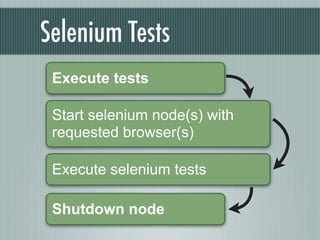
Selenium Tests
 Execute tests

 Start selenium node(s) with
 requested browser(s)

 Execute selenium tests

 Shutdown node
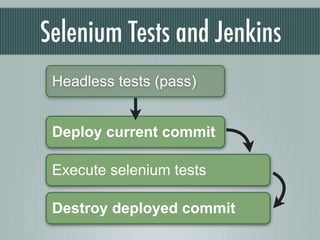
Selenium Tests and Jenkins
 Headless tests (pass)


 Deploy current commit

 Execute selenium tests

 Destroy deployed commit
on-demand selenium nodes
Tests runner      IE9 / Win

                  IE8 / Win

                   IE7 / Win
Service            FF / Win

                    Chrome / Win

                     FF / Linux
Selenium Grid 2      Chrome / Linux
Selenium tests during dev

Developer execute tests with specific browser
It’s not necessary to have browser
It’s possible to debug tests with IPDB
It’s possible to see what’s going on on remove node using
Selenium Node admin or making screenshots
Tests runner configuration

 [runner]
api_key=XXXXXXXXX
nose_args=-v
nose_single_test_args=-vc
selenium_host=http://s.sample.com/wd/hub
rpc_host=http://rpc.s.sample.com
Browsers configuration
    [internetexplorer-9]
name=internetexplorer
version=9
platform=WINDOWS

[internetexplorer-7]
name=internetexplorer
version=7
platform=WINDOWS
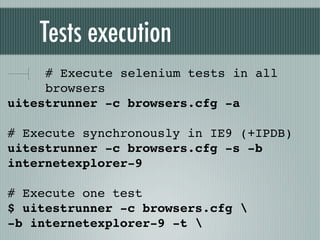
Tests execution
     # Execute selenium tests in all
     browsers
uitestrunner -c browsers.cfg -a

# Execute synchronously in IE9 (+IPDB)
uitestrunner -c browsers.cfg -s -b
internetexplorer-9

# Execute one test
$ uitestrunner -c browsers.cfg 
-b internetexplorer-9 -t
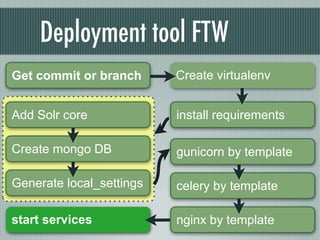
Deployment tool FTW
Get commit or branch      Create virtualenv


Add Solr core             install requirements

Create mongo DB           gunicorn by template

Generate local_settings   celery by template

start services            nginx by template
The flow for developers
The problem:
   QA engineer should check quality of each issue/branch
   Developer should provide “live” url to its branch
Solution:
   Deploy specific branch
   Provide URL to it to QA engineer
Shortcuts for developers

Execute shortcuts in working branch:
doit deploy
doit destroy
doit restart
doit cleanup_build
Summary

Easy-to-demonstrate new changes
Easy to QA
All team members informed about status
Questions?

Testing with Jenkins, Selenium and Continuous Deployment

  • 1.
    Testing with Jenkins,Selenium and Continuous Deployment Max Klymyshyn oDesk PS Twitter: @maxmaxmaxmax Github: joymax
  • 2.
    The problem We needto run our tests periodically Tests execution take a lot of time, it’s not an option to run on integrator’s machine all the time We want to run our Selenium tests on separated branches We don’t have persistent Selenium Grid nodes Blah blah, the CI problem...
  • 3.
    The solution Jenkins asContinuous Integration tool Selenium Grid + Tests execution service with Amazon AWS instances on-demand Deployment tool which can deploy any version of the code within isolated environment
  • 4.
    TOC Jenkins configuration Selenium Gridand Amazon AWS architecture Deployment tool with Fabric, Gunicorn, Nginx (+ Celery, Redis and Solr) Shortcuts for developers A bit about libraries development
  • 5.
  • 6.
    Jenkins Coverage Tests results trend(junit reports) JSLint Pylint
  • 7.
    Tests execution unit, integration,consistency tests with Nose Lettuce for forms and overall site UX JavaScript tests with Rhino and Flask-Jasmine Selenium UI tests
  • 8.
    Selenium Tests Executetests Start selenium node(s) with requested browser(s) Execute selenium tests Shutdown node
  • 9.
    Selenium Tests andJenkins Headless tests (pass) Deploy current commit Execute selenium tests Destroy deployed commit
  • 10.
    on-demand selenium nodes Testsrunner IE9 / Win IE8 / Win IE7 / Win Service FF / Win Chrome / Win FF / Linux Selenium Grid 2 Chrome / Linux
  • 11.
    Selenium tests duringdev Developer execute tests with specific browser It’s not necessary to have browser It’s possible to debug tests with IPDB It’s possible to see what’s going on on remove node using Selenium Node admin or making screenshots
  • 12.
    Tests runner configuration [runner] api_key=XXXXXXXXX nose_args=-v nose_single_test_args=-vc selenium_host=http://s.sample.com/wd/hub rpc_host=http://rpc.s.sample.com
  • 13.
    Browsers configuration [internetexplorer-9] name=internetexplorer version=9 platform=WINDOWS [internetexplorer-7] name=internetexplorer version=7 platform=WINDOWS
  • 14.
    Tests execution # Execute selenium tests in all browsers uitestrunner -c browsers.cfg -a # Execute synchronously in IE9 (+IPDB) uitestrunner -c browsers.cfg -s -b internetexplorer-9 # Execute one test $ uitestrunner -c browsers.cfg -b internetexplorer-9 -t
  • 15.
    Deployment tool FTW Getcommit or branch Create virtualenv Add Solr core install requirements Create mongo DB gunicorn by template Generate local_settings celery by template start services nginx by template
  • 16.
    The flow fordevelopers The problem: QA engineer should check quality of each issue/branch Developer should provide “live” url to its branch Solution: Deploy specific branch Provide URL to it to QA engineer
  • 17.
    Shortcuts for developers Executeshortcuts in working branch: doit deploy doit destroy doit restart doit cleanup_build
  • 18.
    Summary Easy-to-demonstrate new changes Easyto QA All team members informed about status
  • 19.