Automated tests with webdriverIO
1João Casalta Nabais
What is WebdriverIO?
• Allows you to control a browser using code
• Out of the box hook integration with BDD frameworks:
• Cucumber
• Jasmine
• Mocha
• Out of the box support for reporters
• Manages Selenium for you
2
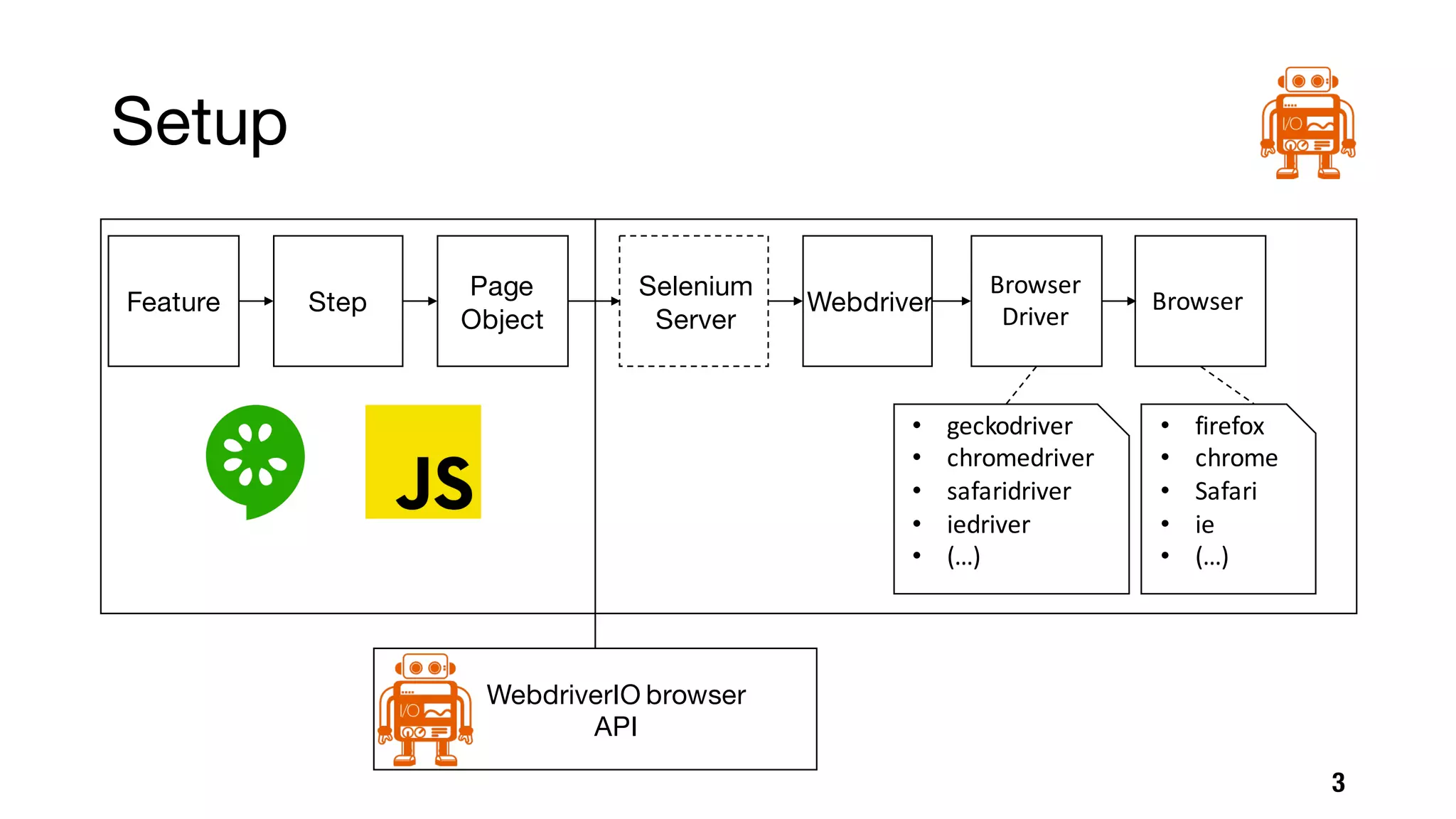
Setup
3
Feature Step
Page
Object
WebdriverIO browser
API
Selenium
Server
Webdriver
Browser
Driver
• geckodriver
• chromedriver
• safaridriver
• iedriver
• (…)
Browser
• firefox
• chrome
• Safari
• ie
• (…)
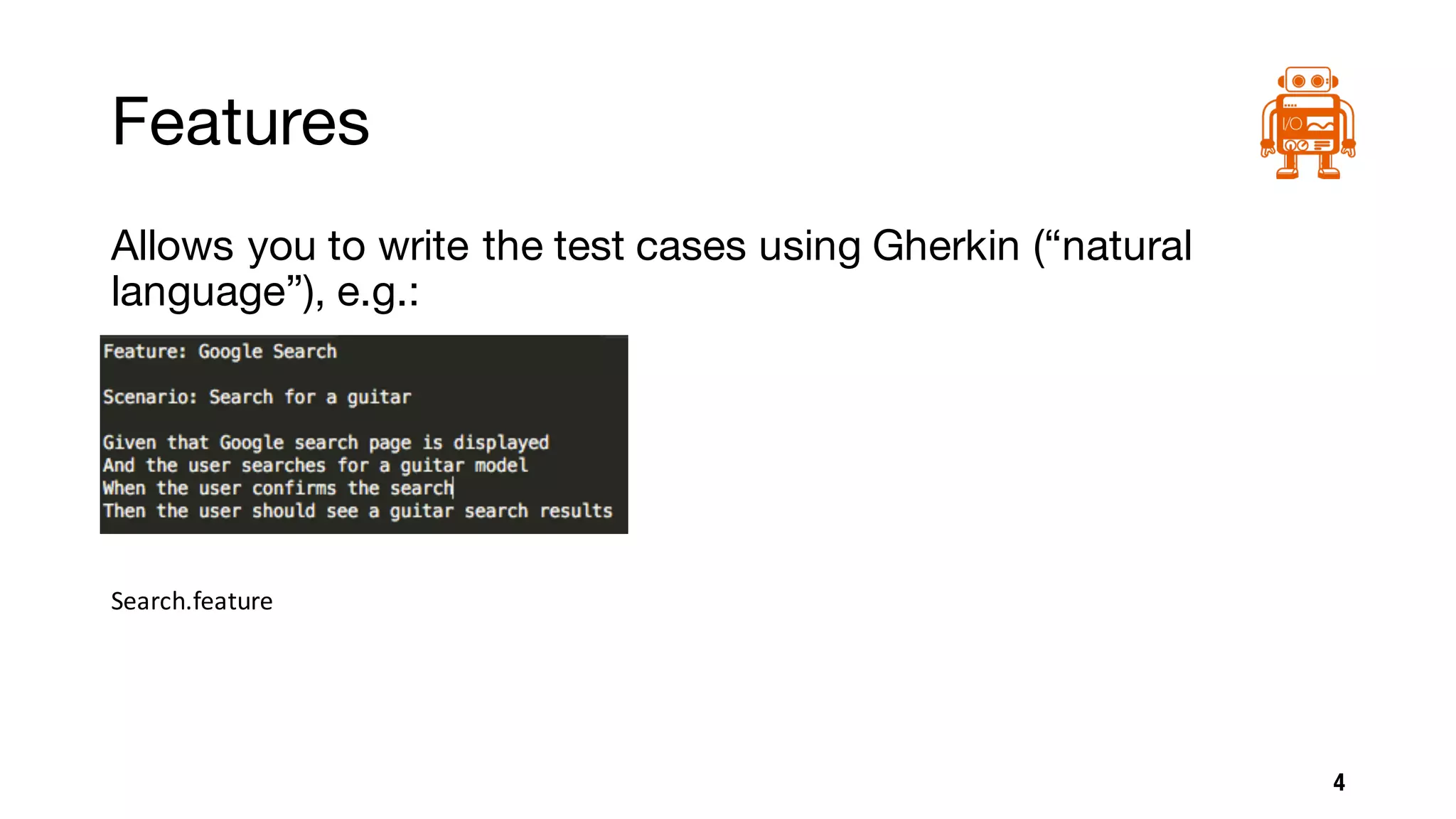
Features
Allows you to write the test cases using Gherkin (“natural
language”), e.g.:
4
Search.feature
Steps (Step Definitions)
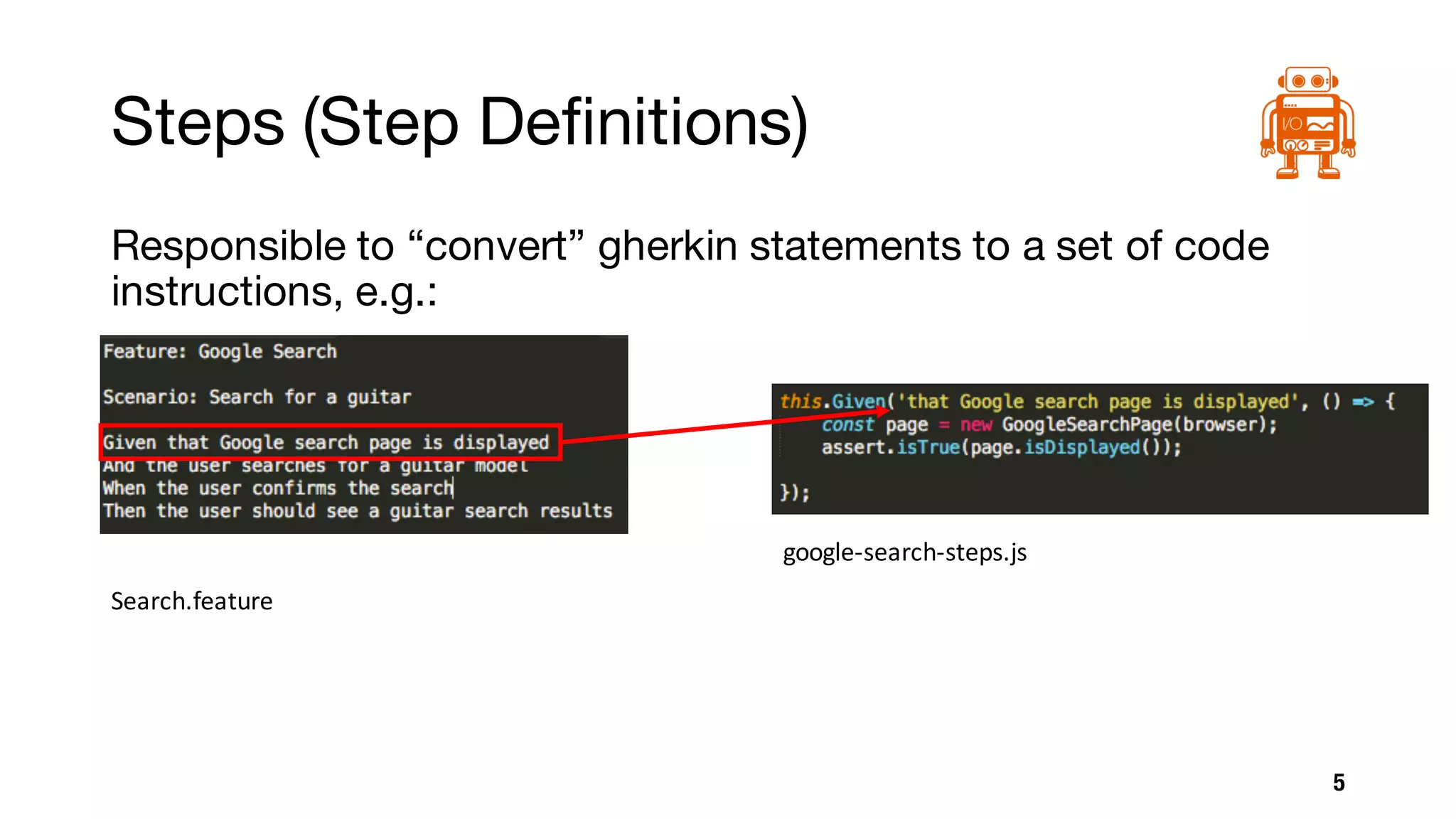
Responsible to “convert” gherkin statements to a set of code
instructions, e.g.:
5
Search.feature
google-search-steps.js
Page Objects
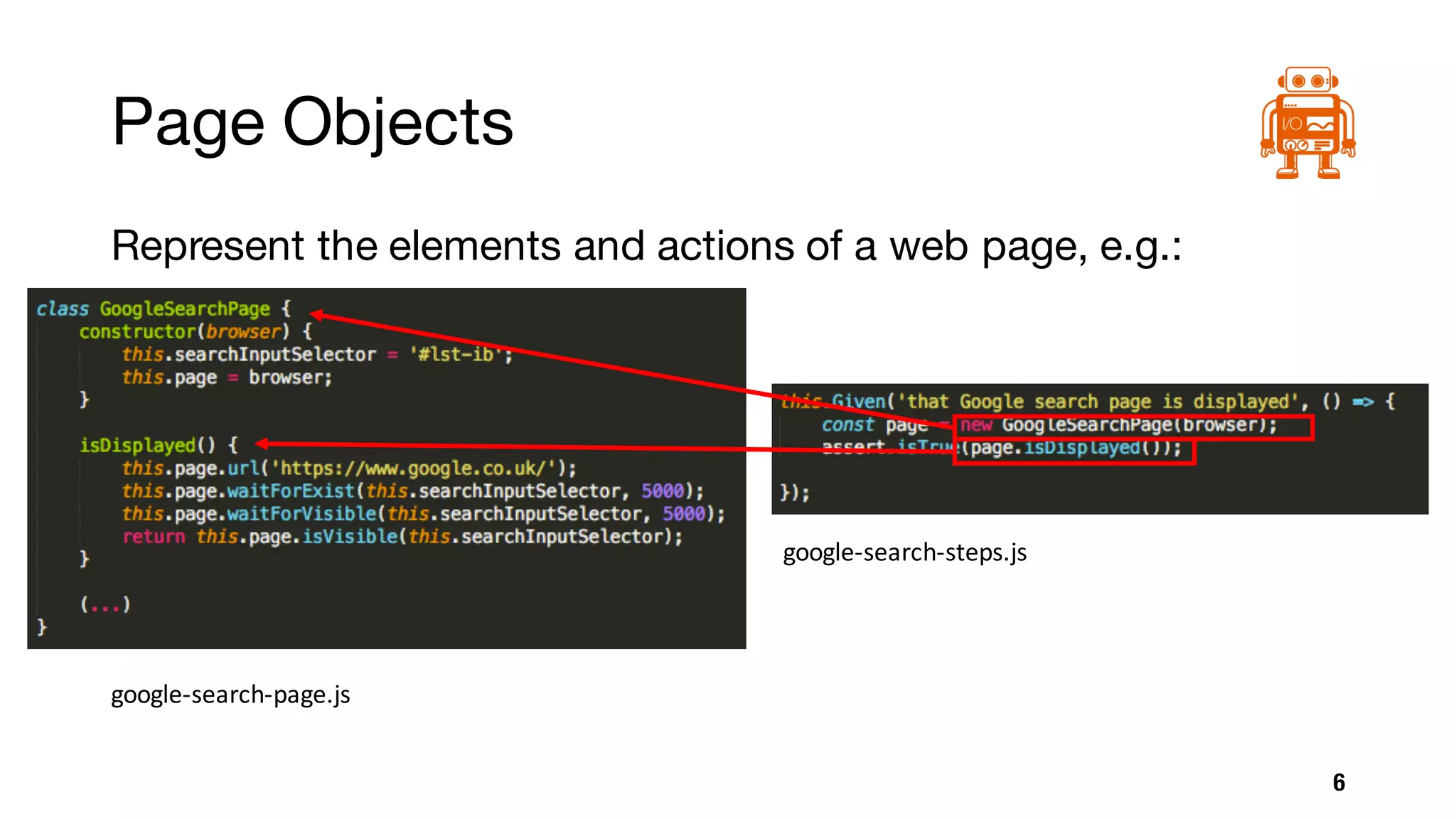
Represent the elements and actions of a web page, e.g.:
6
google-search-page.js
google-search-steps.js
Browser API
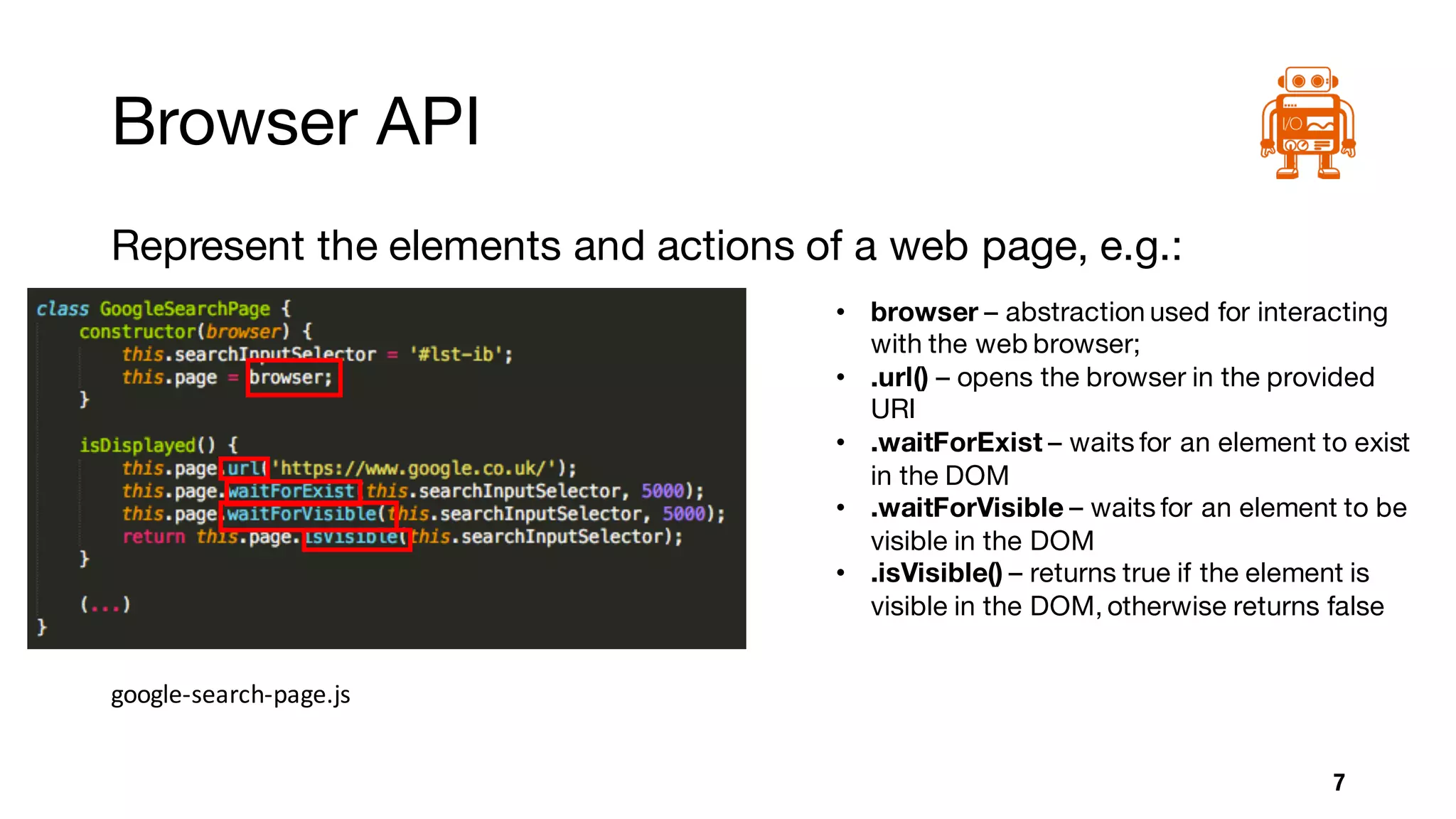
Represent the elements and actions of a web page, e.g.:
7
google-search-page.js
• browser – abstraction used for interacting
with the web browser;
• .url() – opens the browser in the provided
URI
• .waitForExist – waits for an element to exist
in the DOM
• .waitForVisible – waits for an element to be
visible in the DOM
• .isVisible() – returns true if the element is
visible in the DOM, otherwise returns false
Browser API
Other useful commands:
• browser.scroll([selector][,xoffset][,yoffset]);
• browser.click(selector);
• browser.pause(milliseconds);
• browser.moveToObject(selector,xoffset,yoffset);
• browser.setValue(selector,values);
• browser.execute(script[,argument1,...,argumentN]);	
• browser.getCookie([name]);
8
Demo
• Google	Search	Features:
• Search	by	a	static	term
• Search	by	parameter
9
Reporters
10
• Allure
• Xunit
• Dot
• Step
• (…)
Challenges
• Configuration	of	Browsers
• Stability	of	webdriverio project
• Version	matching	(repos,	selenium	server,	browser	drivers,	browsers)
• E.g.	If	chrome	automatically	updates	and	by	some	reason	you	have	a	fixed	
chromedriver version	it	might	break	L
• Support	of	webdriver protocol	(JSON	Wire)
• Some	drivers	do	not	have	all	the	actionsimplemented,	so	even	if	Webdriverio
API	sends	the	request	to	selenium,	the	driver	might	not	have	it	supported	for	
the	targeted	browser	L (e.g.	window	maximize	in	latest	chrome	version)
11
References
• Gherkin Features
• https://cucumber.io/docs/reference
• Cucumber Step Definitions
• https://cucumber.io/docs/reference#step-definitions
• Page Objects
• http://webdriver.io/guide/testrunner/pageobjects.html#description
• https://martinfowler.com/bliki/PageObject.html
• WebdriverIO API (Browser API)
• http://webdriver.io/api.html
12
References
• WebdriverIO GitHub
• https://github.com/webdriverio/webdriverio/
• WebdriverIO Gitter
• https://gitter.im/webdriverio/webdriverio
13
Thank You!
14João Casalta Nabais

Webdriver io presentation

  • 1.
    Automated tests withwebdriverIO 1João Casalta Nabais
  • 2.
    What is WebdriverIO? •Allows you to control a browser using code • Out of the box hook integration with BDD frameworks: • Cucumber • Jasmine • Mocha • Out of the box support for reporters • Manages Selenium for you 2
  • 3.
    Setup 3 Feature Step Page Object WebdriverIO browser API Selenium Server Webdriver Browser Driver •geckodriver • chromedriver • safaridriver • iedriver • (…) Browser • firefox • chrome • Safari • ie • (…)
  • 4.
    Features Allows you towrite the test cases using Gherkin (“natural language”), e.g.: 4 Search.feature
  • 5.
    Steps (Step Definitions) Responsibleto “convert” gherkin statements to a set of code instructions, e.g.: 5 Search.feature google-search-steps.js
  • 6.
    Page Objects Represent theelements and actions of a web page, e.g.: 6 google-search-page.js google-search-steps.js
  • 7.
    Browser API Represent theelements and actions of a web page, e.g.: 7 google-search-page.js • browser – abstraction used for interacting with the web browser; • .url() – opens the browser in the provided URI • .waitForExist – waits for an element to exist in the DOM • .waitForVisible – waits for an element to be visible in the DOM • .isVisible() – returns true if the element is visible in the DOM, otherwise returns false
  • 8.
    Browser API Other usefulcommands: • browser.scroll([selector][,xoffset][,yoffset]); • browser.click(selector); • browser.pause(milliseconds); • browser.moveToObject(selector,xoffset,yoffset); • browser.setValue(selector,values); • browser.execute(script[,argument1,...,argumentN]); • browser.getCookie([name]); 8
  • 9.
  • 10.
  • 11.
    Challenges • Configuration of Browsers • Stability of webdriverioproject • Version matching (repos, selenium server, browser drivers, browsers) • E.g. If chrome automatically updates and by some reason you have a fixed chromedriver version it might break L • Support of webdriver protocol (JSON Wire) • Some drivers do not have all the actionsimplemented, so even if Webdriverio API sends the request to selenium, the driver might not have it supported for the targeted browser L (e.g. window maximize in latest chrome version) 11
  • 12.
    References • Gherkin Features •https://cucumber.io/docs/reference • Cucumber Step Definitions • https://cucumber.io/docs/reference#step-definitions • Page Objects • http://webdriver.io/guide/testrunner/pageobjects.html#description • https://martinfowler.com/bliki/PageObject.html • WebdriverIO API (Browser API) • http://webdriver.io/api.html 12
  • 13.
    References • WebdriverIO GitHub •https://github.com/webdriverio/webdriverio/ • WebdriverIO Gitter • https://gitter.im/webdriverio/webdriverio 13
  • 14.