I N T R O T O A N A LY T I C S
This presentation covers Google Analytics best
practices, key metrics, and how to measure success.
C O N T E N T S
S E C T I O N 1 : O V E R V I E W
Goals and directional insights.
S E C T I O N 2 : K E Y M E T R I C S
Audience, acquisition, behavior, and conversions.
S E C T I O N 3 : K E Y T E R M S
Handy reference guide and links to resources.
S E C T I O N 4 : W E E K LY M E T R I C S
Website traffic, top landing lages, and conversion rate.
D E F I N E Y O U R G O A L S
There is a great deal you can measure with
Google Analytics so we first must define
objectives. An e-commerce site might focus
on items sold, a news site on engagement and
subscriptions, and a brand or product site on
content and referrals. The first step is defining our
primary and secondary goals which will allow us to
answer strategic questions about the website.
D I R E C T I O N A L I N S I G H T S
In most implementations of Google Analytics,
reports are based on a statistically relevant sample
of traffic. In other words, it tracks specific behavior
for a percentage of users and extrapolates.
Therefore, when reading a Google report it is not
productive to get hung up on every last decimal
point. We are looking for bigger directional
differences to inform thinking.
O V E R V I E W
S E C T I O N 1 :
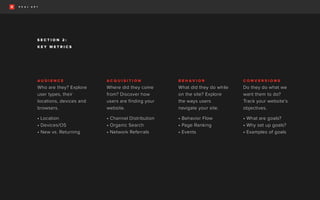
A U D I E N C E
Who are they? Explore
user types, their
locations, devices and
browsers.
• Location
• Devices/OS
• New vs. Returning
K E Y M E T R I C S
A C Q U I S I T I O N
Where did they come
from? Discover how
users are finding your
website.
• Channel Distribution
• Organic Search
• Network Referrals
B E H A V I O R
What did they do while
on the site? Explore
the ways users
navigate your site.
• Behavior Flow
• Page Ranking
• Events
C O N V E R S I O N S
Do they do what we
want them to do?
Track your website’s
objectives.
• What are goals?
• Why set up goals?
• Examples of goals
S E C T I O N 2 :
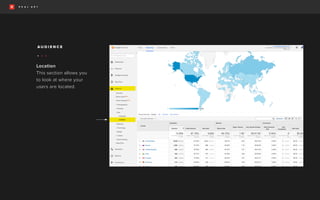
Location
This section allows you
to look at where your
users are located.
A U D I E N C E
• • •
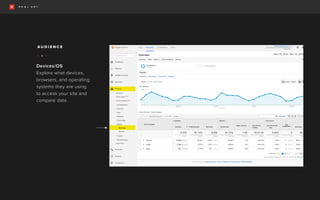
Devices/OS
Explore what devices,
browsers, and operating
systems they are using
to access your site and
compare data.
A U D I E N C E
• • •
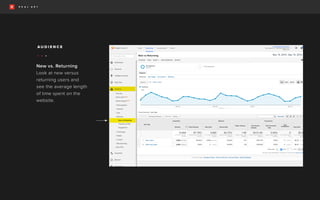
New vs. Returning
Look at new versus
returning users and
see the average length
of time spent on the
website.
A U D I E N C E
• • •
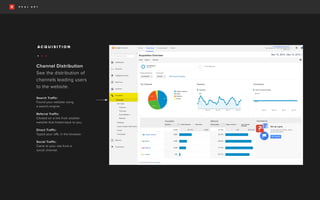
Channel Distribution
See the distribution of
channels leading users
to the website.
Search Traffic:
Found your website using
a search engine.
Referral Traffic:
Clicked on a link from another
website that linked back to you.
Direct Traffic:
Typed your URL in the browser.
Social Traffic:
Came to your site from a
social channel.
A C Q U I S I T I O N
• • •
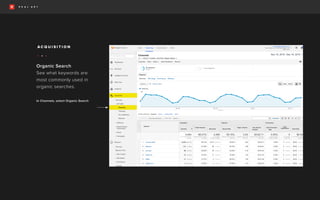
Organic Search
See what keywords are
most commonly used in
organic searches.
In Channels, select Organic Search
A C Q U I S I T I O N
• • •
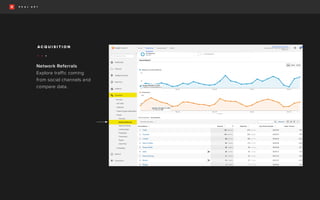
Network Referrals
Explore traffic coming
from social channels and
compare data.
A C Q U I S I T I O N
• • •
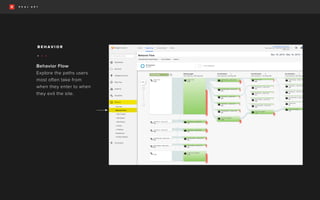
Behavior Flow
Explore the paths users
most often take from
when they enter to when
they exit the site.
B E H A V I O R
• • •
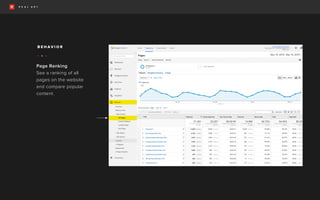
Page Ranking
See a ranking of all
pages on the website
and compare popular
content.
B E H A V I O R
• • •
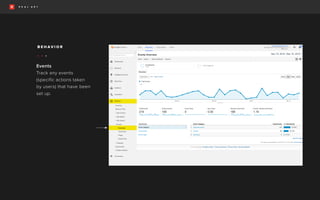
Events
Track any events
(specific actions taken
by users) that have been
set up.
B E H A V I O R
• • •
U N D E R S T A N D I N G U S E R S
Because it relies on page loads to measure user actions,
Google isn’t the best source for measuring sales and
sign-ups. The platforms you use, such as Mailchimp, will
be more precise in measuring conversions. Still, Goals in
Google Analytics can be used to understand what users
do before they choose whether to take an action or not.
W H Y S E T U P G O A L S ?
You can measure conversions, or completion rates, for
each Goal you set up. Combine Goals with Funnels to
analyze user actions leading up to a Goal.
W H A T A R E G O A L S ?
Goals are a way to measure how well your site fulfills
targeted objectives. You can set up individual Goals
for actions like Sessions to a “thanks for registering”
page, a download completed screen, a minimum
Session duration, or a specific purchase amount.
E X A M P L E G O A L S
• Filling out a contact form
• Signing up for a newsletter
• Completing a demo
C O N V E R S I O N S
B O U N C E R A T E
Visits in which the person left your site from the
entrance page without interacting with the page.
P A G E V I E W
The number of webpages loaded. Every time a user
loads a page on your site, it will show a pageview.
S E S S I O N S
A group of interactions that take place on your website
within a given time frame. A single Session can contain
multiple pageviews, events, social interactions, and
e-commerce transactions. By default, a Session lasts until
there’s 30 minutes of inactivity or if a campaign change
occurs (a user is on your site but then enters from a different
keyword search or referring website).
C O N V E R S I O N S
An action completed by a customer that you’ve
defined as valuable (ex: purchased a product, signed
up for your newsletter, called your business, or
downloaded your app).
G O A L S
Critical actions users can take on your site that are
typically measured when they reach a particular page
(URL destination).
E V E N T
An action that can be tracked independently from
a webpage or a screen load (downloads, mobile ad
clicks, gadgets, Flash elements, and video plays etc).
K E Y T E R M S
S E C T I O N 3 :
R E F E R E N C E
How a Session is Defined in Analytics
Conversion Goals and Events in Google Analytics: What’s The
Difference and When To Use Them
Sessions Versus Pageviews: Judging Mobile Success
Exploring Events in Analytics
About Sampled Data in Analytics
Goal Flow: See If Users Are Navigating Content As Expected
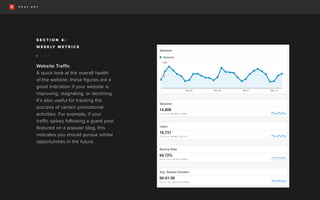
Website Traffic
A quick look at the overall health
of the website, these figures are a
good indication if your website is
improving, stagnating, or declining.
It’s also useful for tracking the
success of certain promotional
activities. For example, if your
traffic spikes following a guest post
featured on a popular blog, this
indicates you should pursue similar
opportunities in the future.
W E E K LY M E T R I C S
• • • •
S E C T I O N 4 :
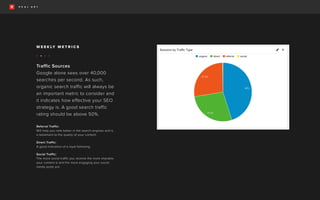
Traffic Sources
Google alone sees over 40,000
searches per second. As such,
organic search traffic will always be
an important metric to consider and
it indicates how effective your SEO
strategy is. A good search traffic
rating should be above 50%.
Referral Traffic:
Will help you rank better in the search engines and is
a testament to the quality of your content.
Direct Traffic:
A good indication of a loyal following.
Social Traffic:
The more social traffic you receive the more sharable
your content is and the more engaging your social
media posts are.
W E E K LY M E T R I C S
• • • •
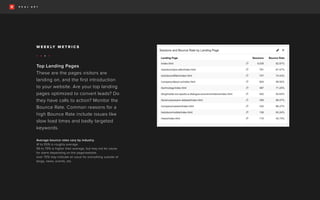
Top Landing Pages
These are the pages visitors are
landing on, and the first introduction
to your website. Are your top landing
pages optimized to convert leads? Do
they have calls to action? Monitor the
Bounce Rate. Common reasons for a
high Bounce Rate include issues like
slow load times and badly targeted
keywords.
Average bounce rates vary by industry.
41 to 55% is roughly average.
56 to 70% is higher than average, but may not be cause
for alarm depending on the page/website.
over 70% may indicate an issue for everything outside of
blogs, news, events, etc.
W E E K LY M E T R I C S
• • • •
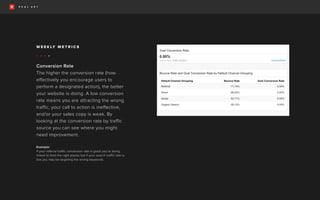
Conversion Rate
The higher the conversion rate (how
effectively you encourage users to
perform a designated action), the better
your website is doing. A low conversion
rate means you are attracting the wrong
traffic, your call to action is ineffective,
and/or your sales copy is weak. By
looking at the conversion rate by traffic
source you can see where you might
need improvement.
Example:
If your referral traffic conversion rate is good you’re being
linked to from the right places but if your search traffic rate is
low you may be targeting the wrong keywords.
W E E K LY M E T R I C S
• • • •
G E T S TA R T E D T O D AY
Real Art combines the never-before-seen with the
why-didn’t-I-think-of-that. Blending art and innovation,
we get people to discover you and remember you.
newyork@realart.com
5 2 0 E A S T F I R S T S T R E E T, D A Y T O N , O H I O 4 5 4 0 2
T 9 3 7 2 2 3 9 9 5 5 F 9 3 7 2 2 3 3 0 1 3 R E A L A R T . C O M
C O N TA C T

test

  • 1.
    I N TR O T O A N A LY T I C S This presentation covers Google Analytics best practices, key metrics, and how to measure success.
  • 2.
    C O NT E N T S S E C T I O N 1 : O V E R V I E W Goals and directional insights. S E C T I O N 2 : K E Y M E T R I C S Audience, acquisition, behavior, and conversions. S E C T I O N 3 : K E Y T E R M S Handy reference guide and links to resources. S E C T I O N 4 : W E E K LY M E T R I C S Website traffic, top landing lages, and conversion rate.
  • 3.
    D E FI N E Y O U R G O A L S There is a great deal you can measure with Google Analytics so we first must define objectives. An e-commerce site might focus on items sold, a news site on engagement and subscriptions, and a brand or product site on content and referrals. The first step is defining our primary and secondary goals which will allow us to answer strategic questions about the website. D I R E C T I O N A L I N S I G H T S In most implementations of Google Analytics, reports are based on a statistically relevant sample of traffic. In other words, it tracks specific behavior for a percentage of users and extrapolates. Therefore, when reading a Google report it is not productive to get hung up on every last decimal point. We are looking for bigger directional differences to inform thinking. O V E R V I E W S E C T I O N 1 :
  • 4.
    A U DI E N C E Who are they? Explore user types, their locations, devices and browsers. • Location • Devices/OS • New vs. Returning K E Y M E T R I C S A C Q U I S I T I O N Where did they come from? Discover how users are finding your website. • Channel Distribution • Organic Search • Network Referrals B E H A V I O R What did they do while on the site? Explore the ways users navigate your site. • Behavior Flow • Page Ranking • Events C O N V E R S I O N S Do they do what we want them to do? Track your website’s objectives. • What are goals? • Why set up goals? • Examples of goals S E C T I O N 2 :
  • 5.
    Location This section allowsyou to look at where your users are located. A U D I E N C E • • •
  • 6.
    Devices/OS Explore what devices, browsers,and operating systems they are using to access your site and compare data. A U D I E N C E • • •
  • 7.
    New vs. Returning Lookat new versus returning users and see the average length of time spent on the website. A U D I E N C E • • •
  • 8.
    Channel Distribution See thedistribution of channels leading users to the website. Search Traffic: Found your website using a search engine. Referral Traffic: Clicked on a link from another website that linked back to you. Direct Traffic: Typed your URL in the browser. Social Traffic: Came to your site from a social channel. A C Q U I S I T I O N • • •
  • 9.
    Organic Search See whatkeywords are most commonly used in organic searches. In Channels, select Organic Search A C Q U I S I T I O N • • •
  • 10.
    Network Referrals Explore trafficcoming from social channels and compare data. A C Q U I S I T I O N • • •
  • 11.
    Behavior Flow Explore thepaths users most often take from when they enter to when they exit the site. B E H A V I O R • • •
  • 12.
    Page Ranking See aranking of all pages on the website and compare popular content. B E H A V I O R • • •
  • 13.
    Events Track any events (specificactions taken by users) that have been set up. B E H A V I O R • • •
  • 14.
    U N DE R S T A N D I N G U S E R S Because it relies on page loads to measure user actions, Google isn’t the best source for measuring sales and sign-ups. The platforms you use, such as Mailchimp, will be more precise in measuring conversions. Still, Goals in Google Analytics can be used to understand what users do before they choose whether to take an action or not. W H Y S E T U P G O A L S ? You can measure conversions, or completion rates, for each Goal you set up. Combine Goals with Funnels to analyze user actions leading up to a Goal. W H A T A R E G O A L S ? Goals are a way to measure how well your site fulfills targeted objectives. You can set up individual Goals for actions like Sessions to a “thanks for registering” page, a download completed screen, a minimum Session duration, or a specific purchase amount. E X A M P L E G O A L S • Filling out a contact form • Signing up for a newsletter • Completing a demo C O N V E R S I O N S
  • 15.
    B O UN C E R A T E Visits in which the person left your site from the entrance page without interacting with the page. P A G E V I E W The number of webpages loaded. Every time a user loads a page on your site, it will show a pageview. S E S S I O N S A group of interactions that take place on your website within a given time frame. A single Session can contain multiple pageviews, events, social interactions, and e-commerce transactions. By default, a Session lasts until there’s 30 minutes of inactivity or if a campaign change occurs (a user is on your site but then enters from a different keyword search or referring website). C O N V E R S I O N S An action completed by a customer that you’ve defined as valuable (ex: purchased a product, signed up for your newsletter, called your business, or downloaded your app). G O A L S Critical actions users can take on your site that are typically measured when they reach a particular page (URL destination). E V E N T An action that can be tracked independently from a webpage or a screen load (downloads, mobile ad clicks, gadgets, Flash elements, and video plays etc). K E Y T E R M S S E C T I O N 3 :
  • 16.
    R E FE R E N C E How a Session is Defined in Analytics Conversion Goals and Events in Google Analytics: What’s The Difference and When To Use Them Sessions Versus Pageviews: Judging Mobile Success Exploring Events in Analytics About Sampled Data in Analytics Goal Flow: See If Users Are Navigating Content As Expected
  • 17.
    Website Traffic A quicklook at the overall health of the website, these figures are a good indication if your website is improving, stagnating, or declining. It’s also useful for tracking the success of certain promotional activities. For example, if your traffic spikes following a guest post featured on a popular blog, this indicates you should pursue similar opportunities in the future. W E E K LY M E T R I C S • • • • S E C T I O N 4 :
  • 18.
    Traffic Sources Google alonesees over 40,000 searches per second. As such, organic search traffic will always be an important metric to consider and it indicates how effective your SEO strategy is. A good search traffic rating should be above 50%. Referral Traffic: Will help you rank better in the search engines and is a testament to the quality of your content. Direct Traffic: A good indication of a loyal following. Social Traffic: The more social traffic you receive the more sharable your content is and the more engaging your social media posts are. W E E K LY M E T R I C S • • • •
  • 19.
    Top Landing Pages Theseare the pages visitors are landing on, and the first introduction to your website. Are your top landing pages optimized to convert leads? Do they have calls to action? Monitor the Bounce Rate. Common reasons for a high Bounce Rate include issues like slow load times and badly targeted keywords. Average bounce rates vary by industry. 41 to 55% is roughly average. 56 to 70% is higher than average, but may not be cause for alarm depending on the page/website. over 70% may indicate an issue for everything outside of blogs, news, events, etc. W E E K LY M E T R I C S • • • •
  • 20.
    Conversion Rate The higherthe conversion rate (how effectively you encourage users to perform a designated action), the better your website is doing. A low conversion rate means you are attracting the wrong traffic, your call to action is ineffective, and/or your sales copy is weak. By looking at the conversion rate by traffic source you can see where you might need improvement. Example: If your referral traffic conversion rate is good you’re being linked to from the right places but if your search traffic rate is low you may be targeting the wrong keywords. W E E K LY M E T R I C S • • • •
  • 21.
    G E TS TA R T E D T O D AY Real Art combines the never-before-seen with the why-didn’t-I-think-of-that. Blending art and innovation, we get people to discover you and remember you.
  • 22.
    newyork@realart.com 5 2 0E A S T F I R S T S T R E E T, D A Y T O N , O H I O 4 5 4 0 2 T 9 3 7 2 2 3 9 9 5 5 F 9 3 7 2 2 3 3 0 1 3 R E A L A R T . C O M C O N TA C T