Chapter 1 Introduction
*   What is Computer Vision?
*   Applications
*   Relations with other fields
*   Resources
1.1 What is Computer Vision?

Computer vision is a field that includes methods
for acquiring, processing, analyzing, and
understanding one or more images from the real
world in order to produce and communicate
numerical or symbolic information to users or
other systems.

How to acquire images?
Why we need to process and analyze images?
Why we want the computer to understand the images?
1.2 Applications
Industrial inspection and quality control – detect
cracks in bottle
Reverse engineering – generate 3D object model
from images
Face/gesture recognition – security
Track and count humans – surveillance, human-
computer interaction
Track and count vehicles – road monitoring
Image database query – automatic image retrieval
Medical image analysis – assist diagnosis, surgery
1.3 Related disciplines
computer vision = machine vision = image understanding


  Computer               Image
   Vision              Processing


           noise filtering, edge detection, etc.
Many computer vision methods use and extend
  signal processing techniques
  Pattern recognition can be considered as part of
  computer vision
  Computer vision is, in some ways, the inverse
  of computer graphics.


                 CV                  CG


original image         3D model           synthetic image
1.4 To know more about Computer Vision

1.4.1 conference

• International Conference on Computer Vision
  (ICCV)
• International Conference on Computer Vision
  and Pattern Recognition (CVPR)
• European Conference on Computer Vision
  (ECCV)
1.4.2 journal
• International Journal of Computer Vision
• IEEE Transactions on Pattern Analysis and
  Machine Intelligence
• Computer Vision and Image Understanding
• Machine Vision and Applications

1.4.3 internet
• CVonline
  (http://homepages.inf.ed.ac.uk/rbf/CVonline)
• Numerical Recipes
  (http://apps.nrbook.com/empanel/index.html#)
1.5 Overview of MATLAB
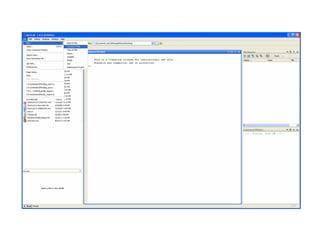
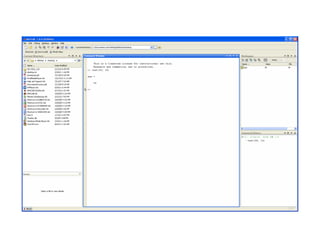
1.5.1 The MATLAB environment

• when you start MATLAB, the command window
  will open with the prompt >>
• user can enter commands or data in the
  command window
• for each command typed in, you get the result
  immediately
• if you do not assign the result to a variable,
  MATLAB will assign it to ans
1.5.2 Assignment

• assign value(s) to variable name(s)

scalar variable
>> a = 4            >> a = 4, A = 6
a=                  a=
       4                  4        Separate
>>                  A=             multiple
                          6        commands by
>> a = 4;           >>             comma
>>
                   Case sensitive
No echo print
array
• a collection of values represented by one
   variable name
• one-dimensional array – vector
• two-dimensional array – matrix

>> a = [1 2 3 4 5]
a=
   1 2 3 4           5       Row vector
>>
>> a = [1;2;3;4;5]     >> a = [1 2 3 4 5]'
a=                     a=
   1                      1 Use single quote
   2                      2 as transpose
   3                      3 operator
   4                      4
   5                      5
>>                     >>

             Column vector
>> A = [1 2 3; 4 5 6; 7 8 9]     >> A = [1 2 3
A=                                      456
   1 2 3                                7 8 9]
   4 5 6                         A=
   7 8 9                            1 2 3
>>                                  4 5 6
                                    7 8 9
                                 >>

                               Press Enter key
                               to separate the rows
To access individual element:

>> a(3)
ans =
   3
>>
>> A(2,3)
ans =     Column index
   6 Row index
>>
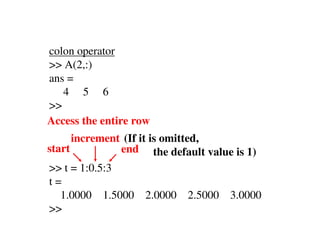
colon operator
>> A(2,:)
ans =
   4 5 6
>>
Access the entire row
      increment (If it is omitted,
start          end the default value is 1)
>> t = 1:0.5:3
t=
  1.0000 1.5000     2.0000 2.5000 3.0000
>>
negative increment

>> t = 10:-1:5
t=
  10 9 8         7    6   5
>>

To extract part of the array:

>> t(2:4)
ans =
   9 8      7
>>
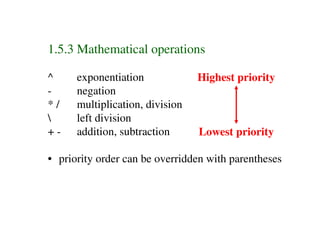
1.5.3 Mathematical operations

^     exponentiation             Highest priority
-     negation
*/    multiplication, division
     left division
+-    addition, subtraction      Lowest priority

• priority order can be overridden with parentheses
>> y = -4 ^ 2
y=
 -16
>>
>> y = (-4) ^ 2
y=
  16
>>
1.5.4 M-file

• M-file provides an alternative way of using
  MATLAB to perform numerical analysis
• starts with the word function
• can have input argument(s) and output(s)
• multiple inputs - separate by comma
• multiple outputs – separate by comma,
  enclose in square brackets
• it contains a series of statements
• the file is stored with an extension .m
function outvar = funcname(arglist)
% comments
statements
outvar = value;

outvar:           name of output variable
funcname:         name of function
arglist:          argument list
comments:         information for user
1.5.5 Structured programming

• simple M-file performs command sequentially,
  from the first statement to the last
• the program is highly restrictive
• real programs usually have non-sequential
  execution paths, which can be achieved via
  decisions and loops
decision
• the branching of execution flow based on a
  decision

if condition              if condition 1
       statements                group 1 statements
end                       elseif condition 2
                                 group 2 statements
if condition                     .
       group 1 statements        .
else                      else
       group 2 statements        else statements
end                       end
• one simple form of condition is a relational
  expression that compares two values

value 1 relation value 2

operator     relation
==           equal
~=           not equal
<            less than
>            greater than
<=           less than or equal to
>=           greater than or equal to
• logical operators can be used to test more
  than one logical condition
• there is priority order, use parentheses to
  override it

operator     meaning
~            not         Highest priority
&&           and
||           or           Lowest priority
loop
• the repetition of a group of statements

for index = start:step:finish
       statements
end
for i = 1:2:5
       disp(i)   Positive step
end
for i = 5:-2:1
       disp(i)   Negative step
end
for i = 1:5
       disp(i)   Default step = 1
end
while condition
      statements
end

i = 5;
while i > 0
       i = i – 1;
       disp(i)
end
Summary
♦ scope of Computer Vision

♦ application areas

♦ relations with other fields

♦ resources and development platform of
  computer vision

Test

  • 1.
    Chapter 1 Introduction * What is Computer Vision? * Applications * Relations with other fields * Resources
  • 2.
    1.1 What isComputer Vision? Computer vision is a field that includes methods for acquiring, processing, analyzing, and understanding one or more images from the real world in order to produce and communicate numerical or symbolic information to users or other systems. How to acquire images? Why we need to process and analyze images? Why we want the computer to understand the images?
  • 3.
    1.2 Applications Industrial inspectionand quality control – detect cracks in bottle Reverse engineering – generate 3D object model from images Face/gesture recognition – security Track and count humans – surveillance, human- computer interaction Track and count vehicles – road monitoring Image database query – automatic image retrieval Medical image analysis – assist diagnosis, surgery
  • 4.
    1.3 Related disciplines computervision = machine vision = image understanding Computer Image Vision Processing noise filtering, edge detection, etc.
  • 5.
    Many computer visionmethods use and extend signal processing techniques Pattern recognition can be considered as part of computer vision Computer vision is, in some ways, the inverse of computer graphics. CV CG original image 3D model synthetic image
  • 6.
    1.4 To knowmore about Computer Vision 1.4.1 conference • International Conference on Computer Vision (ICCV) • International Conference on Computer Vision and Pattern Recognition (CVPR) • European Conference on Computer Vision (ECCV)
  • 7.
    1.4.2 journal • InternationalJournal of Computer Vision • IEEE Transactions on Pattern Analysis and Machine Intelligence • Computer Vision and Image Understanding • Machine Vision and Applications 1.4.3 internet • CVonline (http://homepages.inf.ed.ac.uk/rbf/CVonline) • Numerical Recipes (http://apps.nrbook.com/empanel/index.html#)
  • 8.
    1.5 Overview ofMATLAB 1.5.1 The MATLAB environment • when you start MATLAB, the command window will open with the prompt >> • user can enter commands or data in the command window • for each command typed in, you get the result immediately • if you do not assign the result to a variable, MATLAB will assign it to ans
  • 11.
    1.5.2 Assignment • assignvalue(s) to variable name(s) scalar variable >> a = 4 >> a = 4, A = 6 a= a= 4 4 Separate >> A= multiple 6 commands by >> a = 4; >> comma >> Case sensitive No echo print
  • 12.
    array • a collectionof values represented by one variable name • one-dimensional array – vector • two-dimensional array – matrix >> a = [1 2 3 4 5] a= 1 2 3 4 5 Row vector >>
  • 13.
    >> a =[1;2;3;4;5] >> a = [1 2 3 4 5]' a= a= 1 1 Use single quote 2 2 as transpose 3 3 operator 4 4 5 5 >> >> Column vector
  • 14.
    >> A =[1 2 3; 4 5 6; 7 8 9] >> A = [1 2 3 A= 456 1 2 3 7 8 9] 4 5 6 A= 7 8 9 1 2 3 >> 4 5 6 7 8 9 >> Press Enter key to separate the rows
  • 15.
    To access individualelement: >> a(3) ans = 3 >> >> A(2,3) ans = Column index 6 Row index >>
  • 16.
    colon operator >> A(2,:) ans= 4 5 6 >> Access the entire row increment (If it is omitted, start end the default value is 1) >> t = 1:0.5:3 t= 1.0000 1.5000 2.0000 2.5000 3.0000 >>
  • 17.
    negative increment >> t= 10:-1:5 t= 10 9 8 7 6 5 >> To extract part of the array: >> t(2:4) ans = 9 8 7 >>
  • 18.
    1.5.3 Mathematical operations ^ exponentiation Highest priority - negation */ multiplication, division left division +- addition, subtraction Lowest priority • priority order can be overridden with parentheses
  • 19.
    >> y =-4 ^ 2 y= -16 >> >> y = (-4) ^ 2 y= 16 >>
  • 20.
    1.5.4 M-file • M-fileprovides an alternative way of using MATLAB to perform numerical analysis • starts with the word function • can have input argument(s) and output(s) • multiple inputs - separate by comma • multiple outputs – separate by comma, enclose in square brackets • it contains a series of statements • the file is stored with an extension .m
  • 21.
    function outvar =funcname(arglist) % comments statements outvar = value; outvar: name of output variable funcname: name of function arglist: argument list comments: information for user
  • 28.
    1.5.5 Structured programming •simple M-file performs command sequentially, from the first statement to the last • the program is highly restrictive • real programs usually have non-sequential execution paths, which can be achieved via decisions and loops
  • 29.
    decision • the branchingof execution flow based on a decision if condition if condition 1 statements group 1 statements end elseif condition 2 group 2 statements if condition . group 1 statements . else else group 2 statements else statements end end
  • 30.
    • one simpleform of condition is a relational expression that compares two values value 1 relation value 2 operator relation == equal ~= not equal < less than > greater than <= less than or equal to >= greater than or equal to
  • 31.
    • logical operatorscan be used to test more than one logical condition • there is priority order, use parentheses to override it operator meaning ~ not Highest priority && and || or Lowest priority
  • 32.
    loop • the repetitionof a group of statements for index = start:step:finish statements end
  • 33.
    for i =1:2:5 disp(i) Positive step end for i = 5:-2:1 disp(i) Negative step end for i = 1:5 disp(i) Default step = 1 end
  • 34.
    while condition statements end i = 5; while i > 0 i = i – 1; disp(i) end
  • 38.
    Summary ♦ scope ofComputer Vision ♦ application areas ♦ relations with other fields ♦ resources and development platform of computer vision