Terminal Services in 
Windows Server® 2008 
Infrastructure Planning and Design
What Is IPD? 
Guidance that aims to clarify and streamline the planning and 
design process for Microsoft® infrastructure technologies. 
IPD: 
Defines decision flow 
Describes decisions to be made 
Relates decisions and options for the business 
Frames additional questions for business understanding 
IPD Guides are available at www.microsoft.com/ipd 
Page 2 |
Getting Started 
TERMINAL SERVICES IN 
WINDOWS SERVER® 2008 
Page 3 |
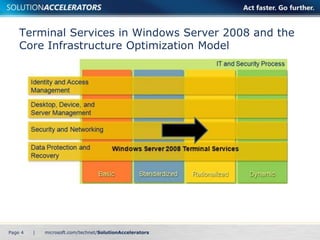
Terminal Services in Windows Server 2008 and the 
Core Infrastructure Optimization Model 
Page 4 |
Purpose and Overview 
Purpose 
To provide guidance for designing a Terminal 
Services infrastructure 
Agenda 
Terminal Services in Windows Server 2008 
features 
Terminal Services infrastructure design 
process 
Page 5 |
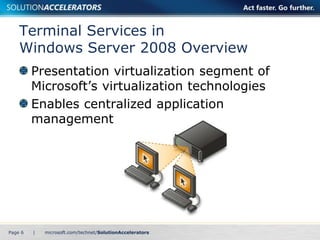
Terminal Services in 
Windows Server 2008 Overview 
Presentation virtualization segment of 
Microsoft’s virtualization technologies 
Enables centralized application 
management 
Page 6 |
New Features in Windows Server 2008 
TS RemoteApp 
Shortcuts on the Start menu 
TS Web Access 
Launch Terminal Services applications through 
a Web page 
TS Gateway 
Remote access without virtual private networks (VPNs) 
TS Session Broker 
Load balancing 
TS Easy Print 
No more printer driver confusion 
Page 7 |
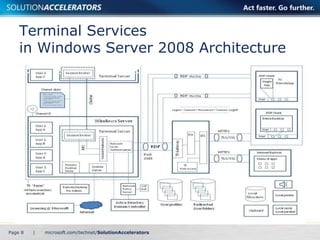
Terminal Services 
in Windows Server 2008 Architecture 
Page 8 |
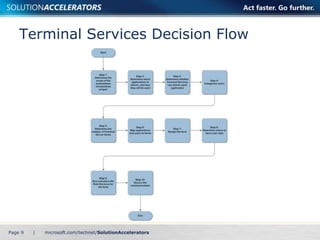
Terminal Services Decision Flow 
Page 9 |
Determine the Scope of the 
Presentation Virtualization Project 
Determine the location scope 
Which locations will be served by this 
implementation? 
Determine the application scope 
Define which applications Terminal Services will host 
What benefits are desired from presentation 
virtualization? 
• Cost 
• Service levels 
• Remote access 
• Centralized management 
• Application compatibility fix 
• Platform independence 
Page 10 | 
1 
2 
3 
4 
5 
6 
7 
8 
9 
10
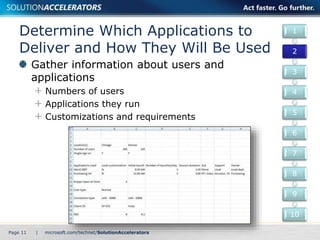
Determine Which Applications to 
Deliver and How They Will Be Used 
Gather information about users and 
applications 
Numbers of users 
Applications they run 
Customizations and requirements 
Page 11 | 
1 
2 
3 
4 
5 
6 
7 
8 
9 
10
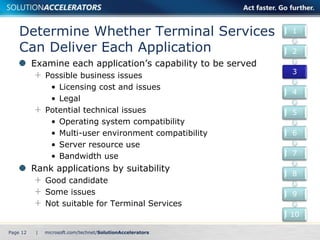
Determine Whether Terminal Services 
Can Deliver Each Application 
Examine each application’s capability to be served 
Possible business issues 
• Licensing cost and issues 
• Legal 
Potential technical issues 
• Operating system compatibility 
• Multi-user environment compatibility 
• Server resource use 
• Bandwidth use 
Rank applications by suitability 
Good candidate 
Some issues 
Not suitable for Terminal Services 
Page 12 | 
1 
2 
3 
4 
5 
6 
7 
8 
9 
10
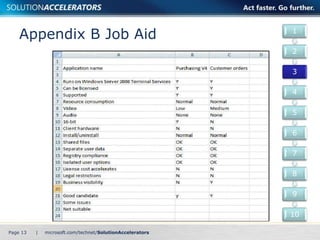
Appendix B Job Aid 
Page 13 | 
1 
2 
3 
4 
5 
6 
7 
8 
9 
10
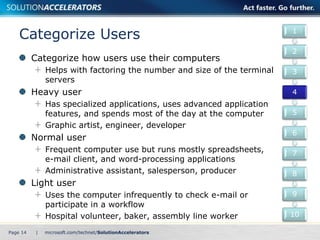
Categorize Users 
Categorize how users use their computers 
Helps with factoring the number and size of the terminal 
servers 
Heavy user 
Has specialized applications, uses advanced application 
features, and spends most of the day at the computer 
Graphic artist, engineer, developer 
Normal user 
Frequent computer use but runs mostly spreadsheets, 
e-mail client, and word-processing applications 
Administrative assistant, salesperson, producer 
Light user 
Uses the computer infrequently to check e-mail or 
participate in a workflow 
Hospital volunteer, baker, assembly line worker 
Page 14 | 
1 
2 
3 
4 
5 
6 
7 
8 
9 
10
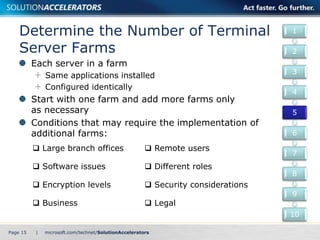
Determine the Number of Terminal 
Server Farms 
Each server in a farm 
Same applications installed 
Configured identically 
Start with one farm and add more farms only 
as necessary 
Conditions that may require the implementation of 
additional farms: 
Page 15 | 
1 
2 
3 
4 
5 
6 
7 
8 
9 
10 
 Large branch offices  Remote users 
 Software issues  Different roles 
 Encryption levels  Security considerations 
 Business  Legal
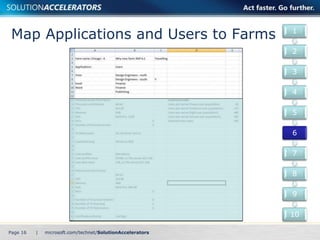
Map Applications and Users to Farms 
Page 16 | 
1 
2 
3 
4 
5 
6 
7 
8 
9 
10
Design the Farm 
Select a form factor for the server 
CPU, memory, disks, disk capacity 
Determine the number of terminal servers required 
in the farm 
Number of users/maximum number of users per 
server = number of servers needed to handle a 
maximum load 
Determine the number of additional servers required 
for fault tolerance 
Extra servers for increased user capacity in case a 
server goes offline 
Determine the number of servers required for 
TS Web Access 
Cannot be shared between farms 
Page 17 | 
1 
2 
3 
4 
5 
6 
7 
8 
9 
10
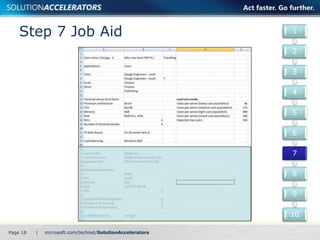
Step 7 Job Aid 
Page 18 | 
1 
2 
3 
4 
5 
6 
7 
8 
9 
10
Determine Where to Store User Data 
Decide user profile policy/storage location 
Mandatory versus Roaming 
Storage size and location 
Different profiles for different farms necessary? 
• fileservershare%FarmName%%username% 
Decide user data policy/storage locations 
Space required 
Storage location 
Design storage for user profiles and data 
Capacity required for all users 
Performance 
Fault tolerance 
Page 19 | 
1 
2 
3 
4 
5 
6 
7 
8 
9 
10
Size and Place the Terminal 
Services Role Services for the Farm 
Design and place the Terminal Services 
Session Brokers 
Place at least one TS Session Broker 
anywhere there is a geographically 
separated farm, then add more to provide 
fault tolerance and handle load 
Design and place the Terminal Services 
Licensing Servers 
Start with one TS Licensing server, add another 
for fault tolerance, then add more 
as necessary to handle the load 
Page 20 | 
1 
2 
3 
4 
5 
6 
7 
8 
9 
10
Size and Place the Terminal 
Services Role Services for the Farm 
Design and place the Terminal Services 
Gateway servers 
Only needed if users without VPN access require 
access through a firewall 
At least one fault-tolerant TS Gateway at each point 
of access through a firewall 
Requires a certificate that is either self-signed or 
trusted certification authority (CA) 
Can be combined with Microsoft Internet Security 
and Acceleration (ISA) Server or Microsoft 
Forefront™ Internet Application Gateway for 
increased security 
If uncertain how many role servers are required, 
a load test can be performed to measure capacity 
Page 21 | 
1 
2 
3 
4 
5 
6 
7 
8 
9 
10
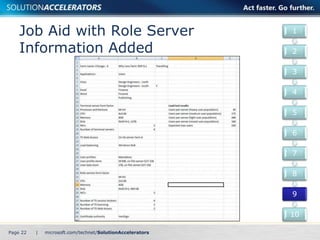
Job Aid with Role Server 
Information Added 
Page 22 | 
1 
2 
3 
4 
5 
6 
7 
8 
9 
10
Secure the Communications 
Determine the encryption level between 
client computers and the terminal server 
56 bit, 128 bit, Federal Information Processing 
(FIPS) 140 
Determine whether to seal the communications 
Use Transport Layer Security (TLS)/Secure Sockets 
Layer (SSL) to prevent a man-in-the-middle attack 
Determine the CA 
Determine whether to encapsulate with 
Hypertext Transfer Protocol over SSL (HTTPS) 
Require HTTPS Web access so port 3389 can be 
closed on the firewall. 
Page 23 | 
1 
2 
3 
4 
5 
6 
7 
8 
9 
10
Conclusion 
If designed properly, Terminal Services in 
Windows Server 2008 can save the 
organization money while increasing 
security and application availability 
Planning is key 
This guide offers major architectural guidance. 
Refer to product documentation for additional 
details. 
All the IPD Guides are available at www.microsoft.com/ipd 
Page 24 |
Questions?

Terminal Services in Windows Server® 2008

  • 1.
    Terminal Services in Windows Server® 2008 Infrastructure Planning and Design
  • 2.
    What Is IPD? Guidance that aims to clarify and streamline the planning and design process for Microsoft® infrastructure technologies. IPD: Defines decision flow Describes decisions to be made Relates decisions and options for the business Frames additional questions for business understanding IPD Guides are available at www.microsoft.com/ipd Page 2 |
  • 3.
    Getting Started TERMINALSERVICES IN WINDOWS SERVER® 2008 Page 3 |
  • 4.
    Terminal Services inWindows Server 2008 and the Core Infrastructure Optimization Model Page 4 |
  • 5.
    Purpose and Overview Purpose To provide guidance for designing a Terminal Services infrastructure Agenda Terminal Services in Windows Server 2008 features Terminal Services infrastructure design process Page 5 |
  • 6.
    Terminal Services in Windows Server 2008 Overview Presentation virtualization segment of Microsoft’s virtualization technologies Enables centralized application management Page 6 |
  • 7.
    New Features inWindows Server 2008 TS RemoteApp Shortcuts on the Start menu TS Web Access Launch Terminal Services applications through a Web page TS Gateway Remote access without virtual private networks (VPNs) TS Session Broker Load balancing TS Easy Print No more printer driver confusion Page 7 |
  • 8.
    Terminal Services inWindows Server 2008 Architecture Page 8 |
  • 9.
  • 10.
    Determine the Scopeof the Presentation Virtualization Project Determine the location scope Which locations will be served by this implementation? Determine the application scope Define which applications Terminal Services will host What benefits are desired from presentation virtualization? • Cost • Service levels • Remote access • Centralized management • Application compatibility fix • Platform independence Page 10 | 1 2 3 4 5 6 7 8 9 10
  • 11.
    Determine Which Applicationsto Deliver and How They Will Be Used Gather information about users and applications Numbers of users Applications they run Customizations and requirements Page 11 | 1 2 3 4 5 6 7 8 9 10
  • 12.
    Determine Whether TerminalServices Can Deliver Each Application Examine each application’s capability to be served Possible business issues • Licensing cost and issues • Legal Potential technical issues • Operating system compatibility • Multi-user environment compatibility • Server resource use • Bandwidth use Rank applications by suitability Good candidate Some issues Not suitable for Terminal Services Page 12 | 1 2 3 4 5 6 7 8 9 10
  • 13.
    Appendix B JobAid Page 13 | 1 2 3 4 5 6 7 8 9 10
  • 14.
    Categorize Users Categorizehow users use their computers Helps with factoring the number and size of the terminal servers Heavy user Has specialized applications, uses advanced application features, and spends most of the day at the computer Graphic artist, engineer, developer Normal user Frequent computer use but runs mostly spreadsheets, e-mail client, and word-processing applications Administrative assistant, salesperson, producer Light user Uses the computer infrequently to check e-mail or participate in a workflow Hospital volunteer, baker, assembly line worker Page 14 | 1 2 3 4 5 6 7 8 9 10
  • 15.
    Determine the Numberof Terminal Server Farms Each server in a farm Same applications installed Configured identically Start with one farm and add more farms only as necessary Conditions that may require the implementation of additional farms: Page 15 | 1 2 3 4 5 6 7 8 9 10  Large branch offices  Remote users  Software issues  Different roles  Encryption levels  Security considerations  Business  Legal
  • 16.
    Map Applications andUsers to Farms Page 16 | 1 2 3 4 5 6 7 8 9 10
  • 17.
    Design the Farm Select a form factor for the server CPU, memory, disks, disk capacity Determine the number of terminal servers required in the farm Number of users/maximum number of users per server = number of servers needed to handle a maximum load Determine the number of additional servers required for fault tolerance Extra servers for increased user capacity in case a server goes offline Determine the number of servers required for TS Web Access Cannot be shared between farms Page 17 | 1 2 3 4 5 6 7 8 9 10
  • 18.
    Step 7 JobAid Page 18 | 1 2 3 4 5 6 7 8 9 10
  • 19.
    Determine Where toStore User Data Decide user profile policy/storage location Mandatory versus Roaming Storage size and location Different profiles for different farms necessary? • fileservershare%FarmName%%username% Decide user data policy/storage locations Space required Storage location Design storage for user profiles and data Capacity required for all users Performance Fault tolerance Page 19 | 1 2 3 4 5 6 7 8 9 10
  • 20.
    Size and Placethe Terminal Services Role Services for the Farm Design and place the Terminal Services Session Brokers Place at least one TS Session Broker anywhere there is a geographically separated farm, then add more to provide fault tolerance and handle load Design and place the Terminal Services Licensing Servers Start with one TS Licensing server, add another for fault tolerance, then add more as necessary to handle the load Page 20 | 1 2 3 4 5 6 7 8 9 10
  • 21.
    Size and Placethe Terminal Services Role Services for the Farm Design and place the Terminal Services Gateway servers Only needed if users without VPN access require access through a firewall At least one fault-tolerant TS Gateway at each point of access through a firewall Requires a certificate that is either self-signed or trusted certification authority (CA) Can be combined with Microsoft Internet Security and Acceleration (ISA) Server or Microsoft Forefront™ Internet Application Gateway for increased security If uncertain how many role servers are required, a load test can be performed to measure capacity Page 21 | 1 2 3 4 5 6 7 8 9 10
  • 22.
    Job Aid withRole Server Information Added Page 22 | 1 2 3 4 5 6 7 8 9 10
  • 23.
    Secure the Communications Determine the encryption level between client computers and the terminal server 56 bit, 128 bit, Federal Information Processing (FIPS) 140 Determine whether to seal the communications Use Transport Layer Security (TLS)/Secure Sockets Layer (SSL) to prevent a man-in-the-middle attack Determine the CA Determine whether to encapsulate with Hypertext Transfer Protocol over SSL (HTTPS) Require HTTPS Web access so port 3389 can be closed on the firewall. Page 23 | 1 2 3 4 5 6 7 8 9 10
  • 24.
    Conclusion If designedproperly, Terminal Services in Windows Server 2008 can save the organization money while increasing security and application availability Planning is key This guide offers major architectural guidance. Refer to product documentation for additional details. All the IPD Guides are available at www.microsoft.com/ipd Page 24 |
  • 25.