Mod- 1
Author: Prabhu NetSys Infotech
 What is Citrix ?
 History of Citrix ?
 How Citrix works?
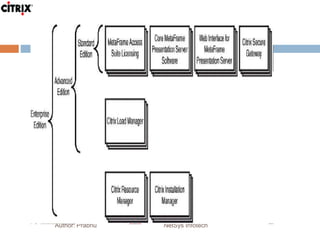
 Components of Presentation /XenApp Server
 Architecture of Presentation /XenApp Server
 What is Citrix Licensing and how it works?
 Q & A
Mod -2
Author: Prabhu NetSys Infotech
 Installation Prerequisites for Presentation Server / Xen
App server
 Installation of Presentation Server / Xenapp
 Configuring and Optimizing Windows 2K3
 Administering XenApp Using the Citrix Access
Management Console /Advanced Configuration console/
App Centre
 Understanding & Managing MetaFrame Licensing
 Q & A
What is Citrix?
Author: Prabhu NetSys Infotech
 Citrix Metaframe Presentation / XenAppServer is a
technology that can allow remote users to connect to
applications that are actually installed on a remote
computer.
 It uses a mix of technology that results in that remote
application looking and behaving just as though it was
installed on the local machine.
History of Citrix
Author: Prabhu NetSys Infotech
 Citrix uses Multi-Win technology for performing the
multi-user computing.
 Citrix first shipped Win frame in windows NT in 1995 and
it was a great success to Citrix and Microsoft.
 Communication Protocol used by Citrix is ICA which is
core technology behind the success story of Citrix.
Citrix Versions
 Xen App 5.0, 6.0, 6.5
 Xen App 4.5(PS)
 Xen App 4.0 (PS)
 Xen App 3.0 (PS)
 Metaframe XP FR1,FR2,FR3
 Winframe
Author: Prabhu NetSys Infotech
How Citrix Works?
Author: Prabhu NetSys Infotech
 Citrix Metaframe Presentation / XenApp Server offers
ICA Protocol by which Servers and client devices
communicates and exchange data.
 ICA Protocol encrypts and transport an application
screen from the server it is running on to the users client
device and returns the users input to the server.
Introduction to Citrix Presentation /
XenApp server.
Author: Prabhu NetSys Infotech
 Server Based Computing
 Citrix Digital Independence
 Components of Metaframe Presentation Server
Author: Prabhu NetSys Infotech
Server Based Computing
Author: Prabhu NetSys Infotech
 Processing Power on Servers
 Basically client gets to see Screenshot of what is going
on the server .
 Inputs can be Audio ,Video ,Printing ,Desktop Intelligent
service- Copy & Paste
 Scanner via applications
 KB and Mouse Clicks
Citrix Digital Independence
Author: Prabhu NetSys Infotech
 Any Platform
 Any Devices such as Thick client, Thin client , Handheld
devices ,PDA.
 Any Connection (Low bandwidth, 20kbps)
 Any location (Home users, Citrix web interface )
Linking Clients & Citrix Servers
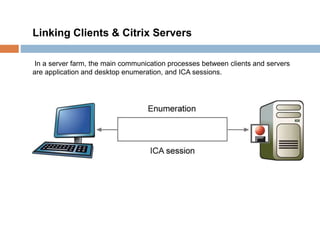
In a server farm, the main communication processes between clients and servers
are application and desktop enumeration, and ICA sessions.
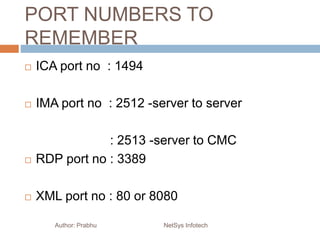
PORT NUMBERS TO
REMEMBER
 ICA port no : 1494
 IMA port no : 2512 -server to server
: 2513 -server to CMC
 RDP port no : 3389
 XML port no : 80 or 8080
Author: Prabhu NetSys Infotech
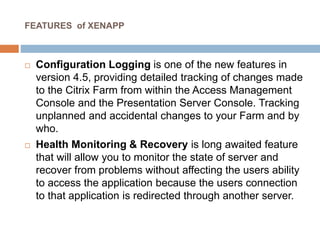
FEATURES of XENAPP
 Configuration Logging is one of the new features in
version 4.5, providing detailed tracking of changes made
to the Citrix Farm from within the Access Management
Console and the Presentation Server Console. Tracking
unplanned and accidental changes to your Farm and by
who.
 Health Monitoring & Recovery is long awaited feature
that will allow you to monitor the state of server and
recover from problems without affecting the users ability
to access the application because the users connection
to that application is redirected through another server.
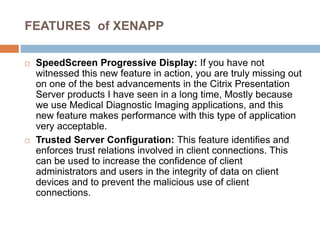
FEATURES of XENAPP
 SpeedScreen Progressive Display: If you have not
witnessed this new feature in action, you are truly missing out
on one of the best advancements in the Citrix Presentation
Server products I have seen in a long time, Mostly because
we use Medical Diagnostic Imaging applications, and this
new feature makes performance with this type of application
very acceptable.
 Trusted Server Configuration: This feature identifies and
enforces trust relations involved in client connections. This
can be used to increase the confidence of client
administrators and users in the integrity of data on client
devices and to prevent the malicious use of client
connections.
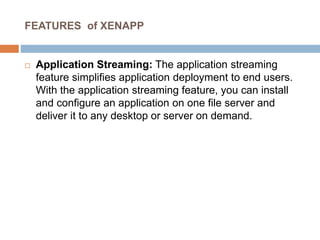
FEATURES of XENAPP
 Application Streaming: The application streaming
feature simplifies application deployment to end users.
With the application streaming feature, you can install
and configure an application on one file server and
deliver it to any desktop or server on demand.
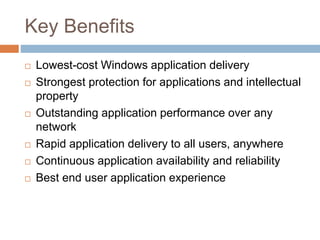
Key Benefits
 Lowest-cost Windows application delivery
 Strongest protection for applications and intellectual
property
 Outstanding application performance over any
network
 Rapid application delivery to all users, anywhere
 Continuous application availability and reliability
 Best end user application experience
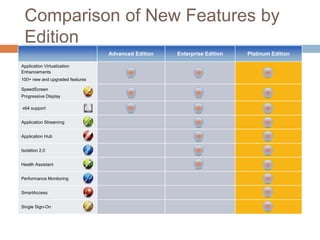
Comparison of New Features by
Edition
Advanced Edition Enterprise Edition Platinum Edition
Application Virtualization
Enhancements
100+ new and upgraded features
SpeedScreen
Progressive Display
x64 support
Application Streaming
Application Hub
Isolation 2.0
Health Assistant
Performance Monitoring
SmartAccess
Single Sign-On
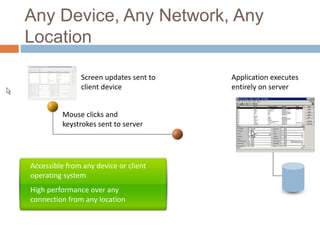
Any Device, Any Network, Any
Location
Accessible from any device or client
operating system
High performance over any
connection from any location
Mouse clicks and
keystrokes sent to server
Application executes
entirely on server
Screen updates sent to
client device
Author: Prabhu NetSys Infotech
MetaFrame Presentation Server
Architecture
Author: Prabhu NetSys Infotech
Terms need to understand:
 Independent Computing Architecture (ICA) protocol
 Independent Management Architecture (IMA) protocol
 SpeedScreen technology
 MultiWin
 Data Store
 Local Host Cache (LHC)
 Data Collector
 Zones
Independent Computing Architecture : The Independent Computing Architecture (ICA) protocol is
a presentation layer protocol on the OSI model. This is the engine by which a clients and XenApp
(MF) servers communicate data. It was designed by Citrix systems in such a way that can exchange
data over network bandwidth as low as 10 to 20Kbps. ICA has been shown to be 2 to 4 times faster
than RDP.
Author: Prabhu NetSys Infotech
 Network The ICA protocol can use a variety of transport protocols to
communicate data between ICA clients and XenApp servers. These protocols
include TCP/IP, IPX, SPX, and NetBIOS.
 Server In a server-based computing only screenshots showing what is
happening on the server are transmitted back to the client. The client only
interacts user interface (UI) of the application, but all the commands, keyboard
strokes, and mouse clicks are executed on the server side.
 Client As the application is executed on the remote server, all the client really
needs to be able to view and interact with the application's UI. Today, ICA clients
exist for almost any type of hardware devicefrom Pocket PCs to laptops to
traditional desktops. ICA clients also exist for almost any type of operating
system from Windows to Linux, Unix, and Macintosh.
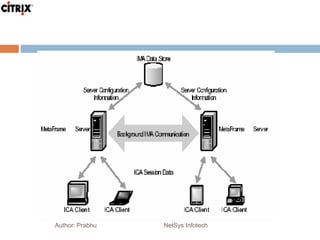
Independent Management Architecture
Author: Prabhu NetSys Infotech
 The IMA protocol offers platform for centralization
administration.
 It’s a mechanism by which XenApp Server-to-server
communication occurs.
 Can be termed as backbone of XenApp Server
 IMA installed as service on all XenApp servers.
What is Centralized Administration ?
Author: Prabhu NetSys Infotech
 Centralized Administrations is the core function of
IMA and this is possible through XenApp
Management Console.
 Presentation console is a Java Based console uses
the IMA protocol for gathering information from
XenApp Server and allowed administrators /users to
make changes on farm wide basis.
SpeedScreen Technology
Author: Prabhu NetSys Infotech
 To improve the frequent transmission of screen updates,
Citrix designed a technology, known as SpeedScreen for
published applications and desktops over slow
communications links
MultiWin
Author: Prabhu NetSys Infotech
 MultiWin, a technology developed by Citrix Systems,
originally created the concept of Terminal Server on the
Windows platform.
 It allows multiple simultaneous users to log on to a
Terminal Server, run applications, and share resources
such as the CPU, memory, and I/O ports.
Data Store
Author: Prabhu NetSys Infotech
 The data store is a database that stores all the
configuration/information needed by a citrix farm.
 Any time you make configuration changes to a XenApp
server on citrix farm the changes are recorded in the
data Store.
 The information stored in the Data Stores includes :
Published Applications, Server Configuration, User
Configuration, Print Environment.
Author: Prabhu NetSys Infotech
Local Host Cache (LHC)
Author: Prabhu NetSys Infotech
 Local Host Cache (LHC) is an Access Database that is
located on every Presentation / XenApp Server.
 It carries enough information to keep the server running
in the event that the main Data Store should become
unavailable for any reason.
Zones
Author: Prabhu NetSys Infotech
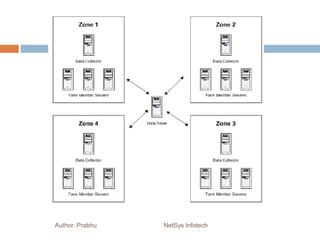
 Zones provide a way of grouping geographically close
servers to save network bandwidth and also improve
performance.
 Every zone elects one Data Collector, which every server
in that zone reports to.
Data Collectors
Author: Prabhu NetSys Infotech
 Data Collectors (DCs) are responsible for keeping zone-
specific information.
 Every zone has one elected server that acts as the DC
and maintains information gathered from all the servers
in that zone.
Data Collectors, Elections, and Priority
Author: Prabhu NetSys Infotech
 Most Preferred This is the favorite server; it always wins
the election.
 Preferred This server is a favorite among others to win
an election.
 Default Preference This server is neutral and can be
selected to become a DC but is not a preferred
candidate.
 Not Preferred This server should never win an election
unless it is the only server in the zone or all the other
preferred servers are unavailable
XenApp 6.0 Features
 Simplified Management – XenApp 6
dramatically simplifies desktop computing with
AppCenter™, a powerful new management
console that makes it easy for IT to centrally
manage all applications enterprise-wide from a
single location.
 Unparalleled Scalability – XenApp 6 has
been verified to scale up to more than 100,000
concurrent users in a single farm, giving
customers unprecedented levels of cost
savings and datacenter efficiency.Author: Prabhu NetSys Infotech
XenApp 6.0 Features
 Expanded Microsoft Integration – Seamless
integration between XenApp 6 and Microsoft
App-V makes it easy for customers to centrally
manage applications using whatever mix of
local and hosted solutions best fit their unique
requirements. XenApp 6 also includes full
support for Microsoft Windows Server 2008
R2, adding a broad range of platform
enhancements including simplified
provisioning, easier automation, and more
efficient power consumption.Author: Prabhu NetSys Infotech
XenApp 6.0 Features
 Mac and Smart Phone Support – In addition
to supporting PCs, thin clients and laptops,
XenApp 6 now makes it easy for users to
access Windows apps from Macs and popular
smart phones such as Apple iPhone, Google
Android and Windows Mobile.
Author: Prabhu NetSys Infotech
XenApp 6.0 Features
 Enhanced High-Definition HDX™
Technology – XenApp 6 includes broad new
HDX technology enhancements that allow
customers to deliver real-time media
applications like voice and CD-quality audio
with a rich, high-definition user experience.
New HDX enhancements in XenApp 6 also
expand support for a broad range of USB
devices, including webcams, microphones,
digital cameras and scanners
Author: Prabhu NetSys Infotech

Citrix xenapp training

  • 1.
    Mod- 1 Author: PrabhuNetSys Infotech  What is Citrix ?  History of Citrix ?  How Citrix works?  Components of Presentation /XenApp Server  Architecture of Presentation /XenApp Server  What is Citrix Licensing and how it works?  Q & A
  • 2.
    Mod -2 Author: PrabhuNetSys Infotech  Installation Prerequisites for Presentation Server / Xen App server  Installation of Presentation Server / Xenapp  Configuring and Optimizing Windows 2K3  Administering XenApp Using the Citrix Access Management Console /Advanced Configuration console/ App Centre  Understanding & Managing MetaFrame Licensing  Q & A
  • 3.
    What is Citrix? Author:Prabhu NetSys Infotech  Citrix Metaframe Presentation / XenAppServer is a technology that can allow remote users to connect to applications that are actually installed on a remote computer.  It uses a mix of technology that results in that remote application looking and behaving just as though it was installed on the local machine.
  • 4.
    History of Citrix Author:Prabhu NetSys Infotech  Citrix uses Multi-Win technology for performing the multi-user computing.  Citrix first shipped Win frame in windows NT in 1995 and it was a great success to Citrix and Microsoft.  Communication Protocol used by Citrix is ICA which is core technology behind the success story of Citrix.
  • 5.
    Citrix Versions  XenApp 5.0, 6.0, 6.5  Xen App 4.5(PS)  Xen App 4.0 (PS)  Xen App 3.0 (PS)  Metaframe XP FR1,FR2,FR3  Winframe Author: Prabhu NetSys Infotech
  • 6.
    How Citrix Works? Author:Prabhu NetSys Infotech  Citrix Metaframe Presentation / XenApp Server offers ICA Protocol by which Servers and client devices communicates and exchange data.  ICA Protocol encrypts and transport an application screen from the server it is running on to the users client device and returns the users input to the server.
  • 7.
    Introduction to CitrixPresentation / XenApp server. Author: Prabhu NetSys Infotech  Server Based Computing  Citrix Digital Independence  Components of Metaframe Presentation Server
  • 8.
  • 9.
    Server Based Computing Author:Prabhu NetSys Infotech  Processing Power on Servers  Basically client gets to see Screenshot of what is going on the server .  Inputs can be Audio ,Video ,Printing ,Desktop Intelligent service- Copy & Paste  Scanner via applications  KB and Mouse Clicks
  • 10.
    Citrix Digital Independence Author:Prabhu NetSys Infotech  Any Platform  Any Devices such as Thick client, Thin client , Handheld devices ,PDA.  Any Connection (Low bandwidth, 20kbps)  Any location (Home users, Citrix web interface )
  • 11.
    Linking Clients &Citrix Servers In a server farm, the main communication processes between clients and servers are application and desktop enumeration, and ICA sessions.
  • 12.
    PORT NUMBERS TO REMEMBER ICA port no : 1494  IMA port no : 2512 -server to server : 2513 -server to CMC  RDP port no : 3389  XML port no : 80 or 8080 Author: Prabhu NetSys Infotech
  • 13.
    FEATURES of XENAPP Configuration Logging is one of the new features in version 4.5, providing detailed tracking of changes made to the Citrix Farm from within the Access Management Console and the Presentation Server Console. Tracking unplanned and accidental changes to your Farm and by who.  Health Monitoring & Recovery is long awaited feature that will allow you to monitor the state of server and recover from problems without affecting the users ability to access the application because the users connection to that application is redirected through another server.
  • 14.
    FEATURES of XENAPP SpeedScreen Progressive Display: If you have not witnessed this new feature in action, you are truly missing out on one of the best advancements in the Citrix Presentation Server products I have seen in a long time, Mostly because we use Medical Diagnostic Imaging applications, and this new feature makes performance with this type of application very acceptable.  Trusted Server Configuration: This feature identifies and enforces trust relations involved in client connections. This can be used to increase the confidence of client administrators and users in the integrity of data on client devices and to prevent the malicious use of client connections.
  • 15.
    FEATURES of XENAPP Application Streaming: The application streaming feature simplifies application deployment to end users. With the application streaming feature, you can install and configure an application on one file server and deliver it to any desktop or server on demand.
  • 16.
    Key Benefits  Lowest-costWindows application delivery  Strongest protection for applications and intellectual property  Outstanding application performance over any network  Rapid application delivery to all users, anywhere  Continuous application availability and reliability  Best end user application experience
  • 17.
    Comparison of NewFeatures by Edition Advanced Edition Enterprise Edition Platinum Edition Application Virtualization Enhancements 100+ new and upgraded features SpeedScreen Progressive Display x64 support Application Streaming Application Hub Isolation 2.0 Health Assistant Performance Monitoring SmartAccess Single Sign-On
  • 18.
    Any Device, AnyNetwork, Any Location Accessible from any device or client operating system High performance over any connection from any location Mouse clicks and keystrokes sent to server Application executes entirely on server Screen updates sent to client device
  • 19.
  • 20.
    MetaFrame Presentation Server Architecture Author:Prabhu NetSys Infotech Terms need to understand:  Independent Computing Architecture (ICA) protocol  Independent Management Architecture (IMA) protocol  SpeedScreen technology  MultiWin  Data Store  Local Host Cache (LHC)  Data Collector  Zones
  • 21.
    Independent Computing Architecture: The Independent Computing Architecture (ICA) protocol is a presentation layer protocol on the OSI model. This is the engine by which a clients and XenApp (MF) servers communicate data. It was designed by Citrix systems in such a way that can exchange data over network bandwidth as low as 10 to 20Kbps. ICA has been shown to be 2 to 4 times faster than RDP. Author: Prabhu NetSys Infotech  Network The ICA protocol can use a variety of transport protocols to communicate data between ICA clients and XenApp servers. These protocols include TCP/IP, IPX, SPX, and NetBIOS.  Server In a server-based computing only screenshots showing what is happening on the server are transmitted back to the client. The client only interacts user interface (UI) of the application, but all the commands, keyboard strokes, and mouse clicks are executed on the server side.  Client As the application is executed on the remote server, all the client really needs to be able to view and interact with the application's UI. Today, ICA clients exist for almost any type of hardware devicefrom Pocket PCs to laptops to traditional desktops. ICA clients also exist for almost any type of operating system from Windows to Linux, Unix, and Macintosh.
  • 22.
    Independent Management Architecture Author:Prabhu NetSys Infotech  The IMA protocol offers platform for centralization administration.  It’s a mechanism by which XenApp Server-to-server communication occurs.  Can be termed as backbone of XenApp Server  IMA installed as service on all XenApp servers.
  • 23.
    What is CentralizedAdministration ? Author: Prabhu NetSys Infotech  Centralized Administrations is the core function of IMA and this is possible through XenApp Management Console.  Presentation console is a Java Based console uses the IMA protocol for gathering information from XenApp Server and allowed administrators /users to make changes on farm wide basis.
  • 24.
    SpeedScreen Technology Author: PrabhuNetSys Infotech  To improve the frequent transmission of screen updates, Citrix designed a technology, known as SpeedScreen for published applications and desktops over slow communications links
  • 25.
    MultiWin Author: Prabhu NetSysInfotech  MultiWin, a technology developed by Citrix Systems, originally created the concept of Terminal Server on the Windows platform.  It allows multiple simultaneous users to log on to a Terminal Server, run applications, and share resources such as the CPU, memory, and I/O ports.
  • 26.
    Data Store Author: PrabhuNetSys Infotech  The data store is a database that stores all the configuration/information needed by a citrix farm.  Any time you make configuration changes to a XenApp server on citrix farm the changes are recorded in the data Store.  The information stored in the Data Stores includes : Published Applications, Server Configuration, User Configuration, Print Environment.
  • 27.
  • 28.
    Local Host Cache(LHC) Author: Prabhu NetSys Infotech  Local Host Cache (LHC) is an Access Database that is located on every Presentation / XenApp Server.  It carries enough information to keep the server running in the event that the main Data Store should become unavailable for any reason.
  • 29.
    Zones Author: Prabhu NetSysInfotech  Zones provide a way of grouping geographically close servers to save network bandwidth and also improve performance.  Every zone elects one Data Collector, which every server in that zone reports to.
  • 30.
    Data Collectors Author: PrabhuNetSys Infotech  Data Collectors (DCs) are responsible for keeping zone- specific information.  Every zone has one elected server that acts as the DC and maintains information gathered from all the servers in that zone.
  • 31.
    Data Collectors, Elections,and Priority Author: Prabhu NetSys Infotech  Most Preferred This is the favorite server; it always wins the election.  Preferred This server is a favorite among others to win an election.  Default Preference This server is neutral and can be selected to become a DC but is not a preferred candidate.  Not Preferred This server should never win an election unless it is the only server in the zone or all the other preferred servers are unavailable
  • 32.
    XenApp 6.0 Features Simplified Management – XenApp 6 dramatically simplifies desktop computing with AppCenter™, a powerful new management console that makes it easy for IT to centrally manage all applications enterprise-wide from a single location.  Unparalleled Scalability – XenApp 6 has been verified to scale up to more than 100,000 concurrent users in a single farm, giving customers unprecedented levels of cost savings and datacenter efficiency.Author: Prabhu NetSys Infotech
  • 33.
    XenApp 6.0 Features Expanded Microsoft Integration – Seamless integration between XenApp 6 and Microsoft App-V makes it easy for customers to centrally manage applications using whatever mix of local and hosted solutions best fit their unique requirements. XenApp 6 also includes full support for Microsoft Windows Server 2008 R2, adding a broad range of platform enhancements including simplified provisioning, easier automation, and more efficient power consumption.Author: Prabhu NetSys Infotech
  • 34.
    XenApp 6.0 Features Mac and Smart Phone Support – In addition to supporting PCs, thin clients and laptops, XenApp 6 now makes it easy for users to access Windows apps from Macs and popular smart phones such as Apple iPhone, Google Android and Windows Mobile. Author: Prabhu NetSys Infotech
  • 35.
    XenApp 6.0 Features Enhanced High-Definition HDX™ Technology – XenApp 6 includes broad new HDX technology enhancements that allow customers to deliver real-time media applications like voice and CD-quality audio with a rich, high-definition user experience. New HDX enhancements in XenApp 6 also expand support for a broad range of USB devices, including webcams, microphones, digital cameras and scanners Author: Prabhu NetSys Infotech