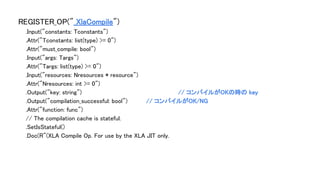
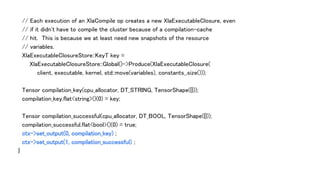
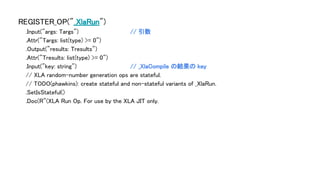
// Each executionof an XlaCompile op creates a new XlaExecutableClosure, even
// if it didn't have to compile the cluster because of a compilation-cache
// hit. This is because we at least need new snapshots of the resource
// variables.
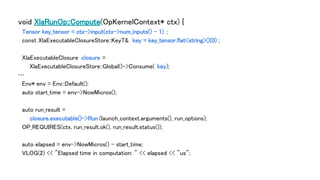
XlaExecutableClosureStore::KeyT key =
XlaExecutableClosureStore::Global()->Produce(XlaExecutableClosure(
client, executable, kernel, std::move(variables), constants_.size()));
Tensor compilation_key(cpu_allocator, DT_STRING, TensorShape({}));
compilation_key.flat<string>()(0) = key;
Tensor compilation_successful(cpu_allocator, DT_BOOL, TensorShape({}));
compilation_successful.flat<bool>()(0) = true;
ctx->set_output(0, compilation_key) ;
ctx->set_output(1, compilation_successful) ;
}
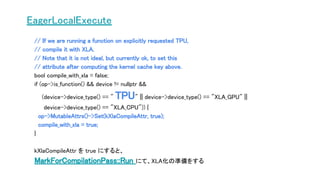
EagerLocalExecute
// If weare running a function on explicitly requested TPU,
// compile it with XLA.
// Note that it is not ideal, but currently ok, to set this
// attribute after computing the kernel cache key above.
bool compile_with_xla = false;
if (op->is_function() && device != nullptr &&
(device->device_type() == " TPU" || device->device_type() == "XLA_GPU" ||
device->device_type() == "XLA_CPU")) {
op->MutableAttrs()->Set(kXlaCompileAttr, true);
compile_with_xla = true;
}
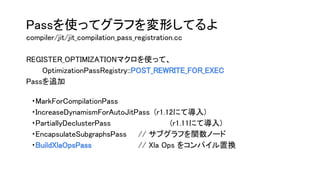
kXlaCompileAttr を true にすると、
MarkForCompilationPass::Run にて、XLA化の準備をする
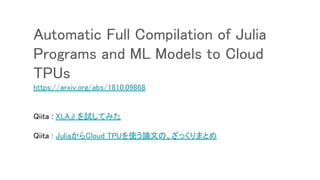
Automatic Full Compilationof Julia
Programs and ML Models to Cloud
TPUs
https://arxiv.org/abs/1810.09868
Qiita : XLA.jl を試してみた
Qiita : JuliaからCloud TPUを使う論文の、ざっくりまとめ
Introducing PyTorch acrossGoogle
Cloud , 2018.10.3
https://cloud.google.com/blog/products/ai-machine-learning/introducing-p
ytorch-across-google-cloud
Today, we’re pleased to announce that engineers on Google’s TPU team
are actively collaborating with core PyTorch developers to connect
PyTorch to Cloud TPUs. The long-term goal is to enable everyone to enjoy
the simplicity and flexibility of PyTorch while benefiting from the
performance, scalability, and cost-efficiency of Cloud TPUs.
69.
As a startingpoint, the engineers involved have produced a prototype that
connects PyTorch to Cloud TPUs via XLA, an open source linear algebra
compiler.
This prototype has successfully enabled us to train a PyTorch
implementation of ResNet-50 on a Cloud TPU, and we’re planning to open
source the prototype and then expand it in collaboration with the PyTorch
community.
Please email us at pytorch-tpu@googlegroups.com to tell us what types of
PyTorch workloads you would be most interested in accelerating with Cloud
TPUs!
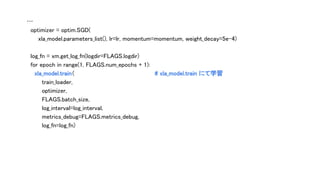
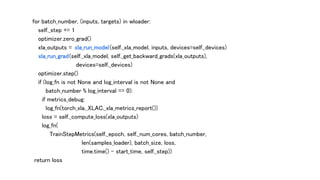
for batch_number, (inputs,targets) in wloader:
self._step += 1
optimizer.zero_grad()
xla_outputs = xla_run_model(self._xla_model, inputs, devices=self._devices)
xla_run_grad(self._xla_model, self._get_backward_grads(xla_outputs),
devices=self._devices)
optimizer.step()
if (log_fn is not None and log_interval is not None and
batch_number % log_interval == 0):
if metrics_debug:
log_fn(torch_xla._XLAC._xla_metrics_report())
loss = self._compute_loss(xla_outputs)
log_fn(
TrainStepMetrics(self._epoch, self._num_cores, batch_number,
len(samples_loader), batch_size, loss,
time.time() - start_time, self._step))
return loss





![サンプルコードを見てみよう
def test_xla_gpu(self):
with tf.Session() as sess:
x = tf.placeholder(tf.float32, [2], name="x")
with tf.device("device:XLA_GPU:0"):
y = x * 2
result = sess.run(y, {x: [1.5, 0.5]})](https://image.slidesharecdn.com/fpgax11tensorflowxla-190202033136/85/TensorFlow-XLA-XLA-9-320.jpg)





![ポイント1 : xla.compile (Python API)
compiler/xla/g3doc/tutorials/xla_compile.ipynb
def build_mnist_model(x, y_):
y = tf.keras.layers.Dense(NUM_CLASSES).apply(x)
cross_entropy = tf.losses.sparse_softmax_cross_entropy(labels=y_, logits=y)
train_step = tf.train.GradientDescentOptimizer(0.5).minimize(cross_entropy)
return y, train_step
[y] = xla.compile(build_mnist_model, inputs=[images, labels])](https://image.slidesharecdn.com/fpgax11tensorflowxla-190202033136/85/TensorFlow-XLA-XLA-19-320.jpg)





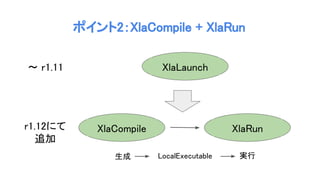
 {
return BuildCompilationCache(ctx, platform_info, cache);
}));
...
std::vector<XlaCompiler::Argument> args;
TF_RETURN_IF_ERROR(XlaComputationLaunchContext::BuildXlaCompilerArguments(
constant_args, *variables, ctx, &args));
return cache->Compile(options, function, args, compile_options,
lazy ? XlaCompilationCache::CompileMode::kLazy
: XlaCompilationCache::CompileMode::kStrict,
kernel, executable);](https://image.slidesharecdn.com/fpgax11tensorflowxla-190202033136/85/TensorFlow-XLA-XLA-29-320.jpg)






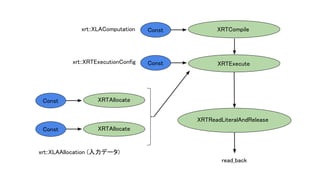
![ClientSession session(root);
std::vector<Tensor> outputs;
TF_EXPECT_OK(session.Run({ read_back}, &outputs));
xla::LiteralProto response;
EXPECT_TRUE(response.ParseFromString(outputs[0].scalar<string>()()));
auto sum = xla::LiteralUtil::CreateR1<float>({9.0f, 7.0f});
auto expected = xla::LiteralUtil::MakeTuple({&sum});
EXPECT_TRUE(CompareLiteralToLiteralProto(expected, response));
}](https://image.slidesharecdn.com/fpgax11tensorflowxla-190202033136/85/TensorFlow-XLA-XLA-45-320.jpg)

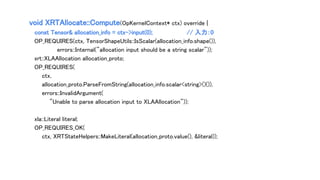
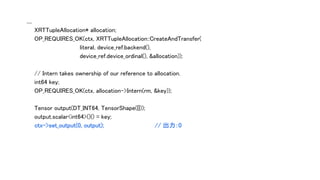

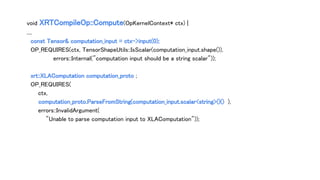
 {
VLOG(1) << "Compiling XLA executable";
return Compile(ctx, computation_proto, program);
}));
std::unique_ptr<XRTCompilationCacheEntryRef> entry;
OP_REQUIRES_OK(ctx, cache->Lookup(uid, &entry));](https://image.slidesharecdn.com/fpgax11tensorflowxla-190202033136/85/TensorFlow-XLA-XLA-52-320.jpg)
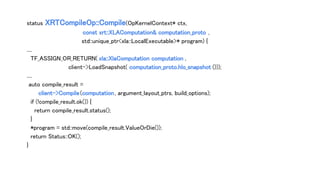
![void XRTExecuteOp::ComputeAsync(OpKernelContext* context, DoneCallback done) {
// Schedule onto the default queue, for unbounded concurrency. See b/73520706
Env::Default()->SchedClosure([this, context, done]() {
OP_REQUIRES_OK_ASYNC(context, DoWork(context), done);
done();
});
}](https://image.slidesharecdn.com/fpgax11tensorflowxla-190202033136/85/TensorFlow-XLA-XLA-56-320.jpg)









![テストコード:test/test_train_imagenet.py
…
import torch_xla_py.xla_model as xm # xla_model をインポート
…
def train_imagenet():
…
model = torchvision.models.resnet50 () # モデル (resnet50)
cross_entropy_loss = nn.CrossEntropyLoss()
devices = [':{}'.format(n) for n in range(0, FLAGS.num_cores)]
inputs = torch.zeros(FLAGS.batch_size, 3, 224, 224)
target = torch.zeros(FLAGS.batch_size, dtype=torch.int64)
xla_model = xm.XlaModel( # XlaModel にてモデルコンパイル
model, [inputs], loss_fn=cross_entropy_loss,
target=target, num_cores=FLAGS.num_cores, devices=devices)](https://image.slidesharecdn.com/fpgax11tensorflowxla-190202033136/85/TensorFlow-XLA-XLA-71-320.jpg)
![PyTorch で TPU を使うときのポイント
1)、xla_model をインポート
import torch_xla_py.xla_model as xm
2)、XlaModel にてモデルコンパイル
xla_model = xm.XlaModel( model, [inputs], …
3)、train にて学習
for epoch in range(1, FLAGS.num_epochs + 1):
xla_model.train(...)
4)、test にて推論
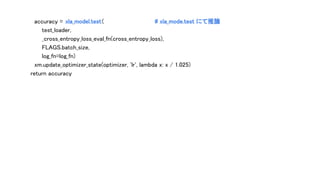
accuracy = xla_model.test(...)](https://image.slidesharecdn.com/fpgax11tensorflowxla-190202033136/85/TensorFlow-XLA-XLA-74-320.jpg)


![with torch.no_grad():
for batch_number, (inputs, targets) in wloader:
xla_outputs = xla_run_model(self._xla_model, inputs, devices=self._devices)
for i, replica_xla_outputs in enumerate(xla_outputs):
output = replica_xla_outputs[1].to_tensor()
closs, ccorrect = eval_fn(output, inputs[i][1].to_tensor())
test_loss += closs
correct += ccorrect
count += batch_size
test_loss /= count
accuracy = 100.0 * correct / count
if log_fn is not None:
log_fn(
TestStepMetrics(test_loss, correct, count,
time.time() - start_time, self._step))
return accuracy](https://image.slidesharecdn.com/fpgax11tensorflowxla-190202033136/85/TensorFlow-XLA-XLA-78-320.jpg)
 -> py::object {
auto inputs = XlaCreateTensorList(args);
XlaModule::TensorBatchVector outputs;
{
NoGilSection nogil;
outputs = xla_module.forward(inputs);
}
return XlaPackTensorList(outputs);
})](https://image.slidesharecdn.com/fpgax11tensorflowxla-190202033136/85/TensorFlow-XLA-XLA-79-320.jpg)
 {
auto inputs = XlaCreateTensorList(args);
NoGilSection nogil;
xla_module.backward (inputs);
})](https://image.slidesharecdn.com/fpgax11tensorflowxla-190202033136/85/TensorFlow-XLA-XLA-80-320.jpg)


![[Aurora事例祭り]Amazon Aurora を使いこなすためのベストプラクティス](https://cdn.slidesharecdn.com/ss_thumbnails/amazonauroratips-170307140000-thumbnail.jpg?width=640&height=640&fit=bounds)


