Unpicking A Problem:
A Quick Guide To Using
Fishbone Diagrams
What is
a
Fishbone
Diagram?
When should
you use
one?
Why do we
use them?
How do you create
a Fishbone
Diagram;
- What do you
need?
- What are the
steps?
Handy
Tips
What the presentation will
cover:
WHAT IS A FISHBONE DIAGRAM?
• ‘Cause & effect’ diagram
• A visual way of showing the potential causes of a problem
• Looks bit like skeleton of a fish
Helps group
possible causes
into categories
WHY DO WE USE FISHBONE DIAGRAMS?
Visualise
possible causes
of a problem
Discover root causes before
you start to think of a
solution
Helps to work
towards
addressing the
problem
Provides structure Facilitate
deeper
thinking about
possible
causation
To help determine
why a particular
problem is
happening
Get a snapshot
of collective
knowledge
Gain a
shared
insight into
the problem
WHEN TO USE A FISHBONE DIAGRAM?
• When there is an issue which has various causes
• When there are processes that don’t work
• When you need different points of view to look at a
problem
• Before you think about making changes
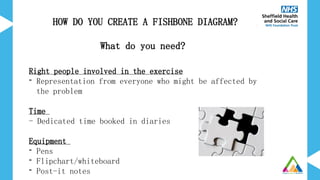
HOW DO YOU CREATE A FISHBONE DIAGRAM?
What do you need?
Right people involved in the exercise
- Representation from everyone who might be affected by
the problem
Time
- Dedicated time booked in diaries
Equipment
- Pens
- Flipchart/whiteboard
- Post-it notes
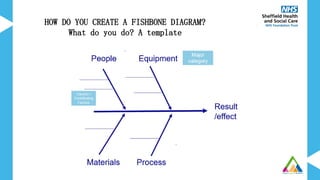
HOW DO YOU CREATE A FISHBONE DIAGRAM?
What do you do? A template
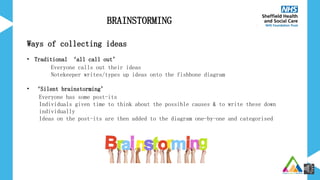
Ways of collecting ideas
• Traditional ‘all call out’
Everyone calls out their ideas
Notekeeper writes/types up ideas onto the fishbone diagram
• ‘Silent brainstorming’
Everyone has some post-its
Individuals given time to think about the possible causes & to write these down
individually
Ideas on the post-its are then added to the diagram one-by-one and categorised
BRAINSTORMING
Long
Waiting
Times
Process
Environmen
t
Equipment People
HOW DO YOU CREATE A FISHBONE DIAGRAM?
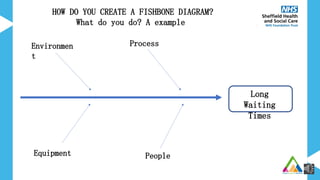
What do you do? A example
Waiting
Time
Methods
Environmen
t
Equipment People
Not enough
treatment
rooms
Small
building
Corridor
blocked
Transport arrives
early
Poor
scheduling
Process
takes too
long
Too much
paperwork
Targets
Incorrect
referrals
Unexpected
patients
Missed
appointments
Staff
sickness
Lateness
Poor maintenance
Lifts
broken
Wheelchairs
not
available
HOW DO YOU CREATE A FISHBONE DIAGRAM? - What do you do?
EXAMPLE OF A FISHBONE DIAGRAM
WHAT TO DO WITH YOUR COMPLETED
FISHBONE DIAGRAM
• Use the fishbone to facilitate discussion about what to work on
• Helps to focus on what you want to work on first
• Identify some quick wins that you can work on
• A tool to start to understand causes impacting on a problem you
want to improve
• Allows people to think deeper into the problem
• Provides a visual record
• Can help focus on where to start improvements
• A way for the whole team to contribute
SUMMARY
Handy Tips
• Get everyone involved & engaged in agreeing problem statement at
the start
• Have representation from across the team
• Ideally causes should appear only in one category
• Encourage no criticism of any ideas & try include all the
suggestions of possible causes
• No discussion during quiet brainstorming to allow everyone time
to think
If you like to learn more about Quality Improvement
tools & how they can help you to make improvements
please get in touch
QITeam@shsc.nhs.uk

Ten Minute Tools - Unpicking a problem.pptx

  • 1.
    Unpicking A Problem: AQuick Guide To Using Fishbone Diagrams
  • 2.
    What is a Fishbone Diagram? When should youuse one? Why do we use them? How do you create a Fishbone Diagram; - What do you need? - What are the steps? Handy Tips What the presentation will cover:
  • 3.
    WHAT IS AFISHBONE DIAGRAM? • ‘Cause & effect’ diagram • A visual way of showing the potential causes of a problem • Looks bit like skeleton of a fish
  • 4.
    Helps group possible causes intocategories WHY DO WE USE FISHBONE DIAGRAMS? Visualise possible causes of a problem Discover root causes before you start to think of a solution Helps to work towards addressing the problem Provides structure Facilitate deeper thinking about possible causation To help determine why a particular problem is happening Get a snapshot of collective knowledge Gain a shared insight into the problem
  • 5.
    WHEN TO USEA FISHBONE DIAGRAM? • When there is an issue which has various causes • When there are processes that don’t work • When you need different points of view to look at a problem • Before you think about making changes
  • 6.
    HOW DO YOUCREATE A FISHBONE DIAGRAM? What do you need? Right people involved in the exercise - Representation from everyone who might be affected by the problem Time - Dedicated time booked in diaries Equipment - Pens - Flipchart/whiteboard - Post-it notes
  • 7.
    HOW DO YOUCREATE A FISHBONE DIAGRAM? What do you do? A template
  • 8.
    Ways of collectingideas • Traditional ‘all call out’ Everyone calls out their ideas Notekeeper writes/types up ideas onto the fishbone diagram • ‘Silent brainstorming’ Everyone has some post-its Individuals given time to think about the possible causes & to write these down individually Ideas on the post-its are then added to the diagram one-by-one and categorised BRAINSTORMING
  • 9.
    Long Waiting Times Process Environmen t Equipment People HOW DOYOU CREATE A FISHBONE DIAGRAM? What do you do? A example
  • 10.
    Waiting Time Methods Environmen t Equipment People Not enough treatment rooms Small building Corridor blocked Transportarrives early Poor scheduling Process takes too long Too much paperwork Targets Incorrect referrals Unexpected patients Missed appointments Staff sickness Lateness Poor maintenance Lifts broken Wheelchairs not available HOW DO YOU CREATE A FISHBONE DIAGRAM? - What do you do?
  • 11.
    EXAMPLE OF AFISHBONE DIAGRAM
  • 12.
    WHAT TO DOWITH YOUR COMPLETED FISHBONE DIAGRAM • Use the fishbone to facilitate discussion about what to work on • Helps to focus on what you want to work on first • Identify some quick wins that you can work on
  • 13.
    • A toolto start to understand causes impacting on a problem you want to improve • Allows people to think deeper into the problem • Provides a visual record • Can help focus on where to start improvements • A way for the whole team to contribute SUMMARY
  • 14.
    Handy Tips • Geteveryone involved & engaged in agreeing problem statement at the start • Have representation from across the team • Ideally causes should appear only in one category • Encourage no criticism of any ideas & try include all the suggestions of possible causes • No discussion during quiet brainstorming to allow everyone time to think
  • 15.
    If you liketo learn more about Quality Improvement tools & how they can help you to make improvements please get in touch QITeam@shsc.nhs.uk

Editor's Notes

  • #3 It’s cause and effect diagram that helps you to think through the causes of a problem (including possible root causes) which then structures and groups them appropriately to help you move forward. A visual way of showing the potential causes of a problem. It’s called a Fishbone simply because it looks a bit like the skeleton of a fish.
  • #4 Helpful to visualise the possible causes of a problem and discover the root causes before you start to think of a solution To try and help determine why a particular problem is happening Facilitate deeper thinking about possible causation; Helps to tease out all of the possible causes not just the most obvious - outcomes rarely result from a single cause (an acorn does not produce an oak tree on it’s own – it needs interactions of soil, water, temperature, location, sunshine etc) Helps to group possible causes into categories Provides a structure to looking at what the problems are Helps to work towards addressing the problem – Helping the team decide where to begin with the process of improvement. It is a way of gathering together a snapshot of everyone's collective knowledge and also to enable those involved to gain a shared insight into the problem. – seeing it from other people’s point of view Helps to discover the root causes before you starting thinking of solutions
  • #5 You want to use a fishbone diagram when you’ve identified that there is an issue or problem that you think you need to work on finding a solution and or there are processes that don’t work as well as they could and when there a. When you want to find out different view points from all those who are effected by the problem. You should use it before you think about making changes to identify what the causes are before making the assumption you know what all the causes are and which ones you want to address. Important to have different members of the team from all different disciplines as each will bring their own ideas/experiences about what they feel is important and contributing to the problem.
  • #6 You need the right people involved, so that’s representatives from all disciplines within your team, are there other staff involved from outside your team, have you thought about the service user/carer perspective You need dedicated time to properly look at what could be causing the problem. Need to have time booked in to everyone’s diaries. Equipment wise you don’t need much. Everyone needs their own pen, some flipchart paper or a white board and post-it notes. If you are doing this online you will need a Word document open and shared with the group With all of these pieces in place you’ll be able to start completing the puzzle
  • #7 So how do you actually create a fishbone diagram – what do you do. Here is a template fishbone. You need to clarify the result/effect – the head of the fish then you want to start thinking about the causal factors You may want to have a brain storming session and then group the causes into some main categories or if you can identify some of the major factors first. You often find that the major categories generally start to emerge naturally as you start brainstorming the possible causes. These are the main bones of the fish. Some general major categories that you might want to think about are people, equipment, materials and process. Then coming off the major categories will be the causes the small fishbones
  • #8 So I keep saying to brainstorm – but what is and how do you brainstorm – I’m only going to one quick slide – as this is another tool in itself! So if you’d like to know more detail around brainstorming please don’t hesitate to contact the QI team, our contact details will be at the end of this presentation. So brainstorming is just a way of collecting ideas. There is the traditional ‘all call out method where everyone calls out their ideas and the nominated notekeeper writes up the ideas onto the fishbone. Or silent brainstorming where you will give everyone some post it notes and then some time to silently have a think about possible causes and write each one onto a post it. Then taking it in turns each person can come up and add their post its to the fishbone diagram. Note: Online people will need to individually brainstorm but then read out their ideas for the notekeeper to type onto to document.
  • #9 If you are working on the problem of long waiting times you will put this to the right; the head of the fish and then draw an arrow across the page; the backbone. If you have agreed some main categories add this to the diagram; the bones of the fish. Then brainstorm all the possible causes.
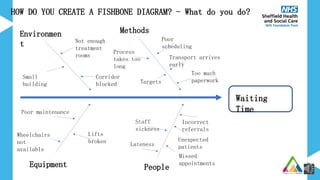
  • #10 After the brainstorming session you will need to add the possible causes under the right category slowly building it up until all the ideas of possible causes have been added to the diagram. If there are any which don’t fit into the main categories you may need to add a new category. This is what it will look like if you created the fish bone online
  • #11 Here’s an example of a fishbone Created using the brainstorm method each post it contains a different possible cause and you can see they are grouped into categories. You can either just take a photo of the fishbone you’ve created and share. Or you can type it up so it looks like the one on the previous slide
  • #12 Once you’ve completed your fishbone & un-picked the problem it will allow discussion about what you can work on, having all the causes visually grouped can help you to focus on what you might want to work on first, there might be lots more causes that you initially realised and you may be able to identify some quick wins that you can work on quickly.
  • #14 Important to have different members of the team from all different disciplines as each will bring their own ideas/experiences about what they feel is important and contributing to the problem. It’s often good to start with the silent brainstorming to allow people time to think without distractions or influence from other members of the group.
  • #15 Thank you for listening and I hope you’ve found this short guide helpful. If you’d like to know more about this or any other Quality Improvement tool and how they can help you to make improvements please get in touch via our team email address QI Team at SHSC dot NHS dot UK