TEKNOLOGI APLIKASI WEBSITE
• Konsep Dasar Web
• HTML
• CSS
• Client-side Script dg Java Script
• XML
• Jquery
• PHP
• Framework Web
1
PERTANYAAN YANG UMUM BERKAITAN DENGAN WEB
Apakah yang dimaksud World Wide Web?
Apakah web sama dengan internet?
Siapakah yang mengunjungi web?
Bagaimana Cara Kerja Web?
Apa saja yang dapat kita lakukan dengan web?
Apa yang harus dilakukan dengan pemrogrman web?
2
WEB  INTERNET
Internet: sebuah jaringan fisik yang menghubungkan jutaan komputer
dengan menggunakan protokol yang sama untuk berbagi / mengirim
informasi (TCP / IP)
• pada kenyataannya, Internet adalah jaringan dari jaringan yang lebih kecil
World Wide Web: koleksi berbagai media dokumen yang saling terkait
yang disimpan di internet dan diakses menggunakan protokol umum
(HTTP)
3
e.g., email, telnet, ftp, usenet, Instant Messenger, Napster, …
Key distinction: Internet is hardware; Web is software
Many other Internet-based applications exist
HISTORY OF THE INTERNET
the idea of a long-distance computer network traces back to early 60's
• Licklider at M.I.T.
• Baran at Rand
• National Physics Laboratory in U.K.
4
in particular, the Department of Defense was interested in the development
of distributed, decentralized networks
 survivability (i.e., network still functions despite a local attack)
 fault-tolerance (i.e., network still functions despite local failure)
contrast with phone system, electrical system
in 1969, Advanced Research Project Agency funded the ARPANET
 connected computers at UCLA, UCSB, SRI, and Utah
 allowed researchers to share data, communicate
56Kb/sec communications lines (vs. 110 b/sec over phone lines)
INTERNET GROWTH
throughout the 70's, the size of the ARPANET doubled every year
• decentralization made adding new computers easy
• ~1000 military & academic computers connected by 1984
5
in 80', U.S. government took a larger role in Internet development
 created NSFNET for academic research in 1986
 ARPANET was retained for military & government computers
by 90's, Internet connected virtually all colleges & universities
 businesses and individuals also connecting as computing costs fell
 ~1,000,000 computers by 1992
in 1992, control of the Internet was transferred to a non-profit org
 Internet Society: Internet Engineering Task Force
Internet Architecture Board
Internet Assigned Number Authority
World-Wide-Web Consortium
. . .
INTERNET GROWTH (CONT.)
Year
Computers on
the Internet
2002 162,128,493
2000 93,047,785
1998 36,739,000
1996 12,881,000
1994 3,212,000
1992 992,000
1990 313,000
1988 56,000
1986 5,089
1984 1,024
1982 235
6
Internet has exhibited exponential growth – doubling
in size every 1-2 years (stats from Internet Software
Consortium)
estimated >600 million Internet users in 2002
(www.nua.ie)
7
ISTILAH-ISTILAH DALAM WEB
• Website : kumpulan beberapa halaman web(web page)
• Homepage : halaman pertama dari sebuah website
• Domain : nama computer
• URL : alamat lengkap web
• Semua website bergabung membentuk “jaringan abstrak” yg disebut
WWW (World Wide Web)
• Data dari sebuah websites dapat diakses dengan bantuan sebuah
jaringan komunikasi yaitu Internet
• Pengguna web yang mencari informasi disebut pihak client
(menggunakan browser)
• Penyedia informasinya disebut pihak server (program khusus web
server)
HISTORY OF THE WEB
the idea of hypertext (cross-linked and inter-linked documents) traces
back to Vannevar Bush in the 1940's
• online hypertext systems began to be developed in 1960's
e.g., Andy van Dam's FRESS, Doug Englebert's NLS
• in 1987, Apple introduced HyperCard
9
in 1989, Tim Berners-Lee at the European Particle Physics Laboratory
(CERN) designed a hypertext system for linking documents over the
Internet
 designed a (Non-WYSIWYG) language for specifying document content
• which evolved into HyperText Markup Language (HTML)
 designed a protocol for downloading documents and interpreting the content
• which evolved into HyperText Transfer Protocol (HTTP)
 implemented the first browser -- text-based, no embedded media
the Web was born!
HISTORY OF THE WEB (CONT.)
the Web was an obscure, European research tool until 1993
in 1993, Marc Andreessen (at the National Center for
Supercomputing Applications) developed Mosaic, the first
graphical Web browser
• the intuitive, clickable interface made hypertext accessible to the masses
• made the integration of multimedia (images, video, sound, …) much easier
• Andreessen left NCSA to found Netscape in 1994
cheap/free browser popularized the Web (75% market share in 1996)
in 1995, Microsoft came out with Internet Explorer
Netscape bought by AOL in 1999 for $10 billion in stock
today, the Web is the most visible aspect of the Internet
10
WEB GROWTH
Stats from
Netcraft Web Server Survey.
Year
Computers on
the Internet
Web Servers on
the Internet
2002 162,128,493 33,082,657
2000 93,047,785 18,169,498
1998 36,739,000 4,279,000
1996 12,881,000 300,000
1994 3,212,000 3,000
1992 992,000 50
11
recent estimates suggest 40-50 M Web sites, with 4-5 B Web pages!
Mosaic
Netscape
IE
KOMPONEN URL
• Dokumen diakses web mempunyai alamat
unik yang disebut Uniform Resource Locator
(URL).
• Istilah Uniform Resource Identifier (URI)
kadang-kadang digunakan secara bergantian
dengan URL, meskipun URI adalah istilah
yang lebih umum, sebuah URL adalah jenis
URI.
• Alamat tersebut memungkinkan user mencari
file di internet kemudian menampilkannya.
• Contoh URL:
INTERNET DIAGRAM
WEB BROWSER
• Menampilkan dan melakukan interaksi dengan
dokumen-dokumen yang disediakan oleh server web.
• Secara teknis akan menterjemahkan kode yang dikirim
dari web server untuk ditampilkan ke user.
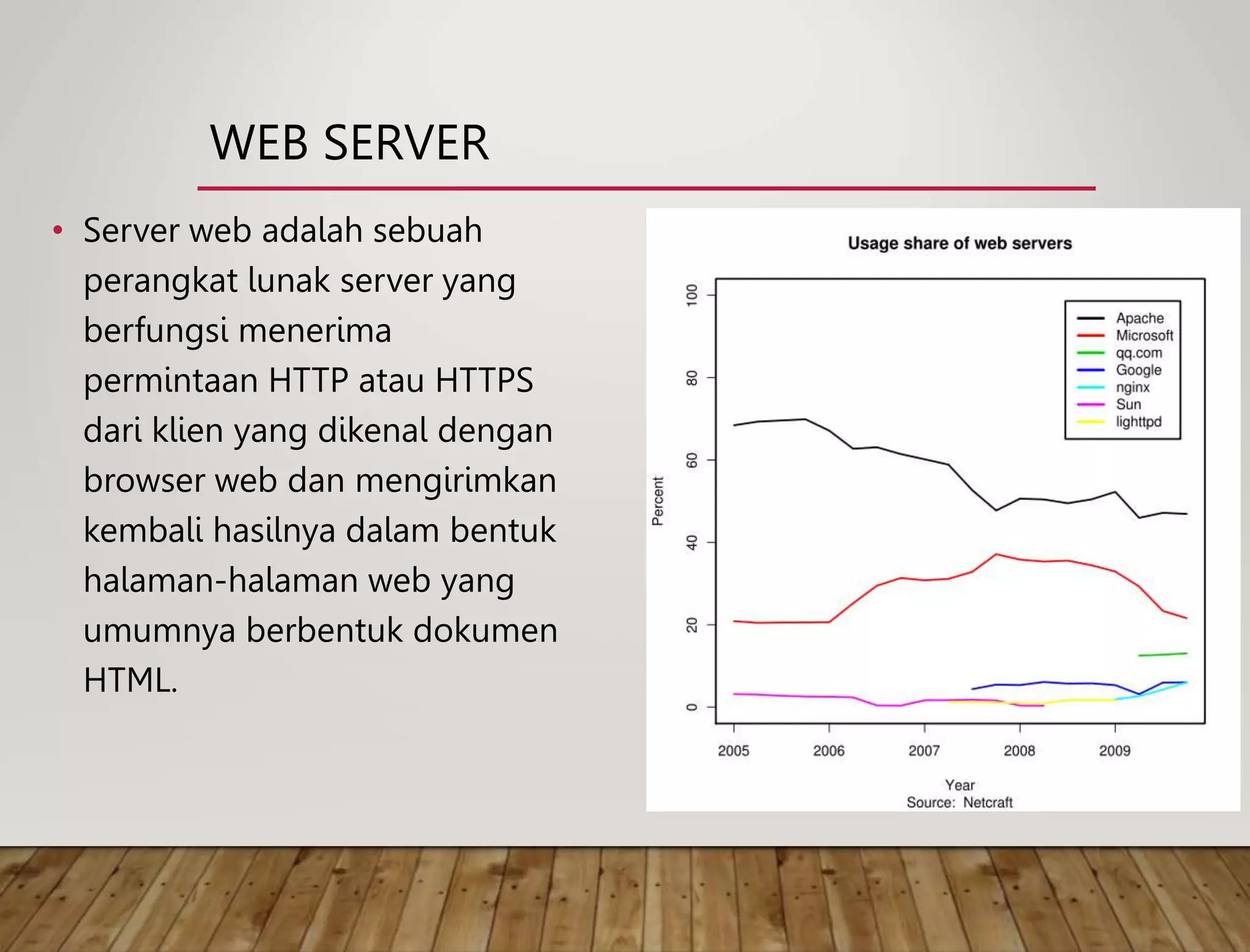
WEB SERVER
• Server web adalah sebuah
perangkat lunak server yang
berfungsi menerima
permintaan HTTP atau HTTPS
dari klien yang dikenal dengan
browser web dan mengirimkan
kembali hasilnya dalam bentuk
halaman-halaman web yang
umumnya berbentuk dokumen
HTML.
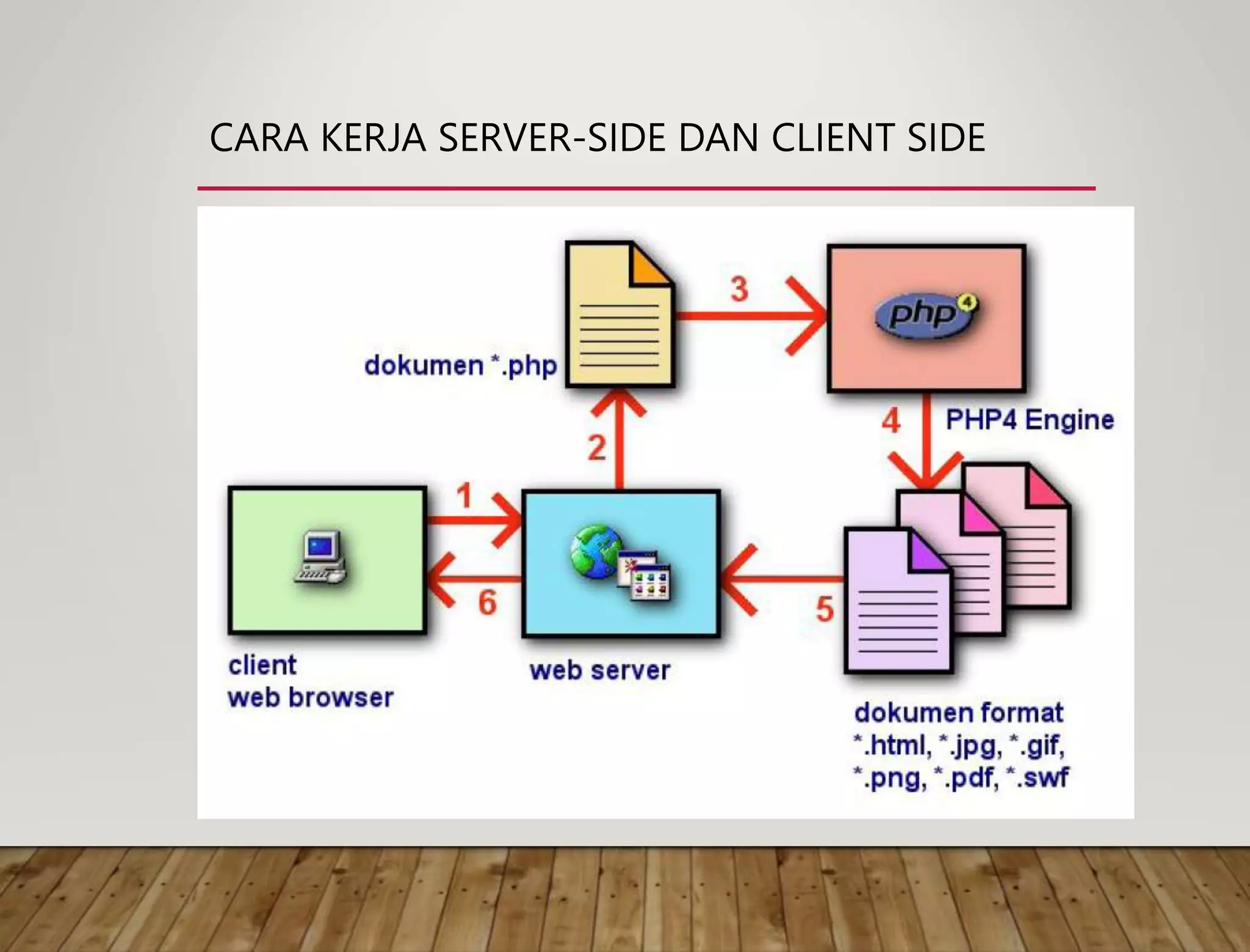
CARA KERJA SERVER-SIDE DAN CLIENT SIDE
STATIC VS. DYNAMIC PAGES
most Web pages are static
• contents (text/links/images) are the same each time it is accessed
e.g., online documents, most homepages
HyperText Markup Language (HTML) is used to specify text/image format
17
as the Web moves towards online services and e-commerce, Web pages
must also provide dynamic content
 pages must be fluid, changeable (e.g., rotating banners)
 must be able to react to the user's actions, request and process info, tailor services
e.g., amazon.com, www.thehungersite.com
this course is about applying your programming skills to the development
of dynamic Web pages and applications
CLIENT-SIDE PROGRAMMING
JavaScript
• a scripting language for Web pages, developed by Netscape in 1995
• uses a C++/Java-like syntax, so familiar to programmers, but simpler
• good for adding dynamic features to Web page, controlling forms and GUI
• see www.creighton.edu/~davereed/Memory
18
Java applets
 can define small, special-purpose programs in Java called applets
 provides full expressive power of Java (but more overhead)
 good for more complex tasks or data heavy tasks, such as graphics
 see www.creighton.edu/~davereed/csc107.F03/Labs/MontePI.html
can download program with Web page, execute on client machine
 simple, generic, but insecure
SERVER-SIDE PROGRAMMING
CGI programming
• programs can be written to conform to the Common Gateway Interface
• when a Web page submits, data from the page is sent as input to the CGI program
• CGI program executes on server, sends its results back to browser as a Web page
• good if computation is large/complex or requires access to private data
19
Active Server Pages, Java Servlets, PHP, Server Side Includes
 vendor-specific alternatives to CGI
 provide many of the same capabilities but using HTML-like tags
can store and execute program on Web server, link from Web page
 more complex, requires server privileges, but secure

Teknologi Aplikasi Web I : Internet

  • 1.
    TEKNOLOGI APLIKASI WEBSITE •Konsep Dasar Web • HTML • CSS • Client-side Script dg Java Script • XML • Jquery • PHP • Framework Web 1
  • 2.
    PERTANYAAN YANG UMUMBERKAITAN DENGAN WEB Apakah yang dimaksud World Wide Web? Apakah web sama dengan internet? Siapakah yang mengunjungi web? Bagaimana Cara Kerja Web? Apa saja yang dapat kita lakukan dengan web? Apa yang harus dilakukan dengan pemrogrman web? 2
  • 3.
    WEB  INTERNET Internet:sebuah jaringan fisik yang menghubungkan jutaan komputer dengan menggunakan protokol yang sama untuk berbagi / mengirim informasi (TCP / IP) • pada kenyataannya, Internet adalah jaringan dari jaringan yang lebih kecil World Wide Web: koleksi berbagai media dokumen yang saling terkait yang disimpan di internet dan diakses menggunakan protokol umum (HTTP) 3 e.g., email, telnet, ftp, usenet, Instant Messenger, Napster, … Key distinction: Internet is hardware; Web is software Many other Internet-based applications exist
  • 4.
    HISTORY OF THEINTERNET the idea of a long-distance computer network traces back to early 60's • Licklider at M.I.T. • Baran at Rand • National Physics Laboratory in U.K. 4 in particular, the Department of Defense was interested in the development of distributed, decentralized networks  survivability (i.e., network still functions despite a local attack)  fault-tolerance (i.e., network still functions despite local failure) contrast with phone system, electrical system in 1969, Advanced Research Project Agency funded the ARPANET  connected computers at UCLA, UCSB, SRI, and Utah  allowed researchers to share data, communicate 56Kb/sec communications lines (vs. 110 b/sec over phone lines)
  • 5.
    INTERNET GROWTH throughout the70's, the size of the ARPANET doubled every year • decentralization made adding new computers easy • ~1000 military & academic computers connected by 1984 5 in 80', U.S. government took a larger role in Internet development  created NSFNET for academic research in 1986  ARPANET was retained for military & government computers by 90's, Internet connected virtually all colleges & universities  businesses and individuals also connecting as computing costs fell  ~1,000,000 computers by 1992 in 1992, control of the Internet was transferred to a non-profit org  Internet Society: Internet Engineering Task Force Internet Architecture Board Internet Assigned Number Authority World-Wide-Web Consortium . . .
  • 6.
    INTERNET GROWTH (CONT.) Year Computerson the Internet 2002 162,128,493 2000 93,047,785 1998 36,739,000 1996 12,881,000 1994 3,212,000 1992 992,000 1990 313,000 1988 56,000 1986 5,089 1984 1,024 1982 235 6 Internet has exhibited exponential growth – doubling in size every 1-2 years (stats from Internet Software Consortium) estimated >600 million Internet users in 2002 (www.nua.ie)
  • 7.
  • 8.
    ISTILAH-ISTILAH DALAM WEB •Website : kumpulan beberapa halaman web(web page) • Homepage : halaman pertama dari sebuah website • Domain : nama computer • URL : alamat lengkap web • Semua website bergabung membentuk “jaringan abstrak” yg disebut WWW (World Wide Web) • Data dari sebuah websites dapat diakses dengan bantuan sebuah jaringan komunikasi yaitu Internet • Pengguna web yang mencari informasi disebut pihak client (menggunakan browser) • Penyedia informasinya disebut pihak server (program khusus web server)
  • 9.
    HISTORY OF THEWEB the idea of hypertext (cross-linked and inter-linked documents) traces back to Vannevar Bush in the 1940's • online hypertext systems began to be developed in 1960's e.g., Andy van Dam's FRESS, Doug Englebert's NLS • in 1987, Apple introduced HyperCard 9 in 1989, Tim Berners-Lee at the European Particle Physics Laboratory (CERN) designed a hypertext system for linking documents over the Internet  designed a (Non-WYSIWYG) language for specifying document content • which evolved into HyperText Markup Language (HTML)  designed a protocol for downloading documents and interpreting the content • which evolved into HyperText Transfer Protocol (HTTP)  implemented the first browser -- text-based, no embedded media the Web was born!
  • 10.
    HISTORY OF THEWEB (CONT.) the Web was an obscure, European research tool until 1993 in 1993, Marc Andreessen (at the National Center for Supercomputing Applications) developed Mosaic, the first graphical Web browser • the intuitive, clickable interface made hypertext accessible to the masses • made the integration of multimedia (images, video, sound, …) much easier • Andreessen left NCSA to found Netscape in 1994 cheap/free browser popularized the Web (75% market share in 1996) in 1995, Microsoft came out with Internet Explorer Netscape bought by AOL in 1999 for $10 billion in stock today, the Web is the most visible aspect of the Internet 10
  • 11.
    WEB GROWTH Stats from NetcraftWeb Server Survey. Year Computers on the Internet Web Servers on the Internet 2002 162,128,493 33,082,657 2000 93,047,785 18,169,498 1998 36,739,000 4,279,000 1996 12,881,000 300,000 1994 3,212,000 3,000 1992 992,000 50 11 recent estimates suggest 40-50 M Web sites, with 4-5 B Web pages! Mosaic Netscape IE
  • 12.
    KOMPONEN URL • Dokumendiakses web mempunyai alamat unik yang disebut Uniform Resource Locator (URL). • Istilah Uniform Resource Identifier (URI) kadang-kadang digunakan secara bergantian dengan URL, meskipun URI adalah istilah yang lebih umum, sebuah URL adalah jenis URI. • Alamat tersebut memungkinkan user mencari file di internet kemudian menampilkannya. • Contoh URL:
  • 13.
  • 14.
    WEB BROWSER • Menampilkandan melakukan interaksi dengan dokumen-dokumen yang disediakan oleh server web. • Secara teknis akan menterjemahkan kode yang dikirim dari web server untuk ditampilkan ke user.
  • 15.
    WEB SERVER • Serverweb adalah sebuah perangkat lunak server yang berfungsi menerima permintaan HTTP atau HTTPS dari klien yang dikenal dengan browser web dan mengirimkan kembali hasilnya dalam bentuk halaman-halaman web yang umumnya berbentuk dokumen HTML.
  • 16.
    CARA KERJA SERVER-SIDEDAN CLIENT SIDE
  • 17.
    STATIC VS. DYNAMICPAGES most Web pages are static • contents (text/links/images) are the same each time it is accessed e.g., online documents, most homepages HyperText Markup Language (HTML) is used to specify text/image format 17 as the Web moves towards online services and e-commerce, Web pages must also provide dynamic content  pages must be fluid, changeable (e.g., rotating banners)  must be able to react to the user's actions, request and process info, tailor services e.g., amazon.com, www.thehungersite.com this course is about applying your programming skills to the development of dynamic Web pages and applications
  • 18.
    CLIENT-SIDE PROGRAMMING JavaScript • ascripting language for Web pages, developed by Netscape in 1995 • uses a C++/Java-like syntax, so familiar to programmers, but simpler • good for adding dynamic features to Web page, controlling forms and GUI • see www.creighton.edu/~davereed/Memory 18 Java applets  can define small, special-purpose programs in Java called applets  provides full expressive power of Java (but more overhead)  good for more complex tasks or data heavy tasks, such as graphics  see www.creighton.edu/~davereed/csc107.F03/Labs/MontePI.html can download program with Web page, execute on client machine  simple, generic, but insecure
  • 19.
    SERVER-SIDE PROGRAMMING CGI programming •programs can be written to conform to the Common Gateway Interface • when a Web page submits, data from the page is sent as input to the CGI program • CGI program executes on server, sends its results back to browser as a Web page • good if computation is large/complex or requires access to private data 19 Active Server Pages, Java Servlets, PHP, Server Side Includes  vendor-specific alternatives to CGI  provide many of the same capabilities but using HTML-like tags can store and execute program on Web server, link from Web page  more complex, requires server privileges, but secure