Technical Presentation
Key featuresof the solution
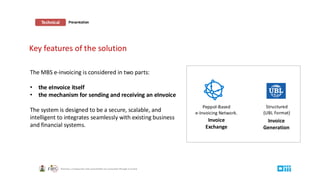
Peppol-Based
e-Invoicing Network.
Structured
(UBL Format)
Invoice
Generation
Invoice
Exchange
The MBS e-invoicing is considered in two parts:
• the eInvoice itself
• the mechanism for sending and receiving an eInvoice
The system is designed to be a secure, scalable, and
intelligent to integrates seamlessly with existing business
and financial systems.
3.
Essential Definitions
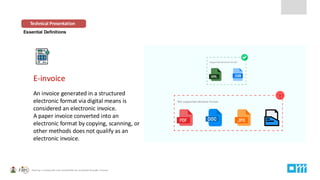
E-invoice
An invoicegenerated in a structured
electronic format via digital means is
considered an electronic invoice.
A paper invoice converted into an
electronic format by copying, scanning, or
other methods does not qualify as an
electronic invoice.
Technical Presentation
4.
Essential Definitions
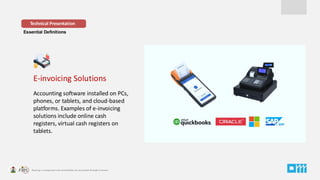
E-invoicing Solutions
Accountingsoftware installed on PCs,
phones, or tablets, and cloud-based
platforms. Examples of e-invoicing
solutions include online cash
registers, virtual cash registers on
tablets.
Technical Presentation
5.
Essential Definitions
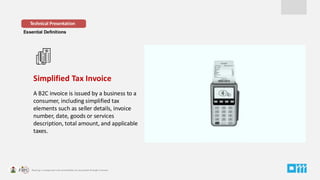
Simplified TaxInvoice
A B2C invoice is issued by a business to a
consumer, including simplified tax
elements such as seller details, invoice
number, date, goods or services
description, total amount, and applicable
taxes.
Technical Presentation
6.
Essential Definitions
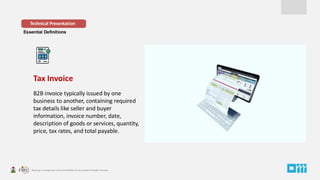
Tax Invoice
B2Binvoice typically issued by one
business to another, containing required
tax details like seller and buyer
information, invoice number, date,
description of goods or services, quantity,
price, tax rates, and total payable.
Technical Presentation
7.
Essential Definitions
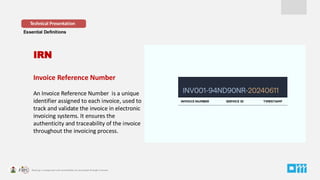
Invoice ReferenceNumber
An Invoice Reference Number is a unique
identifier assigned to each invoice, used to
track and validate the invoice in electronic
invoicing systems. It ensures the
authenticity and traceability of the invoice
throughout the invoicing process.
Technical Presentation
IRN
INVOICE NUMBER SERVICE ID TIMESTAMP
8.
Essential Definitions
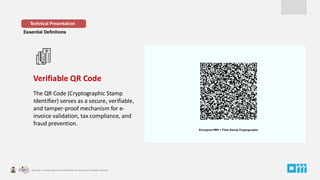
Verifiable QRCode
The QR Code (Cryptographic Stamp
Identifier) serves as a secure, verifiable,
and tamper-proof mechanism for e-
invoice validation, tax compliance, and
fraud prevention.
Technical Presentation
Encrypted IRN + Time Stamp Cryptographic
9.
Essential Definitions
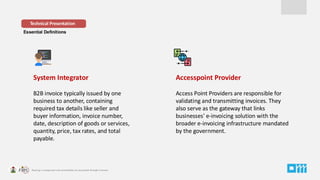
System Integrator
B2Binvoice typically issued by one
business to another, containing
required tax details like seller and
buyer information, invoice number,
date, description of goods or services,
quantity, price, tax rates, and total
payable.
Technical Presentation
Accesspoint Provider
Access Point Providers are responsible for
validating and transmitting invoices. They
also serve as the gateway that links
businesses' e-invoicing solution with the
broader e-invoicing infrastructure mandated
by the government.
10.
Model Adopted
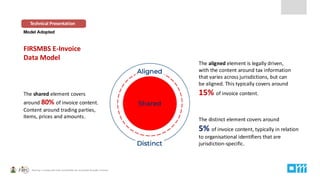
FIRSMBS E-Invoice
DataModel
Technical Presentation
The shared element covers
around 80% of invoice content.
Content around trading parties,
items, prices and amounts.
The aligned element is legally driven,
with the content around tax information
that varies across jurisdictions, but can
be aligned. This typically covers around
15% of invoice content.
The distinct element covers around
5% of invoice content, typically in relation
to organisational identifiers that are
jurisdiction-specific.
11.
Model Adopted -Continuous Transaction Controls (CTC )
Technical Presentation
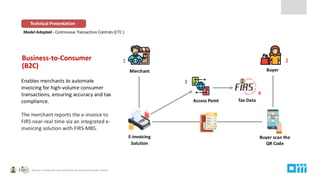
Business-to-Consumer
(B2C)
Enables merchants to automate
invoicing for high-volume consumer
transactions, ensuring accuracy and tax
compliance.
The merchant reports the e-invoice to
FIRS near-real time via an integrated e-
invoicing solution with FIRS-MBS.
Buyer scan the
QR Code
E-invoicing
Solution
Tax Data
Merchant Buyer
Access Point
1 2
3
4
12.
Model Adopted -Continuous Transaction Controls (CTC )
Technical Presentation
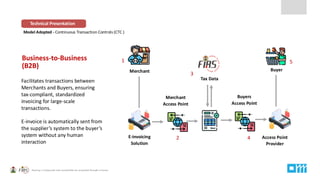
Business-to-Business
(B2B)
Facilitates transactions between
Merchants and Buyers, ensuring
tax-compliant, standardized
invoicing for large-scale
transactions.
E-invoice is automatically sent from
the supplier’s system to the buyer’s
system without any human
interaction
Access Point
Provider
E-invoicing
Solution
Tax Data
Merchant Buyer
Merchant
Access Point
Buyers
Access Point
1
2 4
5
3
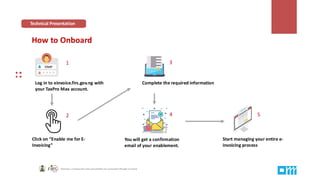
How to Onboard
Startmanaging your entire e-
invoicing process
Log in to einvoice.firs.gov.ng with
your TaxPro Max account.
Click on “Enable me for E-
Invoicing”
Complete the required information
You will get a confirmation
email of your enablement.
1
2
3
4 5
Technical Presentation
15.
NOTE
This document hasbeen prepared solely for informational and educational purposes. Its content
may be updated or modified at any time. It is not intended to be legally binding for the Federal
Inland Revenue Service (FIRS) and should not be considered legal advice. This document cannot
serve as a standalone legal reference, and it is essential to consult the relevant laws and regulations.
All businesses and entities subject to tax laws must ensure they understand their obligations and
comply accordingly. FIRS will not be held liable for any damage or loss incurred due to non-
compliance with applicable regulations.
VISIT – eInvoice.firs.gov.ng




![CEN ISSS Public Workshop A Allikas Tg5 V 1.0[1]](https://cdn.slidesharecdn.com/ss_thumbnails/4811aallikastg5v1-01-090609031534-phpapp01-thumbnail.jpg?width=640&height=640&fit=bounds)
![CEN ISSS workshop e-invoicing A Allikas Tg5 V 1.0[1]](https://cdn.slidesharecdn.com/ss_thumbnails/4811aallikastg5v1-01-090609044613-phpapp02-thumbnail.jpg?width=640&height=640&fit=bounds)


