B E T H A N Y B O W L E S
Technical Editing for Beginners
What is Technical Editing?
 “Technical editing is the editing of scientific,
engineering, medical, or other complex documents
for both language and content issues. The language
aspect covers traditional copyediting and production
editing concerns; the content aspect involves
substantive editing to address the accuracy and
completeness of the technical information and to
ensure that it is intelligible to the intended
audience.”-STC Technical Editing SIG Wiki
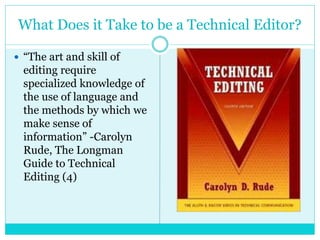
What Does it Take to be a Technical Editor?
 “The art and skill of
editing require
specialized knowledge of
the use of language and
the methods by which we
make sense of
information” -Carolyn
Rude, The Longman
Guide to Technical
Editing (4)
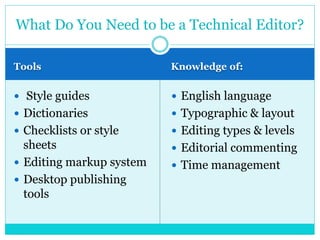
Tools Knowledge of:
 Style guides
 Dictionaries
 Checklists or style
sheets
 Editing markup system
 Desktop publishing
tools
 English language
 Typographic & layout
 Editing types & levels
 Editorial commenting
 Time management
What Do You Need to be a Technical Editor?
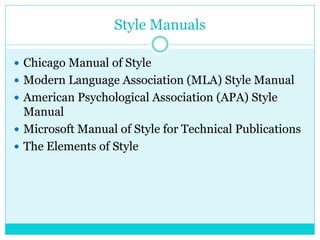
Style Manuals
 Chicago Manual of Style
 Modern Language Association (MLA) Style Manual
 American Psychological Association (APA) Style
Manual
 Microsoft Manual of Style for Technical Publications
 The Elements of Style
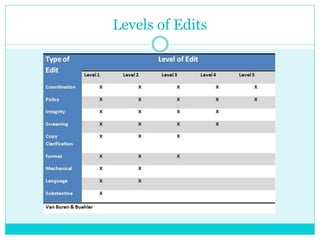
Levels of Edits
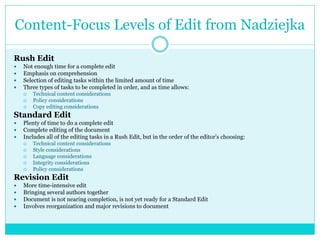
Content-Focus Levels of Edit from Nadziejka
Rush Edit
 Not enough time for a complete edit
 Emphasis on comprehension
 Selection of editing tasks within the limited amount of time
 Three types of tasks to be completed in order, and as time allows:
 Technical content considerations
 Policy considerations
 Copy editing considerations
Standard Edit
 Plenty of time to do a complete edit
 Complete editing of the document
 Includes all of the editing tasks in a Rush Edit, but in the order of the editor’s choosing:
 Technical content considerations
 Style considerations
 Language considerations
 Integrity considerations
 Policy considerations
Revision Edit
 More time-intensive edit
 Bringing several authors together
 Document is not nearing completion, is not yet ready for a Standard Edit
 Involves reorganization and major revisions to document
Rude’s Types of Editing
 Copy Edit
 Comprehensive Edit
Mechanics of Editing
 Colons, semicolons, and commas
 Hyphens and dashes
 Parentheses and brackets
 List structure and usage
 Subject/verb agreement
 Dangling and misplaced modifiers
 Noun strings
 Active/passive voice
 Parallelism
Types of Errors
 Grammatical mistakes
 Misspellings or typos
 Incorrect punctuation
 Inconsistent usage
 Ambiguous technical information
 Wrong scientific terms
 Wrong units and dimensions
 Inconsistent significant figures
 Improper data or chart presentation
 Citation errors
Copyediting
 Markup of language:
 Grammar
 Punctuation
 Style
 Focusing at word-level and sentence-level
 Rules-based
 Can do a copy edit separate from a comprehensive edit
 Focus more on these quality characteristics:
 Clarity
 Style
 Visual Effectiveness
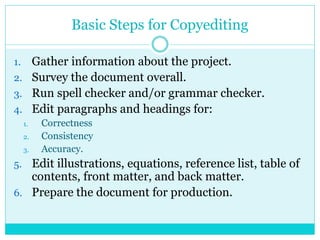
Basic Steps for Copyediting
1. Gather information about the project.
2. Survey the document overall.
3. Run spell checker and/or grammar checker.
4. Edit paragraphs and headings for:
1. Correctness
2. Consistency
3. Accuracy.
5. Edit illustrations, equations, reference list, table of
contents, front matter, and back matter.
6. Prepare the document for production.
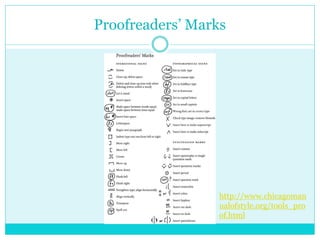
Proofreaders’ Marks
http://www.chicagoman
ualofstyle.org/tools_pro
of.html
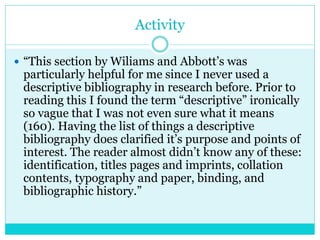
Activity
 “This section by Wiliams and Abbott’s was
particularly helpful for me since I never used a
descriptive bibliography in research before. Prior to
reading this I found the term “descriptive” ironically
so vague that I was not even sure what it means
(160). Having the list of things a descriptive
bibliography does clarified it’s purpose and points of
interest. The reader almost didn’t know any of these:
identification, titles pages and imprints, collation
contents, typography and paper, binding, and
bibliographic history.”
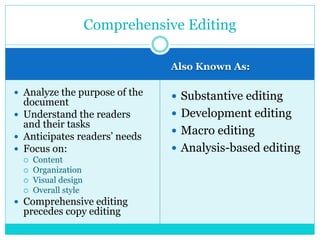
Also Known As:
 Analyze the purpose of the
document
 Understand the readers
and their tasks
 Anticipates readers’ needs
 Focus on:
 Content
 Organization
 Visual design
 Overall style
 Comprehensive editing
precedes copy editing
 Substantive editing
 Development editing
 Macro editing
 Analysis-based editing
Comprehensive Editing
Basic Steps for Comprehensive Editing
1. Analyze the purpose, readers, and uses for the
document.
2. Evaluate the content, organization, visual design,
style, and reader accommodations.
3. Establish editing objectives and document them in
a specific plan for editing.
4. Review the plan with the writer, and work toward
consensus on changes to make.
Microsoft Word Adobe Acrobat
How to Track Edits
Questions?

Technical Editing for Beginners Final

  • 1.
    B E TH A N Y B O W L E S Technical Editing for Beginners
  • 2.
    What is TechnicalEditing?  “Technical editing is the editing of scientific, engineering, medical, or other complex documents for both language and content issues. The language aspect covers traditional copyediting and production editing concerns; the content aspect involves substantive editing to address the accuracy and completeness of the technical information and to ensure that it is intelligible to the intended audience.”-STC Technical Editing SIG Wiki
  • 3.
    What Does itTake to be a Technical Editor?  “The art and skill of editing require specialized knowledge of the use of language and the methods by which we make sense of information” -Carolyn Rude, The Longman Guide to Technical Editing (4)
  • 4.
    Tools Knowledge of: Style guides  Dictionaries  Checklists or style sheets  Editing markup system  Desktop publishing tools  English language  Typographic & layout  Editing types & levels  Editorial commenting  Time management What Do You Need to be a Technical Editor?
  • 5.
    Style Manuals  ChicagoManual of Style  Modern Language Association (MLA) Style Manual  American Psychological Association (APA) Style Manual  Microsoft Manual of Style for Technical Publications  The Elements of Style
  • 6.
  • 7.
    Content-Focus Levels ofEdit from Nadziejka Rush Edit  Not enough time for a complete edit  Emphasis on comprehension  Selection of editing tasks within the limited amount of time  Three types of tasks to be completed in order, and as time allows:  Technical content considerations  Policy considerations  Copy editing considerations Standard Edit  Plenty of time to do a complete edit  Complete editing of the document  Includes all of the editing tasks in a Rush Edit, but in the order of the editor’s choosing:  Technical content considerations  Style considerations  Language considerations  Integrity considerations  Policy considerations Revision Edit  More time-intensive edit  Bringing several authors together  Document is not nearing completion, is not yet ready for a Standard Edit  Involves reorganization and major revisions to document
  • 8.
    Rude’s Types ofEditing  Copy Edit  Comprehensive Edit
  • 9.
    Mechanics of Editing Colons, semicolons, and commas  Hyphens and dashes  Parentheses and brackets  List structure and usage  Subject/verb agreement  Dangling and misplaced modifiers  Noun strings  Active/passive voice  Parallelism
  • 10.
    Types of Errors Grammatical mistakes  Misspellings or typos  Incorrect punctuation  Inconsistent usage  Ambiguous technical information  Wrong scientific terms  Wrong units and dimensions  Inconsistent significant figures  Improper data or chart presentation  Citation errors
  • 11.
    Copyediting  Markup oflanguage:  Grammar  Punctuation  Style  Focusing at word-level and sentence-level  Rules-based  Can do a copy edit separate from a comprehensive edit  Focus more on these quality characteristics:  Clarity  Style  Visual Effectiveness
  • 12.
    Basic Steps forCopyediting 1. Gather information about the project. 2. Survey the document overall. 3. Run spell checker and/or grammar checker. 4. Edit paragraphs and headings for: 1. Correctness 2. Consistency 3. Accuracy. 5. Edit illustrations, equations, reference list, table of contents, front matter, and back matter. 6. Prepare the document for production.
  • 13.
  • 14.
    Activity  “This sectionby Wiliams and Abbott’s was particularly helpful for me since I never used a descriptive bibliography in research before. Prior to reading this I found the term “descriptive” ironically so vague that I was not even sure what it means (160). Having the list of things a descriptive bibliography does clarified it’s purpose and points of interest. The reader almost didn’t know any of these: identification, titles pages and imprints, collation contents, typography and paper, binding, and bibliographic history.”
  • 15.
    Also Known As: Analyze the purpose of the document  Understand the readers and their tasks  Anticipates readers’ needs  Focus on:  Content  Organization  Visual design  Overall style  Comprehensive editing precedes copy editing  Substantive editing  Development editing  Macro editing  Analysis-based editing Comprehensive Editing
  • 16.
    Basic Steps forComprehensive Editing 1. Analyze the purpose, readers, and uses for the document. 2. Evaluate the content, organization, visual design, style, and reader accommodations. 3. Establish editing objectives and document them in a specific plan for editing. 4. Review the plan with the writer, and work toward consensus on changes to make.
  • 17.
    Microsoft Word AdobeAcrobat How to Track Edits
  • 18.