Your Organization                                   Newsletter Date
                                                   Volume 1, Issue 1


How we use digital video
technology
INTRODUCTION TO THIS NEWS LETTER
Digital video technology has shaped the modern world we
live in the use of the internet has made every day things so
much easier to do. In this newsletter we will be covering how
the use of digital video technology helps a users interactive
experience on these few different delivery platforms. We will
be covering; the use of film trailers, user-generated content,
e-learning, and also platforms including www, kiosks and
mobile devices.

FILM TRAILORS
Film trailers have been a big part of the film world, in the
early years of film, trailers used to be shown at the end of a
film at the cinema which was generally the only place where
you could view trailers. Near the end of the 20th century tel-
evisions became more popular and trailer’s were often tele-
vised in advert breaks, but were still not easily accessible and
could not be viewed on demand. By the turn of the 21st cen-
tury the internet grew massively and sites like YouTube and
msn made the ability to view trailers accessible on demand.
Sites like YouTube where users could the upload home vide-
os and film trailers then grew further and became a world
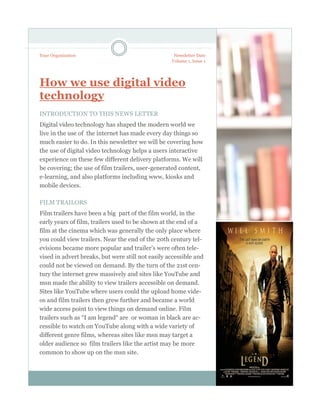
wide access point to view things on demand online. Film
trailers such as “I am legend“ are or woman in black are ac-
cessible to watch on YouTube along with a wide variety of
different genre films, whereas sites like msn may target a
older audience so film trailers like the artist may be more
common to show up on the msn site.
USER GENERATED CONTENT

Some sites such as Facebook, Skype        such as viewing film trailers. Sites
and YouTube allow people to upload        like this tend to be accessible by
pictures videos and even infor-           computer or a mobile phone. These
mation about someone or some-             sites are almost completely depend-
thing new today, these people who         ant on the “user” to share activity on
upload the things or use the site are                             to the site.
called the users who generate activi-
ty to each particular site, these sites
are very useful for similarly keeping
up with new information and as
mention earlier leisurely activities


   Facebook common sense review- “Frictionless sharing”


                                  KIOSK

                                Kiosks are commonly present in places such as large shopping
                                malls and in transport points such as Piccadilly train station and
                                Manchester airport. They can be used for various uses such as to
                                inform visitors about the place. They are also commonly used to
                                help visitors find places such as particular shops at a shopping
                                centre of to find a certain café or terminal at the airport. They have
                                become very popular recently as technology has advanced and
                                make shopping in particular much easier. Kiosks also make things
                                such as booking tickets for the cinema, as it allows you to book a
                                ticket online and just pick them up from kiosks. There are also
                                down sides to kiosks, as they can subside to technical faults and
                                may create a longer time trying to achieve your objective, for ex-
                                ample if you book a ticket at a cinema online and then the kiosk
                                doesn't work properly. This would often mean that you have to go
                                to a member of staff and wait for them to sort you out, which then
                                defeats the purpose of a kiosk at the cinema.
WWW.
WWW. (The world wide web) is now a dependant and crucial element to the modern day. It al-
lows us to apply for jobs, do our weekly shop, purchase luxuries online, learn information, con-
tact people, and even start up new business ‘s. the world wide web is used in every day life and
makes everyday day life a lot easier, however there re many cons to balance the excessive pros
of the WWW. The WWW is also a hazard to young people as it is a primary target for sex of-
fenders and paedophiles, it can be used to exploit other peoples issues and potentially import
offensive opinions and views. Once your personal information is on the world wide web it can
not be erased from it and many people have found ways to get hold of other peoples personal
information. All in all the world wide web is a very threatening and dangerous place.


   MOBILE DEVICES
   Many mobile devices such as phones and tablets come with the internet ac-
   cess, generally on tablets they have a very limited access to the internet
   where u can only use it in certain Wi-Fi spots. Many mobile phones however
   have 3G which means that you can access the internet ant all times in that
   country or region. There are negatives of using the internet using mobile de-
   vices as it drains the battery much faster then normal if you are connected to
   the internet. You can also get certain items such as apps on your phones,
   such as games, learning apps, and leisurely fun apps such as “Fat Booth”. Phones
   now often have built in cameras and even camcorders with MPX generally around
   5 MPX.,


         E-LEARNING
       E learning is used to adopt new skills and learn new things
       through the internet. There are many learning spaces set up
       online which means learning new things are much easier,
       user generated content are also very useful for learning
       things such a YouTube where people often upload tutorial
       videos on how to preform skills and learn information on a
       certain subject for example “how to play football”. Face-
       book is similarly good for this as users can exchange infor-
       mation to each other via the internet. Not only user gener-
       ated content is good for learning, some sites are set up to
       provide information a bout a certain topic or place such as
       the Cheadle & marple “Moodle” set up so viewers can
       learn information about the college.
TECNOLOGY

          MEDIA PLAYERS

    Media player is a term typically       for leisurely activities and allow us
    used to describe computer software     to listen too music and view videos
    for playing back multimedia files.     and even films that we’ve created
    While many media players can play      using software such as windows
    both audio and video, others focus     live movie maker. Sometimes me-
    only on one media type or the oth-     dia players can succumb to tech-
    er. These players are known as ei-     nical faults such as freezing or just
    ther audio or video players, they      not registering a media file.
    usually have a user interface tai-
    lored for the specific media type.
    Media players are generally used


        FILE SIZE

        File size measures the size of a computer file. Bytes wit5h a
        prefix is what its typically measured in The actual amount
        of disk space consumed by the file depends on the file sys-
        tem.
        The maximum size of a file that a file system can hold de-
        pends on the number of bits reserved to store size infor-
        mation the total size of the file system. The bigger the file
        size the more space is consumed but computers have a
        physical maximum capacity so the larger the file size is the
        smaller the space is left. Files can be sent over the internet
        or stored to the computer.


4
DIGITAL FILE FORMATS
There are many different types of digital image file types.
The main ones are as follows: JPG, GIF, TIFF, PNG and
BMP, MOV. These different file types depend on your cer-
tain camera or computer. Image files can be quite large,
and larger file types mean more disk space is taken up and
slower downloads. Compression is a term used to describe
ways of cutting the size of the file. Here are a few of the
most common file formats they differ greatly for there use
the MOV video file format is used commonly to save movies
and other video files, where as the JPEG (Joint Photo-
graphic Experts Group) is a means of digital image file
compression.


“To catch the reader's attention, place an interesting sentence or quote
from the story here.”

COMPRESSION
There are many different        The other key type of image
areas of compression such       compression is lossy
as Data compression , au-
dio compression and video
compression, however the
most common area of com-
pression used is image com-
pression.
There are two key different
types of image compression
Image compression may be
lossy or lossless. Lossless
compression is mainly used
for archival purposes and
often for medical imaging,
technical drawings, clip art,
or comics.

                                                                           5
YOUR ORGANIZATION
This would be a good place to            BACK PAGE STORY HEADLINE
insert a short paragraph about
                                         This story can fit 175-225 words.
your organization. It might
include the purpose of the               If your newsletter is folded and mailed, this story will appear on the back. So, it’s a good
organization, its mission, founding      idea to make it easy to read at a glance.
date, and a brief history. You
                                         A question and answer session is a good way to quickly capture the attention of readers.
could also include a brief list of the
                                         You can either compile questions that you’ve received since the last edition or you can
types of products, services, or
                                         summarize some generic questions that are frequently asked about your organization.
programs your organization offers,
the geographic area covered (for         A listing of names and titles of managers in your organization is a good way to give your
example, western U.S. or                 newsletter a personal touch. If your organization is small, you may want to list the names
European markets), and a profile         of all employees.
of the types of customers or
members served.                          If you have any prices of standard products or services, you can include a listing of those
                                         here. You may want to refer your readers to any other forms of communication that
It would also be useful to include a     you’ve created for your organization.
contact name for readers who
want more information about the          You can also use this space to remind readers to mark their calendars for a regular event,
organization.                            such as a breakfast meeting for vendors every third Tuesday of the month, or a biannual
                                         charity auction.

                                         If space is available, this is a good place to insert a clip art image or some other graphic.


        Your Organization                                                                                                        PLEASE
    Primary Business Address                                                                                                     PLACE
       Your Address Line 2                                                                                                       STAMP
       Your Address Line 3                                                                                                        HERE
       Your Address Line 4
     Phone: 555-555-5555
       Fax: 555-555-5555
 E-mail: someone@example.com


                                                               Mailing Address Line 1
                                                               Mailing Address Line 2
                                                               Mailing Address Line 3
                                                               Mailing Address Line 4
                                                               Mailing Address Line 5


         YOUR LOGO HERE

Tec Leaflet

  • 1.
    Your Organization Newsletter Date Volume 1, Issue 1 How we use digital video technology INTRODUCTION TO THIS NEWS LETTER Digital video technology has shaped the modern world we live in the use of the internet has made every day things so much easier to do. In this newsletter we will be covering how the use of digital video technology helps a users interactive experience on these few different delivery platforms. We will be covering; the use of film trailers, user-generated content, e-learning, and also platforms including www, kiosks and mobile devices. FILM TRAILORS Film trailers have been a big part of the film world, in the early years of film, trailers used to be shown at the end of a film at the cinema which was generally the only place where you could view trailers. Near the end of the 20th century tel- evisions became more popular and trailer’s were often tele- vised in advert breaks, but were still not easily accessible and could not be viewed on demand. By the turn of the 21st cen- tury the internet grew massively and sites like YouTube and msn made the ability to view trailers accessible on demand. Sites like YouTube where users could the upload home vide- os and film trailers then grew further and became a world wide access point to view things on demand online. Film trailers such as “I am legend“ are or woman in black are ac- cessible to watch on YouTube along with a wide variety of different genre films, whereas sites like msn may target a older audience so film trailers like the artist may be more common to show up on the msn site.
  • 2.
    USER GENERATED CONTENT Somesites such as Facebook, Skype such as viewing film trailers. Sites and YouTube allow people to upload like this tend to be accessible by pictures videos and even infor- computer or a mobile phone. These mation about someone or some- sites are almost completely depend- thing new today, these people who ant on the “user” to share activity on upload the things or use the site are to the site. called the users who generate activi- ty to each particular site, these sites are very useful for similarly keeping up with new information and as mention earlier leisurely activities Facebook common sense review- “Frictionless sharing” KIOSK Kiosks are commonly present in places such as large shopping malls and in transport points such as Piccadilly train station and Manchester airport. They can be used for various uses such as to inform visitors about the place. They are also commonly used to help visitors find places such as particular shops at a shopping centre of to find a certain café or terminal at the airport. They have become very popular recently as technology has advanced and make shopping in particular much easier. Kiosks also make things such as booking tickets for the cinema, as it allows you to book a ticket online and just pick them up from kiosks. There are also down sides to kiosks, as they can subside to technical faults and may create a longer time trying to achieve your objective, for ex- ample if you book a ticket at a cinema online and then the kiosk doesn't work properly. This would often mean that you have to go to a member of staff and wait for them to sort you out, which then defeats the purpose of a kiosk at the cinema.
  • 3.
    WWW. WWW. (The worldwide web) is now a dependant and crucial element to the modern day. It al- lows us to apply for jobs, do our weekly shop, purchase luxuries online, learn information, con- tact people, and even start up new business ‘s. the world wide web is used in every day life and makes everyday day life a lot easier, however there re many cons to balance the excessive pros of the WWW. The WWW is also a hazard to young people as it is a primary target for sex of- fenders and paedophiles, it can be used to exploit other peoples issues and potentially import offensive opinions and views. Once your personal information is on the world wide web it can not be erased from it and many people have found ways to get hold of other peoples personal information. All in all the world wide web is a very threatening and dangerous place. MOBILE DEVICES Many mobile devices such as phones and tablets come with the internet ac- cess, generally on tablets they have a very limited access to the internet where u can only use it in certain Wi-Fi spots. Many mobile phones however have 3G which means that you can access the internet ant all times in that country or region. There are negatives of using the internet using mobile de- vices as it drains the battery much faster then normal if you are connected to the internet. You can also get certain items such as apps on your phones, such as games, learning apps, and leisurely fun apps such as “Fat Booth”. Phones now often have built in cameras and even camcorders with MPX generally around 5 MPX., E-LEARNING E learning is used to adopt new skills and learn new things through the internet. There are many learning spaces set up online which means learning new things are much easier, user generated content are also very useful for learning things such a YouTube where people often upload tutorial videos on how to preform skills and learn information on a certain subject for example “how to play football”. Face- book is similarly good for this as users can exchange infor- mation to each other via the internet. Not only user gener- ated content is good for learning, some sites are set up to provide information a bout a certain topic or place such as the Cheadle & marple “Moodle” set up so viewers can learn information about the college.
  • 4.
    TECNOLOGY MEDIA PLAYERS Media player is a term typically for leisurely activities and allow us used to describe computer software to listen too music and view videos for playing back multimedia files. and even films that we’ve created While many media players can play using software such as windows both audio and video, others focus live movie maker. Sometimes me- only on one media type or the oth- dia players can succumb to tech- er. These players are known as ei- nical faults such as freezing or just ther audio or video players, they not registering a media file. usually have a user interface tai- lored for the specific media type. Media players are generally used FILE SIZE File size measures the size of a computer file. Bytes wit5h a prefix is what its typically measured in The actual amount of disk space consumed by the file depends on the file sys- tem. The maximum size of a file that a file system can hold de- pends on the number of bits reserved to store size infor- mation the total size of the file system. The bigger the file size the more space is consumed but computers have a physical maximum capacity so the larger the file size is the smaller the space is left. Files can be sent over the internet or stored to the computer. 4
  • 5.
    DIGITAL FILE FORMATS Thereare many different types of digital image file types. The main ones are as follows: JPG, GIF, TIFF, PNG and BMP, MOV. These different file types depend on your cer- tain camera or computer. Image files can be quite large, and larger file types mean more disk space is taken up and slower downloads. Compression is a term used to describe ways of cutting the size of the file. Here are a few of the most common file formats they differ greatly for there use the MOV video file format is used commonly to save movies and other video files, where as the JPEG (Joint Photo- graphic Experts Group) is a means of digital image file compression. “To catch the reader's attention, place an interesting sentence or quote from the story here.” COMPRESSION There are many different The other key type of image areas of compression such compression is lossy as Data compression , au- dio compression and video compression, however the most common area of com- pression used is image com- pression. There are two key different types of image compression Image compression may be lossy or lossless. Lossless compression is mainly used for archival purposes and often for medical imaging, technical drawings, clip art, or comics. 5
  • 6.
    YOUR ORGANIZATION This wouldbe a good place to BACK PAGE STORY HEADLINE insert a short paragraph about This story can fit 175-225 words. your organization. It might include the purpose of the If your newsletter is folded and mailed, this story will appear on the back. So, it’s a good organization, its mission, founding idea to make it easy to read at a glance. date, and a brief history. You A question and answer session is a good way to quickly capture the attention of readers. could also include a brief list of the You can either compile questions that you’ve received since the last edition or you can types of products, services, or summarize some generic questions that are frequently asked about your organization. programs your organization offers, the geographic area covered (for A listing of names and titles of managers in your organization is a good way to give your example, western U.S. or newsletter a personal touch. If your organization is small, you may want to list the names European markets), and a profile of all employees. of the types of customers or members served. If you have any prices of standard products or services, you can include a listing of those here. You may want to refer your readers to any other forms of communication that It would also be useful to include a you’ve created for your organization. contact name for readers who want more information about the You can also use this space to remind readers to mark their calendars for a regular event, organization. such as a breakfast meeting for vendors every third Tuesday of the month, or a biannual charity auction. If space is available, this is a good place to insert a clip art image or some other graphic. Your Organization PLEASE Primary Business Address PLACE Your Address Line 2 STAMP Your Address Line 3 HERE Your Address Line 4 Phone: 555-555-5555 Fax: 555-555-5555 E-mail: someone@example.com Mailing Address Line 1 Mailing Address Line 2 Mailing Address Line 3 Mailing Address Line 4 Mailing Address Line 5 YOUR LOGO HERE