Migrating to SQL Azure.
Migration Considerations from On-Premise
SQL Server to SQL Azure
Charley Hanania :: QS2 AG – Quality Software Solutions
B.Sc (Computing), MCP, MCDBA, MCITP, MCTS, MCT, Microsoft MVP: SQL Server
Principal Consultant - Senior Database Specialist
About Charley Hanania
• Now:
– Microsoft MVP: SQL Server
– Database Consultant at QS2 AG
• Formerly:
– Production Product Owner of MS SQL Server Platform at UBS Investment Bank
– Consultant
– DB Team Leader at Other Banks
• SQL Server Certified since 1998
– On SQL Server since 1995
– Version 4 on OS/2
• ITIL v3 Certified
• IT Professional since 1992
• PASS
– Chapter Leader – Switzerland
– Regional Mentor – Europe
– 24 Hours of PASS Committee Member
– Event Speaker
@CharleyHanania
Charley.Hanania@qs2.ch
linkedin.com/in/charleyhanania
xing.com/profile/Charley_Hanania
Charley.Hanania
Presentation Focus
• High Level overview of an example
operational on-premise Database
System.
• Overview of SQL Azure Database
Capabilities.
• Question: Why migrate?
• Insight into issues, decisions and
changes needed for migration.
• Future steps and opportunities.
Database System Overview
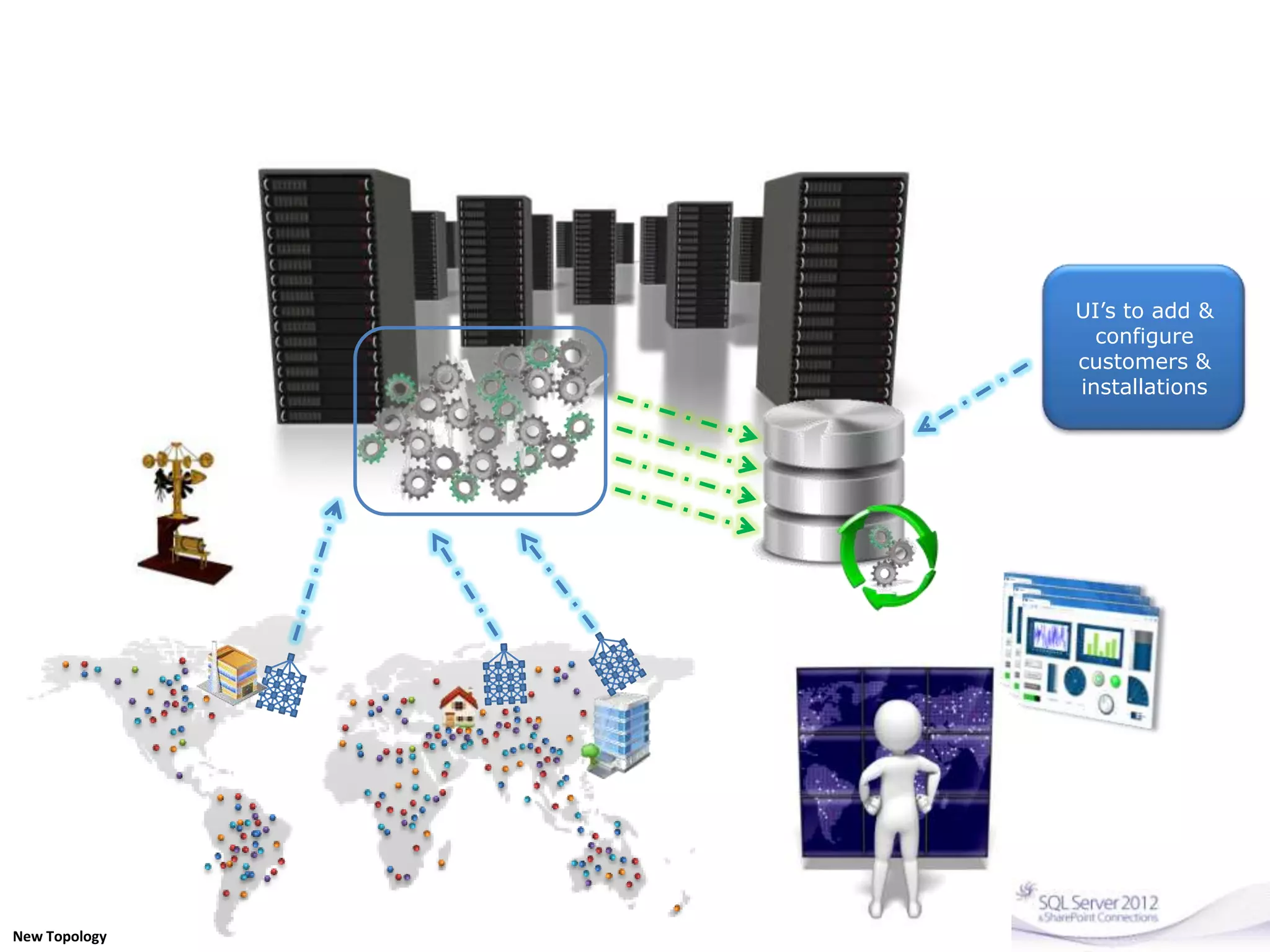
• Monitoring Sensors are deployed Globally
– Collecting data samples every minute on average.
• Messages are sent to a on-premise Service for
digestion and persistence.
• Service persists to SQL Server Data-warehouse
• Aggregations and reports are made off the DW
• Client-facing Web Applications are used to:
– Register and configure new installations
– Present customers with gauges and graphs of data
collected from their installation.
UI’s to add &
configure
customers &
installations
New Topology
SQL Azure Database Capabilities
• Cloud-based (DB as a Service) SQL Server Engine
• A Multi-tenant System
• Uses commodity hardware
• Up to 150Gb database Sizes.
• Subset of features of what SQL Server can
provide on premise.
– In some cases has “more” features eg. Federation
• Subset of T-SQL options available.
• Each db is isolated – no inter-database T-SQL
Communication
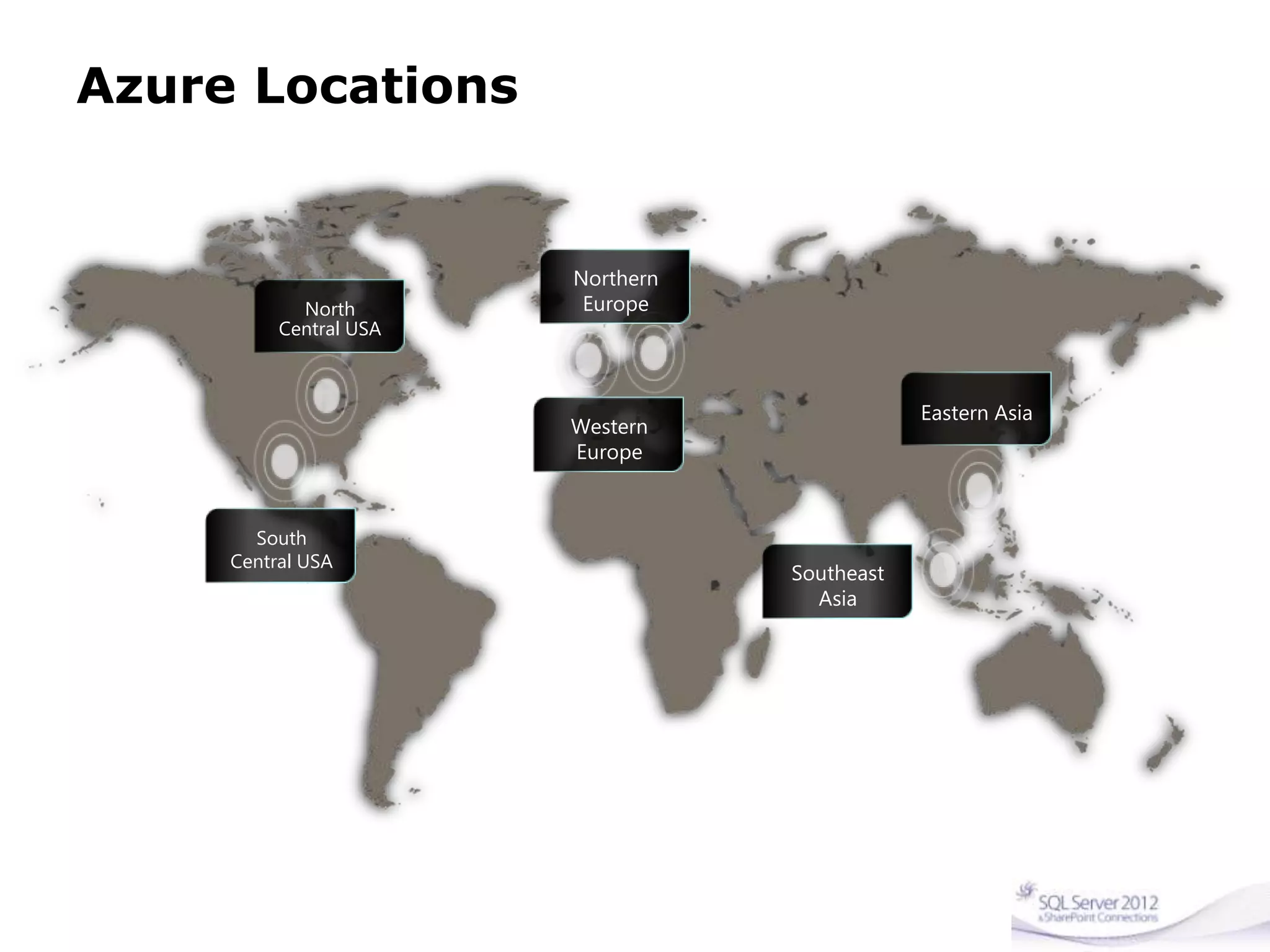
Azure Locations
North
Central USA
South
Central USA
Northern
Europe
Western
Europe
Eastern Asia
Southeast
Asia
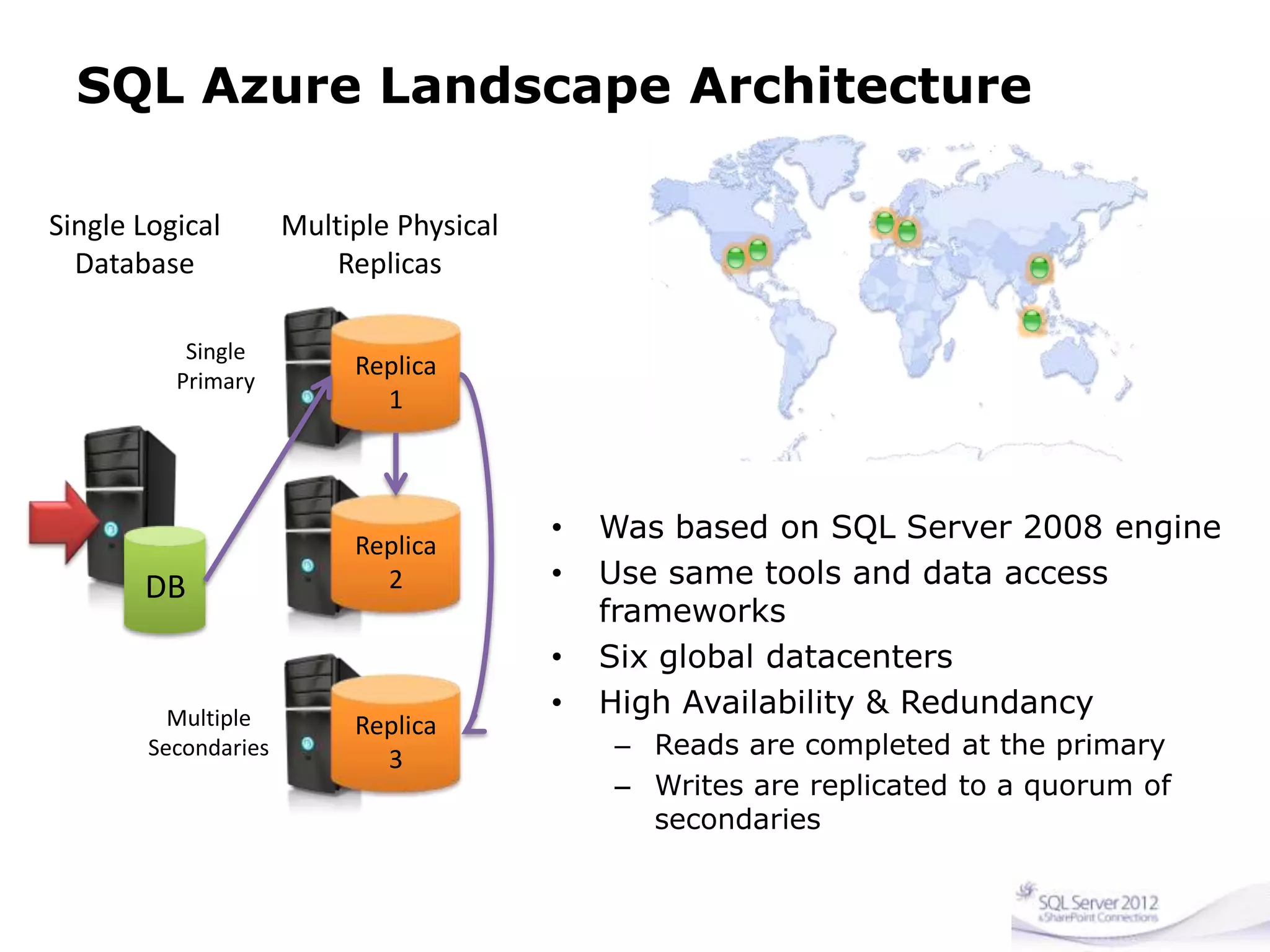
SQL Azure Landscape Architecture
Replica
1
Replica
2
Replica
3
DB
Single Logical
Database
Multiple Physical
Replicas
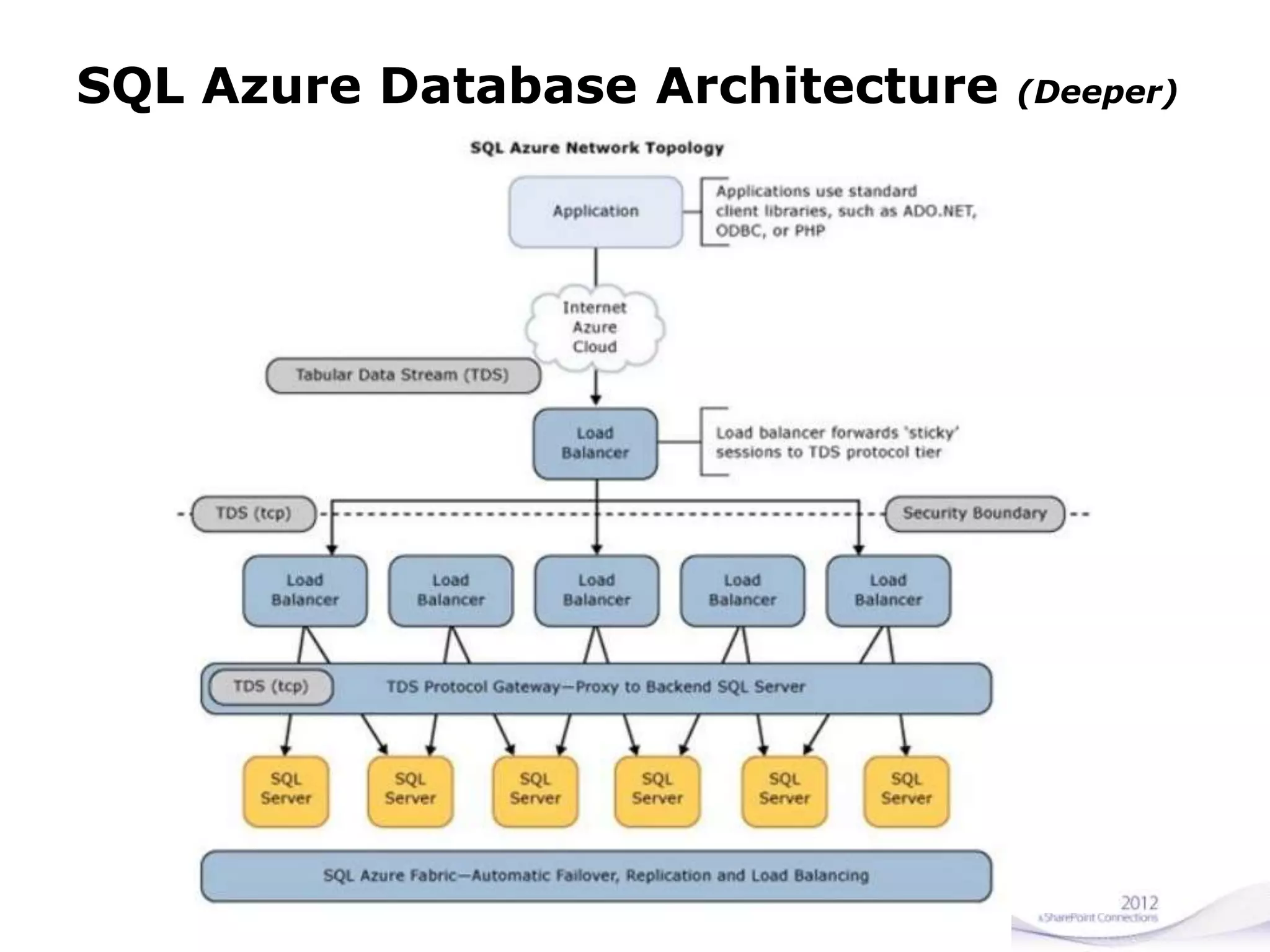
SQL Azure Database Architecture (Deeper)
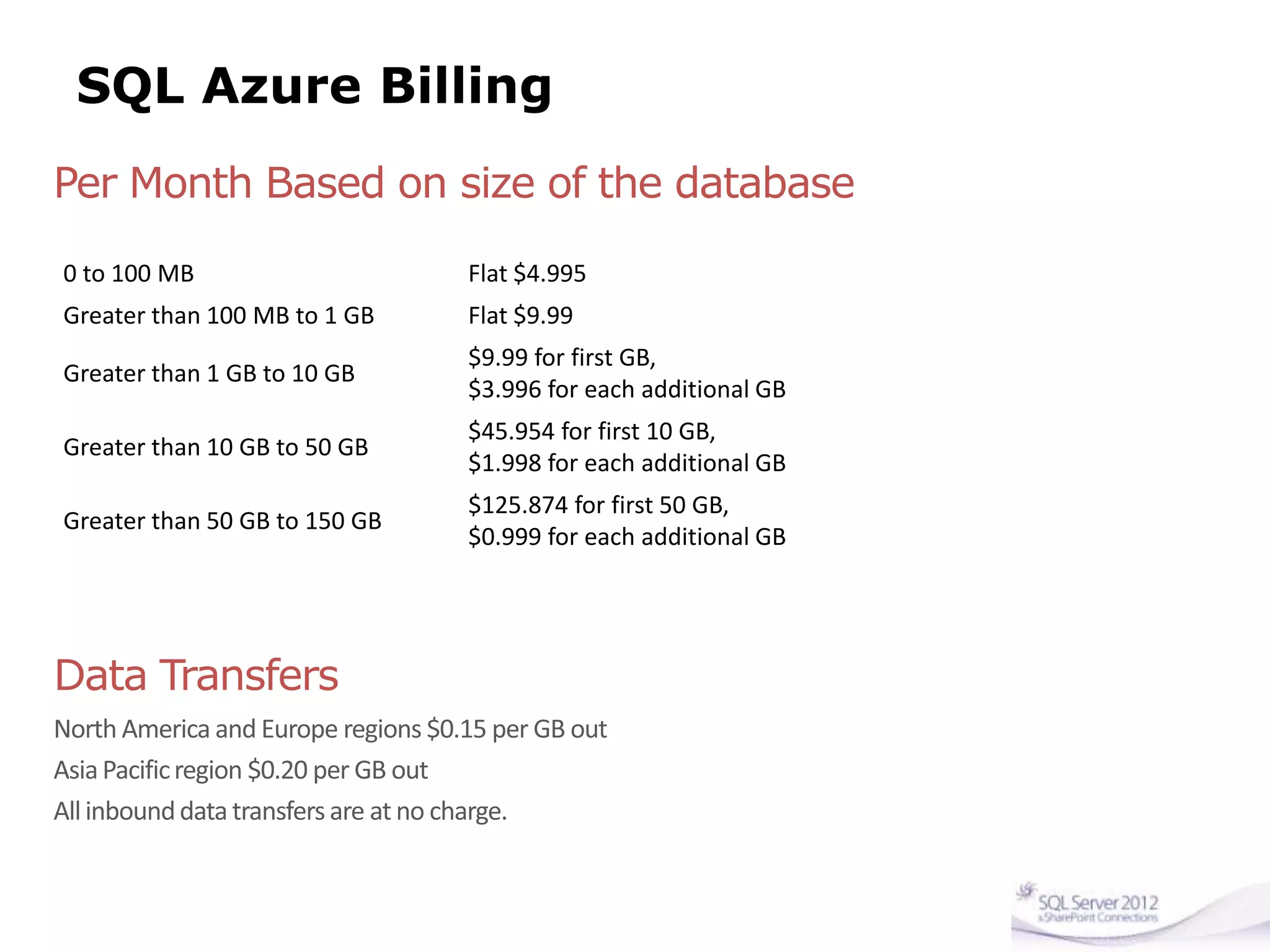
SQL Azure Billing
0 to 100 MB Flat $4.995
Greater than 100 MB to 1 GB Flat $9.99
Greater than 1 GB to 10 GB
$9.99 for first GB,
$3.996 for each additional GB
Greater than 10 GB to 50 GB
$45.954 for first 10 GB,
$1.998 for each additional GB
Greater than 50 GB to 150 GB
$125.874 for first 50 GB,
$0.999 for each additional GB
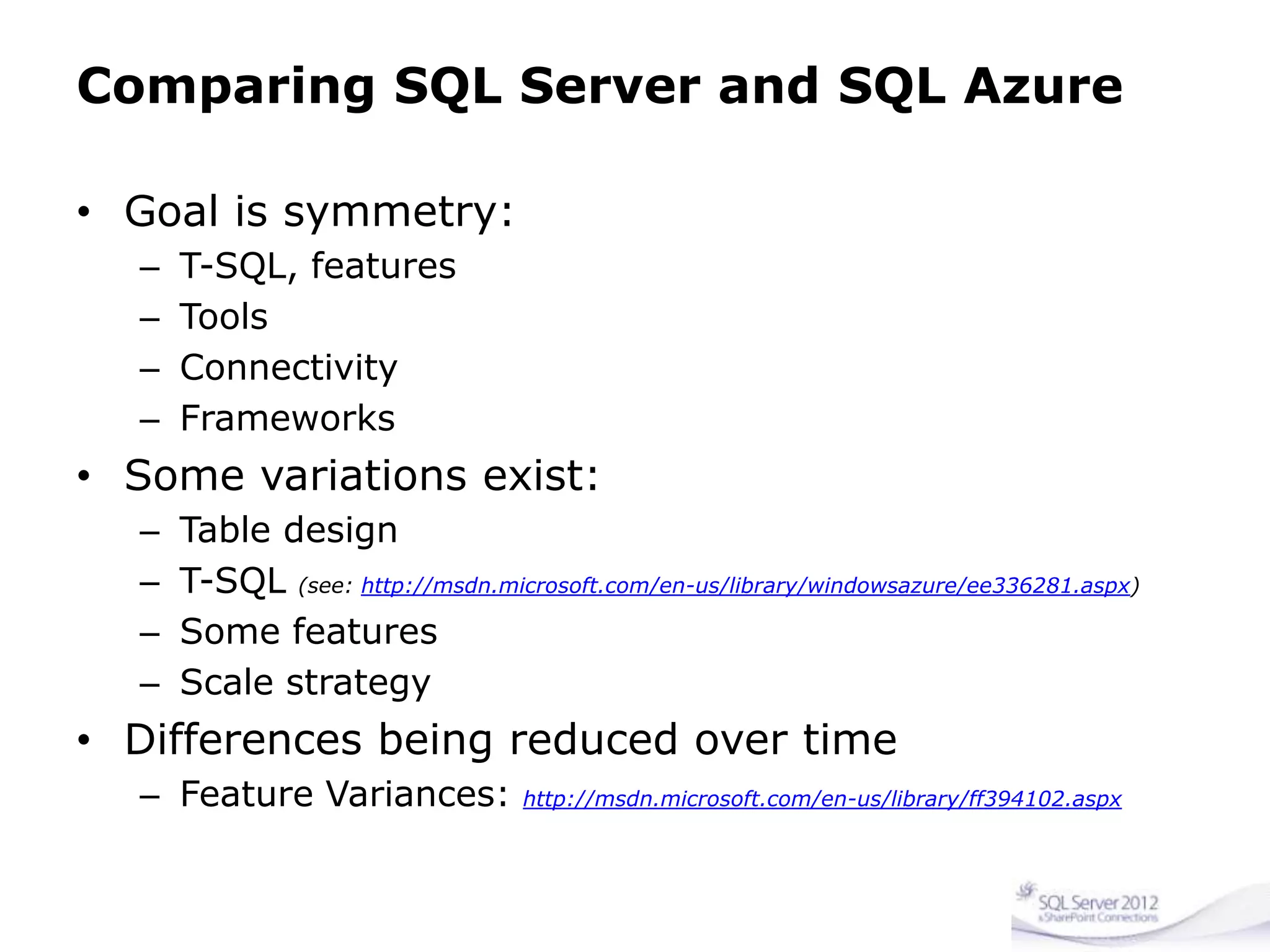
Comparing SQL Server and SQL Azure
• Goal is symmetry:
– T-SQL, features
– Tools
– Connectivity
– Frameworks
• Some variations exist:
– Table design
– T-SQL (see: http://msdn.microsoft.com/en-us/library/windowsazure/ee336281.aspx)
– Some features
– Scale strategy
• Differences being reduced over time
– Feature Variances: http://msdn.microsoft.com/en-us/library/ff394102.aspx
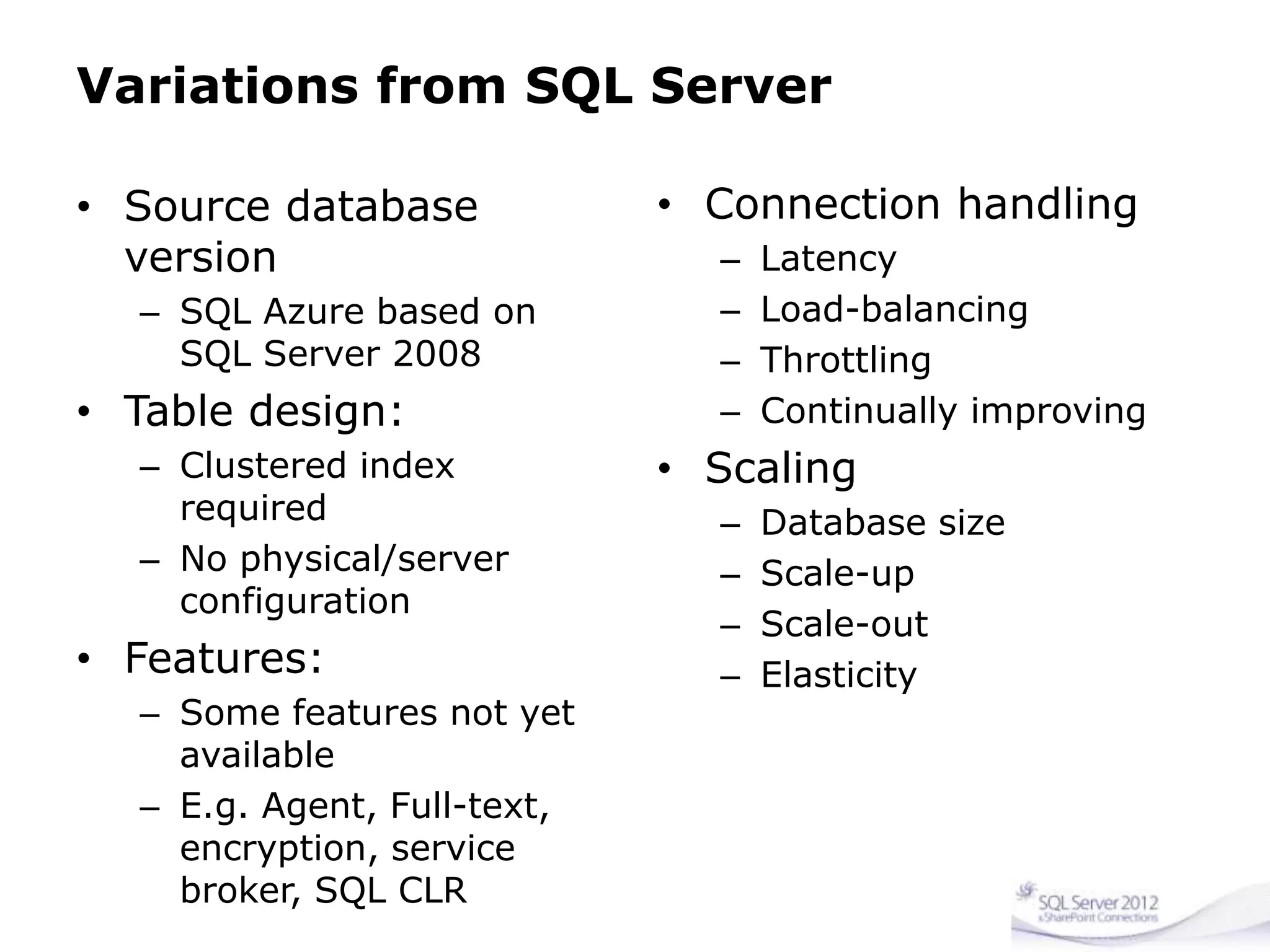
Variations from SQL Server
• Source database
version
– SQL Azure based on
SQL Server 2008
• Table design:
– Clustered index
required
– No physical/server
configuration
• Features:
– Some features not yet
available
– E.g. Agent, Full-text,
encryption, service
broker, SQL CLR
• Connection handling
– Latency
– Load-balancing
– Throttling
– Continually improving
• Scaling
– Database size
– Scale-up
– Scale-out
– Elasticity
Some features not yet available…
• No file-system control
• No FILESTREAM
• No Full Text Search
• No cross-database queries
• No CLR
• No DBCC
• No SSIS or SSAS
• No Backup/Restore
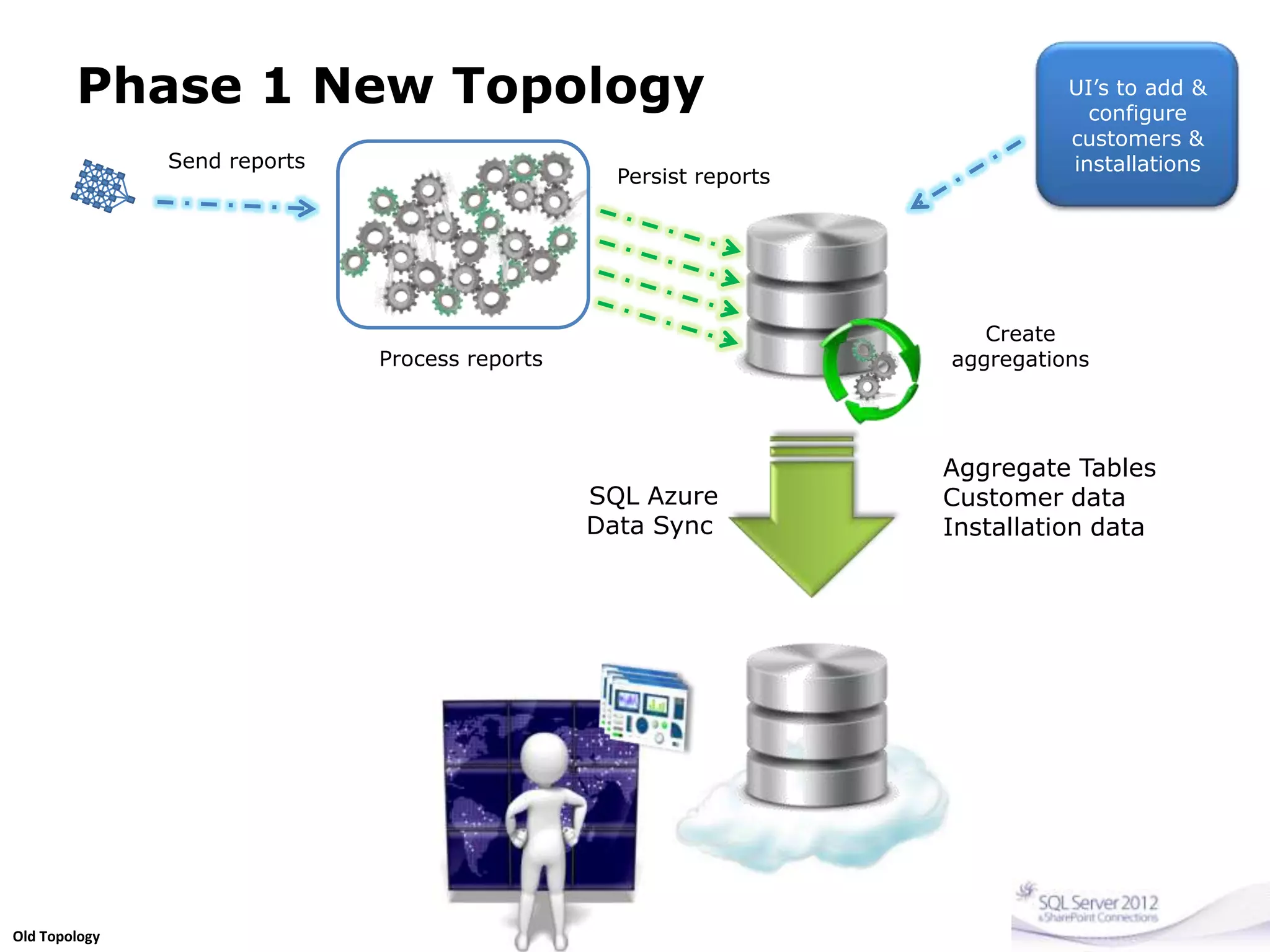
Phase 1 New Topology
Aggregate Tables
Customer data
Installation data
SQL Azure
Data Sync
Send reports
Process reports
Persist reports
Create
aggregations
UI’s to add &
configure
customers &
installations
Old Topology
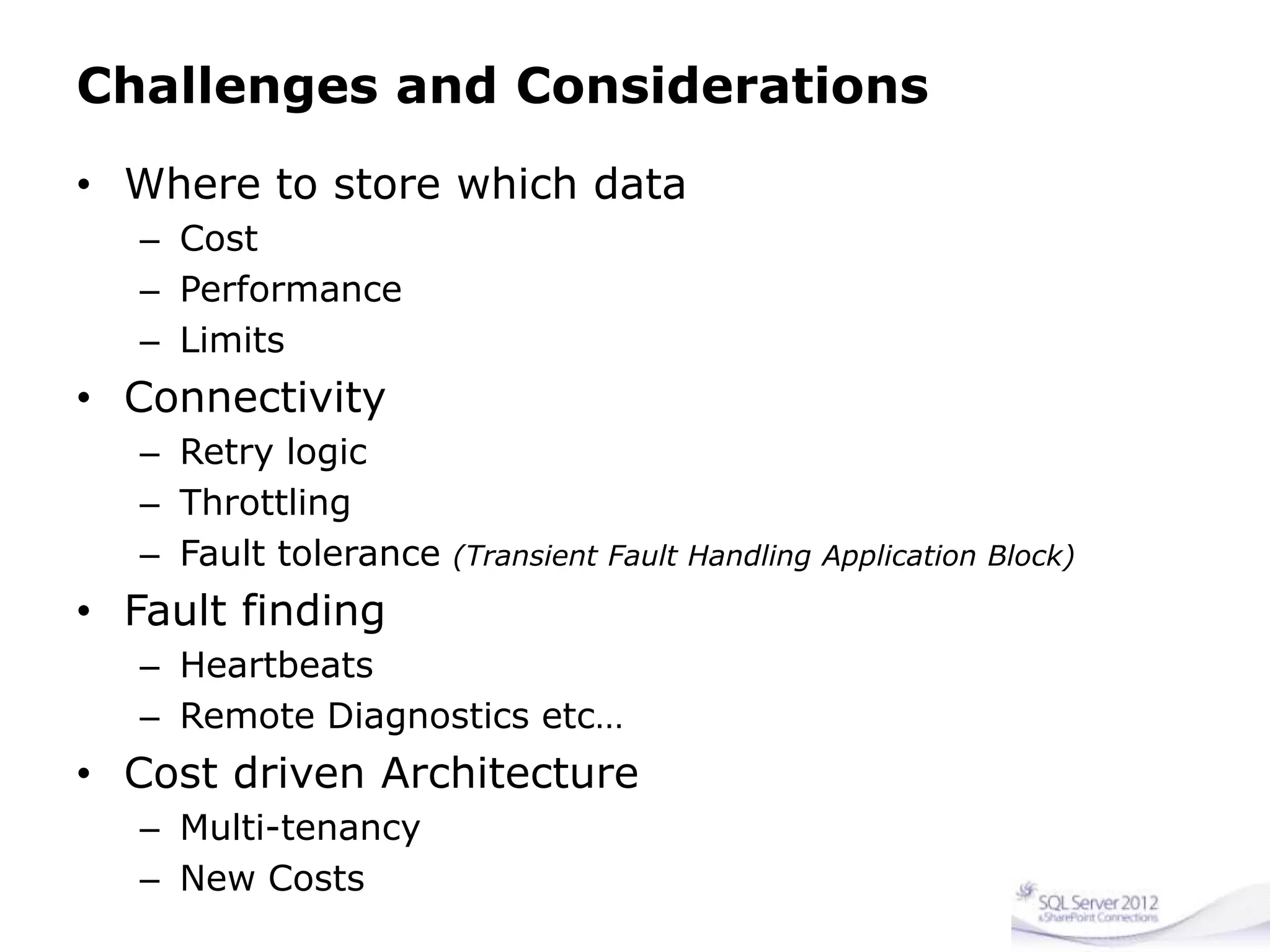
Challenges and Considerations
• Where to store which data
– Cost
– Performance
– Limits
• Connectivity
– Retry logic
– Throttling
– Fault tolerance (Transient Fault Handling Application Block)
• Fault finding
– Heartbeats
– Remote Diagnostics etc…
• Cost driven Architecture
– Multi-tenancy
– New Costs
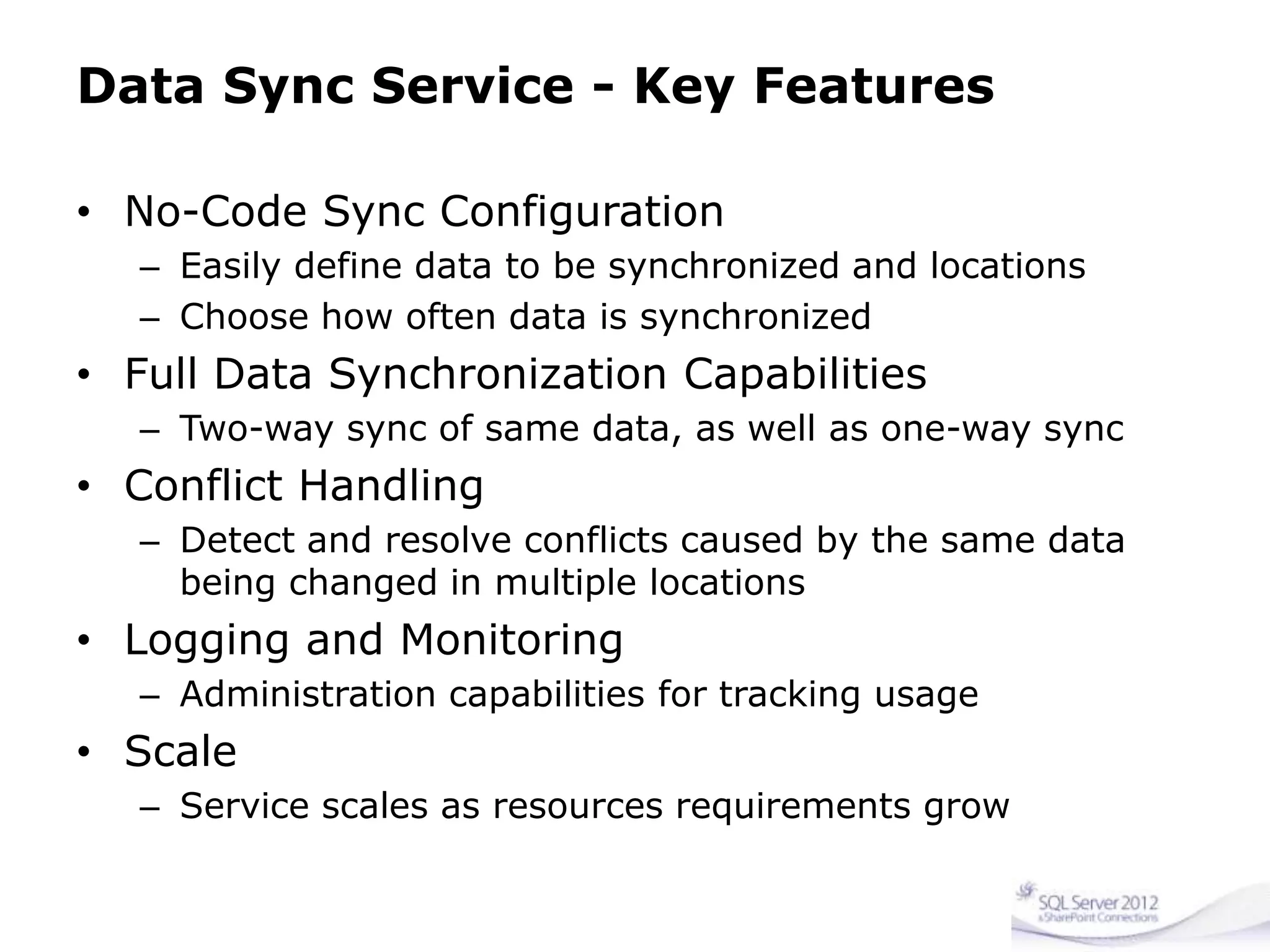
Data Sync Service - Key Features
• No-Code Sync Configuration
– Easily define data to be synchronized and locations
– Choose how often data is synchronized
• Full Data Synchronization Capabilities
– Two-way sync of same data, as well as one-way sync
• Conflict Handling
– Detect and resolve conflicts caused by the same data
being changed in multiple locations
• Logging and Monitoring
– Administration capabilities for tracking usage
• Scale
– Service scales as resources requirements grow
Migration - methods
• SQL Azure Migration Wizard (schema and data)
• SQL Azure Migration Wizard for federations
• Generate Script Wizard in SSMS (schema and
small data)
• SQL Server Migration Assistant for Access v5.1
• SQL Azure Import/Export Service CTP and Data
Tier Applications (DACs)
• SSIS
• BCP
Migrating applications session from teched:
http://channel9.msdn.com/Events/TechEd/NorthAmerica/2010/COS311
Where do we want to be?
• Sensor messages sent into the Azure Cloud
– Distributed
– Location aware
– Load balanced
• SQL Azure Databases
– Regionalised
– Federated by Installation
• Performance (scale-out)
• Locality (to web and data of customer)
• Use Azure Analysis Services (vapour-ware still)
– Engineering focussed data mining reports
• Use Rich Azure Reporting Services
– Management Reporting Dashboards / KPI’s etc
Recap
• SQL Azure is a great platform to utilise, but
– For the right reasons
– In the right way
• Rethink your application Infrastructure for
– Localisation Latency
– Connectivity Retry Logic
– Elastic growth on demand
• Azure’s future is bright
– now’s the time to get on board and
leverage its value-adds
Suggested Links and Resources
• SQL Azure Labs
• SQL Azure Migration Wizard
• SQL Azure Migration Wizard for Federations
• SQL Azure Database – MSDN
• SQL Azure Pricing
• SQL Azure Guidelines and Limitations
• Transient Fault Handling Application Block
• SQL Azure Performance and Elasticity Guide
• SQL Azure Data Sync
• Episode 69 - SQL Azure Federations
• Episode 68 - Throttling in SQL Azure
• Cihan Biyikoglu’s Blog
Join Us at Database Days!
www.databasedays.com
Thank you

Sql connections germany - migration considerations when migrating your on premise db server to sql azure - charley hanania - 08 may 2012

  • 1.
    Migrating to SQLAzure. Migration Considerations from On-Premise SQL Server to SQL Azure Charley Hanania :: QS2 AG – Quality Software Solutions B.Sc (Computing), MCP, MCDBA, MCITP, MCTS, MCT, Microsoft MVP: SQL Server Principal Consultant - Senior Database Specialist
  • 2.
    About Charley Hanania •Now: – Microsoft MVP: SQL Server – Database Consultant at QS2 AG • Formerly: – Production Product Owner of MS SQL Server Platform at UBS Investment Bank – Consultant – DB Team Leader at Other Banks • SQL Server Certified since 1998 – On SQL Server since 1995 – Version 4 on OS/2 • ITIL v3 Certified • IT Professional since 1992 • PASS – Chapter Leader – Switzerland – Regional Mentor – Europe – 24 Hours of PASS Committee Member – Event Speaker @CharleyHanania Charley.Hanania@qs2.ch linkedin.com/in/charleyhanania xing.com/profile/Charley_Hanania Charley.Hanania
  • 3.
    Presentation Focus • HighLevel overview of an example operational on-premise Database System. • Overview of SQL Azure Database Capabilities. • Question: Why migrate? • Insight into issues, decisions and changes needed for migration. • Future steps and opportunities.
  • 4.
    Database System Overview •Monitoring Sensors are deployed Globally – Collecting data samples every minute on average. • Messages are sent to a on-premise Service for digestion and persistence. • Service persists to SQL Server Data-warehouse • Aggregations and reports are made off the DW • Client-facing Web Applications are used to: – Register and configure new installations – Present customers with gauges and graphs of data collected from their installation.
  • 5.
    UI’s to add& configure customers & installations New Topology
  • 6.
    SQL Azure DatabaseCapabilities • Cloud-based (DB as a Service) SQL Server Engine • A Multi-tenant System • Uses commodity hardware • Up to 150Gb database Sizes. • Subset of features of what SQL Server can provide on premise. – In some cases has “more” features eg. Federation • Subset of T-SQL options available. • Each db is isolated – no inter-database T-SQL Communication
  • 7.
    Azure Locations North Central USA South CentralUSA Northern Europe Western Europe Eastern Asia Southeast Asia
  • 8.
    SQL Azure LandscapeArchitecture Replica 1 Replica 2 Replica 3 DB Single Logical Database Multiple Physical Replicas
  • 9.
    SQL Azure DatabaseArchitecture (Deeper)
  • 10.
    SQL Azure Billing 0to 100 MB Flat $4.995 Greater than 100 MB to 1 GB Flat $9.99 Greater than 1 GB to 10 GB $9.99 for first GB, $3.996 for each additional GB Greater than 10 GB to 50 GB $45.954 for first 10 GB, $1.998 for each additional GB Greater than 50 GB to 150 GB $125.874 for first 50 GB, $0.999 for each additional GB
  • 11.
    Comparing SQL Serverand SQL Azure • Goal is symmetry: – T-SQL, features – Tools – Connectivity – Frameworks • Some variations exist: – Table design – T-SQL (see: http://msdn.microsoft.com/en-us/library/windowsazure/ee336281.aspx) – Some features – Scale strategy • Differences being reduced over time – Feature Variances: http://msdn.microsoft.com/en-us/library/ff394102.aspx
  • 12.
    Variations from SQLServer • Source database version – SQL Azure based on SQL Server 2008 • Table design: – Clustered index required – No physical/server configuration • Features: – Some features not yet available – E.g. Agent, Full-text, encryption, service broker, SQL CLR • Connection handling – Latency – Load-balancing – Throttling – Continually improving • Scaling – Database size – Scale-up – Scale-out – Elasticity
  • 13.
    Some features notyet available… • No file-system control • No FILESTREAM • No Full Text Search • No cross-database queries • No CLR • No DBCC • No SSIS or SSAS • No Backup/Restore
  • 14.
    Phase 1 NewTopology Aggregate Tables Customer data Installation data SQL Azure Data Sync Send reports Process reports Persist reports Create aggregations UI’s to add & configure customers & installations Old Topology
  • 15.
    Challenges and Considerations •Where to store which data – Cost – Performance – Limits • Connectivity – Retry logic – Throttling – Fault tolerance (Transient Fault Handling Application Block) • Fault finding – Heartbeats – Remote Diagnostics etc… • Cost driven Architecture – Multi-tenancy – New Costs
  • 16.
    Data Sync Service- Key Features • No-Code Sync Configuration – Easily define data to be synchronized and locations – Choose how often data is synchronized • Full Data Synchronization Capabilities – Two-way sync of same data, as well as one-way sync • Conflict Handling – Detect and resolve conflicts caused by the same data being changed in multiple locations • Logging and Monitoring – Administration capabilities for tracking usage • Scale – Service scales as resources requirements grow
  • 17.
    Migration - methods •SQL Azure Migration Wizard (schema and data) • SQL Azure Migration Wizard for federations • Generate Script Wizard in SSMS (schema and small data) • SQL Server Migration Assistant for Access v5.1 • SQL Azure Import/Export Service CTP and Data Tier Applications (DACs) • SSIS • BCP Migrating applications session from teched: http://channel9.msdn.com/Events/TechEd/NorthAmerica/2010/COS311
  • 18.
    Where do wewant to be? • Sensor messages sent into the Azure Cloud – Distributed – Location aware – Load balanced • SQL Azure Databases – Regionalised – Federated by Installation • Performance (scale-out) • Locality (to web and data of customer) • Use Azure Analysis Services (vapour-ware still) – Engineering focussed data mining reports • Use Rich Azure Reporting Services – Management Reporting Dashboards / KPI’s etc
  • 19.
    Recap • SQL Azureis a great platform to utilise, but – For the right reasons – In the right way • Rethink your application Infrastructure for – Localisation Latency – Connectivity Retry Logic – Elastic growth on demand • Azure’s future is bright – now’s the time to get on board and leverage its value-adds
  • 20.
    Suggested Links andResources • SQL Azure Labs • SQL Azure Migration Wizard • SQL Azure Migration Wizard for Federations • SQL Azure Database – MSDN • SQL Azure Pricing • SQL Azure Guidelines and Limitations • Transient Fault Handling Application Block • SQL Azure Performance and Elasticity Guide • SQL Azure Data Sync • Episode 69 - SQL Azure Federations • Episode 68 - Throttling in SQL Azure • Cihan Biyikoglu’s Blog
  • 21.
    Join Us atDatabase Days! www.databasedays.com
  • 22.

Editor's Notes

  • #2 Slide ObjectiveUse this slide to transition into an explanation of SQL Azure Database (Reporting and Data Sync will be covered later)Explain at a high level how SQL Azure worksSpeaker NotesDesign Principle of SQL Azure: Focus on combining the best features of SQL Server running at scale with low frictionSQL Azure is a high availability databaseAlways three transaction consistent replicas of the databaseOne primary replica; two slave replicasFailure of a replica will result in another replica being spun up immediately by the fabricFailure of the primary replica means a slave replica will become the primary and a new slave will spin upMinimal down timeTypically just a few dropped connectionsEasy to code for the failover scenario- if you are ding god connection management and error handling will be fineClustered index required on all tables to allow replicationNotesUseful article from SQL Azure teamhttp://msdn.microsoft.com/en-us/magazine/ee321567.aspx
  • #11 MS charge at a monthly rate for each SQL Azure database you utilize, but we amortize that database fee over the month and calculate your fee on a daily basis. For databases greater than 1 GB, you will be billed in the next whole gigabyte increment. For example, if you utilized two Business Edition databases, one that was 4.4 GB and one that was 14.4 GB for 1 day during a billing month, you would be charged for a 5 GB and 15 GB database for that day, which would total $2.643. Below are the calculations:5 GB: ($9.99 for the first GB + $3.996 per GB for the next 4 GB) / 31 days = $0.83815 GB: ($45.954 for the first 10 GB + $1.998 per GB for the next 5 GB) / 31 days = $1.805
  • #22 www.databasedays.com