Kit we have used!
Camera
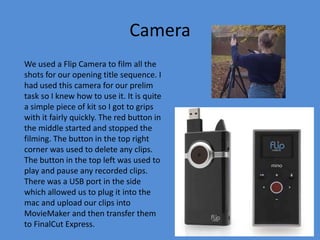
We used a Flip Camera to film all the
shots for our opening title sequence. I
had used this camera for our prelim
task so I knew how to use it. It is quite
a simple piece of kit so I got to grips
with it fairly quickly. The red button in
the middle started and stopped the
filming. The button in the top right
corner was used to delete any clips.
The button in the top left was used to
play and pause any recorded clips.
There was a USB port in the side
which allowed us to plug it into the
mac and upload our clips into
MovieMaker and then transfer them
to FinalCut Express.
Tripod

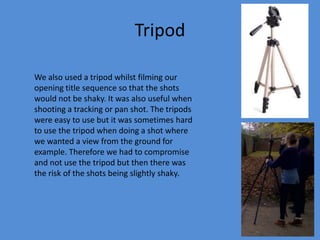
We also used a tripod whilst filming our
opening title sequence so that the shots
would not be shaky. It was also useful when
shooting a tracking or pan shot. The tripods
were easy to use but it was sometimes hard
to use the tripod when doing a shot where
we wanted a view from the ground for
example. Therefore we had to compromise
and not use the tripod but then there was
the risk of the shots being slightly shaky.
Mac computer & laptop
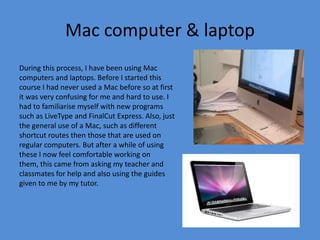
During this process, I have been using Mac
computers and laptops. Before I started this
course I had never used a Mac before so at first
it was very confusing for me and hard to use. I
had to familiarise myself with new programs
such as LiveType and FinalCut Express. Also, just
the general use of a Mac, such as different
shortcut routes then those that are used on
regular computers. But after a while of using
these I now feel comfortable working on
them, this came from asking my teacher and
classmates for help and also using the guides
given to me by my tutor.

Tasks 6

  • 1.
  • 2.
    Camera We used aFlip Camera to film all the shots for our opening title sequence. I had used this camera for our prelim task so I knew how to use it. It is quite a simple piece of kit so I got to grips with it fairly quickly. The red button in the middle started and stopped the filming. The button in the top right corner was used to delete any clips. The button in the top left was used to play and pause any recorded clips. There was a USB port in the side which allowed us to plug it into the mac and upload our clips into MovieMaker and then transfer them to FinalCut Express.
  • 3.
    Tripod We also useda tripod whilst filming our opening title sequence so that the shots would not be shaky. It was also useful when shooting a tracking or pan shot. The tripods were easy to use but it was sometimes hard to use the tripod when doing a shot where we wanted a view from the ground for example. Therefore we had to compromise and not use the tripod but then there was the risk of the shots being slightly shaky.
  • 4.
    Mac computer &laptop During this process, I have been using Mac computers and laptops. Before I started this course I had never used a Mac before so at first it was very confusing for me and hard to use. I had to familiarise myself with new programs such as LiveType and FinalCut Express. Also, just the general use of a Mac, such as different shortcut routes then those that are used on regular computers. But after a while of using these I now feel comfortable working on them, this came from asking my teacher and classmates for help and also using the guides given to me by my tutor.