Use of Applications!
LiveType
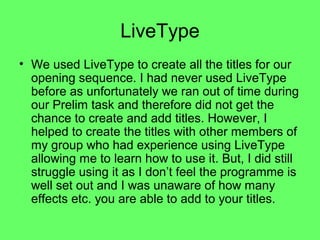
• We used LiveType to create all the titles for our
  opening sequence. I had never used LiveType
  before as unfortunately we ran out of time during
  our Prelim task and therefore did not get the
  chance to create and add titles. However, I
  helped to create the titles with other members of
  my group who had experience using LiveType
  allowing me to learn how to use it. But, I did still
  struggle using it as I don’t feel the programme is
  well set out and I was unaware of how many
  effects etc. you are able to add to your titles.
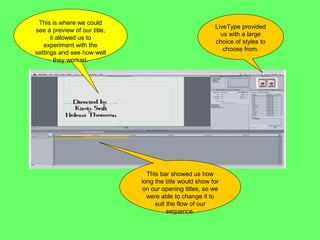
This is where we could
                                                         LiveType provided
see a preview of our title,
                                                           us with a large
      it allowed us to
                                                         choice of styles to
   experiment with the
                                                            choose from.
settings and see how well
        they worked.


                                This bar showed us how
                              long the title would show for
                              on our opening titles, so we
                                were able to change it to
                                   suit the flow of our
                                        sequence.
Soundtrack
• We used the application Soundtrack to create
  both of our soundtracks to be used in our
  opening title sequence. It was a great application
  to use as it allowed us to create two separate
  soundtracks and then merge them together to
  then fit in with our opening sequence. I used it
  previously on our Prelim task so felt fairly
  comfortable with it. We spent a lot of time trying
  different sounds as there were so many to
  choose from and we wanted to create a well
  thought out soundtrack.
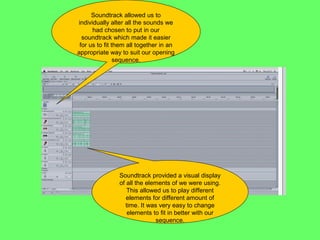
Soundtrack allowed us to
individually alter all the sounds we
      had chosen to put in our
  soundtrack which made it easier
 for us to fit them all together in an
appropriate way to suit our opening
                sequence.


                Soundtrack provided a visual display
                of all the elements of we were using.
                   This allowed us to play different
                   elements for different amount of
                  time. It was very easy to change
                   elements to fit in better with our
                              sequence.
FinalCut
• FinalCut was the main editing software we
  used for our opening sequence. This is the
  application that I have the most
  experience with so therefore felt most
  comfortable using it. It was quite
  complicated to use at first but I now
  understand it well and was happy to use
  this application individually.
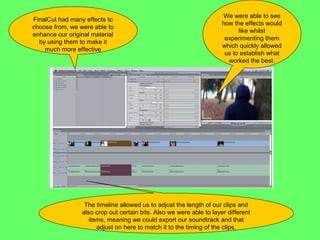
We were able to see
FinalCut had many effects to
                                                                      how the effects would
choose from, we were able to
                                                                            like whilst
enhance our original material
                                                                       experimenting them
  by using them to make it
                                                                      which quickly allowed
    much more effective
                                                                       us to establish what
                                                                        worked the best.


                  The timeline allowed us to adjust the length of our clips and
                 also crop out certain bits. Also we were able to layer different
                    items, meaning we could export our soundtrack and that
                       adjust on here to match it to the timing of the clips.

Use of applications!

  • 1.
  • 2.
    LiveType • We usedLiveType to create all the titles for our opening sequence. I had never used LiveType before as unfortunately we ran out of time during our Prelim task and therefore did not get the chance to create and add titles. However, I helped to create the titles with other members of my group who had experience using LiveType allowing me to learn how to use it. But, I did still struggle using it as I don’t feel the programme is well set out and I was unaware of how many effects etc. you are able to add to your titles.
  • 3.
    This is wherewe could LiveType provided see a preview of our title, us with a large it allowed us to choice of styles to experiment with the choose from. settings and see how well they worked. This bar showed us how long the title would show for on our opening titles, so we were able to change it to suit the flow of our sequence.
  • 4.
    Soundtrack • We usedthe application Soundtrack to create both of our soundtracks to be used in our opening title sequence. It was a great application to use as it allowed us to create two separate soundtracks and then merge them together to then fit in with our opening sequence. I used it previously on our Prelim task so felt fairly comfortable with it. We spent a lot of time trying different sounds as there were so many to choose from and we wanted to create a well thought out soundtrack.
  • 5.
    Soundtrack allowed usto individually alter all the sounds we had chosen to put in our soundtrack which made it easier for us to fit them all together in an appropriate way to suit our opening sequence. Soundtrack provided a visual display of all the elements of we were using. This allowed us to play different elements for different amount of time. It was very easy to change elements to fit in better with our sequence.
  • 6.
    FinalCut • FinalCut wasthe main editing software we used for our opening sequence. This is the application that I have the most experience with so therefore felt most comfortable using it. It was quite complicated to use at first but I now understand it well and was happy to use this application individually.
  • 7.
    We were ableto see FinalCut had many effects to how the effects would choose from, we were able to like whilst enhance our original material experimenting them by using them to make it which quickly allowed much more effective us to establish what worked the best. The timeline allowed us to adjust the length of our clips and also crop out certain bits. Also we were able to layer different items, meaning we could export our soundtrack and that adjust on here to match it to the timing of the clips.