Software House
Presents
Tally ERP 9 For Educational Institutes
Advantage of this Educational Module
This Module is Created keeping in mind the
requirement of both Schools and Colleges where
some details required for school might not be have
an implication in colleges and vice versa.
The User can skip the field which is not required by
them.
 Creation of Company Info specifying whether to be used as educational or others
 Maintenance of Database such as Class, Nationality, Religion, Caste etc
Creation of Concession Details and Concession Template
 Creation of Fee info such as Admission fee, Computer lab fee, 1st term fee, 2nd term
fee etc
Creation of fee templates for each Course or Class.
 Creation of Bus Template for each area of travel which is linked to student info.
Creation of Hostel Fees and Template, Which can be linked to Student Info.
 Creation of Students Attendance info if Required.
Creation of Students Info with complete information such as Photo, Previous
school info, transport info, Tagging of Concession Template etc
Feature of Educational Module
 Generation of Fees Due based on class or course wise for individual students or for
a group (Class or Course)
 Entry for Fee collections from individual Student based on Fee template provided in
master and print out of the same as per your specification (if any required)
 Entry of Student Transfer Certificate and print out of the same
 Entry of Student course completion information and print out of the same
 Entry of Students Attendance for calculation of Attendance percentage
 Creation of Staff master and print out pertaining to their Appointment Letter
 Entering the date of resignation and printout of Experience and relieving order.
Feature of Educational Module
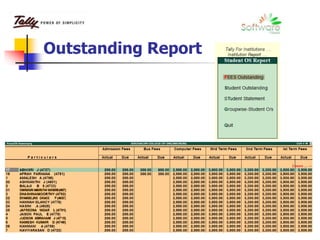
Outstanding Report
Class/Course Fee Outstanding Individual Fee head wise with total
Class/Course Fee total Outstanding Student wise
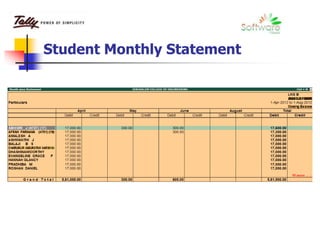
Student Fee Details Monthly wise
Student Fee collection Daily basis, based on period.
Group wise Outstanding with fee template split for each student
 Other Reports Based on database maintained
Student Info Based on Caste wise, Bus route wise, Religion wise etc.
 Attendance Percentage Report
 Class-wise Students Total and Class wise Student list
 Student Profile – Report Based on Information provided in student master.
Reports of Educational Module
Welcome to Educational module in
Tally ERP 9
Let Us Proceed how to maintain the
above said details in Tally ERP 9
with screen capture details
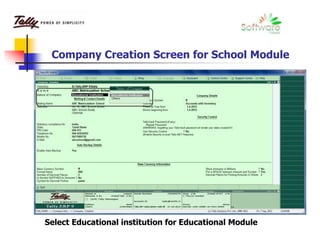
Company Creation Screen for School Module
Select Educational institution for Educational Module
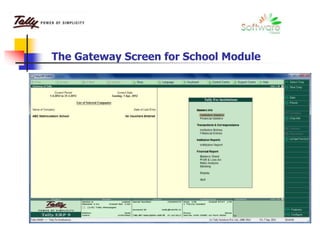
The Gateway Screen for School Module
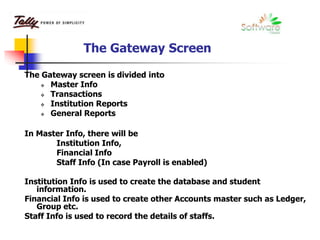
The Gateway Screen
The Gateway screen is divided into
 Master Info
 Transactions
 Institution Reports
 General Reports
In Master Info, there will be
Institution Info,
Financial Info
Staff Info (In case Payroll is enabled)
Institution Info is used to create the database and student
information.
Financial Info is used to create other Accounts master such as Ledger,
Group etc.
Staff Info is used to record the details of staffs.
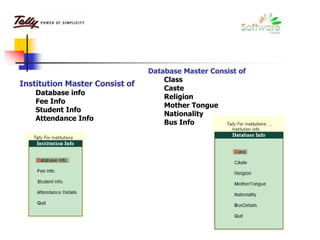
Institution Master Consist of
Database info
Fee Info
Student Info
Attendance Info
Database Master Consist of
Class
Caste
Religion
Mother Tongue
Nationality
Bus Info
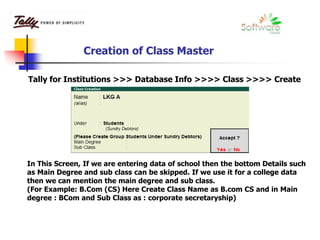
Creation of Class Master
In This Screen, If we are entering data of school then the bottom Details such
as Main Degree and sub class can be skipped. If we use it for a college data
then we can mention the main degree and sub class.
(For Example: B.Com (CS) Here Create Class Name as B.com CS and in Main
degree : BCom and Sub Class as : corporate secretaryship)
Tally for Institutions >>> Database Info >>>> Class >>>> Create
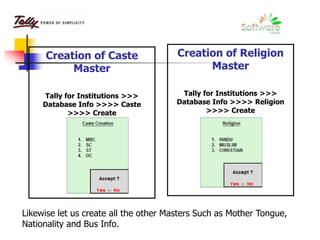
Creation of Caste
Master
Tally for Institutions >>>
Database Info >>>> Caste
>>>> Create
Creation of Religion
Master
Tally for Institutions >>>
Database Info >>>> Religion
>>>> Create
Likewise let us create all the other Masters Such as Mother Tongue,
Nationality and Bus Info.
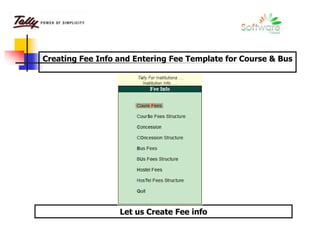
Creating Fee Info and Entering Fee Template for Course & Bus
Let us Create Fee info
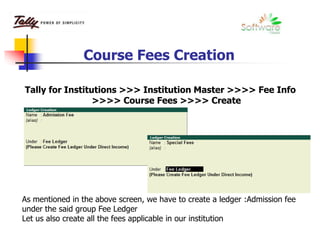
Course Fees Creation
Tally for Institutions >>> Institution Master >>>> Fee Info
>>>> Course Fees >>>> Create
As mentioned in the above screen, we have to create a ledger :Admission fee
under the said group Fee Ledger
Let us also create all the fees applicable in our institution
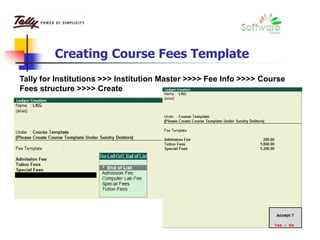
Creating Course Fees Template
Tally for Institutions >>> Institution Master >>>> Fee Info >>>> Course
Fees structure >>>> Create
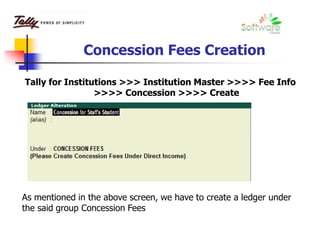
Concession Fees Creation
Tally for Institutions >>> Institution Master >>>> Fee Info
>>>> Concession >>>> Create
As mentioned in the above screen, we have to create a ledger under
the said group Concession Fees
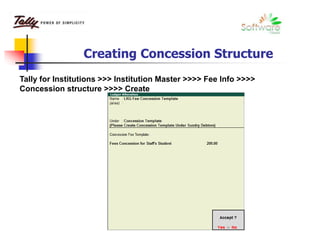
Creating Concession Structure
Tally for Institutions >>> Institution Master >>>> Fee Info >>>>
Concession structure >>>> Create
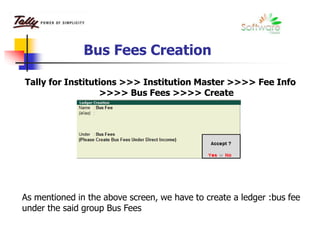
Bus Fees Creation
Tally for Institutions >>> Institution Master >>>> Fee Info
>>>> Bus Fees >>>> Create
As mentioned in the above screen, we have to create a ledger :bus fee
under the said group Bus Fees
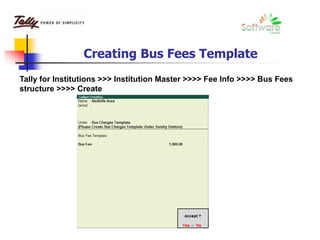
Creating Bus Fees Template
Tally for Institutions >>> Institution Master >>>> Fee Info >>>> Bus Fees
structure >>>> Create
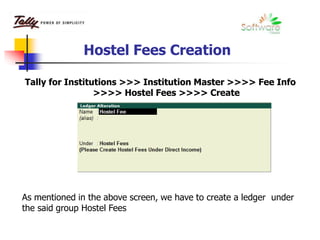
Hostel Fees Creation
Tally for Institutions >>> Institution Master >>>> Fee Info
>>>> Hostel Fees >>>> Create
As mentioned in the above screen, we have to create a ledger under
the said group Hostel Fees
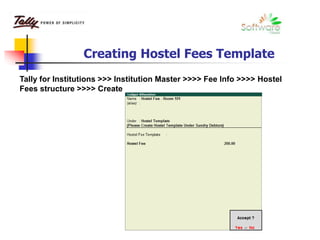
Creating Hostel Fees Template
Tally for Institutions >>> Institution Master >>>> Fee Info >>>> Hostel
Fees structure >>>> Create
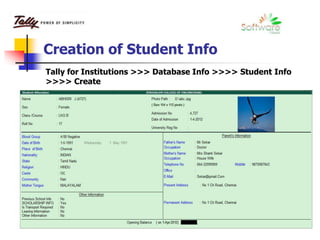
Creation of Student Info
Tally for Institutions >>> Database Info >>>> Student Info
>>>> Create
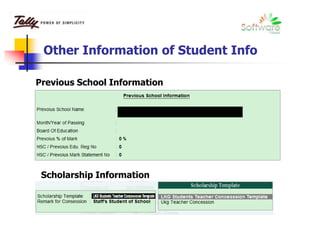
Other Information of Student Info
Previous School Information
Scholarship Information
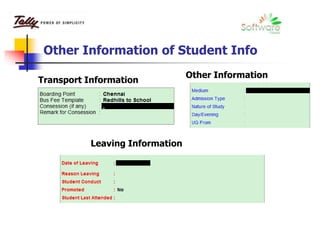
Other Information of Student Info
Transport Information
Other Information
Leaving Information
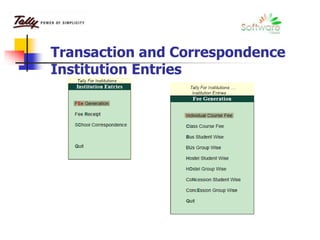
Transaction and Correspondence
Institution Entries
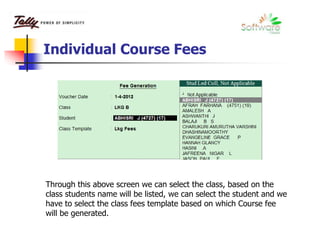
Individual Course Fees
Through this above screen we can select the class, based on the
class students name will be listed, we can select the student and we
have to select the class fees template based on which Course fee
will be generated.
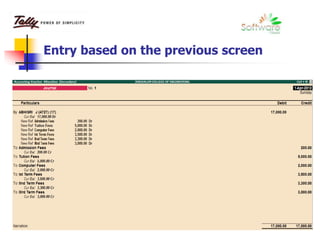
Entry based on the previous screen
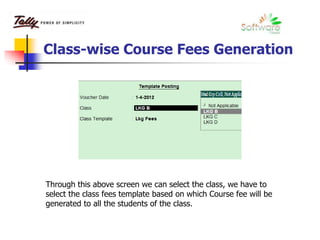
Class-wise Course Fees Generation
Through this above screen we can select the class, we have to
select the class fees template based on which Course fee will be
generated to all the students of the class.
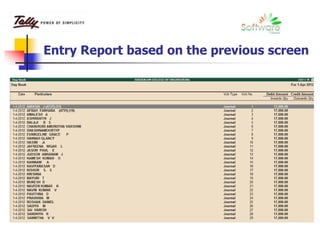
Entry Report based on the previous screen
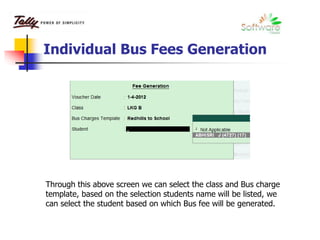
Individual Bus Fees Generation
Through this above screen we can select the class and Bus charge
template, based on the selection students name will be listed, we
can select the student based on which Bus fee will be generated.
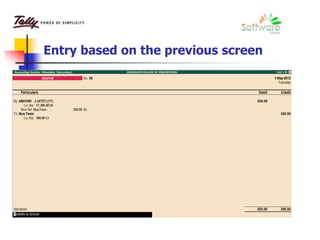
Entry based on the previous screen
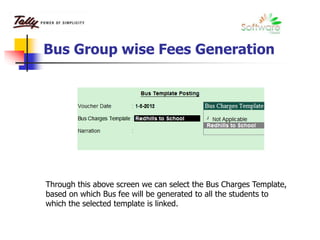
Bus Group wise Fees Generation
Through this above screen we can select the Bus Charges Template,
based on which Bus fee will be generated to all the students to
which the selected template is linked.
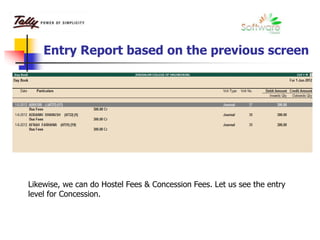
Entry Report based on the previous screen
Likewise, we can do Hostel Fees & Concession Fees. Let us see the entry
level for Concession.
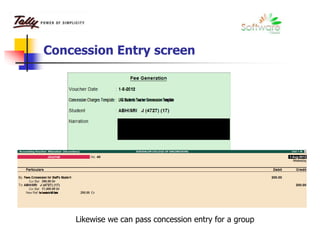
Concession Entry screen
Likewise we can pass concession entry for a group
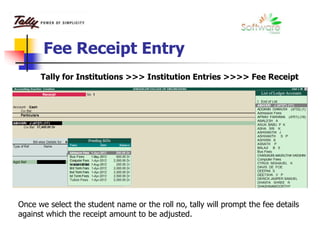
Fee Receipt Entry
Tally for Institutions >>> Institution Entries >>>> Fee Receipt
Once we select the student name or the roll no, tally will prompt the fee details
against which the receipt amount to be adjusted.
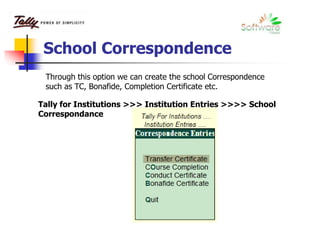
School Correspondence
Through this option we can create the school Correspondence
such as TC, Bonafide, Completion Certificate etc.
Tally for Institutions >>> Institution Entries >>>> School
Correspondance
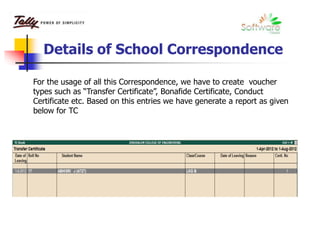
Details of School Correspondence
For the usage of all this Correspondence, we have to create voucher
types such as “Transfer Certificate”, Bonafide Certificate, Conduct
Certificate etc. Based on this entries we have generate a report as given
below for TC
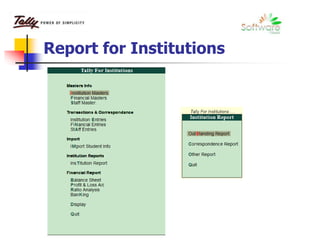
Report for Institutions
Outstanding Report
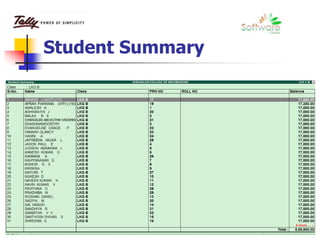
Student Summary
Student Monthly Statement
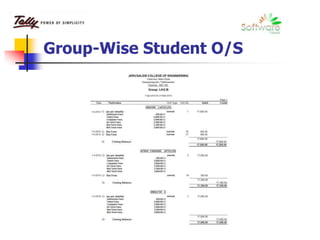
Group-Wise Student O/S
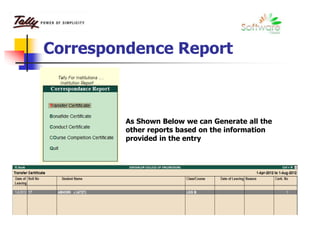
Correspondence Report
As Shown Below we can Generate all the
other reports based on the information
provided in the entry
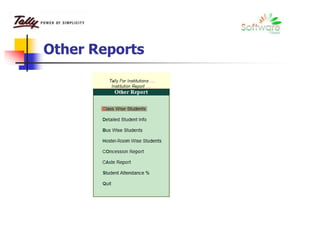
Other Reports
Information on Other reports
Class-wise Students Report :
Based on this report, we can view the class – wise student
Strength details and when we drill down we will see the Student list of
the class.
Detailed Student Information Report :
Based on this report, we can view the complete details of
Student provided in the Student Master info
Bus-wise Student Report :
This Report will display the report of student based on the
Dropping area.
Hostel-wise Student Report :
This Report will display the report of student based on the
Room the student stays.
Information on Other reports
Concession Report :
Based on this report, we can view the concession given to
various students and the basis on which the concession is given
Caste Wise Report :
Based on this report, we can view the complete details of
Student Based on caste wise.
Student Attendance Report
This Report will display the percentage of present based on
the attendance entered
Thank You
For any Clarification on this module
Please feel free to contact
Software House
Sandeep Bagri - 9360939390
Work: 044-42924292
Email: sandeep@indiars.com

Tally for educational institutes from software house

  • 1.
    Software House Presents Tally ERP9 For Educational Institutes
  • 2.
    Advantage of thisEducational Module This Module is Created keeping in mind the requirement of both Schools and Colleges where some details required for school might not be have an implication in colleges and vice versa. The User can skip the field which is not required by them.
  • 3.
     Creation ofCompany Info specifying whether to be used as educational or others  Maintenance of Database such as Class, Nationality, Religion, Caste etc Creation of Concession Details and Concession Template  Creation of Fee info such as Admission fee, Computer lab fee, 1st term fee, 2nd term fee etc Creation of fee templates for each Course or Class.  Creation of Bus Template for each area of travel which is linked to student info. Creation of Hostel Fees and Template, Which can be linked to Student Info.  Creation of Students Attendance info if Required. Creation of Students Info with complete information such as Photo, Previous school info, transport info, Tagging of Concession Template etc Feature of Educational Module
  • 4.
     Generation ofFees Due based on class or course wise for individual students or for a group (Class or Course)  Entry for Fee collections from individual Student based on Fee template provided in master and print out of the same as per your specification (if any required)  Entry of Student Transfer Certificate and print out of the same  Entry of Student course completion information and print out of the same  Entry of Students Attendance for calculation of Attendance percentage  Creation of Staff master and print out pertaining to their Appointment Letter  Entering the date of resignation and printout of Experience and relieving order. Feature of Educational Module
  • 5.
    Outstanding Report Class/Course FeeOutstanding Individual Fee head wise with total Class/Course Fee total Outstanding Student wise Student Fee Details Monthly wise Student Fee collection Daily basis, based on period. Group wise Outstanding with fee template split for each student  Other Reports Based on database maintained Student Info Based on Caste wise, Bus route wise, Religion wise etc.  Attendance Percentage Report  Class-wise Students Total and Class wise Student list  Student Profile – Report Based on Information provided in student master. Reports of Educational Module
  • 6.
    Welcome to Educationalmodule in Tally ERP 9 Let Us Proceed how to maintain the above said details in Tally ERP 9 with screen capture details
  • 7.
    Company Creation Screenfor School Module Select Educational institution for Educational Module
  • 8.
    The Gateway Screenfor School Module
  • 9.
    The Gateway Screen TheGateway screen is divided into  Master Info  Transactions  Institution Reports  General Reports In Master Info, there will be Institution Info, Financial Info Staff Info (In case Payroll is enabled) Institution Info is used to create the database and student information. Financial Info is used to create other Accounts master such as Ledger, Group etc. Staff Info is used to record the details of staffs.
  • 10.
    Institution Master Consistof Database info Fee Info Student Info Attendance Info Database Master Consist of Class Caste Religion Mother Tongue Nationality Bus Info
  • 11.
    Creation of ClassMaster In This Screen, If we are entering data of school then the bottom Details such as Main Degree and sub class can be skipped. If we use it for a college data then we can mention the main degree and sub class. (For Example: B.Com (CS) Here Create Class Name as B.com CS and in Main degree : BCom and Sub Class as : corporate secretaryship) Tally for Institutions >>> Database Info >>>> Class >>>> Create
  • 12.
    Creation of Caste Master Tallyfor Institutions >>> Database Info >>>> Caste >>>> Create Creation of Religion Master Tally for Institutions >>> Database Info >>>> Religion >>>> Create Likewise let us create all the other Masters Such as Mother Tongue, Nationality and Bus Info.
  • 13.
    Creating Fee Infoand Entering Fee Template for Course & Bus Let us Create Fee info
  • 14.
    Course Fees Creation Tallyfor Institutions >>> Institution Master >>>> Fee Info >>>> Course Fees >>>> Create As mentioned in the above screen, we have to create a ledger :Admission fee under the said group Fee Ledger Let us also create all the fees applicable in our institution
  • 15.
    Creating Course FeesTemplate Tally for Institutions >>> Institution Master >>>> Fee Info >>>> Course Fees structure >>>> Create
  • 16.
    Concession Fees Creation Tallyfor Institutions >>> Institution Master >>>> Fee Info >>>> Concession >>>> Create As mentioned in the above screen, we have to create a ledger under the said group Concession Fees
  • 17.
    Creating Concession Structure Tallyfor Institutions >>> Institution Master >>>> Fee Info >>>> Concession structure >>>> Create
  • 18.
    Bus Fees Creation Tallyfor Institutions >>> Institution Master >>>> Fee Info >>>> Bus Fees >>>> Create As mentioned in the above screen, we have to create a ledger :bus fee under the said group Bus Fees
  • 19.
    Creating Bus FeesTemplate Tally for Institutions >>> Institution Master >>>> Fee Info >>>> Bus Fees structure >>>> Create
  • 20.
    Hostel Fees Creation Tallyfor Institutions >>> Institution Master >>>> Fee Info >>>> Hostel Fees >>>> Create As mentioned in the above screen, we have to create a ledger under the said group Hostel Fees
  • 21.
    Creating Hostel FeesTemplate Tally for Institutions >>> Institution Master >>>> Fee Info >>>> Hostel Fees structure >>>> Create
  • 22.
    Creation of StudentInfo Tally for Institutions >>> Database Info >>>> Student Info >>>> Create
  • 23.
    Other Information ofStudent Info Previous School Information Scholarship Information
  • 24.
    Other Information ofStudent Info Transport Information Other Information Leaving Information
  • 25.
  • 26.
    Individual Course Fees Throughthis above screen we can select the class, based on the class students name will be listed, we can select the student and we have to select the class fees template based on which Course fee will be generated.
  • 27.
    Entry based onthe previous screen
  • 28.
    Class-wise Course FeesGeneration Through this above screen we can select the class, we have to select the class fees template based on which Course fee will be generated to all the students of the class.
  • 29.
    Entry Report basedon the previous screen
  • 30.
    Individual Bus FeesGeneration Through this above screen we can select the class and Bus charge template, based on the selection students name will be listed, we can select the student based on which Bus fee will be generated.
  • 31.
    Entry based onthe previous screen
  • 32.
    Bus Group wiseFees Generation Through this above screen we can select the Bus Charges Template, based on which Bus fee will be generated to all the students to which the selected template is linked.
  • 33.
    Entry Report basedon the previous screen Likewise, we can do Hostel Fees & Concession Fees. Let us see the entry level for Concession.
  • 34.
    Concession Entry screen Likewisewe can pass concession entry for a group
  • 35.
    Fee Receipt Entry Tallyfor Institutions >>> Institution Entries >>>> Fee Receipt Once we select the student name or the roll no, tally will prompt the fee details against which the receipt amount to be adjusted.
  • 36.
    School Correspondence Through thisoption we can create the school Correspondence such as TC, Bonafide, Completion Certificate etc. Tally for Institutions >>> Institution Entries >>>> School Correspondance
  • 37.
    Details of SchoolCorrespondence For the usage of all this Correspondence, we have to create voucher types such as “Transfer Certificate”, Bonafide Certificate, Conduct Certificate etc. Based on this entries we have generate a report as given below for TC
  • 38.
  • 39.
  • 40.
  • 41.
  • 42.
  • 43.
    Correspondence Report As ShownBelow we can Generate all the other reports based on the information provided in the entry
  • 44.
  • 45.
    Information on Otherreports Class-wise Students Report : Based on this report, we can view the class – wise student Strength details and when we drill down we will see the Student list of the class. Detailed Student Information Report : Based on this report, we can view the complete details of Student provided in the Student Master info Bus-wise Student Report : This Report will display the report of student based on the Dropping area. Hostel-wise Student Report : This Report will display the report of student based on the Room the student stays.
  • 46.
    Information on Otherreports Concession Report : Based on this report, we can view the concession given to various students and the basis on which the concession is given Caste Wise Report : Based on this report, we can view the complete details of Student Based on caste wise. Student Attendance Report This Report will display the percentage of present based on the attendance entered
  • 47.
    Thank You For anyClarification on this module Please feel free to contact Software House Sandeep Bagri - 9360939390 Work: 044-42924292 Email: sandeep@indiars.com