System Software and
Programming
Presented by: Urvashi Rakholiya
PIAS, PU, Vadodara
1
What is the Software ?
Software is a set of programs, documents,
procedures associated with the operations of a
computer systems. ( Computer instructions &
Data )
OR
A collection of instructions that tells the
computer what to do
Computer Software can be divided into:
 System Software
Application Software
System software
 System software directly interacts with the hardware and manages
hardware devices.
 They perform background task application for application software.
 Operation software system is best example of the System Software.
 Other software include compilers, linkers, loaders etc.
 The first system software required to make computer functioning is
operating system.
 This operating system will provide interface to user to install application
programs.
4
APPLICATION SOFTWARE
 It is generally a program or collection of programs used by end
users. It can be called an application or simply an app.
 A software which is developed to help the user to perform specific
tasks is called application software.
 An application is any program, or group of programs, that is
designed for the end user.
 Applications software (also called end-user programs) include such
things as database programs, word processors, Web browsers,
spreadsheets. office suites, gaming applications, database systems
and educational software.
APPLICATION SOFTWARE
 Depending on the level of language used there are different types of
application software:
 1) Word processing software. ...(word)
 2) Spreadsheet Software. ...(excel)
 3) Desktop Publishing Software.(gritting card, webpage…)
 4) Database Software. ...(MS Access)
 5) Communication Software.(file transfer protocol, xender.)
 6) Presentation Software. ...(Power point)
 7) Internet Browsers.
 8) Email Programs.
APPLICATION SOFTWARE
 The function of application software is to perform
specific operations for various applications. These
functions include writing reports, creating spreadsheets,
manipulating images, keeping records, developing
websites and calculating expenses.
 What Are 10 Examples of Application Software? Specific
examples of application software include Microsoft
Office, Excel and Outlook, Google Chrome, Mozilla
Firefox and Skype. Games and mobile applications such
as "Clash of Clans," Sound Cloud, Spotify and Uber, are
also considered application software.
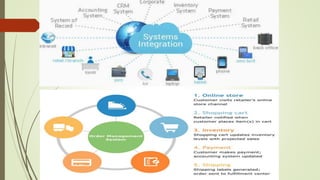
System integration
 System integration is defined in engineering as the process
of bringing together the component sub-systems into
one system and ensuring that the subsystems function
together as a system.
 IT Systems Integration is about the integration of
IT systems into a business.
 The integration of technical components, applications and
infrastructure into or alongside existing systems.
8
Application software
 Application software are the software that user uses to get specific
functions accomplished from the computer.
 Application software consist of single program such as Microsoft’s Note
Pad.
 It may also consist of a collection of programs, known as Software
packages. Like word processing programs, spreadsheet programs,
Database program.
 Accounting program and presentation tools are all application software
packages.
 Application software is controlled by system software
10
System Software
 Function of System Software:
 It supports the development of other application software.
 Execution of other application software.
 Monitors the effective use of CPU, memory, peripheral etc.
 It helps the hardware components work together.
System Software : The OS
 Controls computer functions
 Hardware
 Processor
 Memory
 Devices
 Provides means for software to work with the CPU
 Responsible for management, scheduling and interaction of tasks
 Provides user interface
System Software : Utilities
Utilities : Programs that perform computer
housekeeping tasks
Manage system resources
Improve efficiency
Virus prevention
Utility System Software
 Utility software is a type of system software designed to help analyze,
configure, optimize and maintain the computer.
 A single piece of utility software is usually called a utility or tool.
 Utility software should not be confused with application software, which
allows user to do things like creating text documents, playing games,
listening to music or surfing the web.
 Rather than providing these kinds of user-oriented or output-oriented
functionally, utility software usually focuses on how the computer
infrastructure (including computer hardware, operating system ,
application software and data storage) operates.
 Due to this focus, utilities are often rather than technical and targeted at
people with an advanced level of computer knowledge.
Example of utility software
 Virus scanner : to protect your system from trojans and
viruses
 Disk defragmenter : to speed up your hard disk.
 System monitor : to look at your current system resources
 File managers : to add, delete, rename and move file
and folders
Operating system Categories
Four categories :
Real – time (RtoS)
Single – user, Single- task
Single – user, Multitask
Multiuser
Real – Time Operating Systems
Systems with a specific purpose and a certain result
Uses include :
Industrial machines
Robotics devices
Automobiles
Video games consoles
Home applications
Single – User Operating Systems
 Single-task systems
Preform one task at a
time
Ms-DOS
PDAs :
Pocket Pc
Palm OS
Windows Mobile
 Multitask Systems
Perform simultaneous
tasks
Windows
Mac OS
Linux
Multiuser Operating Systems
 Known as network operating systems
 Allow access to the computer system by more than one user
 Manage user requests
 Systems include :
 Linux
 Unix
 Unico's
 Windows Server 2008
 Windows Vista
 Mac OS X
 I5/OS
Desktop and Notebook Operating Systems
An Operating system combined with a processor is
know as a platform.
Desktop and notebook operating systems include:
Microsoft windows
Mac OS
Linux
UNIX
Microsoft windows & Mac OS & Linux
 This newest version of windows, witch comes in many versions, provides tighter security and
improved graphical capabilities.
 Windows vista (2007)
 Mac OS
 First commercially available OS with point-and click technology ( Graphical user interface)
 Excellent in:
 Graphical display
 Processing reliabilities
 System reliability
 File backup utilities
 Document recovery
 Linux
 Open source operating system
 Based on UNIX
 Stable system free
 May be downloaded from the internet
Introduction to programming language
What is programming language?
A programming language is a set of rules the
provides a way of telling a computer what
operations to perform.
A programming language is a set of rules for
communicating an algorithm.
What is programming language?
English is a natural language .it has words,
symbols and grammatical rules.
A programming language also has words
symbols and rules of grammar.
The grammatical rules are called syntax.
Each programming language has a different
set of syntax rules.
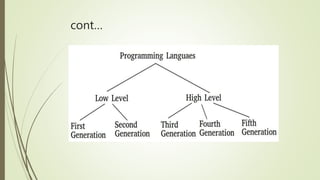
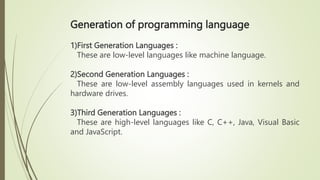
Generation of programming language
1)First Generation Languages :
These are low-level languages like machine language.
2)Second Generation Languages :
These are low-level assembly languages used in kernels and
hardware drives.
3)Third Generation Languages :
These are high-level languages like C, C++, Java, Visual Basic
and JavaScript.
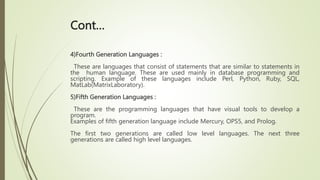
Cont…
4)Fourth Generation Languages :
These are languages that consist of statements that are similar to statements in
the human language. These are used mainly in database programming and
scripting. Example of these languages include Perl, Python, Ruby, SQL,
MatLab(MatrixLaboratory).
5)Fifth Generation Languages :
These are the programming languages that have visual tools to develop a
program.
Examples of fifth generation language include Mercury, OPS5, and Prolog.
The first two generations are called low level languages. The next three
generations are called high level languages.
cont…
Low-Level Languages
These are near to computer hardware and far
from human language.
Two low-level languages.
Machine Language
Assembly Language
cont..
Machine Language
In this Language instructions are written in
binary from.
It is directly understood by the computer.
Programs written in this language are machine
dependent
It also known as first generation language.
cont…
Assembly Language:
In this language, symbol are used.
Symbolic language.
It is mostly used for writing system software.
Second generation language.
High-level Language
Language that is close to human languages.
It is easier to write and modify.
Categories of high-level Language
Procedural Languages
Object-Oriented Languages
Non-procedural Languages
Is there any Best Programming Language?
 Programming language is probably used most efficient if it is well suited
for a specific task.
 For example:
 Business application are often written in COBOL.
 Beginners to programming use BASIC.
 Scientific programming is often undertaken with either FORTON,
PASCAL or C.
Early high- level languages
 The most famous early imperative high-level languages are
FORTRQN, COBAL and BASIC.
 FORTRAN
 COBOL
 BASIC.
Modern languages
 C is arguably the most widely used imperative language
today.
 Various languages have branched away from C by adding
object-oriented features. The most obvious are C++, Java and
C#.
 Modern functional languages like ML and Haskell have built
on the concepts pioneered in Lisp. In many ways they are also
declarative.
Scripting languages
 These languages are designed for rapid application
development and deployment buy are not really suitable for
large programs due to inefficiency and lack of Safety features
such as strong typing.
 Widely used scripting languages are Perl, Python and Tcl.
FORTRN (1954-1957)
 IBM “ FORmula TRANslating system” for IBM 704 computer
 Major emphasis on compiler producing efficient code
 Became the majored scientific/engineering programming
language
 Much evolution : FORTRAN II, FORTRAN IV, FORTRAN 66,
FORTRAN 77
Overview of FORTAN IV
Column 1 used to indicate comment lines
Column 2-5 used for line numbers (optional)
Data : integer, real, array
COBOL (1959-1960)
 Common Business- oriented language
 Developed In 1959 by a group of computer professionals
called the conference on data Systems languages (CODASYL)
 COBOL was the first programming languages whose use
mandated by the US Department of Defense.
 English – like verbose syntax (Goal : Human readability)
 Largely ignored by the academic community
 And if you thought COBOL was end….
Cont..
 COmmon Business-Oriented Language, more commonly known as COBOL
Language, is one of the oldest programming languages in existence.
COBOL languages can primary be found in areas like business and finance
for the government, as well as many companies. COBOL Language first
appeared in late 1959, after a short-range committee, formed during a
meeting at the Pentagon, was asked to recommend a new approach to a
common business language.
BASIC ( 1964 )
 Intended as a simple language for interactive use
 Easy to implement, even on small machines
 Widely used on PC’s but many different versions
 The term “spaghetti code” commonly used to describe code
written in BSIC
 Spaghetti code is a pejorative form for source code that has a
complex and tangled control structure, especially one using
many GOTOs, exceptions, threads or other “ unstructured“
branching constructs.
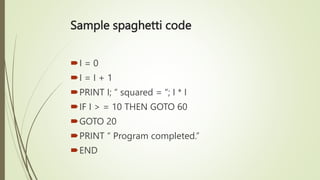
Sample spaghetti code
I = 0
I = I + 1
PRINT I; “ squared = “; I * I
IF I > = 10 THEN GOTO 60
GOTO 20
PRINT “ Program completed.”
END
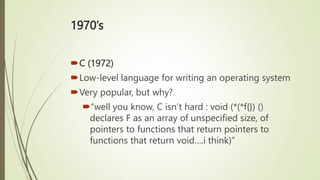
1970’s
C (1972)
Low-level language for writing an operating system
Very popular, but why?
“well you know, C isn’t hard : void (*(*f{}) ()
declares F as an array of unspecified size, of
pointers to functions that return pointers to
functions that return void….i think)”
Features of C languages
 Simple
 Machine Independent or Portable
 Mid-level programming language
 structured programming language
 Rich Library
 Memory Management
 Fast Speed
 Pointers
 Recursion
 Extensible
Cont..
 1) Simple
 C is a simple language in the sense that it provides a structured approach (to
break the problem into parts), the rich set of library functions, data types, etc.
 2) Machine Independent or Portable
 Unlike assembly language, c programs can be executed on different machines
with some machine specific changes. Therefore, C is a machine independent
language.
 3) Mid-level programming language
 Although, C is intended to do low-level programming. It is used to develop
system applications such as kernel, driver, etc. It also supports the features of a
high-level language. That is why it is known as mid-level language.
Cont…
 4) Structured programming language
 C is a structured programming language in the sense that we can break the
program into parts using functions. So, it is easy to understand and modify.
Functions also provide code reusability.
 5) Speed
 The compilation and execution time of C language is fast since there are lesser
inbuilt functions and hence the lesser overhead.
 6) Extensible
 C language is extensible because it can easily adopt new features.
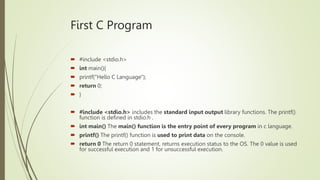
First C Program
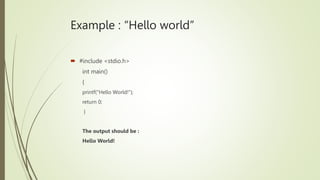
 #include <stdio.h>
 int main(){
 printf("Hello C Language");
 return 0;
 }
 #include <stdio.h> includes the standard input output library functions. The printf()
function is defined in stdio.h .
 int main() The main() function is the entry point of every program in c language.
 printf() The printf() function is used to print data on the console.
 return 0 The return 0 statement, returns execution status to the OS. The 0 value is used
for successful execution and 1 for unsuccessful execution.
Example : “Hello world”
 #include <stdio.h>
int main()
{
printf("Hello World!");
return 0;
}
The output should be :
Hello World!
1980’s…
C++ (1980-1990)
C extended with object-orientation
A comprise language to enable /c compete
Currently, the most widely used object-
oriented language
1990’s
JAVA
Object-oriented language that produces applets..
Developed by sun Microsystems.
Runs On multiple (all) platforms.
Developed for use on the Internet.
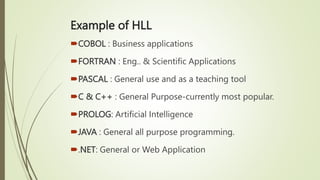
Example of HLL
COBOL : Business applications
FORTRAN : Eng.. & Scientific Applications
PASCAL : General use and as a teaching tool
C & C++ : General Purpose-currently most popular.
PROLOG: Artificial Intelligence
JAVA : General all purpose programming.
.NET: General or Web Application
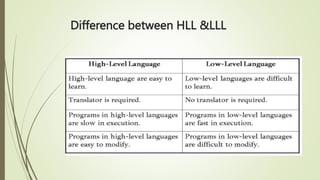
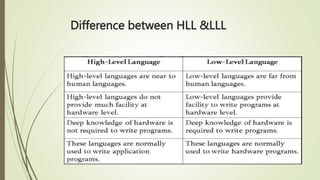
Difference between HLL &LLL

System Software and Programming.pptx

  • 1.
    System Software and Programming Presentedby: Urvashi Rakholiya PIAS, PU, Vadodara 1
  • 2.
    What is theSoftware ? Software is a set of programs, documents, procedures associated with the operations of a computer systems. ( Computer instructions & Data ) OR A collection of instructions that tells the computer what to do
  • 3.
    Computer Software canbe divided into:  System Software Application Software
  • 4.
    System software  Systemsoftware directly interacts with the hardware and manages hardware devices.  They perform background task application for application software.  Operation software system is best example of the System Software.  Other software include compilers, linkers, loaders etc.  The first system software required to make computer functioning is operating system.  This operating system will provide interface to user to install application programs. 4
  • 5.
    APPLICATION SOFTWARE  Itis generally a program or collection of programs used by end users. It can be called an application or simply an app.  A software which is developed to help the user to perform specific tasks is called application software.  An application is any program, or group of programs, that is designed for the end user.  Applications software (also called end-user programs) include such things as database programs, word processors, Web browsers, spreadsheets. office suites, gaming applications, database systems and educational software.
  • 6.
    APPLICATION SOFTWARE  Dependingon the level of language used there are different types of application software:  1) Word processing software. ...(word)  2) Spreadsheet Software. ...(excel)  3) Desktop Publishing Software.(gritting card, webpage…)  4) Database Software. ...(MS Access)  5) Communication Software.(file transfer protocol, xender.)  6) Presentation Software. ...(Power point)  7) Internet Browsers.  8) Email Programs.
  • 7.
    APPLICATION SOFTWARE  Thefunction of application software is to perform specific operations for various applications. These functions include writing reports, creating spreadsheets, manipulating images, keeping records, developing websites and calculating expenses.  What Are 10 Examples of Application Software? Specific examples of application software include Microsoft Office, Excel and Outlook, Google Chrome, Mozilla Firefox and Skype. Games and mobile applications such as "Clash of Clans," Sound Cloud, Spotify and Uber, are also considered application software.
  • 8.
    System integration  Systemintegration is defined in engineering as the process of bringing together the component sub-systems into one system and ensuring that the subsystems function together as a system.  IT Systems Integration is about the integration of IT systems into a business.  The integration of technical components, applications and infrastructure into or alongside existing systems. 8
  • 10.
    Application software  Applicationsoftware are the software that user uses to get specific functions accomplished from the computer.  Application software consist of single program such as Microsoft’s Note Pad.  It may also consist of a collection of programs, known as Software packages. Like word processing programs, spreadsheet programs, Database program.  Accounting program and presentation tools are all application software packages.  Application software is controlled by system software 10
  • 11.
    System Software  Functionof System Software:  It supports the development of other application software.  Execution of other application software.  Monitors the effective use of CPU, memory, peripheral etc.  It helps the hardware components work together.
  • 12.
    System Software :The OS  Controls computer functions  Hardware  Processor  Memory  Devices  Provides means for software to work with the CPU  Responsible for management, scheduling and interaction of tasks  Provides user interface
  • 13.
    System Software :Utilities Utilities : Programs that perform computer housekeeping tasks Manage system resources Improve efficiency Virus prevention
  • 14.
    Utility System Software Utility software is a type of system software designed to help analyze, configure, optimize and maintain the computer.  A single piece of utility software is usually called a utility or tool.  Utility software should not be confused with application software, which allows user to do things like creating text documents, playing games, listening to music or surfing the web.  Rather than providing these kinds of user-oriented or output-oriented functionally, utility software usually focuses on how the computer infrastructure (including computer hardware, operating system , application software and data storage) operates.  Due to this focus, utilities are often rather than technical and targeted at people with an advanced level of computer knowledge.
  • 15.
    Example of utilitysoftware  Virus scanner : to protect your system from trojans and viruses  Disk defragmenter : to speed up your hard disk.  System monitor : to look at your current system resources  File managers : to add, delete, rename and move file and folders
  • 16.
    Operating system Categories Fourcategories : Real – time (RtoS) Single – user, Single- task Single – user, Multitask Multiuser
  • 17.
    Real – TimeOperating Systems Systems with a specific purpose and a certain result Uses include : Industrial machines Robotics devices Automobiles Video games consoles Home applications
  • 18.
    Single – UserOperating Systems  Single-task systems Preform one task at a time Ms-DOS PDAs : Pocket Pc Palm OS Windows Mobile  Multitask Systems Perform simultaneous tasks Windows Mac OS Linux
  • 19.
    Multiuser Operating Systems Known as network operating systems  Allow access to the computer system by more than one user  Manage user requests  Systems include :  Linux  Unix  Unico's  Windows Server 2008  Windows Vista  Mac OS X  I5/OS
  • 20.
    Desktop and NotebookOperating Systems An Operating system combined with a processor is know as a platform. Desktop and notebook operating systems include: Microsoft windows Mac OS Linux UNIX
  • 21.
    Microsoft windows &Mac OS & Linux  This newest version of windows, witch comes in many versions, provides tighter security and improved graphical capabilities.  Windows vista (2007)  Mac OS  First commercially available OS with point-and click technology ( Graphical user interface)  Excellent in:  Graphical display  Processing reliabilities  System reliability  File backup utilities  Document recovery  Linux  Open source operating system  Based on UNIX  Stable system free  May be downloaded from the internet
  • 22.
    Introduction to programminglanguage What is programming language? A programming language is a set of rules the provides a way of telling a computer what operations to perform. A programming language is a set of rules for communicating an algorithm.
  • 23.
    What is programminglanguage? English is a natural language .it has words, symbols and grammatical rules. A programming language also has words symbols and rules of grammar. The grammatical rules are called syntax. Each programming language has a different set of syntax rules.
  • 24.
    Generation of programminglanguage 1)First Generation Languages : These are low-level languages like machine language. 2)Second Generation Languages : These are low-level assembly languages used in kernels and hardware drives. 3)Third Generation Languages : These are high-level languages like C, C++, Java, Visual Basic and JavaScript.
  • 25.
    Cont… 4)Fourth Generation Languages: These are languages that consist of statements that are similar to statements in the human language. These are used mainly in database programming and scripting. Example of these languages include Perl, Python, Ruby, SQL, MatLab(MatrixLaboratory). 5)Fifth Generation Languages : These are the programming languages that have visual tools to develop a program. Examples of fifth generation language include Mercury, OPS5, and Prolog. The first two generations are called low level languages. The next three generations are called high level languages.
  • 26.
  • 27.
    Low-Level Languages These arenear to computer hardware and far from human language. Two low-level languages. Machine Language Assembly Language
  • 28.
    cont.. Machine Language In thisLanguage instructions are written in binary from. It is directly understood by the computer. Programs written in this language are machine dependent It also known as first generation language.
  • 29.
    cont… Assembly Language: In thislanguage, symbol are used. Symbolic language. It is mostly used for writing system software. Second generation language.
  • 30.
    High-level Language Language thatis close to human languages. It is easier to write and modify.
  • 31.
    Categories of high-levelLanguage Procedural Languages Object-Oriented Languages Non-procedural Languages
  • 32.
    Is there anyBest Programming Language?  Programming language is probably used most efficient if it is well suited for a specific task.  For example:  Business application are often written in COBOL.  Beginners to programming use BASIC.  Scientific programming is often undertaken with either FORTON, PASCAL or C.
  • 33.
    Early high- levellanguages  The most famous early imperative high-level languages are FORTRQN, COBAL and BASIC.  FORTRAN  COBOL  BASIC.
  • 34.
    Modern languages  Cis arguably the most widely used imperative language today.  Various languages have branched away from C by adding object-oriented features. The most obvious are C++, Java and C#.  Modern functional languages like ML and Haskell have built on the concepts pioneered in Lisp. In many ways they are also declarative.
  • 35.
    Scripting languages  Theselanguages are designed for rapid application development and deployment buy are not really suitable for large programs due to inefficiency and lack of Safety features such as strong typing.  Widely used scripting languages are Perl, Python and Tcl.
  • 36.
    FORTRN (1954-1957)  IBM“ FORmula TRANslating system” for IBM 704 computer  Major emphasis on compiler producing efficient code  Became the majored scientific/engineering programming language  Much evolution : FORTRAN II, FORTRAN IV, FORTRAN 66, FORTRAN 77
  • 37.
    Overview of FORTANIV Column 1 used to indicate comment lines Column 2-5 used for line numbers (optional) Data : integer, real, array
  • 38.
    COBOL (1959-1960)  CommonBusiness- oriented language  Developed In 1959 by a group of computer professionals called the conference on data Systems languages (CODASYL)  COBOL was the first programming languages whose use mandated by the US Department of Defense.  English – like verbose syntax (Goal : Human readability)  Largely ignored by the academic community  And if you thought COBOL was end….
  • 39.
    Cont..  COmmon Business-OrientedLanguage, more commonly known as COBOL Language, is one of the oldest programming languages in existence. COBOL languages can primary be found in areas like business and finance for the government, as well as many companies. COBOL Language first appeared in late 1959, after a short-range committee, formed during a meeting at the Pentagon, was asked to recommend a new approach to a common business language.
  • 40.
    BASIC ( 1964)  Intended as a simple language for interactive use  Easy to implement, even on small machines  Widely used on PC’s but many different versions  The term “spaghetti code” commonly used to describe code written in BSIC  Spaghetti code is a pejorative form for source code that has a complex and tangled control structure, especially one using many GOTOs, exceptions, threads or other “ unstructured“ branching constructs.
  • 41.
    Sample spaghetti code I= 0 I = I + 1 PRINT I; “ squared = “; I * I IF I > = 10 THEN GOTO 60 GOTO 20 PRINT “ Program completed.” END
  • 42.
    1970’s C (1972) Low-level languagefor writing an operating system Very popular, but why? “well you know, C isn’t hard : void (*(*f{}) () declares F as an array of unspecified size, of pointers to functions that return pointers to functions that return void….i think)”
  • 43.
    Features of Clanguages  Simple  Machine Independent or Portable  Mid-level programming language  structured programming language  Rich Library  Memory Management  Fast Speed  Pointers  Recursion  Extensible
  • 44.
    Cont..  1) Simple C is a simple language in the sense that it provides a structured approach (to break the problem into parts), the rich set of library functions, data types, etc.  2) Machine Independent or Portable  Unlike assembly language, c programs can be executed on different machines with some machine specific changes. Therefore, C is a machine independent language.  3) Mid-level programming language  Although, C is intended to do low-level programming. It is used to develop system applications such as kernel, driver, etc. It also supports the features of a high-level language. That is why it is known as mid-level language.
  • 45.
    Cont…  4) Structuredprogramming language  C is a structured programming language in the sense that we can break the program into parts using functions. So, it is easy to understand and modify. Functions also provide code reusability.  5) Speed  The compilation and execution time of C language is fast since there are lesser inbuilt functions and hence the lesser overhead.  6) Extensible  C language is extensible because it can easily adopt new features.
  • 46.
    First C Program #include <stdio.h>  int main(){  printf("Hello C Language");  return 0;  }  #include <stdio.h> includes the standard input output library functions. The printf() function is defined in stdio.h .  int main() The main() function is the entry point of every program in c language.  printf() The printf() function is used to print data on the console.  return 0 The return 0 statement, returns execution status to the OS. The 0 value is used for successful execution and 1 for unsuccessful execution.
  • 47.
    Example : “Helloworld”  #include <stdio.h> int main() { printf("Hello World!"); return 0; } The output should be : Hello World!
  • 48.
    1980’s… C++ (1980-1990) C extendedwith object-orientation A comprise language to enable /c compete Currently, the most widely used object- oriented language
  • 49.
    1990’s JAVA Object-oriented language thatproduces applets.. Developed by sun Microsystems. Runs On multiple (all) platforms. Developed for use on the Internet.
  • 50.
    Example of HLL COBOL: Business applications FORTRAN : Eng.. & Scientific Applications PASCAL : General use and as a teaching tool C & C++ : General Purpose-currently most popular. PROLOG: Artificial Intelligence JAVA : General all purpose programming. .NET: General or Web Application
  • 51.
  • 52.