Android 
Application Development
AAnnddrrooiidd BBaassiiccss 
Credit goes to Google!
Course Objectives 
• Mobile Application Development (MAD) 
• Intro to Android platform 
• Platform architecture 
• Application building blocks 
• Development tools 
• Textbook: Hello, Android
Few reasons to go MAD… 
• Smart Phones 
– Internet access anywhere 
– Social networking 
• Millions of mobile users 
• Open standards
Introduction to Android 
• Open software platform for mobile 
development 
• A complete stack – OS, Middleware, 
Applications 
• An Open Handset Alliance (OHA) project 
• Powered by Linux operating system 
• Fast application development in Java 
• Open source under the Apache 2 license
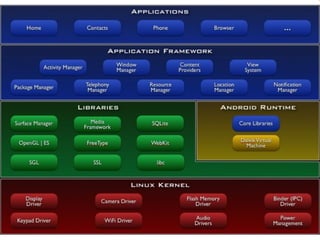
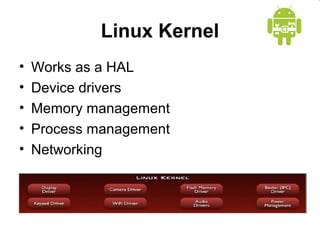
Linux Kernel 
• Works as a HAL 
• Device drivers 
• Memory management 
• Process management 
• Networking
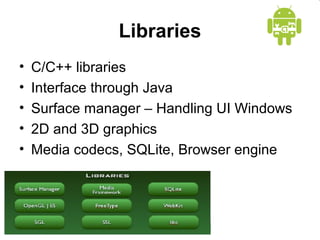
Libraries 
• C/C++ libraries 
• Interface through Java 
• Surface manager – Handling UI Windows 
• 2D and 3D graphics 
• Media codecs, SQLite, Browser engine
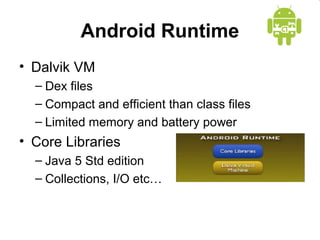
Android Runtime 
• Dalvik VM 
– Dex files 
– Compact and efficient than class files 
– Limited memory and battery power 
• Core Libraries 
– Java 5 Std edition 
– Collections, I/O etc…
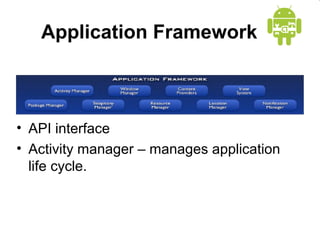
Application Framework 
• API interface 
• Activity manager – manages application 
life cycle.
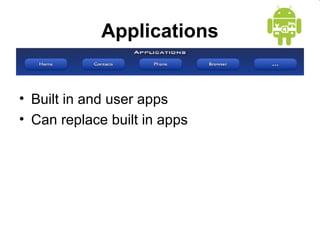
Applications 
• Built in and user apps 
• Can replace built in apps
Course Objectives 
• Mobile Application Development (MAD) 
• Intro to Android platform 
• Platform architecture 
• Application building blocks 
• Development tools 
• Textbook: Hello, Android
Application Building Blocks 
• Activity 
• IntentReceiver 
• Service 
• ContentProvider
Activities 
• Typically correspond to one UI screen 
• But, they can: 
– Be faceless 
– Be in a floating window 
– Return a value
IntentReceivers 
• Components that respond to broadcast 
‘Intents’ 
• Way to respond to external notification or 
alarms 
• Apps can invent and broadcast their own 
Intent
Intents 
• Think of Intents as a verb and object; a 
description of what you want done 
– E.g. VIEW, CALL, PLAY etc.. 
• System matches Intent with Activity that 
can best provide the service 
• Activities and IntentReceivers describe 
what Intents they can service
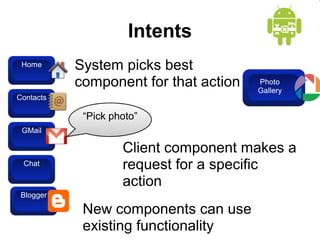
Intents 
Home 
Contacts 
GMail 
Chat 
Blogger 
System picks best 
component for that action 
“Pick photo” 
Client component makes a 
request for a specific 
action 
New components can use 
existing functionality 
Blogger 
Photo 
Gallery
Services 
• Faceless components that run in the 
background 
– E.g. music player, network download etc…
ContentProviders 
• Enables sharing of data across 
applications 
– E.g. address book, photo gallery 
• Provides uniform APIs for: 
– querying 
– delete, update and insert. 
• Content is represented by URI and MIME 
type
Course Objectives 
• Mobile Application Development (MAD) 
• Intro to Android platform 
• Platform architecture 
• Application building blocks 
• Development tools 
• Textbook: Hello, Android
Development Tools 
• Eclipse 
• Android SDK 2.0 or higher 
developer.android.com
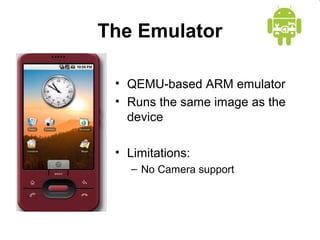
The Emulator 
• QEMU-based ARM emulator 
• Runs the same image as the 
device 
• Limitations: 
– No Camera support
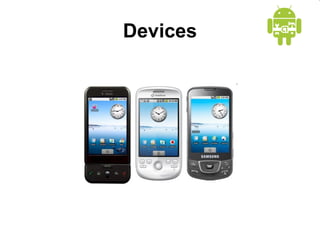
Devices
Hello World 
• A great starting point: 
http://developer.android.com/guide/tutorial 
s/hello-world.html 
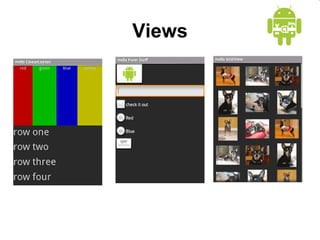
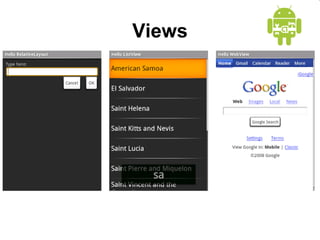
• Generating UIs 
– Views – building blocks 
– E.g. TextView, EditText, Button 
– Placed into Layouts 
– E.g. LinearLayout, TableLayout, 
AbsoluteLayout
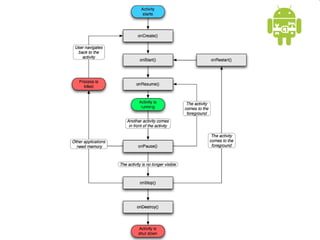
Application Lifecycle 
• Application run in their own processes 
(VM, PID) 
• Processes are started and stopped as 
needed to run an application's 
components 
• Processes may be killed to reclaim 
resources
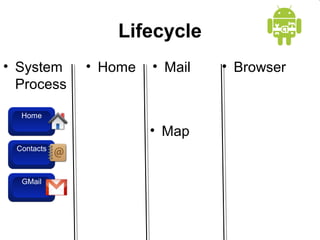
Lifecycle 
• System 
Process 
Home 
Contacts 
GMail 
• Home • Mail • Browser 
• Map
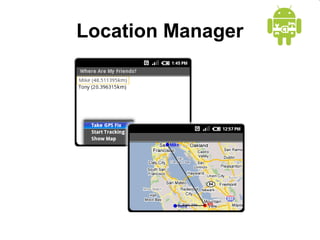
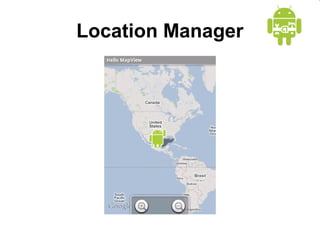
Location Manager
XMPP Services 
• Allows any app to send device-to-device 
messages to other android users 
• Data Messages are Intents with 
name/value pairs 
• Works with any gmail account… 
• Can also build servers to deliver server-to-device 
messages
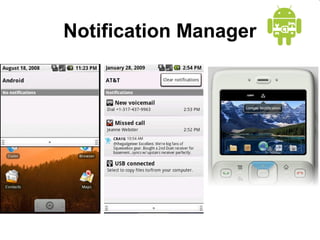
Notification Manager
Notification Manager 
• How background app interact with users 
• Consistent notification presentation
Views
Views
Location Manager
End of Lecture 
• First task, install the SDK and Eclipse for 
instructions detailed in Assignment #1 
• Will be performed in class as well.

Synapseindia android apps application development

  • 1.
  • 2.
  • 3.
    Course Objectives •Mobile Application Development (MAD) • Intro to Android platform • Platform architecture • Application building blocks • Development tools • Textbook: Hello, Android
  • 4.
    Few reasons togo MAD… • Smart Phones – Internet access anywhere – Social networking • Millions of mobile users • Open standards
  • 5.
    Introduction to Android • Open software platform for mobile development • A complete stack – OS, Middleware, Applications • An Open Handset Alliance (OHA) project • Powered by Linux operating system • Fast application development in Java • Open source under the Apache 2 license
  • 7.
    Linux Kernel •Works as a HAL • Device drivers • Memory management • Process management • Networking
  • 8.
    Libraries • C/C++libraries • Interface through Java • Surface manager – Handling UI Windows • 2D and 3D graphics • Media codecs, SQLite, Browser engine
  • 9.
    Android Runtime •Dalvik VM – Dex files – Compact and efficient than class files – Limited memory and battery power • Core Libraries – Java 5 Std edition – Collections, I/O etc…
  • 10.
    Application Framework •API interface • Activity manager – manages application life cycle.
  • 11.
    Applications • Builtin and user apps • Can replace built in apps
  • 12.
    Course Objectives •Mobile Application Development (MAD) • Intro to Android platform • Platform architecture • Application building blocks • Development tools • Textbook: Hello, Android
  • 13.
    Application Building Blocks • Activity • IntentReceiver • Service • ContentProvider
  • 14.
    Activities • Typicallycorrespond to one UI screen • But, they can: – Be faceless – Be in a floating window – Return a value
  • 15.
    IntentReceivers • Componentsthat respond to broadcast ‘Intents’ • Way to respond to external notification or alarms • Apps can invent and broadcast their own Intent
  • 16.
    Intents • Thinkof Intents as a verb and object; a description of what you want done – E.g. VIEW, CALL, PLAY etc.. • System matches Intent with Activity that can best provide the service • Activities and IntentReceivers describe what Intents they can service
  • 17.
    Intents Home Contacts GMail Chat Blogger System picks best component for that action “Pick photo” Client component makes a request for a specific action New components can use existing functionality Blogger Photo Gallery
  • 18.
    Services • Facelesscomponents that run in the background – E.g. music player, network download etc…
  • 19.
    ContentProviders • Enablessharing of data across applications – E.g. address book, photo gallery • Provides uniform APIs for: – querying – delete, update and insert. • Content is represented by URI and MIME type
  • 20.
    Course Objectives •Mobile Application Development (MAD) • Intro to Android platform • Platform architecture • Application building blocks • Development tools • Textbook: Hello, Android
  • 21.
    Development Tools •Eclipse • Android SDK 2.0 or higher developer.android.com
  • 22.
    The Emulator •QEMU-based ARM emulator • Runs the same image as the device • Limitations: – No Camera support
  • 23.
  • 24.
    Hello World •A great starting point: http://developer.android.com/guide/tutorial s/hello-world.html • Generating UIs – Views – building blocks – E.g. TextView, EditText, Button – Placed into Layouts – E.g. LinearLayout, TableLayout, AbsoluteLayout
  • 25.
    Application Lifecycle •Application run in their own processes (VM, PID) • Processes are started and stopped as needed to run an application's components • Processes may be killed to reclaim resources
  • 27.
    Lifecycle • System Process Home Contacts GMail • Home • Mail • Browser • Map
  • 28.
  • 29.
    XMPP Services •Allows any app to send device-to-device messages to other android users • Data Messages are Intents with name/value pairs • Works with any gmail account… • Can also build servers to deliver server-to-device messages
  • 30.
  • 31.
    Notification Manager •How background app interact with users • Consistent notification presentation
  • 32.
  • 33.
  • 34.
  • 35.
    End of Lecture • First task, install the SDK and Eclipse for instructions detailed in Assignment #1 • Will be performed in class as well.