© 2015 IBM Corporation
Protecting Devices without Disrupting the
User Experience
Jason Hardy
Worldwide Market Segment Manager, Mobile Security
IBM Security
Kaushik Srinivas
Worldwide Product Manager, IBM MobileFirst Protect
IBM Security
Surviving the Mobile Phenomenon
CLICK HERE TO
WATCH ON-DEMAND
WEBINAR
2© 2015 IBM Corporation
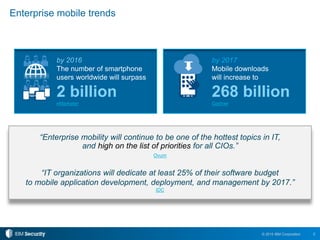
by 2017
Mobile downloads
will increase to
268 billion
Gartner
by 2016
The number of smartphone
users worldwide will surpass
2 billion
eMarketer
Enterprise mobile trends
“Enterprise mobility will continue to be one of the hottest topics in IT,
and high on the list of priorities for all CIOs.”
Ovum
“IT organizations will dedicate at least 25% of their software budget
to mobile application development, deployment, and management by 2017.”
IDC
3© 2015 IBM Corporation
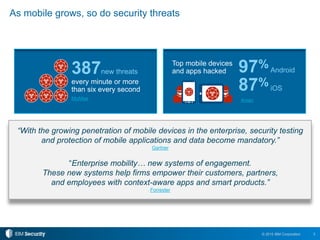
387new threats
every minute or more
than six every second
McAfee
As mobile grows, so do security threats
“With the growing penetration of mobile devices in the enterprise, security testing
and protection of mobile applications and data become mandatory.”
Gartner
“Enterprise mobility… new systems of engagement.
These new systems help firms empower their customers, partners,
and employees with context-aware apps and smart products.”
Forrester
Arxan
Top mobile devices
and apps hacked 97%Android
87%iOS
4© 2015 IBM Corporation
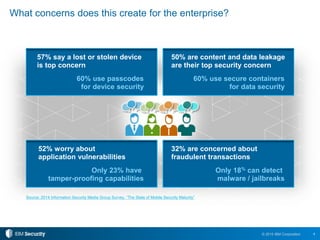
What concerns does this create for the enterprise?
Source: 2014 Information Security Media Group Survey, “The State of Mobile Security Maturity”
32% are concerned about
fraudulent transactions
Only 18% can detect
malware / jailbreaks
52% worry about
application vulnerabilities
Only 23% have
tamper-proofing capabilities
50% are content and data leakage
are their top security concern
60% use secure containers
for data security
57% say a lost or stolen device
is top concern
60% use passcodes
for device security
5© 2015 IBM Corporation
MobileFirst
Protect (MaaS360)
AppScan, Arxan, Trusteer M;
bile SDK
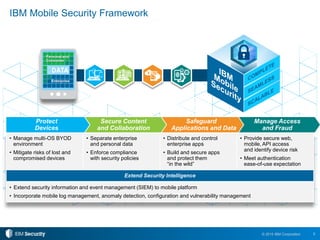
IBM Mobile Security Framework
AirWatch, MobileIron, Good,
Citrix, Microsoft, Mocana
HP Fortify, Veracode, Proguard CA, Oracle, RSA
• Manage multi-OS BYOD
environment
• Mitigate risks of lost and
compromised devices
• Separate enterprise
and personal data
• Enforce compliance
with security policies
• Distribute and control
enterprise apps
• Build and secure apps
and protect them
“in the wild”
• Provide secure web,
mobile, API access
and identify device risk
• Meet authentication
ease-of-use expectation
Extend Security Intelligence
• Extend security information and event management (SIEM) to mobile platform
• Incorporate mobile log management, anomaly detection, configuration and vulnerability management
Manage Access
and Fraud
Safeguard
Applications and Data
Secure Content
and Collaboration
Protect
Devices
6© 2015 IBM Corporation
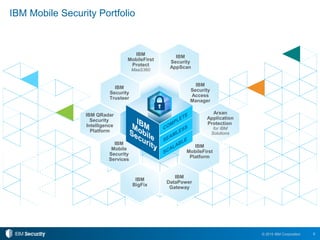
IBM Mobile Security Portfolio
IBM
Security
Access
Manager
IBM
DataPower
Gateway
IBM
BigFix
IBM
MobileFirst
Platform
IBM
MobileFirst
Protect
MaaS360
IBM
Security
AppScan
Arxan
Application
Protection
for IBM
Solutions
IBM QRadar
Security
Intelligence
Platform
IBM
Security
Trusteer
IBM
Mobile
Security
Services
7© 2015 IBM Corporation
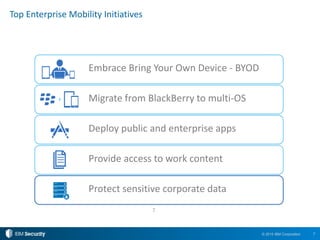
Protect sensitive corporate data
Deploy public and enterprise apps
Provide access to work content
Top Enterprise Mobility Initiatives
7
Embrace Bring Your Own Device - BYOD
Migrate from BlackBerry to multi-OS
8© 2015 IBM Corporation
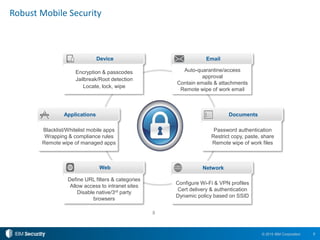
Robust Mobile Security
8
Device
Applications
Network
Email
Documents
Auto-quarantine/access
approval
Contain emails & attachments
Remote wipe of work email
Password authentication
Restrict copy, paste, share
Remote wipe of work files
Configure Wi-Fi & VPN profiles
Cert delivery & authentication
Dynamic policy based on SSID
Encryption & passcodes
Jailbreak/Root detection
Locate, lock, wipe
Blacklist/Whitelist mobile apps
Wrapping & compliance rules
Remote wipe of managed apps
Web
Define URL filters & categories
Allow access to intranet sites
Disable native/3rd party
browsers
9© 2015 IBM Corporation
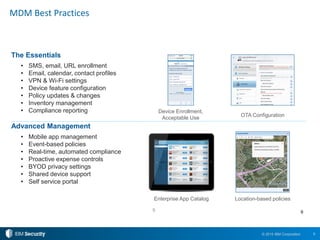
MDM Best Practices
9
The Essentials
• SMS, email, URL enrollment
• Email, calendar, contact profiles
• VPN & Wi-Fi settings
• Device feature configuration
• Policy updates & changes
• Inventory management
• Compliance reporting
Advanced Management
• Mobile app management
• Event-based policies
• Real-time, automated compliance
• Proactive expense controls
• BYOD privacy settings
• Shared device support
• Self service portal
9
Location-based policies
Device Enrollment,
Acceptable Use
Enterprise App Catalog
OTA Configuration
10© 2015 IBM Corporation
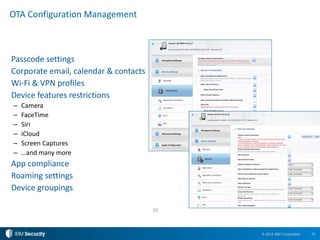
Passcode settings
Corporate email, calendar & contacts
Wi-Fi & VPN profiles
Device features restrictions
– Camera
– FaceTime
– Siri
– iCloud
– Screen Captures
– …and many more
App compliance
Roaming settings
Device groupings
OTA Configuration Management
10
11© 2015 IBM Corporation
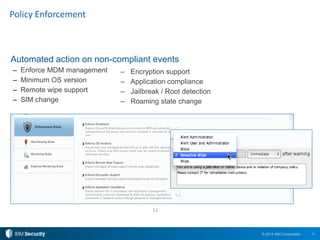
Policy Enforcement
Automated action on non-compliant events
– Enforce MDM management
– Minimum OS version
– Remote wipe support
– SIM change
11
– Encryption support
– Application compliance
– Jailbreak / Root detection
– Roaming state change
12© 2015 IBM Corporation
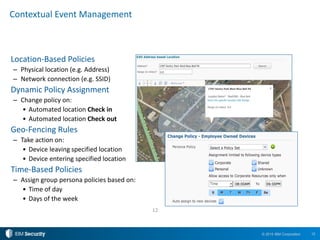
Contextual Event Management
Location-Based Policies
– Physical location (e.g. Address)
– Network connection (e.g. SSID)
Dynamic Policy Assignment
– Change policy on:
• Automated location Check in
• Automated location Check out
Geo-Fencing Rules
– Take action on:
• Device leaving specified location
• Device entering specified location
Time-Based Policies
– Assign group persona policies based on:
• Time of day
• Days of the week
12
13© 2015 IBM Corporation
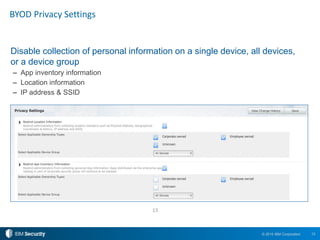
BYOD Privacy Settings
Disable collection of personal information on a single device, all devices,
or a device group
– App inventory information
– Location information
– IP address & SSID
13
14© 2015 IBM Corporation
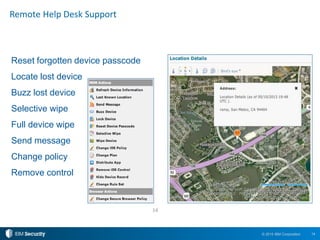
Reset forgotten device passcode
Locate lost device
Buzz lost device
Selective wipe
Full device wipe
Send message
Change policy
Remove control
Remote Help Desk Support
14
15© 2015 IBM Corporation
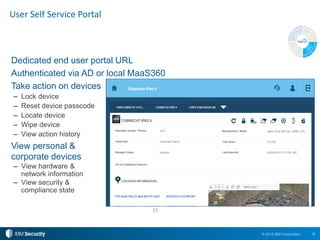
User Self Service Portal
Dedicated end user portal URL
Authenticated via AD or local MaaS360
Take action on devices
– Lock device
– Reset device passcode
– Locate device
– Wipe device
– View action history
View personal &
corporate devices
– View hardware &
network information
– View security &
compliance state
15
16© 2015 IBM Corporation
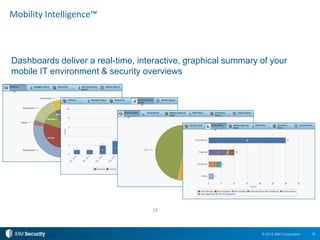
Mobility Intelligence™
Dashboards deliver a real-time, interactive, graphical summary of your
mobile IT environment & security overviews
16
17© 2015 IBM Corporation
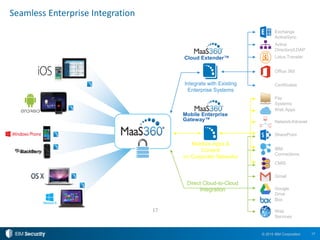
Direct Cloud-to-Cloud
Integration
Direct Cloud-to-Cloud
Integration
Seamless Enterprise Integration
Mobilize Apps &
Content
on Corporate Networks
17
Integrate with Existing
Enterprise Systems
File
Systems
Web Apps
Lotus Traveler
Certificates
Office 365
Exchange
ActiveSync
Active
Directory/LDAP
Network/Intranet
Box
Google
Drive
SharePoint
Cloud Extender™
Mobile Enterprise
Gateway™
IBM
Connections
CMIS
Gmail
Web
Services
18© 2015 IBM Corporation
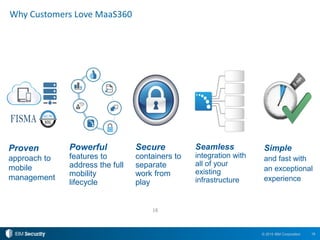
Why Customers Love MaaS360
Powerful
features to
address the full
mobility
lifecycle
18
Seamless
integration with
all of your
existing
infrastructure
Simple
and fast with
an exceptional
experience
Proven
approach to
mobile
management
Secure
containers to
separate
work from
play
19© 2015 IBM Corporation
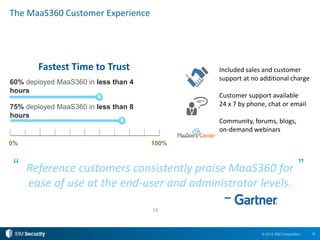
The MaaS360 Customer Experience
19
Fastest Time to Trust
60% deployed MaaS360 in less than 4
hours
75% deployed MaaS360 in less than 8
hours
0% 100%
Reference customers consistently praise MaaS360 for
ease of use at the end-user and administrator levels.
”“
–
Included sales and customer
support at no additional charge
Customer support available
24 x 7 by phone, chat or email
Community, forums, blogs,
on-demand webinars
© 2015 IBM Corporation
Q&A
21© 2015 IBM Corporation
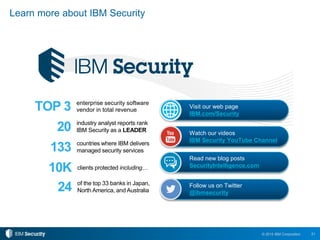
133 countries where IBM delivers
managed security services
20 industry analyst reports rank
IBM Security as a LEADER
TOP 3 enterprise security software
vendor in total revenue
10K clients protected including…
24 of the top 33 banks in Japan,
North America, and Australia
Learn more about IBM Security
Visit our web page
IBM.com/Security
Watch our videos
IBM Security YouTube Channel
Read new blog posts
SecurityIntelligence.com
Follow us on Twitter
@ibmsecurity
© Copyright IBM Corporation 2015. All rights reserved. The information contained in these materials is provided for informational purposes only, and is provided AS IS without warranty of any
kind, express or implied. IBM shall not be responsible for any damages arising out of the use of, or otherwise related to, these materials. Nothing contained in these materials is intended to, nor
shall have the effect of, creating any warranties or representations from IBM or its suppliers or licensors, or altering the terms and conditions of the applicable license agreement governing the use
of IBM software. References in these materials to IBM products, programs, or services do not imply that they will be available in all countries in which IBM operates. Product release dates and / or
capabilities referenced in these materials may change at any time at IBM’s sole discretion based on market opportunities or other factors, and are not intended to be a commitment to future product
or feature availability in any way. IBM, the IBM logo, and other IBM products and services are trademarks of the International Business Machines Corporation, in the United States, other countries
or both. Other company, product, or service names may be trademarks or service marks of others.
Statement of Good Security Practices: IT system security involves protecting systems and information through prevention, detection and response to improper access from within and outside
your enterprise. Improper access can result in information being altered, destroyed, misappropriated or misused or can result in damage to or misuse of your systems, including for use in attacks
on others. No IT system or product should be considered completely secure and no single product, service or security measure can be completely effective in preventing improper use or access.
IBM systems, products and services are designed to be part of a lawful, comprehensive security approach, which will necessarily involve additional operational procedures, and may require other
systems, products or services to be most effective. IBM DOES NOT WARRANT THAT ANY SYSTEMS, PRODUCTS OR SERVICES ARE IMMUNE FROM, OR WILL MAKE YOUR ENTERPRISE
IMMUNE FROM, THE MALICIOUS OR ILLEGAL CONDUCT OF ANY PARTY.
THANK YOU
www.ibm.com/security

Surviving the Mobile Phenomenon: Protecting Devices without Disrupting the User Experience

  • 1.
    © 2015 IBMCorporation Protecting Devices without Disrupting the User Experience Jason Hardy Worldwide Market Segment Manager, Mobile Security IBM Security Kaushik Srinivas Worldwide Product Manager, IBM MobileFirst Protect IBM Security Surviving the Mobile Phenomenon CLICK HERE TO WATCH ON-DEMAND WEBINAR
  • 2.
    2© 2015 IBMCorporation by 2017 Mobile downloads will increase to 268 billion Gartner by 2016 The number of smartphone users worldwide will surpass 2 billion eMarketer Enterprise mobile trends “Enterprise mobility will continue to be one of the hottest topics in IT, and high on the list of priorities for all CIOs.” Ovum “IT organizations will dedicate at least 25% of their software budget to mobile application development, deployment, and management by 2017.” IDC
  • 3.
    3© 2015 IBMCorporation 387new threats every minute or more than six every second McAfee As mobile grows, so do security threats “With the growing penetration of mobile devices in the enterprise, security testing and protection of mobile applications and data become mandatory.” Gartner “Enterprise mobility… new systems of engagement. These new systems help firms empower their customers, partners, and employees with context-aware apps and smart products.” Forrester Arxan Top mobile devices and apps hacked 97%Android 87%iOS
  • 4.
    4© 2015 IBMCorporation What concerns does this create for the enterprise? Source: 2014 Information Security Media Group Survey, “The State of Mobile Security Maturity” 32% are concerned about fraudulent transactions Only 18% can detect malware / jailbreaks 52% worry about application vulnerabilities Only 23% have tamper-proofing capabilities 50% are content and data leakage are their top security concern 60% use secure containers for data security 57% say a lost or stolen device is top concern 60% use passcodes for device security
  • 5.
    5© 2015 IBMCorporation MobileFirst Protect (MaaS360) AppScan, Arxan, Trusteer M; bile SDK IBM Mobile Security Framework AirWatch, MobileIron, Good, Citrix, Microsoft, Mocana HP Fortify, Veracode, Proguard CA, Oracle, RSA • Manage multi-OS BYOD environment • Mitigate risks of lost and compromised devices • Separate enterprise and personal data • Enforce compliance with security policies • Distribute and control enterprise apps • Build and secure apps and protect them “in the wild” • Provide secure web, mobile, API access and identify device risk • Meet authentication ease-of-use expectation Extend Security Intelligence • Extend security information and event management (SIEM) to mobile platform • Incorporate mobile log management, anomaly detection, configuration and vulnerability management Manage Access and Fraud Safeguard Applications and Data Secure Content and Collaboration Protect Devices
  • 6.
    6© 2015 IBMCorporation IBM Mobile Security Portfolio IBM Security Access Manager IBM DataPower Gateway IBM BigFix IBM MobileFirst Platform IBM MobileFirst Protect MaaS360 IBM Security AppScan Arxan Application Protection for IBM Solutions IBM QRadar Security Intelligence Platform IBM Security Trusteer IBM Mobile Security Services
  • 7.
    7© 2015 IBMCorporation Protect sensitive corporate data Deploy public and enterprise apps Provide access to work content Top Enterprise Mobility Initiatives 7 Embrace Bring Your Own Device - BYOD Migrate from BlackBerry to multi-OS
  • 8.
    8© 2015 IBMCorporation Robust Mobile Security 8 Device Applications Network Email Documents Auto-quarantine/access approval Contain emails & attachments Remote wipe of work email Password authentication Restrict copy, paste, share Remote wipe of work files Configure Wi-Fi & VPN profiles Cert delivery & authentication Dynamic policy based on SSID Encryption & passcodes Jailbreak/Root detection Locate, lock, wipe Blacklist/Whitelist mobile apps Wrapping & compliance rules Remote wipe of managed apps Web Define URL filters & categories Allow access to intranet sites Disable native/3rd party browsers
  • 9.
    9© 2015 IBMCorporation MDM Best Practices 9 The Essentials • SMS, email, URL enrollment • Email, calendar, contact profiles • VPN & Wi-Fi settings • Device feature configuration • Policy updates & changes • Inventory management • Compliance reporting Advanced Management • Mobile app management • Event-based policies • Real-time, automated compliance • Proactive expense controls • BYOD privacy settings • Shared device support • Self service portal 9 Location-based policies Device Enrollment, Acceptable Use Enterprise App Catalog OTA Configuration
  • 10.
    10© 2015 IBMCorporation Passcode settings Corporate email, calendar & contacts Wi-Fi & VPN profiles Device features restrictions – Camera – FaceTime – Siri – iCloud – Screen Captures – …and many more App compliance Roaming settings Device groupings OTA Configuration Management 10
  • 11.
    11© 2015 IBMCorporation Policy Enforcement Automated action on non-compliant events – Enforce MDM management – Minimum OS version – Remote wipe support – SIM change 11 – Encryption support – Application compliance – Jailbreak / Root detection – Roaming state change
  • 12.
    12© 2015 IBMCorporation Contextual Event Management Location-Based Policies – Physical location (e.g. Address) – Network connection (e.g. SSID) Dynamic Policy Assignment – Change policy on: • Automated location Check in • Automated location Check out Geo-Fencing Rules – Take action on: • Device leaving specified location • Device entering specified location Time-Based Policies – Assign group persona policies based on: • Time of day • Days of the week 12
  • 13.
    13© 2015 IBMCorporation BYOD Privacy Settings Disable collection of personal information on a single device, all devices, or a device group – App inventory information – Location information – IP address & SSID 13
  • 14.
    14© 2015 IBMCorporation Reset forgotten device passcode Locate lost device Buzz lost device Selective wipe Full device wipe Send message Change policy Remove control Remote Help Desk Support 14
  • 15.
    15© 2015 IBMCorporation User Self Service Portal Dedicated end user portal URL Authenticated via AD or local MaaS360 Take action on devices – Lock device – Reset device passcode – Locate device – Wipe device – View action history View personal & corporate devices – View hardware & network information – View security & compliance state 15
  • 16.
    16© 2015 IBMCorporation Mobility Intelligence™ Dashboards deliver a real-time, interactive, graphical summary of your mobile IT environment & security overviews 16
  • 17.
    17© 2015 IBMCorporation Direct Cloud-to-Cloud Integration Direct Cloud-to-Cloud Integration Seamless Enterprise Integration Mobilize Apps & Content on Corporate Networks 17 Integrate with Existing Enterprise Systems File Systems Web Apps Lotus Traveler Certificates Office 365 Exchange ActiveSync Active Directory/LDAP Network/Intranet Box Google Drive SharePoint Cloud Extender™ Mobile Enterprise Gateway™ IBM Connections CMIS Gmail Web Services
  • 18.
    18© 2015 IBMCorporation Why Customers Love MaaS360 Powerful features to address the full mobility lifecycle 18 Seamless integration with all of your existing infrastructure Simple and fast with an exceptional experience Proven approach to mobile management Secure containers to separate work from play
  • 19.
    19© 2015 IBMCorporation The MaaS360 Customer Experience 19 Fastest Time to Trust 60% deployed MaaS360 in less than 4 hours 75% deployed MaaS360 in less than 8 hours 0% 100% Reference customers consistently praise MaaS360 for ease of use at the end-user and administrator levels. ”“ – Included sales and customer support at no additional charge Customer support available 24 x 7 by phone, chat or email Community, forums, blogs, on-demand webinars
  • 20.
    © 2015 IBMCorporation Q&A
  • 21.
    21© 2015 IBMCorporation 133 countries where IBM delivers managed security services 20 industry analyst reports rank IBM Security as a LEADER TOP 3 enterprise security software vendor in total revenue 10K clients protected including… 24 of the top 33 banks in Japan, North America, and Australia Learn more about IBM Security Visit our web page IBM.com/Security Watch our videos IBM Security YouTube Channel Read new blog posts SecurityIntelligence.com Follow us on Twitter @ibmsecurity
  • 22.
    © Copyright IBMCorporation 2015. All rights reserved. The information contained in these materials is provided for informational purposes only, and is provided AS IS without warranty of any kind, express or implied. IBM shall not be responsible for any damages arising out of the use of, or otherwise related to, these materials. Nothing contained in these materials is intended to, nor shall have the effect of, creating any warranties or representations from IBM or its suppliers or licensors, or altering the terms and conditions of the applicable license agreement governing the use of IBM software. References in these materials to IBM products, programs, or services do not imply that they will be available in all countries in which IBM operates. Product release dates and / or capabilities referenced in these materials may change at any time at IBM’s sole discretion based on market opportunities or other factors, and are not intended to be a commitment to future product or feature availability in any way. IBM, the IBM logo, and other IBM products and services are trademarks of the International Business Machines Corporation, in the United States, other countries or both. Other company, product, or service names may be trademarks or service marks of others. Statement of Good Security Practices: IT system security involves protecting systems and information through prevention, detection and response to improper access from within and outside your enterprise. Improper access can result in information being altered, destroyed, misappropriated or misused or can result in damage to or misuse of your systems, including for use in attacks on others. No IT system or product should be considered completely secure and no single product, service or security measure can be completely effective in preventing improper use or access. IBM systems, products and services are designed to be part of a lawful, comprehensive security approach, which will necessarily involve additional operational procedures, and may require other systems, products or services to be most effective. IBM DOES NOT WARRANT THAT ANY SYSTEMS, PRODUCTS OR SERVICES ARE IMMUNE FROM, OR WILL MAKE YOUR ENTERPRISE IMMUNE FROM, THE MALICIOUS OR ILLEGAL CONDUCT OF ANY PARTY. THANK YOU www.ibm.com/security