SURVIVING DEV FRAMEWORKS:
LESSONS LEARNED WITH
DRUPAL, WORDPRESS, JQUERY, AND MORE
Kate Walser • CX Insights
kwalser@cxinsights.com • @kwalser
Slides @ https://www.slideshare.net/kwalser
CHALLENGE
Costly commercial software
› As the market crashed in the late 1990s and early
2000s and the recession hit, agencies and
businesses were finding ways to cut costs.
Creative Commons – Some Rights Reserved
2
Image credit: “Piggy Banks with savings chart,” by managementwritingsolutions
Flickr Creative Commons
TRENDING
Agile
Creative Commons – Some Rights Reserved
3
TRENDING
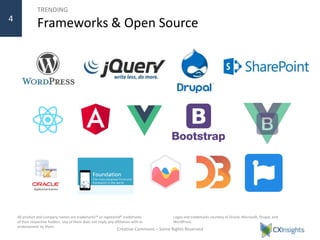
Frameworks & Open Source
Creative Commons – Some Rights Reserved
4
Logos and trademarks courtesy of Oracle, Microsoft, Drupal, and
WordPress.
All product and company names are trademarks™ or registered® trademarks
of their respective holders. Use of them does not imply any affiliation with or
endorsement by them.
THE PROMISE
Powerful, Quicker to build apps
Creative Commons – Some Rights Reserved
5
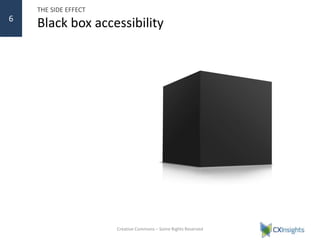
THE SIDE EFFECT
Black box accessibility
Creative Commons – Some Rights Reserved
6
» More Complex User Experiences
7
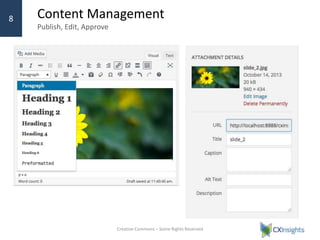
Content Management
Publish, Edit, Approve
› WordPress, Drupal, Joomla, Grav, SharePoint and
other content management tools let organizations
build websites quickly and manage content easily.
The built-in options out of box for most of them
include the ability to tag content with headings, used
by assistive technologies.
› Content owners can also insert media, and in some
better designed tools like WordPress, add alternative
text.
Creative Commons – Some Rights Reserved
8
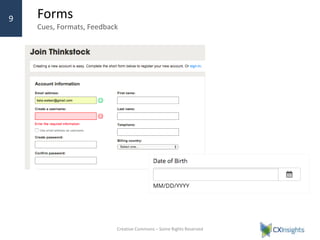
Forms
Cues, Formats, Feedback
› You can also quickly stand up forms to collect
information such as Contact Us, newsletter
subscription, registration, or application
information using Drupal’s Ctools and various
frameworks and plug-ins, like Contact Form 7.
› Many offer support to let you include required
indicators, date picker widgets, and informative
text near the fields to help users know what
format is needed.
Creative Commons – Some Rights Reserved
9
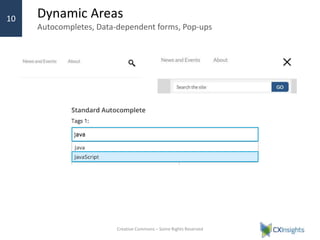
Dynamic Areas
Autocompletes, Data-dependent forms, Pop-ups
› Functionality like autocomplete, typeahead search
/ results, data-driven forms are popping up across
sites.
Creative Commons – Some Rights Reserved
10
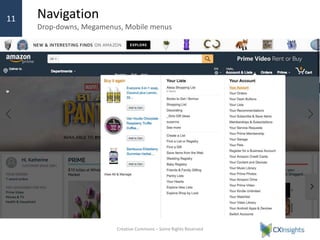
Navigation
Drop-downs, Megamenus, Mobile menus
› Menu trends totally collapsed menus and that
drop-down menus that are only available on hover
Creative Commons – Some Rights Reserved
11
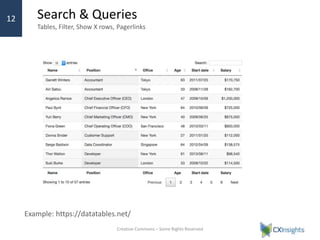
Search & Queries
Tables, Filter, Show X rows, Pagerlinks
Creative Commons – Some Rights Reserved
12
Example: https://datatables.net/
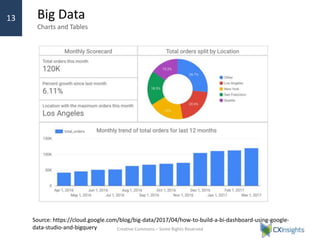
Big Data
Charts and Tables
New and easier to leverage chart libraries are giving
organizations quick and easy ways to show big data in
charts and scorecards.
Creative Commons – Some Rights Reserved
13
Source: https://cloud.google.com/blog/big-data/2017/04/how-to-build-a-bi-dashboard-using-google-
data-studio-and-bigquery
» Lessons Learned
14
Photo credit: “Caution Falling Hardware,” fdecomite
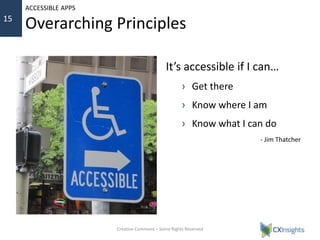
It’s accessible if I can…
› Get there
› Know where I am
› Know what I can do
- Jim Thatcher
Creative Commons – Some Rights Reserved
15
ACCESSIBLE APPS
Overarching Principles
FOR FRAMEWORKS
Accessible content’s easy(er)…
› Content headings
› Labels for basic fields
› Table headings
› Skip to main content
Creative Commons – Some Rights Reserved
16
WHEN USING FRAMEWORKS
Richer content and interactions fell short
1. Title, not alt attribute, was default text
for media
2. Tables pasted in from Word lost
headings
3. Keyboard and speech recognition had
less support
4. Accessible rich Internet application
(ARIA) support to provide context, info
varied
› Good for menus
› Lacking for autocomplete and dynamic
widgets
Creative Commons – Some Rights Reserved
17
DEMO
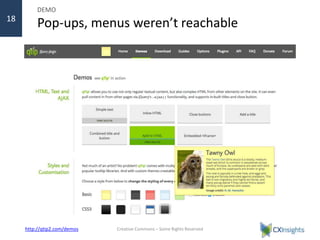
Pop-ups, menus weren’t reachable
› Websites with pop-ups for tooltips, navigation
menus, and modals and dialogs weren’t always
reachable by keyboard.
Creative Commons – Some Rights Reserved
18
http://qtip2.com/demos
LESSONS LEARNED
Add key listeners, focus management
› Add keyboard alternative for click and hover events
– Use native <a href> and interactive elements (button, etc.) when possible
– Level 1 menu links sometimes removed href that provides keyboard support
– Add hover only after keyboard handled
› Verify that focus outline available
› Set focus when open pop-up
windows and dialogs
› Provide a11y info via Help,
offscreen text, or ARIA
Creative Commons – Some Rights Reserved
19
DEMO
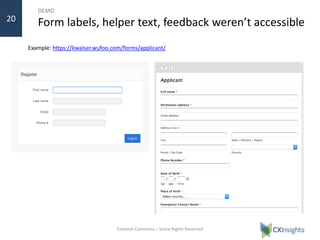
Form labels, helper text, feedback weren’t accessible
Example: https://kwalser.wufoo.com/forms/applicant/
Creative Commons – Some Rights Reserved
20
LESSONS LEARNED
Adjust rendering of labels, helper text with ARIA, listeners
› Adjust out of box required field settings
– Change the symbol * to the word Required
– Add required attribute to field
$form[$key]['#attributes']['required'] =
'required';
› Assign field descriptions to fields
– $form['account']['mail']['#attributes'] = array(
'disabled' => 'disabled',
'aria-describedby' => 'email-helptext');
› Adjust code for custom items
– aria-haspopup or aria-controls when forms
and other options open in dialogs
– aria-live for things like character counts
Creative Commons – Some Rights Reserved
21
LESSONS LEARNED
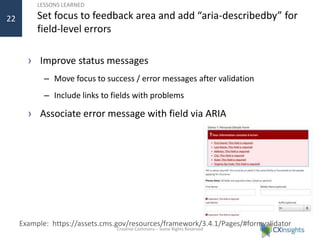
Set focus to feedback area and add “aria-describedby” for
field-level errors
› Improve status messages
– Move focus to success / error messages after validation
– Include links to fields with problems
› Associate error message with field via ARIA
Creative Commons – Some Rights Reserved
22
Example: https://assets.cms.gov/resources/framework/3.4.1/Pages/#formvalidator
DEMO
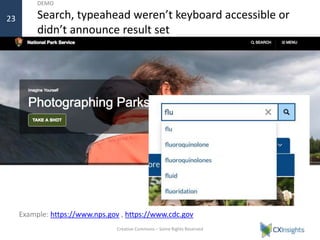
Search, typeahead weren’t keyboard accessible or
didn’t announce result set
Creative Commons – Some Rights Reserved
23
Example: https://www.nps.gov , https://www.cdc.gov
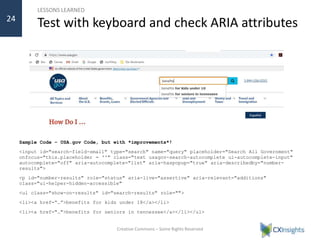
• Where input fields offer
typeahead functionality, use
ARIA and event listeners if
needed to enable focus to
move to the list as soon as
it’s available.
• Include the empty div /
container in the code on
page load and position it
immediately after the
search box to minimize
extra work.
Creative Commons – Some Rights Reserved
24
LESSONS LEARNED
Test with keyboard and check ARIA attributes
Sample Code – USA.gov Code, but with *improvements*!
<input id="search-field-small" type="search" name="query" placeholder="Search All Government"
onfocus="this.placeholder = ''" class="text usagov-search-autocomplete ui-autocomplete-input"
autocomplete="off" aria-autocomplete="list" aria-haspopup="true" aria-describedby="number-
results">
<p id="number-results" role="status" aria-live="assertive" aria-relevant="additions"
class="ui-helper-hidden-accessible"
<ul class="show-on-results" id="search-results" role="">
<li><a href=“…”>benefits for kids under 18</a></li>
<li><a href="…">benefits for seniors in tennessee</a></li></ul>
LESSONS LEARNED
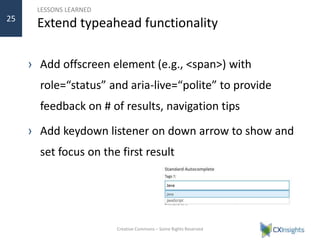
Extend typeahead functionality
› Add offscreen element (e.g., <span>) with
role=“status” and aria-live=“polite” to provide
feedback on # of results, navigation tips
› Add keydown listener on down arrow to show and
set focus on the first result
Creative Commons – Some Rights Reserved
25
DEMO
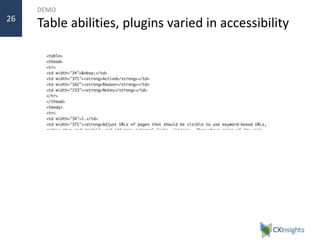
Table abilities, plugins varied in accessibility26
LESSONS LEARNED
Pick accessible libraries and tweak as needed
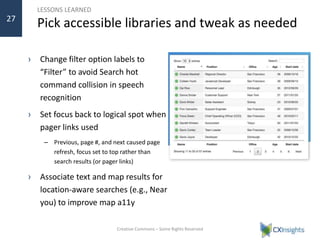
› Change filter option labels to
“Filter” to avoid Search hot
command collision in speech
recognition
› Set focus back to logical spot when
pager links used
– Previous, page #, and next caused page
refresh, focus set to top rather than
search results (or pager links)
› Associate text and map results for
location-aware searches (e.g., Near
you) to improve map a11y
Creative Commons – Some Rights Reserved
27
DEMO
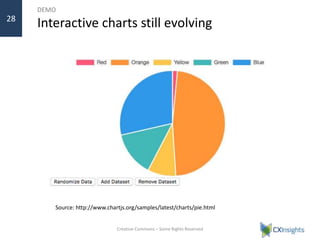
Interactive charts still evolving
Creative Commons – Some Rights Reserved
28
Source: http://www.chartjs.org/samples/latest/charts/pie.html
LESSONS LEARNED
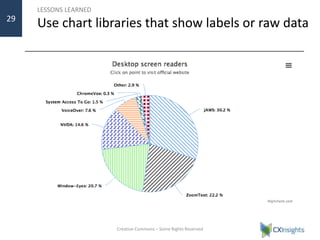
Use chart libraries that show labels or raw data
Creative Commons – Some Rights Reserved
29
LESSONS LEARNED
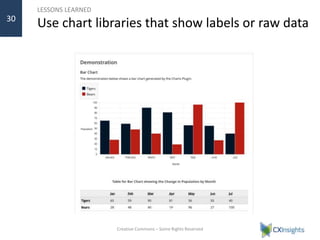
Use chart libraries that show labels or raw data
Creative Commons – Some Rights Reserved
30
GROUP EXERCISE #1
» Triage your site
› Look at menus, tables, interactive sliders, carousels, media,
search
› Watch for contact, registration, application forms
› How would you describe the items to a user who couldn’t see
the screen?
› If you had to tell Siri what to do, what would you say?
31
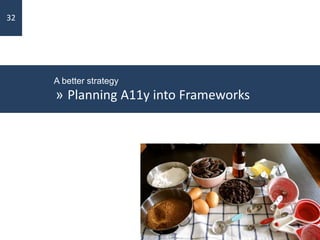
A better strategy
» Planning A11y into Frameworks
32
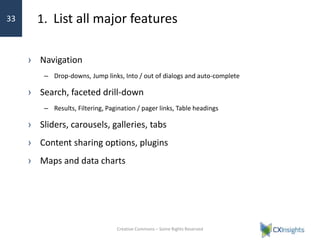
1. List all major features
› Navigation
– Drop-downs, Jump links, Into / out of dialogs and auto-complete
› Search, faceted drill-down
– Results, Filtering, Pagination / pager links, Table headings
› Sliders, carousels, galleries, tabs
› Content sharing options, plugins
› Maps and data charts
Creative Commons – Some Rights Reserved
33
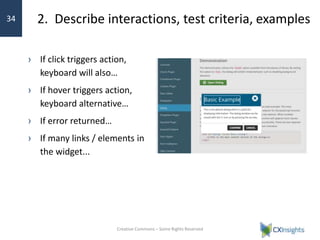
2. Describe interactions, test criteria, examples
› If click triggers action,
keyboard will also…
› If hover triggers action,
keyboard alternative…
› If error returned…
› If many links / elements in
the widget...
Creative Commons – Some Rights Reserved
34
3. Envision rendered code and review API
› How should the final code look to be accessible?
– <label for=“fieldID”>…
<input id=”fieldID” type…>
› Check the API to see how to generate that code
› Read HTML4 vs. HTML5 differences
– HTML4: Structure assistive technologies (AT) liked
<h2>A Heading</h2><div><p>…</p></div>
– HTML5: Anything goes – can sometimes break / do strange things with AT
<a href=“…”>…<h2><div>…</div></h2></a>
› Create standards for developers
– Unique ID – no duplicate IDs in rendered code
Creative Commons – Some Rights Reserved
35
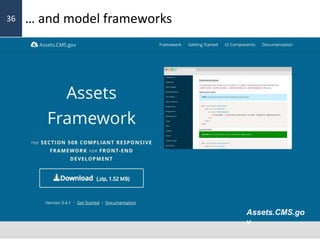
… and model frameworks
› Check frameworks like Assets.CMS.gov for code
examples
Creative Commons – Some Rights Reserved
36
Assets.CMS.go
v
4. Prioritize elements with native interactions
› Start with native interactions
– <a href…>, <button>…
› Find libraries, frameworks that emphasize keyboard
accessibility
› Only use mouse-related listeners for non-critical
interactions
› Try interacting from different devices
– Keyboard only
– Mobile
Creative Commons – Some Rights Reserved
37
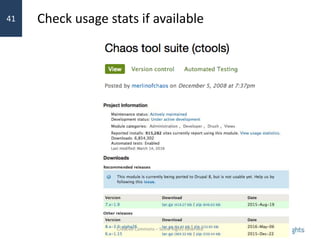
5. Choose tools with large communities
› Look at downloads, usage, active maintenance
› Check keyboard listener options, ARIA
› Find resources on StackOverflow, Quora, JSFiddle.net, CodePen.io
– site:codepen.io +aria +example +jquery/drupal/wp
– site:jsfiddle.net +aria +example +jquery/drupal/wp
– site:jsbin.com +aria +example +jquery/drupal/wp
› Google site:frameworkname +accessibility +…
– “How do I”
– Keyboard access
Creative Commons – Some Rights Reserved
38
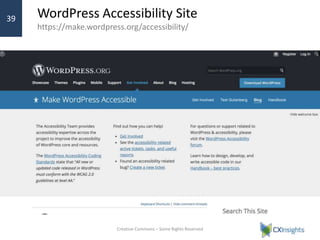
WordPress Accessibility Site
https://make.wordpress.org/accessibility/
› WordPress’s accessibility site includes resources for
creating accessible plugins and themes.
Creative Commons – Some Rights Reserved
39
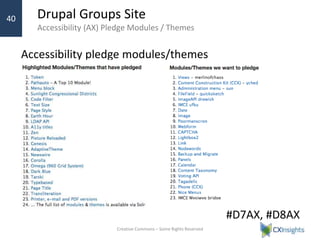
Drupal Groups Site
Accessibility (AX) Pledge Modules / Themes
› Drupal Group’s site lists modules and themes that
have pledge to be accessible and those that the
community wishes would take the pledge.
Creative Commons – Some Rights Reserved
40
Drupal has made a pledge to accessibility, to make both its core framework
accessible and challenge module and theme developers to take an accessibility
pledge. This means they will “try” to make their products accessible.
Accessibility pledge modules/themes
#D7AX, #D8AX
Check usage stats if available
Creative Commons – Some Rights Reserved
41
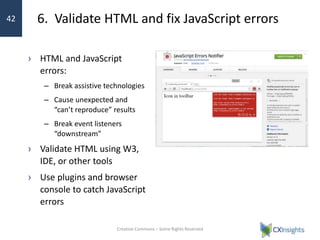
6. Validate HTML and fix JavaScript errors
› HTML and JavaScript
errors:
– Break assistive technologies
– Cause unexpected and
“can’t reproduce” results
– Break event listeners
“downstream”
› Validate HTML using W3,
IDE, or other tools
› Use plugins and browser
console to catch JavaScript
errors
Creative Commons – Some Rights Reserved
42
7. Do a quick check
› Can you navigate using the keyboard? (Tab key)
› Are any menus keyboard-accessible, either with Enter or
Spacebar key on parent? Can you reach any pop-ups?
› Do form elements wrap labels in <label> tags?
› Do any dynamic elements have aria-* attributes in the
code?
› Do dynamic elements that return information or results
relate the element with the results?
Creative Commons – Some Rights Reserved
43
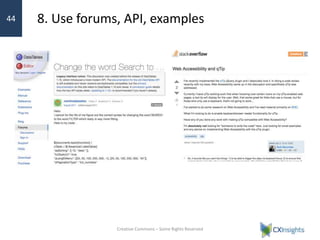
8. Use forums, API, examples
› Many JavaScript libraries document their APIs and
options
› Look for examples to see if and how you can
change things like labels, event listeners, and other
options
› Check forums like StackOverflow and others to see
if others experienced same issue
Creative Commons – Some Rights Reserved
44
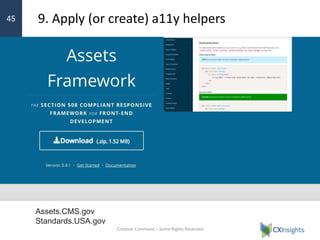
› Look for accessibility frameworks that extend the
functionality or provide examples of how to make it
accessible
9. Apply (or create) a11y helpers
Creative Commons – Some Rights Reserved
45
Assets.CMS.gov
Standards.USA.gov
GROUP EXERCISE #2
» Go back to your site (or a site)
› How would you describe those items and test them?
› What would you want to add, look for to improve accessibility?
46
Useful a11y resources
› Knowbility Developer Resources
– Includes links to browser add-ons and favelets –
https://air-rallies.org/developer-resources/
› Center for Medicare & Medicaid Services
– Assets.cms.gov – Accessibility framework
– Medicare.gov – Accessible website
› Browser add-ons
– Check Chrome, Firefox, IE plugins, extensions
Creative Commons – Some Rights Reserved
47
Exemplar Sites
› Knowbility.org
› WCAG
› Assets.CMS.gov
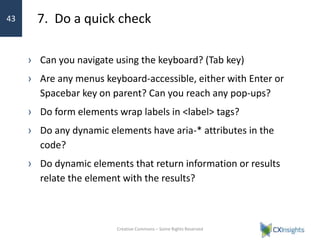
› WebAIM.org
› Playbook.CIO.gov
› Standards.USA.gov
› Bootstrap-vue.js.org/docs/components
Creative Commons – Some Rights Reserved
48
Summary
• Rich, interactive elements present greatest challenge
• “Quick check” of plugin, module, library accessibility helps
• Describe how interactions should work and find examples
49
Contact
Kate Walser
kwalser@cxinsights.com • @kwalser
50

Surviving Dev Frameworks 2019

  • 1.
    SURVIVING DEV FRAMEWORKS: LESSONSLEARNED WITH DRUPAL, WORDPRESS, JQUERY, AND MORE Kate Walser • CX Insights kwalser@cxinsights.com • @kwalser Slides @ https://www.slideshare.net/kwalser
  • 2.
    CHALLENGE Costly commercial software ›As the market crashed in the late 1990s and early 2000s and the recession hit, agencies and businesses were finding ways to cut costs. Creative Commons – Some Rights Reserved 2 Image credit: “Piggy Banks with savings chart,” by managementwritingsolutions Flickr Creative Commons
  • 3.
  • 4.
    TRENDING Frameworks & OpenSource Creative Commons – Some Rights Reserved 4 Logos and trademarks courtesy of Oracle, Microsoft, Drupal, and WordPress. All product and company names are trademarks™ or registered® trademarks of their respective holders. Use of them does not imply any affiliation with or endorsement by them.
  • 5.
    THE PROMISE Powerful, Quickerto build apps Creative Commons – Some Rights Reserved 5
  • 6.
    THE SIDE EFFECT Blackbox accessibility Creative Commons – Some Rights Reserved 6
  • 7.
    » More ComplexUser Experiences 7
  • 8.
    Content Management Publish, Edit,Approve › WordPress, Drupal, Joomla, Grav, SharePoint and other content management tools let organizations build websites quickly and manage content easily. The built-in options out of box for most of them include the ability to tag content with headings, used by assistive technologies. › Content owners can also insert media, and in some better designed tools like WordPress, add alternative text. Creative Commons – Some Rights Reserved 8
  • 9.
    Forms Cues, Formats, Feedback ›You can also quickly stand up forms to collect information such as Contact Us, newsletter subscription, registration, or application information using Drupal’s Ctools and various frameworks and plug-ins, like Contact Form 7. › Many offer support to let you include required indicators, date picker widgets, and informative text near the fields to help users know what format is needed. Creative Commons – Some Rights Reserved 9
  • 10.
    Dynamic Areas Autocompletes, Data-dependentforms, Pop-ups › Functionality like autocomplete, typeahead search / results, data-driven forms are popping up across sites. Creative Commons – Some Rights Reserved 10
  • 11.
    Navigation Drop-downs, Megamenus, Mobilemenus › Menu trends totally collapsed menus and that drop-down menus that are only available on hover Creative Commons – Some Rights Reserved 11
  • 12.
    Search & Queries Tables,Filter, Show X rows, Pagerlinks Creative Commons – Some Rights Reserved 12 Example: https://datatables.net/
  • 13.
    Big Data Charts andTables New and easier to leverage chart libraries are giving organizations quick and easy ways to show big data in charts and scorecards. Creative Commons – Some Rights Reserved 13 Source: https://cloud.google.com/blog/big-data/2017/04/how-to-build-a-bi-dashboard-using-google- data-studio-and-bigquery
  • 14.
    » Lessons Learned 14 Photocredit: “Caution Falling Hardware,” fdecomite
  • 15.
    It’s accessible ifI can… › Get there › Know where I am › Know what I can do - Jim Thatcher Creative Commons – Some Rights Reserved 15 ACCESSIBLE APPS Overarching Principles
  • 16.
    FOR FRAMEWORKS Accessible content’seasy(er)… › Content headings › Labels for basic fields › Table headings › Skip to main content Creative Commons – Some Rights Reserved 16
  • 17.
    WHEN USING FRAMEWORKS Richercontent and interactions fell short 1. Title, not alt attribute, was default text for media 2. Tables pasted in from Word lost headings 3. Keyboard and speech recognition had less support 4. Accessible rich Internet application (ARIA) support to provide context, info varied › Good for menus › Lacking for autocomplete and dynamic widgets Creative Commons – Some Rights Reserved 17
  • 18.
    DEMO Pop-ups, menus weren’treachable › Websites with pop-ups for tooltips, navigation menus, and modals and dialogs weren’t always reachable by keyboard. Creative Commons – Some Rights Reserved 18 http://qtip2.com/demos
  • 19.
    LESSONS LEARNED Add keylisteners, focus management › Add keyboard alternative for click and hover events – Use native <a href> and interactive elements (button, etc.) when possible – Level 1 menu links sometimes removed href that provides keyboard support – Add hover only after keyboard handled › Verify that focus outline available › Set focus when open pop-up windows and dialogs › Provide a11y info via Help, offscreen text, or ARIA Creative Commons – Some Rights Reserved 19
  • 20.
    DEMO Form labels, helpertext, feedback weren’t accessible Example: https://kwalser.wufoo.com/forms/applicant/ Creative Commons – Some Rights Reserved 20
  • 21.
    LESSONS LEARNED Adjust renderingof labels, helper text with ARIA, listeners › Adjust out of box required field settings – Change the symbol * to the word Required – Add required attribute to field $form[$key]['#attributes']['required'] = 'required'; › Assign field descriptions to fields – $form['account']['mail']['#attributes'] = array( 'disabled' => 'disabled', 'aria-describedby' => 'email-helptext'); › Adjust code for custom items – aria-haspopup or aria-controls when forms and other options open in dialogs – aria-live for things like character counts Creative Commons – Some Rights Reserved 21
  • 22.
    LESSONS LEARNED Set focusto feedback area and add “aria-describedby” for field-level errors › Improve status messages – Move focus to success / error messages after validation – Include links to fields with problems › Associate error message with field via ARIA Creative Commons – Some Rights Reserved 22 Example: https://assets.cms.gov/resources/framework/3.4.1/Pages/#formvalidator
  • 23.
    DEMO Search, typeahead weren’tkeyboard accessible or didn’t announce result set Creative Commons – Some Rights Reserved 23 Example: https://www.nps.gov , https://www.cdc.gov
  • 24.
    • Where inputfields offer typeahead functionality, use ARIA and event listeners if needed to enable focus to move to the list as soon as it’s available. • Include the empty div / container in the code on page load and position it immediately after the search box to minimize extra work. Creative Commons – Some Rights Reserved 24 LESSONS LEARNED Test with keyboard and check ARIA attributes Sample Code – USA.gov Code, but with *improvements*! <input id="search-field-small" type="search" name="query" placeholder="Search All Government" onfocus="this.placeholder = ''" class="text usagov-search-autocomplete ui-autocomplete-input" autocomplete="off" aria-autocomplete="list" aria-haspopup="true" aria-describedby="number- results"> <p id="number-results" role="status" aria-live="assertive" aria-relevant="additions" class="ui-helper-hidden-accessible" <ul class="show-on-results" id="search-results" role=""> <li><a href=“…”>benefits for kids under 18</a></li> <li><a href="…">benefits for seniors in tennessee</a></li></ul>
  • 25.
    LESSONS LEARNED Extend typeaheadfunctionality › Add offscreen element (e.g., <span>) with role=“status” and aria-live=“polite” to provide feedback on # of results, navigation tips › Add keydown listener on down arrow to show and set focus on the first result Creative Commons – Some Rights Reserved 25
  • 26.
    DEMO Table abilities, pluginsvaried in accessibility26
  • 27.
    LESSONS LEARNED Pick accessiblelibraries and tweak as needed › Change filter option labels to “Filter” to avoid Search hot command collision in speech recognition › Set focus back to logical spot when pager links used – Previous, page #, and next caused page refresh, focus set to top rather than search results (or pager links) › Associate text and map results for location-aware searches (e.g., Near you) to improve map a11y Creative Commons – Some Rights Reserved 27
  • 28.
    DEMO Interactive charts stillevolving Creative Commons – Some Rights Reserved 28 Source: http://www.chartjs.org/samples/latest/charts/pie.html
  • 29.
    LESSONS LEARNED Use chartlibraries that show labels or raw data Creative Commons – Some Rights Reserved 29
  • 30.
    LESSONS LEARNED Use chartlibraries that show labels or raw data Creative Commons – Some Rights Reserved 30
  • 31.
    GROUP EXERCISE #1 »Triage your site › Look at menus, tables, interactive sliders, carousels, media, search › Watch for contact, registration, application forms › How would you describe the items to a user who couldn’t see the screen? › If you had to tell Siri what to do, what would you say? 31
  • 32.
    A better strategy »Planning A11y into Frameworks 32
  • 33.
    1. List allmajor features › Navigation – Drop-downs, Jump links, Into / out of dialogs and auto-complete › Search, faceted drill-down – Results, Filtering, Pagination / pager links, Table headings › Sliders, carousels, galleries, tabs › Content sharing options, plugins › Maps and data charts Creative Commons – Some Rights Reserved 33
  • 34.
    2. Describe interactions,test criteria, examples › If click triggers action, keyboard will also… › If hover triggers action, keyboard alternative… › If error returned… › If many links / elements in the widget... Creative Commons – Some Rights Reserved 34
  • 35.
    3. Envision renderedcode and review API › How should the final code look to be accessible? – <label for=“fieldID”>… <input id=”fieldID” type…> › Check the API to see how to generate that code › Read HTML4 vs. HTML5 differences – HTML4: Structure assistive technologies (AT) liked <h2>A Heading</h2><div><p>…</p></div> – HTML5: Anything goes – can sometimes break / do strange things with AT <a href=“…”>…<h2><div>…</div></h2></a> › Create standards for developers – Unique ID – no duplicate IDs in rendered code Creative Commons – Some Rights Reserved 35
  • 36.
    … and modelframeworks › Check frameworks like Assets.CMS.gov for code examples Creative Commons – Some Rights Reserved 36 Assets.CMS.go v
  • 37.
    4. Prioritize elementswith native interactions › Start with native interactions – <a href…>, <button>… › Find libraries, frameworks that emphasize keyboard accessibility › Only use mouse-related listeners for non-critical interactions › Try interacting from different devices – Keyboard only – Mobile Creative Commons – Some Rights Reserved 37
  • 38.
    5. Choose toolswith large communities › Look at downloads, usage, active maintenance › Check keyboard listener options, ARIA › Find resources on StackOverflow, Quora, JSFiddle.net, CodePen.io – site:codepen.io +aria +example +jquery/drupal/wp – site:jsfiddle.net +aria +example +jquery/drupal/wp – site:jsbin.com +aria +example +jquery/drupal/wp › Google site:frameworkname +accessibility +… – “How do I” – Keyboard access Creative Commons – Some Rights Reserved 38
  • 39.
    WordPress Accessibility Site https://make.wordpress.org/accessibility/ ›WordPress’s accessibility site includes resources for creating accessible plugins and themes. Creative Commons – Some Rights Reserved 39
  • 40.
    Drupal Groups Site Accessibility(AX) Pledge Modules / Themes › Drupal Group’s site lists modules and themes that have pledge to be accessible and those that the community wishes would take the pledge. Creative Commons – Some Rights Reserved 40 Drupal has made a pledge to accessibility, to make both its core framework accessible and challenge module and theme developers to take an accessibility pledge. This means they will “try” to make their products accessible. Accessibility pledge modules/themes #D7AX, #D8AX
  • 41.
    Check usage statsif available Creative Commons – Some Rights Reserved 41
  • 42.
    6. Validate HTMLand fix JavaScript errors › HTML and JavaScript errors: – Break assistive technologies – Cause unexpected and “can’t reproduce” results – Break event listeners “downstream” › Validate HTML using W3, IDE, or other tools › Use plugins and browser console to catch JavaScript errors Creative Commons – Some Rights Reserved 42
  • 43.
    7. Do aquick check › Can you navigate using the keyboard? (Tab key) › Are any menus keyboard-accessible, either with Enter or Spacebar key on parent? Can you reach any pop-ups? › Do form elements wrap labels in <label> tags? › Do any dynamic elements have aria-* attributes in the code? › Do dynamic elements that return information or results relate the element with the results? Creative Commons – Some Rights Reserved 43
  • 44.
    8. Use forums,API, examples › Many JavaScript libraries document their APIs and options › Look for examples to see if and how you can change things like labels, event listeners, and other options › Check forums like StackOverflow and others to see if others experienced same issue Creative Commons – Some Rights Reserved 44
  • 45.
    › Look foraccessibility frameworks that extend the functionality or provide examples of how to make it accessible 9. Apply (or create) a11y helpers Creative Commons – Some Rights Reserved 45 Assets.CMS.gov Standards.USA.gov
  • 46.
    GROUP EXERCISE #2 »Go back to your site (or a site) › How would you describe those items and test them? › What would you want to add, look for to improve accessibility? 46
  • 47.
    Useful a11y resources ›Knowbility Developer Resources – Includes links to browser add-ons and favelets – https://air-rallies.org/developer-resources/ › Center for Medicare & Medicaid Services – Assets.cms.gov – Accessibility framework – Medicare.gov – Accessible website › Browser add-ons – Check Chrome, Firefox, IE plugins, extensions Creative Commons – Some Rights Reserved 47
  • 48.
    Exemplar Sites › Knowbility.org ›WCAG › Assets.CMS.gov › WebAIM.org › Playbook.CIO.gov › Standards.USA.gov › Bootstrap-vue.js.org/docs/components Creative Commons – Some Rights Reserved 48
  • 49.
    Summary • Rich, interactiveelements present greatest challenge • “Quick check” of plugin, module, library accessibility helps • Describe how interactions should work and find examples 49
  • 50.

Editor's Notes

  • #2 Acronyms to know A11y = accessibility WCAG = web content accessibility guidelines ARIA = accessible rich Internet application standards
  • #4 Many of us are still in an Agile world where agencies and businesses are focused on creating an initial concept and iterating on that and building
  • #5 Open source software and commercial frameworks like Drupal, WordPress, jQuery, Yahoo UI, and others have grown in popularity over the past decade. Businesses use Microsoft SharePoint and Oracle Apex used to stand up intranets and data-intensive apps.
  • #7 With today’s frameworks, creating an accessible product can feel like being locked in a jail with limited options to get out.
  • #13 Search, Tables & Filters
  • #15 Simplistic idea of accessibility as alt attributes and table headings Apps have evolved and so have the interactions users expect and accessibility options Drupal configuration WordPress settings Limitations and constraints imposed by the modules and framework Far removed from the actual code
  • #19 With several plugins and libraries, we found great support for screen reader users. Accessible rich Internet application (ARIA) standards were great
  • #20 In several tools, there’s a built in asterisk that’s included in various positions –
  • #22 In several tools, there’s a built in asterisk that’s included in various positions – Drupal 8 example: .region-header .form-required:after { background-image: url(../../images/required.svg); }
  • #24 WordPress site Search uses plugin
  • #28 In several tools, there’s a built in asterisk that’s included in various positions –
  • #29 http://www.chartjs.org/samples/latest/charts/pie.html
  • #30 https://www.highcharts.com/samples/highcharts/accessibility/accessible-pie/
  • #32 Simplistic idea of accessibility as alt attributes and table headings Apps have evolved and so have the interactions users expect and accessibility options Drupal configuration WordPress settings Limitations and constraints imposed by the modules and framework Far removed from the actual code
  • #36 HTML5 anything goes example: accents in ID attributes
  • #39 When choosing modules and plug-ins for your framework, think about support – the more popular and widely used modules tend to have more support and examples. You’ll find lots of claims of “Accessible, responsive” choices, but they’re often pretty limited and they often do the easy things. The more popular, widely-used items tend to have better out-of-box accessibility support as they applied standards / good coding and have more contributors. And if not, you’ll often be able to Google to find examples on Quora, Stack Overflow or other websites where developers ask questions.
  • #47 Simplistic idea of accessibility as alt attributes and table headings Apps have evolved and so have the interactions users expect and accessibility options Drupal configuration WordPress settings Limitations and constraints imposed by the modules and framework Far removed from the actual code