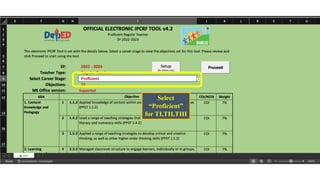
Select
“Proficient”
for TI,TII,TIII
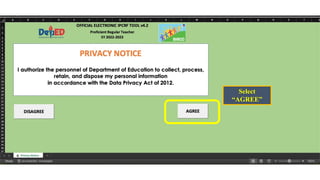
Select
“AGREE”
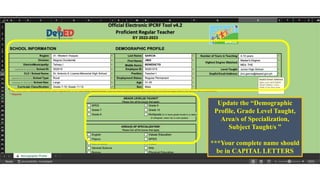
Update the “Demographic
Profile, Grade Level Taught,
Area/s of Specialization,
Subject Taught/s ”
***Your complete name should
be in CAPITAL LETTERS
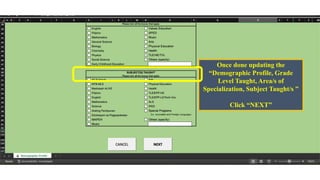
Once done updating the
“Demographic Profile, Grade
Level Taught, Area/s of
Specialization, Subject Taught/s ”
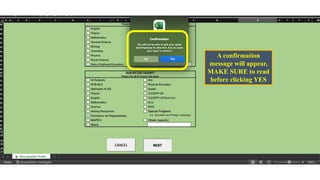
Click “NEXT”
A confirmation
message will appear,
MAKE SURE to read
before clicking YES
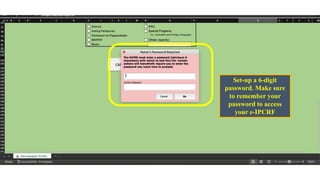
Set-up a 6-digit
password. Make sure
to remember your
password to access
your e-IPCRF
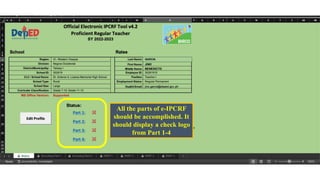
All the parts of e-IPCRF
should be accomplished. It
should display a check logo
from Part 1-4
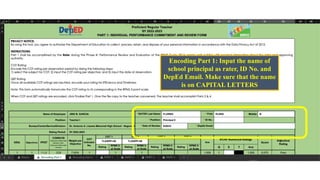
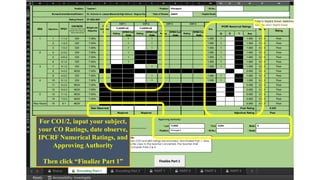
Encoding Part 1: Input the name of
school principal as rater, ID No. and
DepEd Email. Make sure that the name
is on CAPITAL LETTERS
For CO1/2, input your subject,
your CO Ratings, date observe,
IPCRF Numerical Ratings, and
Approving Authority
Then click “Finalize Part 1”
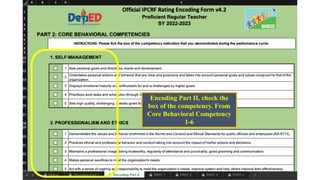
Encoding Part II, check the
box of the competency. From
Core Behavioral Competency
1-6
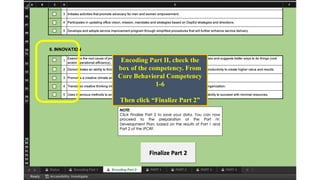
Encoding Part II, check the
box of the competency. From
Core Behavioral Competency
1-6
Then click “Finalize Part 2”
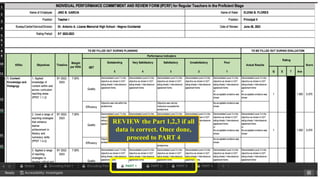
REVIEW the Part 1,2,3 if all
data is correct. Once done,
proceed to PART 4
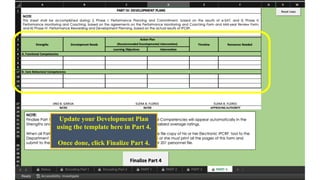
Update your Development Plan
using the template here in Part 4.
Once done, click Finalize Part 4.
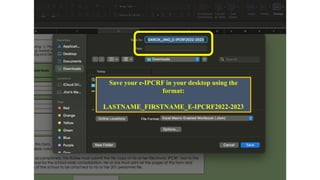
Save your e-IPCRF in your desktop using the
format:
LASTNAME_FIRSTNAME_E-IPCRF2022-2023

STEPS-TO-COMPLETE-THE-E-IPCRF-2022-2023.pdf