WELCOME
Name :-
1. Sase Aditya
2. Barde Vaibhav
3. Salgare Saish
4. Khanvilkar Vikrant
5. Bane Sourabh
Topic :-
•Analysing Data With ‘t – tEst‘
In MS – EXCEL.
Contents :-
❑INTRODUCTION
❑DATA COLLECTION
❑TYPE OF HYPOTHESIS
❑PROBLEM
❑STEP’S OF ACTIVE ANALYSIS TOOL PACK
❑STEP’S OF ‘T – TEST’ IN MS – EXCEL
❑RESULT ANALYSIS
❑CONCLUSION
❑REFERENCE
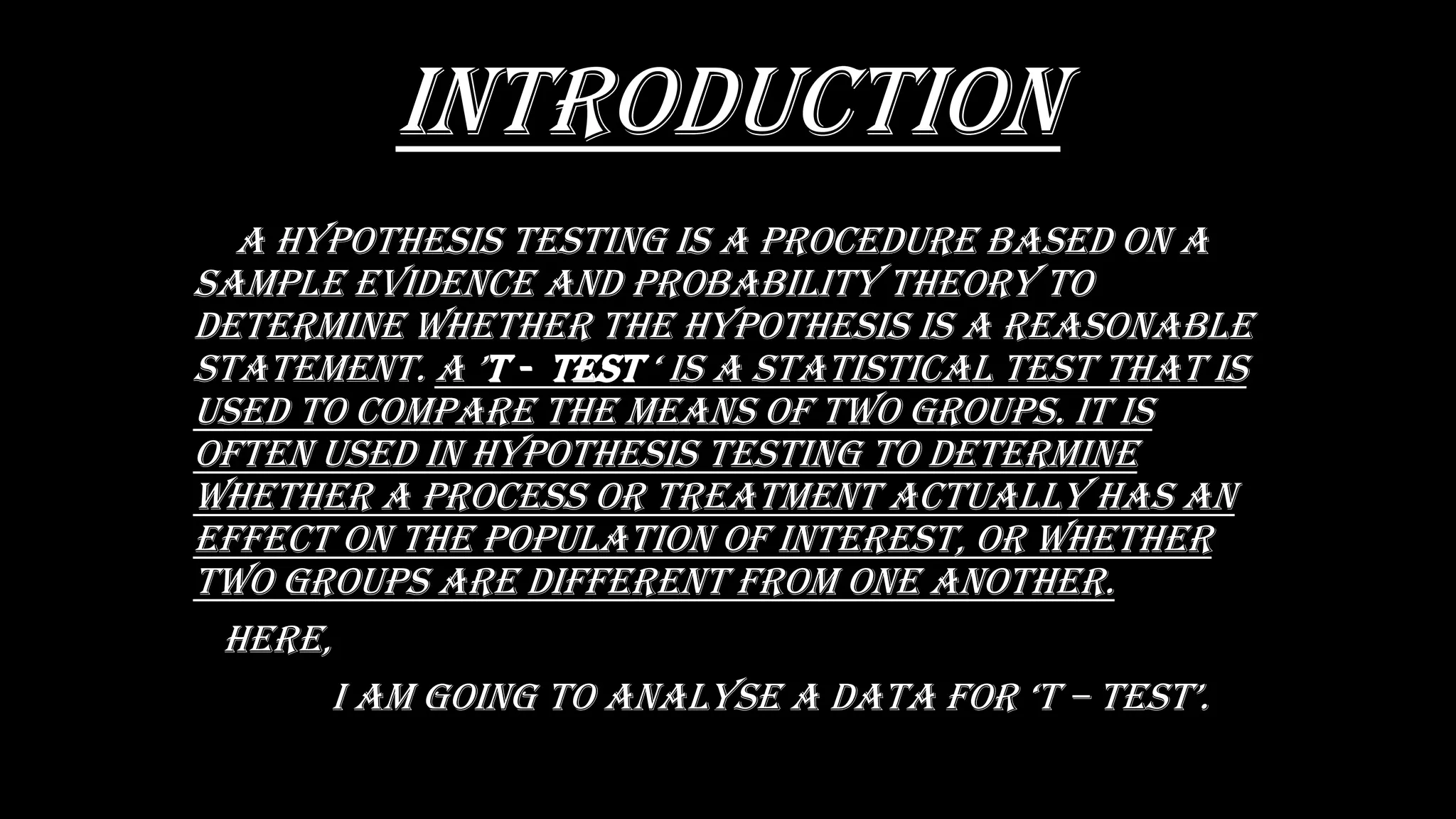
INTRODUCTION
a hypOthEsis tEsting is a prOCEDurE basED On a
saMpLE EviDEnCE anD prObabiLity thEOry tO
DEtErMinE WhEthEr thE hypOthEsis is a rEasOnabLE
statEMEnt. a ’t - tEst ‘ is a statistiCaL tEst that is
usED tO COMparE thE MEans Of tWO grOups. it is
OftEn usED in hypOthEsis tEsting tO DEtErMinE
WhEthEr a prOCEss Or trEatMEnt aCtuaLLy has an
EffECt On thE pOpuLatiOn Of intErEst, Or WhEthEr
tWO grOups arE DiffErEnt frOM OnE anOthEr.
hErE,
i aM gOing tO anaLysE a Data fOr ‘t – tEst’.
Data collection
• The following data is collected the student
SUBJECT in second year bachelor of science
(computer science) in pune university mark list in
semester iii and iv .
• THERE MARK LIST IS FOLLOWS :-
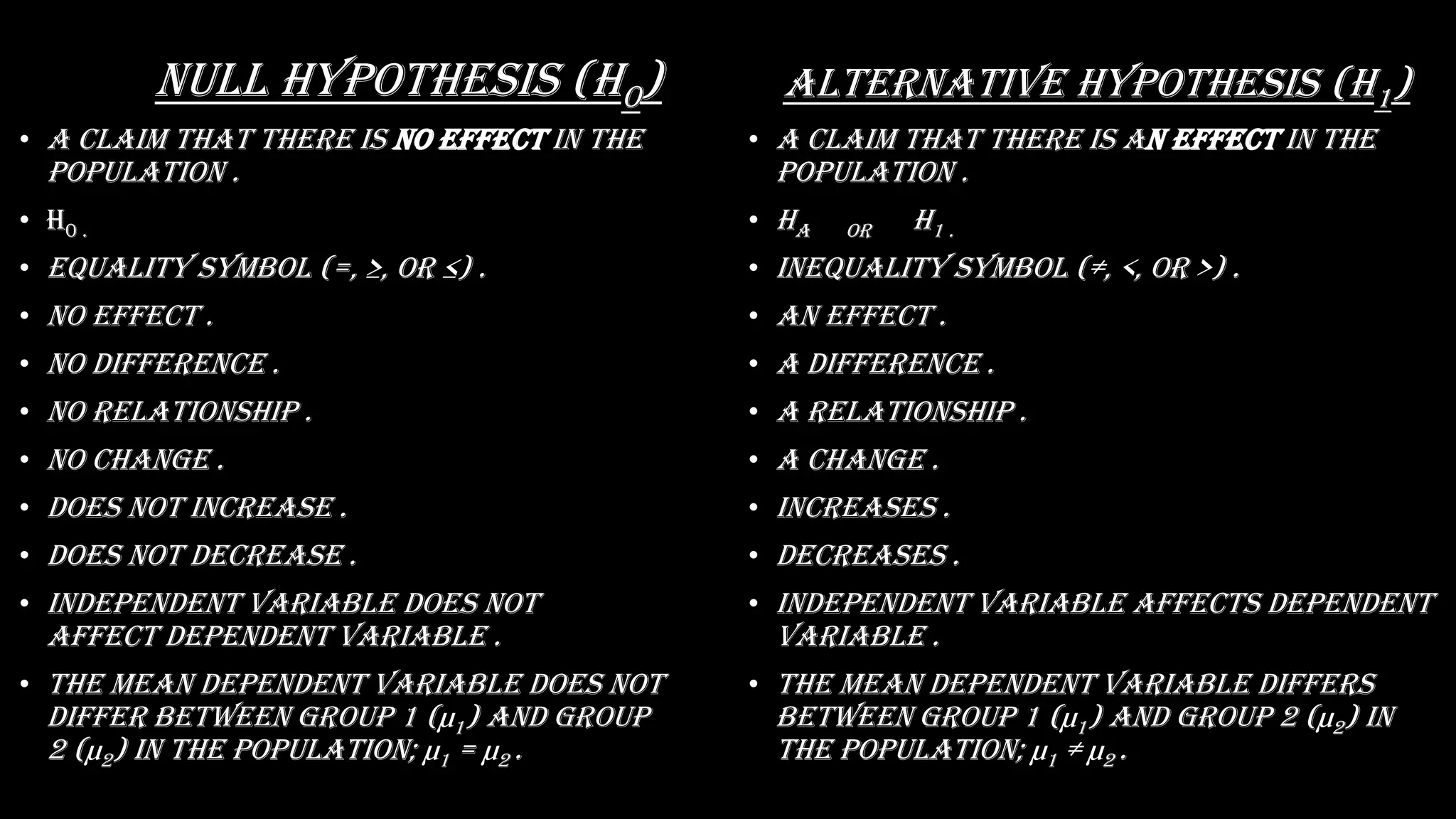
Null hypothesis (H0)
• A claim that there is no effect in the
population .
• H0 .
• EquaLity syMbOL (=, ≥, Or ≤) .
• No effect .
• No difference .
• No relationship .
• No change .
• Does not increase .
• Does not decrease .
• Independent variable does not
affect dependent variable .
• The mean dependent variable does not
differ between group 1 (µ1) and group
2 (µ2) in the population; µ1 = µ2 .
Alternative hypothesis (H1)
• A claim that there is an effect in the
population .
• Ha OR H1 .
• inEquaLity syMbOL (≠, <, Or >) .
• An effect .
• A difference .
• A relationship .
• A change .
• Increases .
• Decreases .
• Independent variable affects dependent
variable .
• The mean dependent variable differs
between group 1 (µ1) and group 2 (µ2) in
the population; µ1 ≠ µ2 .
Problem
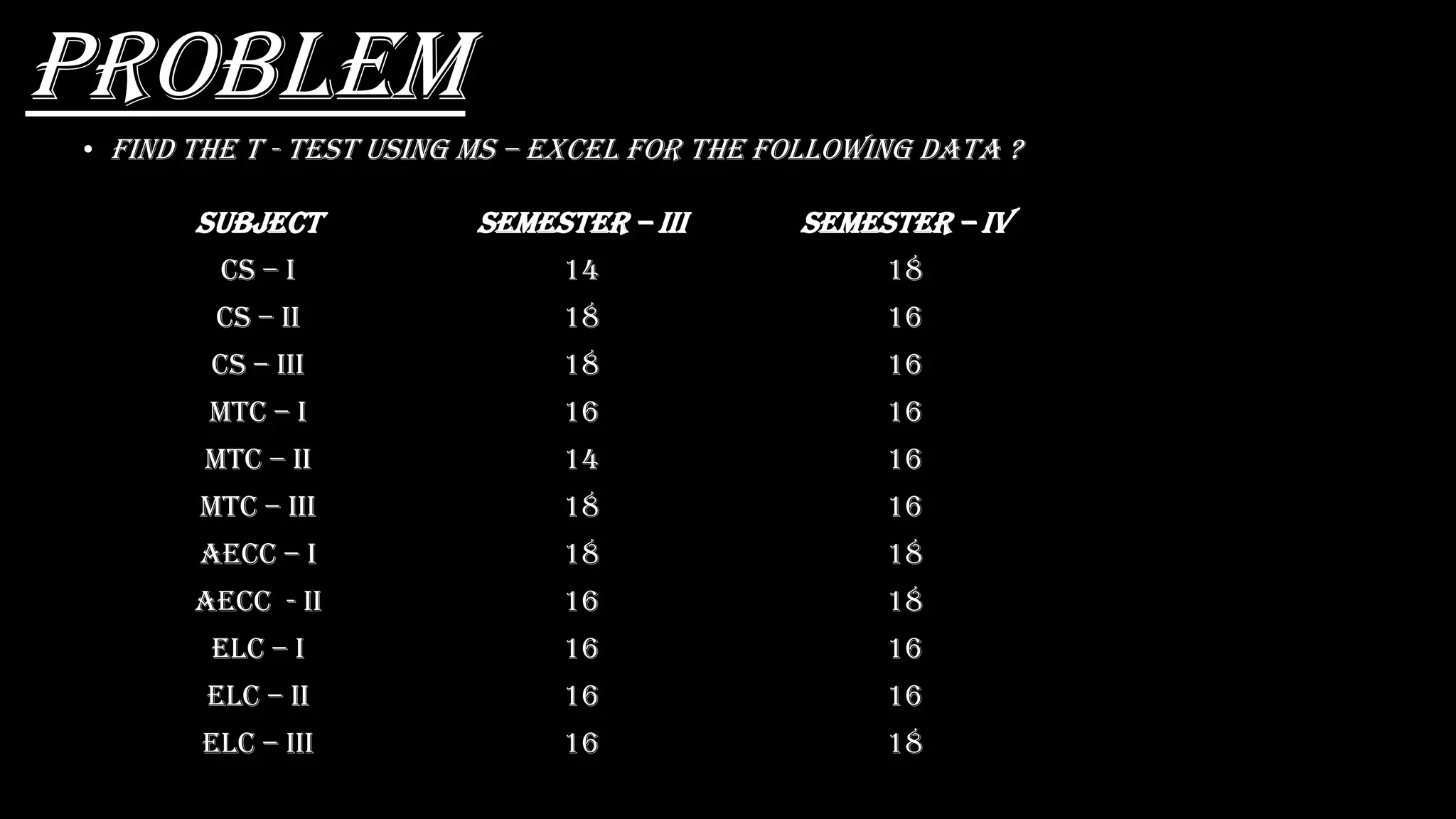
• Find the t - test using MS – EXCEL for the following data ?
subjECt Semester – Iii Semester – Iv
CS – I 14 18
CS – ii 18 16
CS – iii 18 16
MTC – I 16 16
MTC – ii 14 16
MTC – iii 18 16
Aecc – I 18 18
Aecc - ii 16 18
ELC – I 16 16
ELC – ii 16 16
ELC – iii 16 18
conditions
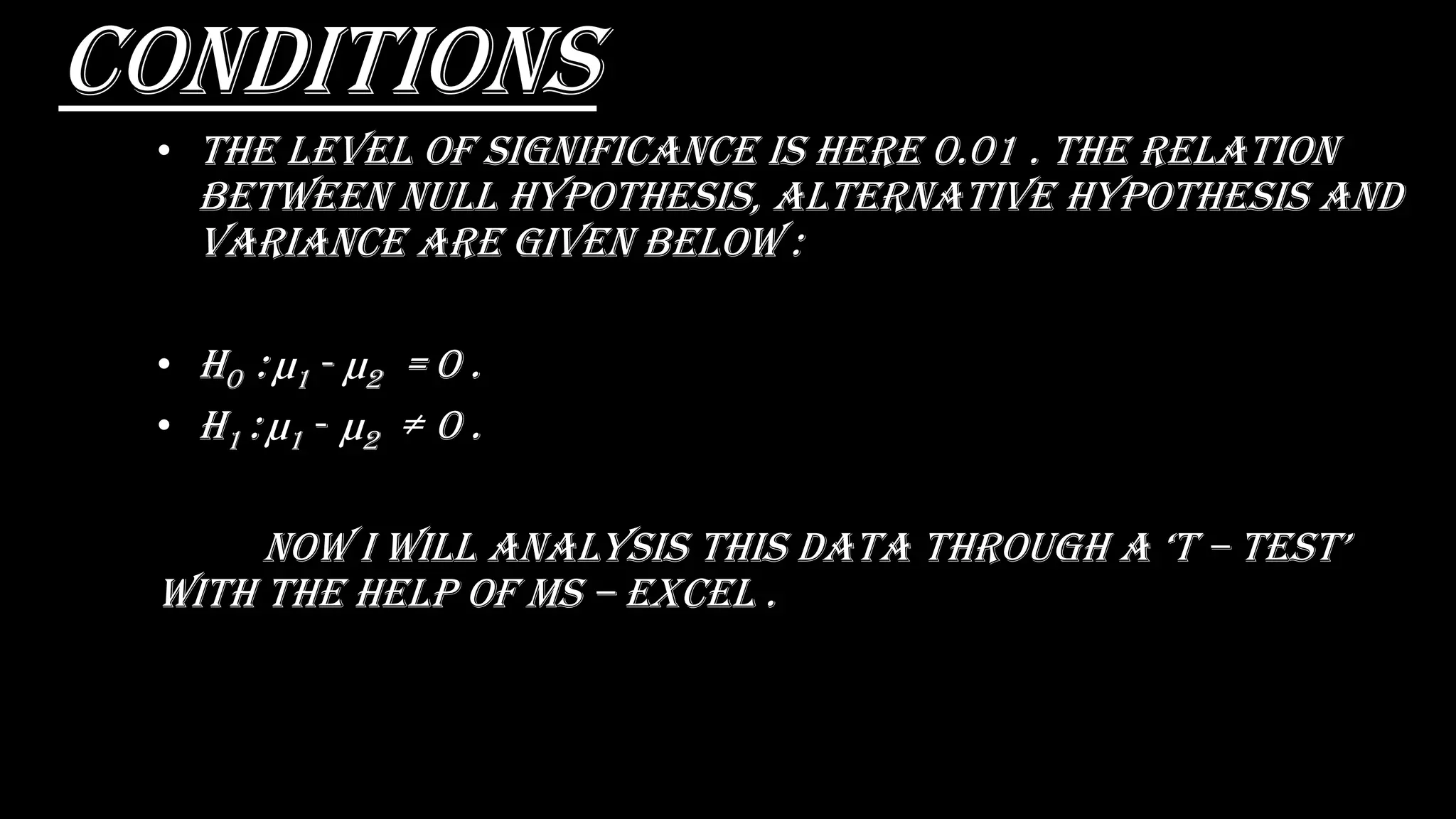
• The level of significance is here 0.01 . The relation
between Null hypothesis, alternative hypothesis and
variance are given below :
• H0 : µ1 - µ2 = 0 .
• H1 : µ1 - µ2 ≠ 0 .
nOW i WiLL anaLysis this Data thrOugh a ‘t – tEst’
with the help of ms – excel .
Opening an ms – excel
spreadsheet :-
• At first select
right button of
the mouse at any
blank space .
• sELECt thE “nEW” .
• And choose
“MiCrOsOft ExCEL
WOrkshEEt” .
• Name the
document .
stEp’s Of ‘t – tEst’
in ms – excel :-
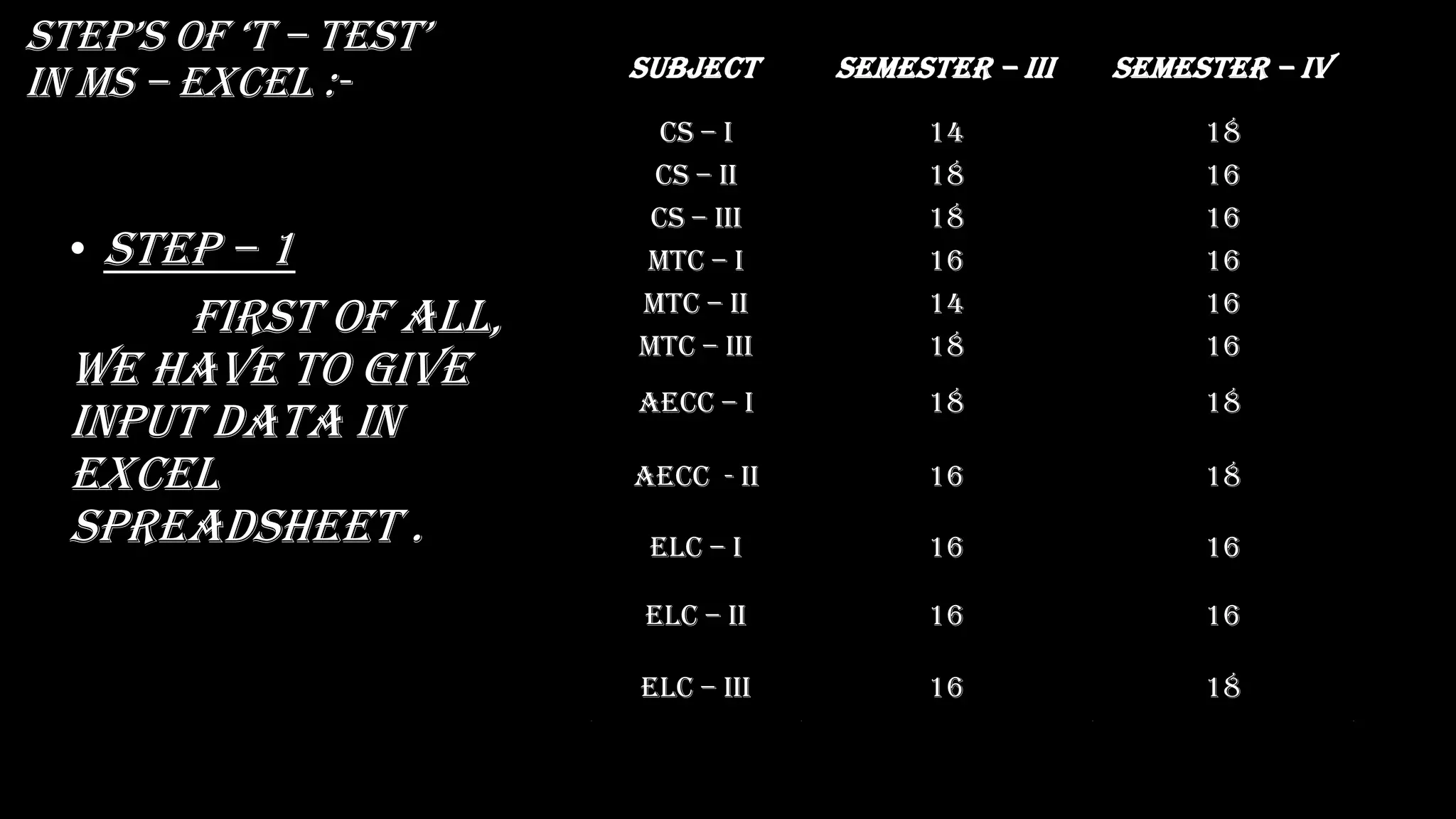
• Step – 1
First of all,
we have to give
input data in
excel
spreadsheet .
Subject sEMEstEr – iii sEMEstEr – iv
Cs – i 14 18
Cs – ii 18 16
Cs – iii 18 16
MtC – i 16 16
MtC – ii 14 16
MtC – iii 18 16
aECC – i 18 18
Aecc - ii 16 18
ELC – i 16 16
ELC – ii 16 16
ELC – iii 16 18
stEp’s Of ‘t – tEst’
in ms – excel :-
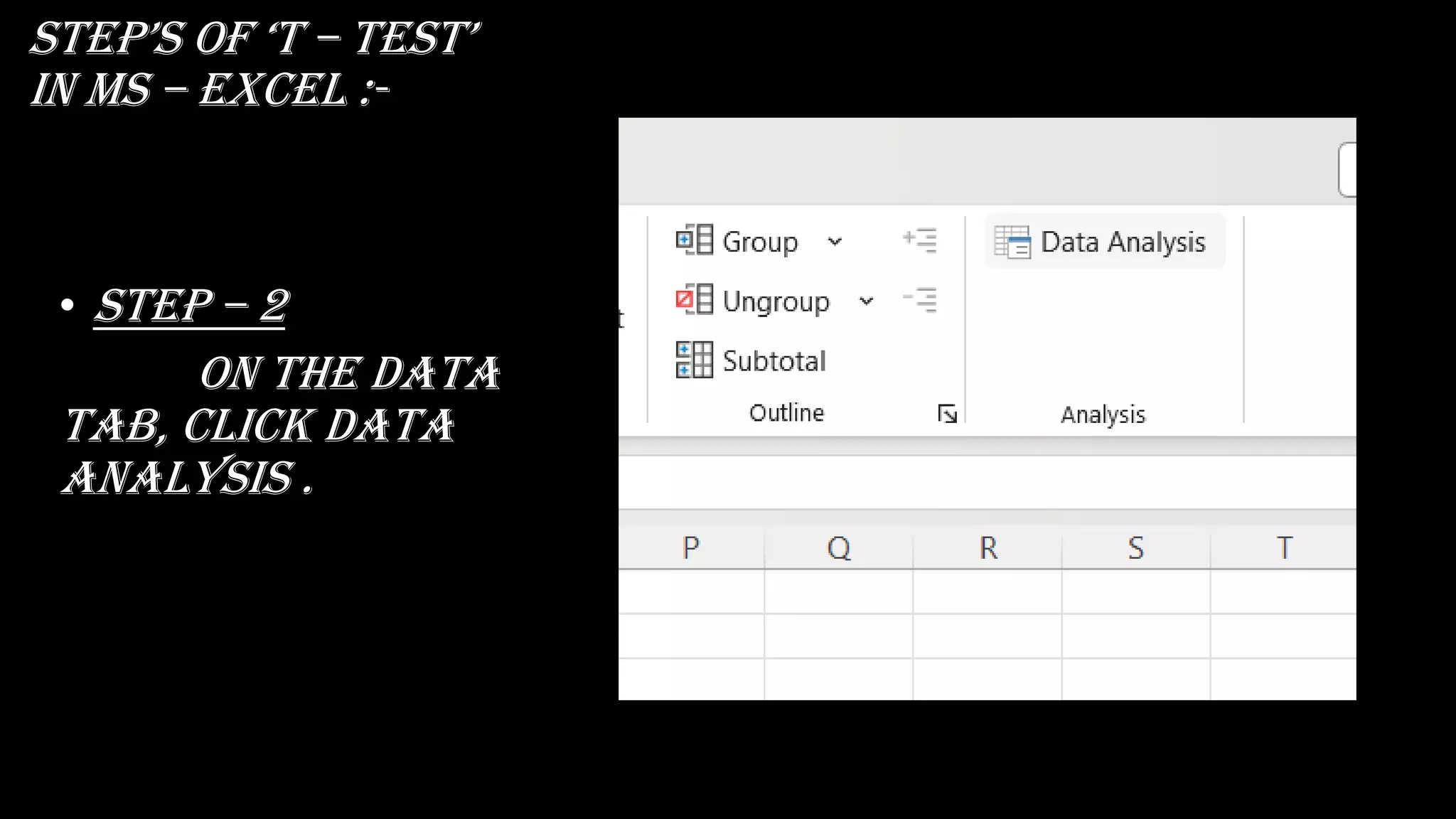
• Step – 2
on the data
tab, click data
analysis .
stEp’s Of ‘t – tEst’ in
ms – excel :-
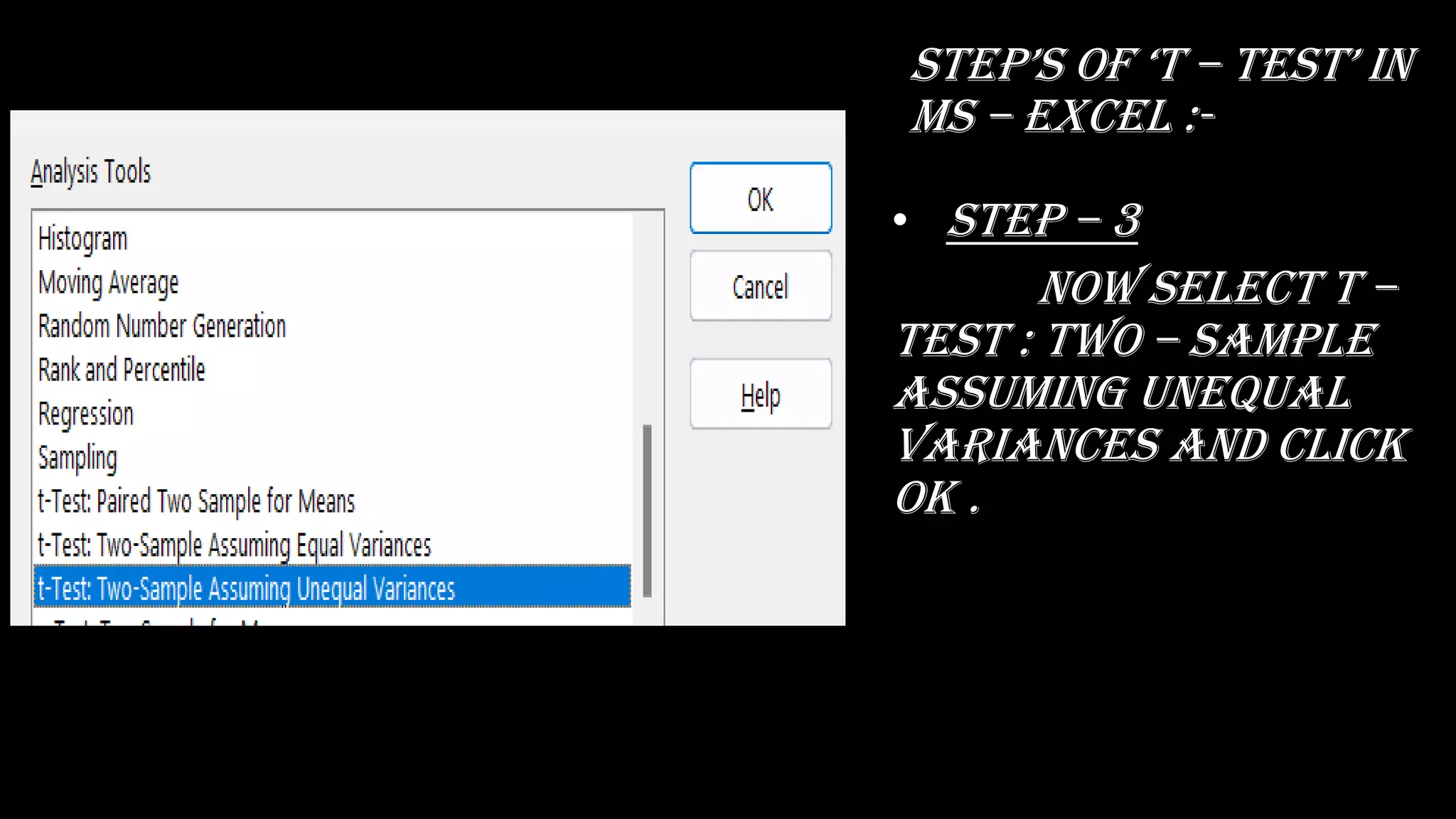
• Step – 3
now select t –
test : two – sample
assuming unequal
variances and click
ok .
stEp’s Of ‘t – tEst’
in ms – excel :-
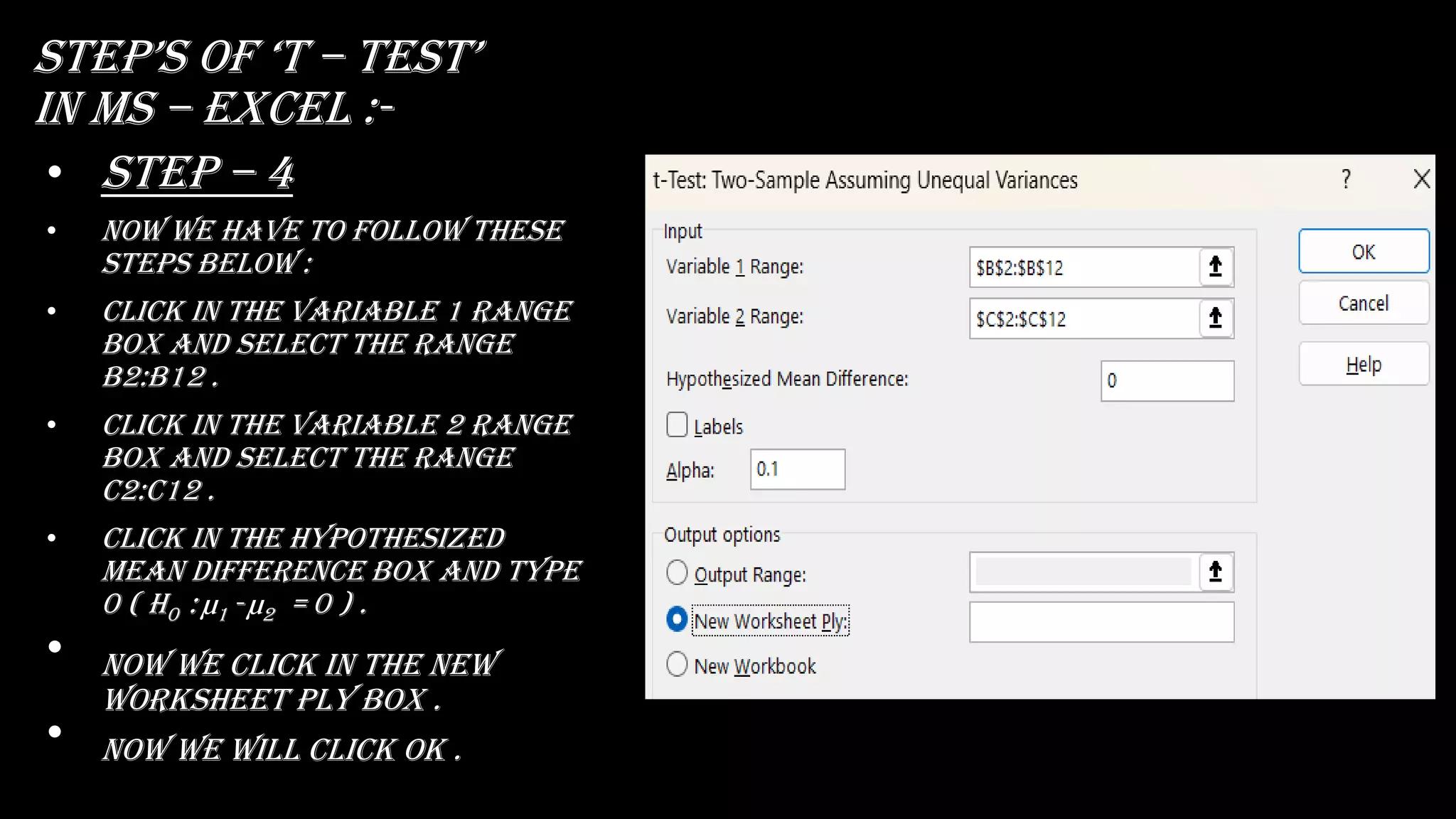
• Step – 4
• Now we have to follow these
steps below :
• Click in the variable 1 range
box and select the range
b2:b12 .
• Click in the variable 2 range
box and select the range
c2:c12 .
• Click in the hypothesized
mean difference box and type
0 ( H0 : µ1 - µ2 = 0 ) .
• now we click in the new
worksheet ply box .
• Now we will click ok .
stEp’s Of ‘t – tEst’
in ms – excel :-
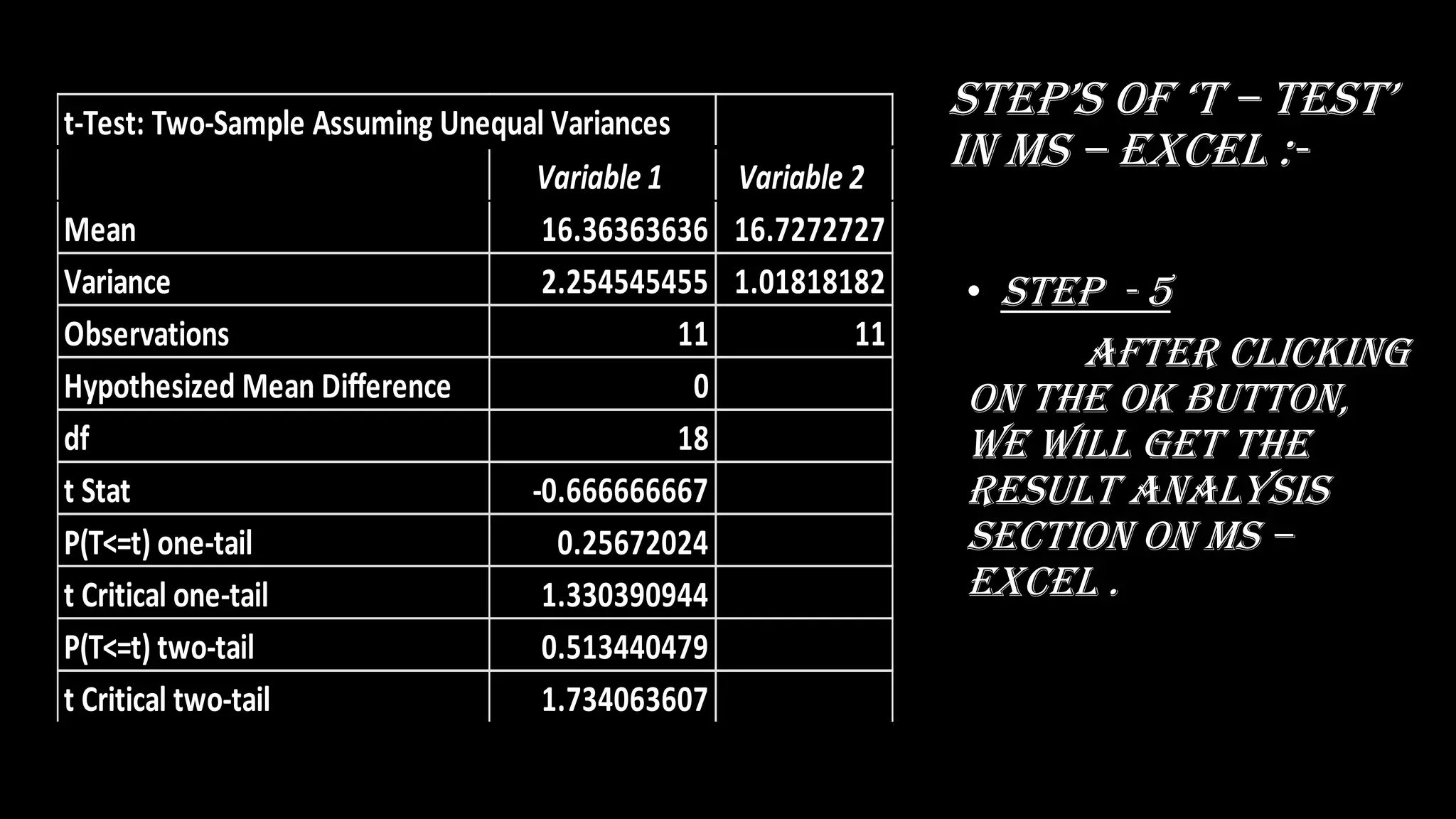
• Step - 5
after clicking
on the ok button,
we will get the
result analysis
section on ms –
excel .
t-Test: Two-Sample Assuming Unequal Variances
Variable 1 Variable 2
Mean 16.36363636 16.7272727
Variance 2.254545455 1.01818182
Observations 11 11
Hypothesized Mean Difference 0
df 18
t Stat -0.666666667
P(T<=t) one-tail 0.25672024
t Critical one-tail 1.330390944
P(T<=t) two-tail 0.513440479
t Critical two-tail 1.734063607
Analysing result
• I examined a two – tail test (inequality) .
p value = 0.5134 .
alpha = 10% = 0.1 (l.o.s.) .
∴ p vaLuE ≤ l.o.s.
0.5134 !≤ 0.1
∴ accept null hypothesis (H0) at 10% level of
significance .
∴ the subjects in semester Iii and iv may have
same mean .
Conclusion
• the subjects in semester Iii and semester iv
may have same mean .
• After analysing data through the ms –
excel, we can clearly observe the results
within a short time and effective way .
• It shows the necessary results elaborately .
• It can easily be published .
• So using the ms – excel in analysing the
hypOthEsis by ‘t – tEst’ is MuCh MOrE EffECtivE
and convenient than any other tool or
method .
REFERENCE:-
thank yOu….☺️

STATISTIC Project.pdf

  • 1.
  • 2.
    Name :- 1. SaseAditya 2. Barde Vaibhav 3. Salgare Saish 4. Khanvilkar Vikrant 5. Bane Sourabh
  • 3.
    Topic :- •Analysing DataWith ‘t – tEst‘ In MS – EXCEL.
  • 4.
    Contents :- ❑INTRODUCTION ❑DATA COLLECTION ❑TYPEOF HYPOTHESIS ❑PROBLEM ❑STEP’S OF ACTIVE ANALYSIS TOOL PACK ❑STEP’S OF ‘T – TEST’ IN MS – EXCEL ❑RESULT ANALYSIS ❑CONCLUSION ❑REFERENCE
  • 5.
    INTRODUCTION a hypOthEsis tEstingis a prOCEDurE basED On a saMpLE EviDEnCE anD prObabiLity thEOry tO DEtErMinE WhEthEr thE hypOthEsis is a rEasOnabLE statEMEnt. a ’t - tEst ‘ is a statistiCaL tEst that is usED tO COMparE thE MEans Of tWO grOups. it is OftEn usED in hypOthEsis tEsting tO DEtErMinE WhEthEr a prOCEss Or trEatMEnt aCtuaLLy has an EffECt On thE pOpuLatiOn Of intErEst, Or WhEthEr tWO grOups arE DiffErEnt frOM OnE anOthEr. hErE, i aM gOing tO anaLysE a Data fOr ‘t – tEst’.
  • 6.
    Data collection • Thefollowing data is collected the student SUBJECT in second year bachelor of science (computer science) in pune university mark list in semester iii and iv . • THERE MARK LIST IS FOLLOWS :-
  • 7.
    Null hypothesis (H0) •A claim that there is no effect in the population . • H0 . • EquaLity syMbOL (=, ≥, Or ≤) . • No effect . • No difference . • No relationship . • No change . • Does not increase . • Does not decrease . • Independent variable does not affect dependent variable . • The mean dependent variable does not differ between group 1 (µ1) and group 2 (µ2) in the population; µ1 = µ2 . Alternative hypothesis (H1) • A claim that there is an effect in the population . • Ha OR H1 . • inEquaLity syMbOL (≠, <, Or >) . • An effect . • A difference . • A relationship . • A change . • Increases . • Decreases . • Independent variable affects dependent variable . • The mean dependent variable differs between group 1 (µ1) and group 2 (µ2) in the population; µ1 ≠ µ2 .
  • 8.
    Problem • Find thet - test using MS – EXCEL for the following data ? subjECt Semester – Iii Semester – Iv CS – I 14 18 CS – ii 18 16 CS – iii 18 16 MTC – I 16 16 MTC – ii 14 16 MTC – iii 18 16 Aecc – I 18 18 Aecc - ii 16 18 ELC – I 16 16 ELC – ii 16 16 ELC – iii 16 18
  • 9.
    conditions • The levelof significance is here 0.01 . The relation between Null hypothesis, alternative hypothesis and variance are given below : • H0 : µ1 - µ2 = 0 . • H1 : µ1 - µ2 ≠ 0 . nOW i WiLL anaLysis this Data thrOugh a ‘t – tEst’ with the help of ms – excel .
  • 10.
    Opening an ms– excel spreadsheet :- • At first select right button of the mouse at any blank space . • sELECt thE “nEW” . • And choose “MiCrOsOft ExCEL WOrkshEEt” . • Name the document .
  • 11.
    stEp’s Of ‘t– tEst’ in ms – excel :- • Step – 1 First of all, we have to give input data in excel spreadsheet . Subject sEMEstEr – iii sEMEstEr – iv Cs – i 14 18 Cs – ii 18 16 Cs – iii 18 16 MtC – i 16 16 MtC – ii 14 16 MtC – iii 18 16 aECC – i 18 18 Aecc - ii 16 18 ELC – i 16 16 ELC – ii 16 16 ELC – iii 16 18
  • 12.
    stEp’s Of ‘t– tEst’ in ms – excel :- • Step – 2 on the data tab, click data analysis .
  • 13.
    stEp’s Of ‘t– tEst’ in ms – excel :- • Step – 3 now select t – test : two – sample assuming unequal variances and click ok .
  • 14.
    stEp’s Of ‘t– tEst’ in ms – excel :- • Step – 4 • Now we have to follow these steps below : • Click in the variable 1 range box and select the range b2:b12 . • Click in the variable 2 range box and select the range c2:c12 . • Click in the hypothesized mean difference box and type 0 ( H0 : µ1 - µ2 = 0 ) . • now we click in the new worksheet ply box . • Now we will click ok .
  • 15.
    stEp’s Of ‘t– tEst’ in ms – excel :- • Step - 5 after clicking on the ok button, we will get the result analysis section on ms – excel . t-Test: Two-Sample Assuming Unequal Variances Variable 1 Variable 2 Mean 16.36363636 16.7272727 Variance 2.254545455 1.01818182 Observations 11 11 Hypothesized Mean Difference 0 df 18 t Stat -0.666666667 P(T<=t) one-tail 0.25672024 t Critical one-tail 1.330390944 P(T<=t) two-tail 0.513440479 t Critical two-tail 1.734063607
  • 16.
    Analysing result • Iexamined a two – tail test (inequality) . p value = 0.5134 . alpha = 10% = 0.1 (l.o.s.) . ∴ p vaLuE ≤ l.o.s. 0.5134 !≤ 0.1 ∴ accept null hypothesis (H0) at 10% level of significance . ∴ the subjects in semester Iii and iv may have same mean .
  • 17.
    Conclusion • the subjectsin semester Iii and semester iv may have same mean . • After analysing data through the ms – excel, we can clearly observe the results within a short time and effective way . • It shows the necessary results elaborately . • It can easily be published . • So using the ms – excel in analysing the hypOthEsis by ‘t – tEst’ is MuCh MOrE EffECtivE and convenient than any other tool or method .
  • 18.
  • 19.