Static and Dynamic Websites
Static and Dynamic Website Design
Presented by: Shawn Cohan, President
All Squared Web Design, LLC
www.AllSquared.com
info@allsquared.com
610-351-5416
Static Websites
Static Websites
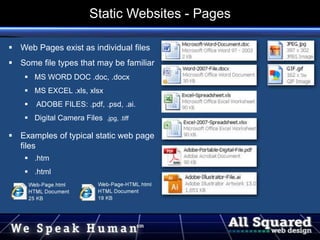
 Web Pages exist as individual files
 Some file types that may be familiar
 MS WORD DOC .doc, .docx
 MS EXCEL .xls, xlsx
 ADOBE FILES: .pdf, .psd, .ai.
 Digital Camera Files .jpg, .tiff
 Examples of typical static web page
files
 .htm
 .html
Static Websites - Pages
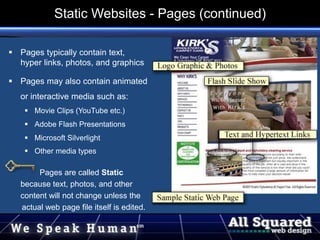
 Pages typically contain text,
hyper links, photos, and graphics
 Pages may also contain animated
or interactive media such as:
 Movie Clips (YouTube etc.)
 Adobe Flash Presentations
 Microsoft Silverlight
 Other media types
Pages are called Static
because text, photos, and other
content will not change unless the
actual web page file itself is edited.
A web page editing program and
Static Websites - Pages (continued)
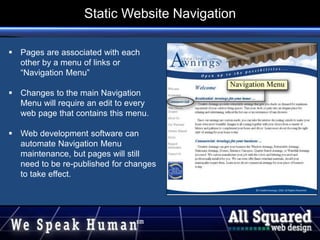
 Pages are associated with each
other by a menu of links or
“Navigation Menu”
 Changes to the main Navigation
Menu will require an edit to every
web page that contains this menu.
 Web development software can
automate Navigation Menu
maintenance, but pages will still
need to be re-published for changes
to take effect.
footer
Static Website Navigation
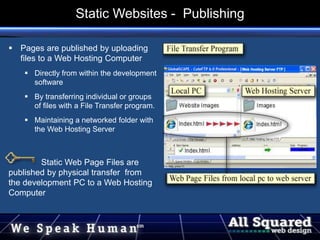
 Pages are published by uploading
files to a Web Hosting Computer
 Directly from within the development
software
 By transferring individual or groups
of files with a File Transfer program.
 Maintaining a networked folder with
the Web Hosting Server
Static Web Page Files are
published by physical transfer from
the development PC to a Web Hosting
Computer
Static Websites - Publishing
Dynamic Websites
Dynamic Websites
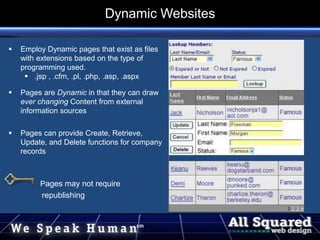
 Employ Dynamic pages that exist as files
with extensions based on the type of
programming used.
 .jsp , .cfm, .pl, .php, .asp, .aspx
 Pages are Dynamic in that they can draw
ever changing Content from external
information sources
 Pages can provide Create, Retrieve,
Update, and Delete functions for company
records
Pages may not require
republishing
Dynamic Websites
 Your basic “CRUD”
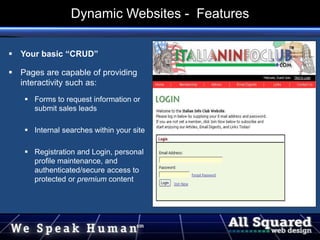
 Pages are capable of providing
interactivity such as:
 Forms to request information or
submit sales leads
 Internal searches within your site
 Registration and Login, personal
profile maintenance, and
authenticated/secure access to
protected or premium content
Dynamic Websites - Features
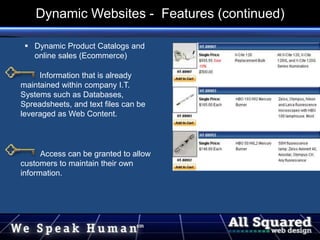
 Dynamic Product Catalogs and
online sales (Ecommerce)
Information that is already
maintained within company I.T.
Systems such as Databases,
Spreadsheets, and text files can be
leveraged as Web Content.
Access can be granted to allow
customers to maintain their own
information.
Dynamic Websites - Features (continued)
Web Content Management System (WCMS)
A web content management (WCM) system is a CMS
designed to simplify the publication of Web content to Web
sites, in particular allowing content creators to submit
content without requiring technical knowledge of HTML or
the uploading of files.
- definition from Wikipedia.org
Dynamic Websites - Content Management Systems
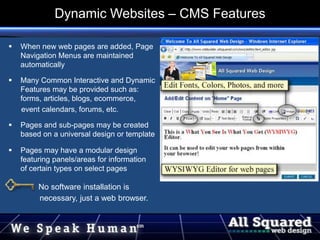
 When new web pages are added, Page
Navigation Menus are maintained
automatically
 Many Common Interactive and Dynamic
Features may be provided such as:
forms, articles, blogs, ecommerce,
event calendars, forums, etc.
 Pages and sub-pages may be created
based on a universal design or template
 Pages may have a modular design
featuring panels/areas for information
of certain types on select pages
No software installation is
necessary, just a web browser.
Dynamic Websites – CMS Features
Static websites are a better choice when you:
 are limited in budget and are starting with a core web presence
 are dealing with 20 pages or less
 are planning to add new pages occasionally
 are assigning maintenance to a provider or have skilled staff and proper
software
 need of portable, physical web page files
Is Static Right for Your Organization
Dynamic websites are a better choice when you:
 need custom programming to accommodate your unique business needs
 need pages that must pull information from sources external to the website proper
 need to be able to easily add and edit web pages (Content) from within a browser
 need web pages that will display and update records from your information systems
 need to give one or more staff members access to edit the site
 need convenient access to setup common interactive features such as Article
Publishing, Event Calendaring, Blogs, Secure Login, Ecommerce, and others.
Is Dynamic Right for Your Organization
Conclusions
The decision as to which type of website design is right for you should start
with an assessment of your business needs. Ask questions like:
 Who will maintain the site when it’s complete?
 What are the key features offered in the website hosting:
 File Space and Bandwidth limits?
 Email Accounts – Storage size limits, Lists, Webmail and its features?
 Are website statistics available via web browser?
 Can Secure Connections be accommodated?
 Do you have qualified staff and the proper software to perform maintenance?
Conclusions
 What functionality is critical to provide to:
 Prospective Customers
 Existing Customers
 Your Staff
 Your Vendors
 Others . . .
 What are your criteria for ecommerce?
 Search enabled product catalog pages
 Shipping options
 Compatible payment processing vendors
 Are your needs fairly common ones or are they unique to
your industry, products, or services?
Conclusions
 Pre-Design Consulting
 Requirements Documentation
 Ecommerce needs assessment
 SEO and SEM planning
 Professional Keyword Research
 Analysis of online competition
 Template based web design
 Custom Design - Unique Concepts
 Design based on your artwork
 Existing Site Redesign
 Ecommerce & Subscription Sites
 Custom dynamic web applications
 CMS Sites
 Website Hosting, Email, and Statistics
 SEO and SEM for existing sites
 Email Campaigns
 Site Maintenance Services
 Pay Per Click Advertising Campaigns
Assistance with:
 Copy writing
 Materials gathering
 Photo selection
 Whatever you need to succeed!
What Can All Squared Do For You?

All-Squared-LVAC-Web-Design.ppt

  • 1.
    Static and DynamicWebsites Static and Dynamic Website Design Presented by: Shawn Cohan, President All Squared Web Design, LLC www.AllSquared.com info@allsquared.com 610-351-5416
  • 2.
  • 3.
     Web Pagesexist as individual files  Some file types that may be familiar  MS WORD DOC .doc, .docx  MS EXCEL .xls, xlsx  ADOBE FILES: .pdf, .psd, .ai.  Digital Camera Files .jpg, .tiff  Examples of typical static web page files  .htm  .html Static Websites - Pages
  • 4.
     Pages typicallycontain text, hyper links, photos, and graphics  Pages may also contain animated or interactive media such as:  Movie Clips (YouTube etc.)  Adobe Flash Presentations  Microsoft Silverlight  Other media types Pages are called Static because text, photos, and other content will not change unless the actual web page file itself is edited. A web page editing program and Static Websites - Pages (continued)
  • 5.
     Pages areassociated with each other by a menu of links or “Navigation Menu”  Changes to the main Navigation Menu will require an edit to every web page that contains this menu.  Web development software can automate Navigation Menu maintenance, but pages will still need to be re-published for changes to take effect. footer Static Website Navigation
  • 6.
     Pages arepublished by uploading files to a Web Hosting Computer  Directly from within the development software  By transferring individual or groups of files with a File Transfer program.  Maintaining a networked folder with the Web Hosting Server Static Web Page Files are published by physical transfer from the development PC to a Web Hosting Computer Static Websites - Publishing
  • 7.
  • 8.
     Employ Dynamicpages that exist as files with extensions based on the type of programming used.  .jsp , .cfm, .pl, .php, .asp, .aspx  Pages are Dynamic in that they can draw ever changing Content from external information sources  Pages can provide Create, Retrieve, Update, and Delete functions for company records Pages may not require republishing Dynamic Websites
  • 9.
     Your basic“CRUD”  Pages are capable of providing interactivity such as:  Forms to request information or submit sales leads  Internal searches within your site  Registration and Login, personal profile maintenance, and authenticated/secure access to protected or premium content Dynamic Websites - Features
  • 10.
     Dynamic ProductCatalogs and online sales (Ecommerce) Information that is already maintained within company I.T. Systems such as Databases, Spreadsheets, and text files can be leveraged as Web Content. Access can be granted to allow customers to maintain their own information. Dynamic Websites - Features (continued)
  • 11.
    Web Content ManagementSystem (WCMS) A web content management (WCM) system is a CMS designed to simplify the publication of Web content to Web sites, in particular allowing content creators to submit content without requiring technical knowledge of HTML or the uploading of files. - definition from Wikipedia.org Dynamic Websites - Content Management Systems
  • 12.
     When newweb pages are added, Page Navigation Menus are maintained automatically  Many Common Interactive and Dynamic Features may be provided such as: forms, articles, blogs, ecommerce, event calendars, forums, etc.  Pages and sub-pages may be created based on a universal design or template  Pages may have a modular design featuring panels/areas for information of certain types on select pages No software installation is necessary, just a web browser. Dynamic Websites – CMS Features
  • 13.
    Static websites area better choice when you:  are limited in budget and are starting with a core web presence  are dealing with 20 pages or less  are planning to add new pages occasionally  are assigning maintenance to a provider or have skilled staff and proper software  need of portable, physical web page files Is Static Right for Your Organization
  • 14.
    Dynamic websites area better choice when you:  need custom programming to accommodate your unique business needs  need pages that must pull information from sources external to the website proper  need to be able to easily add and edit web pages (Content) from within a browser  need web pages that will display and update records from your information systems  need to give one or more staff members access to edit the site  need convenient access to setup common interactive features such as Article Publishing, Event Calendaring, Blogs, Secure Login, Ecommerce, and others. Is Dynamic Right for Your Organization
  • 15.
    Conclusions The decision asto which type of website design is right for you should start with an assessment of your business needs. Ask questions like:  Who will maintain the site when it’s complete?  What are the key features offered in the website hosting:  File Space and Bandwidth limits?  Email Accounts – Storage size limits, Lists, Webmail and its features?  Are website statistics available via web browser?  Can Secure Connections be accommodated?  Do you have qualified staff and the proper software to perform maintenance? Conclusions
  • 16.
     What functionalityis critical to provide to:  Prospective Customers  Existing Customers  Your Staff  Your Vendors  Others . . .  What are your criteria for ecommerce?  Search enabled product catalog pages  Shipping options  Compatible payment processing vendors  Are your needs fairly common ones or are they unique to your industry, products, or services? Conclusions
  • 17.
     Pre-Design Consulting Requirements Documentation  Ecommerce needs assessment  SEO and SEM planning  Professional Keyword Research  Analysis of online competition  Template based web design  Custom Design - Unique Concepts  Design based on your artwork  Existing Site Redesign  Ecommerce & Subscription Sites  Custom dynamic web applications  CMS Sites  Website Hosting, Email, and Statistics  SEO and SEM for existing sites  Email Campaigns  Site Maintenance Services  Pay Per Click Advertising Campaigns Assistance with:  Copy writing  Materials gathering  Photo selection  Whatever you need to succeed! What Can All Squared Do For You?

Editor's Notes

  • #4 Joint Photographic Experts Group Graphic Interchange Format