



Welcome
MD. SHARIF HOSSEN
Lecturer
Dept. of ICT
Comilla University
1
Presentation on
CHOICE OF PROGRAMMING
LANGUAGE FOR WEB
DEVELOPING.
2
Presented by:
Name ID Session
Ali Hayder Meskhat 1109046 2011-2012
Rifath Chowdhury 1109047 2011-2012
Md. Ibrahim Talukdar 1009005 2010-2011
Farzana Yasmin 1009009 2010-2011
Gonesh Chandra Nondi 1009016 2010-2011
Md. Ibrahim Khalil 1009026 2010-2011
3
Overview
 Introduction
 Client & server side programming language
 HTML
 CSS
 Java Script
 SQL
 PHP
 Conclusion
4
Introduction
Web development :Web development refers
developing websites for hosting via intranet or
Internet. The Web development process
includes Web design, Web content
development, client-side/server-side scripting .
5
Introduction (cont.)
Web design : Web design is the
process of creation, with the intention of
presenting the content on electronic web
pages, which the end-users can access
through the internet with the help of a
web browser
6
Introduction (cont.)
What does Web Programming mean?
 Web programming refers to the writing,
markup and coding involved in Web
development, which includes Web content,
Web client and server scripting and network
security.
7
What are the benefits of web
programming?
 allows you to turn a simple, static HTML page into a
dynamic masterpiece.
 interact with your web site and use the application on
any computer
 easier than programming applications that will run
directly on the computer
8
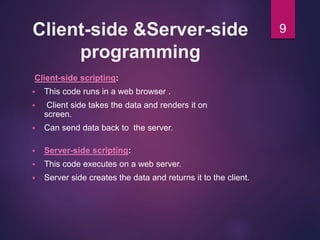
Client-side &Server-side
programming
Client-side scripting:
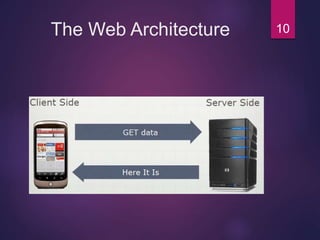
 This code runs in a web browser .
 Client side takes the data and renders it on
screen.
 Can send data back to the server.
 Server-side scripting:
 This code executes on a web server.
 Server side creates the data and returns it to the client.
9
The Web Architecture 10
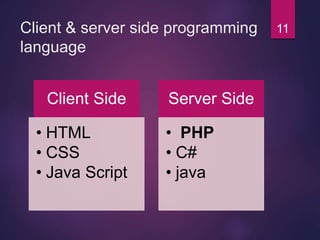
Client & server side programming
language
Client Side
• HTML
• CSS
• Java Script
Server Side
• PHP
• C#
• java
11
Rifath Chowdhury
12
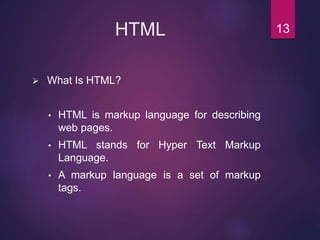
HTML
 What Is HTML?
• HTML is markup language for describing
web pages.
• HTML stands for Hyper Text Markup
Language.
• A markup language is a set of markup
tags.
13
HTML Attributes
 HTML elements can have attributes.
 Attributes provide additional information about
an element.
 Attributes are always specified in the start tag.
 Attributes come in name/value pairs like:
name="value”.
 The Document Language can be declared in the
<html> using lang attribute.
 HTML paragraphs are defined with the <p> tag.
14
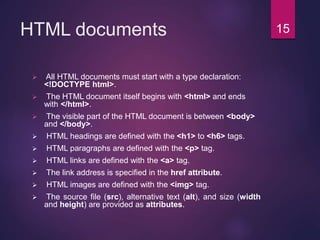
HTML documents
 All HTML documents must start with a type declaration:
<!DOCTYPE html>.
 The HTML document itself begins with <html> and ends
with </html>.
 The visible part of the HTML document is between <body>
and </body>.
 HTML headings are defined with the <h1> to <h6> tags.
 HTML paragraphs are defined with the <p> tag.
 HTML links are defined with the <a> tag.
 The link address is specified in the href attribute.
 HTML images are defined with the <img> tag.
 The source file (src), alternative text (alt), and size (width
and height) are provided as attributes.
15
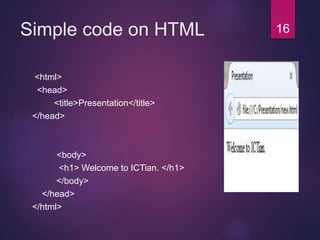
Simple code on HTML
<html>
<head>
<title>Presentation</title>
</head>
<body>
<h1> Welcome to ICTian. </h1>
</body>
</head>
</html>
16
17
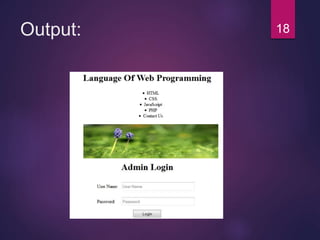
Output: 18
Farzana yasmin
19
Introduction to CSS
 What is CSS?
• CSS stands for Cascading Style Sheets.
• Styles define how to display HTML elements.
• External Style Sheets can save a lot of work.
• External Style Sheets are stored in CSS files.
20
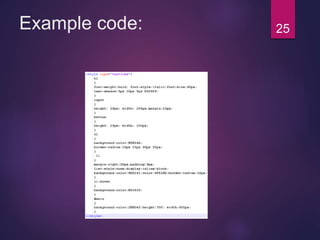
CSS Syntax
 A CSS rule set consists of a selector and a
declaration block.
 The selector points to the HTML element you
want to style.
 The declaration block contains one or more
declarations separated by semicolons.
 Each declaration includes a property name and a
value, separated by a colon.
 A CSS declaration always ends with a semicolon,
and declaration groups are surrounded by curly
braces.
21
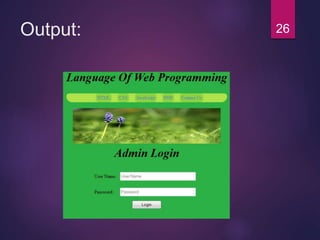
CSS Background
 The background-color property specifies the
background color of an element.
 The background color of a page is defined in the body
selector.
 The background-image property specifies an image to
use as the background of an element.
 By default, the image is repeated so it covers the
entire element.
22
CSS Fonts
 The CSS style font-family defines the
font to be used for in HTML element.
 The CSS style font-size defines the
text size to be used for in HTML
element.
 The CSS style color defines the text
color to be used for in HTML element.
23
Three Ways to Insert CSS
There are three ways of inserting a style sheet:
Internal Style Sheet.
 An internal style sheet should be used when a single document
has a unique style.
External Style Sheet.
 An external style sheet is ideal when the style is applied to many
pages.
Inline Style Sheet.
 Inline styling is useful for applying a unique style to a single
HTML element.
24
Example code: 25
Output: 26
Gonesh Chandra Nondi
27
JavaScript
What is JavaScript?
 JavaScript is a scripting language designed for Web
pages.
About JavaScript :
 Java and JavaScript are two completely different
languages in both concept and design
 Client-side & server-side scripting language
 Enhance dynamics and interactive features of a web
page
 Allows one to perform calculations, write interactive
games, add special effects, customize graphic
selections, create security passwords
 used in millions of web pages.
28
Why Use JavaScript?
• JavaScript enhances Web pages with dynamic and
interactive features.
• JavaScript runs in client software.
• JavaScript gives HTML designers a programming tool.
• JavaScript can react to events.
• It is used in web pages to improve the design
• It is used in web pages to validate forms
• It is used in web pages to detect browsers
• It is used in web pages to create cookies
29
I n t e r n e t
Client requests page
Completed HTML sent to client
Web Server
Client Machine
With Web
Browser
• The script, written by the website developer, generates the HTML code of the page requested.
• The HTML code is not actually a file. The code is actually held in the server’s memory until it is
sent directly to the client.
Script builds
HTML code
HTML ready to send
Server runs script
[ ASP / PHP / Ruby ]
Script
HTML Code
How Scripting Languages Work30
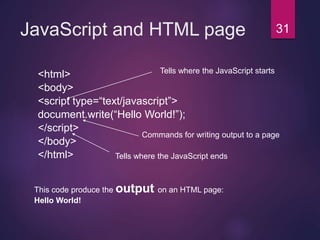
JavaScript and HTML page
<html>
<body>
<script type=“text/javascript”>
document.write(“Hello World!”);
</script>
</body>
</html>
This code produce the output on an HTML page:
Hello World!
Tells where the JavaScript ends
Tells where the JavaScript starts
Commands for writing output to a page
31
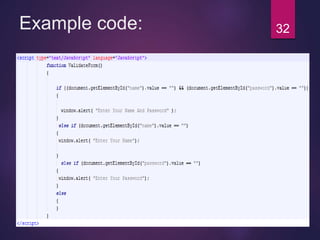
Example code: 32
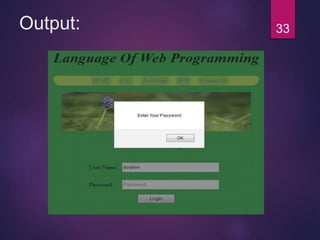
Output: 33
Md. Ibrahim Talukdar
34
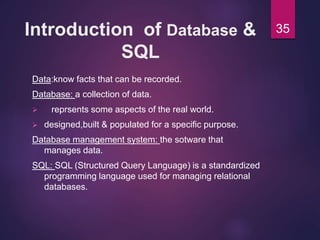
Introduction of Database &
SQL
Data:know facts that can be recorded.
Database: a collection of data.
 reprsents some aspects of the real world.
 designed,built & populated for a specific purpose.
Database management system: the sotware that
manages data.
SQL: SQL (Structured Query Language) is a standardized
programming language used for managing relational
databases.
35
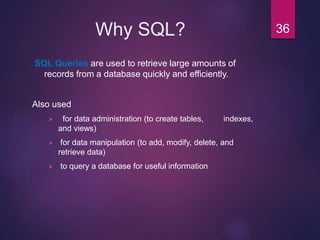
Why SQL?
SQL Queries are used to retrieve large amounts of
records from a database quickly and efficiently.
Also used
 for data administration (to create tables, indexes,
and views)
 for data manipulation (to add, modify, delete, and
retrieve data)
 to query a database for useful information
36
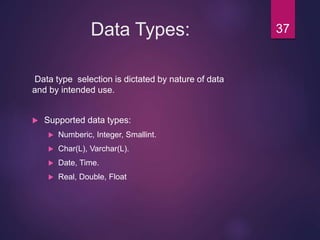
Data Types:
Data type selection is dictated by nature of data
and by intended use.
 Supported data types:
 Numberic, Integer, Smallint.
 Char(L), Varchar(L).
 Date, Time.
 Real, Double, Float
37
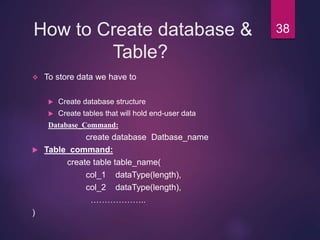
How to Create database &
Table?
 To store data we have to
 Create database structure
 Create tables that will hold end-user data
Database_Command:
create database Datbase_name
 Table_command:
create table table_name(
col_1 dataType(length),
col_2 dataType(length),
………………..
)
38
How to Insert values& Delete
Table?
 INSERT
 Used to enter data into table
 Syntax:
INSERT INTO column_name
VALUES (value1, value2, … , value_N);
 DELETE
 Deletes a table row
 Syntax:
DELETE FROM tablename
[WHERE conditionlist ];
39
Select & update
operation
 SELECT
 Used to list contents of table
 Syntax:
 SELECT columnlist
 FROM tablename;
 UPDATE
 Modify data in a table
 Syntax:
UPDATE tablename
SET columnname = expression [, columnname =
expression]
[WHERE conditionlist];
40
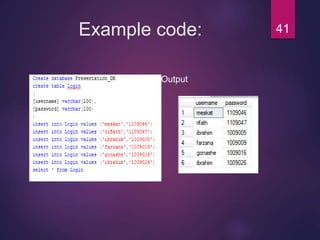
Example code:
Code Output
QUERY:
SELECT*
FROM `login`
41
Md. Ibrahim Khalil
42
What is PHP?
 PHP is a server scripting language, and a powerful tool
for making dynamic and interactive Web pages.
 PHP is an acronym for Hypertext Preprocessor
 PHP is a widely-used, free, and efficient alternative to
competitors such as Microsoft's ASP.
 PHP scripts are executed on the server
 PHP is free to download and use
 Basic PHP Syntax
 <?php
//PHP code here
?>
43
What is a PHP File & Why PHP?
What is a PHP File ?
 PHP files can contain text, HTML, CSS, JavaScript, and PHP code
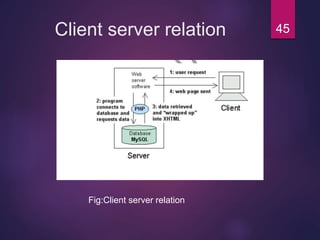
 PHP code are executed on the server, and the result is returned to
the browser as plain HTML
 PHP files have extension ".php“
Why PHP?
 PHP runs on various platforms (Windows, Linux, Unix, Mac OS X,
etc.)
 PHP is compatible with almost all servers used today (Apache, IIS,
etc.)
 PHP supports a wide range of databases
 PHP is free
 PHP is easy to learn and runs efficiently on the server side
44
Client server relation
Fig:Client server relation
45
Variables & Constants
 Variables
 Variables are "containers" for storing information.
 Declaring PHP Variables
 In PHP, a variable starts with the $ sign, followed by the name of
the variable:
 Example
$txt = "Hello world!";
 PHP Constants
 A constant is an identifier (name) for a simple value. The value
cannot be changed during the script.
 A valid constant name starts with a letter or underscore (no $
sign before the constant name).
 Create a PHP Constant
 To create a constant, use the define() function.
 Syntax
 define(name, value, case-insensitive)
46
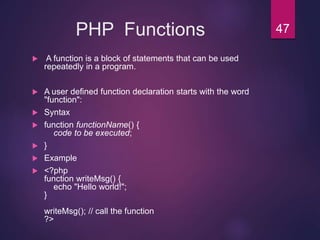
PHP Functions
 A function is a block of statements that can be used
repeatedly in a program.
 A user defined function declaration starts with the word
"function":
 Syntax
 function functionName() {
code to be executed;
 }
 Example
 <?php
function writeMsg() {
echo "Hello world!";
}
writeMsg(); // call the function
?>
47
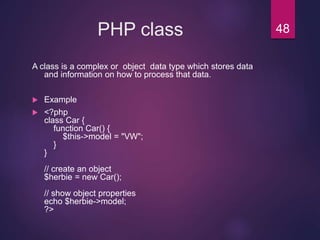
PHP class
A class is a complex or object data type which stores data
and information on how to process that data.
 Example
 <?php
class Car {
function Car() {
$this->model = "VW";
}
}
// create an object
$herbie = new Car();
// show object properties
echo $herbie->model;
?>
48
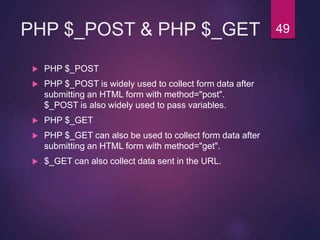
PHP $_POST & PHP $_GET
 PHP $_POST
 PHP $_POST is widely used to collect form data after
submitting an HTML form with method="post".
$_POST is also widely used to pass variables.
 PHP $_GET
 PHP $_GET can also be used to collect form data after
submitting an HTML form with method="get".
 $_GET can also collect data sent in the URL.
49
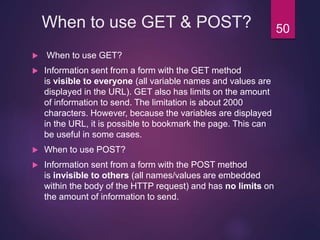
When to use GET & POST?
 When to use GET?
 Information sent from a form with the GET method
is visible to everyone (all variable names and values are
displayed in the URL). GET also has limits on the amount
of information to send. The limitation is about 2000
characters. However, because the variables are displayed
in the URL, it is possible to bookmark the page. This can
be useful in some cases.
 When to use POST?
 Information sent from a form with the POST method
is invisible to others (all names/values are embedded
within the body of the HTTP request) and has no limits on
the amount of information to send.
50
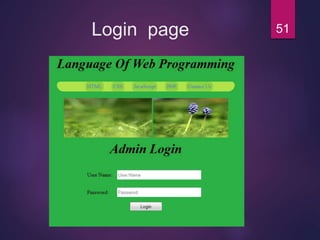
Login page 51
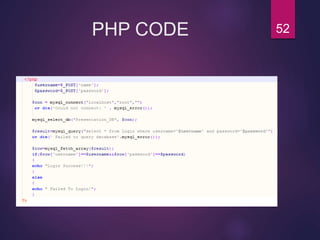
PHP CODE 52
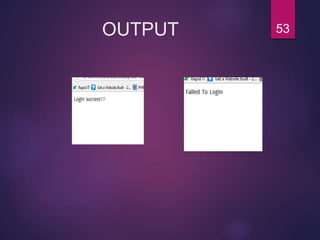
OUTPUT 53
Conclusion
After completing this slide we will learn about:
 HTML
 CSS
 JAVASCRIPT
 SQL
 PHP
All this things contribute to build up an efficient web
programming.
54
Any Question? 55
Thanks to all .
56

Choice of programming language for web developing.

  • 1.
    Welcome MD. SHARIF HOSSEN Lecturer Dept.of ICT Comilla University 1
  • 2.
    Presentation on CHOICE OFPROGRAMMING LANGUAGE FOR WEB DEVELOPING. 2
  • 3.
    Presented by: Name IDSession Ali Hayder Meskhat 1109046 2011-2012 Rifath Chowdhury 1109047 2011-2012 Md. Ibrahim Talukdar 1009005 2010-2011 Farzana Yasmin 1009009 2010-2011 Gonesh Chandra Nondi 1009016 2010-2011 Md. Ibrahim Khalil 1009026 2010-2011 3
  • 4.
    Overview  Introduction  Client& server side programming language  HTML  CSS  Java Script  SQL  PHP  Conclusion 4
  • 5.
    Introduction Web development :Webdevelopment refers developing websites for hosting via intranet or Internet. The Web development process includes Web design, Web content development, client-side/server-side scripting . 5
  • 6.
    Introduction (cont.) Web design: Web design is the process of creation, with the intention of presenting the content on electronic web pages, which the end-users can access through the internet with the help of a web browser 6
  • 7.
    Introduction (cont.) What doesWeb Programming mean?  Web programming refers to the writing, markup and coding involved in Web development, which includes Web content, Web client and server scripting and network security. 7
  • 8.
    What are thebenefits of web programming?  allows you to turn a simple, static HTML page into a dynamic masterpiece.  interact with your web site and use the application on any computer  easier than programming applications that will run directly on the computer 8
  • 9.
    Client-side &Server-side programming Client-side scripting: This code runs in a web browser .  Client side takes the data and renders it on screen.  Can send data back to the server.  Server-side scripting:  This code executes on a web server.  Server side creates the data and returns it to the client. 9
  • 10.
  • 11.
    Client & serverside programming language Client Side • HTML • CSS • Java Script Server Side • PHP • C# • java 11
  • 12.
  • 13.
    HTML  What IsHTML? • HTML is markup language for describing web pages. • HTML stands for Hyper Text Markup Language. • A markup language is a set of markup tags. 13
  • 14.
    HTML Attributes  HTMLelements can have attributes.  Attributes provide additional information about an element.  Attributes are always specified in the start tag.  Attributes come in name/value pairs like: name="value”.  The Document Language can be declared in the <html> using lang attribute.  HTML paragraphs are defined with the <p> tag. 14
  • 15.
    HTML documents  AllHTML documents must start with a type declaration: <!DOCTYPE html>.  The HTML document itself begins with <html> and ends with </html>.  The visible part of the HTML document is between <body> and </body>.  HTML headings are defined with the <h1> to <h6> tags.  HTML paragraphs are defined with the <p> tag.  HTML links are defined with the <a> tag.  The link address is specified in the href attribute.  HTML images are defined with the <img> tag.  The source file (src), alternative text (alt), and size (width and height) are provided as attributes. 15
  • 16.
    Simple code onHTML <html> <head> <title>Presentation</title> </head> <body> <h1> Welcome to ICTian. </h1> </body> </head> </html> 16
  • 17.
  • 18.
  • 19.
  • 20.
    Introduction to CSS What is CSS? • CSS stands for Cascading Style Sheets. • Styles define how to display HTML elements. • External Style Sheets can save a lot of work. • External Style Sheets are stored in CSS files. 20
  • 21.
    CSS Syntax  ACSS rule set consists of a selector and a declaration block.  The selector points to the HTML element you want to style.  The declaration block contains one or more declarations separated by semicolons.  Each declaration includes a property name and a value, separated by a colon.  A CSS declaration always ends with a semicolon, and declaration groups are surrounded by curly braces. 21
  • 22.
    CSS Background  Thebackground-color property specifies the background color of an element.  The background color of a page is defined in the body selector.  The background-image property specifies an image to use as the background of an element.  By default, the image is repeated so it covers the entire element. 22
  • 23.
    CSS Fonts  TheCSS style font-family defines the font to be used for in HTML element.  The CSS style font-size defines the text size to be used for in HTML element.  The CSS style color defines the text color to be used for in HTML element. 23
  • 24.
    Three Ways toInsert CSS There are three ways of inserting a style sheet: Internal Style Sheet.  An internal style sheet should be used when a single document has a unique style. External Style Sheet.  An external style sheet is ideal when the style is applied to many pages. Inline Style Sheet.  Inline styling is useful for applying a unique style to a single HTML element. 24
  • 25.
  • 26.
  • 27.
  • 28.
    JavaScript What is JavaScript? JavaScript is a scripting language designed for Web pages. About JavaScript :  Java and JavaScript are two completely different languages in both concept and design  Client-side & server-side scripting language  Enhance dynamics and interactive features of a web page  Allows one to perform calculations, write interactive games, add special effects, customize graphic selections, create security passwords  used in millions of web pages. 28
  • 29.
    Why Use JavaScript? •JavaScript enhances Web pages with dynamic and interactive features. • JavaScript runs in client software. • JavaScript gives HTML designers a programming tool. • JavaScript can react to events. • It is used in web pages to improve the design • It is used in web pages to validate forms • It is used in web pages to detect browsers • It is used in web pages to create cookies 29
  • 30.
    I n te r n e t Client requests page Completed HTML sent to client Web Server Client Machine With Web Browser • The script, written by the website developer, generates the HTML code of the page requested. • The HTML code is not actually a file. The code is actually held in the server’s memory until it is sent directly to the client. Script builds HTML code HTML ready to send Server runs script [ ASP / PHP / Ruby ] Script HTML Code How Scripting Languages Work30
  • 31.
    JavaScript and HTMLpage <html> <body> <script type=“text/javascript”> document.write(“Hello World!”); </script> </body> </html> This code produce the output on an HTML page: Hello World! Tells where the JavaScript ends Tells where the JavaScript starts Commands for writing output to a page 31
  • 32.
  • 33.
  • 34.
  • 35.
    Introduction of Database& SQL Data:know facts that can be recorded. Database: a collection of data.  reprsents some aspects of the real world.  designed,built & populated for a specific purpose. Database management system: the sotware that manages data. SQL: SQL (Structured Query Language) is a standardized programming language used for managing relational databases. 35
  • 36.
    Why SQL? SQL Queriesare used to retrieve large amounts of records from a database quickly and efficiently. Also used  for data administration (to create tables, indexes, and views)  for data manipulation (to add, modify, delete, and retrieve data)  to query a database for useful information 36
  • 37.
    Data Types: Data typeselection is dictated by nature of data and by intended use.  Supported data types:  Numberic, Integer, Smallint.  Char(L), Varchar(L).  Date, Time.  Real, Double, Float 37
  • 38.
    How to Createdatabase & Table?  To store data we have to  Create database structure  Create tables that will hold end-user data Database_Command: create database Datbase_name  Table_command: create table table_name( col_1 dataType(length), col_2 dataType(length), ……………….. ) 38
  • 39.
    How to Insertvalues& Delete Table?  INSERT  Used to enter data into table  Syntax: INSERT INTO column_name VALUES (value1, value2, … , value_N);  DELETE  Deletes a table row  Syntax: DELETE FROM tablename [WHERE conditionlist ]; 39
  • 40.
    Select & update operation SELECT  Used to list contents of table  Syntax:  SELECT columnlist  FROM tablename;  UPDATE  Modify data in a table  Syntax: UPDATE tablename SET columnname = expression [, columnname = expression] [WHERE conditionlist]; 40
  • 41.
  • 42.
  • 43.
    What is PHP? PHP is a server scripting language, and a powerful tool for making dynamic and interactive Web pages.  PHP is an acronym for Hypertext Preprocessor  PHP is a widely-used, free, and efficient alternative to competitors such as Microsoft's ASP.  PHP scripts are executed on the server  PHP is free to download and use  Basic PHP Syntax  <?php //PHP code here ?> 43
  • 44.
    What is aPHP File & Why PHP? What is a PHP File ?  PHP files can contain text, HTML, CSS, JavaScript, and PHP code  PHP code are executed on the server, and the result is returned to the browser as plain HTML  PHP files have extension ".php“ Why PHP?  PHP runs on various platforms (Windows, Linux, Unix, Mac OS X, etc.)  PHP is compatible with almost all servers used today (Apache, IIS, etc.)  PHP supports a wide range of databases  PHP is free  PHP is easy to learn and runs efficiently on the server side 44
  • 45.
  • 46.
    Variables & Constants Variables  Variables are "containers" for storing information.  Declaring PHP Variables  In PHP, a variable starts with the $ sign, followed by the name of the variable:  Example $txt = "Hello world!";  PHP Constants  A constant is an identifier (name) for a simple value. The value cannot be changed during the script.  A valid constant name starts with a letter or underscore (no $ sign before the constant name).  Create a PHP Constant  To create a constant, use the define() function.  Syntax  define(name, value, case-insensitive) 46
  • 47.
    PHP Functions  Afunction is a block of statements that can be used repeatedly in a program.  A user defined function declaration starts with the word "function":  Syntax  function functionName() { code to be executed;  }  Example  <?php function writeMsg() { echo "Hello world!"; } writeMsg(); // call the function ?> 47
  • 48.
    PHP class A classis a complex or object data type which stores data and information on how to process that data.  Example  <?php class Car { function Car() { $this->model = "VW"; } } // create an object $herbie = new Car(); // show object properties echo $herbie->model; ?> 48
  • 49.
    PHP $_POST &PHP $_GET  PHP $_POST  PHP $_POST is widely used to collect form data after submitting an HTML form with method="post". $_POST is also widely used to pass variables.  PHP $_GET  PHP $_GET can also be used to collect form data after submitting an HTML form with method="get".  $_GET can also collect data sent in the URL. 49
  • 50.
    When to useGET & POST?  When to use GET?  Information sent from a form with the GET method is visible to everyone (all variable names and values are displayed in the URL). GET also has limits on the amount of information to send. The limitation is about 2000 characters. However, because the variables are displayed in the URL, it is possible to bookmark the page. This can be useful in some cases.  When to use POST?  Information sent from a form with the POST method is invisible to others (all names/values are embedded within the body of the HTTP request) and has no limits on the amount of information to send. 50
  • 51.
  • 52.
  • 53.
  • 54.
    Conclusion After completing thisslide we will learn about:  HTML  CSS  JAVASCRIPT  SQL  PHP All this things contribute to build up an efficient web programming. 54
  • 55.
  • 56.

Editor's Notes

  • #15 ASP.NET software company in india
  • #16 ASP.NET software company in india
  • #21 ASP.NET software company in india
  • #22 ASP.NET software company in india
  • #23 ASP.NET software company in india
  • #24 ASP.NET software company in india
  • #25 ASP.NET software company in india