Web Programming
Introduction to Web Programming
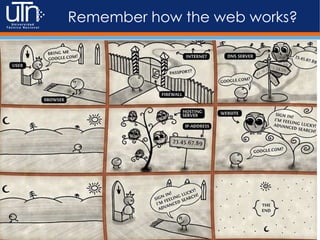
Remember how the web works?
Fundamentals
●Static vs Dynamic Content
●Client/Server
●HTTP
o Request
o Response
o Headers
o Port 80
o Handshake
Static vs Dynamic HTML
What it means?
Do you think this is Static?
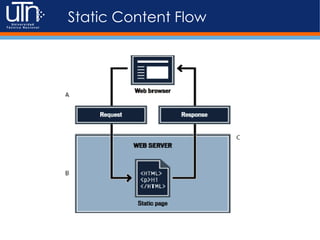
Static Content Flow
Dynamic Content Flow
Static What you see
What the browser renders
<div class="IndicadoresContentDiv">
<table summary="">
<tbody>
<tr>
<td><span title="">Compra</span></td>
<td class="IndicadoresBoxBGR"><span
id="lblCompra">546,37</span>
</td>
</tr>
</tbody>
</table>
<table summary="">
<tbody>
<tr>
<td><span title="">Venta</span></td>
<td class="IndicadoresBoxBGR">
<span id="lblVenta">558,99</span>
</td>
</tr>
</tbody>
</table>
</div>
What the source file looks like
Dynamic What you see
What the browser renders
<?php
$compra = DollarExchange->getBuyValue();
$venta = DollarExchange->getSellValue();
?>
<div class="IndicadoresContentDiv">
<table summary="">
<tbody>
<tr>
<td><span title="">Compra</span></td>
<td class="IndicadoresBoxBGR"><span
id="lblCompra"><?php echo $compra; ?></span>
</td>
</tr>
</tbody>
</table>
<table summary="">
<tbody>
<tr>
<td><span title="">Venta</span></td>
<td class="IndicadoresBoxBGR">
<span id="lblVenta"><?php echo
$venta; ?></span>
</td>
</tr>
</tbody>
</table>
</div>
What the source file look like
Dynamic vs Static HTML
• Features limited to
browser resources.
• Need developer
intervention to change
the content
• Response is always
HTML no matter what.
• Is/Can be cached by the
browser
• You can add some
dynamic features with
Javascript and HTML5
• Tons of libraries to everything
we know that can be done in
Web.
• Content can vary based on a
database change, another site,
the date, no need for developer
intervention
• Response could be anything
that the browser can show for
the same URL. Its generated
dynamically.
• You have to control when to
expire or cache the response
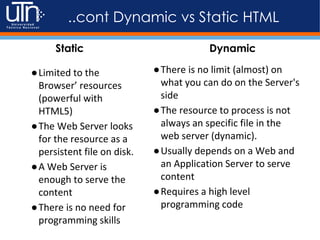
Static Dynamic
●Limited to the
Browser’ resources
(powerful with
HTML5)
●The Web Server looks
for the resource as a
persistent file on disk.
●A Web Server is
enough to serve the
content
●There is no need for
programming skills
●There is no limit (almost) on
what you can do on the Server's
side
●The resource to process is not
always an specific file in the
web server (dynamic).
●Usually depends on a Web and
an Application Server to serve
content
●Requires a high level
programming code
..cont Dynamic vs Static HTML
Static Dynamic
What’s involved in the Dynamic
Content?
• Web Server
• Application Server
• Server Side Coding
– Programming Languages
– Server Side Libraries
– Services
– Configuration Settings
• Other Services
– DBMS (MySQL, PostgreSQL, MongoDB, Oracle)
– Cache (Memcached, Redis)
– Logging
– Third Party APIs
Related
Components
1) The Web Server
The term is used to reference Hardware or software that
servers Web content
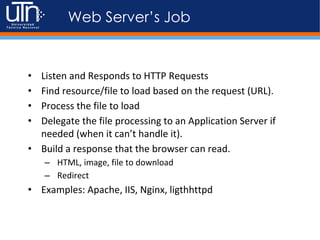
Web Server’s Job
• Listen and Responds to HTTP Requests
• Find resource/file to load based on the request (URL).
• Process the file to load
• Delegate the file processing to an Application Server if
needed (when it can’t handle it).
• Build a response that the browser can read.
– HTML, image, file to download
– Redirect
• Examples: Apache, IIS, Nginx, ligthhttpd
cont..
• Files are stored on an specific directory within the Web
Server’s hard drive (DocumentRoot)
• Web Server should be running and listening to an specific
port (80 by default)
• Configuration files used to configure the server behavior
(httpd.conf)
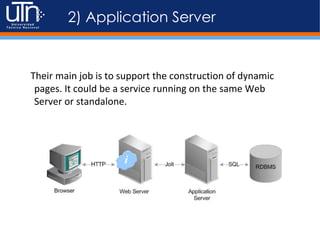
2) Application Server
Their main job is to support the construction of dynamic
pages. It could be a service running on the same Web
Server or standalone.
..cont
●An application server acts as a set of components
accessible to the software developer through an API
defined by the platform itself.
●These components are usually performed in the same
running environment as its web server(s)
●Target much more than just Web page generation: they
implement services like clustering, fail-over, and load-
balancing.
..cont
●Provides access to business logic for use by client
application programs.
●Infinite set of libraries and components for Database
Access, Security, Clustering,
●Some examples: Zend Server (PHP), IBM Websphere (Java
EE), Tomcat (Java), .NET framework (C#), Passenger (RoR),
Node (Javascript), Oracle Weblogic (Java), Glassfish (Java),
JBoss (Java), Unicorn (RoR), Puma (RoR)
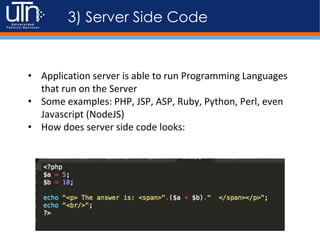
3) Server Side Code
• Application server is able to run Programming Languages
that run on the Server
• Some examples: PHP, JSP, ASP, Ruby, Python, Perl, even
Javascript (NodeJS)
• How does server side code looks:
Static vs Dynamic (URLs)
http://localhost/login.html → /var/www/html/login.html
http://localhost/login.html → /var/www/html/index.php
<html>
<head><title>Login</title></head>
<body>
Login Here:
<form></form>
</body>
</html>
<?php
if(“login”) {
require(‘template/login.php’);
} else {
require(‘template/404.php’);
}
?>
login.html
index.php
<html>
<head><title>Login</title></head>
<body>
Login Here:
<form></form>
</body>
</html>
template/login.php
HTTP
The transportation method
HTTP Request/Response
Request Anatomy
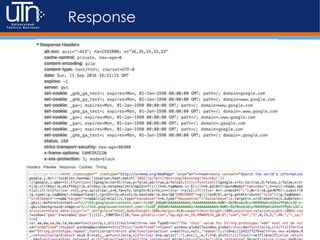
Response

01 - Web Programming Intro.pptx

  • 1.
  • 2.
    Remember how theweb works?
  • 3.
    Fundamentals ●Static vs DynamicContent ●Client/Server ●HTTP o Request o Response o Headers o Port 80 o Handshake
  • 4.
    Static vs DynamicHTML What it means?
  • 5.
    Do you thinkthis is Static?
  • 6.
  • 7.
  • 8.
    Static What yousee What the browser renders <div class="IndicadoresContentDiv"> <table summary=""> <tbody> <tr> <td><span title="">Compra</span></td> <td class="IndicadoresBoxBGR"><span id="lblCompra">546,37</span> </td> </tr> </tbody> </table> <table summary=""> <tbody> <tr> <td><span title="">Venta</span></td> <td class="IndicadoresBoxBGR"> <span id="lblVenta">558,99</span> </td> </tr> </tbody> </table> </div> What the source file looks like
  • 9.
    Dynamic What yousee What the browser renders <?php $compra = DollarExchange->getBuyValue(); $venta = DollarExchange->getSellValue(); ?> <div class="IndicadoresContentDiv"> <table summary=""> <tbody> <tr> <td><span title="">Compra</span></td> <td class="IndicadoresBoxBGR"><span id="lblCompra"><?php echo $compra; ?></span> </td> </tr> </tbody> </table> <table summary=""> <tbody> <tr> <td><span title="">Venta</span></td> <td class="IndicadoresBoxBGR"> <span id="lblVenta"><?php echo $venta; ?></span> </td> </tr> </tbody> </table> </div> What the source file look like
  • 10.
    Dynamic vs StaticHTML • Features limited to browser resources. • Need developer intervention to change the content • Response is always HTML no matter what. • Is/Can be cached by the browser • You can add some dynamic features with Javascript and HTML5 • Tons of libraries to everything we know that can be done in Web. • Content can vary based on a database change, another site, the date, no need for developer intervention • Response could be anything that the browser can show for the same URL. Its generated dynamically. • You have to control when to expire or cache the response Static Dynamic
  • 11.
    ●Limited to the Browser’resources (powerful with HTML5) ●The Web Server looks for the resource as a persistent file on disk. ●A Web Server is enough to serve the content ●There is no need for programming skills ●There is no limit (almost) on what you can do on the Server's side ●The resource to process is not always an specific file in the web server (dynamic). ●Usually depends on a Web and an Application Server to serve content ●Requires a high level programming code ..cont Dynamic vs Static HTML Static Dynamic
  • 12.
    What’s involved inthe Dynamic Content? • Web Server • Application Server • Server Side Coding – Programming Languages – Server Side Libraries – Services – Configuration Settings • Other Services – DBMS (MySQL, PostgreSQL, MongoDB, Oracle) – Cache (Memcached, Redis) – Logging – Third Party APIs
  • 13.
  • 14.
    1) The WebServer The term is used to reference Hardware or software that servers Web content
  • 15.
    Web Server’s Job •Listen and Responds to HTTP Requests • Find resource/file to load based on the request (URL). • Process the file to load • Delegate the file processing to an Application Server if needed (when it can’t handle it). • Build a response that the browser can read. – HTML, image, file to download – Redirect • Examples: Apache, IIS, Nginx, ligthhttpd
  • 16.
    cont.. • Files arestored on an specific directory within the Web Server’s hard drive (DocumentRoot) • Web Server should be running and listening to an specific port (80 by default) • Configuration files used to configure the server behavior (httpd.conf)
  • 18.
    2) Application Server Theirmain job is to support the construction of dynamic pages. It could be a service running on the same Web Server or standalone.
  • 19.
    ..cont ●An application serveracts as a set of components accessible to the software developer through an API defined by the platform itself. ●These components are usually performed in the same running environment as its web server(s) ●Target much more than just Web page generation: they implement services like clustering, fail-over, and load- balancing.
  • 20.
    ..cont ●Provides access tobusiness logic for use by client application programs. ●Infinite set of libraries and components for Database Access, Security, Clustering, ●Some examples: Zend Server (PHP), IBM Websphere (Java EE), Tomcat (Java), .NET framework (C#), Passenger (RoR), Node (Javascript), Oracle Weblogic (Java), Glassfish (Java), JBoss (Java), Unicorn (RoR), Puma (RoR)
  • 21.
    3) Server SideCode • Application server is able to run Programming Languages that run on the Server • Some examples: PHP, JSP, ASP, Ruby, Python, Perl, even Javascript (NodeJS) • How does server side code looks:
  • 22.
    Static vs Dynamic(URLs) http://localhost/login.html → /var/www/html/login.html http://localhost/login.html → /var/www/html/index.php <html> <head><title>Login</title></head> <body> Login Here: <form></form> </body> </html> <?php if(“login”) { require(‘template/login.php’); } else { require(‘template/404.php’); } ?> login.html index.php <html> <head><title>Login</title></head> <body> Login Here: <form></form> </body> </html> template/login.php
  • 23.
  • 25.
  • 27.
  • 28.