Curriculum:
Authentication, Validation & Basic Testing
Spring, 2016
Authentication, Validation, & Testing PART 1
1.) Authentication (~ 60 minutes)
2.) Validation (~ 30 minutes)
3.) Pairing (~30 minutes)
Agenda
Introductions
Matthew Gerrior
Devpost, Head of Engineering
ABOUT ME
● Grew up outside Boston
● Went to school upstate
● Worked in consulting for ~ 3.5 years
● Got tired of building other people’s products
● Moved to NYC to join Devpost (known as
ChallengePost at the time)
devpost.com/MGerrior
Devpost
Get an inside look at Dev teams who are hiring
ABOUT US
● Online Hackathons (Uber, Oculus, AT&T)
● In-Person Hackathons (PennApps, HackNY)
● Developer Portfolios to showcase skills,
technologies, projects
● Team Pages give an inside look at hot
startups in NYC (Blue Apron, Buzzfeed,
Genius)
devpost.com/teams
ScriptEd
Coding Skills for under-resourced schools
ScriptEd equips students in under-resourced schools with the fundamental
coding skills and professional experiences that together create access to
careers in technology.
● GitHub accounts from Day 1
● Two hackathons every year
● Field trips to Tech Companies
● Summer internship opportunities
Authentication
Cookies
Cookies
- Key-value data pairs
- Stored in the user’s browser
- Stored until they reach their specified expiration
data.
Cookies
Cookies
Good for:
- Storing temporary data
- Storing data that isn’t sensitive
Bad for:
- Storing permanent/persistent data
- Storing sensitive data like passwords or
shopping carts
Cookies
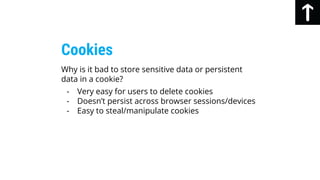
Why is it bad to store sensitive data or persistent
data in a cookie?
- Very easy for users to delete cookies
- Doesn’t persist across browser sessions/devices
- Easy to steal/manipulate cookies
Cookies
Cookies
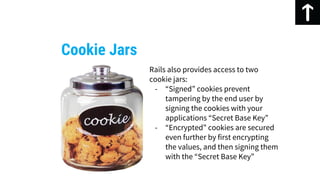
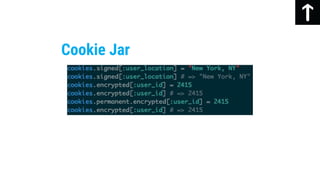
Cookie Jars
Rails also provides access to two
cookie jars:
- “Signed” cookies prevent
tampering by the end user by
signing the cookies with your
applications “Secret Base Key”
- “Encrypted” cookies are secured
even further by first encrypting
the values, and then signing them
with the “Secret Base Key”
Cookie Jar
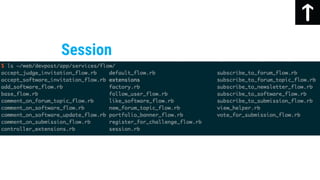
Session
Session
How can we tell which user is making a request to
our site if HTTP requests are stateless?
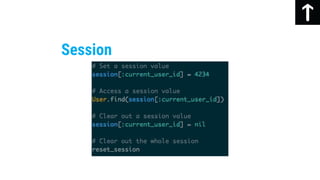
Rails stores a cookie on the user’s browser
containing their session hash.
- Secure
- Tamper-Proof
- Expires when the browser is closed
Session
Session
That looks like the cookies you just taught us about,
why do we need both?
The session is an entire hash that gets stored in a
secure cookie that expires when the browser is
closed. Each value in the cookies hash is stored as an
individual cookie, since they are key-value data pairs.
Session
- Not really a hash, that’s just how Rails presents it
to you to make it easier to work with. Cookies
are not hashes either.
- Size of an individual cookie is limited to roughly
4kb, which is sufficient for normal usage, but
prevents them from acting as a database of any
sort.
Session
Session
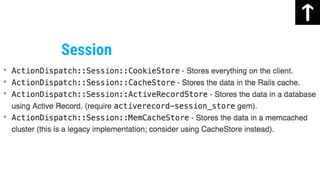
Which Session Store should I choose?
- Cookie store is the default, and recommended
store. It’s lightweight and requires zero setup in
a new application to use.
Session
Why would I use a different store then?
- You need more than 4kb of session data
- You probably don’t, but sometimes you do
- Cookies are sent along with every request you
make
- Bigger Cookies means bigger (and slower)
requests
Session
- If you accidentally expose your
“secret_base_key”, users can change their
session data
- Since the key is used to sign/encrypt the
cookie, exposing the key exposes the
session
- Storing the wrong kind of data is insecure
- Vulnerable to attacks like the replay attack if
sensitive data stored in cookie
Session
What is it useful for besides knowing which user is
currently logged in?
Session
Session
Flash
Flash
Special “hash” that persists only from one request to
the next. A self-destructing session hash.
Commonly used for sending messages from the
controllers to the view, because they persist across a
redirect from a “New Object” form to the details
page for that object.
Flash
Flash
Flash
Flash
Why can’t I just use instance variables?
Instance variables only exist for the current request,
and are lost when a new request takes place such as
when the user is redirected.
Flash
What if I’m not redirecting the user and I’m just
rendering a page?
Make flash messages available to the current
request using flash.now just like you would with a
regular flash.
Flash
Devise
Devise
Flexible authentication solution for Rails with
Warden.
https://github.com/plataformatec/devise
Authenticating users is easy. I’ll just build a
SessionsController with some CRUD actions and
store the user id in the cookie. Problem solved.
Devise
No. Authenticating users is not easy. What about:
- Securely storing user passwords
- Confirming email addresses?
- Log in With Twitter/GitHub/Facebook?
- Forgot Password email?
- Remember me checkbox?
Devise
You’re not getting paid to build an authentication
system (unless you are), you’re getting paid to build
a new and exciting product that no one has ever
built before.
Devise
Hashes and stores a password in the database to
validate the authenticity of a user while signing in.
Devise
Database Authenticatable
Adds OmniAuth (sign in with
Twitter/Facebook/GitHub/whatever) support.
Devise
Omniauthable
Sends emails with confirmation instructions and
verifies whether an account is already confirmed
during sign in.
Devise
Confirmable
Resets the user password and sends reset
instructions.
Devise
Recoverable
Handles signing up users through a registration
process, also allowing them to edit and destroy their
account.
Devise
Registerable
Manages generating and clearing a token for
remembering the user from a saved cookie.
Devise
Rememberable
Tracks sign in count, timestamps and IP address.
Devise
Trackable
Expires sessions that have not been active in a
specified period of time.
Devise
Timeoutable
Provides validations of email and password. It's
optional and can be customized, so you're able to
define your own validations.
Devise
Validatable
Locks an account after a specified number of failed
sign-in attempts. Can unlock via email or after a
specified time period.
Devise
Lockable
Should I always use Devise?
No, not always. There are other alternatives such as
Sorcery that provide authentication.
More importantly, it is a very enlightening exercise to
try to build your own authentication system from
scratch (just not for a production application).
Devise
Where can I learn more about rolling my own
authentication system?
● Michael Hartl's online book: https://www.railstutorial.
org/book/modeling_users
● Ryan Bates' Railscast: http://railscasts.com/episodes/250-authentication-
from-scratch
● Codecademy's Ruby on Rails: Authentication and Authorization: http:
//www.codecademy.com/en/learn/rails-auth
Devise
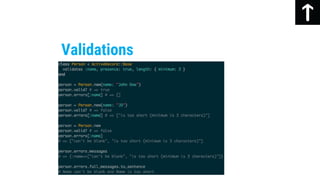
Validation
Validation
- Make testing/maintenance more difficult
- Beneficial when multiple applications access
database
- Can handle some constraints more efficiently
than application-level code
Database-level Validation
- Convenient way to provide immediate feedback
without submitting form/performing request
- Unreliable if used alone and implemented in
JavaScript, as they can easily be bypassed.
Validation
Client-side Validation
- Unwieldy to use and difficult to test/maintain
- Goes against the Skinny Controller/Fat Model
design paradigm of Rails
Validation
Controller-level Validation
- Best way to ensure that only valid data is stored
in the database
- Database agnostic
- Cannot be bypassed by end users
- Convenient to test and maintain
Validation
Model-level validations
- Important to ensure consistency in your
database
- Easier to render things like user profiles if you
know things like name are guaranteed to be
present
- Ensure proper functioning of application by
enforcing things like uniqueness of screen
names, or valid formats of email addresses.
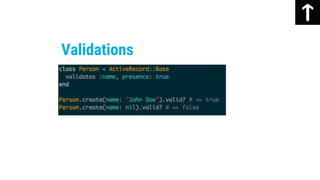
Validations
Validations
Validations
Validations
Validations
Acceptance
Validations
Associated
Validations
Confirmation
Validations
Exclusion
Validations
Format
Validations
Inclusion
Validations
Length
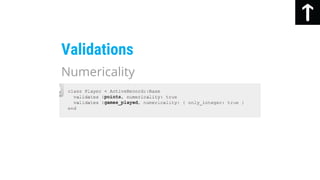
Validations
Numericality
Validations
Presence
Validations
Absence
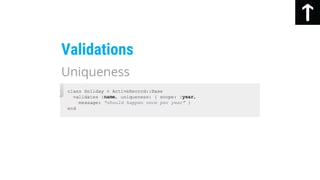
Validations
Uniqueness
Validations
Validations
Validations
Validations
Validations
Validations
Validations
Validations
Validations
Testing
Testing
TDD - Test Driven Development
Testing
TDD
Testing
RSpec
Testing
RSpec
Testing
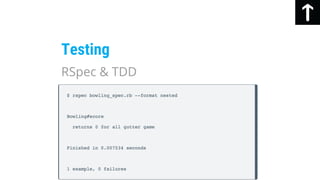
RSpec & TDD
Testing
RSpec & TDD
Testing
RSpec & TDD
Testing
- Earliest phase of testing
- Focuses on individual unit or component
- Best/Easiest phase to catch bugs in
- Can have 100% passing unit tests but still have
code that doesn’t work as intended
Unit Testing
- Ensure that model validations are present
- Ensure that relationships exist with correct
options
- Ensure helper methods perform as expected
Testing
Unit Testing
Testing
Unit Testing
Testing
Unit Testing
Testing combinations of separate
components/modules that have been independently
unit tested already.
Testing
Integration Testing
Testing
Integration
Testing
Integration
Testing
http://i.imgur.com/qSN5SFR.gifv
Integration
Testing
Verifying that all of the product/business needs have
been met and that end users have the desired
experience.
Acceptance
Testing
Cucumber (with Gherkin)
Testing
Cucumber (with Gherkin)
Testing
Cucumber (with Gherkin)
Testing
Capybara
Testing
Capybara
Testing
Resources
http://www.theodinproject.com/ruby-on-
rails/sessions-cookies-and-authentication
https://gorails.com/episodes/user-authentication-
with-devise
http://www.bitspedia.com/2012/05/how-session-
works-in-web-applications.html
http://www.justinweiss.com/articles/how-rails-
sessions-work/
http://www.w3schools.
com/bootstrap/bootstrap_alerts.asp
https://github.com/plataformatec/devise
http://guides.rubyonrails.
org/active_record_validations.html
http://blog.arkency.com/2014/04/mastering-rails-
validations-contexts/
https://octoberclub.files.wordpress.
com/2011/10/red-green-refactor.png
http://david.heinemeierhansson.com/2014/tdd-is-
dead-long-live-testing.html
Resources
http://www.rainforest-alliance.
org/sites/default/files/uploads/4/capybara-
family_15762686447_f9f8a0684a_o.jpg
http://www.can-technologies.
com/images/services/test2.png
http://stumbleapun.magicalfartwizard.org/wp-
content/uploads/2011/06/just-the-tips.jpg
http://stumbleapun.magicalfartwizard.org/wp-
content/uploads/2011/06/just-the-tips.jpg
Resources
http://www.seguetech.com/blog/2013/07/31/four-
levels-software-testing
http://softwaretestingfundamentals.com/unit-
testing/
https://www.inflectra.com/Ideas/Topic/Testing-
Methodologies.aspx
http://www.can-technologies.
com/images/services/test2.png
Resources

Startup Institute NY - Authentication, Validation, and Basic Testing