Start building for voice with Alexa
Eitan Sela - System Architect, WeissBeerger
“Turning drinks into data”
November 23, 2017
eitan.sela@gmail.com
$ whoami
• "Hands-On" system Architect with more than 17 years of
experience with billing, banking, information security (DLP) and
Cloud IoT/Big Data applications.
• AWS enthusiastic and serverless computing especially.
• Java development expert.
• Scalability Performance and Stabilization expert.
• Alexa skills developer and part time counselor (Are you also
interested? Go to www.israelclouds.com and read my articles).
• Member of the 4EPIC commune – 100 miles terrain bike riding.
eitan.sela@gmail.com
What to expect from this session
• Overview
• How Alexa works
• Build a voice experience in 5 minutes or less
• Pricing
• Tips from the trenches
• Q & A
• Links to get you started
Overview
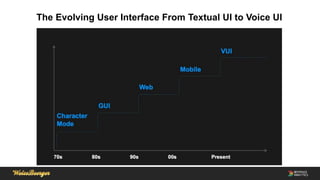
The Evolving User Interface From Textual UI to Voice UI
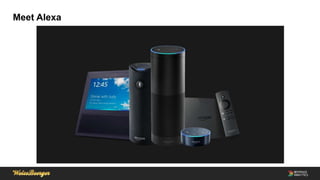
Meet Alexa
Alexa
• Alexa is not a device, but rather a voice cloud service operated by
voice commands.
• Variety of devices: Echo, Echo 2nd generation, Echo Plus, Echo
Show, Echo Connect, Echo Dot, Echo Look.
• Enabled on other Amazon devices: Amazon Fire TV, Fire HD 8,10
Tablets and more.
• More than 15,000 skills in Amazon store.
• Celebrates 3 years!
Availability
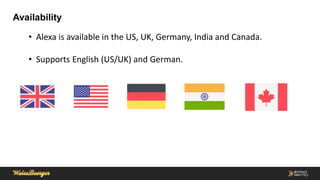
• Alexa is available in the US, UK, Germany, India and Canada.
• Supports English (US/UK) and German.
How Alexa Works
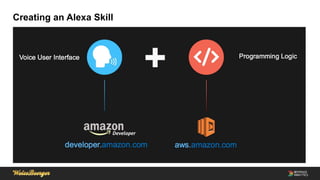
Creating an Alexa Skill
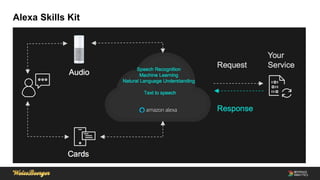
Alexa Skills Kit
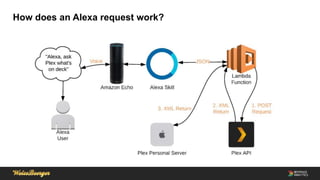
How does an Alexa request work?
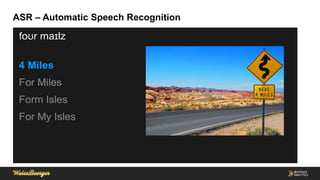
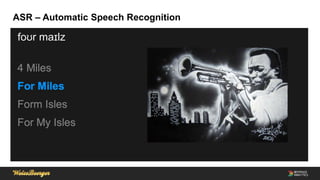
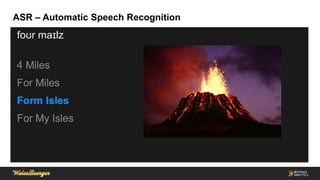
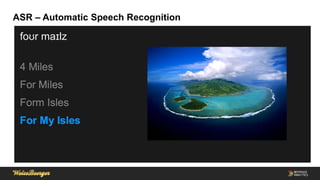
ASR – Automatic Speech Recognition
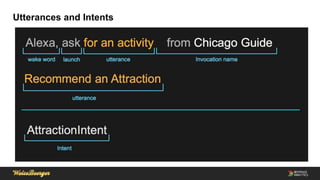
Utterances and Intents
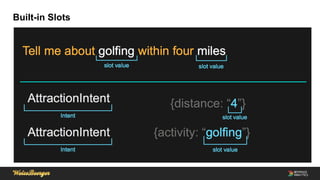
Built-in Slots
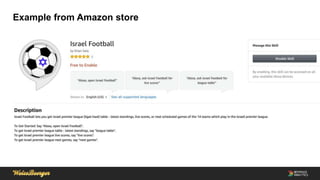
Example from Amazon store
Build a voice experience in 5 minutes or less
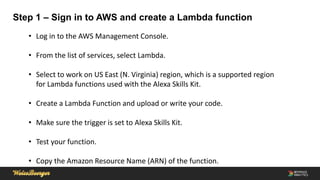
Step 1 – Sign in to AWS and create a Lambda function
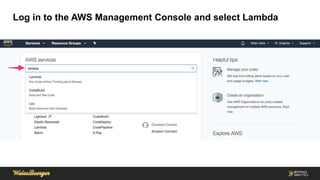
• Log in to the AWS Management Console.
• From the list of services, select Lambda.
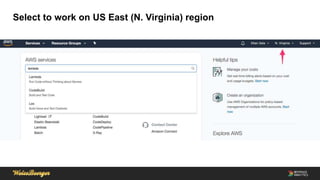
• Select to work on US East (N. Virginia) region, which is a supported region
for Lambda functions used with the Alexa Skills Kit.
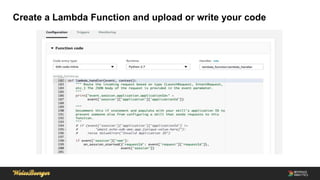
• Create a Lambda Function and upload or write your code.
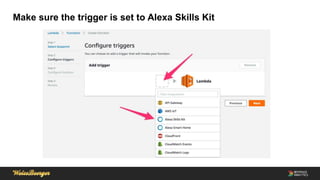
• Make sure the trigger is set to Alexa Skills Kit.
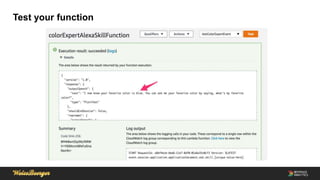
• Test your function.
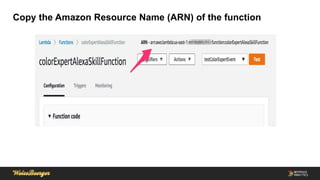
• Copy the Amazon Resource Name (ARN) of the function.
Log in to the AWS Management Console and select Lambda
Select to work on US East (N. Virginia) region
Create a Lambda Function and upload or write your code
Make sure the trigger is set to Alexa Skills Kit
Test your function
Copy the Amazon Resource Name (ARN) of the function
Step 2 – Use the Amazon developer portal to configure your skill
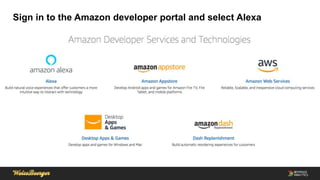
• Sign in to the Amazon developer portal and select Alexa.
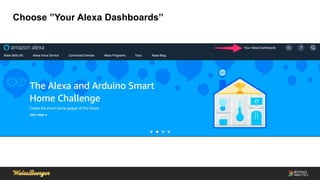
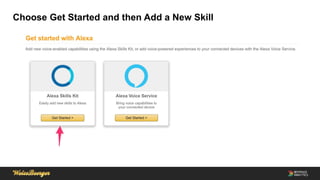
• Under ”Your Alexa Dashboards”, choose Get Started and choose Add a New
Skill.
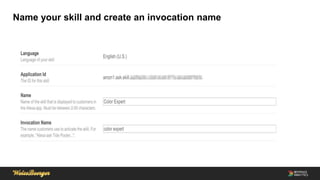
• Name your skill and create an invocation name.
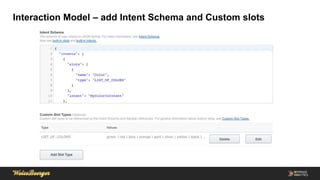
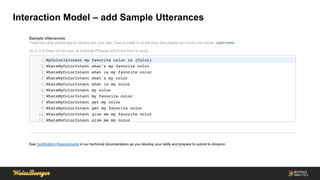
• Interaction Model – add Intent Schema, Custom slots and Sample
Utterances.
• Configure your endpoint – AWS Lambda function or HTTPS.
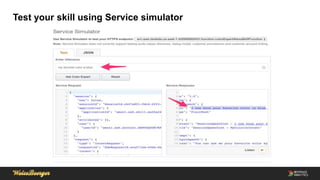
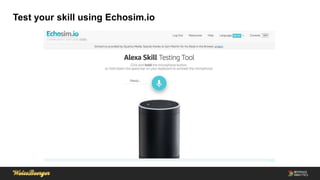
• Test your skill using Voice, Service simulator or Echosim.io.
Sign in to the Amazon developer portal and select Alexa
Choose ”Your Alexa Dashboards”
Choose Get Started and then Add a New Skill
Name your skill and create an invocation name
Interaction Model – add Intent Schema and Custom slots
Interaction Model – add Sample Utterances
Test your skill using Service simulator
Test your skill using Echosim.io
Tips from the trenches
• Before trying to publish your skill, read “Certification Requirements for Custom
Skills” document carefully. You should meet all the requirements.
• Be patient. The certification process is a human led operation and it can span
for few iterations.
• Getting the approval for the certification takes few days. Plus few hours to a day
to be published in amazon store.
• Try to test your sample utterances and custom slots on a voice enables device.
Sometimes it will just not work for you.
• Monitor your AWS Lambda functions with AWS X-Ray. Alexa is an additional UI
for your service. Monitor response times carefully.
Q & A
Links to get you started
• https://www.israelclouds.com/article/developing-new-skill-to-alexa-user-guide-
part1
• https://www.israelclouds.com/article/developing-new-skill-to-alexa-user-guide-
part2
• https://developer.amazon.com/alexa-skills-kit/alexa-skill-quick-start-tutorial
• https://developer.amazon.com/docs/custom-skills/speech-synthesis-markup-
language-ssml-reference.html
•
We Are Hiring
• Do you want to have a sea view from your window?
• Do you want to drink draft beer from a selection of two kegs whenever you want?
• Do you have knowledge of Java, PHP, or FE development?
• Your place is with us!

Start building for voice with alexa

  • 1.
    Start building forvoice with Alexa Eitan Sela - System Architect, WeissBeerger “Turning drinks into data” November 23, 2017 eitan.sela@gmail.com
  • 2.
    $ whoami • "Hands-On"system Architect with more than 17 years of experience with billing, banking, information security (DLP) and Cloud IoT/Big Data applications. • AWS enthusiastic and serverless computing especially. • Java development expert. • Scalability Performance and Stabilization expert. • Alexa skills developer and part time counselor (Are you also interested? Go to www.israelclouds.com and read my articles). • Member of the 4EPIC commune – 100 miles terrain bike riding. eitan.sela@gmail.com
  • 3.
    What to expectfrom this session • Overview • How Alexa works • Build a voice experience in 5 minutes or less • Pricing • Tips from the trenches • Q & A • Links to get you started
  • 4.
  • 5.
    The Evolving UserInterface From Textual UI to Voice UI
  • 6.
  • 7.
    Alexa • Alexa isnot a device, but rather a voice cloud service operated by voice commands. • Variety of devices: Echo, Echo 2nd generation, Echo Plus, Echo Show, Echo Connect, Echo Dot, Echo Look. • Enabled on other Amazon devices: Amazon Fire TV, Fire HD 8,10 Tablets and more. • More than 15,000 skills in Amazon store. • Celebrates 3 years!
  • 8.
    Availability • Alexa isavailable in the US, UK, Germany, India and Canada. • Supports English (US/UK) and German.
  • 9.
  • 10.
  • 11.
  • 12.
    How does anAlexa request work?
  • 13.
    ASR – AutomaticSpeech Recognition
  • 14.
    ASR – AutomaticSpeech Recognition
  • 15.
    ASR – AutomaticSpeech Recognition
  • 16.
    ASR – AutomaticSpeech Recognition
  • 17.
  • 18.
  • 19.
  • 20.
    Build a voiceexperience in 5 minutes or less
  • 21.
    Step 1 –Sign in to AWS and create a Lambda function • Log in to the AWS Management Console. • From the list of services, select Lambda. • Select to work on US East (N. Virginia) region, which is a supported region for Lambda functions used with the Alexa Skills Kit. • Create a Lambda Function and upload or write your code. • Make sure the trigger is set to Alexa Skills Kit. • Test your function. • Copy the Amazon Resource Name (ARN) of the function.
  • 22.
    Log in tothe AWS Management Console and select Lambda
  • 23.
    Select to workon US East (N. Virginia) region
  • 24.
    Create a LambdaFunction and upload or write your code
  • 25.
    Make sure thetrigger is set to Alexa Skills Kit
  • 26.
  • 27.
    Copy the AmazonResource Name (ARN) of the function
  • 28.
    Step 2 –Use the Amazon developer portal to configure your skill • Sign in to the Amazon developer portal and select Alexa. • Under ”Your Alexa Dashboards”, choose Get Started and choose Add a New Skill. • Name your skill and create an invocation name. • Interaction Model – add Intent Schema, Custom slots and Sample Utterances. • Configure your endpoint – AWS Lambda function or HTTPS. • Test your skill using Voice, Service simulator or Echosim.io.
  • 29.
    Sign in tothe Amazon developer portal and select Alexa
  • 30.
    Choose ”Your AlexaDashboards”
  • 31.
    Choose Get Startedand then Add a New Skill
  • 32.
    Name your skilland create an invocation name
  • 33.
    Interaction Model –add Intent Schema and Custom slots
  • 34.
    Interaction Model –add Sample Utterances
  • 35.
    Test your skillusing Service simulator
  • 36.
    Test your skillusing Echosim.io
  • 37.
    Tips from thetrenches
  • 38.
    Tips from thetrenches • Before trying to publish your skill, read “Certification Requirements for Custom Skills” document carefully. You should meet all the requirements. • Be patient. The certification process is a human led operation and it can span for few iterations. • Getting the approval for the certification takes few days. Plus few hours to a day to be published in amazon store. • Try to test your sample utterances and custom slots on a voice enables device. Sometimes it will just not work for you. • Monitor your AWS Lambda functions with AWS X-Ray. Alexa is an additional UI for your service. Monitor response times carefully.
  • 39.
  • 40.
    Links to getyou started • https://www.israelclouds.com/article/developing-new-skill-to-alexa-user-guide- part1 • https://www.israelclouds.com/article/developing-new-skill-to-alexa-user-guide- part2 • https://developer.amazon.com/alexa-skills-kit/alexa-skill-quick-start-tutorial • https://developer.amazon.com/docs/custom-skills/speech-synthesis-markup- language-ssml-reference.html •
  • 41.
    We Are Hiring •Do you want to have a sea view from your window? • Do you want to drink draft beer from a selection of two kegs whenever you want? • Do you have knowledge of Java, PHP, or FE development? • Your place is with us!