September 15
Building Amazon Alexa Custom
skill Step by step
Learn how to create custom skill for Amazon
Alexa and dive into the world of digital
assistants
About Speaker
• Stamo Petkov
• Information services Plc.
• Head of Microsoft Technologies
department
• Contact
o s.g.petkov@is-bg.net
o stamo.petkov@gmail.com
o https://github.com/stamo
o http://bg.linkedin.com/in/stamopetkov
o https://www.facebook.com/stamo.petkov
o @stamo_petkov
Thanks to our Sponsors
Innovation Partner
With the Support of:
Trusted PartnerDigital Transformation Partner
Agenda
o What is Alexa and do we care about digital assistants
at all
o Alexa Skills and the Alexa Skills Kit
• ASK
• Skills and Skill models
• Intents and Utterances
o Building custom skill
o Demo
What is Alexa?
And do we care about digital assistants at all?
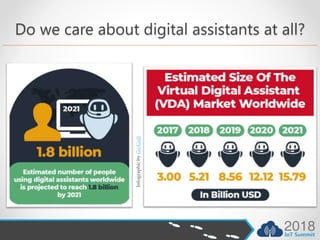
Do we care about digital assistants at all?
InfographicbyGo-Gulf
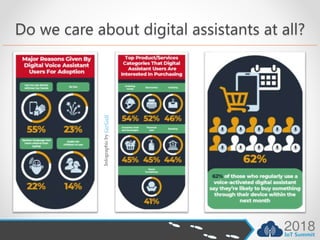
Do we care about digital assistants at all?
InfographicbyGo-Gulf
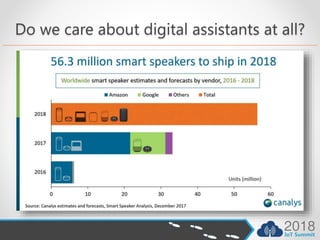
Do we care about digital assistants at all?
Alexa Skills and the Alexa
Skills Kit
ASK, Skills, Skill models, Intents and Utterances
Alexa Skills and the Alexa Skills Kit
• Alexa provides a set of built-in capabilities, referred to
as skills
o playing music from multiple providers
o answering questions
o providing weather forecasts
o querying Wikipedia
• The Alexa Skills Kit lets you teach Alexa new skills
o order pizza from Domino's Pizza
o get you a car from Uber
o play Avengers: Infinity War Trivia Game
o turn on lights in living room
o even Cortana can be an Alexa Skill
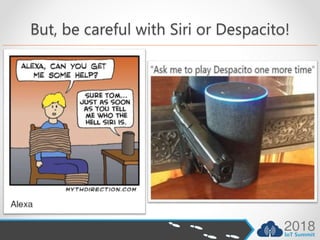
But, be careful with Siri or Despacito!
Skill models
• Every skill has an interaction
model that determines the
requests the skill can handle and
the words users say to invoke
those requests
• You can define it yourself with a
custom model
• The Alexa Skills Kit also provides
pre-built models in which the
possible requests and utterances
are pre-defined for you
• Pre-built interaction
model
• Smart Home Skill
• Video Skill
• Flash Briefing Skill
• List Skill
• Custom interaction
model
• Custom skill
Pre-built Models
• give you less control over the user's experience
• simplifies development since you do not need to create
the voice user interface yourself
• easier for end users to invoke
• can respond only to the requests (device directives)
supported by the corresponding API
• you (as the developer) define how your skill responds to
a particular directive
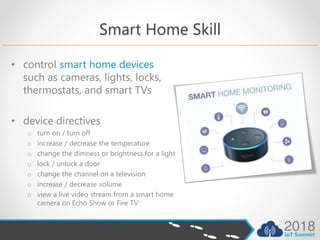
Smart Home Skill
• control smart home devices
such as cameras, lights, locks,
thermostats, and smart TVs
• device directives
o turn on / turn off
o increase / decrease the temperature
o change the dimness or brightness for a light
o lock / unlock a door
o change the channel on a television
o increase / decrease volume
o view a live video stream from a smart home
camera on Echo Show or Fire TV
Video Skill
• designed to enable customers to easily find and
consume video content
• Alexa is aware of video devices and services a user has or
subscribes to, and enables the user to control
experiences across these devices and services
• device directives
o searching and playing content
o playback controls such as pause and rewind
o launching an app or GUI shortcut
o recording video content
o channel navigation
o video catalog ingestion
Flash Briefing Skill
• provides a quick overview of news and other content
such as comedy, interviews, and list
• Alexa either reads text content or plays audio content
that is provided by each enabled skill
• becomes a part of a customer's daily routine as they get
ready for work or school
• content should update at least once a day
• you use the developer portal to provide the name, image
and other descriptive information that display in the
skills list, as well as configure the feeds that populate a
Flash Briefing skill with content
List Skills
• list skill is created through the ASK CLI (Alexa Skills Kit
Command Line Interface)
• list skill may include an optional custom component,
which can include any features allowed for custom skills,
in addition to list skill features
• device directives
o Adding an item to a list
o Removing an item from a list
o Updating an item on a list
Custom skill
• for the most control over the user's experience, build a
skill with a custom interaction model
• developer defines
o the requests the skill can handle. These are defined as intents
o the words users say to make (or invoke) those requests. This is the interaction
model, and it provides the voice user interface by which users communicate with
the skill
o the visual and touch interactions that users will experience and can invoke
o the name Alexa uses to identify your skill, called the invocation name
• this is the most flexible kind of skill you can build, but
also the most complex, since you need to provide the
interaction model
Building custom skill
Step by step
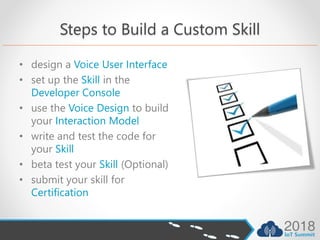
Steps to Build a Custom Skill
• design a Voice User Interface
• set up the Skill in the
Developer Console
• use the Voice Design to build
your Interaction Model
• write and test the code for
your Skill
• beta test your Skill (Optional)
• submit your skill for
Certification
Design a Voice User Interface
• designing an effective voice user interface for your skill is
a critical first step that you should do before writing any
code
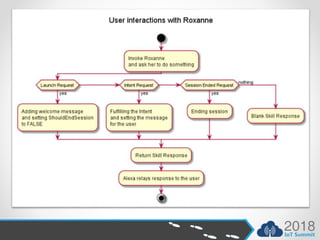
• create a flow diagram that maps out how users will
interact with the skill
• use the flow diagram to identify the user requests that
your skill will handle. These will become intents
• if your skill is designed to include images, gather that
content and store them on a publicly accessible site
Set up the Skill in the Developer Console
To create a new skill, you need to provide:
• a name that identifies the skill. When you publish the
skill, this becomes the public name that customers will
see in the skill store. You can edit this name before you
publish if necessary.
• the initial language to use. You can add support for
additional languages later.
• the interaction model that defines how users interact
with your skill.
Use the Voice Design to build your
Interaction Model
The interaction model refers to your collection of intents,
sample utterances, and the dialog model:
• the requests your skill can handle are represented as
intents
• intents can optionally have arguments called slots
• sample utterances map the intents to the words and
phrases users can say to interact with your skill
• a dialog model identifies information your skill requires
and the prompts Alexa can use to collect and confirm
that information in a conversation with the user
Write and test the code for your Skill
• create a service that can accept requests from the Alexa
service and send back responses
• you can create an AWS Lambda function to host the
service for your skill or build a web service and host it
with any cloud provider
• write the code for your skill. If you are using Lambda, you
can code in Node.js, Java, Python, or C#. If you are
hosting your skill as a web service, you can use any
programming language
• test your skill with the Test page or an Alexa-enabled
device
Beta test your Skill
• Once your skill is finished,
you have the option of
setting up a beta test for
your skill. With a beta test,
you can make your skill
available to a limited group
of testers that you have
personally selected, rather
than to the general public
Submit your skill for Certification
when you are ready to make your skill public, submit it for
certification. If your skill is currently in a beta test, you can
still proceed with certification
• run the validation and functional tests on the
Certification page in the developer console
• review the submission checklist
• when you are ready for your skill to be made public, and
you have ensured that your skill fulfills the requirements
on the certification checklist, submit your skill for
certification
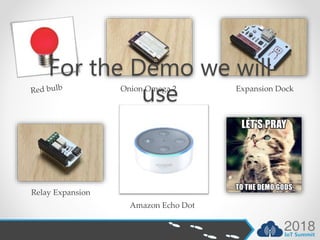
Onion Omega 2 Expansion Dock
Relay Expansion
Amazon Echo Dot
For the Demo we will
use
Thanks to our Sponsors
Innovation Partner
With the Support of:
Trusted PartnerDigital Transformation Partner
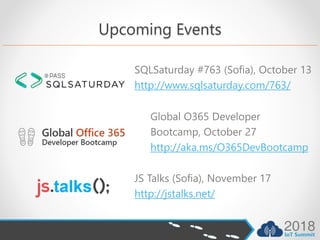
Upcoming Events
SQLSaturday #763 (Sofia), October 13
http://www.sqlsaturday.com/763/
JS Talks (Sofia), November 17
http://jstalks.net/
Global O365 Developer
Bootcamp, October 27
http://aka.ms/O365DevBootcamp

Building Amazon Alexa custom Skill step by step

  • 1.
    September 15 Building AmazonAlexa Custom skill Step by step Learn how to create custom skill for Amazon Alexa and dive into the world of digital assistants
  • 2.
    About Speaker • StamoPetkov • Information services Plc. • Head of Microsoft Technologies department • Contact o s.g.petkov@is-bg.net o stamo.petkov@gmail.com o https://github.com/stamo o http://bg.linkedin.com/in/stamopetkov o https://www.facebook.com/stamo.petkov o @stamo_petkov
  • 3.
    Thanks to ourSponsors Innovation Partner With the Support of: Trusted PartnerDigital Transformation Partner
  • 4.
    Agenda o What isAlexa and do we care about digital assistants at all o Alexa Skills and the Alexa Skills Kit • ASK • Skills and Skill models • Intents and Utterances o Building custom skill o Demo
  • 5.
    What is Alexa? Anddo we care about digital assistants at all?
  • 6.
    Do we careabout digital assistants at all? InfographicbyGo-Gulf
  • 7.
    Do we careabout digital assistants at all? InfographicbyGo-Gulf
  • 8.
    Do we careabout digital assistants at all?
  • 9.
    Alexa Skills andthe Alexa Skills Kit ASK, Skills, Skill models, Intents and Utterances
  • 10.
    Alexa Skills andthe Alexa Skills Kit • Alexa provides a set of built-in capabilities, referred to as skills o playing music from multiple providers o answering questions o providing weather forecasts o querying Wikipedia • The Alexa Skills Kit lets you teach Alexa new skills o order pizza from Domino's Pizza o get you a car from Uber o play Avengers: Infinity War Trivia Game o turn on lights in living room o even Cortana can be an Alexa Skill
  • 11.
    But, be carefulwith Siri or Despacito!
  • 12.
    Skill models • Everyskill has an interaction model that determines the requests the skill can handle and the words users say to invoke those requests • You can define it yourself with a custom model • The Alexa Skills Kit also provides pre-built models in which the possible requests and utterances are pre-defined for you • Pre-built interaction model • Smart Home Skill • Video Skill • Flash Briefing Skill • List Skill • Custom interaction model • Custom skill
  • 13.
    Pre-built Models • giveyou less control over the user's experience • simplifies development since you do not need to create the voice user interface yourself • easier for end users to invoke • can respond only to the requests (device directives) supported by the corresponding API • you (as the developer) define how your skill responds to a particular directive
  • 14.
    Smart Home Skill •control smart home devices such as cameras, lights, locks, thermostats, and smart TVs • device directives o turn on / turn off o increase / decrease the temperature o change the dimness or brightness for a light o lock / unlock a door o change the channel on a television o increase / decrease volume o view a live video stream from a smart home camera on Echo Show or Fire TV
  • 15.
    Video Skill • designedto enable customers to easily find and consume video content • Alexa is aware of video devices and services a user has or subscribes to, and enables the user to control experiences across these devices and services • device directives o searching and playing content o playback controls such as pause and rewind o launching an app or GUI shortcut o recording video content o channel navigation o video catalog ingestion
  • 16.
    Flash Briefing Skill •provides a quick overview of news and other content such as comedy, interviews, and list • Alexa either reads text content or plays audio content that is provided by each enabled skill • becomes a part of a customer's daily routine as they get ready for work or school • content should update at least once a day • you use the developer portal to provide the name, image and other descriptive information that display in the skills list, as well as configure the feeds that populate a Flash Briefing skill with content
  • 17.
    List Skills • listskill is created through the ASK CLI (Alexa Skills Kit Command Line Interface) • list skill may include an optional custom component, which can include any features allowed for custom skills, in addition to list skill features • device directives o Adding an item to a list o Removing an item from a list o Updating an item on a list
  • 18.
    Custom skill • forthe most control over the user's experience, build a skill with a custom interaction model • developer defines o the requests the skill can handle. These are defined as intents o the words users say to make (or invoke) those requests. This is the interaction model, and it provides the voice user interface by which users communicate with the skill o the visual and touch interactions that users will experience and can invoke o the name Alexa uses to identify your skill, called the invocation name • this is the most flexible kind of skill you can build, but also the most complex, since you need to provide the interaction model
  • 19.
  • 20.
    Steps to Builda Custom Skill • design a Voice User Interface • set up the Skill in the Developer Console • use the Voice Design to build your Interaction Model • write and test the code for your Skill • beta test your Skill (Optional) • submit your skill for Certification
  • 21.
    Design a VoiceUser Interface • designing an effective voice user interface for your skill is a critical first step that you should do before writing any code • create a flow diagram that maps out how users will interact with the skill • use the flow diagram to identify the user requests that your skill will handle. These will become intents • if your skill is designed to include images, gather that content and store them on a publicly accessible site
  • 22.
    Set up theSkill in the Developer Console To create a new skill, you need to provide: • a name that identifies the skill. When you publish the skill, this becomes the public name that customers will see in the skill store. You can edit this name before you publish if necessary. • the initial language to use. You can add support for additional languages later. • the interaction model that defines how users interact with your skill.
  • 23.
    Use the VoiceDesign to build your Interaction Model The interaction model refers to your collection of intents, sample utterances, and the dialog model: • the requests your skill can handle are represented as intents • intents can optionally have arguments called slots • sample utterances map the intents to the words and phrases users can say to interact with your skill • a dialog model identifies information your skill requires and the prompts Alexa can use to collect and confirm that information in a conversation with the user
  • 24.
    Write and testthe code for your Skill • create a service that can accept requests from the Alexa service and send back responses • you can create an AWS Lambda function to host the service for your skill or build a web service and host it with any cloud provider • write the code for your skill. If you are using Lambda, you can code in Node.js, Java, Python, or C#. If you are hosting your skill as a web service, you can use any programming language • test your skill with the Test page or an Alexa-enabled device
  • 25.
    Beta test yourSkill • Once your skill is finished, you have the option of setting up a beta test for your skill. With a beta test, you can make your skill available to a limited group of testers that you have personally selected, rather than to the general public
  • 26.
    Submit your skillfor Certification when you are ready to make your skill public, submit it for certification. If your skill is currently in a beta test, you can still proceed with certification • run the validation and functional tests on the Certification page in the developer console • review the submission checklist • when you are ready for your skill to be made public, and you have ensured that your skill fulfills the requirements on the certification checklist, submit your skill for certification
  • 28.
    Onion Omega 2Expansion Dock Relay Expansion Amazon Echo Dot For the Demo we will use
  • 31.
    Thanks to ourSponsors Innovation Partner With the Support of: Trusted PartnerDigital Transformation Partner
  • 32.
    Upcoming Events SQLSaturday #763(Sofia), October 13 http://www.sqlsaturday.com/763/ JS Talks (Sofia), November 17 http://jstalks.net/ Global O365 Developer Bootcamp, October 27 http://aka.ms/O365DevBootcamp