
AlexaDays 2017〜各地でAlexa、AI、IoTを語る
2017/5/17
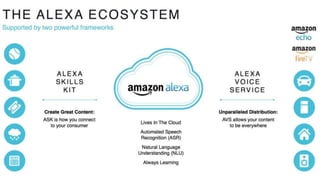
Alexa Skills Kit
@sparkgene
Jun Ichikawa
Favorite services:
AWS IoT
Amazon Alexa
infrastructure engineer
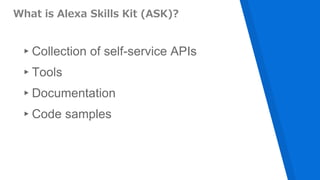
What is Alexa Skills Kit (ASK)?
▸Collection of self-service APIs
▸Tools
▸Documentation
▸Code samples
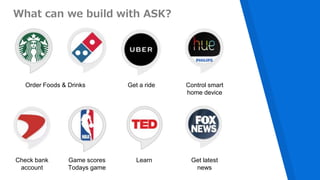
What can we build with ASK?
Order Foods & Drinks Get a ride Control smart
home device
Check bank
account
Game scores
Todays game
Get latest
news
Learn
Alexa Skills Types
▸Custom Skills
▸Smart Home Skills
▸Flash Briefing Skills
Custom Skills
▸design your own interaction model
▸interaction name is required
▸customer need to remember interaction name or invocation
phrase
▸you can use any server to host custom skill
Flash Briefing Skills
▸only way to add contents to Alexa flash briefing
▹ Alexa, what’s new?
▸pre-recorded audio clips and text-to-speech
▸RSS feed format or JSON format
Smart Home Skills
▸built-in interaction model
▸natural utterances to control device
▹Alexa, turn on living light
▸Alexa need a grant permissions (OAuth) to retrieve device
information and control device
▸You need a cloud service to manage customers smart
devices
▸Skill must use AWS Lambda function
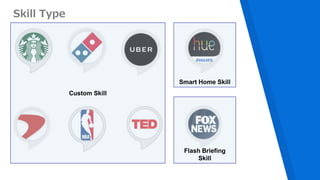
Skill Type
Custom Skill
Smart Home Skill
Flash Briefing
Skill
Custom Skill
How does custom skill work?
[1] Alexa, ask weather
Weather
Skill
[2] Invoke Intent with arguments
[3] Text response
(and card data)
[4] Audio response
[4] display card
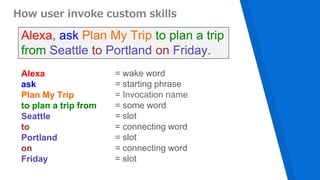
How user invoke custom skills
Alexa, ask Plan My Trip to plan a trip
from Seattle to Portland on Friday.
Alexa
ask
Plan My Trip
to plan a trip from
Seattle
to
Portland
on
Friday
= wake word
= starting phrase
= Invocation name
= some word
= slot
= connecting word
= slot
= connecting word
= slot
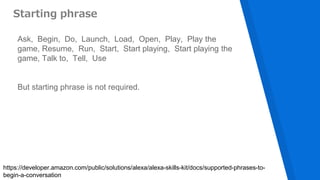
Starting phrase
Ask, Begin, Do, Launch, Load, Open, Play, Play the
game, Resume, Run, Start, Start playing, Start playing the
game, Talk to, Tell, Use
But starting phrase is not required.
https://developer.amazon.com/public/solutions/alexa/alexa-skills-kit/docs/supported-phrases-to-
begin-a-conversation
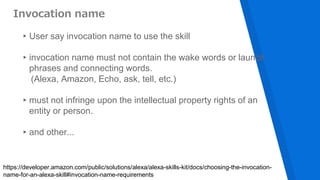
Invocation name
▸User say invocation name to use the skill
▸invocation name must not contain the wake words or launch
phrases and connecting words.
(Alexa, Amazon, Echo, ask, tell, etc.)
▸must not infringe upon the intellectual property rights of an
entity or person.
▸and other...
https://developer.amazon.com/public/solutions/alexa/alexa-skills-kit/docs/choosing-the-invocation-
name-for-an-alexa-skill#invocation-name-requirements
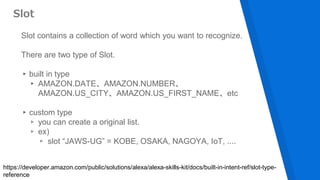
Slot contains a collection of word which you want to recognize.
There are two type of Slot.
▸built in type
▸ AMAZON.DATE、AMAZON.NUMBER、
AMAZON.US_CITY、AMAZON.US_FIRST_NAME、etc
▸custom type
▹ you can create a original list.
▹ ex)
▹ slot “JAWS-UG” = KOBE, OSAKA, NAGOYA, IoT, ....
Slot
https://developer.amazon.com/public/solutions/alexa/alexa-skills-kit/docs/built-in-intent-ref/slot-type-
reference
Interaction Model
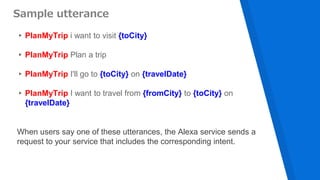
▸PlanMyTrip i want to visit {toCity}
▸PlanMyTrip Plan a trip
▸PlanMyTrip I'll go to {toCity} on {travelDate}
▸PlanMyTrip I want to travel from {fromCity} to {toCity} on
{travelDate}
Sample utterance
When users say one of these utterances, the Alexa service sends a
request to your service that includes the corresponding intent.
{
"intents": [
{
"intent": "PlanMyTrip",
"slots": [
{ "name": "travelDate", "type": "AMAZON.DATE" },
{"name": "toCity", "type": "AMAZON.US_CITY" },
{"name": "fromCity", "type": "AMAZON.US_CITY" }
]
}
]
}
Intent Schema
declares the intents that can be handled by the service for a custom skill
How does Plan My Trip work?
[1] Alexa, ask Plan My Trip to plan a trip
from Seattle to Portland on Friday.
Plan My
Trip
Skill
[2] Invoke PlanMyTrip with
toCity=Portland
fromCity=Seattle
travelDate=May 19 2017
[3] Text response[4] Audio response
Alexa Skill Updates
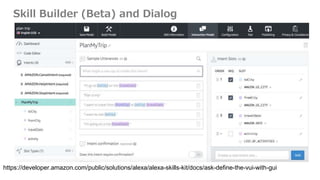
Skill Builder (Beta) and Dialog
https://developer.amazon.com/public/solutions/alexa/alexa-skills-kit/docs/ask-define-the-vui-with-gui
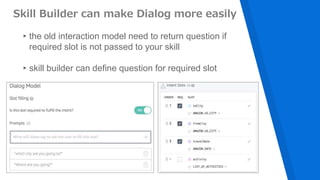
Skill Builder can make Dialog more easily
▸the old interaction model need to return question if
required slot is not passed to your skill
▸skill builder can define question for required slot
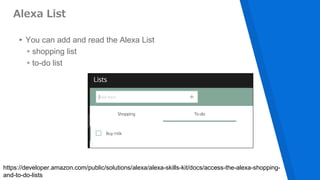
Alexa List
▸You can add and read the Alexa List
▹shopping list
▹to-do list
https://developer.amazon.com/public/solutions/alexa/alexa-skills-kit/docs/access-the-alexa-shopping-
and-to-do-lists
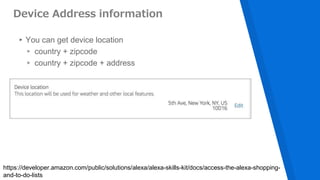
Device Address information
▸You can get device location
▹ country + zipcode
▹ country + zipcode + address
https://developer.amazon.com/public/solutions/alexa/alexa-skills-kit/docs/access-the-alexa-shopping-
and-to-do-lists
Start building
your own skill
▸Step 1: Create your free Amazon Developer Account and
name your skill
▸Step 2: Get Space Geek from the GitHub repository
▸Step 3: Upload code into AWS Lambda
▸Step 4: Configure and test your code
▸Step 5: Customize your Alexa skill
▸Step 6: Fine-Tune and Publish Your Skill
https://developer.amazon.com/public/solutions/alexa/alexa-skills-kit/content/fact-skill-1
6 Steps to Build Your First Alexa Skill
THANKS!
You can find me at @sparkgene

Alexa Skills Kit

  • 1.
  • 2.
    @sparkgene Jun Ichikawa Favorite services: AWSIoT Amazon Alexa infrastructure engineer
  • 4.
    What is AlexaSkills Kit (ASK)? ▸Collection of self-service APIs ▸Tools ▸Documentation ▸Code samples
  • 5.
    What can webuild with ASK? Order Foods & Drinks Get a ride Control smart home device Check bank account Game scores Todays game Get latest news Learn
  • 6.
    Alexa Skills Types ▸CustomSkills ▸Smart Home Skills ▸Flash Briefing Skills
  • 7.
    Custom Skills ▸design yourown interaction model ▸interaction name is required ▸customer need to remember interaction name or invocation phrase ▸you can use any server to host custom skill
  • 8.
    Flash Briefing Skills ▸onlyway to add contents to Alexa flash briefing ▹ Alexa, what’s new? ▸pre-recorded audio clips and text-to-speech ▸RSS feed format or JSON format
  • 9.
    Smart Home Skills ▸built-ininteraction model ▸natural utterances to control device ▹Alexa, turn on living light ▸Alexa need a grant permissions (OAuth) to retrieve device information and control device ▸You need a cloud service to manage customers smart devices ▸Skill must use AWS Lambda function
  • 10.
    Skill Type Custom Skill SmartHome Skill Flash Briefing Skill
  • 11.
  • 12.
    How does customskill work? [1] Alexa, ask weather Weather Skill [2] Invoke Intent with arguments [3] Text response (and card data) [4] Audio response [4] display card
  • 13.
    How user invokecustom skills Alexa, ask Plan My Trip to plan a trip from Seattle to Portland on Friday. Alexa ask Plan My Trip to plan a trip from Seattle to Portland on Friday = wake word = starting phrase = Invocation name = some word = slot = connecting word = slot = connecting word = slot
  • 14.
    Starting phrase Ask, Begin,Do, Launch, Load, Open, Play, Play the game, Resume, Run, Start, Start playing, Start playing the game, Talk to, Tell, Use But starting phrase is not required. https://developer.amazon.com/public/solutions/alexa/alexa-skills-kit/docs/supported-phrases-to- begin-a-conversation
  • 15.
    Invocation name ▸User sayinvocation name to use the skill ▸invocation name must not contain the wake words or launch phrases and connecting words. (Alexa, Amazon, Echo, ask, tell, etc.) ▸must not infringe upon the intellectual property rights of an entity or person. ▸and other... https://developer.amazon.com/public/solutions/alexa/alexa-skills-kit/docs/choosing-the-invocation- name-for-an-alexa-skill#invocation-name-requirements
  • 16.
    Slot contains acollection of word which you want to recognize. There are two type of Slot. ▸built in type ▸ AMAZON.DATE、AMAZON.NUMBER、 AMAZON.US_CITY、AMAZON.US_FIRST_NAME、etc ▸custom type ▹ you can create a original list. ▹ ex) ▹ slot “JAWS-UG” = KOBE, OSAKA, NAGOYA, IoT, .... Slot https://developer.amazon.com/public/solutions/alexa/alexa-skills-kit/docs/built-in-intent-ref/slot-type- reference
  • 17.
  • 18.
    ▸PlanMyTrip i wantto visit {toCity} ▸PlanMyTrip Plan a trip ▸PlanMyTrip I'll go to {toCity} on {travelDate} ▸PlanMyTrip I want to travel from {fromCity} to {toCity} on {travelDate} Sample utterance When users say one of these utterances, the Alexa service sends a request to your service that includes the corresponding intent.
  • 19.
    { "intents": [ { "intent": "PlanMyTrip", "slots":[ { "name": "travelDate", "type": "AMAZON.DATE" }, {"name": "toCity", "type": "AMAZON.US_CITY" }, {"name": "fromCity", "type": "AMAZON.US_CITY" } ] } ] } Intent Schema declares the intents that can be handled by the service for a custom skill
  • 20.
    How does PlanMy Trip work? [1] Alexa, ask Plan My Trip to plan a trip from Seattle to Portland on Friday. Plan My Trip Skill [2] Invoke PlanMyTrip with toCity=Portland fromCity=Seattle travelDate=May 19 2017 [3] Text response[4] Audio response
  • 21.
  • 22.
    Skill Builder (Beta)and Dialog https://developer.amazon.com/public/solutions/alexa/alexa-skills-kit/docs/ask-define-the-vui-with-gui
  • 23.
    Skill Builder canmake Dialog more easily ▸the old interaction model need to return question if required slot is not passed to your skill ▸skill builder can define question for required slot
  • 24.
    Alexa List ▸You canadd and read the Alexa List ▹shopping list ▹to-do list https://developer.amazon.com/public/solutions/alexa/alexa-skills-kit/docs/access-the-alexa-shopping- and-to-do-lists
  • 25.
    Device Address information ▸Youcan get device location ▹ country + zipcode ▹ country + zipcode + address https://developer.amazon.com/public/solutions/alexa/alexa-skills-kit/docs/access-the-alexa-shopping- and-to-do-lists
  • 26.
  • 27.
    ▸Step 1: Createyour free Amazon Developer Account and name your skill ▸Step 2: Get Space Geek from the GitHub repository ▸Step 3: Upload code into AWS Lambda ▸Step 4: Configure and test your code ▸Step 5: Customize your Alexa skill ▸Step 6: Fine-Tune and Publish Your Skill https://developer.amazon.com/public/solutions/alexa/alexa-skills-kit/content/fact-skill-1 6 Steps to Build Your First Alexa Skill
  • 28.
    THANKS! You can findme at @sparkgene