6



2
1.
2.
3.
4.
-
-
-
5.
6.
3
1.To- Down Programming
2.Modular Programming
3.Structured Coding
4
If/then
If Condition Then
statements
End If
Dim num1 As Integer
num1 = 30
If num1 > 0 Then
Print "The number is positive"
End If
5
If /Else
If Condition Then
statements1
Else
statements2
End If
Dim num1 As Integer, num2 As Integer
num1 = 30
num2 = 50
If num1 > num2 Then
Print num1
Else
Print num2
End If
6
Nested If-Else
If Condition Then
statements
ElseIf Condition then
statements
ElseIf Condition Then
statements
.......................
......................
Else
statements
End If
7
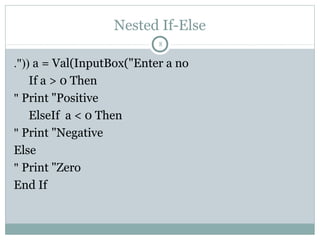
Nested If-Else
a = Val(InputBox("Enter a no."((
If a > 0 Then
Print "Positive"
ElseIf a < 0 Then
Print "Negative"
Else
Print "Zero"
End If
8
Nested If-Else
Dim num1 As Integer, num2 As Integer
num1 = InputBox("Enter 1st number"(
num2 = InputBox("Enter 2nd number"(
If (num1 > 0) And (num2 > 0) Then
MsgBox "Both the numbers are positive"
End If
If (num1 > 0) Or (num2 > 0) Then
MsgBox "Either 1st number or 2nd number or both are positive"
End If
If Not (num1 = 0) Then
MsgBox "The first number is non-zero"
End If
If (num1 > 0) Xor (num2 > 0) Then
MsgBox "Either 1st number or 2nd number is positive“
End If
9
10
Private Sub cmdCalculate_Click)(
Dim num1 As Integer, num2 As Integer, num3 As Integer
num1 = Val(txtNum1.Text(
num2 = Val(txtNum2.Text(
num3 = Val(txtNum3.Text(
If num1 > num2 And num1 > num3 Then
lblResult.Caption = num1
ElseIf num2 > num1 And num2 > num3 Then
lblResult.Caption = num2
Else
lblResult.Caption = num3
End If
End Sub
11
Select Case
Select Case expression
Case value 0
statements
Case value 1
statements
Case value 2
statements
...........
...............
Case else
statements
End select
12
Select Case
Dim num As Integer
num = Val(Text1.Text)
Select Case num
Case Is > 0
Print "Positive number"
Case Is < 0
Print "Negative number"
Case 0
Print "Zero"
End Select
13
14
Private Sub cmdCalculate_Click)(
Dim n As Long
n = Val(txtNum.Text(
Select Case n
Case 0 To 9
lblResult.Caption = "Single digit number"
Case 10 To 99
lblResult.Caption = "two digit number"
Case 100 To 999
lblResult.Caption = "Three digit number"
Case 1000 To 9999
lblResult.Caption = "Four digit number"
Case 10000 To 99999
lblResult.Caption = "Five digit number"
Case Else
lblResult.Caption = "More than Five digit number"
End Select
End Sub
15
16
Private Sub cmdCalculate_Click()
Dim s As String
s = txtGrade.Text
Select Case s
Case "E"
lblMarks.Caption = "above 90%"
lblRemarks.Caption = "Excellent"
Case "A+"
lblMarks.Caption = "above 80%"
lblRemarks.Caption = "Very Good"
Case "A"
lblMarks.Caption = "above 70%"
lblRemarks.Caption = "Good"
Case "B"
lblMarks.Caption = "above 60%"
lblRemarks.Caption = "Average"
Case "C"
lblMarks.Caption = "above 50%"
lblRemarks.Caption = "Satisfactory"
Case "D"
lblMarks.Caption = "above 40%"
lblRemarks.Caption = "Poor"
Case "F"
lblMarks.Caption = "above 35%"
lblRemarks.Caption = "Fail"
End Select
End Sub
17
IFF
18
Switch
19
r
Switch
20
Choose
21
For/Next
Dim i As Integer For i = 0 To 6 Step 2
Print i
Next i
_______________________________
Dim i As Integer For i = 10 To 0 Step -3
Print i
Next i
________________________________
22
Do/Loop
Do While Condition
statement(s)
Loop
_______________________
Do
statement(s)
Loop while Condition
_______________________
Do
statement(s)
Loop Until Condition
_______________________
Do Until Condition
Statement(s)
loop
23
Do/ Loop While
Dim num As Integer num = 0
Do
Print num
num = num + 1
Loop While num <= 10
___________________________
Dim num As Integer num = 11
Do
Print num
num = num + 1
Loop While num < 10
24
Do While/Loop
Dim num As Integer num = 0
Do While num < 10
Print num
num = num + 1
Loop
25
Do/Loop Until
'x is incremented until x becomes greater than 10
Dim x As Integer
x = 0
Do
Print x
x = x + 1
Loop Until x > 10
MsgBox x
26
Do Until/Loop
Private Sub Command1_Click()
x = 1
Index = 1
Do Until Index >= 21
Print x, x * x, x ^ 3
x = x + 2
Index = Index + 1
Loop
End Sub
27
WHILE/WEND
While condition
Statements…….
……………
……………
Wend
Private Sub Command1_Click()
x = 1
Index = 1
While Index <= 21
Print x, x * x, x ^ 3
x = x + 2
Index = Index + 1
wend
End Sub
28
Nested Loops
29
For loop
For counter1=startNumber to endNumber (Step increment)
For counter2=startNumber to endNumber (Step increment)
One or more VB statements
Next counter2
Next counter1
Nested Loops
30
Private Sub Form_Activate ( )
Dim x as integer, y as integer
For x= 1 to 5
Print “Hello”
For y=1 to 4
Print “Welcome to the VB tutorial”
Next y
Next x
Print ” Thank you”
End Sub
Dim x As Integer
Private Sub Command1_Click()
List1.Clear
Dim i As Integer, y As Integer
x = Text1.Text
For i = 1 To 12
y = x * i
List1.AddItem x & "*" & i &
"=" & y
Next i
End Sub
31

ملخص البرمجة المرئية - الوحدة الرابعة

  • 1.
  • 2.
  • 3.
  • 4.
    1.To- Down Programming 2.ModularProgramming 3.Structured Coding 4
  • 5.
    If/then If Condition Then statements EndIf Dim num1 As Integer num1 = 30 If num1 > 0 Then Print "The number is positive" End If 5
  • 6.
    If /Else If ConditionThen statements1 Else statements2 End If Dim num1 As Integer, num2 As Integer num1 = 30 num2 = 50 If num1 > num2 Then Print num1 Else Print num2 End If 6
  • 7.
    Nested If-Else If ConditionThen statements ElseIf Condition then statements ElseIf Condition Then statements ....................... ...................... Else statements End If 7
  • 8.
    Nested If-Else a =Val(InputBox("Enter a no."(( If a > 0 Then Print "Positive" ElseIf a < 0 Then Print "Negative" Else Print "Zero" End If 8
  • 9.
    Nested If-Else Dim num1As Integer, num2 As Integer num1 = InputBox("Enter 1st number"( num2 = InputBox("Enter 2nd number"( If (num1 > 0) And (num2 > 0) Then MsgBox "Both the numbers are positive" End If If (num1 > 0) Or (num2 > 0) Then MsgBox "Either 1st number or 2nd number or both are positive" End If If Not (num1 = 0) Then MsgBox "The first number is non-zero" End If If (num1 > 0) Xor (num2 > 0) Then MsgBox "Either 1st number or 2nd number is positive“ End If 9
  • 10.
  • 11.
    Private Sub cmdCalculate_Click)( Dimnum1 As Integer, num2 As Integer, num3 As Integer num1 = Val(txtNum1.Text( num2 = Val(txtNum2.Text( num3 = Val(txtNum3.Text( If num1 > num2 And num1 > num3 Then lblResult.Caption = num1 ElseIf num2 > num1 And num2 > num3 Then lblResult.Caption = num2 Else lblResult.Caption = num3 End If End Sub 11
  • 12.
    Select Case Select Caseexpression Case value 0 statements Case value 1 statements Case value 2 statements ........... ............... Case else statements End select 12
  • 13.
    Select Case Dim numAs Integer num = Val(Text1.Text) Select Case num Case Is > 0 Print "Positive number" Case Is < 0 Print "Negative number" Case 0 Print "Zero" End Select 13
  • 14.
  • 15.
    Private Sub cmdCalculate_Click)( Dimn As Long n = Val(txtNum.Text( Select Case n Case 0 To 9 lblResult.Caption = "Single digit number" Case 10 To 99 lblResult.Caption = "two digit number" Case 100 To 999 lblResult.Caption = "Three digit number" Case 1000 To 9999 lblResult.Caption = "Four digit number" Case 10000 To 99999 lblResult.Caption = "Five digit number" Case Else lblResult.Caption = "More than Five digit number" End Select End Sub 15
  • 16.
  • 17.
    Private Sub cmdCalculate_Click() Dims As String s = txtGrade.Text Select Case s Case "E" lblMarks.Caption = "above 90%" lblRemarks.Caption = "Excellent" Case "A+" lblMarks.Caption = "above 80%" lblRemarks.Caption = "Very Good" Case "A" lblMarks.Caption = "above 70%" lblRemarks.Caption = "Good" Case "B" lblMarks.Caption = "above 60%" lblRemarks.Caption = "Average" Case "C" lblMarks.Caption = "above 50%" lblRemarks.Caption = "Satisfactory" Case "D" lblMarks.Caption = "above 40%" lblRemarks.Caption = "Poor" Case "F" lblMarks.Caption = "above 35%" lblRemarks.Caption = "Fail" End Select End Sub 17
  • 18.
  • 19.
  • 20.
  • 21.
  • 22.
    For/Next Dim i AsInteger For i = 0 To 6 Step 2 Print i Next i _______________________________ Dim i As Integer For i = 10 To 0 Step -3 Print i Next i ________________________________ 22
  • 23.
    Do/Loop Do While Condition statement(s) Loop _______________________ Do statement(s) Loopwhile Condition _______________________ Do statement(s) Loop Until Condition _______________________ Do Until Condition Statement(s) loop 23
  • 24.
    Do/ Loop While Dimnum As Integer num = 0 Do Print num num = num + 1 Loop While num <= 10 ___________________________ Dim num As Integer num = 11 Do Print num num = num + 1 Loop While num < 10 24
  • 25.
    Do While/Loop Dim numAs Integer num = 0 Do While num < 10 Print num num = num + 1 Loop 25
  • 26.
    Do/Loop Until 'x isincremented until x becomes greater than 10 Dim x As Integer x = 0 Do Print x x = x + 1 Loop Until x > 10 MsgBox x 26
  • 27.
    Do Until/Loop Private SubCommand1_Click() x = 1 Index = 1 Do Until Index >= 21 Print x, x * x, x ^ 3 x = x + 2 Index = Index + 1 Loop End Sub 27
  • 28.
    WHILE/WEND While condition Statements……. …………… …………… Wend Private SubCommand1_Click() x = 1 Index = 1 While Index <= 21 Print x, x * x, x ^ 3 x = x + 2 Index = Index + 1 wend End Sub 28
  • 29.
    Nested Loops 29 For loop Forcounter1=startNumber to endNumber (Step increment) For counter2=startNumber to endNumber (Step increment) One or more VB statements Next counter2 Next counter1
  • 30.
    Nested Loops 30 Private SubForm_Activate ( ) Dim x as integer, y as integer For x= 1 to 5 Print “Hello” For y=1 to 4 Print “Welcome to the VB tutorial” Next y Next x Print ” Thank you” End Sub
  • 31.
    Dim x AsInteger Private Sub Command1_Click() List1.Clear Dim i As Integer, y As Integer x = Text1.Text For i = 1 To 12 y = x * i List1.AddItem x & "*" & i & "=" & y Next i End Sub 31