【企業應用行動化開發模式 】

- Rational Mobile Suite


 IBM ,Software 資深技術顧問 Tommy Wu,


                                  © 2011 IBM Corporation
Mobile Suite 開發模式 Overview


  UI Layer: Dojo Mobile
  Logic Layer : Ajax
  Data Access Layer : Storage Access


      Model
                             Controller
                 View
                                          © 2011 IBM Corporation
Presentation Layer (View) – 細說 Dojo Mobile


    Dojo Mobile 是 Dojo Toolkit 的一個延伸應用,其提供了一系列的
     widget 或 component ,以用在諸如智慧手機或是平板電腦一類的
     移動設備上。這些元件是完全可以使用一些主題來做定義的,比如
     說,可讓你向 iOS 用戶推出與 Android 用戶不同的一組風格。
    Dojo Mobile 的工作方式類似於元件的 Dijit 庫,要在應用中使用小
     部件的某個具體類型的話,你首先要在應用的主 JavaScript 塊中使
     用 dojo.require 來載入相關的類別。然後你就可以通過兩種方式來
     把 widget 加到應用中,或者是使用帶有 dojoType 屬性的 HTML
     標籤,或者是使用 JavaScript 代碼來動態產生。
    Dojo Mobile 在 iOS 和 Android 設備上都或得完全的支援,這大部
     分要歸功於在這些平臺上 Webkit 瀏覽器都是可用的。這一優勢還
     可延續到其他提供了符合 WebKit 標準的流覽器的平臺上,比如說
     BlackBerry OS 6 、 HP webOS, Windows Phone 等等。


                                              © 2011 IBM Corporation
Dojo Mobile 主要功能特性


   Dojo Mobile 的一些主要功能特性包括:
   1. Lightweight 的 widget 載入,這要歸功於 Dojo
    Mobile 的解析器。
    2. iOS 和 Android/Windows Phone/.. 設備上的 CSS3
    動畫和過渡。
    3. 包括了多種智慧裝置如 iOS 和 Android 觀感的主題
    (Theme) 。
    4. 非 CSS3 相容的設備和流覽器的相容性。
    5. 完全宣告式 (Declarative) 的語法使得學習曲線變得
    很平坦。
    6. 一大批的 Widgets ,目前最新版本為 1.8 Beta 。


                                            © 2011 IBM Corporation
如何開始?從 View 開始


   手動的載入 Dojo Mobile 類別
   dojo.require("dojox.mobile.ScrollableView");
    dojo.require("dojox.mobile.FlippableView");
    dojo.require("dojox.mobile.IconContainer");


                                                   © 2011 IBM Corporation
Dojo Mobile View


    View
    View (視圖)是一個容器部件,其佔用了設備螢幕上的所有可用
     空間。你的應用頁面可以包含多個 View 物件,但在任何特定時候
     都永遠只會有其中的一個是活動的。用戶通常會使用工具欄按鈕和
     標籤欄按鈕來在不同的視圖之間進行導航,這種導航為在各個視圖
     之間的轉移提供了各種各樣的過渡效果。圖 2 給出了一個空視圖的
     例子。
    圖 2. 一個空的 View 物件


                                  © 2011 IBM Corporation
視圖呈現


  在使用 View 物件的時候,你使用 selected 屬性來定義在應用啟動
   時該視圖是否應該被顯示出來(啟動視圖)。以宣告來建立上面的
   View 需要用到如下代碼。
  < div dojoType="dojox.mobile.View" selected="true">< /div>


                                                        © 2011 IBM Corporation
其他基本 Dojo Mobile UI widget 應用


   Heading
   Heading 物件允許你建立一個出現在應用的最頂部的導航
    欄, Heading 物件通常會有一個標題。你也可以往其中加入一些
    導航元素,比如 Back (後退)按鈕或是工具欄按鈕等,以此來提
    供一種導航到應用各處的簡單方式。
   < h1 dojoType="dojox.mobile.Heading" label="My App"
    back="Back"
     moveTo="back">
       < div dojoType="dojox.mobile.ToolBarButton" label="Edit"
        class="mblColorBlue" style="width:25px;float:right">
       < /div>
    < /h1>


                                                           © 2011 IBM Corporation
Dojo Mobile Data Container Widget


    RoundRect
    RoundRect 類別允許你建立一個簡單的圓角容器,該容器可用來
     放置靜態的 HTML 或是其他的 Dojo Mobile 部件。圖 6 給出了一
     個 RoundRect 部件的例子。
    圖 6. 使用 RoundRect 容器


    < div dojoType="dojox.mobile.RoundRect" shadow="true">
        This is a simple RoundRect object with some content in it.
     < /div>


                                                                     © 2011 IBM Corporation
Dojo Mobile Data Container Widget


    RoundRectCategory 和 RoundRectList
    在移動設備上呈現資料的時候,列表起到了非常重要的作用。垂直的表格
     結構允許你表示一系列不同的列表,這些項目可被用來顯示用於導航目的
     或是其他各種用途的資訊。 Dojo Mobile 允許你建立兩種類型的列表,這
     兩種列表都有著一個相關的類別部件。 RoundRectList 建立的列表的兩邊
     都有著一條間縫,第一項和最後一項的邊角則是圓的。圖 7 給出了在
     iPhone 上看到的 RoundRectCategory 和 RoundRectList 的樣子。
    圖 7. RoundRectList

    < h2 dojoType="dojox.mobile.RoundRectCategory">
     List Heading< /h2>
    < ul dojoType="dojox.mobile.RoundRectList">
       < li dojoType="dojox.mobile.ListItem">List Item 1< /li>
       < li dojoType="dojox.mobile.ListItem">List Item 2< /li>
       < li dojoType="dojox.mobile.ListItem">List Item 3< /li>
    < /ul>
                                                                 © 2011 IBM Corporation
一個 Dojo Mobile 綜合應用的簡單範例


   < div dojoType="dojox.mobile.ScrollableView" selected="true">
       < h1 dojoType="dojox.mobile.Heading" fixed="top">Hello, World!<
    /h1>
       < h2 dojoType="dojox.mobile.RoundRectCategory">First Section<
    /h2>
       < div dojoType="dojox.mobile.RoundRect">
          This is a nice standard rounded rectangular label.
       < /div>
       < h2 dojoType="dojox.mobile.RoundRectCategory">Second
    Section< /h2>
       < ul dojoType="dojox.mobile.RoundRectList">
          < li dojoType="dojox.mobile.ListItem">List Item 1< /li>
          < li dojoType="dojox.mobile.ListItem">List Item 2< /li>
          < li dojoType="dojox.mobile.ListItem">List Item 3< /li>
          < li dojoType="dojox.mobile.ListItem">List Item 4< /li>
          < li dojoType="dojox.mobile.ListItem">List Item 5< /li>
       < /ul>
    < /div>

                                                                    © 2011 IBM Corporation
其他常用 UI Widget


   < div dojoType="dojox.mobile.Switch" value="off">< /div>

   < ul dojoType="dojox.mobile.TabBar" barType="segmentedControl">
      < li dojoType="dojox.mobile.TabBarButton" moveTo="view1"
       selected="true">Albums< /li>
      < li dojoType="dojox.mobile.TabBarButton"
       moveTo="view2">Events< /li>
   < /ul>                                        < button dojoType="dojox.mobile.Button" btnClass="mblBlueButton"
                                           style="width: 100px">Click me!< /button>


                                                                                                         © 2011 IBM Corporation
Logic Layer : Ajax for xhr


    Ajax : AJAX (Asynchronous JavaScript and XML)
     -XMLHttpRequest 物件
    Ajax is a term used to describe a combination of technologies to
     make calls (asynchronously) to a server while the user's web
     page stays loaded. Dojo.xhrGet
    Making the call to the URL from the Dojo Toolkit ,Simply set up
     the arguments for the call, as shown in Listing 6, and pass them
     to the service.


                                                                 © 2011 IBM Corporation
XMLHTTPREQUEST2


   Cross-Origin Resource Sharing
   FormData, another new data type conceived for
    XHR2. FormData is convenient for creating an HTML <form> on-
    the-fly, in JavaScript. That form can then be submitted using
    AJAX
   Typed Array
   Progress Events


                                                             © 2011 IBM Corporation
REST API Call


    In addition to calling standard Ajax-style services, you can also
     use the Dojo Toolkit to call RESTful web services.
    Using a RESTful service
    Most RESTful web services follow conventions for the way a URL
     is constructed for a specific type of request, in addition to the
     HTTP method used for the request.
    Calling a RESTful web service using dojo.rpc.Rest
     // Calling this access the URL hobbits/1 (see Table 2)
    var service = dojox.rpc.Rest("hobbits");
    service("1");


                                                                 © 2011 IBM Corporation
xhr.responseType='blob'
   A Blob can be used in a number of places, including saving it to
    indexedDB, writing it to the HTML5 File System, or creating an
    Blob URL


                                                                 © 2011 IBM Corporation
Send File or Blob data using XHR2


    Sets up a handler to inform the user of the upload's progress:


                                                                 © 2011 IBM Corporation
Cross-Origin Resource Sharing- CORS 限制 (same origin policy )


    跨網域代理( Cross Domain Proxy )
    Using an iframe and document.domain
    JsonP : JSONP 其實就是運用 json 資料格式,及回呼程式
     (callback=?) 的方式達到可以取得到其它網域的資料並且執行後續
     callback 的 function
    CORS Spec :
     Header 的部份宣告 Access-Control-Allow-Origin ,並且限制可存
     取網域為 http://clonn.info ,如果希望所有網站都可以存取可以使
     用 "*"
    JS Library
      – easyXDM
      – easyXSS


                                                      © 2011 IBM Corporation
Data Access Layer : Offline Storage Access


    Application Cache :
      – allows us to store a copy of our web app's HTML, CSS and other
        assets off line, to be used when the network is not available.


    LocalStorage :
      – Web Storage takes the principles of older storage mechanisms
        such as cookies, and makes them more powerful and flexible


    WebSQL (Embedded SQLite)
      – WebSQL provides a fully-operational SQL database inside the
        browser, which can store a copy of our web app's data offline,
        allowing users to continue working with their data when they
        have no connection available.


                                                                  © 2011 IBM Corporation
Application Cache


    Loading our app's files when there is no network connection
    Define a manifest file containing the references to the files
     needed to run that app offline.


    <html manifest="demo.manifest">


                                                             © 2011 IBM Corporation
Web Storage (LocalStorage)


    Web Storage is perfect for storing small chunks of information
     rather than large tables of organized information.


                                                                 © 2011 IBM Corporation
WebSQL


   WebSQL is a local SQLite database that you can save application
    data to, using a combination of simple JavaScript and SQL.


   Transactions


                                                             © 2011 IBM Corporation
WebSQL


   Looping through result sets


                                  © 2011 IBM Corporation
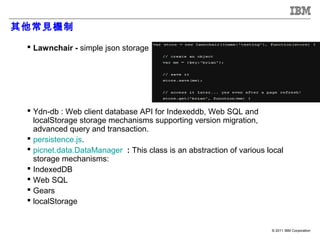
其他常見機制

  Lawnchair - simple json storage


  Ydn-db : Web client database API for Indexeddb, Web SQL and
   localStorage storage mechanisms supporting version migration,
   advanced query and transaction.
  persistence.js.
  picnet.data.DataManager : This class is an abstraction of various local
   storage mechanisms:
  IndexedDB
  Web SQL
  Gears
  localStorage


                                                                      © 2011 IBM Corporation
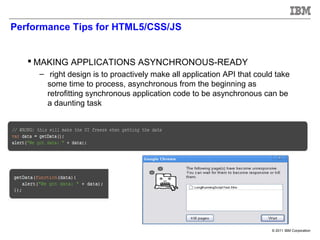
Performance Tips for HTML5/CSS/JS


    MAKING APPLICATIONS ASYNCHRONOUS-READY
     – right design is to proactively make all application API that could take
       some time to process, asynchronous from the beginning as
       retrofitting synchronous application code to be asynchronous can be
       a daunting task


                                                                        © 2011 IBM Corporation
Data exchange language performance : JSON vs. XML


    JSON should be faster since it's JS Object Notation, which
     means it can be recognized natively by JavaScript

    JSON lets you send JavaScript objects, while XML requires
     parsing a document.
     Benchmarking( JSON vs XML )

    http://www.navioo.com/ajax/ajax_json_xml_Benchmarking.p
     hp


      Parsing JSON was 2 -10 times faster than parsing XML!       © 2011 IBM Corporation
Minimizing browser reflow

    Reflow is the name of the web browser process for re-calculating
     the positions and geometries of elements in the document


       Reduce unnecessary DOM depth
       Minimize CSS rules
       Avoid unnecessary complex CSS selectors


                                                                © 2011 IBM Corporation
SLICING A FILE AND UPLOADING EACH PORTION


    we can minimize the work to upload a large file. The technique is
     to slice the upload into multiple chunks, spawn an XHR for each
     portion, and put the file together on the server.


                                                                 © 2011 IBM Corporation
Dojo Tips : CSS Sprite


    The combined big image can be clipped and adjusted with CSS
     properties so that it can be used as one of small images – Dojo
     Mobile


                                                                 © 2011 IBM Corporation
Dojo Tips : Dynamic creation and lazy loading


    Dojo Mobile use lazy loading technique to load modules only
     when they are referenced for the first time—improves the
     application's startup performance
    Lazy-load :
      – With the url property of _ItemBase, you can dynamically create a new
        view immediately before making a view transition
      – To improve the startup time performance, you can specify
        the lazy="true" parameter on IconItems
      – TabBar lazy=“true”
    Requiring modules dynamically
    Asynchronous mode
      – In Dojo 1.7, a new AMD (Asynchronous Module Definition) loader is
        provided in addition to the traditional Dojo loader. Dojo Mobile
        widgets are written in the new AMD syntax.

                                                                      © 2011 IBM Corporation
Reference


    Dojo Mobile 1.8 API Doc :https://dojotoolkit.org/reference-
     guide/1.8/dojox/mobile.html
    Dojo Mobile Demo Showcase :
     http://demos.dojotoolkit.org/demos/mobileGallery/demo-
     iphone.html
    Dojo Demos :http://demos.dojotoolkit.org/demos/
    HTML5 功能對於各 os 平台支援表 : http://mobilehtml5.org/
    HTML5 office storage tutorial :
     http://www.html5rocks.com/en/tutorials/offline/storage/
    Rest Demo for SQL manipulation :http://predic8.com/rest-
     demo.htm
    HTML5 Performance Tips : http://paulirish.com/2011/dom-
     html5-css3-performance/
    Phonegap Plugins on github :
     https://github.com/phonegap/phonegap-plugins

                                                             © 2011 IBM Corporation

企業應用行動化開發架構

  • 1.
    【企業應用行動化開發模式 】 - RationalMobile Suite IBM ,Software 資深技術顧問 Tommy Wu, © 2011 IBM Corporation
  • 2.
    Mobile Suite 開發模式Overview UI Layer: Dojo Mobile Logic Layer : Ajax Data Access Layer : Storage Access Model Controller View © 2011 IBM Corporation
  • 3.
    Presentation Layer (View)– 細說 Dojo Mobile  Dojo Mobile 是 Dojo Toolkit 的一個延伸應用,其提供了一系列的 widget 或 component ,以用在諸如智慧手機或是平板電腦一類的 移動設備上。這些元件是完全可以使用一些主題來做定義的,比如 說,可讓你向 iOS 用戶推出與 Android 用戶不同的一組風格。  Dojo Mobile 的工作方式類似於元件的 Dijit 庫,要在應用中使用小 部件的某個具體類型的話,你首先要在應用的主 JavaScript 塊中使 用 dojo.require 來載入相關的類別。然後你就可以通過兩種方式來 把 widget 加到應用中,或者是使用帶有 dojoType 屬性的 HTML 標籤,或者是使用 JavaScript 代碼來動態產生。  Dojo Mobile 在 iOS 和 Android 設備上都或得完全的支援,這大部 分要歸功於在這些平臺上 Webkit 瀏覽器都是可用的。這一優勢還 可延續到其他提供了符合 WebKit 標準的流覽器的平臺上,比如說 BlackBerry OS 6 、 HP webOS, Windows Phone 等等。 © 2011 IBM Corporation
  • 4.
    Dojo Mobile 主要功能特性  Dojo Mobile 的一些主要功能特性包括:  1. Lightweight 的 widget 載入,這要歸功於 Dojo Mobile 的解析器。 2. iOS 和 Android/Windows Phone/.. 設備上的 CSS3 動畫和過渡。 3. 包括了多種智慧裝置如 iOS 和 Android 觀感的主題 (Theme) 。 4. 非 CSS3 相容的設備和流覽器的相容性。 5. 完全宣告式 (Declarative) 的語法使得學習曲線變得 很平坦。 6. 一大批的 Widgets ,目前最新版本為 1.8 Beta 。 © 2011 IBM Corporation
  • 5.
    如何開始?從 View 開始  手動的載入 Dojo Mobile 類別  dojo.require("dojox.mobile.ScrollableView"); dojo.require("dojox.mobile.FlippableView"); dojo.require("dojox.mobile.IconContainer"); © 2011 IBM Corporation
  • 6.
    Dojo Mobile View  View  View (視圖)是一個容器部件,其佔用了設備螢幕上的所有可用 空間。你的應用頁面可以包含多個 View 物件,但在任何特定時候 都永遠只會有其中的一個是活動的。用戶通常會使用工具欄按鈕和 標籤欄按鈕來在不同的視圖之間進行導航,這種導航為在各個視圖 之間的轉移提供了各種各樣的過渡效果。圖 2 給出了一個空視圖的 例子。  圖 2. 一個空的 View 物件 © 2011 IBM Corporation
  • 7.
    視圖呈現  在使用View 物件的時候,你使用 selected 屬性來定義在應用啟動 時該視圖是否應該被顯示出來(啟動視圖)。以宣告來建立上面的 View 需要用到如下代碼。  < div dojoType="dojox.mobile.View" selected="true">< /div> © 2011 IBM Corporation
  • 8.
    其他基本 Dojo MobileUI widget 應用  Heading  Heading 物件允許你建立一個出現在應用的最頂部的導航 欄, Heading 物件通常會有一個標題。你也可以往其中加入一些 導航元素,比如 Back (後退)按鈕或是工具欄按鈕等,以此來提 供一種導航到應用各處的簡單方式。  < h1 dojoType="dojox.mobile.Heading" label="My App" back="Back" moveTo="back"> < div dojoType="dojox.mobile.ToolBarButton" label="Edit" class="mblColorBlue" style="width:25px;float:right"> < /div> < /h1> © 2011 IBM Corporation
  • 9.
    Dojo Mobile DataContainer Widget  RoundRect  RoundRect 類別允許你建立一個簡單的圓角容器,該容器可用來 放置靜態的 HTML 或是其他的 Dojo Mobile 部件。圖 6 給出了一 個 RoundRect 部件的例子。  圖 6. 使用 RoundRect 容器  < div dojoType="dojox.mobile.RoundRect" shadow="true"> This is a simple RoundRect object with some content in it. < /div> © 2011 IBM Corporation
  • 10.
    Dojo Mobile DataContainer Widget  RoundRectCategory 和 RoundRectList  在移動設備上呈現資料的時候,列表起到了非常重要的作用。垂直的表格 結構允許你表示一系列不同的列表,這些項目可被用來顯示用於導航目的 或是其他各種用途的資訊。 Dojo Mobile 允許你建立兩種類型的列表,這 兩種列表都有著一個相關的類別部件。 RoundRectList 建立的列表的兩邊 都有著一條間縫,第一項和最後一項的邊角則是圓的。圖 7 給出了在 iPhone 上看到的 RoundRectCategory 和 RoundRectList 的樣子。  圖 7. RoundRectList  < h2 dojoType="dojox.mobile.RoundRectCategory"> List Heading< /h2> < ul dojoType="dojox.mobile.RoundRectList"> < li dojoType="dojox.mobile.ListItem">List Item 1< /li> < li dojoType="dojox.mobile.ListItem">List Item 2< /li> < li dojoType="dojox.mobile.ListItem">List Item 3< /li> < /ul> © 2011 IBM Corporation
  • 11.
    一個 Dojo Mobile綜合應用的簡單範例  < div dojoType="dojox.mobile.ScrollableView" selected="true"> < h1 dojoType="dojox.mobile.Heading" fixed="top">Hello, World!< /h1> < h2 dojoType="dojox.mobile.RoundRectCategory">First Section< /h2> < div dojoType="dojox.mobile.RoundRect"> This is a nice standard rounded rectangular label. < /div> < h2 dojoType="dojox.mobile.RoundRectCategory">Second Section< /h2> < ul dojoType="dojox.mobile.RoundRectList"> < li dojoType="dojox.mobile.ListItem">List Item 1< /li> < li dojoType="dojox.mobile.ListItem">List Item 2< /li> < li dojoType="dojox.mobile.ListItem">List Item 3< /li> < li dojoType="dojox.mobile.ListItem">List Item 4< /li> < li dojoType="dojox.mobile.ListItem">List Item 5< /li> < /ul> < /div> © 2011 IBM Corporation
  • 12.
    其他常用 UI Widget < div dojoType="dojox.mobile.Switch" value="off">< /div> < ul dojoType="dojox.mobile.TabBar" barType="segmentedControl"> < li dojoType="dojox.mobile.TabBarButton" moveTo="view1" selected="true">Albums< /li> < li dojoType="dojox.mobile.TabBarButton" moveTo="view2">Events< /li> < /ul> < button dojoType="dojox.mobile.Button" btnClass="mblBlueButton" style="width: 100px">Click me!< /button> © 2011 IBM Corporation
  • 13.
    Logic Layer :Ajax for xhr  Ajax : AJAX (Asynchronous JavaScript and XML) -XMLHttpRequest 物件  Ajax is a term used to describe a combination of technologies to make calls (asynchronously) to a server while the user's web page stays loaded. Dojo.xhrGet  Making the call to the URL from the Dojo Toolkit ,Simply set up the arguments for the call, as shown in Listing 6, and pass them to the service. © 2011 IBM Corporation
  • 14.
    XMLHTTPREQUEST2 Cross-Origin Resource Sharing  FormData, another new data type conceived for XHR2. FormData is convenient for creating an HTML <form> on- the-fly, in JavaScript. That form can then be submitted using AJAX  Typed Array  Progress Events © 2011 IBM Corporation
  • 15.
    REST API Call  In addition to calling standard Ajax-style services, you can also use the Dojo Toolkit to call RESTful web services.  Using a RESTful service  Most RESTful web services follow conventions for the way a URL is constructed for a specific type of request, in addition to the HTTP method used for the request.  Calling a RESTful web service using dojo.rpc.Rest // Calling this access the URL hobbits/1 (see Table 2)  var service = dojox.rpc.Rest("hobbits");  service("1"); © 2011 IBM Corporation
  • 16.
    xhr.responseType='blob' A Blob can be used in a number of places, including saving it to indexedDB, writing it to the HTML5 File System, or creating an Blob URL © 2011 IBM Corporation
  • 17.
    Send File orBlob data using XHR2  Sets up a handler to inform the user of the upload's progress: © 2011 IBM Corporation
  • 18.
    Cross-Origin Resource Sharing-CORS 限制 (same origin policy )  跨網域代理( Cross Domain Proxy )  Using an iframe and document.domain  JsonP : JSONP 其實就是運用 json 資料格式,及回呼程式 (callback=?) 的方式達到可以取得到其它網域的資料並且執行後續 callback 的 function  CORS Spec : Header 的部份宣告 Access-Control-Allow-Origin ,並且限制可存 取網域為 http://clonn.info ,如果希望所有網站都可以存取可以使 用 "*"  JS Library – easyXDM – easyXSS © 2011 IBM Corporation
  • 19.
    Data Access Layer: Offline Storage Access  Application Cache : – allows us to store a copy of our web app's HTML, CSS and other assets off line, to be used when the network is not available.  LocalStorage : – Web Storage takes the principles of older storage mechanisms such as cookies, and makes them more powerful and flexible  WebSQL (Embedded SQLite) – WebSQL provides a fully-operational SQL database inside the browser, which can store a copy of our web app's data offline, allowing users to continue working with their data when they have no connection available. © 2011 IBM Corporation
  • 20.
    Application Cache  Loading our app's files when there is no network connection  Define a manifest file containing the references to the files needed to run that app offline.  <html manifest="demo.manifest"> © 2011 IBM Corporation
  • 21.
    Web Storage (LocalStorage)  Web Storage is perfect for storing small chunks of information rather than large tables of organized information. © 2011 IBM Corporation
  • 22.
    WebSQL WebSQL is a local SQLite database that you can save application data to, using a combination of simple JavaScript and SQL.  Transactions © 2011 IBM Corporation
  • 23.
    WebSQL Looping through result sets © 2011 IBM Corporation
  • 24.
    其他常見機制  Lawnchair- simple json storage  Ydn-db : Web client database API for Indexeddb, Web SQL and localStorage storage mechanisms supporting version migration, advanced query and transaction.  persistence.js.  picnet.data.DataManager : This class is an abstraction of various local storage mechanisms:  IndexedDB  Web SQL  Gears  localStorage © 2011 IBM Corporation
  • 25.
    Performance Tips forHTML5/CSS/JS  MAKING APPLICATIONS ASYNCHRONOUS-READY – right design is to proactively make all application API that could take some time to process, asynchronous from the beginning as retrofitting synchronous application code to be asynchronous can be a daunting task © 2011 IBM Corporation
  • 26.
    Data exchange languageperformance : JSON vs. XML  JSON should be faster since it's JS Object Notation, which means it can be recognized natively by JavaScript  JSON lets you send JavaScript objects, while XML requires parsing a document. Benchmarking( JSON vs XML )  http://www.navioo.com/ajax/ajax_json_xml_Benchmarking.p hp Parsing JSON was 2 -10 times faster than parsing XML! © 2011 IBM Corporation
  • 27.
    Minimizing browser reflow  Reflow is the name of the web browser process for re-calculating the positions and geometries of elements in the document Reduce unnecessary DOM depth Minimize CSS rules Avoid unnecessary complex CSS selectors © 2011 IBM Corporation
  • 28.
    SLICING A FILEAND UPLOADING EACH PORTION  we can minimize the work to upload a large file. The technique is to slice the upload into multiple chunks, spawn an XHR for each portion, and put the file together on the server. © 2011 IBM Corporation
  • 29.
    Dojo Tips :CSS Sprite  The combined big image can be clipped and adjusted with CSS properties so that it can be used as one of small images – Dojo Mobile © 2011 IBM Corporation
  • 30.
    Dojo Tips :Dynamic creation and lazy loading  Dojo Mobile use lazy loading technique to load modules only when they are referenced for the first time—improves the application's startup performance  Lazy-load : – With the url property of _ItemBase, you can dynamically create a new view immediately before making a view transition – To improve the startup time performance, you can specify the lazy="true" parameter on IconItems – TabBar lazy=“true”  Requiring modules dynamically  Asynchronous mode – In Dojo 1.7, a new AMD (Asynchronous Module Definition) loader is provided in addition to the traditional Dojo loader. Dojo Mobile widgets are written in the new AMD syntax. © 2011 IBM Corporation
  • 31.
    Reference  Dojo Mobile 1.8 API Doc :https://dojotoolkit.org/reference- guide/1.8/dojox/mobile.html  Dojo Mobile Demo Showcase : http://demos.dojotoolkit.org/demos/mobileGallery/demo- iphone.html  Dojo Demos :http://demos.dojotoolkit.org/demos/  HTML5 功能對於各 os 平台支援表 : http://mobilehtml5.org/  HTML5 office storage tutorial : http://www.html5rocks.com/en/tutorials/offline/storage/  Rest Demo for SQL manipulation :http://predic8.com/rest- demo.htm  HTML5 Performance Tips : http://paulirish.com/2011/dom- html5-css3-performance/  Phonegap Plugins on github : https://github.com/phonegap/phonegap-plugins © 2011 IBM Corporation

Editor's Notes

  • #15 A revamped send() method has been overridden to accept any of the following types: DOMString, Document, FormData, Blob, File, ArrayBuffer.  var xhr = new XMLHttpRequest(); xhr.open(&apos;GET&apos;, &apos;/path/to/image.png&apos;, true); xhr.responseType = &apos;arraybuffer&apos;; xhr.onload = function(e) { var uInt8Array = new Uint8Array ( this.response ); // this.response == uInt8Array.buffer // var byte3 = uInt8Array[4]; // byte at offset 4 ... }; If you want to work directly with a  Blob  and/or don&apos;t need to manipulate any of the file&apos;s bytes, use xhr.responseType=&apos;blob&apos;: