








Lukasz Pawlowski, Denny Lee
Microsoft Corporation
DBP210
• Learn how to ensure a predictable Reporting Services
deployment in your environment
• Learn about the following as relates to Reporting Services
• Backup/restore
• Security/authorization
• Scale/performance/high availability
• Upgrade
• Approach:
• Provide the technical knowledge needed to make sound decisions
• Provide lessons learned from Real Customers
• Reporting Services 101
• Backup/Restore
• Security
• Monitoring and Planning
• Deployment Topology
• Upgrade
• Tribal Knowledge
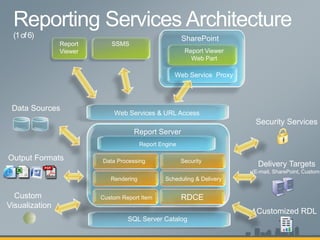
Report Server
SQL Server Catalog
Report Engine
Scheduling & DeliveryRendering
Data Processing Security
Delivery Targets
(E-mail, SharePoint, Custom)
Security Services
Output Formats
Data Sources
RDCE
Customized RDL
Custom Report ItemCustom
Visualization
SSMSReport
Viewer
Web Service Proxy
Report Viewer
Web Part
SharePoint
Web Services & URL Access
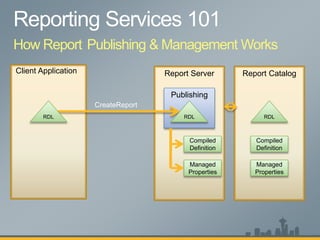
Client Application Report Server
Publishing
CreateReport
RDL
Compiled
Definition
Managed
Properties
Report Catalog
RDL
Compiled
Definition
Managed
Properties
RDL
How Report Publishing & Management Works
Client Application Report Server Report Catalog
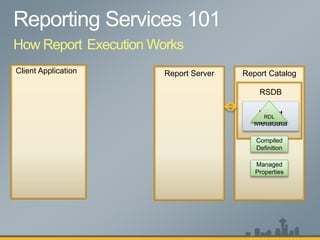
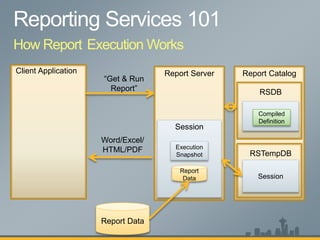
How Report Execution Works
RSDB
Report
Metadata
RDL
Compiled
Definition
Managed
Properties
Client Application Report Server Report Catalog
How Report Execution Works
RSDB
RSTempDB
Report
Metadata
Session
Session
Compiled
Definition
“Get & Run
Report”
Execution
Snapshot
Report Data
Report
Data
Word/Excel/
HTML/PDF
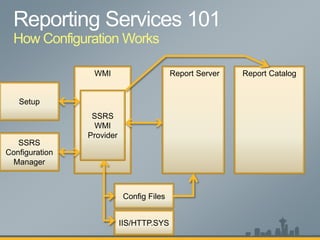
How Configuration Works
WMI Report Server Report Catalog
SSRS
WMI
Provider
IIS/HTTP.SYS
Config Files
SSRS
Configuration
Manager
Setup
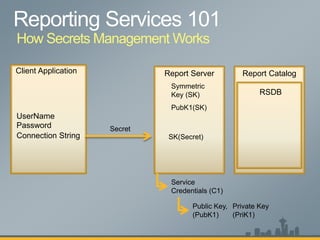
Client Application Report Server Report Catalog
How Secrets Management Works
RSDB
UserName
Password
Connection String
Secret
Symmetric
Key (SK)
Service
Credentials (C1)
Public Key,
(PubK1)
Private Key
(PriK1)
PubK1(SK)
SK(Secret)
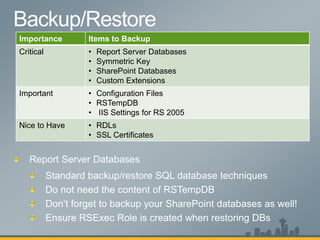
Importance Items to Backup
Critical • Report Server Databases
• Symmetric Key
• SharePoint Databases
• Custom Extensions
Important • Configuration Files
• RSTempDB
• IIS Settings for RS 2005
Nice to Have • RDLs
• SSL Certificates
Standard backup/restore SQL database techniques
Don’t forget to backup your SharePoint databases as well!
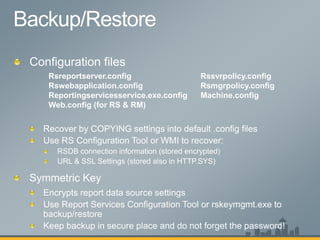
Rsreportserver.config
Rswebapplication.config
Reportingservicesservice.exe.config
Web.config (for RS & RM)
Rssvrpolicy.config
Rsmgrpolicy.config
Machine.config
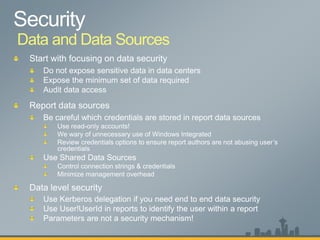
Data and Data Sources
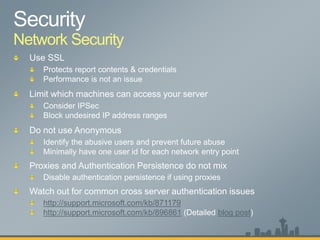
Network Security
http://support.microsoft.com/kb/871179
http://support.microsoft.com/kb/896861 blog post
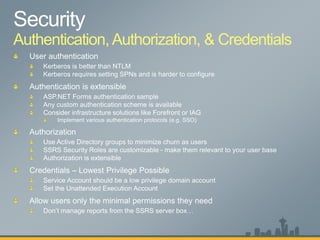
Authentication, Authorization, & Credentials
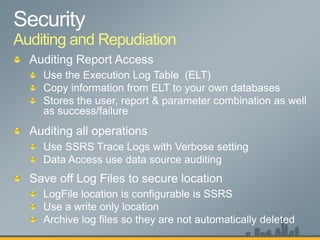
Auditing and Repudiation
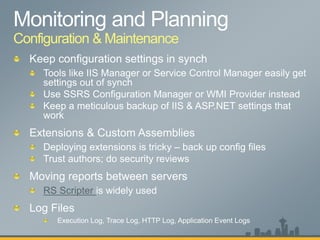
Configuration & Maintenance
RS Scripter
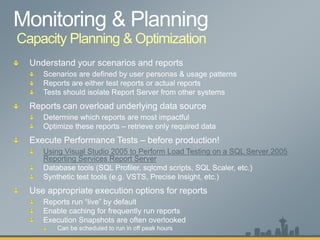
Using Visual Studio 2005 to Perform Load Testing on a SQL Server 2005
Reporting Services Report Server
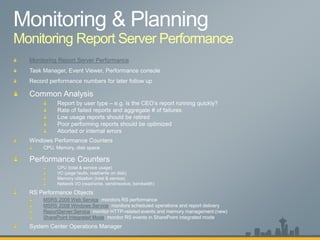
Monitoring Report Server Performance
MSRS 2008 Web Service
MSRS 2008 Windows Service
ReportServer:Service
SharePoint Integrated Mode
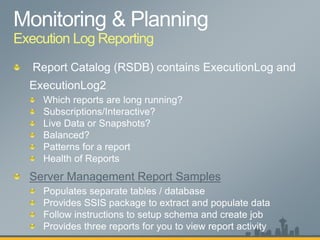
Execution Log Reporting
Server Management Report Samples
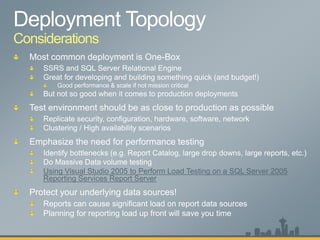
Considerations
Using Visual Studio 2005 to Perform Load Testing on a SQL Server 2005
Reporting Services Report Server
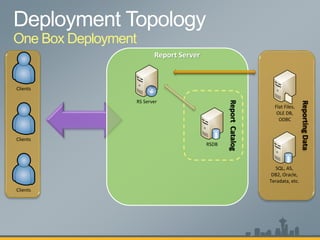
ReportCatalog
ReportingData
One Box Deployment
RSDB
Flat Files,
OLE DB,
ODBC
SQL, AS,
DB2, Oracle,
Teradata, etc.
Report Server
RS Server
Clients
Clients
Clients
ReportCatalog
ReportingData
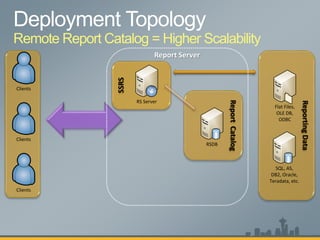
Remote Report Catalog = Higher Scalability
SSRS
RSDB
Flat Files,
OLE DB,
ODBC
SQL, AS,
DB2, Oracle,
Teradata, etc.
RS Server
Report Server
Clients
Clients
Clients
ReportCatalog
RSDB
ReportingData
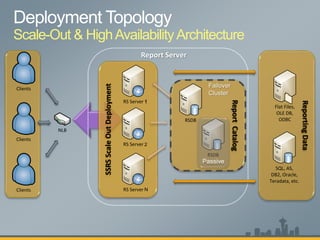
Scale-Out & HighAvailabilityArchitecture
SSRSScaleOutDeployment
RSDB
Flat Files,
OLE DB,
ODBC
SQL, AS,
DB2, Oracle,
Teradata, etc.
RS Server
RS Server
RS Server
Report Server
NLB
Clients
Clients
Clients
1
2
N
1
CustomApplicationFarm
RS Server
RS Server
RS Server
ReportCatalog
ReportingData
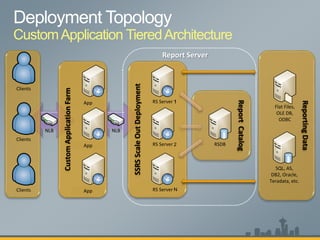
CustomApplication TieredArchitecture
SSRSScaleOutDeployment
RSDB
Flat Files,
OLE DB,
ODBC
SQL, AS,
DB2, Oracle,
Teradata, etc.
RS Server
RS Server
RS Server
Report Server
Clients
Clients
Clients
1
2
N
1
NLB NLB
App
App
App
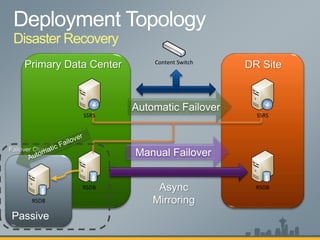
Disaster Recovery
RSDB
Content Switch
RSDB
RSDB
SSRSSSRS
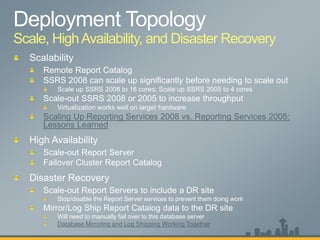
Scale, HighAvailability, and Disaster Recovery
Scaling Up Reporting Services 2008 vs. Reporting Services 2005:
Lessons Learned
Scale-out Report Servers to include a DR site
Stop/disable the Report Server services to prevent them doing work
Mirror/Log Ship Report Catalog data to the DR site
Will need to manually fail over to this database server
Database Mirroring and Log Shipping Working Together
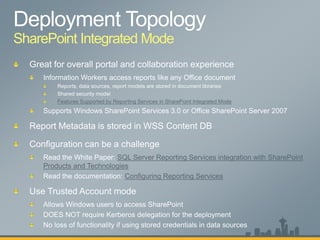
SharePoint Integrated Mode
Features Supported by Reporting Services in SharePoint Integrated Mode
SQL Server Reporting Services integration with SharePoint
Products and Technologies
Configuring Reporting Services
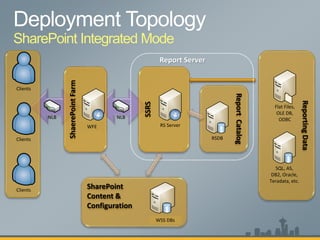
ReportCatalog
ReportingData
SharePoint Integrated Mode
SSRS
RSDB
Flat Files,
OLE DB,
ODBC
SQL, AS,
DB2, Oracle,
Teradata, etc.
RS Server
Report Server
Clients
Clients
Clients
SharePoint
Content &
Configuration
RSDB
ShaerePointFarm
NLB NLB
RS ServerWFE
WSS DBs
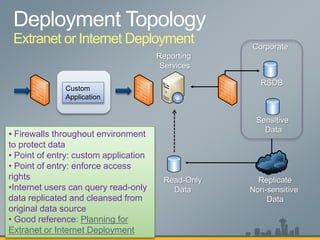
Extranet or Internet Deployment
Custom
Application
• Firewalls throughout environment
to protect data
• Point of entry: custom application
• Point of entry: enforce access
rights
•Internet users can query read-only
data replicated and cleansed from
original data source
• Good reference: Planning for
Extranet or Internet Deployment
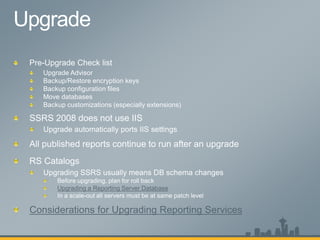
Upgrading a Reporting Server Database
Considerations for Upgrading Reporting Services
Tips for Saving You Time
Overview
http://www.codeplex.com/
http://blogs.msdn.com/sqlrsteamblog/
http://blogs.msdn.com/lukaszp/
www.sqlcat.com
http://msdn.microsoft.com/en-us/library/bb545450.aspx
http://forums.microsoft.com/MSDN/ShowForum.aspx?ForumID=82&SiteID
=1
http://connect.microsoft.com/
http://www.microsoft.com/sql/technologies/reporting/whitepapers.mspx
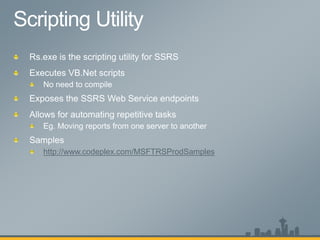
http://www.codeplex.com/MSFTRSProdSamples
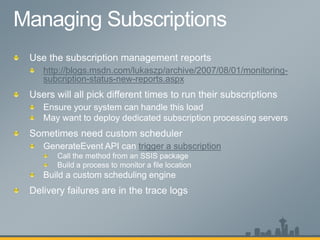
http://blogs.msdn.com/lukaszp/archive/2007/08/01/monitoring-
subcription-status-new-reports.aspx
trigger a subscription
SQL Server Reporting Services: IT Best Practices

SQL Server Reporting Services: IT Best Practices

Editor's Notes

  • #17 RSExec Role – RSExec Role grants SSRS service permissions to access the SQL Server databases needed to store SSRS metadata. RSExec Role is created on a number of databases in SQL Server – MSDB, Master, RSDB, RSTempDB. If the role does not exist, SSRS will fail when doing certain operations. Ensure that you are able to recreate RSExec Role during Disaster Recovery. The easiest way to re-create the RSExec role is to create a new report server database using the SSRS Configuration Manager tool. When you do this, RSExec role is created on all required locations. Then you can attach your backup databases, replacing the database you just created. Following this, use the SSRS configuration manager to explicitly choose the database you attached – this may seem like duplicate work, but it is the easy way to ensure that the SSRS service has been correctly granted rights in the RSExec role. Otherwise, you can use SSMS or another tool to explicitly add the desired user/group to the RSExec role. Notes: RDLs are stored in RSDB - so if you only need the last version, you don’t need to save off previous versions. Previous versions could be stored in an content management system like Source Depot or Visual Source Safe.
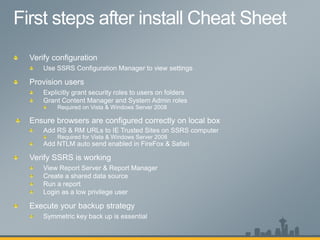
  • #18  Configuration Files The configuration files store a multitude of settings. Specific ones to think about are settings for RSDB connection information (DSN, LogonUser, LogonPassword, etc.) & URL configuration. Overlaying configuration files from one instance to another will not work. DSN and URL configuration are the most prone to breaking, but others such as InstallationID are also problematic. Best approach is to copy settings from one file to another or write a script to do so intelligently. For DSN and URL configuration, use the Reporting Services Configuration Manager tool to set these after recovering the databases. This will ensure they are correctly encrypted or stored in the OS (http.sys or IIS metabase). Symmetric Key If you lose Symmetric Key, you will not be able to access any reports. You can partially recover from this by Deleting Encrypted Content from the RSDB using the Reporting Services Configuration Manager or WMI. Once you do this, you will be able to access reports, but all report data source connection information will be lost. Likewise, any usernames & passwords stored in subscriptions will be lost. To avoid needing to re-enter all of the report data source connection information, backup the symmetric key and store it in a safe place. Memorize the password that protects the symmetric key. Report Data source settings include: Username, password Connection string Subscription Settings can optionally include: Username, password Custom – any properties the delivery extension requests to be stored securely.
  • #20 Security can be a daunting problem to consider. The question always comes up – “where to start?” The you should start by looking at the most ASSETS you want to protect. Then look at how users get access to those assets and what mitigations you have in place to ensure users don’t get too much access. For any reporting solution, the goal is to provide data to users. The data is your most precious asset. Figure out first how to protect the data. Every other decision you make about security in a reporting deployment will stem from protecting the data. When using Integrated Security credentials or Prompt credentials, it is easy for a malicious report author to use the user’s credentials to access an underlying data source. The malicious author has control over the SQL Statement/Query that is executed. If they choose they can run the statement under the user’s credentials which could lead to a ‘trojan report’. It is up to the SSRS administrator to ensure users are not preying on other users. You can address this by using: Shared Data Sources - to store prescribed credentials; admin controls these and can set them to be low privilege; also store connection strings meaning that reports use specific data sources rather than any data source the author chooses Review reports prior to publish or after publishing – scrutinize the use of embedded data sources to ensure there is a business purpose behind it. Deny users permission to publish reports in “official” folders Don’t tell the report author the data source credentials of the production server  For the paranoid – disable integrated authentication – See the SSRS System Properties Not using Kerberos delegation – without delegation, unless the user is on the local server computer, using Windows Integrated authentication doesn’t work; the request from SSRS to the data source will be an anonymous request. Does not help against the ‘prompt’ issue… By correlation, admins should be cautious about running un-trusted reports when while logged into the actual SSRS server computer; running the report from a remote client machine when Kerberos delegation is enabled avoids this problem. Use Read-only Accounts – effectively accounts that you don’t care if the password is disclosed.
  • #26 Enable caching of reports – the report cache is best used for frequently run reports that DO NOT require up to the second data on every refresh. If a data latency of 5 to 15 or more minutes is OK for the user base, enabling caching can be very useful. Caching is per report parameter combination. Caching is not available for reports that have a user profile dependency or that use integrated security – if the data in the report is somehow user specific, we disable caching so users don’t get other user’s data. User profile dependency means using properties from the User!* Properties in RDL (i.e. User!UserId). Cache can be pre-populated using data driven subscriptions, null rendering extension and null delivery extension. Enable Scheduled snapshot creation – if report data is updated very infrequently, report queries take a long time to execute, or if all users need to see a single view of the data, then snapshots can significantly reduce overhead. Snapshots run once and then are available to all users with access to the report. This minimizes the number of times the queries are executed. It can also reduce the amount of time the user is waiting for the rendering since SSRS does not need to retrieve the data from the data source. At the extreme, a custom application may be needed to ensure your overall environment is not impaced. Example – One customer we talked to has a report that causes significant load on the underlying data source. 4 concurrent executions of the report cause the underlying data source to fail. Solution was to schedule report executions to avoid 4 concurrent executions. As part of their front end application to SSRS, the customer built a queuing mechanism to ensure serialize the report executions.
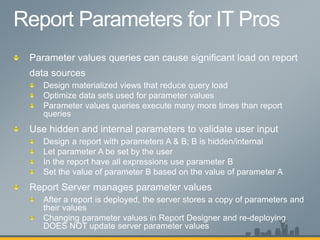
  • #27 Monitoring RS Performance, i.e. How to know things work
  • #29 Which reports are long running? Sort by ElapsedSec or RowCount Review TimeDataRetrieval, TimeProcessing, TimeRendering If high TimeDataRetrieval, you need to optimize data source (e.g. add indexes, hints, etc.) If high RowCount (e.g. >1000 rows): A lot of data aggregated, grouped, filtered, sorted by SSRS; have SQL do this as its faster at it A lot of details, provide aggregate reports and have them drill-through vs. manually digesting and determining patterns Subscriptions/Interactive? Sort by RequestType If a lot of subscriptions, can determine the bottlenecks and stagger reports Live Data or Snapshots? Sort by Source If reports can be snapshot (e.g. last week’s report), then create snapshot to avoid query execution, report processing, and report rendering Balanced? Sort by Instance Determine if NLB is handling request in balanced fashion Or Nodes down or not processing requests Patterns for a report Sort by ReportPath and TimeStart E.g. expensive report (takes 5 min to run) running every 10 min Health of Reports Sort by Status Failures occur before (e.g. incorrect RDL) or after (e.g. subscription delivery error) report is processed Outdated information or settings (e.g. expired passwords, missing subreports, etc.) Based on this, can create data driven subscriptions: Errors > 5% Continual scale mode
  • #37 A common approach to scaling Reporting Services is to scale up similar to the way we scale up SQL Server. While you can do this, the approach for scaling Reporting Services is really to scale out. The idea is that you can have multiple Report Servers that reference a remote catalog. You have multiple servers sharing the same catalog database so that way you can be sharing the state information between the all of the boxes.
  • #38 A common approach to scaling Reporting Services is to scale up similar to the way we scale up SQL Server. While you can do this, the approach for scaling Reporting Services is really to scale out. The idea is that you can have multiple Report Servers that reference a remote catalog. You have multiple servers sharing the same catalog database so that way you can be sharing the state information between the all of the boxes.
  • #39 Configure Affinity on the NLB – this saves processing time. A common approach to scaling Reporting Services is to scale up similar to the way we scale up SQL Server. While you can do this, the approach for scaling Reporting Services is really to scale out. The idea is that you can have multiple Report Servers that reference a remote catalog. You have multiple servers sharing the same catalog database so that way you can be sharing the state information between the all of the boxes.
  • #40 A common approach to scaling Reporting Services is to scale up similar to the way we scale up SQL Server. While you can do this, the approach for scaling Reporting Services is really to scale out. The idea is that you can have multiple Report Servers that reference a remote catalog. You have multiple servers sharing the same catalog database so that way you can be sharing the state information between the all of the boxes.
  • #41 Front ends connected to same cluster of databases Content switch allows for automatic failover of SSRS servers (IP address remapping) Mirrored databases on disaster recovery site asynchronously (some metadata loss is okay) Manual failover from primary to disaster recovery site Database Instance names are the same (e.g. REDMOND\sql4, BAY\sql4)
  • #42 In SSRS 2005, adding more than 4 cores per SSRS instance does not help increase throughput on that instance. Adding memory is always beneficial to throughput. In SSRS 2008, more than 16 cores per SSRS instances does not help increase throughput on that instance. Adding memory is always beneficial throughput. SSRS supports scale-out deployments. Customers are employing virtualization to deploy more instances of SSRS on larger hardware boxes; they add Virtual Machines running SSRS nodes to a single scale-out deployment automatically based on Reporting load. This approach helps them consolidate hardware and therefore have fewer total servers to manage. Customers are reporting about a 30% decrease in throughput due to the overhead of virtualization. However, overall performance is acceptable to meet SLAs and customer are proceeding to roll these deployments into production. Customers have done this work on both Hyper-V and 3rd party virtualization solutions. In terms of server consolidation, there is no question that SSRS 2008 scales up much better than SSRS 2005. Therefore upgrading to SSRS 2008 can help you achieve your server consolidation objectives.
  • #43 Hiding reports or datasources in SharePoint mode Cannot do it SharePoint; confusing to users; Created a custom default view with document types a
  • #45 http://msdn.microsoft.com/en-us/library/ms159272.aspx At the first entry point, customers often put a device that enforces security access. They tightly couple the access location of the user is trying to access with a set of static permissions. Various 3rd party and Microsoft products offer this capability; ForeFront and IAG server are examples.
  • #47 Common troubleshooting issues: Backup encryption keys Scenario: The report server installation is not initialized (rsReportServerNotActivated). Occurs when we point a new instance to an existing database; to initialize the instance you need to import encrypted keys to get it activated Recall, upgrade involves schema changes: Schema upgraded automatically after setup Security descriptors upgraded on first use / after schema Published reports and compiled report snapshots are updated on first use
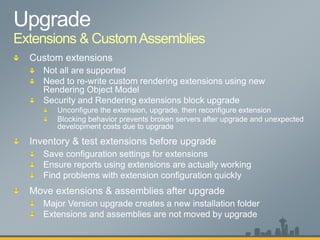
  • #48 Configuration setting for extensions may be removed by service pack upgrades. This is being addressed. However, best to backup extensions; always best to know if extensions work/are configured correctly before upgrading.
  • #52 (Talk to): Automate using rs.exe scripting utility Check WMI status using WMI Provider & Power Shell Check versions of servers easily by looking at Report Server Vdir or SOAP headers Creating Shared data source ensures your server can access secure information like usernames passwords and has a solid encryption key.